1
Definitions
 Database: An Organized collection of logically related
data, usually designed to meet the information needs of
multiple users in an organization
 Data: stored representations of meaningful objects and
events
– Structured: numbers, text, dates
– Unstructured: images, video, documents
 Information: data processed to increase knowledge in the
person using the data
 Metadata: data that describes the properties and context of
user data
2
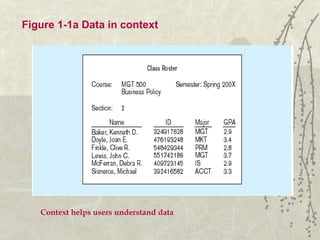
Figure 1-1a Data in context
Context helps users understand data
3
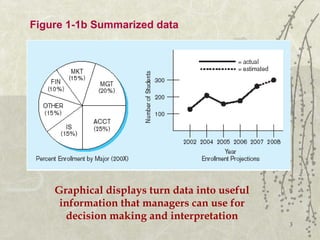
Figure 1-1b Summarized data
Graphical displays turn data into useful
information that managers can use for
decision making and interpretation
4
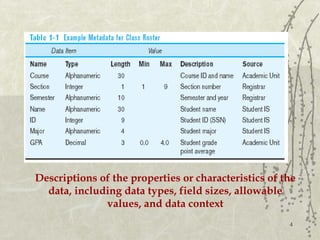
Descriptions of the properties or characteristics of the
data, including data types, field sizes, allowable
values, and data context
5
Types of data
Structured data
includes numbers, text, dates.
Numeric data (numbers), this type of data consists numeric
digits from 0-9. It may either be positive or negative.
Alphabetic data (text), this type of data consists of
alphabetic letters from A-Z,(a-z), blank space e.g “Ali shah’,
“hayat” etc.
Alphanumeric data (dates), it consists digits (0-9), letters
(a-z, A-Z) and all special characters (*,+,@,&,#….)
6
Types of data
 Unstructured data
Includes images, audio, videos
Images data consists charts, pictures, paintings.
Audio data , that type of data includes music(audio), speech
or any type of sound.
Video data, collection of full motion images played at high
speed. And used to display actions and movements.
7
Data Vs Information
 Data unprocessed raw
facts
 Data is meaningless
 Data is the input of
computer
 Data is extensive in its
volume
 Data is used rarely
 Data is independent
 Data is not functional in
decision making
 Information is processed
form of data
 Information is meaningful
 Information is the output
of computer
 Information is short in
volume
 Information is frequently
used
 Information is dependent
on data
 Information is functional
in decision making
8
Entity & Its types
Entity
“An entity is a person, place, object, event or concept in the
user envirment about which the organization wishes to
maintain data”
Example-1; a library system may contain data about different
entities like BOOK and MEMBER
Example-2; a college system may include entities like
STUDENT, TEACHER, CLASS etc.
9
Entity & Its types
Some Examples of Entities
Person : employee, Student, Player, Doctor, Patient
Place : Country, City, Store
Object : Vehicle, Toy, Furniture, Building
Event : Sale, Admission, Registration
Concept : Programming, Account, Course
The following symbol used for an entity in ERD.
10
Entity & Its types
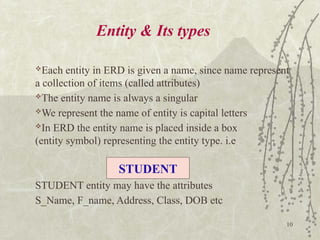
Each entity in ERD is given a name, since name represent
a collection of items (called attributes)
The entity name is always a singular
We represent the name of entity is capital letters
In ERD the entity name is placed inside a box
(entity symbol) representing the entity type. i.e
STUDENT entity may have the attributes
S_Name, F_name, Address, Class, DOB etc
STUDENT
11
Entity & Its types
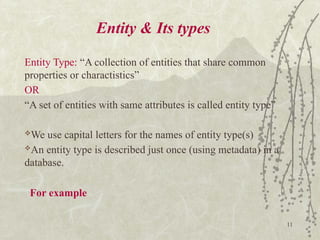
Entity Type: “A collection of entities that share common
properties or charactistics”
OR
“A set of entities with same attributes is called entity type”
We use capital letters for the names of entity type(s)
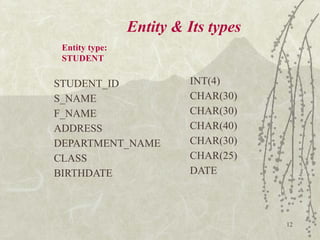
An entity type is described just once (using metadata) in a
database.
For example
12
Entity & Its types
STUDENT_ID
S_NAME
F_NAME
ADDRESS
DEPARTMENT_NAME
CLASS
BIRTHDATE
INT(4)
CHAR(30)
CHAR(30)
CHAR(40)
CHAR(30)
CHAR(25)
DATE
Entity type:
STUDENT
13
Entity & Its types
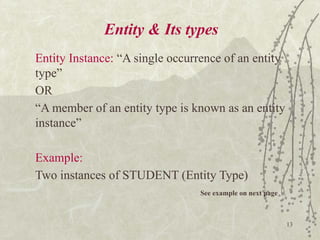
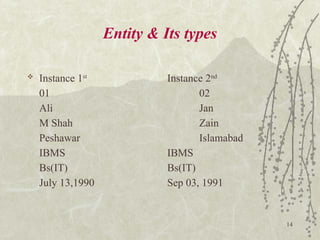
Entity Instance: “A single occurrence of an entity
type”
OR
“A member of an entity type is known as an entity
instance”
Example:
Two instances of STUDENT (Entity Type)
See example on next page
14
Entity & Its types
 Instance 1st
Instance 2nd
01 02
Ali Jan
M Shah Zain
Peshawar Islamabad
IBMS IBMS
Bs(IT) Bs(IT)
July 13,1990 Sep 03, 1991
15
Entity & Its types
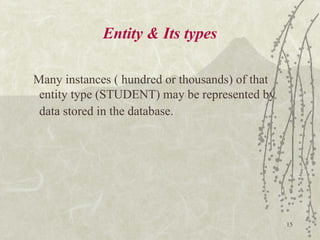
Many instances ( hundred or thousands) of that
entity type (STUDENT) may be represented by
data stored in the database.
16
Entity & Its types
STRONG ENTITY VS WEAK ENTITY TYPES
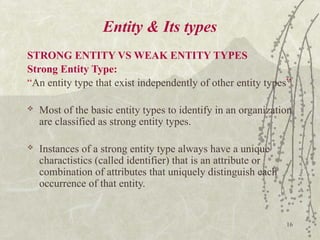
Strong Entity Type:
“An entity type that exist independently of other entity types”
 Most of the basic entity types to identify in an organization
are classified as strong entity types.
 Instances of a strong entity type always have a unique
charactistics (called identifier) that is an attribute or
combination of attributes that uniquely distinguish each
occurrence of that entity.
17
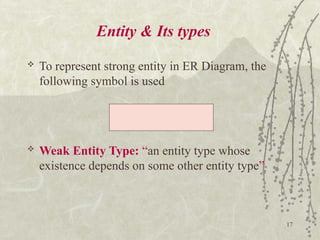
 To represent strong entity in ER Diagram, the
following symbol is used
 Weak Entity Type: “an entity type whose
existence depends on some other entity type”
Entity & Its types
18
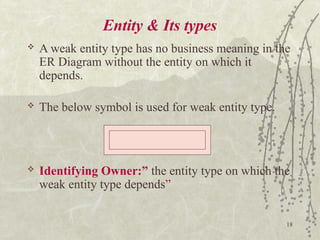
Entity & Its types
 A weak entity type has no business meaning in the
ER Diagram without the entity on which it
depends.
 The below symbol is used for weak entity type.
 Identifying Owner:” the entity type on which the
weak entity type depends”
19
Entity & Its types
 A weak entity type does not have its own
identifier, Generally on an ERD a weak entity type
has an attribute that serves as a partial identifier.
 Identifying Relationship: “ the relationship b/w a
weak entity type and its owner(identifying
owner)”
 Example (next page)
20
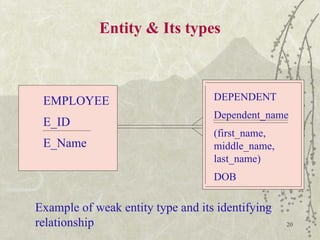
Entity & Its types
EMPLOYEE
E_ID
E_Name
DEPENDENT
Dependent_name
(first_name,
middle_name,
last_name)
DOB
Example of weak entity type and its identifying
relationship
21
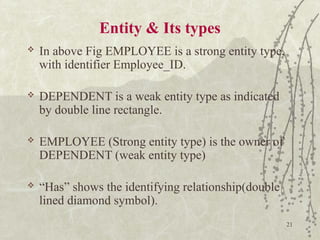
Entity & Its types
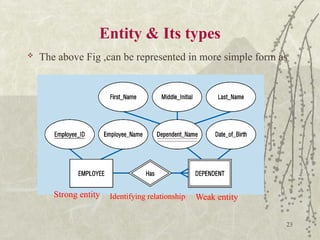
 In above Fig EMPLOYEE is a strong entity type,
with identifier Employee_ID.
 DEPENDENT is a weak entity type as indicated
by double line rectangle.
 EMPLOYEE (Strong entity type) is the owner of
DEPENDENT (weak entity type)
 “Has” shows the identifying relationship(double
lined diamond symbol).
22
Entity & Its types
 The attribute ‘Dependent_Name’ serves as a
partial identifier.
 We use double underline to show a partial
identifier.
Identifier: “An attribute or combination of attribute
that uniquely distinguish individual instance of an
entity type”
23
Entity & Its types
 The above Fig ,can be represented in more simple form as
Strong entity Identifying relationship Weak entity
24
Attributes & its types
 Attribute – “property or characteristic of an
entity type that is of interest to the
organization”
 Each entity type has a set of attributes
associated with it.
 In Entity Relationship Diagram(ERD) we
represent an attribute with sign of ellipse.
Attribute Symbol in
ERD
25
 Following are the some entity types and
their associated attributes
I. STUDENT
[ Student_ID, Student_Name, Home_Address,
Phone_Number]
II. EMPLOYEE
[Employee_ID, Employee_Name,
Designation, Department].
Attributes & its types
26
Attributes & its types
 In naming attributes, we use an initial
capital letter and other are in lower
case.
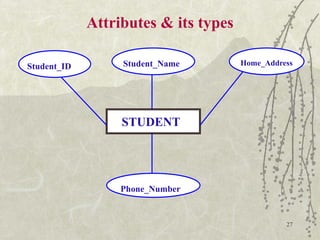
 We represent an attribute(in ERD) by
placing its name in an
ELLIPS(symbol) with a line
connecting it to its associated entity.
e.g (next page)
27
Attributes & its types
STUDENT
Student_ID Student_Name Home_Address
Phone_Number
28
Attributes & its types
 Types of Attributes:
-Simple Attribute
-Composite Attribute
-Single valued Attribute
-Multi-Valued Attribute
-Derived Attribute
-Stored Attribute
29
Attributes & its types
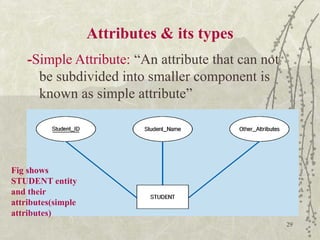
-Simple Attribute: “An attribute that can not
be subdivided into smaller component is
known as simple attribute”
Fig shows
STUDENT entity
and their
attributes(simple
attributes)
30
Attributes & its types
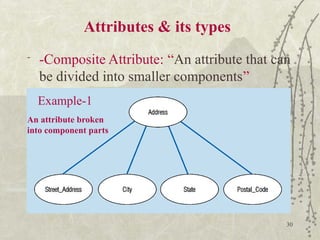
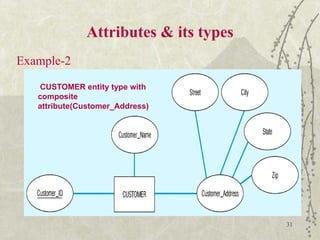
- -Composite Attribute: “An attribute that can
be divided into smaller components”
An attribute broken
into component parts
Example-1
31
Attributes & its types
Example-2
CUSTOMER entity type with
composite
attribute(Customer_Address)
32
Attributes & its types
Single-valued Vs Multi-valued Attribute:
Single-valued attribute: “An attribute that may
contain single value”
e.g. Age of a person is a single-value attribute, also
gender is the example of single-value attribute.
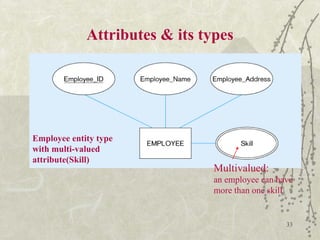
Multi-valued attribute: “An attribute that may
contain two or more values”
 Multi-valued attribute is represented by double-
line oval.
33
Attributes & its types
Employee entity type
with multi-valued
attribute(Skill)
Multivalued:
an employee can have
more than one skill
34
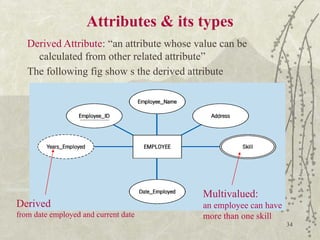
Attributes & its types
Derived Attribute: “an attribute whose value can be
calculated from other related attribute”
The following fig show s the derived attribute
Derived
from date employed and current date
Multivalued:
an employee can have
more than one skill
35
Attributes & its types
Stored Attribute: “An attribute that is stored in a
database is called stored attribute”
Attribute Domain: “A set of possible values for an
attribute is known as attribute domain”
The domain may consist of range of a values or
some discrete values.
e.g. the domain for GPA can be from 0-4, similarly
the domain for ‘Gender’ attribute can be either
‘Male’ or ‘Female’.

1.Intro to Database management System.pptx

  • 1.
    1 Definitions  Database: AnOrganized collection of logically related data, usually designed to meet the information needs of multiple users in an organization  Data: stored representations of meaningful objects and events – Structured: numbers, text, dates – Unstructured: images, video, documents  Information: data processed to increase knowledge in the person using the data  Metadata: data that describes the properties and context of user data
  • 2.
    2 Figure 1-1a Datain context Context helps users understand data
  • 3.
    3 Figure 1-1b Summarizeddata Graphical displays turn data into useful information that managers can use for decision making and interpretation
  • 4.
    4 Descriptions of theproperties or characteristics of the data, including data types, field sizes, allowable values, and data context
  • 5.
    5 Types of data Structureddata includes numbers, text, dates. Numeric data (numbers), this type of data consists numeric digits from 0-9. It may either be positive or negative. Alphabetic data (text), this type of data consists of alphabetic letters from A-Z,(a-z), blank space e.g “Ali shah’, “hayat” etc. Alphanumeric data (dates), it consists digits (0-9), letters (a-z, A-Z) and all special characters (*,+,@,&,#….)
  • 6.
    6 Types of data Unstructured data Includes images, audio, videos Images data consists charts, pictures, paintings. Audio data , that type of data includes music(audio), speech or any type of sound. Video data, collection of full motion images played at high speed. And used to display actions and movements.
  • 7.
    7 Data Vs Information Data unprocessed raw facts  Data is meaningless  Data is the input of computer  Data is extensive in its volume  Data is used rarely  Data is independent  Data is not functional in decision making  Information is processed form of data  Information is meaningful  Information is the output of computer  Information is short in volume  Information is frequently used  Information is dependent on data  Information is functional in decision making
  • 8.
    8 Entity & Itstypes Entity “An entity is a person, place, object, event or concept in the user envirment about which the organization wishes to maintain data” Example-1; a library system may contain data about different entities like BOOK and MEMBER Example-2; a college system may include entities like STUDENT, TEACHER, CLASS etc.
  • 9.
    9 Entity & Itstypes Some Examples of Entities Person : employee, Student, Player, Doctor, Patient Place : Country, City, Store Object : Vehicle, Toy, Furniture, Building Event : Sale, Admission, Registration Concept : Programming, Account, Course The following symbol used for an entity in ERD.
  • 10.
    10 Entity & Itstypes Each entity in ERD is given a name, since name represent a collection of items (called attributes) The entity name is always a singular We represent the name of entity is capital letters In ERD the entity name is placed inside a box (entity symbol) representing the entity type. i.e STUDENT entity may have the attributes S_Name, F_name, Address, Class, DOB etc STUDENT
  • 11.
    11 Entity & Itstypes Entity Type: “A collection of entities that share common properties or charactistics” OR “A set of entities with same attributes is called entity type” We use capital letters for the names of entity type(s) An entity type is described just once (using metadata) in a database. For example
  • 12.
    12 Entity & Itstypes STUDENT_ID S_NAME F_NAME ADDRESS DEPARTMENT_NAME CLASS BIRTHDATE INT(4) CHAR(30) CHAR(30) CHAR(40) CHAR(30) CHAR(25) DATE Entity type: STUDENT
  • 13.
    13 Entity & Itstypes Entity Instance: “A single occurrence of an entity type” OR “A member of an entity type is known as an entity instance” Example: Two instances of STUDENT (Entity Type) See example on next page
  • 14.
    14 Entity & Itstypes  Instance 1st Instance 2nd 01 02 Ali Jan M Shah Zain Peshawar Islamabad IBMS IBMS Bs(IT) Bs(IT) July 13,1990 Sep 03, 1991
  • 15.
    15 Entity & Itstypes Many instances ( hundred or thousands) of that entity type (STUDENT) may be represented by data stored in the database.
  • 16.
    16 Entity & Itstypes STRONG ENTITY VS WEAK ENTITY TYPES Strong Entity Type: “An entity type that exist independently of other entity types”  Most of the basic entity types to identify in an organization are classified as strong entity types.  Instances of a strong entity type always have a unique charactistics (called identifier) that is an attribute or combination of attributes that uniquely distinguish each occurrence of that entity.
  • 17.
    17  To representstrong entity in ER Diagram, the following symbol is used  Weak Entity Type: “an entity type whose existence depends on some other entity type” Entity & Its types
  • 18.
    18 Entity & Itstypes  A weak entity type has no business meaning in the ER Diagram without the entity on which it depends.  The below symbol is used for weak entity type.  Identifying Owner:” the entity type on which the weak entity type depends”
  • 19.
    19 Entity & Itstypes  A weak entity type does not have its own identifier, Generally on an ERD a weak entity type has an attribute that serves as a partial identifier.  Identifying Relationship: “ the relationship b/w a weak entity type and its owner(identifying owner)”  Example (next page)
  • 20.
    20 Entity & Itstypes EMPLOYEE E_ID E_Name DEPENDENT Dependent_name (first_name, middle_name, last_name) DOB Example of weak entity type and its identifying relationship
  • 21.
    21 Entity & Itstypes  In above Fig EMPLOYEE is a strong entity type, with identifier Employee_ID.  DEPENDENT is a weak entity type as indicated by double line rectangle.  EMPLOYEE (Strong entity type) is the owner of DEPENDENT (weak entity type)  “Has” shows the identifying relationship(double lined diamond symbol).
  • 22.
    22 Entity & Itstypes  The attribute ‘Dependent_Name’ serves as a partial identifier.  We use double underline to show a partial identifier. Identifier: “An attribute or combination of attribute that uniquely distinguish individual instance of an entity type”
  • 23.
    23 Entity & Itstypes  The above Fig ,can be represented in more simple form as Strong entity Identifying relationship Weak entity
  • 24.
    24 Attributes & itstypes  Attribute – “property or characteristic of an entity type that is of interest to the organization”  Each entity type has a set of attributes associated with it.  In Entity Relationship Diagram(ERD) we represent an attribute with sign of ellipse. Attribute Symbol in ERD
  • 25.
    25  Following arethe some entity types and their associated attributes I. STUDENT [ Student_ID, Student_Name, Home_Address, Phone_Number] II. EMPLOYEE [Employee_ID, Employee_Name, Designation, Department]. Attributes & its types
  • 26.
    26 Attributes & itstypes  In naming attributes, we use an initial capital letter and other are in lower case.  We represent an attribute(in ERD) by placing its name in an ELLIPS(symbol) with a line connecting it to its associated entity. e.g (next page)
  • 27.
    27 Attributes & itstypes STUDENT Student_ID Student_Name Home_Address Phone_Number
  • 28.
    28 Attributes & itstypes  Types of Attributes: -Simple Attribute -Composite Attribute -Single valued Attribute -Multi-Valued Attribute -Derived Attribute -Stored Attribute
  • 29.
    29 Attributes & itstypes -Simple Attribute: “An attribute that can not be subdivided into smaller component is known as simple attribute” Fig shows STUDENT entity and their attributes(simple attributes)
  • 30.
    30 Attributes & itstypes - -Composite Attribute: “An attribute that can be divided into smaller components” An attribute broken into component parts Example-1
  • 31.
    31 Attributes & itstypes Example-2 CUSTOMER entity type with composite attribute(Customer_Address)
  • 32.
    32 Attributes & itstypes Single-valued Vs Multi-valued Attribute: Single-valued attribute: “An attribute that may contain single value” e.g. Age of a person is a single-value attribute, also gender is the example of single-value attribute. Multi-valued attribute: “An attribute that may contain two or more values”  Multi-valued attribute is represented by double- line oval.
  • 33.
    33 Attributes & itstypes Employee entity type with multi-valued attribute(Skill) Multivalued: an employee can have more than one skill
  • 34.
    34 Attributes & itstypes Derived Attribute: “an attribute whose value can be calculated from other related attribute” The following fig show s the derived attribute Derived from date employed and current date Multivalued: an employee can have more than one skill
  • 35.
    35 Attributes & itstypes Stored Attribute: “An attribute that is stored in a database is called stored attribute” Attribute Domain: “A set of possible values for an attribute is known as attribute domain” The domain may consist of range of a values or some discrete values. e.g. the domain for GPA can be from 0-4, similarly the domain for ‘Gender’ attribute can be either ‘Male’ or ‘Female’.