Advance Automation Training Program
●Factory IO ●PLC
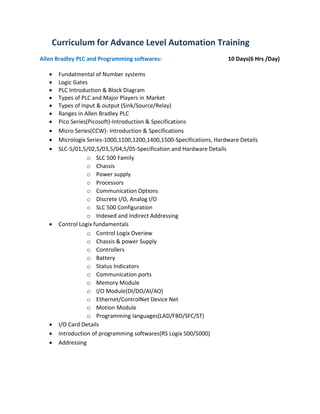
Curriculum for Advance Level Automation Training
Allen Bradley PLC and Programming softwares: 10 Days(6 Hrs /Day)
• Fundatmental of Number systems
• Logic Gates
• PLC Introduction & Block Diagram
• Types of PLC and Major Players in Market
• Types of Input & output (Sink/Source/Relay)
• Ranges in Allen Bradley PLC
• Pico Series(Picosoft)-Introduction & Specifications
• Micro Series(CCW)- Introduction & Specifications
• Micrologix Series-1000,1100,1200,1400,1500-Specifications, Hardware Details
• SLC-5/01,5/02,5/03,5/04,5/05-Specification and Hardware Details
o SLC 500 Family
o Chassis
o Power supply
o Processors
o Communication Options
o Discrete I/O, Analog I/O
o SLC 500 Configuration
o Indexed and Indirect Addressing
• Control Logix fundamentals
o Control Logix Overiew
o Chassis & power Supply
o Controllers
o Battery
o Status Indicators
o Communication ports
o Memory Module
o I/O Module(DI/DO/AI/AO)
o Ethernet/ControlNet Device Net
o Motion Module
o Programming languages(LAD/FBD/SFC/ST)
• I/O Card Details
• Introduction of programming softwares(RS Logix 500/5000)
• Addressing
• Basic Instructions
• SET/RESET Instructions
• OSR/OSF
• Timer/Counter
• MOV,Compare,Math Instructions,
• Data Files and Array
• SCALING with analog devices
• Sequencer Instructions
• TND/FIFO/LIFO/MCR/DDV/RAD/CPT/Mov with Mask/DEG, ABS Instructions.
• Communication with programming software and Forcing
• Troubleshooting and Fault Finding in PLC
• Slave Master in Micrologix PLC.
• Documentation: Comments, statements, Printing.
Siemens PLC & Programming Software:(LAD/FBD/STL) ( 7 days 6 Hr/day)
Software:Simatic Manager/TIA
• Basic Series Introduction and Specifications:
o S7-200
o S7-300
o S7-400
o S7-1200
o S7-1500
• Adddressing in Simatic Manager and TIA.
• Memory Concept in Simatic Manager/TIA
• Bit Logic Instructions
• Compare Instructions
• Maths instructions
• Simatic Timers
• IEC Timers
• Conversion Instructions
• Integer Function
• Floating Point Function
• Jump & Program Control Instructions
• Shift/Rotate & Status BitInstructions
• FB/FC/DB/SFB/SFC Blocks overview and Programming
• Export/Import Symbol Table,Declration Table
• Monitoring and Communication with PLC.
• Wiring details
• Forcing
• Analog Module
• Troubleshooting and status File analysis
• Documentation :Comments,Statements,Printing
Mitsubishi PLC & Programming softwares: (5 Days/5Hrs)
FX-Series Hardware Review
FX Line of PLCs
Hardware Components
Inputs
Outputs
Special Function Modules
High Speed Counter & Positioning Modules
Communication Modules and Option Boards
Network Modules & Option Boards
Power Supplies
Memory Types
Programming
Programming Software
GX-Works Overview File
Format
Hardware Connection
Number Systems
Binary Numbers
Hexadecimal Numbers
Octal Numbers
Binary Coded Decimal
Numeric Data in PLCs
Integer (16/32 Bit)
Decimal (16/23 Bit)
Addressing and Programming Software
Creating a New Project
Editing the Ladder
Program Transfer
Online Editing
Monitor the Program Operation
Forcing Bits and Changing Registers
Right Side Bus Rules of Addressing
Instruction Types
Basic Instructions
STL (Step Ladder) Instructions
Applied Instructions
Basic Instructions
Symbols
Ladder Basics
Common Instructions
Timers and Counters
Timers/Counters
Applied Instructions
General Format
Data Transfer Instructions
Comparison Instructions
Conversion Instruction
Increment and Decrement Instructions
Arithmetic Instructions
TO/FROM Instructions
Shift Registers Program
Flow Control
Diagnostic Devices
Special M Relays Special
D Registers
Handy Troubleshooting Circuits
Real Time Clock Usage
GX-Works Diagnostics
Find/Replace Menu
Data Trace
Documentation and Printing
Comments
Statements
Notes
Device Labels
Viewing Documentation
Printing
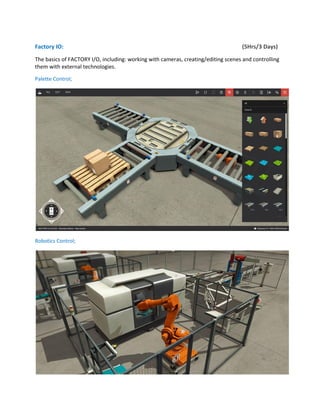
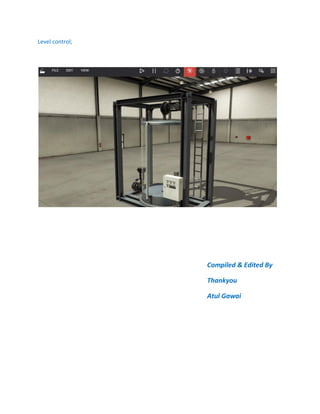
Factory IO: (5Hrs/3 Days)
The basics of FACTORY I/O, including: working with cameras, creating/editing scenes and controlling
them with external technologies.
Palette Control;
Robotics Control;
Level control;
Compiled & Edited By
Thankyou
Atul Gawai
Advance automation training program converted

Advance automation training program converted

  • 1.
    Advance Automation TrainingProgram ●Factory IO ●PLC
  • 2.
    Curriculum for AdvanceLevel Automation Training Allen Bradley PLC and Programming softwares: 10 Days(6 Hrs /Day) • Fundatmental of Number systems • Logic Gates • PLC Introduction & Block Diagram • Types of PLC and Major Players in Market • Types of Input & output (Sink/Source/Relay) • Ranges in Allen Bradley PLC • Pico Series(Picosoft)-Introduction & Specifications • Micro Series(CCW)- Introduction & Specifications • Micrologix Series-1000,1100,1200,1400,1500-Specifications, Hardware Details • SLC-5/01,5/02,5/03,5/04,5/05-Specification and Hardware Details o SLC 500 Family o Chassis o Power supply o Processors o Communication Options o Discrete I/O, Analog I/O o SLC 500 Configuration o Indexed and Indirect Addressing • Control Logix fundamentals o Control Logix Overiew o Chassis & power Supply o Controllers o Battery o Status Indicators o Communication ports o Memory Module o I/O Module(DI/DO/AI/AO) o Ethernet/ControlNet Device Net o Motion Module o Programming languages(LAD/FBD/SFC/ST) • I/O Card Details • Introduction of programming softwares(RS Logix 500/5000) • Addressing
  • 3.
    • Basic Instructions •SET/RESET Instructions • OSR/OSF • Timer/Counter • MOV,Compare,Math Instructions, • Data Files and Array • SCALING with analog devices • Sequencer Instructions • TND/FIFO/LIFO/MCR/DDV/RAD/CPT/Mov with Mask/DEG, ABS Instructions. • Communication with programming software and Forcing • Troubleshooting and Fault Finding in PLC • Slave Master in Micrologix PLC. • Documentation: Comments, statements, Printing.
  • 4.
    Siemens PLC &Programming Software:(LAD/FBD/STL) ( 7 days 6 Hr/day) Software:Simatic Manager/TIA • Basic Series Introduction and Specifications: o S7-200 o S7-300 o S7-400 o S7-1200 o S7-1500 • Adddressing in Simatic Manager and TIA. • Memory Concept in Simatic Manager/TIA • Bit Logic Instructions • Compare Instructions • Maths instructions • Simatic Timers • IEC Timers • Conversion Instructions • Integer Function • Floating Point Function • Jump & Program Control Instructions • Shift/Rotate & Status BitInstructions • FB/FC/DB/SFB/SFC Blocks overview and Programming • Export/Import Symbol Table,Declration Table • Monitoring and Communication with PLC. • Wiring details • Forcing • Analog Module • Troubleshooting and status File analysis • Documentation :Comments,Statements,Printing
  • 5.
    Mitsubishi PLC &Programming softwares: (5 Days/5Hrs) FX-Series Hardware Review FX Line of PLCs Hardware Components Inputs Outputs Special Function Modules High Speed Counter & Positioning Modules Communication Modules and Option Boards Network Modules & Option Boards Power Supplies Memory Types Programming Programming Software GX-Works Overview File Format Hardware Connection Number Systems Binary Numbers Hexadecimal Numbers Octal Numbers Binary Coded Decimal Numeric Data in PLCs Integer (16/32 Bit) Decimal (16/23 Bit) Addressing and Programming Software Creating a New Project Editing the Ladder Program Transfer Online Editing Monitor the Program Operation Forcing Bits and Changing Registers Right Side Bus Rules of Addressing Instruction Types Basic Instructions STL (Step Ladder) Instructions Applied Instructions Basic Instructions Symbols Ladder Basics Common Instructions Timers and Counters Timers/Counters
  • 6.
    Applied Instructions General Format DataTransfer Instructions Comparison Instructions Conversion Instruction Increment and Decrement Instructions Arithmetic Instructions TO/FROM Instructions Shift Registers Program Flow Control Diagnostic Devices Special M Relays Special D Registers Handy Troubleshooting Circuits Real Time Clock Usage GX-Works Diagnostics Find/Replace Menu Data Trace Documentation and Printing Comments Statements Notes Device Labels Viewing Documentation Printing
  • 7.
    Factory IO: (5Hrs/3Days) The basics of FACTORY I/O, including: working with cameras, creating/editing scenes and controlling them with external technologies. Palette Control; Robotics Control;
  • 8.
    Level control; Compiled &Edited By Thankyou Atul Gawai