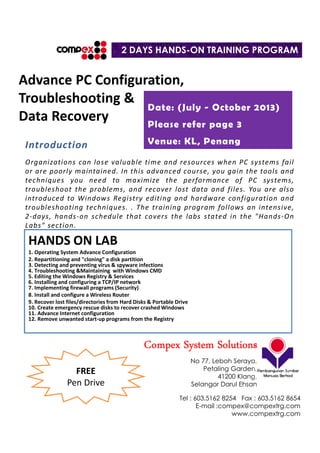
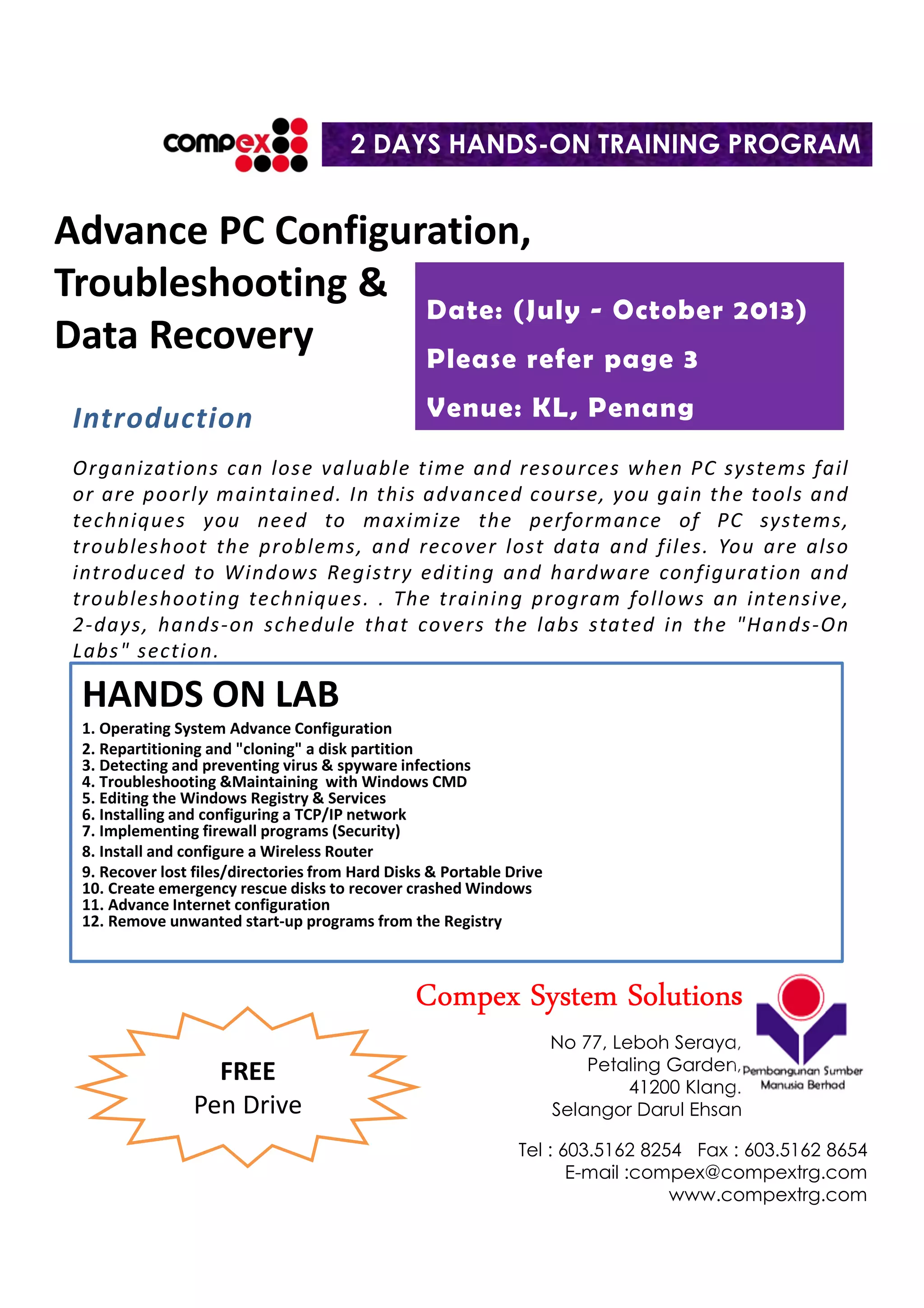
Advance PC Configuration,
Troubleshooting &
Data Recovery
HANDS ON LAB
1. Operating System Advance Configuration
2. Repartitioning and "cloning" a disk partition
3. Detecting and preventing virus & spyware infections
4. Troubleshooting &Maintaining with Windows CMD
5. Editing the Windows Registry & Services
6. Installing and configuring a TCP/IP network
7. Implementing firewall programs (Security)
8. Install and configure a Wireless Router
9. Recover lost files/directories from Hard Disks & Portable Drive
10. Create emergency rescue disks to recover crashed Windows
11. Advance Internet configuration
12. Remove unwanted start-up programs from the Registry
Introduction
Organizations can lose valuable time and resources when PC systems fail
or are poorly maintained. In this advanced course, you gain the tools and
techniques you need to maximize the performance of PC systems,
troubleshoot the problems, and recover lost data and files. You are also
introduced to Windows Registry editing and hardware configuration and
troubleshooting techniques. . The training program follows an intensive,
2-days, hands-on schedule that covers the labs stated in the "Hands-On
Labs" section.
2 DAYS HANDS-ON TRAINING PROGRAM
Date: (July - October 2013)
Please refer page 3
Venue: KL, Penang
CompexCompexCompexCompex System SolutionsSystem SolutionsSystem SolutionsSystem Solutions
No 77, Leboh Seraya,
Petaling Garden,
41200 Klang.
Selangor Darul Ehsan
Tel : 603.5162 8254 Fax : 603.5162 8654
E-mail :compex@compextrg.com
www.compextrg.com
FREE
Pen Drive
COURSE OUTLINE
Data Recovery Concepts
[ ] Interpreting disk error messages
[ ] Creating emergency rescue disk
[ ] Flash drive repair tools
Recovering Files and Directories
[ ] Useful data-recovery techniques
[ ] Recovering erased files & folder
[ ] Editing disk sectors
[ ] Rescuing data from USB flash @ portable drives
[ ] Transferring recovered files to back up media
Surviving Disk Disasters
[ ] Repairing the master boot record
[ ] Fixing a damaged partition table
Solving Common Disk Problems
[ ] Recovering from accidental reformatting
[ ] "Invalid drive specification"
[ ] When Windows won't start
The Malware Epidemic
[ ] Preventing infection
[ ] Diagnosing virus
[ ] Treating spyware infections
[ ] Detecting and removing rootkits
Macro Viruses
[ ] Protecting key system files
[ ] Checking macro viruses missed by scanning
program
[ ] Protecting against script-based viruses
Optimizing Disk Organization
[ ] Repartitioning disks on the fly
[ ] Reducing wasted cluster space
[ ] Eliminating disk fragmentation
Implementing Windows Recovery Strategies
[ ] Creating complete disk images with imaging
software & windows based
[ ] Repairing damaged systems
Network Configuration
[ ] Server & TCP/IP configuration (based on Windows
Server 2008 R2 SP1)
[ ] Wireless administration & configuration (WiFi
Modem Router)
[ ] Internet configuration & tweaking
Troubleshooting Registry Problems
[ ] Repairing corrupted Registry files
[ ] Removing unwanted Registry entries
[ ] Solving .INI/Registry conflicts
Windows Emergency Repair Tools
[ ] Booting a "blue-screened" system with the
Windows Recovery Console
[ ] Performing emergency repairs with ERD
[ ] Repairing environments using advanced tools:
Windows PE and Bart PE
Troubleshooting Start-up Problems
[ ] Windows Plug-and-Play architecture
[ ] Windows boot files
[ ] Creating Windows ASR backups
Windows Administrative Tools
[ ] Computer Management Console
[ ] System tools, storage, services and applications
[ ] Viewing event logs
Securing Your Computer
[ ] Physical security and hardware authentication
devices
[ ] Authentication technologies: CHAP, digital
certificates
[ ] Controlling access with Active Directory, User
Accounts and Group Policies (The Concepts)
[ ] Configuring Windows firewall with Advance
Security & Services for maximum protection
TRAINER”S PROFILE
Mohd Hamizi bin Jamaludin, 35 years old is a
recognized Microsoft Certified Trainer (MCT) and PSMB
Certified Trainer, graduated with an Microsoft Certified
Solution Associate (MCSA), Microsoft MCITP Server
Administrator (Server 2008 R2), MCTS Server 2008 R2,
A + Certification, Professional Certificate in Microsoft
Windows NT Workstation 4.0, NT Server 4.0, Microsoft
Press Certificate in Microsoft Windows 2000 Server,
and he also had attended Kursus Induksi Pegawai
Pengesah Dalaman – PPD (MLVK / SKM) and Training of
Trainer course in UTM, KL.
He was teaching Advance PC Maintenance (specializing
in Hardware, Software & Data Recovery), Computer
Networking, Office Application such as Word, Excel,
Power Point, Access, Visio and the latest technology
course for Microsoft Certification such Windows Vista,
Windows 7, Windows Server 2008 R2, Active Directory,
Microsoft Exchange 2010, Wireless Networking,
Wireless Security, Computer Security and he also
capable of teaching Redhat Enterprise Linux 5
Certification and now he intensively involve in
Windows 8, Windows Server 2012, Server
Virtualization, Cloud computing & Microsoft System
Centre 2008 R2 training for corporate environment.
ADVANCEPCCONFIGURATION,TROUBLESHOOTING&DATARECOVERY
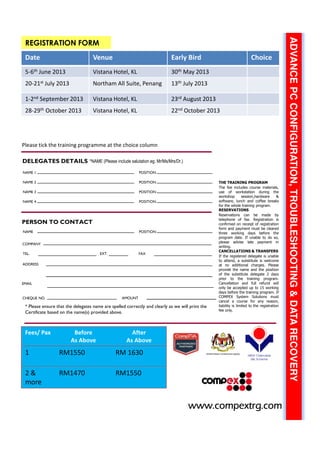
REGISTRATION FORM
*NAME (Please include salutation eg. Mr/Ms/Mrs/Dr.)
COMPANY
TEL.
CHEQUE NO.
* Please ensure that the delegates name are spelled correctly and clearly as we will print the
Certificate based on the name(s) provided above.
PERSON TO CONTACT
THE TRAINING PROGRAM
The fee includes course materials,
use of workstation during the
workshop session,hardware &
software, lunch and coffee breaks
for the whole training program.
RESERVATIONS
Reservations can be made by
telephone of fax. Registration is
confirmed on receipt of registration
form and payment must be cleared
three working days before the
program date. If unable to do so,
please advise late payment in
writing.
CANCELLATIONS & TRANSFERS
If the registered delegate is unable
to attend, a substitute is welcome
at no additional charges. Please
provide the name and the position
of the substitute delegate 2 days
prior to the training program.
Cancellation and full refund will
only be accepted up to 15 working
days before the training program. If
COMPEX System Solutions must
cancel a course for any reason,
liability is limited to the registration
fee only.
DELEGATES DETAILS
NAME 1
NAME 2
NAME 3
NAME 4
POSITION
POSITION
POSITION
POSITION
NAME POSITION
FAXEXT.
ADDRESS
AMOUNT
www.compextrg.comwww.compextrg.comwww.compextrg.comwww.compextrg.comwww.compextrg.comwww.compextrg.comwww.compextrg.comwww.compextrg.com
EMAIL
Fees/ Pax Before
As Above
After
As Above
1 RM1550 RM 1630
2 &
more
RM1470 RM1550
Date Venue Early Bird Choice
5-6th June 2013 Vistana Hotel, KL 30th May 2013
20-21st July 2013 Northam All Suite, Penang 13th July 2013
1-2nd September 2013 Vistana Hotel, KL 23rd August 2013
28-29th October 2013 Vistana Hotel, KL 22nd October 2013
Please tick the training programme at the choice column

Advance PC Configuration, Troubleshooting & Data Recovery Training

  • 1.
    Advance PC Configuration, Troubleshooting& Data Recovery HANDS ON LAB 1. Operating System Advance Configuration 2. Repartitioning and "cloning" a disk partition 3. Detecting and preventing virus & spyware infections 4. Troubleshooting &Maintaining with Windows CMD 5. Editing the Windows Registry & Services 6. Installing and configuring a TCP/IP network 7. Implementing firewall programs (Security) 8. Install and configure a Wireless Router 9. Recover lost files/directories from Hard Disks & Portable Drive 10. Create emergency rescue disks to recover crashed Windows 11. Advance Internet configuration 12. Remove unwanted start-up programs from the Registry Introduction Organizations can lose valuable time and resources when PC systems fail or are poorly maintained. In this advanced course, you gain the tools and techniques you need to maximize the performance of PC systems, troubleshoot the problems, and recover lost data and files. You are also introduced to Windows Registry editing and hardware configuration and troubleshooting techniques. . The training program follows an intensive, 2-days, hands-on schedule that covers the labs stated in the "Hands-On Labs" section. 2 DAYS HANDS-ON TRAINING PROGRAM Date: (July - October 2013) Please refer page 3 Venue: KL, Penang CompexCompexCompexCompex System SolutionsSystem SolutionsSystem SolutionsSystem Solutions No 77, Leboh Seraya, Petaling Garden, 41200 Klang. Selangor Darul Ehsan Tel : 603.5162 8254 Fax : 603.5162 8654 E-mail :compex@compextrg.com www.compextrg.com FREE Pen Drive
  • 2.
    COURSE OUTLINE Data RecoveryConcepts [ ] Interpreting disk error messages [ ] Creating emergency rescue disk [ ] Flash drive repair tools Recovering Files and Directories [ ] Useful data-recovery techniques [ ] Recovering erased files & folder [ ] Editing disk sectors [ ] Rescuing data from USB flash @ portable drives [ ] Transferring recovered files to back up media Surviving Disk Disasters [ ] Repairing the master boot record [ ] Fixing a damaged partition table Solving Common Disk Problems [ ] Recovering from accidental reformatting [ ] "Invalid drive specification" [ ] When Windows won't start The Malware Epidemic [ ] Preventing infection [ ] Diagnosing virus [ ] Treating spyware infections [ ] Detecting and removing rootkits Macro Viruses [ ] Protecting key system files [ ] Checking macro viruses missed by scanning program [ ] Protecting against script-based viruses Optimizing Disk Organization [ ] Repartitioning disks on the fly [ ] Reducing wasted cluster space [ ] Eliminating disk fragmentation Implementing Windows Recovery Strategies [ ] Creating complete disk images with imaging software & windows based [ ] Repairing damaged systems Network Configuration [ ] Server & TCP/IP configuration (based on Windows Server 2008 R2 SP1) [ ] Wireless administration & configuration (WiFi Modem Router) [ ] Internet configuration & tweaking Troubleshooting Registry Problems [ ] Repairing corrupted Registry files [ ] Removing unwanted Registry entries [ ] Solving .INI/Registry conflicts Windows Emergency Repair Tools [ ] Booting a "blue-screened" system with the Windows Recovery Console [ ] Performing emergency repairs with ERD [ ] Repairing environments using advanced tools: Windows PE and Bart PE Troubleshooting Start-up Problems [ ] Windows Plug-and-Play architecture [ ] Windows boot files [ ] Creating Windows ASR backups Windows Administrative Tools [ ] Computer Management Console [ ] System tools, storage, services and applications [ ] Viewing event logs Securing Your Computer [ ] Physical security and hardware authentication devices [ ] Authentication technologies: CHAP, digital certificates [ ] Controlling access with Active Directory, User Accounts and Group Policies (The Concepts) [ ] Configuring Windows firewall with Advance Security & Services for maximum protection TRAINER”S PROFILE Mohd Hamizi bin Jamaludin, 35 years old is a recognized Microsoft Certified Trainer (MCT) and PSMB Certified Trainer, graduated with an Microsoft Certified Solution Associate (MCSA), Microsoft MCITP Server Administrator (Server 2008 R2), MCTS Server 2008 R2, A + Certification, Professional Certificate in Microsoft Windows NT Workstation 4.0, NT Server 4.0, Microsoft Press Certificate in Microsoft Windows 2000 Server, and he also had attended Kursus Induksi Pegawai Pengesah Dalaman – PPD (MLVK / SKM) and Training of Trainer course in UTM, KL. He was teaching Advance PC Maintenance (specializing in Hardware, Software & Data Recovery), Computer Networking, Office Application such as Word, Excel, Power Point, Access, Visio and the latest technology course for Microsoft Certification such Windows Vista, Windows 7, Windows Server 2008 R2, Active Directory, Microsoft Exchange 2010, Wireless Networking, Wireless Security, Computer Security and he also capable of teaching Redhat Enterprise Linux 5 Certification and now he intensively involve in Windows 8, Windows Server 2012, Server Virtualization, Cloud computing & Microsoft System Centre 2008 R2 training for corporate environment.
  • 3.
    ADVANCEPCCONFIGURATION,TROUBLESHOOTING&DATARECOVERY REGISTRATION FORM *NAME (Pleaseinclude salutation eg. Mr/Ms/Mrs/Dr.) COMPANY TEL. CHEQUE NO. * Please ensure that the delegates name are spelled correctly and clearly as we will print the Certificate based on the name(s) provided above. PERSON TO CONTACT THE TRAINING PROGRAM The fee includes course materials, use of workstation during the workshop session,hardware & software, lunch and coffee breaks for the whole training program. RESERVATIONS Reservations can be made by telephone of fax. Registration is confirmed on receipt of registration form and payment must be cleared three working days before the program date. If unable to do so, please advise late payment in writing. CANCELLATIONS & TRANSFERS If the registered delegate is unable to attend, a substitute is welcome at no additional charges. Please provide the name and the position of the substitute delegate 2 days prior to the training program. Cancellation and full refund will only be accepted up to 15 working days before the training program. If COMPEX System Solutions must cancel a course for any reason, liability is limited to the registration fee only. DELEGATES DETAILS NAME 1 NAME 2 NAME 3 NAME 4 POSITION POSITION POSITION POSITION NAME POSITION FAXEXT. ADDRESS AMOUNT www.compextrg.comwww.compextrg.comwww.compextrg.comwww.compextrg.comwww.compextrg.comwww.compextrg.comwww.compextrg.comwww.compextrg.com EMAIL Fees/ Pax Before As Above After As Above 1 RM1550 RM 1630 2 & more RM1470 RM1550 Date Venue Early Bird Choice 5-6th June 2013 Vistana Hotel, KL 30th May 2013 20-21st July 2013 Northam All Suite, Penang 13th July 2013 1-2nd September 2013 Vistana Hotel, KL 23rd August 2013 28-29th October 2013 Vistana Hotel, KL 22nd October 2013 Please tick the training programme at the choice column