MySQL IN
Operator
The MySQL IN Operator
The MySQL IN operator is a logical operator that is used to specify a
range of values for matching in a SQL query's WHERE clause. It allows
you to filter rows based on a specific column's value being one of a list
of values.
The IN operator allows you to specify multiple values in a WHERE clause.
The IN operator is a shorthand for multiple OR conditions.
IN Syntax
SELECT column_name(s)
FROM table_name
WHERE column_name IN (value1, value2, ...);
or:
SELECT column_name(s)
FROM table_name
WHERE column_name IN (SELECT STATEMENT);
IN Operator Examples
The following SQL statement selects all customers that are located in "Germany",
"France" or "UK":
Try:
SELECT * FROM Customers
WHERE Country IN ('Germany', 'France', 'UK’);
The following SQL statement selects all customers that are NOT located in "Germany",
"France" or "UK":
Try:
SELECT * FROM Customers
WHERE Country NOT IN ('Germany', 'France', 'UK’);
MySQL BETWEEN Operator
The MySQL BETWEEN operator is used in SQL queries to filter rows
based on a specified range of values within a given column. It is often
used in the WHERE clause of a SQL statement to select rows that fall
within a specified range. The BETWEEN operator is inclusive, meaning
it includes both the lower and upper boundary values in the range.
The BETWEEN operator selects values within a given range. The values can
be numbers, text, or dates.
The BETWEEN operator is inclusive: begin and end values are included.
BETWEEN Syntax
SELECT column_name(s)
FROM table_name
WHERE column_name BETWEEN value1 AND value2;
BETWEEN Example
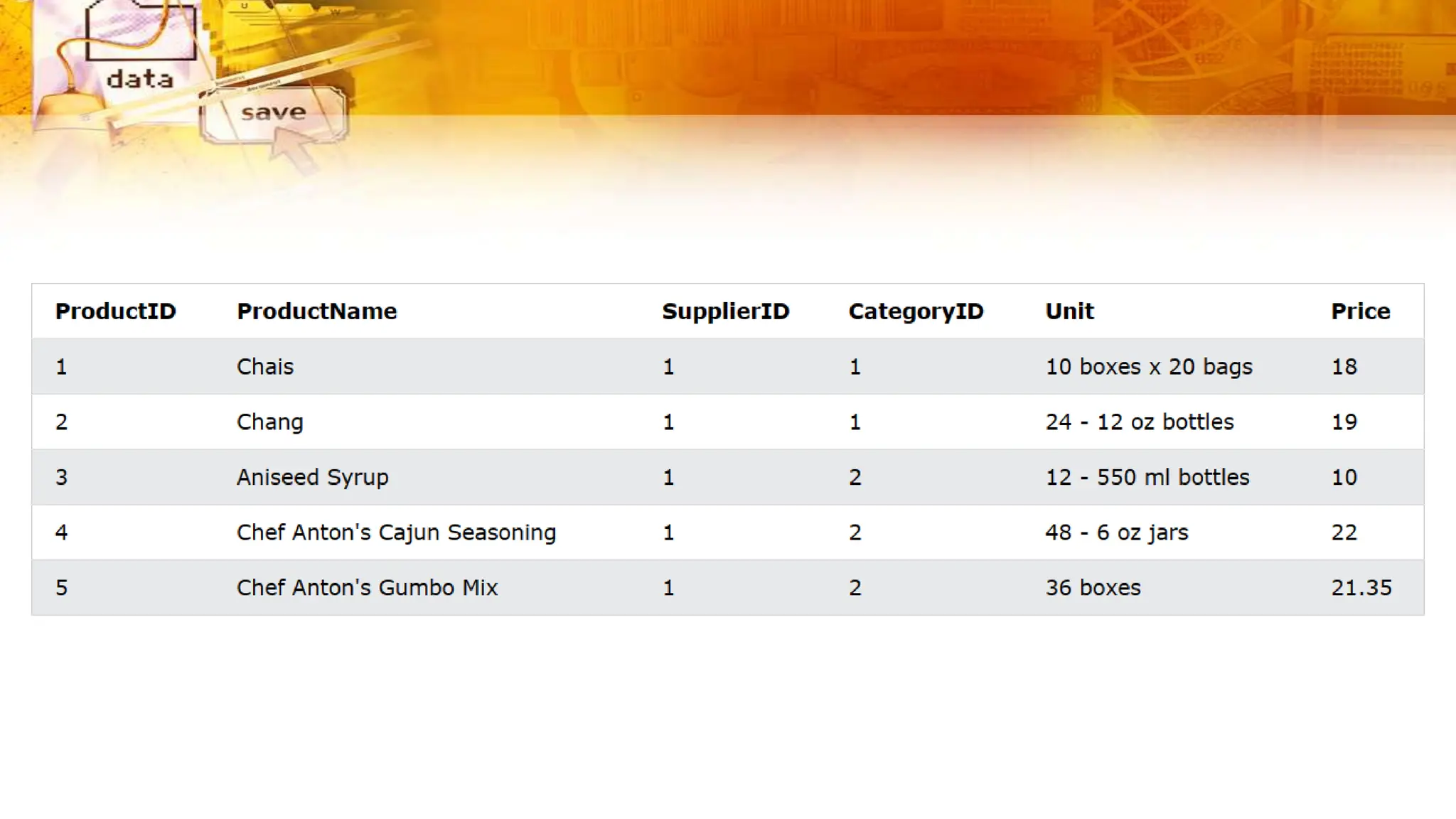
The following SQL statement selects all products with a price between 10 and 20:
Try:
SELECT * FROM Products
WHERE Price BETWEEN 10 AND 20;
NOT BETWEEN Example
To display the products outside the range of the previous example, use NOT BETWEEN:
Try:
SELECT * FROM Products
WHERE Price NOT BETWEEN 10 AND 20;
BETWEEN with IN Example
The following SQL statement selects all products with a price between 10 and 20. In addition; do
not show products with a CategoryID of 1,2, or 3:
Try:
SELECT * FROM Products
WHERE Price BETWEEN 10 AND 20
AND CategoryID NOT IN (1,2,3);
BETWEEN Text Values Example
The following SQL statement selects all products with a ProductName between "Carnarvon
Tigers" and "Mozzarella di Giovanni":
Try:
SELECT * FROM Products
WHERE ProductName BETWEEN 'Carnarvon Tigers' AND 'Mozzarella di Giovanni’
ORDER BY ProductName;
The following SQL statement selects all products with a ProductName between "Carnarvon
Tigers" and "Chef Anton's Cajun Seasoning":
Try:
SELECT * FROM Products
WHERE ProductName BETWEEN "Carnarvon Tigers" AND "Chef Anton's Cajun
Seasoning"
ORDER BY ProductName;
NOT BETWEEN Text Values Example
The following SQL statement selects all products with a ProductName not between "Carnarvon
Tigers" and "Mozzarella di Giovanni":
Try:
SELECT * FROM Products
WHERE ProductName NOT BETWEEN 'Carnarvon Tigers' AND 'Mozzarella di Giovanni’
ORDER BY ProductName;
The following SQL statement selects all products with a ProductName between "Carnarvon
Tigers" and "Chef Anton's Cajun Seasoning":
Try:
SELECT * FROM Products
WHERE ProductName BETWEEN "Carnarvon Tigers" AND "Chef Anton's Cajun
Seasoning"
ORDER BY ProductName;
BETWEEN Dates Example
The following SQL statement selects all orders with an OrderDate between '01-July-1996' and
'31-July-1996’:
Try:
SELECT * FROM Orders
WHERE OrderDate BETWEEN '1996-07-01' AND '1996-07-31’;
The following SQL statement selects all products with a ProductName between "Carnarvon
Tigers" and "Chef Anton's Cajun Seasoning":
Try:
SELECT * FROM Products
WHERE ProductName BETWEEN "Carnarvon Tigers" AND "Chef Anton's Cajun
Seasoning"
ORDER BY ProductName;
MySQL Aliases
In MySQL, aliases are used to provide temporary names or labels for
columns or tables in the result set of a query. Aliases make the output
of a query more readable and can be helpful when working with
complex queries or when you want to assign a more meaningful name
to a column or table.
Aliases are used to give a table, or a column in a table, a temporary name.
Aliases are often used to make column names more readable.
An alias only exists for the duration of that query.
An alias is created with the AS keyword.
There are two types of aliases in MySQL:
1. Column Aliases:
Column aliases are used to rename the columns in the result set,
making them more user-friendly or descriptive. You can use aliases to
change the names of columns in the query result without changing the
actual column names in the database.
2. Table Aliases:
Table aliases are used to provide a shorthand name for tables in a
query, especially when you're working with multiple tables in a join
operation. Table aliases help simplify the query and make it more
concise.
Alias Column Syntax
SELECT column_name AS alias_name
FROM table_name;
Alias Table Syntax
SELECT column_name(s)
FROM table_name AS alias_name;
Alias for Columns Examples
The following SQL statement creates two aliases, one for the CustomerID column and
one for the CustomerName column:
Try:
SELECT CustomerID AS ID,
CustomerName AS Customer
FROM Customers;
The following SQL statement creates two aliases, one for the CustomerName column
and one for the ContactName column. Note: Single or double quotation marks are
required if the alias name contains spaces:
Try:
SELECT CustomerName AS Customer, ContactName AS "Contact Person"
FROM Customers;
Alias for Columns Examples
The following SQL statement creates an alias named "Address" that combine four
columns (Address, PostalCode, City and Country):
Try:
SELECT CustomerName, CONCAT_WS(', ', Address, PostalCode, City,
Country) AS Address
FROM Customers;
Alias for Tables Example
The following SQL statement selects all the orders from the customer with CustomerID=4
(Around the Horn). We use the "Customers" and "Orders" tables, and give them the table aliases
of "c" and "o" respectively (Here we use aliases to make the SQL shorter):
Try:
SELECT o.OrderID, o.OrderDate, c.CustomerName
FROM Customers AS c, Orders AS o
WHERE c.CustomerName='Around the
Horn' AND c.CustomerID=o.CustomerID;
The following SQL statement is the same as above, but without aliases:
Try:
SELECT Orders.OrderID, Orders.OrderDate, Customers.CustomerName
FROM Customers, Orders
WHERE Customers.CustomerName='Around the
Horn' AND Customers.CustomerID=Orders.CustomerID;
Exercise:
Use the IN operator to select all the records where Country is either
"Norway" or "France".
Exercise:
Use the IN operator to select all the records where Country is either
"Norway" or "France".
Exercise:
Use the IN operator to select all the records where Country is NOT
"Norway" and NOT "France".
Exercise:
Use the IN operator to select all the records where Country is NOT
"Norway" and NOT "France".
Exercise:
Use the BETWEEN operator to select all the records where the value of
the Price column is between 10 and 20.
Exercise:
Use the BETWEEN operator to select all the records where the value of
the Price column is between 10 and 20.
Exercise:
Use the BETWEEN operator to select all the records where the value of
the Price column is NOT between 10 and 20.
Exercise:
Use the BETWEEN operator to select all the records where the value of
the Price column is NOT between 10 and 20.
Exercise:
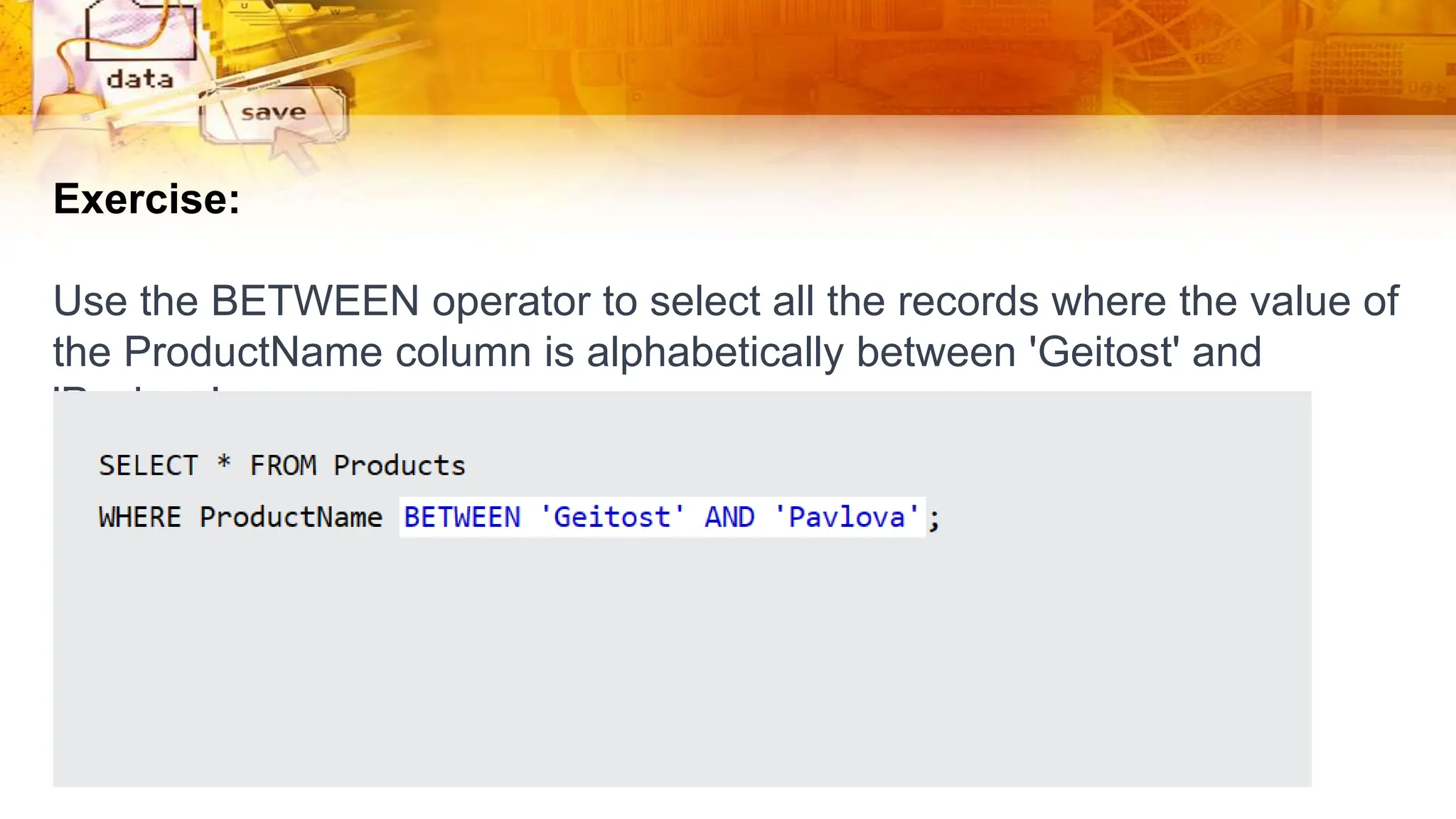
Use the BETWEEN operator to select all the records where the value of
the ProductName column is alphabetically between 'Geitost' and
'Pavlova'.
Exercise:
Use the BETWEEN operator to select all the records where the value of
the ProductName column is alphabetically between 'Geitost' and
'Pavlova'.
Exercise:
When displaying the Customers table, make an ALIAS of
the PostalCode column, the column should be called Pno instead.
Exercise:
When displaying the Customers table, make an ALIAS of
the PostalCode column, the column should be called Pno instead.
Exercise:
When displaying the Customers table, refer to the table
as Consumers instead of Customers.
Exercise:
When displaying the Customers table, refer to the table
as Consumers instead of Customers.

ADV Powepoint 4 Lec.pptx

  • 1.
  • 2.
    The MySQL INOperator The MySQL IN operator is a logical operator that is used to specify a range of values for matching in a SQL query's WHERE clause. It allows you to filter rows based on a specific column's value being one of a list of values. The IN operator allows you to specify multiple values in a WHERE clause. The IN operator is a shorthand for multiple OR conditions.
  • 3.
    IN Syntax SELECT column_name(s) FROMtable_name WHERE column_name IN (value1, value2, ...); or: SELECT column_name(s) FROM table_name WHERE column_name IN (SELECT STATEMENT);
  • 5.
    IN Operator Examples Thefollowing SQL statement selects all customers that are located in "Germany", "France" or "UK": Try: SELECT * FROM Customers WHERE Country IN ('Germany', 'France', 'UK’); The following SQL statement selects all customers that are NOT located in "Germany", "France" or "UK": Try: SELECT * FROM Customers WHERE Country NOT IN ('Germany', 'France', 'UK’);
  • 6.
    MySQL BETWEEN Operator TheMySQL BETWEEN operator is used in SQL queries to filter rows based on a specified range of values within a given column. It is often used in the WHERE clause of a SQL statement to select rows that fall within a specified range. The BETWEEN operator is inclusive, meaning it includes both the lower and upper boundary values in the range. The BETWEEN operator selects values within a given range. The values can be numbers, text, or dates. The BETWEEN operator is inclusive: begin and end values are included.
  • 7.
    BETWEEN Syntax SELECT column_name(s) FROMtable_name WHERE column_name BETWEEN value1 AND value2;
  • 9.
    BETWEEN Example The followingSQL statement selects all products with a price between 10 and 20: Try: SELECT * FROM Products WHERE Price BETWEEN 10 AND 20; NOT BETWEEN Example To display the products outside the range of the previous example, use NOT BETWEEN: Try: SELECT * FROM Products WHERE Price NOT BETWEEN 10 AND 20;
  • 10.
    BETWEEN with INExample The following SQL statement selects all products with a price between 10 and 20. In addition; do not show products with a CategoryID of 1,2, or 3: Try: SELECT * FROM Products WHERE Price BETWEEN 10 AND 20 AND CategoryID NOT IN (1,2,3);
  • 11.
    BETWEEN Text ValuesExample The following SQL statement selects all products with a ProductName between "Carnarvon Tigers" and "Mozzarella di Giovanni": Try: SELECT * FROM Products WHERE ProductName BETWEEN 'Carnarvon Tigers' AND 'Mozzarella di Giovanni’ ORDER BY ProductName; The following SQL statement selects all products with a ProductName between "Carnarvon Tigers" and "Chef Anton's Cajun Seasoning": Try: SELECT * FROM Products WHERE ProductName BETWEEN "Carnarvon Tigers" AND "Chef Anton's Cajun Seasoning" ORDER BY ProductName;
  • 12.
    NOT BETWEEN TextValues Example The following SQL statement selects all products with a ProductName not between "Carnarvon Tigers" and "Mozzarella di Giovanni": Try: SELECT * FROM Products WHERE ProductName NOT BETWEEN 'Carnarvon Tigers' AND 'Mozzarella di Giovanni’ ORDER BY ProductName; The following SQL statement selects all products with a ProductName between "Carnarvon Tigers" and "Chef Anton's Cajun Seasoning": Try: SELECT * FROM Products WHERE ProductName BETWEEN "Carnarvon Tigers" AND "Chef Anton's Cajun Seasoning" ORDER BY ProductName;
  • 14.
    BETWEEN Dates Example Thefollowing SQL statement selects all orders with an OrderDate between '01-July-1996' and '31-July-1996’: Try: SELECT * FROM Orders WHERE OrderDate BETWEEN '1996-07-01' AND '1996-07-31’; The following SQL statement selects all products with a ProductName between "Carnarvon Tigers" and "Chef Anton's Cajun Seasoning": Try: SELECT * FROM Products WHERE ProductName BETWEEN "Carnarvon Tigers" AND "Chef Anton's Cajun Seasoning" ORDER BY ProductName;
  • 15.
    MySQL Aliases In MySQL,aliases are used to provide temporary names or labels for columns or tables in the result set of a query. Aliases make the output of a query more readable and can be helpful when working with complex queries or when you want to assign a more meaningful name to a column or table. Aliases are used to give a table, or a column in a table, a temporary name. Aliases are often used to make column names more readable. An alias only exists for the duration of that query. An alias is created with the AS keyword.
  • 16.
    There are twotypes of aliases in MySQL: 1. Column Aliases: Column aliases are used to rename the columns in the result set, making them more user-friendly or descriptive. You can use aliases to change the names of columns in the query result without changing the actual column names in the database. 2. Table Aliases: Table aliases are used to provide a shorthand name for tables in a query, especially when you're working with multiple tables in a join operation. Table aliases help simplify the query and make it more concise.
  • 17.
    Alias Column Syntax SELECTcolumn_name AS alias_name FROM table_name; Alias Table Syntax SELECT column_name(s) FROM table_name AS alias_name;
  • 19.
    Alias for ColumnsExamples The following SQL statement creates two aliases, one for the CustomerID column and one for the CustomerName column: Try: SELECT CustomerID AS ID, CustomerName AS Customer FROM Customers; The following SQL statement creates two aliases, one for the CustomerName column and one for the ContactName column. Note: Single or double quotation marks are required if the alias name contains spaces: Try: SELECT CustomerName AS Customer, ContactName AS "Contact Person" FROM Customers;
  • 20.
    Alias for ColumnsExamples The following SQL statement creates an alias named "Address" that combine four columns (Address, PostalCode, City and Country): Try: SELECT CustomerName, CONCAT_WS(', ', Address, PostalCode, City, Country) AS Address FROM Customers;
  • 21.
    Alias for TablesExample The following SQL statement selects all the orders from the customer with CustomerID=4 (Around the Horn). We use the "Customers" and "Orders" tables, and give them the table aliases of "c" and "o" respectively (Here we use aliases to make the SQL shorter): Try: SELECT o.OrderID, o.OrderDate, c.CustomerName FROM Customers AS c, Orders AS o WHERE c.CustomerName='Around the Horn' AND c.CustomerID=o.CustomerID; The following SQL statement is the same as above, but without aliases: Try: SELECT Orders.OrderID, Orders.OrderDate, Customers.CustomerName FROM Customers, Orders WHERE Customers.CustomerName='Around the Horn' AND Customers.CustomerID=Orders.CustomerID;
  • 22.
    Exercise: Use the INoperator to select all the records where Country is either "Norway" or "France".
  • 23.
    Exercise: Use the INoperator to select all the records where Country is either "Norway" or "France".
  • 24.
    Exercise: Use the INoperator to select all the records where Country is NOT "Norway" and NOT "France".
  • 25.
    Exercise: Use the INoperator to select all the records where Country is NOT "Norway" and NOT "France".
  • 26.
    Exercise: Use the BETWEENoperator to select all the records where the value of the Price column is between 10 and 20.
  • 27.
    Exercise: Use the BETWEENoperator to select all the records where the value of the Price column is between 10 and 20.
  • 28.
    Exercise: Use the BETWEENoperator to select all the records where the value of the Price column is NOT between 10 and 20.
  • 29.
    Exercise: Use the BETWEENoperator to select all the records where the value of the Price column is NOT between 10 and 20.
  • 30.
    Exercise: Use the BETWEENoperator to select all the records where the value of the ProductName column is alphabetically between 'Geitost' and 'Pavlova'.
  • 31.
    Exercise: Use the BETWEENoperator to select all the records where the value of the ProductName column is alphabetically between 'Geitost' and 'Pavlova'.
  • 32.
    Exercise: When displaying theCustomers table, make an ALIAS of the PostalCode column, the column should be called Pno instead.
  • 33.
    Exercise: When displaying theCustomers table, make an ALIAS of the PostalCode column, the column should be called Pno instead.
  • 34.
    Exercise: When displaying theCustomers table, refer to the table as Consumers instead of Customers.
  • 35.
    Exercise: When displaying theCustomers table, refer to the table as Consumers instead of Customers.