TCP/IP Protocol Suite 1
ARP and RARP
ARP and RARP
• Understand the need for ARP
• Understand the cases in which ARP is used
• Understand the need for RARP
TCP/IP Protocol Suite 2
Address Mapping
An internet is made of a combination of physical networks
connected together by internetworking devices such as
routers.
A packet starting from a source host may pass through
several different physical networks before finally reaching
the destination host.
The hosts and routers are recognized at the network level
by their logical addresses.
A logical address is unique universally. It is called a logical
address because it is usually implemented in software.
packets pass through physical networks to reach these
hosts and routers. At the physical level, the hosts and
routers are recognized by their physical addresses. A
physical address is a local address
TCP/IP Protocol Suite 3
Address Mapping
It should be unique locally, but not necessarily universally.
It is called a physical address because it is usually (but not
always) implemented in hardware.
Examples of physical addresses are 48-bit MAC addresses
in the Ethernet protocol, which are imprinted on the NIC
installed in the host or router.
The physical address and the logical address are two
different identifiers. We need both of them
This means that delivery of a packet to a host or a router
requires two levels of addressing: logical and physical.
We need to be able to map a logical address to its
corresponding physical address and vice versa. These can be
done using either static or dynamic mapping
TCP/IP Protocol Suite 4
Static Mapping
Static mapping means creating a table that associates a
logical address with a physical address. This table is stored
in each machine on the network. Each machine that knows,
for example, the IP address of another machine but not its
physical address can look it up in the table. This has some
limitations because physical addresses may change in the
following ways:
1. A machine could change its NIC, resulting in a new
physical address.
2. In some LANs, such as LocalTalk, the physical address
changes every time the computer is turned on.
3. A mobile computer can move from one physical
network to another, resulting in a change in its physical
address.
TCP/IP Protocol Suite 5
Dynamic Mapping
In dynamic mapping, each time a machine knows the
logical address of another machine, it can use a protocol to
find the physical address.
Two protocols have been designed to perform dynamic
mapping:
Address Resolution Protocol (ARP) and
Reverse Address Resolution Protocol (RARP).
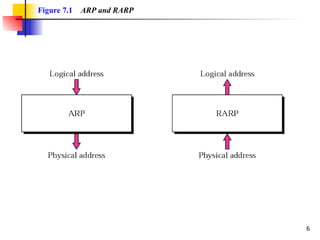
ARP maps a logical address to a physical address; RARP
maps a physical address to a logical address.
6
Figure 7.1 ARP and RARP
TCP/IP Protocol Suite 7
Address Resolution Protocol(ARP)
Anytime a node has an IP datagram to send to another
node in a link, it has the IP address of the receiving node.
 The source host knows the IP address of the default
router. Each router except the last one in the path gets the
IP address of the next router by using its forwarding table.
The last router knows the IP address of the destination
host. However, the IP address of the next node is not
helpful in moving a frame through a link;
We need the link-layer address of the next node. This is
the time when the Address Resolution Protocol (ARP)
becomes helpful.
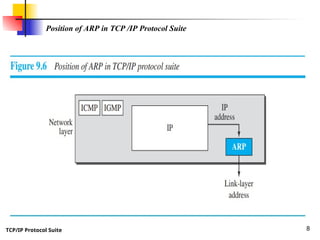
The ARP protocol is one of the auxiliary protocols defined
in the network layer, as shown in Figure 9.6.
TCP/IP Protocol Suite 8
Position of ARP in TCP /IP Protocol Suite
TCP/IP Protocol Suite 9
Address Resolution Protocol(ARP)
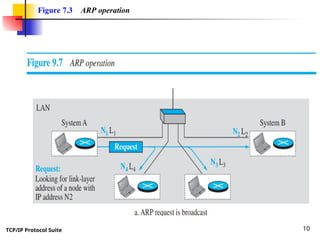
Anytime a host or a router needs to find
the link-layer address of another host or
router in its network, it sends an ARP
request packet.
The packet includes the link-layer and IP
addresses of the sender and the IP address
of the receiver. Because the sender does not
know the link-layer address of the receiver.
The query is broadcast over the link using
the link-layer broadcast address, (see Figure
9.7).
TCP/IP Protocol Suite 10
Figure 7.3 ARP operation
TCP/IP Protocol Suite 11
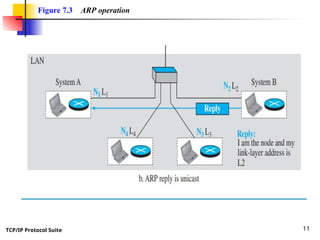
Figure 7.3 ARP operation
TCP/IP Protocol Suite 12
ARP Packet Format
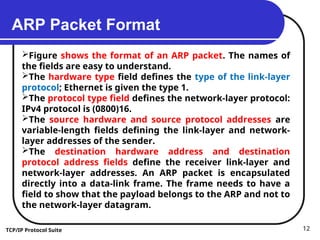
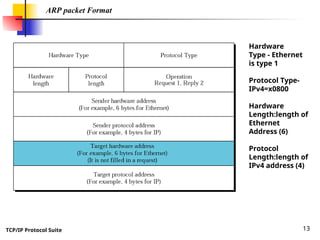
Figure shows the format of an ARP packet. The names of
the fields are easy to understand.
The hardware type field defines the type of the link-layer
protocol; Ethernet is given the type 1.
The protocol type field defines the network-layer protocol:
IPv4 protocol is (0800)16.
The source hardware and source protocol addresses are
variable-length fields defining the link-layer and network-
layer addresses of the sender.
The destination hardware address and destination
protocol address fields define the receiver link-layer and
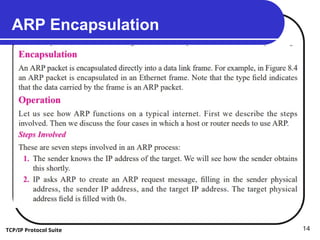
network-layer addresses. An ARP packet is encapsulated
directly into a data-link frame. The frame needs to have a
field to show that the payload belongs to the ARP and not to
the network-layer datagram.
TCP/IP Protocol Suite 13
ARP packet Format
Hardware
Type - Ethernet
is type 1
Protocol Type-
IPv4=x0800
Hardware
Length:length of
Ethernet
Address (6)
Protocol
Length:length of
IPv4 address (4)
TCP/IP Protocol Suite 14
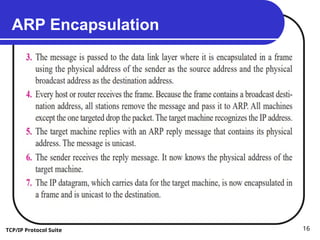
ARP Encapsulation
TCP/IP Protocol Suite 15
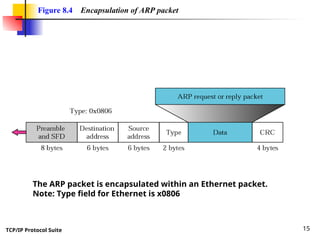
Figure 8.4 Encapsulation of ARP packet
The ARP packet is encapsulated within an Ethernet packet.
Note: Type field for Ethernet is x0806
TCP/IP Protocol Suite 16
ARP Encapsulation
TCP/IP Protocol Suite 17
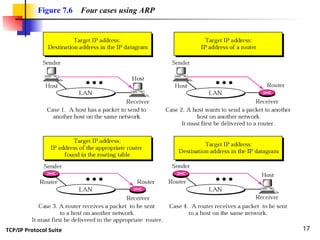
Figure 7.6 Four cases using ARP
TCP/IP Protocol Suite 18
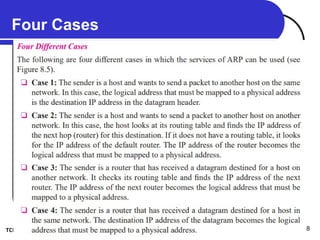
Four Cases
TCP/IP Protocol Suite 19
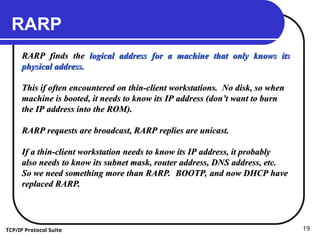
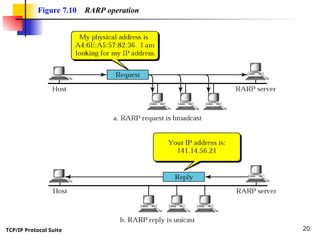
RARP
RARP finds the
RARP finds the logical address for a machine that only knows its
logical address for a machine that only knows its
physical address.
physical address.
This if often encountered on thin-client workstations. No disk, so when
machine is booted, it needs to know its IP address (don’t want to burn
the IP address into the ROM).
RARP requests are broadcast, RARP replies are unicast.
If a thin-client workstation needs to know its IP address, it probably
also needs to know its subnet mask, router address, DNS address, etc.
So we need something more than RARP. BOOTP, and now DHCP have
replaced RARP.
replaced RARP.
TCP/IP Protocol Suite 20
Figure 7.10 RARP operation
TCP/IP Protocol Suite 21
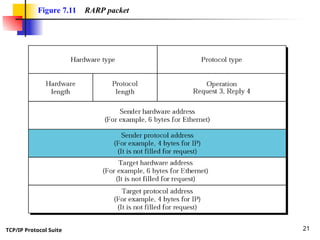
Figure 7.11 RARP packet
TCP/IP Protocol Suite 22
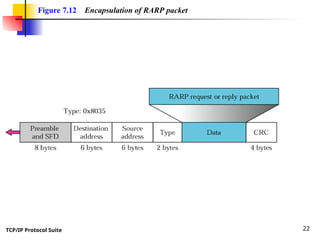
Figure 7.12 Encapsulation of RARP packet
TCP/IP Protocol Suite 23
Dynamic Host Configuration Protocol (DHCP)
We have seen that a large organization or an ISP can
receive a block of addresses directly from ICANN and a
small organization can receive a block of addresses from an
ISP.
After a block of addresses are assigned to an organization,
the network administration can manually assign addresses
to the individual hosts or routers.
However, address assignment in an organization can be
done automatically using the Dynamic Host Configuration
Protocol (DHCP).
DHCP is an application-layer program, using the client-
server paradigm, that actually helps TCP/IP at the network
layer
TCP/IP Protocol Suite 24
Dynamic Host Configuration Protocol (DHCP)
DHCP has found such widespread use in the Internet that
it is often called a plugand-play protocol.
In can be used in many situations.
A network manager can configure DHCP to assign
permanent IP addresses to the host and routers.
DHCP can also be configured to provide temporary, on
demand, IP addresses to hosts.
The second capability can provide a temporary IP address
to a traveller to connect her laptop to the Internet while
she is staying in the hotel.
It also allows an ISP with 1000 granted addresses to
provide services to 4000 households, assuming not more
than one-forth of customers use the Internet at the same
time.
TCP/IP Protocol Suite 25
Dynamic Host Configuration Protocol (DHCP)
In addition to its IP address, a computer
also needs to know the network prefix (or
address mask).
Most computers also need two other
pieces of information, such as the address
of a default router to be able to
communicate with other networks and the
address of a name server to be able to use
names instead of addresses
TCP/IP Protocol Suite 26
DHCP Message Format
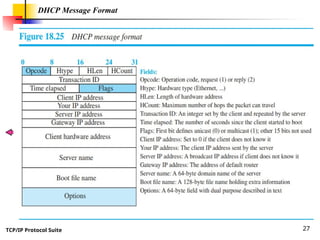
DHCP is a client-server protocol in which
the client sends a request message and
the server returns a response message.
 Before we discuss the operation of
DHCP, let us show the general format of
the DHCP message in Figure 18.25.
Most of the fields are explained in the
figure, but we need to discuss the option
field, which plays a very important role in
DHCP.
TCP/IP Protocol Suite 27
DHCP Message Format

Addressing mapping protocol_ARPandRARP.ppt

  • 1.
    TCP/IP Protocol Suite1 ARP and RARP ARP and RARP • Understand the need for ARP • Understand the cases in which ARP is used • Understand the need for RARP
  • 2.
    TCP/IP Protocol Suite2 Address Mapping An internet is made of a combination of physical networks connected together by internetworking devices such as routers. A packet starting from a source host may pass through several different physical networks before finally reaching the destination host. The hosts and routers are recognized at the network level by their logical addresses. A logical address is unique universally. It is called a logical address because it is usually implemented in software. packets pass through physical networks to reach these hosts and routers. At the physical level, the hosts and routers are recognized by their physical addresses. A physical address is a local address
  • 3.
    TCP/IP Protocol Suite3 Address Mapping It should be unique locally, but not necessarily universally. It is called a physical address because it is usually (but not always) implemented in hardware. Examples of physical addresses are 48-bit MAC addresses in the Ethernet protocol, which are imprinted on the NIC installed in the host or router. The physical address and the logical address are two different identifiers. We need both of them This means that delivery of a packet to a host or a router requires two levels of addressing: logical and physical. We need to be able to map a logical address to its corresponding physical address and vice versa. These can be done using either static or dynamic mapping
  • 4.
    TCP/IP Protocol Suite4 Static Mapping Static mapping means creating a table that associates a logical address with a physical address. This table is stored in each machine on the network. Each machine that knows, for example, the IP address of another machine but not its physical address can look it up in the table. This has some limitations because physical addresses may change in the following ways: 1. A machine could change its NIC, resulting in a new physical address. 2. In some LANs, such as LocalTalk, the physical address changes every time the computer is turned on. 3. A mobile computer can move from one physical network to another, resulting in a change in its physical address.
  • 5.
    TCP/IP Protocol Suite5 Dynamic Mapping In dynamic mapping, each time a machine knows the logical address of another machine, it can use a protocol to find the physical address. Two protocols have been designed to perform dynamic mapping: Address Resolution Protocol (ARP) and Reverse Address Resolution Protocol (RARP). ARP maps a logical address to a physical address; RARP maps a physical address to a logical address.
  • 6.
  • 7.
    TCP/IP Protocol Suite7 Address Resolution Protocol(ARP) Anytime a node has an IP datagram to send to another node in a link, it has the IP address of the receiving node.  The source host knows the IP address of the default router. Each router except the last one in the path gets the IP address of the next router by using its forwarding table. The last router knows the IP address of the destination host. However, the IP address of the next node is not helpful in moving a frame through a link; We need the link-layer address of the next node. This is the time when the Address Resolution Protocol (ARP) becomes helpful. The ARP protocol is one of the auxiliary protocols defined in the network layer, as shown in Figure 9.6.
  • 8.
    TCP/IP Protocol Suite8 Position of ARP in TCP /IP Protocol Suite
  • 9.
    TCP/IP Protocol Suite9 Address Resolution Protocol(ARP) Anytime a host or a router needs to find the link-layer address of another host or router in its network, it sends an ARP request packet. The packet includes the link-layer and IP addresses of the sender and the IP address of the receiver. Because the sender does not know the link-layer address of the receiver. The query is broadcast over the link using the link-layer broadcast address, (see Figure 9.7).
  • 10.
    TCP/IP Protocol Suite10 Figure 7.3 ARP operation
  • 11.
    TCP/IP Protocol Suite11 Figure 7.3 ARP operation
  • 12.
    TCP/IP Protocol Suite12 ARP Packet Format Figure shows the format of an ARP packet. The names of the fields are easy to understand. The hardware type field defines the type of the link-layer protocol; Ethernet is given the type 1. The protocol type field defines the network-layer protocol: IPv4 protocol is (0800)16. The source hardware and source protocol addresses are variable-length fields defining the link-layer and network- layer addresses of the sender. The destination hardware address and destination protocol address fields define the receiver link-layer and network-layer addresses. An ARP packet is encapsulated directly into a data-link frame. The frame needs to have a field to show that the payload belongs to the ARP and not to the network-layer datagram.
  • 13.
    TCP/IP Protocol Suite13 ARP packet Format Hardware Type - Ethernet is type 1 Protocol Type- IPv4=x0800 Hardware Length:length of Ethernet Address (6) Protocol Length:length of IPv4 address (4)
  • 14.
    TCP/IP Protocol Suite14 ARP Encapsulation
  • 15.
    TCP/IP Protocol Suite15 Figure 8.4 Encapsulation of ARP packet The ARP packet is encapsulated within an Ethernet packet. Note: Type field for Ethernet is x0806
  • 16.
    TCP/IP Protocol Suite16 ARP Encapsulation
  • 17.
    TCP/IP Protocol Suite17 Figure 7.6 Four cases using ARP
  • 18.
    TCP/IP Protocol Suite18 Four Cases
  • 19.
    TCP/IP Protocol Suite19 RARP RARP finds the RARP finds the logical address for a machine that only knows its logical address for a machine that only knows its physical address. physical address. This if often encountered on thin-client workstations. No disk, so when This if often encountered on thin-client workstations. No disk, so when machine is booted, it needs to know its IP address (don’t want to burn machine is booted, it needs to know its IP address (don’t want to burn the IP address into the ROM). the IP address into the ROM). RARP requests are broadcast, RARP replies are unicast. RARP requests are broadcast, RARP replies are unicast. If a thin-client workstation needs to know its IP address, it probably If a thin-client workstation needs to know its IP address, it probably also needs to know its subnet mask, router address, DNS address, etc. also needs to know its subnet mask, router address, DNS address, etc. So we need something more than RARP. BOOTP, and now DHCP have So we need something more than RARP. BOOTP, and now DHCP have replaced RARP. replaced RARP.
  • 20.
    TCP/IP Protocol Suite20 Figure 7.10 RARP operation
  • 21.
    TCP/IP Protocol Suite21 Figure 7.11 RARP packet
  • 22.
    TCP/IP Protocol Suite22 Figure 7.12 Encapsulation of RARP packet
  • 23.
    TCP/IP Protocol Suite23 Dynamic Host Configuration Protocol (DHCP) We have seen that a large organization or an ISP can receive a block of addresses directly from ICANN and a small organization can receive a block of addresses from an ISP. After a block of addresses are assigned to an organization, the network administration can manually assign addresses to the individual hosts or routers. However, address assignment in an organization can be done automatically using the Dynamic Host Configuration Protocol (DHCP). DHCP is an application-layer program, using the client- server paradigm, that actually helps TCP/IP at the network layer
  • 24.
    TCP/IP Protocol Suite24 Dynamic Host Configuration Protocol (DHCP) DHCP has found such widespread use in the Internet that it is often called a plugand-play protocol. In can be used in many situations. A network manager can configure DHCP to assign permanent IP addresses to the host and routers. DHCP can also be configured to provide temporary, on demand, IP addresses to hosts. The second capability can provide a temporary IP address to a traveller to connect her laptop to the Internet while she is staying in the hotel. It also allows an ISP with 1000 granted addresses to provide services to 4000 households, assuming not more than one-forth of customers use the Internet at the same time.
  • 25.
    TCP/IP Protocol Suite25 Dynamic Host Configuration Protocol (DHCP) In addition to its IP address, a computer also needs to know the network prefix (or address mask). Most computers also need two other pieces of information, such as the address of a default router to be able to communicate with other networks and the address of a name server to be able to use names instead of addresses
  • 26.
    TCP/IP Protocol Suite26 DHCP Message Format DHCP is a client-server protocol in which the client sends a request message and the server returns a response message.  Before we discuss the operation of DHCP, let us show the general format of the DHCP message in Figure 18.25. Most of the fields are explained in the figure, but we need to discuss the option field, which plays a very important role in DHCP.
  • 27.
    TCP/IP Protocol Suite27 DHCP Message Format