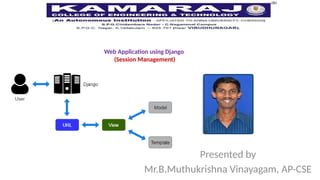
Web Application usingDjango
(Session Management)
Presented by
Mr.B.Muthukrishna Vinayagam, AP-CSE
2.
Cookies
• HTTP’s statelessnessposes a huge problem for Web developers, and thus cookies
were born. A cookie is a small piece of information that browsers store on behalf of
Web servers.
• COOKIES is a special attribute of request, and its value is the name of the cookie
from which you want to read data
– Using request.COOKIES[]
• Basic syntax to access a class parameter as: request.COOKIES[‘cookie_name’]
• Using Directmethod: request.COOKIES.get(key,value)
• Using response object with following function to set and delete cookie.
– set_cookie() to create cookies, we can also delete cookies using a similar function, delete_cookie()
from django.urls importreverse
return res
def reset(request):
res=HttpResponse("cookies deleted <a
href='{}'>reload</a>".format(reverse('index')))
res.delete_cookie('count','Updated
Successfully')
return res
6.
testck.html
<h1> User Visit(s){{count}}</h1>
urls.py
from django.contrib import admin
from django.urls import path
from APP import views
urlpatterns = [
path('admin/', admin.site.urls),
path("chk",views.chk,name="chk"),
path("dck",views.dck,name="dck"),]
]
7.
Session
Sessions are themechanism used by Django (and most of the
Internet) for keeping track of the "state" between the site and a
particular browser.
The session is a semi-permanent and two-way communication
between the server and the browser.
8.
Syntax
# Get asession value, setting a default if it is not present (0)
count= request.session.get(' count ',0)
# Set a session value
request.session[' count '] =0
# Delete a session value
del request.session[' count ']
testck.html
<h1> User Visit(s){{count}}</h1>
urls.py
from django.contrib import admin
from django.urls import path
from APP import views
urlpatterns = [
path('admin/', admin.site.urls),
path("chk",views.chk,name="chk"),
path("dck",views.dck,name="dck"),]
]
11.
Session Example2
(logging andlogout with Session)
forms.py
from django.contrib.auth.models import User
from django.contrib.auth.forms import UserCreationForm
class NewUserForm(UserCreationForm):
class Meta:
model=User
fields=['username','email','password1','password2']
12.
Views.py
from django.shortcuts importrender,HttpResponse,redirect
from django.contrib.auth import authenticate,login,logout
from.forms import *
def signup(request):
if request.method=='POST':
form = NewUserForm(request.POST)
if form.is_valid():
form.save()
return redirect('login')
else:
form = NewUserForm()
return render(request, 'signup.html', {'form': form })
urls.py
from django.contrib importadmin
from django.urls import path
from myapp.views import *
urlpatterns = [
path('admin/', admin.site.urls),
path('home/',home,name='home'),
path('',signup,name='signup'),
path('login/',loginpage,name='login'),
path('logout/',logoutpage,name='logout')
]
18.
mail
from django.core.mail importsend_mail
send_mail(
"Subject here",
"Here is the message.",
"from@example.com",
["to@example.com"],
fail_silently=False,
)

![Cookies
• HTTP’s statelessness poses a huge problem for Web developers, and thus cookies
were born. A cookie is a small piece of information that browsers store on behalf of
Web servers.
• COOKIES is a special attribute of request, and its value is the name of the cookie
from which you want to read data
– Using request.COOKIES[]
• Basic syntax to access a class parameter as: request.COOKIES[‘cookie_name’]
• Using Directmethod: request.COOKIES.get(key,value)
• Using response object with following function to set and delete cookie.
– set_cookie() to create cookies, we can also delete cookies using a similar function, delete_cookie()](https://image.slidesharecdn.com/sessionfdp-250329052540-c6598f64/85/session-faculty-development-programme-pptx-2-320.jpg)


![testck.html
<h1> User Visit(s) {{count}}</h1>
urls.py
from django.contrib import admin
from django.urls import path
from APP import views
urlpatterns = [
path('admin/', admin.site.urls),
path("chk",views.chk,name="chk"),
path("dck",views.dck,name="dck"),]
]](https://image.slidesharecdn.com/sessionfdp-250329052540-c6598f64/85/session-faculty-development-programme-pptx-6-320.jpg)

![Syntax
# Get a session value, setting a default if it is not present (0)
count= request.session.get(' count ',0)
# Set a session value
request.session[' count '] =0
# Delete a session value
del request.session[' count ']](https://image.slidesharecdn.com/sessionfdp-250329052540-c6598f64/85/session-faculty-development-programme-pptx-8-320.jpg)
![Views.py
def chk(request):
count=request.session.get('count',0)
tc=int(count)+1
response=render(request,"testck.html",{'count':tc})
return response
def dck(request):
del request.session['count']
response = HttpResponse("Deleting the session key which is set")
return response](https://image.slidesharecdn.com/sessionfdp-250329052540-c6598f64/85/session-faculty-development-programme-pptx-9-320.jpg)
![testck.html
<h1> User Visit(s) {{count}}</h1>
urls.py
from django.contrib import admin
from django.urls import path
from APP import views
urlpatterns = [
path('admin/', admin.site.urls),
path("chk",views.chk,name="chk"),
path("dck",views.dck,name="dck"),]
]](https://image.slidesharecdn.com/sessionfdp-250329052540-c6598f64/85/session-faculty-development-programme-pptx-10-320.jpg)
![Session Example2
(logging and logout with Session)
forms.py
from django.contrib.auth.models import User
from django.contrib.auth.forms import UserCreationForm
class NewUserForm(UserCreationForm):
class Meta:
model=User
fields=['username','email','password1','password2']](https://image.slidesharecdn.com/sessionfdp-250329052540-c6598f64/85/session-faculty-development-programme-pptx-11-320.jpg)

![def loginpage(request):
if request.method=='POST':
username=request.POST.get('username')
pass1=request.POST.get('password')
user=authenticate(request,username=username,password=pass1)
if user is not None:
login(request,user)
request.session["uname"] = username
return redirect('home')
else:
return HttpResponse ("Username or Password is incorrect!!!")
return render (request,'login.html')](https://image.slidesharecdn.com/sessionfdp-250329052540-c6598f64/85/session-faculty-development-programme-pptx-13-320.jpg)
![def home(request):
uname =request.session["uname"]
return render (request,'home.html',{'uname': uname})
def logoutpage(request):
del request.session["uname"]
logout(request)
return redirect('login')](https://image.slidesharecdn.com/sessionfdp-250329052540-c6598f64/85/session-faculty-development-programme-pptx-14-320.jpg)


![urls.py
from django.contrib import admin
from django.urls import path
from myapp.views import *
urlpatterns = [
path('admin/', admin.site.urls),
path('home/',home,name='home'),
path('',signup,name='signup'),
path('login/',loginpage,name='login'),
path('logout/',logoutpage,name='logout')
]](https://image.slidesharecdn.com/sessionfdp-250329052540-c6598f64/85/session-faculty-development-programme-pptx-17-320.jpg)
![mail
from django.core.mail import send_mail
send_mail(
"Subject here",
"Here is the message.",
"from@example.com",
["to@example.com"],
fail_silently=False,
)](https://image.slidesharecdn.com/sessionfdp-250329052540-c6598f64/85/session-faculty-development-programme-pptx-18-320.jpg)


![Settings.py
import os
STATIC_URL = '/static/'
STATICFILES_DIRS = [(os.path.join(BASE_DIR, 'static'))]
STATIC_ROOT = os.path.join(BASE_DIR, 'staticfiles')
MEDIA_URL = '/media/'
MEDIA_ROOT = os.path.join(BASE_DIR, 'media/')
Urls.py:
urlpatterns +=
static(settings.STATIC_URL,document_root=settings.STATIC_ROOT)
urlpatterns += static(settings.STATIC_URL, document_root=settings.STATIC_ROOT)](https://image.slidesharecdn.com/sessionfdp-250329052540-c6598f64/85/session-faculty-development-programme-pptx-21-320.jpg)


