How to add research notes
to a reference in EndNote Web
Aurelie Gandour
Tavistock and Portman NHS Foundation Trust
Accessing references
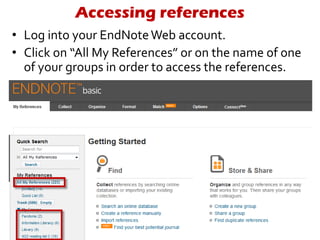
• Log into your EndNoteWeb account.
• Click on “All My References” or on the name of one
of your groups in order to access the references.
Accessing references
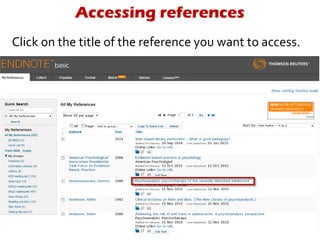
Click on the title of the reference you want to access.
Adding research notes
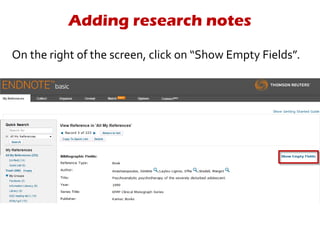
On the right of the screen, click on “Show Empty Fields”.
Adding research notes
Scroll down to the very bottom of the screen until you
find the field “Research notes”.
Adding research notes
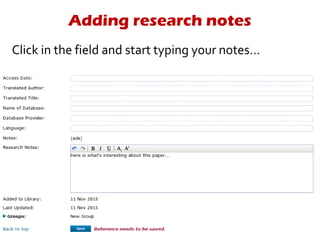
Click in the field and start typing your notes…
Using the search option
If, in the future, you use EndNote’s “Quick Search”, it will
search throughout your references but also throughout
your notes!
If you need more help,
call the library!
library@tavi-port.ac.uk
020 8938 2520

Adding research notes to a reference in EndNote Web

  • 1.
    How to addresearch notes to a reference in EndNote Web Aurelie Gandour Tavistock and Portman NHS Foundation Trust
  • 2.
    Accessing references • Loginto your EndNoteWeb account. • Click on “All My References” or on the name of one of your groups in order to access the references.
  • 3.
    Accessing references Click onthe title of the reference you want to access.
  • 4.
    Adding research notes Onthe right of the screen, click on “Show Empty Fields”.
  • 5.
    Adding research notes Scrolldown to the very bottom of the screen until you find the field “Research notes”.
  • 6.
    Adding research notes Clickin the field and start typing your notes…
  • 7.
    Using the searchoption If, in the future, you use EndNote’s “Quick Search”, it will search throughout your references but also throughout your notes!
  • 8.
    If you needmore help, call the library! library@tavi-port.ac.uk 020 8938 2520