Full-Text Links
in
Tavistock and Portman NHS Foundation Trust
Did you know that you could get direct links to the full-text
of documents that the Tavistock and Portman Library has
access to when doing searches in Google Scholar?
You just need to do a simple set-up.
When in Google Scholar (http://scholar.google.com/),
click on “Settings”.
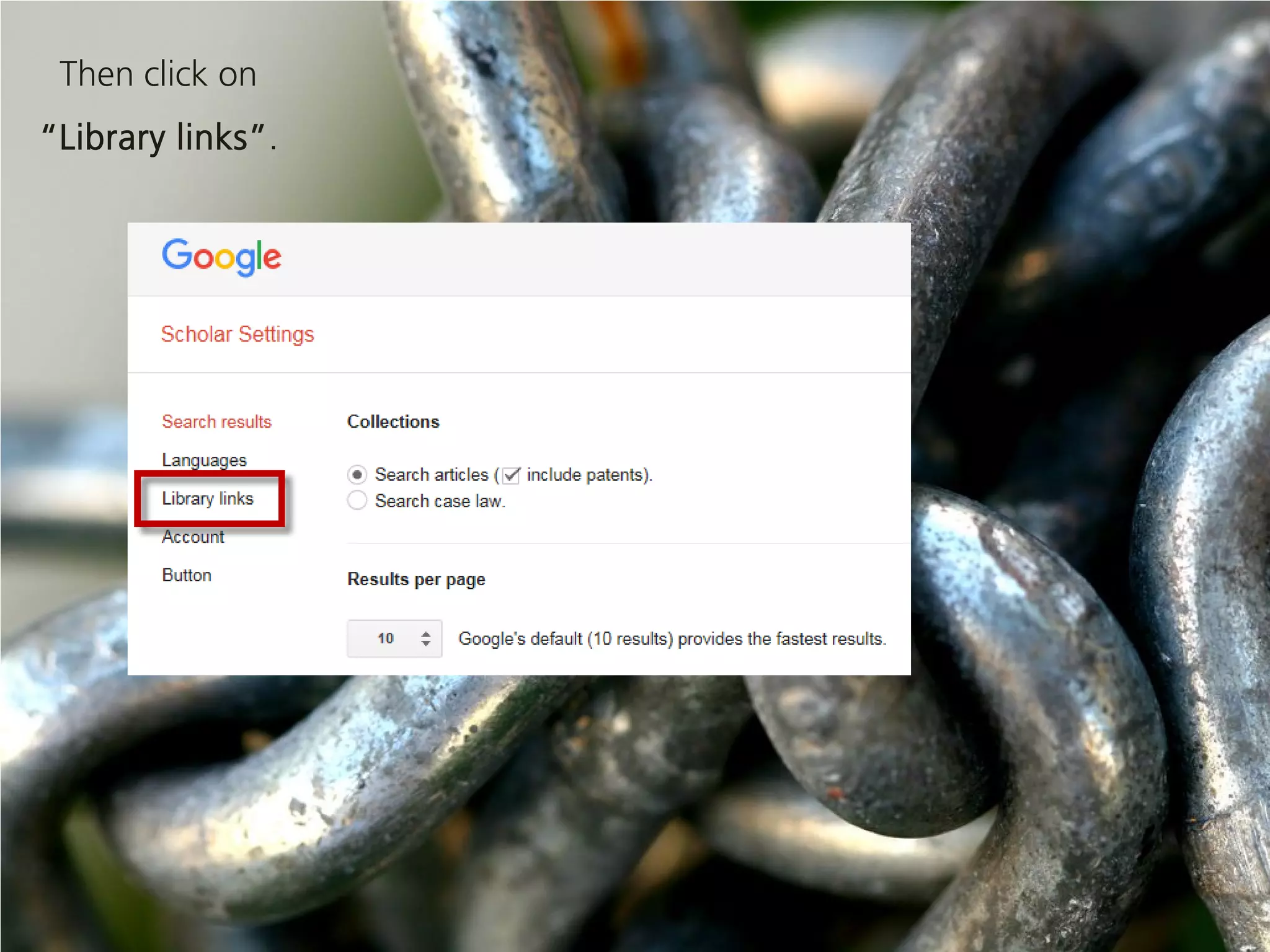
Then click on
“Library links”.
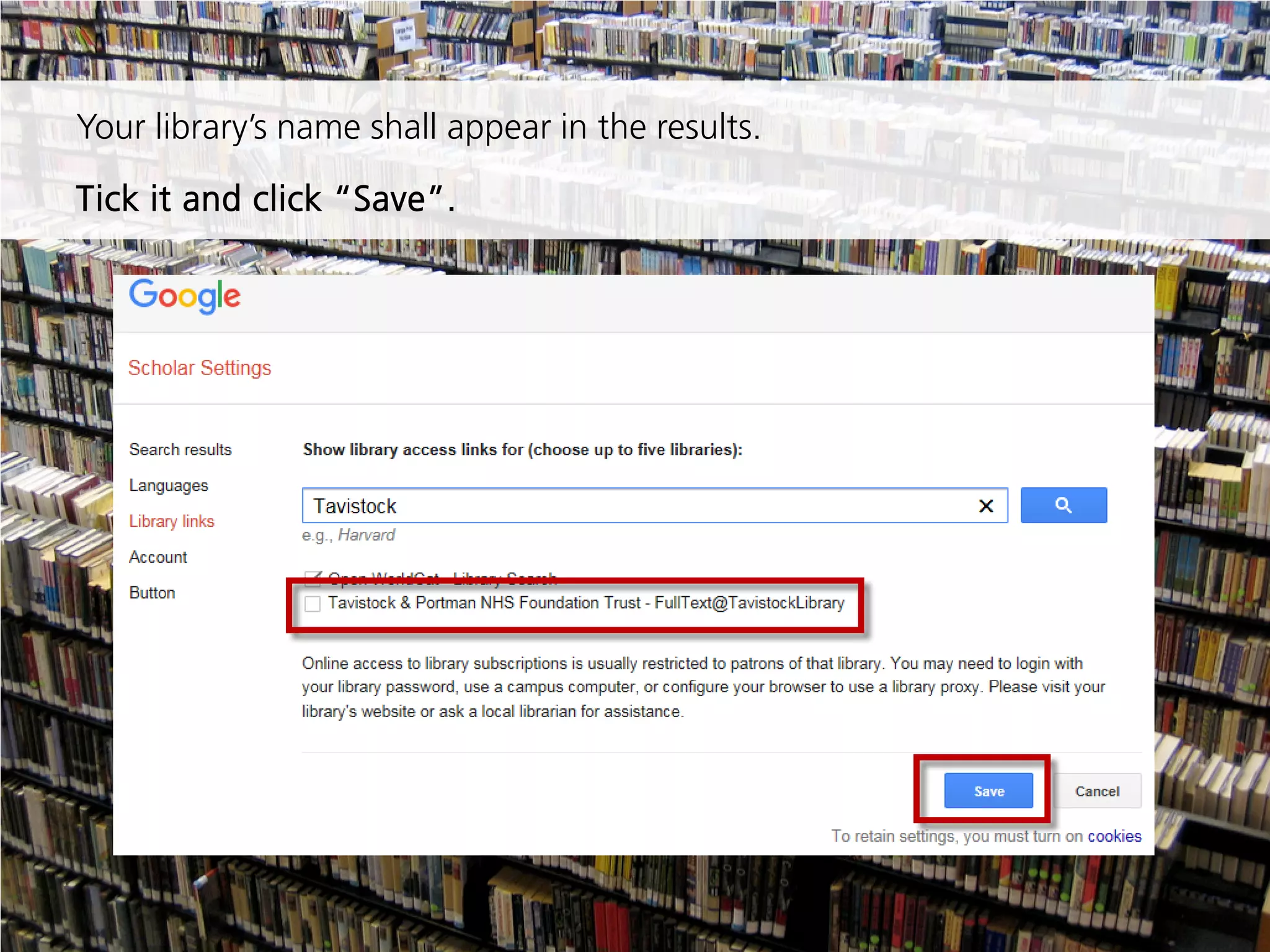
Start typing the name of your library in the following search box
and click the search icon.
Your library’s name shall appear in the results.
Tick it and click “Save”.
From now on, when the full-text for a document is accessible
through the library’s collection, a direct link will appear next to
the result.
You’re
done!
If you encounter any problem,
contact the library
020 8938 2520
library@tavi-port.ac.uk
Attributions for the pictures used
in this presentation
Slide 1: Photo by Jim Nix / Nomadic Pursuits - Creative Commons Attribution-NonCommercial-
ShareAlike License https://www.flickr.com/photos/34825346@N02
Slide 2: Photo by weesen - Creative Commons Attribution-NonCommercial License
https://www.flickr.com/photos/36317426@N00
Slide 3: Photo by Anonymous Account - Creative Commons Attribution License
https://www.flickr.com/photos/anonymouscollective/
Slide 4: Photo by mangpages - Creative Commons Attribution-NonCommercial License
https://www.flickr.com/photos/68546684@N00
Slide 5: Photo by Jan David Hanrath - Creative Commons Attribution-ShareAlike License
https://www.flickr.com/photos/jandavid/
Slide 7: Photo by Amanda Graham - Creative Commons Attribution-NonCommercial-ShareAlike
License https://www.flickr.com/photos/ytwhitelight/
Slide 8: Photo by Doug - Creative Commons Attribution-NonCommercial License
https://www.flickr.com/photos/dmosiondz/
Slide 10: Photo by kevin dooley - Creative Commons Attribution License
https://www.flickr.com/photos/12836528@N00

Link to your library with Google scholar

  • 1.
    Full-Text Links in Tavistock andPortman NHS Foundation Trust
  • 2.
    Did you knowthat you could get direct links to the full-text of documents that the Tavistock and Portman Library has access to when doing searches in Google Scholar? You just need to do a simple set-up.
  • 3.
    When in GoogleScholar (http://scholar.google.com/), click on “Settings”.
  • 4.
  • 5.
    Start typing thename of your library in the following search box and click the search icon.
  • 6.
    Your library’s nameshall appear in the results. Tick it and click “Save”.
  • 7.
    From now on,when the full-text for a document is accessible through the library’s collection, a direct link will appear next to the result. You’re done!
  • 8.
    If you encounterany problem, contact the library 020 8938 2520 library@tavi-port.ac.uk
  • 9.
    Attributions for thepictures used in this presentation Slide 1: Photo by Jim Nix / Nomadic Pursuits - Creative Commons Attribution-NonCommercial- ShareAlike License https://www.flickr.com/photos/34825346@N02 Slide 2: Photo by weesen - Creative Commons Attribution-NonCommercial License https://www.flickr.com/photos/36317426@N00 Slide 3: Photo by Anonymous Account - Creative Commons Attribution License https://www.flickr.com/photos/anonymouscollective/ Slide 4: Photo by mangpages - Creative Commons Attribution-NonCommercial License https://www.flickr.com/photos/68546684@N00 Slide 5: Photo by Jan David Hanrath - Creative Commons Attribution-ShareAlike License https://www.flickr.com/photos/jandavid/ Slide 7: Photo by Amanda Graham - Creative Commons Attribution-NonCommercial-ShareAlike License https://www.flickr.com/photos/ytwhitelight/ Slide 8: Photo by Doug - Creative Commons Attribution-NonCommercial License https://www.flickr.com/photos/dmosiondz/ Slide 10: Photo by kevin dooley - Creative Commons Attribution License https://www.flickr.com/photos/12836528@N00