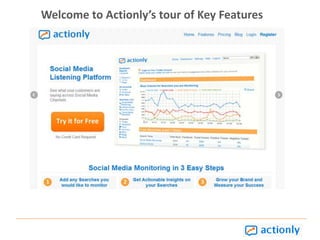
Welcome to Actionly’s tour of Key Features
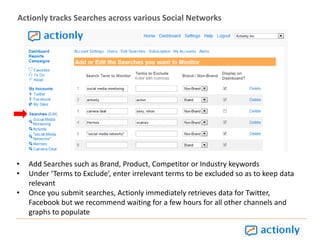
Actionly tracks Searches across various Social NetworksAdd Searches such as Brand, Product, Competitor or Industry keywords
Under ‘Terms to Exclude’, enter irrelevant terms to be excluded so as to keep data relevant
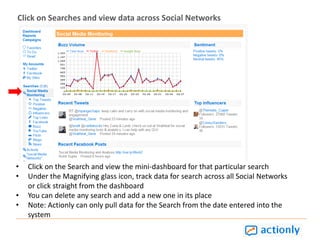
Once you submit searches, Actionly immediately retrieves data for Twitter, Facebook but we recommend waiting for a few hours for all other channels and graphs to populate Click on Searches and view data across Social NetworksClick on the Search and view the mini-dashboard for that particular search
Under the Magnifying glass icon, track data for search across all Social Networks or click straight from the dashboard
You can delete any search and add a new one in its place
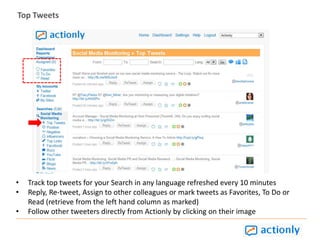
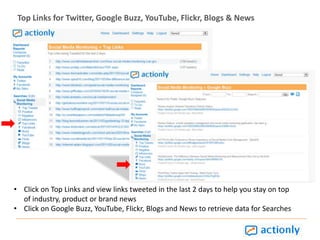
Note: Actionly can only pull data for the Search from the date entered into the systemTop TweetsTrack top tweets for your Search in any language refreshed every 10 minutes
Reply, Re-tweet, Assign to other colleagues or mark tweets as Favorites, To Do or Read (retrieve from the left hand column as marked)
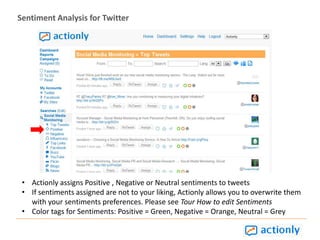
Follow other tweeters directly from Actionly by clicking on their imageSentiment Analysis for TwitterActionly assigns Positive , Negative or Neutral sentiments to tweets
If sentiments assigned are not to your liking, Actionly allows you to overwrite them with your sentiments preferences. Please see Tour How to edit Sentiments
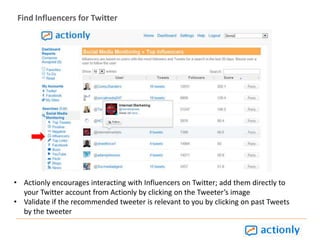
Color tags for Sentiments: Positive = Green, Negative = Orange, Neutral = GreyFind Influencers for TwitterActionly encourages interacting with Influencers on Twitter; add them directly to your Twitter account from Actionly by clicking on the Tweeter’s image
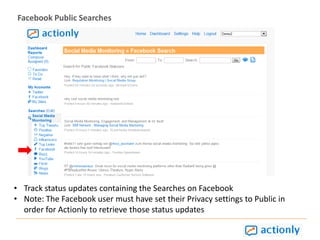
Validate if the recommended tweeter is relevant to you by clicking on past Tweets by the tweeterFacebook Public SearchesTrack status updates containing the Searches on Facebook
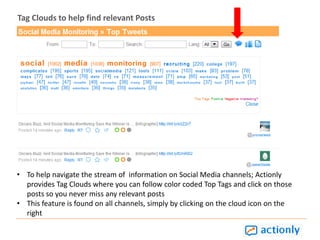
Note: The Facebook user must have set their Privacy settings to Public in order for Actionly to retrieve those status updatesTag Clouds to help find relevant PostsTo help navigate the stream of  information on Social Media channels; Actionly provides Tag Clouds where you can follow color coded Top Tags and click on those posts so you never miss any relevant posts
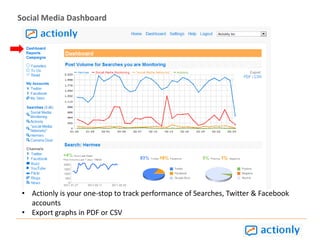
This feature is found on all channels, simply by clicking on the cloud icon on the rightSocial Media DashboardActionly is your one-stop to track performance of Searches, Twitter & Facebook accounts
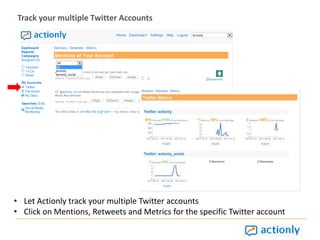
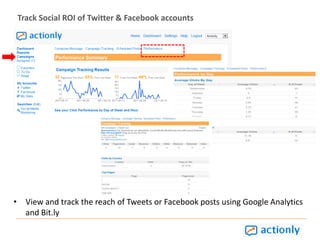
Export graphs in PDF or CSVTrack your multiple Twitter AccountsLet Actionly track your multiple Twitter accounts
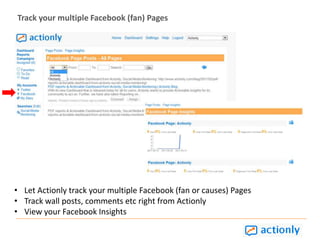
Click on Mentions, Retweets and Metrics for the specific Twitter accountTrack your multiple Facebook (fan) PagesLet Actionly track your multiple Facebook (fan or causes) Pages
Track wall posts, comments etc right from Actionly
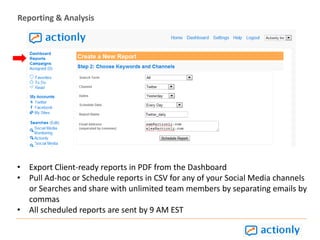
View your Facebook InsightsReporting & AnalysisExport Client-ready reports in PDF from the Dashboard

Actionly Feature Tour

  • 1.
    Welcome to Actionly’stour of Key Features
  • 2.
    Actionly tracks Searchesacross various Social NetworksAdd Searches such as Brand, Product, Competitor or Industry keywords
  • 3.
    Under ‘Terms toExclude’, enter irrelevant terms to be excluded so as to keep data relevant
  • 4.
    Once you submitsearches, Actionly immediately retrieves data for Twitter, Facebook but we recommend waiting for a few hours for all other channels and graphs to populate Click on Searches and view data across Social NetworksClick on the Search and view the mini-dashboard for that particular search
  • 5.
    Under the Magnifyingglass icon, track data for search across all Social Networks or click straight from the dashboard
  • 6.
    You can deleteany search and add a new one in its place
  • 7.
    Note: Actionly canonly pull data for the Search from the date entered into the systemTop TweetsTrack top tweets for your Search in any language refreshed every 10 minutes
  • 8.
    Reply, Re-tweet, Assignto other colleagues or mark tweets as Favorites, To Do or Read (retrieve from the left hand column as marked)
  • 9.
    Follow other tweetersdirectly from Actionly by clicking on their imageSentiment Analysis for TwitterActionly assigns Positive , Negative or Neutral sentiments to tweets
  • 10.
    If sentiments assignedare not to your liking, Actionly allows you to overwrite them with your sentiments preferences. Please see Tour How to edit Sentiments
  • 11.
    Color tags forSentiments: Positive = Green, Negative = Orange, Neutral = GreyFind Influencers for TwitterActionly encourages interacting with Influencers on Twitter; add them directly to your Twitter account from Actionly by clicking on the Tweeter’s image
  • 12.
    Validate if therecommended tweeter is relevant to you by clicking on past Tweets by the tweeterFacebook Public SearchesTrack status updates containing the Searches on Facebook
  • 13.
    Note: The Facebookuser must have set their Privacy settings to Public in order for Actionly to retrieve those status updatesTag Clouds to help find relevant PostsTo help navigate the stream of information on Social Media channels; Actionly provides Tag Clouds where you can follow color coded Top Tags and click on those posts so you never miss any relevant posts
  • 14.
    This feature isfound on all channels, simply by clicking on the cloud icon on the rightSocial Media DashboardActionly is your one-stop to track performance of Searches, Twitter & Facebook accounts
  • 15.
    Export graphs inPDF or CSVTrack your multiple Twitter AccountsLet Actionly track your multiple Twitter accounts
  • 16.
    Click on Mentions,Retweets and Metrics for the specific Twitter accountTrack your multiple Facebook (fan) PagesLet Actionly track your multiple Facebook (fan or causes) Pages
  • 17.
    Track wall posts,comments etc right from Actionly
  • 18.
    View your FacebookInsightsReporting & AnalysisExport Client-ready reports in PDF from the Dashboard