



Introduction to OOPs(In java)
Presented By : Govind Singh
Roll No: 1441910036
Introduction to OOPs
Object oriented programming is a problem
solving methodology based on
object and classes.
Object:
Object is the real world entity.
Class:
Class is the blue print of an object.
Features of OOPs:
 Data Hiding
 Abstraction
 Encapsulation
 Tightly Encapsulated Class
 Is-A Relationship
 Has-A Relationship
 Method Signature
 Method Overloading
 Method Overriding
 Constructors
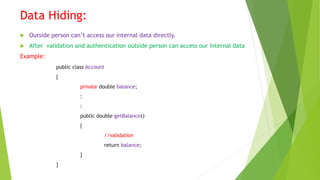
Data Hiding:
 Outside person can’t access our internal data directly.
 After validation and authentication outside person can access our internal data
Example:
public class Account
{
private double balance;
:
:
public double getBalance()
{
//validation
return balance;
}
}
Abstraction
 Show functionality hide complexity
Mini Statement Cash Withdraw
Change PIN Balance Enquiry
Change Mobile NumberOther
ATM GUI SCREEN
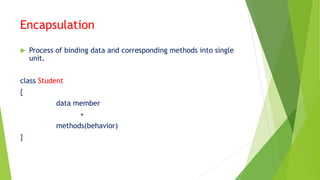
Encapsulation
 Process of binding data and corresponding methods into single
unit.
class Student
{
data member
+
methods(behavior)
}
Tightly Encapsulated Class
 Each and every variable declared as private
public class Account
{
private double balance;
public double getBalance();
{
return balance;
}
}
Is-A Relationship(Inheritance)
 One object acquire the properties of another object.
 By using “extends” keyword we can implement Is-A relationship.
 The main advantage is reusability of code.
E.g.
class Parent
{
public void m1()
{
System.out.println (“Parent”);
}
}
class Child extends Parent
{
public void m2()
{
System.out.println(“Child”);
}
}
class Test
{
public static void main(String args[])
{
case 1:
Parent p1=new Parent();
p1.m1();
p1.m2();
case 2:
Child c1=new Child();
c1.m1();
c1.m2();
case 3:
Parent p1=new Child();
p1.m1();
p1.m2();
case 4:
Child c1=new Parent();
}
}
C E: can’t find symbol
Symbol: method m2()
Location: class Parent
C E : incompatible types
Found: Parent
Required: Child
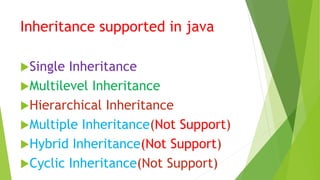
Inheritance supported in java
Single Inheritance
Multilevel Inheritance
Hierarchical Inheritance
Multiple Inheritance(Not Support)
Hybrid Inheritance(Not Support)
Cyclic Inheritance(Not Support)
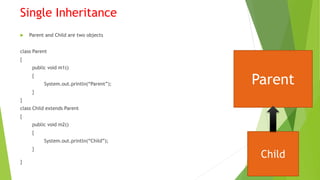
Single Inheritance
 Parent and Child are two objects
class Parent
{
public void m1()
{
System.out.println(“Parent”);
}
}
class Child extends Parent
{
public void m2()
{
System.out.println(“Child”);
}
}
Parent
Child
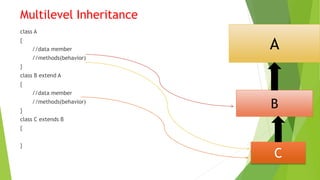
Multilevel Inheritance
class A
{
//data member
//methods(behavior)
}
class B extend A
{
//data member
//methods(behavior)
}
class C extends B
{
}
A
C
B
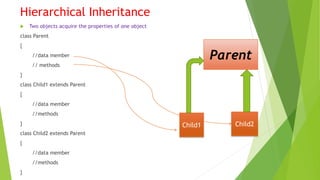
Hierarchical Inheritance
 Two objects acquire the properties of one object
class Parent
{
//data member
// methods
}
class Child1 extends Parent
{
//data member
//methods
}
class Child2 extends Parent
{
//data member
//methods
}
Parent
Child1 Child2
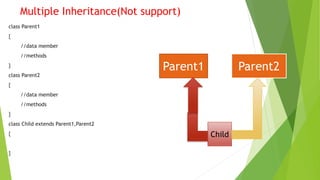
Multiple Inheritance(Not support)
class Parent1
{
//data member
//methods
}
class Parent2
{
//data member
//methods
}
class Child extends Parent1,Parent2
{
}
Parent1 Parent2
Child
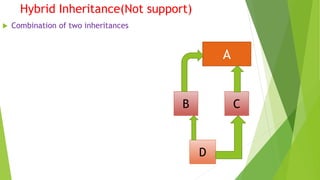
Hybrid Inheritance(Not support)
 Combination of two inheritances
A
B C
D
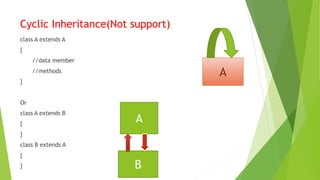
Cyclic Inheritance(Not support)
class A extends A
{
//data member
//methods
}
Or
class A extends B
{
}
class B extends A
{
}
A
A
B
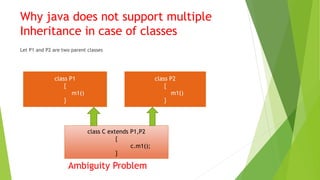
Why java does not support multiple
Inheritance in case of classes
Let P1 and P2 are two parent classes
Ambiguity Problem
class P1
{
m1()
}
class P2
{
m1()
}
class C extends P1,P2
{
c.m1();
}
Has-A Relationship(Inheritance)
 Also known as composition or aggregation
 Implement using new operator
 Main advantage is reusability of code
e.g.
class Engine
{
public void m1()
{
System.out.println(“2 horse power”);
}
}
class Car
{
public static void main(String args[])
{
Engine e=new Engine();
e.m1();
}
}
C:>javac Car.java
C:>java car
2 horse power
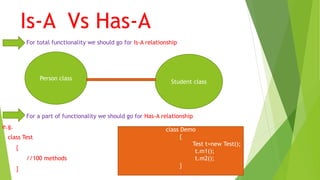
Is-A Vs Has-A
For total functionality we should go for Is-A relationship
For a part of functionality we should go for Has-A relationship
e.g.
class Test
{
//100 methods
}
Person class
Student class
class Demo
{
Test t=new Test();
t.m1();
t.m2();
}
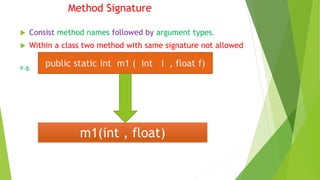
Method Signature
 Consist method names followed by argument types.
 Within a class two method with same signature not allowed
e.g.
public static int m1 ( int i , float f)
m1(int , float)
Program:
class Signature
{
public void m1(int x)
{
}
public void m2(String s)
{
}
public static void main(String ags[])
{
Signature obj=new Signature();
obj.m1(10);
obj.m2(“Govind”);
obj.m3(10.5);
}
}
C E: can’t find symbol
Symbol : method m3(float)
Location : class Signature
Method Overloading(Polymorphism)
 Two methods having same name with different argument type.
e.g.
class Test
{
public void m1()
{
System.out.println(“no-arg”);
}
• public void m1(int i)
{
System.out.println(“int-args”);
}
public static void main(String args[])
{
Test t=new Test();
t.m1();
t.m1(10);
}
}
no-arg
int-arg
 Resolution always takes care by compiler
based on reference type
 Hence it is also known as compile time
polymorphism or static polymorphism or
early binding
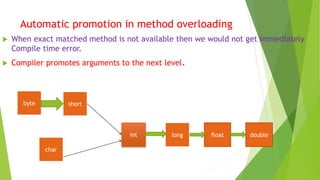
Automatic promotion in method overloading
 When exact matched method is not available then we would not get immediately
Compile time error.
 Compiler promotes arguments to the next level.
byte short
long floatint
char
double
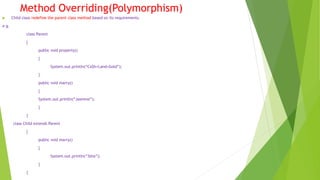
Method Overriding(Polymorphism)
 Child class redefine the parent class method based on its requirements.
e.g.
class Parent
{
public void property()
{
System.out.println(“Ca$h+Land+Gold”);
}
public void marry()
{
System.out.println(“Jasmine”);
}
}
class Child extends Parent
{
public void marry()
{
System.out.println(“3sha”);
}
}
class Test
{
public static void main(String args[])
{
case 1:
Parent p=new P();
p.marry();
case 2:
Child c=new Child();
c.marry();
case 3:
Parent p1=new Child();
p1.marry();
}
}
jasmine
3sha
3sha
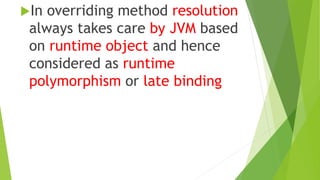
In overriding method resolution
always takes care by JVM based
on runtime object and hence
considered as runtime
polymorphism or late binding
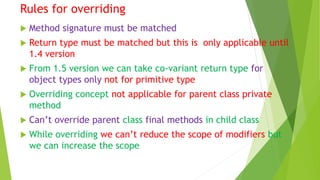
Rules for overriding
 Method signature must be matched
 Return type must be matched but this is only applicable until
1.4 version
 From 1.5 version we can take co-variant return type for
object types only not for primitive type
 Overriding concept not applicable for parent class private
method
 Can’t override parent class final methods in child class
 While overriding we can’t reduce the scope of modifiers but
we can increase the scope
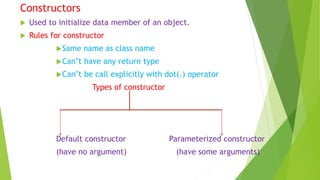
Constructors
 Used to initialize data member of an object.
 Rules for constructor
Same name as class name
Can’t have any return type
Can’t be call explicitly with dot(.) operator
Types of constructor
Default constructor Parameterized constructor
(have no argument) (have some arguments)
Default constructor
 Syntax :
<class _ name> ()
{
}
e.g. class Bike
{
Bike()
{
System.out.println("Bike is created");
}
public static void main(String args[])
{
Bike1 b=new Bike1();
}
}
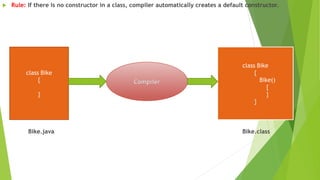
 Rule: If there is no constructor in a class, compiler automatically creates a default constructor.
Bike.java Bike.class
class Bike
{
}
Compiler
class Bike
{
Bike()
{
}
}
Example of default constructor that displays the default values
class Student
{
int id;
String name;
void display()
{
System.out.println(id+" "+name);
}
public static void main(String args[])
{
Student s1=new Student();
Student s2=new Student();
s1.display();
s2.display();
}
}
Output
0 null
0 null
Parameterized constructor
 Parameterized constructor is used to provide different values to the distinct objects.
class Student
{
int id;
String name;
Student(int i,String n)
{
id = i;
name = n;
}
void display()
{
System.out.println(id+" "+name);
}
public static void main(String args[])
{
Student s1 = new Student(111,“govind");
Student s2 = new Student(222,“maneesh");
s1.display();
s2.display();
}
}
Output
111 Govind
222 Manish
Thank you

Introduction to OOP(in java) BY Govind Singh

  • 1.
    Introduction to OOPs(Injava) Presented By : Govind Singh Roll No: 1441910036
  • 2.
    Introduction to OOPs Objectoriented programming is a problem solving methodology based on object and classes. Object: Object is the real world entity. Class: Class is the blue print of an object.
  • 3.
    Features of OOPs: Data Hiding  Abstraction  Encapsulation  Tightly Encapsulated Class  Is-A Relationship  Has-A Relationship  Method Signature  Method Overloading  Method Overriding  Constructors
  • 4.
    Data Hiding:  Outsideperson can’t access our internal data directly.  After validation and authentication outside person can access our internal data Example: public class Account { private double balance; : : public double getBalance() { //validation return balance; } }
  • 5.
    Abstraction  Show functionalityhide complexity Mini Statement Cash Withdraw Change PIN Balance Enquiry Change Mobile NumberOther ATM GUI SCREEN
  • 6.
    Encapsulation  Process ofbinding data and corresponding methods into single unit. class Student { data member + methods(behavior) }
  • 7.
    Tightly Encapsulated Class Each and every variable declared as private public class Account { private double balance; public double getBalance(); { return balance; } }
  • 8.
    Is-A Relationship(Inheritance)  Oneobject acquire the properties of another object.  By using “extends” keyword we can implement Is-A relationship.  The main advantage is reusability of code. E.g. class Parent { public void m1() { System.out.println (“Parent”); } } class Child extends Parent { public void m2() { System.out.println(“Child”); } }
  • 9.
    class Test { public staticvoid main(String args[]) { case 1: Parent p1=new Parent(); p1.m1(); p1.m2(); case 2: Child c1=new Child(); c1.m1(); c1.m2(); case 3: Parent p1=new Child(); p1.m1(); p1.m2(); case 4: Child c1=new Parent(); } } C E: can’t find symbol Symbol: method m2() Location: class Parent C E : incompatible types Found: Parent Required: Child
  • 10.
    Inheritance supported injava Single Inheritance Multilevel Inheritance Hierarchical Inheritance Multiple Inheritance(Not Support) Hybrid Inheritance(Not Support) Cyclic Inheritance(Not Support)
  • 11.
    Single Inheritance  Parentand Child are two objects class Parent { public void m1() { System.out.println(“Parent”); } } class Child extends Parent { public void m2() { System.out.println(“Child”); } } Parent Child
  • 12.
    Multilevel Inheritance class A { //datamember //methods(behavior) } class B extend A { //data member //methods(behavior) } class C extends B { } A C B
  • 13.
    Hierarchical Inheritance  Twoobjects acquire the properties of one object class Parent { //data member // methods } class Child1 extends Parent { //data member //methods } class Child2 extends Parent { //data member //methods } Parent Child1 Child2
  • 14.
    Multiple Inheritance(Not support) classParent1 { //data member //methods } class Parent2 { //data member //methods } class Child extends Parent1,Parent2 { } Parent1 Parent2 Child
  • 15.
    Hybrid Inheritance(Not support) Combination of two inheritances A B C D
  • 16.
    Cyclic Inheritance(Not support) classA extends A { //data member //methods } Or class A extends B { } class B extends A { } A A B
  • 17.
    Why java doesnot support multiple Inheritance in case of classes Let P1 and P2 are two parent classes Ambiguity Problem class P1 { m1() } class P2 { m1() } class C extends P1,P2 { c.m1(); }
  • 18.
    Has-A Relationship(Inheritance)  Alsoknown as composition or aggregation  Implement using new operator  Main advantage is reusability of code e.g. class Engine { public void m1() { System.out.println(“2 horse power”); } } class Car { public static void main(String args[]) { Engine e=new Engine(); e.m1(); } } C:>javac Car.java C:>java car 2 horse power
  • 19.
    Is-A Vs Has-A Fortotal functionality we should go for Is-A relationship For a part of functionality we should go for Has-A relationship e.g. class Test { //100 methods } Person class Student class class Demo { Test t=new Test(); t.m1(); t.m2(); }
  • 20.
    Method Signature  Consistmethod names followed by argument types.  Within a class two method with same signature not allowed e.g. public static int m1 ( int i , float f) m1(int , float)
  • 21.
    Program: class Signature { public voidm1(int x) { } public void m2(String s) { } public static void main(String ags[]) { Signature obj=new Signature(); obj.m1(10); obj.m2(“Govind”); obj.m3(10.5); } } C E: can’t find symbol Symbol : method m3(float) Location : class Signature
  • 22.
    Method Overloading(Polymorphism)  Twomethods having same name with different argument type. e.g. class Test { public void m1() { System.out.println(“no-arg”); } • public void m1(int i) { System.out.println(“int-args”); } public static void main(String args[]) { Test t=new Test(); t.m1(); t.m1(10); } } no-arg int-arg
  • 23.
     Resolution alwaystakes care by compiler based on reference type  Hence it is also known as compile time polymorphism or static polymorphism or early binding
  • 24.
    Automatic promotion inmethod overloading  When exact matched method is not available then we would not get immediately Compile time error.  Compiler promotes arguments to the next level. byte short long floatint char double
  • 25.
    Method Overriding(Polymorphism)  Childclass redefine the parent class method based on its requirements. e.g. class Parent { public void property() { System.out.println(“Ca$h+Land+Gold”); } public void marry() { System.out.println(“Jasmine”); } } class Child extends Parent { public void marry() { System.out.println(“3sha”); } }
  • 26.
    class Test { public staticvoid main(String args[]) { case 1: Parent p=new P(); p.marry(); case 2: Child c=new Child(); c.marry(); case 3: Parent p1=new Child(); p1.marry(); } } jasmine 3sha 3sha
  • 27.
    In overriding methodresolution always takes care by JVM based on runtime object and hence considered as runtime polymorphism or late binding
  • 28.
    Rules for overriding Method signature must be matched  Return type must be matched but this is only applicable until 1.4 version  From 1.5 version we can take co-variant return type for object types only not for primitive type  Overriding concept not applicable for parent class private method  Can’t override parent class final methods in child class  While overriding we can’t reduce the scope of modifiers but we can increase the scope
  • 29.
    Constructors  Used toinitialize data member of an object.  Rules for constructor Same name as class name Can’t have any return type Can’t be call explicitly with dot(.) operator Types of constructor Default constructor Parameterized constructor (have no argument) (have some arguments)
  • 30.
    Default constructor  Syntax: <class _ name> () { } e.g. class Bike { Bike() { System.out.println("Bike is created"); } public static void main(String args[]) { Bike1 b=new Bike1(); } }
  • 31.
     Rule: Ifthere is no constructor in a class, compiler automatically creates a default constructor. Bike.java Bike.class class Bike { } Compiler class Bike { Bike() { } }
  • 32.
    Example of defaultconstructor that displays the default values class Student { int id; String name; void display() { System.out.println(id+" "+name); } public static void main(String args[]) { Student s1=new Student(); Student s2=new Student(); s1.display(); s2.display(); } } Output 0 null 0 null
  • 33.
    Parameterized constructor  Parameterizedconstructor is used to provide different values to the distinct objects. class Student { int id; String name; Student(int i,String n) { id = i; name = n; } void display() { System.out.println(id+" "+name); } public static void main(String args[]) { Student s1 = new Student(111,“govind"); Student s2 = new Student(222,“maneesh"); s1.display(); s2.display(); } } Output 111 Govind 222 Manish
  • 34.