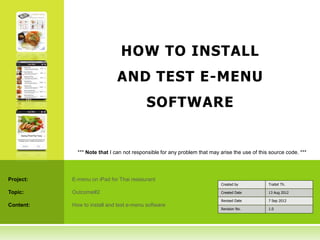
HOW TO INSTALL
                              AND TEST E-MENU
                                          SOFTWARE


             *** Note that I can not responsible for any problem that may arise the use of this source code. ***


Project:   E-menu on iPad for Thai restaurant
                                                                           Created by          Traitet Th.

Topic:     Outcome#2                                                       Created Date        13 Aug 2012

                                                                           Revised Date        7 Sep 2012
Content:   How to install and test e-menu software
                                                                           Revision No.        1.0
2        OBJECTIVES OF THIS DOCUMENT


    1.   To explain general information about
         source code.

    2.   To explain briefly how to install and test
         application.
3             PRESENTATION ON YOUTUBE


       Video presentation of e-menu on iPad for restaurant
        customer:

            http://www.youtube.com/watch?v=th5YlsYrHuY


            http://www.youtube.com/watch?v=bCsFiMHuG80


       Video presentation of e-menu on Website for restaurant staff:

            http://www.youtube.com/watch?v=HSqTJ5acxzw


       Video presentation of innovative e-menu and its benefits:

            http://www.youtube.com/watch?v=-cBTICTa7bE
1. XCODE FOR IPAD APP


            4
5                                                           1. XCODE

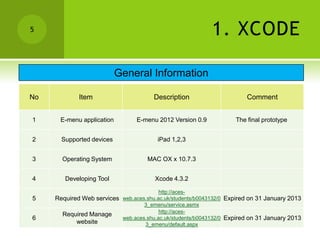
                           General Information

No           Item                      Description                      Comment


1     E-menu application         E-menu 2012 Version 0.9            The final prototype


2      Supported devices                 iPad 1,2,3


3      Operating System              MAC OX x 10.7.3


4       Developing Tool                 Xcode 4.3.2

                                         http://aces-
5    Required Web services web.aces.shu.ac.uk/students/b0043132/0 Expired on 31 January 2013
                                   3_emenu/service.asmx
                                         http://aces-
       Required Manage
6                          web.aces.shu.ac.uk/students/b0043132/0 Expired on 31 January 2013
            website                3_emenu/default.aspx
6                                                                      1. XCODE
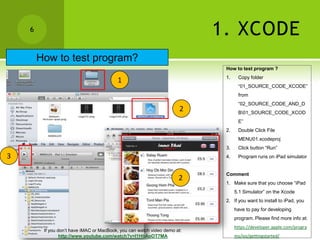
        How to test program?
                                                                            How to test program ?
                                                                            1.    Copy folder
                                          1
                                                                                  “01_SOURCE_CODE_XCODE”
                                                                                  from
                                                                                  “02_SOURCE_CODE_AND_D
                                                                       2          B01_SOURCE_CODE_XCOD
                                                                                  E”
                                                                            2.    Double Click File
                                                                                  MENU01.xcodeproj
                                                                            3.    Click button “Run”
3                                                                           4.    Program runs on iPad simulator


                                                                            Comment
                                                                      2
                                                                            1. Make sure that you choose “iPad
                                                                                 5.1 Simulator” on the Xcode
                                                                            2. If you want to install to iPad, you
                                                                                 have to pay for developing
                                                                                 program. Please find more info at:
                                                                                 https://developer.apple.com/progra
         If you don’t have iMAC or MacBook, you can watch video demo at:
                 http://www.youtube.com/watch?v=I1HbAoOT7MA                      ms/ios/gettingstarted/
2. E-MENU WEBSITE (.NET)


            7
8                         2.1 E-MENU WEBSITE (.NET)


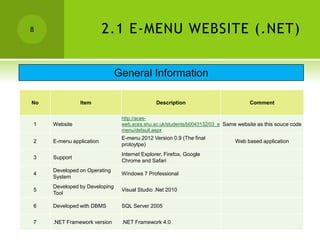
                               General Information

No             Item                            Description                          Comment

                                http://aces-
1    Website                    web.aces.shu.ac.uk/students/b0043132/03_e Same website as this souce code
                                menu/default.aspx
                                E-menu 2012 Version 0.9 (The final
2    E-menu application                                                       Web based application
                                protoytpe)
                                Internet Explorer, Firefox, Google
3    Support
                                Chrome and Safari
     Developed on Operating
4                               Windows 7 Professional
     System
     Developed by Developing
5                               Visual Studio .Net 2010
     Tool

6    Developed with DBMS        SQL Server 2005


7    .NET Framework version     .NET Framework 4.0
9                           2.2 E-MENU WEBSITE (.NET)
                             How to install e-menu website?
                                                 Install Website
                                                                                     http://technet.microsoft.com/en-
    1       Install IIS                 Find installation guide at:
                                                                                    us/library/cc725762.aspx

    2       Copy folder "03_EMENU" to   C:Inetpubwwwroot
                                        IIS, [your computer name], Sites, Default
            Convert "03_EMENU" to
    3                                   Web site, 03_EMENU, Right Click, Convert     See the left figure
            application
                                        to Application
                                                                                                            1

1                                       2                                       3
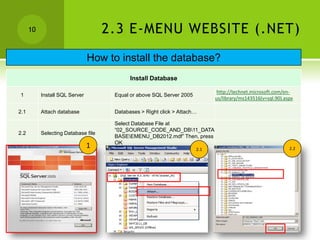
10                             2.3 E-MENU WEBSITE (.NET)
                                How to install the database?
                                            Install Database

                                                                              http://technet.microsoft.com/en-
1          Install SQL Server         Equal or above SQL Server 2005
                                                                             us/library/ms143516(v=sql.90).aspx

2.1        Attach database            Databases > Right click > Attach…

                                      Select Database File at
                                      “02_SOURCE_CODE_AND_DB11_DATA
2.2        Selecting Database file
                                      BASEEMENU_DB2012.mdf” Then, press
                                      OK
                                1                                      2.1                                   2.2
11                               2.4 E-MENU WEBSITE (.NET)
                        How to configure e-menu website?
            If database server is installed at different place as web server or it is installed not in your PC,
                                   You have to change configuration in .NET files as follow;
1        Open visual studio .net             At C:Inetpubwwwroot03_EMENU
                                                                                          <add name="cn" connectionString="Data
                                     Change configuration at line 8
         Change web.config file                                                           Source=.;Initial
                                     Source: [Database Server Name]
                                                                                          Catalog=EMENU_DB2012;User
2                                    Catalog: Database Name
         In                                                                               ID=emenu;Password=emenu"
                                     ID: Database user
         C:Inetpubwwwroot03_EMENU                                                      providerName="System.Data.SqlClient"/
                                     Password: Database Password
                                                                                          >
                                             Change
3        Change resource.resx file
                                             "App_GlobalResource/Resource.resx"


                                    1

                                                             2


                                                             3
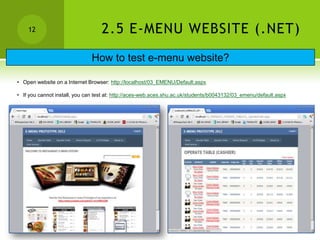
12                             2.5 E-MENU WEBSITE (.NET)
                               How to test e-menu website?

• Open website on a Internet Browser: http://localhost/03_EMENU/Default.aspx

• If you cannot install, you can test at: http://aces-web.aces.shu.ac.uk/students/b0043132/03_emenu/default.aspx

00 how to_test_app

  • 1.
    HOW TO INSTALL AND TEST E-MENU SOFTWARE *** Note that I can not responsible for any problem that may arise the use of this source code. *** Project: E-menu on iPad for Thai restaurant Created by Traitet Th. Topic: Outcome#2 Created Date 13 Aug 2012 Revised Date 7 Sep 2012 Content: How to install and test e-menu software Revision No. 1.0
  • 2.
    2 OBJECTIVES OF THIS DOCUMENT 1. To explain general information about source code. 2. To explain briefly how to install and test application.
  • 3.
    3 PRESENTATION ON YOUTUBE  Video presentation of e-menu on iPad for restaurant customer:  http://www.youtube.com/watch?v=th5YlsYrHuY  http://www.youtube.com/watch?v=bCsFiMHuG80  Video presentation of e-menu on Website for restaurant staff:  http://www.youtube.com/watch?v=HSqTJ5acxzw  Video presentation of innovative e-menu and its benefits:  http://www.youtube.com/watch?v=-cBTICTa7bE
  • 4.
    1. XCODE FORIPAD APP 4
  • 5.
    5 1. XCODE General Information No Item Description Comment 1 E-menu application E-menu 2012 Version 0.9 The final prototype 2 Supported devices iPad 1,2,3 3 Operating System MAC OX x 10.7.3 4 Developing Tool Xcode 4.3.2 http://aces- 5 Required Web services web.aces.shu.ac.uk/students/b0043132/0 Expired on 31 January 2013 3_emenu/service.asmx http://aces- Required Manage 6 web.aces.shu.ac.uk/students/b0043132/0 Expired on 31 January 2013 website 3_emenu/default.aspx
  • 6.
    6 1. XCODE How to test program? How to test program ? 1. Copy folder 1 “01_SOURCE_CODE_XCODE” from “02_SOURCE_CODE_AND_D 2 B01_SOURCE_CODE_XCOD E” 2. Double Click File MENU01.xcodeproj 3. Click button “Run” 3 4. Program runs on iPad simulator Comment 2 1. Make sure that you choose “iPad 5.1 Simulator” on the Xcode 2. If you want to install to iPad, you have to pay for developing program. Please find more info at: https://developer.apple.com/progra If you don’t have iMAC or MacBook, you can watch video demo at: http://www.youtube.com/watch?v=I1HbAoOT7MA ms/ios/gettingstarted/
  • 7.
  • 8.
    8 2.1 E-MENU WEBSITE (.NET) General Information No Item Description Comment http://aces- 1 Website web.aces.shu.ac.uk/students/b0043132/03_e Same website as this souce code menu/default.aspx E-menu 2012 Version 0.9 (The final 2 E-menu application Web based application protoytpe) Internet Explorer, Firefox, Google 3 Support Chrome and Safari Developed on Operating 4 Windows 7 Professional System Developed by Developing 5 Visual Studio .Net 2010 Tool 6 Developed with DBMS SQL Server 2005 7 .NET Framework version .NET Framework 4.0
  • 9.
    9 2.2 E-MENU WEBSITE (.NET) How to install e-menu website? Install Website http://technet.microsoft.com/en- 1 Install IIS Find installation guide at: us/library/cc725762.aspx 2 Copy folder "03_EMENU" to C:Inetpubwwwroot IIS, [your computer name], Sites, Default Convert "03_EMENU" to 3 Web site, 03_EMENU, Right Click, Convert See the left figure application to Application 1 1 2 3
  • 10.
    10 2.3 E-MENU WEBSITE (.NET) How to install the database? Install Database http://technet.microsoft.com/en- 1 Install SQL Server Equal or above SQL Server 2005 us/library/ms143516(v=sql.90).aspx 2.1 Attach database Databases > Right click > Attach… Select Database File at “02_SOURCE_CODE_AND_DB11_DATA 2.2 Selecting Database file BASEEMENU_DB2012.mdf” Then, press OK 1 2.1 2.2
  • 11.
    11 2.4 E-MENU WEBSITE (.NET) How to configure e-menu website? If database server is installed at different place as web server or it is installed not in your PC, You have to change configuration in .NET files as follow; 1 Open visual studio .net At C:Inetpubwwwroot03_EMENU <add name="cn" connectionString="Data Change configuration at line 8 Change web.config file Source=.;Initial Source: [Database Server Name] Catalog=EMENU_DB2012;User 2 Catalog: Database Name In ID=emenu;Password=emenu" ID: Database user C:Inetpubwwwroot03_EMENU providerName="System.Data.SqlClient"/ Password: Database Password > Change 3 Change resource.resx file "App_GlobalResource/Resource.resx" 1 2 3
  • 12.
    12 2.5 E-MENU WEBSITE (.NET) How to test e-menu website? • Open website on a Internet Browser: http://localhost/03_EMENU/Default.aspx • If you cannot install, you can test at: http://aces-web.aces.shu.ac.uk/students/b0043132/03_emenu/default.aspx

Editor's Notes

  • #5 Xcode is a development tool for iOS devices. It use Objective-C language.It normally implement based on Cocoa framework.It includes iPad simulator.
  • #6 Xcode is a development tool for development of apple applications.The website will be unavailable because the university have gave permission to use a database and web server until 31 January 2013.
  • #10 IIS is prerequisite software.
  • #13 You can find a video presentation of e-menu on iPad at;http://www.youtube.com/watch?v=th5YlsYrHuYhttp://www.youtube.com/watch?v=bCsFiMHuG80You can find a video presentation of e-menu on Website at;http://www.youtube.com/watch?v=HSqTJ5acxzw