Building a  Professional Learning Network (PLN) By: Torrey Trust
New Age Teaching & Learning In the information age, students must learn to navigate and evaluate an expanding network of information.  Highly effective teachers model this process of information analysis and knowledge acquisition by continually learning through collaboration, professional development, and studying pedagogical techniques and best practices.
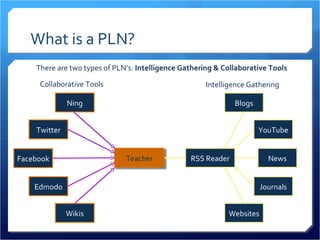
What is a PLN? A Professional Learning Network (PLN) is a flexible, teacher-driven activity space that facilitates personalized professional development. PLN’s connect teachers to other individuals worldwide who can offer support, advice, feedback, and collaboration opportunities.  PLN’s allow teachers to collect information from various websites and access it in one organized area so they can stay up-to-date on the latest teaching techniques, pedagogies, and changes in the field of education.
What is a PLN? RSS Reader Journals Websites YouTube Blogs News Edmodo Wikis Twitter Ning Facebook Collaborative Tools Intelligence Gathering There are two types of PLN’s:  Intelligence Gathering & Collaborative Tools Teacher
Benefits of PLN’s Flexible  Teachers can learn on their own time from home. PLN’s shape and grow with the individuals that are part of the network.  Personalized Teachers can choose which sites to add to their RSS reader and which groups and social networking sites to join based on their personal interests and areas identified for professional growth.  Practical Learning is practical (not a one-size-fits-all workshop).
Benefits of PLN’s Real-Time Solutions Teachers can learn from others and implement solutions immediately. Instant Access Access to new information, thousands of experts, feedback, support, ideas, partnerships, etc
 Expertise Everyone can be an expert. Teachers can share wisdom and receive help. Everyone is part of someone else’s network so all teachers are responsible for the growth of the entire network.
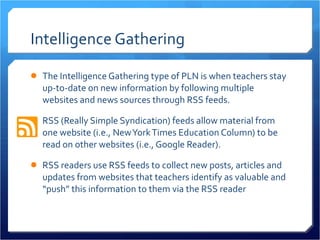
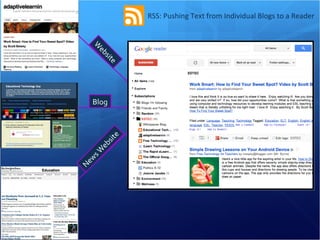
Intelligence Gathering The Intelligence Gathering type of PLN is when teachers stay up-to-date on new information by following multiple websites and news sources through RSS feeds.  RSS (Really Simple Syndication) feeds allow material from one website (i.e., New York Times Education Column) to be read on other websites (i.e., Google Reader).  RSS readers use RSS feeds to collect new posts, articles and updates from websites that teachers identify as valuable and “push” this information to them via the RSS reader
RSS: Pushing Text from Individual Blogs to a Reader Blog News Website Website
Intelligence Gathering RSS readers save teachers time since they no longer have to visit each individual website and check for updates.  Teachers can rapidly skim through hundreds of articles in RSS readers and click on the ones that are most interesting or useful to visit the website where the post originated and read the entire text.
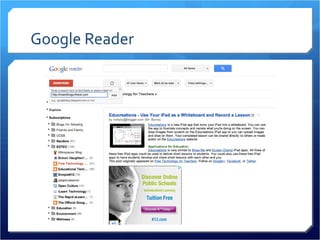
Information Gathering Tools Google Reader ( http://www.google.com/reader ) Bloglines ( http://www.bloglines.com/ ) FeedDemon ( http://www.feeddemon.com/ ) My Yahoo! ( http://my.yahoo.com/ )  Comparison of RSS Readers:  http://en.wikipedia.org/wiki/Comparison_of_feed_aggregators
Google Reader
Intelligence Gathering Another form of information aggregation is email subscriptions.  Many websites include a “Follow Me” or “Subscribe” widget that allows viewers to input their email address and receive emails anytime there is a new post or update on the website or blog.  This turns the email inbox into a RSS reader and allows teachers to gather information in their email instead of visiting a RSS reader website.
Education Sites to Follow Accomplished Teacher SmartBrief Daily Newsletter:  http://www.smartbrief.com/nbpts/index.jsp?campaign=hpselect For the Love of Learning:  http://www.joebower.org/ Larry Ferlazzo’s Websites of the Day:  http://larryferlazzo.edublogs.org/ EduBlog Awards: Top Individual Blog List  http://edublogawards.com/2011-3/best-individual-blog-2011/
EDTEC Sites to Follow SmartBrief on EdTech Daily Newsletter:  https://www.smartbrief.com/edtech/index.jsp FreeTech4Teachers:  http://www.freetech4teachers.com/   Educational Technology Guy:  http://educationaltechnologyguy.blogspot.com/   Simon Haughton’s Blog:  http://www.simonhaughton.co.uk/ Simple K-12:  http://blog.simplek12.com/
Collaborative Tools The collaborative tools type of PLN is when teachers use social media tools to connect with various individuals around the world.  These social media tools include: Social networking sites (Facebook, Twitter) Affinity-based group sites (Ning, Wikispaces) Real-time interaction tools (online chat rooms, instant messaging, Skype, Second Life).
Collaborative Tools While, Ning, Facebook, and Twitter have real-time interaction capabilities, teachers generally use these sites for  asynchronous learning  where they post a question to a community discussion board or send a message to another individual and check back at a later time to find a response.  These sites are less demanding on the teacher’s time because they can write or respond to posts whenever they have free time in their schedule.  These sites also provide a space for  collective knowledge  where teachers can find support from large groups of individuals that pool their answers to find the best solution to a problem.
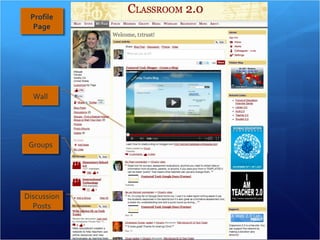
Discussion Posts Groups Profile Page Wall
Collaborative Tools Real-time interaction tools allow teachers to have conversations with others worldwide to receive feedback on new ideas, discuss lesson plans, ask for support, solve problems, and collaborate.  Teachers can video chat through Skype, text chat with instant messaging tools, and even create an avatar and talk with someone in real-time through the virtual world Second Life.  Real-time interaction tools are useful for building relationships and seeking one-on-one support, such as mentoring.
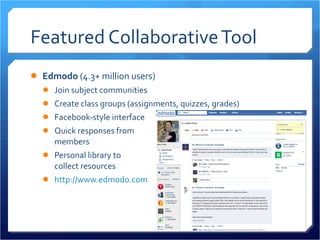
Featured Collaborative Tool Edmodo  (4.3+ million users) Join subject communities Create class groups (assignments, quizzes, grades) Facebook-style interface Quick responses from  members Personal library to  collect resources http://www.edmodo.com
Featured Collaborative Tool Classroom 2.0  (60,000+ members) Instantly chat with other individuals on the website Classroom 2.0 LIVE weekly webcast Join special-interest groups Upload photos/videos Add RSS feeds to your profile page Write blog posts & create your own blog http://www.classroom20.com
Featured Collaborative Tool The Educator’s PLN  (10,000+ members) Instantly chat with other individuals on the website Add & RSVP to events Join special-interest groups Listen to education podcasts Add RSS feeds to your profile page Write blog posts & create your own blog http://edupln.ning.com/
Featured Collaborative Tool Twitter Follow educators, experts, policymakers Share your own links and resources Join education conversations (see next slide) Share ideas, ask for help, receive feedback from followers Connect with educators around the world http://www.twitter.com
Twitter Hashtags Join education conversations: #edchat:  Over 400 teachers get together every Tuesday at Noon EST or at 6PM EST to chat about a variety of pre-determined topics. #Scichat, #mathchat, #engchat:  Talk with teachers who teach your core subject area (times vary) #1stchat, #2ndchat, #3rdchat, etc.:  Talk with teachers who teach your grade level #edtech:  Chat about all things new in educational technology  Visit the  WeAreTeachers blog  to learn how to get involved with twitter chats about education View more education hashtags here:  http://teacherstraining.com.au/how-teachers-can-use-twitter-to-maximise-their-professional-learning/
PLN Overload Typically a teacher will develop both types of PLN’s; however, it can be overwhelming to sorting through all of the information, figuring out the social norms for the activity spaces, and learning to use the new tools.  It is recommended that teachers start with one tool (i.e., Google Reader or Ning) and then gradually build their PLN as they become more comfortable accessing information and navigating the online activity spaces.
PLN Survival Tips Intelligence Gathering Start by identifying 2-3 information sources to follow (including email subscriptions) Set a reminder on your calendar to visit your RSS reader weekly Collaborative Tools Try to connect with 1-2 individuals (via friend request or responding to discussion posts) Ask these individuals about how to make the most out of the activity space
Credits Presentation Designed by: Torrey Trust Ph.D. Student  Education: Teaching & Learning Gevirtz Graduate School of Education UC Santa Barbara K-12 Tech Tools Database  Founder

A Teacher's Guide to Building a Professional Learning Network (PLN)

  • 1.
    Building a Professional Learning Network (PLN) By: Torrey Trust
  • 2.
    New Age Teaching& Learning In the information age, students must learn to navigate and evaluate an expanding network of information. Highly effective teachers model this process of information analysis and knowledge acquisition by continually learning through collaboration, professional development, and studying pedagogical techniques and best practices.
  • 3.
    What is aPLN? A Professional Learning Network (PLN) is a flexible, teacher-driven activity space that facilitates personalized professional development. PLN’s connect teachers to other individuals worldwide who can offer support, advice, feedback, and collaboration opportunities. PLN’s allow teachers to collect information from various websites and access it in one organized area so they can stay up-to-date on the latest teaching techniques, pedagogies, and changes in the field of education.
  • 4.
    What is aPLN? RSS Reader Journals Websites YouTube Blogs News Edmodo Wikis Twitter Ning Facebook Collaborative Tools Intelligence Gathering There are two types of PLN’s: Intelligence Gathering & Collaborative Tools Teacher
  • 5.
    Benefits of PLN’sFlexible Teachers can learn on their own time from home. PLN’s shape and grow with the individuals that are part of the network. Personalized Teachers can choose which sites to add to their RSS reader and which groups and social networking sites to join based on their personal interests and areas identified for professional growth. Practical Learning is practical (not a one-size-fits-all workshop).
  • 6.
    Benefits of PLN’sReal-Time Solutions Teachers can learn from others and implement solutions immediately. Instant Access Access to new information, thousands of experts, feedback, support, ideas, partnerships, etc
 Expertise Everyone can be an expert. Teachers can share wisdom and receive help. Everyone is part of someone else’s network so all teachers are responsible for the growth of the entire network.
  • 7.
    Intelligence Gathering TheIntelligence Gathering type of PLN is when teachers stay up-to-date on new information by following multiple websites and news sources through RSS feeds. RSS (Really Simple Syndication) feeds allow material from one website (i.e., New York Times Education Column) to be read on other websites (i.e., Google Reader). RSS readers use RSS feeds to collect new posts, articles and updates from websites that teachers identify as valuable and “push” this information to them via the RSS reader
  • 8.
    RSS: Pushing Textfrom Individual Blogs to a Reader Blog News Website Website
  • 9.
    Intelligence Gathering RSSreaders save teachers time since they no longer have to visit each individual website and check for updates. Teachers can rapidly skim through hundreds of articles in RSS readers and click on the ones that are most interesting or useful to visit the website where the post originated and read the entire text.
  • 10.
    Information Gathering ToolsGoogle Reader ( http://www.google.com/reader ) Bloglines ( http://www.bloglines.com/ ) FeedDemon ( http://www.feeddemon.com/ ) My Yahoo! ( http://my.yahoo.com/ ) Comparison of RSS Readers: http://en.wikipedia.org/wiki/Comparison_of_feed_aggregators
  • 11.
  • 12.
    Intelligence Gathering Anotherform of information aggregation is email subscriptions. Many websites include a “Follow Me” or “Subscribe” widget that allows viewers to input their email address and receive emails anytime there is a new post or update on the website or blog. This turns the email inbox into a RSS reader and allows teachers to gather information in their email instead of visiting a RSS reader website.
  • 13.
    Education Sites toFollow Accomplished Teacher SmartBrief Daily Newsletter: http://www.smartbrief.com/nbpts/index.jsp?campaign=hpselect For the Love of Learning: http://www.joebower.org/ Larry Ferlazzo’s Websites of the Day: http://larryferlazzo.edublogs.org/ EduBlog Awards: Top Individual Blog List http://edublogawards.com/2011-3/best-individual-blog-2011/
  • 14.
    EDTEC Sites toFollow SmartBrief on EdTech Daily Newsletter: https://www.smartbrief.com/edtech/index.jsp FreeTech4Teachers: http://www.freetech4teachers.com/ Educational Technology Guy: http://educationaltechnologyguy.blogspot.com/ Simon Haughton’s Blog: http://www.simonhaughton.co.uk/ Simple K-12: http://blog.simplek12.com/
  • 15.
    Collaborative Tools Thecollaborative tools type of PLN is when teachers use social media tools to connect with various individuals around the world. These social media tools include: Social networking sites (Facebook, Twitter) Affinity-based group sites (Ning, Wikispaces) Real-time interaction tools (online chat rooms, instant messaging, Skype, Second Life).
  • 16.
    Collaborative Tools While,Ning, Facebook, and Twitter have real-time interaction capabilities, teachers generally use these sites for asynchronous learning where they post a question to a community discussion board or send a message to another individual and check back at a later time to find a response. These sites are less demanding on the teacher’s time because they can write or respond to posts whenever they have free time in their schedule. These sites also provide a space for collective knowledge where teachers can find support from large groups of individuals that pool their answers to find the best solution to a problem.
  • 17.
    Discussion Posts GroupsProfile Page Wall
  • 18.
    Collaborative Tools Real-timeinteraction tools allow teachers to have conversations with others worldwide to receive feedback on new ideas, discuss lesson plans, ask for support, solve problems, and collaborate. Teachers can video chat through Skype, text chat with instant messaging tools, and even create an avatar and talk with someone in real-time through the virtual world Second Life. Real-time interaction tools are useful for building relationships and seeking one-on-one support, such as mentoring.
  • 19.
    Featured Collaborative ToolEdmodo (4.3+ million users) Join subject communities Create class groups (assignments, quizzes, grades) Facebook-style interface Quick responses from members Personal library to collect resources http://www.edmodo.com
  • 20.
    Featured Collaborative ToolClassroom 2.0 (60,000+ members) Instantly chat with other individuals on the website Classroom 2.0 LIVE weekly webcast Join special-interest groups Upload photos/videos Add RSS feeds to your profile page Write blog posts & create your own blog http://www.classroom20.com
  • 21.
    Featured Collaborative ToolThe Educator’s PLN (10,000+ members) Instantly chat with other individuals on the website Add & RSVP to events Join special-interest groups Listen to education podcasts Add RSS feeds to your profile page Write blog posts & create your own blog http://edupln.ning.com/
  • 22.
    Featured Collaborative ToolTwitter Follow educators, experts, policymakers Share your own links and resources Join education conversations (see next slide) Share ideas, ask for help, receive feedback from followers Connect with educators around the world http://www.twitter.com
  • 23.
    Twitter Hashtags Joineducation conversations: #edchat:  Over 400 teachers get together every Tuesday at Noon EST or at 6PM EST to chat about a variety of pre-determined topics. #Scichat, #mathchat, #engchat:  Talk with teachers who teach your core subject area (times vary) #1stchat, #2ndchat, #3rdchat, etc.:  Talk with teachers who teach your grade level #edtech:  Chat about all things new in educational technology  Visit the WeAreTeachers blog to learn how to get involved with twitter chats about education View more education hashtags here: http://teacherstraining.com.au/how-teachers-can-use-twitter-to-maximise-their-professional-learning/
  • 24.
    PLN Overload Typicallya teacher will develop both types of PLN’s; however, it can be overwhelming to sorting through all of the information, figuring out the social norms for the activity spaces, and learning to use the new tools. It is recommended that teachers start with one tool (i.e., Google Reader or Ning) and then gradually build their PLN as they become more comfortable accessing information and navigating the online activity spaces.
  • 25.
    PLN Survival TipsIntelligence Gathering Start by identifying 2-3 information sources to follow (including email subscriptions) Set a reminder on your calendar to visit your RSS reader weekly Collaborative Tools Try to connect with 1-2 individuals (via friend request or responding to discussion posts) Ask these individuals about how to make the most out of the activity space
  • 26.
    Credits Presentation Designedby: Torrey Trust Ph.D. Student Education: Teaching & Learning Gevirtz Graduate School of Education UC Santa Barbara K-12 Tech Tools Database Founder