A Simple Digital
Combination Lock
ADVANCE DIGITAL DESIGN
Student Name: Fan Qin Student ID: 1754618 Tutor: Steven Quigley
University of Birmingham
Abstract
Abstract
This report is about the Advance Digital Design Assignment. This assignment is aimed at using XILINX ISE TM
software and VHDL language to design a simple digital combination lock and running the design on the Nexys 3
TM Board (Figure 1) [1]. This board is a complete, ready-to-use digital circuit development platform based on the
Xilinx Spartan-6 LX16 FPGA. The simple digital combination lock is a lock which can be open via entering the
password. In this assignment, the lock is required to design as a design as a digital password checker. The
password can be reset, and the super administrator password is required before the reset process. And the
error password can be showed on the 7-segment display. While enter or reset the initial password, maximum 10
digits with the flexible digits setting is allowable in the process.
Adept
USB
Port
Power
Switch
USB HID
Host
Port
Power
Jack
JTAG
Header
MODE
Jumper
Power
Good
LED
Done
LED
Rese
t
Button
Power Select
Jumpe
r
LED
s
Slide
switch
Push
button
7-seg
Display
UART
Ethernet
Pmod
Connector
s
VHD
C
Conncector
Figure 1
VGA Port
Abstract
Contents
Abstract ____________________________________________________________________ i
Introduction ________________________________________________________________1
Requirement Specification ____________________________________________________2
Design Specification _________________________________________________________3
Testing____________________________________________________________________10
Reflective and Conclusion ___________________________________________________13
References ________________________________________________________________14
Appendix __________________________________________________________________15
Contents
01 Introduction
Introduction
This report will cover the following parts requirement, design specification, implementation, simulation and
conclusion.
The design of the VHDL based digital combination lock. The requirement is which should be the first presented
in the system design. This requirement is base on the Lab work sheet and the MSc Advanced Digital Design
Assignment Requirement Document which is submitted on University of Birmingham Canvas website.
After the requirement specification is the design specification. This module is the main module of the report. It
includes the clock, 7-segment driver, four 7-segment driver and the principle of the Finite State Machine in the
design.
When comes to the simulation part, the ISim simulator is used in the design. The simulation will be run and the
result is shown in the report.
At the end of the report is the conclusion. In this part, the experience of the design will be talked and the
improvement of the project can be achieved in the future.
02 Requirement Specification
Requirement Specification
This design should realize the follow function:
Unlock switch
One of the switches will be used to indicate that the user wishes to enter a code sequence.
Input the password
After one of the switch turned on, other four of the switches are designed to enter the digits in the binary code
sequentially. After the digit has been entered via the slider switches, the corresponding button need to be
pressed so that the system can read the digit in. The user then uses the slider switches and the push button to
enter the remaining three digits.
Check the digits and feedback
Once the user finish entering the digits, the digits will be compared with the initial digits. If the user input the
correct digits, the special message will be displayed on the 7-segment display. If the user input the incorrect
digits, the wrong digits and err message will be displayed alternate at one second intervals.
Administrator reset the password
Sometime the user may forget the password. In this case, the special digits is available for the user to modify
the previous password.
Flexible digits available
The password is maximum 10 digits and the user can set the suitable length.
03 Design Specification
Design Specification
Flow Chart
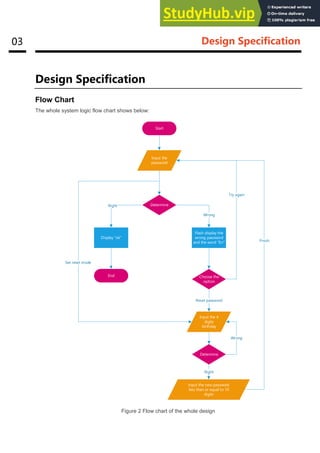
The whole system logic flow chart shows below:
Start
Input the
password
Determine
Display ok
Flash display the
wrong password
and the word Err
End
Wrong
Right
Choose the
option
Try again
Input the 4
digits
birthday
Reset password
Determine
Input the new password
less than or equal to 10
digits
Right
Wrong
Finish
Set reset mode
Figure 2 Flow chart of the whole design
04 Design Specification
Clock
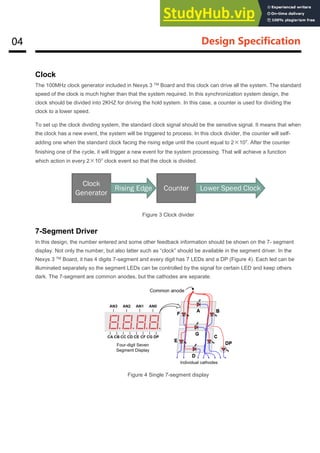
The 100MHz clock generator included in Nexys 3 TM Board and this clock can drive all the system. The standard
speed of the clock is much higher than that the system required. In this synchronization system design, the
clock should be divided into 2KHZ for driving the hold system. In this case, a counter is used for dividing the
clock to a lower speed.
To set up the clock dividing system, the standard clock signal should be the sensitive signal. It means that when
the clock has a new event, the system will be triggered to process. In this clock divider, the counter will self-
adding one when the standard clock facing the rising edge until the count equal to 2×10⁷. After the counter
finishing one of the cycle, it will trigger a new event for the system processing. That will achieve a function
which action in every 2×10⁷ clock event so that the clock is divided.
Clock
Generator
Counter
Rising Edge Lower Speed Clock
Figure 3 Clock divider
7-Segment Driver
In this design, the number entered and some other feedback information should be shown on the 7- segment
display. Not only the number, but also latter such as “clock” should be available in the segment driver. In the
Nexys 3 TM Board, it has 4 digits 7-segment and every digit has 7 LEDs and a DP (Figure 4). Each led can be
illuminated separately so the segment LEDs can be controlled by the signal for certain LED and keep others
dark. The 7-segment are common anodes, but the cathodes are separate.
Figure 4 Single 7-segment display
05 Design Specification
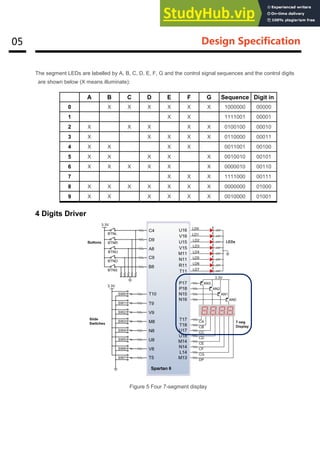
The segment LEDs are labelled by A, B, C, D, E, F, G and the control signal sequences and the control digits
are shown below (X means illuminate):
A B C D E F G Sequence Digit in
0 X X X X X X 1000000 00000
1 X X 1111001 00001
2 X X X X X 0100100 00010
3 X X X X X 0110000 00011
4 X X X X 0011001 00100
5 X X X X X 0010010 00101
6 X X X X X X 0000010 00110
7 X X X 1111000 00111
8 X X X X X X X 0000000 01000
9 X X X X X X 0010000 01001
4 Digits Driver
Figure 5 Four 7-segment display
06 Design Specification
As the Figure 5 showing above, there are four-7-segment display on the Nexys3 board and these four LED
display are common anode. The principle of 4-digit driver is to continuously refresh and repeat the display from
the first to the fourth bit (as the signal diagram shown in figure 6), and when the frequency of the scroll refresh
is higher than 45Hz, the human eyes will not detect the flash of the display and the four-digit number will be
displayed bright and continuous illumination. Since the display is a common anode, the digit display will be
achieved by controlling the cathode.
As the clock divider designed before, the same logic can be used in this four-7-segment display. However, the
clock frequency for the display is lower than that used in the main process. In the four-7-segment display driver,
the frequency is 1KHz.
De-bounce
Because of the structure and the material of the button, when the button pressed for a moment, it cannot output
a steady signal, but a jitter of the electrical frequency of the unstable signal [2]. As a result, the entire system
will be wrong when judging the button state. For example, just press the button once, the system recognizes the
press two times button, this will cause the entire system to input unstable. Therefore, the button's dithering
design is necessary.
Figure 7 Unstable button signal
AN1
AN2
AN3
AN4
Cathodes Digit0
Refresh period
= 1ms to16ms
Digit period
= Refresh/ 4
Digit1 Digit2 Digit3
Press State
Buttons signal output
Unstable signal Unstable signal
Figure 6 Reflash display signals
07 Design Specification
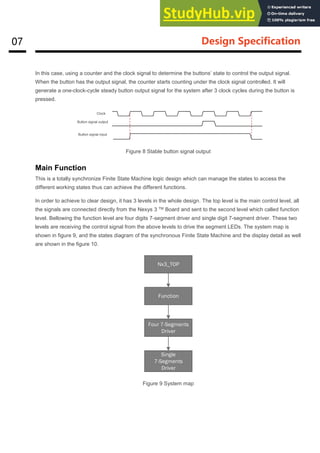
In this case, using a counter and the clock signal to determine the buttons’ state to control the output signal.
When the button has the output signal, the counter starts counting under the clock signal controlled. It will
generate a one-clock-cycle steady button output signal for the system after 3 clock cycles during the button is
pressed.
Figure 8 Stable button signal output
Main Function
This is a totally synchronize Finite State Machine logic design which can manage the states to access the
different working states thus can achieve the different functions.
In order to achieve to clear design, it has 3 levels in the whole design. The top level is the main control level, all
the signals are connected directly from the Nexys 3 TM Board and sent to the second level which called function
level. Bellowing the function level are four digits 7-segment driver and single digit 7-segment driver. These two
levels are receiving the control signal from the above levels to drive the segment LEDs. The system map is
shown in figure 9, and the states diagram of the synchronous Finite State Machine and the display detail as well
are shown in the figure 10.
Nx3_TOP
Function
Four 7-Segments
Driver
Single
7-Segments
Driver
Figure 9 System map
Clock
Button signal output
Button signal input
08 Design Specification
Fan-
1234
PASS
1229
Ok
1234
get
Initial State
Input Password
States
×
10
Check
Password State
×
1
Input
Administrator
Password
States
×
4
Check
Administrator
Password State
×
1
Reset
Password State
×
10
Finish Reset
State
×
1
Err
1234
Err
1234
Switches 0 to 4
If right
Switches 0 to 4
If right
Switches 0 to 4
If wrong
Lock State
×
1
Middle button
Middle button
Switch 5
Middle button
Middle button
Middle button
Switch 7
Lock
If wrong
Loop
Loop
Switches 0 to 4 to input
Right button to go forward
Left button to go back
Switches 0 to 4 to input
Right button to go forward
Left button to go back
Switches 0 to 4 to input
Right button to go forward
Left button to go back
Switch 5 off
States Display
Switch 7 on
Wrong admin
password
Wrong
password
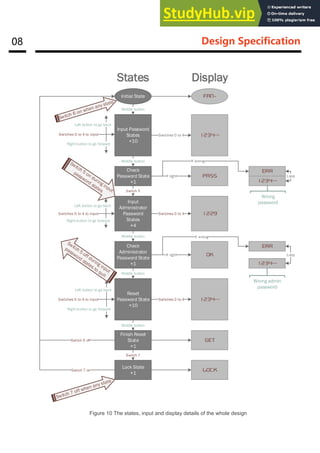
Figure 10 The states, input and display details of the whole design
09 Design Specification
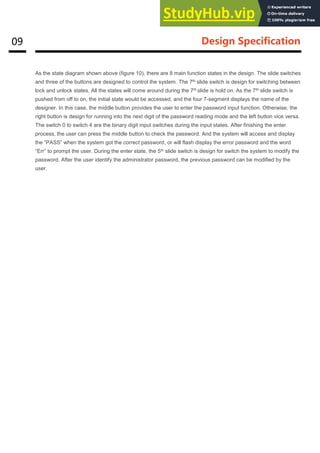
As the state diagram shown above (figure 10), there are 8 main function states in the design. The slide switches
and three of the buttons are designed to control the system. The 7th slide switch is design for switching between
lock and unlock states. All the states will come around during the 7th slide is hold on. As the 7th slide switch is
pushed from off to on, the initial state would be accessed, and the four 7-segment displays the name of the
designer. In this case, the middle button provides the user to enter the password input function. Otherwise, the
right button is design for running into the next digit of the password reading mode and the left button vice versa.
The switch 0 to switch 4 are the binary digit input switches during the input states. After finishing the enter
process, the user can press the middle button to check the password. And the system will access and display
the “PASS” when the system got the correct password, or will flash display the error password and the word
“Err” to prompt the user. During the enter state, the 5th slide switch is design for switch the system to modify the
password. After the user identify the administrator password, the previous password can be modified by the
user.
10 Testing
Testing
Simulation
During the simulation step, the design utilizing the ISim simulator. It is necessary to create a test bench for the
unit under the test bench and run the test bench. In this report, one of the 7-segment simulation is selected to
simulate. Other simulations have the same process and will not discuss in this report.
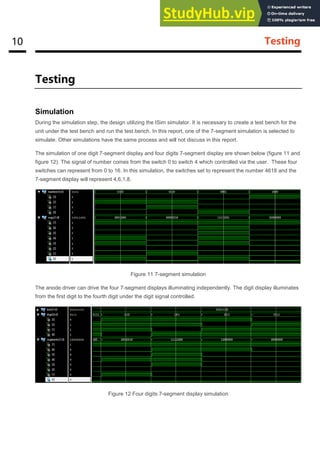
The simulation of one digit 7-segment display and four digits 7-segment display are shown below (figure 11 and
figure 12). The signal of number comes from the switch 0 to switch 4 which controlled via the user. These four
switches can represent from 0 to 16. In this simulation, the switches set to represent the number 4618 and the
7-segment display will represent 4,6,1,8.
Figure 11 7-segment simulation
The anode driver can drive the four 7-segment displays illuminating independently. The digit display illuminates
from the first digit to the fourth digit under the digit signal controlled.
Figure 12 Four digits 7-segment display simulation
11 Testing
Synthesis
Schematic
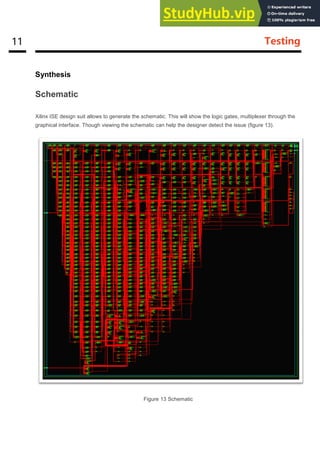
Xilinx ISE design suit allows to generate the schematic. This will show the logic gates, multiplexer through the
graphical interface. Though viewing the schematic can help the designer detect the issue (figure 13).
Figure 13 Schematic
12 Testing
Capability of the design
The design I based on the Spartan-6 FPGA chip which device model XC6SLX16 and the package model
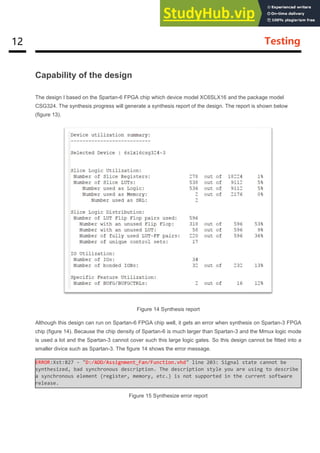
CSG324. The synthesis progress will generate a synthesis report of the design. The report is shown below
(figure 13).
Figure 14 Synthesis report
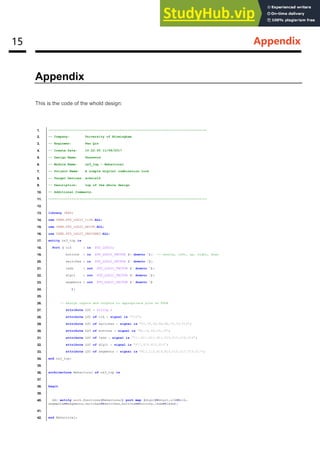
Although this design can run on Spartan-6 FPGA chip well, it gets an error when synthesis on Spartan-3 FPGA
chip (figure 14). Because the chip density of Spartan-6 is much larger than Spartan-3 and the Mmux logic mode
is used a lot and the Spartan-3 cannot cover such this large logic gates. So this design cannot be fitted into a
smaller divice such as Spartan-3. The figure 14 shows the error message.
ERROR:Xst:827 - "D:/ADD/Assignment_Fan/Function.vhd" line 203: Signal state cannot be
synthesized, bad synchronous description. The description style you are using to describe
a synchronous element (register, memory, etc.) is not supported in the current software
release.
Figure 15 Synthesize error report
13 Reflective and Conclusion
Reflective and Conclusion
In this design, I learned a lot about the VHDL language design ideas and ISE software problems related to the
troubleshooting methods. At the beginning of the design, I was just a simple understanding of the working
principle of the finite synchronous state machine, and try to solve the problem by step by step according to the
teacher's requirement. Until the variable digit password changes this additional function, it is found that the
entire design has been definitely difficult to achieve. Because I found out that VHDL often touches a lot of other
parts when changing a part of the design, this will cause the whole design of the change to appear very
confusing. So, before you start designing the last topic, you will back up all of your previous code and redesign
the system completely. The newly designed system covers the subject requirements. The rewritten code
appears structurally clear, readable and modifiable, and improves the efficiency of the system as a whole.
Although this design fully implements all the required functions, it seems that the whole system has a lot of
imperfections. For example, the entire system is permanently locked and the display of empty space cannot be
skipped when the error password is not implemented. The former has very important significance in the actual
design process, which can prevent the criminals from maliciously unlocking. The latter is a detail optimization
problem, skipping the vacancy display will eliminate the user's meaningless wait time.
Overall, the design completes all the requirements and can be implemented stably. Through this design, let me
understand the VHDL language more deeply. It is the milestone in my VHDL study life.
14 References
References
[1] Nexys3 TM Board Reference Manual 2013 Digilent.
[2] VHDL Code for Debounce Circuit in FPGA:
http://allaboutfpga.com/vhdl-code-for-debounce-circuit-in-fpga/
15 Appendix
Appendix
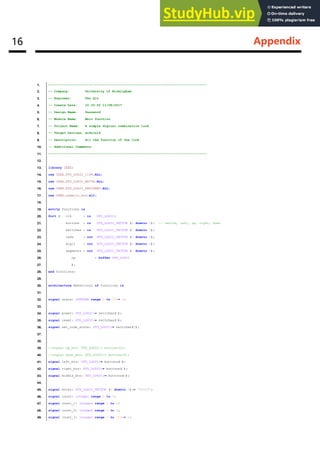
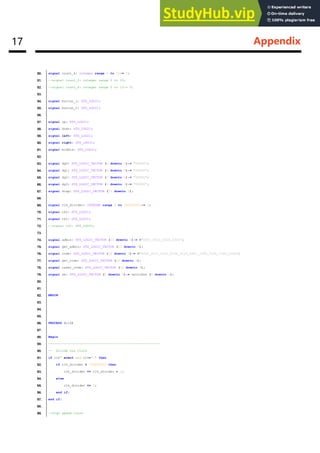
This is the code of the whold design:
1. ----------------------------------------------------------------------------------
2. -- Company: University of Birmingham
3. -- Engineer: Fan Qin
4. -- Create Date: 10:22:50 11/08/2017
5. -- Design Name: Password
6. -- Module Name: nx3_top - Behavioral
7. -- Project Name: A simple digital combination lock
8. -- Target Devices: xc6slx16
9. -- Description: top of the whole design
10. -- Additional Comments:
11. ----------------------------------------------------------------------------------
12.
13. library IEEE;
14. use IEEE.STD_LOGIC_1164.ALL;
15. use IEEE.STD_LOGIC_ARITH.ALL;
16. use IEEE.STD_LOGIC_UNSIGNED.ALL;
17. entity nx3_top is
18. Port ( clk : in STD_LOGIC;
19. buttons : in STD_LOGIC_VECTOR (4 downto 0); -- centre, left, up, right, down
20. switches : in STD_LOGIC_VECTOR (7 downto 0);
21. leds : out STD_LOGIC_VECTOR (7 downto 0);
22. digit : out STD_LOGIC_VECTOR (3 downto 0);
23. segments : out STD_LOGIC_VECTOR (7 downto 0)
24. );
25.
26. -- Assign inputs and outputs to appropriate pins on FPGA
27. attribute LOC : string ;
28. attribute LOC of clk : signal is "V10";
29. attribute LOC of switches : signal is "T5,V8,U8,N8,M8,V9,T9,T10";
30. attribute LOC of buttons : signal is "B8,C4,A8,D9,C9";
31. attribute LOC of leds : signal is "T11,R11,N11,M11,V15,U15,V16,U16";
32. attribute LOC of digit : signal is "P17,P18,N15,N16";
33. attribute LOC of segments : signal is "M13,L14,N14,M14,U18,U17,T18,T17";
34. end nx3_top;
35.
36. architecture Behavioral of nx3_top is
37.
38. begin
39.
40. dd: entity work.functions(Behavioral) port map (digit=>digit,clk=>clk,
segments=>segments,switches=>switches,buttons=>buttons,leds=>leds);
41.
42. end Behavioral;
16 Appendix
1. ----------------------------------------------------------------------------------
2. -- Company: University of Birmingham
3. -- Engineer: Fan Qin
4. -- Create Date: 10:33:50 11/08/2017
5. -- Design Name: Password
6. -- Module Name: Main function
7. -- Project Name: A simple digital combination lock
8. -- Target Devices: xc6slx16
9. -- Description: All the function of the lock
10. -- Additional Comments:
11. ----------------------------------------------------------------------------------
12.
13. library IEEE;
14. use IEEE.STD_LOGIC_1164.ALL;
15. use IEEE.STD_LOGIC_ARITH.ALL;
16. use IEEE.STD_LOGIC_UNSIGNED.ALL;
17. use IEEE.numeric_std.all;
18.
19. entity functions is
20. Port ( clk : in STD_LOGIC;
21. buttons : in STD_LOGIC_VECTOR (4 downto 0); -- centre, left, up, right, down
22. switches : in STD_LOGIC_VECTOR (7 downto 0);
23. leds : out STD_LOGIC_VECTOR (7 downto 0);
24. digit : out STD_LOGIC_VECTOR (3 downto 0);
25. segments : out STD_LOGIC_VECTOR (7 downto 0);
26. cp : buffer STD_LOGIC
27. );
28. end functions;
29.
30. architecture Behavioral of functions is
31.
32. signal state: INTEGER range 0 to 39:= 0;
33.
34. signal power: STD_LOGIC:= switches(7);
35. signal reset: STD_LOGIC:= switches(6);
36. signal set_code_state: STD_LOGIC:= switches(5);
37.
38.
39. --signal up_btn: STD_LOGIC:= buttons(2);
40. --signal down_btn: STD_LOGIC:= buttons(0);
41. signal left_btn: STD_LOGIC:= buttons(3);
42. signal right_btn: STD_LOGIC:= buttons(1);
43. signal middle_btn: STD_LOGIC:= buttons(4);
44.
45. signal enter: STD_LOGIC_VECTOR (4 downto 0):= "00000";
46. signal count: integer range 0 to 4;
47. signal count_1: integer range 0 to 4;
48. signal count_2: integer range 0 to 4;
49. signal count_3: integer range 0 to 100:= 0;
17 Appendix
50. signal count_4: integer range 0 to 50:= 0;
51. --signal count_5: integer range 0 to 15;
52. --signal count_6: integer range 0 to 15:= 0;
53.
54. signal button_1: STD_LOGIC;
55. signal button_2: STD_LOGIC;
56.
57. signal up: STD_LOGIC;
58. signal down: STD_LOGIC;
59. signal left: STD_LOGIC;
60. signal right: STD_LOGIC;
61. signal middle: STD_LOGIC;
62.
63. signal dg0: STD_LOGIC_VECTOR (4 downto 0):= "00000";
64. signal dg1: STD_LOGIC_VECTOR (4 downto 0):= "00000";
65. signal dg2: STD_LOGIC_VECTOR (4 downto 0):= "00000";
66. signal dg3: STD_LOGIC_VECTOR (4 downto 0):= "00000";
67. signal disp: STD_LOGIC_VECTOR (19 downto 0);
68.
69. signal clk_divider: INTEGER range 0 to 100000000:= 0;
70. signal ck2: STD_LOGIC;
71. signal ck1: STD_LOGIC;
72. --signal ck2: STD_LOGIC;
73.
74. signal admin: STD_LOGIC_VECTOR (15 downto 0):= B"0001_0010_0010_1001";
75. signal get_admin: STD_LOGIC_VECTOR (15 downto 0);
76. signal code: STD_LOGIC_VECTOR (39 downto 0):= B"0001_0111_0101_0100_0110_0001_1000_1100_1100_1100";
77. signal get_code: STD_LOGIC_VECTOR (39 downto 0);
78. signal reset_code: STD_LOGIC_VECTOR (39 downto 0);
79. signal sw: STD_LOGIC_VECTOR (4 downto 0):= switches (4 downto 0);
80.
81.
82. BEGIN
83.
84.
85.
86. PROCESS (clk)
87.
88. Begin
89. ----------------------------------------------------------
90. -- divide the clock
91. if clk' event and clk='1' then
92. if clk_divider < 100000000 then
93. clk_divider <= clk_divider + 1;
94. else
95. clk_divider <= 0;
96. end if;
97. end if;
98.
99. --high speed clock
18 Appendix
100. case clk_divider is
101. --when 10000000 => ck1 <= '1';
102. when 20000000 => ck1 <= '1';
103. --when 25000000 => ck1 <= '1';
104. --when 30000000 => ck1 <= '1';
105. when 40000000 => ck1 <= '1';
106. --when 50000000 => ck1 <= '1';
107. when 60000000 => ck1 <= '1';
108. --when 70000000 => ck1 <= '1';
109. --when 75000000 => ck1 <= '1';
110. when 80000000 => ck1 <= '1';
111. --when 90000000 => ck1 <= '1';
112. when 100000000 => ck1 <= '1';
113. when others => ck1 <= '0';
114. end case;
115.
116. --low speed clock
117. case clk_divider is
118. when 100000000 => ck2 <= '1';
119. when others => ck2 <= '0';
120. end case;
121.
122. --end of the clock divider
123.
124.
125. end process;
126. ---------------------------------------------------------
127. --debounce the buttons
128. process(ck1)
129. begin
130.
131. if buttons(4) = '0' then
132. count <= 0;
133. elsif rising_edge (ck1) then
134. if count = 4 then
135. count <= count;
136. else
137. count <= count + 1;
138. end if;
139. end if;
140.
141. if count = 3 then
142. middle_btn <= '1';
143. else
144. middle_btn <= '0';
145. end if;
146.
147. ----------------------------------
148.
149. if buttons(1) = '0' then
19 Appendix
150. count_1 <= 0;
151. elsif rising_edge (ck1) then
152. if count_1 = 4 then
153. count_1 <= count_1;
154. else
155. count_1 <= count_1 + 1;
156. end if;
157. end if;
158.
159. if count_1 = 3 then
160. right_btn <= '1';
161. else
162. right_btn <= '0';
163. end if;
164.
165. ---------------------------------
166.
167. if buttons(3) = '0' then
168. count_2 <= 0;
169. elsif rising_edge (ck1) then
170. if count_2 = 4 then
171. count_2 <= count_2;
172. else
173. count_2 <= count_2 + 1;
174. end if;
175. end if;
176.
177. if count_2 = 3 then
178. left_btn <= '1';
179. else
180. left_btn <= '0';
181. end if;
182.
183. End process;
184.
185. --end of the debounce
186. --------------------------------------------------------
187.
188. PROCESS(ck1)
189.
190. begin
191.
192. ----circulating display the detials-----
193. ---try to write by loop!!!!!!!!!!!!!!!!!!!----------
194. if (state > 34 and state < 39) then
195. if rising_edge (ck1) then
196. if count_3 = 100 then
197. count_3 <= 0;
198. else
199. count_3 <= count_3 + 1;
20 Appendix
200. end if;
201. end if;
202.
203. if count_3 = 0 then --display the "Err "
204. state <= 35;
205. -- count_5 <= count_6;
206.
207. elsif count_3 = 25 then --display the 1st 4 sequence
208. -- count_6 <= count_6 - 4;
209. state <= 36;
210.
211. elsif count_3 = 50 then --display the 2rd 4 sequence
212. -- count_6 <= count_6 - 4;
213. state <= 37;
214.
215. elsif count_3 = 75 then --display the 3rd 2 sequence
216. state <= 38;
217. -- count_6 <= count_5;
218.
219. --elsif count_6 < 5 then
220. --count_3 <= 0;
221.
222.
223. end if;
224.
225. end if;
226.
227. if (state >32 and state < 35) then
228. if rising_edge (ck1) then
229. if count_4 = 50 then
230. count_4 <= 0;
231. else
232. count_4 <= count_4 + 1;
233. end if;
234. end if;
235.
236.
237. if count_4 = 0 then
238. state <= 33;
239. elsif count_4 = 25 then
240. state <= 34;
241. end if;
242. end if;
243. ------------------------------------------
244.
245.
246. if rising_edge (ck1) then
247.
248. --power control---------------------
249. if (power = '1' and state = 39) then
21 Appendix
250. state <= 4;
251. elsif power = '0' then
252. state <= 39;
253. leds <= "00000000";
254. end if;
255.
256. if (power = '1' and reset = '1') then
257. state <= 5;
258. end if;
259.
260. --button when input the password
261. if (state > 5 and state < 15) then
262. if right_btn = '1' then
263. state <= state + 1;
264. elsif left_btn = '1' then
265. state <= state - 1;
266. end if;
267.
268. --button when input the admin_code
269. elsif (state > 16 and state < 20) then
270. if right_btn = '1' then
271. state <= state + 1;
272. elsif left_btn = '1' then
273. state <= state - 1;
274. end if;
275.
276. --button when reset the password
277. elsif (state > 21 and state < 31) then
278. if right_btn = '1' then
279. state <= state + 1;
280. elsif left_btn = '1' then
281. state <= state - 1;
282. end if;
283.
284. --button when finish the step
285. elsif (state = 20 or state = 21 or state = 31) then
286. if middle_btn = '1' then
287. if get_admin = admin then
288. state <= state + 1;
289. else
290. state <= 33;
291. end if;
292. elsif left_btn = '1' then
293. state <= state - 1;
294. elsif right_btn = '1' then
295. null;
296. end if;
297.
298. --button when start
299. elsif (state < 6 and middle_btn = '1') then
22 Appendix
300. state <= 6;
301.
302. end if;
303.
304. --set into password reset mode
305. if set_code_state = '1' then
306. if ((state > 5 and state < 16) or (state > 34 and state < 39)) then
307. state <= 17;
308. elsif (state = 16) then
309. state <= 22;
310. end if;
311. elsif (set_code_state = '0' and state > 16 and state < 33) then
312. state <= 5;
313. end if;
314.
315.
316. dg3 <= disp (19 downto 15);
317. dg2 <= disp (14 downto 10);
318. dg1 <= disp (9 downto 5);
319. dg0 <= disp (4 downto 0);
320.
321. case state is
322. when 0 => disp <= B"11111_11111_11111_00001";
323. when 1 => disp <= B"01011_11111_11111_11111";
324. when 2 => disp <= B"01011_01010_11111_11111";
325. when 3 => disp <= B"01011_01010_10010_11111";
326. when 4 => disp <= B"01011_01010_10010_01100"; --display the "Fan-"
327.
328. when 5 => disp <= B"11001_11010_11011_10111"; --display the "code"
329.
330. when 6 => disp <= sw & B"10110_10110_10110";
331. when 7 => disp <= dg3 & sw & B"10110_10110";
332. when 8 => disp <= dg3 & dg2 & sw & B"10110";
333. when 9 => disp <= dg3 & dg2 & dg1 & sw;
334. when 10 => disp <= sw & B"10110_10110_10110";
335. when 11 => disp <= dg3 & sw & B"10110_10110";
336. when 12 => disp <= dg3 & dg2 & sw & B"10110";
337. when 13 => disp <= dg3 & dg2 & dg1 & sw;
338. when 14 => disp <= sw & B"10110_01100_01100";
339. when 15 => disp <= dg3 & sw & B"01100_01100"; --display the password inputed
340.
341. when 16 => disp <= B"10101_01010_00101_00101"; --display the "PASS"
342.
343. when 17 => disp <= sw & B"10110_10110_10110";
344. when 18 => disp <= dg3 & sw & B"10110_10110";
345. when 19 => disp <= dg3 & dg2 & sw & B"10110";
346. when 20 => disp <= dg3 & dg2 & dg1 & sw; --display the admin_code inputed
347.
348. when 21 => disp <= B"11111_11111_10011_10100"; --display the " ok"
349.
23 Appendix
350. when 22 => disp <= sw & B"10110_10110_10110";
351. when 23 => disp <= dg3 & sw & B"10110_10110";
352. when 24 => disp <= dg3 & dg2 & sw & B"10110";
353. when 25 => disp <= dg3 & dg2 & dg1 & sw;
354. when 26 => disp <= sw & B"10110_10110_10110";
355. when 27 => disp <= dg3 & sw & B"10110_10110";
356. when 28 => disp <= dg3 & dg2 & sw & B"10110";
357. when 29 => disp <= dg3 & dg2 & dg1 & sw;
358. when 30 => disp <= sw & B"10110_01100_01100";
359. when 31 => disp <= dg3 & sw & B"01100_01100"; -- display the reset_code inputed
360.
361. when 32 => disp <= B"11111_01001_01110_11000"; --display the " get"
362.
363. when 33 => disp <= B"01110_01101_01101_11111"; --display the "Err "
364. when 34 => disp <= "0" & get_admin (15 downto 12) & "0" & get_admin (11 downto 8) & "0" & get_admin (7 downto 4) & "0" &
get_admin (3 downto 0); --display the error admin_code
365.
366. when 35 => disp <= B"01110_01101_01101_11111"; --display the "Err "
367. when 36 => disp <= "0" & get_code (39 downto 36) & "0" & get_code (35 downto 32) & "0" & get_code (31 downto 28) & "0" &
get_code (27 downto 24);
368. when 37 => disp <= "0" & get_code (23 downto 20) & "0" & get_code (19 downto 16) & "0" & get_code (15 downto 12) & "0" &
get_code (11 downto 8);
369. when 38 => disp <= "0" & get_code (7 downto 4) & "0" & get_code (3 downto 0) & B"01100_01100"; --display the error
password
370.
371. when 39 => disp <= B"11100_10011_11001_10100"; --display the "Lock"
372.
373. end case;
374.
375.
376.
377.
378. case state is
379.
380. when 5 => get_code (39 downto 0) <= B"0000_0000_0000_0000_0000_0000_0000_0000_0000_0000"; --set all the digits to 0
381. when 6 => get_code (39 downto 36) <= switches (3 downto 0);
382. get_code (35 downto 0) <= B"1100_1100_1100_1100_1100_1100_1100_1100_1100";
383. when 7 => get_code (35 downto 32) <= switches (3 downto 0);
384. get_code (31 downto 0) <= B"1100_1100_1100_1100_1100_1100_1100_1100";
385. when 8 => get_code (31 downto 28) <= switches (3 downto 0);
386. get_code (27 downto 0) <= B"1100_1100_1100_1100_1100_1100_1100";
387. when 9 => get_code (27 downto 24) <= switches (3 downto 0);
388. get_code (23 downto 0) <= B"1100_1100_1100_1100_1100_1100";
389. when 10 => get_code (23 downto 20) <= switches (3 downto 0);
390. get_code (19 downto 0) <= B"1100_1100_1100_1100_1100";
391. when 11 => get_code (19 downto 16) <= switches (3 downto 0);
392. get_code (15 downto 0) <= B"1100_1100_1100_1100";
393. when 12 => get_code (15 downto 12) <= switches (3 downto 0);
394. get_code (11 downto 0) <= B"1100_1100_1100";
395. when 13 => get_code (11 downto 8) <= switches (3 downto 0);
396. get_code (7 downto 0) <= B"1100_1100";
397. when 14 => get_code (7 downto 4) <= switches (3 downto 0);
24 Appendix
398. get_code (3 downto 0) <= B"1100";
399. when 15 => get_code (3 downto 0) <= switches (3 downto 0); --input the password
400.
401. when 17 => get_admin (15 downto 12) <= switches (3 downto 0);
402. when 18 => get_admin (11 downto 8) <= switches (3 downto 0);
403. when 19 => get_admin (7 downto 4) <= switches (3 downto 0);
404. when 20 => get_admin (3 downto 0) <= switches (3 downto 0); --input the admin_code
405.
406. when 22 => reset_code (39 downto 36) <= switches (3 downto 0);
407. reset_code (35 downto 0) <= B"1100_1100_1100_1100_1100_1100_1100_1100_1100";
408. when 23 => reset_code (35 downto 32) <= switches (3 downto 0);
409. reset_code (31 downto 0) <= B"1100_1100_1100_1100_1100_1100_1100_1100";
410. when 24 => reset_code (31 downto 28) <= switches (3 downto 0);
411. reset_code (27 downto 0) <= B"1100_1100_1100_1100_1100_1100_1100";
412. when 25 => reset_code (27 downto 24) <= switches (3 downto 0);
413. reset_code (23 downto 0) <= B"1100_1100_1100_1100_1100_1100";
414. when 26 => reset_code (23 downto 20) <= switches (3 downto 0);
415. reset_code (19 downto 0) <= B"1100_1100_1100_1100_1100";
416. when 27 => reset_code (19 downto 16) <= switches (3 downto 0);
417. reset_code (15 downto 0) <= B"1100_1100_1100_1100";
418. when 28 => reset_code (15 downto 12) <= switches (3 downto 0);
419. reset_code (11 downto 0) <= B"1100_1100_1100";
420. when 29 => reset_code (11 downto 8) <= switches (3 downto 0);
421. reset_code (7 downto 0) <= B"1100_1100";
422. when 30 => reset_code (7 downto 4) <= switches (3 downto 0);
423. reset_code (3 downto 0) <= B"1100";
424. when 31 => reset_code (3 downto 0) <= switches (3 downto 0); --input the reset_password
425.
426. when 32 => code <= reset_code;
427.
428. when others => null;
429.
430. end case;
431.
432. --if state = 15 and middle_btn = '1' then
433. --if get_code = code then
434. -- state <= 16;
435. --else
436. -- state <= 35;
437. --end if;
438. --end if;
439.
440.
441. --password less than 10 digits
442. if (state > 22 and state < 32) then
443. if middle_btn = '1' then
444. state <= 32;
445. end if;
446. elsif (state > 5 and state < 16) then
447. if middle_btn = '1' then
25 Appendix
448. if code = get_code then
449. state <= 16;
450. else
451. --count_6 <= state;
452. state <= 35;
453. end if;
454. end if;
455. end if;
456.
457.
458. --led display
459.
460. if state = 0 then
461. leds <= "00000000";
462. elsif (state > 0 and state < 6) then
463. leds <= "10000000";
464. elsif ((state > 5 and state < 16) or (state > 16 and state < 21) or (state > 21 and state < 32)) then
465. leds <= switches;
466. elsif (state = 16 or state = 21 or state = 32) then
467. leds <= "11111111";
468. end if;
469.
470. end if;
471.
472.
473. end process;
474.
475.
476. dd: entity work.Four_Display(Behavioral)
477. port map (an=>digit,
478. clk=>clk,
479. seg=>segments,
480. d3 => dg3,
481. d2 => dg2,
482. d1 => dg1,
483. d0 =>dg0);
484.
485. end Behavioral;
26 Appendix
1. ----------------------------------------------------------------------------------
2. -- Company: University of Birmingham
3. -- Engineer: Fan Qin
4. -- Create Date: 10:34:50 11/08/2017
5. -- Design Name: Password
6. -- Module Name: 4 – 7 – segment driver
7. -- Project Name: A simple digital combination lock
8. -- Target Devices: xc6slx16
9. -- Description: The driver of the 4 digits 7 segment
10. -- Additional Comments:
11. ----------------------------------------------------------------------------------
12.
13. library IEEE;
14. use IEEE.STD_LOGIC_1164.ALL;
15. use IEEE.numeric_std.all;
16.
17. entity Four_Display is
18. Port (
19. d0 : in STD_LOGIC_VECTOR (4 downto 0);
20. d1 : in STD_LOGIC_VECTOR (4 downto 0);
21. d2 : in STD_LOGIC_VECTOR (4 downto 0);
22. d3 : in STD_LOGIC_VECTOR (4 downto 0);
23. clk : in STD_LOGIC;
24.
25. seg : out STD_LOGIC_VECTOR (7 downto 0);
26. an : out STD_LOGIC_VECTOR (3 downto 0)
27. );
28.
29. end Four_Display;
30.
31. architecture Behavioral of Four_Display is
32.
33. signal q: UNSIGNED (1 downto 0);
34. signal digit: STD_LOGIC_VECTOR(4 downto 0);
35. signal clk_an : STD_LOGIC := '0';
36. SIGNAL clk_divider_1 : INTEGER range 0 to 50000;
37. signal anode : STD_LOGIC_VECTOR(3 downto 0);
38. begin
39.
40. --use main clock to genearate the anode drive signal.
41. process(clk)
42. begin
43. IF clk'event and clk='1' then
44. IF clk_divider_1 = 50000 then
45. clk_divider_1 <= 0;
46. clk_an<= not clk_an;
47. else clk_divider_1 <= clk_divider_1 +1;
48. end if;
49. end if;
27 Appendix
50. end process;
51. --dynamic scan the anode
52. process
53. begin
54. wait until RISING_EDGE(clk_an);
55. if q = 0 then
56. digit <= d0;
57. an <="1110";
58. anode<="1110";
59. elsif q = 1 then
60. digit <= d1;
61. an<="1101";
62. anode<="1101";
63. elsif q = 2 then
64. digit <= d2;
65. an<="1011";
66. anode<="1011";
67. else
68. digit <= d3;
69. an<="0111";
70. anode<="0111";
71. end if;
72. q <= q + 1;
73. end process;
74.
75. display_unit : entity work.display(Behavioral)
76. Port map (digit => digit, seg => seg, an => anode);
77.
78. end Behavioral;
28 Appendix
1. ----------------------------------------------------------------------------------
2. -- Company: University of Birmingham
3. -- Engineer: Fan Qin
4. -- Create Date: 90:33:50 10/08/2017
5. -- Design Name: Password
6. -- Module Name: One digit display driver
7. -- Project Name: A simple digital combination lock
8. -- Target Devices: xc6slx16
9. -- Description: One digit 7 segment driver
10. -- Additional Comments:
11. ----------------------------------------------------------------------------------
12.
13. library IEEE;
14. use IEEE.STD_LOGIC_1164.ALL;
15.
16.
17. entity display is
18. Port ( digit : in STD_LOGIC_VECTOR (4 downto 0);
19. seg : out STD_LOGIC_VECTOR (7 downto 0);
20. an : in STD_LOGIC_VECTOR (3 downto 0)
21. );
22. end display;
23.
24. architecture Behavioral of display is
25.
26. begin
27. seg(7) <= '1';
28. with digit select
29. seg (6 downto 0) <= "1000000" when "00000", --0 or O
30. "1111001" when "00001", --1 or I
31. "0100100" when "00010", --2
32. "0110000" when "00011", --3
33. "0011001" when "00100", --4
34. "0010010" when "00101", --5 or S
35. "0000010" when "00110", --6
36. "1111000" when "00111", --7
37. "0000000" when "01000", --8
38. "0010000" when "01001", --9 or g
39. "0001000" when "01010", --A
40. "0001110" when "01011", --F
41. "0111111" when "01100", --- (score)
42. "0101111" when "01101", --r
43. "0000110" when "01110", --E
44. "0001001" when "01111", --H
45. "0111000" when "10000", --F
46. "0001000" when "10001", --A
47. "1001000" when "10010", --n
48. "0100011" when "10011", --o
49. "0000111" when "10100", --k
29 Appendix
50. "0001100" when "10101", --P
51. "1110111" when "10110", --_ (under score)
52. "0000100" when "10111", --e
53. "0111001" when "11000", --t
54. "0100111" when "11001", --C
55. "0100011" when "11010", --o
56. "0100001" when "11011", --d
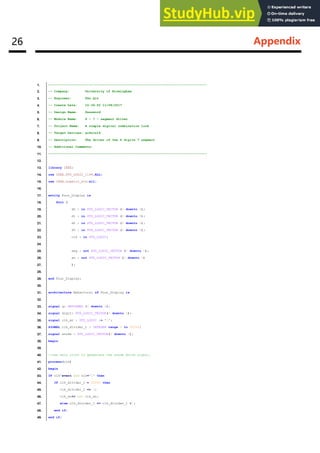
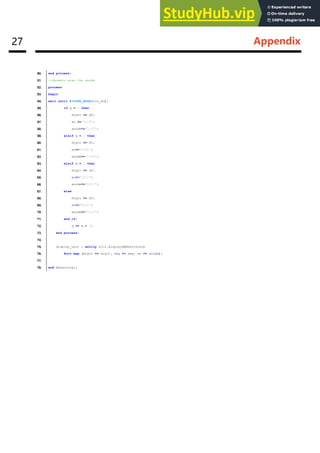
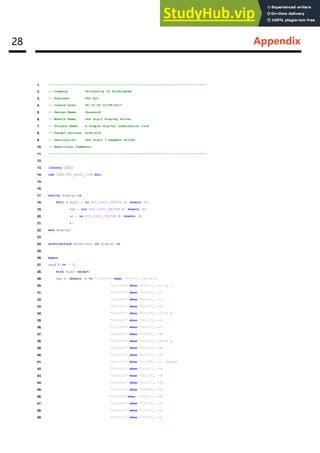
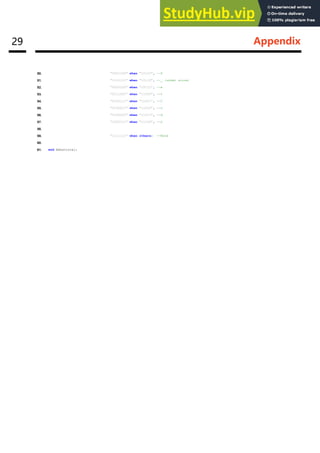
57. "1000111" when "11100", --L
58.
59. "1111111" when others; --None
60.
61. end Behavioral;

A Simple Digital Combination Lock ADVANCE DIGITAL DESIGN

  • 1.
    A Simple Digital CombinationLock ADVANCE DIGITAL DESIGN Student Name: Fan Qin Student ID: 1754618 Tutor: Steven Quigley University of Birmingham
  • 2.
    Abstract Abstract This report isabout the Advance Digital Design Assignment. This assignment is aimed at using XILINX ISE TM software and VHDL language to design a simple digital combination lock and running the design on the Nexys 3 TM Board (Figure 1) [1]. This board is a complete, ready-to-use digital circuit development platform based on the Xilinx Spartan-6 LX16 FPGA. The simple digital combination lock is a lock which can be open via entering the password. In this assignment, the lock is required to design as a design as a digital password checker. The password can be reset, and the super administrator password is required before the reset process. And the error password can be showed on the 7-segment display. While enter or reset the initial password, maximum 10 digits with the flexible digits setting is allowable in the process. Adept USB Port Power Switch USB HID Host Port Power Jack JTAG Header MODE Jumper Power Good LED Done LED Rese t Button Power Select Jumpe r LED s Slide switch Push button 7-seg Display UART Ethernet Pmod Connector s VHD C Conncector Figure 1 VGA Port
  • 3.
    Abstract Contents Abstract ____________________________________________________________________ i Introduction________________________________________________________________1 Requirement Specification ____________________________________________________2 Design Specification _________________________________________________________3 Testing____________________________________________________________________10 Reflective and Conclusion ___________________________________________________13 References ________________________________________________________________14 Appendix __________________________________________________________________15 Contents
  • 4.
    01 Introduction Introduction This reportwill cover the following parts requirement, design specification, implementation, simulation and conclusion. The design of the VHDL based digital combination lock. The requirement is which should be the first presented in the system design. This requirement is base on the Lab work sheet and the MSc Advanced Digital Design Assignment Requirement Document which is submitted on University of Birmingham Canvas website. After the requirement specification is the design specification. This module is the main module of the report. It includes the clock, 7-segment driver, four 7-segment driver and the principle of the Finite State Machine in the design. When comes to the simulation part, the ISim simulator is used in the design. The simulation will be run and the result is shown in the report. At the end of the report is the conclusion. In this part, the experience of the design will be talked and the improvement of the project can be achieved in the future.
  • 5.
    02 Requirement Specification RequirementSpecification This design should realize the follow function: Unlock switch One of the switches will be used to indicate that the user wishes to enter a code sequence. Input the password After one of the switch turned on, other four of the switches are designed to enter the digits in the binary code sequentially. After the digit has been entered via the slider switches, the corresponding button need to be pressed so that the system can read the digit in. The user then uses the slider switches and the push button to enter the remaining three digits. Check the digits and feedback Once the user finish entering the digits, the digits will be compared with the initial digits. If the user input the correct digits, the special message will be displayed on the 7-segment display. If the user input the incorrect digits, the wrong digits and err message will be displayed alternate at one second intervals. Administrator reset the password Sometime the user may forget the password. In this case, the special digits is available for the user to modify the previous password. Flexible digits available The password is maximum 10 digits and the user can set the suitable length.
  • 6.
    03 Design Specification DesignSpecification Flow Chart The whole system logic flow chart shows below: Start Input the password Determine Display ok Flash display the wrong password and the word Err End Wrong Right Choose the option Try again Input the 4 digits birthday Reset password Determine Input the new password less than or equal to 10 digits Right Wrong Finish Set reset mode Figure 2 Flow chart of the whole design
  • 7.
    04 Design Specification Clock The100MHz clock generator included in Nexys 3 TM Board and this clock can drive all the system. The standard speed of the clock is much higher than that the system required. In this synchronization system design, the clock should be divided into 2KHZ for driving the hold system. In this case, a counter is used for dividing the clock to a lower speed. To set up the clock dividing system, the standard clock signal should be the sensitive signal. It means that when the clock has a new event, the system will be triggered to process. In this clock divider, the counter will self- adding one when the standard clock facing the rising edge until the count equal to 2×10⁷. After the counter finishing one of the cycle, it will trigger a new event for the system processing. That will achieve a function which action in every 2×10⁷ clock event so that the clock is divided. Clock Generator Counter Rising Edge Lower Speed Clock Figure 3 Clock divider 7-Segment Driver In this design, the number entered and some other feedback information should be shown on the 7- segment display. Not only the number, but also latter such as “clock” should be available in the segment driver. In the Nexys 3 TM Board, it has 4 digits 7-segment and every digit has 7 LEDs and a DP (Figure 4). Each led can be illuminated separately so the segment LEDs can be controlled by the signal for certain LED and keep others dark. The 7-segment are common anodes, but the cathodes are separate. Figure 4 Single 7-segment display
  • 8.
    05 Design Specification Thesegment LEDs are labelled by A, B, C, D, E, F, G and the control signal sequences and the control digits are shown below (X means illuminate): A B C D E F G Sequence Digit in 0 X X X X X X 1000000 00000 1 X X 1111001 00001 2 X X X X X 0100100 00010 3 X X X X X 0110000 00011 4 X X X X 0011001 00100 5 X X X X X 0010010 00101 6 X X X X X X 0000010 00110 7 X X X 1111000 00111 8 X X X X X X X 0000000 01000 9 X X X X X X 0010000 01001 4 Digits Driver Figure 5 Four 7-segment display
  • 9.
    06 Design Specification Asthe Figure 5 showing above, there are four-7-segment display on the Nexys3 board and these four LED display are common anode. The principle of 4-digit driver is to continuously refresh and repeat the display from the first to the fourth bit (as the signal diagram shown in figure 6), and when the frequency of the scroll refresh is higher than 45Hz, the human eyes will not detect the flash of the display and the four-digit number will be displayed bright and continuous illumination. Since the display is a common anode, the digit display will be achieved by controlling the cathode. As the clock divider designed before, the same logic can be used in this four-7-segment display. However, the clock frequency for the display is lower than that used in the main process. In the four-7-segment display driver, the frequency is 1KHz. De-bounce Because of the structure and the material of the button, when the button pressed for a moment, it cannot output a steady signal, but a jitter of the electrical frequency of the unstable signal [2]. As a result, the entire system will be wrong when judging the button state. For example, just press the button once, the system recognizes the press two times button, this will cause the entire system to input unstable. Therefore, the button's dithering design is necessary. Figure 7 Unstable button signal AN1 AN2 AN3 AN4 Cathodes Digit0 Refresh period = 1ms to16ms Digit period = Refresh/ 4 Digit1 Digit2 Digit3 Press State Buttons signal output Unstable signal Unstable signal Figure 6 Reflash display signals
  • 10.
    07 Design Specification Inthis case, using a counter and the clock signal to determine the buttons’ state to control the output signal. When the button has the output signal, the counter starts counting under the clock signal controlled. It will generate a one-clock-cycle steady button output signal for the system after 3 clock cycles during the button is pressed. Figure 8 Stable button signal output Main Function This is a totally synchronize Finite State Machine logic design which can manage the states to access the different working states thus can achieve the different functions. In order to achieve to clear design, it has 3 levels in the whole design. The top level is the main control level, all the signals are connected directly from the Nexys 3 TM Board and sent to the second level which called function level. Bellowing the function level are four digits 7-segment driver and single digit 7-segment driver. These two levels are receiving the control signal from the above levels to drive the segment LEDs. The system map is shown in figure 9, and the states diagram of the synchronous Finite State Machine and the display detail as well are shown in the figure 10. Nx3_TOP Function Four 7-Segments Driver Single 7-Segments Driver Figure 9 System map Clock Button signal output Button signal input
  • 11.
    08 Design Specification Fan- 1234 PASS 1229 Ok 1234 get InitialState Input Password States × 10 Check Password State × 1 Input Administrator Password States × 4 Check Administrator Password State × 1 Reset Password State × 10 Finish Reset State × 1 Err 1234 Err 1234 Switches 0 to 4 If right Switches 0 to 4 If right Switches 0 to 4 If wrong Lock State × 1 Middle button Middle button Switch 5 Middle button Middle button Middle button Switch 7 Lock If wrong Loop Loop Switches 0 to 4 to input Right button to go forward Left button to go back Switches 0 to 4 to input Right button to go forward Left button to go back Switches 0 to 4 to input Right button to go forward Left button to go back Switch 5 off States Display Switch 7 on Wrong admin password Wrong password Figure 10 The states, input and display details of the whole design
  • 12.
    09 Design Specification Asthe state diagram shown above (figure 10), there are 8 main function states in the design. The slide switches and three of the buttons are designed to control the system. The 7th slide switch is design for switching between lock and unlock states. All the states will come around during the 7th slide is hold on. As the 7th slide switch is pushed from off to on, the initial state would be accessed, and the four 7-segment displays the name of the designer. In this case, the middle button provides the user to enter the password input function. Otherwise, the right button is design for running into the next digit of the password reading mode and the left button vice versa. The switch 0 to switch 4 are the binary digit input switches during the input states. After finishing the enter process, the user can press the middle button to check the password. And the system will access and display the “PASS” when the system got the correct password, or will flash display the error password and the word “Err” to prompt the user. During the enter state, the 5th slide switch is design for switch the system to modify the password. After the user identify the administrator password, the previous password can be modified by the user.
  • 13.
    10 Testing Testing Simulation During thesimulation step, the design utilizing the ISim simulator. It is necessary to create a test bench for the unit under the test bench and run the test bench. In this report, one of the 7-segment simulation is selected to simulate. Other simulations have the same process and will not discuss in this report. The simulation of one digit 7-segment display and four digits 7-segment display are shown below (figure 11 and figure 12). The signal of number comes from the switch 0 to switch 4 which controlled via the user. These four switches can represent from 0 to 16. In this simulation, the switches set to represent the number 4618 and the 7-segment display will represent 4,6,1,8. Figure 11 7-segment simulation The anode driver can drive the four 7-segment displays illuminating independently. The digit display illuminates from the first digit to the fourth digit under the digit signal controlled. Figure 12 Four digits 7-segment display simulation
  • 14.
    11 Testing Synthesis Schematic Xilinx ISEdesign suit allows to generate the schematic. This will show the logic gates, multiplexer through the graphical interface. Though viewing the schematic can help the designer detect the issue (figure 13). Figure 13 Schematic
  • 15.
    12 Testing Capability ofthe design The design I based on the Spartan-6 FPGA chip which device model XC6SLX16 and the package model CSG324. The synthesis progress will generate a synthesis report of the design. The report is shown below (figure 13). Figure 14 Synthesis report Although this design can run on Spartan-6 FPGA chip well, it gets an error when synthesis on Spartan-3 FPGA chip (figure 14). Because the chip density of Spartan-6 is much larger than Spartan-3 and the Mmux logic mode is used a lot and the Spartan-3 cannot cover such this large logic gates. So this design cannot be fitted into a smaller divice such as Spartan-3. The figure 14 shows the error message. ERROR:Xst:827 - "D:/ADD/Assignment_Fan/Function.vhd" line 203: Signal state cannot be synthesized, bad synchronous description. The description style you are using to describe a synchronous element (register, memory, etc.) is not supported in the current software release. Figure 15 Synthesize error report
  • 16.
    13 Reflective andConclusion Reflective and Conclusion In this design, I learned a lot about the VHDL language design ideas and ISE software problems related to the troubleshooting methods. At the beginning of the design, I was just a simple understanding of the working principle of the finite synchronous state machine, and try to solve the problem by step by step according to the teacher's requirement. Until the variable digit password changes this additional function, it is found that the entire design has been definitely difficult to achieve. Because I found out that VHDL often touches a lot of other parts when changing a part of the design, this will cause the whole design of the change to appear very confusing. So, before you start designing the last topic, you will back up all of your previous code and redesign the system completely. The newly designed system covers the subject requirements. The rewritten code appears structurally clear, readable and modifiable, and improves the efficiency of the system as a whole. Although this design fully implements all the required functions, it seems that the whole system has a lot of imperfections. For example, the entire system is permanently locked and the display of empty space cannot be skipped when the error password is not implemented. The former has very important significance in the actual design process, which can prevent the criminals from maliciously unlocking. The latter is a detail optimization problem, skipping the vacancy display will eliminate the user's meaningless wait time. Overall, the design completes all the requirements and can be implemented stably. Through this design, let me understand the VHDL language more deeply. It is the milestone in my VHDL study life.
  • 17.
    14 References References [1] Nexys3TM Board Reference Manual 2013 Digilent. [2] VHDL Code for Debounce Circuit in FPGA: http://allaboutfpga.com/vhdl-code-for-debounce-circuit-in-fpga/
  • 18.
    15 Appendix Appendix This isthe code of the whold design: 1. ---------------------------------------------------------------------------------- 2. -- Company: University of Birmingham 3. -- Engineer: Fan Qin 4. -- Create Date: 10:22:50 11/08/2017 5. -- Design Name: Password 6. -- Module Name: nx3_top - Behavioral 7. -- Project Name: A simple digital combination lock 8. -- Target Devices: xc6slx16 9. -- Description: top of the whole design 10. -- Additional Comments: 11. ---------------------------------------------------------------------------------- 12. 13. library IEEE; 14. use IEEE.STD_LOGIC_1164.ALL; 15. use IEEE.STD_LOGIC_ARITH.ALL; 16. use IEEE.STD_LOGIC_UNSIGNED.ALL; 17. entity nx3_top is 18. Port ( clk : in STD_LOGIC; 19. buttons : in STD_LOGIC_VECTOR (4 downto 0); -- centre, left, up, right, down 20. switches : in STD_LOGIC_VECTOR (7 downto 0); 21. leds : out STD_LOGIC_VECTOR (7 downto 0); 22. digit : out STD_LOGIC_VECTOR (3 downto 0); 23. segments : out STD_LOGIC_VECTOR (7 downto 0) 24. ); 25. 26. -- Assign inputs and outputs to appropriate pins on FPGA 27. attribute LOC : string ; 28. attribute LOC of clk : signal is "V10"; 29. attribute LOC of switches : signal is "T5,V8,U8,N8,M8,V9,T9,T10"; 30. attribute LOC of buttons : signal is "B8,C4,A8,D9,C9"; 31. attribute LOC of leds : signal is "T11,R11,N11,M11,V15,U15,V16,U16"; 32. attribute LOC of digit : signal is "P17,P18,N15,N16"; 33. attribute LOC of segments : signal is "M13,L14,N14,M14,U18,U17,T18,T17"; 34. end nx3_top; 35. 36. architecture Behavioral of nx3_top is 37. 38. begin 39. 40. dd: entity work.functions(Behavioral) port map (digit=>digit,clk=>clk, segments=>segments,switches=>switches,buttons=>buttons,leds=>leds); 41. 42. end Behavioral;
  • 19.
    16 Appendix 1. ---------------------------------------------------------------------------------- 2.-- Company: University of Birmingham 3. -- Engineer: Fan Qin 4. -- Create Date: 10:33:50 11/08/2017 5. -- Design Name: Password 6. -- Module Name: Main function 7. -- Project Name: A simple digital combination lock 8. -- Target Devices: xc6slx16 9. -- Description: All the function of the lock 10. -- Additional Comments: 11. ---------------------------------------------------------------------------------- 12. 13. library IEEE; 14. use IEEE.STD_LOGIC_1164.ALL; 15. use IEEE.STD_LOGIC_ARITH.ALL; 16. use IEEE.STD_LOGIC_UNSIGNED.ALL; 17. use IEEE.numeric_std.all; 18. 19. entity functions is 20. Port ( clk : in STD_LOGIC; 21. buttons : in STD_LOGIC_VECTOR (4 downto 0); -- centre, left, up, right, down 22. switches : in STD_LOGIC_VECTOR (7 downto 0); 23. leds : out STD_LOGIC_VECTOR (7 downto 0); 24. digit : out STD_LOGIC_VECTOR (3 downto 0); 25. segments : out STD_LOGIC_VECTOR (7 downto 0); 26. cp : buffer STD_LOGIC 27. ); 28. end functions; 29. 30. architecture Behavioral of functions is 31. 32. signal state: INTEGER range 0 to 39:= 0; 33. 34. signal power: STD_LOGIC:= switches(7); 35. signal reset: STD_LOGIC:= switches(6); 36. signal set_code_state: STD_LOGIC:= switches(5); 37. 38. 39. --signal up_btn: STD_LOGIC:= buttons(2); 40. --signal down_btn: STD_LOGIC:= buttons(0); 41. signal left_btn: STD_LOGIC:= buttons(3); 42. signal right_btn: STD_LOGIC:= buttons(1); 43. signal middle_btn: STD_LOGIC:= buttons(4); 44. 45. signal enter: STD_LOGIC_VECTOR (4 downto 0):= "00000"; 46. signal count: integer range 0 to 4; 47. signal count_1: integer range 0 to 4; 48. signal count_2: integer range 0 to 4; 49. signal count_3: integer range 0 to 100:= 0;
  • 20.
    17 Appendix 50. signalcount_4: integer range 0 to 50:= 0; 51. --signal count_5: integer range 0 to 15; 52. --signal count_6: integer range 0 to 15:= 0; 53. 54. signal button_1: STD_LOGIC; 55. signal button_2: STD_LOGIC; 56. 57. signal up: STD_LOGIC; 58. signal down: STD_LOGIC; 59. signal left: STD_LOGIC; 60. signal right: STD_LOGIC; 61. signal middle: STD_LOGIC; 62. 63. signal dg0: STD_LOGIC_VECTOR (4 downto 0):= "00000"; 64. signal dg1: STD_LOGIC_VECTOR (4 downto 0):= "00000"; 65. signal dg2: STD_LOGIC_VECTOR (4 downto 0):= "00000"; 66. signal dg3: STD_LOGIC_VECTOR (4 downto 0):= "00000"; 67. signal disp: STD_LOGIC_VECTOR (19 downto 0); 68. 69. signal clk_divider: INTEGER range 0 to 100000000:= 0; 70. signal ck2: STD_LOGIC; 71. signal ck1: STD_LOGIC; 72. --signal ck2: STD_LOGIC; 73. 74. signal admin: STD_LOGIC_VECTOR (15 downto 0):= B"0001_0010_0010_1001"; 75. signal get_admin: STD_LOGIC_VECTOR (15 downto 0); 76. signal code: STD_LOGIC_VECTOR (39 downto 0):= B"0001_0111_0101_0100_0110_0001_1000_1100_1100_1100"; 77. signal get_code: STD_LOGIC_VECTOR (39 downto 0); 78. signal reset_code: STD_LOGIC_VECTOR (39 downto 0); 79. signal sw: STD_LOGIC_VECTOR (4 downto 0):= switches (4 downto 0); 80. 81. 82. BEGIN 83. 84. 85. 86. PROCESS (clk) 87. 88. Begin 89. ---------------------------------------------------------- 90. -- divide the clock 91. if clk' event and clk='1' then 92. if clk_divider < 100000000 then 93. clk_divider <= clk_divider + 1; 94. else 95. clk_divider <= 0; 96. end if; 97. end if; 98. 99. --high speed clock
  • 21.
    18 Appendix 100. caseclk_divider is 101. --when 10000000 => ck1 <= '1'; 102. when 20000000 => ck1 <= '1'; 103. --when 25000000 => ck1 <= '1'; 104. --when 30000000 => ck1 <= '1'; 105. when 40000000 => ck1 <= '1'; 106. --when 50000000 => ck1 <= '1'; 107. when 60000000 => ck1 <= '1'; 108. --when 70000000 => ck1 <= '1'; 109. --when 75000000 => ck1 <= '1'; 110. when 80000000 => ck1 <= '1'; 111. --when 90000000 => ck1 <= '1'; 112. when 100000000 => ck1 <= '1'; 113. when others => ck1 <= '0'; 114. end case; 115. 116. --low speed clock 117. case clk_divider is 118. when 100000000 => ck2 <= '1'; 119. when others => ck2 <= '0'; 120. end case; 121. 122. --end of the clock divider 123. 124. 125. end process; 126. --------------------------------------------------------- 127. --debounce the buttons 128. process(ck1) 129. begin 130. 131. if buttons(4) = '0' then 132. count <= 0; 133. elsif rising_edge (ck1) then 134. if count = 4 then 135. count <= count; 136. else 137. count <= count + 1; 138. end if; 139. end if; 140. 141. if count = 3 then 142. middle_btn <= '1'; 143. else 144. middle_btn <= '0'; 145. end if; 146. 147. ---------------------------------- 148. 149. if buttons(1) = '0' then
  • 22.
    19 Appendix 150. count_1<= 0; 151. elsif rising_edge (ck1) then 152. if count_1 = 4 then 153. count_1 <= count_1; 154. else 155. count_1 <= count_1 + 1; 156. end if; 157. end if; 158. 159. if count_1 = 3 then 160. right_btn <= '1'; 161. else 162. right_btn <= '0'; 163. end if; 164. 165. --------------------------------- 166. 167. if buttons(3) = '0' then 168. count_2 <= 0; 169. elsif rising_edge (ck1) then 170. if count_2 = 4 then 171. count_2 <= count_2; 172. else 173. count_2 <= count_2 + 1; 174. end if; 175. end if; 176. 177. if count_2 = 3 then 178. left_btn <= '1'; 179. else 180. left_btn <= '0'; 181. end if; 182. 183. End process; 184. 185. --end of the debounce 186. -------------------------------------------------------- 187. 188. PROCESS(ck1) 189. 190. begin 191. 192. ----circulating display the detials----- 193. ---try to write by loop!!!!!!!!!!!!!!!!!!!---------- 194. if (state > 34 and state < 39) then 195. if rising_edge (ck1) then 196. if count_3 = 100 then 197. count_3 <= 0; 198. else 199. count_3 <= count_3 + 1;
  • 23.
    20 Appendix 200. endif; 201. end if; 202. 203. if count_3 = 0 then --display the "Err " 204. state <= 35; 205. -- count_5 <= count_6; 206. 207. elsif count_3 = 25 then --display the 1st 4 sequence 208. -- count_6 <= count_6 - 4; 209. state <= 36; 210. 211. elsif count_3 = 50 then --display the 2rd 4 sequence 212. -- count_6 <= count_6 - 4; 213. state <= 37; 214. 215. elsif count_3 = 75 then --display the 3rd 2 sequence 216. state <= 38; 217. -- count_6 <= count_5; 218. 219. --elsif count_6 < 5 then 220. --count_3 <= 0; 221. 222. 223. end if; 224. 225. end if; 226. 227. if (state >32 and state < 35) then 228. if rising_edge (ck1) then 229. if count_4 = 50 then 230. count_4 <= 0; 231. else 232. count_4 <= count_4 + 1; 233. end if; 234. end if; 235. 236. 237. if count_4 = 0 then 238. state <= 33; 239. elsif count_4 = 25 then 240. state <= 34; 241. end if; 242. end if; 243. ------------------------------------------ 244. 245. 246. if rising_edge (ck1) then 247. 248. --power control--------------------- 249. if (power = '1' and state = 39) then
  • 24.
    21 Appendix 250. state<= 4; 251. elsif power = '0' then 252. state <= 39; 253. leds <= "00000000"; 254. end if; 255. 256. if (power = '1' and reset = '1') then 257. state <= 5; 258. end if; 259. 260. --button when input the password 261. if (state > 5 and state < 15) then 262. if right_btn = '1' then 263. state <= state + 1; 264. elsif left_btn = '1' then 265. state <= state - 1; 266. end if; 267. 268. --button when input the admin_code 269. elsif (state > 16 and state < 20) then 270. if right_btn = '1' then 271. state <= state + 1; 272. elsif left_btn = '1' then 273. state <= state - 1; 274. end if; 275. 276. --button when reset the password 277. elsif (state > 21 and state < 31) then 278. if right_btn = '1' then 279. state <= state + 1; 280. elsif left_btn = '1' then 281. state <= state - 1; 282. end if; 283. 284. --button when finish the step 285. elsif (state = 20 or state = 21 or state = 31) then 286. if middle_btn = '1' then 287. if get_admin = admin then 288. state <= state + 1; 289. else 290. state <= 33; 291. end if; 292. elsif left_btn = '1' then 293. state <= state - 1; 294. elsif right_btn = '1' then 295. null; 296. end if; 297. 298. --button when start 299. elsif (state < 6 and middle_btn = '1') then
  • 25.
    22 Appendix 300. state<= 6; 301. 302. end if; 303. 304. --set into password reset mode 305. if set_code_state = '1' then 306. if ((state > 5 and state < 16) or (state > 34 and state < 39)) then 307. state <= 17; 308. elsif (state = 16) then 309. state <= 22; 310. end if; 311. elsif (set_code_state = '0' and state > 16 and state < 33) then 312. state <= 5; 313. end if; 314. 315. 316. dg3 <= disp (19 downto 15); 317. dg2 <= disp (14 downto 10); 318. dg1 <= disp (9 downto 5); 319. dg0 <= disp (4 downto 0); 320. 321. case state is 322. when 0 => disp <= B"11111_11111_11111_00001"; 323. when 1 => disp <= B"01011_11111_11111_11111"; 324. when 2 => disp <= B"01011_01010_11111_11111"; 325. when 3 => disp <= B"01011_01010_10010_11111"; 326. when 4 => disp <= B"01011_01010_10010_01100"; --display the "Fan-" 327. 328. when 5 => disp <= B"11001_11010_11011_10111"; --display the "code" 329. 330. when 6 => disp <= sw & B"10110_10110_10110"; 331. when 7 => disp <= dg3 & sw & B"10110_10110"; 332. when 8 => disp <= dg3 & dg2 & sw & B"10110"; 333. when 9 => disp <= dg3 & dg2 & dg1 & sw; 334. when 10 => disp <= sw & B"10110_10110_10110"; 335. when 11 => disp <= dg3 & sw & B"10110_10110"; 336. when 12 => disp <= dg3 & dg2 & sw & B"10110"; 337. when 13 => disp <= dg3 & dg2 & dg1 & sw; 338. when 14 => disp <= sw & B"10110_01100_01100"; 339. when 15 => disp <= dg3 & sw & B"01100_01100"; --display the password inputed 340. 341. when 16 => disp <= B"10101_01010_00101_00101"; --display the "PASS" 342. 343. when 17 => disp <= sw & B"10110_10110_10110"; 344. when 18 => disp <= dg3 & sw & B"10110_10110"; 345. when 19 => disp <= dg3 & dg2 & sw & B"10110"; 346. when 20 => disp <= dg3 & dg2 & dg1 & sw; --display the admin_code inputed 347. 348. when 21 => disp <= B"11111_11111_10011_10100"; --display the " ok" 349.
  • 26.
    23 Appendix 350. when22 => disp <= sw & B"10110_10110_10110"; 351. when 23 => disp <= dg3 & sw & B"10110_10110"; 352. when 24 => disp <= dg3 & dg2 & sw & B"10110"; 353. when 25 => disp <= dg3 & dg2 & dg1 & sw; 354. when 26 => disp <= sw & B"10110_10110_10110"; 355. when 27 => disp <= dg3 & sw & B"10110_10110"; 356. when 28 => disp <= dg3 & dg2 & sw & B"10110"; 357. when 29 => disp <= dg3 & dg2 & dg1 & sw; 358. when 30 => disp <= sw & B"10110_01100_01100"; 359. when 31 => disp <= dg3 & sw & B"01100_01100"; -- display the reset_code inputed 360. 361. when 32 => disp <= B"11111_01001_01110_11000"; --display the " get" 362. 363. when 33 => disp <= B"01110_01101_01101_11111"; --display the "Err " 364. when 34 => disp <= "0" & get_admin (15 downto 12) & "0" & get_admin (11 downto 8) & "0" & get_admin (7 downto 4) & "0" & get_admin (3 downto 0); --display the error admin_code 365. 366. when 35 => disp <= B"01110_01101_01101_11111"; --display the "Err " 367. when 36 => disp <= "0" & get_code (39 downto 36) & "0" & get_code (35 downto 32) & "0" & get_code (31 downto 28) & "0" & get_code (27 downto 24); 368. when 37 => disp <= "0" & get_code (23 downto 20) & "0" & get_code (19 downto 16) & "0" & get_code (15 downto 12) & "0" & get_code (11 downto 8); 369. when 38 => disp <= "0" & get_code (7 downto 4) & "0" & get_code (3 downto 0) & B"01100_01100"; --display the error password 370. 371. when 39 => disp <= B"11100_10011_11001_10100"; --display the "Lock" 372. 373. end case; 374. 375. 376. 377. 378. case state is 379. 380. when 5 => get_code (39 downto 0) <= B"0000_0000_0000_0000_0000_0000_0000_0000_0000_0000"; --set all the digits to 0 381. when 6 => get_code (39 downto 36) <= switches (3 downto 0); 382. get_code (35 downto 0) <= B"1100_1100_1100_1100_1100_1100_1100_1100_1100"; 383. when 7 => get_code (35 downto 32) <= switches (3 downto 0); 384. get_code (31 downto 0) <= B"1100_1100_1100_1100_1100_1100_1100_1100"; 385. when 8 => get_code (31 downto 28) <= switches (3 downto 0); 386. get_code (27 downto 0) <= B"1100_1100_1100_1100_1100_1100_1100"; 387. when 9 => get_code (27 downto 24) <= switches (3 downto 0); 388. get_code (23 downto 0) <= B"1100_1100_1100_1100_1100_1100"; 389. when 10 => get_code (23 downto 20) <= switches (3 downto 0); 390. get_code (19 downto 0) <= B"1100_1100_1100_1100_1100"; 391. when 11 => get_code (19 downto 16) <= switches (3 downto 0); 392. get_code (15 downto 0) <= B"1100_1100_1100_1100"; 393. when 12 => get_code (15 downto 12) <= switches (3 downto 0); 394. get_code (11 downto 0) <= B"1100_1100_1100"; 395. when 13 => get_code (11 downto 8) <= switches (3 downto 0); 396. get_code (7 downto 0) <= B"1100_1100"; 397. when 14 => get_code (7 downto 4) <= switches (3 downto 0);
  • 27.
    24 Appendix 398. get_code(3 downto 0) <= B"1100"; 399. when 15 => get_code (3 downto 0) <= switches (3 downto 0); --input the password 400. 401. when 17 => get_admin (15 downto 12) <= switches (3 downto 0); 402. when 18 => get_admin (11 downto 8) <= switches (3 downto 0); 403. when 19 => get_admin (7 downto 4) <= switches (3 downto 0); 404. when 20 => get_admin (3 downto 0) <= switches (3 downto 0); --input the admin_code 405. 406. when 22 => reset_code (39 downto 36) <= switches (3 downto 0); 407. reset_code (35 downto 0) <= B"1100_1100_1100_1100_1100_1100_1100_1100_1100"; 408. when 23 => reset_code (35 downto 32) <= switches (3 downto 0); 409. reset_code (31 downto 0) <= B"1100_1100_1100_1100_1100_1100_1100_1100"; 410. when 24 => reset_code (31 downto 28) <= switches (3 downto 0); 411. reset_code (27 downto 0) <= B"1100_1100_1100_1100_1100_1100_1100"; 412. when 25 => reset_code (27 downto 24) <= switches (3 downto 0); 413. reset_code (23 downto 0) <= B"1100_1100_1100_1100_1100_1100"; 414. when 26 => reset_code (23 downto 20) <= switches (3 downto 0); 415. reset_code (19 downto 0) <= B"1100_1100_1100_1100_1100"; 416. when 27 => reset_code (19 downto 16) <= switches (3 downto 0); 417. reset_code (15 downto 0) <= B"1100_1100_1100_1100"; 418. when 28 => reset_code (15 downto 12) <= switches (3 downto 0); 419. reset_code (11 downto 0) <= B"1100_1100_1100"; 420. when 29 => reset_code (11 downto 8) <= switches (3 downto 0); 421. reset_code (7 downto 0) <= B"1100_1100"; 422. when 30 => reset_code (7 downto 4) <= switches (3 downto 0); 423. reset_code (3 downto 0) <= B"1100"; 424. when 31 => reset_code (3 downto 0) <= switches (3 downto 0); --input the reset_password 425. 426. when 32 => code <= reset_code; 427. 428. when others => null; 429. 430. end case; 431. 432. --if state = 15 and middle_btn = '1' then 433. --if get_code = code then 434. -- state <= 16; 435. --else 436. -- state <= 35; 437. --end if; 438. --end if; 439. 440. 441. --password less than 10 digits 442. if (state > 22 and state < 32) then 443. if middle_btn = '1' then 444. state <= 32; 445. end if; 446. elsif (state > 5 and state < 16) then 447. if middle_btn = '1' then
  • 28.
    25 Appendix 448. ifcode = get_code then 449. state <= 16; 450. else 451. --count_6 <= state; 452. state <= 35; 453. end if; 454. end if; 455. end if; 456. 457. 458. --led display 459. 460. if state = 0 then 461. leds <= "00000000"; 462. elsif (state > 0 and state < 6) then 463. leds <= "10000000"; 464. elsif ((state > 5 and state < 16) or (state > 16 and state < 21) or (state > 21 and state < 32)) then 465. leds <= switches; 466. elsif (state = 16 or state = 21 or state = 32) then 467. leds <= "11111111"; 468. end if; 469. 470. end if; 471. 472. 473. end process; 474. 475. 476. dd: entity work.Four_Display(Behavioral) 477. port map (an=>digit, 478. clk=>clk, 479. seg=>segments, 480. d3 => dg3, 481. d2 => dg2, 482. d1 => dg1, 483. d0 =>dg0); 484. 485. end Behavioral;
  • 29.
    26 Appendix 1. ---------------------------------------------------------------------------------- 2.-- Company: University of Birmingham 3. -- Engineer: Fan Qin 4. -- Create Date: 10:34:50 11/08/2017 5. -- Design Name: Password 6. -- Module Name: 4 – 7 – segment driver 7. -- Project Name: A simple digital combination lock 8. -- Target Devices: xc6slx16 9. -- Description: The driver of the 4 digits 7 segment 10. -- Additional Comments: 11. ---------------------------------------------------------------------------------- 12. 13. library IEEE; 14. use IEEE.STD_LOGIC_1164.ALL; 15. use IEEE.numeric_std.all; 16. 17. entity Four_Display is 18. Port ( 19. d0 : in STD_LOGIC_VECTOR (4 downto 0); 20. d1 : in STD_LOGIC_VECTOR (4 downto 0); 21. d2 : in STD_LOGIC_VECTOR (4 downto 0); 22. d3 : in STD_LOGIC_VECTOR (4 downto 0); 23. clk : in STD_LOGIC; 24. 25. seg : out STD_LOGIC_VECTOR (7 downto 0); 26. an : out STD_LOGIC_VECTOR (3 downto 0) 27. ); 28. 29. end Four_Display; 30. 31. architecture Behavioral of Four_Display is 32. 33. signal q: UNSIGNED (1 downto 0); 34. signal digit: STD_LOGIC_VECTOR(4 downto 0); 35. signal clk_an : STD_LOGIC := '0'; 36. SIGNAL clk_divider_1 : INTEGER range 0 to 50000; 37. signal anode : STD_LOGIC_VECTOR(3 downto 0); 38. begin 39. 40. --use main clock to genearate the anode drive signal. 41. process(clk) 42. begin 43. IF clk'event and clk='1' then 44. IF clk_divider_1 = 50000 then 45. clk_divider_1 <= 0; 46. clk_an<= not clk_an; 47. else clk_divider_1 <= clk_divider_1 +1; 48. end if; 49. end if;
  • 30.
    27 Appendix 50. endprocess; 51. --dynamic scan the anode 52. process 53. begin 54. wait until RISING_EDGE(clk_an); 55. if q = 0 then 56. digit <= d0; 57. an <="1110"; 58. anode<="1110"; 59. elsif q = 1 then 60. digit <= d1; 61. an<="1101"; 62. anode<="1101"; 63. elsif q = 2 then 64. digit <= d2; 65. an<="1011"; 66. anode<="1011"; 67. else 68. digit <= d3; 69. an<="0111"; 70. anode<="0111"; 71. end if; 72. q <= q + 1; 73. end process; 74. 75. display_unit : entity work.display(Behavioral) 76. Port map (digit => digit, seg => seg, an => anode); 77. 78. end Behavioral;
  • 31.
    28 Appendix 1. ---------------------------------------------------------------------------------- 2.-- Company: University of Birmingham 3. -- Engineer: Fan Qin 4. -- Create Date: 90:33:50 10/08/2017 5. -- Design Name: Password 6. -- Module Name: One digit display driver 7. -- Project Name: A simple digital combination lock 8. -- Target Devices: xc6slx16 9. -- Description: One digit 7 segment driver 10. -- Additional Comments: 11. ---------------------------------------------------------------------------------- 12. 13. library IEEE; 14. use IEEE.STD_LOGIC_1164.ALL; 15. 16. 17. entity display is 18. Port ( digit : in STD_LOGIC_VECTOR (4 downto 0); 19. seg : out STD_LOGIC_VECTOR (7 downto 0); 20. an : in STD_LOGIC_VECTOR (3 downto 0) 21. ); 22. end display; 23. 24. architecture Behavioral of display is 25. 26. begin 27. seg(7) <= '1'; 28. with digit select 29. seg (6 downto 0) <= "1000000" when "00000", --0 or O 30. "1111001" when "00001", --1 or I 31. "0100100" when "00010", --2 32. "0110000" when "00011", --3 33. "0011001" when "00100", --4 34. "0010010" when "00101", --5 or S 35. "0000010" when "00110", --6 36. "1111000" when "00111", --7 37. "0000000" when "01000", --8 38. "0010000" when "01001", --9 or g 39. "0001000" when "01010", --A 40. "0001110" when "01011", --F 41. "0111111" when "01100", --- (score) 42. "0101111" when "01101", --r 43. "0000110" when "01110", --E 44. "0001001" when "01111", --H 45. "0111000" when "10000", --F 46. "0001000" when "10001", --A 47. "1001000" when "10010", --n 48. "0100011" when "10011", --o 49. "0000111" when "10100", --k
  • 32.
    29 Appendix 50. "0001100"when "10101", --P 51. "1110111" when "10110", --_ (under score) 52. "0000100" when "10111", --e 53. "0111001" when "11000", --t 54. "0100111" when "11001", --C 55. "0100011" when "11010", --o 56. "0100001" when "11011", --d 57. "1000111" when "11100", --L 58. 59. "1111111" when others; --None 60. 61. end Behavioral;