A Semi-automatic Annotation Tool For Cooking Video
Simone Biancoa, Gianluigi Cioccaa, Paolo Napoletanoa, Raimondo Schettinia, Roberto
Margheritab, Gianluca Marinic, Giorgio Gianformec, Giuseppe Pantaleoc
aDISCo (Dipartimento di Informatica, Sistemistica e Comunicazione)
Università degli Studi di Milano-Bicocca, Viale Sarca 336, 20126 Milano, Italy;
bAlmaviva S.p.a., cAlmawave S.r.l.
Centro Direzionale Business Park, Via dei Missaglia n. 97, Edificio B4, 20142 Milano, Italy.
ABSTRACT
In order to create a cooking assistant application to guide the users in the preparation of the dishes relevant to
their profile diets and food preferences, it is necessary to accurately annotate the video recipes, identifying and
tracking the foods of the cook. These videos present particular annotation challenges such as frequent occlusions,
food appearance changes, etc. Manually annotate the videos is a time-consuming, tedious and error-prone task.
Fully automatic tools that integrate computer vision algorithms to extract and identify the elements of interest are
not error free, and false positive and false negative detections need to be corrected in a post-processing stage. We
present an interactive, semi-automatic tool for the annotation of cooking videos that integrates computer vision
techniques under the supervision of the user. The annotation accuracy is increased with respect to completely
automatic tools and the human effort is reduced with respect to completely manual ones. The performance and
usability of the proposed tool are evaluated on the basis of the time and effort required to annotate the same
video sequences.
Keywords: Video annotation, object recognition, interactive tracking
1. INTRODUCTION
The annotation of image and video data of large datasets is a fundamental task in multimedia information
retrieval1–3
and computer vision applications.4–9
The manual generation of video annotations by a user is a time-consuming, tedious and error-prone task: in
fact, typical videos are recorded with a frame rate of 24-30 frames per second; even a short video of 60 seconds
would require the annotation of 1440-1800 frames. Theoretically, fully automatic tools that integrate computer
vision algorithms to extract and identify the elements of interest across frames, should be developed. Unfor-
tunately, state-of-the-art algorithms such as image and video segmentation, object detection and recognition,
object tracking, and motion detection,10–12
are not error free, and false positive and false negative detections
would require a human effort to correct them in a post-processing stage. As a consequence, several efficient
semi-automatic visual tools have been developed.13–17
Usually, such tools, that support the annotator with basic
computer vision algorithms (i.e. key frame detection, motion and shape linear interpolation, etc.), have demon-
strated to be very effective in terms of the number of user interactions, user experience, usability, accuracy and
annotation time.15
The most recent trend is the development of tools that integrate computer vision algorithms
(such as unsupervised/supervised object detection, object tracking, etc.) that assist humans or cooperate with
them to accomplish labelling tasks.18,19
In this paper we present a tool for interactive, semi-automatic video annotation that integrates customized
versions of well known computer vision algorithms, specifically adapted to work in an interactive framework.
The tool has been developed and tested within the Feed for Good project, described later in Sec. 2, to annotate
video recipes, but it can be easily adapted and used to annotate videos from different domains as well.
Simone Bianco: bianco@disco.unimib.it, Gianluigi Ciocca: ciocca@disco.unimib.it, Paolo Napoletano: napole-
tano@disco.unimib.it, Raimondo Schettini: schettini@disco.unimib.it, Roberto Margherita: r.margherita@almaviva.it,
Gianluca Marini: g.marini2@almaviva.it, Giorgio Gianforme: g.gianforme@almaviva.it, Giuseppe Pantaleo:
g.pantaleo@almaviva.it
The integration of computer vision techniques, under the supervision of the user, allows to increase the
annotation accuracy with respect to completely automatic tools reducing at the same time the human effort with
respect to completely manual ones. Our tool includes different computer vision modules for object detection
and tracking within an incremental learning framework. The object detection modules aim at localizing and
identifying the occurrences of pre-defined objects of interest. For a given frame, the output of an object detector
is a set of bounding boxes and the detected object identities. The object tracking modules aim at propagating
identities of detected objects across the video sequence. The objects identified in previous frames are used as
inputs and associations with the localized objects are given as outputs. The output of the tracking modules can
be also used as feedback to the object detection modules.
The annotation tool also provides an interactive framework that allows the user to: browse the annotation
results using an intuitive graphical interface; correct false positive and false negative errors of the computer
vision modules; add new instances of objects to be recognized.
The paper is structured as follows: section 2 describes the context within which the tool has been developed
illustrating the challenges in annotating our cooking videos. Section 3 describes the design of the tool, its
functionalities and the user interactions. The system’s usability is assessed by different users and the results are
shown in section 4. Finally, section 5 concludes the paper.
2. PROBLEM DEFINITION
The tool is realized in the context if the Feed for Good project, which aims at promoting food awareness. Among
its objectives there is the creation of a cooking assistant application to guide the users in the preparation of the
dishes relevant to their profile diets and food preferences, illustrating the actions of the cook and showing, at
request, the nutrition properties of foods involved in the recipe. To this end it is necessary to accurately annotate
the video recipes with the steps of foods processing, identities and locations of the processed food and cooking
activities.
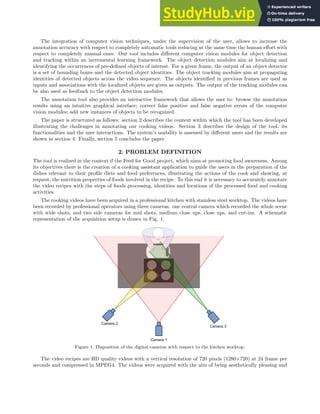
The cooking videos have been acquired in a professional kitchen with stainless steel worktop. The videos have
been recorded by professional operators using three cameras: one central camera which recorded the whole scene
with wide shots, and two side cameras for mid shots, medium close ups, close ups, and cut-ins. A schematic
representation of the acquisition setup is drawn in Fig. 1.
Figure 1. Disposition of the digital cameras with respect to the kitchen worktop.
The video recipes are HD quality videos with a vertical resolution of 720 pixels (1280×720) at 24 frame per
seconds and compressed in MPEG4. The videos were acquired with the aim of being aesthetically pleasing and
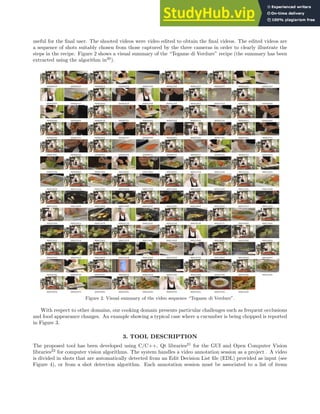
useful for the final user. The shooted videos were video edited to obtain the final videos. The edited videos are
a sequence of shots suitably chosen from those captured by the three cameras in order to clearly illustrate the
steps in the recipe. Figure 2 shows a visual summary of the “Tegame di Verdure” recipe (the summary has been
extracted using the algorithm in20
).
Figure 2. Visual summary of the video sequence “Tegame di Verdure”.
With respect to other domains, our cooking domain presents particular challenges such as frequent occlusions
and food appearance changes. An example showing a typical case where a cucumber is being chopped is reported
in Figure 3.
3. TOOL DESCRIPTION
The proposed tool has been developed using C/C++, Qt libraries21
for the GUI and Open Computer Vision
libraries22
for computer vision algorithms. The system handles a video annotation session as a project . A video
is divided in shots that are automatically detected from an Edit Decision List file (EDL) provided as input (see
Figure 4), or from a shot detection algorithm. Each annotation session must be associated to a list of items
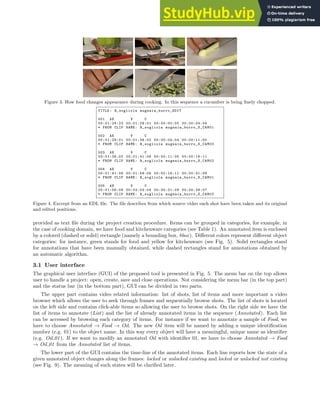
Figure 3. How food changes appearance during cooking. In this sequence a cucumber is being finely chopped.
TITLE: R_sogliola mugnaia_burro_EDIT
001 AX V C
00:01:24:22 00:01:29:01 00:00:00:00 00:00:04:04
* FROM CLIP NAME: R_sogliola mugnaia_burro_S_CAM01
002 AX V C
00:01:29:01 00:01:36:02 00:00:04:04 00:00:11:05
* FROM CLIP NAME: R_sogliola mugnaia_burro_S_CAM03
003 AX V C
00:01:36:02 00:01:41:08 00:00:11:05 00:00:16:11
* FROM CLIP NAME: R_sogliola mugnaia_burro_S_CAM02
004 AX V C
00:01:41:08 00:01:56:06 00:00:16:11 00:00:31:09
* FROM CLIP NAME: R_sogliola mugnaia_burro_S_CAM01
005 AX V C
00:01:56:06 00:02:04:04 00:00:31:09 00:00:39:07
* FROM CLIP NAME: R_sogliola mugnaia_burro_S_CAM03
Figure 4. Excerpt from an EDL file. The file describes from which source video each shot have been taken and its original
and edited positions.
provided as text file during the project creation procedure. Items can be grouped in categories, for example, in
the case of cooking domain, we have food and kitchenware categories (see Table 1). An annotated item is enclosed
by a colored (dashed or solid) rectangle (namely a bounding box, bbox). Different colors represent different object
categories: for instance, green stands for food and yellow for kitchenware (see Fig. 5). Solid rectangles stand
for annotations that have been manually obtained, while dashed rectangles stand for annotations obtained by
an automatic algorithm.
3.1 User interface
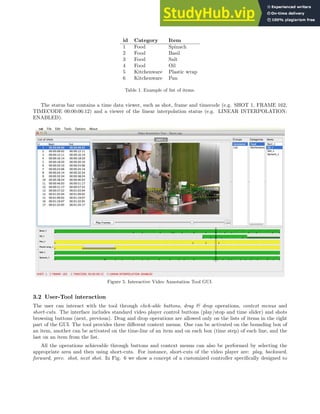
The graphical user interface (GUI) of the proposed tool is presented in Fig. 5. The menu bar on the top allows
user to handle a project: open, create, save and close operations. Not considering the menu bar (in the top part)
and the status bar (in the bottom part), GUI can be divided in two parts.
The upper part contains video related information: list of shots, list of items and more important a video
browser which allows the user to seek through frames and sequentially browse shots. The list of shots is located
on the left side and contains click-able items so allowing the user to browse shots. On the right side we have the
list of items to annotate (List) and the list of already annotated items in the sequence (Annotated). Each list
can be accessed by browsing each category of items. For instance if we want to annotate a sample of Food, we
have to choose Annotated → Food → Oil. The new Oil item will be named by adding a unique identification
number (e.g. 01) to the object name. In this way every object will have a meaningful, unique name as identifier
(e.g. Oil 01). If we want to modify an annotated Oil with identifier 01, we have to choose Annotated → Food
→ Oil 01 from the Annotated list of items.
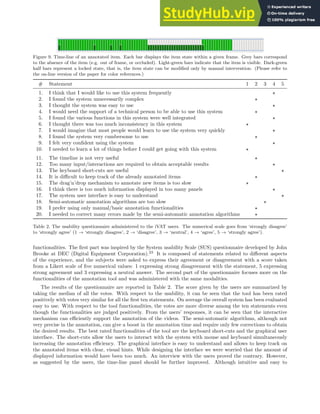
The lower part of the GUI contains the time-line of the annotated items. Each line reports how the state of a
given annotated object changes along the frames: locked or unlocked existing and locked or unlocked not existing
(see Fig. 9). The meaning of such states will be clarified later.
id Category Item
1 Food Spinach
2 Food Basil
3 Food Salt
4 Food Oil
5 Kitchenware Plastic wrap
6 Kitchenware Pan
Table 1. Example of list of items.
The status bar contains a time data viewer, such as shot, frame and timecode (e.g. SHOT 1, FRAME 162,
TIMECODE 00:00:06:12) and a viewer of the linear interpolation status (e.g. LINEAR INTERPOLATION:
ENABLED).
Figure 5. Interactive Video Annotation Tool GUI.
3.2 User-Tool interaction
The user can interact with the tool through click-able buttons, drag & drop operations, context menus and
short-cuts. The interface includes standard video player control buttons (play/stop and time slider) and shots
browsing buttons (next, previous). Drag and drop operations are allowed only on the lists of items in the right
part of the GUI. The tool provides three different context menus. One can be activated on the bounding box of
an item, another can be activated on the time-line of an item and on each box (time step) of each line, and the
last on an item from the list.
All the operations achievable through buttons and context menus can also be performed by selecting the
appropriate area and then using short-cuts. For instance, short-cuts of the video player are: play, backward,
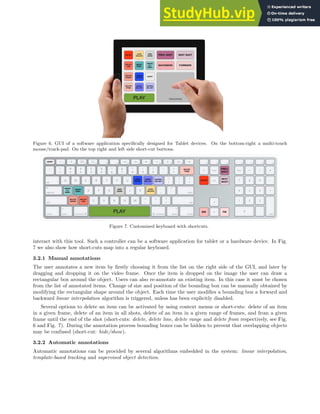
forward, prev. shot, next shot. In Fig. 6 we show a concept of a customized controller specifically designed to
Figure 6. GUI of a software application specifically designed for Tablet devices. On the bottom-right a multi-touch
mouse/track-pad. On the top right and left side short-cut buttons.
Figure 7. Customized keyboard with shortcuts.
interact with this tool. Such a controller can be a software application for tablet or a hardware device. In Fig.
7 we also show how short-cuts map into a regular keyboard.
3.2.1 Manual annotations
The user annotates a new item by firstly choosing it from the list on the right side of the GUI, and later by
dragging and dropping it on the video frame. Once the item is dropped on the image the user can draw a
rectangular box around the object. Users can also re-annotate an existing item. In this case it must be chosen
from the list of annotated items. Change of size and position of the bounding box can be manually obtained by
modifying the rectangular shape around the object. Each time the user modifies a bounding box a forward and
backward linear interpolation algorithm is triggered, unless has been explicitly disabled.
Several options to delete an item can be activated by using context menus or short-cuts: delete of an item
in a given frame, delete of an item in all shots, delete of an item in a given range of frames, and from a given
frame until the end of the shot (short-cuts: delete, delete line, delete range and delete from respectively, see Fig.
6 and Fig. 7). During the annotation process bounding boxes can be hidden to prevent that overlapping objects
may be confused (short-cut: hide/show).
3.2.2 Automatic annotations
Automatic annotations can be provided by several algorithms embedded in the system: linear interpolation,
template-based tracking and supervised object detection.
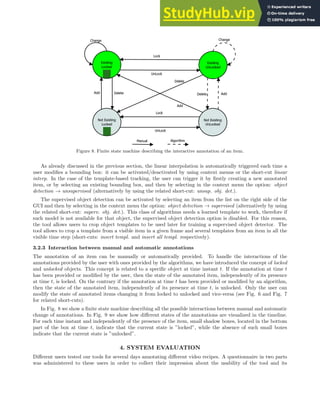
Figure 8. Finite state machine describing the interactive annotation of an item.
As already discussed in the previous section, the linear interpolation is automatically triggered each time a
user modifies a bounding box: it can be activated/deactivated by using context menus or the short-cut linear
interp. In the case of the template-based tracking, the user can trigger it by firstly creating a new annotated
item, or by selecting an existing bounding box, and then by selecting in the context menu the option: object
detection → unsupervised (alternatively by using the related short-cut: unsup. obj. det.).
The supervised object detection can be activated by selecting an item from the list on the right side of the
GUI and then by selecting in the context menu the option: object detection → supervised (alternatively by using
the related short-cut: superv. obj. det.). This class of algorithms needs a learned template to work, therefore if
such model is not available for that object, the supervised object detection option is disabled. For this reason,
the tool allows users to crop object templates to be used later for training a supervised object detector. The
tool allows to crop a template from a visible item in a given frame and several templates from an item in all the
visible time step (short-cuts: insert templ. and insert all templ. respectively).
3.2.3 Interaction between manual and automatic annotations
The annotation of an item can be manually or automatically provided. To handle the interactions of the
annotations provided by the user with ones provided by the algorithms, we have introduced the concept of locked
and unlocked objects. This concept is related to a specific object at time instant t. If the annotation at time t
has been provided or modified by the user, then the state of the annotated item, independently of its presence
at time t, is locked. On the contrary if the annotation at time t has been provided or modified by an algorithm,
then the state of the annotated item, independently of its presence at time t, is unlocked. Only the user can
modify the state of annotated items changing it from locked to unlocked and vice-versa (see Fig. 6 and Fig. 7
for related short-cuts).
In Fig. 8 we show a finite state machine describing all the possible interactions between manual and automatic
change of annotations. In Fig. 9 we show how different states of the annotations are visualized in the timeline.
For each time instant and independently of the presence of the item, small shadow boxes, located in the bottom
part of the box at time t, indicate that the current state is ”locked”, while the absence of such small boxes
indicate that the current state is ”unlocked”.
4. SYSTEM EVALUATION
Different users tested our tools for several days annotating different video recipes. A questionnaire in two parts
was administered to these users in order to collect their impression about the usability of the tool and its
Figure 9. Time-line of an annotated item. Each bar displays the item state within a given frame. Grey bars correspond
to the absence of the item (e.g. out of frame, or occluded). Light-green bars indicate that the item is visible. Dark-green
half bars represent a locked state, that is, the item state can be modified only by manual intervention. (Please refer to
the on-line version of the paper for color references.)
# Statement 1 2 3 4 5
1. I think that I would like to use this system frequently ⋆
2. I found the system unnecessarily complex ⋆
3. I thought the system was easy to use ⋆
4. I would need the support of a technical person to be able to use this system ⋆
5. I found the various functions in this system were well integrated ⋆
6. I thought there was too much inconsistency in this system ⋆
7. I would imagine that most people would learn to use the system very quickly ⋆
8. I found the system very cumbersome to use ⋆
9. I felt very confident using the system ⋆
10. I needed to learn a lot of things before I could get going with this system ⋆
11. The timeline is not very useful ⋆
12. Too many input/interactions are required to obtain acceptable results ⋆
13. The keyboard short-cuts are useful ⋆
14. It is difficult to keep track of the already annotated items ⋆
15. The drag’n’drop mechanism to annotate new items is too slow ⋆
16. I think there is too much information displayed in too many panels ⋆
17. The system user interface is easy to understand ⋆
18. Semi-automatic annotation algorithms are too slow ⋆
19. I prefer using only manual/basic annotation functionalities ⋆
20. I needed to correct many errors made by the semi-automatic annotation algorithms ⋆
Table 2. The usability questionnaire administered to the iVAT users. The numerical scale goes from ‘strongly disagree’
to ‘strongly agree’ (1 → ‘strongly disagree’, 2 → ‘disagree’, 3 → ‘neutral’, 4 → ‘agree’, 5 → ‘strongly agree’).
functionalities. The first part was inspired by the System usability Scale (SUS) questionnaire developed by John
Brooke at DEC (Digital Equipment Corporation).23
It is composed of statements related to different aspects
of the experience, and the subjects were asked to express their agreement or disagreement with a score taken
from a Likert scale of five numerical values: 1 expressing strong disagreement with the statement, 5 expressing
strong agreement and 3 expressing a neutral answer. The second part of the questionnaire focuses more on the
functionalities of the annotation tool and was administered with the same modalities.
The results of the questionnaire are reported in Table 2. The score given by the users are summarized by
taking the median of all the votes. With respect to the usability, it can be seen that the tool has been rated
positively with votes very similar for all the first ten statements. On average the overall system has been evaluated
easy to use. With respect to the tool functionalities, the votes are more diverse among the ten statements even
though the functionalities are judged positively. From the users’ responses, it can be seen that the interactive
mechanism can efficiently support the annotation of the videos. The semi-automatic algorithms, although not
very precise in the annotation, can give a boost in the annotation time and require only few corrections to obtain
the desired results. The best rated functionalities of the tool are the keyboard short-cuts and the graphical user
interface. The short-cuts allow the users to interact with the system with mouse and keyboard simultaneously
increasing the annotation efficiency. The graphical interface is easy to understand and allows to keep track on
the annotated items with clear, visual hints. While designing the interface we were worried that the amount of
displayed information would have been too much. An interview with the users proved the contrary. However,
as suggested by the users, the time-line panel should be further improved. Although intuitive and easy to
understand, the user considered to be useful to add the capability to zoom-in and zoom-out the time-line. When
the number of frames is very large, they felt very tedious to scroll the panel back and forth in order to seek the
desired frame interval. A resizeable time-line that could be made to fit the size of the panel will be a welcome
addition to the tool.
With respect to the tool’s usage, initially some users preferred to start the annotation process by using
only the manual functionalities coupled with the interpolation and then adjust the results. Other users first
exploited the automatic or semi-automatic annotation functionalities and then manually modified the results.
After having acquired familiarity with the tools, all the users start to mix the manual and semi-automatic
annotation functionalities. One usage pattern common to all the users is that they start the annotation process
following the temporal order of the frames, that is, they start form the beginning of the video sequence and move
forward.
5. CONCLUSIONS
In this paper we presented an interactive, semi-automatic tool for the annotation of cooking videos. The tool
includes different computer vision modules for object detection and object tracking within an incremental learning
framework. The integration of computer vision techniques, under the supervision of the user, allows to increase
the annotation accuracy with respect to completely automatic tools reducing at the same time the human effort
with respect to completely manual ones.
The annotation tool provides an interactive framework that allows the user to: browse the annotation results
using an intuitive graphical interface; correct false positive and false negative errors of the computer vision
modules; add new instances of objects to be recognized.
A questionnaire was administered to the users that used our tool in order to collect their impression about
the usability of the tool and its functionalities. The users rated positively the tool, and on average the overall
system has been evaluated easy to use. With respect to the tool functionalities, the users found the interactive
mechanism an efficient support for the video annotation. The best rated functionalities of the tool are the
keyboard short-cuts and the graphical user interface.
As future work we plan to extend the annotation tool to include the observations emerged from the users’
interviews. We plan also to customize and include a larger number of computer vision algorithms, which will be
specifically adapted to work fine in an interactive framework.
ACKNOWLEDGMENTS
The R&D project “Feed for good” is coordinated by Almaviva and partially supported by Regione Lombardia
(www.regione.lombardia.it). The University of Milano Bicocca is supported by Almaviva. The authors thank
Almaviva for the permission to present this paper.
REFERENCES
[1] Smeulders, A. W. M., Worring, M., Santini, S., Gupta, A., and Jain, R., “Content-based image retrieval at
the end of the early years,” IEEE Trans. Pattern Anal. Mach. Intell. 22(12), 1349–1380 (2000).
[2] Datta, R., Joshi, D., Li, J., James, and Wang, Z., “Image retrieval: Ideas, influences, and trends of the new
age,” ACM Computing Surveys 39, 2007 (2006).
[3] Hu, W., Xie, N., Li, L., Zeng, X., and Maybank, S., “A survey on visual content-based video indexing and
retrieval,” Systems, Man, and Cybernetics, Part C: Applications and Reviews, IEEE Transactions on 41(6),
797 –819 (2011).
[4] “The pascal visual object classes challenge.” http://pascallin.ecs.soton.ac.uk/challenges/VOC/.
[5] “Virat video dataset.” http://www.viratdata.org.
[6] “Pets: Performance evaluation of tracking and surveillance.” www.cvg.cs.rdg.ac.uk/slides/pets.html.
[7] “Trecvid: Trec video retrieval evaluation.” http://trecvid.nist.gov.
[8] Hu, W., Tan, T., Wang, L., and Maybank, S., “A survey on visual surveillance of object motion and
behaviors,” Systems, Man, and Cybernetics, Part C: Applications and Reviews, IEEE Transactions on 34(3),
334 –352 (2004).
[9] “Intelligent multi-camera video surveillance: A review,” Pattern Recognition Letters 34(1), 3 – 19 (2013).
[10] Pal, N. R. and Pal, S. K., “A review on image segmentation techniques,” Pattern Recognition 26(9), 1277
– 1294 (1993).
[11] Yilmaz, A., Javed, O., and Shah, M., “Object tracking: A survey,” ACM Comput. Surv. 38(4) (2006).
[12] Zhang, C. and Zhang, Z., “A survey of recent advances in face detection,” Technical report, Microsoft
Research (2010).
[13] Torralba, A., Russell, B., and Yuen, J., “Labelme: Online image annotation and applications,” Proceedings
of the IEEE 98(8), 1467 –1484 (2010).
[14] Yuen, J., Russell, B., Liu, C., and Torralba, A., “Labelme video: Building a video database with human
annotations,” in [Computer Vision, 2009 IEEE 12th International Conference on], 1451 –1458 (2009).
[15] Vondrick, C., Patterson, D., and Ramanan, D., “Efficiently scaling up crowdsourced video annotation,”
International Journal of Computer Vision , 1–21.
[16] Mihalcik, D. and Doermann, D., “The design and implementation of viper,” (2003).
[17] Ali, K., Hasler, D., and Fleuret, F., “Flowboost: Appearance learning from sparsely annotated video,” in
[Computer Vision and Pattern Recognition (CVPR), 2011 IEEE Conference on], 1433 –1440 (june 2011).
[18] Kavasidis, I., Palazzo, S., Di Salvo, R., Giordano, D., and Spampinato, C., “A semi-automatic tool for
detection and tracking ground truth generation in videos,” in [Proceedings of the 1st International Workshop
on Visual Interfaces for Ground Truth Collection in Computer Vision Applications], VIGTA ’12, 6:1–6:5,
ACM, New York, NY, USA (2012).
[19] Yao, A., Gall, J., Leistner, C., and Van Gool, L., “Interactive object detection,” in [Computer Vision and
Pattern Recognition (CVPR), 2012 IEEE Conference on], 3242 –3249 (june 2012).
[20] Ciocca, G. and Schettini, R., “An innovative algorithm for key frame extraction in video summarization,”
Journal of Real-Time Image Processing 1, 69–88 (2006).
[21] “Qt framework.” http://qt-project.org.
[22] “Open computer vision libraries - opencv.” http://opencv.org.
[23] Brooke, J., “SUS: A Quick and Dirty Usability Scale,” in [Usability Evaluation in Industry], Jordan, P. W.,
Thomas, B., Weerdmeester, B. A., and McClelland, I. L., eds., Taylor & Francis., London (1996).

A Semi-Automatic Annotation Tool For Cooking Video

  • 1.
    A Semi-automatic AnnotationTool For Cooking Video Simone Biancoa, Gianluigi Cioccaa, Paolo Napoletanoa, Raimondo Schettinia, Roberto Margheritab, Gianluca Marinic, Giorgio Gianformec, Giuseppe Pantaleoc aDISCo (Dipartimento di Informatica, Sistemistica e Comunicazione) Università degli Studi di Milano-Bicocca, Viale Sarca 336, 20126 Milano, Italy; bAlmaviva S.p.a., cAlmawave S.r.l. Centro Direzionale Business Park, Via dei Missaglia n. 97, Edificio B4, 20142 Milano, Italy. ABSTRACT In order to create a cooking assistant application to guide the users in the preparation of the dishes relevant to their profile diets and food preferences, it is necessary to accurately annotate the video recipes, identifying and tracking the foods of the cook. These videos present particular annotation challenges such as frequent occlusions, food appearance changes, etc. Manually annotate the videos is a time-consuming, tedious and error-prone task. Fully automatic tools that integrate computer vision algorithms to extract and identify the elements of interest are not error free, and false positive and false negative detections need to be corrected in a post-processing stage. We present an interactive, semi-automatic tool for the annotation of cooking videos that integrates computer vision techniques under the supervision of the user. The annotation accuracy is increased with respect to completely automatic tools and the human effort is reduced with respect to completely manual ones. The performance and usability of the proposed tool are evaluated on the basis of the time and effort required to annotate the same video sequences. Keywords: Video annotation, object recognition, interactive tracking 1. INTRODUCTION The annotation of image and video data of large datasets is a fundamental task in multimedia information retrieval1–3 and computer vision applications.4–9 The manual generation of video annotations by a user is a time-consuming, tedious and error-prone task: in fact, typical videos are recorded with a frame rate of 24-30 frames per second; even a short video of 60 seconds would require the annotation of 1440-1800 frames. Theoretically, fully automatic tools that integrate computer vision algorithms to extract and identify the elements of interest across frames, should be developed. Unfor- tunately, state-of-the-art algorithms such as image and video segmentation, object detection and recognition, object tracking, and motion detection,10–12 are not error free, and false positive and false negative detections would require a human effort to correct them in a post-processing stage. As a consequence, several efficient semi-automatic visual tools have been developed.13–17 Usually, such tools, that support the annotator with basic computer vision algorithms (i.e. key frame detection, motion and shape linear interpolation, etc.), have demon- strated to be very effective in terms of the number of user interactions, user experience, usability, accuracy and annotation time.15 The most recent trend is the development of tools that integrate computer vision algorithms (such as unsupervised/supervised object detection, object tracking, etc.) that assist humans or cooperate with them to accomplish labelling tasks.18,19 In this paper we present a tool for interactive, semi-automatic video annotation that integrates customized versions of well known computer vision algorithms, specifically adapted to work in an interactive framework. The tool has been developed and tested within the Feed for Good project, described later in Sec. 2, to annotate video recipes, but it can be easily adapted and used to annotate videos from different domains as well. Simone Bianco: bianco@disco.unimib.it, Gianluigi Ciocca: ciocca@disco.unimib.it, Paolo Napoletano: napole- tano@disco.unimib.it, Raimondo Schettini: schettini@disco.unimib.it, Roberto Margherita: r.margherita@almaviva.it, Gianluca Marini: g.marini2@almaviva.it, Giorgio Gianforme: g.gianforme@almaviva.it, Giuseppe Pantaleo: g.pantaleo@almaviva.it
  • 2.
    The integration ofcomputer vision techniques, under the supervision of the user, allows to increase the annotation accuracy with respect to completely automatic tools reducing at the same time the human effort with respect to completely manual ones. Our tool includes different computer vision modules for object detection and tracking within an incremental learning framework. The object detection modules aim at localizing and identifying the occurrences of pre-defined objects of interest. For a given frame, the output of an object detector is a set of bounding boxes and the detected object identities. The object tracking modules aim at propagating identities of detected objects across the video sequence. The objects identified in previous frames are used as inputs and associations with the localized objects are given as outputs. The output of the tracking modules can be also used as feedback to the object detection modules. The annotation tool also provides an interactive framework that allows the user to: browse the annotation results using an intuitive graphical interface; correct false positive and false negative errors of the computer vision modules; add new instances of objects to be recognized. The paper is structured as follows: section 2 describes the context within which the tool has been developed illustrating the challenges in annotating our cooking videos. Section 3 describes the design of the tool, its functionalities and the user interactions. The system’s usability is assessed by different users and the results are shown in section 4. Finally, section 5 concludes the paper. 2. PROBLEM DEFINITION The tool is realized in the context if the Feed for Good project, which aims at promoting food awareness. Among its objectives there is the creation of a cooking assistant application to guide the users in the preparation of the dishes relevant to their profile diets and food preferences, illustrating the actions of the cook and showing, at request, the nutrition properties of foods involved in the recipe. To this end it is necessary to accurately annotate the video recipes with the steps of foods processing, identities and locations of the processed food and cooking activities. The cooking videos have been acquired in a professional kitchen with stainless steel worktop. The videos have been recorded by professional operators using three cameras: one central camera which recorded the whole scene with wide shots, and two side cameras for mid shots, medium close ups, close ups, and cut-ins. A schematic representation of the acquisition setup is drawn in Fig. 1. Figure 1. Disposition of the digital cameras with respect to the kitchen worktop. The video recipes are HD quality videos with a vertical resolution of 720 pixels (1280×720) at 24 frame per seconds and compressed in MPEG4. The videos were acquired with the aim of being aesthetically pleasing and
  • 3.
    useful for thefinal user. The shooted videos were video edited to obtain the final videos. The edited videos are a sequence of shots suitably chosen from those captured by the three cameras in order to clearly illustrate the steps in the recipe. Figure 2 shows a visual summary of the “Tegame di Verdure” recipe (the summary has been extracted using the algorithm in20 ). Figure 2. Visual summary of the video sequence “Tegame di Verdure”. With respect to other domains, our cooking domain presents particular challenges such as frequent occlusions and food appearance changes. An example showing a typical case where a cucumber is being chopped is reported in Figure 3. 3. TOOL DESCRIPTION The proposed tool has been developed using C/C++, Qt libraries21 for the GUI and Open Computer Vision libraries22 for computer vision algorithms. The system handles a video annotation session as a project . A video is divided in shots that are automatically detected from an Edit Decision List file (EDL) provided as input (see Figure 4), or from a shot detection algorithm. Each annotation session must be associated to a list of items
  • 4.
    Figure 3. Howfood changes appearance during cooking. In this sequence a cucumber is being finely chopped. TITLE: R_sogliola mugnaia_burro_EDIT 001 AX V C 00:01:24:22 00:01:29:01 00:00:00:00 00:00:04:04 * FROM CLIP NAME: R_sogliola mugnaia_burro_S_CAM01 002 AX V C 00:01:29:01 00:01:36:02 00:00:04:04 00:00:11:05 * FROM CLIP NAME: R_sogliola mugnaia_burro_S_CAM03 003 AX V C 00:01:36:02 00:01:41:08 00:00:11:05 00:00:16:11 * FROM CLIP NAME: R_sogliola mugnaia_burro_S_CAM02 004 AX V C 00:01:41:08 00:01:56:06 00:00:16:11 00:00:31:09 * FROM CLIP NAME: R_sogliola mugnaia_burro_S_CAM01 005 AX V C 00:01:56:06 00:02:04:04 00:00:31:09 00:00:39:07 * FROM CLIP NAME: R_sogliola mugnaia_burro_S_CAM03 Figure 4. Excerpt from an EDL file. The file describes from which source video each shot have been taken and its original and edited positions. provided as text file during the project creation procedure. Items can be grouped in categories, for example, in the case of cooking domain, we have food and kitchenware categories (see Table 1). An annotated item is enclosed by a colored (dashed or solid) rectangle (namely a bounding box, bbox). Different colors represent different object categories: for instance, green stands for food and yellow for kitchenware (see Fig. 5). Solid rectangles stand for annotations that have been manually obtained, while dashed rectangles stand for annotations obtained by an automatic algorithm. 3.1 User interface The graphical user interface (GUI) of the proposed tool is presented in Fig. 5. The menu bar on the top allows user to handle a project: open, create, save and close operations. Not considering the menu bar (in the top part) and the status bar (in the bottom part), GUI can be divided in two parts. The upper part contains video related information: list of shots, list of items and more important a video browser which allows the user to seek through frames and sequentially browse shots. The list of shots is located on the left side and contains click-able items so allowing the user to browse shots. On the right side we have the list of items to annotate (List) and the list of already annotated items in the sequence (Annotated). Each list can be accessed by browsing each category of items. For instance if we want to annotate a sample of Food, we have to choose Annotated → Food → Oil. The new Oil item will be named by adding a unique identification number (e.g. 01) to the object name. In this way every object will have a meaningful, unique name as identifier (e.g. Oil 01). If we want to modify an annotated Oil with identifier 01, we have to choose Annotated → Food → Oil 01 from the Annotated list of items. The lower part of the GUI contains the time-line of the annotated items. Each line reports how the state of a given annotated object changes along the frames: locked or unlocked existing and locked or unlocked not existing (see Fig. 9). The meaning of such states will be clarified later.
  • 5.
    id Category Item 1Food Spinach 2 Food Basil 3 Food Salt 4 Food Oil 5 Kitchenware Plastic wrap 6 Kitchenware Pan Table 1. Example of list of items. The status bar contains a time data viewer, such as shot, frame and timecode (e.g. SHOT 1, FRAME 162, TIMECODE 00:00:06:12) and a viewer of the linear interpolation status (e.g. LINEAR INTERPOLATION: ENABLED). Figure 5. Interactive Video Annotation Tool GUI. 3.2 User-Tool interaction The user can interact with the tool through click-able buttons, drag & drop operations, context menus and short-cuts. The interface includes standard video player control buttons (play/stop and time slider) and shots browsing buttons (next, previous). Drag and drop operations are allowed only on the lists of items in the right part of the GUI. The tool provides three different context menus. One can be activated on the bounding box of an item, another can be activated on the time-line of an item and on each box (time step) of each line, and the last on an item from the list. All the operations achievable through buttons and context menus can also be performed by selecting the appropriate area and then using short-cuts. For instance, short-cuts of the video player are: play, backward, forward, prev. shot, next shot. In Fig. 6 we show a concept of a customized controller specifically designed to
  • 6.
    Figure 6. GUIof a software application specifically designed for Tablet devices. On the bottom-right a multi-touch mouse/track-pad. On the top right and left side short-cut buttons. Figure 7. Customized keyboard with shortcuts. interact with this tool. Such a controller can be a software application for tablet or a hardware device. In Fig. 7 we also show how short-cuts map into a regular keyboard. 3.2.1 Manual annotations The user annotates a new item by firstly choosing it from the list on the right side of the GUI, and later by dragging and dropping it on the video frame. Once the item is dropped on the image the user can draw a rectangular box around the object. Users can also re-annotate an existing item. In this case it must be chosen from the list of annotated items. Change of size and position of the bounding box can be manually obtained by modifying the rectangular shape around the object. Each time the user modifies a bounding box a forward and backward linear interpolation algorithm is triggered, unless has been explicitly disabled. Several options to delete an item can be activated by using context menus or short-cuts: delete of an item in a given frame, delete of an item in all shots, delete of an item in a given range of frames, and from a given frame until the end of the shot (short-cuts: delete, delete line, delete range and delete from respectively, see Fig. 6 and Fig. 7). During the annotation process bounding boxes can be hidden to prevent that overlapping objects may be confused (short-cut: hide/show). 3.2.2 Automatic annotations Automatic annotations can be provided by several algorithms embedded in the system: linear interpolation, template-based tracking and supervised object detection.
  • 7.
    Figure 8. Finitestate machine describing the interactive annotation of an item. As already discussed in the previous section, the linear interpolation is automatically triggered each time a user modifies a bounding box: it can be activated/deactivated by using context menus or the short-cut linear interp. In the case of the template-based tracking, the user can trigger it by firstly creating a new annotated item, or by selecting an existing bounding box, and then by selecting in the context menu the option: object detection → unsupervised (alternatively by using the related short-cut: unsup. obj. det.). The supervised object detection can be activated by selecting an item from the list on the right side of the GUI and then by selecting in the context menu the option: object detection → supervised (alternatively by using the related short-cut: superv. obj. det.). This class of algorithms needs a learned template to work, therefore if such model is not available for that object, the supervised object detection option is disabled. For this reason, the tool allows users to crop object templates to be used later for training a supervised object detector. The tool allows to crop a template from a visible item in a given frame and several templates from an item in all the visible time step (short-cuts: insert templ. and insert all templ. respectively). 3.2.3 Interaction between manual and automatic annotations The annotation of an item can be manually or automatically provided. To handle the interactions of the annotations provided by the user with ones provided by the algorithms, we have introduced the concept of locked and unlocked objects. This concept is related to a specific object at time instant t. If the annotation at time t has been provided or modified by the user, then the state of the annotated item, independently of its presence at time t, is locked. On the contrary if the annotation at time t has been provided or modified by an algorithm, then the state of the annotated item, independently of its presence at time t, is unlocked. Only the user can modify the state of annotated items changing it from locked to unlocked and vice-versa (see Fig. 6 and Fig. 7 for related short-cuts). In Fig. 8 we show a finite state machine describing all the possible interactions between manual and automatic change of annotations. In Fig. 9 we show how different states of the annotations are visualized in the timeline. For each time instant and independently of the presence of the item, small shadow boxes, located in the bottom part of the box at time t, indicate that the current state is ”locked”, while the absence of such small boxes indicate that the current state is ”unlocked”. 4. SYSTEM EVALUATION Different users tested our tools for several days annotating different video recipes. A questionnaire in two parts was administered to these users in order to collect their impression about the usability of the tool and its
  • 8.
    Figure 9. Time-lineof an annotated item. Each bar displays the item state within a given frame. Grey bars correspond to the absence of the item (e.g. out of frame, or occluded). Light-green bars indicate that the item is visible. Dark-green half bars represent a locked state, that is, the item state can be modified only by manual intervention. (Please refer to the on-line version of the paper for color references.) # Statement 1 2 3 4 5 1. I think that I would like to use this system frequently ⋆ 2. I found the system unnecessarily complex ⋆ 3. I thought the system was easy to use ⋆ 4. I would need the support of a technical person to be able to use this system ⋆ 5. I found the various functions in this system were well integrated ⋆ 6. I thought there was too much inconsistency in this system ⋆ 7. I would imagine that most people would learn to use the system very quickly ⋆ 8. I found the system very cumbersome to use ⋆ 9. I felt very confident using the system ⋆ 10. I needed to learn a lot of things before I could get going with this system ⋆ 11. The timeline is not very useful ⋆ 12. Too many input/interactions are required to obtain acceptable results ⋆ 13. The keyboard short-cuts are useful ⋆ 14. It is difficult to keep track of the already annotated items ⋆ 15. The drag’n’drop mechanism to annotate new items is too slow ⋆ 16. I think there is too much information displayed in too many panels ⋆ 17. The system user interface is easy to understand ⋆ 18. Semi-automatic annotation algorithms are too slow ⋆ 19. I prefer using only manual/basic annotation functionalities ⋆ 20. I needed to correct many errors made by the semi-automatic annotation algorithms ⋆ Table 2. The usability questionnaire administered to the iVAT users. The numerical scale goes from ‘strongly disagree’ to ‘strongly agree’ (1 → ‘strongly disagree’, 2 → ‘disagree’, 3 → ‘neutral’, 4 → ‘agree’, 5 → ‘strongly agree’). functionalities. The first part was inspired by the System usability Scale (SUS) questionnaire developed by John Brooke at DEC (Digital Equipment Corporation).23 It is composed of statements related to different aspects of the experience, and the subjects were asked to express their agreement or disagreement with a score taken from a Likert scale of five numerical values: 1 expressing strong disagreement with the statement, 5 expressing strong agreement and 3 expressing a neutral answer. The second part of the questionnaire focuses more on the functionalities of the annotation tool and was administered with the same modalities. The results of the questionnaire are reported in Table 2. The score given by the users are summarized by taking the median of all the votes. With respect to the usability, it can be seen that the tool has been rated positively with votes very similar for all the first ten statements. On average the overall system has been evaluated easy to use. With respect to the tool functionalities, the votes are more diverse among the ten statements even though the functionalities are judged positively. From the users’ responses, it can be seen that the interactive mechanism can efficiently support the annotation of the videos. The semi-automatic algorithms, although not very precise in the annotation, can give a boost in the annotation time and require only few corrections to obtain the desired results. The best rated functionalities of the tool are the keyboard short-cuts and the graphical user interface. The short-cuts allow the users to interact with the system with mouse and keyboard simultaneously increasing the annotation efficiency. The graphical interface is easy to understand and allows to keep track on the annotated items with clear, visual hints. While designing the interface we were worried that the amount of displayed information would have been too much. An interview with the users proved the contrary. However, as suggested by the users, the time-line panel should be further improved. Although intuitive and easy to
  • 9.
    understand, the userconsidered to be useful to add the capability to zoom-in and zoom-out the time-line. When the number of frames is very large, they felt very tedious to scroll the panel back and forth in order to seek the desired frame interval. A resizeable time-line that could be made to fit the size of the panel will be a welcome addition to the tool. With respect to the tool’s usage, initially some users preferred to start the annotation process by using only the manual functionalities coupled with the interpolation and then adjust the results. Other users first exploited the automatic or semi-automatic annotation functionalities and then manually modified the results. After having acquired familiarity with the tools, all the users start to mix the manual and semi-automatic annotation functionalities. One usage pattern common to all the users is that they start the annotation process following the temporal order of the frames, that is, they start form the beginning of the video sequence and move forward. 5. CONCLUSIONS In this paper we presented an interactive, semi-automatic tool for the annotation of cooking videos. The tool includes different computer vision modules for object detection and object tracking within an incremental learning framework. The integration of computer vision techniques, under the supervision of the user, allows to increase the annotation accuracy with respect to completely automatic tools reducing at the same time the human effort with respect to completely manual ones. The annotation tool provides an interactive framework that allows the user to: browse the annotation results using an intuitive graphical interface; correct false positive and false negative errors of the computer vision modules; add new instances of objects to be recognized. A questionnaire was administered to the users that used our tool in order to collect their impression about the usability of the tool and its functionalities. The users rated positively the tool, and on average the overall system has been evaluated easy to use. With respect to the tool functionalities, the users found the interactive mechanism an efficient support for the video annotation. The best rated functionalities of the tool are the keyboard short-cuts and the graphical user interface. As future work we plan to extend the annotation tool to include the observations emerged from the users’ interviews. We plan also to customize and include a larger number of computer vision algorithms, which will be specifically adapted to work fine in an interactive framework. ACKNOWLEDGMENTS The R&D project “Feed for good” is coordinated by Almaviva and partially supported by Regione Lombardia (www.regione.lombardia.it). The University of Milano Bicocca is supported by Almaviva. The authors thank Almaviva for the permission to present this paper. REFERENCES [1] Smeulders, A. W. M., Worring, M., Santini, S., Gupta, A., and Jain, R., “Content-based image retrieval at the end of the early years,” IEEE Trans. Pattern Anal. Mach. Intell. 22(12), 1349–1380 (2000). [2] Datta, R., Joshi, D., Li, J., James, and Wang, Z., “Image retrieval: Ideas, influences, and trends of the new age,” ACM Computing Surveys 39, 2007 (2006). [3] Hu, W., Xie, N., Li, L., Zeng, X., and Maybank, S., “A survey on visual content-based video indexing and retrieval,” Systems, Man, and Cybernetics, Part C: Applications and Reviews, IEEE Transactions on 41(6), 797 –819 (2011). [4] “The pascal visual object classes challenge.” http://pascallin.ecs.soton.ac.uk/challenges/VOC/. [5] “Virat video dataset.” http://www.viratdata.org. [6] “Pets: Performance evaluation of tracking and surveillance.” www.cvg.cs.rdg.ac.uk/slides/pets.html. [7] “Trecvid: Trec video retrieval evaluation.” http://trecvid.nist.gov.
  • 10.
    [8] Hu, W.,Tan, T., Wang, L., and Maybank, S., “A survey on visual surveillance of object motion and behaviors,” Systems, Man, and Cybernetics, Part C: Applications and Reviews, IEEE Transactions on 34(3), 334 –352 (2004). [9] “Intelligent multi-camera video surveillance: A review,” Pattern Recognition Letters 34(1), 3 – 19 (2013). [10] Pal, N. R. and Pal, S. K., “A review on image segmentation techniques,” Pattern Recognition 26(9), 1277 – 1294 (1993). [11] Yilmaz, A., Javed, O., and Shah, M., “Object tracking: A survey,” ACM Comput. Surv. 38(4) (2006). [12] Zhang, C. and Zhang, Z., “A survey of recent advances in face detection,” Technical report, Microsoft Research (2010). [13] Torralba, A., Russell, B., and Yuen, J., “Labelme: Online image annotation and applications,” Proceedings of the IEEE 98(8), 1467 –1484 (2010). [14] Yuen, J., Russell, B., Liu, C., and Torralba, A., “Labelme video: Building a video database with human annotations,” in [Computer Vision, 2009 IEEE 12th International Conference on], 1451 –1458 (2009). [15] Vondrick, C., Patterson, D., and Ramanan, D., “Efficiently scaling up crowdsourced video annotation,” International Journal of Computer Vision , 1–21. [16] Mihalcik, D. and Doermann, D., “The design and implementation of viper,” (2003). [17] Ali, K., Hasler, D., and Fleuret, F., “Flowboost: Appearance learning from sparsely annotated video,” in [Computer Vision and Pattern Recognition (CVPR), 2011 IEEE Conference on], 1433 –1440 (june 2011). [18] Kavasidis, I., Palazzo, S., Di Salvo, R., Giordano, D., and Spampinato, C., “A semi-automatic tool for detection and tracking ground truth generation in videos,” in [Proceedings of the 1st International Workshop on Visual Interfaces for Ground Truth Collection in Computer Vision Applications], VIGTA ’12, 6:1–6:5, ACM, New York, NY, USA (2012). [19] Yao, A., Gall, J., Leistner, C., and Van Gool, L., “Interactive object detection,” in [Computer Vision and Pattern Recognition (CVPR), 2012 IEEE Conference on], 3242 –3249 (june 2012). [20] Ciocca, G. and Schettini, R., “An innovative algorithm for key frame extraction in video summarization,” Journal of Real-Time Image Processing 1, 69–88 (2006). [21] “Qt framework.” http://qt-project.org. [22] “Open computer vision libraries - opencv.” http://opencv.org. [23] Brooke, J., “SUS: A Quick and Dirty Usability Scale,” in [Usability Evaluation in Industry], Jordan, P. W., Thomas, B., Weerdmeester, B. A., and McClelland, I. L., eds., Taylor & Francis., London (1996).