Route Origin Validation - A MANRS
Approach
Md. Zobair Khan
MANRS Ambassador
Acknowledgement
• This paper is made taking notes, diagram, configurations from
MANRS, APNIC training materials & blog, NLnet Labs, Github &
Dr. Philip Smith along with the operational experience of the
author.
MANRS
• Mutually Agreed Norms for Routing Security (MANRS) is a
global initiative, supported by the Internet Society, that
provides crucial fixes to reduce the most common routing
threats.
MANRS
• MANRS outlines four simple but concrete actions that network
operators should take:
• Filtering
• Anti-spoofing
• Coordination
• Global Validation
Global Validation
• Publish your data, so others can validate routing information on
a global scale
• Automated information validation needs arrangements
• Securing global routing information is done by RPKI
Resource Public Key Infrastructure (RPKI)
• RPKI allows holders of Internet number resources to make
verifiable statements about how they intend to use their
resources.
• RPKI is a way to define data in an out-of-band system such
that the information that are exchanged by BGP can be
validated to be correct.
• RPKI is used to make Internet routing more secure.
Importance of RPKI
• Secured Routing Table
• Dynamic LOA checking
• Maintaining a Dynamic Chain of Trust
• Digitally Signed Resources Certificate (X.509 Certificates-RFC5280)
• Helps to Stop Route Hijack
Route Origin Authorizations (ROA)
• Using the RPKI system, the legitimate holder of a block of IP
addresses can use their resource certificate to make an
authoritative, signed statement about which autonomous
system is authorized to originate their prefix in BGP.
• These statements are called Route Origin Authorizations
(ROAs).
Route Origin Validation (ROV)
• RPKI system tries to closely mimic what route objects in the
IRR intend to do, but then in a more trustworthy manner.
• This process is called route origin validation (ROV)
Validity
• Valid - Resources found in database which is called Validated
ROA Payload (VRP).
• Invalid – Resources found but partial/whole information
doesn’t match with database.
• Not Found - The prefix in this announcement is not covered
by a VRP.
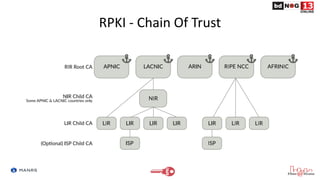
RPKI - Chain Of Trust
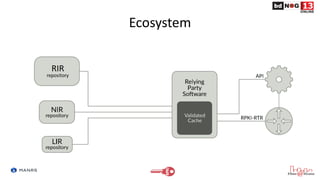
Ecosystem
Working Steps
• Creating ROA for owned resources for RPKI
• Implementing Validator relying software for ROV
• Enforcing policies for based on Validation
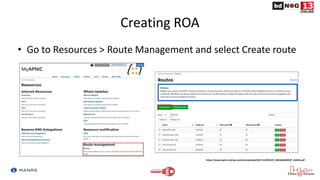
Creating ROA
• Go to Resources > Route Management and select Create route
https://www.apnic.net/wp-content/uploads/2017/12/ROUTE_MANAGEMENT_GUIDE.pdf
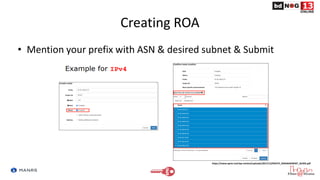
Creating ROA
• Mention your prefix with ASN & desired subnet & Submit
https://www.apnic.net/wp-content/uploads/2017/12/ROUTE_MANAGEMENT_GUIDE.pdf
Relying Party Software
 NLnet Labs Routinator
https://github.com/NLnetLabs/routinator
 LACNIC/NIC Mexico validator (FORT)
https://github.com/NICMx/FORT-validator
 Cloudflare validator (OctoRPKI)
https://github.com/cloudflare/cfrpki
Routinator
• Routinator is free, open source RPKI Relying Party software written by NLnet Labs in the
Rust programming language.
• Routinator connects to the Trust Anchors of the five Regional Internet Registries (RIRs) —
APNIC, AFRINIC, ARIN, LACNIC and RIPE NCC — downloads all of the certificates and
ROAs in the various repositories, verifies the signatures and makes the result available
for use in the BGP workflow.
• The validated cache can be fed directly into RPKI-capable routers via the RPKI to Router
Protocol (RPKI-RTR), described in RFC 8210.
https://rpki.readthedocs.io/en/latest/routinator/index.html
Installation
Add the line below that corresponds to your operating system to your
/etc/apt/sources.list or /etc/apt/sources.list.d/
deb [arch=amd64] https://packages.nlnetlabs.nl/linux/debian/ stretch main
deb [arch=amd64] https://packages.nlnetlabs.nl/linux/debian/ buster main
deb [arch=amd64] https://packages.nlnetlabs.nl/linux/ubuntu/ xenial main
deb [arch=amd64] https://packages.nlnetlabs.nl/linux/ubuntu/ bionic main
deb [arch=amd64] https://packages.nlnetlabs.nl/linux/ubuntu/ focal main
Installation
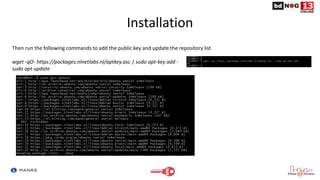
Then run the following commands to add the public key and update the repository list
wget -qO- https://packages.nlnetlabs.nl/aptkey.asc | sudo apt-key add -
sudo apt update
Installation
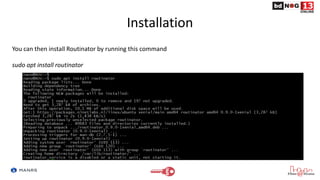
You can then install Routinator by running this command
sudo apt install routinator
Installation
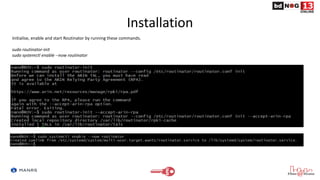
Initialise, enable and start Routinator by running these commands.
sudo routinator-init
sudo systemctl enable --now routinator
Installation
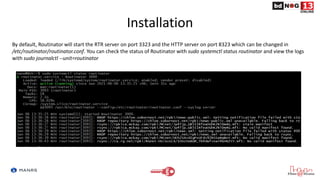
By default, Routinator will start the RTR server on port 3323 and the HTTP server on port 8323 which can be changed in
/etc/routinator/routinator.conf. You can check the status of Routinator with sudo systemctl status routinator and view the logs
with sudo journalctl --unit=routinator
Installation
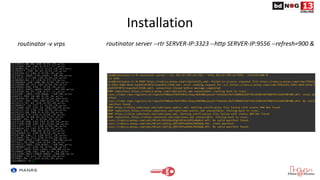
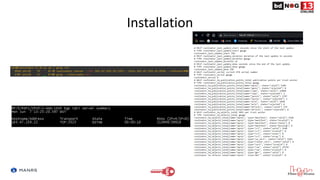
routinator -v vrps routinator server --rtr SERVER-IP:3323 --http SERVER-IP:9556 --refresh=900 &
Installation
OctoRPKI
• Developed and used by Cloudflare
• This application periodically refreshes the data provided by the RIRs and the delegated
organizations.
• It keeps exploring the RPKI repositories until it reaches a stable state (no new endpoints
added).
• RTR session is handeled by GoRTR – a separate module.
Installation
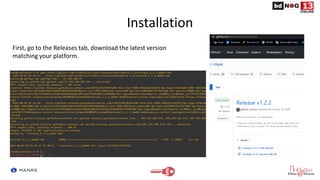
First, go to the Releases tab, download the latest version
matching your platform.
Installation
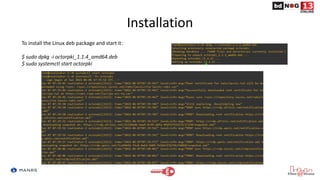
To install the Linux deb package and start it:
$ sudo dpkg -i octorpki_1.1.4_amd64.deb
$ sudo systemctl start octorpki
Installation
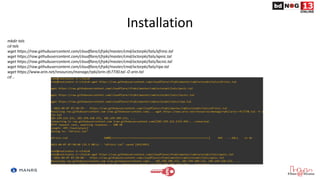
mkdir tals
cd tals
wget https://raw.githubusercontent.com/cloudflare/cfrpki/master/cmd/octorpki/tals/afrinic.tal
wget https://raw.githubusercontent.com/cloudflare/cfrpki/master/cmd/octorpki/tals/apnic.tal
wget https://raw.githubusercontent.com/cloudflare/cfrpki/master/cmd/octorpki/tals/lacnic.tal
wget https://raw.githubusercontent.com/cloudflare/cfrpki/master/cmd/octorpki/tals/ripe.tal
wget https://www.arin.net/resources/manage/rpki/arin-rfc7730.tal -O arin.tal
cd ..
Installation
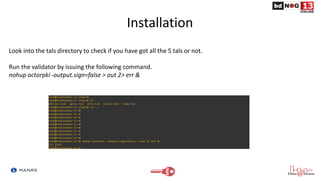
Look into the tals directory to check if you have got all the 5 tals or not.
Run the validator by issuing the following command.
nohup octorpki -output.sign=false > out 2> err &
Installation
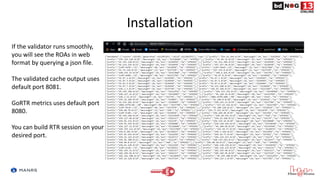
If the validator runs smoothly,
you will see the ROAs in web
format by querying a json file.
The validated cache output uses
default port 8081.
GoRTR metrics uses default port
8080.
You can build RTR session on your
desired port.
Installation
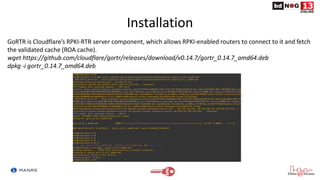
GoRTR is Cloudflare’s RPKI-RTR server component, which allows RPKI-enabled routers to connect to it and fetch
the validated cache (ROA cache).
wget https://github.com/cloudflare/gortr/releases/download/v0.14.7/gortr_0.14.7_amd64.deb
dpkg -i gortr_0.14.7_amd64.deb
Installation
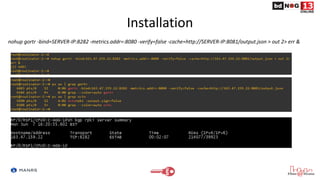
nohup gortr -bind=SERVER-IP:8282 -metrics.addr=:8080 -verify=false -cache=http://SERVER-IP:8081/output.json > out 2> err &
FORT Validator
• FORT validator is an MIT-licensed RPKI Relying Party, this is a tool offered as part of
the FORT project.
• FORT is a joint initiative by LACNIC, the Regional Internet Registry for Latin America and
the Caribbean, and NIC.MX.
• RTR Configuration is done with json file.
Installation
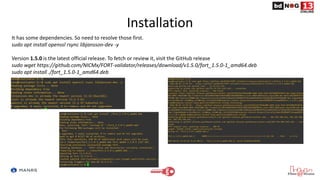
It has some dependencies. So need to resolve those first.
sudo apt install openssl rsync libjansson-dev -y
Version 1.5.0 is the latest official release. To fetch or review it, visit the GitHub release
sudo wget https://github.com/NICMx/FORT-validator/releases/download/v1.5.0/fort_1.5.0-1_amd64.deb
sudo apt install ./fort_1.5.0-1_amd64.deb
Installation
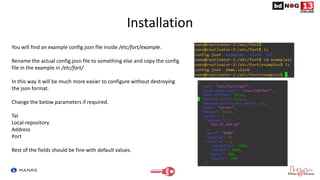
You will find an example config.json file inside /etc/fort/example.
Rename the actual config.josn file to something else and copy the config
file in the example in /etc/fort/
In this way it will be much more easier to configure without destroying
the json format.
Change the below parameters if required.
Tal
Local-repository
Address
Port
Rest of the fields should be fine with default values.
Installation
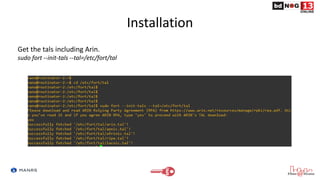
Get the tals including Arin.
sudo fort --init-tals --tal=/etc/fort/tal
Installation
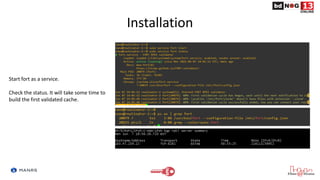
Start fort as a service.
Check the status. It will take some time to
build the first validated cache.
Hardware OS
Juniper - Junos version 12.2 and newer.
Cisco - IOS release 15.2 and newer, as well as Cisco IOS/XR since release 4.3.2.
Nokia - SR OS 12.0.R4 and newer, running on the 7210 SAS, 7250 IXR, 7750 SR, 7950 XRS and the VSR.
Arista - EOS 4.24.0F and newer
MikroTik - 7.0beta7 and newer
Huawei - VRP 8.150 and newer.
Router Configuration
router bgp [ASN]
rpki server [SERVER IP]
transport tcp port 3323
refresh-time 120
address-family ipv4 unicast
bgp origin-as validation signal ibgp
address-family ipv6 unicast
bgp origin-as validation signal ibgp
Configuration of IOS-XR
Router Configuration
• routing-options {
autonomous-system [ASN];
validation {
group rpki-validator {
Session [Server IP] {
refresh-time 120;
Port 3323;
local-address X.X.X.253;
}
}
}
}
Configuration of Junos
Decision
• Since now the validation states are visible to you, you can
decide what to do with invalids
• You can –
– Use them with low preference
– Or drop them
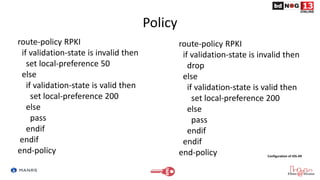
Policy
route-policy RPKI
if validation-state is invalid then
set local-preference 50
else
if validation-state is valid then
set local-preference 200
else
pass
endif
endif
end-policy
route-policy RPKI
if validation-state is invalid then
drop
else
if validation-state is valid then
set local-preference 200
else
pass
endif
endif
end-policy Configuration of IOS-XR
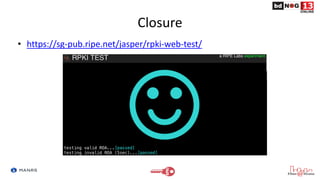
Closure
• https://sg-pub.ripe.net/jasper/rpki-web-test/
One Last Thing
• ARIN has announced a surprised maintenance of 30 min in July 2021. Announcement was made on 2nd
June 2021.
• They are doing it to make sure that their RPKI infrastructure is running with peak performance.
• https://www.arin.net/announcements/20210602-rpki/
• Also Job Snijders has shared some valuable insights on this maintenance work.
• https://lists.arin.net/pipermail/arin-tech-discuss/2021-June/000932.html
• Our learning –
– When you deploy RPKI, you need to keep an eye on your RPKI infrastructure performance.
– You need to make sure that any maintenance work is informed to your clients way ahead.
– Also you need to be aware of the events taking places in RIRs regarding their RPKI Infrastructure.
Reference
• https://www.manrs.org/about/
• https://blog.apnic.net/2019/10/28/how-to-installing-an-rpki-validator/
• http://www.bgp4all.com.au/pfs/training/apnic48/agenda
• https://rpki.readthedocs.io/en/latest/ops/tools.html#doc-tools
• https://www.ripe.net/manage-ips-and-asns/resource-management/certification/tools-and-resources
• https://github.com/cloudflare/cfrpki#octorpki
Query !!
Thanks …

Route Origin Validation - A MANRS Approach

  • 1.
    Route Origin Validation- A MANRS Approach Md. Zobair Khan MANRS Ambassador
  • 2.
    Acknowledgement • This paperis made taking notes, diagram, configurations from MANRS, APNIC training materials & blog, NLnet Labs, Github & Dr. Philip Smith along with the operational experience of the author.
  • 3.
    MANRS • Mutually AgreedNorms for Routing Security (MANRS) is a global initiative, supported by the Internet Society, that provides crucial fixes to reduce the most common routing threats.
  • 4.
    MANRS • MANRS outlinesfour simple but concrete actions that network operators should take: • Filtering • Anti-spoofing • Coordination • Global Validation
  • 5.
    Global Validation • Publishyour data, so others can validate routing information on a global scale • Automated information validation needs arrangements • Securing global routing information is done by RPKI
  • 6.
    Resource Public KeyInfrastructure (RPKI) • RPKI allows holders of Internet number resources to make verifiable statements about how they intend to use their resources. • RPKI is a way to define data in an out-of-band system such that the information that are exchanged by BGP can be validated to be correct. • RPKI is used to make Internet routing more secure.
  • 7.
    Importance of RPKI •Secured Routing Table • Dynamic LOA checking • Maintaining a Dynamic Chain of Trust • Digitally Signed Resources Certificate (X.509 Certificates-RFC5280) • Helps to Stop Route Hijack
  • 8.
    Route Origin Authorizations(ROA) • Using the RPKI system, the legitimate holder of a block of IP addresses can use their resource certificate to make an authoritative, signed statement about which autonomous system is authorized to originate their prefix in BGP. • These statements are called Route Origin Authorizations (ROAs).
  • 9.
    Route Origin Validation(ROV) • RPKI system tries to closely mimic what route objects in the IRR intend to do, but then in a more trustworthy manner. • This process is called route origin validation (ROV)
  • 10.
    Validity • Valid -Resources found in database which is called Validated ROA Payload (VRP). • Invalid – Resources found but partial/whole information doesn’t match with database. • Not Found - The prefix in this announcement is not covered by a VRP.
  • 11.
    RPKI - ChainOf Trust
  • 12.
  • 13.
    Working Steps • CreatingROA for owned resources for RPKI • Implementing Validator relying software for ROV • Enforcing policies for based on Validation
  • 14.
    Creating ROA • Goto Resources > Route Management and select Create route https://www.apnic.net/wp-content/uploads/2017/12/ROUTE_MANAGEMENT_GUIDE.pdf
  • 15.
    Creating ROA • Mentionyour prefix with ASN & desired subnet & Submit https://www.apnic.net/wp-content/uploads/2017/12/ROUTE_MANAGEMENT_GUIDE.pdf
  • 16.
    Relying Party Software NLnet Labs Routinator https://github.com/NLnetLabs/routinator  LACNIC/NIC Mexico validator (FORT) https://github.com/NICMx/FORT-validator  Cloudflare validator (OctoRPKI) https://github.com/cloudflare/cfrpki
  • 17.
    Routinator • Routinator isfree, open source RPKI Relying Party software written by NLnet Labs in the Rust programming language. • Routinator connects to the Trust Anchors of the five Regional Internet Registries (RIRs) — APNIC, AFRINIC, ARIN, LACNIC and RIPE NCC — downloads all of the certificates and ROAs in the various repositories, verifies the signatures and makes the result available for use in the BGP workflow. • The validated cache can be fed directly into RPKI-capable routers via the RPKI to Router Protocol (RPKI-RTR), described in RFC 8210. https://rpki.readthedocs.io/en/latest/routinator/index.html
  • 18.
    Installation Add the linebelow that corresponds to your operating system to your /etc/apt/sources.list or /etc/apt/sources.list.d/ deb [arch=amd64] https://packages.nlnetlabs.nl/linux/debian/ stretch main deb [arch=amd64] https://packages.nlnetlabs.nl/linux/debian/ buster main deb [arch=amd64] https://packages.nlnetlabs.nl/linux/ubuntu/ xenial main deb [arch=amd64] https://packages.nlnetlabs.nl/linux/ubuntu/ bionic main deb [arch=amd64] https://packages.nlnetlabs.nl/linux/ubuntu/ focal main
  • 19.
    Installation Then run thefollowing commands to add the public key and update the repository list wget -qO- https://packages.nlnetlabs.nl/aptkey.asc | sudo apt-key add - sudo apt update
  • 20.
    Installation You can theninstall Routinator by running this command sudo apt install routinator
  • 21.
    Installation Initialise, enable andstart Routinator by running these commands. sudo routinator-init sudo systemctl enable --now routinator
  • 22.
    Installation By default, Routinatorwill start the RTR server on port 3323 and the HTTP server on port 8323 which can be changed in /etc/routinator/routinator.conf. You can check the status of Routinator with sudo systemctl status routinator and view the logs with sudo journalctl --unit=routinator
  • 23.
    Installation routinator -v vrpsroutinator server --rtr SERVER-IP:3323 --http SERVER-IP:9556 --refresh=900 &
  • 24.
  • 25.
    OctoRPKI • Developed andused by Cloudflare • This application periodically refreshes the data provided by the RIRs and the delegated organizations. • It keeps exploring the RPKI repositories until it reaches a stable state (no new endpoints added). • RTR session is handeled by GoRTR – a separate module.
  • 26.
    Installation First, go tothe Releases tab, download the latest version matching your platform.
  • 27.
    Installation To install theLinux deb package and start it: $ sudo dpkg -i octorpki_1.1.4_amd64.deb $ sudo systemctl start octorpki
  • 28.
    Installation mkdir tals cd tals wgethttps://raw.githubusercontent.com/cloudflare/cfrpki/master/cmd/octorpki/tals/afrinic.tal wget https://raw.githubusercontent.com/cloudflare/cfrpki/master/cmd/octorpki/tals/apnic.tal wget https://raw.githubusercontent.com/cloudflare/cfrpki/master/cmd/octorpki/tals/lacnic.tal wget https://raw.githubusercontent.com/cloudflare/cfrpki/master/cmd/octorpki/tals/ripe.tal wget https://www.arin.net/resources/manage/rpki/arin-rfc7730.tal -O arin.tal cd ..
  • 29.
    Installation Look into thetals directory to check if you have got all the 5 tals or not. Run the validator by issuing the following command. nohup octorpki -output.sign=false > out 2> err &
  • 30.
    Installation If the validatorruns smoothly, you will see the ROAs in web format by querying a json file. The validated cache output uses default port 8081. GoRTR metrics uses default port 8080. You can build RTR session on your desired port.
  • 31.
    Installation GoRTR is Cloudflare’sRPKI-RTR server component, which allows RPKI-enabled routers to connect to it and fetch the validated cache (ROA cache). wget https://github.com/cloudflare/gortr/releases/download/v0.14.7/gortr_0.14.7_amd64.deb dpkg -i gortr_0.14.7_amd64.deb
  • 32.
    Installation nohup gortr -bind=SERVER-IP:8282-metrics.addr=:8080 -verify=false -cache=http://SERVER-IP:8081/output.json > out 2> err &
  • 33.
    FORT Validator • FORTvalidator is an MIT-licensed RPKI Relying Party, this is a tool offered as part of the FORT project. • FORT is a joint initiative by LACNIC, the Regional Internet Registry for Latin America and the Caribbean, and NIC.MX. • RTR Configuration is done with json file.
  • 34.
    Installation It has somedependencies. So need to resolve those first. sudo apt install openssl rsync libjansson-dev -y Version 1.5.0 is the latest official release. To fetch or review it, visit the GitHub release sudo wget https://github.com/NICMx/FORT-validator/releases/download/v1.5.0/fort_1.5.0-1_amd64.deb sudo apt install ./fort_1.5.0-1_amd64.deb
  • 35.
    Installation You will findan example config.json file inside /etc/fort/example. Rename the actual config.josn file to something else and copy the config file in the example in /etc/fort/ In this way it will be much more easier to configure without destroying the json format. Change the below parameters if required. Tal Local-repository Address Port Rest of the fields should be fine with default values.
  • 36.
    Installation Get the talsincluding Arin. sudo fort --init-tals --tal=/etc/fort/tal
  • 37.
    Installation Start fort asa service. Check the status. It will take some time to build the first validated cache.
  • 38.
    Hardware OS Juniper -Junos version 12.2 and newer. Cisco - IOS release 15.2 and newer, as well as Cisco IOS/XR since release 4.3.2. Nokia - SR OS 12.0.R4 and newer, running on the 7210 SAS, 7250 IXR, 7750 SR, 7950 XRS and the VSR. Arista - EOS 4.24.0F and newer MikroTik - 7.0beta7 and newer Huawei - VRP 8.150 and newer.
  • 39.
    Router Configuration router bgp[ASN] rpki server [SERVER IP] transport tcp port 3323 refresh-time 120 address-family ipv4 unicast bgp origin-as validation signal ibgp address-family ipv6 unicast bgp origin-as validation signal ibgp Configuration of IOS-XR
  • 40.
    Router Configuration • routing-options{ autonomous-system [ASN]; validation { group rpki-validator { Session [Server IP] { refresh-time 120; Port 3323; local-address X.X.X.253; } } } } Configuration of Junos
  • 41.
    Decision • Since nowthe validation states are visible to you, you can decide what to do with invalids • You can – – Use them with low preference – Or drop them
  • 42.
    Policy route-policy RPKI if validation-stateis invalid then set local-preference 50 else if validation-state is valid then set local-preference 200 else pass endif endif end-policy route-policy RPKI if validation-state is invalid then drop else if validation-state is valid then set local-preference 200 else pass endif endif end-policy Configuration of IOS-XR
  • 43.
  • 44.
    One Last Thing •ARIN has announced a surprised maintenance of 30 min in July 2021. Announcement was made on 2nd June 2021. • They are doing it to make sure that their RPKI infrastructure is running with peak performance. • https://www.arin.net/announcements/20210602-rpki/ • Also Job Snijders has shared some valuable insights on this maintenance work. • https://lists.arin.net/pipermail/arin-tech-discuss/2021-June/000932.html • Our learning – – When you deploy RPKI, you need to keep an eye on your RPKI infrastructure performance. – You need to make sure that any maintenance work is informed to your clients way ahead. – Also you need to be aware of the events taking places in RIRs regarding their RPKI Infrastructure.
  • 45.
    Reference • https://www.manrs.org/about/ • https://blog.apnic.net/2019/10/28/how-to-installing-an-rpki-validator/ •http://www.bgp4all.com.au/pfs/training/apnic48/agenda • https://rpki.readthedocs.io/en/latest/ops/tools.html#doc-tools • https://www.ripe.net/manage-ips-and-asns/resource-management/certification/tools-and-resources • https://github.com/cloudflare/cfrpki#octorpki
  • 46.