



UNLEASHING THE POWER:
A LAP AROUND
POWERSHELL 3.0
SARAH DUTKIEWICZ
CLEVELAND TECH CONSULTING
SARAH@CLETECHCONSULTING.COM
AGENDA
• System Requirements
• Overview of New & Improved Features
• Resources
• BONUS Material : Cool PowerShell Tools for Devs
WINDOWS MANAGEMENT FRAMEWORK 3.0
• Includes:
•
•
•
•
•

Windows PowerShell 3.0
WMI
WinRM
Management OData IIS Extension
Server Manager CIM Provider

Download Here
SYSTEM REQUIREMENTS
• Windows 8, Windows Server 2012 – built-in
• Windows 7 Service Pack 1
• Windows Server 2008 R2 SP1
• Windows Server 2008 Service Pack 2
INSTALLATION NOTES
• Requires Microsoft .NET Framework 4.0
• The Integrated Scripting Environment (ISE) is an optional feature for
server SKUs.

• For Windows Server 2008, the previous version of Windows
Management Framework – which contains PowerShell 2.0 – must be
installed first.
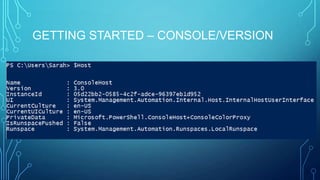
GETTING STARTED – CONSOLE/VERSION
BACKWARDS COMPATIBILITY
• Windows PowerShell 3.0 is backward-compatible.
• 2.0 syntax and functionality that were designed for 2.0 should work in 3.0
without changes.
POWERSHELL WEB ACCESS
ACCESS YOUR COMPANY’S COMPUTERS VIA POWERSHELL IN A WEB
BROWSER
POWERSHELL WEB ACCESS - LIMITATIONS
• Double-hop issues when connecting to a second computer
• Same limitations as a remote Windows PowerShell session
• Commands that call Windows console APIs don’t work.
• Anything that displays a GUI doesn’t work.

• Tab Completion doesn’t work in NoLanguage sessions.
• Allows only one remote connection per browser session
POWERSHELL WEB ACCESS – MORE
LIMITATIONS
•

Persistent Windows PowerShell sessions – need to use –Job for long
running tasks and to allow disconnection rather than log off

• No nested progress displays
• Input colors cannot be modified
• Function keys may not work in the PowerShell app if they are reserved for
browser functionality

•

More notes at: Use the Web-based PowerShell Console
WINDOWS POWERSHELL WEB ACCESS
• Requires:
•
•
•
•

Windows Server 2012
IIS
.NET Framework 4.5
PowerShell 3.0
POWERSHELL WEB ACCESS – BROWSER
SUPPORT
• Internet Explorer (8 or higher)
• Firefox (10.0.2)
• Chrome for Windows (17.0.963.56m)
• Safari for Windows (5.1.2)
• Safari for Mac (5.1.2)
POWERSHELL WEB ACCESS – MOBILE
SUPPORT
• Minimally tested on:
•
•
•
•

Windows Phone 7 and 7.5
Google Android WebKit 3.1 Browser Android 2.2.1 (Kernel 2.6)
Apple Safari for iPhone operating system 5.0.1
Apple Safari for iPad 2 operating system 5.0.1
POWERSHELL WEB ACCESS – BROWSER
REQUIREMENTS
• Allow cookies from the Windows PowerShell Web Access gateway
website.

• Be able to open and read HTTPS pages.
• Open and run websites that use JavaScript.
POWERSHELL WEB ACCESS INSTALLATION
• Via Features/Roles wizard through the Server Manager
• Through PowerShell cmdlets
• Detailed instructions available here: http://technet.microsoft.com/enus/library/hh831611.aspx#BKMK_install
POWERSHELL WEB ACCESS – SET UP THE
GATEWAY
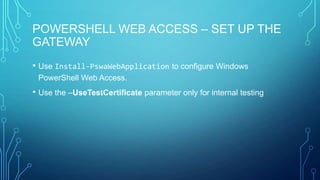
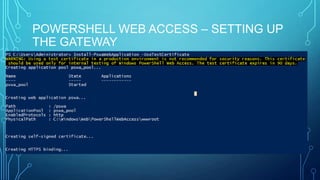
• Use Install-PswaWebApplication to configure Windows
PowerShell Web Access.

• Use the –UseTestCertificate parameter only for internal testing
POWERSHELL WEB ACCESS – SETTING UP
THE GATEWAY
POWERSHELL WEB ACCESS – CONFIGURE
SECURITY
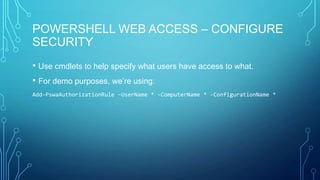
• Use cmdlets to help specify what users have access to what.
• For demo purposes, we’re using:
Add-PswaAuthorizationRule –UserName * -ComputerName * -ConfigurationName *
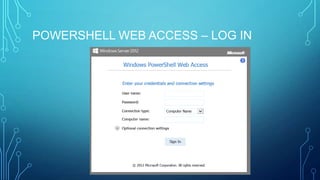
POWERSHELL WEB ACCESS – LOG IN
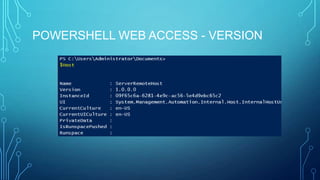
POWERSHELL WEB ACCESS - VERSION
NEW FEATURES &
IMPROVEMENTS
EASIER SYNTAX, BETTER PERFORMANCE, MORE ROBUSTNESS, AND
MORE!
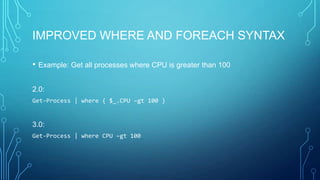
IMPROVED WHERE AND FOREACH SYNTAX
•

Example: Get all processes where CPU is greater than 100

2.0:
Get-Process | where { $_.CPU –gt 100 }

3.0:
Get-Process | where CPU –gt 100
IMPROVED WHERE AND FOREACH SYNTAX
•

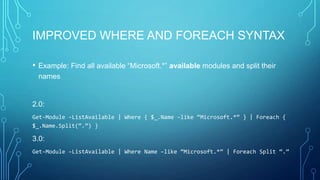
Example: Find all available “Microsoft.*” available modules and split their
names

2.0:
Get-Module –ListAvailable | Where { $_.Name –like “Microsoft.*” } | Foreach {
$_.Name.Split(“.”) }

3.0:
Get-Module –ListAvailable | Where Name –like “Microsoft.*” | Foreach Split “.”
MICROSOFT .NET FRAMEWORK 4.0
SUPPORT
• Application Compatibility and Deployment
• Managed Extensibility Framework
• Parallel Computing
• Networking
• Windows Communication Foundation
• Windows Workflow Foundation
SESSION IMPROVEMENTS –
DISCONNECTED SESSIONS
• Persistent sessions saved on remote computer
• No longer session-dependent
• New cmdlets: Connect-PSSession, Disconnect-PSSession, and ReceivePSSession

• New parameter InDisconnectedSession
• Both client and server need to be running Windows PowerShell 3.0
HELP IMPROVEMENTS – UPDATABLE HELP
• Updatable Help System
• By default, help files for a module update no more than once a day
• Windows 8 and Windows Server 2012 do not have help files as part of their
installations
Update-Help
Save-Help

Supporting Updatable Help
HELP IMPROVEMENTS – ENHANCED
ONLINE HELP
• Enhanced Online Help
• Works well even when the help files aren’t installed on the computer

Get-Help {cmdlet} –Online

Supporting Online Help
SCHEDULED JOBS & TASK SCHEDULER
INTEGRATION
• Windows PowerShell jobs can now be background jobs managed by
Task Scheduler.

• PowerShell scheduled jobs run asynchronously.
• Scheduled jobs can be one-time or recurrent.
• New cmdlet set for scheduled jobs
• See more at about_Scheduled_Jobs
LANGUAGE ENHANCEMENTS – NEW CORE
CMDLETS
• Full list can be seen here: http://technet.microsoft.com/enus/library/hh857339.aspx#BKMK_CHAR

• Highlights include:
• ConvertTo-Json & ConvertFrom-Json
• Disable-ScheduledJob & Enable-ScheduledJob
• Invoke-RestMethod & Invoke-WebRequest
IMPROVEMENTS TO EXISTING
FUNCTIONALITY
•

Simplified syntax and new parameters include:

•
•
•
•
•
•
•
•
•

Get-ChildItem
Get-Command

Get-Content
Get-History
Select-Object
Select-String

Split-Path
Start-Process
Test-Connection
IMPROVEMENTS TO EXISTING
FUNCTIONALITY
• Certificate provider supports SSL certificates for web hosting
• Support for credential
• Persistent network drives
• Alternate data streams in file system drives
ENHANCED TAB COMPLETION
• Tab completion was written on a new parser
• Better midline tab completion
• Now completes:
•
•
•
•
•
•
•
•

Cmdlets
Parameters
Parameter Values
Enumerations
.NET Framework types
COM objects

Hidden directories
More!
MODULE AUTO-LOADING
• Get-Command now looks at all installed modules rather than just the
imported ones.

• Automatic import is triggered by Get-Command, Get-Help, or running a
cmdlet from the module

• This auto-loading can be controlled with the
$PSModuleAutoLoadingPreference preference variable
MODULE EXPERIENCE IMPROVEMENTS
• Module logging for individual modules (LogPipelineExecutionDetails) and the new "Turn on Module
Logging" Group Policy setting

• Extended module objects that expose the values from the module manifest
• New ExportedCommands property of modules, including nested modules, that combines
commands of all types

• Improved discovery of available (un-imported) modules, including allowing the Path and
ListAvailable parameters in the same command

• New DefaultCommandPrefix key in module manifests that avoids name conflicts without
changing module code.
MODULE EXPERIENCE IMPROVEMENTS
• Improved module requirements, including fully-qualified required
modules with version and GUID and automatic importing of required
modules

• Quieter, streamlined operation of the New-ModuleManifest cmdlet.
• New Module parameter for #Requires
• Improved Import-Module cmdlet with both MinimumVersion and
RequiredVersion parameters.
SIMPLIFIED COMMAND DISCOVERY
• Get-Command displays all commands from all installed modules.

• Due to auto-loading, a module will automatically be loaded once a
command from that module is executed.

• Show-Command also helps beginners learn commands.
IMPROVED LOGGING
• Supports Event Tracing in Windows (ETW) logs
• “Turn on Module Logging” now included as a Group Policy setting.
• Parameter values appear in log details in the log properties.
FORMATTING & OUTPUT IMPROVEMENTS
•
•

Output redirection for all streams
Enhanced Update-Type cmdlet that adds types dynamically without ps1xml
format files

• Word wrap in output
• Default formatting of custom objects
• PSCustomObject type
• Support for discovering method overloads
SPECIAL CHARACTER HANDLING
IMPROVEMENTS
• The LiteralPath parameter appears now on most cmdlets that use
Path – including Update-Help and Save-Help

• Improved handling of backticks and square brackets in file names and
paths
NEW CMDLET AND HOSTING APIS
• Public AST APIs
• APIs for
•
•
•
•
•
•

Pipeline paging
Nested pipelines
Runspace pools tab completion
Windows RT
Obsolete cmdlet attribute
Verb and Noun properties of the FunctionInfo object
PERFORMANCE IMPROVEMENTS
• New language parser built on the Dynamic Runtime Language in
.NET 4.0

• Runtime script compilation
• Engine reliability improvements
• Changes to the Get-ChildItem algorithm to enhance performance,
especially with searching network shares
NEW FEATURES IN WINDOWS
POWERSHELL ISE
• Snippets
• Includes advanced functions and their parameters and for Do, While, If, Switch,
and ForEach keywords.

• Make your own snippets and import snippets from modules.
• Three cmdlets: New-IseSnippet, Get-IseSnippet and Import-IseSnippet.

• Brace-matching, error indicators, code outlining
• Options Window
NEW FEATURES IN WINDOWS
POWERSHELL ISE
• Console pane
•
•
•
•
•
•
•

Command pane + Output pane
Behaves similar to console
Intellisense
Syntax highlighting
Snippets
Brace-matching
Error indicators

• Show Command window
• Intellisense
NEW FEATURES IN WINDOWS
POWERSHELL ISE
•
•

Update Windows PowerShell Help from the Help menu
Help Window- displays help from the help files on the computer,
complementing the Updatable Help feature.

• Auto-save
• Recent items list
• Block copy
• And more!
MICROSOFT SCRIPT
EXPLORER
MICROSOFT SCRIPT EXPLORER
• Was a great way to search for scripts as guides – similar to the All-InOne Code Framework app for developers

• Unfortunately, not well-adopted, so the service will be turned off
effective June 14, 2013

• What to do with this being discontinued? See the PowerShell blog
post: Microsoft Script Explorer: Next Steps
POWERSHELL WEB SERVICE
WINDOWS POWERSHELL WEB SERVICE
• Enables an administrator to expose a set of PowerShell cmdlets as a
RESTful endpoint via OData

• Allows cmdlets to be invoked by any platform that can work with
OData feeds – Windows and non-Windows

• Windows PowerShell role-based OData Web Service sample
• Windows PowerShell basic OData Web Service sample
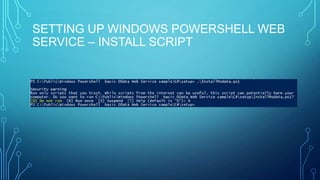
SETTING UP WINDOWS POWERSHELL WEB
SERVICE – INSTALL SCRIPT
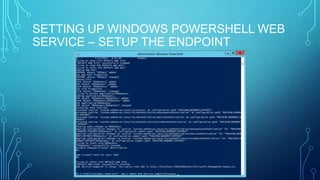
SETTING UP WINDOWS POWERSHELL WEB
SERVICE – SETUP THE ENDPOINT
DEMO OF POWERSHELL WEB SERVICE
• More on PowerShell cmdlets invocation through Management OData
using WCF client
RESOURCES
• Windows PowerShell Script Center
• Windows PowerShell Language Specification Version 3.0
• Windows PowerShell for Developers
• Windows PowerShell 3.0 SDK Sample Pack
• Windows PowerShell Reference
BONUS MATERIAL : COOL POWERSHELL TOOLS
FOR DEVS
• StudioShell – exposes Visual Studio’s extensibility points in a simple
manner

• SeeShell – Data Visualization for PowerShell
• Psake – a build automation tool
• OData PowerShell Provider – mount OData feeds as drives in
PowerShell

• PoShRabbit – exposes RabbitMQ to PowerShell

A Lap Around PowerShell 3.0

  • 1.
    UNLEASHING THE POWER: ALAP AROUND POWERSHELL 3.0 SARAH DUTKIEWICZ CLEVELAND TECH CONSULTING SARAH@CLETECHCONSULTING.COM
  • 2.
    AGENDA • System Requirements •Overview of New & Improved Features • Resources • BONUS Material : Cool PowerShell Tools for Devs
  • 3.
    WINDOWS MANAGEMENT FRAMEWORK3.0 • Includes: • • • • • Windows PowerShell 3.0 WMI WinRM Management OData IIS Extension Server Manager CIM Provider Download Here
  • 4.
    SYSTEM REQUIREMENTS • Windows8, Windows Server 2012 – built-in • Windows 7 Service Pack 1 • Windows Server 2008 R2 SP1 • Windows Server 2008 Service Pack 2
  • 5.
    INSTALLATION NOTES • RequiresMicrosoft .NET Framework 4.0 • The Integrated Scripting Environment (ISE) is an optional feature for server SKUs. • For Windows Server 2008, the previous version of Windows Management Framework – which contains PowerShell 2.0 – must be installed first.
  • 6.
    GETTING STARTED –CONSOLE/VERSION
  • 7.
    BACKWARDS COMPATIBILITY • WindowsPowerShell 3.0 is backward-compatible. • 2.0 syntax and functionality that were designed for 2.0 should work in 3.0 without changes.
  • 8.
    POWERSHELL WEB ACCESS ACCESSYOUR COMPANY’S COMPUTERS VIA POWERSHELL IN A WEB BROWSER
  • 9.
    POWERSHELL WEB ACCESS- LIMITATIONS • Double-hop issues when connecting to a second computer • Same limitations as a remote Windows PowerShell session • Commands that call Windows console APIs don’t work. • Anything that displays a GUI doesn’t work. • Tab Completion doesn’t work in NoLanguage sessions. • Allows only one remote connection per browser session
  • 10.
    POWERSHELL WEB ACCESS– MORE LIMITATIONS • Persistent Windows PowerShell sessions – need to use –Job for long running tasks and to allow disconnection rather than log off • No nested progress displays • Input colors cannot be modified • Function keys may not work in the PowerShell app if they are reserved for browser functionality • More notes at: Use the Web-based PowerShell Console
  • 11.
    WINDOWS POWERSHELL WEBACCESS • Requires: • • • • Windows Server 2012 IIS .NET Framework 4.5 PowerShell 3.0
  • 12.
    POWERSHELL WEB ACCESS– BROWSER SUPPORT • Internet Explorer (8 or higher) • Firefox (10.0.2) • Chrome for Windows (17.0.963.56m) • Safari for Windows (5.1.2) • Safari for Mac (5.1.2)
  • 13.
    POWERSHELL WEB ACCESS– MOBILE SUPPORT • Minimally tested on: • • • • Windows Phone 7 and 7.5 Google Android WebKit 3.1 Browser Android 2.2.1 (Kernel 2.6) Apple Safari for iPhone operating system 5.0.1 Apple Safari for iPad 2 operating system 5.0.1
  • 14.
    POWERSHELL WEB ACCESS– BROWSER REQUIREMENTS • Allow cookies from the Windows PowerShell Web Access gateway website. • Be able to open and read HTTPS pages. • Open and run websites that use JavaScript.
  • 15.
    POWERSHELL WEB ACCESSINSTALLATION • Via Features/Roles wizard through the Server Manager • Through PowerShell cmdlets • Detailed instructions available here: http://technet.microsoft.com/enus/library/hh831611.aspx#BKMK_install
  • 16.
    POWERSHELL WEB ACCESS– SET UP THE GATEWAY • Use Install-PswaWebApplication to configure Windows PowerShell Web Access. • Use the –UseTestCertificate parameter only for internal testing
  • 17.
    POWERSHELL WEB ACCESS– SETTING UP THE GATEWAY
  • 18.
    POWERSHELL WEB ACCESS– CONFIGURE SECURITY • Use cmdlets to help specify what users have access to what. • For demo purposes, we’re using: Add-PswaAuthorizationRule –UserName * -ComputerName * -ConfigurationName *
  • 19.
  • 20.
  • 21.
    NEW FEATURES & IMPROVEMENTS EASIERSYNTAX, BETTER PERFORMANCE, MORE ROBUSTNESS, AND MORE!
  • 22.
    IMPROVED WHERE ANDFOREACH SYNTAX • Example: Get all processes where CPU is greater than 100 2.0: Get-Process | where { $_.CPU –gt 100 } 3.0: Get-Process | where CPU –gt 100
  • 23.
    IMPROVED WHERE ANDFOREACH SYNTAX • Example: Find all available “Microsoft.*” available modules and split their names 2.0: Get-Module –ListAvailable | Where { $_.Name –like “Microsoft.*” } | Foreach { $_.Name.Split(“.”) } 3.0: Get-Module –ListAvailable | Where Name –like “Microsoft.*” | Foreach Split “.”
  • 24.
    MICROSOFT .NET FRAMEWORK4.0 SUPPORT • Application Compatibility and Deployment • Managed Extensibility Framework • Parallel Computing • Networking • Windows Communication Foundation • Windows Workflow Foundation
  • 25.
    SESSION IMPROVEMENTS – DISCONNECTEDSESSIONS • Persistent sessions saved on remote computer • No longer session-dependent • New cmdlets: Connect-PSSession, Disconnect-PSSession, and ReceivePSSession • New parameter InDisconnectedSession • Both client and server need to be running Windows PowerShell 3.0
  • 26.
    HELP IMPROVEMENTS –UPDATABLE HELP • Updatable Help System • By default, help files for a module update no more than once a day • Windows 8 and Windows Server 2012 do not have help files as part of their installations Update-Help Save-Help Supporting Updatable Help
  • 27.
    HELP IMPROVEMENTS –ENHANCED ONLINE HELP • Enhanced Online Help • Works well even when the help files aren’t installed on the computer Get-Help {cmdlet} –Online Supporting Online Help
  • 28.
    SCHEDULED JOBS &TASK SCHEDULER INTEGRATION • Windows PowerShell jobs can now be background jobs managed by Task Scheduler. • PowerShell scheduled jobs run asynchronously. • Scheduled jobs can be one-time or recurrent. • New cmdlet set for scheduled jobs • See more at about_Scheduled_Jobs
  • 29.
    LANGUAGE ENHANCEMENTS –NEW CORE CMDLETS • Full list can be seen here: http://technet.microsoft.com/enus/library/hh857339.aspx#BKMK_CHAR • Highlights include: • ConvertTo-Json & ConvertFrom-Json • Disable-ScheduledJob & Enable-ScheduledJob • Invoke-RestMethod & Invoke-WebRequest
  • 30.
    IMPROVEMENTS TO EXISTING FUNCTIONALITY • Simplifiedsyntax and new parameters include: • • • • • • • • • Get-ChildItem Get-Command Get-Content Get-History Select-Object Select-String Split-Path Start-Process Test-Connection
  • 31.
    IMPROVEMENTS TO EXISTING FUNCTIONALITY •Certificate provider supports SSL certificates for web hosting • Support for credential • Persistent network drives • Alternate data streams in file system drives
  • 32.
    ENHANCED TAB COMPLETION •Tab completion was written on a new parser • Better midline tab completion • Now completes: • • • • • • • • Cmdlets Parameters Parameter Values Enumerations .NET Framework types COM objects Hidden directories More!
  • 33.
    MODULE AUTO-LOADING • Get-Commandnow looks at all installed modules rather than just the imported ones. • Automatic import is triggered by Get-Command, Get-Help, or running a cmdlet from the module • This auto-loading can be controlled with the $PSModuleAutoLoadingPreference preference variable
  • 34.
    MODULE EXPERIENCE IMPROVEMENTS •Module logging for individual modules (LogPipelineExecutionDetails) and the new "Turn on Module Logging" Group Policy setting • Extended module objects that expose the values from the module manifest • New ExportedCommands property of modules, including nested modules, that combines commands of all types • Improved discovery of available (un-imported) modules, including allowing the Path and ListAvailable parameters in the same command • New DefaultCommandPrefix key in module manifests that avoids name conflicts without changing module code.
  • 35.
    MODULE EXPERIENCE IMPROVEMENTS •Improved module requirements, including fully-qualified required modules with version and GUID and automatic importing of required modules • Quieter, streamlined operation of the New-ModuleManifest cmdlet. • New Module parameter for #Requires • Improved Import-Module cmdlet with both MinimumVersion and RequiredVersion parameters.
  • 36.
    SIMPLIFIED COMMAND DISCOVERY •Get-Command displays all commands from all installed modules. • Due to auto-loading, a module will automatically be loaded once a command from that module is executed. • Show-Command also helps beginners learn commands.
  • 37.
    IMPROVED LOGGING • SupportsEvent Tracing in Windows (ETW) logs • “Turn on Module Logging” now included as a Group Policy setting. • Parameter values appear in log details in the log properties.
  • 38.
    FORMATTING & OUTPUTIMPROVEMENTS • • Output redirection for all streams Enhanced Update-Type cmdlet that adds types dynamically without ps1xml format files • Word wrap in output • Default formatting of custom objects • PSCustomObject type • Support for discovering method overloads
  • 39.
    SPECIAL CHARACTER HANDLING IMPROVEMENTS •The LiteralPath parameter appears now on most cmdlets that use Path – including Update-Help and Save-Help • Improved handling of backticks and square brackets in file names and paths
  • 40.
    NEW CMDLET ANDHOSTING APIS • Public AST APIs • APIs for • • • • • • Pipeline paging Nested pipelines Runspace pools tab completion Windows RT Obsolete cmdlet attribute Verb and Noun properties of the FunctionInfo object
  • 41.
    PERFORMANCE IMPROVEMENTS • Newlanguage parser built on the Dynamic Runtime Language in .NET 4.0 • Runtime script compilation • Engine reliability improvements • Changes to the Get-ChildItem algorithm to enhance performance, especially with searching network shares
  • 42.
    NEW FEATURES INWINDOWS POWERSHELL ISE • Snippets • Includes advanced functions and their parameters and for Do, While, If, Switch, and ForEach keywords. • Make your own snippets and import snippets from modules. • Three cmdlets: New-IseSnippet, Get-IseSnippet and Import-IseSnippet. • Brace-matching, error indicators, code outlining • Options Window
  • 43.
    NEW FEATURES INWINDOWS POWERSHELL ISE • Console pane • • • • • • • Command pane + Output pane Behaves similar to console Intellisense Syntax highlighting Snippets Brace-matching Error indicators • Show Command window • Intellisense
  • 44.
    NEW FEATURES INWINDOWS POWERSHELL ISE • • Update Windows PowerShell Help from the Help menu Help Window- displays help from the help files on the computer, complementing the Updatable Help feature. • Auto-save • Recent items list • Block copy • And more!
  • 45.
  • 46.
    MICROSOFT SCRIPT EXPLORER •Was a great way to search for scripts as guides – similar to the All-InOne Code Framework app for developers • Unfortunately, not well-adopted, so the service will be turned off effective June 14, 2013 • What to do with this being discontinued? See the PowerShell blog post: Microsoft Script Explorer: Next Steps
  • 47.
  • 48.
    WINDOWS POWERSHELL WEBSERVICE • Enables an administrator to expose a set of PowerShell cmdlets as a RESTful endpoint via OData • Allows cmdlets to be invoked by any platform that can work with OData feeds – Windows and non-Windows • Windows PowerShell role-based OData Web Service sample • Windows PowerShell basic OData Web Service sample
  • 49.
    SETTING UP WINDOWSPOWERSHELL WEB SERVICE – INSTALL SCRIPT
  • 50.
    SETTING UP WINDOWSPOWERSHELL WEB SERVICE – SETUP THE ENDPOINT
  • 51.
    DEMO OF POWERSHELLWEB SERVICE • More on PowerShell cmdlets invocation through Management OData using WCF client
  • 52.
    RESOURCES • Windows PowerShellScript Center • Windows PowerShell Language Specification Version 3.0 • Windows PowerShell for Developers • Windows PowerShell 3.0 SDK Sample Pack • Windows PowerShell Reference
  • 53.
    BONUS MATERIAL :COOL POWERSHELL TOOLS FOR DEVS • StudioShell – exposes Visual Studio’s extensibility points in a simple manner • SeeShell – Data Visualization for PowerShell • Psake – a build automation tool • OData PowerShell Provider – mount OData feeds as drives in PowerShell • PoShRabbit – exposes RabbitMQ to PowerShell

Editor's Notes

  • #2 http://technet.microsoft.com/en-us/library/hh857339.aspx#BKMK_WebAccess
  • #4 Download: http://www.microsoft.com/en-us/download/details.aspx?id=34595
  • #12 http://technet.microsoft.com/en-us/library/hh831611.aspx
  • #49 http://msdn.microsoft.com/en-us/library/windows/desktop/hh880865(v=vs.85).aspx