Apache Toree
A Jupyter Kernel for Scala and Apache Spark
THIS IS NOT A CONTRIBUTION
Luciano Resende
Apache Torree committer and PPMC member | Apple
ApacheCon North America 2022
About me - Luciano Resende
lresende@apache.org https://www.linkedin.com/in/lresende
@lresende1975 https://github.com/lresende
AI/ML Data Platform Architect — Apple
•Over 20 years industry experience with over 15 year contributing to open source
•Creator of Elyra and Jupyter Enterprise Gateway
•Open source areas of contribution: Elyra, Jupyter Notebook ecosystem, Apache
Bahir, Apache Toree, Apache Spark among other projects related to AI/ML
platforms
Jupyter Notebooks
Jupyter Notebooks
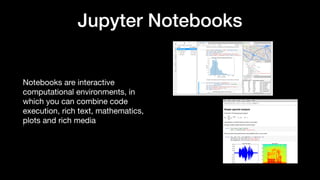
Notebooks are interactive
computational environments, in
which you can combine code
execution, rich text, mathematics,
plots and rich media
•
Jupyter Notebooks
Jupyter Ecosystem is
the de-facto standard tool in data
science and AI community
Popular IDE usage
JupyterLab
Visual Studio Code
PyCharm
Rstudio
Spyder
Notepad++
Sublime Text
Vim, Emacs, or similar
Visual Studio
MATLAB
Other
None
0% 20% 40% 60% 80%
0.7%
5.6%
5.8%
10.1%
11.0%
15.2%
19.4%
21.8%
31.5%
31.9%
33.2%
74.1%
Jupyter Notebooks
Simple, but Powerful
As simple as opening a web page, with the capabilities of a powerful, multilingual, development environment.
Interactive widgets
Code can produce rich outputs such as images, videos, markdown, LaTeX and JavaScript. Interactive widgets can be
used to manipulate and visualize data in real-time.
Language of choice
Jupyter Notebooks have support for over 50 programming languages, including those popular in Data Science, Data Engineer,
and AI such as Python, R, Julia and Scala.
Big Data Integration
Leverage Big Data platforms such as Apache Spark from Python, R and Scala. Explore the same data with pandas,
scikit-learn, ggplot2, dplyr, etc.
Share Notebooks
Notebooks can be shared with others using e-mail, Dropbox, Google Drive, GitHub, etc
􀙚􀆅􀫐􀂒􀡓
⤵
Jupyter Notebooks
Single page web interface
• File Browser
• Code Console (QT Console)
• Text Editor
Current Release
• Jupyter Notebook 6.4.12
• Available in Anaconda
• pip install --upgrade notebook
Jupyter Notebooks
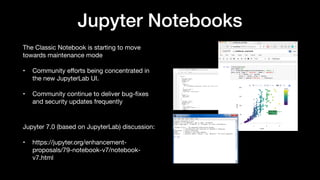
The Classic Notebook is starting to move
towards maintenance mode
• Community e
ff
orts being concentrated in
the new JupyterLab UI.
• Community continue to deliver bug-
fi
xes
and security updates frequently
Jupyter 7.0 (based on JupyterLab) discussion:
• https://jupyter.org/enhancement-
proposals/79-notebook-v7/notebook-
v7.html
JupyterLab
JupyterLab is the next generation UI
for the Jupyter Ecosystem.
Brings all the previous improvements
into a single uni
fi
ed platform plus
more!
Provides a modular, extensible
architecture
Retains backward compatibility with
the old notebook we know and love
JupyterLab
File Browser
Widgets/
Rich Output
Tabbed
Workspaces
Text Editor
Console/
Terminal
Jupyter Notebooks
Notebook UI runs on the browser
The Notebook Server serves the
‘Notebooks’
Kernels interpret/execute cell contents
• Are responsible for code execution
• Abstracts di
ff
erent languages
• 1:1 relationship with Notebook
• Runs and consume resources as long as
notebook is running
Https/
websocket
ZMQ
􀡓􀈿
Jupyter Notebooks
􀇳
Front-end
Kernel Proxy
DEAL SUB
IPython Kernel
ROUTER
􀇳􀇳
Front-end
Kernel Proxy
DEAL SUB
Front-end
Kernel Proxy
DEAL SUB DEAL
ROUTER PUB
Kernel raw_iput
Requests to kernal
Kernel output broadcast
Request / Reply direction
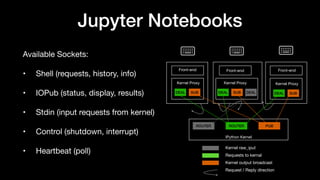
Available Sockets:
• Shell (requests, history, info)
• IOPub (status, display, results)
• Stdin (input requests from kernel)
• Control (shutdown, interrupt)
• Heartbeat (poll)
Jupyter Notebooks
Two types of responses
Results
• Computations that return a result
• 1+1
• val a = 2 + 5
Stream Content
• Values that are written to output stream
• df.show(10)
Client Program Kernel
Evaluate (msgid=1) ‘1+1’
Busy (msgid=1)
Status (msgid=1) ok/error
Result (msgid=1)
Stream Content (msgid=1)
Idle (msgid=1)
Apache Toree
Apache Toree
A Scala based Jupyter Kernel that enables Jupyter
Notebooks to execute Scala code and connect to Apache
Spark to build interactive applications.
Apache Toree History
• December 2014 - Open Sourced Spark Kernel to GitHub
• July 2015 - Joined developerWorks Open
• https://developer.ibm.com/open/spark-kernel/
• December 2015 - Accepted as an Apache Incubator Project
• https://toree.apache.org
Apache Toree Releases
Release Scala Version Spark Version
Toree 0.1.x Scala 2.11 Spark 1.6
Toree 0.2.x - 0.4.x Scala 2.11 Spark 2.x
Toree 0.5.x Scala 2.12 Spark 3.x
Apache Toree
Installing the Toree Kernel
• pip install –upgrade toree
Con
fi
guring the Toree Kernel
• jupyter toree install --spark_home=/usr/local/bin/apache-spark/
Apache Toree
{
"argv": [
"/usr/local/share/jupyter/kernels/apache_toree_scala/bin/run.sh",
"--profile",
"{connection_file}"
],
"env": {
"DEFAULT_INTERPRETER": "Scala",
"__TOREE_SPARK_OPTS__": "",
"__TOREE_OPTS__": "",
"SPARK_HOME": "/Users/lresende/opt/spark-3.2.2-bin-hadoop2.7/",
"PYTHONPATH": “/Users/lresende/opt/spark-3.2.2-bin-hadoop2.7//python:/Users/lresende/opt/spark-3.2.2-bin-
hadoop2.7/python/lib/py4j-0.10.9.5-src.zip”,
"PYTHON_EXEC": "python"
},
"display_name": "Apache Toree - Scala",
"language": "scala",
"interrupt_mode": "signal",
"metadata": {}
}
Apache Toree
{
"argv": [
“/usr/local/share/jupyter/kernels/apache_toree_scala/bin/run.sh",
"--spark-context-initialization-mode",
"none",
"--profile",
"{connection_file}"
],
"env": {
"DEFAULT_INTERPRETER": "Scala",
"__TOREE_SPARK_OPTS__": "",
"__TOREE_OPTS__": "",
"SPARK_HOME": "/Users/lresende/opt/spark-3.2.2-bin-hadoop2.7/",
"PYTHONPATH": “/Users/lresende/opt/spark-3.2.2-bin-hadoop2.7//python:/Users/lresende/opt/spark-3.2.2-bin-hadoop2.7/
python/lib/py4j-0.10.9.5-src.zip”,
"PYTHON_EXEC": "python"
},
"display_name": "Apache Toree - Scala",
"language": "scala",
"interrupt_mode": "signal",
"metadata": {}
}
Apache Toree
{
"language": "scala",
"display_name": "Spark - Scala (YARN Cluster Mode)",
"metadata": { "process_proxy": { "class_name":
"enterprise_gateway.services.processproxies.yarn.YarnClusterProcessProxy” } },
"env": {
"SPARK_HOME": "/usr/hdp/current/spark2-client",
"__TOREE_SPARK_OPTS__": "--master yarn --deploy-mode cluster --name ${KERNEL_ID:-ERROR__NO__KERNEL_ID} --conf
spark.yarn.submit.waitAppCompletion=false --conf spark.yarn.am.waitTime=1d ${KERNEL_EXTRA_SPARK_OPTS}",
"__TOREE_OPTS__": "--alternate-sigint USR2",
"DEFAULT_INTERPRETER": "Scala"
},
"argv": [
"/usr/local/share/jupyter/kernels/spark_scala_yarn_cluster/bin/run.sh",
"--RemoteProcessProxy.kernel-id",
"{kernel_id}",
"--RemoteProcessProxy.response-address",
"{response_address}",
"--RemoteProcessProxy.spark-context-initialization-mode",
"lazy"
]
}
Apache Toree
PROG_HOME="$(cd "`dirname "$0"`"/..; pwd)"
if [ -z "$SPARK_HOME" ]; then
echo "SPARK_HOME must be set to the location of a Spark distribution!"
exit 1
fi
echo "Starting Spark Kernel with SPARK_HOME=$SPARK_HOME"
KERNEL_ASSEMBLY=`(cd ${PROG_HOME}/lib; ls -1 toree-assembly-*.jar;)`
# disable randomized hash for string in Python 3.3+
TOREE_ASSEMBLY=${PROG_HOME}/lib/${KERNEL_ASSEMBLY}
eval exec 
"${SPARK_HOME}/bin/spark-submit" 
--name "'Apache Toree'" 
"${SPARK_OPTS}" 
--class org.apache.toree.Main 
"${TOREE_ASSEMBLY}" 
"${TOREE_OPTS}" 
"$@"
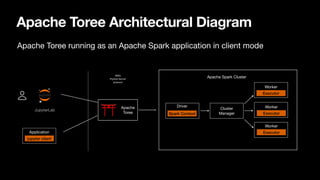
Apache Toree Architectural Diagram
Apache Toree running as an Apache Spark application in client mode
Bob
Alice
􀉩
JupyterLab
jupyter client
Application
Apache
Toree
Driver
Spark Context
Apache Spark Cluster
Worker
Executor
Worker
Executor
Worker
Executor
Cluster
Manager
0MQ
IPython Kernel
protocol
Jupyter Notebooks
Stack Limitation
Scalability
• Jupyter Kernels running as local process
• Resources are limited by what is available on
the one single node that runs all Kernels and
associated Spark drivers
Security
• Single user sharing the same privileges
• Users can see and control each other
process using Jupyter administrative utilities
Maximum Number of Simultaneous Kernels
Max
Kernels
(4GB
Heap)
0
10
20
Cluster Size (32GB Nodes)
4 Nodes 8 Nodes 12 Nodes 16 Nodes
􀪬􀪬􀪬􀪬􀪬􀪬
Cloud Cluster
􀪬
k Kernel
k
k
YARN
Workers
Apache Toree Architectural Diagram
Apache Toree running as an Apache Spark application in cluster mode
YARN Cluster
Gateway Edge Node
Bob
Alice
Jupyter Enterprise Gateway
• Multitenancy
• Remote kernel lifecycle management
Spark Executors
Spark Executors
Spark Executors
Yarn Container
Toree Kernel
Spark Driver
Spark Executors
Spark Executors
Spark Executors
Yarn Container
Toree Kernel
Spark Driver
Impersonation: Alice’s
kernel runs under
Alice’s user ID.
Spark Executors
Spark Executors
Spark Executors
Yarn Container
Toree Kernel
Spark Driver
Security
Layer
􀉩􀝊
JupyterLab
Jupyter Notebook
(local)
Apache Toree Add-ons
Apache Toree, via extensions like
Brunel for Apache Toree or Plotly for
Scala, supports rich visualizations that
integrates directly with Spark Data
Frame APIs
Notes:
Brunel seems to be broken with Spark
3.2.2 (from previous 2.x/3.0.x)
Plotly seems to have a dependency
issue (https://github.com/
alexarchambault/plotly-scala/issues/14)
Apache Toree Visualizations
Apache Toree provides a set of
magics that enhances the user
experience manipulating data
coming from Spark tables or data
Apache Toree Visualizations
Apache Toree APIs
Apache Toree
Accessing Toree programmatically
using Scala
Torre Client APIs
https://github.com/lresende/toree-
gateway/blob/v1.0/src/main/scala/
org/apache/toree/gateway/
ToreeGateway.scala
object ToreeGatewayClient extends App {
// Parse our configuration and create a client connecting
to our kernel
val configFileContent =
scala.io.Source.fromFile(“config.json”).mkString
val config: Config =
ConfigFactory.parseString(configFileContent)
val client = (new ClientBootstrap(config)
with StandardSystemInitialization
with StandardHandlerInitialization).createClient()
…
val promise = Promise[String]
try {
val exRes: DeferredExecution = client.execute(“1+1”)
.onResult(executeResult => {
handleResult(promise, executeResult)
}).onError(executeReplyError =>{
handleError(promise, executeReplyError)
}).onSuccess(executeReplyOk => {
handleSuccess(promise, executeReplyOk)
}).onStream(streamResult => {
handleStream(promise, streamResult)
})
} catch {
case t : Throwable => {
log.info("Error submitting request: " + t.getMessage,
t)
promise.success("Error submitting request: " +
t.getMessage)
}
}
Await.result(promise.future, Duration.Inf)
}
Apache Toree
Accessing Toree programmatically
using Python
Jupyter Client package
https://github.com/lresende/toree-
gateway/blob/master/python/
toree_client.py
self.client =
BlockingKernelClient(connection_file=connectionFileLocation)
self.client.load_connection_file(connection_file=connectionFil
eLocation)
…
msg_id = self.client.execute(code=‘1+1’, allow_stdin=False)
reply = self.client.get_shell_msg(block=True, timeout=timeout)
results = []
while True:
try:
msg = self.client.get_iopub_msg(timeout=timeout)
except:
raise Exception("Error: Timeout executing
request")
# Stream results are being returned, accumulate them to
results
if msg['msg_type'] == 'stream':
type = 'stream'
results.append(msg['content']['text'])
continue
elif msg['msg_type'] == 'execute_result’:
if 'text/plain' in msg['content']['data']:
type = 'text'
results.append(msg['content']['data']['text/
plain'])
elif 'text/html' in msg['content']['data']:
# When idle, responses have all been processed/returned
elif msg['msg_type'] == 'status’:
if msg['content']['execution_state'] == 'idle':
break
if reply['content']['status'] == 'ok’:
return ''.join(results)
Apache Toree
Accessing Toree programmatically
using Jupyter Enterprise Gateway
GatewayClient
https://github.com/jupyter-server/
enterprise_gateway/tree/master/
enterprise_gateway/client
# initialize environment
gatewayClient = GatewayClient()
kernel = gatewayClient.start_kernel(‘toree-
kernelspec’)
…
result = self.kernel.execute(”1+1")
…
# shutdown environment
gatewayClient.shutdown_kernel(cls.kernel)
Demo
Apache Toree: Join the Community
Contribute to Apache Toree
Roadmap suggestions for contributors
• Decouple plain Scala kernel from Spark
• Enhance startup performance
• Evaluate/Implement better async/parallelism framework
• Progress bar for Spark Jobs
• Spark 3.x and Scala 2.13
• Help with documentation and website enhancements
Apache Toree
https://toree.apache.org
Apache Toree Mailing List
dev@toree.incubator.apache.org
Apache Toree source code at GitHub
https://github.com/apache/incubator-toree
􀋂
Star and fork the project on Github
Apache Toree Resources
Apache Toree
0.5.0 - incubating
pip install -upgrade toree
Questions
lresende@apache.org
@lresende1975
https://www.linkedin.com/in/lresende
https://github.com/lresende

A Jupyter kernel for Scala and Apache Spark.pdf

  • 1.
    Apache Toree A JupyterKernel for Scala and Apache Spark THIS IS NOT A CONTRIBUTION Luciano Resende Apache Torree committer and PPMC member | Apple ApacheCon North America 2022
  • 2.
    About me -Luciano Resende lresende@apache.org https://www.linkedin.com/in/lresende @lresende1975 https://github.com/lresende AI/ML Data Platform Architect — Apple •Over 20 years industry experience with over 15 year contributing to open source •Creator of Elyra and Jupyter Enterprise Gateway •Open source areas of contribution: Elyra, Jupyter Notebook ecosystem, Apache Bahir, Apache Toree, Apache Spark among other projects related to AI/ML platforms
  • 3.
  • 4.
    Jupyter Notebooks Notebooks areinteractive computational environments, in which you can combine code execution, rich text, mathematics, plots and rich media •
  • 5.
    Jupyter Notebooks Jupyter Ecosystemis the de-facto standard tool in data science and AI community Popular IDE usage JupyterLab Visual Studio Code PyCharm Rstudio Spyder Notepad++ Sublime Text Vim, Emacs, or similar Visual Studio MATLAB Other None 0% 20% 40% 60% 80% 0.7% 5.6% 5.8% 10.1% 11.0% 15.2% 19.4% 21.8% 31.5% 31.9% 33.2% 74.1%
  • 6.
    Jupyter Notebooks Simple, butPowerful As simple as opening a web page, with the capabilities of a powerful, multilingual, development environment. Interactive widgets Code can produce rich outputs such as images, videos, markdown, LaTeX and JavaScript. Interactive widgets can be used to manipulate and visualize data in real-time. Language of choice Jupyter Notebooks have support for over 50 programming languages, including those popular in Data Science, Data Engineer, and AI such as Python, R, Julia and Scala. Big Data Integration Leverage Big Data platforms such as Apache Spark from Python, R and Scala. Explore the same data with pandas, scikit-learn, ggplot2, dplyr, etc. Share Notebooks Notebooks can be shared with others using e-mail, Dropbox, Google Drive, GitHub, etc 􀙚􀆅􀫐􀂒􀡓 ⤵
  • 7.
    Jupyter Notebooks Single pageweb interface • File Browser • Code Console (QT Console) • Text Editor Current Release • Jupyter Notebook 6.4.12 • Available in Anaconda • pip install --upgrade notebook
  • 8.
    Jupyter Notebooks The ClassicNotebook is starting to move towards maintenance mode • Community e ff orts being concentrated in the new JupyterLab UI. • Community continue to deliver bug- fi xes and security updates frequently Jupyter 7.0 (based on JupyterLab) discussion: • https://jupyter.org/enhancement- proposals/79-notebook-v7/notebook- v7.html
  • 9.
    JupyterLab JupyterLab is thenext generation UI for the Jupyter Ecosystem. Brings all the previous improvements into a single uni fi ed platform plus more! Provides a modular, extensible architecture Retains backward compatibility with the old notebook we know and love
  • 10.
  • 11.
    Jupyter Notebooks Notebook UIruns on the browser The Notebook Server serves the ‘Notebooks’ Kernels interpret/execute cell contents • Are responsible for code execution • Abstracts di ff erent languages • 1:1 relationship with Notebook • Runs and consume resources as long as notebook is running Https/ websocket ZMQ 􀡓􀈿
  • 12.
    Jupyter Notebooks 􀇳 Front-end Kernel Proxy DEALSUB IPython Kernel ROUTER 􀇳􀇳 Front-end Kernel Proxy DEAL SUB Front-end Kernel Proxy DEAL SUB DEAL ROUTER PUB Kernel raw_iput Requests to kernal Kernel output broadcast Request / Reply direction Available Sockets: • Shell (requests, history, info) • IOPub (status, display, results) • Stdin (input requests from kernel) • Control (shutdown, interrupt) • Heartbeat (poll)
  • 13.
    Jupyter Notebooks Two typesof responses Results • Computations that return a result • 1+1 • val a = 2 + 5 Stream Content • Values that are written to output stream • df.show(10) Client Program Kernel Evaluate (msgid=1) ‘1+1’ Busy (msgid=1) Status (msgid=1) ok/error Result (msgid=1) Stream Content (msgid=1) Idle (msgid=1)
  • 14.
  • 15.
    Apache Toree A Scalabased Jupyter Kernel that enables Jupyter Notebooks to execute Scala code and connect to Apache Spark to build interactive applications.
  • 16.
    Apache Toree History •December 2014 - Open Sourced Spark Kernel to GitHub • July 2015 - Joined developerWorks Open • https://developer.ibm.com/open/spark-kernel/ • December 2015 - Accepted as an Apache Incubator Project • https://toree.apache.org
  • 17.
    Apache Toree Releases ReleaseScala Version Spark Version Toree 0.1.x Scala 2.11 Spark 1.6 Toree 0.2.x - 0.4.x Scala 2.11 Spark 2.x Toree 0.5.x Scala 2.12 Spark 3.x
  • 18.
    Apache Toree Installing theToree Kernel • pip install –upgrade toree Con fi guring the Toree Kernel • jupyter toree install --spark_home=/usr/local/bin/apache-spark/
  • 19.
    Apache Toree { "argv": [ "/usr/local/share/jupyter/kernels/apache_toree_scala/bin/run.sh", "--profile", "{connection_file}" ], "env":{ "DEFAULT_INTERPRETER": "Scala", "__TOREE_SPARK_OPTS__": "", "__TOREE_OPTS__": "", "SPARK_HOME": "/Users/lresende/opt/spark-3.2.2-bin-hadoop2.7/", "PYTHONPATH": “/Users/lresende/opt/spark-3.2.2-bin-hadoop2.7//python:/Users/lresende/opt/spark-3.2.2-bin- hadoop2.7/python/lib/py4j-0.10.9.5-src.zip”, "PYTHON_EXEC": "python" }, "display_name": "Apache Toree - Scala", "language": "scala", "interrupt_mode": "signal", "metadata": {} }
  • 20.
    Apache Toree { "argv": [ “/usr/local/share/jupyter/kernels/apache_toree_scala/bin/run.sh", "--spark-context-initialization-mode", "none", "--profile", "{connection_file}" ], "env":{ "DEFAULT_INTERPRETER": "Scala", "__TOREE_SPARK_OPTS__": "", "__TOREE_OPTS__": "", "SPARK_HOME": "/Users/lresende/opt/spark-3.2.2-bin-hadoop2.7/", "PYTHONPATH": “/Users/lresende/opt/spark-3.2.2-bin-hadoop2.7//python:/Users/lresende/opt/spark-3.2.2-bin-hadoop2.7/ python/lib/py4j-0.10.9.5-src.zip”, "PYTHON_EXEC": "python" }, "display_name": "Apache Toree - Scala", "language": "scala", "interrupt_mode": "signal", "metadata": {} }
  • 21.
    Apache Toree { "language": "scala", "display_name":"Spark - Scala (YARN Cluster Mode)", "metadata": { "process_proxy": { "class_name": "enterprise_gateway.services.processproxies.yarn.YarnClusterProcessProxy” } }, "env": { "SPARK_HOME": "/usr/hdp/current/spark2-client", "__TOREE_SPARK_OPTS__": "--master yarn --deploy-mode cluster --name ${KERNEL_ID:-ERROR__NO__KERNEL_ID} --conf spark.yarn.submit.waitAppCompletion=false --conf spark.yarn.am.waitTime=1d ${KERNEL_EXTRA_SPARK_OPTS}", "__TOREE_OPTS__": "--alternate-sigint USR2", "DEFAULT_INTERPRETER": "Scala" }, "argv": [ "/usr/local/share/jupyter/kernels/spark_scala_yarn_cluster/bin/run.sh", "--RemoteProcessProxy.kernel-id", "{kernel_id}", "--RemoteProcessProxy.response-address", "{response_address}", "--RemoteProcessProxy.spark-context-initialization-mode", "lazy" ] }
  • 22.
    Apache Toree PROG_HOME="$(cd "`dirname"$0"`"/..; pwd)" if [ -z "$SPARK_HOME" ]; then echo "SPARK_HOME must be set to the location of a Spark distribution!" exit 1 fi echo "Starting Spark Kernel with SPARK_HOME=$SPARK_HOME" KERNEL_ASSEMBLY=`(cd ${PROG_HOME}/lib; ls -1 toree-assembly-*.jar;)` # disable randomized hash for string in Python 3.3+ TOREE_ASSEMBLY=${PROG_HOME}/lib/${KERNEL_ASSEMBLY} eval exec "${SPARK_HOME}/bin/spark-submit" --name "'Apache Toree'" "${SPARK_OPTS}" --class org.apache.toree.Main "${TOREE_ASSEMBLY}" "${TOREE_OPTS}" "$@"
  • 23.
    Apache Toree ArchitecturalDiagram Apache Toree running as an Apache Spark application in client mode Bob Alice 􀉩 JupyterLab jupyter client Application Apache Toree Driver Spark Context Apache Spark Cluster Worker Executor Worker Executor Worker Executor Cluster Manager 0MQ IPython Kernel protocol
  • 24.
    Jupyter Notebooks Stack Limitation Scalability •Jupyter Kernels running as local process • Resources are limited by what is available on the one single node that runs all Kernels and associated Spark drivers Security • Single user sharing the same privileges • Users can see and control each other process using Jupyter administrative utilities Maximum Number of Simultaneous Kernels Max Kernels (4GB Heap) 0 10 20 Cluster Size (32GB Nodes) 4 Nodes 8 Nodes 12 Nodes 16 Nodes 􀪬􀪬􀪬􀪬􀪬􀪬 Cloud Cluster 􀪬 k Kernel k k
  • 25.
    YARN Workers Apache Toree ArchitecturalDiagram Apache Toree running as an Apache Spark application in cluster mode YARN Cluster Gateway Edge Node Bob Alice Jupyter Enterprise Gateway • Multitenancy • Remote kernel lifecycle management Spark Executors Spark Executors Spark Executors Yarn Container Toree Kernel Spark Driver Spark Executors Spark Executors Spark Executors Yarn Container Toree Kernel Spark Driver Impersonation: Alice’s kernel runs under Alice’s user ID. Spark Executors Spark Executors Spark Executors Yarn Container Toree Kernel Spark Driver Security Layer 􀉩􀝊 JupyterLab Jupyter Notebook (local)
  • 26.
  • 27.
    Apache Toree, viaextensions like Brunel for Apache Toree or Plotly for Scala, supports rich visualizations that integrates directly with Spark Data Frame APIs Notes: Brunel seems to be broken with Spark 3.2.2 (from previous 2.x/3.0.x) Plotly seems to have a dependency issue (https://github.com/ alexarchambault/plotly-scala/issues/14) Apache Toree Visualizations
  • 28.
    Apache Toree providesa set of magics that enhances the user experience manipulating data coming from Spark tables or data Apache Toree Visualizations
  • 29.
  • 30.
    Apache Toree Accessing Toreeprogrammatically using Scala Torre Client APIs https://github.com/lresende/toree- gateway/blob/v1.0/src/main/scala/ org/apache/toree/gateway/ ToreeGateway.scala object ToreeGatewayClient extends App { // Parse our configuration and create a client connecting to our kernel val configFileContent = scala.io.Source.fromFile(“config.json”).mkString val config: Config = ConfigFactory.parseString(configFileContent) val client = (new ClientBootstrap(config) with StandardSystemInitialization with StandardHandlerInitialization).createClient() … val promise = Promise[String] try { val exRes: DeferredExecution = client.execute(“1+1”) .onResult(executeResult => { handleResult(promise, executeResult) }).onError(executeReplyError =>{ handleError(promise, executeReplyError) }).onSuccess(executeReplyOk => { handleSuccess(promise, executeReplyOk) }).onStream(streamResult => { handleStream(promise, streamResult) }) } catch { case t : Throwable => { log.info("Error submitting request: " + t.getMessage, t) promise.success("Error submitting request: " + t.getMessage) } } Await.result(promise.future, Duration.Inf) }
  • 31.
    Apache Toree Accessing Toreeprogrammatically using Python Jupyter Client package https://github.com/lresende/toree- gateway/blob/master/python/ toree_client.py self.client = BlockingKernelClient(connection_file=connectionFileLocation) self.client.load_connection_file(connection_file=connectionFil eLocation) … msg_id = self.client.execute(code=‘1+1’, allow_stdin=False) reply = self.client.get_shell_msg(block=True, timeout=timeout) results = [] while True: try: msg = self.client.get_iopub_msg(timeout=timeout) except: raise Exception("Error: Timeout executing request") # Stream results are being returned, accumulate them to results if msg['msg_type'] == 'stream': type = 'stream' results.append(msg['content']['text']) continue elif msg['msg_type'] == 'execute_result’: if 'text/plain' in msg['content']['data']: type = 'text' results.append(msg['content']['data']['text/ plain']) elif 'text/html' in msg['content']['data']: # When idle, responses have all been processed/returned elif msg['msg_type'] == 'status’: if msg['content']['execution_state'] == 'idle': break if reply['content']['status'] == 'ok’: return ''.join(results)
  • 32.
    Apache Toree Accessing Toreeprogrammatically using Jupyter Enterprise Gateway GatewayClient https://github.com/jupyter-server/ enterprise_gateway/tree/master/ enterprise_gateway/client # initialize environment gatewayClient = GatewayClient() kernel = gatewayClient.start_kernel(‘toree- kernelspec’) … result = self.kernel.execute(”1+1") … # shutdown environment gatewayClient.shutdown_kernel(cls.kernel)
  • 33.
  • 34.
    Apache Toree: Jointhe Community
  • 35.
    Contribute to ApacheToree Roadmap suggestions for contributors • Decouple plain Scala kernel from Spark • Enhance startup performance • Evaluate/Implement better async/parallelism framework • Progress bar for Spark Jobs • Spark 3.x and Scala 2.13 • Help with documentation and website enhancements
  • 36.
    Apache Toree https://toree.apache.org Apache ToreeMailing List dev@toree.incubator.apache.org Apache Toree source code at GitHub https://github.com/apache/incubator-toree 􀋂 Star and fork the project on Github Apache Toree Resources Apache Toree 0.5.0 - incubating pip install -upgrade toree
  • 37.