

Jupyter
Enterprise Gateway
CODAIT Development Team
August, 2018
© 2018 IBM Corporation 1
Jupyter Notebooks
Overview
5© 2018 IBM Corporation
Jupyter Notebooks
© 2018 IBM Corporation 6
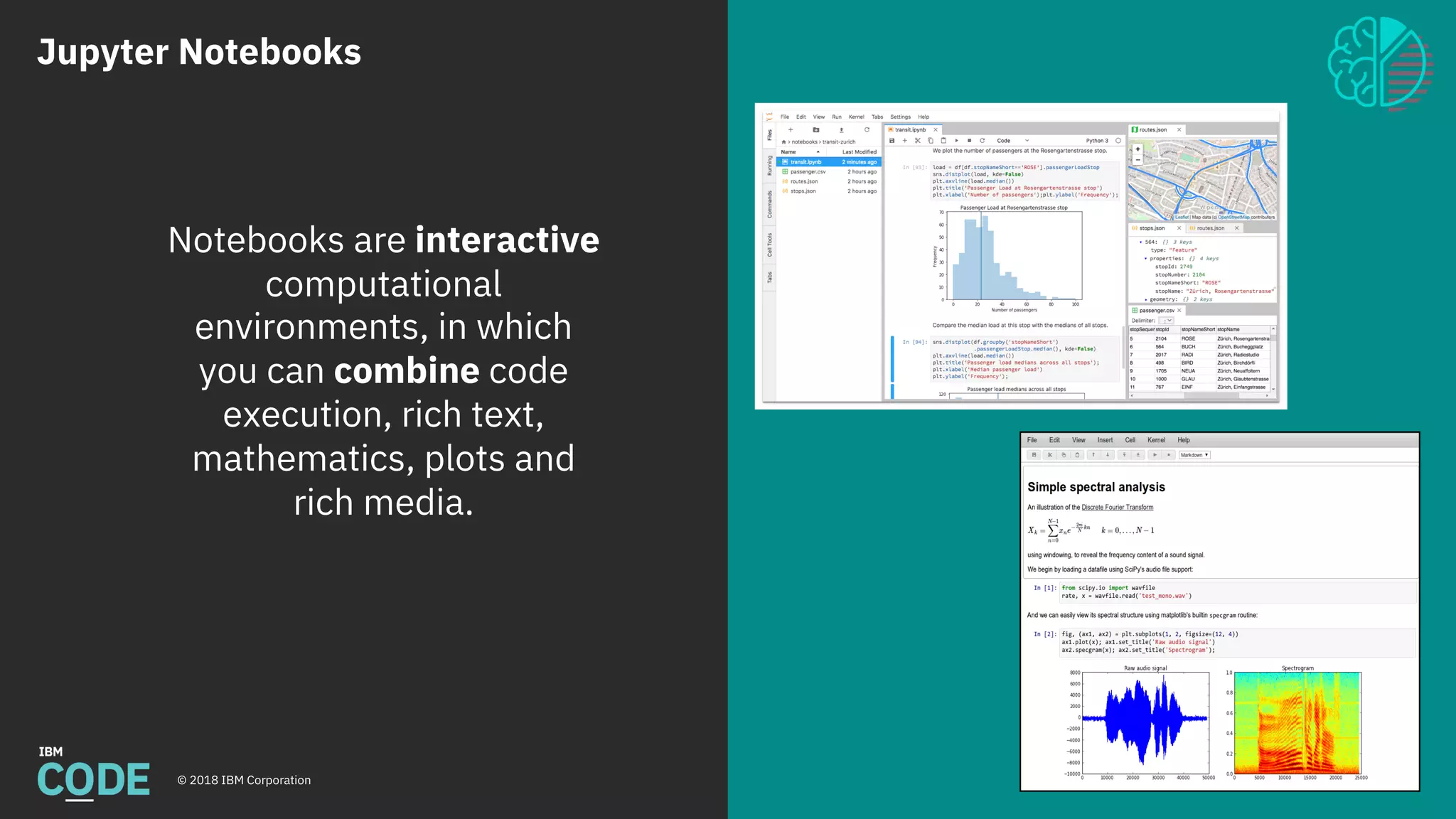
Notebooks are interactive
computational
environments, in which
you can combine code
execution, rich text,
mathematics, plots and
rich media.
Jupyter Notebooks
© 2018 IBM Corporation 7
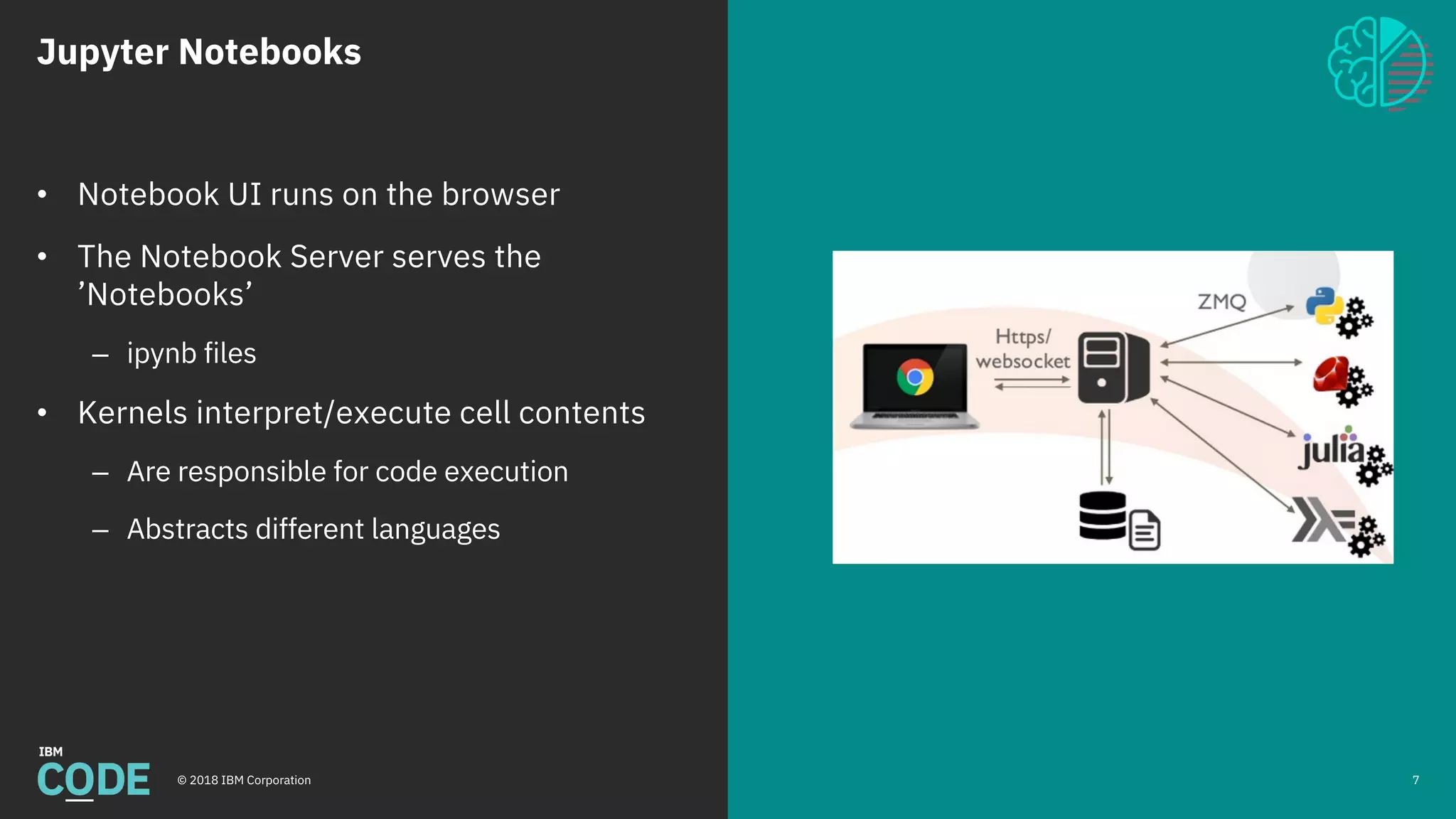
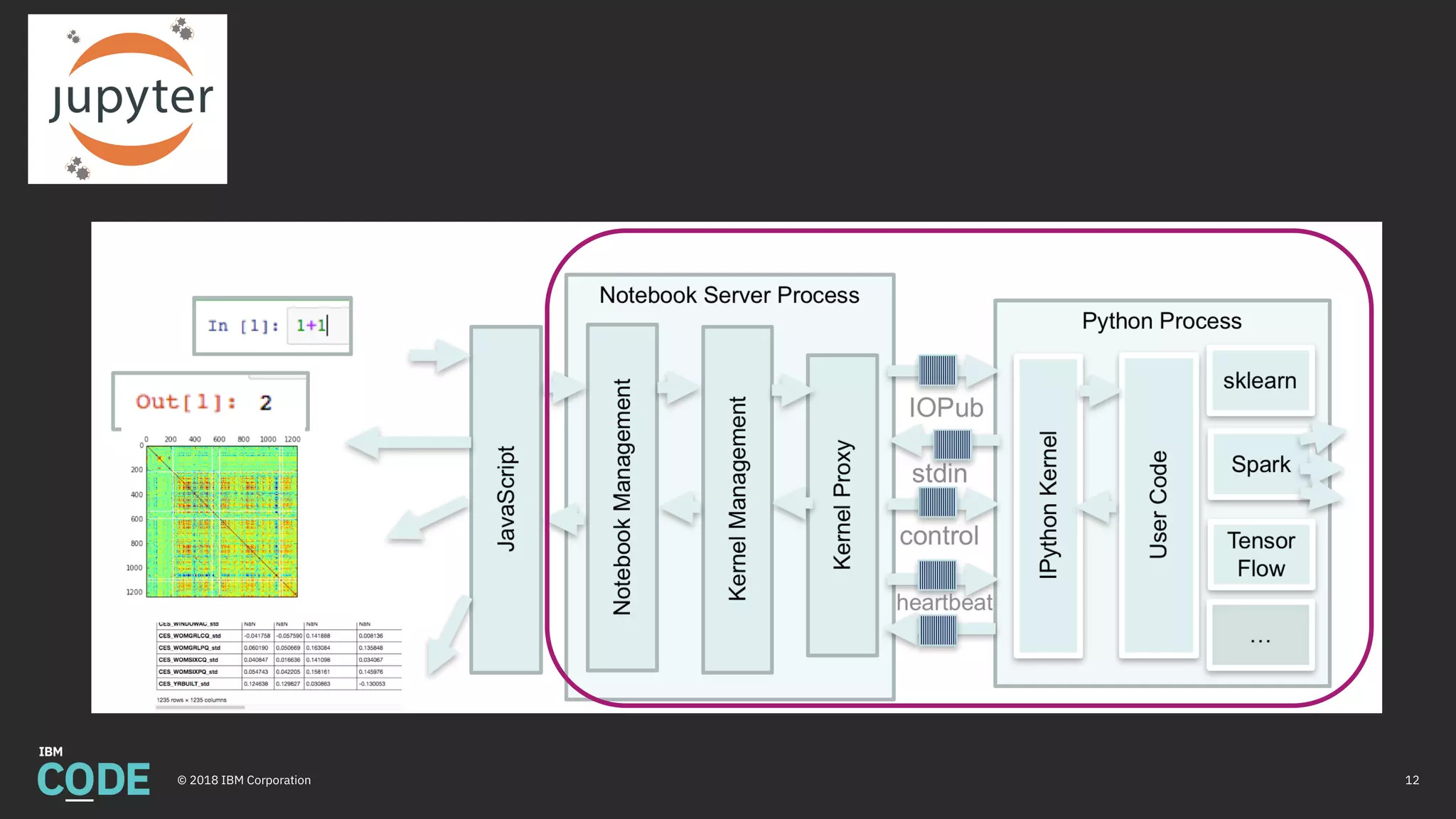
• Notebook UI runs on the browser
• The Notebook Server serves the
’Notebooks’
– ipynb files
• Kernels interpret/execute cell contents
– Are responsible for code execution
– Abstracts different languages
Building a
Data Science
Analytical Platform
9© 2018 IBM Corporation
Building an Data Science Platform
© 2018 IBM Corporation
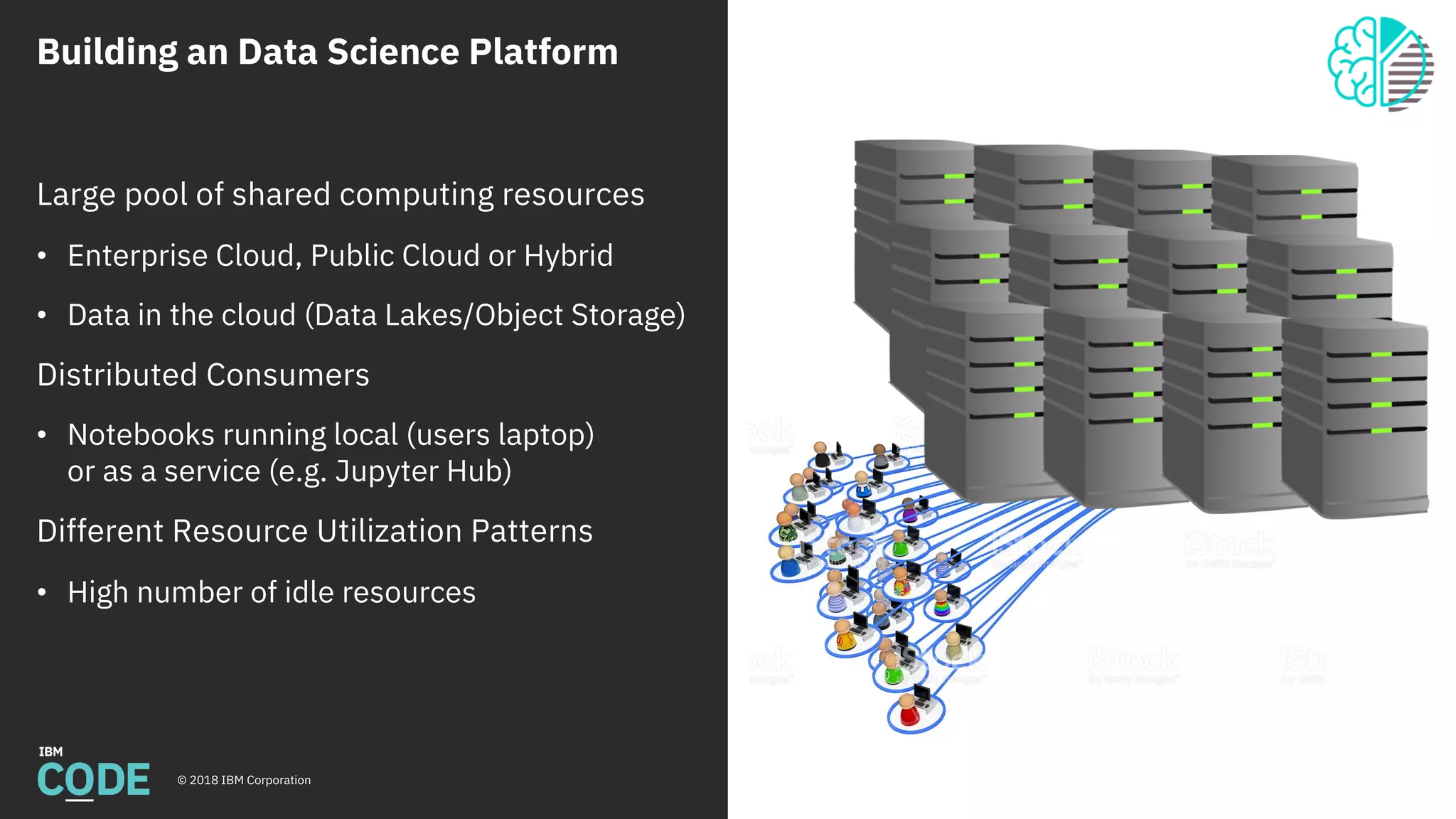
Large pool of shared computing resources
• Enterprise Cloud, Public Cloud or Hybrid
• Data in the cloud (Data Lakes/Object Storage)
Distributed Consumers
• Notebooks running local (users laptop)
or as a service (e.g. Jupyter Hub)
Different Resource Utilization Patterns
• High number of idle resources
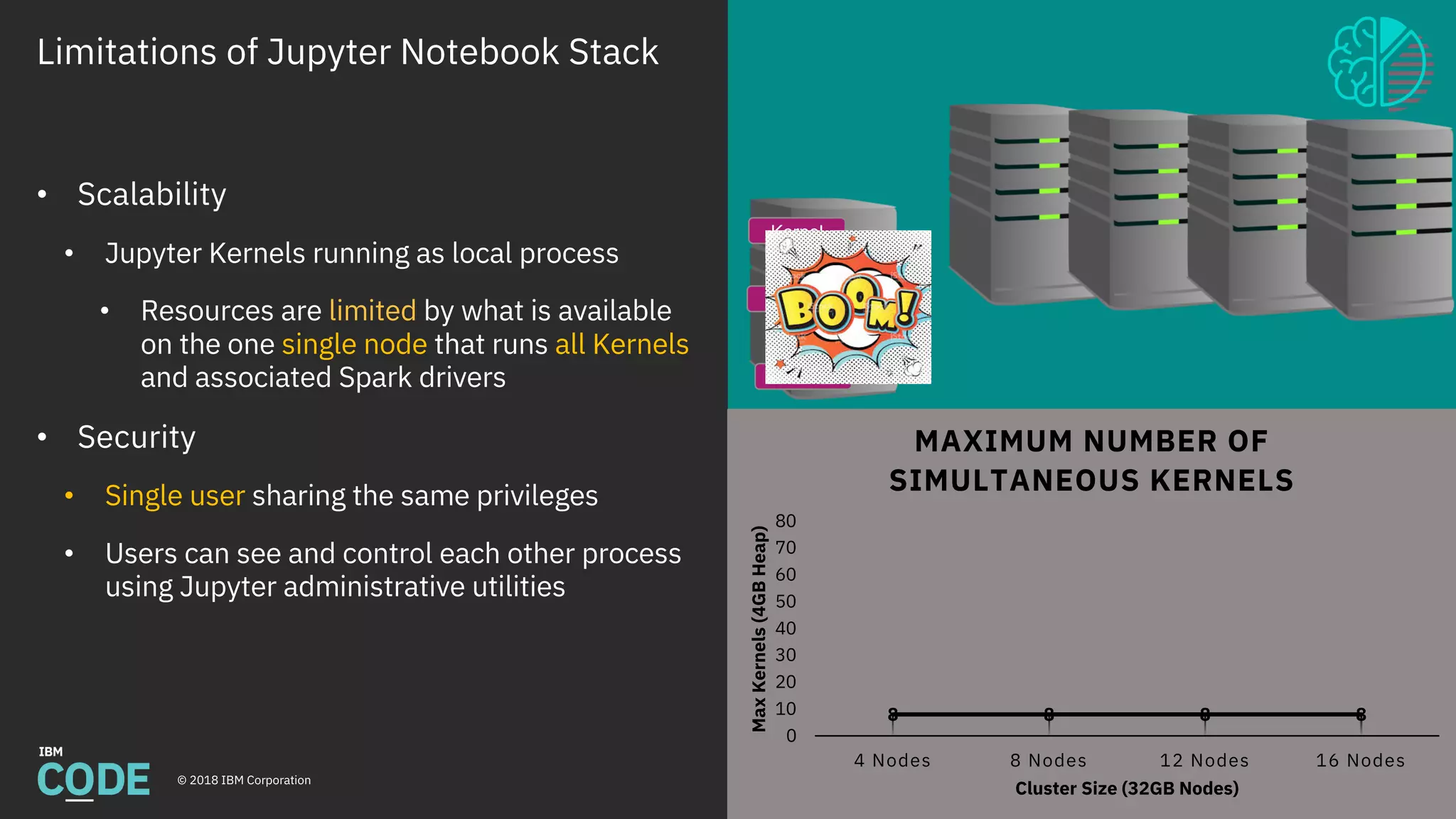
Limitations of Jupyter Notebook Stack
© 2018 IBM Corporation
Gather
Data
Analyze
Data
Machine
Learning
Deep
Learning
Deploy
Model
Maintain
Model
Python
Data Science
Stack
Fabric for
Deep Learning
(FfDL)
Mleap +
PFA
Scikit-LearnPandas
Apache
Spark
Apache
Spark
Jupyter
Model
Asset
eXchange
Keras +
Tensorflow
11
8 8 8 8
0
10
20
30
40
50
60
70
80
4 Nodes 8 Nodes 12 Nodes 16 NodesMaxKernels(4GBHeap)
Cluster Size (32GB Nodes)
MAXIMUM NUMBER OF
SIMULTANEOUS KERNELS
• Scalability
• Jupyter Kernels running as local process
• Resources are limited by what is available
on the one single node that runs all Kernels
and associated Spark drivers
• Security
• Single user sharing the same privileges
• Users can see and control each other process
using Jupyter administrative utilities
Kernel
Kernel
Kernel
Kernel
Kernel
12© 2018 IBM Corporation
Jupyter Enterprise Gateway
13© 2018 IBM Corporation
Jupyter Enterprise
Gateway
© 2018 IBM Corporation
Jupyter Enterprise Gateway at IBM Code
https://developer.ibm.com/code/openprojects/jupyter-enterprise-gateway/
Jupyter Enterprise Gateway source code at GitHub
https://github.com/jupyter-incubator/enterprise_gateway
Jupyter Enterprise Gateway Documentation
http://jupyter-enterprise-gateway.readthedocs.io/en/latest/
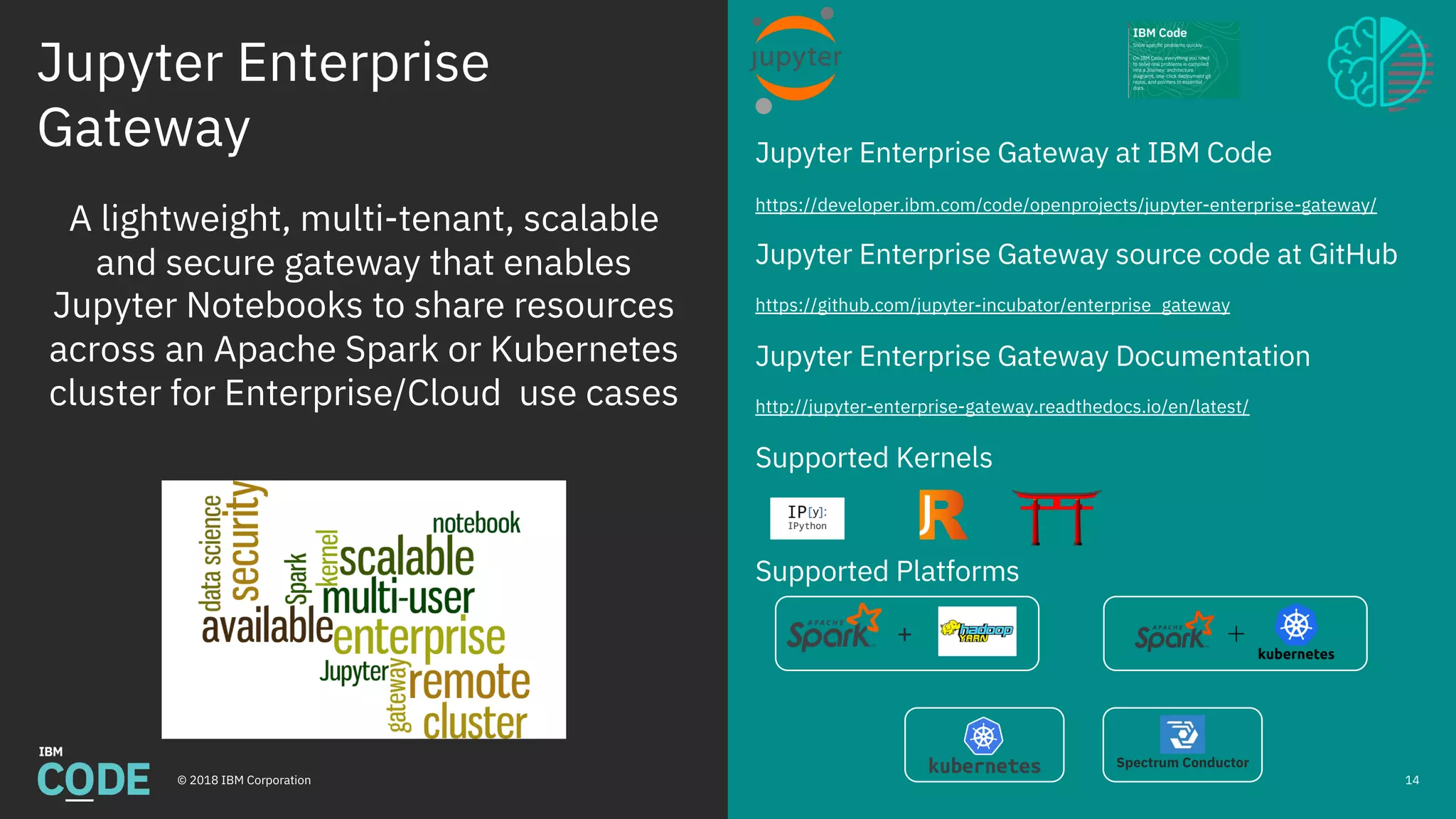
Supported Kernels
Supported Platforms
14
A lightweight, multi-tenant, scalable
and secure gateway that enables
Jupyter Notebooks to share resources
across an Apache Spark or Kubernetes
cluster for Enterprise/Cloud use cases
Spectrum Conductor
+
Jupyter Enterprise Gateway Features
© 2018 IBM Corporation
Gather
Data
Analyze
Data
Machine
Learning
Deep
Learning
Deploy
Model
Maintain
Model
Python
Data Science
Stack
Fabric for
Deep Learning
(FfDL)
Mleap +
PFA
Scikit-LearnPandas
Apache
Spark
Apache
Spark
Jupyter
Model
Asset
eXchange
Keras +
Tensorflow
15
16
32
48
64
0
10
20
30
40
50
60
70
80
4 Nodes 8 Nodes 12 Nodes 16 NodesMaxKernels(4GBHeap)
Cluster Size (32GB Nodes)
MAXIMUM NUMBER OF
SIMULTANEOUS KERNELS
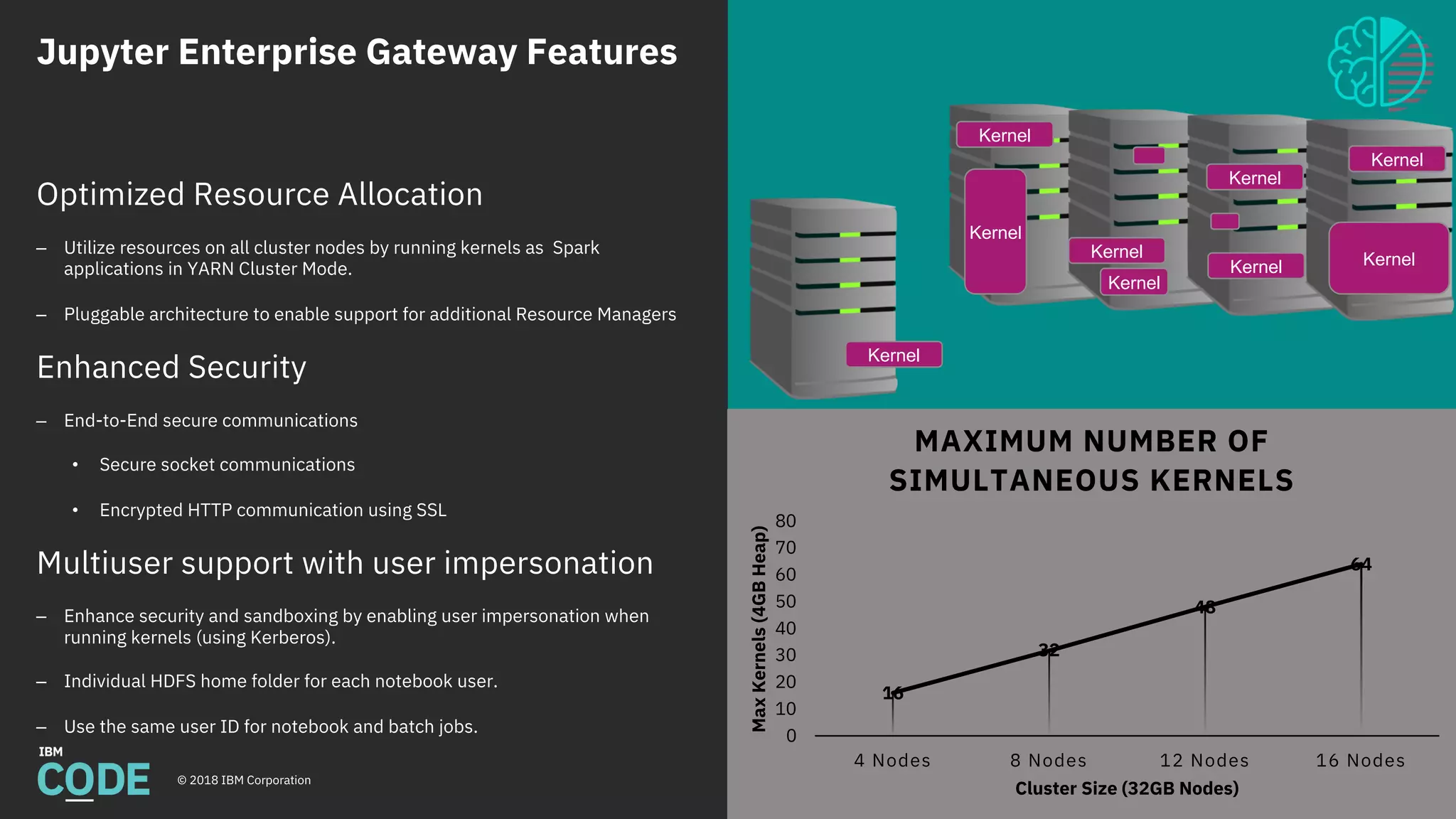
Optimized Resource Allocation
– Utilize resources on all cluster nodes by running kernels as Spark
applications in YARN Cluster Mode.
– Pluggable architecture to enable support for additional Resource Managers
Enhanced Security
– End-to-End secure communications
• Secure socket communications
• Encrypted HTTP communication using SSL
Multiuser support with user impersonation
– Enhance security and sandboxing by enabling user impersonation when
running kernels (using Kerberos).
– Individual HDFS home folder for each notebook user.
– Use the same user ID for notebook and batch jobs.
Kernel
Kernel
Kernel
Kernel
Kernel
Kernel
Kernel
Kernel
Kernel
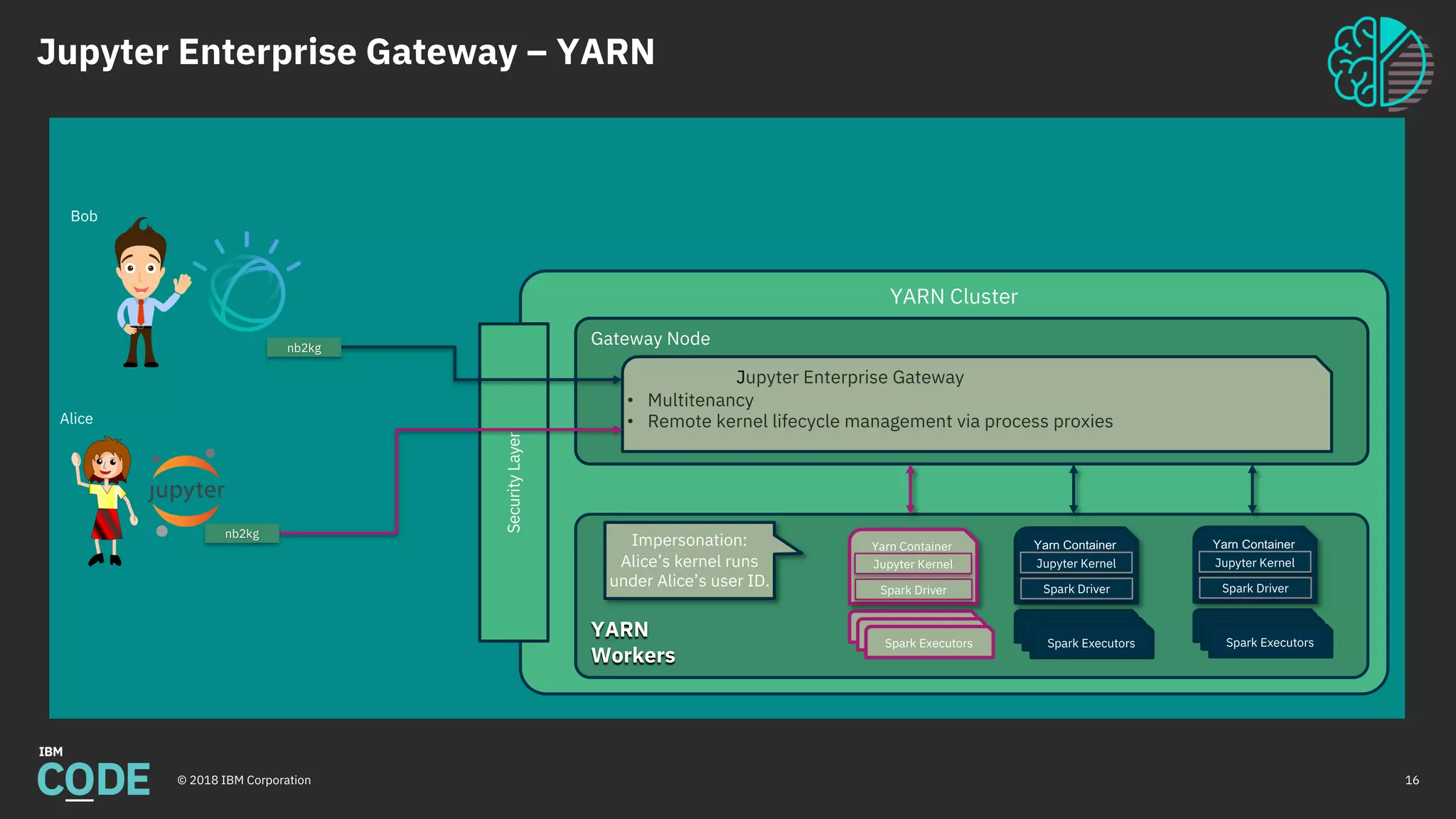
Jupyter Enterprise Gateway – YARN
© 2018 IBM Corporation 16
YARN Cluster
YARN
Workers
Gateway Node
Jupyter Enterprise Gateway
• Multitenancy
• Remote kernel lifecycle management via process proxies
Spark Executors
Spark Executors
Spark Executors
Yarn Container
Jupyter Kernel
Spark Driver
Impersonation:
Alice’s kernel runs
under Alice’s user ID.
Spark Executors
Spark Executors
Spark Executors
Yarn Container
Jupyter Kernel
Spark Driver
SecurityLayer
nb2kg
nb2kg
Spark Executors
Spark Executors
Spark Executors
Yarn Container
Jupyter Kernel
Spark Driver
Bob
Alice
Enterprise Gateway & Kubernetes
© 2018 IBM Corporation
Supported Platforms
FfDL
Before Enterprise Gateway After Enterprise Gateway
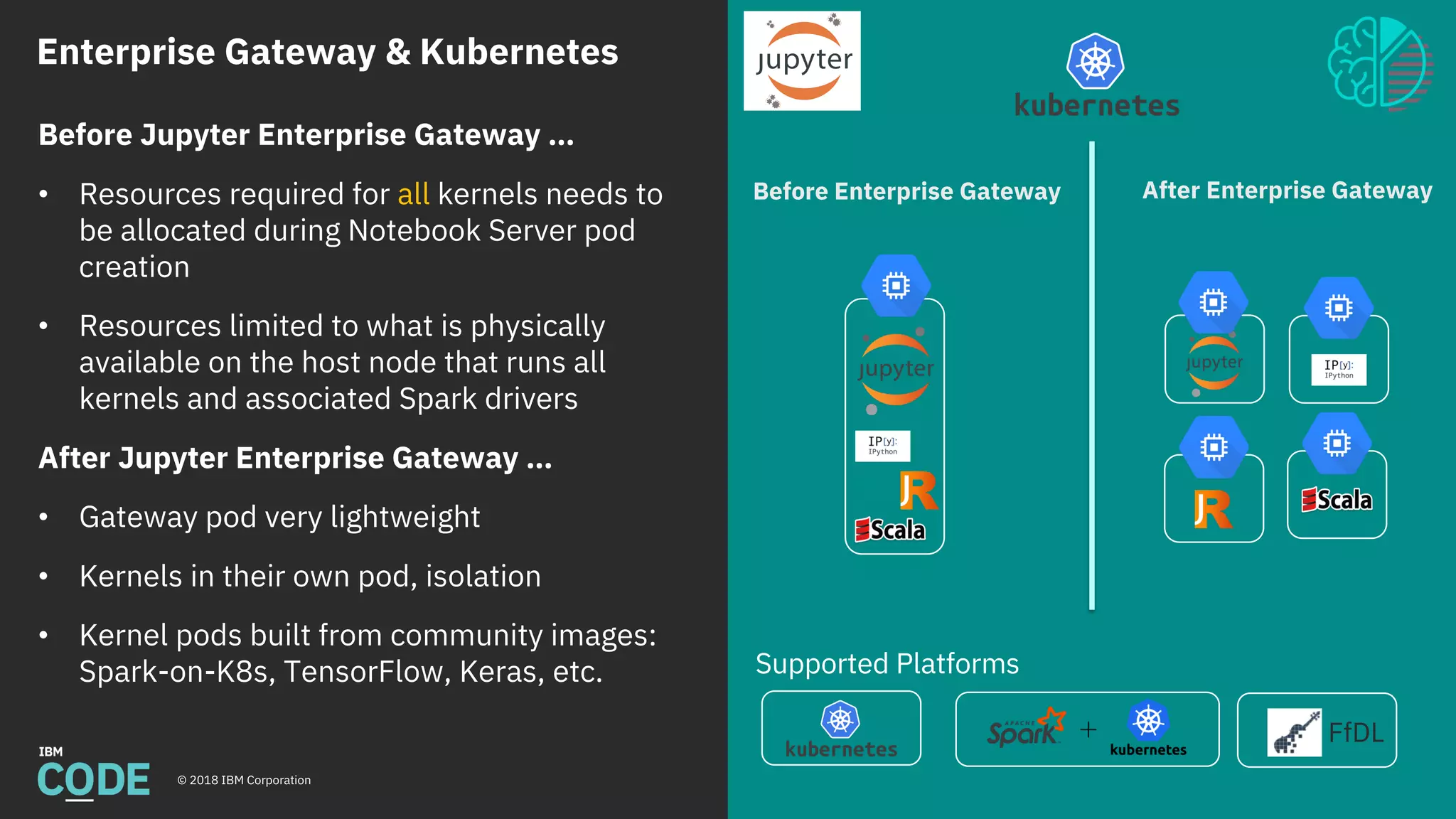
Before Jupyter Enterprise Gateway …
• Resources required for all kernels needs to
be allocated during Notebook Server pod
creation
• Resources limited to what is physically
available on the host node that runs all
kernels and associated Spark drivers
After Jupyter Enterprise Gateway …
• Gateway pod very lightweight
• Kernels in their own pod, isolation
• Kernel pods built from community images:
Spark-on-K8s, TensorFlow, Keras, etc.
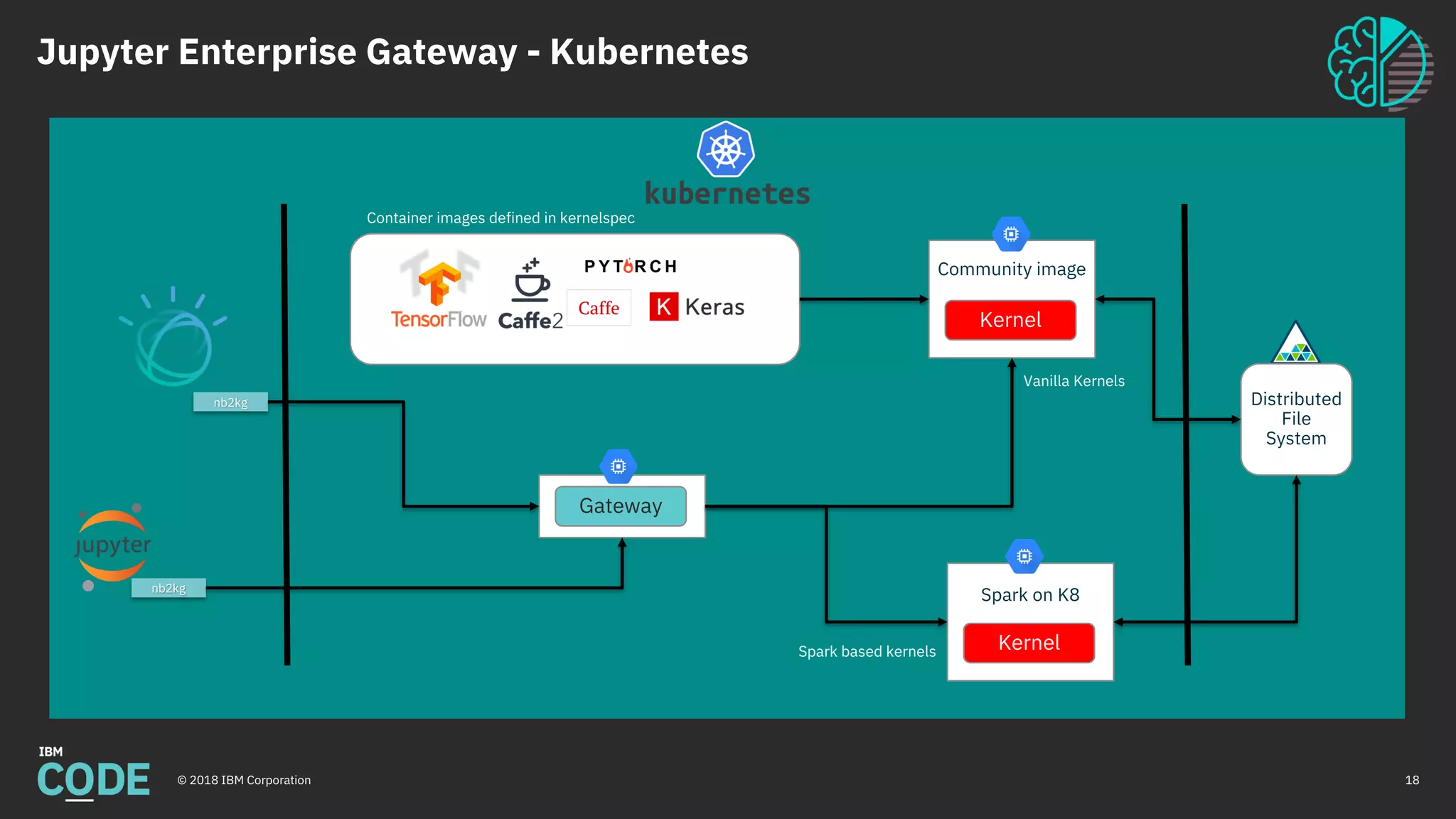
Jupyter Enterprise Gateway - Kubernetes
© 2018 IBM Corporation 18
Container images defined in kernelspec
Community image
Kernel
Spark on K8
Kernel
Distributed
File
System
Vanilla Kernels
Spark based kernels
Gateway
nb2kg
nb2kg
The Secret Sauce:
Process Proxies mixed with Kernel Launchers
© 2018 IBM Corporation
Process Proxy:
• Abstracts kernel process represented by Jupyter
framework
• Pluggable class definition identified in kernelspec
(kernel.json)
• Manages kernel lifecycle
Kernel Launcher:
• Embeds target kernel
• Listens on gateway communication port
• Conveys interrupt requests (via local signal)
• Could be extended for additional communications
{
"language": "python",
"display_name": "Spark - Python (Kubernetes Mode)",
"process_proxy": {
"class_name":
"enterprise_gateway.services.processproxies.k8s.KubernetesProcessP
roxy",
"config": {
"image_name": "elyra/kubernetes-kernel-py:dev",
"executor_image_name": "elyra/kubernetes-kernel-py:dev”,
"port_range" : "40000..42000"
}
},
"env": {
"SPARK_HOME": "/opt/spark",
"SPARK_OPTS": "--master k8s://https://${KUBERNETES_SERVICE_HOST
--deploy-mode cluster --name …",
…
},
"argv": [
"/usr/local/share/jupyter/kernels/spark_python_kubernetes/bin/run.
sh",
"{connection_file}",
"--RemoteProcessProxy.response-address",
"{response_address}",
"--RemoteProcessProxy.spark-context-initialization-mode",
"lazy"
]
}
Deployment
Utilities
21© 2018 IBM Corporation
Enterprise Gateway Deployment
© 2018 IBM Corporation 22
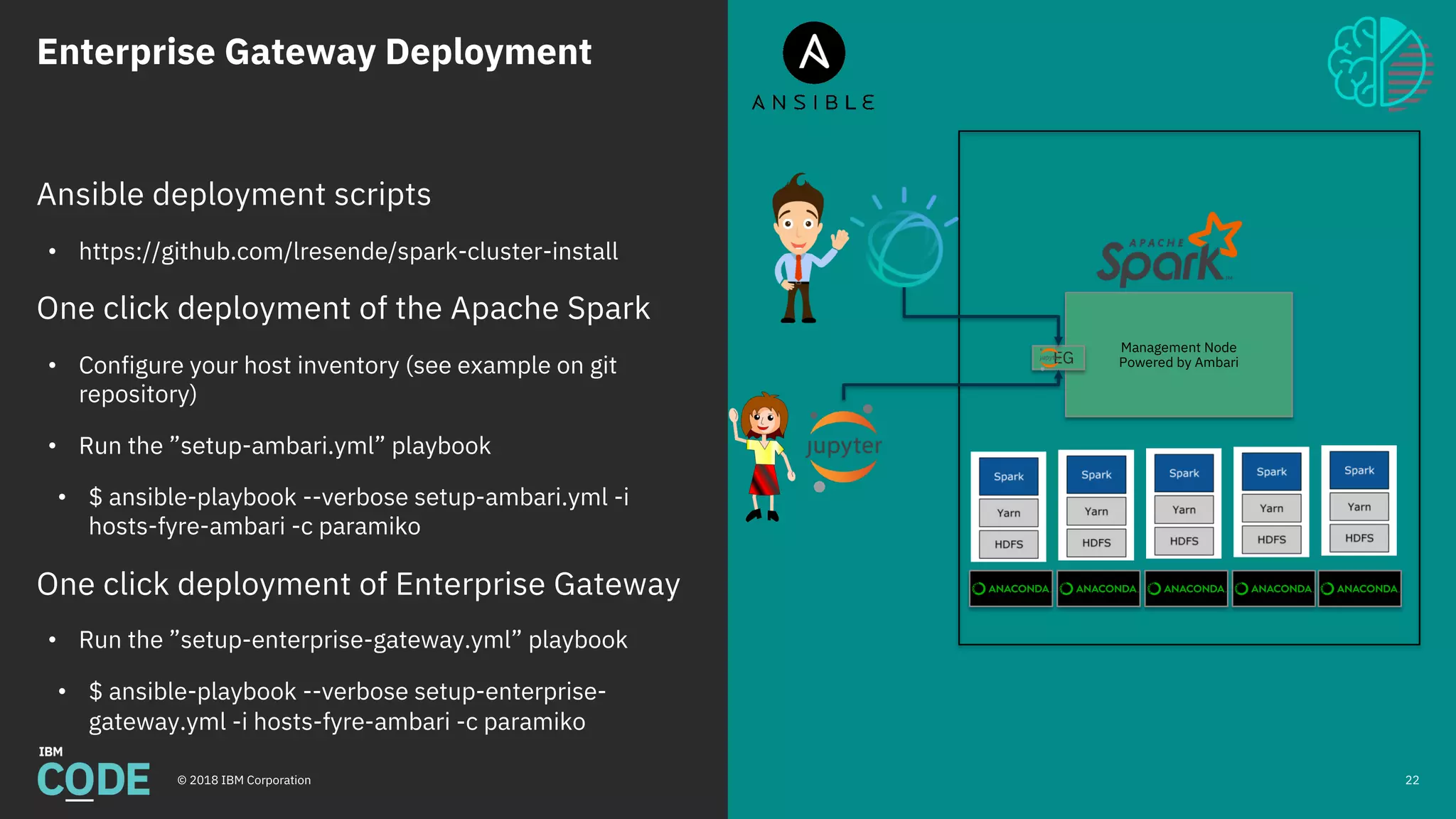
Ansible deployment scripts
• https://github.com/lresende/spark-cluster-install
One click deployment of the Apache Spark
• Configure your host inventory (see example on git
repository)
• Run the ”setup-ambari.yml” playbook
• $ ansible-playbook --verbose setup-ambari.yml -i
hosts-fyre-ambari -c paramiko
One click deployment of Enterprise Gateway
• Run the ”setup-enterprise-gateway.yml” playbook
• $ ansible-playbook --verbose setup-enterprise-
gateway.yml -i hosts-fyre-ambari -c paramiko
Management Node
Powered by AmbariEG
Enterprise Gateway Deployment
© 2018 IBM Corporation 23
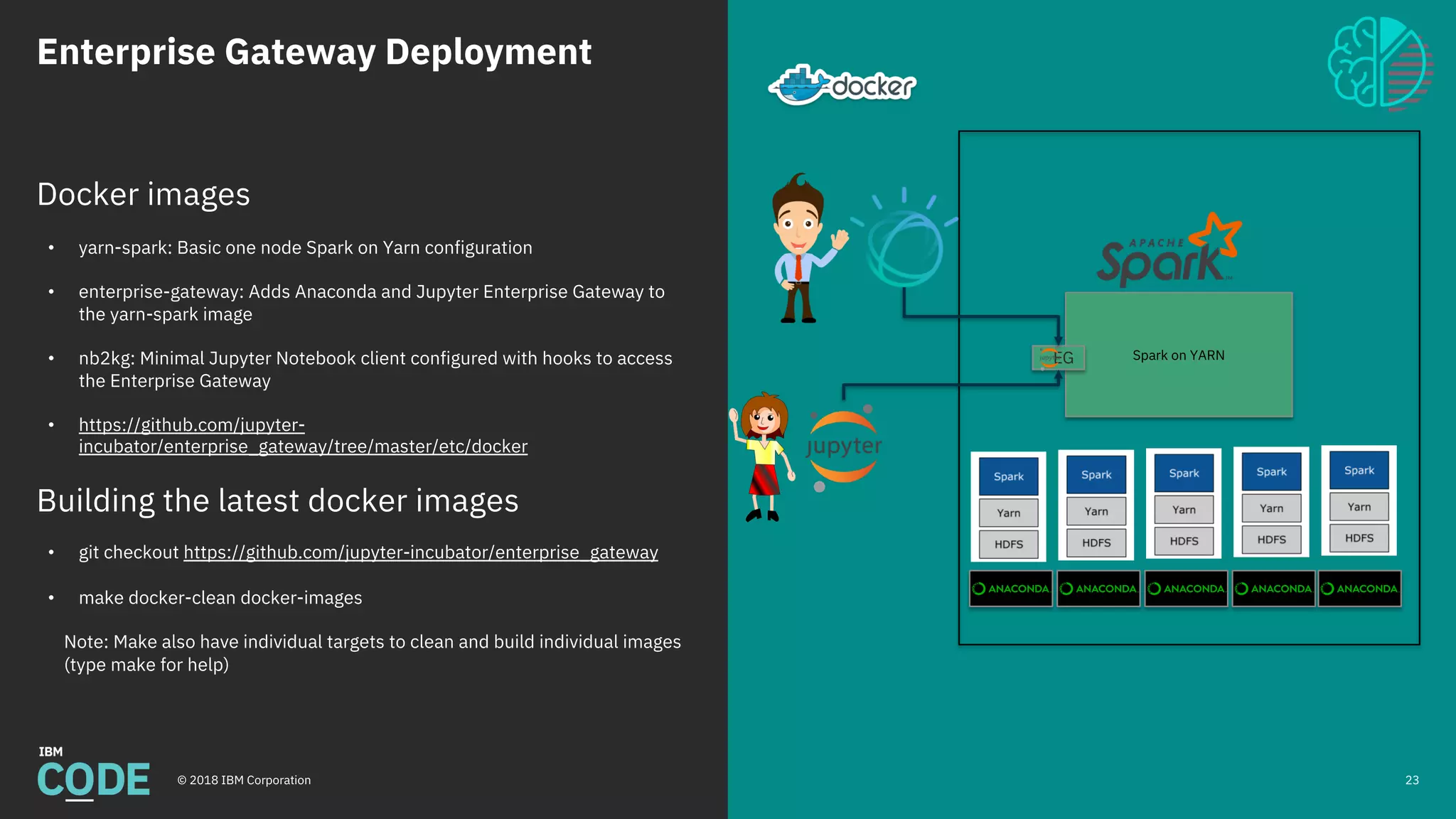
Docker images
• yarn-spark: Basic one node Spark on Yarn configuration
• enterprise-gateway: Adds Anaconda and Jupyter Enterprise Gateway to
the yarn-spark image
• nb2kg: Minimal Jupyter Notebook client configured with hooks to access
the Enterprise Gateway
• https://github.com/jupyter-
incubator/enterprise_gateway/tree/master/etc/docker
Building the latest docker images
• git checkout https://github.com/jupyter-incubator/enterprise_gateway
• make docker-clean docker-images
Note: Make also have individual targets to clean and build individual images
(type make for help)
Spark on YARNEG
Enterprise Gateway Deployment
© 2018 IBM Corporation 24
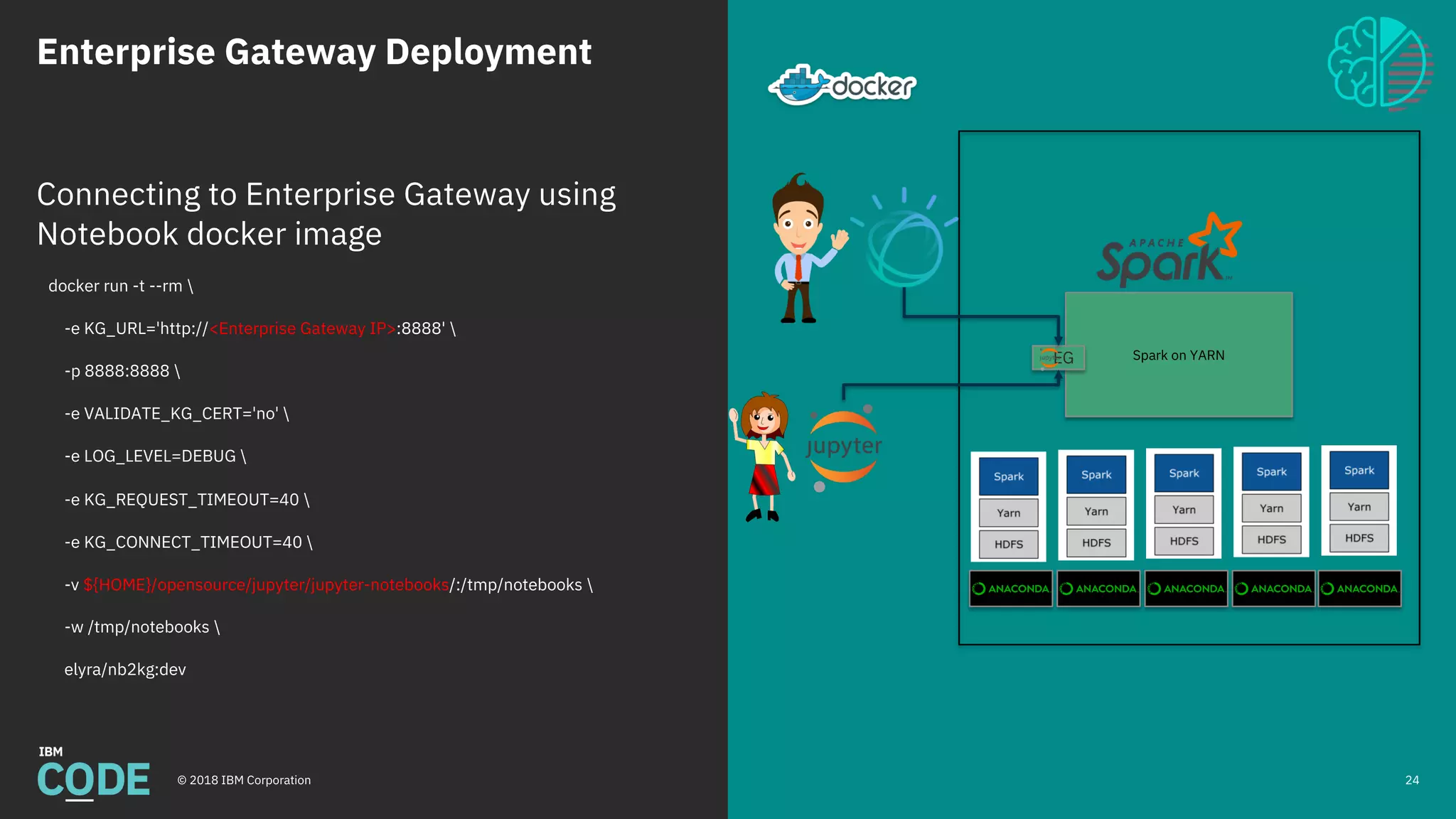
Connecting to Enterprise Gateway using
Notebook docker image
docker run -t --rm 
-e KG_URL='http://<Enterprise Gateway IP>:8888' 
-p 8888:8888 
-e VALIDATE_KG_CERT='no' 
-e LOG_LEVEL=DEBUG 
-e KG_REQUEST_TIMEOUT=40 
-e KG_CONNECT_TIMEOUT=40 
-v ${HOME}/opensource/jupyter/jupyter-notebooks/:/tmp/notebooks 
-w /tmp/notebooks 
elyra/nb2kg:dev
Spark on YARNEG

Jupyter Enterprise Gateway Overview

  • 1.
    Jupyter Enterprise Gateway CODAIT DevelopmentTeam August, 2018 © 2018 IBM Corporation 1
  • 2.
  • 3.
    Jupyter Notebooks © 2018IBM Corporation 6 Notebooks are interactive computational environments, in which you can combine code execution, rich text, mathematics, plots and rich media.
  • 4.
    Jupyter Notebooks © 2018IBM Corporation 7 • Notebook UI runs on the browser • The Notebook Server serves the ’Notebooks’ – ipynb files • Kernels interpret/execute cell contents – Are responsible for code execution – Abstracts different languages
  • 5.
    Building a Data Science AnalyticalPlatform 9© 2018 IBM Corporation
  • 6.
    Building an DataScience Platform © 2018 IBM Corporation Large pool of shared computing resources • Enterprise Cloud, Public Cloud or Hybrid • Data in the cloud (Data Lakes/Object Storage) Distributed Consumers • Notebooks running local (users laptop) or as a service (e.g. Jupyter Hub) Different Resource Utilization Patterns • High number of idle resources
  • 7.
    Limitations of JupyterNotebook Stack © 2018 IBM Corporation Gather Data Analyze Data Machine Learning Deep Learning Deploy Model Maintain Model Python Data Science Stack Fabric for Deep Learning (FfDL) Mleap + PFA Scikit-LearnPandas Apache Spark Apache Spark Jupyter Model Asset eXchange Keras + Tensorflow 11 8 8 8 8 0 10 20 30 40 50 60 70 80 4 Nodes 8 Nodes 12 Nodes 16 NodesMaxKernels(4GBHeap) Cluster Size (32GB Nodes) MAXIMUM NUMBER OF SIMULTANEOUS KERNELS • Scalability • Jupyter Kernels running as local process • Resources are limited by what is available on the one single node that runs all Kernels and associated Spark drivers • Security • Single user sharing the same privileges • Users can see and control each other process using Jupyter administrative utilities Kernel Kernel Kernel Kernel Kernel
  • 8.
    12© 2018 IBMCorporation
  • 9.
    Jupyter Enterprise Gateway 13©2018 IBM Corporation
  • 10.
    Jupyter Enterprise Gateway © 2018IBM Corporation Jupyter Enterprise Gateway at IBM Code https://developer.ibm.com/code/openprojects/jupyter-enterprise-gateway/ Jupyter Enterprise Gateway source code at GitHub https://github.com/jupyter-incubator/enterprise_gateway Jupyter Enterprise Gateway Documentation http://jupyter-enterprise-gateway.readthedocs.io/en/latest/ Supported Kernels Supported Platforms 14 A lightweight, multi-tenant, scalable and secure gateway that enables Jupyter Notebooks to share resources across an Apache Spark or Kubernetes cluster for Enterprise/Cloud use cases Spectrum Conductor +
  • 11.
    Jupyter Enterprise GatewayFeatures © 2018 IBM Corporation Gather Data Analyze Data Machine Learning Deep Learning Deploy Model Maintain Model Python Data Science Stack Fabric for Deep Learning (FfDL) Mleap + PFA Scikit-LearnPandas Apache Spark Apache Spark Jupyter Model Asset eXchange Keras + Tensorflow 15 16 32 48 64 0 10 20 30 40 50 60 70 80 4 Nodes 8 Nodes 12 Nodes 16 NodesMaxKernels(4GBHeap) Cluster Size (32GB Nodes) MAXIMUM NUMBER OF SIMULTANEOUS KERNELS Optimized Resource Allocation – Utilize resources on all cluster nodes by running kernels as Spark applications in YARN Cluster Mode. – Pluggable architecture to enable support for additional Resource Managers Enhanced Security – End-to-End secure communications • Secure socket communications • Encrypted HTTP communication using SSL Multiuser support with user impersonation – Enhance security and sandboxing by enabling user impersonation when running kernels (using Kerberos). – Individual HDFS home folder for each notebook user. – Use the same user ID for notebook and batch jobs. Kernel Kernel Kernel Kernel Kernel Kernel Kernel Kernel Kernel
  • 12.
    Jupyter Enterprise Gateway– YARN © 2018 IBM Corporation 16 YARN Cluster YARN Workers Gateway Node Jupyter Enterprise Gateway • Multitenancy • Remote kernel lifecycle management via process proxies Spark Executors Spark Executors Spark Executors Yarn Container Jupyter Kernel Spark Driver Impersonation: Alice’s kernel runs under Alice’s user ID. Spark Executors Spark Executors Spark Executors Yarn Container Jupyter Kernel Spark Driver SecurityLayer nb2kg nb2kg Spark Executors Spark Executors Spark Executors Yarn Container Jupyter Kernel Spark Driver Bob Alice
  • 13.
    Enterprise Gateway &Kubernetes © 2018 IBM Corporation Supported Platforms FfDL Before Enterprise Gateway After Enterprise Gateway Before Jupyter Enterprise Gateway … • Resources required for all kernels needs to be allocated during Notebook Server pod creation • Resources limited to what is physically available on the host node that runs all kernels and associated Spark drivers After Jupyter Enterprise Gateway … • Gateway pod very lightweight • Kernels in their own pod, isolation • Kernel pods built from community images: Spark-on-K8s, TensorFlow, Keras, etc.
  • 14.
    Jupyter Enterprise Gateway- Kubernetes © 2018 IBM Corporation 18 Container images defined in kernelspec Community image Kernel Spark on K8 Kernel Distributed File System Vanilla Kernels Spark based kernels Gateway nb2kg nb2kg
  • 15.
    The Secret Sauce: ProcessProxies mixed with Kernel Launchers © 2018 IBM Corporation Process Proxy: • Abstracts kernel process represented by Jupyter framework • Pluggable class definition identified in kernelspec (kernel.json) • Manages kernel lifecycle Kernel Launcher: • Embeds target kernel • Listens on gateway communication port • Conveys interrupt requests (via local signal) • Could be extended for additional communications { "language": "python", "display_name": "Spark - Python (Kubernetes Mode)", "process_proxy": { "class_name": "enterprise_gateway.services.processproxies.k8s.KubernetesProcessP roxy", "config": { "image_name": "elyra/kubernetes-kernel-py:dev", "executor_image_name": "elyra/kubernetes-kernel-py:dev”, "port_range" : "40000..42000" } }, "env": { "SPARK_HOME": "/opt/spark", "SPARK_OPTS": "--master k8s://https://${KUBERNETES_SERVICE_HOST --deploy-mode cluster --name …", … }, "argv": [ "/usr/local/share/jupyter/kernels/spark_python_kubernetes/bin/run. sh", "{connection_file}", "--RemoteProcessProxy.response-address", "{response_address}", "--RemoteProcessProxy.spark-context-initialization-mode", "lazy" ] }
  • 16.
  • 17.
    Enterprise Gateway Deployment ©2018 IBM Corporation 22 Ansible deployment scripts • https://github.com/lresende/spark-cluster-install One click deployment of the Apache Spark • Configure your host inventory (see example on git repository) • Run the ”setup-ambari.yml” playbook • $ ansible-playbook --verbose setup-ambari.yml -i hosts-fyre-ambari -c paramiko One click deployment of Enterprise Gateway • Run the ”setup-enterprise-gateway.yml” playbook • $ ansible-playbook --verbose setup-enterprise- gateway.yml -i hosts-fyre-ambari -c paramiko Management Node Powered by AmbariEG
  • 18.
    Enterprise Gateway Deployment ©2018 IBM Corporation 23 Docker images • yarn-spark: Basic one node Spark on Yarn configuration • enterprise-gateway: Adds Anaconda and Jupyter Enterprise Gateway to the yarn-spark image • nb2kg: Minimal Jupyter Notebook client configured with hooks to access the Enterprise Gateway • https://github.com/jupyter- incubator/enterprise_gateway/tree/master/etc/docker Building the latest docker images • git checkout https://github.com/jupyter-incubator/enterprise_gateway • make docker-clean docker-images Note: Make also have individual targets to clean and build individual images (type make for help) Spark on YARNEG
  • 19.
    Enterprise Gateway Deployment ©2018 IBM Corporation 24 Connecting to Enterprise Gateway using Notebook docker image docker run -t --rm -e KG_URL='http://<Enterprise Gateway IP>:8888' -p 8888:8888 -e VALIDATE_KG_CERT='no' -e LOG_LEVEL=DEBUG -e KG_REQUEST_TIMEOUT=40 -e KG_CONNECT_TIMEOUT=40 -v ${HOME}/opensource/jupyter/jupyter-notebooks/:/tmp/notebooks -w /tmp/notebooks elyra/nb2kg:dev Spark on YARNEG