Introduction about Jupyter
Notebook and Azure Machine
Learning Studio
Muralidharan Deenathayalan,
Technical Architect, Quanticate
1
What is Python?
• Python is an interpreted language.
• Python is an object-oriented, high-level programming language for general-purpose programming
• Created by Guido van Rossum and first released in 1991
2
Advantages of Python
• Extensive Support Libraries
• Integration Feature
• Improved Programmer’s Productivity
Ref : https://medium.com/@mindfiresolutions.usa/advantages-and-disadvantages-of-python-programming-language-fd0b394f2121
3
What is R ?
• R is a language and environment for statistical computing and graphics.
• It is a GNU project which is similar to the S language and environment which was developed at Bell
Laboratories (formerly AT&T, now Lucent Technologies) by John Chambers and colleagues.
• R can be considered as a different implementation of S
Ref : https://www.r-project.org/about.html
4
Advantages of R
• An effective data handling and storage facility.
• Suite of operators for calculations on arrays, in particular matrices.
• A large, coherent, integrated collection of intermediate tools for data analysis.
• Graphical facilities for data analysis and display either on-screen or on hardcopy.
• A well-developed, simple and effective programming language which includes conditionals, loops, user-
defined recursive functions and input and output facilities
Ref : https://www.r-project.org/about.html
5
What is Julia?
• Julia is a high-level, high-performance dynamic programming language for numerical computing.
• Julia provides a sophisticated compiler, distributed parallel execution, numerical accuracy, and an
extensive mathematical function library.
• Julia’s Base library, largely written in Julia itself.
• It integrates mature, best-of-breed open source C and Fortran libraries for linear algebra, random
number generation, signal processing, and string processing.
Ref :https://julialang.org/
6
Advantages of Julia
• Multiple dispatch: providing the ability to define function behaviour across many combinations of
argument types.
• Good performance, approaching that of statically-compiled languages like C
• Built-in package manager
• Call Python functions: use the PyCall package
• Call C functions directly: no wrappers or special APIs
Ref :https://julialang.org/
7
Limitations of Julia
• Not fully stabilized
• Lesser scientific tools
• Slower
Ref : https://www.allerin.com/blog/big-data-python-r-or-julia
8
What is iPython?
• iPython – Interactive Python command shell.
• It provides a rich toolkit to help you make the most of using Python interactively.
• Its main components are:
• A powerful interactive Python shell
• A Jupyter kernel to work with Python code in Jupyter notebooks and other interactive frontends.
Ref : https://ipython.readthedocs.io/en/stable/
9
Advantages of iPython
• Comprehensive object introspection.
• Input history, persistent across sessions.
• Caching of output results during a session with automatically generated references.
• Extensible tab completion, with support by default for completion of python variables and keywords,
filenames and function keywords.
• Extensible system of ā€˜magic’ commands for controlling the environment and performing many tasks
related to iPython or the operating system.
Ref : https://ipython.readthedocs.io/en/stable/
10
Limitations of iPython
• No native code session save.
• Unnatural keyboard shortcuts and no syntax debugger.
• Code cell allows lines that are too long and has no wrapping / autoindent.
• No easy drag and rearrange code cells.
• No table of content to show where html headers are.
• No easy hiding of code cells / code output.
Ref : https://www.quora.com/What-are-the-limitations-of-IPython-Notebook
11
What is Jupyter?
• Ju(lia) + Py(thon) + (e)R
• The Jupyter Notebook is an open-source web application that allows you to create and share documents.
• This document contain live code, equations, visualizations and narrative text.
Ref : https://www.oreilly.com/ideas/what-is-jupyter
12
Advantages of Jupyter?
• Useful for data cleaning and transformation, numerical simulation, statistical modelling, data
visualization, machine learning, and much more.
• Language of choice  40+ Languages
• Notebooks can be shared with others using email, Dropbox, GitHub and the Jupyter Notebook Viewer.
• Your code can produce rich, interactive output: HTML, images, videos, and custom MIME types.
• Big data integration - Leverage big data tools, such as Apache Spark, from Python, R and Scala. Explore
that same data with pandas, scikit-learn, ggplot2, TensorFlow.
Ref : http://jupyter.org/
13
Limitations of Jupyter
• It messes with your version control.
• The Jupyter Notebook format is just a big JSON, which contains your code and the outputs of the code
• Code can only be run in chunks.
Ref : http://opiateforthemass.es/articles/why-i-dont-like-jupyter-fka-ipython-notebook/
14
History of Jupyter & iPython
• Initial release : 2001; 17 years ago
• In 2014, Fernando PĆ©rez announced a spin-off project from IPython called Project Jupyter.
• In 2015, GitHub and the Jupyter Project announced native rendering of Jupyter notebooks file format
(.ipynb files) on the GitHub platform.
Ref : https://en.wikipedia.org/wiki/IPython , https://en.wikipedia.org/wiki/Project_Jupyter#History
15
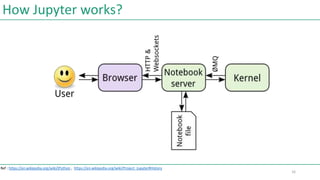
How Jupyter works?
Ref : https://en.wikipedia.org/wiki/IPython , https://en.wikipedia.org/wiki/Project_Jupyter#History
16
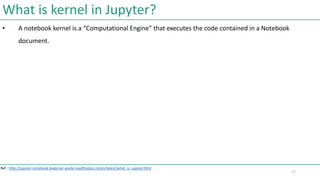
What is kernel in Jupyter?
• A notebook kernel is a ā€œComputational Engineā€ that executes the code contained in a Notebook
document.
Ref : http://jupyter-notebook-beginner-guide.readthedocs.io/en/latest/what_is_jupyter.html
17
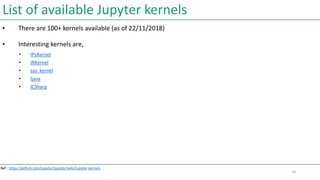
List of available Jupyter kernels
• There are 100+ kernels available (as of 22/11/2018)
• Interesting kernels are,
• IPyKernel
• IRKernel
• sas_kernel
• Ijava
• ICSharp
Ref : https://github.com/jupyter/jupyter/wiki/Jupyter-kernels
18
Installation of Jupyter Notebook
• http://jupyter-notebook-beginner-guide.readthedocs.io/en/latest/install.html
19
Jupyter Notebook on Cloud
• Navigate to https://notebooks.azure.com/
• Click Samples to navigate to https://notebooks.azure.com/Microsoft/libraries/samples
• Click anyone of the sample
• Click Clone option (You may get login dialog (if you’re not signed in, use your Hotmail/outlook/skype)
and login.)
• Enter library name and click Clone button
• Click on ā€œIntroduction to Pythonā€ sample and it launches, Jupyter notebook on Azure
• Select the statements on starts with In[1] … and select click Run button in the toolbar.
20
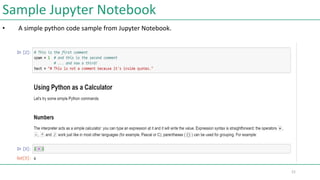
Sample Jupyter Notebook
• A simple python code sample from Jupyter Notebook.
21
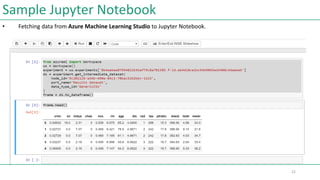
Sample Jupyter Notebook
• Fetching data from Azure Machine Learning Studio to Jupyter Notebook.
22
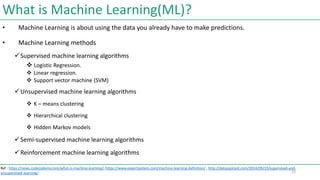
What is Machine Learning(ML)?
• Machine Learning is about using the data you already have to make predictions.
• Machine Learning methods
Supervised machine learning algorithms
 Logistic Regression.
 Linear regression.
 Support vector machine (SVM)
Unsupervised machine learning algorithms
 K – means clustering
 Hierarchical clustering
 Hidden Markov models
Semi-supervised machine learning algorithms
Reinforcement machine learning algorithms
Ref : https://news.codecademy.com/what-is-machine-learning/, https://www.expertsystem.com/machine-learning-definition/ , http://dataaspirant.com/2014/09/19/supervised-and-
unsupervised-learning/ 23
Microsoft Azure Machine Learning Studio
• Navigate to https://studio.azureml.net/ (Sign- in, if not.)
24
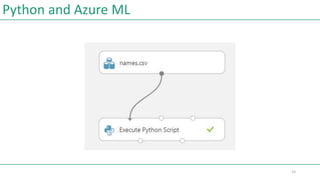
Python and Azure ML
25
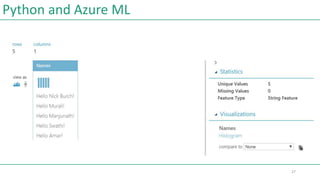
Python and Azure ML
import pandas as pd
def azureml_main(dataframe1):
for index, row in dataframe1.iterrows():
row[0]="Hello " + row[0] +"!"
# Return value must be of a sequence of pandas.DataFrame
return dataframe1
26
Python and Azure ML
27
Python and Azure ML Demo
Demo
28
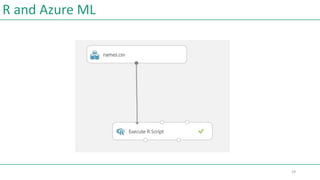
R and Azure ML
29
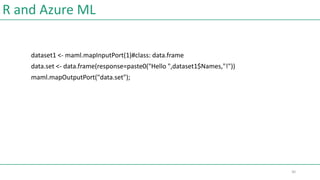
R and Azure ML
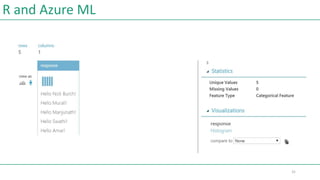
dataset1 <- maml.mapInputPort(1)#class: data.frame
data.set <- data.frame(response=paste0("Hello ",dataset1$Names,"!"))
maml.mapOutputPort("data.set");
30
R and Azure ML
31
R and Azure ML Demo
Demo
32
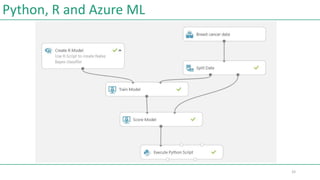
Python, R and Azure ML
33
Q & A
Q & A
34
Keep in touch
Muralidharan Deenathayalan
Blogs : www.codingfreaks.net
Twitter : https://twitter.com/muralidharand
GitHub : https://github.com/muralidharand
LinkedIn : https://www.linkedin.com/in/muralidharand
35
Thanks
Thank you !
36

Introduction to Jupyter notebook and MS Azure Machine Learning Studio

  • 1.
    Introduction about Jupyter Notebookand Azure Machine Learning Studio Muralidharan Deenathayalan, Technical Architect, Quanticate 1
  • 2.
    What is Python? •Python is an interpreted language. • Python is an object-oriented, high-level programming language for general-purpose programming • Created by Guido van Rossum and first released in 1991 2
  • 3.
    Advantages of Python •Extensive Support Libraries • Integration Feature • Improved Programmer’s Productivity Ref : https://medium.com/@mindfiresolutions.usa/advantages-and-disadvantages-of-python-programming-language-fd0b394f2121 3
  • 4.
    What is R? • R is a language and environment for statistical computing and graphics. • It is a GNU project which is similar to the S language and environment which was developed at Bell Laboratories (formerly AT&T, now Lucent Technologies) by John Chambers and colleagues. • R can be considered as a different implementation of S Ref : https://www.r-project.org/about.html 4
  • 5.
    Advantages of R •An effective data handling and storage facility. • Suite of operators for calculations on arrays, in particular matrices. • A large, coherent, integrated collection of intermediate tools for data analysis. • Graphical facilities for data analysis and display either on-screen or on hardcopy. • A well-developed, simple and effective programming language which includes conditionals, loops, user- defined recursive functions and input and output facilities Ref : https://www.r-project.org/about.html 5
  • 6.
    What is Julia? •Julia is a high-level, high-performance dynamic programming language for numerical computing. • Julia provides a sophisticated compiler, distributed parallel execution, numerical accuracy, and an extensive mathematical function library. • Julia’s Base library, largely written in Julia itself. • It integrates mature, best-of-breed open source C and Fortran libraries for linear algebra, random number generation, signal processing, and string processing. Ref :https://julialang.org/ 6
  • 7.
    Advantages of Julia •Multiple dispatch: providing the ability to define function behaviour across many combinations of argument types. • Good performance, approaching that of statically-compiled languages like C • Built-in package manager • Call Python functions: use the PyCall package • Call C functions directly: no wrappers or special APIs Ref :https://julialang.org/ 7
  • 8.
    Limitations of Julia •Not fully stabilized • Lesser scientific tools • Slower Ref : https://www.allerin.com/blog/big-data-python-r-or-julia 8
  • 9.
    What is iPython? •iPython – Interactive Python command shell. • It provides a rich toolkit to help you make the most of using Python interactively. • Its main components are: • A powerful interactive Python shell • A Jupyter kernel to work with Python code in Jupyter notebooks and other interactive frontends. Ref : https://ipython.readthedocs.io/en/stable/ 9
  • 10.
    Advantages of iPython •Comprehensive object introspection. • Input history, persistent across sessions. • Caching of output results during a session with automatically generated references. • Extensible tab completion, with support by default for completion of python variables and keywords, filenames and function keywords. • Extensible system of ā€˜magic’ commands for controlling the environment and performing many tasks related to iPython or the operating system. Ref : https://ipython.readthedocs.io/en/stable/ 10
  • 11.
    Limitations of iPython •No native code session save. • Unnatural keyboard shortcuts and no syntax debugger. • Code cell allows lines that are too long and has no wrapping / autoindent. • No easy drag and rearrange code cells. • No table of content to show where html headers are. • No easy hiding of code cells / code output. Ref : https://www.quora.com/What-are-the-limitations-of-IPython-Notebook 11
  • 12.
    What is Jupyter? •Ju(lia) + Py(thon) + (e)R • The Jupyter Notebook is an open-source web application that allows you to create and share documents. • This document contain live code, equations, visualizations and narrative text. Ref : https://www.oreilly.com/ideas/what-is-jupyter 12
  • 13.
    Advantages of Jupyter? •Useful for data cleaning and transformation, numerical simulation, statistical modelling, data visualization, machine learning, and much more. • Language of choice  40+ Languages • Notebooks can be shared with others using email, Dropbox, GitHub and the Jupyter Notebook Viewer. • Your code can produce rich, interactive output: HTML, images, videos, and custom MIME types. • Big data integration - Leverage big data tools, such as Apache Spark, from Python, R and Scala. Explore that same data with pandas, scikit-learn, ggplot2, TensorFlow. Ref : http://jupyter.org/ 13
  • 14.
    Limitations of Jupyter •It messes with your version control. • The Jupyter Notebook format is just a big JSON, which contains your code and the outputs of the code • Code can only be run in chunks. Ref : http://opiateforthemass.es/articles/why-i-dont-like-jupyter-fka-ipython-notebook/ 14
  • 15.
    History of Jupyter& iPython • Initial release : 2001; 17 years ago • In 2014, Fernando PĆ©rez announced a spin-off project from IPython called Project Jupyter. • In 2015, GitHub and the Jupyter Project announced native rendering of Jupyter notebooks file format (.ipynb files) on the GitHub platform. Ref : https://en.wikipedia.org/wiki/IPython , https://en.wikipedia.org/wiki/Project_Jupyter#History 15
  • 16.
    How Jupyter works? Ref: https://en.wikipedia.org/wiki/IPython , https://en.wikipedia.org/wiki/Project_Jupyter#History 16
  • 17.
    What is kernelin Jupyter? • A notebook kernel is a ā€œComputational Engineā€ that executes the code contained in a Notebook document. Ref : http://jupyter-notebook-beginner-guide.readthedocs.io/en/latest/what_is_jupyter.html 17
  • 18.
    List of availableJupyter kernels • There are 100+ kernels available (as of 22/11/2018) • Interesting kernels are, • IPyKernel • IRKernel • sas_kernel • Ijava • ICSharp Ref : https://github.com/jupyter/jupyter/wiki/Jupyter-kernels 18
  • 19.
    Installation of JupyterNotebook • http://jupyter-notebook-beginner-guide.readthedocs.io/en/latest/install.html 19
  • 20.
    Jupyter Notebook onCloud • Navigate to https://notebooks.azure.com/ • Click Samples to navigate to https://notebooks.azure.com/Microsoft/libraries/samples • Click anyone of the sample • Click Clone option (You may get login dialog (if you’re not signed in, use your Hotmail/outlook/skype) and login.) • Enter library name and click Clone button • Click on ā€œIntroduction to Pythonā€ sample and it launches, Jupyter notebook on Azure • Select the statements on starts with In[1] … and select click Run button in the toolbar. 20
  • 21.
    Sample Jupyter Notebook •A simple python code sample from Jupyter Notebook. 21
  • 22.
    Sample Jupyter Notebook •Fetching data from Azure Machine Learning Studio to Jupyter Notebook. 22
  • 23.
    What is MachineLearning(ML)? • Machine Learning is about using the data you already have to make predictions. • Machine Learning methods Supervised machine learning algorithms  Logistic Regression.  Linear regression.  Support vector machine (SVM) Unsupervised machine learning algorithms  K – means clustering  Hierarchical clustering  Hidden Markov models Semi-supervised machine learning algorithms Reinforcement machine learning algorithms Ref : https://news.codecademy.com/what-is-machine-learning/, https://www.expertsystem.com/machine-learning-definition/ , http://dataaspirant.com/2014/09/19/supervised-and- unsupervised-learning/ 23
  • 24.
    Microsoft Azure MachineLearning Studio • Navigate to https://studio.azureml.net/ (Sign- in, if not.) 24
  • 25.
  • 26.
    Python and AzureML import pandas as pd def azureml_main(dataframe1): for index, row in dataframe1.iterrows(): row[0]="Hello " + row[0] +"!" # Return value must be of a sequence of pandas.DataFrame return dataframe1 26
  • 27.
  • 28.
    Python and AzureML Demo Demo 28
  • 29.
  • 30.
    R and AzureML dataset1 <- maml.mapInputPort(1)#class: data.frame data.set <- data.frame(response=paste0("Hello ",dataset1$Names,"!")) maml.mapOutputPort("data.set"); 30
  • 31.
  • 32.
    R and AzureML Demo Demo 32
  • 33.
    Python, R andAzure ML 33
  • 34.
    Q & A Q& A 34
  • 35.
    Keep in touch MuralidharanDeenathayalan Blogs : www.codingfreaks.net Twitter : https://twitter.com/muralidharand GitHub : https://github.com/muralidharand LinkedIn : https://www.linkedin.com/in/muralidharand 35
  • 36.