Workshop :  Use Cases Brent H. Snyder July 23, 2007
Identify Actors and Use Cases Identify Primary Use Cases “ As-Is” functionality of existing system (if applicable) Main “new” features requested by stakeholders Secondary features that are important or significant, or do not appear to tie directly into the main features Identify any applicable use case dependencies  Identify Actors Roles that perform the functions identified in the use cases
Create Prelim. HL Use Case Model Add Identified Use Cases to Model Detail the brief description for each use case Show any use case dependencies that have been identified at this time (most will come later) Prioritize Use Cases based on importance, difficulty, etc. Add Actors to Model Show the association links between the actors and the use cases that the actors are associated with Try to place actors on the outside of model, with the use cases in the center, as this helps to show the system as being “bounded”
What is a Use Case? A Use Case is a functional requirement, created to illustrate the means to achieve a particular goal within a System Describes a step-by-step sequence of user actions followed by System responses as seen by the user. Describes one aspect of usage of a System without presuming any specific design or implementation.
High Level Use Case Model
Why use   Use Cases?  Relatively easy to keep track of Traceability less problematic Practical goal is for ALL business requirements & stakeholder requests to be fully described by the Use Cases. Validation of User Proposed Functionality Helps developers understand what the System does Reduces developer level of effort Allows for analysts, developers and stakeholders to be on the same page
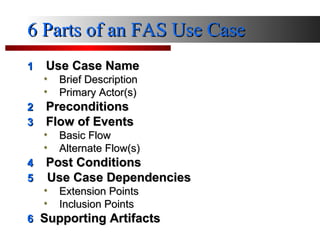
6 Parts of an FAS Use Case 1 Use Case Name Brief Description Primary Actor(s) 2 Preconditions 3 Flow of Events Basic Flow Alternate Flow(s) 4 Post Conditions 5   Use Case Dependencies Extension Points Inclusion Points 6   Supporting Artifacts
Use Case Specification Push
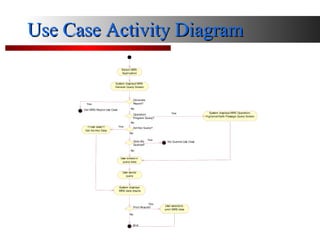
Use Case Activity Diagram
Use Cases Advantages  Use Cases help to drive the SDLC Can breakout Project into iterations Halfway done Test Cases Reduces overall Project Risk
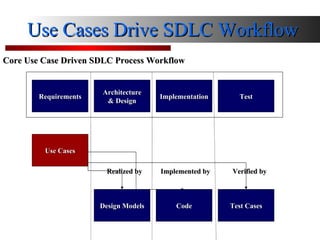
Use Cases Drive SDLC Workflow Use Cases Design Models Code Test Cases Test Implementation Architecture & Design Requirements Core Use Case Driven SDLC Process Workflow Verified by Realized by Implemented by
Iterative, Incremental & Concurrent Analysis Design Development Test 1 st 1 st 1 st 2 nd 1 st 2 nd 1 st 2 nd 3 rd Analysis & Design   Coding & Testing Production
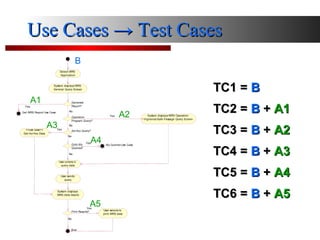
Use Cases  -> Test Cases B A1 A2 A3 A4 A5 TC1 =  B TC2 =  B  +   A1 TC3 =  B  +   A2 TC4 =  B  +   A3 TC5 =  B  +   A4 TC6 =  B  +   A5
SDLC:  Use Case vs. Traditional Requirements Staffing Design Staffing Implementation Staffing Transition Staffing
Questions??? Brent H. Snyder July 23, 2007

Use Case Workshop

  • 1.
    Workshop : Use Cases Brent H. Snyder July 23, 2007
  • 2.
    Identify Actors andUse Cases Identify Primary Use Cases “ As-Is” functionality of existing system (if applicable) Main “new” features requested by stakeholders Secondary features that are important or significant, or do not appear to tie directly into the main features Identify any applicable use case dependencies Identify Actors Roles that perform the functions identified in the use cases
  • 3.
    Create Prelim. HLUse Case Model Add Identified Use Cases to Model Detail the brief description for each use case Show any use case dependencies that have been identified at this time (most will come later) Prioritize Use Cases based on importance, difficulty, etc. Add Actors to Model Show the association links between the actors and the use cases that the actors are associated with Try to place actors on the outside of model, with the use cases in the center, as this helps to show the system as being “bounded”
  • 4.
    What is aUse Case? A Use Case is a functional requirement, created to illustrate the means to achieve a particular goal within a System Describes a step-by-step sequence of user actions followed by System responses as seen by the user. Describes one aspect of usage of a System without presuming any specific design or implementation.
  • 5.
    High Level UseCase Model
  • 6.
    Why use  Use Cases? Relatively easy to keep track of Traceability less problematic Practical goal is for ALL business requirements & stakeholder requests to be fully described by the Use Cases. Validation of User Proposed Functionality Helps developers understand what the System does Reduces developer level of effort Allows for analysts, developers and stakeholders to be on the same page
  • 7.
    6 Parts ofan FAS Use Case 1 Use Case Name Brief Description Primary Actor(s) 2 Preconditions 3 Flow of Events Basic Flow Alternate Flow(s) 4 Post Conditions 5 Use Case Dependencies Extension Points Inclusion Points 6 Supporting Artifacts
  • 8.
  • 9.
  • 10.
    Use Cases Advantages Use Cases help to drive the SDLC Can breakout Project into iterations Halfway done Test Cases Reduces overall Project Risk
  • 11.
    Use Cases DriveSDLC Workflow Use Cases Design Models Code Test Cases Test Implementation Architecture & Design Requirements Core Use Case Driven SDLC Process Workflow Verified by Realized by Implemented by
  • 12.
    Iterative, Incremental &Concurrent Analysis Design Development Test 1 st 1 st 1 st 2 nd 1 st 2 nd 1 st 2 nd 3 rd Analysis & Design Coding & Testing Production
  • 13.
    Use Cases -> Test Cases B A1 A2 A3 A4 A5 TC1 = B TC2 = B + A1 TC3 = B + A2 TC4 = B + A3 TC5 = B + A4 TC6 = B + A5
  • 14.
    SDLC: UseCase vs. Traditional Requirements Staffing Design Staffing Implementation Staffing Transition Staffing
  • 15.
    Questions??? Brent H.Snyder July 23, 2007

Editor's Notes

  • #2 Hello… I’m here today to talk about the RUP and to explain how the IVIS analysis team is using Use Case Analysis and UML modeling to improve the Software Development processes for the IVIS system. The Rational Unified Process, or more commonly referred to as RUP, is a software process framework that can be specialized for a very large class of software systems. The reason that I’m here to discuss RUP is because the the DoS has directed us to use the Rational Methodology along with the Rational Enterprise Suite of software tools. Those tools are Rational Requisite Pro for use in maintaining requirements and use cases, Rational Team Test for automated testing, and Rational Rose for UML object modeling. RUP will also help in Configuration Management and the advancement of CMM.