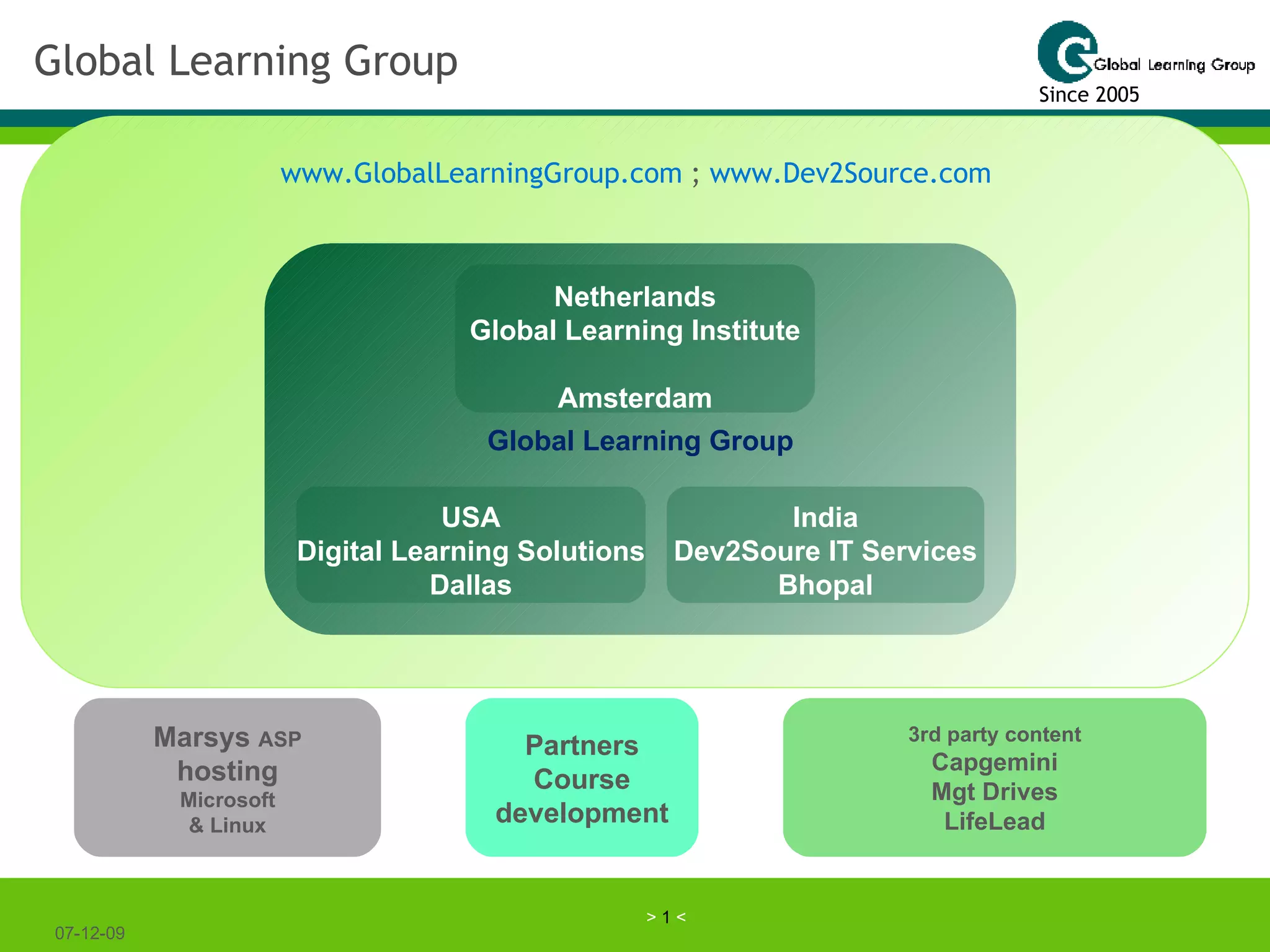
Global Learning Group 07-06-09 Global Learning Group Netherlands Global Learning Institute Amsterdam USA Digital Learning Solutions Dallas Marsys  ASP hosting Microsoft & Linux 3rd party content Capgemini Mgt Drives LifeLead India Dev2Soure IT Services Bhopal Partners Course development Since 2005 www.GlobalLearningGroup.com  ;  www.Dev2Source.com
What we do We share our vision and experience on  effective learning & collaboration processes  helping you save money and making your learning and your teams much more effective. Building  blended curricula  at low costs and  integrating learning & working . Building curricula using our concept of adaptive Task Based Learning and Story telling. We show you how to  improve the performance of individuals & teams , internally and in the Extended Enterprise by facilitating knowledge sharing, best practices and supporting them with effective communication channels. We build Life Long Learning Communities. We provide design and development services for  custom web based content  with your subject matter experts and we help you develop your  learning strategy We give customers access to a  technology platform  to support their learning & collaboration processes, without bothering them with ICT problems and overhead costs We build  software applications off shore  for third parties through our Indian firm  Dev2Source IT Services  Pvt.Ltd, New Delhi and Bhopal We deliver  training & coaching  in change and transformation, and in valuing differences, team & organizational development 07-06-09
Dev2Source IT Services 07-06-09 www.dev2source.com   “ We design local and build of shore” Software development Website development Portal development Application maintenance Open source selection & tuning Web based learning Data Processing Related Services & Scanning Forms processing Data entry, cleaning, conversions, extraction Web enabled applications eCommerce Content management Flash multimedia CRM Cloud computing
Dev2Assist (1) 07-06-09 www.dev2assist.com   “Virtual Assistant Services” The Virtual Assistant is an individual, not a computer.   The goal of Virtual Assistant Services is to free up your time, improve your lifestyle, increase productivity, and reduce the amount of stress in your life. So you could think of your assistant in a number of ways. They can be your worker bee (helping you get things done and taking care of the things you don't want to do), your lifestyle concierge (helping you create the life you want), or your secretary (helping you manage your work and life). We think the term "personal assistant" sums it up best because, really, we can help you and your company with any random task you have - personal or professional - that doesn't require our physical presence either on a part time or full time basis. Service segments at this moment are: Research (on the internet); Data entry / word processing; event / trip planning; social Networking (like Blog posting, Commenting, Linking, Social media, Online data profile management); General administrative assistant, financial research at companies, maintenance of marketing data, and more. We cleaned up a huge customer relations database, launched a new CRM system and converted all data into the new system.
Dev2Assist (2) 07-06-09 www.dev2assist.com   “Virtual Assistant Services” The Virtual Assistants are university graduates. They speak good English and have clear and neutral accents.   Can I hire Virtual Assistant with qualifications such as MBA, Engineering, Medical Degrees? - Yes, certainly we can allocate Virtual Assistants with any technical qualifications. Higher charges apply for Virtual Assistants with technical university degrees. These Virtual Assistants are available only on full time basis (160 hours a month). Assistance from € 7.- / hour of € 1000.- / month,  to € 1800.- / month.   If relevant we offer the use our platform with digital workgroups, content management and all kinds of communication, for free.
Welcome in the GL3C learning & working platform  07-06-09 Agenda Who we are Characteristics of the technology Costs and ROI The application is used in many different ways by clients Easy to tune on your requirements Global Learning Institute & Digital Learning Solutions
What drives the Global Learning Group? Vision We believe in the effectiveness of Learning by Doing, learning from Stories and working on the job. Task focused, learning in Teams, Collaborative Communities, and in the integration of learning and working to improve Life Long performance. 07-06-09 Strategy We provide a highly scalable and interactive hosted web based collaborative and secured learning & working environment to deliver and manage content, projects, and learning & working activities and we design content and curricula at competitive prices. Mission To leverage people effectiveness and to make organizations more innovative   by designing  & developing top class effective learning & collaborative working processes, and support with a highly integrated collaborative flexible and secured environment.
Examples of usage of the technology (1) “ Where do I find an advanced, cost effective and flexible technology solution to support my vision of  effective learning processes ”? How do I achieve this without being an ICT expert, without huge overhead costs so that it is self-supporting?  “ In our business we need  trained and qualified employees  available for our projects on  very short notice. “We don’t have the time and the budget to send them to  formal training”. “However, we must train and certify them to let them grow as a professional and lower our risk on projects”. How do we achieve this objective with limited budgets?   Why are  Life Long Learning Communities  very scattered, if at all such communities exist?  Why is this promising concept from the European Communion (Lisbon, 2002) still far behind realization? How can I  manage a project  ( change, organizational development, an implementation of new technology or processes, employee satisfaction improvement,  and more) in a way that employees are involved in a continuous learning process that can be monitored.  It should also facilitate project members to collaborate and tune the work-streams effectively”?   07-06-09
How the platform is used…(2) 1- Effective learning processes like a path, making deliverables, getting feedback, working in small teams. Task based, adaptive, personalized, stories, cases, articles. The integration of formal & informal learning. A collaborative process “ I never teach my pupils; I only attempt to provide the conditions in which they can learn”  Albert Einstein Informal learning and working in a digital workplace.   Project teams, units, peer-groups 2-   The Just-In-Time and Just for Me approach. Middle size companies and project driven organizations. Coaching & mentoring in addition to small relevant learning objects like assessments, stories, reports, and cases 3- An open environment building all kinds of Life Long Learning Communities. Accomplishing tasks, sharing knowledge, helping & coaching, access to sites, databases (with content), experts, collaborative tools 5- Platform to support implementations, change processes, collaboration & communication, involving employees, getting feedback (anonymous also), monitoring, building the (re-usable) library 07-06-09
JIT training Solution: The things we are expert at we are expert at unconsciously. Make sure that learners can ask the question they need to ask rather than the one they want to ask Create difficulties:  A learner who has no difficulties has no questions.  And put them under pressure to perform What is needed? Content ‘snippets’: a library with assignments , cases, stories, Q&A, a catalog of mistakes and feedback (well written critique) on deliverables / mistakes  Experts, trainers, moderators Collaborative learning & working environment, advanced content management My ‘personnel agent’ to find the right expert / content / feedback JIT 07-06-09 “ The premise of  just in time education  is simply this: no one wants to sit in a classroom. People want to know what they need to know when they discover they need to know it. So, we need to find out what they need to know and tell it to them when they are ready to hear it” And: the Internet generation is learning differently. This has its impact on the current schooling system. The Internet generation are  Digital Natives (Home Zappiens). They start (and are motivated)  to learn the moment they must deliver!
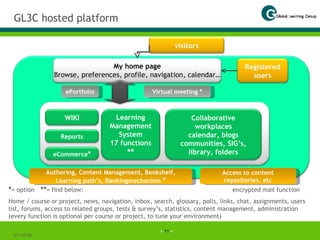
GL3C hosted platform 07-06-09 07-06-09 Virtual meeting * ePortfolio Authoring, Content Management, Bookshelf, Learning path’s, Rankingmechanism  * Access to content repositories, etc * = option ** = find below: encrypted mail function Home / course or project, news, navigation, inbox, search, glossary, polls, links, chat, assignments, users list, forums, access to related groups, tests & survey’s, statistics, content management, administration (every function is optional per course or project, to tune your environment) My home page Browse, preferences, profile, navigation, calendar… Registered users Learning Management System 17 functions  ** Collaborative workplaces calendar, blogs communities, SIG’s, library, folders WIKI eCommerce * visitors Reports
Some Characteristics of the GLC suite The LMS is organized around the teacher / project leader / content owner who is self-supporting Therefore: no much effort from a super administrator The content owner maintains the home page of the course/project/unit The content owner can add new users and link them to the right domain The content owner can maintain his/her content and add or remove content The content owner can give rights to specific users, creating assistants The content owner tunes the functionality (fit for purpose) Reports for who is doing what are available. Same for statistics Many ways to communicate, using the system or using mail. You can always see who is on-line. You can leave messages to individuals or groups. Look into profiles. In the Groups / Portfolio’s there is always an owner / administrator who can manage access and can give privileges. (No one else, even not the super-admin. can look into the groups or personnel portfolio’s without being invited) Many automated notifications are available Library with Blog function and version management The platform is scalable and secure and easy to enhance with additional functions Advanced search on people and on content (browse and per group library) 07-06-09
Terminology and more characteristics In the application you will find buttons and messages with the words learner, instructor, course, course / project, alumni, student, coach. The application is modified in a way that you can manage projects, work-groups, documents, departments, and more. Some of our clients are using the platform just like a digital collaborative workplace. Therefore, be aware that a name may have different meanings. 07-06-09 The entity Course / Project / unit / department / organization / document file: source for information Learner / user / member / student / subject matter expert Instructor / manager / administrator / (team)-leader / project manager / coach / moderator / mentor / counselor / teacher / content owner Content might be Public, Protected or Private (look under Browse) Registered user may have privileges, managed by the administrator / content owner / PL For a dedicated hosted client environment on our redundant servers we always customize the skin / interface
Automatic notifications in GL3C In groups forums thread. You can chose to subscribe. As a subsciber you will get a notifications in your mailbox (external) when something is added to the thread. The Forum function on the home page of a Course / Project (when this function is activated). You can subscribe on a thread by clicking on the small field at the bottum of your new contribution to that thread Go to Preferences on your home page and select the option receiving automated notifications from the Inbox.  Be aware: this is the Inbox at the right top corner of every screen If a member without Administrator rights in a group adds a new file, he/she can click a small field to notify the Administrator a new file was uploaded When an Instructor attaches an assignment to a student under Assignments, that student will receive a notification that an assignment is waiting for him/her. That assignment  also shows in the list at the bottom of the personal home page On the home page of a group you can always find new files and new event schedules 07-06-09
Communication options in GL3C (1) From the home-page of a project or course Click on Members, select the name, open the profile and send a mail,  Click in the right top of the screen on Inbox. Find at the left top side “Send Message”. Search by name, select the right name(s) from the list. Add to Recipient. Start the message. Click on Send at the bottom. This mail goes to the Inbox of the recipients (inside this application, save) and the recipient receives a warning notification in the external mailbox. (If the recipient selected the notification function under his preferences). If Activated: Forum. Forum discussion per thread. You can subscribe on a thread.  If activated: Chat If you are an Administrator: Manage – Course eMail – select name(s) – edit your message Virtual Meeting / -Class: the button vMeeting on your home page. 07-06-09
Communication options in GL3C (2) From the Home-page of a group Inbox function of the group. Select name(s), edit your message and send. !! they will NOT receive a notification. Click on Members, select a name, get the profile, send a mail (external mailbox)  If you are an administrator in this group: Click button Administration – Mailing List – edit message – send and all members of the group will get that message in the external mail. Forum(s): Forum discussion with notification on a thread if you subscribe on that thread. Chat function Library: files in Folders. Revisions, Comments 07-06-09

Intro.Dw.Short.V3.E

  • 1.
    Global Learning Group07-06-09 Global Learning Group Netherlands Global Learning Institute Amsterdam USA Digital Learning Solutions Dallas Marsys ASP hosting Microsoft & Linux 3rd party content Capgemini Mgt Drives LifeLead India Dev2Soure IT Services Bhopal Partners Course development Since 2005 www.GlobalLearningGroup.com ; www.Dev2Source.com
  • 2.
    What we doWe share our vision and experience on effective learning & collaboration processes helping you save money and making your learning and your teams much more effective. Building blended curricula at low costs and integrating learning & working . Building curricula using our concept of adaptive Task Based Learning and Story telling. We show you how to improve the performance of individuals & teams , internally and in the Extended Enterprise by facilitating knowledge sharing, best practices and supporting them with effective communication channels. We build Life Long Learning Communities. We provide design and development services for custom web based content with your subject matter experts and we help you develop your learning strategy We give customers access to a technology platform to support their learning & collaboration processes, without bothering them with ICT problems and overhead costs We build software applications off shore for third parties through our Indian firm Dev2Source IT Services Pvt.Ltd, New Delhi and Bhopal We deliver training & coaching in change and transformation, and in valuing differences, team & organizational development 07-06-09
  • 3.
    Dev2Source IT Services07-06-09 www.dev2source.com “ We design local and build of shore” Software development Website development Portal development Application maintenance Open source selection & tuning Web based learning Data Processing Related Services & Scanning Forms processing Data entry, cleaning, conversions, extraction Web enabled applications eCommerce Content management Flash multimedia CRM Cloud computing
  • 4.
    Dev2Assist (1) 07-06-09www.dev2assist.com “Virtual Assistant Services” The Virtual Assistant is an individual, not a computer.   The goal of Virtual Assistant Services is to free up your time, improve your lifestyle, increase productivity, and reduce the amount of stress in your life. So you could think of your assistant in a number of ways. They can be your worker bee (helping you get things done and taking care of the things you don't want to do), your lifestyle concierge (helping you create the life you want), or your secretary (helping you manage your work and life). We think the term "personal assistant" sums it up best because, really, we can help you and your company with any random task you have - personal or professional - that doesn't require our physical presence either on a part time or full time basis. Service segments at this moment are: Research (on the internet); Data entry / word processing; event / trip planning; social Networking (like Blog posting, Commenting, Linking, Social media, Online data profile management); General administrative assistant, financial research at companies, maintenance of marketing data, and more. We cleaned up a huge customer relations database, launched a new CRM system and converted all data into the new system.
  • 5.
    Dev2Assist (2) 07-06-09www.dev2assist.com “Virtual Assistant Services” The Virtual Assistants are university graduates. They speak good English and have clear and neutral accents.   Can I hire Virtual Assistant with qualifications such as MBA, Engineering, Medical Degrees? - Yes, certainly we can allocate Virtual Assistants with any technical qualifications. Higher charges apply for Virtual Assistants with technical university degrees. These Virtual Assistants are available only on full time basis (160 hours a month). Assistance from € 7.- / hour of € 1000.- / month, to € 1800.- / month.   If relevant we offer the use our platform with digital workgroups, content management and all kinds of communication, for free.
  • 6.
    Welcome in theGL3C learning & working platform 07-06-09 Agenda Who we are Characteristics of the technology Costs and ROI The application is used in many different ways by clients Easy to tune on your requirements Global Learning Institute & Digital Learning Solutions
  • 7.
    What drives theGlobal Learning Group? Vision We believe in the effectiveness of Learning by Doing, learning from Stories and working on the job. Task focused, learning in Teams, Collaborative Communities, and in the integration of learning and working to improve Life Long performance. 07-06-09 Strategy We provide a highly scalable and interactive hosted web based collaborative and secured learning & working environment to deliver and manage content, projects, and learning & working activities and we design content and curricula at competitive prices. Mission To leverage people effectiveness and to make organizations more innovative by designing & developing top class effective learning & collaborative working processes, and support with a highly integrated collaborative flexible and secured environment.
  • 8.
    Examples of usageof the technology (1) “ Where do I find an advanced, cost effective and flexible technology solution to support my vision of effective learning processes ”? How do I achieve this without being an ICT expert, without huge overhead costs so that it is self-supporting? “ In our business we need trained and qualified employees available for our projects on very short notice. “We don’t have the time and the budget to send them to formal training”. “However, we must train and certify them to let them grow as a professional and lower our risk on projects”. How do we achieve this objective with limited budgets? Why are Life Long Learning Communities very scattered, if at all such communities exist? Why is this promising concept from the European Communion (Lisbon, 2002) still far behind realization? How can I manage a project ( change, organizational development, an implementation of new technology or processes, employee satisfaction improvement, and more) in a way that employees are involved in a continuous learning process that can be monitored. It should also facilitate project members to collaborate and tune the work-streams effectively”? 07-06-09
  • 9.
    How the platformis used…(2) 1- Effective learning processes like a path, making deliverables, getting feedback, working in small teams. Task based, adaptive, personalized, stories, cases, articles. The integration of formal & informal learning. A collaborative process “ I never teach my pupils; I only attempt to provide the conditions in which they can learn” Albert Einstein Informal learning and working in a digital workplace. Project teams, units, peer-groups 2- The Just-In-Time and Just for Me approach. Middle size companies and project driven organizations. Coaching & mentoring in addition to small relevant learning objects like assessments, stories, reports, and cases 3- An open environment building all kinds of Life Long Learning Communities. Accomplishing tasks, sharing knowledge, helping & coaching, access to sites, databases (with content), experts, collaborative tools 5- Platform to support implementations, change processes, collaboration & communication, involving employees, getting feedback (anonymous also), monitoring, building the (re-usable) library 07-06-09
  • 10.
    JIT training Solution:The things we are expert at we are expert at unconsciously. Make sure that learners can ask the question they need to ask rather than the one they want to ask Create difficulties: A learner who has no difficulties has no questions. And put them under pressure to perform What is needed? Content ‘snippets’: a library with assignments , cases, stories, Q&A, a catalog of mistakes and feedback (well written critique) on deliverables / mistakes Experts, trainers, moderators Collaborative learning & working environment, advanced content management My ‘personnel agent’ to find the right expert / content / feedback JIT 07-06-09 “ The premise of just in time education is simply this: no one wants to sit in a classroom. People want to know what they need to know when they discover they need to know it. So, we need to find out what they need to know and tell it to them when they are ready to hear it” And: the Internet generation is learning differently. This has its impact on the current schooling system. The Internet generation are Digital Natives (Home Zappiens). They start (and are motivated) to learn the moment they must deliver!
  • 11.
    GL3C hosted platform07-06-09 07-06-09 Virtual meeting * ePortfolio Authoring, Content Management, Bookshelf, Learning path’s, Rankingmechanism * Access to content repositories, etc * = option ** = find below: encrypted mail function Home / course or project, news, navigation, inbox, search, glossary, polls, links, chat, assignments, users list, forums, access to related groups, tests & survey’s, statistics, content management, administration (every function is optional per course or project, to tune your environment) My home page Browse, preferences, profile, navigation, calendar… Registered users Learning Management System 17 functions ** Collaborative workplaces calendar, blogs communities, SIG’s, library, folders WIKI eCommerce * visitors Reports
  • 12.
    Some Characteristics ofthe GLC suite The LMS is organized around the teacher / project leader / content owner who is self-supporting Therefore: no much effort from a super administrator The content owner maintains the home page of the course/project/unit The content owner can add new users and link them to the right domain The content owner can maintain his/her content and add or remove content The content owner can give rights to specific users, creating assistants The content owner tunes the functionality (fit for purpose) Reports for who is doing what are available. Same for statistics Many ways to communicate, using the system or using mail. You can always see who is on-line. You can leave messages to individuals or groups. Look into profiles. In the Groups / Portfolio’s there is always an owner / administrator who can manage access and can give privileges. (No one else, even not the super-admin. can look into the groups or personnel portfolio’s without being invited) Many automated notifications are available Library with Blog function and version management The platform is scalable and secure and easy to enhance with additional functions Advanced search on people and on content (browse and per group library) 07-06-09
  • 13.
    Terminology and morecharacteristics In the application you will find buttons and messages with the words learner, instructor, course, course / project, alumni, student, coach. The application is modified in a way that you can manage projects, work-groups, documents, departments, and more. Some of our clients are using the platform just like a digital collaborative workplace. Therefore, be aware that a name may have different meanings. 07-06-09 The entity Course / Project / unit / department / organization / document file: source for information Learner / user / member / student / subject matter expert Instructor / manager / administrator / (team)-leader / project manager / coach / moderator / mentor / counselor / teacher / content owner Content might be Public, Protected or Private (look under Browse) Registered user may have privileges, managed by the administrator / content owner / PL For a dedicated hosted client environment on our redundant servers we always customize the skin / interface
  • 14.
    Automatic notifications inGL3C In groups forums thread. You can chose to subscribe. As a subsciber you will get a notifications in your mailbox (external) when something is added to the thread. The Forum function on the home page of a Course / Project (when this function is activated). You can subscribe on a thread by clicking on the small field at the bottum of your new contribution to that thread Go to Preferences on your home page and select the option receiving automated notifications from the Inbox. Be aware: this is the Inbox at the right top corner of every screen If a member without Administrator rights in a group adds a new file, he/she can click a small field to notify the Administrator a new file was uploaded When an Instructor attaches an assignment to a student under Assignments, that student will receive a notification that an assignment is waiting for him/her. That assignment also shows in the list at the bottom of the personal home page On the home page of a group you can always find new files and new event schedules 07-06-09
  • 15.
    Communication options inGL3C (1) From the home-page of a project or course Click on Members, select the name, open the profile and send a mail, Click in the right top of the screen on Inbox. Find at the left top side “Send Message”. Search by name, select the right name(s) from the list. Add to Recipient. Start the message. Click on Send at the bottom. This mail goes to the Inbox of the recipients (inside this application, save) and the recipient receives a warning notification in the external mailbox. (If the recipient selected the notification function under his preferences). If Activated: Forum. Forum discussion per thread. You can subscribe on a thread. If activated: Chat If you are an Administrator: Manage – Course eMail – select name(s) – edit your message Virtual Meeting / -Class: the button vMeeting on your home page. 07-06-09
  • 16.
    Communication options inGL3C (2) From the Home-page of a group Inbox function of the group. Select name(s), edit your message and send. !! they will NOT receive a notification. Click on Members, select a name, get the profile, send a mail (external mailbox) If you are an administrator in this group: Click button Administration – Mailing List – edit message – send and all members of the group will get that message in the external mail. Forum(s): Forum discussion with notification on a thread if you subscribe on that thread. Chat function Library: files in Folders. Revisions, Comments 07-06-09