9A-1
The Uses of a Network
• Easier data backup
– Backup copies data to removable media
– Server data backed up in one step
9A-2
Common Network Types
• Local Area Network (LAN)
– Contains printers, servers and computers
– Systems are close to each other
– Contained in one office or building
– Organizations often have several LANS
9A-3
Common Network Types
• Wide Area Networks (WAN)
– Two or more LANs connected
– Over a large geographic area
– Typically use public or leased lines
• Phone lines
• Satellite
– The Internet is a WAN
9A-4
Hybrid Network Types
• Campus Area Networks (CAN)
– A LAN in one large geographic area
– Resources related to the same organization
– Each department shares the LAN
9A-5
Hybrid Network Types
• Metropolitan Area Network (MAN)
– Large network that connects different
organizations
– Shares regional resources
– A network provider sells time
9A-6
Hybrid Network Types
• Home Area Network (HAN)
– Small scale network
– Connects computers and entertainment
appliances
– Found mainly in the home
9A-7
Hybrid Network Types
• Personal Area Network (PAN)
– Very small scale network
– Range is less than 2 meters
– Cell phones, PDAs, MP3 players
9A-8
How Networks Are Structured
• Server based network
– Node is any network device
– Servers control what the node accesses
– Users gain access by logging in
– Server is the most important computer
9A-9
How Networks Are Structured
• Client/Server network
– Nodes and servers share data roles
– Nodes are called clients
– Servers are used to control access
– Database software
• Access to data controlled by server
– Server is the most important computer
9A-10
Network Hardware
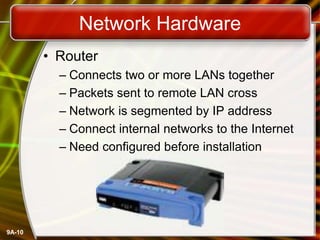
• Router
– Connects two or more LANs together
– Packets sent to remote LAN cross
– Network is segmented by IP address
– Connect internal networks to the Internet
– Need configured before installation
9A-11
Network Hardware
• Gateway
– Connects two dissimilar networks
– Connects coax to twisted pair
– Most gateways contained in other devices
9A-12
Network Cabling
• Cabling specifications
– Bandwidth measures cable speed
• Typically measured in Mbps
– Maximum cable length
– Connector describes the type of plug
9A-13
Network Cabling
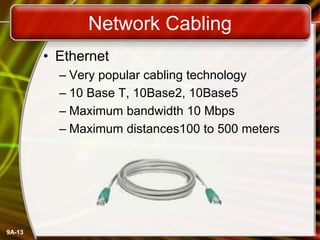
• Ethernet
– Very popular cabling technology
– 10 Base T, 10Base2, 10Base5
– Maximum bandwidth 10 Mbps
– Maximum distances100 to 500 meters
9A-14
Network Cabling
• Fast Ethernet
– Newer version of Ethernet
– Bandwidth is 100 Mbps
– Uses Cat5 or greater cable
• Sometimes called 100Base T
– Requires a switch
9A-15
Network Cabling
• Gigabit Ethernet
– High bandwidth version of Ethernet
– 1 to 10 Gbps
– Cat 5 or fiber optic cable
– Video applications
9A-16
Network Cabling
• Token ring
– Uses shielded twisted pair cabling
– Bandwidth between 10 and 25 Mbps
– Uses a multiple access unit (MAU)
– Popular in manufacturing and finance
9A-17
Network Protocols
• Language of the network
– Rules of communication
– Error resolution
– Defines collision and collision recovery
– Size of packet
– Naming rules for computers
9A-18
Network Protocols
• TCP/IP
– Transmission Control Protocol/Internet
Protocol
– Most popular protocol
– Machines assigned a name of 4 numbers
• IP address
• 209.8.166.179 is the White House’s web site
– Dynamic Host Configuration Protocol
• Simplifies assignment of IP addresses
– Required for Internet access
9A-19
Network Protocols
• IPX/SPX
– Internet Packet Exchange/Sequenced
Packet Exchange
– Older protocol
– Associated with Novell Netware
– Replaced by TCP/IP
9A-20
Network Protocols
• NetBEUI
– Network BIOS Extended User Interface
– Used by Windows to name computers
– Transmission details handled by TCP/IP
9A-21
Network Protocols
• Token ring
– Popular in manufacturing and finance
– Nodes communicate when they have the
token
Copyright © 2006 by The McGraw-Hill Companies, Inc. All rights reserved.
McGraw-Hill Technology Education
Chapter 9A
End of Chapter

Networkuses.ppt

  • 1.
    9A-1 The Uses ofa Network • Easier data backup – Backup copies data to removable media – Server data backed up in one step
  • 2.
    9A-2 Common Network Types •Local Area Network (LAN) – Contains printers, servers and computers – Systems are close to each other – Contained in one office or building – Organizations often have several LANS
  • 3.
    9A-3 Common Network Types •Wide Area Networks (WAN) – Two or more LANs connected – Over a large geographic area – Typically use public or leased lines • Phone lines • Satellite – The Internet is a WAN
  • 4.
    9A-4 Hybrid Network Types •Campus Area Networks (CAN) – A LAN in one large geographic area – Resources related to the same organization – Each department shares the LAN
  • 5.
    9A-5 Hybrid Network Types •Metropolitan Area Network (MAN) – Large network that connects different organizations – Shares regional resources – A network provider sells time
  • 6.
    9A-6 Hybrid Network Types •Home Area Network (HAN) – Small scale network – Connects computers and entertainment appliances – Found mainly in the home
  • 7.
    9A-7 Hybrid Network Types •Personal Area Network (PAN) – Very small scale network – Range is less than 2 meters – Cell phones, PDAs, MP3 players
  • 8.
    9A-8 How Networks AreStructured • Server based network – Node is any network device – Servers control what the node accesses – Users gain access by logging in – Server is the most important computer
  • 9.
    9A-9 How Networks AreStructured • Client/Server network – Nodes and servers share data roles – Nodes are called clients – Servers are used to control access – Database software • Access to data controlled by server – Server is the most important computer
  • 10.
    9A-10 Network Hardware • Router –Connects two or more LANs together – Packets sent to remote LAN cross – Network is segmented by IP address – Connect internal networks to the Internet – Need configured before installation
  • 11.
    9A-11 Network Hardware • Gateway –Connects two dissimilar networks – Connects coax to twisted pair – Most gateways contained in other devices
  • 12.
    9A-12 Network Cabling • Cablingspecifications – Bandwidth measures cable speed • Typically measured in Mbps – Maximum cable length – Connector describes the type of plug
  • 13.
    9A-13 Network Cabling • Ethernet –Very popular cabling technology – 10 Base T, 10Base2, 10Base5 – Maximum bandwidth 10 Mbps – Maximum distances100 to 500 meters
  • 14.
    9A-14 Network Cabling • FastEthernet – Newer version of Ethernet – Bandwidth is 100 Mbps – Uses Cat5 or greater cable • Sometimes called 100Base T – Requires a switch
  • 15.
    9A-15 Network Cabling • GigabitEthernet – High bandwidth version of Ethernet – 1 to 10 Gbps – Cat 5 or fiber optic cable – Video applications
  • 16.
    9A-16 Network Cabling • Tokenring – Uses shielded twisted pair cabling – Bandwidth between 10 and 25 Mbps – Uses a multiple access unit (MAU) – Popular in manufacturing and finance
  • 17.
    9A-17 Network Protocols • Languageof the network – Rules of communication – Error resolution – Defines collision and collision recovery – Size of packet – Naming rules for computers
  • 18.
    9A-18 Network Protocols • TCP/IP –Transmission Control Protocol/Internet Protocol – Most popular protocol – Machines assigned a name of 4 numbers • IP address • 209.8.166.179 is the White House’s web site – Dynamic Host Configuration Protocol • Simplifies assignment of IP addresses – Required for Internet access
  • 19.
    9A-19 Network Protocols • IPX/SPX –Internet Packet Exchange/Sequenced Packet Exchange – Older protocol – Associated with Novell Netware – Replaced by TCP/IP
  • 20.
    9A-20 Network Protocols • NetBEUI –Network BIOS Extended User Interface – Used by Windows to name computers – Transmission details handled by TCP/IP
  • 21.
    9A-21 Network Protocols • Tokenring – Popular in manufacturing and finance – Nodes communicate when they have the token
  • 22.
    Copyright © 2006by The McGraw-Hill Companies, Inc. All rights reserved. McGraw-Hill Technology Education Chapter 9A End of Chapter