8086 Memory Segmentation
Sridari Iyer
St. Francis Inst. of Tech.
Borivali (W), Mumbai.
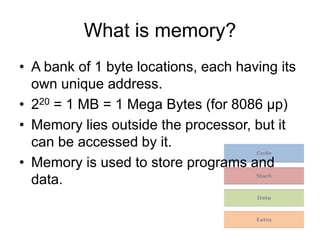
What is memory?
• A bank of 1 byte locations, each having its
own unique address.
• 220 = 1 MB = 1 Mega Bytes (for 8086 μp)
• Memory lies outside the processor, but it
can be accessed by it.
• Memory is used to store programs and
data.
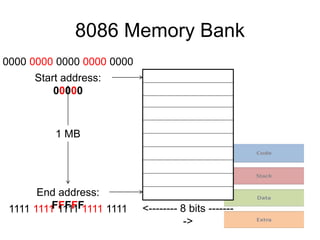
8086 Memory Bank
Start address:
00000
End address:
FFFFF
1 MB
<-------- 8 bits -------
->
0000 0000 0000 0000 0000
1111 1111 1111 1111 1111
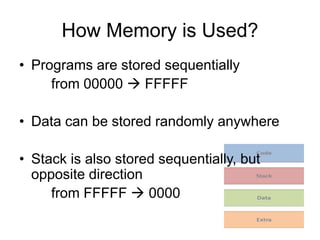
How Memory is Used?
• Programs are stored sequentially
from 00000  FFFFF
• Data can be stored randomly anywhere
• Stack is also stored sequentially, but
opposite direction
from FFFFF  0000
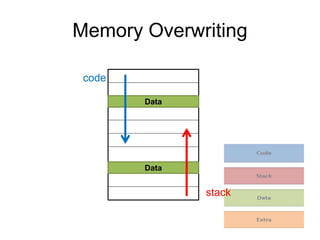
Memory Overwriting
code
stack
Data
Data
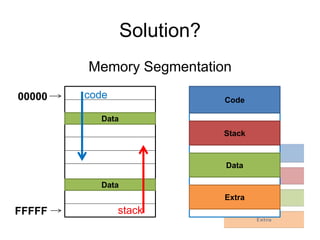
Solution?
Memory Segmentation
Code
Stack
Data
Extra
00000
FFFFF
code
stack
Data
Data
Features
• Prevents over-writing of memory
• Organized management of memory
(Gave birth to the concept of files and
folders)
• Allows 20-bit physical addressing with 16-
bit registers.
???
Example of a College
• There are 500 students in a college. Each
student has a unique number for
identification 001 – 500.
• There are 8 courses in this college.
• Given a student id will it be possible to
guess the course he has enrolled for?
(without looking at the database)
Example: student id 246
Example...
• Assume each course can handle only 100
students.
• The roll numbers of students are assigned
from 00 – 99 for each course
• A course id is maintained 1 – 8.
• The student id is now assigned as xyy
where x is the course id and yy is the class
roll number.
Example: 685
Example...
• Consider a database that allows you to
enter two digits for of student id
1st enter 06 (course id)
then 85 (class roll no)
• The first digit of the course id is always
going to be 0, but it cannot be avoided
because you have to enter two digits
Problem with 20-bit addresses
8086 addresses are 20-bits long.
In a computer, 1 location is always 8 bits
long.
• 8 bits = 1 byte
• 16 bits = 2 bytes
• 20 bits = 2.5 bytes
Problem: 20 bits is not computer-compatible
Solution without Segmentation
• Solution: use 24 bits = 3 bytes (with 4 bits
always set to
0000)
• Again problem: huge amounts of data
transfer wastage
The real need for Segmentation...
• Who created these problems?
WE
• Why did we create these problems?
We are not happy with 216 = 64 KB memory
We want to access 1 MB memory
with 16 bits!
How?
Memory Segmentation
What is Memory Segmentation?
• Access a 20-bit address using 16-bits!
• Split the 20-bit address into two parts
– Segment address (16-bits)
– Offset address (16-bits)
• Regain the original physical address with the
help of a small calculator
P.A. = Segment address * 10
+ offset address
Note: Segmentation is not optional for the 8086
architecture, it is a necessity.
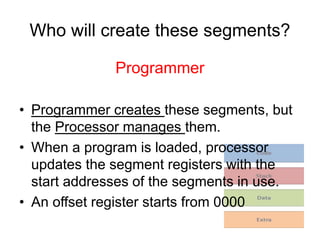
Who will create these segments?
Programmer
• Programmer creates these segments, but
the Processor manages them.
• When a program is loaded, processor
updates the segment registers with the
start addresses of the segments in use.
• An offset register starts from 0000
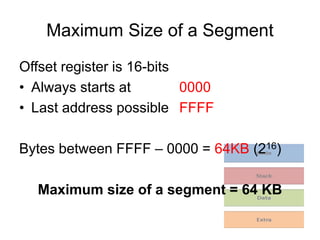
Maximum Size of a Segment
Offset register is 16-bits
• Always starts at 0000
• Last address possible FFFF
Bytes between FFFF – 0000 = 64KB (216)
Maximum size of a segment = 64 KB
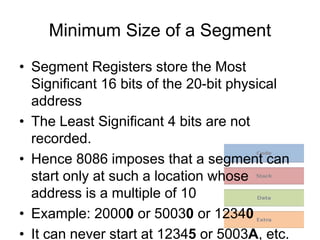
Minimum Size of a Segment
• Segment Registers store the Most
Significant 16 bits of the 20-bit physical
address
• The Least Significant 4 bits are not
recorded.
• Hence 8086 imposes that a segment can
start only at such a location whose
address is a multiple of 10
• Example: 20000 or 50030 or 12340
• It can never start at 12345 or 5003A, etc.
Minimum Size of a Segment
Assume a segment starts at 51230
Since a segment cannot start at 51231
51232
...
51239
5123A
...
5123F
The next location available is 51240
i.e., 51240h – 51230h = 16 bytes
Minimum size of a segment = 16 bytes
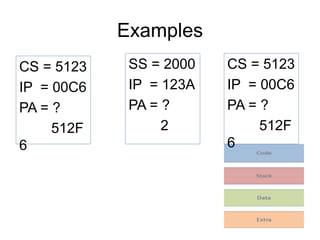
Examples
CS = 5123
IP = 00C6
PA = ?
512F
6
SS = 2000
IP = 123A
PA = ?
2
CS = 5123
IP = 00C6
PA = ?
512F
6

8086 memory segmentation

  • 1.
    8086 Memory Segmentation SridariIyer St. Francis Inst. of Tech. Borivali (W), Mumbai.
  • 2.
    What is memory? •A bank of 1 byte locations, each having its own unique address. • 220 = 1 MB = 1 Mega Bytes (for 8086 μp) • Memory lies outside the processor, but it can be accessed by it. • Memory is used to store programs and data.
  • 3.
    8086 Memory Bank Startaddress: 00000 End address: FFFFF 1 MB <-------- 8 bits ------- -> 0000 0000 0000 0000 0000 1111 1111 1111 1111 1111
  • 4.
    How Memory isUsed? • Programs are stored sequentially from 00000  FFFFF • Data can be stored randomly anywhere • Stack is also stored sequentially, but opposite direction from FFFFF  0000
  • 5.
  • 6.
  • 7.
    Features • Prevents over-writingof memory • Organized management of memory (Gave birth to the concept of files and folders) • Allows 20-bit physical addressing with 16- bit registers. ???
  • 8.
    Example of aCollege • There are 500 students in a college. Each student has a unique number for identification 001 – 500. • There are 8 courses in this college. • Given a student id will it be possible to guess the course he has enrolled for? (without looking at the database) Example: student id 246
  • 9.
    Example... • Assume eachcourse can handle only 100 students. • The roll numbers of students are assigned from 00 – 99 for each course • A course id is maintained 1 – 8. • The student id is now assigned as xyy where x is the course id and yy is the class roll number. Example: 685
  • 10.
    Example... • Consider adatabase that allows you to enter two digits for of student id 1st enter 06 (course id) then 85 (class roll no) • The first digit of the course id is always going to be 0, but it cannot be avoided because you have to enter two digits
  • 11.
    Problem with 20-bitaddresses 8086 addresses are 20-bits long. In a computer, 1 location is always 8 bits long. • 8 bits = 1 byte • 16 bits = 2 bytes • 20 bits = 2.5 bytes Problem: 20 bits is not computer-compatible
  • 12.
    Solution without Segmentation •Solution: use 24 bits = 3 bytes (with 4 bits always set to 0000) • Again problem: huge amounts of data transfer wastage
  • 13.
    The real needfor Segmentation... • Who created these problems? WE • Why did we create these problems? We are not happy with 216 = 64 KB memory We want to access 1 MB memory with 16 bits! How?
  • 14.
  • 15.
    What is MemorySegmentation? • Access a 20-bit address using 16-bits! • Split the 20-bit address into two parts – Segment address (16-bits) – Offset address (16-bits) • Regain the original physical address with the help of a small calculator P.A. = Segment address * 10 + offset address Note: Segmentation is not optional for the 8086 architecture, it is a necessity.
  • 16.
    Who will createthese segments? Programmer • Programmer creates these segments, but the Processor manages them. • When a program is loaded, processor updates the segment registers with the start addresses of the segments in use. • An offset register starts from 0000
  • 17.
    Maximum Size ofa Segment Offset register is 16-bits • Always starts at 0000 • Last address possible FFFF Bytes between FFFF – 0000 = 64KB (216) Maximum size of a segment = 64 KB
  • 18.
    Minimum Size ofa Segment • Segment Registers store the Most Significant 16 bits of the 20-bit physical address • The Least Significant 4 bits are not recorded. • Hence 8086 imposes that a segment can start only at such a location whose address is a multiple of 10 • Example: 20000 or 50030 or 12340 • It can never start at 12345 or 5003A, etc.
  • 19.
    Minimum Size ofa Segment Assume a segment starts at 51230 Since a segment cannot start at 51231 51232 ... 51239 5123A ... 5123F The next location available is 51240 i.e., 51240h – 51230h = 16 bytes Minimum size of a segment = 16 bytes
  • 20.
    Examples CS = 5123 IP= 00C6 PA = ? 512F 6 SS = 2000 IP = 123A PA = ? 2 CS = 5123 IP = 00C6 PA = ? 512F 6