Your Name
Production
Reflection
Process
• To begin with I
started of with
making the
background. I just
used the fill tool and
the pencil tool and
drew the planet and
the moon. I used
different colours
that go well to add
more texture to my
drawings.
Process
• The 2nd step I
added two layers
of stars so when I
was animating I
could switch
between the both
so it looked like
Process
• I then made one of
the main thing in
the game the star of
death which
destroys planets. I
had a image of
something similar
and not copied but
based it of it to get
the shape and
colours right
Process
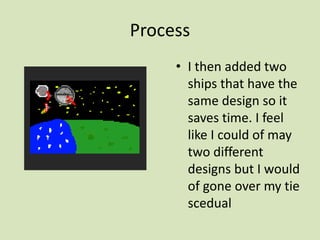
• I then added two
ships that have the
same design so it
saves time. I feel
like I could of may
two different
designs but I would
of gone over my tie
scedual
Process
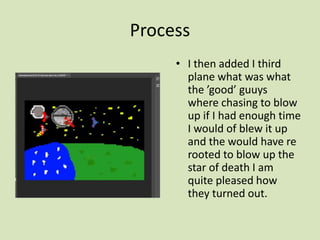
• I then added I third
plane what was what
the ’good’ guuys
where chasing to blow
up if I had enough time
I would of blew it up
and the would have re
rooted to blow up the
star of death I am
quite pleased how
they turned out.
Process
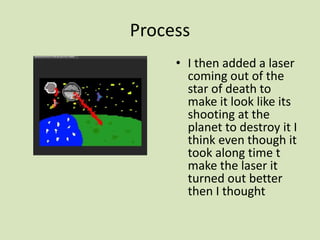
• I then added a laser
coming out of the
star of death to
make it look like its
shooting at the
planet to destroy it I
think even though it
took along time t
make the laser it
turned out better
then I thought
Process
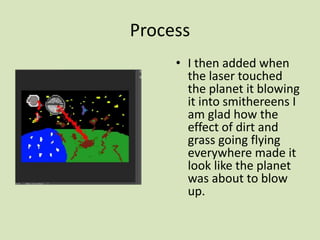
• I then added when
the laser touched
the planet it blowing
it into smithereens I
am glad how the
effect of dirt and
grass going flying
everywhere made it
look like the planet
was about to blow
up.
Process
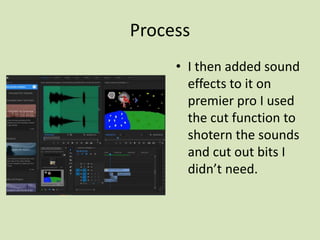
• I then added sound
effects to it on
premier pro I used
the cut function to
shotern the sounds
and cut out bits I
didn’t need.

6. production reflection (interactive)

  • 1.
  • 2.
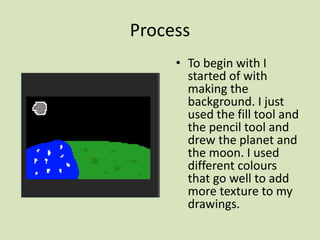
    Process • To beginwith I started of with making the background. I just used the fill tool and the pencil tool and drew the planet and the moon. I used different colours that go well to add more texture to my drawings.
  • 3.
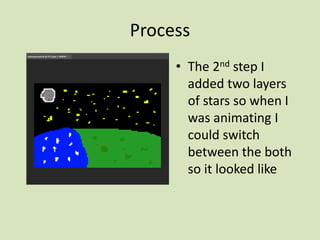
    Process • The 2ndstep I added two layers of stars so when I was animating I could switch between the both so it looked like
  • 4.
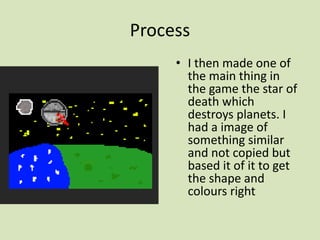
    Process • I thenmade one of the main thing in the game the star of death which destroys planets. I had a image of something similar and not copied but based it of it to get the shape and colours right
  • 5.
    Process • I thenadded two ships that have the same design so it saves time. I feel like I could of may two different designs but I would of gone over my tie scedual
  • 6.
    Process • I thenadded I third plane what was what the ’good’ guuys where chasing to blow up if I had enough time I would of blew it up and the would have re rooted to blow up the star of death I am quite pleased how they turned out.
  • 7.
    Process • I thenadded a laser coming out of the star of death to make it look like its shooting at the planet to destroy it I think even though it took along time t make the laser it turned out better then I thought
  • 8.
    Process • I thenadded when the laser touched the planet it blowing it into smithereens I am glad how the effect of dirt and grass going flying everywhere made it look like the planet was about to blow up.
  • 9.
    Process • I thenadded sound effects to it on premier pro I used the cut function to shotern the sounds and cut out bits I didn’t need.

Editor's Notes

  • #3 Discuss the tools and processes used in your production. Log your thoughts and feelings about your work.
  • #4 Discuss the tools and processes used in your production. Log your thoughts and feelings about your work.
  • #5 Discuss the tools and processes used in your production. Log your thoughts and feelings about your work.
  • #6 Discuss the tools and processes used in your production. Log your thoughts and feelings about your work.
  • #7 Discuss the tools and processes used in your production. Log your thoughts and feelings about your work.
  • #8 Discuss the tools and processes used in your production. Log your thoughts and feelings about your work.
  • #9 Discuss the tools and processes used in your production. Log your thoughts and feelings about your work.
  • #10 Discuss the tools and processes used in your production. Log your thoughts and feelings about your work.