CHAPTER-28:PRODUCT COST
CONTROLLING
1.Product Costing Overview:
Product Cost Controlling is part of the Controlling application
component. It’s a tool for managing costs related to the
manufacturing products or Rendering services.
It uses information from Overhead Cost Controlling to calculate
such costs as labor, machine, or factory overhead. It also supplies
Information to Profitability Analysis so that component can
calculate Contribution margins.
Product Cost Controlling includes the following tools:
• Product Cost Planning
• Cost Object Controlling .
Product Cost Controlling can help you:-
• Plan your product costs accurately
• Compare alternative cost estimates to optimize your business
decisions
• Monitor your product costs in every stage of the manufacturing
process
• Carry out detailed variance analysis on each order, product, and
product group
• Calculate actual costs by period.
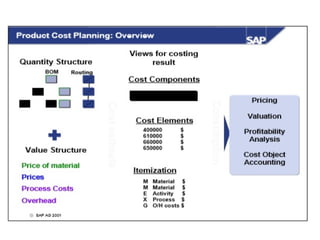
Product costing is a tool for planning costs and establishing prices for
materials. It is used to calculate the costs of goods manufactured and
the costs of goods sold for each product unit. If costing is carried out
on the basis of data in Production Planning (PP), then the cost
estimate is a product cost estimate with a quantity structure (for
example, BOM and routing).
If costing is carried out on the basis of data that you enter manually,
then the cost estimate is a product cost estimate without a quantity
structure. Product costing belongs to both the Production Planning
(PP) Module and the Controlling (CO) Module.
2.Product Cost Planning or Product Cost Estimate Product Cost
Planning is a set of functions that estimate the costs to produce
goods or services. If a quantity structure (bill of material and
routing) is available in the PP (Production Planning) component of
the R/3 System, the system can automatically create a cost estimate
based on this data. If no quantity structure is available in R/3, you
can either enter the costing items manually with the unit costing
tool or transfer them automatically from a non-SAP system using
batch input.
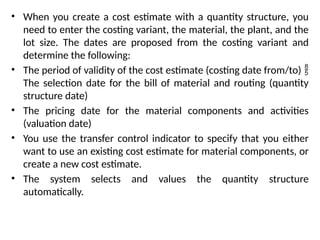
• When you create a cost estimate with a quantity structure, you
need to enter the costing variant, the material, the plant, and the
lot size. The dates are proposed from the costing variant and
determine the following:
• The period of validity of the cost estimate (costing date from/to) 
The selection date for the bill of material and routing (quantity
structure date)
• The pricing date for the material components and activities
(valuation date)
• You use the transfer control indicator to specify that you either
want to use an existing cost estimate for material components, or
create a new cost estimate.
• The system selects and values the quantity structure
automatically.
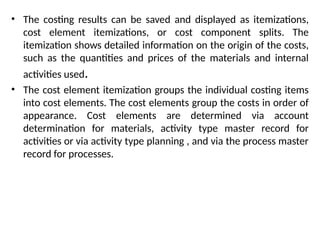
• The costing results can be saved and displayed as itemizations,
cost element itemizations, or cost component splits. The
itemization shows detailed information on the origin of the costs,
such as the quantities and prices of the materials and internal
activities used.
• The cost element itemization groups the individual costing items
into cost elements. The cost elements group the costs in order of
appearance. Cost elements are determined via account
determination for materials, activity type master record for
activities or via activity type planning , and via the process master
record for processes.
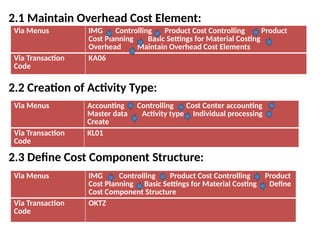
2.1 Maintain Overhead Cost Element:
2.2 Creation of Activity Type:
2.3 Define Cost Component Structure:
Via Menus IMG Controlling Product Cost Controlling Product
Cost Planning Basic Settings for Material Costing
Overhead Maintain Overhead Cost Elements
Via Transaction
Code
KA06
Via Menus Accounting Controlling Cost Center accounting
Master data Activity type Individual processing
Create
Via Transaction
Code
KL01
Via Menus IMG Controlling Product Cost Controlling Product
Cost Planning Basic Settings for Material Costing Define
Cost Component Structure
Via Transaction
Code
OKTZ
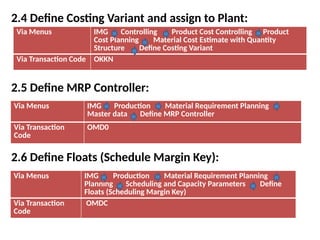
2.4 Define Costing Variant and assign to Plant:
2.5 Define MRP Controller:
2.6 Define Floats (Schedule Margin Key):
Via Menus IMG Controlling Product Cost Controlling Product
Cost Planning Material Cost Estimate with Quantity
Structure Define Costing Variant
Via Transaction Code OKKN
Via Menus IMG Production Material Requirement Planning
Master data Define MRP Controller
Via Transaction
Code
OMD0
Via Menus IMG Production Material Requirement Planning
Planning Scheduling and Capacity Parameters Define
Floats (Scheduling Margin Key)
Via Transaction
Code
OMDC
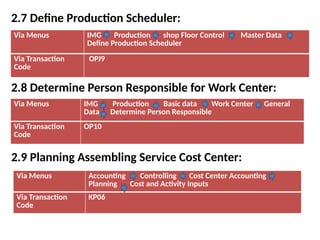
2.7 Define Production Scheduler:
2.8 Determine Person Responsible for Work Center:
2.9 Planning Assembling Service Cost Center:
Via Menus IMG Production shop Floor Control Master Data
Define Production Scheduler
Via Transaction
Code
OPJ9
Via Menus IMG Production Basic data Work Center General
Data Determine Person Responsible
Via Transaction
Code
OP10
Via Menus Accounting Controlling Cost Center Accounting
Planning Cost and Activity Inputs
Via Transaction
Code
KP06
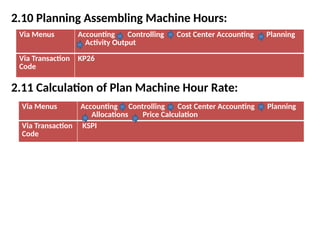
2.10 Planning Assembling Machine Hours:
2.11 Calculation of Plan Machine Hour Rate:
Via Menus Accounting Controlling Cost Center Accounting Planning
Activity Output
Via Transaction
Code
KP26
Via Menus Accounting Controlling Cost Center Accounting Planning
Allocations Price Calculation
Via Transaction
Code
KSPI
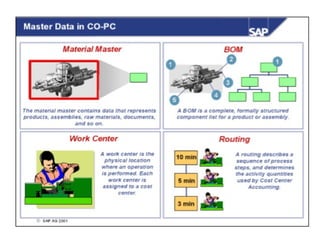
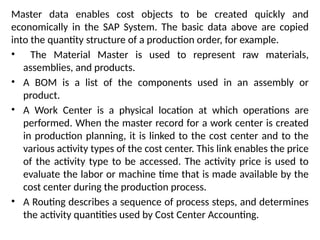
Master data enables cost objects to be created quickly and
economically in the SAP System. The basic data above are copied
into the quantity structure of a production order, for example.
• The Material Master is used to represent raw materials,
assemblies, and products.
• A BOM is a list of the components used in an assembly or
product.
• A Work Center is a physical location at which operations are
performed. When the master record for a work center is created
in production planning, it is linked to the cost center and to the
various activity types of the cost center. This link enables the price
of the activity type to be accessed. The activity price is used to
evaluate the labor or machine time that is made available by the
cost center during the production process.
• A Routing describes a sequence of process steps, and determines
the activity quantities used by Cost Center Accounting.
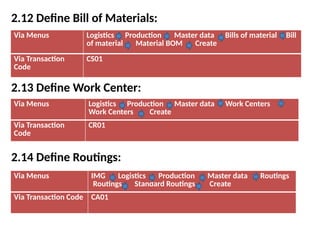
2.12 Define Bill of Materials:
2.13 Define Work Center:
2.14 Define Routings:
Via Menus Logistics Production Master data Bills of material Bill
of material Material BOM Create
Via Transaction
Code
CS01
Via Menus Logistics Production Master data Work Centers
Work Centers Create
Via Transaction
Code
CR01
Via Menus IMG Logistics Production Master data Routings
Routings Standard Routings Create
Via Transaction Code CA01
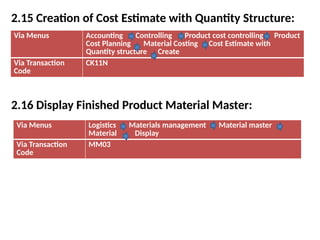
2.15 Creation of Cost Estimate with Quantity Structure:
2.16 Display Finished Product Material Master:
Via Menus Accounting Controlling Product cost controlling Product
Cost Planning Material Costing Cost Estimate with
Quantity structure Create
Via Transaction
Code
CK11N
Via Menus Logistics Materials management Material master
Material Display
Via Transaction
Code
MM03
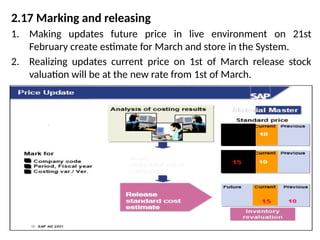
2.17 Marking and releasing
1. Making updates future price in live environment on 21st
February create estimate for March and store in the System.
2. Realizing updates current price on 1st of March release stock
valuation will be at the new rate from 1st of March.
• Marking and releasing a standard cost estimate updates the
standard price for the material in the material master record. This
leads to a revaluation of the inventory (important for FI).
• The following prerequisites must be fulfilled, before a standard
cost estimate can be marked or released:
• The standard cost estimate must be free of errors (status CT)
• The marking and release must be reliable. The company code
and period in which the standard cost estimate can be marked
with a set valuation variant, are entered in the authorization for a
marking. The authorization should take place once per period by
the employee responsible. If you mark a standard cost estimate,
the results are updated in the material master records as the
future standard price. When you release the standard cost

estimate, these future prices are updated as the current standard
price.
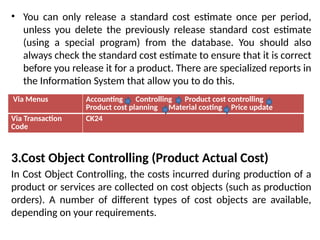
• You can only release a standard cost estimate once per period,
unless you delete the previously release standard cost estimate
(using a special program) from the database. You should also
always check the standard cost estimate to ensure that it is correct
before you release it for a product. There are specialized reports in
the Information System that allow you to do this.
3.Cost Object Controlling (Product Actual Cost)
In Cost Object Controlling, the costs incurred during production of a
product or services are collected on cost objects (such as production
orders). A number of different types of cost objects are available,
depending on your requirements.
Via Menus Accounting Controlling Product cost controlling
Product cost planning Material costing Price update
Via Transaction
Code
CK24
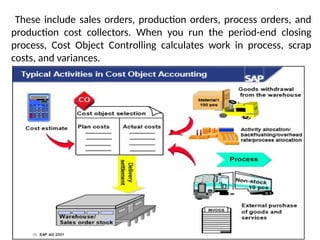
These include sales orders, production orders, process orders, and
production cost collectors. When you run the period-end closing
process, Cost Object Controlling calculates work in process, scrap
costs, and variances.
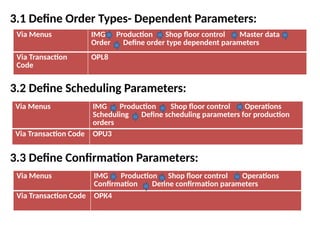
3.1 Define Order Types- Dependent Parameters:
3.2 Define Scheduling Parameters:
3.3 Define Confirmation Parameters:
Via Menus IMG Production Shop floor control Master data
Order Define order type dependent parameters
Via Transaction
Code
OPL8
Via Menus IMG Production Shop floor control Operations
Scheduling Define scheduling parameters for production
orders
Via Transaction Code OPU3
Via Menus IMG Production Shop floor control Operations
Confirmation Define confirmation parameters
Via Transaction Code OPK4
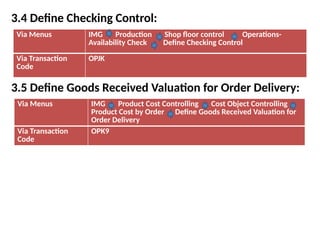
3.4 Define Checking Control:
3.5 Define Goods Received Valuation for Order Delivery:
Via Menus IMG Production Shop floor control Operations-
Availability Check Define Checking Control
Via Transaction
Code
OPJK
Via Menus IMG Product Cost Controlling Cost Object Controlling
Product Cost by Order Define Goods Received Valuation for
Order Delivery
Via Transaction
Code
OPK9
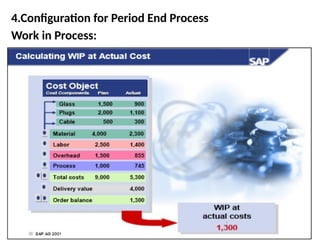
4.Configuration for Period End Process
Work in Process:
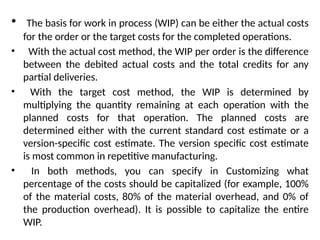
• The basis for work in process (WIP) can be either the actual costs
for the order or the target costs for the completed operations.
• With the actual cost method, the WIP per order is the difference
between the debited actual costs and the total credits for any
partial deliveries.
• With the target cost method, the WIP is determined by
multiplying the quantity remaining at each operation with the
planned costs for that operation. The planned costs are
determined either with the current standard cost estimate or a
version-specific cost estimate. The version specific cost estimate
is most common in repetitive manufacturing.
• In both methods, you can specify in Customizing what
percentage of the costs should be capitalized (for example, 100%
of the material costs, 80% of the material overhead, and 0% of
the production overhead). It is possible to capitalize the entire
WIP.
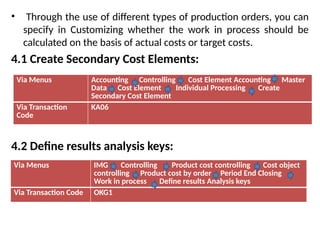
• Through the use of different types of production orders, you can
specify in Customizing whether the work in process should be
calculated on the basis of actual costs or target costs.
4.1 Create Secondary Cost Elements:
4.2 Define results analysis keys:
Via Menus Accounting Controlling Cost Element Accounting Master
Data Cost Element Individual Processing Create
Secondary Cost Element
Via Transaction
Code
KA06
Via Menus IMG Controlling Product cost controlling Cost object
controlling Product cost by order Period End Closing
Work in process Define results Analysis keys
Via Transaction Code OKG1
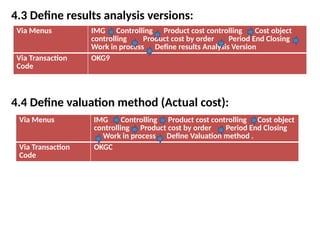
4.3 Define results analysis versions:
4.4 Define valuation method (Actual cost):
Via Menus IMG Controlling Product cost controlling Cost object
controlling Product cost by order Period End Closing
Work in process Define results Analysis Version
Via Transaction
Code
OKG9
Via Menus IMG Controlling Product cost controlling Cost object
controlling Product cost by order Period End Closing
Work in process Define Valuation method .
Via Transaction
Code
OKGC
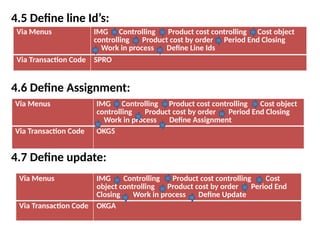
4.5 Define line Id’s:
4.6 Define Assignment:
4.7 Define update:
Via Menus IMG Controlling Product cost controlling Cost object
controlling Product cost by order Period End Closing
Work in process Define Line Ids
Via Transaction Code SPRO
Via Menus IMG Controlling Product cost controlling Cost object
controlling Product cost by order Period End Closing
Work in process Define Assignment
Via Transaction Code OKG5
Via Menus IMG Controlling Product cost controlling Cost
object controlling Product cost by order Period End
Closing Work in process Define Update
Via Transaction Code OKGA
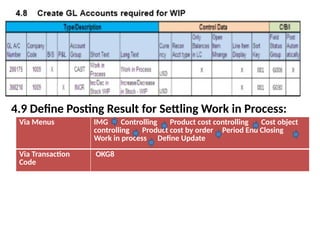
4.9 Define Posting Result for Settling Work in Process:
Via Menus IMG Controlling Product cost controlling Cost object
controlling Product cost by order Period End Closing
Work in process Define Update
Via Transaction
Code
OKG8
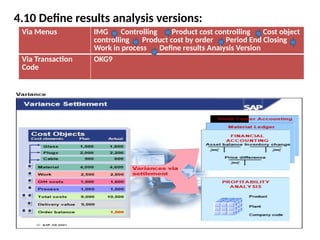
4.10 Define results analysis versions:
Via Menus IMG Controlling Product cost controlling Cost object
controlling Product cost by order Period End Closing
Work in process Define results Analysis Version
Via Transaction
Code
OKG9
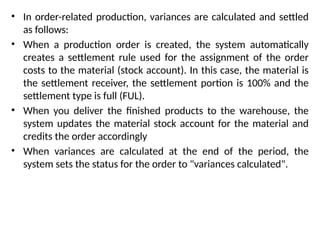
• In order-related production, variances are calculated and settled
as follows:
• When a production order is created, the system automatically
creates a settlement rule used for the assignment of the order
costs to the material (stock account). In this case, the material is
the settlement receiver, the settlement portion is 100% and the
settlement type is full (FUL).
• When you deliver the finished products to the warehouse, the
system updates the material stock account for the material and
credits the order accordingly
• When variances are calculated at the end of the period, the
system sets the status for the order to "variances calculated".
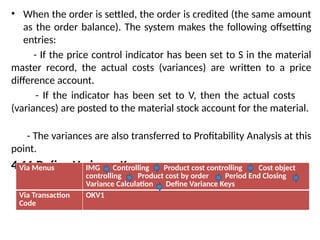
• When the order is settled, the order is credited (the same amount
as the order balance). The system makes the following offsetting
entries:
- If the price control indicator has been set to S in the material
master record, the actual costs (variances) are written to a price
difference account.
- If the indicator has been set to V, then the actual costs
(variances) are posted to the material stock account for the material.
- The variances are also transferred to Profitability Analysis at this
point.
4.11 Define Variance Keys:
Via Menus IMG Controlling Product cost controlling Cost object
controlling Product cost by order Period End Closing
Variance Calculation Define Variance Keys
Via Transaction
Code
OKV1
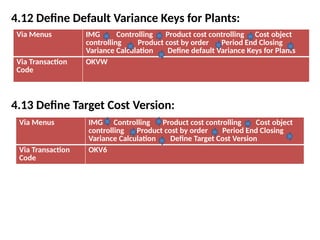
4.12 Define Default Variance Keys for Plants:
4.13 Define Target Cost Version:
Via Menus IMG Controlling Product cost controlling Cost object
controlling Product cost by order Period End Closing
Variance Calculation Define default Variance Keys for Plants
Via Transaction
Code
OKVW
Via Menus IMG Controlling Product cost controlling Cost object
controlling Product cost by order Period End Closing
Variance Calculation Define Target Cost Version
Via Transaction
Code
OKV6
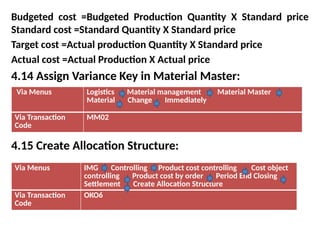
Budgeted cost =Budgeted Production Quantity X Standard price
Standard cost =Standard Quantity X Standard price
Target cost =Actual production Quantity X Standard price
Actual cost =Actual Production X Actual price
4.14 Assign Variance Key in Material Master:
4.15 Create Allocation Structure:
Via Menus Logistics Material management Material Master
Material Change Immediately
Via Transaction
Code
MM02
Via Menus IMG Controlling Product cost controlling Cost object
controlling Product cost by order Period End Closing
Settlement Create Allocation Structure
Via Transaction
Code
OKO6
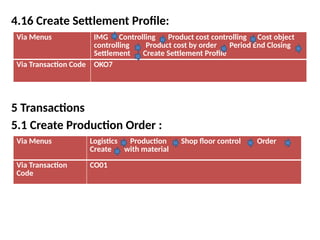
4.16 Create Settlement Profile:
5 Transactions
5.1 Create Production Order :
Via Menus IMG Controlling Product cost controlling Cost object
controlling Product cost by order Period End Closing
Settlement Create Settlement Profile
Via Transaction Code OKO7
Via Menus Logistics Production Shop floor control Order
Create with material
Via Transaction
Code
CO01
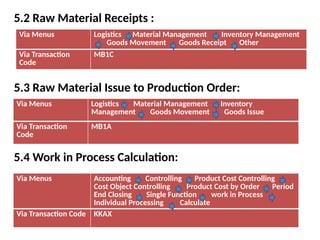
5.2 Raw Material Receipts :
5.3 Raw Material Issue to Production Order:
5.4 Work in Process Calculation:
Via Menus Logistics Material Management Inventory Management
Goods Movement Goods Receipt Other
Via Transaction
Code
MB1C
Via Menus Logistics Material Management Inventory
Management Goods Movement Goods Issue
Via Transaction
Code
MB1A
Via Menus Accounting Controlling Product Cost Controlling
Cost Object Controlling Product Cost by Order Period
End Closing Single Function work in Process
Individual Processing Calculate
Via Transaction Code KKAX
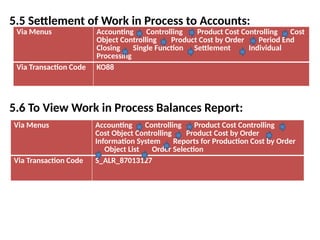
5.5 Settlement of Work in Process to Accounts:
5.6 To View Work in Process Balances Report:
Via Menus Accounting Controlling Product Cost Controlling Cost
Object Controlling Product Cost by Order Period End
Closing Single Function Settlement Individual
Processing
Via Transaction Code KO88
Via Menus Accounting Controlling Product Cost Controlling
Cost Object Controlling Product Cost by Order
Information System Reports for Production Cost by Order
Object List Order Selection
Via Transaction Code S_ALR_87013127
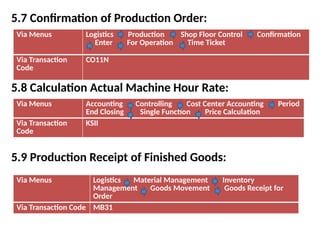
5.7 Confirmation of Production Order:
5.8 Calculation Actual Machine Hour Rate:
5.9 Production Receipt of Finished Goods:
Via Menus Logistics Production Shop Floor Control Confirmation
Enter For Operation Time Ticket
Via Transaction
Code
CO11N
Via Menus Accounting Controlling Cost Center Accounting Period
End Closing Single Function Price Calculation
Via Transaction
Code
KSII
Via Menus Logistics Material Management Inventory
Management Goods Movement Goods Receipt for
Order
Via Transaction Code MB31
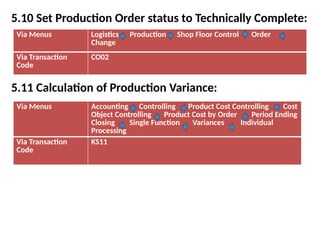
5.10 Set Production Order status to Technically Complete:
5.11 Calculation of Production Variance:
Via Menus Logistics Production Shop Floor Control Order
Change
Via Transaction
Code
CO02
Via Menus Accounting Controlling Product Cost Controlling Cost
Object Controlling Product Cost by Order Period Ending
Closing Single Function Variances Individual
Processing
Via Transaction
Code
KS11

CHAPTER-28.pptx annnnnnnnnnaaaaaaaaaaann

  • 1.
  • 2.
    1.Product Costing Overview: ProductCost Controlling is part of the Controlling application component. It’s a tool for managing costs related to the manufacturing products or Rendering services. It uses information from Overhead Cost Controlling to calculate such costs as labor, machine, or factory overhead. It also supplies Information to Profitability Analysis so that component can calculate Contribution margins. Product Cost Controlling includes the following tools: • Product Cost Planning • Cost Object Controlling .
  • 3.
    Product Cost Controllingcan help you:- • Plan your product costs accurately • Compare alternative cost estimates to optimize your business decisions • Monitor your product costs in every stage of the manufacturing process • Carry out detailed variance analysis on each order, product, and product group • Calculate actual costs by period. Product costing is a tool for planning costs and establishing prices for materials. It is used to calculate the costs of goods manufactured and the costs of goods sold for each product unit. If costing is carried out on the basis of data in Production Planning (PP), then the cost estimate is a product cost estimate with a quantity structure (for example, BOM and routing).
  • 4.
    If costing iscarried out on the basis of data that you enter manually, then the cost estimate is a product cost estimate without a quantity structure. Product costing belongs to both the Production Planning (PP) Module and the Controlling (CO) Module. 2.Product Cost Planning or Product Cost Estimate Product Cost Planning is a set of functions that estimate the costs to produce goods or services. If a quantity structure (bill of material and routing) is available in the PP (Production Planning) component of the R/3 System, the system can automatically create a cost estimate based on this data. If no quantity structure is available in R/3, you can either enter the costing items manually with the unit costing tool or transfer them automatically from a non-SAP system using batch input.
  • 6.
    • When youcreate a cost estimate with a quantity structure, you need to enter the costing variant, the material, the plant, and the lot size. The dates are proposed from the costing variant and determine the following: • The period of validity of the cost estimate (costing date from/to)  The selection date for the bill of material and routing (quantity structure date) • The pricing date for the material components and activities (valuation date) • You use the transfer control indicator to specify that you either want to use an existing cost estimate for material components, or create a new cost estimate. • The system selects and values the quantity structure automatically.
  • 7.
    • The costingresults can be saved and displayed as itemizations, cost element itemizations, or cost component splits. The itemization shows detailed information on the origin of the costs, such as the quantities and prices of the materials and internal activities used. • The cost element itemization groups the individual costing items into cost elements. The cost elements group the costs in order of appearance. Cost elements are determined via account determination for materials, activity type master record for activities or via activity type planning , and via the process master record for processes.
  • 8.
    2.1 Maintain OverheadCost Element: 2.2 Creation of Activity Type: 2.3 Define Cost Component Structure: Via Menus IMG Controlling Product Cost Controlling Product Cost Planning Basic Settings for Material Costing Overhead Maintain Overhead Cost Elements Via Transaction Code KA06 Via Menus Accounting Controlling Cost Center accounting Master data Activity type Individual processing Create Via Transaction Code KL01 Via Menus IMG Controlling Product Cost Controlling Product Cost Planning Basic Settings for Material Costing Define Cost Component Structure Via Transaction Code OKTZ
  • 9.
    2.4 Define CostingVariant and assign to Plant: 2.5 Define MRP Controller: 2.6 Define Floats (Schedule Margin Key): Via Menus IMG Controlling Product Cost Controlling Product Cost Planning Material Cost Estimate with Quantity Structure Define Costing Variant Via Transaction Code OKKN Via Menus IMG Production Material Requirement Planning Master data Define MRP Controller Via Transaction Code OMD0 Via Menus IMG Production Material Requirement Planning Planning Scheduling and Capacity Parameters Define Floats (Scheduling Margin Key) Via Transaction Code OMDC
  • 10.
    2.7 Define ProductionScheduler: 2.8 Determine Person Responsible for Work Center: 2.9 Planning Assembling Service Cost Center: Via Menus IMG Production shop Floor Control Master Data Define Production Scheduler Via Transaction Code OPJ9 Via Menus IMG Production Basic data Work Center General Data Determine Person Responsible Via Transaction Code OP10 Via Menus Accounting Controlling Cost Center Accounting Planning Cost and Activity Inputs Via Transaction Code KP06
  • 11.
    2.10 Planning AssemblingMachine Hours: 2.11 Calculation of Plan Machine Hour Rate: Via Menus Accounting Controlling Cost Center Accounting Planning Activity Output Via Transaction Code KP26 Via Menus Accounting Controlling Cost Center Accounting Planning Allocations Price Calculation Via Transaction Code KSPI
  • 13.
    Master data enablescost objects to be created quickly and economically in the SAP System. The basic data above are copied into the quantity structure of a production order, for example. • The Material Master is used to represent raw materials, assemblies, and products. • A BOM is a list of the components used in an assembly or product. • A Work Center is a physical location at which operations are performed. When the master record for a work center is created in production planning, it is linked to the cost center and to the various activity types of the cost center. This link enables the price of the activity type to be accessed. The activity price is used to evaluate the labor or machine time that is made available by the cost center during the production process. • A Routing describes a sequence of process steps, and determines the activity quantities used by Cost Center Accounting.
  • 14.
    2.12 Define Billof Materials: 2.13 Define Work Center: 2.14 Define Routings: Via Menus Logistics Production Master data Bills of material Bill of material Material BOM Create Via Transaction Code CS01 Via Menus Logistics Production Master data Work Centers Work Centers Create Via Transaction Code CR01 Via Menus IMG Logistics Production Master data Routings Routings Standard Routings Create Via Transaction Code CA01
  • 15.
    2.15 Creation ofCost Estimate with Quantity Structure: 2.16 Display Finished Product Material Master: Via Menus Accounting Controlling Product cost controlling Product Cost Planning Material Costing Cost Estimate with Quantity structure Create Via Transaction Code CK11N Via Menus Logistics Materials management Material master Material Display Via Transaction Code MM03
  • 16.
    2.17 Marking andreleasing 1. Making updates future price in live environment on 21st February create estimate for March and store in the System. 2. Realizing updates current price on 1st of March release stock valuation will be at the new rate from 1st of March.
  • 17.
    • Marking andreleasing a standard cost estimate updates the standard price for the material in the material master record. This leads to a revaluation of the inventory (important for FI). • The following prerequisites must be fulfilled, before a standard cost estimate can be marked or released: • The standard cost estimate must be free of errors (status CT) • The marking and release must be reliable. The company code and period in which the standard cost estimate can be marked with a set valuation variant, are entered in the authorization for a marking. The authorization should take place once per period by the employee responsible. If you mark a standard cost estimate, the results are updated in the material master records as the future standard price. When you release the standard cost  estimate, these future prices are updated as the current standard price.
  • 18.
    • You canonly release a standard cost estimate once per period, unless you delete the previously release standard cost estimate (using a special program) from the database. You should also always check the standard cost estimate to ensure that it is correct before you release it for a product. There are specialized reports in the Information System that allow you to do this. 3.Cost Object Controlling (Product Actual Cost) In Cost Object Controlling, the costs incurred during production of a product or services are collected on cost objects (such as production orders). A number of different types of cost objects are available, depending on your requirements. Via Menus Accounting Controlling Product cost controlling Product cost planning Material costing Price update Via Transaction Code CK24
  • 19.
    These include salesorders, production orders, process orders, and production cost collectors. When you run the period-end closing process, Cost Object Controlling calculates work in process, scrap costs, and variances.
  • 20.
    3.1 Define OrderTypes- Dependent Parameters: 3.2 Define Scheduling Parameters: 3.3 Define Confirmation Parameters: Via Menus IMG Production Shop floor control Master data Order Define order type dependent parameters Via Transaction Code OPL8 Via Menus IMG Production Shop floor control Operations Scheduling Define scheduling parameters for production orders Via Transaction Code OPU3 Via Menus IMG Production Shop floor control Operations Confirmation Define confirmation parameters Via Transaction Code OPK4
  • 21.
    3.4 Define CheckingControl: 3.5 Define Goods Received Valuation for Order Delivery: Via Menus IMG Production Shop floor control Operations- Availability Check Define Checking Control Via Transaction Code OPJK Via Menus IMG Product Cost Controlling Cost Object Controlling Product Cost by Order Define Goods Received Valuation for Order Delivery Via Transaction Code OPK9
  • 22.
    4.Configuration for PeriodEnd Process Work in Process:
  • 23.
    • The basisfor work in process (WIP) can be either the actual costs for the order or the target costs for the completed operations. • With the actual cost method, the WIP per order is the difference between the debited actual costs and the total credits for any partial deliveries. • With the target cost method, the WIP is determined by multiplying the quantity remaining at each operation with the planned costs for that operation. The planned costs are determined either with the current standard cost estimate or a version-specific cost estimate. The version specific cost estimate is most common in repetitive manufacturing. • In both methods, you can specify in Customizing what percentage of the costs should be capitalized (for example, 100% of the material costs, 80% of the material overhead, and 0% of the production overhead). It is possible to capitalize the entire WIP.
  • 24.
    • Through theuse of different types of production orders, you can specify in Customizing whether the work in process should be calculated on the basis of actual costs or target costs. 4.1 Create Secondary Cost Elements: 4.2 Define results analysis keys: Via Menus Accounting Controlling Cost Element Accounting Master Data Cost Element Individual Processing Create Secondary Cost Element Via Transaction Code KA06 Via Menus IMG Controlling Product cost controlling Cost object controlling Product cost by order Period End Closing Work in process Define results Analysis keys Via Transaction Code OKG1
  • 25.
    4.3 Define resultsanalysis versions: 4.4 Define valuation method (Actual cost): Via Menus IMG Controlling Product cost controlling Cost object controlling Product cost by order Period End Closing Work in process Define results Analysis Version Via Transaction Code OKG9 Via Menus IMG Controlling Product cost controlling Cost object controlling Product cost by order Period End Closing Work in process Define Valuation method . Via Transaction Code OKGC
  • 26.
    4.5 Define lineId’s: 4.6 Define Assignment: 4.7 Define update: Via Menus IMG Controlling Product cost controlling Cost object controlling Product cost by order Period End Closing Work in process Define Line Ids Via Transaction Code SPRO Via Menus IMG Controlling Product cost controlling Cost object controlling Product cost by order Period End Closing Work in process Define Assignment Via Transaction Code OKG5 Via Menus IMG Controlling Product cost controlling Cost object controlling Product cost by order Period End Closing Work in process Define Update Via Transaction Code OKGA
  • 27.
    4.9 Define PostingResult for Settling Work in Process: Via Menus IMG Controlling Product cost controlling Cost object controlling Product cost by order Period End Closing Work in process Define Update Via Transaction Code OKG8
  • 28.
    4.10 Define resultsanalysis versions: Via Menus IMG Controlling Product cost controlling Cost object controlling Product cost by order Period End Closing Work in process Define results Analysis Version Via Transaction Code OKG9
  • 29.
    • In order-relatedproduction, variances are calculated and settled as follows: • When a production order is created, the system automatically creates a settlement rule used for the assignment of the order costs to the material (stock account). In this case, the material is the settlement receiver, the settlement portion is 100% and the settlement type is full (FUL). • When you deliver the finished products to the warehouse, the system updates the material stock account for the material and credits the order accordingly • When variances are calculated at the end of the period, the system sets the status for the order to "variances calculated".
  • 30.
    • When theorder is settled, the order is credited (the same amount as the order balance). The system makes the following offsetting entries: - If the price control indicator has been set to S in the material master record, the actual costs (variances) are written to a price difference account. - If the indicator has been set to V, then the actual costs (variances) are posted to the material stock account for the material. - The variances are also transferred to Profitability Analysis at this point. 4.11 Define Variance Keys: Via Menus IMG Controlling Product cost controlling Cost object controlling Product cost by order Period End Closing Variance Calculation Define Variance Keys Via Transaction Code OKV1
  • 31.
    4.12 Define DefaultVariance Keys for Plants: 4.13 Define Target Cost Version: Via Menus IMG Controlling Product cost controlling Cost object controlling Product cost by order Period End Closing Variance Calculation Define default Variance Keys for Plants Via Transaction Code OKVW Via Menus IMG Controlling Product cost controlling Cost object controlling Product cost by order Period End Closing Variance Calculation Define Target Cost Version Via Transaction Code OKV6
  • 32.
    Budgeted cost =BudgetedProduction Quantity X Standard price Standard cost =Standard Quantity X Standard price Target cost =Actual production Quantity X Standard price Actual cost =Actual Production X Actual price 4.14 Assign Variance Key in Material Master: 4.15 Create Allocation Structure: Via Menus Logistics Material management Material Master Material Change Immediately Via Transaction Code MM02 Via Menus IMG Controlling Product cost controlling Cost object controlling Product cost by order Period End Closing Settlement Create Allocation Structure Via Transaction Code OKO6
  • 33.
    4.16 Create SettlementProfile: 5 Transactions 5.1 Create Production Order : Via Menus IMG Controlling Product cost controlling Cost object controlling Product cost by order Period End Closing Settlement Create Settlement Profile Via Transaction Code OKO7 Via Menus Logistics Production Shop floor control Order Create with material Via Transaction Code CO01
  • 34.
    5.2 Raw MaterialReceipts : 5.3 Raw Material Issue to Production Order: 5.4 Work in Process Calculation: Via Menus Logistics Material Management Inventory Management Goods Movement Goods Receipt Other Via Transaction Code MB1C Via Menus Logistics Material Management Inventory Management Goods Movement Goods Issue Via Transaction Code MB1A Via Menus Accounting Controlling Product Cost Controlling Cost Object Controlling Product Cost by Order Period End Closing Single Function work in Process Individual Processing Calculate Via Transaction Code KKAX
  • 35.
    5.5 Settlement ofWork in Process to Accounts: 5.6 To View Work in Process Balances Report: Via Menus Accounting Controlling Product Cost Controlling Cost Object Controlling Product Cost by Order Period End Closing Single Function Settlement Individual Processing Via Transaction Code KO88 Via Menus Accounting Controlling Product Cost Controlling Cost Object Controlling Product Cost by Order Information System Reports for Production Cost by Order Object List Order Selection Via Transaction Code S_ALR_87013127
  • 36.
    5.7 Confirmation ofProduction Order: 5.8 Calculation Actual Machine Hour Rate: 5.9 Production Receipt of Finished Goods: Via Menus Logistics Production Shop Floor Control Confirmation Enter For Operation Time Ticket Via Transaction Code CO11N Via Menus Accounting Controlling Cost Center Accounting Period End Closing Single Function Price Calculation Via Transaction Code KSII Via Menus Logistics Material Management Inventory Management Goods Movement Goods Receipt for Order Via Transaction Code MB31
  • 37.
    5.10 Set ProductionOrder status to Technically Complete: 5.11 Calculation of Production Variance: Via Menus Logistics Production Shop Floor Control Order Change Via Transaction Code CO02 Via Menus Accounting Controlling Product Cost Controlling Cost Object Controlling Product Cost by Order Period Ending Closing Single Function Variances Individual Processing Via Transaction Code KS11