• Adobe Connect Learning is a tool within the Adobe software line that is
used to host live classroom learning and trainings at a distance.
• This tool can aid in the successful transfer of knowledge for many different
types of educators and trainers with learners of all ages and levels.
• Like many Adobe products, there are intuitive functions of the software
and there are portions that are more advanced.
• With Adobe Connect Learning, many of the features are very easy to
use. After using the trial version, I realized that I caught on setting up a
classroom with whiteboards and polls—easily.
• Adobe even says that each virtual classroom can easily be connected with
most LMS and all learning can be tracked and measured.
Asynchronous Tool Summary of
Function
Who is this for? What background does
an administrator or
learner need?
Advantages Disadvantages How does the tool
Support Distance
Education?
Software Selection
Decision
Adobe Connect- Learning Adobe Connect
Learning is a tool
that can used to
host live classroom
learning at a
distance, trainings
and event
management
planning.
Anyone with an
Adobe Connect
license can use
Adobe Connect . I
think educators
and even more so
training instructors
can benefit from
this tool.
Adobe connect has some
great resources for users.
You don’t need much of
a tech savvy background
but it’s not super easy to
set up—but again there
are SO many resources
available.
For an instructor that
does not have these
capabilities through
their LMS this tool is
awesome. You can
synchronously teach a
class, upload content,
increase classroom
participation, push out
announcements, keep
grading, set up meeting
times for office hours.
It’s just an all in one
tool for an educator or
a training instructor
with staff located
abroad.
The only disadvantage that I
can think of is that new
users really don’t have a
previous point of reference.
So, using the tool will be
really new. And many of the
functions aren’t like Adobe
Connect (unless you’re
pushing out a webinar or
something like that in your
classroom).
This is an extremely
useful tool for
distance education.
Because an educator
or training instructor
can fully operate a
class from this tool.
From content storage
to grading.
If cost is highest
deciding factor for
choosing between
the two pieces of
software then Adobe
Connect Learning
may be too pricey.
(Next slide will have
price break down).
But if you’re needing
a tool where you can
increase class
participation, track
learning and many
tools to use to deliver
learning this is the
software to purchase.
Splashtop Classroom Is a screen sharing
tool that allows
educators to share
their screen with
learners in real time
in the classroom.
Students are able to
collaborate with the
instructor or each
other.
I think this tool is
for in class
collaboration
more but there’s
feature where an
instructor can
share with a
device one on
one. So, if a
student is missing
class or needs
more instructing
the teacher can
give personalized
help in real time.
There are so many
resources to help you set
up the screen sharing
app that it’s pretty
intuitive. There are step
by step guides once you
log in and its very hands
on as the user and
learner uses it the first
time with overlaid
helpful tips on screen.
This tool helps teachers
connect with learners
through their devices. It
pulls learners in with
the use of technology.
It’s a ‘cool’ way of
collaborating—teacher
to student.
The only disadvantage I
found is that I can’t find out
the cost. I’m currently on a
trial basis and I believe you
work with someone to
figure out cost based on
how much you think you’ll
use the application and
class size. This could get
complicated for educators
on fixed budgets.
Specifically, for
students who may
not be able to attend
class or those that
need more hands on
help this tool can fill
that gap for the
educators. But most
importantly this tool
drives in-class
participation too.
Overall, this software
is cheaper, very easy
to use and easily
transferable from one
subject to the next. It
is not a stand alone
piece of software.
Though it connects
the educator and the
learner and drives
participation it is not
a software that can
deliver leaning
holistically.
• Splashtop Classroom is a software that allows for a teacher to connect
with their students through a smartphone/tablet/iPad device through
screen sharing and whiteboard features.
• Educators and Trainers are able to send out session invites and learners
join the classroom via a QR code or remote students are sent a numbered
code. They’re able to see exactly what the teacher is seeing and interact
virtually or as another means of participation in the traditional classroom
environment.
• The software is an easy 3 step process to set up and use for both the
educator and the learner. The learning is not measureable in this
software.
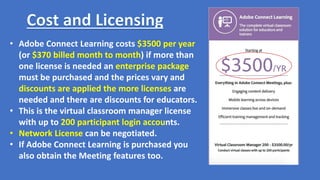
• Adobe Connect Learning costs $3500 per year
(or $370 billed month to month) if more than
one license is needed an enterprise package
must be purchased and the prices vary and
discounts are applied the more licenses are
needed and there are discounts for educators.
• This is the virtual classroom manager license
with up to 200 participant login accounts.
• Network License can be negotiated.
• If Adobe Connect Learning is purchased you
also obtain the Meeting features too.
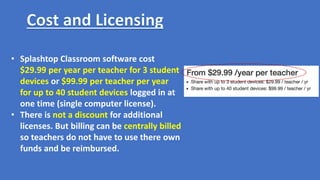
• Splashtop Classroom software cost
$29.99 per year per teacher for 3 student
devices or $99.99 per teacher per year
for up to 40 student devices logged in at
one time (single computer license).
• There is not a discount for additional
licenses. But billing can be centrally billed
so teachers do not have to use there own
funds and be reimbursed.
• Google Classroom is a great and free alternative tool for similar features
in both Adobe Connect Learning and Splashtop Classroom.
• Even though Google Classroom would be better used for K-12, since most
higher education institutions would be using an LMS for more complex
functions, there are uses for training environments.
• The learning curb should not be an issue since Google creates tools that
are intuitive.
• Google Classroom can be used for distance instruction/learning, students
in traditional learning environments can use the tool for in-class
participation too.
• Personal testimonial: I have used Google Classroom before and it
functions well to transfer information at a distance and it is free.

5395 Module 4 Assignment 3 Presentation Brandis J. Haynes

  • 3.
    • Adobe ConnectLearning is a tool within the Adobe software line that is used to host live classroom learning and trainings at a distance. • This tool can aid in the successful transfer of knowledge for many different types of educators and trainers with learners of all ages and levels. • Like many Adobe products, there are intuitive functions of the software and there are portions that are more advanced. • With Adobe Connect Learning, many of the features are very easy to use. After using the trial version, I realized that I caught on setting up a classroom with whiteboards and polls—easily. • Adobe even says that each virtual classroom can easily be connected with most LMS and all learning can be tracked and measured.
  • 4.
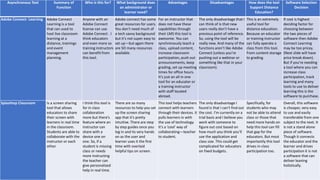
    Asynchronous Tool Summaryof Function Who is this for? What background does an administrator or learner need? Advantages Disadvantages How does the tool Support Distance Education? Software Selection Decision Adobe Connect- Learning Adobe Connect Learning is a tool that can used to host live classroom learning at a distance, trainings and event management planning. Anyone with an Adobe Connect license can use Adobe Connect . I think educators and even more so training instructors can benefit from this tool. Adobe connect has some great resources for users. You don’t need much of a tech savvy background but it’s not super easy to set up—but again there are SO many resources available. For an instructor that does not have these capabilities through their LMS this tool is awesome. You can synchronously teach a class, upload content, increase classroom participation, push out announcements, keep grading, set up meeting times for office hours. It’s just an all in one tool for an educator or a training instructor with staff located abroad. The only disadvantage that I can think of is that new users really don’t have a previous point of reference. So, using the tool will be really new. And many of the functions aren’t like Adobe Connect (unless you’re pushing out a webinar or something like that in your classroom). This is an extremely useful tool for distance education. Because an educator or training instructor can fully operate a class from this tool. From content storage to grading. If cost is highest deciding factor for choosing between the two pieces of software then Adobe Connect Learning may be too pricey. (Next slide will have price break down). But if you’re needing a tool where you can increase class participation, track learning and many tools to use to deliver learning this is the software to purchase. Splashtop Classroom Is a screen sharing tool that allows educators to share their screen with learners in real time in the classroom. Students are able to collaborate with the instructor or each other. I think this tool is for in class collaboration more but there’s feature where an instructor can share with a device one on one. So, if a student is missing class or needs more instructing the teacher can give personalized help in real time. There are so many resources to help you set up the screen sharing app that it’s pretty intuitive. There are step by step guides once you log in and its very hands on as the user and learner uses it the first time with overlaid helpful tips on screen. This tool helps teachers connect with learners through their devices. It pulls learners in with the use of technology. It’s a ‘cool’ way of collaborating—teacher to student. The only disadvantage I found is that I can’t find out the cost. I’m currently on a trial basis and I believe you work with someone to figure out cost based on how much you think you’ll use the application and class size. This could get complicated for educators on fixed budgets. Specifically, for students who may not be able to attend class or those that need more hands on help this tool can fill that gap for the educators. But most importantly this tool drives in-class participation too. Overall, this software is cheaper, very easy to use and easily transferable from one subject to the next. It is not a stand alone piece of software. Though it connects the educator and the learner and drives participation it is not a software that can deliver leaning holistically.
  • 5.
    • Splashtop Classroomis a software that allows for a teacher to connect with their students through a smartphone/tablet/iPad device through screen sharing and whiteboard features. • Educators and Trainers are able to send out session invites and learners join the classroom via a QR code or remote students are sent a numbered code. They’re able to see exactly what the teacher is seeing and interact virtually or as another means of participation in the traditional classroom environment. • The software is an easy 3 step process to set up and use for both the educator and the learner. The learning is not measureable in this software.
  • 6.
    • Adobe ConnectLearning costs $3500 per year (or $370 billed month to month) if more than one license is needed an enterprise package must be purchased and the prices vary and discounts are applied the more licenses are needed and there are discounts for educators. • This is the virtual classroom manager license with up to 200 participant login accounts. • Network License can be negotiated. • If Adobe Connect Learning is purchased you also obtain the Meeting features too.
  • 7.
    • Splashtop Classroomsoftware cost $29.99 per year per teacher for 3 student devices or $99.99 per teacher per year for up to 40 student devices logged in at one time (single computer license). • There is not a discount for additional licenses. But billing can be centrally billed so teachers do not have to use there own funds and be reimbursed.
  • 8.
    • Google Classroomis a great and free alternative tool for similar features in both Adobe Connect Learning and Splashtop Classroom. • Even though Google Classroom would be better used for K-12, since most higher education institutions would be using an LMS for more complex functions, there are uses for training environments. • The learning curb should not be an issue since Google creates tools that are intuitive. • Google Classroom can be used for distance instruction/learning, students in traditional learning environments can use the tool for in-class participation too. • Personal testimonial: I have used Google Classroom before and it functions well to transfer information at a distance and it is free.