5 Steps to Your
 Quality Manual
        Andrea Gentil
       Business Expert
      www.oquma.com


              2010-05-11
OQUMA – Quality Management

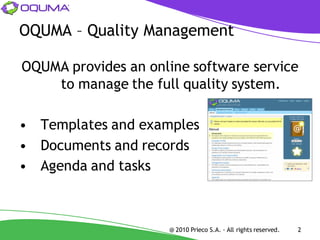
OQUMA provides an online software service
    to manage the full quality system.

• Templates and examples
• Documents and records
• Agenda and tasks


                     @ 2010 Prieco S.A. - All rights reserved.   2
Setup

Step1 – Requirements:


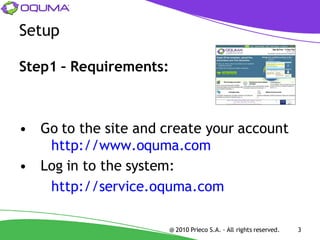
• Go to the site and create your account
   http://www.oquma.com
• Log in to the system:
   http://service.oquma.com

                        @ 2010 Prieco S.A. - All rights reserved.   3
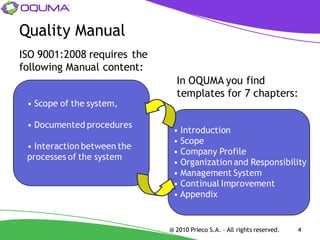
Quality Manual
ISO 9001:2008 requires the
following Manual content:
                               In OQUMA you find
                               templates for 7 chapters:
 • Scope of the system,

 • Documented procedures
                              • Introduction
                              • Scope
 • Interaction between the
                              • Company Profile
 processes of the system
                              • Organization and Responsibility
                              • Management System
                              • Continual Improvement
                              • Appendix


                             @ 2010 Prieco S.A. - All rights reserved.   4
Document Templates

Step 2 - Templates:


•   Download each template
•   Customize the templates
•   Fill the info between the brackets [ ]
    Example: your Company Name
•   Upload each document


                           @ 2010 Prieco S.A. - All rights reserved.   5
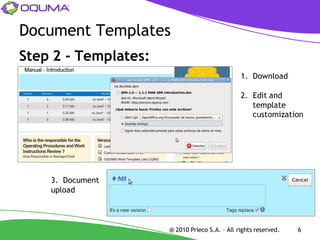
Document Templates
Step 2 - Templates:
                                                1. Download

                                                2. Edit and
                                                   template
                                                   customization


    3. Document
    upload


                      @ 2010 Prieco S.A. - All rights reserved.   6
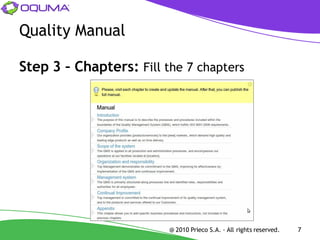
Quality Manual

Step 3 – Chapters: Fill the 7 chapters


                         @ 2010 Prieco S.A. - All rights reserved.   7
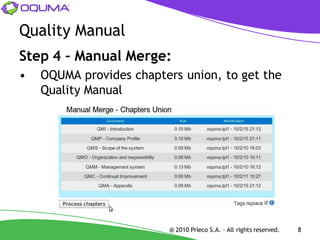
Quality Manual
Step 4 – Manual Merge:
•   OQUMA provides chapters union, to get the
    Quality Manual


                         @ 2010 Prieco S.A. - All rights reserved.   8
Quality Manual
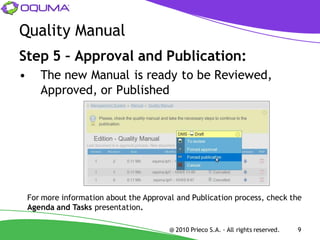
Step 5 – Approval and Publication:
•      The new Manual is ready to be Reviewed,
       Approved, or Published


    For more information about the Approval and Publication process, check the
    Agenda and Tasks presentation.

                                          @ 2010 Prieco S.A. - All rights reserved.   9
Conclusion
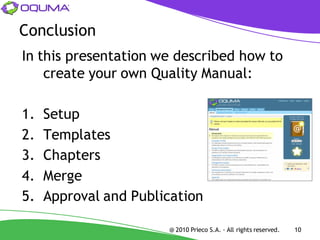
In this presentation we described how to
    create your own Quality Manual:

1.   Setup
2.   Templates
3.   Chapters
4.   Merge
5.   Approval and Publication

                       @ 2010 Prieco S.A. - All rights reserved.   10
Thank you for you attention


                  5 Steps for Your
                    Quality Manual
                                           Andrea Gentil
                                          Business Expert
                                         www.oquma.com


                    @ 2010 Prieco S.A. - All rights reserved.   11

5 Steps to your Quality Manual

  • 1.
    5 Steps toYour Quality Manual Andrea Gentil Business Expert www.oquma.com 2010-05-11
  • 2.
    OQUMA – QualityManagement OQUMA provides an online software service to manage the full quality system. • Templates and examples • Documents and records • Agenda and tasks @ 2010 Prieco S.A. - All rights reserved. 2
  • 3.
    Setup Step1 – Requirements: •Go to the site and create your account http://www.oquma.com • Log in to the system: http://service.oquma.com @ 2010 Prieco S.A. - All rights reserved. 3
  • 4.
    Quality Manual ISO 9001:2008requires the following Manual content: In OQUMA you find templates for 7 chapters: • Scope of the system, • Documented procedures • Introduction • Scope • Interaction between the • Company Profile processes of the system • Organization and Responsibility • Management System • Continual Improvement • Appendix @ 2010 Prieco S.A. - All rights reserved. 4
  • 5.
    Document Templates Step 2- Templates: • Download each template • Customize the templates • Fill the info between the brackets [ ] Example: your Company Name • Upload each document @ 2010 Prieco S.A. - All rights reserved. 5
  • 6.
    Document Templates Step 2- Templates: 1. Download 2. Edit and template customization 3. Document upload @ 2010 Prieco S.A. - All rights reserved. 6
  • 7.
    Quality Manual Step 3– Chapters: Fill the 7 chapters @ 2010 Prieco S.A. - All rights reserved. 7
  • 8.
    Quality Manual Step 4– Manual Merge: • OQUMA provides chapters union, to get the Quality Manual @ 2010 Prieco S.A. - All rights reserved. 8
  • 9.
    Quality Manual Step 5– Approval and Publication: • The new Manual is ready to be Reviewed, Approved, or Published For more information about the Approval and Publication process, check the Agenda and Tasks presentation. @ 2010 Prieco S.A. - All rights reserved. 9
  • 10.
    Conclusion In this presentationwe described how to create your own Quality Manual: 1. Setup 2. Templates 3. Chapters 4. Merge 5. Approval and Publication @ 2010 Prieco S.A. - All rights reserved. 10
  • 11.
    Thank you foryou attention 5 Steps for Your Quality Manual Andrea Gentil Business Expert www.oquma.com @ 2010 Prieco S.A. - All rights reserved. 11