Pre-Production
Rhiannah Baker
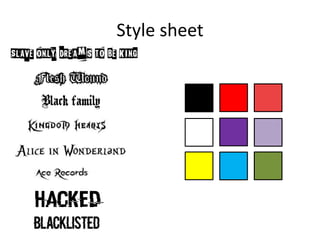
Style sheet
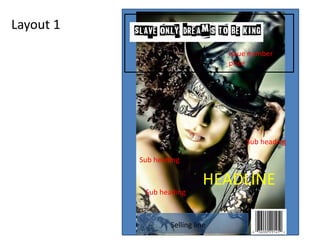
Layout 1
HEADLINE
Sub heading
Issue number
price
Sub heading
Sub heading
Selling line
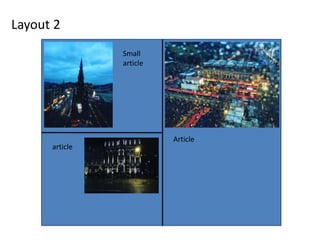
Layout 2
Article
Small
article
article
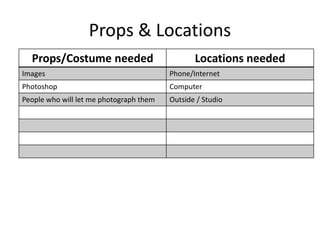
Props & Locations
Props/Costume needed Locations needed
Images Phone/Internet
Photoshop Computer
People who will let me photograph them Outside / Studio
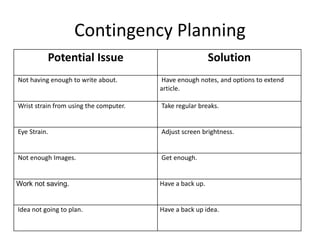
Contingency Planning
Potential Issue Solution
Not having enough to write about. Have enough notes, and options to extend
article.
Wrist strain from using the computer. Take regular breaks.
Eye Strain. Adjust screen brightness.
Not enough Images. Get enough.
Work not saving. Have a back up.
Idea not going to plan. Have a back up idea.
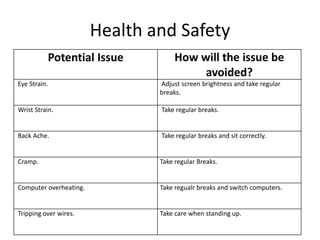
Health and Safety
Potential Issue How will the issue be
avoided?
Eye Strain. Adjust screen brightness and take regular
breaks.
Wrist Strain. Take regular breaks.
Back Ache. Take regular breaks and sit correctly.
Cramp. Take regular Breaks.
Computer overheating. Take regualr breaks and switch computers.
Tripping over wires. Take care when standing up.
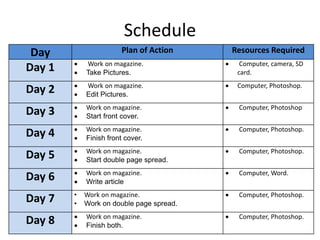
Schedule
Day Plan of Action Resources Required
Day 1  Work on magazine.
 Take Pictures.
 Computer, camera, SD
card.
Day 2  Work on magazine.
 Edit Pictures.
 Computer, Photoshop.
Day 3  Work on magazine.
 Start front cover.
 Computer, Photoshop
Day 4  Work on magazine.
 Finish front cover.
 Computer, Photoshop.
Day 5  Work on magazine.
 Start double page spread.
 Computer, Photoshop.
Day 6  Work on magazine.
 Write article
 Computer, Word.
Day 7 • Work on magazine.
• Work on double page spread.
 Computer, Photoshop.
Day 8  Work on magazine.
 Finish both.
 Computer, Photoshop.

5.5. pre production

  • 1.
  • 2.
  • 3.
    Layout 1 HEADLINE Sub heading Issuenumber price Sub heading Sub heading Selling line
  • 4.
  • 5.
    Props & Locations Props/Costumeneeded Locations needed Images Phone/Internet Photoshop Computer People who will let me photograph them Outside / Studio
  • 6.
    Contingency Planning Potential IssueSolution Not having enough to write about. Have enough notes, and options to extend article. Wrist strain from using the computer. Take regular breaks. Eye Strain. Adjust screen brightness. Not enough Images. Get enough. Work not saving. Have a back up. Idea not going to plan. Have a back up idea.
  • 7.
    Health and Safety PotentialIssue How will the issue be avoided? Eye Strain. Adjust screen brightness and take regular breaks. Wrist Strain. Take regular breaks. Back Ache. Take regular breaks and sit correctly. Cramp. Take regular Breaks. Computer overheating. Take regualr breaks and switch computers. Tripping over wires. Take care when standing up.
  • 8.
    Schedule Day Plan ofAction Resources Required Day 1  Work on magazine.  Take Pictures.  Computer, camera, SD card. Day 2  Work on magazine.  Edit Pictures.  Computer, Photoshop. Day 3  Work on magazine.  Start front cover.  Computer, Photoshop Day 4  Work on magazine.  Finish front cover.  Computer, Photoshop. Day 5  Work on magazine.  Start double page spread.  Computer, Photoshop. Day 6  Work on magazine.  Write article  Computer, Word. Day 7 • Work on magazine. • Work on double page spread.  Computer, Photoshop. Day 8  Work on magazine.  Finish both.  Computer, Photoshop.

Editor's Notes

  • #3 Explore colours, fonts and image styles similar to what you want to produce. Discuss all three elements in relation to why you chose them and where you may use them in your project. Go over as many pages as you need to
  • #4 Mock up of a potential design using the colours and fonts established in your style sheet and sourced images
  • #5 Mock up of a potential design using the colours and fonts established in your style sheet and sourced images