Pre-Production
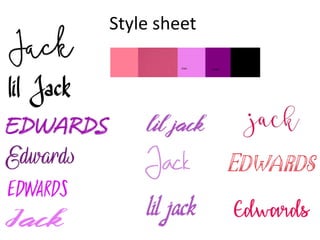
Style sheet
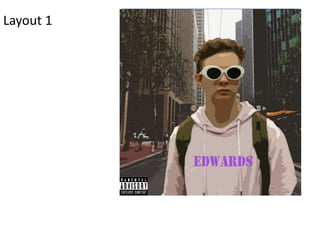
Layout 1
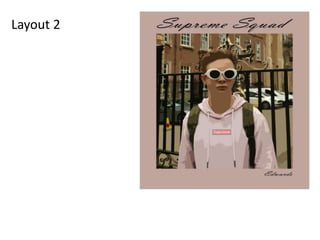
Layout 2
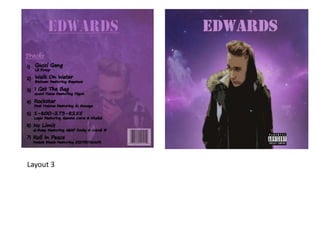
Layout 3
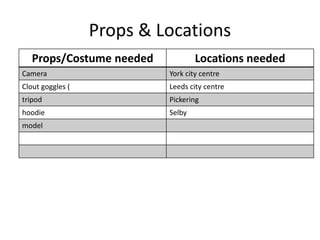
Props & Locations
Props/Costume needed Locations needed
Camera York city centre
Clout goggles ( Leeds city centre
tripod Pickering
hoodie Selby
model
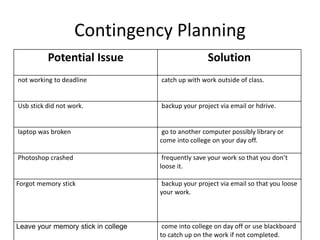
Contingency Planning
Potential Issue Solution
not working to deadline catch up with work outside of class.
Usb stick did not work. backup your project via email or hdrive.
laptop was broken go to another computer possibly library or
come into college on your day off.
Photoshop crashed frequently save your work so that you don’t
loose it.
Forgot memory stick backup your project via email so that you loose
your work.
Leave your memory stick in college come into college on day off or use blackboard
to catch up on the work if not completed.
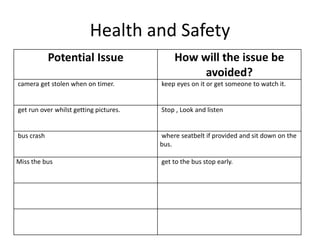
Health and Safety
Potential Issue How will the issue be
avoided?
camera get stolen when on timer. keep eyes on it or get someone to watch it.
get run over whilst getting pictures. Stop , Look and listen
bus crash where seatbelt if provided and sit down on the
bus.
Miss the bus get to the bus stop early.
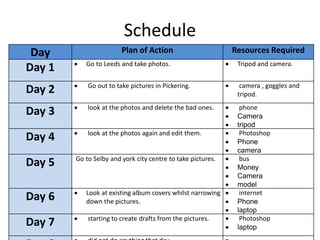
Schedule
Day Plan of Action Resources Required
Day 1  Go to Leeds and take photos.  Tripod and camera.
Day 2  Go out to take pictures in Pickering.  camera , goggles and
tripod.
Day 3  look at the photos and delete the bad ones.  phone
 Camera
 tripod
Day 4  look at the photos again and edit them.  Photoshop
 Phone
 camera
Day 5 Go to Selby and york city centre to take pictures.  bus
 Money
 Camera
 model
Day 6  Look at existing album covers whilst narrowing
down the pictures.
 internet
 Phone
 laptop
Day 7  starting to create drafts from the pictures.  Photoshop
 laptop

5. pre production

  • 1.
  • 2.
  • 3.
  • 4.
  • 5.
  • 6.
    Props & Locations Props/Costumeneeded Locations needed Camera York city centre Clout goggles ( Leeds city centre tripod Pickering hoodie Selby model
  • 7.
    Contingency Planning Potential IssueSolution not working to deadline catch up with work outside of class. Usb stick did not work. backup your project via email or hdrive. laptop was broken go to another computer possibly library or come into college on your day off. Photoshop crashed frequently save your work so that you don’t loose it. Forgot memory stick backup your project via email so that you loose your work. Leave your memory stick in college come into college on day off or use blackboard to catch up on the work if not completed.
  • 8.
    Health and Safety PotentialIssue How will the issue be avoided? camera get stolen when on timer. keep eyes on it or get someone to watch it. get run over whilst getting pictures. Stop , Look and listen bus crash where seatbelt if provided and sit down on the bus. Miss the bus get to the bus stop early.
  • 9.
    Schedule Day Plan ofAction Resources Required Day 1  Go to Leeds and take photos.  Tripod and camera. Day 2  Go out to take pictures in Pickering.  camera , goggles and tripod. Day 3  look at the photos and delete the bad ones.  phone  Camera  tripod Day 4  look at the photos again and edit them.  Photoshop  Phone  camera Day 5 Go to Selby and york city centre to take pictures.  bus  Money  Camera  model Day 6  Look at existing album covers whilst narrowing down the pictures.  internet  Phone  laptop Day 7  starting to create drafts from the pictures.  Photoshop  laptop

Editor's Notes

  • #3 Explore colours, fonts and image styles similar to what you want to produce. Discuss all three elements in relation to why you chose them and where you may use them in your project. Go over as many pages as you need to
  • #4 Mock up of a potential design using the colours and fonts established in your style sheet and sourced images
  • #5 Mock up of a potential design using the colours and fonts established in your style sheet and sourced images