Pre-Production
Alex Foreman
Pre-production
Assessment
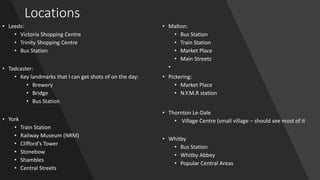
Locations
• Leeds:
• Victoria Shopping Centre
• Trinity Shopping Centre
• Bus Station
• Tadcaster:
• Key landmarks that I can get shots of on the day:
• Brewery
• Bridge
• Bus Station
• York
• Train Station
• Railway Museum (NRM)
• Clifford's Tower
• Stonebow
• Shambles
• Central Streets
• Malton:
• Bus Station
• Train Station
• Market Place
• Main Streets
•
• Pickering:
• Market Place
• N.Y.M.R station
• Thornton Le-Dale
• Village Centre (small village – should see most of it
• Whitby
• Bus Station
• Whitby Abbey
• Popular Central Areas
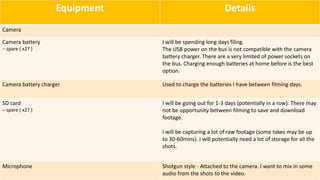
Equipment Details
Camera
Camera battery
– spare ( x2? )
I will be spending long days filing.
The USB power on the bus is not compatible with the camera
battery charger. There are a very limited of power sockets on
the bus. Charging enough batteries at home before is the best
option.
Camera battery charger Used to charge the batteries I have between filming days.
SD card
– spare ( x2? )
I will be going out for 1-3 days (potentially in a row). There may
not be opportunity between filming to save and download
footage.
I will be capturing a lot of raw footage (some takes may be up
to 30-60mins). I will potentially need a lot of storage for all the
shots.
Microphone Shotgun style - Attached to the camera. I want to mix in some
audio from the shots to the video.
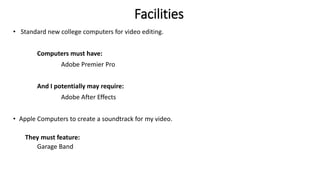
Facilities
• Standard new college computers for video editing.
Computers must have:
Adobe Premier Pro
And I potentially may require:
Adobe After Effects
• Apple Computers to create a soundtrack for my video.
They must feature:
Garage Band
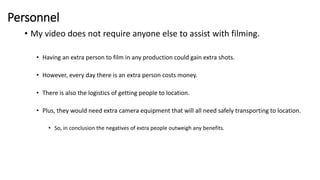
Personnel
• My video does not require anyone else to assist with filming.
• Having an extra person to film in any production could gain extra shots.
• However, every day there is an extra person costs money.
• There is also the logistics of getting people to location.
• Plus, they would need extra camera equipment that will all need safely transporting to location.
• So, in conclusion the negatives of extra people outweigh any benefits.
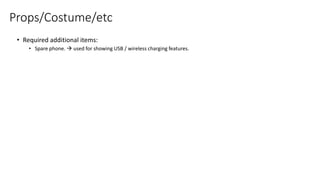
Props/Costume/etc
• Required additional items:
• Spare phone.  used for showing USB / wireless charging features.
Visual Planning
Storyboarding
• Your storyboard should bring your idea to life
• Provide an idea of the sequencing of you video
• Provides a basis for production
• Suggested online storyboard creators are:
• https://www.storyboardthat.com
• http://www.pixton.com [very complicated]
• http://www.storyjumper.com [allows you to insert your own images]
•
• Alternatively, hand draw or photograph your storyboard and scan or copy to insert it onto your slides
Shot List
• Your shot list should contain the sequential breakdown of what you need to shoot for your video
• It should work in partnership with your storyboard
• It will be your working document when you film
• It should contain the shot number, scene number, shot description, framing and action you will see
• It should also have information on performers in the scene and other props, etc
• Shot list template is on Blackboard in the pre-production folder.
Organisational
Planning
Location information
• Information and images of your location[s] for filming
• You should have address details, clearance/premissions for filming, recce photos and floorplans
[including camera, equipment and cast/crew layouts]
• Where possible, have a plan B fallback location option
• Assess each location for any issues and suggest solutions
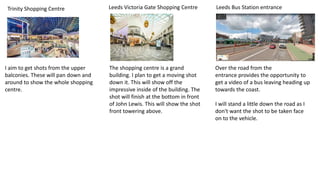
Trinity Shopping Centre Leeds Victoria Gate Shopping Centre Leeds Bus Station entrance
Over the road from the
entrance provides the opportunity to
get a video of a bus leaving heading up
towards the coast.
I will stand a little down the road as I
don't want the shot to be taken face
on to the vehicle.
The shopping centre is a grand
building. I plan to get a moving shot
down it. This will show off the
impressive inside of the building. The
shot will finish at the bottom in front
of John Lewis. This will show the shot
front towering above.
I aim to get shots from the upper
balconies. These will pan down and
around to show the whole shopping
centre.
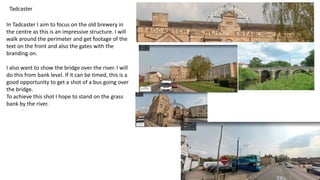
Tadcaster
In Tadcaster I aim to focus on the old brewery in
the centre as this is an impressive structure. I will
walk around the perimeter and get footage of the
text on the front and also the gates with the
branding on.
I also want to show the bridge over the river. I will
do this from bank level. If it can be timed, this is a
good opportunity to get a shot of a bus going over
the bridge.
To achieve this shot I hope to stand on the grass
bank by the river.
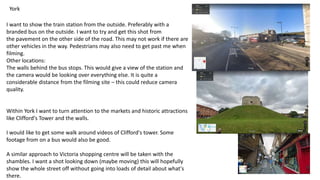
York
I want to show the train station from the outside. Preferably with a
branded bus on the outside. I want to try and get this shot from
the pavement on the other side of the road. This may not work if there are
other vehicles in the way. Pedestrians may also need to get past me when
filming.
Other locations:
The walls behind the bus stops. This would give a view of the station and
the camera would be looking over everything else. It is quite a
considerable distance from the filming site – this could reduce camera
quality.
Within York I want to turn attention to the markets and historic attractions
like Clifford's Tower and the walls.
I would like to get some walk around videos of Clifford's tower. Some
footage from on a bus would also be good.
A similar approach to Victoria shopping centre will be taken with the
shambles. I want a shot looking down (maybe moving) this will hopefully
show the whole street off without going into loads of detail about what's
there.
Production Schedule
• Your schedule should budget a total of 10 hours for production, that is
for the filming and editing of your project.
• You should plan when you’re filming and how you intend to use the in
class days on your timetable/class schedule
Dates
11th  24th April During the Easter Holiday I will spend days filming out at the different locations. This will require several trips on the
route.
I'm expecting the filming to take about three days.
In this period, I will watch back footage as I go. This will enable me to pick up on any problems, either one off or
reoccurring.
I will then have a chance to go back and get anything I think I've missed or that could be improved.
I will also maybe do a rough draft edit and put the clips in order. This order will probably change for the final edit.
However, it will give the chance to find out if I have missed any major shots.
Taking notes of what order the clips are in could help speed up the assembly part of the editing process in college.
25th  27th April Footage Review, Editing.
If it wasn't possible during the Easter Holiday to review all shots, I will start the week by doing this. During the look
through, I will delete anything that is unusable. In worst case scenario, I then have the opportunity to capture more
footage.
After going through the footage, I will begin importing clips on to my Adobe Premier Pro timeline. These clips will be cut
to approximate length and the clips will be ordered.
This will be the beginning of the edit process.
Dates
2nd --> 4th May 2nd: Bank holiday. - opportunity to catch up on written work and capture extra 'emergency' shots.
Rest of week:
Main edit continuation.
9th  11th Music production
Voiceover for video should be complete by this point.
More video editing
16th  18th Video editing finish and general catch up
Finish written work.
23rd  25th Evaluation
30th  6th June Final finishing off
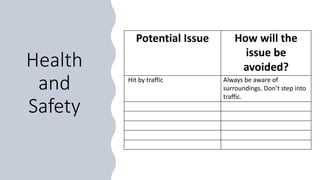
Health
and
Safety
Potential Issue How will the
issue be
avoided?
Hit by traffic Always be aware of
surroundings. Don’t step into
traffic.

3. Pre-Production - new idea.pptx

  • 1.
  • 2.
  • 3.
    Locations • Leeds: • VictoriaShopping Centre • Trinity Shopping Centre • Bus Station • Tadcaster: • Key landmarks that I can get shots of on the day: • Brewery • Bridge • Bus Station • York • Train Station • Railway Museum (NRM) • Clifford's Tower • Stonebow • Shambles • Central Streets • Malton: • Bus Station • Train Station • Market Place • Main Streets • • Pickering: • Market Place • N.Y.M.R station • Thornton Le-Dale • Village Centre (small village – should see most of it • Whitby • Bus Station • Whitby Abbey • Popular Central Areas
  • 4.
    Equipment Details Camera Camera battery –spare ( x2? ) I will be spending long days filing. The USB power on the bus is not compatible with the camera battery charger. There are a very limited of power sockets on the bus. Charging enough batteries at home before is the best option. Camera battery charger Used to charge the batteries I have between filming days. SD card – spare ( x2? ) I will be going out for 1-3 days (potentially in a row). There may not be opportunity between filming to save and download footage. I will be capturing a lot of raw footage (some takes may be up to 30-60mins). I will potentially need a lot of storage for all the shots. Microphone Shotgun style - Attached to the camera. I want to mix in some audio from the shots to the video.
  • 5.
    Facilities • Standard newcollege computers for video editing. Computers must have: Adobe Premier Pro And I potentially may require: Adobe After Effects • Apple Computers to create a soundtrack for my video. They must feature: Garage Band
  • 6.
    Personnel • My videodoes not require anyone else to assist with filming. • Having an extra person to film in any production could gain extra shots. • However, every day there is an extra person costs money. • There is also the logistics of getting people to location. • Plus, they would need extra camera equipment that will all need safely transporting to location. • So, in conclusion the negatives of extra people outweigh any benefits.
  • 7.
    Props/Costume/etc • Required additionalitems: • Spare phone.  used for showing USB / wireless charging features.
  • 8.
  • 9.
    Storyboarding • Your storyboardshould bring your idea to life • Provide an idea of the sequencing of you video • Provides a basis for production • Suggested online storyboard creators are: • https://www.storyboardthat.com • http://www.pixton.com [very complicated] • http://www.storyjumper.com [allows you to insert your own images] • • Alternatively, hand draw or photograph your storyboard and scan or copy to insert it onto your slides
  • 10.
    Shot List • Yourshot list should contain the sequential breakdown of what you need to shoot for your video • It should work in partnership with your storyboard • It will be your working document when you film • It should contain the shot number, scene number, shot description, framing and action you will see • It should also have information on performers in the scene and other props, etc • Shot list template is on Blackboard in the pre-production folder.
  • 11.
  • 12.
    Location information • Informationand images of your location[s] for filming • You should have address details, clearance/premissions for filming, recce photos and floorplans [including camera, equipment and cast/crew layouts] • Where possible, have a plan B fallback location option • Assess each location for any issues and suggest solutions
  • 13.
    Trinity Shopping CentreLeeds Victoria Gate Shopping Centre Leeds Bus Station entrance Over the road from the entrance provides the opportunity to get a video of a bus leaving heading up towards the coast. I will stand a little down the road as I don't want the shot to be taken face on to the vehicle. The shopping centre is a grand building. I plan to get a moving shot down it. This will show off the impressive inside of the building. The shot will finish at the bottom in front of John Lewis. This will show the shot front towering above. I aim to get shots from the upper balconies. These will pan down and around to show the whole shopping centre.
  • 14.
    Tadcaster In Tadcaster Iaim to focus on the old brewery in the centre as this is an impressive structure. I will walk around the perimeter and get footage of the text on the front and also the gates with the branding on. I also want to show the bridge over the river. I will do this from bank level. If it can be timed, this is a good opportunity to get a shot of a bus going over the bridge. To achieve this shot I hope to stand on the grass bank by the river.
  • 15.
    York I want toshow the train station from the outside. Preferably with a branded bus on the outside. I want to try and get this shot from the pavement on the other side of the road. This may not work if there are other vehicles in the way. Pedestrians may also need to get past me when filming. Other locations: The walls behind the bus stops. This would give a view of the station and the camera would be looking over everything else. It is quite a considerable distance from the filming site – this could reduce camera quality. Within York I want to turn attention to the markets and historic attractions like Clifford's Tower and the walls. I would like to get some walk around videos of Clifford's tower. Some footage from on a bus would also be good. A similar approach to Victoria shopping centre will be taken with the shambles. I want a shot looking down (maybe moving) this will hopefully show the whole street off without going into loads of detail about what's there.
  • 16.
    Production Schedule • Yourschedule should budget a total of 10 hours for production, that is for the filming and editing of your project. • You should plan when you’re filming and how you intend to use the in class days on your timetable/class schedule Dates 11th  24th April During the Easter Holiday I will spend days filming out at the different locations. This will require several trips on the route. I'm expecting the filming to take about three days. In this period, I will watch back footage as I go. This will enable me to pick up on any problems, either one off or reoccurring. I will then have a chance to go back and get anything I think I've missed or that could be improved. I will also maybe do a rough draft edit and put the clips in order. This order will probably change for the final edit. However, it will give the chance to find out if I have missed any major shots. Taking notes of what order the clips are in could help speed up the assembly part of the editing process in college. 25th  27th April Footage Review, Editing. If it wasn't possible during the Easter Holiday to review all shots, I will start the week by doing this. During the look through, I will delete anything that is unusable. In worst case scenario, I then have the opportunity to capture more footage. After going through the footage, I will begin importing clips on to my Adobe Premier Pro timeline. These clips will be cut to approximate length and the clips will be ordered. This will be the beginning of the edit process.
  • 17.
    Dates 2nd --> 4thMay 2nd: Bank holiday. - opportunity to catch up on written work and capture extra 'emergency' shots. Rest of week: Main edit continuation. 9th  11th Music production Voiceover for video should be complete by this point. More video editing 16th  18th Video editing finish and general catch up Finish written work. 23rd  25th Evaluation 30th  6th June Final finishing off
  • 18.
    Health and Safety Potential Issue Howwill the issue be avoided? Hit by traffic Always be aware of surroundings. Don’t step into traffic.

Editor's Notes

  • #4 You need to identify locations and plan a recce. What are the limitations and risks, eg distance, access, cost, weather? How will you manage this?
  • #5 What do you need? E.g. equipment, resources? Mostly from college, but who do you need to speak to get this kit? What is available? When? Look at equipment hire places, etc
  • #6 Where will you edit your video? Do you need any other specialist facilities…?
  • #7 CREW: What is you team? Who is in it? What are each team members strengths/weaknesses? When are they available? CAST: Do you need any external performers? When are they available? Cost implications? Will you have to feed them? Transport them? Other personnel? Is anyone else helping you?