Pre-Production
Fraser Hardwick
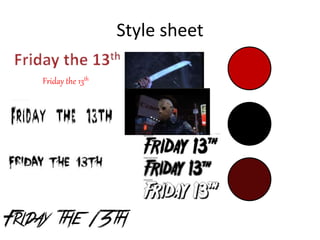
Style sheet
Friday the 13th
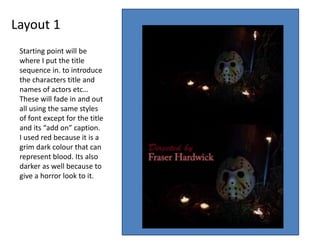
Layout 1
Starting point will be
where I put the title
sequence in. to introduce
the characters title and
names of actors etc…
These will fade in and out
all using the same styles
of font except for the title
and its “add on” caption.
I used red because it is a
grim dark colour that can
represent blood. Its also
darker as well because to
give a horror look to it.
Layout 2
Friday the 13th
Showing the title with the
iconic movie killer to
resemble what the viewer is
watching and establishing
the short film with. This will
stay on screen till masked
killer is fully lit this will
happen by him coming
towards the screen and
when he is fully shown. then
the movie clip would
continue. Lights will be set
up round the camera for the
perfect light.
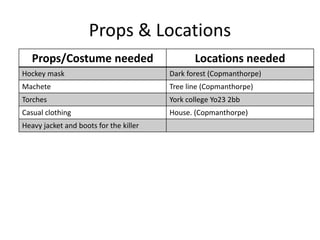
Props & Locations
Props/Costume needed Locations needed
Hockey mask Dark forest (Copmanthorpe)
Machete Tree line (Copmanthorpe)
Torches York college Yo23 2bb
Casual clothing House. (Copmanthorpe)
Heavy jacket and boots for the killer
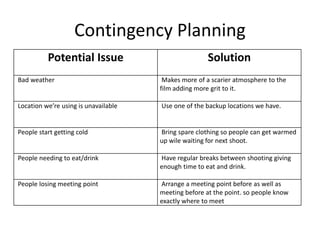
Contingency Planning
Potential Issue Solution
Bad weather Makes more of a scarier atmosphere to the
film adding more grit to it.
Location we’re using is unavailable Use one of the backup locations we have.
People start getting cold Bring spare clothing so people can get warmed
up wile waiting for next shoot.
People needing to eat/drink Have regular breaks between shooting giving
enough time to eat and drink.
People losing meeting point Arrange a meeting point before as well as
meeting before at the point. so people know
exactly where to meet
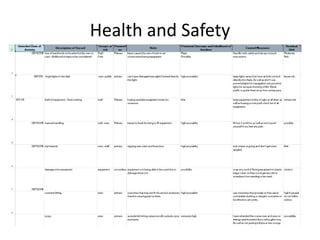
Health and Safety
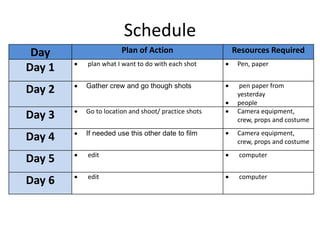
Schedule
Day Plan of Action Resources Required
Day 1  plan what I want to do with each shot  Pen, paper
Day 2  Gather crew and go though shots  pen paper from
yesterday
 people
Day 3  Go to location and shoot/ practice shots  Camera equipment,
crew, props and costume
Day 4  If needed use this other date to film  Camera equipment,
crew, props and costume
Day 5  edit  computer
Day 6  edit  computer

5. pre production

  • 1.
  • 2.
  • 3.
    Layout 1 Starting pointwill be where I put the title sequence in. to introduce the characters title and names of actors etc… These will fade in and out all using the same styles of font except for the title and its “add on” caption. I used red because it is a grim dark colour that can represent blood. Its also darker as well because to give a horror look to it.
  • 4.
    Layout 2 Friday the13th Showing the title with the iconic movie killer to resemble what the viewer is watching and establishing the short film with. This will stay on screen till masked killer is fully lit this will happen by him coming towards the screen and when he is fully shown. then the movie clip would continue. Lights will be set up round the camera for the perfect light.
  • 5.
    Props & Locations Props/Costumeneeded Locations needed Hockey mask Dark forest (Copmanthorpe) Machete Tree line (Copmanthorpe) Torches York college Yo23 2bb Casual clothing House. (Copmanthorpe) Heavy jacket and boots for the killer
  • 6.
    Contingency Planning Potential IssueSolution Bad weather Makes more of a scarier atmosphere to the film adding more grit to it. Location we’re using is unavailable Use one of the backup locations we have. People start getting cold Bring spare clothing so people can get warmed up wile waiting for next shoot. People needing to eat/drink Have regular breaks between shooting giving enough time to eat and drink. People losing meeting point Arrange a meeting point before as well as meeting before at the point. so people know exactly where to meet
  • 7.
  • 8.
    Schedule Day Plan ofAction Resources Required Day 1  plan what I want to do with each shot  Pen, paper Day 2  Gather crew and go though shots  pen paper from yesterday  people Day 3  Go to location and shoot/ practice shots  Camera equipment, crew, props and costume Day 4  If needed use this other date to film  Camera equipment, crew, props and costume Day 5  edit  computer Day 6  edit  computer

Editor's Notes

  • #3 Explore colours, fonts and image styles similar to what you want to produce. Discuss all three elements in relation to why you chose them and where you may use them in your project. Go over as many pages as you need to
  • #4 Mock up of a potential design using the colours and fonts established in your style sheet and sourced images
  • #5 Mock up of a potential design using the colours and fonts established in your style sheet and sourced images