Contents
 Introduction
 History
 5 functions
 Working of P-ISM
 Merits
 Demerits
 Conclusion
Introduction
 P-ISM (“Pen-style
Personal Networking
Gadget Package”).
 Connected With A
Wireless Technology.
 Whole Set Is Connected
To Internet Through
Cellular Phone Function.
 This 'pen sort
of instrument' produces
both the monitor as well as
the keyboard on any flat
surfaces from where
you can carry out
functions you would
normally do
on your desktop
computer.
History
 "Pen-style Personal Networking Gadget"
created in 2012 by Japanese technology
company NEC.
 Its designer Tour Ichihash.
 P-ISM was first featured at the 2011 ITU
Telecom world held in Geneva,
Switzerland.
P-ISM includes 5 functions
 CPU PEN
 COMMUNICATION PEN
 VISUAL OUTPUT
 VIRTUAL KEYBOARD
 CAMERA
Concept component Function
CPU Pen Computing Engine
Communication Pen Cell Phone, pointer
and ear piece,
Communication
using Bluetooth
Display LED Projector A4 size
approx. 1024x768
Keyboard Projected keyboard
with 3D IR Sensors
Camera Digital camera
Based Battery Charger and
Mass Storage
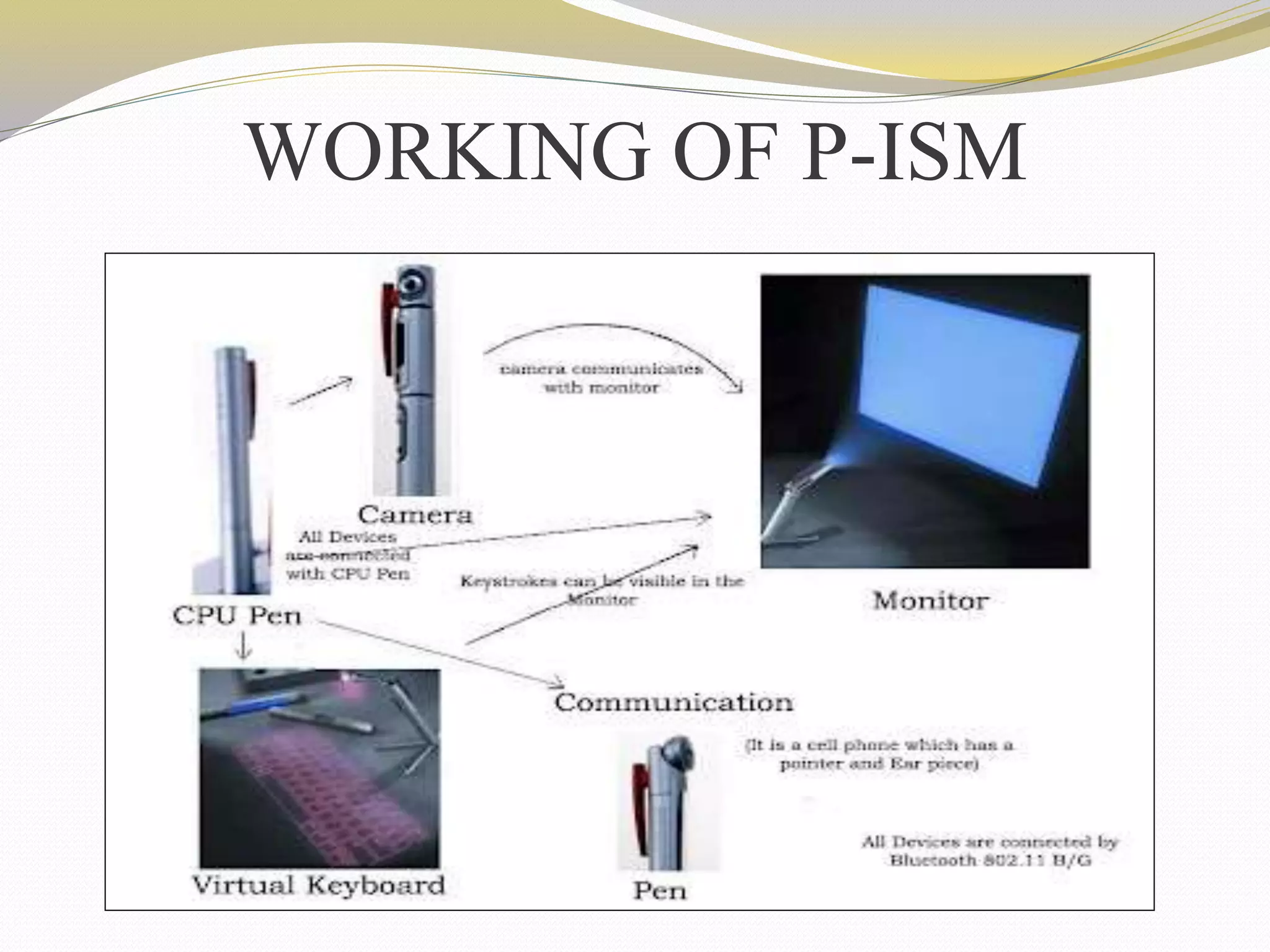
WORKING OF P-ISM
CPU Pen
 The functionality of the
CPU is done by
one of the pen.
 It is also known as
computing engine.
 Dual Core processor
is used.
 Works with windows
operating system.
Communication Pen
 Wireless Bluetooth
Technology.
 Connected to internet
through cellular phone
function.
 Uses Wi-Fi technology.
 Exchange information
with wireless connection.
LED Projector
 Monitor is LED Projector.
 Size is A4.
 Resolution capacity
is1024x768 approx.
 It gives more clarity and
good picture.
Virtual Keyboard
 Virtual laser keyboard is a
new gadget.
 It emits laser on desk.
 Uses laser beam to generate
full-size perfect keyboard.
 VKB settings can be
changed.
Digital Camera
 It is useful in video recording ,
video conferencing simply as a
webcam.
 Connected with other devices.
 portable.
 360 degree visual
communication device.
Battery
 It is the most important part in the portable type of
computers.
 Usually batteries are small in size and work for a long
time.
 It comes with a battery life of 6+ (i.e. 6 days).
 For normal use it can be used for 2 weeks.
Merits
 Portable
 Feasible
 Ubiquitous computing is done
 Wi-Fi technology
 Pens produces both the monitor as well as the
keyboard on any flat surfaces from where you can
carry out functions.
Demerits
• Cost
• Battery
• Keyboard concept is not
new
• Positioning is main
•Currently un-clear.
CONCLUSION
The communication devices are becoming smaller
and compact .
This is only an example for the start of this new
technology. We can expect more such developments
in the future.
5 PEN PC TECHNOLOGY

5 PEN PC TECHNOLOGY

  • 2.
    Contents  Introduction  History 5 functions  Working of P-ISM  Merits  Demerits  Conclusion
  • 3.
    Introduction  P-ISM (“Pen-style PersonalNetworking Gadget Package”).  Connected With A Wireless Technology.  Whole Set Is Connected To Internet Through Cellular Phone Function.
  • 4.
     This 'pensort of instrument' produces both the monitor as well as the keyboard on any flat surfaces from where you can carry out functions you would normally do on your desktop computer.
  • 5.
    History  "Pen-style PersonalNetworking Gadget" created in 2012 by Japanese technology company NEC.  Its designer Tour Ichihash.  P-ISM was first featured at the 2011 ITU Telecom world held in Geneva, Switzerland.
  • 6.
    P-ISM includes 5functions  CPU PEN  COMMUNICATION PEN  VISUAL OUTPUT  VIRTUAL KEYBOARD  CAMERA Concept component Function CPU Pen Computing Engine Communication Pen Cell Phone, pointer and ear piece, Communication using Bluetooth Display LED Projector A4 size approx. 1024x768 Keyboard Projected keyboard with 3D IR Sensors Camera Digital camera Based Battery Charger and Mass Storage
  • 7.
  • 8.
    CPU Pen  Thefunctionality of the CPU is done by one of the pen.  It is also known as computing engine.  Dual Core processor is used.  Works with windows operating system.
  • 9.
    Communication Pen  WirelessBluetooth Technology.  Connected to internet through cellular phone function.  Uses Wi-Fi technology.  Exchange information with wireless connection.
  • 10.
    LED Projector  Monitoris LED Projector.  Size is A4.  Resolution capacity is1024x768 approx.  It gives more clarity and good picture.
  • 11.
    Virtual Keyboard  Virtuallaser keyboard is a new gadget.  It emits laser on desk.  Uses laser beam to generate full-size perfect keyboard.  VKB settings can be changed.
  • 12.
    Digital Camera  Itis useful in video recording , video conferencing simply as a webcam.  Connected with other devices.  portable.  360 degree visual communication device.
  • 13.
    Battery  It isthe most important part in the portable type of computers.  Usually batteries are small in size and work for a long time.  It comes with a battery life of 6+ (i.e. 6 days).  For normal use it can be used for 2 weeks.
  • 14.
    Merits  Portable  Feasible Ubiquitous computing is done  Wi-Fi technology  Pens produces both the monitor as well as the keyboard on any flat surfaces from where you can carry out functions.
  • 15.
    Demerits • Cost • Battery •Keyboard concept is not new • Positioning is main •Currently un-clear.
  • 16.
    CONCLUSION The communication devicesare becoming smaller and compact . This is only an example for the start of this new technology. We can expect more such developments in the future.

Editor's Notes

  • #11 LED Projector: The role of monitor is taken by LED Projector which projects on the screen. The size of the projector is of A4 size. It has the approximate resolution capacity of 1024 X 768. Thus it is gives more clarity and good picture.
  • #12 Features of virtual keyboards are: VKB settings can be changed by Sound:  Controllable Virtual Keyboard sound effects (key clicks)  Connection: Connection to the appropriate Laptop/PC port  Intensity: Intensity of the projected Virtual Keyboard  Timeouts: coordinated timeouts to conserve the Virtual Keyboard's battery life  Sensitivity: adjustable sensitivity of the Virtual Keyboard  Auto-repeat: Allows the VKB to automatically repeat a key based on prescribed parameters. 
  • #13 Digital Camera: We had digital camera in the shape of pen. It is useful in video recording, video conferencing, simply it is called as web cam. It is also connected with other devices through Bluetooth. The major advantage it is small which is easily portable. It is a 360-Degree Visual Communication Device. We have seen video phones hundreds of times in movies. However, why can't we act naturally in front of videophone cameras? Conventional visual communications at a distance have been limited due to the display devices and terminals. This terminal enables showing of the surrounding atmosphere and group-to-group communication with a round display and a central super-wide-angle camera.
  • #14 Battery: The most important part in the portable type of computer is its battery. Usually batteries must be small in size and work for longer time. It comes with a battery life of 6+. For normal use it can be used for 2 weeks. This 'pen sort of instrument' produces both the monitor as well as the keyboard on any flat surfaces from where you can carry out functions you would normally do on your desktop computer.
  • #15 Advantage of this 5 pen pc technology: It is Portable i.e can be carried It is Feasible i.e workable, executable Ultimate ubiquitous(being present everywhere at once) Support WiFi technology Pens produces both the monitor as well as the keyboard on any flat surfaces from where you can carry out functions.