Elasticsearch
On Kubernetes
Elasticsearch [is] a distributed, multitenant-capable full-text search engine with
an HTTP web interface and schema-free JSON documents [based on Lucene]
(https://en.wikipedia.org/wiki/Elasticsearch)
Elasticsearch at Honestbee
● Used as backend for product search function on Honestbee.com
● Mission critical part of production setup
● Downtime will cause major service disruption
● Stats:
○ Product index: ~3,300,000 documents
○ Query latency: ~30ms
○ Queries per hr: 15-20k
● ES v2.3, 5.3
● Kubernetes v1.5, v1.7
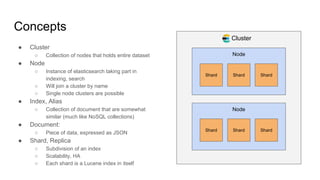
Concepts
● Cluster
○ Collection of nodes that holds entire dataset
● Node
○ Instance of elasticsearch taking part in
indexing, search
○ Will join a cluster by name
○ Single node clusters are possible
● Index, Alias
○ Collection of document that are somewhat
similar (much like NoSQL collections)
● Document:
○ Piece of data, expressed as JSON
● Shard, Replica
○ Subdivision of an index
○ Scalability, HA
○ Each shard is a Lucene index in itself
Cluster
Node
Shard Shard Shard
Node
Shard Shard Shard
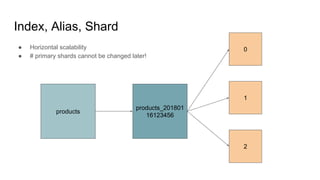
Index, Alias, Shard
products_201801
16123456
products
0
1
2
● Horizontal scalability
● # primary shards cannot be changed later!
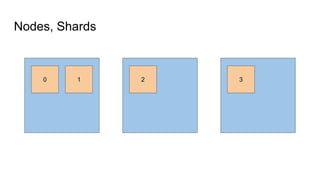
Nodes, Shards
0 1 2 3
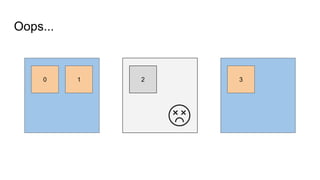
Oops...
0 1 2 3
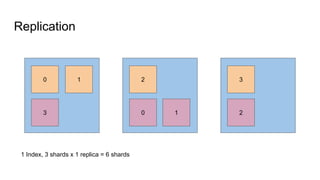
Replication
0 1
3
2
0 1
3
2
1 Index, 3 shards x 1 replica = 6 shards
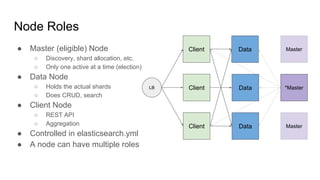
Node Roles
● Master (eligible) Node
○ Discovery, shard allocation, etc.
○ Only one active at a time (election)
● Data Node
○ Holds the actual shards
○ Does CRUD, search
● Client Node
○ REST API
○ Aggregation
● Controlled in elasticsearch.yml
● A node can have multiple roles
Client
Client
Client
Data
Data
Data
LB *Master
Master
Master
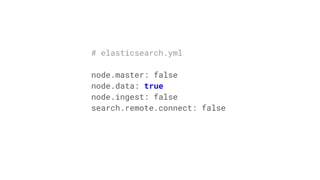
# elasticsearch.yml
node.master: false
node.data: true
node.ingest: false
search.remote.connect: false
es-masteres-dataes-clients
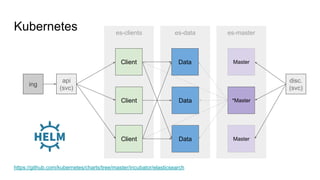
Kubernetes
Client
Client
Client
Data
Data
Data
*Master
Master
Master
api
(svc)
ing
disc.
(svc)
https://github.com/kubernetes/charts/tree/master/incubator/elasticsearch
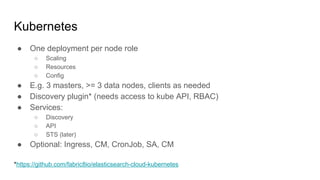
Kubernetes
● One deployment per node role
○ Scaling
○ Resources
○ Config
● E.g. 3 masters, >= 3 data nodes, clients as needed
● Discovery plugin* (needs access to kube API, RBAC)
● Services:
○ Discovery
○ API
○ STS (later)
● Optional: Ingress, CM, CronJob, SA, CM
*https://github.com/fabric8io/elasticsearch-cloud-kubernetes
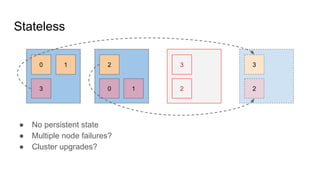
Stateless
0 1 2 3
3 0 1 2
3
2
● No persistent state
● Multiple node failures?
● Cluster upgrades?
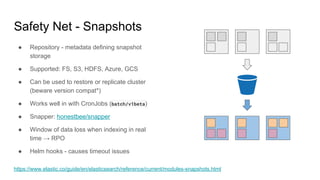
Safety Net - Snapshots
● Repository - metadata defining snapshot
storage
● Supported: FS, S3, HDFS, Azure, GCS
● Can be used to restore or replicate cluster
(beware version compat*)
● Works well in with CronJobs (batch/v1beta)
● Snapper: honestbee/snapper
● Window of data loss when indexing in real
time → RPO
● Helm hooks - causes timeout issues
https://www.elastic.co/guide/en/elasticsearch/reference/current/modules-snapshots.html
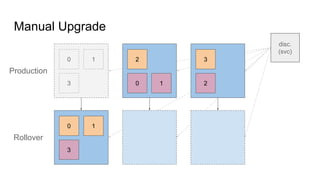
Manual Upgrade
0 1
3
2
0 1
3
2
0 1
3
disc.
(svc)
Production
Rollover
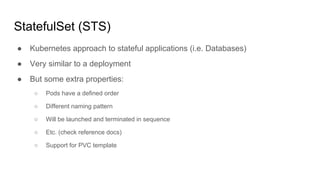
StatefulSet (STS)
● Kubernetes approach to stateful applications (i.e. Databases)
● Very similar to a deployment
● But some extra properties:
○ Pods have a defined order
○ Different naming pattern
○ Will be launched and terminated in sequence
○ Etc. (check reference docs)
○ Support for PVC template
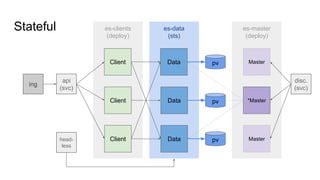
es-master
(deploy)
es-data
(sts)
es-clients
(deploy)
Stateful
Client
Client
Client
Data
Data
*Master
Master
Master
api
(svc)
ing
disc.
(svc)
Data
pv
pv
pvhead-
less
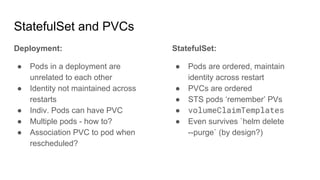
StatefulSet and PVCs
Deployment:
● Pods in a deployment are
unrelated to each other
● Identity not maintained across
restarts
● Indiv. Pods can have PVC
● Multiple pods - how to?
● Association PVC to pod when
rescheduled?
StatefulSet:
● Pods are ordered, maintain
identity across restart
● PVCs are ordered
● STS pods ‘remember’ PVs
● volumeClaimTemplates
● Even survives `helm delete
--purge` (by design?)
apiVersion: apps/v1beta1
kind: StatefulSet
# ...
spec:
serviceName: {{ template
"elasticsearch.data-service" . }}
# ...
podManagementPolicy: Parallel # quicker
updateStrategy:
type: RollingUpdate # default: onDelete
template:
# Pod spec, like deployment
Statefulset vs. Deployment
# ...
volumeClaimTemplates:
- metadata:
name: "es-staging-pvc"
labels:
# ...
spec:
accessModes: [ReadWriteOnce]
storageClassName: ”gp2”
resources:
requests:
storage: ”35Gi”
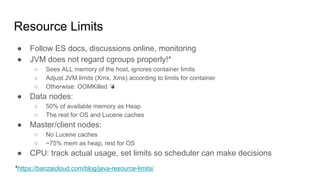
Resource Limits
● Follow ES docs, discussions online, monitoring
● JVM does not regard cgroups properly!*
○ Sees ALL memory of the host, ignores container limits
○ Adjust JVM limits (Xmx, Xms) according to limits for container
○ Otherwise: OOMKilled
● Data nodes:
○ 50% of available memory as Heap
○ The rest for OS and Lucene caches
● Master/client nodes:
○ No Lucene caches
○ ~75% mem as heap, rest for OS
● CPU: track actual usage, set limits so scheduler can make decisions
*https://banzaicloud.com/blog/java-resource-limits/
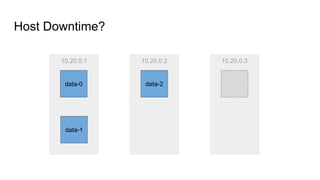
10.20.0.1
Host Downtime?
data-1
data-0
10.20.0.2
data-2
10.20.0.3
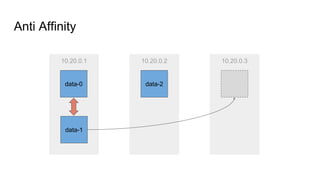
10.20.0.1
Anti Affinity
data-1
data-0
10.20.0.2
data-2
10.20.0.3
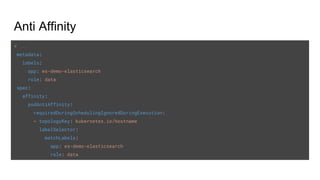
Anti Affinity
# ...
metadata:
labels:
app: es-demo-elasticsearch
role: data
spec:
affinity:
podAntiAffinity:
requiredDuringSchedulingIgnoredDuringExecution:
- topologyKey: kubernetes.io/hostname
labelSelector:
matchLabels:
app: es-demo-elasticsearch
role: data
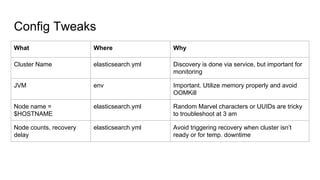
Config Tweaks
What Where Why
Cluster Name elasticsearch.yml Discovery is done via service, but important for
monitoring
JVM env Important. Utilize memory properly and avoid
OOMKill
Node name =
$HOSTNAME
elasticsearch.yml Random Marvel characters or UUIDs are tricky
to troubleshoot at 3 am
Node counts, recovery
delay
elasticsearch.yml Avoid triggering recovery when cluster isn’t
ready or for temp. downtime
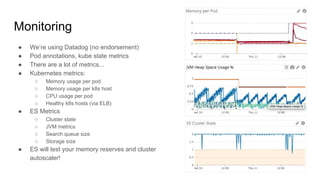
Monitoring
● We’re using Datadog (no endorsement)
● Pod annotations, kube state metrics
● There are a lot of metrics...
● Kubernetes metrics:
○ Memory usage per pod
○ Memory usage per k8s host
○ CPU usage per pod
○ Healthy k8s hosts (via ELB)
● ES Metrics
○ Cluster state
○ JVM metrics
○ Search queue size
○ Storage size
● ES will test your memory reserves and cluster
autoscaler!
Troubleshooting
● Introspection via API
● _cat APIs
○ Human readable, watchable
○ Health state, index health
○ Shard allocation
○ Recovery jobs
○ Thread pool (search queue size!)
● _cluster/_node APIs
○ Consumed by e.g. Datadog
○ Node stats: JVM state, resource usage
○ Cluster stats
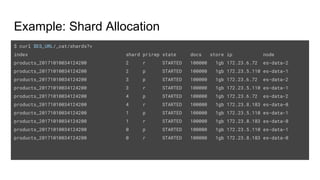
Example: Shard Allocation
$ curl $ES_URL/_cat/shards?v
index shard prirep state docs store ip node
products_20171010034124200 2 r STARTED 100000 1gb 172.23.6.72 es-data-2
products_20171010034124200 2 p STARTED 100000 1gb 172.23.5.110 es-data-1
products_20171010034124200 3 p STARTED 100000 1gb 172.23.6.72 es-data-2
products_20171010034124200 3 r STARTED 100000 1gb 172.23.5.110 es-data-1
products_20171010034124200 4 p STARTED 100000 1gb 172.23.6.72 es-data-2
products_20171010034124200 4 r STARTED 100000 1gb 172.23.8.183 es-data-0
products_20171010034124200 1 p STARTED 100000 1gb 172.23.5.110 es-data-1
products_20171010034124200 1 r STARTED 100000 1gb 172.23.8.183 es-data-0
products_20171010034124200 0 p STARTED 100000 1gb 172.23.5.110 es-data-1
products_20171010034124200 0 r STARTED 100000 1gb 172.23.8.183 es-data-0
Example: JVM heap usage
curl $ES_URL/_nodes/<node_name> | jq '.nodes[].jvm.mem'
{
"heap_init_in_bytes": 1073741824, # 1 GB
"heap_max_in_bytes": 1038876672, # ~1 GB
"non_heap_init_in_bytes": 2555904,
"non_heap_max_in_bytes": 0,
"direct_max_in_bytes": 1038876672
}
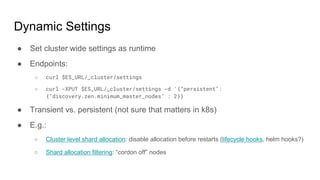
Dynamic Settings
● Set cluster wide settings as runtime
● Endpoints:
○ curl $ES_URL/_cluster/settings
○ curl -XPUT $ES_URL/_cluster/settings -d '{"persistent":
{"discovery.zen.minimum_master_nodes" : 2}}
● Transient vs. persistent (not sure that matters in k8s)
● E.g.:
○ Cluster level shard allocation: disable allocation before restarts (lifecycle hooks, helm hooks?)
○ Shard allocation filtering: “cordon off” nodes
Advanced (TODO)
● Shard allocation awareness (host, rack, AZ, …)
● Shard allocation filtering (cordoning off nodes, ...)
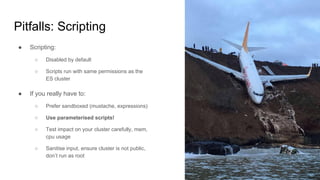
Pitfalls: Scripting
● Scripting:
○ Disabled by default
○ Scripts run with same permissions as the
ES cluster
● If you really have to:
○ Prefer sandboxed (mustache, expressions)
○ Use parameterised scripts!
○ Test impact on your cluster carefully, mem,
cpu usage
○ Sanitise input, ensure cluster is not public,
don’t run as root
Elasticsearch Operator
● https://github.com/upmc-enterprises/elasticsearch-operator
● CustomResourceDefinition, higher level abstraction
○ Domain specific configuration
○ Snapshots
○ Certificates
● https://raw.githubusercontent.com/upmc-enterprises/elasticsearch-operator/m
aster/example/example-es-cluster-minikube.yaml
● Demo: https://www.youtube.com/watch?v=3HnV7NfgP6A

Elasticsearch on Kubernetes

  • 1.
  • 2.
    Elasticsearch [is] adistributed, multitenant-capable full-text search engine with an HTTP web interface and schema-free JSON documents [based on Lucene] (https://en.wikipedia.org/wiki/Elasticsearch)
  • 3.
    Elasticsearch at Honestbee ●Used as backend for product search function on Honestbee.com ● Mission critical part of production setup ● Downtime will cause major service disruption ● Stats: ○ Product index: ~3,300,000 documents ○ Query latency: ~30ms ○ Queries per hr: 15-20k ● ES v2.3, 5.3 ● Kubernetes v1.5, v1.7
  • 4.
    Concepts ● Cluster ○ Collectionof nodes that holds entire dataset ● Node ○ Instance of elasticsearch taking part in indexing, search ○ Will join a cluster by name ○ Single node clusters are possible ● Index, Alias ○ Collection of document that are somewhat similar (much like NoSQL collections) ● Document: ○ Piece of data, expressed as JSON ● Shard, Replica ○ Subdivision of an index ○ Scalability, HA ○ Each shard is a Lucene index in itself Cluster Node Shard Shard Shard Node Shard Shard Shard
  • 5.
    Index, Alias, Shard products_201801 16123456 products 0 1 2 ●Horizontal scalability ● # primary shards cannot be changed later!
  • 6.
  • 7.
  • 8.
    Replication 0 1 3 2 0 1 3 2 1Index, 3 shards x 1 replica = 6 shards
  • 9.
    Node Roles ● Master(eligible) Node ○ Discovery, shard allocation, etc. ○ Only one active at a time (election) ● Data Node ○ Holds the actual shards ○ Does CRUD, search ● Client Node ○ REST API ○ Aggregation ● Controlled in elasticsearch.yml ● A node can have multiple roles Client Client Client Data Data Data LB *Master Master Master
  • 10.
    # elasticsearch.yml node.master: false node.data:true node.ingest: false search.remote.connect: false
  • 11.
  • 12.
    Kubernetes ● One deploymentper node role ○ Scaling ○ Resources ○ Config ● E.g. 3 masters, >= 3 data nodes, clients as needed ● Discovery plugin* (needs access to kube API, RBAC) ● Services: ○ Discovery ○ API ○ STS (later) ● Optional: Ingress, CM, CronJob, SA, CM *https://github.com/fabric8io/elasticsearch-cloud-kubernetes
  • 13.
    Stateless 0 1 23 3 0 1 2 3 2 ● No persistent state ● Multiple node failures? ● Cluster upgrades?
  • 15.
    Safety Net -Snapshots ● Repository - metadata defining snapshot storage ● Supported: FS, S3, HDFS, Azure, GCS ● Can be used to restore or replicate cluster (beware version compat*) ● Works well in with CronJobs (batch/v1beta) ● Snapper: honestbee/snapper ● Window of data loss when indexing in real time → RPO ● Helm hooks - causes timeout issues https://www.elastic.co/guide/en/elasticsearch/reference/current/modules-snapshots.html
  • 16.
    Manual Upgrade 0 1 3 2 01 3 2 0 1 3 disc. (svc) Production Rollover
  • 17.
    StatefulSet (STS) ● Kubernetesapproach to stateful applications (i.e. Databases) ● Very similar to a deployment ● But some extra properties: ○ Pods have a defined order ○ Different naming pattern ○ Will be launched and terminated in sequence ○ Etc. (check reference docs) ○ Support for PVC template
  • 18.
  • 19.
    StatefulSet and PVCs Deployment: ●Pods in a deployment are unrelated to each other ● Identity not maintained across restarts ● Indiv. Pods can have PVC ● Multiple pods - how to? ● Association PVC to pod when rescheduled? StatefulSet: ● Pods are ordered, maintain identity across restart ● PVCs are ordered ● STS pods ‘remember’ PVs ● volumeClaimTemplates ● Even survives `helm delete --purge` (by design?)
  • 20.
    apiVersion: apps/v1beta1 kind: StatefulSet #... spec: serviceName: {{ template "elasticsearch.data-service" . }} # ... podManagementPolicy: Parallel # quicker updateStrategy: type: RollingUpdate # default: onDelete template: # Pod spec, like deployment Statefulset vs. Deployment # ... volumeClaimTemplates: - metadata: name: "es-staging-pvc" labels: # ... spec: accessModes: [ReadWriteOnce] storageClassName: ”gp2” resources: requests: storage: ”35Gi”
  • 21.
    Resource Limits ● FollowES docs, discussions online, monitoring ● JVM does not regard cgroups properly!* ○ Sees ALL memory of the host, ignores container limits ○ Adjust JVM limits (Xmx, Xms) according to limits for container ○ Otherwise: OOMKilled ● Data nodes: ○ 50% of available memory as Heap ○ The rest for OS and Lucene caches ● Master/client nodes: ○ No Lucene caches ○ ~75% mem as heap, rest for OS ● CPU: track actual usage, set limits so scheduler can make decisions *https://banzaicloud.com/blog/java-resource-limits/
  • 22.
  • 23.
  • 24.
    Anti Affinity # ... metadata: labels: app:es-demo-elasticsearch role: data spec: affinity: podAntiAffinity: requiredDuringSchedulingIgnoredDuringExecution: - topologyKey: kubernetes.io/hostname labelSelector: matchLabels: app: es-demo-elasticsearch role: data
  • 25.
    Config Tweaks What WhereWhy Cluster Name elasticsearch.yml Discovery is done via service, but important for monitoring JVM env Important. Utilize memory properly and avoid OOMKill Node name = $HOSTNAME elasticsearch.yml Random Marvel characters or UUIDs are tricky to troubleshoot at 3 am Node counts, recovery delay elasticsearch.yml Avoid triggering recovery when cluster isn’t ready or for temp. downtime
  • 26.
    Monitoring ● We’re usingDatadog (no endorsement) ● Pod annotations, kube state metrics ● There are a lot of metrics... ● Kubernetes metrics: ○ Memory usage per pod ○ Memory usage per k8s host ○ CPU usage per pod ○ Healthy k8s hosts (via ELB) ● ES Metrics ○ Cluster state ○ JVM metrics ○ Search queue size ○ Storage size ● ES will test your memory reserves and cluster autoscaler!
  • 27.
    Troubleshooting ● Introspection viaAPI ● _cat APIs ○ Human readable, watchable ○ Health state, index health ○ Shard allocation ○ Recovery jobs ○ Thread pool (search queue size!) ● _cluster/_node APIs ○ Consumed by e.g. Datadog ○ Node stats: JVM state, resource usage ○ Cluster stats
  • 28.
    Example: Shard Allocation $curl $ES_URL/_cat/shards?v index shard prirep state docs store ip node products_20171010034124200 2 r STARTED 100000 1gb 172.23.6.72 es-data-2 products_20171010034124200 2 p STARTED 100000 1gb 172.23.5.110 es-data-1 products_20171010034124200 3 p STARTED 100000 1gb 172.23.6.72 es-data-2 products_20171010034124200 3 r STARTED 100000 1gb 172.23.5.110 es-data-1 products_20171010034124200 4 p STARTED 100000 1gb 172.23.6.72 es-data-2 products_20171010034124200 4 r STARTED 100000 1gb 172.23.8.183 es-data-0 products_20171010034124200 1 p STARTED 100000 1gb 172.23.5.110 es-data-1 products_20171010034124200 1 r STARTED 100000 1gb 172.23.8.183 es-data-0 products_20171010034124200 0 p STARTED 100000 1gb 172.23.5.110 es-data-1 products_20171010034124200 0 r STARTED 100000 1gb 172.23.8.183 es-data-0
  • 29.
    Example: JVM heapusage curl $ES_URL/_nodes/<node_name> | jq '.nodes[].jvm.mem' { "heap_init_in_bytes": 1073741824, # 1 GB "heap_max_in_bytes": 1038876672, # ~1 GB "non_heap_init_in_bytes": 2555904, "non_heap_max_in_bytes": 0, "direct_max_in_bytes": 1038876672 }
  • 30.
    Dynamic Settings ● Setcluster wide settings as runtime ● Endpoints: ○ curl $ES_URL/_cluster/settings ○ curl -XPUT $ES_URL/_cluster/settings -d '{"persistent": {"discovery.zen.minimum_master_nodes" : 2}} ● Transient vs. persistent (not sure that matters in k8s) ● E.g.: ○ Cluster level shard allocation: disable allocation before restarts (lifecycle hooks, helm hooks?) ○ Shard allocation filtering: “cordon off” nodes
  • 31.
    Advanced (TODO) ● Shardallocation awareness (host, rack, AZ, …) ● Shard allocation filtering (cordoning off nodes, ...)
  • 32.
    Pitfalls: Scripting ● Scripting: ○Disabled by default ○ Scripts run with same permissions as the ES cluster ● If you really have to: ○ Prefer sandboxed (mustache, expressions) ○ Use parameterised scripts! ○ Test impact on your cluster carefully, mem, cpu usage ○ Sanitise input, ensure cluster is not public, don’t run as root
  • 33.
    Elasticsearch Operator ● https://github.com/upmc-enterprises/elasticsearch-operator ●CustomResourceDefinition, higher level abstraction ○ Domain specific configuration ○ Snapshots ○ Certificates ● https://raw.githubusercontent.com/upmc-enterprises/elasticsearch-operator/m aster/example/example-es-cluster-minikube.yaml ● Demo: https://www.youtube.com/watch?v=3HnV7NfgP6A