Table Styling
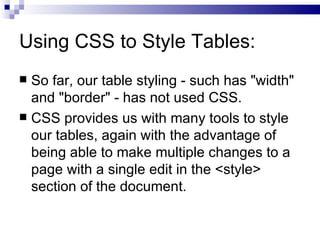
Using CSS to Style Tables: So far, our table styling - such has &quot;width&quot; and &quot;border&quot; - has not used CSS. CSS provides us with many tools to style our tables, again with the advantage of being able to make multiple changes to a page with a single edit in the <style> section of the document.
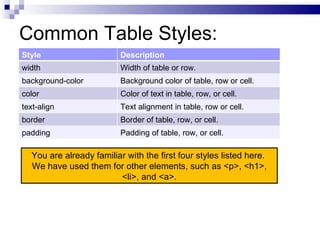
Common Table Styles: You are already familiar with the first four styles listed here.  We have used them for other elements, such as <p>, <h1>, <li>, and <a>. Text alignment in table, row or cell. text-align Border of table, row, or cell. border Padding of table, row, or cell. padding Style Description width Width of table or row. background-color Background color of table, row or cell. color Color of text in table, row, or cell.
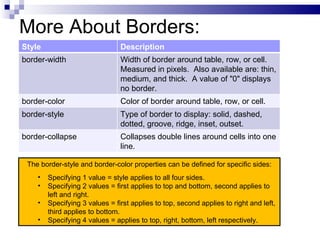
More About Borders: The border-style and border-color properties can be defined for specific sides: Specifying 1 value = style applies to all four sides. Specifying 2 values = first applies to top and bottom, second applies to left and right. Specifying 3 values = first applies to top, second applies to right and left, third applies to bottom.  Specifying 4 values = applies to top, right, bottom, left respectively. Collapses double lines around cells into one line. border-collapse Style Description border-width Width of border around table, row, or cell.  Measured in pixels.  Also available are: thin, medium, and thick.  A value of &quot;0&quot; displays no border. border-color Color of border around table, row, or cell. border-style Type of border to display: solid, dashed, dotted, groove, ridge, inset, outset.
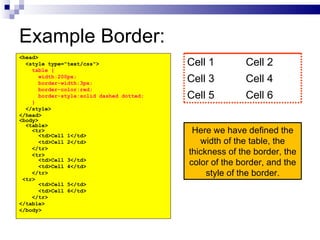
Example Border: <head> <style type=&quot;text/css&quot;> table { width:200px; border-width:3px; border-color:red; border-style:solid dashed dotted; } </style> </head> <body> <table> <tr> <td>Cell 1</td> <td>Cell 2</td> </tr> <tr> <td>Cell 3</td> <td>Cell 4</td> </tr> <tr> <td>Cell 5</td> <td>Cell 6</td> </tr> </table> </body> Here we have defined the width of the table, the thickness of the border, the color of the border, and the style of the border. Cell 4 Cell 3 Cell 6 Cell 5 Cell 2 Cell 1
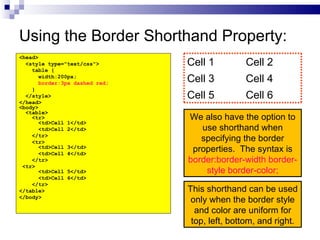
Using the Border Shorthand Property: <head> <style type=&quot;text/css&quot;> table { width:200px; border:3px dashed red; } </style> </head> <body> <table> <tr> <td>Cell 1</td> <td>Cell 2</td> </tr> <tr> <td>Cell 3</td> <td>Cell 4</td> </tr> <tr> <td>Cell 5</td> <td>Cell 6</td> </tr> </table> </body> We also have the option to use shorthand when specifying the border properties.  The syntax is  border:border-width border-style border-color; This shorthand can be used only when the border style and color are uniform for top, left, bottom, and right. Cell 4 Cell 3 Cell 6 Cell 5 Cell 2 Cell 1
Using CSS Classes to Style Tables: The power of CSS classes can be used when styling tables. For example, we can used two different classes to alternate background colors for table rows, making our table easier to read (much like the tables used in earlier slides).
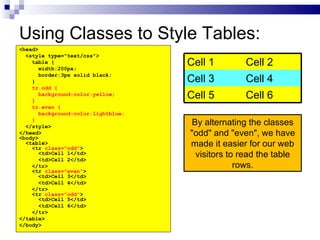
Using Classes to Style Tables: <head> <style type=&quot;text/css&quot;> table { width:200px; border:3px solid black; } tr.odd { background-color:yellow; } tr.even { background-color:lightblue; } </style> </head> <body> <table> <tr  class=&quot;odd&quot; > <td>Cell 1</td> <td>Cell 2</td> </tr> <tr  class=&quot;even&quot; > <td>Cell 3</td> <td>Cell 4</td> </tr> <tr  class=&quot;odd&quot; > <td>Cell 5</td> <td>Cell 6</td> </tr> </table> </body> By alternating the classes &quot;odd&quot; and &quot;even&quot;, we have made it easier for our web visitors to read the table rows. Cell 4 Cell 3 Cell 6 Cell 5 Cell 2 Cell 1

4.3 table styling

  • 1.
  • 2.
    Using CSS toStyle Tables: So far, our table styling - such has &quot;width&quot; and &quot;border&quot; - has not used CSS. CSS provides us with many tools to style our tables, again with the advantage of being able to make multiple changes to a page with a single edit in the <style> section of the document.
  • 3.
    Common Table Styles:You are already familiar with the first four styles listed here. We have used them for other elements, such as <p>, <h1>, <li>, and <a>. Text alignment in table, row or cell. text-align Border of table, row, or cell. border Padding of table, row, or cell. padding Style Description width Width of table or row. background-color Background color of table, row or cell. color Color of text in table, row, or cell.
  • 4.
    More About Borders:The border-style and border-color properties can be defined for specific sides: Specifying 1 value = style applies to all four sides. Specifying 2 values = first applies to top and bottom, second applies to left and right. Specifying 3 values = first applies to top, second applies to right and left, third applies to bottom. Specifying 4 values = applies to top, right, bottom, left respectively. Collapses double lines around cells into one line. border-collapse Style Description border-width Width of border around table, row, or cell. Measured in pixels. Also available are: thin, medium, and thick. A value of &quot;0&quot; displays no border. border-color Color of border around table, row, or cell. border-style Type of border to display: solid, dashed, dotted, groove, ridge, inset, outset.
  • 5.
    Example Border: <head><style type=&quot;text/css&quot;> table { width:200px; border-width:3px; border-color:red; border-style:solid dashed dotted; } </style> </head> <body> <table> <tr> <td>Cell 1</td> <td>Cell 2</td> </tr> <tr> <td>Cell 3</td> <td>Cell 4</td> </tr> <tr> <td>Cell 5</td> <td>Cell 6</td> </tr> </table> </body> Here we have defined the width of the table, the thickness of the border, the color of the border, and the style of the border. Cell 4 Cell 3 Cell 6 Cell 5 Cell 2 Cell 1
  • 6.
    Using the BorderShorthand Property: <head> <style type=&quot;text/css&quot;> table { width:200px; border:3px dashed red; } </style> </head> <body> <table> <tr> <td>Cell 1</td> <td>Cell 2</td> </tr> <tr> <td>Cell 3</td> <td>Cell 4</td> </tr> <tr> <td>Cell 5</td> <td>Cell 6</td> </tr> </table> </body> We also have the option to use shorthand when specifying the border properties. The syntax is border:border-width border-style border-color; This shorthand can be used only when the border style and color are uniform for top, left, bottom, and right. Cell 4 Cell 3 Cell 6 Cell 5 Cell 2 Cell 1
  • 7.
    Using CSS Classesto Style Tables: The power of CSS classes can be used when styling tables. For example, we can used two different classes to alternate background colors for table rows, making our table easier to read (much like the tables used in earlier slides).
  • 8.
    Using Classes toStyle Tables: <head> <style type=&quot;text/css&quot;> table { width:200px; border:3px solid black; } tr.odd { background-color:yellow; } tr.even { background-color:lightblue; } </style> </head> <body> <table> <tr class=&quot;odd&quot; > <td>Cell 1</td> <td>Cell 2</td> </tr> <tr class=&quot;even&quot; > <td>Cell 3</td> <td>Cell 4</td> </tr> <tr class=&quot;odd&quot; > <td>Cell 5</td> <td>Cell 6</td> </tr> </table> </body> By alternating the classes &quot;odd&quot; and &quot;even&quot;, we have made it easier for our web visitors to read the table rows. Cell 4 Cell 3 Cell 6 Cell 5 Cell 2 Cell 1