XHTML Validation
What is Validation?
   Validation is a method of verifying that we
    have made no syntax or rules violations on our
    web pages.
   This step is important, as it helps ensure that
    our websites display properly and consistently
    to our visitors.
   We validate our pages and make any
    necessary corrections prior to posting them
    live on the internet. Whenever we make major
    changes to a page, we should revalidate it.
More About Validation:
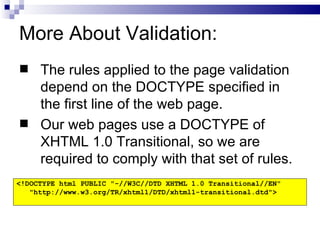
 The rules applied to the page validation
  depend on the DOCTYPE specified in
  the first line of the web page.
 Our web pages use a DOCTYPE of
  XHTML 1.0 Transitional, so we are
  required to comply with that set of rules.
<!DOCTYPE html PUBLIC "-//W3C//DTD XHTML 1.0 Transitional//EN"
   "http://www.w3.org/TR/xhtml1/DTD/xhtml1-transitional.dtd">
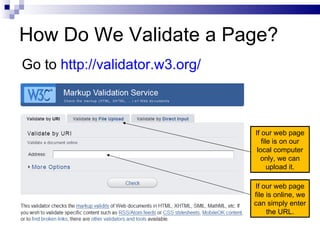
How Do We Validate a Page?
Go to http://validator.w3.org/


                                 If our web page
                                    file is on our
                                  local computer
                                   only, we can
                                       upload it.

                                 If our web page
                                 file is online, we
                                 can simply enter
                                      the URL.
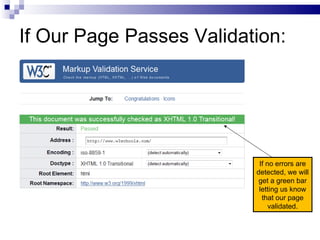
If Our Page Passes Validation:


                           If no errors are
                          detected, we will
                           get a green bar
                           letting us know
                            that our page
                               validated.
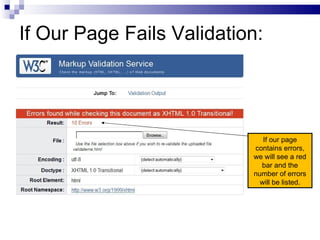
If Our Page Fails Validation:


                              If our page
                           contains errors,
                           we will see a red
                             bar and the
                           number of errors
                             will be listed.
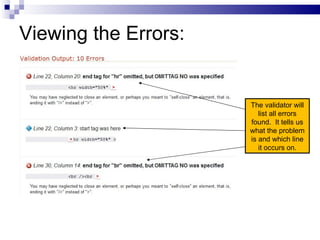
Viewing the Errors:


                      The validator will
                         list all errors
                      found. It tells us
                      what the problem
                      is and which line
                         it occurs on.
Making the Corrections:
   Don't panic when you see that there are errors
    on your page. It's very common.
   Make the corrections one or two at a time and
    revalidate the document. Often, you will find
    that by making a single correction, the error
    count will drop dramatically.
   Continue working through the corrections until
    your document validates with no errors.

7.1 xhtml validation

  • 1.
  • 2.
    What is Validation?  Validation is a method of verifying that we have made no syntax or rules violations on our web pages.  This step is important, as it helps ensure that our websites display properly and consistently to our visitors.  We validate our pages and make any necessary corrections prior to posting them live on the internet. Whenever we make major changes to a page, we should revalidate it.
  • 3.
    More About Validation: The rules applied to the page validation depend on the DOCTYPE specified in the first line of the web page.  Our web pages use a DOCTYPE of XHTML 1.0 Transitional, so we are required to comply with that set of rules. <!DOCTYPE html PUBLIC "-//W3C//DTD XHTML 1.0 Transitional//EN" "http://www.w3.org/TR/xhtml1/DTD/xhtml1-transitional.dtd">
  • 4.
    How Do WeValidate a Page? Go to http://validator.w3.org/ If our web page file is on our local computer only, we can upload it. If our web page file is online, we can simply enter the URL.
  • 5.
    If Our PagePasses Validation: If no errors are detected, we will get a green bar letting us know that our page validated.
  • 6.
    If Our PageFails Validation: If our page contains errors, we will see a red bar and the number of errors will be listed.
  • 7.
    Viewing the Errors: The validator will list all errors found. It tells us what the problem is and which line it occurs on.
  • 8.
    Making the Corrections:  Don't panic when you see that there are errors on your page. It's very common.  Make the corrections one or two at a time and revalidate the document. Often, you will find that by making a single correction, the error count will drop dramatically.  Continue working through the corrections until your document validates with no errors.