Advanced Tables
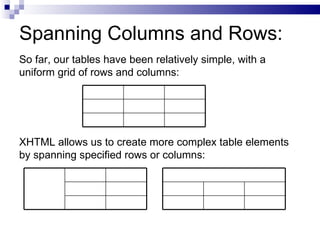
Spanning Columns and Rows: So far, our tables have been relatively simple, with a uniform grid of rows and columns: XHTML allows us to create more complex table elements by spanning specified rows or columns:
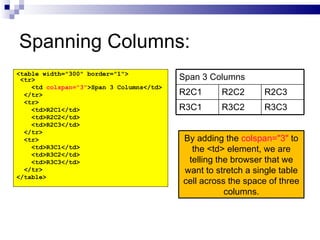
Spanning Columns: <table width=&quot;300&quot; border=&quot;1&quot;> <tr> <td  colspan=&quot;3&quot; >Span 3 Columns</td> </tr> <tr> <td>R2C1</td> <td>R2C2</td> <td>R2C3</td> </tr> <tr> <td>R3C1</td> <td>R3C2</td> <td>R3C3</td> </tr> </table> By adding the  colspan=&quot;3&quot;  to the <td> element, we are telling the browser that we want to stretch a single table cell across the space of three columns. R3C2 R2C2 R3C3 R3C1 R2C3 R2C1 Span 3 Columns
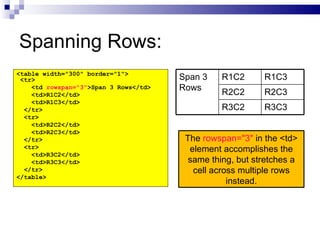
Spanning Rows: <table width=&quot;300&quot; border=&quot;1&quot;> <tr> <td  rowspan=&quot;3&quot; >Span 3 Rows</td> <td>R1C2</td> <td>R1C3</td> </tr> <tr> <td>R2C2</td> <td>R2C3</td> </tr> <tr> <td>R3C2</td> <td>R3C3</td> </tr> </table> The  rowspan=&quot;3&quot;  in the <td> element accomplishes the same thing, but stretches a cell across multiple rows instead. R1C3 R1C2 Span 3 Rows R3C2 R2C2 R3C3 R2C3

4.1 advanced tables

  • 1.
  • 2.
    Spanning Columns andRows: So far, our tables have been relatively simple, with a uniform grid of rows and columns: XHTML allows us to create more complex table elements by spanning specified rows or columns:
  • 3.
    Spanning Columns: <tablewidth=&quot;300&quot; border=&quot;1&quot;> <tr> <td colspan=&quot;3&quot; >Span 3 Columns</td> </tr> <tr> <td>R2C1</td> <td>R2C2</td> <td>R2C3</td> </tr> <tr> <td>R3C1</td> <td>R3C2</td> <td>R3C3</td> </tr> </table> By adding the colspan=&quot;3&quot; to the <td> element, we are telling the browser that we want to stretch a single table cell across the space of three columns. R3C2 R2C2 R3C3 R3C1 R2C3 R2C1 Span 3 Columns
  • 4.
    Spanning Rows: <tablewidth=&quot;300&quot; border=&quot;1&quot;> <tr> <td rowspan=&quot;3&quot; >Span 3 Rows</td> <td>R1C2</td> <td>R1C3</td> </tr> <tr> <td>R2C2</td> <td>R2C3</td> </tr> <tr> <td>R3C2</td> <td>R3C3</td> </tr> </table> The rowspan=&quot;3&quot; in the <td> element accomplishes the same thing, but stretches a cell across multiple rows instead. R1C3 R1C2 Span 3 Rows R3C2 R2C2 R3C3 R2C3