Hi friends
C# Tutorial
Part 40:
XML
www.siri-kt.blogspot.com
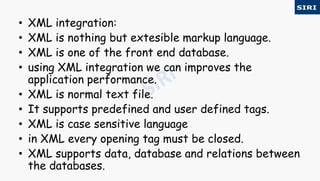
• XML integration:
• XML is nothing but extesible markup language.
• XML is one of the front end database.
• using XML integration we can improves the
application performance.
• XML is normal text file.
• It supports predefined and user defined tags.
• XML is case sensitive language
• in XML every opening tag must be closed.
• XML supports data, database and relations between
the databases.
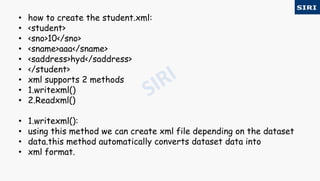
• how to create the student.xml:
• <student>
• <sno>10</sno>
• <sname>aaa</sname>
• <saddress>hyd</saddress>
• </student>
• xml supports 2 methods
• 1.writexml()
• 2.Readxml()
• 1.writexml():
• using this method we can create xml file depending on the dataset
• data.this method automatically converts dataset data into
• xml format.
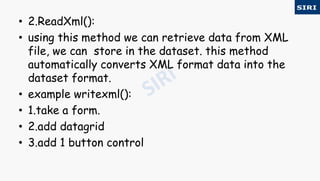
• 2.ReadXml():
• using this method we can retrieve data from XML
file, we can store in the dataset. this method
automatically converts XML format data into the
dataset format.
• example writexml():
• 1.take a form.
• 2.add datagrid
• 3.add 1 button control
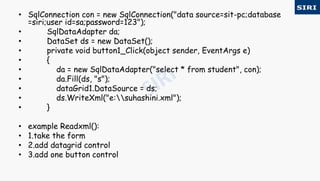
• SqlConnection con = new SqlConnection("data source=sit-pc;database
=siri;user id=sa;password=123");
• SqlDataAdapter da;
• DataSet ds = new DataSet();
• private void button1_Click(object sender, EventArgs e)
• {
• da = new SqlDataAdapter("select * from student", con);
• da.Fill(ds, "s");
• dataGrid1.DataSource = ds;
• ds.WriteXml("e:suhashini.xml");
• }
• example Readxml():
• 1.take the form
• 2.add datagrid control
• 3.add one button control
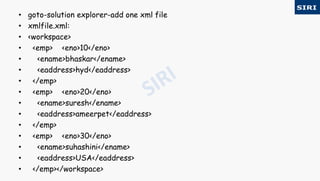
• goto-solution explorer-add one xml file
• xmlfile.xml:
• <workspace>
• <emp> <eno>10</eno>
• <ename>bhaskar</ename>
• <eaddress>hyd</eaddress>
• </emp>
• <emp> <eno>20</eno>
• <ename>suresh</ename>
• <eaddress>ameerpet</eaddress>
• </emp>
• <emp> <eno>30</eno>
• <ename>suhashini</ename>
• <eaddress>USA</eaddress>
• </emp></workspace>
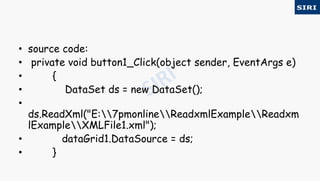
• source code:
• private void button1_Click(object sender, EventArgs e)
• {
• DataSet ds = new DataSet();
•
ds.ReadXml("E:7pmonlineReadxmlExampleReadxm
lExampleXMLFile1.xml");
• dataGrid1.DataSource = ds;
• }
For more visit our website www.siri-kt.blogspot.com
Thanks for
Watching
More Angular JS TutorialsMore C sharp (c#) tutorials

40c

  • 1.
    Hi friends C# Tutorial Part40: XML www.siri-kt.blogspot.com
  • 2.
    • XML integration: •XML is nothing but extesible markup language. • XML is one of the front end database. • using XML integration we can improves the application performance. • XML is normal text file. • It supports predefined and user defined tags. • XML is case sensitive language • in XML every opening tag must be closed. • XML supports data, database and relations between the databases.
  • 3.
    • how tocreate the student.xml: • <student> • <sno>10</sno> • <sname>aaa</sname> • <saddress>hyd</saddress> • </student> • xml supports 2 methods • 1.writexml() • 2.Readxml() • 1.writexml(): • using this method we can create xml file depending on the dataset • data.this method automatically converts dataset data into • xml format.
  • 4.
    • 2.ReadXml(): • usingthis method we can retrieve data from XML file, we can store in the dataset. this method automatically converts XML format data into the dataset format. • example writexml(): • 1.take a form. • 2.add datagrid • 3.add 1 button control
  • 5.
    • SqlConnection con= new SqlConnection("data source=sit-pc;database =siri;user id=sa;password=123"); • SqlDataAdapter da; • DataSet ds = new DataSet(); • private void button1_Click(object sender, EventArgs e) • { • da = new SqlDataAdapter("select * from student", con); • da.Fill(ds, "s"); • dataGrid1.DataSource = ds; • ds.WriteXml("e:suhashini.xml"); • } • example Readxml(): • 1.take the form • 2.add datagrid control • 3.add one button control
  • 6.
    • goto-solution explorer-addone xml file • xmlfile.xml: • <workspace> • <emp> <eno>10</eno> • <ename>bhaskar</ename> • <eaddress>hyd</eaddress> • </emp> • <emp> <eno>20</eno> • <ename>suresh</ename> • <eaddress>ameerpet</eaddress> • </emp> • <emp> <eno>30</eno> • <ename>suhashini</ename> • <eaddress>USA</eaddress> • </emp></workspace>
  • 7.
    • source code: •private void button1_Click(object sender, EventArgs e) • { • DataSet ds = new DataSet(); • ds.ReadXml("E:7pmonlineReadxmlExampleReadxm lExampleXMLFile1.xml"); • dataGrid1.DataSource = ds; • }
  • 8.
    For more visitour website www.siri-kt.blogspot.com Thanks for Watching More Angular JS TutorialsMore C sharp (c#) tutorials