Hello friends
C# Tutorial
Part : 43
Exception Handling
www.siri-kt.blogspot.com
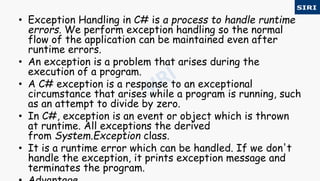
• Exception Handling in C# is a process to handle runtime
errors. We perform exception handling so the normal
flow of the application can be maintained even after
runtime errors.
• An exception is a problem that arises during the
execution of a program.
• A C# exception is a response to an exceptional
circumstance that arises while a program is running, such
as an attempt to divide by zero.
• In C#, exception is an event or object which is thrown
at runtime. All exceptions the derived
from System.Exception class.
• It is a runtime error which can be handled. If we don't
handle the exception, it prints exception message and
terminates the program.
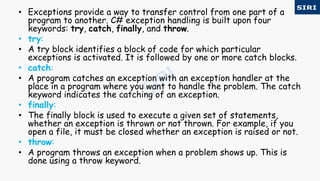
• Exceptions provide a way to transfer control from one part of a
program to another. C# exception handling is built upon four
keywords: try, catch, finally, and throw.
• try:
• A try block identifies a block of code for which particular
exceptions is activated. It is followed by one or more catch blocks.
• catch:
• A program catches an exception with an exception handler at the
place in a program where you want to handle the problem. The catch
keyword indicates the catching of an exception.
• finally:
• The finally block is used to execute a given set of statements,
whether an exception is thrown or not thrown. For example, if you
open a file, it must be closed whether an exception is raised or not.
• throw:
• A program throws an exception when a problem shows up. This is
done using a throw keyword.
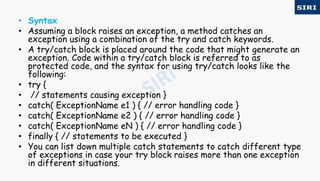
• Syntax
• Assuming a block raises an exception, a method catches an
exception using a combination of the try and catch keywords.
• A try/catch block is placed around the code that might generate an
exception. Code within a try/catch block is referred to as
protected code, and the syntax for using try/catch looks like the
following:
• try {
• // statements causing exception }
• catch( ExceptionName e1 ) { // error handling code }
• catch( ExceptionName e2 ) { // error handling code }
• catch( ExceptionName eN ) { // error handling code }
• finally { // statements to be executed }
• You can list down multiple catch statements to catch different type
of exceptions in case your try block raises more than one exception
in different situations.
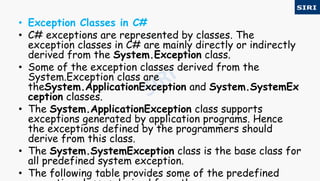
• Exception Classes in C#
• C# exceptions are represented by classes. The
exception classes in C# are mainly directly or indirectly
derived from the System.Exception class.
• Some of the exception classes derived from the
System.Exception class are
theSystem.ApplicationException and System.SystemEx
ception classes.
• The System.ApplicationException class supports
exceptions generated by application programs. Hence
the exceptions defined by the programmers should
derive from this class.
• The System.SystemException class is the base class for
all predefined system exception.
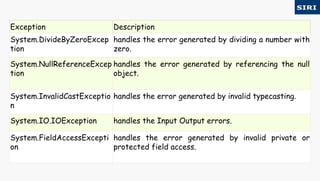
• The following table provides some of the predefined
Exception Description
System.DivideByZeroExcep
tion
handles the error generated by dividing a number with
zero.
System.NullReferenceExcep
tion
handles the error generated by referencing the null
object.
System.InvalidCastExceptio
n
handles the error generated by invalid typecasting.
System.IO.IOException handles the Input Output errors.
System.FieldAccessExcepti
on
handles the error generated by invalid private or
protected field access.
• C# try/catch
• In C# programming, exception handling is performed by try/catch
statement. The try block in C# is used to place the code that may throw
exception. The catch block is used to handled the exception. The catch
block must be preceded by try block.
• C# example without try/catch
• using System;
• public class ExExample
• { public static void Main(string[] args)
• { int a = 10;
• int b = 0;
• int x = a/b;
• Console.WriteLine("Rest of the code");
• } }
• Output:
• Unhandled Exception: System.DivideByZeroException: Attempted to divide
• C# try/catch example
• using System;
• public class ExExample
• { public static void Main(string[] args)
• { try
• { int a = 10;
• int b = 0;
• int x = a / b; }
• catch (Exception e) { Console.WriteLine(e); }
• Console.WriteLine("Rest of the code");
• } }
• Output:
• System.DivideByZeroException: Attempted to divide by zero. Rest
of the code
• C# finally
• C# finally block is used to execute important code which is to be executed whether
exception is handled or not. It must be preceded by catch or try block.
• C# finally example if exception is handled
• using System;
• public class ExExample
• { public static void Main(string[] args)
• { try
• { int a = 10;
• int b = 0;
• int x = a / b; }
• catch (Exception e) { Console.WriteLine(e); }
• finally { Console.WriteLine("Finally block is executed"); }
• Console.WriteLine("Rest of the code");
• } }
• Output:
• System.DivideByZeroException: Attempted to divide by zero. Finally block is
executed Rest of the code
• C# finally example if exception is not handled
• using System;
• public class ExExample
• { public static void Main(string[] args)
• { try
• { int a = 10;
• int b = 0;
• int x = a / b; }
• catch (NullReferenceException e) { Console.WriteLine(e); }
• finally { Console.WriteLine("Finally block is executed"); }
• Console.WriteLine("Rest of the code");
• } }
• Output:
• Unhandled Exception: System.DivideBy
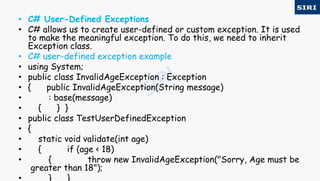
• C# User-Defined Exceptions
• C# allows us to create user-defined or custom exception. It is used
to make the meaningful exception. To do this, we need to inherit
Exception class.
• C# user-defined exception example
• using System;
• public class InvalidAgeException : Exception
• { public InvalidAgeException(String message)
• : base(message)
• { } }
• public class TestUserDefinedException
• {
• static void validate(int age)
• { if (age < 18)
• { throw new InvalidAgeException("Sorry, Age must be
greater than 18");
• public static void Main(string[] args)
• { try
• { validate(12); }
• catch (InvalidAgeException e) { Console.Write
Line(e); }
• Console.WriteLine("Rest of the code");
• } }
• Output:
• InvalidAgeException: Sorry, Age must be greater
For more visit our website www.siri-kt.blogspot.com
Thanks for
Watching
More Angular JS TutorialsMore C sharp (c#) tutorials

43c

  • 1.
    Hello friends C# Tutorial Part: 43 Exception Handling www.siri-kt.blogspot.com
  • 2.
    • Exception Handlingin C# is a process to handle runtime errors. We perform exception handling so the normal flow of the application can be maintained even after runtime errors. • An exception is a problem that arises during the execution of a program. • A C# exception is a response to an exceptional circumstance that arises while a program is running, such as an attempt to divide by zero. • In C#, exception is an event or object which is thrown at runtime. All exceptions the derived from System.Exception class. • It is a runtime error which can be handled. If we don't handle the exception, it prints exception message and terminates the program.
  • 3.
    • Exceptions providea way to transfer control from one part of a program to another. C# exception handling is built upon four keywords: try, catch, finally, and throw. • try: • A try block identifies a block of code for which particular exceptions is activated. It is followed by one or more catch blocks. • catch: • A program catches an exception with an exception handler at the place in a program where you want to handle the problem. The catch keyword indicates the catching of an exception. • finally: • The finally block is used to execute a given set of statements, whether an exception is thrown or not thrown. For example, if you open a file, it must be closed whether an exception is raised or not. • throw: • A program throws an exception when a problem shows up. This is done using a throw keyword.
  • 4.
    • Syntax • Assuminga block raises an exception, a method catches an exception using a combination of the try and catch keywords. • A try/catch block is placed around the code that might generate an exception. Code within a try/catch block is referred to as protected code, and the syntax for using try/catch looks like the following: • try { • // statements causing exception } • catch( ExceptionName e1 ) { // error handling code } • catch( ExceptionName e2 ) { // error handling code } • catch( ExceptionName eN ) { // error handling code } • finally { // statements to be executed } • You can list down multiple catch statements to catch different type of exceptions in case your try block raises more than one exception in different situations.
  • 5.
    • Exception Classesin C# • C# exceptions are represented by classes. The exception classes in C# are mainly directly or indirectly derived from the System.Exception class. • Some of the exception classes derived from the System.Exception class are theSystem.ApplicationException and System.SystemEx ception classes. • The System.ApplicationException class supports exceptions generated by application programs. Hence the exceptions defined by the programmers should derive from this class. • The System.SystemException class is the base class for all predefined system exception. • The following table provides some of the predefined
  • 6.
    Exception Description System.DivideByZeroExcep tion handles theerror generated by dividing a number with zero. System.NullReferenceExcep tion handles the error generated by referencing the null object. System.InvalidCastExceptio n handles the error generated by invalid typecasting. System.IO.IOException handles the Input Output errors. System.FieldAccessExcepti on handles the error generated by invalid private or protected field access.
  • 7.
    • C# try/catch •In C# programming, exception handling is performed by try/catch statement. The try block in C# is used to place the code that may throw exception. The catch block is used to handled the exception. The catch block must be preceded by try block. • C# example without try/catch • using System; • public class ExExample • { public static void Main(string[] args) • { int a = 10; • int b = 0; • int x = a/b; • Console.WriteLine("Rest of the code"); • } } • Output: • Unhandled Exception: System.DivideByZeroException: Attempted to divide
  • 8.
    • C# try/catchexample • using System; • public class ExExample • { public static void Main(string[] args) • { try • { int a = 10; • int b = 0; • int x = a / b; } • catch (Exception e) { Console.WriteLine(e); } • Console.WriteLine("Rest of the code"); • } } • Output: • System.DivideByZeroException: Attempted to divide by zero. Rest of the code
  • 9.
    • C# finally •C# finally block is used to execute important code which is to be executed whether exception is handled or not. It must be preceded by catch or try block. • C# finally example if exception is handled • using System; • public class ExExample • { public static void Main(string[] args) • { try • { int a = 10; • int b = 0; • int x = a / b; } • catch (Exception e) { Console.WriteLine(e); } • finally { Console.WriteLine("Finally block is executed"); } • Console.WriteLine("Rest of the code"); • } } • Output: • System.DivideByZeroException: Attempted to divide by zero. Finally block is executed Rest of the code
  • 10.
    • C# finallyexample if exception is not handled • using System; • public class ExExample • { public static void Main(string[] args) • { try • { int a = 10; • int b = 0; • int x = a / b; } • catch (NullReferenceException e) { Console.WriteLine(e); } • finally { Console.WriteLine("Finally block is executed"); } • Console.WriteLine("Rest of the code"); • } } • Output: • Unhandled Exception: System.DivideBy
  • 11.
    • C# User-DefinedExceptions • C# allows us to create user-defined or custom exception. It is used to make the meaningful exception. To do this, we need to inherit Exception class. • C# user-defined exception example • using System; • public class InvalidAgeException : Exception • { public InvalidAgeException(String message) • : base(message) • { } } • public class TestUserDefinedException • { • static void validate(int age) • { if (age < 18) • { throw new InvalidAgeException("Sorry, Age must be greater than 18");
  • 12.
    • public staticvoid Main(string[] args) • { try • { validate(12); } • catch (InvalidAgeException e) { Console.Write Line(e); } • Console.WriteLine("Rest of the code"); • } } • Output: • InvalidAgeException: Sorry, Age must be greater
  • 13.
    For more visitour website www.siri-kt.blogspot.com Thanks for Watching More Angular JS TutorialsMore C sharp (c#) tutorials