Ian Cleary
   @iancleary
www.razorsocial.com
How to you keep a record of interesting
                       tweets you send?


When I come across great articles I share them out on
twitter but I don’t always store them myself.

This presentation shows a few different options for saving
my tweets.
1. Finding Tweets sent worth saving using
                         allmytweets.net


Twitter only stores the last 3,200 tweets you send and
doesn’t provide this in a easy to view format.

Allmytweets.net allows you to enter your twitter ID and
then display the last 3,200 tweets.
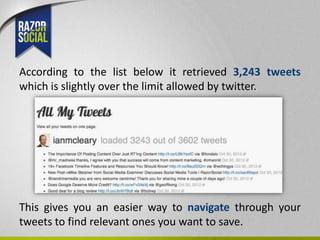
According to the list below it retrieved 3,243 tweets
which is slightly over the limit allowed by twitter.


This gives you an easier way to navigate through your
tweets to find relevant ones you want to save.
2. Bookmark your tweets with Diigo


Diigo is a neat bookmarking tool that allows you to store
links to relevant content.

The free version allows you to do unlimited bookmarking.

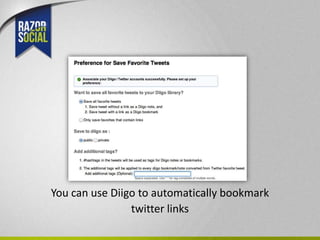
In Diigo there is an option to link your account to twitter.
You could do the following:

a). Favourite tweets in twitter and automatically save
them in Diigo.

b). Only save favourites that have links.

c). Automatically tag items coming from twitter e.g. tag
them ‘tweets’ so you know they came from twitter. Also
tag items with hashtags already specified.
You can use Diigo to automatically bookmark
                twitter links
3. Bookmark to a selection of places
                       using Packrati.us


Packrati.us monitors your twitter account.

When it comes across links it automatically adds these
links to your favourite bookmarking site such as
Delicious, Historious & Pocket (Read it later).

You can also bookmark website addresses in replies to
you.
4. Use a URL Shortener for every link sent


An alternative method is to use a website address
shortener when you are sending links.

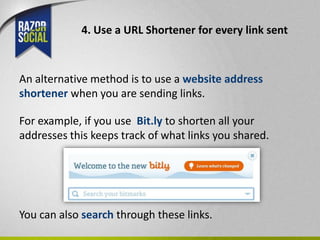
For example, if you use Bit.ly to shorten all your
addresses this keeps track of what links you shared.


You can also search through these links.
www.razorsocial.com

4 tools for saving great tweets

  • 1.
    Ian Cleary @iancleary www.razorsocial.com
  • 2.
    How to youkeep a record of interesting tweets you send? When I come across great articles I share them out on twitter but I don’t always store them myself. This presentation shows a few different options for saving my tweets.
  • 3.
    1. Finding Tweetssent worth saving using allmytweets.net Twitter only stores the last 3,200 tweets you send and doesn’t provide this in a easy to view format. Allmytweets.net allows you to enter your twitter ID and then display the last 3,200 tweets.
  • 4.
    According to thelist below it retrieved 3,243 tweets which is slightly over the limit allowed by twitter. This gives you an easier way to navigate through your tweets to find relevant ones you want to save.
  • 5.
    2. Bookmark yourtweets with Diigo Diigo is a neat bookmarking tool that allows you to store links to relevant content. The free version allows you to do unlimited bookmarking. In Diigo there is an option to link your account to twitter.
  • 6.
    You could dothe following: a). Favourite tweets in twitter and automatically save them in Diigo. b). Only save favourites that have links. c). Automatically tag items coming from twitter e.g. tag them ‘tweets’ so you know they came from twitter. Also tag items with hashtags already specified.
  • 7.
    You can useDiigo to automatically bookmark twitter links
  • 8.
    3. Bookmark toa selection of places using Packrati.us Packrati.us monitors your twitter account. When it comes across links it automatically adds these links to your favourite bookmarking site such as Delicious, Historious & Pocket (Read it later). You can also bookmark website addresses in replies to you.
  • 9.
    4. Use aURL Shortener for every link sent An alternative method is to use a website address shortener when you are sending links. For example, if you use Bit.ly to shorten all your addresses this keeps track of what links you shared. You can also search through these links.
  • 10.