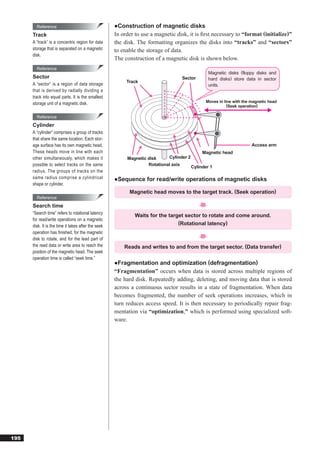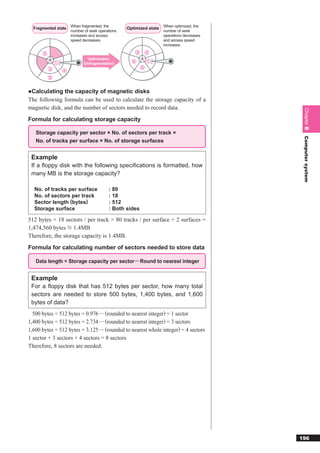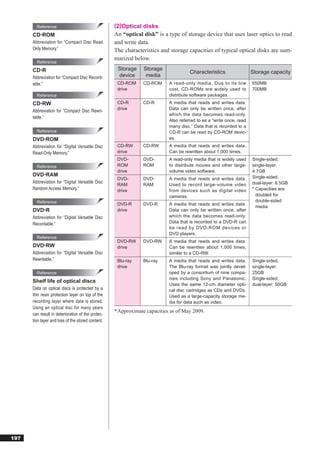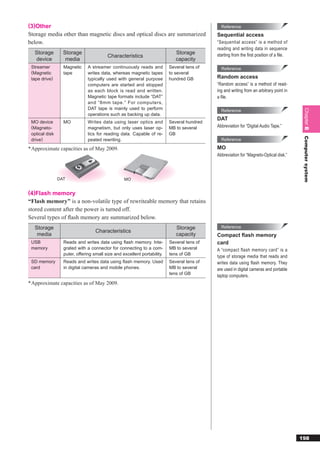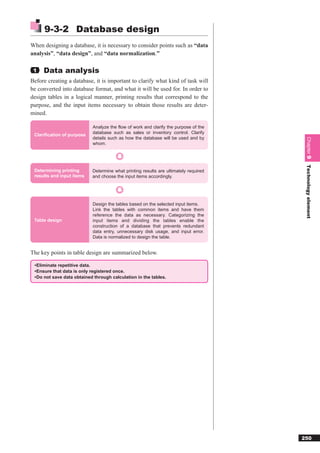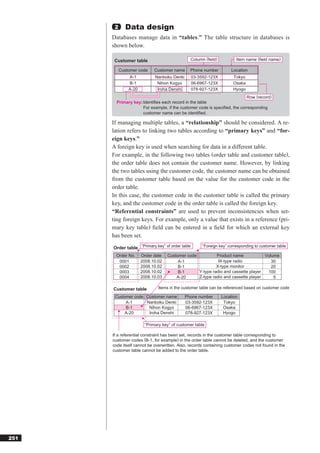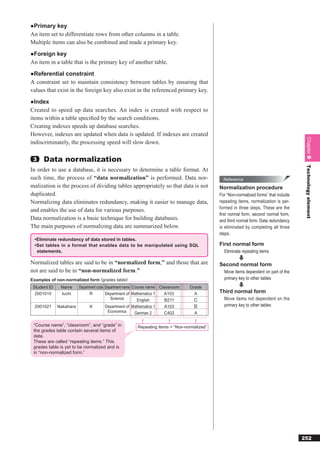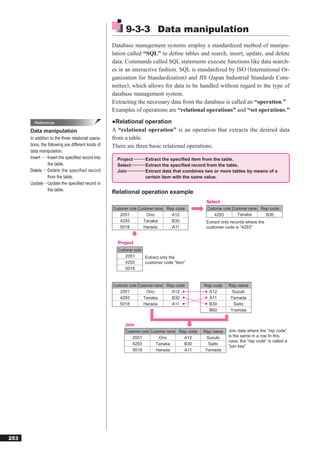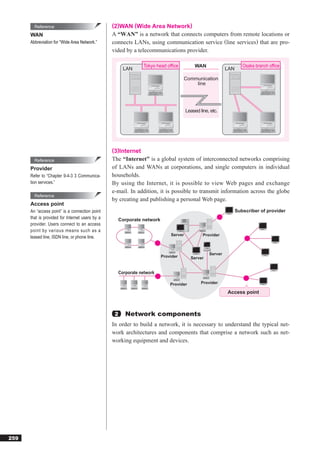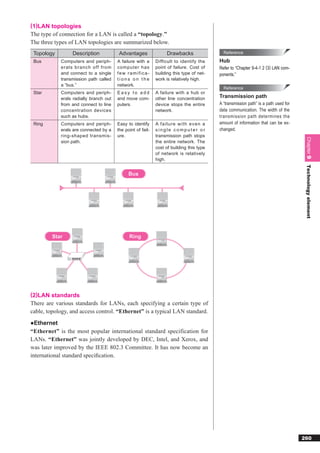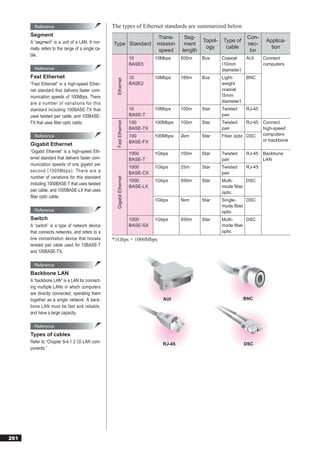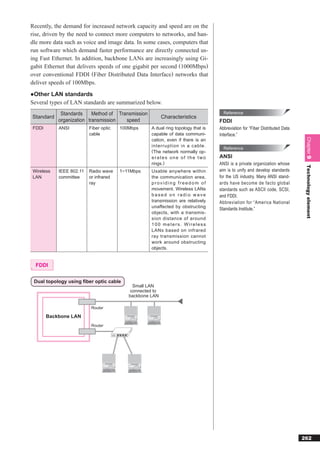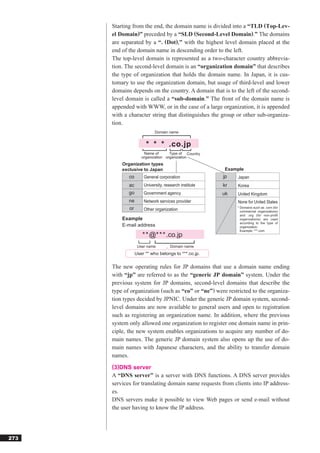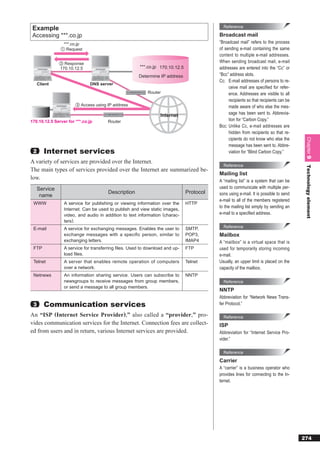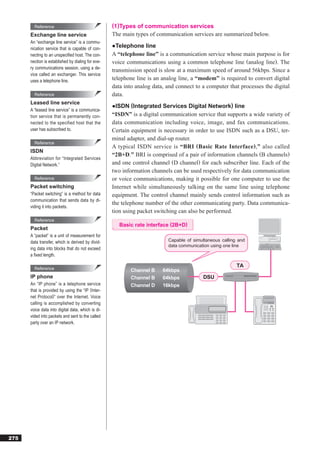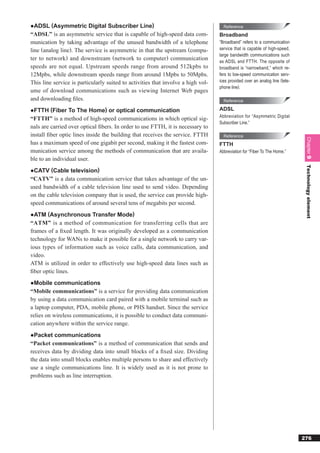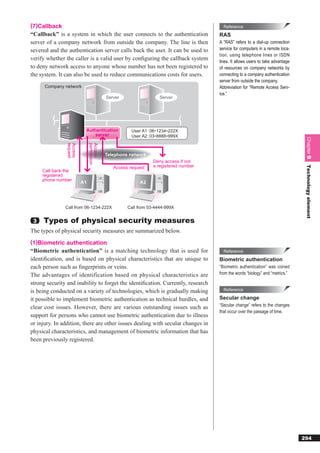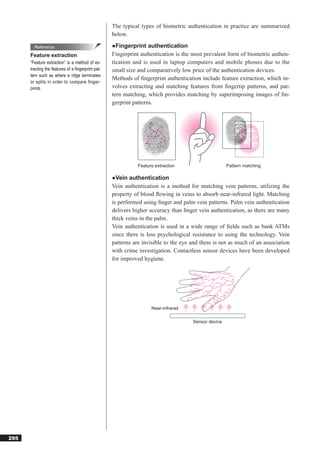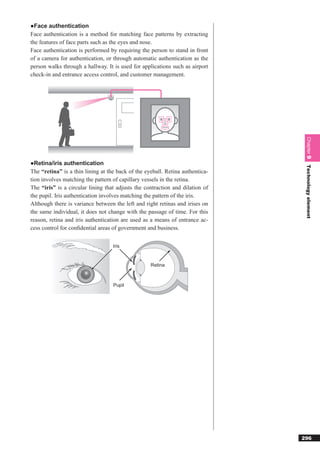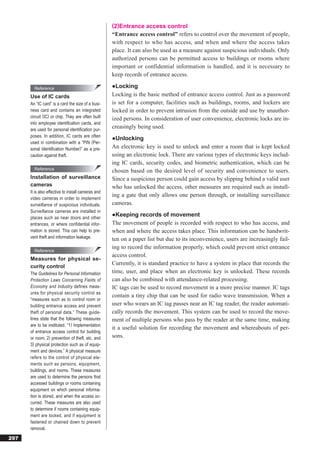


TECHNOLOGY


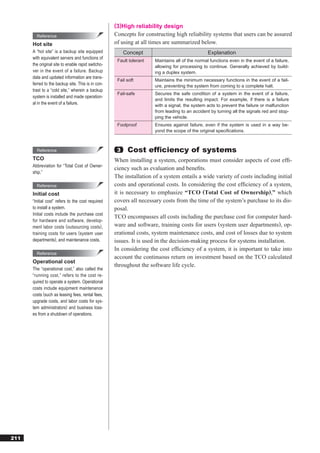
 Chapter 7 Basic theory............................ 156
 Chapter 8 Computer system ................... 186
 Chapter 9 Technology element ............... 234
Chapter


                        7

  Basic theory
Chapter 7 explains the fundamental concepts of ra-
dixes, sets, probabilities, and statistics, as well as the
digitization of information and algorithms.


7-1 Basic theory....................................... 157
7-2 Algorithms and programming ............ 171
7-3 Chapter quiz ...................................... 183
7-1   Basic theory

                    7-1-1 Discrete mathematics
              The information managed by computers bears a close relationship with
              “discrete mathematics,” which deals with factors such as digital quantity.
              Discrete mathematics forms the basis of a wide number of fields, encom-
              passing computer logic circuitry, data structures, and linguistic theory.

               1    Numbers and expression
              All internal computer commands and data are expressed using binary num-
              bers. An understanding of the fundamental logic behind the binary num-
              bers that form the basis of data expression, as well as other types of
              number systems, is essential in order to perform tasks such as program-
              ming.
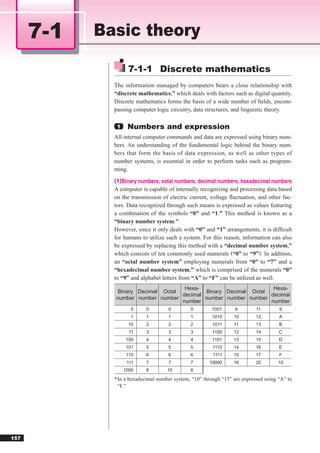
              (1)Binary numbers, octal numbers, decimal numbers, hexadecimal numbers
              A computer is capable of internally recognizing and processing data based
              on the transmission of electric current, voltage fluctuation, and other fac-
              tors. Data recognized through such means is expressed as values featuring
              a combination of the symbols “0” and “1.” This method is known as a
              “binary number system.”
              However, since it only deals with “0” and “1” arrangements, it is difficult
              for humans to utilize such a system. For this reason, information can also
              be expressed by replacing this method with a “decimal number system,”
              which consists of ten commonly used numerals (“0” to “9”). In addition,
              an “octal number system” employing numerals from “0” to “7” and a
              “hexadecimal number system,” which is comprised of the numerals “0”
              to “9” and alphabet letters from “A” to “F” can be utilized as well.
                                     Hexa-                         Hexa-
               Binary Decimal Octal          Binary Decimal Octal
                                    decimal                       decimal
              number number number          number number number
                                    number                        number
                      0     0        0         0        1001       9        11        9
                      1     1        1         1        1010      10        12        A
                     10     2        2         2         1011     11        13        B
                     11     3        3         3         1100     12        14        C
                    100     4        4         4         1101     13        15        D
                    101     5        5         5         1110     14        16        E
                    110     6        6         6         1111     15        17        F
                    111     7        7         7       10000      16        20       10
                   1000     8        10        8
              * In a hexadecimal number system, “10” through “15” are expressed using “A” to
                “F.”


157
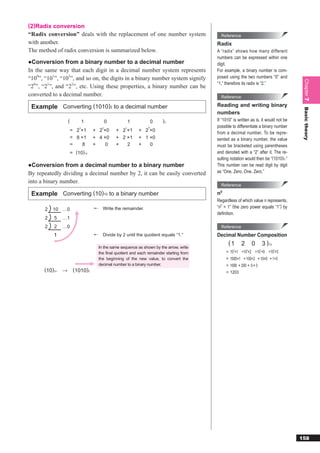
(2)Radix conversion
“Radix conversion” deals with the replacement of one number system                             Reference
with another.                                                                              Radix
The method of radix conversion is summarized below.                                        A “radix” shows how many different
                                                                                           numbers can be expressed within one
●Conversion from a binary number to a decimal number                                       digit.
In the same way that each digit in a decimal number system represents                      For example, a binary number is com-
“100”, “101”, “102”, and so on, the digits in a binary number system signify               posed using the two numbers “0” and


                                                                                                                                          Chapter 7
                                                                                           “1,” therefore its radix is “2.”
“20”, “21”, and “22”, etc. Using these properties, a binary number can be
converted to a decimal number.                                                                 Reference

 Example Converting (1010)2 to a decimal number                                            Reading and writing binary


                                                                                                                                          Basic theory
                                                                                           numbers
                   (           1           0            1            0   )2                If “1010” is written as is, it would not be
                           3           2            1            0                         possible to differentiate a binary number
                       = 2 ×1      + 2 ×0      + 2 ×1       + 2 ×0
                                                                                           from a decimal number. To be repre-
                       = 8 ×1      + 4 ×0      + 2 ×1       + 1 ×0                         sented as a binary number, the value
                       =    8      +    0      +   2        +   0                          must be bracketed using parentheses
                       = (10) 10                                                           and denoted with a “2” after it. The re-
                                                                                           sulting notation would then be “(1010)2.”
●Conversion from a decimal number to a binary number                                       This number can be read digit by digit
By repeatedly dividing a decimal number by 2, it can be easily converted                   as “One. Zero. One. Zero.”

into a binary number.
                                                                                               Reference

 Example Converting (10)10 to a binary number                                              n 0

                                                                                           Regardless of which value n represents,
       2   10 …0                       Write the remainder.                                “n0 = 1” (the zero power equals “1”) by
                                                                                           definition.
       2   5   …1
       2   2   …0                                                                              Reference
                                       Divide by 2 until the quotient equals “1.”          Decimal Number Composition
                                                                                                  (1       2       0        3 )10
                                     In the same sequence as shown by the arrow, write
                                                                                                     3         2        1           0
                                     the final quotient and each remainder starting from         = 10 ×1 +10 ×2 +10 ×0 +10 ×3
                                     the beginning of the new value, to convert the              = 1000×1 + 100×2 + 10×0 + 1×3
                                     decimal number to a binary number.                          = 1000 + 200 + 0 + 3
      (10)10   →        (1010)2                                                                  = 1203


                                                                                                                                         158
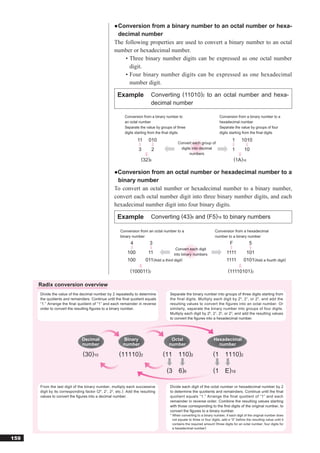
● Conversion from a binary number to an octal number or hexa-
                                                     decimal number
                                                   The following properties are used to convert a binary number to an octal
                                                   number or hexadecimal number.
                                                       • Three binary number digits can be expressed as one octal number
                                                         digit.
                                                       • Four binary number digits can be expressed as one hexadecimal
                                                         number digit.

                                                     Example              Converting (11010)2 to an octal number and hexa-
                                                                          decimal number

                                                          Conversion from a binary number to                             Conversion from a binary number to a
                                                          an octal number                                                hexadecimal number
                                                          Separate the value by groups of three                          Separate the value by groups of four
                                                          digits starting from the final digits                          digits starting from the final digits

                                                                 11     010                                                       1      1010
                                                                                          Convert each group of
                                                                  3       2                digits into decimal                    1        10
                                                                                                numbers
                                                                    (32)8                                                           (1A)16

                                                   ●Conversion from an octal number or hexadecimal number to a
                                                    binary number
                                                   To convert an octal number or hexadecimal number to a binary number,
                                                   convert each octal number digit into three binary number digits, and each
                                                   hexadecimal number digit into four binary digits.

                                                     Example              Converting (43)8 and (F5)16 to binary numbers

                                                       Conversion from an octal number to a                          Conversion from a hexadecimal
                                                       binary number                                                 number to a binary number
                                                             4           3                                                      F             5
                                                                                       Convert each digit
                                                           100         11             into binary numbers                     1111           101
                                                           100        011(Add a third digit)                                  1111        0101(Add a fourth digit)

                                                             (100011)2                                                         (11110101)2

      Radix conversion overview
      Divide the value of the decimal number by 2 repeatedly to determine            Separate the binary number into groups of three digits starting from
      the quotients and remainders. Continue until the final quotient equals         the final digits. Multiply each digit by 2 0 , 2 1 , or 2 2 , and add the
      “1.” Arrange the final quotient of “1” and each remainder in reverse           resulting values to convert the figures into an octal number. Or
      order to convert the resulting figures to a binary number.                     similarly, separate the binary number into groups of four digits.
                                                                                     Multiply each digit by 20, 21, 22, or 23, and add the resulting values
                                                                                     to convert the figures into a hexadecimal number.


                               Decimal                   Binary                      Octal                          Hexadecimal
                               number                    number                     number                            number

                                (30)10                (11110)2                   (11       110)2                    (1       1110)2

                                                                                   (3      6)8                      (1       E)16

      From the last digit of the binary number, multiply each successive             Divide each digit of the octal number or hexadecimal number by 2
      digit by its corresponding factor (20, 21, 22, etc.). Add the resulting        to determine the quotients and remainders. Continue until the final
      values to convert the figures into a decimal number.                           quotient equals “1.” Arrange the final quotient of “1” and each
                                                                                     remainder in reverse order. Combine the resulting values starting
                                                                                     with those corresponding to the first digits of the original number, to
                                                                                     convert the figures to a binary number.
                                                                                     * When converting to a binary number, if each digit of the original number does
                                                                                       not equate to three or four digits, add a “0” before the resulting value until it
                                                                                       contains the required amount (three digits for an octal number, four digits for
                                                                                       a hexadecimal number).


159
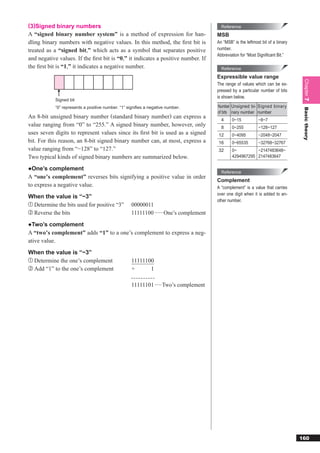
(3)Signed binary numbers                                                                 Reference
A “signed binary number system” is a method of expression for han-                     MSB
dling binary numbers with negative values. In this method, the first bit is             An “MSB” is the leftmost bit of a binary
treated as a “signed bit,” which acts as a symbol that separates positive              number.
                                                                                       Abbreviation for “Most Significant Bit.”
and negative values. If the first bit is “0,” it indicates a positive number. If
the first bit is “1,” it indicates a negative number.                                     Reference
                                                                                       Expressible value range


                                                                                                                                   Chapter 7
                                                                                       The range of values which can be ex-
                                                                                       pressed by a particular number of bits
                                                                                       is shown below.
            Signed bit
            “0” represents a positive number. “1” signifies a negative number.         Number Unsigned bi- Signed binary


                                                                                                                                   Basic theory
                                                                                       of bits nary number number
An 8-bit unsigned binary number (standard binary number) can express a
                                                                                         4     0~15           −8~7
value ranging from “0” to “255.” A signed binary number, however, only                   8     0~255          −128~127
uses seven digits to represent values since its first bit is used as a signed           12      0~4095         −2048~2047
bit. For this reason, an 8-bit signed binary number can, at most, express a            16      0~65535        −32768~32767
value ranging from “−128” to “127.”                                                    32      0~         −2147483648~
Two typical kinds of signed binary numbers are summarized below.                               4294967295 2147483647

●One’s complement
                                                                                         Reference
A “one’s complement” reverses bits signifying a positive value in order
                                                                                       Complement
to express a negative value.                                                           A “complement” is a value that carries
                                                                                       over one digit when it is added to an-
When the value is “−3”
                                                                                       other number.
① Determine the bits used for positive “3”          00000011
② Reverse the bits                                  11111100 ······ One’s complement
●Two’s complement
A “two’s complement” adds “1” to a one’s complement to express a neg-
ative value.
When the value is “−3”
① Determine the one’s complement                    11111100
② Add “1” to the one’s complement                   +      1

                                                    11111101 ·····Two’s complement


                                                                                                                                  160
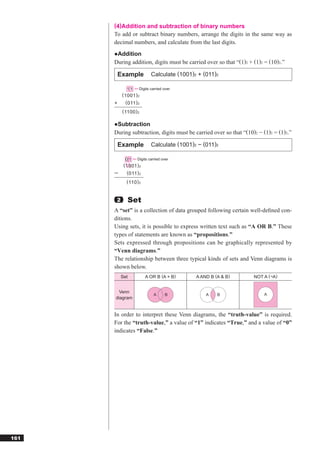
(4)Addition and subtraction of binary numbers
      To add or subtract binary numbers, arrange the digits in the same way as
      decimal numbers, and calculate from the last digits.
      ●Addition
      During addition, digits must be carried over so that “(1)2 + (1)2 = (10)2.”

          Example          Calculate (1001)2 + (011)2

              1 1 Digits carried over
           ( 1001 ) 2
      +      ( 011 ) 2
           ( 1100 ) 2

      ●Subtraction
      During subtraction, digits must be carried over so that “(10)2 − (1)2 = (1)2.”

          Example          Calculate (1001)2 − (011)2

              0 1 Digits carried over
            ( 1001 ) 2
             ( 011 ) 2
             ( 110 ) 2


       2      Set
      A “set” is a collection of data grouped following certain well-defined con-
      ditions.
      Using sets, it is possible to express written text such as “A OR B.” These
      types of statements are known as “propositions.”
      Sets expressed through propositions can be graphically represented by
      “Venn diagrams.”
      The relationship between three typical kinds of sets and Venn diagrams is
      shown below.
           Set           A OR B (A + B)     A AND B (A & B)        NOT A (¬A)


       Venn
                            A      B            A    B                  A
      diagram


      In order to interpret these Venn diagrams, the “truth-value” is required.
      For the “truth-value,” a value of “1” indicates “True,” and a value of “0”
      indicates “False.”


161
For example, if A is valid, but B is not valid, the respective truth-values
would be “A = 1” and “B = 0.”
If proposition “A OR B” is applied, this equates to “1 OR 0,” indicating
that the proposition is logically true. However, if proposition “A AND B”
is applied, this becomes “1 AND 0,” which would be logically false.
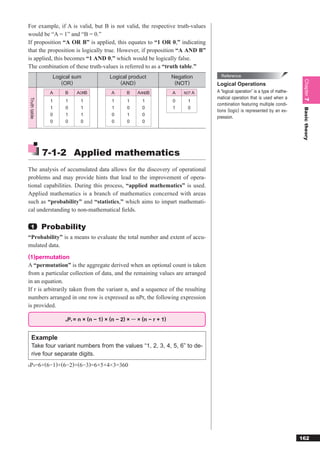
The combination of these truth-values is referred to as a “truth table.”
                Logical sum             Logical product               Negation      Reference


                                                                                                                               Chapter 7
                   (OR)                     (AND)                      (NOT)      Logical Operations
                A   B    AORB            A      B    AANDB            A   NOT A   A “logical operation” is a type of mathe-
                                                                                  matical operation that is used when a
Truth table


                1   1      1             1      1      1              0     1
                                                                                  combination featuring multiple condi-
                1   0      1             1      0      0              1     0


                                                                                                                               Basic theory
                                                                                  tions (logic) is represented by an ex-
                0   1      1             0      1      0
                                                                                  pression.
                0   0      0             0      0      0


              7-1-2 Applied mathematics
The analysis of accumulated data allows for the discovery of operational
problems and may provide hints that lead to the improvement of opera-
tional capabilities. During this process, “applied mathematics” is used.
Applied mathematics is a branch of mathematics concerned with areas
such as “probability” and “statistics,” which aims to impart mathemati-
cal understanding to non-mathematical fields.

  1           Probability
“Probability” is a means to evaluate the total number and extent of accu-
mulated data.
(1)permutation
A “permutation” is the aggregate derived when an optional count is taken
from a particular collection of data, and the remaining values are arranged
in an equation.
If r is arbitrarily taken from the variant n, and a sequence of the resulting
numbers arranged in one row is expressed as nPr, the following expression
is provided.

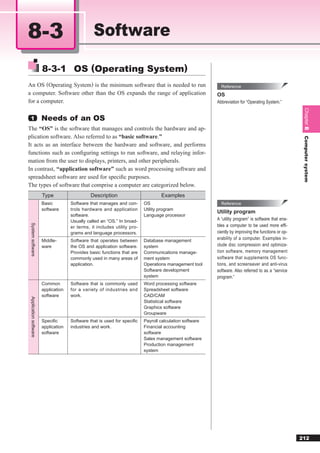
                    nPr = n × (n − 1) × (n − 2) × ··· × (n − r + 1)


   Example
   Take four variant numbers from the values “1, 2, 3, 4, 5, 6” to de-
   rive four separate digits.
P =6×(6−1)×(6−2)×(6−3)=6×5×4×3=360
6 4


                                                                                                                              162
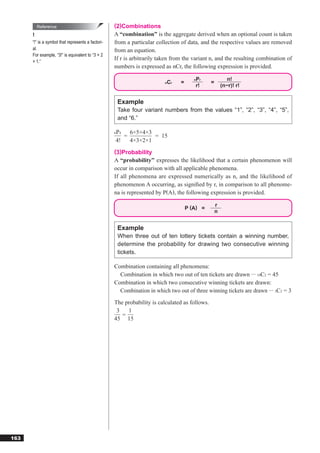
Reference                                (2)Combinations
      !                                            A “combination” is the aggregate derived when an optional count is taken
      “!” is a symbol that represents a factori-   from a particular collection of data, and the respective values are removed
      al.                                          from an equation.
      For example, “3!” is equivalent to “3 × 2
      × 1.”
                                                   If r is arbitrarily taken from the variant n, and the resulting combination of
                                                   numbers is expressed as nCr, the following expression is provided.

                                                                                       Pr
                                                                                       n                  n!
                                                                         nCr    =              =
                                                                                       r!              (n−r)! r!


                                                    Example
                                                    Take four variant numbers from the values “1”, “2”, “3”, “4”, “5”,
                                                    and “6.”

                                                   P
                                                   6 4  6×5×4×3
                                                      =         = 15
                                                   4!   4×3×2×1
                                                   (3)Probability
                                                   A “probability” expresses the likelihood that a certain phenomenon will
                                                   occur in comparison with all applicable phenomena.
                                                   If all phenomena are expressed numerically as n, and the likelihood of
                                                   phenomenon A occurring, as signified by r, in comparison to all phenome-
                                                   na is represented by P(A), the following expression is provided.

                                                                                                   r
                                                                                    P (A) =
                                                                                                   n


                                                    Example
                                                    When three out of ten lottery tickets contain a winning number,
                                                    determine the probability for drawing two consecutive winning
                                                    tickets.

                                                   Combination containing all phenomena:
                                                     Combination in which two out of ten tickets are drawn ··· 10C2 = 45
                                                   Combination in which two consecutive winning tickets are drawn:
                                                     Combination in which two out of three winning tickets are drawn ··· 3C2 = 3

                                                   The probability is calculated as follows.
                                                    3   1
                                                      =
                                                   45 15


163
Example
 When three out of ten lottery tickets contain a winning number,
 determine the probability for drawing two consecutive winning
 tickets. (Alternate method)
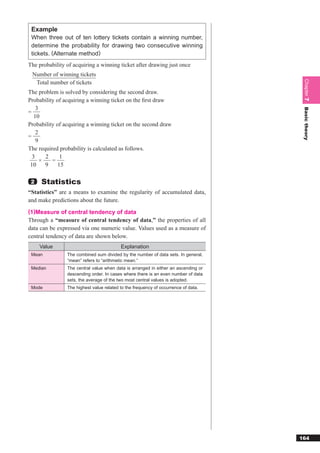
The probability of acquiring a winning ticket after drawing just once
 Number of winning tickets


                                                                                     Chapter 7
  Total number of tickets
The problem is solved by considering the second draw.
Probability of acquiring a winning ticket on the first draw
    3


                                                                                     Basic theory
=
   10
Probability of acquiring a winning ticket on the second draw
    2
=
    9
The required probability is calculated as follows.
  3     2     1
      ×   =
 10     9    15

 2   Statistics
“Statistics” are a means to examine the regularity of accumulated data,
and make predictions about the future.
(1)Measure of central tendency of data
Through a “measure of central tendency of data,” the properties of all
data can be expressed via one numeric value. Values used as a measure of
central tendency of data are shown below.
     Value                                Explanation
 Mean           The combined sum divided by the number of data sets. In general,
                “mean” refers to “arithmetic mean.”
 Median         The central value when data is arranged in either an ascending or
                descending order. In cases where there is an even number of data
                sets, the average of the two most central values is adopted.
 Mode           The highest value related to the frequency of occurrence of data.


                                                                                    164
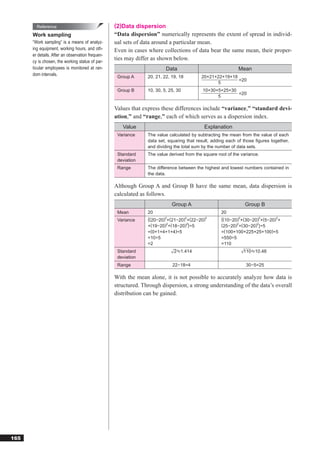
Reference                                 (2)Data dispersion
      Work sampling                               “Data dispersion” numerically represents the extent of spread in individ-
      “Work sampling” is a means of analyz-       ual sets of data around a particular mean.
      ing equipment, working hours, and oth-      Even in cases where collections of data bear the same mean, their proper-
      er details. After an observation frequen-
      cy is chosen, the working status of par-
                                                  ties may differ as shown below.
      ticular employees is monitored at ran-                             Data                               Mean
      dom intervals.                               Group A      20, 21, 22, 19, 18        20+21+22+19+18
                                                                                                         =20
                                                                                                5
                                                   Group B      10, 30, 5, 25, 30          10+30+5+25+30
                                                                                                         =20
                                                                                                 5

                                                  Values that express these differences include “variance,” “standard devi-
                                                  ation,” and “range,” each of which serves as a dispersion index.
                                                     Value                                 Explanation
                                                   Variance     The value calculated by subtracting the mean from the value of each
                                                                data set, squaring that result, adding each of those figures together,
                                                                and dividing the total sum by the number of data sets.
                                                   Standard     The value derived from the square root of the variance.
                                                   deviation
                                                   Range        The difference between the highest and lowest numbers contained in
                                                                the data.

                                                  Although Group A and Group B have the same mean, data dispersion is
                                                  calculated as follows.
                                                                            Group A                             Group B
                                                   Mean         20                                  20
                                                   Variance     {(20−20)2+(21−20)2+(22−20)2         {(10−20)2+(30−20)2+(5−20)2+
                                                                         2        2
                                                                +(19−20) +(18−20) }÷5               (25−20)2+(30−20)2}÷5
                                                                =(0+1+4+1+4)÷5                      =(100+100+225+25+100)÷5
                                                                =10÷5                               =550÷5
                                                                =2                                  =110
                                                   Standard                  2 1.414                           110 10.48
                                                   deviation
                                                   Range                    22−18=4                             30−5=25

                                                  With the mean alone, it is not possible to accurately analyze how data is
                                                  structured. Through dispersion, a strong understanding of the data’s overall
                                                  distribution can be gained.


165
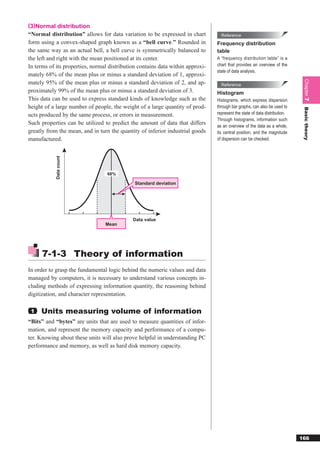
(3)Normal distribution
“Normal distribution” allows for data variation to be expressed in chart          Reference
form using a convex-shaped graph known as a “bell curve.” Rounded in            Frequency distribution
the same way as an actual bell, a bell curve is symmetrically balanced to       table
the left and right with the mean positioned at its center.                      A “frequency distribution table” is a
In terms of its properties, normal distribution contains data within approxi-   chart that provides an overview of the
                                                                                state of data analysis.
mately 68% of the mean plus or minus a standard deviation of 1, approxi-


                                                                                                                             Chapter 7
mately 95% of the mean plus or minus a standard deviation of 2, and ap-           Reference
proximately 99% of the mean plus or minus a standard deviation of 3.            Histogram
This data can be used to express standard kinds of knowledge such as the        Histograms, which express dispersion
height of a large number of people, the weight of a large quantity of prod-     through bar graphs, can also be used to


                                                                                                                             Basic theory
ucts produced by the same process, or errors in measurement.                    represent the state of data distribution.
                                                                                Through histograms, information such
Such properties can be utilized to predict the amount of data that differs      as an overview of the data as a whole,
greatly from the mean, and in turn the quantity of inferior industrial goods    its central position, and the magnitude
manufactured.                                                                   of dispersion can be checked.
            Data count


                                  68%

                                              Standard deviation


                                             Data value
                                 Mean


      7-1-3 Theory of information
In order to grasp the fundamental logic behind the numeric values and data
managed by computers, it is necessary to understand various concepts in-
cluding methods of expressing information quantity, the reasoning behind
digitization, and character representation.

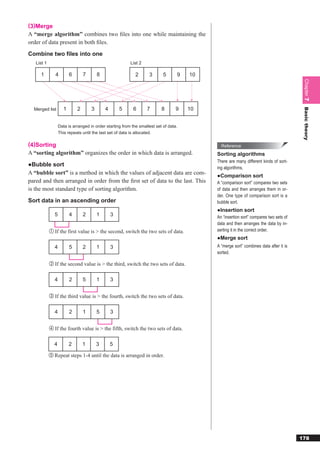
 1   Units measuring volume of information
“Bits” and “bytes” are units that are used to measure quantities of infor-
mation, and represent the memory capacity and performance of a compu-
ter. Knowing about these units will also prove helpful in understanding PC
performance and memory, as well as hard disk memory capacity.


                                                                                                                            166
Reference                                      (1)Bits and bytes
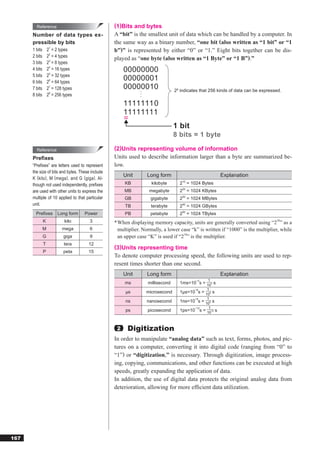
      Number of data types ex-                         A “bit” is the smallest unit of data which can be handled by a computer. In
      pressible by bits                                the same way as a binary number, “one bit (also written as “1 bit” or “1
      1 bits       21 = 2 types                        b”)” is represented by either “0” or “1.” Eight bits together can be dis-
      2 bits       22 = 4 types
                                                       played as “one byte (also written as “1 Byte” or “1 B”).”
      3 bits       23 = 8 types
      4 bits       24 = 16 types                            00000000
      5 bits       25 = 32 types
      6 bits       26 = 64 types
                                                            00000001
      7 bits       27 = 128 types                           00000010                 28 indicates that 256 kinds of data can be expressed.
      8 bits       28 = 256 types
                                                            11111110
                                                            11111111
                                                            _
                                                            _
                                                                                     1 bit
                                                                                     8 bits = 1 byte

        Reference                                      (2)Units representing volume of information
      Prefixes                                          Units used to describe information larger than a byte are summarized be-
      “Prefixes” are letters used to represent          low.
      the size of bits and bytes. These include
                                                            Unit      Long form                            Explanation
      K ( kilo ) , M ( mega ) , and G ( giga ) . Al-
      though not used independently, prefixes                KB           kilobyte      210 = 1024 Bytes
      are used with other units to express the              MB         megabyte        220 = 1024 KBytes
      multiple of 10 applied to that particular             GB          gigabyte       230 = 1024 MBytes
      unit.                                                 TB          terabyte       240 = 1024 GBytes
        Prefixes         Long form       Power               PB          petabyte       250 = 1024 TBytes
               K            kilo           3           * When displaying memory capacity, units are generally converted using “210” as a
               M           mega            6             multiplier. Normally, a lower case “k” is written if “1000” is the multiplier, while
               G            giga           9             an upper case “K” is used if “210” is the multiplier.
               T            tera          12
                                                       (3)Units representing time
               P            peta          15
                                                       To denote computer processing speed, the following units are used to rep-
                                                       resent times shorter than one second.
                                                            Unit      Long form                            Explanation
                                                                                               −3   1
                                                            ms         millisecond     1ms=10 s = 103 s
                                                                                             −6    1
                                                            μs        microsecond      1μs=10 s = 106 s
                                                                                             −9    1
                                                            ns        nanosecond       1ns=10 s = 109 s
                                                                                             −12    1
                                                            ps         picosecond      1ps=10 s = 1012 s


                                                        2    Digitization
                                                       In order to manipulate “analog data” such as text, forms, photos, and pic-
                                                       tures on a computer, converting it into digital code (ranging from “0” to
                                                       “1”) or “digitization,” is necessary. Through digitization, image process-
                                                       ing, copying, communications, and other functions can be executed at high
                                                       speeds, greatly expanding the application of data.
                                                       In addition, the use of digital data protects the original analog data from
                                                       deterioration, allowing for more efficient data utilization.


167
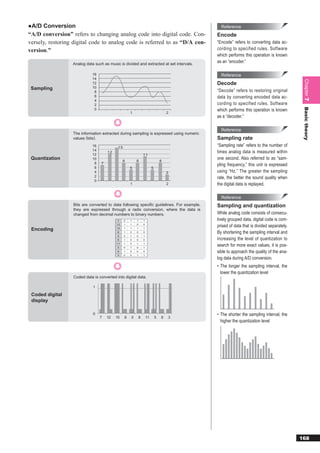
●A/D Conversion                                                                              Reference
“A/D conversion” refers to changing analog code into digital code. Con-                    Encode
versely, restoring digital code to analog code is referred to as “D/A con-                 “Encode” refers to converting data ac-
version.”                                                                                  cording to specified rules. Software
                                                                                           which performs this operation is known
                  Analog data such as music is divided and extracted at set intervals.
                                                                                           as an “encoder.”

                             16                                                              Reference
                             14


                                                                                                                                         Chapter 7
                             12                                                            Decode
 Sampling                    10
                              8                                                            “Decode” refers to restoring original
                              6                                                            data by converting encoded data ac-
                              4
                              2                                                            cording to specified rules. Software


                                                                                                                                         Basic theory
                              0                                                            which performs this operation is known
                                                     1                                2
                                                                                           as a “decoder.”

                                                                                             Reference
                  The information extracted during sampling is expressed using numeric
                  values (bits).                                                           Sampling rate
                             16             15
                                                                                           “Sampling rate” refers to the number of
                             14
                                      12                                                   times analog data is measured within
                             12                                  11
 Quantization                10                                                            one second. Also referred to as “sam-
                                                8        8                        8
                              8   7                                                        pling frequency,” this unit is expressed
                              6                      5                    5
                              4                                                       3    using “Hz.” The greater the sampling
                              2                                                            rate, the better the sound quality when
                              0
                                                     1                                2    the digital data is replayed.

                                                                                             Reference
                  Bits are converted to data following specific guidelines. For example,   Sampling and quantization
                  they are expressed through a radix conversion, where the data is
                  changed from decimal numbers to binary numbers.                          While analog code consists of consecu-
                                           7     0   1   1       1                         tively grouped data, digital code is com-
                                           12    1   1   0       0
                                                                                           prised of data that is divided separately.
 Encoding                                  15    1   1   1       1
                                           8     1   0   0       0                         By shortening the sampling interval and
                                           5     0   1   0       1
                                           8     1   0   0       0                         increasing the level of quantization to
                                           11
                                           5
                                                 1
                                                 0
                                                     0
                                                     1
                                                         1
                                                         0
                                                                 1
                                                                 1
                                                                                           search for more exact values, it is pos-
                                           8     1   0   0       0                         sible to approach the quality of the ana-
                                           3     0   0   1       1
                                                                                           log data during A/D conversion.
                                                                                           • The longer the sampling interval, the
                                                                                             lower the quantization level
                  Coded data is converted into digital data.

                             1

 Coded digital
 display

                             0                                                             • The shorter the sampling interval, the
                                  7   12   15    8   5       8       11       5   8   3
                                                                                             higher the quantization level


                                                                                                                                        168
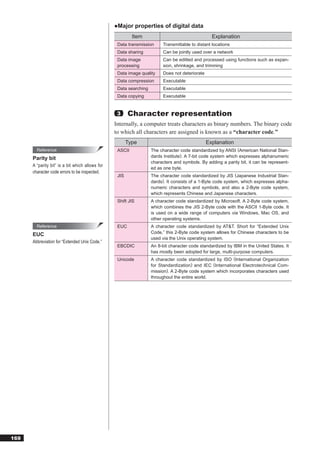
●Major properties of digital data
                                                          Item                                    Explanation
                                                  Data transmission      Transmittable to distant locations
                                                  Data sharing           Can be jointly used over a network
                                                  Data image             Can be editted and processed using functions such as expan-
                                                  processing             sion, shrinkage, and trimming
                                                  Data image quality     Does not deteriorate
                                                  Data compression       Executable
                                                  Data searching         Executable
                                                  Data copying           Executable


                                                  3     Character representation
                                                 Internally, a computer treats characters as binary numbers. The binary code
                                                 to which all characters are assigned is known as a “character code.”
                                                        Type                                    Explanation
        Reference                                 ASCII            The character code standardized by ANSI (American National Stan-
      Parity bit                                                   dards Institute). A 7-bit code system which expresses alphanumeric
                                                                   characters and symbols. By adding a parity bit, it can be represent-
      A “parity bit” is a bit which allows for
                                                                   ed as one byte.
      character code errors to be inspected.
                                                  JIS              The character code standardized by JIS (Japanese Industrial Stan-
                                                                   dards). It consists of a 1-Byte code system, which expresses alpha-
                                                                   numeric characters and symbols, and also a 2-Byte code system,
                                                                   which represents Chinese and Japanese characters.
                                                  Shift JIS        A character code standardized by Microsoft. A 2-Byte code system,
                                                                   which combines the JIS 2-Byte code with the ASCII 1-Byte code. It
                                                                   is used on a wide range of computers via Windows, Mac OS, and
                                                                   other operating systems.
        Reference                                 EUC              A character code standardized by AT&T. Short for “Extended Unix
      EUC                                                          Code,” this 2-Byte code system allows for Chinese characters to be
                                                                   used via the Unix operating system.
      Abbreviation for “Extended Unix Code.”
                                                  EBCDIC           An 8-bit character code standardized by IBM in the United States. It
                                                                   has mostly been adopted for large, multi-purpose computers.
                                                  Unicode          A character code standardized by ISO (International Organization
                                                                   for Standardization) and IEC (International Electrotechnical Com-
                                                                   mission). A 2-Byte code system which incorporates characters used
                                                                   throughout the entire world.


169
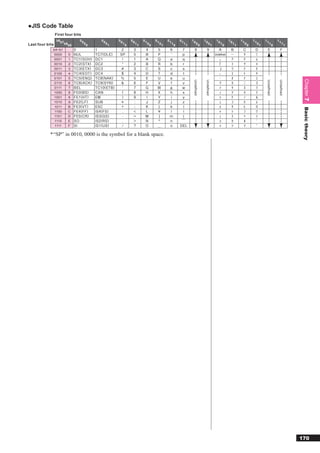
●JIS Code Table
                 First four bits
               b8b7            00        00        00        00        01        01        01        01        10           10            10        10        11        11        11           11
Last four bits      b6b5            00        01        10        11        00        01        10        11        00           01            10        11        00        01        10           11
             b4~b1
             0000     0                                                                                                                  Undefined
             0001     1
             0010     2
              0011    3
             0100     4
             0101     5


                                                                                                                                                                                                             Chapter 7
                                                                                                                Undefi ned


                                                                                                                             Undefi ned


                                                                                                                                                                                   Undefi ned


                                                                                                                                                                                                Undefi ned
              0110    6
              0111    7
             1000     8
             1001     9
             1010     A
              1011    B


                                                                                                                                                                                                             Basic theory
              1100    C
              1101    D
              1110    E
              1111    F

            * “SP” in 0010, 0000 is the symbol for a blank space.


                                                                                                                                                                                                            170
7-2                              Algorithms and programming

                                                     7-2-1 Data structures
                                               When developing a system, programs must be created so that the neces-
                                               sary functions will operate correctly. Here, the data structures and algo-
                                               rithms required during programming will be explained.

                                                1   Data and data structures
                                               “Data” is defined as the information manipulated internally by a compu-
                                               ter. When a collection of data is systematically organized and managed as
                                               a group, that information is known as a “data structure.”
                                               Data structure design serves as the entire foundation of system develop-
                                               ment. Accordingly, it is necessary to plan and investigate data structures
                                               ahead of time so that they can execute the desired tasks.
                                               The fundamental data structures are summarized below.

        Reference                              ●Variables
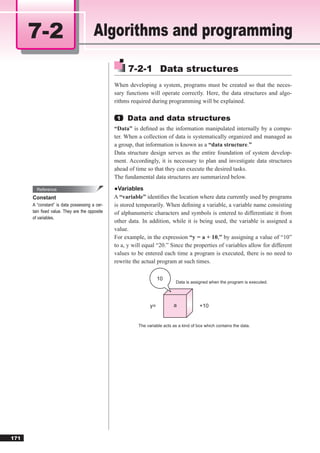
      Constant                                 A “variable” identifies the location where data currently used by programs
      A “constant” is data possessing a cer-   is stored temporarily. When defining a variable, a variable name consisting
      tain fixed value. They are the opposite   of alphanumeric characters and symbols is entered to differentiate it from
      of variables.
                                               other data. In addition, while it is being used, the variable is assigned a
                                               value.
                                               For example, in the expression “y = a + 10,” by assigning a value of “10”
                                               to a, y will equal “20.” Since the properties of variables allow for different
                                               values to be entered each time a program is executed, there is no need to
                                               rewrite the actual program at such times.

                                                                    10
                                                                            Data is assigned when the program is executed.


                                                               y=          a             +10


                                                         The variable acts as a kind of box which contains the data.


171
●Field types
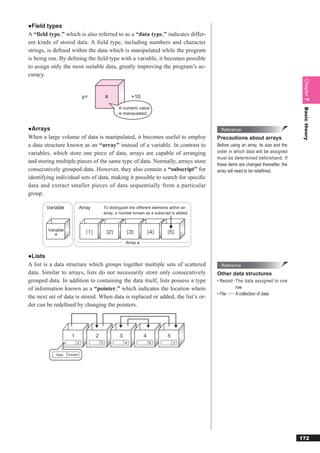
A “field type,” which is also referred to as a “data type,” indicates differ-
ent kinds of stored data. A field type, including numbers and character
strings, is defined within the data which is manipulated while the program
is being run. By defining the field type with a variable, it becomes possible
to assign only the most suitable data, greatly improving the program’s ac-
curacy.


                                                                                                                                          Chapter 7
                              y=             a                +10

                                                     A numeric value


                                                                                                                                          Basic theory
                                                     is manipulated.


●Arrays                                                                                          Reference
When a large volume of data is manipulated, it becomes useful to employ                        Precautions about arrays
a data structure known as an “array” instead of a variable. In contrast to                     Before using an array, its size and the
variables, which store one piece of data, arrays are capable of arranging                      order in which data will be assigned
                                                                                               must be determined beforehand. If
and storing multiple pieces of the same type of data. Normally, arrays store
                                                                                               these items are changed thereafter, the
consecutively grouped data. However, they also contain a “subscript” for                       array will need to be redefined.
identifying individual sets of data, making it possible to search for specific
data and extract smaller pieces of data sequentially from a particular
group.

        Variable             Array           To distinguish the different elements within an
                                             array, a number known as a subscript is added.


        Variable
           a
                                                          Array a


●Lists
A list is a data structure which groups together multiple sets of scattered                      Reference
data. Similar to arrays, lists do not necessarily store only consecutively                     Other data structures
grouped data. In addition to containing the data itself, lists possess a type                  • Record ∙∙ The data assigned to one
of information known as a “pointer,” which indicates the location where                                       row
                                                                                               • File ∙∙∙∙∙∙∙ A collection of data
the next set of data is stored. When data is replaced or added, the list’s or-
der can be redefined by changing the pointers.


                     1               2                3             4           5
                         2               5                4             6           3


            Data   Pointer


                                                                                                                                         172
2   Stacks and queues
                                                The concept of introducing and deleting data within a list is summarized
                                                below.
                                                ●Stacks
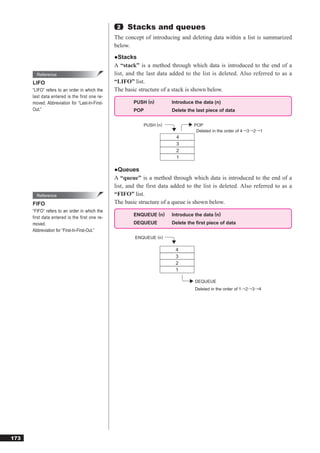
                                                A “stack” is a method through which data is introduced to the end of a
        Reference                               list, and the last data added to the list is deleted. Also referred to as a
      LIFO                                      “LIFO” list.
      “LIFO” refers to an order in which the    The basic structure of a stack is shown below.
      last data entered is the first one re-
      moved. Abbreviation for “Last-In-First-           PUSH (n)        Introduce the data (n)
      Out.”                                             POP             Delete the last piece of data


                                                            PUSH (n)              POP
                                                                                   Deleted in the order of 4→3→2→1
                                                                          4
                                                                          3
                                                                          2
                                                                          1

                                                ●Queues
                                                A “queue” is a method through which data is introduced to the end of a
                                                list, and the first data added to the list is deleted. Also referred to as a
        Reference                               “FIFO” list.
      FIFO                                      The basic structure of a queue is shown below.
      “FIFO” refers to an order in which the
                                                        ENQUEUE (n)     Introduce the data (n)
      first data entered is the first one re-
      moved.                                            DEQUEUE         Delete the first piece of data
      Abbreviation for “First-In-First-Out.”
                                                        ENQUEUE (n)

                                                                          4
                                                                          3
                                                                          2
                                                                          1

                                                                                  DEQUEUE
                                                                                  Deleted in the order of 1→2→3→4


173
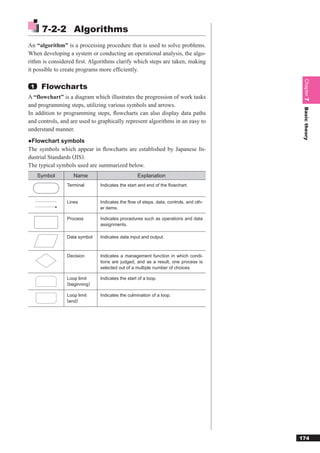
7-2-2 Algorithms
An “algorithm” is a processing procedure that is used to solve problems.
When developing a system or conducting an operational analysis, the algo-
rithm is considered first. Algorithms clarify which steps are taken, making
it possible to create programs more efficiently.


                                                                                      Chapter 7
 1    Flowcharts
A “flowchart” is a diagram which illustrates the progression of work tasks
and programming steps, utilizing various symbols and arrows.


                                                                                      Basic theory
In addition to programming steps, flowcharts can also display data paths
and controls, and are used to graphically represent algorithms in an easy to
understand manner.
●Flowchart symbols
The symbols which appear in flowcharts are established by Japanese In-
dustrial Standards (JIS).
The typical symbols used are summarized below.
     Symbol        Name                          Explanation
                Terminal      Indicates the start and end of the flowchart.


                Lines         Indicates the flow of steps, data, controls, and oth-
                              er items.

                Process       Indicates procedures such as operations and data
                              assignments.

                Data symbol   Indicates data input and output.


                Decision      Indicates a management function in which condi-
                              tions are judged, and as a result, one process is
                              selected out of a multiple number of choices.

                Loop limit    Indicates the start of a loop.
                (beginning)
                Loop limit    Indicates the culmination of a loop.
                (end)


                                                                                     174
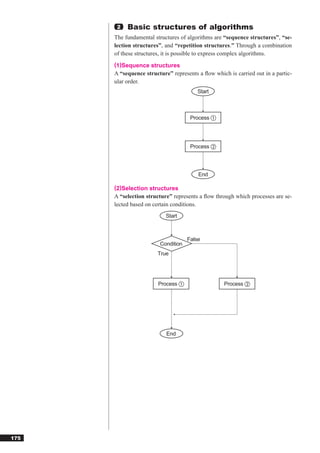
2   Basic structures of algorithms
      The fundamental structures of algorithms are “sequence structures”, “se-
      lection structures”, and “repetition structures.” Through a combination
      of these structures, it is possible to express complex algorithms.
      (1)Sequence structures
      A “sequence structure” represents a flow which is carried out in a partic-
      ular order.
                                        Start


                                     Process ①


                                     Process ②


                                        End

      (2)Selection structures
      A “selection structure” represents a flow through which processes are se-
      lected based on certain conditions.
                           Start


                                    False
                        Condition
                       True


                        Process ①                  Process ②


                           End


175
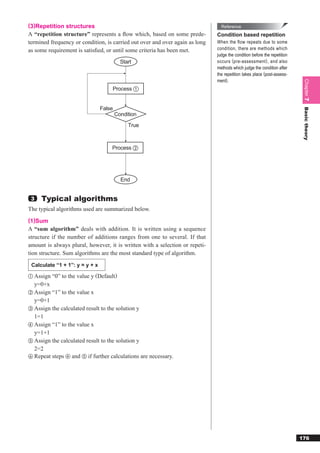
(3)Repetition structures                                                        Reference
A “repetition structure” represents a flow which, based on some prede-         Condition based repetition
termined frequency or condition, is carried out over and over again as long   When the flow repeats due to some
as some requirement is satisfied, or until some criteria has been met.         condition, there are methods which
                                                                              judge the condition before the repetition
                                          Start                               occurs ( pre-assessment ) , and also
                                                                              methods which judge the condition after
                                                                              the repetition takes place (post-assess-
                                                                              ment).


                                                                                                                           Chapter 7
                                     Process ①


                                False


                                                                                                                           Basic theory
                                        Condition
                                             True


                                    Process ②


                                          End


 3   Typical algorithms
The typical algorithms used are summarized below.
(1)Sum
A “sum algorithm” deals with addition. It is written using a sequence
structure if the number of additions ranges from one to several. If that
amount is always plural, however, it is written with a selection or repeti-
tion structure. Sum algorithms are the most standard type of algorithm.

 Calculate “1 + 1”: y = y + x

① Assign   “0” to the value y (Default)
  y=0+x
② Assign “1” to the value x
  y=0+1
③ Assign the calculated result to the solution y
  1=1
④ Assign “1” to the value x
  y=1+1
⑤ Assign the calculated result to the solution y
  2=2
⑥ Repeat steps ④ and ⑤ if further calculations are necessary.


                                                                                                                          176
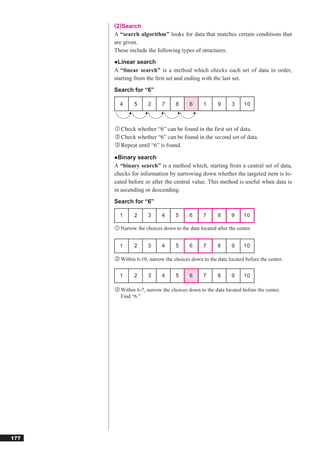
(2)Search
      A “search algorithm” looks for data that matches certain conditions that
      are given.
      These include the following types of structures.
      ●Linear search
      A “linear search” is a method which checks each set of data in order,
      starting from the first set and ending with the last set.
      Search for “6”

        4      5     2     7      8     6     1      9     3     10


      ① Check whether “6” can be found in the first set of data.
      ② Check whether “6” can be found in the second set of data.
      ③ Repeat until “6” is found.

      ●Binary search
      A “binary search” is a method which, starting from a central set of data,
      checks for information by narrowing down whether the targeted item is lo-
      cated before or after the central value. This method is useful when data is
      in ascending or descending.
      Search for “6”

        1     2      3     4      5     6     7      8     9     10

      ① Narrow the choices down to the data located after the center.


        1     2      3     4      5     6     7      8     9     10

      ② Within 6-10, narrow the choices down to the data located before the center.


        1     2      3     4      5     6     7      8     9     10

      ③ Within 6-7, narrow the choices down to the data located before the center.
        Find “6.”


177
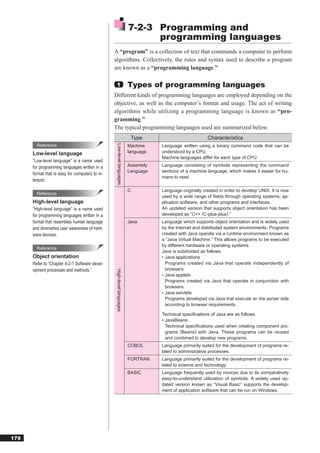
(3)Merge
A “merge algorithm” combines two files into one while maintaining the
order of data present in both files.
Combine two files into one
   List 1                                                List 2

     1         4        6       7       8                   2      3       5      9   10


                                                                                                                                       Chapter 7
                    1       2       3       4       5      6      7       8       9   10


                                                                                                                                       Basic theory
  Merged list


                  Data is arranged in order starting from the smallest set of data.
                  This repeats until the last set of data is allocated.

(4)Sorting                                                                                   Reference
A “sorting algorithm” organizes the order in which data is arranged.                       Sorting algorithms
                                                                                           There are many different kinds of sort-
●Bubble sort                                                                               ing algorithms.
A “bubble sort” is a method in which the values of adjacent data are com-                  ●Comparison sort
pared and then arranged in order from the first set of data to the last. This               A “comparison sort” compares two sets
is the most standard type of sorting algorithm.                                            of data and then arranges them in or-
                                                                                           der. One type of comparison sort is a
Sort data in an ascending order                                                            bubble sort.
                                                                                           ●Insertion sort
              5         4       2       1       3                                          An “insertion sort” compares two sets of
                                                                                           data and then arranges the data by in-
            ① If the first value is > the second, switch the two sets of data.             serting it in the correct order.
                                                                                           ●Merge sort
              4         5       2       1       3                                          A “merge sort” combines data after it is
                                                                                           sorted.

            ② If the second value is > the third, switch the two sets of data.


              4         2       5       1       3

            ③ If the third value is > the fourth, switch the two sets of data.


              4         2       1       5       3

            ④ If the fourth value is > the fifth, switch the two sets of data.


              4         2       1       3       5
            ⑤ Repeat steps 1-4 until the data is arranged in order.


                                                                                                                                      178
7-2-3 Programming and
                                                                               programming languages
                                                 A “program” is a collection of text that commands a computer to perform
                                                 algorithms. Collectively, the rules and syntax used to describe a program
                                                 are known as a “programming language.”

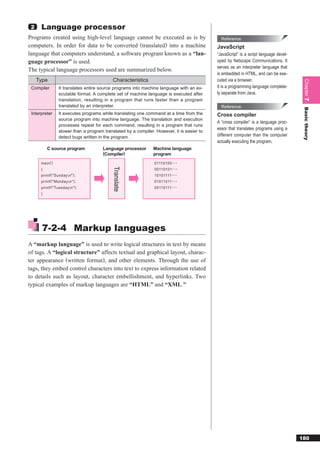
                                                   1                     Types of programming languages
                                                 Different kinds of programming languages are employed depending on the
                                                 objective, as well as the computer’s format and usage. The act of writing
                                                 algorithms while utilizing a programming language is known as “pro-
                                                 gramming.”
                                                 The typical programming languages used are summarized below.
                                                                          Type                            Characteristics
        Reference                                                        Machine    Language written using a binary command code that can be
                                                   Low-level languages


      Low-level language                                                 language   understood by a CPU.
                                                                                    Machine languages differ for each type of CPU.
      “Low-level language” is a name used
      for programming languages written in a                             Assembly   Language consisting of symbols representing the command
                                                                         Language   sections of a machine language, which makes it easier for hu-
      format that is easy for computers to in-
                                                                                    mans to read.
      terpret.

                                                                         C          Language originally created in order to develop UNIX. It is now
        Reference
                                                                                    used by a wide range of fields through operating systems, ap-
      High-level language                                                           plication software, and other programs and interfaces.
      “High-level language” is a name used                                          An updated version that supports object orientation has been
      for programming languages written in a                                        developed as “C++ (C-plus-plus).”
      format that resembles human language                               Java       Language which supports object orientation and is widely used
      and diminishes user awareness of hard-                                        by the Internet and distributed system environments. Programs
      ware devices.                                                                 created with Java operate via a runtime environment known as
                                                                                    a “Java Virtual Machine.” This allows programs to be executed
                                                                                    by different hardware or operating systems.
        Reference
                                                                                    Java is subdivided as follows.
      Object orientation                                                            • Java applications
      Refer to “Chapter 4-2-1 Software devel-                                         Programs created via Java that operate independently of
      opment processes and methods.”                                                  browsers.
                                                  High-level languages


                                                                                    • Java applets
                                                                                      Programs created via Java that operate in conjunction with
                                                                                      browsers.
                                                                                    • Java servlets
                                                                                      Programs developed via Java that execute on the server side
                                                                                      according to browser requirements.

                                                                                    Technical specifications of Java are as follows.
                                                                                    • JavaBeans
                                                                                      Technical specifications used when creating component pro-
                                                                                      grams (Beans) with Java. These programs can be reused
                                                                                      and combined to develop new programs.
                                                                         COBOL      Language primarily suited for the development of programs re-
                                                                                    lated to administrative processes.
                                                                         FORTRAN    Language primarily suited for the development of programs re-
                                                                                    lated to science and technology.
                                                                         BASIC      Language frequently used by novices due to its comparatively
                                                                                    easy-to-understand utilization of symbols. A widely used up-
                                                                                    dated version known as “Visual Basic” supports the develop-
                                                                                    ment of application software that can be run on Windows.


179
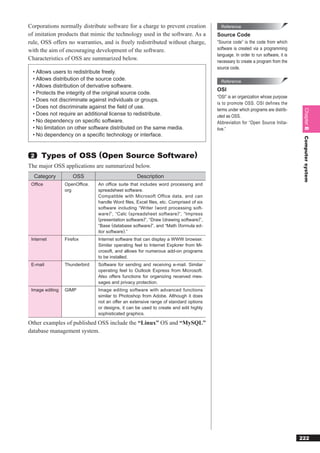
2    Language processor
Programs created using high-level language cannot be executed as is by                         Reference
computers. In order for data to be converted (translated) into a machine                     JavaScript
language that computers understand, a software program known as a “lan-                      “JavaScript” is a script language devel-
guage processor” is used.                                                                    oped by Netscape Communications. It
                                                                                             serves as an interpreter language that
The typical language processors used are summarized below.
                                                                                             is embedded in HTML, and can be exe-
     Type                                    Characteristics                                 cuted via a browser.


                                                                                                                                         Chapter 7
 Compiler         It translates entire source programs into machine language with an ex-     It is a programming language complete-
                  ecutable format. A complete set of machine language is executed after      ly separate from Java.
                  translation, resulting in a program that runs faster than a program
                  translated by an interpreter.                                                Reference


                                                                                                                                         Basic theory
 Interpreter      It executes programs while translating one command at a time from the      Cross compiler
                  source program into machine language. The translation and execution
                                                                                             A “cross compiler” is a language proc-
                  processes repeat for each command, resulting in a program that runs
                                                                                             essor that translates programs using a
                  slower than a program translated by a compiler. However, it is easier to
                  detect bugs written in the program.                                        different computer than the computer
                                                                                             actually executing the program.
          C source program              Language processor       Machine language
                                        (Compiler)               program
      main ()                                                    01110100
                                             Translate


      {                                                          00110101
      printf ( "Sunday  n" ) ;                                  10101111
      printf ( "Monday  n" ) ;                                  01011011
      printf ( "Tuesday  n" ) ;                                 00110111
      }


       7-2-4 Markup languages
A “markup language” is used to write logical structures in text by means
of tags. A “logical structure” affects textual and graphical layout, charac-
ter appearance (written format), and other elements. Through the use of
tags, they embed control characters into text to express information related
to details such as layout, character embellishment, and hyperlinks. Two
typical examples of markup languages are “HTML” and “XML.”


                                                                                                                                        180
Reference                                   1    HTML
      HTML
                                                   “HTML,” which was developed based on “SGML,” is a language used to
      Abbreviation for “HyperText Markup
      Language.”
                                                   create Web pages. It employs control characters called “tags,” which pro-
                                                   vide commands that direct how the page will be displayed. These tags ap-
        Reference                                  pear as sections which are bracketed off using the symbols “<” and “>.”
      SGML
                                                   ●Standard tags
      “SGML” is a type of markup language
      that uses a text format developed to                   Tag                                        Explanation
      simplify data conversion for electronic       <HTML>…</HTML>            Start and end of HTML
      publishing, text databases, and other
                                                    <HEAD>…</HEAD>            Start and end of header
      types of applications.
                                                    <TITLE>…</TITLE>          Start and end of title
      Abbreviation for “Standard Generalized
      Markup Language.”                             <BODY>…</BODY>            Start and end of main text
                                                    <P>…</P>                  Start and end of paragraph
        Reference                                   <B>…</B>                  Start and end of boldface text
      DHTML                                         <U>…</U>                  Start and end of underlined text
      “DHTML,” which is based on expanded           <I>…</I>                  Start and end of italicized text
      HTML specifications, is a technology          <A>…</A>                  Start and end of link (indicates a link using an HREF attribute)
      that enables various interactive means
                                                    <BR>                      Line break
      of expression on a Web page. It allows
      for more animated Web pages featuring
      images that display and illustrations that   ●Examples of tag notation
      move in line with mouse or cursor
                                                    <HTML>       ← Start of HTML
      movement.                                     <HEAD>        ← Start of header
      Abbreviation for “Dynamic HTML.”                <TITLE>      ← Start of title
                                                          Home page       ←(Title)
                                                      </TITLE>     ← End of title
                                                    </HEAD>       ← End of header
                                                    <BODY>        ← Start of main text
                                                      <P><B><U>Recruiting baseball team members</U></B></P>


                                                                                                                                                [Main text]
                                                      <P><I>Practice every Sat. and Sun.<BR>
                                                               Members needed: 5 players (ages 20-35)</I></P>
                                                      <P>For further details <A HREF=“http://www.fom.fujitsu.com/recruite.html”>click</A></P>
                                                    </BODY>       ← End of main text
                                                    </HTML>      ← End of HTML


                                                             Appears in browser as


181
2   XML                                                                          Reference
                                                                                XML
“XML” is a markup language designed for writing data that is optimally
                                                                                Abbreviation for “eXtensible Markup
suited for use with the Internet. Since it allows tags to be independently      Language.”
defined, it is said to be an expandable markup language.
XML is also capable of defining text and the information that defines text          Reference
type (DTD) separately. Text written using XML is translated under the           DTD
rules stipulated by the DTD, and the resulting information is displayed on-     Abbreviation for “Document Type Defi-


                                                                                                                           Chapter 7
screen.                                                                         nition.”

Currently, this language is widely used not only by the information servic-
                                                                                  Reference
es industry, but also by a wide range of companies that utilize its capabili-
                                                                                VRML
ties to disclose information or make electronic commercial transactions via


                                                                                                                           Basic theory
                                                                                “VRML” is a language used to manipu-
the Internet.                                                                   late three-dimensional data.
                                                                                Abbreviation for “Virtual Reality Mode-
                                                                                ling Language.”


                                                                                                                          182
7-3                  Chapter quiz

       7-1   Which of the following is the binary number obtained by adding binary number 1111 and
             number 101?

                a)    1111
                b)    1212
                c)    10000
                d)    10100


       7-2   A test consisting of two questions, question 1 and question 2, was given. Among 100 ex-
             aminees, 65 correctly answered question 1 and 73 correctly answered question 2. At least
             how many examinees correctly answered both questions?

                a)    35
                b)    38
                c)    62
                d)    65


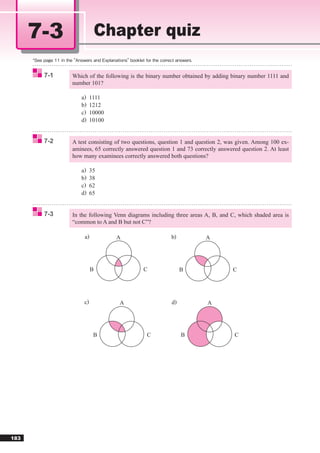
       7-3   In the following Venn diagrams including three areas A, B, and C, which shaded area is
             “common to A and B but not C”?

                  a)          A                      b)            A


                       B                 C                B                   C


                 c)             A                    d)            A


                       B                   C              B                   C


183
7-4   At least how many bits are required to indicate the length from 0 mm to 1,000 mm in the
      unit of millimeters?

         a)   4
         b)   10
         c)   1000
         d)   1001


                                                                                                      Chapter 7
7-5   There is a device where articles are accumulated upwards from the bottom and taken out
      from upwards in sequential order. There are two kinds of operations for this device.


                                                                                                      Basic theory
           PUSH n: Accumulate an article (number n)
           POP:       Extract one article from the top
      If no articles are accumulated at the beginning, which of the following is the result of the
      operations?

                                       PUSH 1 → PUSH 5 → POP → PUSH 7 →
         PUSH           POP
                                       PUSH 6 → PUSH 4 → POP → POP → PUSH 3


         a)                   b)                 c)                  d)
              1                    3                  3                   6
              7                    4                  7                   4
              3                    6                  1                   3


7-6   When the procedure described below is repeated to sort five numbers in ascending order,
      how many times is the procedure repeated until sorting is completed?

         [The order of data before sorting]
         5, 1, 4, 3, 2
         [Procedure]
         (1) If the 1st data > the 2nd data, replace the 1st and 2nd data.
         (2) If the 2nd data > the 3rd data, replace the 2nd and 3rd data.
         (3) If the 3rd data > the 4th data, replace the 3rd and 4th data.
         (4) If the 4th data > the 5th data, replace the 4th and 5th data.
         (5) When no replacement occurs, sorting is completed.
             When replacement occurs, repeat the procedure from (1).

         a)   1
         b)   2
         c)   3
         d)   4


                                                                                                     184
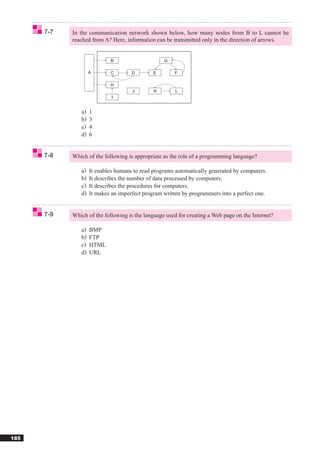
7-7   In the communication network shown below, how many nodes from B to L cannot be
            reached from A? Here, information can be transmitted only in the direction of arrows.


                            B                     G

                    A       C        D        E       F

                            H
                                     J        K        L
                             I


               a)   1
               b)   3
               c)   4
               d)   6


      7-8   Which of the following is appropriate as the role of a programming language?

               a)   It enables humans to read programs automatically generated by computers.
               b)   It describes the number of data processed by computers.
               c)   It describes the procedures for computers.
               d)   It makes an imperfect program written by programmers into a perfect one.


      7-9   Which of the following is the language used for creating a Web page on the Internet?

               a)   BMP
               b)   FTP
               c)   HTML
               d)   URL


185
Chapter


                          8

Computer system
 Chapter 8 examines computer components, system
 components, hardware, and software, and explains
 each type of component and their characteristics.


 8-1   Computer component ........................ 187
 8-2   System component............................ 204
 8-3   Software ............................................ 212
 8-4   Hardware ........................................... 223
 8-5   Chapter quiz ...................................... 229
8-1                              Computer component

                                                      8-1-1 Processor
        Reference                               The “processor” or “CPU (Central Processing Unit),” is a critical de-
      CPU                                       vice that can be considered the brains and nucleus of a computer.
      Abbreviation for “Central Processing      A computer is comprised of devices that perform various functions center-
      Unit.”                                    ing on the CPU. When using a computer, it is important to understand the
                                                basic components of a computer and how they work.

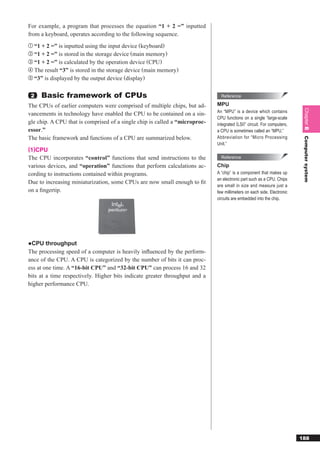
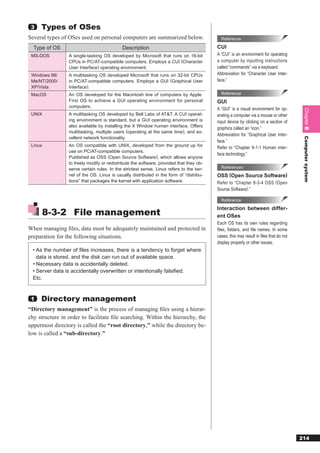
                                                 1   Computer configuration
                                                A computer is configured from devices that possess the five functions of
                                                “input”, “output”, “control”, “operation”, and “storage.” The roles
                                                performed by the five major types of devices are summarized below.
                                                     Device                                       Task
                                                 Control device     Interprets programs and sends instructions to other devices.
                                                 Operation device   Performs calculations according to the instructions within pro-
                                                                    grams. Combined with the control device, it is referred to as the
                                                                    CPU.
                                                 Storage device     Stores programs and data. Divided into “main memory” and
                                                                    “auxiliary storage devices.”
                                                 Input device       Inputs data to the main memory.
                                                 Output device      Outputs data from the main memory (display, print, etc.).

                                                The flow of data and control between the respective devices is shown be-
                                                low.
        Reference
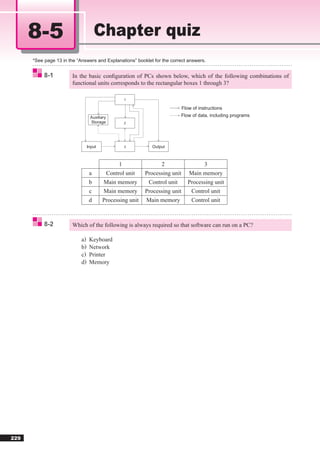
                                                                                       CPU

                                                                                                                                          Flow of control
      Peripheral device
      A “peripheral device” is a device other                                                                              Flow of data
                                                                                 Control device
      than the CPU and main memory.


                                                                                 Operation device


                                                                                      Main
                                                        Input device                 memory                   Output device


                                                                              Auxiliary storage devices   Peripheral devices


187
For example, a program that processes the equation “1 + 2 =” inputted
from a keyboard, operates according to the following sequence.
① “1 + 2 =” is inputted using the input device (keyboard)
② “1 + 2 =” is stored in the storage device (main memory)
③ “1 + 2 =” is calculated by the operation device (CPU)
④ The result “3” is stored in the storage device (main memory)
⑤ “3” is displayed by the output device (display)


 2     Basic framework of CPUs                                                 Reference

The CPUs of earlier computers were comprised of multiple chips, but ad-      MPU


                                                                                                                          Chapter 8
                                                                             An “MPU” is a device which contains
vancements in technology have enabled the CPU to be contained on a sin-
                                                                             CPU functions on a single “large-scale
gle chip. A CPU that is comprised of a single chip is called a “microproc-   integrated (LSI)” circuit. For computers,
essor.”                                                                      a CPU is sometimes called an “MPU.”
The basic framework and functions of a CPU are summarized below.             Abbreviation for “Micro Processing


                                                                                                                          Computer system
                                                                             Unit.”
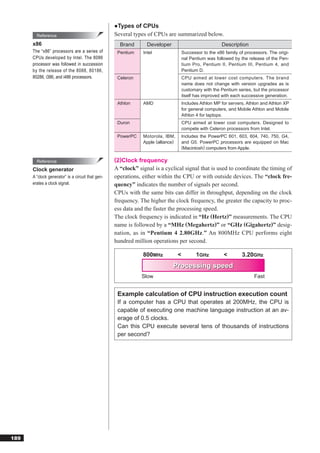
(1)CPU
The CPU incorporates “control” functions that send instructions to the         Reference

various devices, and “operation” functions that perform calculations ac-     Chip
cording to instructions contained within programs.                           A “chip” is a component that makes up
                                                                             an electronic part such as a CPU. Chips
Due to increasing miniaturization, some CPUs are now small enough to fit
                                                                             are small in size and measure just a
on a fingertip.                                                               few millimeters on each side. Electronic
                                                                             circuits are embedded into the chip.


●CPU throughput
The processing speed of a computer is heavily influenced by the perform-
ance of the CPU. A CPU is categorized by the number of bits it can proc-
ess at one time. A “16-bit CPU” and “32-bit CPU” can process 16 and 32
bits at a time respectively. Higher bits indicate greater throughput and a
higher performance CPU.


                                                                                                                         188
●Types of CPUs
        Reference                                  Several types of CPUs are summarized below.
      x86                                            Brand       Developer                               Description
      The “x86” processors are a series of          Pentium    Intel                  Successor to the x86 family of processors. The origi-
      CPUs developed by Intel. The 8086                                               nal Pentium was followed by the release of the Pen-
      processor was followed in succession                                            tium Pro, Pentium II, Pentium III, Pentium 4, and
      by the release of the 8088, 80186,                                              Pentium D.
      80286, i386, and i486 processors.             Celeron                           CPU aimed at lower cost computers. The brand
                                                                                      name does not change with version upgrades as is
                                                                                      customary with the Pentium series, but the processor
                                                                                      itself has improved with each successive generation.
                                                    Athlon     AMD                    Includes Athlon MP for servers, Athlon and Athlon XP
                                                                                      for general computers, and Mobile Athlon and Mobile
                                                                                      Athlon 4 for laptops.
                                                    Duron                             CPU aimed at lower cost computers. Designed to
                                                                                      compete with Celeron processors from Intel.
                                                    PowerPC    Motorola, IBM,         Includes the PowerPC 601, 603, 604, 740, 750, G4,
                                                               Apple (alliance)       and G5. PowerPC processors are equipped on Mac
                                                                                      (Macintosh) computers from Apple.


        Reference                                  (2)Clock frequency
      Clock generator                              A “clock” signal is a cyclical signal that is used to coordinate the timing of
      A “clock generator” is a circuit that gen-   operations, either within the CPU or with outside devices. The “clock fre-
      erates a clock signal.                       quency” indicates the number of signals per second.
                                                   CPUs with the same bits can differ in throughput, depending on the clock
                                                   frequency. The higher the clock frequency, the greater the capacity to proc-
                                                   ess data and the faster the processing speed.
                                                   The clock frequency is indicated in “Hz (Hertz)” measurements. The CPU
                                                   name is followed by a “MHz (Megahertz)” or “GHz (Gigahertz)” desig-
                                                   nation, as in “Pentium 4 2.80GHz.” An 800MHz CPU performs eight
                                                   hundred million operations per second.

                                                               800MHz             <          1GHz         <        3.20GHz
                                                                             Processing speed
                                                               Slow                                                      Fast


                                                    Example calculation of CPU instruction execution count
                                                    If a computer has a CPU that operates at 200MHz, the CPU is
                                                    capable of executing one machine language instruction at an av-
                                                    erage of 0.5 clocks.
                                                    Can this CPU execute several tens of thousands of instructions
                                                    per second?


189
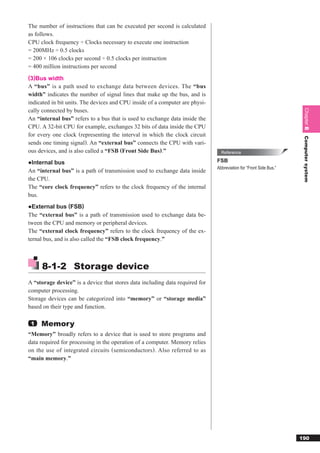
The number of instructions that can be executed per second is calculated
as follows.
CPU clock frequency ÷ Clocks necessary to execute one instruction
= 200MHz ÷ 0.5 clocks
= 200 × 106 clocks per second ÷ 0.5 clocks per instruction
= 400 million instructions per second
(3)Bus width
A “bus” is a path used to exchange data between devices. The “bus
width” indicates the number of signal lines that make up the bus, and is
indicated in bit units. The devices and CPU inside of a computer are physi-
cally connected by buses.


                                                                                                                    Chapter 8
An “internal bus” refers to a bus that is used to exchange data inside the
CPU. A 32-bit CPU for example, exchanges 32 bits of data inside the CPU
for every one clock (representing the interval in which the clock circuit


                                                                                                                    Computer system
sends one timing signal). An “external bus” connects the CPU with vari-
ous devices, and is also called a “FSB (Front Side Bus).”                       Reference

●Internal bus                                                                 FSB
                                                                              Abbreviation for “Front Side Bus.”
An “internal bus” is a path of transmission used to exchange data inside
the CPU.
The “core clock frequency” refers to the clock frequency of the internal
bus.
●External bus (FSB)
The “external bus” is a path of transmission used to exchange data be-
tween the CPU and memory or peripheral devices.
The “external clock frequency” refers to the clock frequency of the ex-
ternal bus, and is also called the “FSB clock frequency.”


     8-1-2 Storage device
A “storage device” is a device that stores data including data required for
computer processing.
Storage devices can be categorized into “memory” or “storage media”
based on their type and function.

 1   Memory
“Memory” broadly refers to a device that is used to store programs and
data required for processing in the operation of a computer. Memory relies
on the use of integrated circuits (semiconductors). Also referred to as
“main memory.”


                                                                                                                   190
(1)Types of memory
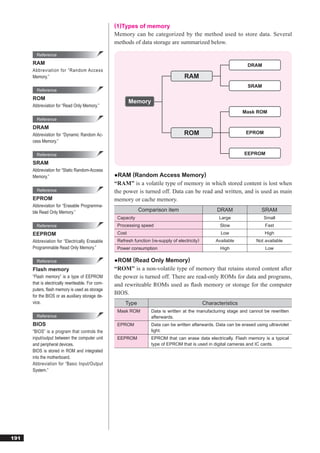
                                                   Memory can be categorized by the method used to store data. Several
                                                   methods of data storage are summarized below.

        Reference
      RAM                                                                                                            DRAM
      Abbreviation for “Random Access
      Memory.”                                                                         RAM
                                                                                                                     SRAM
        Reference
      ROM
                                                           Memory
      Abbreviation for “Read Only Memory.”
                                                                                                                    Mask ROM
        Reference
      DRAM
      Abbreviation for “Dynamic Random Ac-                                             ROM                           EPROM
      cess Memory.”

        Reference                                                                                                   EEPROM
      SRAM
      Abbreviation for “Static Random-Access
      Memory.”                                     ●RAM (Random Access Memory)
                                                   “RAM” is a volatile type of memory in which stored content is lost when
        Reference                                  the power is turned off. Data can be read and written, and is used as main
      EPROM                                        memory or cache memory.
      Abbreviation for “Erasable Programma-
      ble Read Only Memory.”                                   Comparison item                          DRAM               SRAM
                                                    Capacity                                             Large               Small
        Reference                                   Processing speed                                     Slow                Fast
      EEPROM                                        Cost                                                 Low                 High
      Abbreviation for “Electrically Erasable       Refresh function (re-supply of electricity)        Available        Not available
      Programmable Read Only Memory.”               Power consumption                                    High                Low

        Reference                                  ●ROM (Read Only Memory)
      Flash memory                                 “ROM” is a non-volatile type of memory that retains stored content after
      “Flash memory” is a type of EEPROM           the power is turned off. There are read-only ROMs for data and programs,
      that is electrically rewriteable. For com-   and rewriteable ROMs used as flash memory or storage for the computer
      puters, flash memory is used as storage
      for the BIOS or as auxiliary storage de-
                                                   BIOS.
      vice.                                             Type                                      Characteristics
                                                    Mask ROM         Data is written at the manufacturing stage and cannot be rewritten
        Reference                                                    afterwards.
      BIOS                                          EPROM            Data can be written afterwards. Data can be erased using ultraviolet
      “BIOS” is a program that controls the                          light.
      input/output between the computer unit        EEPROM           EPROM that can erase data electrically. Flash memory is a typical
      and peripheral devices.                                        type of EPROM that is used in digital cameras and IC cards.
      BIOS is stored in ROM and integrated
      into the motherboard.
      Abbreviation for “Basic Input/Output
      System.”


191
(2)Memory applications
Memory can be categorized by application. Several types of memory are
summarized below.
    Type                                     Characteristics
 Main memory      Memory that stores programs and data that the CPU processes.
                  DRAM is used for this purpose.
 Cache            Memory used to speed up computers by absorbing the difference in
 memory           the access speeds of the CPU and main memory. Many computers
                  are equipped with multiple cache memory, which are called “primary
                  cache memory” and “secondary cache memory” based on their
                  proximity to the CPU. SRAM is used for this purpose.
 VRAM             Dedicated memory for temporary storage of image data shown on


                                                                                        Chapter 8
                  the display. VRAM is typically provided separately from the main
                  memory, and is integrated into graphics accelerator boards. DRAM
                  is used for this purpose.

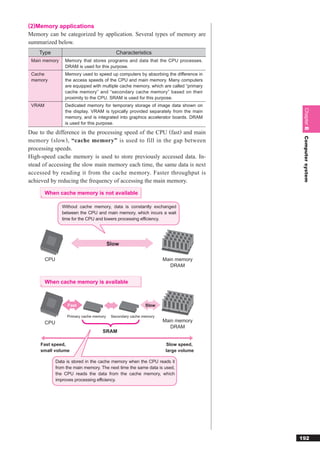
Due to the difference in the processing speed of the CPU (fast) and main


                                                                                        Computer system
memory ( slow ) , “cache memory” is used to fill in the gap between
processing speeds.
High-speed cache memory is used to store previously accessed data. In-
stead of accessing the slow main memory each time, the same data is next
accessed by reading it from the cache memory. Faster throughput is
achieved by reducing the frequency of accessing the main memory.

        When cache memory is not available

                 Without cache memory, data is constantly exchanged
                 between the CPU and main memory, which incurs a wait
                 time for the CPU and lowers processing efficiency.


                                          Slow

        CPU                                                         Main memory
                                                                       DRAM


        When cache memory is available


                   Fast                                     Slow

                   Primary cache memory    Secondary cache memory
        CPU                                                         Main memory
                                                                       DRAM
                                     SRAM

     Fast speed,                                                     Slow speed,
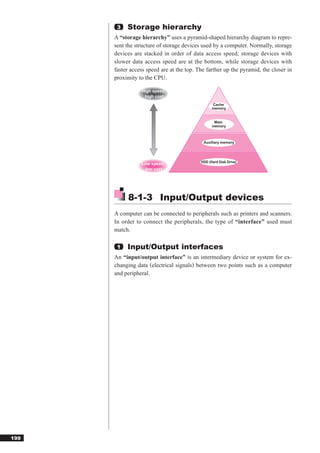
     small volume                                                    large volume

              Data is stored in the cache memory when the CPU reads it
              from the main memory. The next time the same data is used,
              the CPU reads the data from the cache memory, which
              improves processing efficiency.


                                                                                       192
Reference                                 (3)Types of main memory
      SIMM                                        The type of main memory used depends on the type of computer. When
      Abbreviation for “Single In-line Memory     expanding the main memory, it is necessary to add the correct type of main
      Module.”                                    memory for the computer.
                                                  The common types of main memory are summarized in the following ta-
        Reference
                                                  ble.
      DIMM
      Abbreviation for “Dual In-line Memory        Type                       Characteristics                        Data transfer
      Module.”                                     SIMM    The signal pins on the front and back of the module re-   32-bit unit
                                                           lease the same signals. Used on desktop computers, typ-
        Reference                                          ically in pairs. Recently declining in usage.

      Expansion memory                             DIMM    The signal pins on the front and back of the module re-   64-bit unit
                                                           lease separate signals. Used in laptop PCs. Recently
      “Expansion memory” is memory that is
                                                           used as memory in desktop computers.
      added later to expand the built-in stand-
      ard memory.

                                                                                       SIMM


                                                                                       DIMM


                                                   2   Storage media
                                                  “Storage media” are devices that store created data and files, and are also
                                                  called “auxiliary storage devices.”
                                                  The data stored on storage media is retained after the power is turned off,
                                                  making it possible to carry the data around and distribute it. Storage media
                                                  also have a large storage capacity, and can be used to save data and pro-
                                                  grams.


193
The following are types of storage media.

                                                              Floppy disk
                              Magnetic disk
                                                               Hard disk


                                                          CD-ROM
                                                          CD-R
                                                          CD-RW
   Storage media              Optical disk
                                                         DVD-ROM


                                                                                       Chapter 8
                                                         DVD-RAM
                                                         DVD-R
                                                         DVD-RW


                                                                                       Computer system
                                                               Streamer
                                 Other
                                                                    MO


                                                             USB memory
                              Flash memory
                                                           Memory card
                                                      (Semiconductor memory)


(1)Magnetic disk
A “magnetic disk” is a type of storage media that uses magnetization to
read and write data.
The characteristics and storage capacities of typical types of magnetic
disks are summarized below.
                   Storage
Storage device                         Characteristics             Storage capacity
                    media
 FDD (Floppy      Floppy disk    Reads and writes data to flop-     720KB
 Disk Drive)                     py storage media comprising       1.44MB
                                 of a plastic case that contains
                                 a thin, magnetic-coated film
                                 disk.
 HDD (Hard        Hard disk      Reads and writes data to stor-    Tens of GB
 Disk Drive)                     age media comprising of multi-    (gigabytes) to
                                 ple magnetic-coated metal         several TB
                                 disks. The standard storage       (terabytes)
                                 media used for computers.

* Approximate capacities as of May 2009.
                                  Floppy disk
                                                           Hard disk


                                                                                      194
Reference                                    ●Construction of magnetic disks
      Track                                          In order to use a magnetic disk, it is first necessary to “format (initialize)”
      A “track” is a concentric region for data      the disk. The formatting organizes the disks into “tracks” and “sectors”
      storage that is separated on a magnetic        to enable the storage of data.
      disk.
                                                     The construction of a magnetic disk is shown below.
        Reference
                                                                                                 Magnetic disks (floppy disks and
      Sector                                                                      Sector         hard disks) store data in sector
                                                          Track
      A “sector” is a region of data storage                                                     units.
      that is derived by radially dividing a
      track into equal parts. It is the smallest
      storage unit of a magnetic disk.                                                         Moves in line with the magnetic head
                                                                                                          (Seek operation)

        Reference
      Cylinder
      A “cylinder” comprises a group of tracks
      that share the same location. Each stor-
      age surface has its own magnetic head.                                                                          Access arm
      These heads move in line with each                                                      Magnetic head
      other simultaneously, which makes it                Magnetic disk     Cylinder 2
      possible to select tracks on the same                        Rotational axis
                                                                                         Cylinder 1
      radius. The groups of tracks on the
      same radius comprise a cylindrical             ●Sequence for read/write operations of magnetic disks
      shape or cylinder.
                                                           Magnetic head moves to the target track. (Seek operation)
        Reference
      Search time
      “Search time” refers to rotational latency
                                                              Waits for the target sector to rotate and come around.
      for read/write operations on a magnetic
                                                                                (Rotational latency)
      disk. It is the time it takes after the seek
      operation has finished, for the magnetic
      disk to rotate, and for the lead part of
      the read data or write area to reach the           Reads and writes to and from the target sector. (Data transfer)
      position of the magnetic head. The seek
      operation time is called “seek time.”
                                                     ●Fragmentation and optimization (defragmentation)
                                                     “Fragmentation” occurs when data is stored across multiple regions of
                                                     the hard disk. Repeatedly adding, deleting, and moving data that is stored
                                                     across a continuous sector results in a state of fragmentation. When data
                                                     becomes fragmented, the number of seek operations increases, which in
                                                     turn reduces access speed. It is then necessary to periodically repair frag-
                                                     mentation via “optimization,” which is performed using specialized soft-
                                                     ware.


195
Fragmented state When fragmented, the           Optimized state When optimized, the
                      number of seek operations                    number of seek
                      increases and access                         operations decreases
                      speed decreases.                             and access speed
                                                                   increases.

      ②                                               ③       ②
                               Optimization
              ①              (Defragmentation)      ④         ①
          ③                                               ⑤
                  ④
          ⑤


●Calculating the capacity of magnetic disks
The following formula can be used to calculate the storage capacity of a
magnetic disk, and the number of sectors needed to record data.


                                                                                           Chapter 8
Formula for calculating storage capacity

   Storage capacity per sector × No. of sectors per track ×


                                                                                           Computer system
   No. of tracks per surface × No. of storage surfaces


 Example
 If a floppy disk with the following specifications is formatted, how
 many MB is the storage capacity?

  No. of tracks per surface               : 80
  No. of sectors per track                : 18
  Sector length (bytes)                   : 512
  Storage surface                         : Both sides

512 bytes × 18 sectors / per track × 80 tracks / per surface × 2 surfaces =
1,474,560 bytes 1.4MB
Therefore, the storage capacity is 1.4MB.
Formula for calculating number of sectors needed to store data

   Data length ÷ Storage capacity per sector ··· Round to nearest integer


 Example
 For a floppy disk that has 512 bytes per sector, how many total
 sectors are needed to store 500 bytes, 1,400 bytes, and 1,600
 bytes of data?
  500 bytes ÷ 512 bytes = 0.976 ···· (rounded to nearest integer) = 1 sector
1,400 bytes ÷ 512 bytes = 2.734 ···· (rounded to nearest integer) = 3 sectors
1,600 bytes ÷ 512 bytes = 3.125 ···· (rounded to nearest whole integer) = 4 sectors
1 sector + 3 sectors + 4 sectors = 8 sectors
Therefore, 8 sectors are needed.


                                                                                          196
Reference                                  (2)Optical disks
      CD-ROM                                       An “optical disk” is a type of storage device that uses laser optics to read
      Abbreviation for “Compact Disc Read          and write data.
      Only Memory.”                                The characteristics and storage capacities of typical optical disks are sum-
                                                   marized below.
        Reference
      CD-R                                          Storage     Storage
                                                                                     Characteristics                 Storage capacity
      Abbreviation for “Compact Disc Record-        device       media
      able.”                                        CD-ROM     CD-ROM      A read-only media. Due to its low         650MB
                                                    drive                  cost, CD-ROMs are widely used to          700MB
        Reference                                                          distribute software packages.
      CD-RW                                         CD-R       CD-R        A media that reads and writes data.
                                                    drive                  Data can only be written once, after
      Abbreviation for “Compact Disc Rewri-
                                                                           which the data becomes read-only.
      table.”
                                                                           Also referred to as a “write once, read
                                                                           many disc.” Data that is recorded to a
        Reference                                                          CD-R can be read by CD-ROM devic-
      DVD-ROM                                                              es.
      Abbreviation for “Digital Versatile Disc      CD-RW      CD-RW       A media that reads and writes data.
      Read-Only Memory.”                            drive                  Can be rewritten about 1,000 times.
                                                    DVD-       DVD-        A read-only media that is widely used     Single-sided,
        Reference                                   ROM        ROM         to distribute movies and other large-     single-layer:
                                                    drive                  volume video software.                    4.7GB
      DVD-RAM                                                                                                        Single-sided,
                                                    DVD-       DVD-        A media that reads and writes data.
      Abbreviation for “Digital Versatile Disc                                                                       dual-layer: 8.5GB
                                                    RAM        RAM         Used to record large-volume video
      Random Access Memory.”                        drive                  from devices such as digital video        * Capacities are
                                                                           cameras.                                    doubled for
        Reference                                                                                                      double-sided
                                                    DVD-R      DVD-R       A media that reads and writes data.
                                                                                                                       media
      DVD-R                                         drive                  Data can only be written once, after
      Abbreviation for “Digital Versatile Disc                             which the data becomes read-only.
      Recordable.”                                                         Data that is recorded to a DVD-R can
                                                                           be read by DVD-ROM devices or
                                                                           DVD players.
        Reference
                                                    DVD-RW     DVD-RW      A media that reads and writes data.
      DVD-RW                                        drive                  Can be rewritten about 1,000 times,
      Abbreviation for “Digital Versatile Disc                             similar to a CD-RW.
      Rewritable.”                                  Blu-ray    Blu-ray     A media that reads and writes data.       Single-sided,
                                                    drive                  The Blu-ray format was jointly devel-     single-layer:
        Reference                                                          oped by a consortium of nine compa-       25GB
                                                                           nies including Sony and Panasonic.        Single-sided,
      Shelf life of optical discs
                                                                           Uses the same 12-cm diameter opti-        dual-layer: 50GB
      Data on optical discs is protected by a                              cal disc cartridges as CDs and DVDs.
      thin resin protection layer on top of the                            Used as a large-capacity storage me-
      recording layer where data is stored.                                dia for data such as video.
      Using an optical disc for many years
                                                   * Approximate capacities as of May 2009.
      can result in deterioration of the protec-
      tion layer and loss of the stored content.


197
(3)Other                                                                                      Reference
Storage media other than magnetic discs and optical discs are summarized                    Sequential access
below.                                                                                      “Sequential access” is a method of
                                                                                            reading and writing data in sequence
  Storage         Storage                                                    Storage        starting from the first position of a file.
                                         Characteristics
  device           media                                                     capacity
 Streamer         Magnetic    A streamer continuously reads and           Several tens of     Reference
 (Magnetic        tape        writes data, whereas magnetic tapes         to several
 tape drive)                  typically used with general purpose         hundred GB        Random access
                              computers are started and stopped                             “Random access” is a method of read-
                              as each block is read and written.                            ing and writing from an arbitrary point in
                              Magnetic tape formats include “DAT”                           a file.
                              and “8mm tape.” For computers,
                              DAT tape is mainly used to perform


                                                                                                                                          Chapter 8
                                                                                              Reference
                              operations such as backing up data.
                                                                                            DAT
 MO device        MO          Writes data using laser optics and          Several hundred
 (Magneto-                    magnetism, but only uses laser op-          MB to several     Abbreviation for “Digital Audio Tape.”
 optical disk                 tics for reading data. Capable of re-       GB


                                                                                                                                          Computer system
 drive)                       peated rewriting.                                               Reference

* Approximate capacities as of May 2009.                                                    MO
                                                                                            Abbreviation for “Magneto-Optical disk.”


                DAT                               MO


(4)Flash memory
“Flash memory” is a non-volatile type of rewriteable memory that retains
stored content after the power is turned off.
Several types of flash memory are summarized below.
  Storage                                                                    Storage          Reference
                                   Characteristics
   media                                                                     capacity       Compact flash memory
 USB              Reads and writes data using flash memory. Inte-          Several tens of   card
 memory           grated with a connector for connecting to a com-        MB to several     A “compact flash memory card” is a
                  puter, offering small size and excellent portability.   tens of GB
                                                                                            type of storage media that reads and
 SD memory        Reads and writes data using flash memory. Used           Several tens of   writes data using flash memory. They
 card             in digital cameras and mobile phones.                   MB to several     are used in digital cameras and portable
                                                                          tens of GB
                                                                                            laptop computers.
* Approximate capacities as of May 2009.


                                                                                                                                         198
3   Storage hierarchy
      A “storage hierarchy” uses a pyramid-shaped hierarchy diagram to repre-
      sent the structure of storage devices used by a computer. Normally, storage
      devices are stacked in order of data access speed; storage devices with
      slower data access speed are at the bottom, while storage devices with
      faster access speed are at the top. The farther up the pyramid, the closer in
      proximity to the CPU.

                 High speed,
                  high cost
                                                 Cache
                                                 memory


                                                  Main
                                                 memory


                                            Auxiliary memory


                                           HDD (Hard Disk Drive)
                 Low speed,
                  low cost


            8-1-3 Input/Output devices
      A computer can be connected to peripherals such as printers and scanners.
      In order to connect the peripherals, the type of “interface” used must
      match.

       1   Input/Output interfaces
      An “input/output interface” is an intermediary device or system for ex-
      changing data (electrical signals) between two points such as a computer
      and peripheral.


199
The types of data exchanged between a computer and peripheral are sum-
marized below.
●Analog
“Analog” information is expressed as a continuous value. Changes occur
in a wave-like pattern since time is continuous. Attenuation and noise be-
come more pronounced as the transmission distance increases.
                          Size


                                                Time


                                                                                 Chapter 8
●Digital
“Digital” information is expressed as a concrete numerical value. Changes


                                                                                 Computer system
occur in a bar graph pattern due to numerical value conversion. Digital in-
formation is not prone to attenuation and noise as the transmission distance
increases.
                          Size


                                                Time


A computer processes information based on electrical signals that have
been converted into numerical values. In other words, a computer handles
and processes digital information. In the exchange of electrical signals be-
tween a computer and peripheral, the interface acts as an intermediary. In-
put/output interfaces used for data transmission are divided into “serial in-
terfaces”, “parallel interfaces”, and “wireless interfaces.”


                                                                                200
Reference                               (1)Serial interface
      PC/AT-compatible                          A “serial interface” is an interface that transfers data one bit at a time.
      computers                                 It uses few signal lines and is not prone to signal variation, making it suit-
      A “PC/AT-compatible computer” is a        able for long-distance transmission.
      computer that is compatible with PC/AT
                                                The standards for serial interfaces are summarized below.
      computers made by U.S.-based IBM
      Corporation.                                Standard                                   Characteristics
      The “IBM PC/AT” computer specifica-        RS-232C        An interface used to connect a computer unit to a modem or mouse.
      tion was released in 1984. Many hard-                     They are standard and built into PC/AT-compatible computers.
      ware manufacturers produced comput-        USB            An interface used to connect various types of peripherals such as a
      ers according to this specification, and                   keyboard, mouse, printer, or display. A USB hub can be used to
      it is now a global standard for comput-                   connect up to 127 peripherals. While the power is on, peripherals
      ers.                                                      can be connected or removed (hot plugging), and power can also
                                                                be supplied to them over a cable.
        Reference                                               Data transmission speeds range from 1.5Mbps for low-speed mode
                                                                (USB 1.1) to 480Mbps for high-speed mode (USB 2.0).
      Bus power method
                                                 IEEE1394       An interface used to connect devices such as a digital video camera
      “Bus power method” is a method of
                                                                or DVD-RAM. Up to 63 peripherals can be connected. It enables hot
      supplying power to USB equipment                          plugging and power to be supplied. Also referred to as “FireWire”
      over a USB cable. USB equipment that                      and “i.Link.”
      does not need an AC adapter or power
      cord is operable simply by connecting a
      USB cable and receiving power via                 RS-232C
      USB.
                                                                                  D-sub 25-pin                  D-sub 9-pin
        Reference
      bps                                               USB                                              IEEE1394
      “bps” refers to the amount of data that
      can be transferred in one second.
      Abbreviation for “bits per second.”        USB connection example

                                                                                      USB hub                          USB hub


                                                                                   CD-ROM                         MO          Digital
                                                                       Printer                    Scanner
                                                                                     drive                        drive       camera


                                                                    Up to 127 devices including USB hubs can be connected
                                                                   * Printers and other peripherals can also be directly connected to the
                                                                     USB port of the computer unit.


201
(2)Parallel interface                                                                                 Reference
A “parallel interface” is an interface that transfers data in groups of mul-                        PCMCIA
tiple bits.                                                                                         “PCMCIA” is a U.S. standardization or-
Since it bundles signal lines and sends data in parallel, it is prone to signal                     ganization that develops standards and
                                                                                                    specification for items such as PC
variation. This makes it unsuitable for long-distance transmission.                                 cards.
The standards for parallel interfaces are summarized below.                                         There are various types of PC cards in-
                                                                                                    cluding SCSI cards and LAN cards. PC
  Standard                                   Characteristics
                                                                                                    cards transmit data using a parallel
 IEEE1284        An interface mainly used to connect a computer unit to a printer. In
                                                                                                    transfer method.
                 addition to printers, it is also used to connect image scanners and
                                                                                                    Abbreviation for “Personal Computer
                 MO devices.
                                                                                                    Memory Card International Associa-
 SCSI            An interface used to connect a computer unit to peripherals. It is
                                                                                                    tion.”
 ( pronounced    mainly used when connecting external peripherals. Up to seven pe-


                                                                                                                                               Chapter 8
 “scuzzy”)       ripherals can be connected in a daisy chain method in which each
                 piece of equipment is connected in series. (The daisy chain can
                 comprise up to eight pieces of equipment including the SCSI board
                 of the computer unit.) Depending on the SCSI standard, up to 15


                                                                                                                                               Computer system
                 pieces of equipment (or 16 including the SCSI board of the comput-
                 er unit) can be connected.


      IEEE1284
                                   D-sub 25-pin                     Amphenol 36-pin

      SCSI
                                Amphenol 50-pin                       D-sub 25-pin


                           Amphenol half pitch 50-pin      Comb-shaped Amphenol half-pitch 50-pin


 SCSI connection example

 Computer unit                                          Hard disk


                                                                     Hard disk


                      Terminator
                      (integrated on the
                      SCSI board)
                                                                      CD-ROM drive
 Other SCSI equipment

                      Terminator


                                                                       MO drive


                              Printer                           Scanner


                                                                                                                                              202
Reference                                  Up to seven peripherals can be connected by a daisy chain method. A “ter-
      Terminator                                   minator” is attached to the equipment at each end of the daisy chain as re-
      A “terminator” is a kind of resistance       sistance. (A SCSI board contains a built-in terminator.)
      that is connected so that electrical sig-    Each piece of SCSI equipment must be configured to have a unique ID
      nals are not reflected back at the end of
      a daisy chain of peripherals. Also re-
                                                   number. If the SCSI IDs overlap, there can be issues such as the peripher-
      ferred to as a “terminating resistance.”     als failing to operate.
                                                   (3)Wireless interface
        Reference
                                                   A “wireless interface” is an interface that transfers data using infrared or
      SCSI ID
      A “SCSI ID” is a number from 0 to 7 that     wireless transmission technology. Transmission speeds can range from fast
      is used to identify equipment connected      to slow, but the distance of transmission is short at several tens of meters.
      by a SCSI interface. The SCSI ID can         Wireless interfaces are therefore generally suited for short-range use such
      be assigned to SCSI equipment in any
                                                   as indoors.
      order.
                                                   Standards for wireless interfaces are summarized below.
        Reference                                    Standard                              Characteristics
      IrDA                                          IrDA          An interface that uses infrared communication. The transmission
      Abbreviation for “Infrared Data Associa-                    distance is generally within two meters. If there are obstructing ob-
      tion.”                                                      jects between the devices, interference can occur in the data trans-
                                                                  mission.
                                                    Bluetooth     A wireless communications interface that uses the 2.4GHz band to
                                                                  achieve transmission speeds of 1Mbps within a range of 10 meters.
                                                                  Integrated into computers, printers, PDAs, and mobile phones. Rel-
                                                                  atively resistant to obstructing objects compared to IrDA.


                                                    2      Device driver
        Reference                                  A “device driver,” also called a “driver,” is a piece of software that ena-
      Device                                       bles the use of a peripheral. Every peripheral requires a device driver,
      A “device” is a peripheral that is con-      which must be installed to use the peripheral. Device drivers must be de-
      nected to a computer such as a key-          veloped to support the type of operating system and type of computer, and
      board, mouse, or display.
                                                   are either provided with the device or can be downloaded from the Web
        Reference
                                                   site of the manufacturer.
      Plug and play
                                                   However, the latest operating systems are “plug and play,” which enables
      “Plug and play” is a function of Windows     peripherals to be used simply by connecting them.
      that automatically configures the opti-
      mum settings for a peripheral when it is
      added to a computer. Necessary device
      drivers for the connected device are au-
      tomatically added and configured. In or-
      der to activate it, plug and play must not
      only be supported by the computer, but
      also by the peripheral.


203
8-2                           System component

     8-2-1 System configuration
An “information system” is a system that uses a computer to advance
work activities.
Information systems can be categorized according to the type of computer
used or processing mode. When developing systems, it is necessary to se-


                                                                                                                                  Chapter 8
lect a system configuration that matches its purpose.


 1   Processing modes for information systems


                                                                                                                                  Computer system
The processing modes for information systems are summarized below.
(1)Centralized processing
“Centralized processing” is a processing mode in which all processing is
performed by a single computer (host computer). It is the processing mode
employed by online systems.                                                             Reference
The characteristics of centralized processing are summarized below.                   Online system
                                                                                      An “online system” is a system configu-
 • One computer is used for management, making it possible to focus equip-
                                                                                      ration that uses a communication line to
   ment and personnel.
                                                                                      connect between computers and per-
 • Easy to conduct operations management, security management, and main-
                                                                                      form processing.
   tenance.
 • If there is a failure with the computer that performs the processing, the over-
   all system comes to a halt.


(2)Distributed processing
“Distributed processing” is a mode in which processing is divided be-
tween multiple computers connected by a network. It is the processing
mode employed by client/server systems.                                                 Reference
The features of distributed processing are summarized below.                          Client/server system
                                                                                      Refer to “Chapter 8-2-1 4 Client/server
 • Easy to expand the system functions.
                                                                                      system.”
 • If there is a failure with a single computer, the overall system comes to a
   halt.
 • Processing is performed by multiple computers, increasing the complexity
   of operations management, security management, and maintenance.
 • If an abnormality occurs, it can be difficult to trace the location of the abnor-
   mality.


                                                                                                                                 204
Reference                                  In terms of hardware configuration, distributed processing can be catego-
      Standalone                                   rized into “horizontal distribution” and “vertical distribution.”
      “Standalone” is a system configuration
      in which a single computer performs          ●Horizontal distribution
      processing without connecting to a net-      “Horizontal distribution” is a processing mode in which processing is dis-
      work.                                        tributed by connecting computers and workstations with standalone process-
                                                   ing capabilities.
        Reference
      Workstation                                  ●Vertical distribution
      Refer to “Chapter 8-4-1 Hardware.”           “Vertical distribution” is a processing mode in which the functions are
                                                   distributed by connecting a hierarchy of computers and terminals that per-
        Reference
                                                   form the processing.
      Parallel processing
      “Parallel processing” is a method for
      improving the overall throughput of a         2   Information system configuration
      system by connecting multiple comput-        The typical configurations for information systems are summarized below.
      ers to perform a single processing task.
                                                   (1)Dual system
                                                   A “dual system” uses two systems with the same configuration, which si-
                                                   multaneously perform the same processing to check whether there are er-
                                                   rors in the processing results. If a failure occurs, the system that generated
        Reference                                  it is isolated and the other system continues the processing.
      Cluster system                               (2)Duplex system
      A “cluster system” is a system configu-
      ration in which multiple computers (in-
                                                   A “duplex system” uses two systems; one system is used as the primary
      cluding servers ) are connected by a         system (currently used system), and the other is used as the secondary sys-
      network, operating together as if it were    tem (backup system). The primary system usually performs the process-
      a single system. It is one type of system    ing. If a failure occurs with the primary system, the duplex system switch-
      configuration that seeks to improve reli-
      ability by continuing to provide services
                                                   es to the secondary system to continue the processing that the primary sys-
      without interrupting tasks in the event of   tem was performing.
      a failure.
                                                   (3)Thin client
        Reference                                  A “thin client” manages resources such as application software and files
      Handling of primary and                      on the server side, and limits the client-side computer to only the minimum
      secondary systems                            functions. On the client side, the system can be operated simply by prepar-
      Depending on how the secondary sys-          ing network functions for connecting to the server and input/output func-
      tem is handled, there are two types of       tions. This makes operations management easy to conduct, and offers en-
      duplex systems.
                                                   hanced security.
      ●Cold standby system
      The primary system usually performs
      real-time processing, while the second-       3   Uses of information systems
      ary system performs other processing
                                                   The uses of information systems are summarized below.
      such as batch processing. Depending
      on the separate processing performed         (1)Interactive processing
      by the primary and secondary systems,
                                                   “Interactive processing” is a form of mutually interactive processing be-
      a duplex system can be effectively em-
      ployed.                                      tween the user and computer. The user responds to the operations request-
      ●Hot standby system                          ed by the computer through the display, mutually performing the process-
      The primary and secondary systems do         ing as if actively interacting with the computer.
      not perform separate processing, and
      the secondary system is maintained in
      the same state as the primary system
      as a backup. This makes it possible to
      quickly switch systems in the event of a
      failure.


205
(2)Real-time processing
“Real-time processing” is a mode in which processing occurs the instant
data is generated. It is used in conjunction with online systems such as
bank ATM and train seating reservation systems.
(3)Batch processing
“Batch processing” is a mode that accumulates data over a specified peri-
od and processes it in batches. Batch processing is automatically per-
formed simply by configuring the processing settings, which allows it to
be employed when the computer is normally not in use. It is used for ad-
ministrative processing such as pay calculations.


                                                                                                                                      Chapter 8
 4     Client/server system
A “client/server system” is a system that is configured by designating the
roles of a “server” and “client.” A server provides services to computers


                                                                                                                                      Computer system
that are connected to the network, while a client requests services from the
server.
                                                                                           Reference

                                       Server                                            Peer to peer
                                                                                         “Peer to peer” refers to a type of system
                                                                                         that comprises a network. In a peer to
                                                      Printer
                                                                                         peer system, computers connected to
                            Data                                                         the network are mutually connected as
                                                                                         equals, instead of designating individual
         Provide services                                       Provide services         roles. For this reason, there is no dis-
                                                                                         tinction between servers and clients.

                                   Request services                                        Reference

                                       Client                                            Web system
                                                                                         A “Web system” is a system that oper-
                                                                                         ates on a server and performs two-way
(1)Characteristics of client/server systems                                              communications using a browser.
The characteristics of a client/server system are summarized below.                      “Shopping carts” seen on many shop-
                                                                                         ping sites and “e-mail forms” are a type
     Characteristic                             Description                              of Web system applications.
 Reduced load on       Roles are divided (processing is distributed) between client
 system                and server, reducing the load on the system.
 Reduced installa-     Use of hardware resources (printers, hard disk drives, etc.) is
 tion cost             shared, reducing installation costs.
 Improved efficiency   Use of software resources (files, etc.) is shared, improving
 of work               work efficiency by retrieving necessary data when needed and
                       processing.
 Ease of system        Servers and clients can be added easily.
 expansion
 Increased complex-    Hardware and software resources must be managed for each
 ity of system         server and client, increasing complexity the more the scale of
 management            the system increases. Also difficult to isolate the cause and
                       responsibility if an issue arises.


                                                                                                                                     206
(2)Types of servers
        Reference                                    In a client/server system, servers can be categorized according to their
      Network printer                                role. The types of servers are summarized below.
      A “network printer” is a printer with built-    Type of sever                                  Description
      in print server functions. Laser printers
                                                      File server         A server that collectively manages files. Clients can share files on
      widely used in corporations are a type
                                                                          the file server for effective use of information.
      of network printer. Clients can use a
      network printer simply by connecting            Print server        A server that manages and controls a printer. Clients temporarily
                                                                          save print data to the hard disk of the printer server (spooling),
      the printer to a hub. However, a printer
                                                                          and after it is registered to a printing queue, the data is printed in
      driver must be installed for each client.
                                                                          sequence.
                                                      Database server     A server with a DBMS (Database Management System). It can
        Reference
                                                                          produce an environment similar to one in which all clients are di-
      Database management                                                 rectly connected to the database. According to the requests of
      system                                                              the client, the database server performs processing such as
                                                                          searching, tabulating, and sorting large amounts of data, and re-
      Refer to “Chapter 9-3-1 Database archi-
                                                                          turns only the results to the client.
      tecture.”
                                                     (3)Three-layer architecture
                                                     A “three-layer architecture” is a system that divides the applications of a
                                                     client/server system into three modules.
                                                     In a three-layer architecture, data is processed on the server side to limit
                                                     the amount of data transferred between the client and server.
                                                     Dividing the applications into three modules also makes it easier to change
                                                     the specifications.
                                                     A conventional and typical client/server system is called a “two-layer ar-
                                                     chitecture.”
                                                     Hierarchy of three-layer architecture
                                                      First layer       Presentation layer                   Human interface level
                                                      Second layer    Application layer (Function layer)     Data processing level
                                                      Third layer       Data layer                           Database access level


207
8-2-2 System evaluation indexes
System evaluation indexes require a comprehensive look at the computer
performance, reliability, and cost efficiency.

 1   System performance
System performance is measured by conducting a “performance testing”
as part of system testing and acceptance testing. A performance testing is a
test used to verify whether aspects of processing such as response time,
turnaround time, and benchmarks satisfy requirements.


                                                                                                                           Chapter 8
The aspects used to evaluate the performance of a system are summarized
below.
(1)Response time


                                                                                                                           Computer system
The “response time” is the time it takes for the computer to first respond
from the time the computer is requested to perform a given process. It is
used to evaluate the performance of online systems. Response time is af-
fected by CPU performance and number of connected users. Lower loads
produce faster response times, while higher loads produce slower response
times.
(2)Turnaround time                                                               Reference
The “turnaround time” is the time it takes to receive all processing re-       Throughput
sults from the time the computer is requested to perform a series of tasks.    “Throughput” refers to the amount of
It is used to evaluate batch processing performance.                           work that a system can perform in a unit
                                                                               of time.
                               Response time


             Printing
                                Processing          Printing result
           instruction


                              Turnaround time

(3)Benchmark
A “benchmark” is an index used to measure system performance.
It compares and evaluates the performance of multiple computers by meas-
uring aspects such as response time and CPU availability.


                                                                                                                          208
2    System reliability
                                                When installing a system, it is important that the system is reliable for us-
                                                ers (system user departments). System reliability is improved by ensuring
                                                the system remains operational with no functions coming to a halt during
                                                operation.
                                                (1)Index for system reliability
                                                “Availability” is used as an index for measuring system reliability. The
                                                system availability is a percentage that indicates the level of uninterrupted
                                                availability. The higher the availability value, the better the reliability of
                                                the system.
        Reference                               Availability can be indicated by “MTBF (Mean Time Between Fail-
      MTBF                                      ures)” or “MTTR (Mean Time To Repair).” A higher MTBF or shorter
      Abbreviation for “Mean Time Between       MTTR indicates better system availability.
      Failures.”                                The following formulas are used to calculate availability using MTBF and
                                                MTTR.
        Reference
      MTTR                                                                            MTBF
                                                             Availability =
      Abbreviation for “Mean Time To Repair.”                                      MTBF + MTTR

                                                OR
                                                                                 Total operational time − Failure time
                                                             Availability =
                                                                                       Total operational time

                                                 MTBF              Time between failures.
                                                                   Average time of continuous system operation.
                                                 MTTR              Average time to repair the system in the event of a failure.


                                                  Start of operation                                                         End of operation

                                                                    Failure                                Failure           Failure
                                                            Operation                  Operation                     Operation

                                                               100     6                  350                 2        120        4
                                                                                                                                       Time
                                                             MTBF: (100 + 356 + 120 hours) ÷ (3 times) = 190 hours
                                                             MTTR: (6 + 2 + 4 hours) ÷ (3 times) = 4 hours
                                                             Availability :         MTBF                 190
                                                                                                    =   190+4
                                                                                 MTBF + MTTR
                                                                              =0.9793814 … Approx. 0.979
                                                                              OR
                                                                              Total operational time − Failure time =   570
                                                                                      Total operational time          570+12
                                                                              =0.9793814 … Approx. 0.979


209
(2)Availability of complex systems
For systems that are configured from multiple computers or equipment, the
formula used to calculate availability depends on whether a system is a
“serial system” or “parallel system.”
●Availability of serial systems
A “serial system” is a system that only operates when all of the devices
from which it is configured are operational. If there is a failure with even
one device, the system is unable to operate.

                             Availability = A1×A2


                                                                                                                               Chapter 8
               Availability A1   Availability A2
                                                   If A1 = 0.9 and A2 = 0.8,
                                                   the availability is


                                                                                                                               Computer system
                                                        0.9 × 0.8 = 0.72
                Device 1          Device 2

●Availability of parallel systems
A “parallel system” is a system that operates as long as at least one device        Reference
is operational. The system stops operating only when all of the devices           Failure rate
from which it is configured have failed.                                           The “failure rate” is the rate represent-
                                                                                  ing the number of failures that occur
                                                                                  within a given time.
                           Rate of failure from both device 1 and device 2
                                                                                                    1
                                                                                  Failure rate =
                                                                                                  MTBF

                       Availability = 1− (1−A1) × (1−A2)

                                             Rate of failure    Rate of failure
                                             with device 1      with device 2


                  Availability A1


                                             If A1 = 0.9 and A2 = 0.8,
                     Device 1
                                             the availability is
                  Availability A2            1 × (1−0.9) x (1−0.8) = 0.98


                     Device 2


                                                                                                                              210
(3)High reliability design
        Reference                                  Concepts for constructing high reliability systems that users can be assured
      Hot site                                     of using at all times are summarized below.
      A “hot site” is a backup site equipped            Concept                                 Explanation
      with equivalent servers and functions of
                                                    Fault tolerant   Maintains all of the normal functions even in the event of a failure,
      the original site to enable rapid switcho-                     allowing for processing to continue. Generally achieved by build-
      ver in the event of a failure. Backup                          ing a duplex system.
      data and updated information are trans-
                                                    Fail soft        Maintains the minimum necessary functions in the event of a fail-
      ferred to the backup site. This is in con-                     ure, preventing the system from coming to a complete halt.
      trast to a “cold site,” wherein a backup
                                                    Fail-safe        Secures the safe condition of a system in the event of a failure,
      system is installed and made operation-
                                                                     and limits the resulting impact. For example, if there is a failure
      al in the event of a failure.                                  with a signal, the system acts to prevent the failure or malfunction
                                                                     from leading to an accident by turning all the signals red and stop-
                                                                     ping the vehicle.
                                                    Foolproof        Ensures against failure, even if the system is used in a way be-
                                                                     yond the scope of the original specifications.


        Reference                                   3    Cost efficiency of systems
      TCO                                          When installing a system, corporations must consider aspects of cost effi-
      Abbreviation for “Total Cost of Owner-
                                                   ciency such as evaluation and benefits.
      ship.”
                                                   The installation of a system entails a wide variety of costs including initial
        Reference                                  costs and operational costs. In considering the cost efficiency of a system,
      Initial cost                                 it is necessary to emphasize “TCO (Total Cost of Ownership),” which
      “Initial cost” refers to the cost required   covers all necessary costs from the time of the system’s purchase to its dis-
      to install a system.                         posal.
      Initial costs include the purchase cost
                                                   TCO encompasses all costs including the purchase cost for computer hard-
      for hardware and software, develop-
      ment labor costs (outsourcing costs),        ware and software, training costs for users (system user departments), op-
      training costs for users (system user        erational costs, system maintenance costs, and cost of losses due to system
      departments), and maintenance costs.         issues. It is used in the decision-making process for systems installation.
                                                   In considering the cost efficiency of a system, it is important to take into
        Reference
                                                   account the continuous return on investment based on the TCO calculated
      Operational cost
                                                   throughout the software life cycle.
      The “operational cost,” also called the
      “running cost,” refers to the cost re-
      quired to operate a system. Operational
      costs include equipment maintenance
      costs (such as leasing fees, rental fees,
      upgrade costs, and labor costs for sys-
      tem administrators) and business loss-
      es from a shutdown of operations.


211
8-3                                              Software

                        8-3-1 OS (Operating System)
An OS (Operating System) is the minimum software that is needed to run                                      Reference
a computer. Software other than the OS expands the range of application                                   OS
for a computer.                                                                                           Abbreviation for “Operating System.”


                                                                                                                                                       Chapter 8
 1                      Needs of an OS
The “OS” is the software that manages and controls the hardware and ap-
plication software. Also referred to as “basic software.”


                                                                                                                                                       Computer system
It acts as an interface between the hardware and software, and performs
functions such as configuring settings to run software, and relaying infor-
mation from the user to displays, printers, and other peripherals.
In contrast, “application software” such as word processing software and
spreadsheet software are used for specific purposes.
The types of software that comprise a computer are categorized below.
                        Type                    Description                        Examples
                        Basic         Software that manages and con-       OS                               Reference
                        software      trols hardware and application       Utility program
                                                                                                          Utility program
                                      software.                            Language processor
                                      Usually called an “OS.” In broad-                                   A “utility program” is software that ena-
                                                                                                          bles a computer to be used more effi-
 System software


                                      er terms, it includes utility pro-
                                      grams and language processors.                                      ciently by improving the functions or op-
                        Middle-       Software that operates between       Database management            erability of a computer. Examples in-
                        ware          the OS and application software.     system                         clude disc compression and optimiza-
                                      Provides basic functions that are    Communications manage-         tion software, memory management
                                      commonly used in many areas of       ment system                    software that supplements OS func-
                                      application.                         Operations management tool     tions, and screensaver and anti-virus
                                                                           Software development           software. Also referred to as a “service
                                                                           system                         program.”
                        Common        Software that is commonly used       Word processing software
                        application   for a variety of industries and      Spreadsheet software
                        software      work.                                CAD/CAM
 Application software


                                                                           Statistical software
                                                                           Graphics software
                                                                           Groupware
                        Specific       Software that is used for specific    Payroll calculation software
                        application   industries and work.                 Financial accounting
                        software                                           software
                                                                           Sales management software
                                                                           Production management
                                                                           system


                                                                                                                                                      212
OS
                                                                     OS                                                         Application
                                                                                                                                software


                                                                                              User

        Reference                                                     Software
      Virtual memory                                                       Application software
                                                                           (Runs on system software platform)
      “Virtual memory” is a function that uses
      a portion of auxiliary storage devices
      such as hard disks to execute large                                 System software
      programs that exceed the main storage                                    Middleware
      capacity. When executing multiple pro-
      grams at the same time, or editing large
      data such as an image file, memory can                                            Basic software
      be insufficient. In such a case, some of                             (Acts as interface between hardware and application
                                                                          software, and humans)
      the data in the main memory is tempo-
      rarily saved to a hard disk or other de-
      vice, effectively providing more memory
      than the physical capacity of the main                                              Hardware
      memory.

        Reference                                  2   OS functions
      Profile                                      The functions of an OS are summarized below.
      A “profile” is a collection of information
                                                        Function                                          Description
      for each user account that is unique to
      each environment. It manages settings        Memory management          Manages the memory domain for efficient memory use.
                                                                              Virtual memory enables more memory to be used than
      such as the desktop layout, network
                                                                              physically available.
      configuration, and human interface con-
      figuration.                                   Resource                   Allocates and manages computer resources (CPU, memo-
                                                   management                 ry, hard disk, software) for efficient use of resources.

        Reference                                  Input/output               Manages and controls peripherals such as a keyboard or
                                                   management                 printer. Recent OSes are “plug and play” to enable the
      User account                                 (Device management)        easy use of peripherals.
      A “user account,” also referred to as an     File management           Enables reading and writing of files in devices such as hard
      “account,” is a collection of information                              disks and floppy disks. Restrictions on file and folder usage
      such as a user name or password that                                   within the computer can be placed for each user.
      is required to utilize a computer. A user    User management            Enables registration and deletion of multiple user accounts
      account is linked to a single profile, and                               on a computer. Information such as access rights and pro-
      when the user logs on to the user ac-                                   files are managed for each registered user account.
      count, the computer reads the informa-       Task management            Manages the programs that are currently in operation. The
      tion in the profile.                                                     execution unit of a program is called a “task.” Recent OSes
                                                                              possess the capability to multitask, and are able to perform
        Reference                                                             multiple tasks at the same time.
      Multitask
      “Multitask” refers to the CPU function in
      which multiple tasks are executed at the
      same time. Multitasking enables multi-
      ple programs including word processing
      software and spreadsheet software to
      run at the same time, and allows alter-
      nation between the two programs.
      In contrast, a CPU that can only exe-
      cute one task at a time is considered to
      be “single-tasking.”


213
3   Types of OSes
Several types of OSes used on personal computers are summarized below.                     Reference

  Type of OS                                Description                                  CUI
 MS-DOS          A single-tasking OS developed by Microsoft that runs on 16-bit          A “CUI” is an environment for operating
                 CPUs in PC/AT-compatible computers. Employs a CUI (Character            a computer by inputting instructions
                 User Interface) operating environment.                                  called “commands” via a keyboard.
 Windows 98/     A multitasking OS developed Microsoft that runs on 32-bit CPUs          Abbreviation for “Character User Inter-
 Me/NT/2000/     in PC/AT-compatible computers. Employs a GUI (Graphical User            face.”
 XP/Vista        Interface).
 MacOS           An OS developed for the Macintosh line of computers by Apple.             Reference
                 First OS to achieve a GUI operating environment for personal            GUI
                 computers.
                                                                                         A “GUI” is a visual environment for op-


                                                                                                                                       Chapter 8
 UNIX            A multitasking OS developed by Bell Labs of AT&T. A CUI operat-         erating a computer via a mouse or other
                 ing environment is standard, but a GUI operating environment is         input device by clicking on a section of
                 also available by installing the X Window human interface. Offers
                                                                                         graphics called an “icon.”
                 multitasking, multiple users (operating at the same time), and ex-
                                                                                         Abbreviation for “Graphical User Inter-
                 cellent network functionality.


                                                                                                                                       Computer system
                                                                                         face.”
 Linux           An OS compatible with UNIX, developed from the ground up for            Refer to “Chapter 9-1-1 Human inter-
                 use on PC/AT-compatible computers.
                                                                                         face technology.”
                 Published as OSS (Open Source Software), which allows anyone
                 to freely modify or redistribute the software, provided that they ob-
                 serve certain rules. In the strictest sense, Linux refers to the ker-     Referencev
                 nel of the OS. Linux is usually distributed in the form of “distribu-   OSS (Open Source Software)
                 tions” that packages the kernel with application software.              Refer to “Chapter 8-3-4 OSS ( Open
                                                                                         Source Software).”

                                                                                           Reference


      8-3-2 File management
                                                                                         Interaction between differ-
                                                                                         ent OSes
                                                                                         Each OS has its own rules regarding
When managing files, data must be adequately maintained and protected in                  files, folders, and file names. In some
preparation for the following situations.                                                cases, this may result in files that do not
                                                                                         display properly or other issues.
  • As the number of files increases, there is a tendency to forget where
    data is stored, and the disk can run out of available space.
  • Necessary data is accidentally deleted.
  • Server data is accidentally overwritten or intentionally falsified.
  Etc.


 1   Directory management
“Directory management” is the process of managing files using a hierar-
chy structure in order to facilitate file searching. Within the hierarchy, the
uppermost directory is called the “root directory,” while the directory be-
low is called a “sub-directory.”


                                                                                                                                      214
Reference                                 A directory employs a tree structure shown below.
      Current directory
      The “current directory” refers to the re-                                                                       Root directory
      spective directory in which operations
      are currently being performed.
                                                                               USR                               ETC

        Reference
      “.” symbol                                                      USR1               USR2          MYFILE.txt      HERFILE.txt
      Indicates the current directory when
      specifying the relative path.                     OURFILE.html YOURFILE.html
                                                                                                                       Sub-directory
                                                                                                                       File
        Reference
      “..” symbol                                 The two ways to specify the location of files based on these file manage-
      Indicates one directory above the start-    ment methods are summarized below.
      ing directory when specifying the rela-
      tive path.                                  ●Current directory is “USR”
                                                       Specifying
        Reference                                                                        Description                    Specify MYFILE.txt
                                                        method
      Directory notation method
                                                   Specify relative    Specify the location of the target file from      ..ETCMYFILE.txt
      The notation method for directories de-      path                the perspective of the current directory.
      pends on the OS. Sometimes, a slash
                                                   Specify             Specify all directory names and file             ETCMYFILE.txt
      (“/”) or backslash (“”) may be used.
                                                   absolute path       names in hierarchical order from the root
                                                                       directory to the target file.


                                                   2     File sharing
                                                  When building a network, it is possible to enable file sharing so that multi-
                                                  ple users can share and use files on computers that are part of the network.
                                                  For example, in a corporation, it possible to save files such as business ne-
        Reference                                 gotiation records and client information to a computer that is equipped
      File management                             with a large-capacity hard disk, and share them so that all employees con-
      The following operations are also effec-    cerned can access this information.
      tive for file management.                    When sharing directories and files on a network, it is necessary to set “ac-
      • File optimization (defragmentation)
      • File organization (deletion of unneces-
                                                  cess rights” to restrict the read and write activity for each user.
         sary files)
                                                                                                                              File 1
                                                                                                                                 Write
                                                                                                       Write                     Read
                                                                       Write                                   Group
                                                                                     File
                                                          User A                     1      Read


                                                         File 1        Read                            Write
                                                            Write
                                                            Read       Write                Read
                                                                                                                              File 1
                                                         File 2
                                                                                     File                                        Write
                                                            Write
                                                            Read       Read          2                          User B           Read


215
3    Backup
A “backup” refers to a copy of data comprised of files and programs that
is stored on an auxiliary storage device as protection against loss of data
from computer or disk device failure. In such an event, lost data can be re-
covered from the backup.
The following considerations should be taken when backing up data.

 • Back up data regularly on a daily, weekly, or monthly basis.
 • Schedule a suitable time to back up data such as after business processes
   are finished so that everyday work is not interrupted.
 • For backup media, consider the time and cost the backup will require, and
   choose one that can store all the backup data.


                                                                                                                              Chapter 8
 • It is normal practice to create primary and secondary backup files, and store
   them in separate places to protect against file loss.


(1)Backup files


                                                                                                                              Computer system
Attempting to back up every file and registry on a personal computer is
time-consuming and requires media with a large capacity.
Since Windows and application software can be reinstalled and restored to
their initial state, it is normal practice not to back up either software.
Important files created by users and files that contain environment settings
are usually backed up.
However, the entire hard disk is backed up if a failure will cause major
ramifications.
(2)Choosing a backup method
Methods of backing up data based on recovery time and backup work load
are summarized below.
                                                                   Backup Recovery
     Type         Backup data            Recovery method
                                                                    time    time
 Full backup    All data on the disk.   Restore from full back-                        Reference
                                                                    Long    Short
                                        up.                                          Restore
 Differential   Data that has           Restore from full back-                      “Restore” refers to returning content
 backup         changed since the       up and last differential                     that has been backed up on a disk de-
                last full backup.       backup.
                                                                                     vice or other device.
 Incremental    Data that has           Restore from full back-
 backup         changed since the       up and all incremental
                last backup.            backups performed
                                        since the full backup.

                                                                    Short   Long


                                                                                                                             216
Work disk                     Differential backup        Incremental backup


                                                      Monday


                                                                                                      Full backup                Full backup
                                                                                                       (all data)                 (all data)

                                                                            Change
                                                      Tuesday

                                                                                                    Changes since              Changes since
                                                                                                      full backup                backup

                                                                                   Change
                                                     Wednesday

                                                                                                     Changes since             Changes since
                                                                                                       full backup               backup
                                                                         Failure
                                                                                            Restore from full backup       Restore from full backup ,
                                                                                            and last differential backup   and incremental backups
                                                                                                                           and in sequence


                                                                     Recovery


                                                     (3)Backup methods
                                                     Important files are saved to a separate drive or backup media. In addition,
                                                     backing up the entire C: drive allows for quick recovery of files in the
                                                     event of an emergency such as damage to the hard disk.
                                                                Method                                          Description
        Reference                                     Copy files and folders         Create backups by dragging and dropping each file or fold-
                                                                                     er, or by copying and pasting.
      Generation management
      “Generation management” refers to the           Utilize backup tool            Create backups by using specialized application software.
      process of storing several generations
      of backup data from the past. Backup
                                                     (4)Backup media
      data is needed when recovering data,
      but if it is accidentally overwritten, older   Backup media is selected according to the volume of backup files or their
      data may become necessary. In such             application.
      an event, generation management is             Examples of media formats that can be used for backup include hard disks,
      useful.
                                                     MO, CD-R, CD-RW, DVD-R, DVD-RW, and DAT.
        Reference
      Backups that use DAT
      “DAT” is a type of magnetic tape that is
      suited for backing up entire hard disks.
      Instead of individual files, whole disks
      are backed up.


217
8-3-3 Development tools
Software packages such as office suites are used for work purposes. It is
useful to understand the characteristics and basic methods of operating
such software, in order to use them efficiently for your work.

 1   Software packages
“Application software” refers to software that is used for a specific pur-
pose or work.
There are various types of application software, many of which are sold as


                                                                                                                                   Chapter 8
software packages. Compared to software developed from the ground up
according to specific corporation or user requests, software packages are
developed at a comparatively low cost, and sold to many and unspecified
corporations and users.


                                                                                                                                   Computer system
Application software in software packages used on personal computers are
summarized below.
      Type                                Characteristics                              Reference

 Word processing   Software used to create, edit, and print documents.               Multimedia authoring tools
 software                                                                            A “multimedia authoring tool” is software
 Spreadsheet       Software used to perform calculations such as tabulation, and     used to create multimedia content that
 software          create graphs by entering data and formulas into a worksheet.     combine elements such as images,
 Database          Software used to collect, manage, and apply various data.         sound, and characters.
 software
 Graphics          Software used to produce drawings or edit photographic images.      Reference
 software                                                                            Plug-in
 Presentation      Software used for visualization via inserting drawings, graphs,   A “plug-in” is a program that adds fea-
 software          tables, and photographs into presentation documents.              tures to application software, and ex-
                                                                                     pands the functionality of the original
                                                                                     application software. It is possible to
 2   Word processing software                                                        upgrade only the plug-in, or uninstall it.
“Word processing software” is software used to create documents that
offers extensive functions for printing and enhancing the readability of               Reference

documents. Expressive documents can be created by setting the style for-             Word processing software
                                                                                     Examples of word processing software
mat of characters, and using tables, drawings, and diagrams.
                                                                                     include “Microsoft Word” from Microsoft
The main features of word processing software are summarized below.                  and “Ichitaro” from JustSystems.
(1)Create documents
Documents are created by inputting character strings using an input method.
The inputted character strings can be formatted by configuring settings
such as the font, font size, and underlining. Other settings such as center-
ing, indenting, and bullets can be used to change the positioning of charac-
ter strings and paragraphs.
(2)Create tables
Tables are easily created by simply specifying the number of columns and
rows. It is also possible to insert or delete columns and rows, or change the
column width.                                                                          Reference
                                                                                     Clipboard
(3)Embed drawings, graphic objects, and tables
                                                                                     A “clipboard” is an area used to tempo-
Expressive documents can be created by embedding drawings and graphic                rarily store data during moving or copy-
objects.                                                                             ing operations.
                                                                                     Data from the clipboard can be pasted
                                                                                     any number of times once the data has
                                                                                     been moved or copied to the clipboard.

                                                                                                                                  218
Reference                                   3     Spreadsheet software
      Spreadsheet software
                                                   “Spreadsheet software” is integrated software that offers a variety of
      Examples of spreadsheet software in-
      clude “Microsoft Excel” from Microsoft
                                                   functions from spreadsheet and graph creation to data management. Tables
      and “Calc” from Sun Microsystems.            and graphs are created by inputting characters, numbers, and formulas
                                                   such as functions into a worksheet. It is suited for complex data analysis,
                                                   and is used to analyze sales with budgeting and pricing models, as well as
                                                   create forms and slips such as quotations and invoices.
                                                   The main features of spreadsheet software are summarized below.
                                                   (1)Spreadsheet functions
                                                   Spreadsheet software can easily perform calculations by inputting formu-
        Reference                                  las into cells that use functions and operator symbols. Data can be selected,
      Cell                                         added, deleted, and inserted as well as formatted, to create tables that are
      A “cell” is a section of a grid in a work-   easy to understand.
      sheet that is divided into columns and       The main operator symbols and functions used in spreadsheets are summa-
      rows.
                                                   rized below.
      For example, the cell in column A or row
      1 is called cell “A1.”                       ●Operator symbols
        Reference                                                                                    Formula       Formula
                                                    Operator symbol Calculation performed
                                                                                                     example       entered
      Inputting formulas
                                                    + (Plus)           Addition                 2+3              =2+3
      ● Input a formula using numbers and
        operator symbols                            − (Minus)          Subtraction              2−3              =2−3
        Example =10+20+30                           * (Asterisk)       Multiplication           2×3              =2*3
      ● Reference cells with inputted num-          / (Slash)          Division                 2÷3              =2/3
        bers and input a formula using opera-       ^ (Caret)          Exponentiation           23               =2^3
        tor symbols
        Example =C5+D5+E5                          ●Functions
      ● Input a formula using a function
        Example =SUM (C5:E5)                              Function     Calculation performed            Formula entered
                                                    SUM                Sum of numbers           =SUM(C2:C4)
        Reference                                   AVERAGE            Average of number        =AVERAGE(C2:C4)
      Cell reference                                COUNT              Count of numbers         =COUNT(C2:C4)
      A “cell reference” refers to the referenc-    MAX                Maximum value            =MAX(C2:C4)
      ing of a specific cell or range of cells.      MIN                Minimum value            =MIN(C2:C4)
      When a formula is inputted using a cell
      reference, and the data inputted into the
      cell is changed, the calculation result is   (2)Graphing functions
      automatically re-calculated.                 Graphs can be easily created using data that has been inputted into cells.
      A cell reference can be a “relative refer-
                                                   Graphs can be used to visually represent data, and are useful for compar-
      ence” or an “absolute reference.” The
      “$” character can be added to the cell       ing data and analyzing trends.
      address to specify an absolute refer-        Various types of graphs such as vertical and horizontal bar graphs, line
      ence and fix the cell reference.              graphs, and pie charts are included in spreadsheet software.
      Example =SUM ($C$2:$C$4)


219
(3)Database functions
A “database function” is a function that is used to manage and operate a
database containing related data such as a product list, employee list, or
sales log.
Database functions can be used to efficiently management large amounts
of data.
Database functions are summarized below.
●Sort
Sorts data according to the specified criteria.
●Filter


                                                                                                                                Chapter 8
Filters only the data from the database that meets the conditions.

 4   Presentation software


                                                                                                                                Computer system
“Presentation software” is software used to create persuasive and high-              Reference
impact presentations through the use of tables, graphs, diagrams, anima-           Presentation software
tions, and audio in addition to explanatory text. It can be used to make ef-       Examples of presentation software in-
fective presentations for a variety of situations including briefings for vari-     clude “PowerPoint” from Microsoft, and
                                                                                   “Agree” from JustSystems.
ous project plans such as sales plans, and announcements of new products.
The main features of presentation software are summarized below.
(1)Create slides
Files are in slide format, making it possible to input titles for each slide, or
input text using bullets. The design, font, and other attributes used in the
slides can also be changed.
(2)Expressive presentations
Graphs can be inserted in order to visually express numerical data. Also,
drawings and images taken with a digital camera also be inserted, and
graphics such as lines, ellipses, and balloons can be created.

 5   WWW browser (Web browser)                                                       Reference

“WWW (World Wide Web)” refers to a service that is used to view and                WWW
                                                                                   Abbreviation for “World Wide Web.”
search information from “Web pages” on the Internet. Web pages are col-
lections of information published on the Internet. In order to obtain infor-         Reference
mation from the Internet, the Web page a user wishes to view is accessed.          WWW browser
Software referred to as a “WWW browser” is used to view Web pages.                 Examples of WWW browsers include
The main features of a WWW browser are summarized below.                           “Internet Explorer” from Microsoft, “Net-
                                                                                   scape” from Netscape, and “Firefox”
(1)View Web pages                                                                  from Mozilla Japan.
In order to view a Web page, a “URL” is specified from the WWW brows-
er. A URL, also simply called an “address,” is a convention for displaying           Reference

a Web page address.                                                                URL
                                                                                   Abbreviation for “Uniform Resource Lo-
                                                                                   cator.”


                                                                                                                               220
(2)Search Web pages
      A “search engine” is utilized when the address of a Web page a user wish-
      es to view is not known. The user simply enters or selects a keyword using
      the search engine to display matching Web pages. If many Web pages
      match the keyword, additional keywords can be added to narrow the
      search.
                                         Enter the
                                         keyword!
                                                       CAK        FRANCE      WINE
                 Search criteria                           E
                                                                 Tens of
                     France               Execute              thousands
                                                                of matching CA
                                                               websites found FE
                                                             WINE
              Specify one criterion                                       COFFEE
                                                                          COFFEE


                 Search criteria                               WINE
                     France                                        Several
                                          Execute
                      Wine                                          matching
                                                                  websites found

             Specify multiple criteria


      The following search methods are used when specifying multiple key-
      words.
      Operator                        Description                             Example
       AND         Search that includes both “France” and “wine”        France AND wine
       OR          Search that includes “France” or “wine”              France OR wine
       NOT         Search that includes “France” but not “wine”         France NOT wine


             8-3-4 OSS (Open Source Software)
      OSS (Open Source Software) is software that is freely modified and dis-
      tributed by many persons, used around the world.

       1     Characteristics of OSS
      “OSS” refers to software wherein the source code is published over the
      Internet free of charge by the creator, making it possible for anyone to
      modify or redistribute the software without infringing on copyrights.


221
Corporations normally distribute software for a charge to prevent creation              Reference
of imitation products that mimic the technology used in the software. As a            Source Code
rule, OSS offers no warranties, and is freely redistributed without charge,           “Source code” is the code from which
with the aim of encouraging development of the software.                              software is created via a programming
                                                                                      language. In order to run software, it is
Characteristics of OSS are summarized below.                                          necessary to create a program from the
                                                                                      source code.
 • Allows users to redistribute freely.
 • Allows distribution of the source code.                                              Reference
 • Allows distribution of derivative software.
                                                                                      OSI
 • Protects the integrity of the original source code.
                                                                                      “OSI” is an organization whose purpose
 • Does not discriminate against individuals or groups.
                                                                                      is to promote OSS. OSI defines the
 • Does not discriminate against the field of use.
                                                                                      terms under which programs are distrib-


                                                                                                                                   Chapter 8
 • Does not require an additional license to redistribute.                            uted as OSS.
 • No dependency on specific software.                                                 Abbreviation for “Open Source Initia-
 • No limitation on other software distributed on the same media.                     tive.”
 • No dependency on a specific technology or interface.


                                                                                                                                   Computer system
 2    Types of OSS (Open Source Software)
The major OSS applications are summarized below.
  Category           OSS                          Description
 Office           OpenOffice.    An office suite that includes word processing and
                 org           spreadsheet software.
                               Compatible with Microsoft Office data, and can
                               handle Word files, Excel files, etc. Comprised of six
                               software including “Writer (word processing soft-
                               ware ) ”, “Calc ( spreadsheet software ) ”, “Impress
                               (presentation software)”, “Draw (drawing software)”,
                               “Base (database software)”, and “Math (formula ed-
                               itor software).”
 Internet        Firefox       Internet software that can display a WWW browser.
                               Similar operating feel to Internet Explorer from Mi-
                               crosoft, and allows for numerous add-on programs
                               to be installed.
 E-mail          Thunderbird   Software for sending and receiving e-mail. Similar
                               operating feel to Outlook Express from Microsoft.
                               Also offers functions for organizing received mes-
                               sages and privacy protection.
 Image editing   GIMP          Image editing software with advanced functions
                               similar to Photoshop from Adobe. Although it does
                               not an offer an extensive range of standard options
                               or designs, it can be used to create and edit highly
                               sophisticated graphics.

Other examples of published OSS include the “Linux” OS and “MySQL”
database management system.


                                                                                                                                  222
8-4                               Hardware
        Reference
      Hardware
                                                       8-4-1 Hardware
      “Hardware” refers to the actual devices
      that make up a personal computer.          There are many types of typical hardware that make up a computer. Under-
                                                 standing these types and their characteristics enable hardware to be used
                                                 effectively for work.

                                                  1    Computer
                                                 Computers can be organized into various categories based on their per-
                                                 formance, purpose, shape, and size.
                                                 (1)Types of computers
                                                 Computers were originally developed for the purpose of performing sci-
                                                 ence and technology calculations.
                                                 Subsequent advancements in technology have led to the spread of comput-
                                                 ers to all kinds of fields. Modern day computers are now used for a wide
                                                 variety of purposes in not only corporations and research institutes, but in
                                                 homes and schools as well.
                                                 Computers are categorized by performance and purpose as summarized
                                                 below.
                                                      Type                    Description                         Applications
                                                  Supercom-     A computer that offers the fastest speed     Weather forecasting, air
                                                  puter         and highest performance for high-speed       traffic control, aerospace
                                                                processing such as science and technol-      development, etc.
                                                                ogy calculations.
        Reference                                 General       A computer that is designed to be used       Train seat reservations,
      Microcomputer                               purpose       for both office processing and science       online bank deposit sys-
                                                  computer      and technology calculations.                 tems, etc.
      A “microcomputer” is an ultra-small
                                                                Also referred to as a “mainframe.”
      computer system that is intended for in-
                                                  Office         A specialized computer used for office       Inventory control, sales
      tegration into equipment used for con-
                                                  computer      processing in corporations.                  management, etc.
      trol purposes. It was originally used to
                                                                Also referred to as a “business server.”
      refer to a computer system that is cen-
                                                  Workstation   A high-performance computer used for         Software development,
      tered on a microprocessor.
                                                                specialized work. A workstation is catego-   CAD/CAM, servers, etc.
                                                                rized as either an “EWS ( Engineering
                                                                Workstation)” used for applications such
                                                                as CAD/CAM and science and technolo-
                                                                gy calculations, or an “office workstation”
                                                                used for applications such office process-
                                                                ing and information management. Work-
                                                                stations are mainly connected to LANs
                                                                and used as servers. Workstations can
                                                                also include high-end personal comput-
                                                                ers with high-performance processing.


223
(2)Types of PCs (Personal Computers)                                                  Reference
Computers can be categorized into several types according to their layout           PC
and size as summarized below.                                                       Abbreviation for “Personal Computer.”

                                                           Characteristics
   Type                  Description                                      Power
                                                        Size Expand-
                                                                           con-
                                                      (Weight) ability
                                                                         sumption
 Desktop    A personal computer used in a fixed
            location such as on a desk. Also re-
            ferred to as a “stationary computer.”      Large    High         High     Reference
            Broadly categorized into tower, slim-
            line, and all-in-one types.                                             Rack-mount server


                                                                                                                                Chapter 8
            Tower        A personal computer                                        A “rack-mount server” is a server with a
                         unit that stands upright                                   flat layout designed to be mounted on a
                         and is relatively large.                                   rack. Rack-mount servers are suited for
            Slimline     A slim personal comput-                                    keeping and organizing multiple serv-
                                                                                    ers. Each server requires their own


                                                                                                                                Computer system
                         er unit that takes up less
                         space.                                                     power supply and cabling.
            All-in-one   A personal computer
                         unit that is integrated                                      Reference
                         with a display.                                            Blade server
 Laptop     A portable personal computer that is                                    A “blade server” is a server in which
            equipped with a full keyboard, and                                      multiple thin servers are mounted on a
            can be directly supplied with
                                                                                    specialized chassis, and is suited for
            100V/200V AC electric power (with-
                                                                                    processing large amounts of data. The
            out an AC power adapter). It gets its
                                                                                    multiple servers are constructed ex-
            name from being able to sit on top of
            a lap and be used. A slimline desktop                                   tremely thin, and can share a power
            personal computer that uses an LCD                                      supply and cabling. This enables it to
            display can also be considered a lap-                                   take up even less space than a rack-
            top. In the West, notebook comput-                                      mount server and use less power.
            ers are often called laptops.
 Notebook   A personal computer that can be
            folded like a notebook with an em-
            phasis on portability, and is equipped
            with an LCD display and keyboard
            that are built into the unit. Notebook
            computers come in A4 and B5 sizes,
            as well as even smaller sub-note-
            books.
 PDA        A palm-sized personal computer,
            also referred to as a “palmtop” com-
            puter. Mainly used to manage per-
            sonal information such as addresses        Small    Low          Low
            and schedules. Usually equipped
            with built-in Internet connectivity.


                                                                                                                               224
2   Input devices
                                                  “Input devices” are devices used to assign instructions and data to a per-
                                                  sonal computer.
                                                  Several types of input devices are summarized below.
                                                       Type           Nam                              Description
                                                   Input device   Keyboard         A standard device for inputting characters, num-
                                                   for charac-                     bers, and symbols, by pressing the keys positioned
                                                   ters and                        on the keyboard.
                                                   numbers
                                                   Pointing       Mouse            A typical pointing device for inputting positional in-
                                                   devices                         formation such as icons, by rotating a mouse ball to
                                                                                   move the pointer on the screen. There is also an
                                                                                   “optical mouse” that detects reflected light to gauge
                                                                                   the amount of movement.
                                                                  Trackball        A device for inputting positional information such as
                                                                                   icons, by rotating a ball using the fingers.
                                                                  Trackpad         A device that moves a mouse pointer by brushing a
                                                                  (Touchpad)       finger against a flat, plastic surface. It detects
                                                                                   changes in capacitance when a finger brushes
                                                                                   against the trackpad. Unlike a trackball or mouse,
                                                                                   no mechanical parts are used, making it resistant to
                                                                                   breaking. Mainly used on notebook computers.
        Reference                                                 Pointing stick   A device that moves a mouse pointer, by using a
      Pointing device                                                              finger to apply pressure forward/backward/left/right
                                                                                   against a stick that protrudes from the middle of a
      A “pointing device” broadly refers to a
                                                                                   keyboard. The speed at which the mouse pointer is
      device that inputs positional information                                    moved can be typically controlled by adjusting the
      (coordinate information) for the screen.                                     force used to press the stick. Mainly used on note-
                                                                                   book computers. Names vary by manufacturer.
        Reference                                                 Digitizer/       A device that uses a coordinate indicator to input a
      Stylus pen                                                  tablet           position on a flat surface. It is used to input design
      A “stylus pen” is an input device that is                                    plans and drawings. A “tablet” is a small version of
      shaped like a pen. It is used to input                                       this device that is used on desk. A “stylus pen” is
                                                                                   used for input.
      graphic objects and characters on a
      tablet or PDA.                                              Touch panel      A device that inputs data by touching the fingers
                                                                  (Touch           against icons or buttons shown on the display.
                                                                  screen)          Used for bank ATM and library information displays,
                                                                                   etc.


                                                                      Trackball                          Trackpad


                                                                                      Pointing stick


225
Type          Nam                               Description                         Reference

Image input   Image           A device that captures photographs, pictures, print-   OCR
device        scanner         ed materials, and handwritten characters as digital    Abbreviation for “Optical Character
                              data. There are “flatbed”, “sheet feeder”, and “por-    Reader.”
                              table” scanners.
              Digital         Similar to a regular camera, it photographs scenery      Reference
              camera          and people, but captures the images as digital data.
                                                                                     OMR
              Barcode         A device that optically reads barcodes placed on
                                                                                     Abbreviation for “Optical Mark Reader.”
              reader          products and other items. Used as an input device
                              for POS terminals. There are “stationary” and “por-
                              table” barcode readers.                                  Reference

              OCR (Optical    A device that optically reads handwritten characters   CCD
              Character       and printed characters. OCR for personal comput-       A “CCD” is a semiconductor device that


                                                                                                                                   Chapter 8
              Reader)         ers read images with an image scanner, and use         converts the intensity of light called a
              device          OCR software for character recognition.                “light-sensitive element” or “pixel” into
              OMR (Optical    A device that optically reads marks that are dark-     an electrical signal. Devices such as
              Mark Reader)    ened with a pencil on an answer sheet.                 digital cameras use an array of multiple
              device                                                                 CCDs to convert and store changes in


                                                                                                                                   Computer system
Other input   Sound input     A device that uses a microphone to input data or       light, into independent electrical signals
devices       device          operate a personal computer by voice.                  for each pixel. CCDs with a higher
              Handwritten     A device that reads characters that are handwritten    number of pixels produce more detailed
              character       on a flat device. Can also be used in place of a       images. Abbreviation for “Charge Cou-
              input device    mouse to input positional information. Used on         pled Device.”
                              electronic personal organizers and notebook com-
                              puters.
              Magnetic        A device that reads information from magnetic
              card reader     stripes attached on magnetic stripe cards such as
                              credit cards and debit cards.


                                  Barcode reader


                  Image scanner                       OCR


                                                                                                                                  226
3    Output devices
                                                  An “output device” is a device that retrieves information from within a
                                                  computer in a manner that is easy to understand for humans. Typical out-
                                                  put devices for personal computers are a “display” and “printer.”
                                                  (1)Display
                                                  Several types of displays are summarized below.
        Reference                                       Type                                  Characteristics
      CRT                                          CRT display       A display device that uses a CRT (Cathode Ray Tube). It comes
      Abbreviation for “Cathode Ray Tube.”                           in a variety of sizes such as 15-inch, 17-inch, and 21-inch, and
                                                                     basically uses the same principles as a CRT television. Although
                                                                     it has a high display performance, it has disadvantages such as
        Reference
                                                                     high power consumption and the large size of the device itself.
      Pixel                                        LCD display       A display device that uses LCD (Liquid Crystal Display) technolo-
      A “pixel” is the smallest unit of an im-                       gy. It ranges in size from 10 inches to around 60 inches, and em-
      age, and indicates a point on a display.                       ploys the property of liquid crystals (light transparency changes
      Also referred to as a “dot.”                                   when voltage is applied) to display images.
                                                   OLED (Organic     A low voltage drive and low power consumption display device
        Reference                                  Light- Emitting   that emits light when voltage is applied. It gets its name from the
      Multiscan display                            Diode) display    use of luminescent organic molecules such as diamine and an-
                                                                     thracene. The low voltage drive, low power consumption, and the
      A “multiscan display” refers to a display
                                                                     ability to produce thin displays make it possible to use it in the
      that supports multiple resolutions.                            same way as an LCD display.
      The resolution can be changed to suit
      the application.                            (2)Printer
                                                  Printers are categorized by the unit used to print characters and other infor-
                                                  mation on paper, and divided into “page printers” and “serial printers.”
                                                  A page printer stores the printing pattern for a single page in the printer
                                                  memory, and prints the page all at once. In contrast, a serial printer prints
                                                  one character at a time.
                                                  Several types of page printers and serial printers are summarized below.
                                                  ●Page Printer
                                                        Type                                 Characteristics
                                                   Laser printer     A printing device that uses a laser beam and electrostatic technol-
                                                                     ogy to deposit toner on paper. Printers primarily used in offices
                                                                     due to high speed and quality of printing.


                                                                                 Laser printer


227
●Serial printer                                                                              Reference

        Type                                  Characteristics                              Plotter
 Inkjet printer        A device that sprays ink droplets from nozzle tips onto paper.      A “plotter” is a device for printing design
                       Printers primarily suited for consumer use due to low price and     plans and graphics.
                       high quality of color printing.                                     They are used to print drawings pre-
 Dot impact printer    A printing device that uses a set of pins that are driven forward   pared by CAD or other software. There
                       to form the shape of a character. An ink ribbon is positioned       are various types of plotters including
                       between the paper and pins, and the pins hit the ribbon to          an “XY plotter” that prints by moving a
                       transfer ink. Used for printing on carbon paper.                    pen in a horizontal and vertical direc-
 Thermal transfer      A printing device that uses thermal heat to transfer the ink from   tion, and an “electrostatic plotter” that
 printer               an ink ribbon. Some use thermal paper instead of an ink rib-        uses the same principle as a laser
                       bon. This type is called a “thermal printer.” Many thermal trans-   printer for printing. There is also an
                       fer printers can also be used as thermal printers.                  “inkjet plotter,” which uses the same


                                                                                                                                           Chapter 8
                                                                                           principle as an inkjet printer for printing.

                                                                                             Reference

                                                                                           PostScript language


                                                                                                                                           Computer system
                                                                                           “PostScript language” is a page de-
                                                                                           scription language for printers, and it is
                                                                                           used to coordinate the printer controls
                                                                                           and printing content.
                                       Inkjet printer

The units used to evaluate the performance of a printer are summarized
below.
   Unit                                    Description                                       Reference

 dpi         Indicates the number of dots per inch (approx. 2.5cm) in a straight line.     dpi
             Used as a unit to indicate the quality of a printer or image scanner. The     Abbreviation for “dot per inch.”
             higher the number, the greater the resolution.
             Example: 600dpi over a square inch works out to 600 x 600 = 360,000             Reference
             dots.
                                                                                           ppm
 ppm         Indicates the number of pages that can be printed per minute. Used as a
             unit to indicate the printing speed of a page printer.                        Abbreviation for “page per minute.”
 cps         Indicates the number of characters that can be printed per second. Used
             as a unit to indicate the printing speed of a serial printer.                   Reference

                                                                                           cps
                                                                                           Abbreviation for “characters per second.”

                                                                                             Reference

                                                                                           cpi
                                                                                           “cpi” is a unit that expresses the number
                                                                                           of characters that can be printed in one
                                                                                           inch.
                                                                                           Abbreviation for “characters per inch.”


                                                                                                                                          228
8-5                             Chapter quiz
      *See page 13 in the “Answers and Explanations” booklet for the correct answers.


           8-1          In the basic configuration of PCs shown below, which of the following combinations of
                        functional units corresponds to the rectangular boxes 1 through 3?

                                                       1

                                                                               Flow of instructions
                                  Auxiliary                                  Flow of data, including programs
                                  Storage              2


                                 Input                 3        Output


                                                   1                2                     3
                                  a           Control unit   Processing unit      Main memory
                                  b      Main memory          Control unit        Processing unit
                                  c      Main memory         Processing unit       Control unit
                                  d      Processing unit     Main memory           Control unit


           8-2          Which of the following is always required so that software can run on a PC?

                            a)    Keyboard
                            b)    Network
                            c)    Printer
                            d)    Memory


229
8-3   Which of the following is the memory used in SD cards?

         a)   CD-ROM
         b)   DRAM
         c)   SRAM
         d)   Flash memory


8-4   Among the connection interfaces for PCs and peripheral devices, which of the following
      uses electromagnetic waves for the transmission of signals?


                                                                                                   Chapter 8
         a)   Bluetooth
         b)   IEEE 1394
         c)   IrDA
         d)   USB 2.0


                                                                                                   Computer system
8-5   Which of the following is the configuration where the computers connected to the network
      use resources of each other, such as data, on equal terms?

         a)   Client/server
         b)   Streaming
         c)   Peer-to-peer
         d)   Mailing list


8-6   Which of the following is the most appropriate processing that should be performed by the
      server in a client/server system?

         a)   Processing to check the format of input data
         b)   Processing to display pull-down menus
         c)   Processing to preview printing results
         d)   Processing to update databases


                                                                                                  230
8-7   For improvement in system reliability, there are a measure to prevent failures and a meas-
            ure to continue operating the system even if a failure occurs. Which of the following is a
            measure to continue operating the system even if a failure occurs?

               a)   Replacing with the devices that do not fail easily
               b)   Configure redundant devices that constitute the system
               c)   Preparing an operation manual to prevent operators from performing incorrect operations
               d)   Performing operations incorporating the scheduled maintenance for the devices


      8-8   Which of the following is the appropriate description concerning an OS that runs on PCs?

               a)   Software that manages hardware and applications on a PC
               b)   Software for viewing Web pages
               c)   Software for transmitting and receiving e-mail
               d)   Software for creating and editing documents


      8-9   In the hierarchical structure shown in the figure, two or more directories with the same
            names A and B are located. Which of the following specifies file “f ” in the directory indi-
            cated by an arrow from the directory with the “*” (current directory)? Here, the file specifi-
            cation method is as follows:

               [Specification method]
               (1) Like “Directory name... directory namefile name”, place the directories on the path
                   by using “” as a delimiter in correct order and then place “” and the file name.
               (2) Indicate the current directory with “.” (one dot).
               (3) Indicate the parent directory (one level up within hierarchy) with “..” (two dots).
               (4) When it begins with “”, the root directory is omitted at the left end.

                                      Root


                         A                       B


                 A                B          A       B


                        A               B


               a)   .Bf
               b)   ....Bf
               c)   ..A..Bf
               d)   ..Bf


231
8-10   When important files are replicated in preparation for possible hard disk failures, which of
       the following is the most appropriate method?

          a) Replicating the files on a different hard disk, attaching version numbers to the file
              names
          b ) Finding the available hard disk space for every operation to place replicated files
              there
          c) Replicating the files with the same file name on the hard disk used for the last replica-
              tion
          d ) Replicating the files with different file names on the same hard disk as that storing
              them


                                                                                                        Chapter 8
8-11   Which of the following is the purpose of using a multimedia authoring tool?


                                                                                                        Computer system
          a) It is used for creating multimedia content combining materials, such as images,
             sounds, and characters.
          b) It is used for building the network environment that handles multimedia information,
             including images, sounds, and characters.
          c) It is used for searching for multimedia information, including images, sounds, and
             characters on the Internet.
          d) It is used for building the database that consists of multimedia information, including
             images, sounds, and characters.


8-12   Which of the following is a characteristic of open source software?

          a)   All copyrights are waived.
          b)   A warranty is available in case of problems.
          c)   Only one copy may be made for the purpose of backup.
          d)   The source code can be obtained.


8-13   Which of the following is the advantage of using open source software?

          a)   It can be used free of charge, including support.
          b)   There are no restrictions on modifying the source code.
          c)   Security is assured because there are no vulnerabilities in the software.
          d)   It can run on every operating system.


                                                                                                       232
8-14   Which of the following is the input device that detects the moving direction and distance
             and reflects it on the cursor movement on the screen?

                a)   Keyboard
                b)   Touch panel
                c)   Bar code reader
                d)   Mouse


      8-15   A disk is labeled 1 through 6 clockwise around the outer edge. The disk spins clockwise
             and completes a cycle once every 6 seconds. The disk is in a dark room, and only the por-
             tion on top (outlined with a dotted line here) is illuminated for a moment by a spotlight at a
             flashing interval of a specified period of time. Which of the following patterns of numbers
             can be seen when the spotlight is set to flash every 5 seconds?


                a)   1, 2, 3, 4, 5, 6
                b)   1, 3, 5, 1, 3, 5
                c)   1, 4, 1, 4, 1, 4
                d)   1, 6, 5, 4, 3, 2


233
Chapter


                             9

Technology element
  Chapter 9 examines the characteristics of human in-
  terfaces and multimedia technology, basic knowledge
  about database design and networks, as well as secu-
  rity measures and other aspects.


  9-1	   Human	interface	................................ 235
  9-2	   Multimedia	......................................... 240
  9-3	   Database	........................................... 247
  9-4	   Network	............................................. 258
  9-5	   Security	............................................. 279
  9-6	   Chapter	quiz	...................................... 301
9-1                              Human interface

                                                     9-1-1 Human interface technology
                                               A “human interface” is the point of contact between a human and a com-
                                               puter. Specifically, it refers to the layout of the screen, form, and methods
                                               of operating the computer when the system is used.
                                               During the systems architecture design stage of system development, it is
                                               important to create a human interface that considers ease of use from the
                                               user’s perspective, and it is necessary to learn the techniques and proce-
                                               dures for designing such an interface.

                                                1    GUI
                                               A “GUI” is a human interface that makes heavy use of graphics to present
                                               information visually, and enables basic operations to be performed by us-
                                               ing pointing devices such as a mouse.
                                               The elements that comprise a GUI are summarized below.
                                                                                                                 ①Window


                                                ②Menu    bar
        Reference
      Help function
      The “help function” is an operational
      guide that provides on-screen instruc-                                                      ③Text   box
      tions for system operations and other
                                                                           ④Radio     button
      tasks.

                                                                                      ⑤Pull-down    menu


                                                                                                ⑥Check box
                                                                                               ⑦Command button


                                               *The above screen is an example from Windows Vista.
                                               ① Window .....................Small, stand-alone screen provided within the op-
                                                                            erational screen. Text and images are displayed
                                                                            here.
                                               ② Menu bar ..................Displays menu names. When a menu name is se-
                                                                            lected, a list of corresponding commands is dis-
                                                                            played.


235
③ Text box ....................Text and number data is entered here using the
                                  keyboard.
④ Radio button .............One item is selected from a list of several. If a
                                  different item is selected, the previous one will be
                                  unselected automatically.
⑤ Pull-down menu .......Displays the selected menu by opening downward
                                  on the screen from the menu heading.
⑥ Check box .................Applicable items are selected from a list of sever-
                                  al. Either a single item or multiple items can be
                                  selected. Alternatively, each individual item may
                                  have an ON and OFF option to select from.
⑦ Command button .....Performs the corresponding action when selected.
  List box .....................One or more items are selected from a list of sev-
                                  eral. Effective when there are more items than
                                  will fit in a radio button or check box list.


                                                                                                                                      Chapter 9
  Icon............................A picture or symbol representing a file or com-
                                  mand. Can be used to launch applications, open
                                  files, etc.


                                                                                                                                      Technology element
  Pop-up menu ............A menu displayed in an arbitrary place on the
                                  screen while preserving the current contents. Also
                                  referred to as a “short-cut menu.”


      9-1-2 Interface design                                                               Reference
                                                                                         Source document
Interface design can be broken down into “screen design” and “form de-                   A “source document” is a form for pre-
sign.”                                                                                   filling the data to be entered on the
                                                                                         computer. The necessary items, boxes,
 Screen design      Designs screen items and layout for data entry, and keyboard
                    and mouse operations, etc.                                           etc. are printed to make it easier to fill
                                                                                         out.
 Form design        Designs layout for pages and source documents, and contents to
                    be printed, etc.
                                                                                           Reference
                                                                                         Points of consideration for
                                                                                         interface design
                                                                                         ● Clarify the purpose of the data to be
                                                                                           printed and the items included. Next,
                                                                                           clarify what data must be entered for
                                                                                           it to be printed.
                                                                                         ● Clarify whether the user of the input
                                                                                           screen or recipient of the form is an
                                                                                           employee or customer, and adjust
                                                                                           the format accordingly.
                                                                                         ● Select an appropriate human inter-
                                                                                           face according to user proficiency.
                                                                                         ● Select the input/output device ac-
                                                                                           cording to the contents.
                                                                                         ● Minimize the response time and turn-
                                                                                           around time, and take steps to en-
                                                                                           sure that a long time is not spent
                                                                                           waiting for the data to be processed.
                                                                                         ● Clarify how to deal with erroneous
                                                                                           operations and system failures.
                                                                                         ● Take steps to ensure that the data
                                                                                           entered is not leaked outside the
                                                                                           company.

                                                                                                                                     236
1   Screen design
                                                   The input screen is the interface most used in a system by users.
                                                   An easy-to-use input screen should be designed from the standpoint of the
                                                   user.
                                                   The procedures for designing an input screen are as follows.
        Reference                                                             Standardize the items common to each of the screens
                                                    Screen standardization    such as the position of the title and function key
      Function key
                                                                              assignment.
      A “function key” is a key on the key-
      board that has been assigned a specific
      function. Also referred to as a “PF key.”
                                                                              Design the flow and hierarchical relationship between
      Depending on the type of keyboard,
                                                                              related screens. After the screens have been systematized,
      they may be given labels such as “PF1”        Screen systematization
                                                                              create a “screen hierarchy chart” and “screen transition
      or “F1.”                                                                chart.”


        Reference                                   Screen item definition    Decide on the position of items on the screen, default
      Default value                                 and layout design         values, input methods, etc.
      A “default value” is a value that has
      been pre-set. When entering data, the        Example: Conference room reservation system screen design
      default value can be overwritten.
                                                    Screen hierarchy chart
                                                                                  Main
        Reference
      Main
      The “main” screen is the first screen                    Reservation                               Inquiry
      that is displayed when using the sys-
      tem. All available functions are listed in
      the form of a menu. For this reason, it is              Cancelation          Event exhibition
                                                                                                                    Availability
                                                                                     information
      also called the “main menu.”


                                                    Screen transition chart
                                                                                          Availability
                                                                Reservation


                                                                                Main
                                                                                                          Inquiry


                                                                Cancelation                 Event                    ··· Shows that the screen
                                                                                          exhibition
                                                                                         information                     can be moved


237
●Points of consideration for screen design
The points of consideration for screen design are as follows.

 • Have it move from left to right and top to bottom so that the flow of input is
   natural.
 • When there are a large number of options, group them together or use some
   other means to make the selection easy.
 • Establish rules for color usage.
 • Provide an operational guide (help function) for users not familiar with the
   operations.
 • According to purpose of use, make it possible to use other input devices
   other than a keyboard (barcode reader, touch panel, scanner, etc.).


 2   Form design
Forms used on a daily basis need to be designed in such a way that they
are easy for anyone to use.


                                                                                                                                      Chapter 9
The procedures for designing forms are summarized below.
                            Standardize the elements common to each of the forms
 Form standardization       such as the position of the title and the number of lines per
                            page.


                                                                                                                                      Technology element
 Layout design              Design the layout of each of the items.


 Selection of printer and   If the form is to be printed, select the printer and paper
 paper                      according to the purpose of use.


●Points of consideration for form design
The points of consideration for form design are as follows.                                   Reference

 • Place items that are common to all the forms in the same location.
                                                                                            WYSIWYG
 • Include only the bare minimum information.                                               Abbreviation for “What You See Is What
 • Use commas for every three digits to make numerical data easy to read.                   You Get,” meaning that what is printed
 • Use tables, graphs, diagrams, etc. in the layout according to purpose.                   will be the same as the on-screen dis-
 • Make considerations for special output such as barcodes according to                     play.
   purpose.


                                                                                                                                     238
3   Web design
                                                   It has become common practice for companies to set up their own Web
                                                   pages and transmit information via the Internet. As Web pages are seen by
                                                   so many people, it is not an exaggeration to say that the quality of the Web
                                                   page’s design can make or break the company’s image. Web pages are also
                                                   places to search for information on companies and submit inquiries.
                                                   It is important for Web pages to be designed in such a way that they are
                                                   easy for anyone to use.
                                                   ●Considerations for Web design
        Reference
                                                    • Use a style sheet and standardize the colors and design.
      Style sheet                                   • Keep use of images to a minimum and make the operations stress-free.
      A “style sheet” sets various style for-       • Avoid functions that only work on certain Web browsers and make sure the
      mats for a Web page that defines set-            site renders properly on all browsers.
      tings such as font style and size, back-
      ground, and margins. A style sheet can
      be used to comprehensively manage a           4   Universal design
      Web page, making it possible to not          “Universal design” is an approach that involves designing products,
      only set and make changes efficiently,
      but maintain the overall volume of the
                                                   equipment, facilities, and living spaces in such a way that they can be used
      website.                                     by anyone regardless of nationality, culture, gender, age, or physical abili-
                                                   ty. Some examples include vending machines that have the product dis-
        Reference                                  penser in the middle, and elevators that are entered on one side and exited
      Usability                                    on the other. These designs provide ease of use to everyone and are not
      “Usability” refers to ease of use for a
                                                   limited to those in wheelchairs or those with large luggage.
      user. It is an indicator for designing a
      user-friendly and easy-to-use Web            This universal design approach is said to have first been proposed by Ron-
      page.                                        ald Mace, a professor at the University of North Carolina in the United
                                                   States, in 1985. The key point is that the target is all persons and is not
        Reference
                                                   limited to the elderly or people with disabilities. It is important to imagine
      Web accessibility                            being in the user’s shoes and make designs that are accessible to as many
      “Web accessibility” refers to the availa-
                                                   people as possible by eliminating any inconveniences.
      bility of the desired information and
      services on the website to everyone, in-
      cluding the elderly and disabled.

        Reference
      Information accessibility
      “Information accessibility” refers to the
      removal of obstacles that get in the way
      of using information devices so that in-
      formation can be accessed without diffi-
      culty. In general, if a device is easy to
      use or a screen is easy to see for peo-
      ple with disabilities or special needs, it
      will likely be easy to use or see for all
      users.


239
9-2                         Multimedia

        9-2-1 Multimedia technology                                                       Reference
                                                                                        Web content
“Multimedia” refers to the combined use of various types of data in addi-               “Web content” is a generic term that re-
                                                                                        fers to information and data accessed
tion to letters and numbers, including static images, video, and audio. With
                                                                                        on Internet browsers, including static
advances in computer technology, the use of data such as static images,                 images, video, audio and text.
video, and audio files has become increasingly common. After converting
this analog data into digital data according to certain rules, it is used in              Reference

“Web content”, “hypermedia”, “streaming”, and other media.                              Hypermedia
                                                                                        “Hypermedia” is used as a logical ex-
                                                                                        tension of the term “hypertext,” which
        Multimedia file types


                                                                                                                                       Chapter 9
 1                                                                                      applies to text, and is a media format
Multimedia includes static images, video, and audio.                                    that links text, images, audio, and other
                                                                                        objects together in an easily accessible
●Static images                                                                          manner.


                                                                                                                                       TechnologyChapter 5
The types of static image formats and their characteristics are summarized
                                                                                          Reference
below.
                                                                                        Streaming
 File type Extension                        Characteristics                             “Streaming” refers to a technology for
 JPEG       .jpg       A file format for compressing and storing static images. It       efficiently distributing and playing back


                                                                                                                                                  element
            .jpeg      supports 24-bit full color (16.77 million colors) images and     audio files, video, and other Web con-
                       is suited for photographs and other data that includes a         tent. The data is played back while it is
                       wide range of colors. It is used as the image format for digi-   being downloaded, so the user does not
                       tal cameras and other devices. It employs lossy compres-         need to wait for the download to com-
                       sion so there is deterioration in quality. The compression
                                                                                        plete. It makes it easier to watch videos
                       rate can be changed.
                                                                                        and listen to music on the Internet.
 GIF        .gif       A file format for compressing and storing static images. It
                       supports 8-bit color (256 colors) images and is suited for
                                                                                          Reference
                       graphics and other data with limited color variation. It em-
                       ploys lossless compression, so there is no deterioration in      PDF
                       quality.                                                         “PDF” is a file format created by Adobe
                       The compression rate cannot be changed.                          Systems’ Acrobat software. When con-
 BMP        .bmp       A file format for storing static images as a collection (or      verting documents created using word
                       map) of dots. The images are not compressed, so the size         processing software into PDF format,
                       of the file is relative to the size of the image and the num-     the data can be compressed to reduce
                       ber of colors. It is a standard format on Windows.               the file size. For this reason, it is widely
 TIFF       .tif       A file format for storing static images. It was developed by      used for distributing electronic docu-
            .tiff      Microsoft and Aldus (now Adobe Systems) and can save             ments. PDF files cannot be edited using
                       image data of different formats. Attribute information on the    the original software.
                       recording format is placed in what is called a “tag” at the
                                                                                        Abbreviation for “Portable Document
                       top of the image data, and the image is rendered according
                                                                                        Format.”
                       to this information, so it can record images regardless of
                       resolution, number of colors, etc. The user can also choose
                       whether or not to compress the data. It employs lossless           Reference
                       compression, so there is no deterioration in quality.            Compression rate
 PNG        .png       A file format for compressing and storing static images. It       “Compression rate” refers to the ratio of
                       supports 48-bit color images. It employs lossless compres-       data compression. The higher the com-
                       sion, so there is no deterioration in quality.                   pression rate, the smaller the file size.


                                                                                                                                      240
Reference                               ●Video
      JPEG                                      The types of video formats and their characteristics are summarized below.
      Abbreviation for “Joint Photographic
                                                 File type   Extension                       Characteristics
      Experts Group.”
                                                 MPEG        .mpg        A file format for compressing and storing video. It is an
                                                                         international standard data format for color video and au-
        Reference
                                                                         dio. There are three different MPEG formats.
      GIF                                                                MPEG-1      Used for CDs (Video-CD), DAT, hard disks,
      Abbreviation for “Graphics Interchange                                         and other media that have a data transfer
      Format.”                                                                       speed of around 1.5 Mbps. Data is com-
                                                                                     pressed and decompressed by software. Im-
        Reference                                                                    age quality is comparable to VHS videos.

      PNG                                                                MPEG-2      Used for DVDs (DVD-Video), digital satellite
                                                                                     broadcasts, etc. that have a data transfer
      Abbreviation for “Portable Network
                                                                                     speed of several Mbps to several dozens of
      Graphics.”                                                                     Mbps. Data is compressed and decom-
                                                                                     pressed by hardware. Image quality is com-
        Reference                                                                    parable to HDTV.
      Capture card                                                       MPEG-4      Used for mobile communication devices
      A “capture card” is an extension card                                          (such as mobile phones), video conferencing
      that can import video signals from                                             systems, etc. that have a data transfer speed
                                                                                     of several kbps to several dozens of kbps.
      VCRs and other devices, and convert
      them into digital data (video) that can    SWF         .swf        The video file format created by Macromedia’s ( now
      be viewed on a computer.                                           Adobe Systems) Flash software. Widely used on the In-
                                                                         ternet for animated video files. A plugin (Adobe Flash
                                                                         Player) is required to playback video.
        Reference
                                                 AVI         .avi        A standard composite file format for videos and audio
      MPEG                                                               used on Windows. Software called “CODEC” that sup-
      Abbreviation for “Moving Picture Ex-                               ports the various video and audio compression formats
      perts Group.”                                                      is required to play AVI files.
                                                 QuickTime   .mov        A video file format created by Apple.
                                                                         Widely used not only on Macintosh, but also Windows
                                                                         computers. These files provide simultaneous support for
                                                                         various compression and decompression systems not
                                                                         only for audio and video, but also for text.


241
●Audio                                                                                   Reference
The types of audio formats and their characteristics are summarized be-                MP3
low.                                                                                   Abbreviation for “MPEG-1 Audio Lay-
                                                                                       er-3.”
  File type      Extension                     Characteristics
 MP3             .mp3        A file format for compressing and storing audio data         Reference
                             using the part of MPEG-1 that controls sound. The
                                                                                       MIDI
                             data can be compressed to about 1/10 the size of a
                             music CD (compression rate can be specified). It is       Abbreviation for “Musical Instrument
                             used on portable music players and used to distribute     Digital Interface.”
                             music over the Internet.
 WAV             .wav        A file format for storing raw audio sampling data in the     Reference
                             same way as CD audio. It is used as the audio data        ATRAC3
                             format on Windows computers. When exporting audio
                                                                                       Abbreviation for “Adaptive TRansform
                             files from CDs to Windows computers without com-
                                                                                       Acoustic Coding 3.”
                             pression, they are exported in WAV format. As data is
                             not compressed, the size of data is large.
                                                                                         Reference
 WMA             .wma        A file format for compressing and storing audio used


                                                                                                                                      Chapter 9
                             as a standard on Windows computers. The data can          AAC
                             be compressed to about 1/20 the size of a music CD        “AAC” is a file format developed by Ap-
                             (compression rate can be specified). It is used on por-    ple for compressing and storing audio.
                             table music players and used to distribute music over     Abbreviation for “Advanced Audio Cod-
                             the Internet.
                                                                                       ing.”


                                                                                                                                      Technology element
 MIDI            .midi       A file format for storing musical data such as pitch,
                             loudness, and tone. It is used to play data created us-
                                                                                         Reference
                             ing electronic instruments (synthesizers and sound
                             generator units) on a computer or network karaoke.        SDMI
 ATRAC3          .at3        A file format developed by Sony for compressing and        “SDMI” is a file format standardized by
                             storing audio. It is an improvement of “ATRAC,” cur-      a foundation established to protect dig-
                             rently used in MDs, designed for use with Sony memo-      ital music copyrights and used on mo-
                             ry sticks.                                                bile music players. It is used as a format
                                                                                       for music files distributed over the Inter-
                                                                                       net.
 2      Compression and decompression of information                                   Abbreviation for “Secure Digital Music
When attaching large data such as multimedia files to e-mail or publishing              Initiative.”

it on a Web page, it is common practice to “compress” it. The size of the
                                                                                         Reference
file can be reduced by compressing the data.
                                                                                       Archive
Several files can also be put together into one, enabling data exchange to              An “archive” is a collection of files that
be simplified.                                                                          have been packaged together. Archives
“Decompress” refers to returning compressed data to its original state.                are used to free up space by compress-
Compression/decompression software is used to accomplish this task.                    ing large files, or distribute multiple files
                                                                                       as a single package.
The following are examples of data compression formats.
 File type     Extension                       Characteristics                           Reference

 Lzh          .lzh           Format of files compressed with LHA (file compression       Lossy compression
                             software).                                                “Lossy compression” is a method of
                             The compressed data can be decompressed and com-          data compression in which the com-
                             pletely restored to its original state.                   pressed images and other files cannot
 Zip          .zip           Format of files compressed with file compression soft-      be completely restored to their original
                             ware developed by PKWARE. The compressed data             state when decompressing the archive.
                             can be decompressed and completely restored to its
                             original state.                                             Reference
                                                                                       Lossless compression
                                                                                       “Lossless compression” is a method of
                                                                                       data compression in which the com-
                                                                                       pressed images and other files can be
                                                                                       completely restored to their original
                                                                                       state when decompressing the archive.


                                                                                                                                     242
9-2-2 Multimedia application
      Multimedia technology and graphics processing are applied and utilized in
      various fields.

       1   Graphics processing
      “Graphics processing” is a task involving the display, processing, and
      storing of loaded images. In order to implement graphics processing, it is
      necessary to have an understanding of color and image quality.
      (1)Color representation
      “RGB” and “CMYK” color models are used for displaying color on dis-
      play devices and for printing in color.
      ●Three primary colors of light (RGB)
      When displaying color on display devices, a single dot is comprised of the
      three colored lights Red (R), Green (G) and Blue (B). All colors are repro-
      duced by adding together R, G and B light in varying degrees. When all
      three are combined, white is produced. When all three are at zero intensity,
      black is produced.
                          Three primary colors of light (RGB)


                                             Red (R)

                                     Yellow      Magenta
                                             White
                                Green (G)    Cyan      Blue (B)


      ●Three primary process colors (CYMK)
      When printing in color, the colors are created by mixing Cyan (C), Magen-
      ta (M), and Yellow (Y). When C, M, and Y are mixed, black is produced.
      For a solid black, Black (K) is added to create CMYK ink.
                         Three primary process colors (CYMK)
                                                             Black (K)
                                              Cyan
                                               (C)


                                      Blue           Green


                                Magenta       Red       Yellow
                                  (M)                    (Y)


243
●Three elements of color
Colors are comprised of the three elements “hue”, “brightness”, and
“saturation.”
These three elements can be adjusted to produce various effects such as
color uniformity or accented colors.
       Element                               Description
 Hue                The color as described by wavelength. Each hue is represented
                    on the “color circle.”
 Brightness         The intensity of the color. The higher the brightness, the whiter
                    the color. The lower the brightness, the blacker the color.
 Saturation         The amount of color displayed. The higher the saturation, the
                    deeper the color. The lower the saturation, the duller the color.

(2)Image quality
Image quality is determined by pixels, resolution, and contrast.


                                                                                                                                      Chapter 9
●Pixel
A “pixel” refers to the dots that comprise an image and is the smallest sin-
gle component of the image. The higher the number of pixels, the larger
the data.


                                                                                                                                      Technology element
●Resolution
“Resolution” is a value that expresses the number of pixels per inch and is
a measure of the detail and smoothness of the image. The higher the reso-
lution, the more natural and attractive the image. The lower the resolution,
the blurrier the image.
●Contrast
“Contrast” refers to the gradation of colors, and is a measure of the image
detail. The higher the contrast, the smoother the image. The lower the con-
trast, the clearer the colors.
(3)Graphics software
Graphics software that handle images include “painting” and “drawing”
software.
                             Painting type                     Drawing type               Reference
 Image category     Luster                            Vector                            Luster and vector
 Characteristics    Pictures can be painted on        Pictures are drawn by com-        “Luster” refers to images created with a
                    the computer much like paint-     bining lines and curves into      collection of small colored dots. “Vector”
                    ing on a piece of paper or        different shapes like circles     refers to images that appear as if they
                    canvass, but the image is ac-     and squares. The picture is       were drawn with a pencil; several point
                    tually saved as a collection of   smooth even when enlarged.        coordinates called “anchors” are creat-
                    dots. There are slight differ-                                      ed, and the images are produced by
                    ences between various soft-
                                                                                        connecting the anchors with lines, ap-
                    ware applications, but they all
                                                                                        plying color to areas enclosed by lines,
                    feature intuitive tools.
                                                                                        etc.
 Typical software   Paint, Adobe Photoshop, etc.      Adobe Illustrator, etc.


                                                                                                                                     244
2   Multimedia technology applications
                                              Graphics processing is an applied technology for multimedia expressions.
                                              Graphics processing involves the use of computers to create images and
                                              videos, and add sound and other effects to artificially create a sense of re-
                                              alism. It is used in games and other forms of entertainment as well as vari-
                                              ous professional training programs.
                                              The typical forms of graphics processing are summarized below.

        Reference                             (1)Computer graphics (CG)
      CG                                      “Computer graphics” refers to the technology for processing and gener-
      Abbreviation for “Computer Graphics.”   ating images and videos using a computer or the images and videos them-
                                              selves.
                                              Computers are used to create images of imaginary objects and scenes, or
                                              to add special effects.
                                              Computer graphics can be either two- or three-dimensional representa-
                                              tions.
                                              Two-dimensional representations are used in tablet paintings, photographic
                                              image processing, etc.
                                              Three-dimensional representations are used to create virtual worlds for
                                              video games, simulations of future urban landscapes, CAD-based industri-
                                              al designs, etc.

        Reference                             (2)Virtual reality (VR)
      VR                                      “Virtual reality” refers to the technology for creating an artificial (virtual)
      Abbreviation for “Virtual Reality.”     reality by combining computer graphics with sound effects.
                                              People can experience virtual realities like far-removed worlds, past and
                                              future locations, etc., as if they were actually there, while not setting foot
                                              outside their current location.


245
(3)Computer simulation                                                           Reference
“Computer simulation” involves using a computer to simulate an event           Interlaced display
of some kind. Creating various simulated situations enable results to be re-   “Interlaced display” refers to a method
alized that are otherwise unattainable using actual theories or experiments.   of dividing the image display operation
                                                                               into two parts and displaying a complete
For example, it can be applied to predict damage from building fires, or the    image only when the second part is dis-
effects of global warming on climate.                                          played. It controls flickering when dis-
The hardware and software used to perform computer simulations are             playing moving images. For this reason,
called a “simulator.”                                                          it is used in televisions.

(4)CAD                                                                           Reference
“CAD” is a system used when designing machines, buildings, electronic          Non-interlaced display
circuits, etc.                                                                 “Non-interlaced display” refers to a
                                                                               method of displaying a single, complete
With recent developments in computer graphics, CAD is now used in a va-
                                                                               image all at once. On computer moni-
riety of situations.                                                           tors and other display devices that often
Drawings used to be created by hand, but have now become digitalized,          display static images and letters, the in-


                                                                                                                             Chapter 9
making them easier to edit, correct, and render into three-dimensional rep-    terlaced method tends to produce flick-
                                                                               ering and bleeding. As a result, most
resentations.
                                                                               devices use a non-interlaced display.
In addition to floor plans and blueprints for buildings and design plans for
automobiles, televisions and other mechanical products, CAD is used to


                                                                                                                             Technology element
                                                                                 Reference
prepare the basic CG data used in media such as commercials and video          Collage
games.                                                                         A “collage” is a composite picture creat-
                                                                               ed using a computer to combine pic-
                                                                               tures of scenes and people that were
                                                                               taken separately.


                                                                                                                            246
9-3   Database

                    9-3-1 Database architecture
              A database is a collection of various data (information) organized and
              stored in a single location according to a certain purpose. For example,
              product or customer information is collected and stored together in a data-
              base.
              Using a database enables business activities to be expressed from the per-
              spective of information, and makes it possible to streamline those activi-
              ties.

               1   Characteristics of databases
              A “database” is a collection of data organized for a certain purpose.
              In the past, data used in business activities was saved in files according to
              each program (process). In such a system, programs were created accord-
              ing to the data format. This resulted in the issue of programs not being able
              to respond flexibly to changes in the format of the data. To resolve this
              problem, databases were proposed.
              A comparison of traditional files and databases is shown below.
                           Item                             File                 Database
               Impact of changes to data       Large                          Small
               format on program
               Redundancy of data              Data is sometimes redun-       No redundancy
                                               dant on a task-by-task basis
               Consistency between related     Hard to maintain               Can be maintained
               data
               Sharing of data between tasks   Sharing is difficult            Sharing is easy
               Data backup                     Complicated                    Simple and easy


247
2   Database models
There are several models of databases depending on the format in which
the data is managed.
The typical models are summarized below.
●Relational database                                                            Reference
Data is managed in tables. Multiple tables are linked by item values to       Characteristics of relation-
build a database.                                                             al databases
                                                                              • Related data is managed in tables.
                                                                               →Easy for users to understand.
          Student ID     Course name          Course name      Classroom
                                                                              • Tables are linked by saved “values.”
           2001010       Mathematics 1        Mathematics 1      A103
                                                                               →Easy to extract the user’s desired
           2001021           English               English       B211           data.
           2001021       Mathematics 1             French        B211
           2001021           French                                             Reference
                                                                              Use of relational databases


                                                                                                                        Chapter 9
●Network database                                                             Relational databases are used as the
Data is managed in a meshed format. Many-to-many parent-child relation-       basic model for E-R diagrams.

ships


                                                                                                                        Technology element
                 A103                     B211


             Mathematics 1               English              French


               2001010                             2001021


●Hierarchical database
Data is managed in a hierarchical structure. One-to-many parent-child rela-
tionships comprise the data.

                A103                             B211


             Mathematics 1                   English          French


               2001010        2001021        2001021          2001021


                                                                                                                       248
Reference                                3   DBMS (DataBase Management System)
      DBMS                                      A database product (software) called a “database management system”
      Abbreviation for “DataBase Manage-
      ment System.”
                                                is used to manage and manipulate databases.
                                                The role of database management systems is to structurally store data and
                                                maintain consistency so that the user can properly use the database at any
                                                time.
                                                The main functions of database management systems are summarized be-
                                                low.

                                                                       Database management system

                                                                         Simultaneous
                                                      Database            processing             Log                 Operations
                                                      definition           (exclusive         management            management
                                                                        access control)

                                                        Data           Recovery process         Access
                                                                                                                   Reorganization
                                                     manipulation         (function)          management


                                                                                    Database


                                                     Function                                 Description
                                                 Database            Standardize the operations for defining the database structure,
                                                 definition           including tables, items, and indexes.
                                                 Data manipula-      Standardize data manipulation (search, insert, update, and de-
                                                 tion                lete actions) with respect to the database.
                                                 Simultaneous        Maintain data consistency so that even if multiple users manip-
                                                 processing          ulate the database simultaneously, no discrepancies arise in the
                                                 (exclusive access   data.
                                                 control)
                                                 Recovery process    Restore the data to the state it was in just before experiencing
                                                 (function)          hardware or software issues.
                                                 Log management      Store and manage the log files necessary for the recovery pro-
                                                                     cess.
                                                 Access control      Set user privileges for the database so that users without privi-
        Reference                                                    leges cannot access the data.
      Buffer                                     Operations          Several management-related functions including database
      A “buffer” is an area of memory used to    management          backups and restoration, storage status, and buffer status.
      store data temporarily.                    Reorganization      Resolve database fragmentation resulting from repetitive add-
                                                                     ing and deleting of data.
                                                                     Reorganizing the database improves the speed of data manipu-
                                                                     lation.


249
9-3-2 Database design
When designing a database, it is necessary to consider points such as “data
analysis”, “data design”, and “data normalization.”

 1   Data analysis
Before creating a database, it is important to clarify what kind of task will
be converted into database format, and what it will be used for. In order to
design tables in a logical manner, printing results that correspond to the
purpose, and the input items necessary to obtain those results are deter-
mined.

                            Analyze the flow of work and clarify the purpose of the
                            database such as sales or inventory control. Clarify
 Clarification of purpose
                            details such as how the database will be used and by


                                                                                       Chapter 9
                            whom.


                                                                                       Technology element
 Determining printing       Determine what printing results are ultimately required
 results and input items    and choose the input items accordingly.


                            Design the tables based on the selected input items.
                            Link the tables with common items and have them
                            reference the data as necessary. Categorizing the
 Table design               input items and dividing the tables enable the
                            construction of a database that prevents redundant
                            data entry, unnecessary disk usage, and input error.
                            Data is normalized to design the table.


The key points in table design are summarized below.

 • Eliminate repetitive data.
 • Ensure that data is only registered once.
 • Do not save data obtained through calculation in the tables.


                                                                                      250
2     Data design
      Databases manage data in “tables.” The table structure in databases is
      shown below.

       Customer table                          Column (field)           Item name (field name)

           Customer code    Customer name      Phone number          Location
               A-1          Nanboku Denki        03-3592-123X         Tokyo
               B-1           Nihon Kogyo         06-6967-123X         Osaka
               A-20          Iroha Denshi        078-927-123X         Hyogo
                                                                            Row (record)
        Primary key: Identifies each record in the table
                     For example, if the customer code is specified, the corresponding
                     customer name can be identified.

      If managing multiple tables, a “relationship” should be considered. A re-
      lation refers to linking two tables according to “primary keys” and “for-
      eign keys.”
      A foreign key is used when searching for data in a different table.
      For example, in the following two tables (order table and customer table),
      the order table does not contain the customer name. However, by linking
      the two tables using the customer code, the customer name can be obtained
      from the customer table based on the value for the customer code in the
      order table.
      In this case, the customer code in the customer table is called the primary
      key, and the customer code in the order table is called the foreign key.
      “Referential constraints” are used to prevent inconsistencies when set-
      ting foreign keys. For example, only a value that exists in a reference (pri-
      mary key table) field can be entered in a field for which an external key
      has been set.

      Order table “Primary key” of order table        “Foreign key” corresponding to customer table

       Order No.      Order date   Customer code          Product name            Volume
        0001          2008.10.02        A-1                W-type radio              30
        0002          2008.10.02        B-1               X-type monitor             20
        0003          2008.10.02        B-1      Y-type radio and cassette player  100
        0004          2008.10.03       A-20      Z-type radio and cassette player     5

      Customer table          Items in the customer table can be referenced based on customer code

       Customer code Customer name          Phone number        Location
            A-1      Nanboku Denki          03-3592-123X         Tokyo
            B-1       Nihon Kogyo           06-6967-123X         Osaka
           A-20       Iroha Denshi          078-927-123X         Hyogo

                       “Primary key” of customer table

      If a referential constraint has been set, records in the customer table corresponding to
      customer codes (B-1, for example) in the order table cannot be deleted, and the customer
      code itself cannot be overwritten. Also, records containing customer codes not found in the
      customer table cannot be added to the order table.


251
●Primary key
An item set to differentiate rows from other columns in a table.
Multiple items can also be combined and made a primary key.
●Foreign key
An item in a table that is the primary key of another table.
●Referential constraint
A constraint set to maintain consistency between tables by ensuring that
values that exist in the foreign key also exist in the referenced primary key.
●Index
Created to speed up data searches. An index is created with respect to
items within a table specified by the search conditions.
Creating indexes speeds up database searches.
However, indexes are updated when data is updated. If indexes are created


                                                                                                                                      Chapter 9
indiscriminately, the processing speed will slow down.

 3    Data normalization


                                                                                                                                      Technology element
In order to use a database, it is necessary to determine a table format. At
such time, the process of “data normalization” is performed. Data nor-                       Reference
malization is the process of dividing tables appropriately so that data is not             Normalization procedure
duplicated.                                                                                For “Non-normalized forms” that include
Normalizing data eliminates redundancy, making it easier to manage data,                   repeating items, normalization is per-
                                                                                           formed in three steps. These are the
and enables the use of data for various purposes.
                                                                                           first normal form, second normal form,
Data normalization is a basic technique for building databases.                            and third normal form. Data redundancy
The main purposes of normalizing data are summarized below.                                is eliminated by completing all three
                                                                                           steps.
 • Eliminate redundancy of data stored in tables.
 • Set tables in a format that enables data to be manipulated using SQL                    First normal form
   statements.                                                                               Eliminate repeating items

Normalized tables are said to be in “normalized form,” and those that are                  Second normal form
not are said to be in “non-normalized form.”                                                 Move items dependent on part of the
Examples of non-normalized form (grades table)                                               primary key to other tables
 Student ID    Name    Department code Department name Course name Classroom   Grade
  2001010      Iuchi         R         Department of Mathematics 1   A103        A         Third normal form
                                          Science        English      B211                   Move items not dependent on the
  2001021     Nakahara       K         Department of Mathematics 1   A103                    primary key to other tables
                                        Economics       German 2     C402        A

 “Course name”, “classroom”, and “grade” in           Repeating items = “Non-normalized”
 the grades table contain several items of
 data.
 These are called “repeating items.” This
 grades table is yet to be normalized and is
 in “non-normalized form.”


                                                                                                                                     252
9-3-3 Data manipulation
                                                    Database management systems employ a standardized method of manipu-
                                                    lation called “SQL” to define tables and search, insert, update, and delete
                                                    data. Commands called SQL statements execute functions like data search-
                                                    es in an interactive fashion. SQL is standardized by ISO (International Or-
                                                    ganization for Standardization) and JIS (Japan Industrial Standards Com-
                                                    mittee), which allows for data to be handled without regard to the type of
                                                    database management system.
                                                    Extracting the necessary data from the database is called an “operation.”
                                                    Examples of operations are “relational operations” and “set operations.”

        Reference                                   ●Relational operation
      Data manipulation                             A “relational operation” is an operation that extracts the desired data
      In addition to the three relational opera-    from a table.
      tions, the following are different kinds of   There are three basic relational operations.
      data manipulation.
      Insert ·····Insert the specified record into     Project ·········Extract the specified item from the table.
                  the table.                          Select ···········Extract the specified record from the table.
      Delete ····Delete the specified record          Join ··············Extract data that combines two or more tables by means of a
                  from the table.                                        certain item with the same value.
      Update ···Update the specified record in
                  the table.
                                                    Relational operation example
                                                                                                  Select
                                                    Customer code Customer name Rep code          Customer code Customer name Rep code
                                                        2051           Ono        A12                 4293        Tanaka        B30
                                                        4293        Tanaka        B30             Extract only records where the
                                                        5018        Harada        A11             customer code is “4293”


                                                      Project
                                                      Customer code
                                                          2051      Extract only the
                                                          4293      customer code “item”
                                                          5018


                                                    Customer code Customer name Rep code         Rep code    Rep name
                                                        2051           Ono        A12              A12         Suzuki
                                                        4293        Tanaka        B30              A11        Yamada
                                                        5018        Harada        A11              B30          Saito
                                                                                                   B60        Yoshida


                                                         Join
                                                          Customer code Customer name Rep code   Rep name    Join data where the “rep code”
                                                              2051           Ono        A12        Suzuki    is the same in a row In this
                                                                                                             case, the “rep code” is called a
                                                              4293        Tanaka        B30         Saito
                                                                                                             “join key”
                                                              5018        Harada        A11       Yamada


253
●Set operation                                                                               Reference
A “set operation” is an operation that extracts data using the approach of                 Wildcard
joining two tables.                                                                        A wildcard can be used to specify con-
The primary set operations are as follows.                                                 ditions, enabling searches for partially
                                                                                           matching strings.
                                                                                           Examples of wildcards are listed below
  Union··················· Extract all data in two tables.
                                                                                           % ·· Matches any number of characters
  Intersection ········ Extract shared data in two tables.
                                                                                                 including zero
  Difference ··········· Extract data in only one of two tables.
                                                                                           _ ··· Matches a single character

Set operation example

 Purchase Table A                              Purchase Table B
  Customer code Customer name    Rep code      Customer code Customer name      Rep code
      1311          Inoue          C01             2051           Ono             A12
      2051           Ono           A12             4293         Tanaka            B30
      4293         Tanaka          B30             5018         Harada            A11
      1806           Mori          A11


                                                                                                                                       Chapter 9
      7745           Yagi          D04


 Union
 Data in both Purchase Table A                               A              B
 and Purchase Table B


                                                                                                                                       Technology element
  Customer code Customer name   Rep code                Inoue
                                                                    Ono
      1311          Inoue         C01                    Mori             Harada
                                                                   Tanaka
      2051           Ono          A12                    Yagi
      4293         Tanaka         B30
      1806           Mori         A11
      7745           Yagi         D04
      5018         Harada         A11

 Records in both tables
 consolidated into one record
                                                            A               B
 Intersection
 Data in Purchase Table A                                Inoue
 or Purchase Table B                                                Ono
                                                          Mori              Harada
  Customer code Customer name   Rep code                           Tanaka
                                                          Yagi
      2051           Ono          A12
      4293         Tanaka         B30


 Difference
 Data in Purchase Table A minus
                                                            A               B
 data in Purchase Table B (data only
                                                         Inoue
 found in Purchase Table A)                                         Ono
                                                          Mori              Harada
  Customer code Customer name   Rep code                           Tanaka
      1311          Inoue         C01                     Yagi
      1806           Mori         A11
      7745           Yagi         D04


                                                                                                                                      254
Reference
      Online transaction
                                                         9-3-4 Transaction processing
      processing
                                                   When manipulating a database, it is necessary to maintain database con-
      “Online transaction processing” is a
      process in which a client connected to a     sistency using exclusive control, recovery functionality, etc. to handle ref-
      network sends a processing request to        erencing and updates to the data by multiple users.
      a server, and the server performs the
      task accordingly and returns the results
      to the client. Usually, there are many
                                                    1   Exclusive control
      processes involved with updating the         “Exclusive control” is a function that temporarily prevents data writing
      database (including adding and deleting
                                                   on the part of one user, when two are simultaneously attempting to update
      data), and if processing is interrupted,
      inconsistency in the data will result. For   the same data in order to prevent inconsistencies from arising within the
      this reason, reliability is required.        database. To restrict access, the database is “locked.” The consistency of
                                                   the data can be maintained by restricting access.
                                                   (1)Lock
                                                   By “locking” the database, users can be prevented from using data that is
                                                   being updated or referenced by another user. There is an “exclusive lock,”
                                                   where both updating and referencing are locked, and a “shared lock (read
                                                   lock),” where only updating is locked.
                                                   In general, when performing an update process (insert, update, or delete),
                                                   the database management system automatically applies an exclusive lock.
                                                   When performing a reference process, the program can specify whether to
                                                   apply a shared lock.
                                                   [External data usage and lock status]
                                                                                      Exclusive lock          Shared lock
                                                    Update                                   ×                     ×
                                                    Reference                                ×                     ○
                                                    Delete                                   ×                     ×
                                                    Exclusive lock by other program          ×                     ×
                                                    Shared lock by other program             ×                     ○


255
Example
 A store has 50 units of Product A in inventory and two people or-
 der Product A simultaneously, reducing the inventory

      ① Places order for 15                                               ② Places order for 20
        units of Product A                                                  units of Product A


             A                                                                       B
          User A                                                                  User B
                            Product A inventory
            :Reference                                         ×:Reference         User B is
                                        50 units                                   made to
                            lock
                            Exclusive


                                                                                   wait during
        50−15 35
                                                                                   this time
            :Update                                             :Reference
                                        35 units                                    User B
                                                   lock
                                                   Exclusive


                                                                                    acquires
                                                                    35−20 15


                                                                                                                                                  Chapter 9
          Acquire exclusive lock                                                    exclusive
          to prevent                                            :Update             lock
          referencing/updating          15 units
          by others
                                               Acquire exclusive lock
                                               to prevent


                                                                                                                                                  Technology element
                                               referencing/updating by
                                               others


(2)Transaction
A “transaction” is a set of operations that should be completed as one
unit. For example, the process of “placing an order for 15 units of Prod-
uct A” is a transaction.
Transactions are either accepted and completely processed, or rejected and
not processed at all. If a transaction is completed successfully, the database
is updated. However, if a transaction is interrupted and gets aborted, the
database is not updated. This system maintains database consistency.

 2   Backups in the event of failure
The database management system automatically writes updated informa-                                Reference
tion to a “log file” when an update process is executed on the database.                          Log file
The database and log file should be backed up regularly just in case hard-                         A “log file” is a file that records activities
ware failure occurs. If hardware failure does occur, a backup makes it pos-                       that occur on a computer. It can be used
                                                                                                  to check who accessed the data on a
sible to exchange the hardware and restore the database up to the point
                                                                                                  server, when it was accessed, and what
where the log file was last backed up.                                                             was done to it.


                                                                                                                                                 256
When an update process is executed,
                                                  “pre-update” and “post-update”
                                                  information is saved to the log file

                 Database
                                                                               <Passage of time>
                                                  Log file
                                                (journal file)
                                            Pre-update information
                                            Post-update information


                      Backup
                                                         Ba
                                                              ck
                                                                   up


                  Database                                          Log file


              ② Back up database                   ① Back up log file when
              from specific point in time          it becomes full (save it)
              (save it)


       3   Recovery process
      The “recovery process” is the process of restoring the database to the
      state it was in when it was backed up or just before the trouble arose in the
      event of hardware or software failure.
      There are two types of recovery processes, “roll forward” and “roll
      back.”
      ●Roll forward
      “Roll forward” describes the method of restoring a database to the state it
      was in when the log file was backed up by using the database backup, and
      reproducing the processes listed in the log file in the event of hardware
      failure or other issues.
      ●Roll back
      “Roll back” describes the method of rewinding the data back to before the
      transaction, and starting again in the event an error occurs during a trans-
      action.


257
9-4                         Network

     9-4-1 Network architecture
A “network” is a form of using multiple computers by connecting them
with a cable.
A network provides the following functions that cannot be achieved by us-
ing a single standalone computer or personal computer.
●Sharing of resources
A network enables the sharing of software resources such as programs and
data, and hardware resources such as storage devices and printers. Sharing


                                                                                                                         Chapter 9
data and other resources helps to improve the efficiency of work, and de-
livers other advantages such as cost reduction through sharing of hardware.
●Exchange of information


                                                                                                                         TechnologyChapter 5
In addition to exchanging data, it is possible to exchange text and voice
messages, and multimedia information such as images and video. By ex-
changing information, it is possible to use a variety of expressive means to
communicate, even from a remote location.


                                                                                                                                    element
 1   Types of networks
The types of networks are summarized below.
(1)LAN (Local Area Network)                                                      Reference
A “LAN” is a network that is used to exchange information within a rela-       LAN
tively confined area such as a single building, site, plant, or school.         Abbreviation for “Local Area Network.”


                                  3rd Floor Planning dept.


                                  2nd Floor Sales dept.


                                  1st Floor General affairs dept.


              LAN


                                                                                                                        258
Reference                                (2)WAN (Wide Area Network)
      WAN                                        A “WAN” is a network that connects computers from remote locations or
      Abbreviation for “Wide Area Network.”      connects LANs, using communication service (line services) that are pro-
                                                 vided by a telecommunications provider.

                                                              Tokyo head office         WAN                       Osaka branch office
                                                      LAN                                                LAN

                                                                                  Communication
                                                                                      line


                                                                                    Leased line, etc.


                                                 (3)Internet
        Reference                                The “Internet” is a global system of interconnected networks comprising
      Provider                                   of LANs and WANs at corporations, and single computers in individual
      Refer to “Chapter 9-4-3 3 Communica-       households.
      tion services.”                            By using the Internet, it is possible to view Web pages and exchange
                                                 e-mail. In addition, it is possible to transmit information across the globe
        Reference
                                                 by creating and publishing a personal Web page.
      Access point
      An “access point” is a connection point                                                                  Subscriber of provider
      that is provided for Internet users by a     Corporate network
      provider. Users connect to an access
      point by various means such as a
                                                                           Server            Provider
      leased line, ISDN line, or phone line.


                                                                                                Server
                                                                       Provider       Server


                                                   Corporate network

                                                                           Provider         Provider

                                                                                                         Access point


                                                  2   Network components
                                                 In order to build a network, it is necessary to understand the typical net-
                                                 work architectures and components that comprise a network such as net-
                                                 working equipment and devices.


259
(1)LAN topologies
The type of connection for a LAN is called a “topology.”
The three types of LAN topologies are summarized below.
 Topology        Description             Advantages                Drawbacks                Reference

 Bus        Computers and periph-       A failure with a     Difficult to identify the    Hub
            erals branch off from       computer has         point of failure. Cost of    Refer to “Chapter 9-4-1 2 (3) LAN com-
            and connect to a single     few ramifica-        building this type of net-   ponents.”
            transmission path called    tions on the         work is relatively high.
            a “bus.”                    network.
                                                                                            Reference
 Star       Computers and periph-       Easy to add          A failure with a hub or
            erals radially branch out   and move com-        other line concentration     Transmission path
            from and connect to line    puters.              device stops the entire      A “transmission path” is a path used for
            concentration devices                            network.                     data communication. The width of the
            such as hubs.                                                                 transmission path determines the
 Ring       Computers and periph-       Easy to identify     A failure with even a        amount of information that can be ex-
            erals are connected by a    the point of fail-   single computer or           changed.
            ring-shaped transmis-       ure.                 transmission path stops


                                                                                                                                      Chapter 9
            sion path.                                       the entire network. The
                                                             cost of building this type
                                                             of network is relatively
                                                             high.


                                                                                                                                      Technology element
                                              Bus


         Star                                 Ring


(2)LAN standards
There are various standards for LANs, each specifying a certain type of
cable, topology, and access control. “Ethernet” is a typical LAN standard.
●Ethernet
“Ethernet” is the most popular international standard specification for
LANs. “Ethernet” was jointly developed by DEC, Intel, and Xerox, and
was later improved by the IEEE 802.3 Committee. It has now become an
international standard specification.


                                                                                                                                     260
Reference                                 The types of Ethernet standards are summarized below.
      Segment                                                                    Trans-      Seg-                          Con-
      A “segment” is a unit of a LAN. It nor-                                                        Topol-   Type of              Applica-
                                                  Type Standard                  mission     ment                          nec-
      mally refers to the range of a single ca-                                                       ogy      cable                 tion
                                                                                 speed      length                          tor
      ble.
                                                                       10        10Mbps     500m     Bus      Coaxial     AUI     Connect
                                                                       BASE5                                  (10mm               computers
        Reference                                                                                             diameter)
      Fast Ethernet                                                    10        10Mbps     185m     Bus      Light-      BNC


                                                    Ethernet
      “Fast Ethernet” is a high-speed Ether-                           BASE2                                  weight
      net standard that delivers faster com-                                                                  coaxial
      munication speeds of 100Mbps. There                                                                     (5mm
      are a number of variations for this                                                                     diameter)
      standard including 100BASE-TX that                               10        10Mbps     100m     Star     Twisted     RJ-45
      uses twisted pair cable, and 100BASE-                            BASE-T                                 pair
      FX that uses fiber optic cable.                                   100       100Mbps    100m     Star     Twisted     RJ-45   Connect
                                                    Fast Ethernet
                                                                       BASE-TX                                pair                high-speed
        Reference                                                      100       100Mbps    2km      Star     Fiber optic DSC     computers
                                                                       BASE-FX                                                    or backbone
      Gigabit Ethernet
      “Gigabit Ethernet” is a high-speed Eth-                          1000      1Gbps      100m     Star     Twisted     RJ-45   Backbone
      ernet standard that delivers faster com-                         BASE-T                                 pair                LAN
      munication speeds of one gigabit per
                                                                       1000      1Gbps      25m      Star     Twisted     RJ-45
      second ( 1000Mbps ) . There are a                                BASE-CX                                pair
      number of variations for this standard
                                                    Gigabit Ethernet


                                                                       1000      1Gbps      550m     Star     Multi-    DSC
      including 1000BASE-T that uses twisted
                                                                       BASE-LX                                mode fiber
      pair cable, and 1000BASE-LX that uses                                                                   optic
      fiber optic cable.
                                                                                 1Gbps      5km      Star     Single-   DSC
                                                                                                              mode fiber
        Reference                                                                                             optic
      Switch                                                           1000      1Gbps      550m     Star     Multi-    DSC
      A “switch” is a type of network device                           BASE-SX                                mode fiber
      that connects networks, and refers to a                                                                 optic
      line concentration device that houses       *1Gbps = 1000Mbps
      twisted pair cable used for 10BASE-T
      and 100BASE-TX.

        Reference
      Backbone LAN
      A “backbone LAN” is a LAN for connect-
      ing multiple LANs in which computers
      are directly connected, operating them
      together as a single network. A back-                                         AUI                                   BNC
      bone LAN must be fast and reliable,
      and have a large capacity.

        Reference
      Types of cables
      Refer to “Chapter 9-4-1 2 (3) LAN com-                                        RJ-45                                 DSC
      ponents.”


261
Recently, the demand for increased network capacity and speed are on the
rise, driven by the need to connect more computers to networks, and han-
dle more data such as voice and image data. In some cases, computers that
run software which demand faster performance are directly connected us-
ing Fast Ethernet. In addition, backbone LANs are increasingly using Gi-
gabit Ethernet that delivers speeds of one gigabit per second (1000Mbps)
over conventional FDDI (Fiber Distributed Data Interface) networks that
deliver speeds of 100Mbps.
●Other LAN standards
Several types of LAN standards are summarized below.
            Standards     Method of Transmission                                    Reference
Standard                                                 Characteristics
           organization transmission   speed                                      FDDI
FDDI       ANSI          Fiber optic   100Mbps     A dual ring topology that is   Abbreviation for “Fiber Distributed Data
                         cable                     capable of data communi-       Interface.”


                                                                                                                              Chapter 9
                                                   cation, even if there is an
                                                   interruption in a cable.
                                                                                    Reference
                                                   (The network normally op-
                                                   erates one of the two          ANSI
                                                   rings.)                        ANSI is a private organization whose


                                                                                                                              Technology element
Wireless   IEEE 802.11   Radio wave    1~11Mbps    Usable anywhere within         aim is to unify and develop standards
LAN        committee     or infrared               the communication area,        for the US industry. Many ANSI stand-
                         ray                       providing freedom of           ards have become de facto global
                                                   movement. Wireless LANs        standards such as ASCII code, SCSI,
                                                   based on radio wave            and FDDI.
                                                   transmission are relatively    Abbreviation for “America National
                                                   unaffected by obstructing      Standards Institute.”
                                                   objects, with a transmis-
                                                   sion distance of around
                                                   100 meters. Wireless
                                                   LANs based on infrared
                                                   ray transmission cannot
                                                   work around obstructing
                                                   objects.


  FDDI


 Dual topology using fiber optic cable
                                           Small LAN
                                          connected to
                                          backbone LAN

                          Router

       Backbone LAN
                          Router


                                                                                                                             262
Reference                               ●Wireless LAN
      Precautions when install-                 Wireless LAN is a technology for building networks using radio waves or
      ing wireless LANs                         infrared rays.
      A wireless LAN enables communication      Since no cables are used, wireless LANs are used in places where the of-
      within the range of radio waves, which
                                                fice layout is changed frequently, the wiring is complicated, or a tidier ap-
      requires security considerations beyond
      that of a cable-based LAN.                pearance is necessary.
      Authentication functions and communi-     Since there are several wireless LAN standards, care must be taken to
      cation encryption functions are often     match the supported standards. If the standards are not the same, commu-
      used to provide security.
                                                nications will not be possible.
                                                Several types of wireless LANs are summarized below.
                                                                   Frequency Transmission
                                                  Standard                                              Characteristics
                                                                      band       rate
                                                                                              Fast data rate.
                                                                                              Uses higher frequencies and is some-
                                                IEEE                                          times affected by obstructing objects,
                                                                   5.2GHz        54Mbps
                                                802.11a                                       but is resistant to noise as it uses a
                                                                                              frequency that is not usually shared
                                                                                              with other electronic equipment.
                                                                                              Fast data rate.
                                                                                              Compatible with 802.11b.
                                                                                              Low frequency band tends to be unaf-
                                                IEEE                                          fected by obstructing objects. Howev-
                                                                                 54Mbps
                                                802.11g                                       er, communication quality is inferior to
                                                                                              802.11a, as it uses a frequency that is
                                                                                              often shared with other electronic
                                                                                              equipment.
                                                                   2.4GHz
                                                                                              Technology is more affordable than
                                                                                              high-speed standards.
                                                                                              Low frequency band tends to be unaf-
                                                IEEE                                          fected by obstructing objects. Howev-
                                                                                 11Mbps
                                                802.11b                                       er, communication quality is inferior to
                                                                                              802.11a, as it uses a frequency that is
                                                                                              often shared with other electronic
                                                                                              equipment.


                                                 Wireless LAN                         Hub


                                                                                             Wired LAN (Ethernet)


                                                    Access point                                        Access point


                                                                             Wireless LAN
                                                                            (IEEE 802.11b)


263
(3)LAN components
The network equipment required to build a LAN are summarized below.
 Equipment                                  Characteristics                                  Reference

 LAN board        An expansion board for connecting a personal computer to a LAN.          NIC
                  Also referred to as a “LAN adapter” or “NIC ( Network Interface          Abbreviation for “Network Interface
                  Card).” The LAN and personal computer must support the same              Card.”
                  standard.
 Transceiver      A piece of equipment used to connect the LAN board installed on a
                  personal computer to a coaxial cable for LANs that support the
                  10BASE5 standard. The transceiver provides functions such as
                  sending and receiving between the personal computer and coaxial
                  cable, and transmitting collision detection to the personal computer.
 Hub              A line concentration device used for LANs with a star topology. Many
                  hubs provide a repeater function. These are also called a “repeater
                  hub.”
 Cable            Provides a connection for computers and equipment that connect to
                  a LAN.


                                                                                                                                        Chapter 9
●Types of cables
Cables are required in order to connect computers and equipment that con-
nect to a LAN.


                                                                                                                                        Technology element
Several types of cables are summarized below.
    Cable                                   Characteristics                                  Reference

 Coaxial          Comprised of a copper core surrounded by an insulating layer, which      Crossover cable
 cable            is in turn wrapped in a copper layer woven from fine copper wire.         A twisted pair “crossover cable” is a ca-
                  The cable is resistant to external noise. The diameter of the cable      ble that contains signal wires for input
                  ranges from 10mm standard coaxial cable to 5mm thin coaxial cable.
                                                                                           and output which cross over inside.
 Twisted pair     Comprised of several pairs of wires with copper cores. The cable is
 cable            thin and flexible, which makes it easy to handle.
 Fiber optic      Comprised of quartz glass or plastic fibers, which makes the cable
 cable            thin and lightweight. Can transmit signals with almost no deteriora-
                  tion or attenuation of data, and is not affected by electromagnetic
                  waves. Uses light to transmit data instead of electrical signals. Sup-
                  ports a wide range of transmission speeds from 10Mbps to
                  1000Mpbs.


  10BASE 5

    Terminator                           Coaxial cable
                  Transceiver


 AUI                                                                                         Reference
 cable                                                        Hub
               LAN board     LAN board                                                     AUI cable
                                                                                           An “AUI cable,” also called a “transceiv-
                                                                                           er cable,” provides a connection be-
                                                         LAN board
                                                                                           tween a transceiver and LAN board or
                                                                                           hub.
                                                                                           Abbreviation for “Attachment Unit Inter-
                                                                                           face.”
                                 Can also connect
                                 using 10BASE-T


                                                                                                                                       264
Reference
                                                   10BASE 2
      LAN analyzer                                                        Lightweight coaxial cable
      A “LAN analyzer” is a piece of software        Terminator
      or hardware that monitors the packets
      (data) that are carried over a LAN, and
      analyzes the traffic (volume of data).                   LAN board       LAN board            LAN board


                                                   10BASE-T                                 Hub


                                                                                                            Twisted
                                                                                                           pair cable


                                                                           LAN board              LAN board


                                                 ●Relay device
                                                 Various types of relay devices are used to expand a network.
                                                 The main types of relay devices are summarized below.
                                                     Device                                 Characteristics
                                                  Repeater         A device that amplifies an electrical signal carried over a cable to
                                                                   extend the transmission distance. Connects the first layer (physical
                                                                   layer) in the OSI model.
                                                  Bridge (bus)     A device that connects multiple LANs. The bridge remembers the
        Reference                                                  MAC address for the LAN board in each computer, and can be
                                                                   configured to reduce traffic (data over the network) by not carrying
      MAC address                                                  data that is unnecessary to the LAN and unrelated to communica-
      A “MAC address” is a 48-bit number                           tions. Connects the second layer (data link layer) in the OSI model.
      that is assigned to a LAN board at the      Switching hub    A hub that provides functions for transferring packets only to LAN
      time of manufacturing. MAC address is       (star)           ports that have a destination MAC address. To provide this func-
      assigned in order to identify each com-                      tion, the switching hub has the ability learn the MAC address for
      puter within the LAN.                                        each LAN port. Unlike a repeater hub, there are no limitations on
                                                                   the number of intermediary hubs that can be used.
        Reference
      Default gateway
      A “default gateway” is a piece of equip-
      ment such as a computer or router that
      is used when accessing a computer lo-
      cated outside the network. The equip-
      ment acts as a gateway to enable com-
      munications.

        Reference
      OSI
      Refer to “Chapter 9-4-2 Communica-
      tions protocols.”


265
LAN construction example

                                               Gigabit Ethernet                    Switch
                  Switch                           (1Gbps)


                                                Fast Ethernet
                                                 (100Mbps)

        Switching hub                                 Switching hub


                                         Switching hub                         Switching hub
   Repeater hub


                                Repeater hub


                                                                                                                                            Chapter 9
                            Ethernet
                                                       Server         Server
                            (10Mbps)


                                                                                                                                            Technology element
                                        *Circles indicate the area of the transmission speed.


(4)Network communication lines
The types of equipment needed to perform data communication over a
communication line are summarized below.
 Type of com-                                                                                     Reference
                Equipment needed                           Role of equipment
munication line                                                                                 DSU
 Analog line         Modem                       Provide conversion of digital signals and      Abbreviation for “Digital Service Unit.”
                     (Modulation and             analog signals.
                     demodulation device)                                                         Reference
 ISDN                DSU                         Provide conversion for digital signal for-
                     (Line terminating
                                                                                                TA
                                                 mats from computers and digital signal
                     device)                     formats over the network, and a terminal       Abbreviation for “Terminal Adapter.”
                                                 connection for the digital line.
                     TA                          Provide conversion for ISDN digital signals      Reference
                     (Terminal Adapter)          and other signals such as analog signals.      PBX
                                                 Many terminal adapters have a built-in         “PBX” is a piece of equipment that pro-
                                                 DSU.                                           vides a private telephone exchange for
                     Dial-up router              A router that is equipped with TA, DSU, or     extension phone use. The PBX con-
                                                 hub functions. Generally used to provide       nects to a phone line to enable a corpo-
                                                 an Internet connection using an ISDN line      ration or other organization to build an
                                                 for multiple computers on a LAN.
                                                                                                extension phone network within a re-
 ADSL                ADSL modem                  Provides conversion of ADSL analog sig-        stricted area.
                                                 nals and digital signals. The connection       Abbreviation for “Private Branch eX-
                                                 port on the computer can use an Ethernet
                                                                                                change.”
                                                 or USB interface.
                     Splitter                    Separates the bandwidth used for voice
                                                 signals and data signals.
 FTTH                Media converter             Provides conversion for optical signals
                                                 and electric signals.


                                                                                                                                           266
9-4-2 Communications protocols
                                                 A “protocol” is a set of rules for data communication between computers
                                                 over a network. In order to exchange data between computers, it is neces-
                                                 sary to first decide on a mutual protocol.

                                                       Windows                                                        Mac


                                                                                   Ability to build a network that is not
                                                                                  dependant on OS or type of computer
                                                                                        Protocol (Rules)

                                                       UNIX                                  Windows                        Windows


        Reference                                 1   OSI model
      OSI                                        The “OSI (Open Systems Interconnection) model” is a protocol refer-
      Abbreviation for “Open Systems Inter-      ence model and international standard. The OSI model was mainly devel-
      connection.”
                                                 oped by the ISO and ITU. It can be used as a starting point for developing
        Reference                                a protocol that enables communications between different systems and dif-
      ITU                                        ferent types of computers.
      The ITU develops international stand-      The OSI model divides the many protocols necessary for communications
      ards in the field of telecommunications     into functional layers.
      for data and other communications.         The OSI model is comprised of the following seven layers.
      Abbreviation for “International Telecom-
      munication Union.”                                      Layer                                                Description
                                                  Layer 7     Application layer        Provides communication services such as file transfer
                                                                                       and e-mail.
                                                  Layer 6     Presentation             Provides conversion into a form that is acceptable for
                                                              layer                    data communication, and conversion into a form that
                                                                                       the application layer can accept.
                                                  Layer 5     Session layer            Establishes and terminates communications.
                                                  Layer 4     Transport layer          Ensures reliable communications including retrans-
                                                                                       mission in the event of communication errors.
                                                  Layer 3     Network layer            Transfers data between computers or relays data
                                                                                       across multiple networks.
                                                  Layer 2     Data link layer          Sends data between adjacent computers.
                                                  Layer 1     Physical layer           Provides conversion of data into electrical signals and
                                                                                       transmits the electrical signals.


267
2    TCP/IP (Transmission Control Protocol/Internet Protocol)                       Reference

“TCP/IP” is a set of protocols for data communication over the Internet,           SMTP
                                                                                   Abbreviation for “Simple Mail Transfer
centering around the TCP and IP.                                                   Protocol.”
TCP/IP became a standard protocol with the spread of the Internet, and is
often referenced today in describing the structure of the OSI model.                 Reference

           OSI model               TCP/IP model            Main protocols          POP3
                                                                                   Abbreviation for “Post Office Protocol
 Layer 7    Application layer    Application layer   SMTP,
                                                                                   version 3.”
 Layer 6    Presentation layer                       POP3,
                                                     HTTP,
 Layer 5    Session layer                                                            Reference
                                                     FTP,
                                                     Telnet,                       HTTP
                                                     SNMP
                                                                                   Abbreviation for “HyperText Transfer
 Layer 4    Transport layer      Transport layer     TCP, UDP                      Protocol.”
 Layer 3    Network layer        Internet layer      IP
 Layer 2    Data link layer                          CSMA/CD, PPP                    Reference
                                 Network interface
                                                     Twisted pair, coaxial, fiber


                                                                                                                                 Chapter 9
 Layer 1    Physical layer       layer                                             FTP
                                                     optic
                                                                                   Abbreviation for “File Transfer Protocol.”
SMTP          :   Sends or transfers e-mail to a mail server.
                                                                                     Reference
POP3          :   Retrieves e-mail from a mail server.


                                                                                                                                 Technology element
                                                                                   SNMP
HTTP          :   Transfers files that are marked in HTML.
                                                                                   Abbreviation for “Simple Network Man-
FTP           :   Transfers files.                                                  agement Protocol.”
Telnet        :   Provides remote operation of computers over a network.
SNMP          :   Manages communications equipment that is connected to a            Reference
                  network over the network.                                        TCP
TCP           :   Provides reliable end-to-end data transfer services.             Abbreviation for “Transmission Control
UDP           :   Provides high-speed data transfer services, but end-to-end       Protocol.”

                  does not guarantee reliability.
                                                                                     Reference
IP      :         Provides routing functions.
                                                                                   UDP
CSMA/CD :         Monitors the usage of communication paths, and provides          Abbreviation for “User Datagram Proto-
                  data transfer by detecting open transmission paths.              col.”
PPP           :   Connects computers to a network over a phone line. Fre-
                  quently used for dial-up connections.                              Reference
                                                                                   IP
                                                                                   Abbreviation for “Internet Protocol.”

                                                                                     Reference
                                                                                   CSMA/CD
                                                                                   Abbreviation for “Carrier Sense Multiple
                                                                                   Access with Collision Detection.”

                                                                                     Reference
                                                                                   PPP
                                                                                   Abbreviation for “Point-to-Point Proto-
                                                                                   col.”

                                                                                     Reference
                                                                                   HTTPS
                                                                                   “HTTPS” is a protocol that combines
                                                                                   HTTP with data encryption functions
                                                                                   based on SSL.
                                                                                   Abbreviation for “HyperText Transfer
                                                                                   Protocol Secure.”


                                                                                                                                268
Reference                                  (1)TCP
      End-to-end                                   “TCP” is a protocol that corresponds to the transport layer (Layer 4) in the
      “End-to-end” refers to connectivity be-      OSI model. TCP provides reliable end-to-end communications.
      tween the computers that engage in the       It is equipped with the following functions to accomplish this role.
      final communications.
                                                    • Divides and assembles data into packets.
                                                    • Assigns a number (sequence number) to packets, indicating the sequence in
                                                      which the packets were divided.
                                                    • Uses numbers (port numbers) to identify the application software that
                                                      supports the data.


                                                    Port Number                 Protocol
                                                    20, 21                        FTP
                                                    23                           Telnet
                                                    25                           SMTP
                                                    80                           HTTP

                                                   (2)IP
        Reference                                  “IP” is a protocol that corresponds to the network layer (Layer 3) in the
      IPv6                                         OSI model. Common functions of IP are “addressing” and “routing.”
      “IPv6” is an Internet protocol that pro-
      vides expanded functionality over the        ●Addressing
      current Internet protocol (IPv4) used.       IP uses a number called an “IP address” to identify the computer connect-
      IPv6 expands the manageable address          ed to a network. An IP address is a 32-bit number, and is divided into a
      space from 32 bits to 128 bits to ad-
      dress the shortage of available IP ad-
                                                   “network address” used to distinguish between multiple networks, and a
      dresses caused by the rapid spread of        “host address” to distinguish computers within a network.
      the Internet.
                                                                                          Network address                      Host address
      Other characteristics include faster rout-
      ing, plug-and-play functionality, security    IP address                                  160.               168.            1.              25
      functions, multimedia support, and flexi-      representation
      bility and expandability of functions.        Binary representation               10100000           10101000        00000001       00011001
      Abbreviation for “Internet Protocol ver-
      sion 6.”                                     [IP address classes]
                                                   According to the scale of the network, IP addresses are divided into Class
                                                   A, Class B, and Class C. The structures of Classes A to C are shown below.
                                                             0                            7 8                                                      31
                                                   Class A       0       (7-bit)                                     (24-bit)
                                                                     Network address                                Host address
                                                                           8-bit                                       24-bit
                                                             0                                             15 16                                   31
                                                   Class B       1     0        (14-bit)                                   (16-bit)
                                                                           Network address                                Host address
                                                                                16-bit                                         16-bit
                                                             0                                                            23 24                    31
                                                   Class C       1     1    0                   (21-bit)                             (8-bit)
                                                                                   Network address                                  Host address
                                                                                        24-bit                                           8-bit


269
[Number of network addresses and host addresses supported]                             Reference

          Network                                                                    RFC
Class                 No. of network addresses        No. of host addresses          An “RFC” is a document prepared by
           scale
                        7                             24                             the IETF ( Internet Engineering Task
   A        Large     2 – 2 = 126                    2 – 2 = approx. 16.77 million
                        14                            16
                                                                                     Force) that describes technical informa-
   B      Medium      2 – 2 = approx. 160,000        2 – 2 = approx. 650,000         tion, specifications, and operating rules
                        21                            8
   C        Small     2 – 2 = approx. 2.09 million   2 – 2 = 254                     concerning the Internet.
* For host addresses, “0” and “1” are always reserved for special purposes. There-   IETF is an organization that develops
                                   n
  fore the number of addresses is 2 – 2 (where “n” is the number of bits).           standards for Internet technologies.
                                                                                     Abbreviation for “Request for Com-
  For network addresses, “0” and “1” are always reserved for special purposes on
                                                                        n            ments.”
  RFC 950 compliant networks. Therefore the number of addresses is 2 – 2 (where
  “n” is the number of bits). On RFC 1812 compliant networks, “0” and “1” are          Reference
  always usable as a valid subnet. Therefore there is no need to subtract two.
                                                                                     JPNIC
●Global IP address and private IP address                                            The “JPNIC” is an organization that ad-
                                                                                     ministers the NIC in Japan. It oversees
A “global IP address” is an IP address assigned to a computer that con-
                                                                                     all administration for the assignment of
nects to the Internet. In order to connect to the Internet, it is necessary to


                                                                                                                                    Chapter 9
                                                                                     IP address and domain names in Ja-
obtain a global IP address assigned by “JPNIC.”                                      pan. In order to make a corporate mail
A “private IP address” is an IP address assigned to a computer that only             server available or publish a Web serv-
                                                                                     er over the Internet, it is necessary to
connects to an individual network such as a corporate network. A private
                                                                                     apply for and acquire an IP address and


                                                                                                                                    Technology element
IP address cannot be used to directly connect to the Internet.                       domain name from JPNIC.
                                                                                     Abbreviation for “Japan Network Infor-
●Routing
                                                                                     mation Center.”
A “router” is a device that connects multiple LANs and WANs to transfer
data between computers using the best path of transmission. A router cor-              Reference
responds to the network layer (Layer 3) in the OSI model.                            NIC
The main function of a router is to perform “routing.” Routing is the proc-          The “NIC” is based in the United States,
ess of transferring data using the best path of transmission so that the data        and is the central governing body for
                                                                                     network information. It oversees all ad-
reaches the destination computer. Routers are positioned between comput-             ministration of IP addresses and sup-
ers engaged in communications and each one decides the next router to                plies IP addresses.
send the data to, and relays the data. To decide on the next router, the rout-       Abbreviation for “Network Information
er uses the destination IP address in the IP packet and searches for it in the       Center.”

routing table within the router.
                                                                                       Reference
Routing is also referred to as “path control” and “path selection.”
                                                                                     Routing table
                                                                                     A “routing table” lists routing information
                                                                                     for the send destination of packets that
                                                                                     are managed by the router. Specifically,
                                                                                     a router stores a routing table that cor-
                                                                                     responds with the destination for re-
                                                                                     ceived packets, and the networks or
                                                                                     router IP addresses through which the
                                                                                     packets are sent to the destination.
                                                                                     Routing tables can be generated and
                                                                                     managed via “static routing,” in which
                                                                                     the administrator of the router manually
                                                                                     configures each routing table, and “dy-
                                                                                     namic routing,” in which routers auto-
                                                                                     matically configure routing tables by ex-
                                                                                     changing information between routers.


                                                                                                                                   270
Router

                                 Routing table for router 1
                          Network   Next router           Distance                                     Network B                      Routing table for router 2
                          A         Direct connection         0                                                                Network   Next router          Distance
                          B         Direct connection         0                                                                A         Router 1                 1
             Host 1       C         Direct connection         0                                                                B         Direct connection        0
                          D         Router 3                  1                                                Router 2        C         Direct connection        0
                                                                                                                               D         Router 3                 1
                                                                                                       Network C
                                                                 Router 1                                                             Routing table for router 3
                                    IP packet                                                                                  Network   Next router           Distance
        Network A                                                                                                              A         Router 1                  1
                                                                                                                Router 3       B         Router 2                  1
      Source IP address     Destination IP address                                                                             C         Direct connection         0
       Network A/Host 1     Network D/Host 2         Other control/information data
                                                                                                                               D         Direct connection         0

        There are two paths when transmitting packets from Host 1
        to Host 2. The router selects the optimum path (shortest                                                      Host 2
        path), and the packets are carried in the arrow direction.
                                                                                                       Network D


                                                                3       Protocols used for e-mail
                                                              The protocols used for e-mail are summarized below.
                                                                 Protocol                                             Description
                                                                SMTP                  A protocol for sending e-mail. Used when sending e-mail between mail
                                                                                      servers, or from a mail client to a mail server.
        Reference                                               POP3                  A protocol for retrieving e-mail. Retrieves all newly arrived e-mail that
      IMAP4                                                                           has been stored on the mail server and is addressed to the user.

      Abbreviation for “Internet Message Ac-                    IMAP4                 A protocol for retrieving e-mail. Can selectively retrieve e-mail that is
      cess Protocol version 4.”                                                       stored on the mail server.


                                                               Example
                                                               Protocol for sending e-mail from A to D

                                                                                                           Internet                                             D
                                                                               Mail addressed
                                                                 A             to D
                                                                                                                                             ③
                                                                          ①                Router        ② Transfer              Router       Retrieve by
                                                                                                             by SMTP
                                                                             Send by SMTP                                                    POP3 or IMAP4


                                                                                                Mail addressed to D                                Mailbox for D
                                                                                                                                                        Mail addressed
                                                                                                                                                        to D
                                                                 B      Mail server
                                                                    Mail server for A                                                     C      Mail server
                                                                                                                                            Mail server for D


271
●Other protocols used for e-mail                                                            Reference
Other protocols that extend the data formats or provide added security                    MIME
functions are summarized below.                                                           Abbreviation for “Multipurpose Internet
                                                                                          Mail Extensions.”
 Protocol                                  Description
 MIME        A protocol that extends the data formats for sending and receiving             Reference
             e-mail, in addition to the text format. Using MIME, it is possible to send
                                                                                          S/MIME
             and receive multimedia files such as static images, video, and audio
             media as attachments.                                                        Abbreviation for “Secure/Multipurpose
                                                                                          Internet Mail Extensions.”
 S/MIME      A protocol that extends MIME with additional security functions (en-
             cryption functions). Can be used to prevent interception, spoofing, and
             falsification of e-mail.                                                        Reference

 APOP        Protocol that encrypts passwords. Can be used to encrypt passwords           APOP
             sent to providers when retrieving e-mail.                                    Abbreviation for “Authenticated Post Of-
                                                                                          fice Protocol.”


      9-4-3 Network application


                                                                                                                                      Chapter 9
There are many kinds of services that can be used over the Internet. In or-
der to utilize these services, it is necessary to understand the framework of


                                                                                                                                      Technology element
the Internet.

 1   Framework of the Internet
The Internet was born when the “ARPANET ( Advanced Research                                 Reference
Projects Agency Network)” was created as a distributed computer net-                      ARPANET
work by the United States Department of Defense in 1969. In the early                     Abbreviation for “Advanced Research
1970s, research institutes such as those at universities were connected to                Projects Agency NETwork.”
the network, and in 1991 the network was opened to commercial provid-
ers. The Internet has since spread at an explosive rate to become what it is
today.
Computers from around the globe can mutually connect over the Internet
through the use of protocols to exchange information.
(1)DNS
“DNS (Domain Name System)” is a framework for providing services to                         Reference
manage the one-to-one matching of IP addresses and domain names. When                     DNS
computers communicate to each other, IP addresses are used to find the                     Abbreviation for “Domain Name Sys-
other computer. However, since IP addresses are represented as numbers,                   tem.”
they are difficult for people to use. A domain name is therefore used as a
separate name for an IP address.
(2)Domain name
A “domain name” uses a combination of characters to represent an IP ad-
dress, and is easier for people to understand. Domain names are generally
used to access servers over the Internet.


                                                                                                                                     272
Starting from the end, the domain name is divided into a “TLD (Top-Lev-
      el Domain)” preceded by a “SLD (Second-Level Domain).” The domains
      are separated by a “. (Dot),” with the highest level domain placed at the
      end of the domain name in descending order to the left.
      The top-level domain is represented as a two-character country abbrevia-
      tion. The second-level domain is an “organization domain” that describes
      the type of organization that holds the domain name. In Japan, it is cus-
      tomary to use the organization domain, but usage of third-level and lower
      domains depends on the country. A domain that is to the left of the second-
      level domain is called a “sub-domain.” The front of the domain name is
      appended with WWW, or in the case of a large organization, it is appended
      with a character string that distinguishes the group or other sub-organiza-
      tion.
                            Domain name


                       * * * .co.jp
                      Name of       Type of Country
                     organization organization
          Organization types
          exclusive to Japan                           Example
             co       General corporation              jp   Japan
             ac       University, research institute   kr   Korea
             go       Government agency                uk   United Kingdom
             ne       Network services provider             None for United States
             or                                             * Domains such as .com (for
                      Other organization                      commercial organizations)
                                                              and .org (for non-profit
          Example                                             organizations) are used
                                                              according to the type of
          E-mail address                                      organization.
                                                              Example: ***.com
                     * * @* * * .co.jp
                   User name         Domain name
                  User ** who belongs to ***.co.jp.

      The new operating rules for JP domains that use a domain name ending
      with “jp” are referred to as the “generic JP domain” system. Under the
      previous system for JP domains, second-level domains that describe the
      type of organization (such as “co” or “ne”) were restricted to the organiza-
      tion types decided by JPNIC. Under the generic JP domain system, second-
      level domains are now available to general users and open to registration
      such as registering an organization name. In addition, where the previous
      system only allowed one organization to register one domain name in prin-
      ciple, the new system enables organizations to acquire any number of do-
      main names. The generic JP domain system also opens up the use of do-
      main names with Japanese characters, and the ability to transfer domain
      names.
      (3)DNS server
      A “DNS server” is a server with DNS functions. A DNS server provides
      services for translating domain name requests from clients into IP address-
      es.
      DNS servers make it possible to view Web pages or send e-mail without
      the user having to know the IP address.


273
Example                                                                                   Reference

 Accessing ***.co.jp                                                                     Broadcast mail
                ***.co.jp                                                                “Broadcast mail” refers to the process
               ① Request                                                                 of sending e-mail containing the same
                                                                                         content to multiple e-mail addresses.
              ② Response                                                                 When sending broadcast mail, e-mail
              170.10.12.5                             ***.co.jp 170.10.12.5              addresses are entered into the “Cc” or
                                                      Determine IP address               “Bcc” address slots.
                                                                                         Cc: E-mail addresses of persons to re-
     Client                   DNS server
                                                                                              ceive mail are specified for refer-
                                                          Router                              ence. Addresses are visible to all
                                                                                              recipients so that recipients can be
                       ③ Access using IP address                                              made aware of who else the mes-
                                                                Internet                      sage has been sent to. Abbrevia-
170.10.12.5 Server for ***.co.jp      Router                                                  tion for “Carbon Copy.”
                                                                                         Bcc: Unlike Cc, e-mail addresses are
                                                                                              hidden from recipients so that re-
                                                                                              cipients do not know who else the


                                                                                                                                      Chapter 9
                                                                                              message has been sent to. Abbre-
 2      Internet services                                                                     viation for “Blind Carbon Copy.”

A variety of services are provided over the Internet.
                                                                                           Reference


                                                                                                                                      Technology element
The main types of services provided over the Internet are summarized be-
                                                                                         Mailing list
low.                                                                                     A “mailing list” is a system that can be
   Service                                                                               used to communicate with multiple per-
                                      Description                             Protocol   sons using e-mail. It is possible to send
    name
                                                                                         e-mail to all of the members registered
 WWW             A service for publishing or viewing information over the     HTTP
                                                                                         to the mailing list simply by sending an
                 Internet. Can be used to publish and view static images,
                 video, and audio in addition to text information (charac-               e-mail to a specified address.
                 ters).
 E-mail          A service for exchanging messages. Enables the user to       SMTP,        Reference
                 exchange messages with a specific person, similar to         POP3,      Mailbox
                 exchanging letters.                                          IMAP4      A “mailbox” is a virtual space that is
 FTP             A service for transferring files. Used to download and up-    FTP        used for temporarily storing incoming
                 load files.                                                              e-mail.
 Telnet          A server that enables remote operation of computers          Telnet     Usually, an upper limit is placed on the
                 over a network.                                                         capacity of the mailbox.
 Netnews         An information sharing service. Users can subscribe to       NNTP
                 newsgroups to receive messages from group members,                        Reference
                 or send a message to all group members.
                                                                                         NNTP
                                                                                         Abbreviation for “Network News Trans-
 3      Communication services                                                           fer Protocol.”

An “ISP (Internet Service Provider),” also called a “provider,” pro-                       Reference
vides communication services for the Internet. Connection fees are collect-              ISP
ed from users and in return, various Internet services are provided.                     Abbreviation for “Internet Service Pro-
                                                                                         vider.”

                                                                                           Reference
                                                                                         Carrier
                                                                                         A “carrier” is a business operator who
                                                                                         provides lines for connecting to the In-
                                                                                         ternet.


                                                                                                                                     274
Reference                                  (1)Types of communication services
      Exchange line service                        The main types of communication services are summarized below.
      An “exchange line service” is a commu-
      nication service that is capable of con-     ●Telephone line
      necting to an unspecified host. The con-      A “telephone line” is a communication service whose main purpose is for
      nection is established by dialing for eve-   voice communications using a common telephone line (analog line). The
      ry communications session, using a de-
                                                   transmission speed is slow at a maximum speed of around 56kbps. Since a
      vice called an exchanger. This service
      uses a telephone line.                       telephone line is an analog line, a “modem” is required to convert digital
                                                   data into analog data, and connect to a computer that processes the digital
        Reference                                  data.
      Leased line service
                                                   ●ISDN (Integrated Services Digital Network) line
      A “leased line service” is a communica-
      tion service that is permanently con-        “ISDN” is a digital communication service that supports a wide variety of
      nected to the specified host that the        data communication including voice, image, and fax communications.
      user has subscribed to.                      Certain equipment is necessary in order to use ISDN such as a DSU, ter-
                                                   minal adapter, and dial-up router.
        Reference
                                                   A typical ISDN service is “BRI (Basic Rate Interface),” also called
      ISDN
                                                   “2B+D.” BRI is comprised of a pair of information channels (B channels)
      Abbreviation for “Integrated Services
      Digital Network.”                            and one control channel (D channel) for each subscriber line. Each of the
                                                   two information channels can be used respectively for data communication
        Reference                                  or voice communications, making it possible for one computer to use the
      Packet switching                             Internet while simultaneously talking on the same line using telephone
      “Packet switching” is a method for data      equipment. The control channel mainly sends control information such as
      communication that sends data by di-
                                                   the telephone number of the other communicating party. Data communica-
      viding it into packets.
                                                   tion using packet switching can also be performed.
        Reference
                                                      Basic rate interface (2B+D)
      Packet
      A “packet” is a unit of measurement for
      data transfer, which is derived by divid-                           Capable of simultaneous calling and
                                                                          data communication using one line
      ing data into blocks that do not exceed
      a fixed length.

        Reference
                                                                                                         TA
                                                          Channel B     64kbps
      IP phone                                            Channel B     64kbps           DSU
      An “IP phone” is a telephone service                Channel D     16kbps
      that is provided by using the “IP (Inter-
      net Protocol)” over the Internet. Voice
      calling is accomplished by converting
      voice data into digital data, which is di-
      vided into packets and sent to the called
      party over an IP network.


275
●ADSL (Asymmetric Digital Subscriber Line)                                          Reference
“ADSL” is an asymmetric service that is capable of high-speed data com-           Broadband
munication by taking advantage of the unused bandwidth of a telephone             “Broadband” refers to a communication
line (analog line). The service is asymmetric in that the upstream (compu-        service that is capable of high-speed,
                                                                                  large bandwidth communications such
ter to network) and downstream (network to computer) communication                as ADSL and FTTH. The opposite of
speeds are not equal. Upstream speeds range from around 512kpbs to                broadband is “narrowband,” which re-
12Mpbs, while downstream speeds range from around 1Mpbs to 50Mpbs.                fers to low-speed communication serv-
This line service is particularly suited to activities that involve a high vol-   ices provided over an analog line (tele-
                                                                                  phone line).
ume of download communications such as viewing Internet Web pages
and downloading files.                                                               Reference

●FTTH (Fiber To The Home) or optical communication                                ADSL
                                                                                  Abbreviation for “Asymmetric Digital
“FTTH” is a method of high-speed communications in which optical sig-
                                                                                  Subscriber Line.”
nals are carried over optical fibers. In order to use FTTH, it is necessary to
install fiber optic lines inside the building that receives the service. FTTH        Reference


                                                                                                                              Chapter 9
has a maximum speed of one gigabit per second, making it the fastest com-         FTTH
munication service among the methods of communication that are availa-            Abbreviation for “Fiber To The Home.”
ble to an individual user.


                                                                                                                              Technology element
●CATV (Cable television)
“CATV” is a data communication service that takes advantage of the un-
used bandwidth of a cable television line used to send video. Depending
on the cable television company that is used, the service can provide high-
speed communications of around several tens of megabits per second.
●ATM (Asynchronous Transfer Mode)
“ATM” is a method of communication for transferring cells that are
frames of a fixed length. It was originally developed as a communication
technology for WANs to make it possible for a single network to carry var-
ious types of information such as voice calls, data communication, and
video.
ATM is utilized in order to effectively use high-speed data lines such as
fiber optic lines.
●Mobile communications
“Mobile communications” is a service for providing data communication
by using a data communication card paired with a mobile terminal such as
a laptop computer, PDA, mobile phone, or PHS handset. Since the service
relies on wireless communications, it is possible to conduct data communi-
cation anywhere within the service range.
●Packet communications
“Packet communications” is a method of communication that sends and
receives data by dividing data into small blocks of a fixed size. Dividing
the data into small blocks enables multiple persons to share and effectively
use a single communications line. It is widely used as it is not prone to
problems such as line interruption.


                                                                                                                             276
(2)Billing methods
                                                  “Billing” refers to the process of charging fees for the use of services.
                                                  There are various billing methods including flat, metered, and base plus
                                                  metered.
                                                    Billing
                                                                                           Fee structure
                                                    method
                                                   Flat         Usage fees are always billed at a flat rate regardless of the length of
                                                                usage, such a “flat 1,000 yen monthly fee.”
                                                   Metered      Billed according to the length of usage such as “10 yen per three min-
                                                                utes.”
                                                   Base plus    Billed at a base fee plus additional metered charges, with the addition-
                                                   metered      al charges covering usage that exceeds the amount covered by the
                                                                base fee.
                                                   Cap          Capped at a maximum fee such as “10 yen per three minutes up to
                                                                one hour, not over 1,000 yen per month regardless of usage.”

        Reference                                 ●Calculation of transmission time/communications fee
      Transmission speed                          The “transmission time” refers to the time required to transmit data. The
      The “transmission speed” indicates the      following formula can be used to calculate the transmission time, and the
      amount of data that can be transferred      communications fee for the transmission time.
      within a specific time. It is expressed in
      units such as “bps (bits per second)” or    Formula for calculating transmission time
      “B/s,” which is the amount of data that
      can be transmitted in one second.            Transmitted data ÷ (Line transmission speed × Transmission efficiency)

        Reference
      Transmission efficiency                       Example 1
      The “transmission efficiency” is the per-     Approximately how many minutes are required to transmit data
      centage of actual data that is contained     under the following conditions?
      within all the transmitted data. Due to
      the inclusion of other data such as con-
      trol codes, the transmission efficiency      Transmission data      : 2000 × 1,500 pixel JPEG image, 16.77 mil-
      normally ranges from 60 to 80%.                                       lion colors, compressed to one-tenth size
                                                   Line speed             : 33.6kbps modem
                                                   Transmission efficiency : 60%

                                                  ① Calculation of transmission data volume
                                                                                                                   1
                                                      2000 pixels × 1500 pixels × 24 bits per dot             ×   10
                                                              (Total pixels)       (16.77 million           (Compression rate)
                                                                                    colors is 224)
                                                      = 7,200,000 bits


                                                  ② Calculation of transmission time
                                                      7,200,000 bits ÷ (33,600 bits per second × 60%)
                                                       (Transmission   (Line transmission speed) (Transmission
                                                        data volume)                               efficiency)

                                                          357 seconds     6 minutes

                                                  Therefore, approximately six minutes are needed to transmit the data.


277
Example 2
  What are the phone charges for downloading a file from the In-
  ternet using a mobile phone under the following conditions?
  Please ignore the time required for specifying the file, and for
  connecting and disconnecting the line. Also, assume that only
  mobile phone fees are incurred for using the Internet connection
  service provided by the mobile phone carrier.

      Mobile phone fee        : 30 yen per 30 seconds
      Communication speed     : 9,600 bits per second
      Effective communication
      speed                   : 80% of communication speed

      Size of download file          : 1.2 megabytes (1 byte = 8 bits)


                                                                                   Chapter 9
① Calculation of transmission time

     1.2 megabytes × 8 bits ÷ (9,600 bits per second × 80%)
   (Transmission data volume) (Line transmission speed) (Transmission


                                                                                   Technology element
                                                          efficiency)

    = 9,600,000 bits ÷ 7,680 bits per second

    = 1,250 seconds


② Calculation of phone fee

    1,250 seconds ÷ 30 seconds = 41.666 ···30-second units transmitted 42 times

    42 times × 30 yen per 30 seconds = 1,260 yen


Therefore, the phone fee for downloading the file is 1,260 yen.


                                                                                  278
9-5   Security
                   9-5-1 Information assets and
                         information security
              Corporations and other organizations handle a wide variety of information
              such as personal information and confidential information, and also share
              information using computers. “Information” of this type is an important
              “asset,” regardless of whether it is from the perspective of a corporation,
              organization, or educational institution. These information assets must be
              strictly managed.


               1   Information assets
              “Information assets” refers to assets whose value should be protected
              such as data, software, computers, and network equipment. The adoption
              of computers and spread of the Internet has rapidly increased the use of in-
              formation by corporations and other organizations.
              When a corporation has customer information that only it should use and
              the information is leaked to the outside, it can hurt the competitiveness of
              the corporation and ultimately threaten its very existence.
              In addition, personal information such as customer information must be
              protected from the standpoint of privacy, while leakage of such informa-
              tion is certain to damage the credibility of the organization.
              For these reason, organizations must treat “information” as “assets.”
              Information assets can be broadly categorized into “tangible assets” and
              “intangible assets.”
              Examples of tangible assets

               • Data printed on paper
               • Hardware such as servers and computers
               • Network equipment


              Examples of intangible assets

               • Data such as customer information, personal information, sales informa-
                 tion, and information concerning intellectual property
               • Software such as operating systems and applications
               • Knowledge and experience of people


279
2   Classification of information
Information that is handled by an organization can be broadly categorized
into “published information” and “unpublished information.”
Published information refers to information that has been made available
to the public such as product catalogs and information on Web pages, and
information that can be published without issue.
Unpublished information refers to confidential information that is not in
the interest of the organization to publish such as information about new
product development, and personal information such as customer informa-
tion and address information.
In handling information, it is necessary to rank the importance of the infor-
mation, taking into account the value of the information and the extent to
which people will use the information. It is also important to decide the
administrator of the information and how the information will be managed.


                                                                                   Chapter 9
After determining if information is published information or unpublished
information, it is necessary to take adequate precautions for the handling
of unpublished information in particular.
Information can be ranked as follows.


                                                                                   Technology element
               Rank of importance            Content of information
 Unpublished   A: Confidential       Product cost sheets, human resources infor-
               information          mation, customer information
               B: Information for   Marketing information, sales information
               internal use only
 Published     C: Published         Information published on the Web, product
               information          catalogs


 3   Threats and vulnerabilities
Information systems and the Internet are widely used today by corpora-
tions and other organizations, making it possible for anyone to quickly and
easily use information. At the same time, there is seemingly no end to inci-
dents involving virus infections or unauthorized access of information sys-
tems. It is important to grasp the various risks involved, and institute ap-
propriate measures to protect information assets from such risks and en-
sure safe use of information assets.
(1)Types and characteristics of human threats
In the field of security, “social engineering” refers to the act of manipulat-
ing people to obtain important information through physical and personal
means, and use it for fraudulent purposes. Anyone can easily use informa-
tion for fraudulent purposes by preying on the psychological vulnerabili-
ties of people, even without possessing technical knowledge. For this rea-
son, due caution is necessary.
The typical methods of social engineering are summarized below.
●Spoofing
“Spoofing” is a technique that is used to masquerade as someone such as
a superior, person from an information systems department, or customer.
Once the person has asked and obtained information for the purpose of
gaining unauthorized access, the person masquerades as the normal user
using the stolen ID or password, and proceeds to use a computer for fraud-
ulent purposes.

                                                                                  280
●Intrusion
                                                 “Intrusion” is the process of trespassing into a building or site by using
                                                 items such as an ID card that have been found or stolen.
                                                 ●Trash scouring
                                                 “Trash scouring” is the process of masquerading as cleaning staff in or-
                                                 der to dig through trash and gather information such as customer informa-
                                                 tion, human resources information, and product development information.
                                                 ●Peeping
                                                 “Peeping” is the act of looking at someone’s keyboard while they are en-
                                                 tering a password. It can also mean looking at the computer display of an-
                                                 other person over their shoulder, or looking at memos or notes on the desk
                                                 of a person while that person is away.

        Reference                                ●Theft, leakage, and loss of information
      Information leakage from                   “Theft” of information refers to the act of intruding on a system without
      operational error                          authorization to remove important and confidential information from with-
      Sometimes important information can        in the system. “Loss” of important information can occur if a person re-
      be erroneously leaked by internal em-      moves a notebook used for work from the workplace and misplaces it.
      ployees due to errors in e-mail handling
      such as sending e-mail to the wrong re-
                                                 Theft or loss of confidential information can result in its “leakage” to third
      cipients or attaching the wrong files.      parties.
                                                 ●Damage to data
                                                 Damage to data can occur if storage media or hard disks on which data is
                                                 stored are damaged, or if important documents are accidentally shredded
                                                 to render the data unusable.
                                                 ●Cracking
                                                 “Cracking” is the act of intruding on a system without authorization to
                                                 engage in illegal acts such as the destruction or falsification of information.
                                                 A person who commits such an act is called a “cracker.”
                                                 ●Falsification of information
                                                 “Falsification of information” is the act of intruding on a system without
                                                 authorization in order to rewrite data within a computer using an unauthor-
                                                 ized means.
                                                 (2)Types and characteristics of technical threats
                                                 Technical threats include attacks that are designed to create confusion
                                                 among users, or overload an externally accessible server such as a Web
                                                 server or mail server so that it stops providing services. The typical threats
                                                 are summarized below.


281
●Computer viruses                                                                            Reference
A “computer virus” is a malicious program that is created for purposes                     Malware
such as intruding into a computer without the user’s knowledge to destroy                  “Malware” broadly refers to software
data within the computer, or to spread the virus to other computers. It pos-               that has a malicious intent. Computer
                                                                                           viruses are a common example of mal-
es the greatest threat upon usage of information systems and the Internet.                 ware.
A computer virus usually has a life cycle of “infection”, “dormancy”,
                                                                                             Reference
and “appearance of symptoms.”
                                                                                           BOT
                                                                                           A “BOT” is a newer type of computer vi-
                                                                                           rus created for the purpose of using a
                                                                                           computer for malicious purposes. Once
                                                                                           a computer is infected with a BOT, a
         Infection                     Dormancy                  Appearance                third party with a malicious intent can
                                                                 of symptoms
                                                                                           manipulate the computer and cause se-
     Infection occurs              No symptoms                 Causes the                  rious damage through acts of nuisance
     when the virus is             appear until certain        destruction of              such as e-mail bombs and DoS (Denial-


                                                                                                                                           Chapter 9
     copied to other               conditions are met          programs or data, or        of-Service) attacks. The name comes
     programs                                                  triggers abnormal
                                                                                           from manipulating an infected computer
                                                               computer operations
                                                                                           as if it were a “robot.”

The types of computer viruses are summarized below.


                                                                                                                                           Technology element
                                                                                             Reference

[Type of virus by symptoms]                                                                Spyware
                                                                                           “Spyware” broadly refers to software
       Type                                       Symptoms                                 that sends personal or other information
 Program destruc-        Causes destruction to the OS as the basic software, or causes     from within a computer to the Internet.
 tion                    destruction to application software.                              Users are often unaware that they have
 Data destruction        Causes destruction to data such as files on auxiliary storage      spyware installed on their computer,
                         devices.                                                          which can lead to serious damage.
 Screen display          Suddenly displays objects on the screen of the display such as
 destruction             pictures, graphics, or characters.                                  Reference
 Specific date/time       Causes symptoms that lower the performance or cause the de-       Stealth virus
 message output          struction of files, only when the computer is operated on a spe-   A “stealth virus” is a type of virus that
                         cific date/time.                                                   attempts to conceal itself so that it is
                                                                                           hard to find the infection.
[Type of virus by infection object]
       Type                                       Symptoms                                   Reference

 Boot sector virus       Infects the location that stores the programs that are executed   Worm
                         on system launch. Infection is dependent on the OS and type of    A “worm” is a program that continues to
                         machine.                                                          replicate itself when an infected com-
 Program virus           Infects other programs during the program execution. Infection    puter is connected to a network. The
                         is dependent on the OS and type of machine.                       spread of damage depends on the net-
 Macro virus             Infects files that are created using applications such as word     work load.
                         processing or spreadsheet software. Infection occurs when the
                         file is opened. Infection is not dependent on the OS and type of     Reference
                         machine as long as the macro framework is the same.
                                                                                           Trojan horse
●Port scan                                                                                 A “Trojan horse” is a program that mas-
                                                                                           querades as a utility or other useful pro-
A “port scan” is the process of scanning a computer to look for open port                  gram, but performs unauthorized
numbers. If an open port number is found, it is exploited for intrusion pur-               processing when the program is exe-
poses or to block services that use the open port number.                                  cuted. The unauthorized processing
                                                                                           can include the destruction of data with-
                                                                                           in the computer, or the automatic send-
                                                                                           ing of keystroke information. As it does
                                                                                           not self-replicate on infection, it is tech-
                                                                                           nically not a computer virus.


                                                                                                                                          282
●Password crack
                                                    A “password crack” is the process of engaging in analysis to discover a
                                                    user name and password, which a cracker requires in order to use a com-
                                                    puter for an unauthorized purpose. One form of password cracking is a
                                                    “dictionary attack” that involves analysis in combination with a file (dic-
                                                    tionary file), which comprises a large list of descriptions of candidate user
                                                    names and passwords. Another form of password cracking is a “brute
                                                    force attack,” which involves analysis in combination with a program that
                                                    generates random character strings.
                                                    ●Stepping stone
                                                    A “stepping stone” refers to the use of computer with weak security as a
                                                    cloaked base for a cracker to attack a target system.
                                                    ●Buffer overflow attack
                                                    A “buffer overflow attack” is an intentional attempt by a cracker to over-
                                                    flow the buffer on a computer by executing unauthorized processes. The
                                                    attack is executed by sending data that exceeds the memory capacity (buff-
                                                    er) secured by a program operating on a computer.
                                                    ●DoS attack
        Reference                                   A “DoS (Denial-of-Service) attack” is an attempt to disable the functions
      DoS                                           of a server by overloading the server. In general, this method involves
      Abbreviation for “Denial-of-Service.”         sending a large amount of packets that exceed the processing capacity of
                                                    the server. A “distributed denial-of-service (DDoS)” attack is an attack
        Reference
                                                    that uses multiple computers to execute DoS attacks at the same time. The
      File exchange software                        network congestion created by the attack can render the entire server unus-
      “File exchange software” refers to soft-
                                                    able to general users.
      ware that enables the exchange of files
      between computers on a network.               ●E-mail bomb
      When a file is published on a computer
                                                    An “e-mail bomb” attack is an attempt to disable the functions of a mail
      that has been installed with file ex-
      change software, users on other com-          server by sending a large amount of e-mail to overload a server. It is a type
      puters can download that file. Careless        of DoS attack that is used to harass a specific user.
      use of file exchange software can lead
      to a serious breach of information leak-      ●Phishing
      age.                                          “Phishing” is the act of sending e-mail as if it were from an actual corpo-
                                                    ration or organization to obtain the personal credit information of the re-
                                                    cipient such as credit card numbers, IDs, and passwords.
                                                    ●Cross-site scripting
        Reference                                   “Cross-site scripting” is a type of security hole vulnerability in software.
      Security hole                                 The vulnerability can be exploited to steal personal information or destroy
      A “security hole” refers to a security vul-   files on a computer when a user views a malicious website containing em-
      nerability in software.                       bedded code. The damage occurs when the website is posted to a bulletin
                                                    board or online forum.


283
(3)Types and characteristics of physical threats
Physical threats such as natural disasters, destruction, and sabotage can
prevent access to information or lead to the destruction of information,
which in turn can interfere with the execution of work or provision of serv-
ices.
●Natural disasters
Natural disasters such as earthquakes, fire, and flooding can cause the de-
struction of computers or information. Unlike threats from social engineer-
ing, it is difficult to control threats from natural disasters. Measures that
include appropriate response after a threat has materialized must be formu-
lated.
●Destruction and sabotage
Deletion of data within a computer, destruction of actual storage media,
and spread of malicious code or programs through unauthorized access to


                                                                                                                             Chapter 9
computers can interfere with work.


                                                                                                                             Technology element
      9-5-2 Information security management
“Risk management” refers to the process of ascertaining and analyzing
risks, and assessing the risks from the standpoint of the frequency of oc-
currence and extent of impact, in order to implement certain measures ac-
cording to the type of risk. It is also important to formulate measures to
minimize the damage, if the risk actually materializes. Information securi-
ty management and personal information protection are types of risk man-
agement.

 1   ISMS (Information Security Management System)                                  Reference

“ISMS” is a unified framework for an organization to improve the level of          ISMS conformity assess-
information security by implementing necessary information security               ment system
                                                                                  An ISMS conformity assessment sys-
measures based on risk analysis/assessment.
                                                                                  tem is a system for assessment that is
(1)Risk management                                                                conducted by a third party examination
                                                                                  and registration organization to deter-
“Risk management” is a method for identifying where and how risks ex-             mine conformance with international
ist in using information systems, and measuring the extent of losses and          conformity standards.
impact if the identified risks materialize. The order of priority is also deter-   Abbreviation for “Information Security
mined for foreseeable risks, starting with risks that have the greatest prob-     Management System.”

ability of materializing and incur the greatest losses.


                                                                                                                            284
“Risk assessment” is implemented in the following order.

       Identify                 Identify where and how risks exist.


       Analyze                  Analyze the extent of the losses and impact.


                                Determine the order of priority, starting with risks that have the
       Assess
                                greatest probability of occurring and incur the greatest losses.


                                Prepare a response manual, and carry out other
       Measures
                                preparations such as education and training.


      (2)Method for operating ISMS
      It is necessary to formulate a concrete basic policy and targets for informa-
      tion security based on the results of the risk analysis and assessment.
      After formulating the basic policy and targets, there is a need to implement
      information security measures including human and physical security
      measures, in addition to technical measures. The information security of
      the organization is continuously improved through the process of verifying
      the results and reassessing the measures.

                                           Identify
                                             risks


                           Measures                          Analyze
                                                              risks


                                        Assessment


       2   Information security policy
      An “information security policy” explicitly describes the basic security
      policy of an organization in order to consistently implement information
      security measures throughout the organization. The information security
      policy explicitly describes the usage and operation of systems and the or-
      ganizational framework, rather than the technical measures for information
      security. Under the information security policy, the organization identifies
      the important information assets within the organization and formulates
      measures that determine how the organization is to protect the assets.
      The information security policy is made up of a “basic policy”, “stand-
      ards for measures”, and “procedures for implementation.” An informa-
      tion security policy commonly covers the “basic policy” and “standards
      for measures.”


285
Basic
                    policy                       Information security policy


                Standards for
                  measures


               Procedures for
               implementation


●Basic policy
Describes the guidelines from upper management for pursuing information
security initiatives as an organization. Upper management must explain the


                                                                                Chapter 9
reasons for pursuing these initiatives to the employees of the organization.
●Standards for measures
The organization establishes a concrete code and evaluation criteria in ac-


                                                                                Technology element
cordance with the basic policy, describing the “information assets,
threats, and degree of protection against threats.”
●Procedures for implementation
The procedures for implementation are usually not covered by the infor-
mation security policy. The procedures for implementation describe the
procedures for executing the contents prescribed by the “standards for
measures,” as it relates to specific and individual work and information
systems.

 3   Three major elements of information
     security management
“Information security management” is designed to protect information
assets from various threats, and secure the “confidentiality”, “integrity”,
and “availability” of the information assets. These three elements are to
be secured in a balanced manner.
●Confidentiality
Ensure that only persons authorized to have access are able to access infor-
mation.
●Integrity
Protect the accuracy and integrity of information and processing methods.
●Availability
Ensure that authorized users are able to access information and related as-
sets when needed.


                                                                               286
4   Personal information protection
                                                   Incidents involving the leakage of personal information are now occurring
                                                   with greater frequency. As a result, corporations must protect and strictly
                                                   manage personal information as part of their valuable assets. Leakage of
                                                   personal information can expose individuals to various threats including
                                                   nuisance telemarketing calls, large amounts of direct mail, and misleading
                                                   payment notices, in addition to eroding confidence in the corporation.
                                                   ●Privacy Mark System
                                                   A large amount of personal information is stored on computers today,
                                                   which has increased the risk that personal information could be carelessly
                                                   leaked. Due to this risk, developed countries have implemented measures
                                                   such as enacting legislation for the protection of personal information. The
        Reference                                  European Parliament and Council of the EU (European Union) issued the
      EU (European Union) direc-                   EU Directive on the protection of individuals with regard to the processing
      tive                                         of personal data and the free movement of such data in 1995. This direc-
      An “EU directive” is a form of legislation   tive served as the impetus for Japan to launch the “Privacy Mark Sys-
      between EU member states. The 1995           tem” in April 1998, with the JIPDEC (Japan Information Processing De-
      EU Directive on the protection of indi-
                                                   velopment Corporation) acting as the accreditation body.
      viduals with regard to the processing of
      personal data and the free movement          The three objectives of the Privacy Mark System are summarized below.
      of such data stipulates that the transfer
      of personal data from an EU member            • Enhance consumer consciousness toward personal information protection.
      state to a third country may only be          • Provide consumers with an index for judging the appropriateness of the
                                                      handling of personal information by business operators.
      made to a third country that takes ade-
                                                    • Bestow incentives for business operators to take measures to protect
      quate steps to protect personal informa-
                                                      personal information.
      tion.
                                                   Under the Privacy Mark System, JIPDEC grants permission to business
                                                   operators who have demonstrated that they have taken appropriate initia-
                                                   tives to protect personal information for using the privacy mark as a mark
                                                   of accreditation. Business operators who have been granted permission to
                                                   use the privacy mark may display this mark in advertising and on business
                                                   cards, and on envelopes and websites to demonstrate to others that they
                                                   observe the appropriate handling of personal information.

                                                             Privacy mark
                                                                                              Sample
                                                                                            * The privacy mark accreditation
                                                                                              number shown here is a sample
                                                                                              number. Accreditation numbers are
                                                                                              individually assigned to business
                                                                                              operators.


287
9-5-3 Information security measures/information
            security implementation technology
It is necessary to institute and implement information security measures
from every possible perspective in order to suitably deal with a variety of
threats to information security.
It is also important to institute information security measures against hu-
man, technical, and physical threats respectively.

 1   Types of human security measures
The types of human security measures are summarized below.
(1)Realization of information security policy
The purpose of a security policy is to realize a unified approach to infor-
mation security as an organization. There are multiple information security


                                                                                   Chapter 9
measures for each threat. Of these measures, an organization can achieve a
unified approach to information security by pursuing “standardization of
measures as an organization.”


                                                                                   Technology element
(2)Implementation of security education
It is important to regularly implement security education so as to raise
awareness of security among users.
(3)Compliance with company regulations and manuals
The organization should prepare company regulations and manuals, and
ensure strict compliance by users.
For example, there are various methods for logging on to a server such as
through the use of an “IC card”, “password”, or “fingerprint authenti-
cation.” The organization should prescribe the administration method for
logging on to servers through company regulations or manuals so that it is
standardized to secure unified compliance by users.
(4)Access administration
Unauthorized intrusion into a company network can lead to the possibility
of theft or falsification of data in shared folders. When sharing directories
or folders on a network, it is necessary to set “access rights” that deter-
mine who may use the directories or folders, and the extent of use. By set-
ting access rights, it is possible to restrict the users with access and extent
of use to prevent theft or falsification of data.


                                                                                  288
In addition, if there is a workplace transfer by a user, certain actions are
                                                   taken such as assigning new access rights and revoking old access rights.
                                                   If a user quits the company, the user ID is rendered invalid.
                                                   To verify that access rights are operating as intended, it is necessary to
                                                   gather user logs and regularly audit the logs.

                                                    2   Types of technical security measures
                                                   The types of technical security measures are summarized below.
                                                   (1)Measures for computer viruses
                                                   The infection routes for computer viruses are through removable storage
                                                   (portable storage media) such as USB memory and networks.
                                                   The following are measures that can be taken to protect systems from the
                                                   threat of computer viruses.

        Reference                                  ●Habitually running checks using antivirus software
      OS (Operating System) up-                    “Antivirus software” is software with functions to check for infection by
      dates                                        computer viruses, and to remove computer viruses if there is an infection.
      A type of bug known as a “security hole”     Also referred to as “vaccine software.”
      is sometimes discovered in OSes and          When files or e-mail are downloaded from the Internet, there is a possibili-
      e-mail software. When a security hole is
      discovered, the OS developer distrib-
                                                   ty that the files or e-mail could be infected with a computer virus. There-
      utes an updating program on its website      fore, it is necessary to use antivirus software to run a virus check on the
      in order to repair the security hole. The    downloaded files or e-mail. In addition, infection can result from bringing
      updating program can be downloaded           in devices such as USB memory from outside the organization. Therefore,
      and installed to repair the security hole,
      and restore security to the OS. It is im-
                                                   users should be conditioned to habitually run a virus check before using
      portant to regularly update the OS.          such devices.
                                                   ●Measures to prevent virus intrusion from networks
        Reference
                                                   To prevent the intrusion of computer viruses from networks, it is necessary
      Signature code
      A “signature code” describes the char-
                                                   to deploy antivirus software at appropriate points on the path of infection
      acteristics of a virus, and is stored in     over networks. Specifically, antivirus software should be deployed for fire-
      pattern files.                                walls that are the sole path connecting internal networks to the Internet,
                                                   and on public servers, company servers, and clients. These steps are taken
        Reference
                                                   to minimize the scope of infection from a computer virus. It is also neces-
      Basic measures following
                                                   sary to create a framework to automatically distribute antivirus software to
      virus infection
                                                   these resources so that every resource is updated to the most recent soft-
      ● Removable storage media that con-
        tains an infected program should ba-       ware version and pattern file (virus detection data).
        sically be destroyed, as there is no
        assurance that initializing the media
        will completely remove the computer
        virus.
      ● If a fixed disk within a system is dis-
        covered to be infected with a virus,
        follow the instructions issued by the
        security administrator for dealing with
        the problem.
      ● Follow the instructions issued by the
        security administrator when attempt-
        ing to restore backup systems and
        other systems, taking into account
        that the infection could spread.


289
●Measures to prevent spread of damage following virus infection
If a situation that points to a computer virus infection is discovered, the
first step it to stop using the system, then notify the security administer and
follow instructions as necessary. If the system is connected to a network,
the connection should immediately be severed to prevent the infection
from spreading.
(2)ID and password management
A “user ID” is a user name that is assigned in order to identify the system
user. A “password” is used to authenticate the user and prove that it is the
correct user. The system validates that it is the user only when the user ID
and password match.
●Password setting and management                                                       Reference
Under user ID and password management, permission to use a system is                 Measures for when a net-
only granted when a user enters the correct user ID and password combi-              work system is infected by


                                                                                                                                   Chapter 9
nation. Therefore, it is necessary to set a password that is difficult for oth-       a virus
ers to guess.                                                                        ● Issue instructions to stop using the
                                                                                       system, and sever the system from
 Easy passwords to    · Own name or date of birth                                      the network.


                                                                                                                                   Technology element
 guess                · Telephone number                                             ● Investigate the route of infection, pos-
                      · Employee number or company name
                                                                                       sible scope of infection, and type of
                      · Address
                                                                                       computer virus, and notify relevant
                      · Commonly used word
                      · Repeat characters                                              departments and network users of
                      · Few characters                                                 the virus infection.
                                                                                     ● Implement measures such as restrict-
 Difficult passwords   · Combination of multiple words
 to guess             · Combination of alphanumeric characters and special symbols     ing use of the network.
                      · Character string containing eight characters or more

The following precautions should be observed for password management.

 • Always set passwords. (Do not permit blank passwords.)
 • Change passwords on a regular basis.
 • Do not write down passwords on a piece of paper or other material.
 • Do not set shared passwords for an entire organization, etc.
 • Do not respond to inquiries over the phone.
 • Do not send passwords by e-mail.


                                                                                                                                  290
Reference                                 ●Response by security administrator
      One-way hash function                       A security administrator, regardless of position, must not know the pass-
      A “one-way hash function” is a function     words of users, due to the risk of password leakage. If a password is for-
      that converts an entered value into an-     gotten by a user, the old password should be initialized and rendered unus-
      other value in such a way that it is not
      possible to derive the entered value
                                                  able, and the user should personally reset the password. The security ad-
      through reverse conversion of the con-      ministrator should not be the one to set a new password.
      verted value.                               It is also necessary to take measures to ensure that the contents of pass-
        Reference
                                                  word files used for password registration cannot be immediately deci-
                                                  phered in case the password files are stolen, and to prevent malicious use
      One-time password
      A “one-time password” can be used for       of the passwords. One method is to encrypt the passwords in advance. A
      one login session only, after which it is   “one-way hash function” is often used to prevent the deciphering of en-
      discarded. The password is generated        crypted passwords.
      using a piece of hardware called a
      password generator.
      The advantage of a one-time password                         ABC
                                                                                                  Match      Password file
      is that security is not compromised if
      the one-time password is leaked, as the
                                                        Person A                         XYZ                      Person A
      password is changed for each login.


                                                                      Conversion using
                                                                       hash function


                                                                                               Third party


        Reference                                 (3)Use of encryption
      SSL                                         “Encryption” is the process of converting information into a format that
      “SSL” is a protocol developed by Net-       cannot be leaked to a third party when exchanging data over the Internet.
      scape Corporation to provide communi-       Using encryption during communications can prevent the theft of informa-
      cations security for the transport layer
                                                  tion.
      of TCP/IP. Specifically, SSL is used to
      encrypt the sending and receiving of in-    (4)Setting a firewall
      formation between an Internet server
      and a Web browser so that a third party
                                                  A “firewall” is a system that prevents unauthorized intrusion from the In-
      cannot use the information for malicious    ternet. It functions as the entry and exit point between a company network
      purposes.                                   and the Internet in order to monitor communications and block unauthor-
      Abbreviation for “Secure Sockets Lay-       ized communications.
      er.”
                                                  The most basic function of a firewall is “packet filtering,” which searches
                                                  for information such as the IP address of packets, as well as TCP port num-
                                                  bers and UDP port numbers. Only packets that contain a previously regis-
                                                  tered and permitted IP address, TCP port number, or UDP number are al-
                                                  lowed to pass through the firewall. This prevents the intrusion of packets
                                                  that do not have permission.


291
A router can also be used to provide this function. However, the difference
between a router and firewall is that a router is designed in principle to let
all packets through, which makes it necessary to register packets that are
to be blocked. In contrast, a firewall is designed in principle to block all
packets, which makes it necessary to register the packets that are to be let
through.
      Company network (company LAN)


              Web server
              for internal use
                                                                    Protection
                                                                   from outside
                                      Firewall


                                                                                   Chapter 9
                                 Router


                                                                                   Technology element
                                                Unauthorized intrusion


                                          Internet


(5)Installing a proxy server
A “proxy server,” also called an “application gateway,” is a server that
acts as a communications gateway for company computers to access the
Internet.
●Communications gateway
When a company computer connects to the Internet, the connection is
routed through a proxy server acting as a gateway. Using a proxy server as
a gateway makes it possible to conceal the IP address of each computer
(private IP address). From the perspective of the Internet, communications
are conducted with the proxy server, which reduces the risk of attacks on
company computers.
In addition, a proxy server can temporarily store (cache) data that has been
accessed, which speeds up the process when accessing the same data the
next time.


                                                                                  292
Reference                                  ●Content filter
      Security settings for e-mail                 A “content filter” is a function that blocks inappropriate content to pre-
      and Web browsers                             vent leakage of information. For example, an educational institution may
      E-mail software and Web browsers pro-        place restrictions on accessing harmful Web pages to discourage viewing
      vide functions for setting the security
                                                   of certain sites such as those containing adult or violent content. This can
      level of the software. Setting a high se-
      curity level can help to prevent intrusion   be accomplished by preparing a list of URLs of harmful Web pages and
      from viruses, hackers, etc.                  blocking access to them, or blocking access to Web pages that use specific
                                                   words or phrases. Corporations also use content filtering to ban the view-
                                                   ing of Web pages that are unrelated to work, or to prevent leakage of infor-
                                                   mation through message boards or blogs.
                                                   (6)DMZ
        Reference                                  A “DMZ (DeMilitarized Zone)” is an area of a network that is estab-
      DMZ                                          lished between the company network and an external network such as the
      Abbreviation for “DeMilitarized Zone.”       Internet. Web servers, mail servers, and proxy servers that a corporation
                                                   publishes over the Internet are situated in the DMZ. A server that is pub-
                                                   lished in the DMZ can be accessed from company networks, while also
                                                   permitting access from the Internet. It is also permitted to access the Inter-
                                                   net through the DMZ, but company networks cannot be accessed through
                                                   the DMZ. Establishing a DMZ is useful for preventing the spread of dam-
                                                   age to company networks, if a server published on the Internet is compro-
                                                   mised through unauthorized access.
                                                    Company network (company LAN)


                                                            Web server
                                                            for internal use


                                                                                                         Proxy     Web      Mail
                                                                                                         server    server   server


                                                                                    Firewall
                                                                                                                  DMZ


                                                                           Router


                                                                                     Internet


293
(7)Callback                                                                              Reference
“Callback” is a system in which the user connects to the authentication                RAS
server of a company network from outside the company. The line is then                 A “RAS” refers to a dial-up connection
severed and the authentication server calls back the user. It can be used to           service for computers in a remote loca-
                                                                                       tion, using telephone lines or ISDN
verify whether the caller is a valid user by configuring the callback system            lines. It allows users to take advantage
to deny network access to anyone whose number has not been registered to               of resources on company networks by
the system. It can also be used to reduce communications costs for users.              connecting to a company authentication
                                                                                       server from outside the company.
      Company network                                                                  Abbreviation for “Remote Access Serv-
                                                                                       ice.”
                                            Server                  Server


                           Authentication              User A1 : 06-1234-222X
                               server                  User A2 : 03-8888-999X


                                                                                                                                   Chapter 9
                request
                Access


                               permission
                               Access


                                            Telephone network
                                                                 Deny access if not
                                                                 a registered number


                                                                                                                                   Technology element
                                               Access request
     Call back the
     registered
     phone number
                          A1                              A2


               Call from 06-1234-222X                Call from 03-4444-999X


 3   Types of physical security measures
The types of physical security measures are summarized below.
(1)Biometric authentication
“Biometric authentication” is a matching technology that is used for                     Reference
identification, and is based on physical characteristics that are unique to             Biometric authentication
each person such as fingerprints or veins.                                              “Biometric authentication” was coined
The advantages of identification based on physical characteristics are                 from the words “biology” and “metrics.”

strong security and inability to forget the identification. Currently, research
is being conducted on a variety of technologies, which is gradually making               Reference

it possible to implement biometric authentication as technical hurdles, and            Secular change
clear cost issues. However, there are various outstanding issues such as               “Secular change” refers to the changes
                                                                                       that occur over the passage of time.
support for persons who cannot use biometric authentication due to illness
or injury. In addition, there are other issues dealing with secular changes in
physical characteristics, and management of biometric information that has
been previously registered.


                                                                                                                                  294
The typical types of biometric authentication in practice are summarized
                                                   below.

        Reference                                  ●Fingerprint authentication
      Feature extraction                           Fingerprint authentication is the most prevalent form of biometric authen-
      “Feature extraction” is a method of ex-      tication and is used in laptop computers and mobile phones due to the
      tracting the features of a fingerprint pat-   small size and comparatively low price of the authentication devices.
      tern such as where a ridge terminates
                                                   Methods of fingerprint authentication include feature extraction, which in-
      or splits in order to compare finger-
      prints.                                      volves extracting and matching features from fingertip patterns, and pat-
                                                   tern matching, which provides matching by superimposing images of fin-
                                                   gerprint patterns.


                                                              Feature extraction                     Pattern matching

                                                   ●Vein authentication
                                                   Vein authentication is a method for matching vein patterns, utilizing the
                                                   property of blood flowing in veins to absorb near-infrared light. Matching
                                                   is performed using finger and palm vein patterns. Palm vein authentication
                                                   delivers higher accuracy than finger vein authentication, as there are many
                                                   thick veins in the palm.
                                                   Vein authentication is used in a wide range of fields such as bank ATMs
                                                   since there is less psychological resistance to using the technology. Vein
                                                   patterns are invisible to the eye and there is not as much of an association
                                                   with crime investigation. Contactless sensor devices have been developed
                                                   for improved hygiene.


                                                                    Near-infrared

                                                                                     Sensor device


295
●Face authentication
Face authentication is a method for matching face patterns by extracting
the features of face parts such as the eyes and nose.
Face authentication is performed by requiring the person to stand in front
of a camera for authentication, or through automatic authentication as the
person walks through a hallway. It is used for applications such as airport
check-in and entrance access control, and customer management.


                                                                                Chapter 9
●Retina/iris authentication


                                                                                Technology element
The “retina” is a thin lining at the back of the eyeball. Retina authentica-
tion involves matching the pattern of capillary vessels in the retina.
The “iris” is a circular lining that adjusts the contraction and dilation of
the pupil. Iris authentication involves matching the pattern of the iris.
Although there is variance between the left and right retinas and irises on
the same individual, it does not change with the passage of time. For this
reason, retina and iris authentication are used as a means of entrance ac-
cess control for confidential areas of government and business.


                                   Iris


                                                   Retina


                                   Pupil


                                                                               296
(2)Entrance access control
                                                    “Entrance access control” refers to control over the movement of people,
                                                    with respect to who has access, and when and where the access takes
                                                    place. It can also be used as a measure against suspicious individuals. Only
                                                    authorized persons can be permitted access to buildings or rooms where
                                                    important or confidential information is handled, and it is necessary to
                                                    keep records of entrance access.

        Reference                                   ●Locking
      Use of IC cards                               Locking is the basic method of entrance access control. Just as a password
      An “IC card” is a card the size of a busi-    is set for a computer, facilities such as buildings, rooms, and lockers are
      ness card and contains an integrated          locked in order to prevent intrusion from the outside and use by unauthor-
      circuit (IC) or chip. They are often built    ized persons. In consideration of user convenience, electronic locks are in-
      into employee identification cards, and
      are used for personal identification pur-
                                                    creasingly being used.
      poses. In addition, IC cards are often
                                                    ●Unlocking
      used in combination with a “PIN (Per-
      sonal Identification Number)” as a pre-        An electronic key is used to unlock and enter a room that is kept locked
      caution against theft.                        using an electronic lock. There are various types of electronic keys includ-
                                                    ing IC cards, security codes, and biometric authentication, which can be
        Reference                                   chosen based on the desired level of security and convenience to users.
      Installation of surveillance                  Since a suspicious person could gain access by slipping behind a valid user
      cameras                                       who has unlocked the access, other measures are required such as install-
      It is also effective to install cameras and
                                                    ing a gate that only allows one person through, or installing surveillance
      video cameras in order to implement
      surveillance of suspicious individuals.       cameras.
      Surveillance cameras are installed in
      places such as near doors and other
                                                    ●Keeping records of movement
      entrances, or where confidential infor-       The movement of people is recorded with respect to who has access, and
      mation is stored. This can help to pre-       when and where the access takes place. This information can be handwrit-
      vent theft and information leakage.           ten on a paper list but due to its inconvenience, users are increasingly fail-
                                                    ing to record the information properly, which could prevent strict entrance
        Reference
                                                    access control.
      Measures for physical se-
                                                    Currently, it is standard practice to have a system in place that records the
      curity control
      The Guidelines for Personal Information       time, user, and place when an electronic key is unlocked. These records
      Protection Laws Concerning Fields of          can also be combined with attendance-related processing.
      Economy and Industry defines meas-            IC tags can be used to record movement in a more precise manner. IC tags
      ures for physical security control as
                                                    contain a tiny chip that can be used for radio wave transmission. When a
      “measures such as to control room or
      building entrance access and prevent          user who wears an IC tag passes near an IC tag reader, the reader automati-
      theft of personal data.” These guide-         cally records the movement. This system can be used to record the move-
      lines state that the following measures       ment of multiple persons who pass by the reader at the same time, making
      are to be instituted. “1) Implementation
                                                    it a useful solution for recording the movement and whereabouts of per-
      of entrance access control for building
      or room, 2) prevention of theft, etc. and     sons.
      3) physical protection such as of equip-
      ment and devices.” A physical measure
      refers to the control of physical ele-
      ments such as persons, equipment,
      buildings, and rooms. These measures
      are used to determine the persons that
      accessed buildings or rooms containing
      equipment on which personal informa-
      tion is stored, and when the access oc-
      curred. These measures are also used
      to determine if rooms containing equip-
      ment are locked, and if equipment is
      fastened or chained down to prevent
      removal.

297
4     Encryption technology                                                                             Reference

“Encryption” is the process of converting plaintext (source text) into dif-                            Encryption example
                                                                                                       Encryption by “replacing each character
ferent data. Decryption is the process of returning the encrypted data to                              with the next character” in the alphabet.
plaintext. A key is required for both encryption and decryption.
                                                                                                        Plaintext
Approaches for encryption include “common key cryptography” and
“public key cryptography,” which are distinguished by their respective                                               Test
use of keys.
                                                                                                        Encryption      Replace with next
(1)Common key cryptography (Secret key cryptography)                                                                    character in alphabet
                                                                                                       Ciphertext
“Common key cryptography” is an approach that uses the same key
(common key) for encryption and decryption. The common key must be                                                   Uftu
confidentially shared since it is not possible to prevent interception or fal-
sification if the key becomes known to a third party.                                                    Encryption       Replace with preceding
                                                                                                                         character in alphabet
For this reason, common key cryptography is also called “secret key                                     Plaintext
cryptography” and “shared key cryptography.” The “DES (Data En-


                                                                                                                                                    Chapter 9
cryption Standard)” is a commonly used method of common key cryp-                                                    Test
tography.
The framework and characteristics of communications using common key


                                                                                                                                                    Technology element
                                                                                                         Reference
cryptography are summarized below.
                                                                                                       DES
     Sender generates a common key, and confidentially transmits the common                            Abbreviation for “Data Encryption
     key to the recipient.                                                                             Standard.”


     The sender sends the ciphertext that was encrypted using the common key.


     The recipient decrypts the ciphertext using the common key.


●Characteristics

 • Fast encryption and decryption speed.
 • Risk of leaking the common key when the common key is transmitted.
 • Need to prepare separate common keys for each communicating partner.


            Sender                                                           Recipient
                                         Transmit

            Encryption                                                        Decryption

Plaintext                Ciphertext                             Ciphertext                 Plaintext
                                      Ciphertext


        Common key                                 Common key                Common key


                                             Same key


                                                                                                                                                   298
Reference                                   (2)Public key cryptography
      PKI                                           “Public key cryptography” is an approach that uses different keys (secret
      “PKI” refers to the overall technology        key and public key) for encryption and decryption. The secret key is for
      and product infrastructure for using          personal use and must not be shared with a third party. The public key is
      public key cryptography. It encompass-
      es technologies for public key cryptog-
                                                    widely published to third parties, and is registered with a certification au-
      raphy such as RSA, browsers that in-          thority for publication.
      corporate SSL, e-mail encrypted using         “RSA” is s method that is typically used for public key cryptography.
      a standard such as S/MIME, and serv-          The framework and characteristics of communications using public key
      ers of certification authorities that issue
      digital certificates. It was proposed as a
                                                    cryptography are summarized below.
      solution to enable the secure execution
                                                       The recipient generates a secret key and public key, and registers the
      of electronic commerce.                          public key to the public key list of a certification authority. The recipient
      Abbreviation for “Public Key Infrastruc-         then receives a certificate.
      ture.”

        Reference
                                                       The sender takes the recipient’s public key from the public key list of the
      RSA                                              certification authority.
      “RSA” is a method for public key cryp-
      tography that was developed with a fo-
      cus on the challenge of factoring large
      numbers into its prime components.
                                                       The sender sends the ciphertext encrypted with the recipient’s public key.

        Reference
      CA
      A “CA” is an entity that issues certifi-
      cates that attest to the validity of a pub-      The recipient uses their own secret key to decrypt the ciphertext.
      lic key used for purposes such as public
      key cryptography or digital signatures.
      Abbreviation for “Certification Authority.”    ●Characteristics
                                                     • Uses a public key which is suited for communications with many recipi-
                                                       ents.
                                                     • Easy to manage keys.
                                                     • Slow encryption and decryption speed.


                                                                  Sender                                                 Recipient
                                                                                           Transmit

                                                                 Encryption                                              Decryption

                                                    Plaintext                 Ciphertext                    Ciphertext                Plaintext
                                                                                              Ciphertext


                                                                Public key                                               Secret key


                                                                                           Pair of keys
                                                     Certification
                                                     authority


                                                     Public key of
                                                     recipient


299
(3)Other cryptography approaches                                                            Reference
Another approach to cryptography is “session key cryptography,” which                     Digital signature
combines the approaches of common key cryptography and public key                         A “digital signature” refers to information
cryptography. It is also referred to as a “hybrid cryptography” approach.                 that is appended in order to attest to the
                                                                                          validity of electromagnetic records (dig-
The session key cryptography takes advantage of the fast encryption speed                 ital documents). A digital signature has
of common key cryptography, and the ease of key management under pub-                     the same effect as a seal or signature
lic key cryptography, combining the approaches to provide a more practi-                  that is used to attest validity in daily life.
cal approach to encryption.                                                               A digital signature is achieved through
                                                                                          the combined use of a message digest
The framework and characteristics of communications using session key                     and common key cryptography.
cryptography are summarized below.                                                        The characteristics of a digital signature
                                                                                          are summarized below.
                                                                                          • Sender uses a secret key for encryp-
   Sender encrypts plaintext using a common key.
                                                                                            tion so that it is possible to attest that
                                                                                            it is the sender.
                                                                                          • The message digest is compared to
                                                                                            attest that the data has not been falsi-


                                                                                                                                            Chapter 9
   Sender transmits the common key that has been encrypted using the                        fied.
   recipient’s public key.
                                                                                            Reference
                                                                                          Message digest


                                                                                                                                            Technology element
                                                                                          A “message digest” is compact data
   The recipient decrypts the common key using their own secret key.                      that contains a summary of the original
                                                                                          plaintext. A hash function is used to
                                                                                          summarize the original plaintext. It is
                                                                                          not possible to generate the original
                                                                                          plaintext from the message digest,
   The recipient decrypts the ciphertext using the common key.                            while even a single change in the origi-
                                                                                          nal plaintext completely changes the
                                                                                          values of the message digest. There-
●Characteristics                                                                          fore, the message digest before trans-
                                                                                          mission and after transmission can be
 • Uses common key cryptography for fast encryption and decryption speed.                 compared to attest that the data has not
 • Uses public key cryptography to enable confidential notification of com-
                                                                                          been falsified.
   mon keys.


            Sender                                               Recipient
                                      Transmit

            Encryption                                            Decryption


Common key                                                              Common key


    Encryption using                                     Decryption using
  recipient’s public key                               recipient’s secret key

                                      Transmit

            Encryption                                           Decryption

Plaintext                Ciphertext                 Ciphertext                Plaintext
                                       Ciphertext


       Common key                                                Common key


                                        Same key


                                                                                                                                           300
9-6                              Chapter quiz
      *See page 15 in the “Answers and Explanations” booklet for the correct answers.


            9-1             Which of the following is the appropriate GUI (Graphical User Interface) component used
                            to select one from multiple alternatives?

                                 a)   Scroll bar
                                 b)   Push button
                                 c)   Progress bar
                                 d)   Radio button


            9-2             In screen design, in which of the following situations would it be better to select an option
                            from a list of candidates than enter data directly?

                                 a)   In the situation where each input item must be checked or corrected
                                 b)   In the situation where large amounts of data such as sentences are entered
                                 c)   In the situation where many different values are valid as input data
                                 d)   In the situation where the types and content of input data are limited


            9-3             When Web pages are created with due consideration for ease of use, which of the following
                            points should be kept in mind?

                                 a) The fundamental screen structure and buttons should be displayed and placed in an
                                    easily understood manner on each page, without unifying the whole website.
                                 b) When there are many options, they should be divided into groups or hierarchies to
                                    make them easy to select.
                                 c) The title of a page should be named so that the developer can understand easily when
                                    the page contents are updated.
                                 d) When you want the user to move to another page, you should make the page switch
                                    automatically, rather than prompt the user to select the link for the destination.


301
9-4   Which of the following is the appropriate description concerning the JPEG format?

         a)   It is an encoding format for images with up to 256 colors.
         b)   It is an encoding format for audio.
         c)   It is an encoding format for static images.
         d)   It is an encoding format for video.


9-5   Which of the following is a device that is used for catching image projected from imaging
      equipment such as a video cassette recorder and storing it on a computer as digital data?

         a)   Capture card
         b)   Scanner
         c)   Sound card
         d)   Tablet


                                                                                                      Chapter 9
9-6   Which of the following is the appropriate explanation of virtual reality?


                                                                                                      Technology element
         a) It enables recognition of the overall picture immediately not by displaying an image
            from the top gradually but by displaying a coarse mosaic-like image first and then
            displaying a clear and vivid image gradually.
         b) It enables seeing and hearing the objects and spaces that are generated by computers
            like the actual world using computer graphics etc.
         c) Instead of the wind tunnel test used for the design of cars and airplanes, it conducts
            simulation tests using computers.
         d) It creates the composite image of scenery and people shot separately to make an im-
            age that is different from the real world.


9-7   Which of the following is appropriate as a role that a database management system plays?

         a)   It compresses data to increase the available capacity of a disk.
         b)   It encrypts the data transmitted to a network.
         c)   It enables multiple computers to share a magnetic disk.
         d)   It enables multiple users to share a large amount of data.


                                                                                                     302
9-8   In handling a database, the key to specify a record is required. Which of the following is
            the appropriate key to specify a record in the student management table of a certain school
            year?

               a)   Name
               b)   Address
               c)   Student number
               d)   Birth date


      9-9   Which of the following is the membership number of the woman whose present address
            and work location are both Tokyo in the member list table?

               Member list
                 Membership
                                        Name            Sex      Present address       Work location
                  number

                     0001            Akio Tanizawa      Male     Saitama Prefecture        Tokyo

                     0002        Masato Toyonaga        Male          Tokyo                Tokyo

                     0003        Mayumi Akiyama        Female    Chiba Prefecture     Saitama Prefecture

                     0004             Yuka Kasai       Female         Tokyo                Tokyo

                     0005         Kenta Yamauchi        Male     Saitama Prefecture   Saitama Prefecture

                     0006       Nobuko Yamamoto        Female    Chiba Prefecture          Tokyo

               a)   0001
               b)   0003
               c)   0004
               d)   0006


303
9-10   Which of the following product groups can be found when searching the “Product Invento-
       ry” table for products with a sales price of 500 dollars or more per unit and an inventory of
       less than 10 units?

          Product Inventory
             Product                              Manu-       Sale
                           Product Name                                 Inventory    Inspector
              Code                               facturer     Price

            100         Large refrigerator      AAA         300,000            10   Smith

            110         Medium refrigerator     AAA         200,000             6   Smith

            120         Small refrigerator      BBB         100,000             8   Smith

            130         Portable refrigerator   BBB           40,000            3   Smith

            200         Air purifier             CCC           60,000           22   Miller


                                                                                                         Chapter 9
            210         Air ionizer             DDD           45,000           18   Miller

            300         Coffee maker            EEE           15,000            5   Johnson


                                                                                                         Technology element
            400         Air conditioner         FFF         120,000             7   Brown

          a) Large refrigerator, medium refrigerator, small refrigerator, air purifier, and air condi-
              tioner
          b ) Large refrigerator, medium refrigerator, small refrigerator, portable refrigerator, air
              purifier, coffee maker, and air conditioner
          c) Medium refrigerator, small refrigerator, and air conditioner
          d) Medium refrigerator, small refrigerator, portable refrigerator, coffee maker, and air
              conditioner


9-11   Which of the following is the problem that may occur when multiple users change one file
       and overwrite it concurrently?

          a) Many files with the same name are created and the users cannot distinguish them.
          b) Only the contents overwritten by the last user remain, and the previous modifications
             are lost.
          c) The file is moved onto the PC of the user who modified the file previously, and other
             users cannot find the file.
          d) Modified contents are automatically added at the end of the file and the file size in-
             creases.


                                                                                                        304
9-12   Which of the following is the appropriate explanation of LAN?

                a) The protocol for transmitting and receiving e-mails on the Internet
                b) The network that provides “high speed” communication between the computers in a
                   comparatively narrow area, such as inside of the same building
                c) The network that connects geographically distant Base A and Base B using telephone
                   lines or dedicated lines to provide communication
                d) The standard protocol of the Internet used for network control


      9-13   What is the convention and rules that both sides should observe about error detection, re-
             transmission control, and selection of communication pathways for data flowing through
             channels, in communication between computers via a network?

                a)   Address
                b)   Interface
                c)   Domain
                d)   Protocol


      9-14   Which of the following is indicated by URLs, which are used on the Internet?

                a)   E-mail addresses for use in the Internet
                b)   Information sources (resources) on the Internet
                c)   IP addresses of servers connected to the Internet
                d)   Owners of PCs connected to the Internet


      9-15   When Mr. A sent an e-mail to Mr. B, Mr. A specified Mr. C as “cc” and Mr. D and Mr. E as
             “bcc.” Which of the following is an appropriate explanation at that time?

                a)   Mr. B understands that the mail from Mr. A was sent to Mr. D and Mr. E.
                b)   Mr. C understands that the mail from Mr. A was sent to Mr. D and Mr. E.
                c)   Mr. D understands that the mail from Mr. A was sent to Mr. E.
                d)   Mr. E understands that the mail from Mr. A was sent to Mr. C.


305
9-16   When you send broadcast mails to a large number of predetermined people, which of the
       following is used to specify the destinations easily?

          a)   bcc
          b)   Mailing list
          c)   Mail transfer
          d)   Mailbox


9-17   Which of the following describes social engineering?

          a) It collects a user’s personal information via a questionnaire on a website.
          b) It analyzes the utilization history of on-line shopping to predict the product that the
             customer is likely to buy.
          c) It collects the e-mail addresses publicly available on the website to transmit the


                                                                                                        Chapter 9
             e-mails for advertisements to many people.
          d) It picks a piece of paper on which a password is written out of a trash can to obtain a
             user’s password, and pretend to be the user when using a system.


                                                                                                        Technology element
9-18   Which of the following is the appropriate description concerning formulation of the infor-
       mation security policies in a company?

          a) They are common in each type of industry, so creating original policies in each com-
             pany is not required.
          b) They are created by a system administrator and care must be taken not to let anyone
             else know about them.
          c) The concepts and measures for information security in the company are clearly de-
             scribed in a document.
          d) The configuration of a firewall is determined and documented.


9-19   Which of the following is the most appropriate description concerning management of the
       user IDs and passwords in system operations?

          a) Each business system uses a different user ID and password. The user must carry a
             list to prevent input mistakes.
          b) The company prompts all the employees to change their passwords periodically, and
             the users themselves change their passwords.
          c) A system distributes the word chosen from the dictionary at random to each user. The
             user uses it for a password up to a periodic date of update.
          d) The users are encouraged to use a numeric string that is easy to memorize and easy to
             use, such as their birthdays and telephone numbers, as their passwords.


                                                                                                       306
9-20   If a user at an enterprise forgets his/her own password, which of the following is an appro-
             priate way in which a security administrator should inform the user of his/her passwords
             after confirming his/her identity?

                a) A security administrator retrieves the password which is stored on his/her own com-
                   puter, and then sends it to the user in the form of an internal document classified as
                   confidential.
                b) A security administrator informs the user of an initial value after initializing the user’
                   s password, and then the user changes it to a new password.
                c) A security administrator makes a copy of the password, which is stored in an encrypt-
                   ed form, in the common area, and then informs the user of the decryption key by tele-
                   phone.
                d) A security administrator decodes the password which is managed in an encrypted
                   form, and then informs the user of that password by e-mail.


      9-21   Which of the following is the appropriate description of measures against computer virus-
             es?

                a)   Virus checking is unnecessary while the PC is operating normally.
                b)   The virus definition file in antivirus software is updated to the latest one.
                c)   Virus checking is unnecessary if the digital signature is attached to the program.
                d)   Virus checking is unnecessary for the software that one of your friends gave you.


307

4 technology

  • 1.
    TECHNOLOGY Chapter 7Basic theory............................ 156 Chapter 8 Computer system ................... 186 Chapter 9 Technology element ............... 234
  • 3.
    Chapter 7 Basic theory Chapter 7 explains the fundamental concepts of ra- dixes, sets, probabilities, and statistics, as well as the digitization of information and algorithms. 7-1 Basic theory....................................... 157 7-2 Algorithms and programming ............ 171 7-3 Chapter quiz ...................................... 183
  • 4.
    7-1 Basic theory 7-1-1 Discrete mathematics The information managed by computers bears a close relationship with “discrete mathematics,” which deals with factors such as digital quantity. Discrete mathematics forms the basis of a wide number of fields, encom- passing computer logic circuitry, data structures, and linguistic theory. 1 Numbers and expression All internal computer commands and data are expressed using binary num- bers. An understanding of the fundamental logic behind the binary num- bers that form the basis of data expression, as well as other types of number systems, is essential in order to perform tasks such as program- ming. (1)Binary numbers, octal numbers, decimal numbers, hexadecimal numbers A computer is capable of internally recognizing and processing data based on the transmission of electric current, voltage fluctuation, and other fac- tors. Data recognized through such means is expressed as values featuring a combination of the symbols “0” and “1.” This method is known as a “binary number system.” However, since it only deals with “0” and “1” arrangements, it is difficult for humans to utilize such a system. For this reason, information can also be expressed by replacing this method with a “decimal number system,” which consists of ten commonly used numerals (“0” to “9”). In addition, an “octal number system” employing numerals from “0” to “7” and a “hexadecimal number system,” which is comprised of the numerals “0” to “9” and alphabet letters from “A” to “F” can be utilized as well. Hexa- Hexa- Binary Decimal Octal Binary Decimal Octal decimal decimal number number number number number number number number 0 0 0 0 1001 9 11 9 1 1 1 1 1010 10 12 A 10 2 2 2 1011 11 13 B 11 3 3 3 1100 12 14 C 100 4 4 4 1101 13 15 D 101 5 5 5 1110 14 16 E 110 6 6 6 1111 15 17 F 111 7 7 7 10000 16 20 10 1000 8 10 8 * In a hexadecimal number system, “10” through “15” are expressed using “A” to “F.” 157
  • 5.
    (2)Radix conversion “Radix conversion”deals with the replacement of one number system Reference with another. Radix The method of radix conversion is summarized below. A “radix” shows how many different numbers can be expressed within one ●Conversion from a binary number to a decimal number digit. In the same way that each digit in a decimal number system represents For example, a binary number is com- “100”, “101”, “102”, and so on, the digits in a binary number system signify posed using the two numbers “0” and Chapter 7 “1,” therefore its radix is “2.” “20”, “21”, and “22”, etc. Using these properties, a binary number can be converted to a decimal number. Reference Example Converting (1010)2 to a decimal number Reading and writing binary Basic theory numbers ( 1 0 1 0 )2 If “1010” is written as is, it would not be 3 2 1 0 possible to differentiate a binary number = 2 ×1 + 2 ×0 + 2 ×1 + 2 ×0 from a decimal number. To be repre- = 8 ×1 + 4 ×0 + 2 ×1 + 1 ×0 sented as a binary number, the value = 8 + 0 + 2 + 0 must be bracketed using parentheses = (10) 10 and denoted with a “2” after it. The re- sulting notation would then be “(1010)2.” ●Conversion from a decimal number to a binary number This number can be read digit by digit By repeatedly dividing a decimal number by 2, it can be easily converted as “One. Zero. One. Zero.” into a binary number. Reference Example Converting (10)10 to a binary number n 0 Regardless of which value n represents, 2 10 …0 Write the remainder. “n0 = 1” (the zero power equals “1”) by definition. 2 5 …1 2 2 …0 Reference Divide by 2 until the quotient equals “1.” Decimal Number Composition (1 2 0 3 )10 In the same sequence as shown by the arrow, write 3 2 1 0 the final quotient and each remainder starting from = 10 ×1 +10 ×2 +10 ×0 +10 ×3 the beginning of the new value, to convert the = 1000×1 + 100×2 + 10×0 + 1×3 decimal number to a binary number. = 1000 + 200 + 0 + 3 (10)10 → (1010)2 = 1203 158
  • 6.
    ● Conversion froma binary number to an octal number or hexa- decimal number The following properties are used to convert a binary number to an octal number or hexadecimal number. • Three binary number digits can be expressed as one octal number digit. • Four binary number digits can be expressed as one hexadecimal number digit. Example Converting (11010)2 to an octal number and hexa- decimal number Conversion from a binary number to Conversion from a binary number to a an octal number hexadecimal number Separate the value by groups of three Separate the value by groups of four digits starting from the final digits digits starting from the final digits 11 010 1 1010 Convert each group of 3 2 digits into decimal 1 10 numbers (32)8 (1A)16 ●Conversion from an octal number or hexadecimal number to a binary number To convert an octal number or hexadecimal number to a binary number, convert each octal number digit into three binary number digits, and each hexadecimal number digit into four binary digits. Example Converting (43)8 and (F5)16 to binary numbers Conversion from an octal number to a Conversion from a hexadecimal binary number number to a binary number 4 3 F 5 Convert each digit 100 11 into binary numbers 1111 101 100 011(Add a third digit) 1111 0101(Add a fourth digit) (100011)2 (11110101)2 Radix conversion overview Divide the value of the decimal number by 2 repeatedly to determine Separate the binary number into groups of three digits starting from the quotients and remainders. Continue until the final quotient equals the final digits. Multiply each digit by 2 0 , 2 1 , or 2 2 , and add the “1.” Arrange the final quotient of “1” and each remainder in reverse resulting values to convert the figures into an octal number. Or order to convert the resulting figures to a binary number. similarly, separate the binary number into groups of four digits. Multiply each digit by 20, 21, 22, or 23, and add the resulting values to convert the figures into a hexadecimal number. Decimal Binary Octal Hexadecimal number number number number (30)10 (11110)2 (11 110)2 (1 1110)2 (3 6)8 (1 E)16 From the last digit of the binary number, multiply each successive Divide each digit of the octal number or hexadecimal number by 2 digit by its corresponding factor (20, 21, 22, etc.). Add the resulting to determine the quotients and remainders. Continue until the final values to convert the figures into a decimal number. quotient equals “1.” Arrange the final quotient of “1” and each remainder in reverse order. Combine the resulting values starting with those corresponding to the first digits of the original number, to convert the figures to a binary number. * When converting to a binary number, if each digit of the original number does not equate to three or four digits, add a “0” before the resulting value until it contains the required amount (three digits for an octal number, four digits for a hexadecimal number). 159
  • 7.
    (3)Signed binary numbers Reference A “signed binary number system” is a method of expression for han- MSB dling binary numbers with negative values. In this method, the first bit is An “MSB” is the leftmost bit of a binary treated as a “signed bit,” which acts as a symbol that separates positive number. Abbreviation for “Most Significant Bit.” and negative values. If the first bit is “0,” it indicates a positive number. If the first bit is “1,” it indicates a negative number. Reference Expressible value range Chapter 7 The range of values which can be ex- pressed by a particular number of bits is shown below. Signed bit “0” represents a positive number. “1” signifies a negative number. Number Unsigned bi- Signed binary Basic theory of bits nary number number An 8-bit unsigned binary number (standard binary number) can express a 4 0~15 −8~7 value ranging from “0” to “255.” A signed binary number, however, only 8 0~255 −128~127 uses seven digits to represent values since its first bit is used as a signed 12 0~4095 −2048~2047 bit. For this reason, an 8-bit signed binary number can, at most, express a 16 0~65535 −32768~32767 value ranging from “−128” to “127.” 32 0~ −2147483648~ Two typical kinds of signed binary numbers are summarized below. 4294967295 2147483647 ●One’s complement Reference A “one’s complement” reverses bits signifying a positive value in order Complement to express a negative value. A “complement” is a value that carries over one digit when it is added to an- When the value is “−3” other number. ① Determine the bits used for positive “3” 00000011 ② Reverse the bits 11111100 ······ One’s complement ●Two’s complement A “two’s complement” adds “1” to a one’s complement to express a neg- ative value. When the value is “−3” ① Determine the one’s complement 11111100 ② Add “1” to the one’s complement + 1 11111101 ·····Two’s complement 160
  • 8.
    (4)Addition and subtractionof binary numbers To add or subtract binary numbers, arrange the digits in the same way as decimal numbers, and calculate from the last digits. ●Addition During addition, digits must be carried over so that “(1)2 + (1)2 = (10)2.” Example Calculate (1001)2 + (011)2 1 1 Digits carried over ( 1001 ) 2 + ( 011 ) 2 ( 1100 ) 2 ●Subtraction During subtraction, digits must be carried over so that “(10)2 − (1)2 = (1)2.” Example Calculate (1001)2 − (011)2 0 1 Digits carried over ( 1001 ) 2 ( 011 ) 2 ( 110 ) 2 2 Set A “set” is a collection of data grouped following certain well-defined con- ditions. Using sets, it is possible to express written text such as “A OR B.” These types of statements are known as “propositions.” Sets expressed through propositions can be graphically represented by “Venn diagrams.” The relationship between three typical kinds of sets and Venn diagrams is shown below. Set A OR B (A + B) A AND B (A & B) NOT A (¬A) Venn A B A B A diagram In order to interpret these Venn diagrams, the “truth-value” is required. For the “truth-value,” a value of “1” indicates “True,” and a value of “0” indicates “False.” 161
  • 9.
    For example, ifA is valid, but B is not valid, the respective truth-values would be “A = 1” and “B = 0.” If proposition “A OR B” is applied, this equates to “1 OR 0,” indicating that the proposition is logically true. However, if proposition “A AND B” is applied, this becomes “1 AND 0,” which would be logically false. The combination of these truth-values is referred to as a “truth table.” Logical sum Logical product Negation Reference Chapter 7 (OR) (AND) (NOT) Logical Operations A B AORB A B AANDB A NOT A A “logical operation” is a type of mathe- matical operation that is used when a Truth table 1 1 1 1 1 1 0 1 combination featuring multiple condi- 1 0 1 1 0 0 1 0 Basic theory tions (logic) is represented by an ex- 0 1 1 0 1 0 pression. 0 0 0 0 0 0 7-1-2 Applied mathematics The analysis of accumulated data allows for the discovery of operational problems and may provide hints that lead to the improvement of opera- tional capabilities. During this process, “applied mathematics” is used. Applied mathematics is a branch of mathematics concerned with areas such as “probability” and “statistics,” which aims to impart mathemati- cal understanding to non-mathematical fields. 1 Probability “Probability” is a means to evaluate the total number and extent of accu- mulated data. (1)permutation A “permutation” is the aggregate derived when an optional count is taken from a particular collection of data, and the remaining values are arranged in an equation. If r is arbitrarily taken from the variant n, and a sequence of the resulting numbers arranged in one row is expressed as nPr, the following expression is provided. nPr = n × (n − 1) × (n − 2) × ··· × (n − r + 1) Example Take four variant numbers from the values “1, 2, 3, 4, 5, 6” to de- rive four separate digits. P =6×(6−1)×(6−2)×(6−3)=6×5×4×3=360 6 4 162
  • 10.
    Reference (2)Combinations ! A “combination” is the aggregate derived when an optional count is taken “!” is a symbol that represents a factori- from a particular collection of data, and the respective values are removed al. from an equation. For example, “3!” is equivalent to “3 × 2 × 1.” If r is arbitrarily taken from the variant n, and the resulting combination of numbers is expressed as nCr, the following expression is provided. Pr n n! nCr = = r! (n−r)! r! Example Take four variant numbers from the values “1”, “2”, “3”, “4”, “5”, and “6.” P 6 4 6×5×4×3 = = 15 4! 4×3×2×1 (3)Probability A “probability” expresses the likelihood that a certain phenomenon will occur in comparison with all applicable phenomena. If all phenomena are expressed numerically as n, and the likelihood of phenomenon A occurring, as signified by r, in comparison to all phenome- na is represented by P(A), the following expression is provided. r P (A) = n Example When three out of ten lottery tickets contain a winning number, determine the probability for drawing two consecutive winning tickets. Combination containing all phenomena: Combination in which two out of ten tickets are drawn ··· 10C2 = 45 Combination in which two consecutive winning tickets are drawn: Combination in which two out of three winning tickets are drawn ··· 3C2 = 3 The probability is calculated as follows. 3 1 = 45 15 163
  • 11.
    Example When threeout of ten lottery tickets contain a winning number, determine the probability for drawing two consecutive winning tickets. (Alternate method) The probability of acquiring a winning ticket after drawing just once Number of winning tickets Chapter 7 Total number of tickets The problem is solved by considering the second draw. Probability of acquiring a winning ticket on the first draw 3 Basic theory = 10 Probability of acquiring a winning ticket on the second draw 2 = 9 The required probability is calculated as follows. 3 2 1 × = 10 9 15 2 Statistics “Statistics” are a means to examine the regularity of accumulated data, and make predictions about the future. (1)Measure of central tendency of data Through a “measure of central tendency of data,” the properties of all data can be expressed via one numeric value. Values used as a measure of central tendency of data are shown below. Value Explanation Mean The combined sum divided by the number of data sets. In general, “mean” refers to “arithmetic mean.” Median The central value when data is arranged in either an ascending or descending order. In cases where there is an even number of data sets, the average of the two most central values is adopted. Mode The highest value related to the frequency of occurrence of data. 164
  • 12.
    Reference (2)Data dispersion Work sampling “Data dispersion” numerically represents the extent of spread in individ- “Work sampling” is a means of analyz- ual sets of data around a particular mean. ing equipment, working hours, and oth- Even in cases where collections of data bear the same mean, their proper- er details. After an observation frequen- cy is chosen, the working status of par- ties may differ as shown below. ticular employees is monitored at ran- Data Mean dom intervals. Group A 20, 21, 22, 19, 18 20+21+22+19+18 =20 5 Group B 10, 30, 5, 25, 30 10+30+5+25+30 =20 5 Values that express these differences include “variance,” “standard devi- ation,” and “range,” each of which serves as a dispersion index. Value Explanation Variance The value calculated by subtracting the mean from the value of each data set, squaring that result, adding each of those figures together, and dividing the total sum by the number of data sets. Standard The value derived from the square root of the variance. deviation Range The difference between the highest and lowest numbers contained in the data. Although Group A and Group B have the same mean, data dispersion is calculated as follows. Group A Group B Mean 20 20 Variance {(20−20)2+(21−20)2+(22−20)2 {(10−20)2+(30−20)2+(5−20)2+ 2 2 +(19−20) +(18−20) }÷5 (25−20)2+(30−20)2}÷5 =(0+1+4+1+4)÷5 =(100+100+225+25+100)÷5 =10÷5 =550÷5 =2 =110 Standard 2 1.414 110 10.48 deviation Range 22−18=4 30−5=25 With the mean alone, it is not possible to accurately analyze how data is structured. Through dispersion, a strong understanding of the data’s overall distribution can be gained. 165
  • 13.
    (3)Normal distribution “Normal distribution”allows for data variation to be expressed in chart Reference form using a convex-shaped graph known as a “bell curve.” Rounded in Frequency distribution the same way as an actual bell, a bell curve is symmetrically balanced to table the left and right with the mean positioned at its center. A “frequency distribution table” is a In terms of its properties, normal distribution contains data within approxi- chart that provides an overview of the state of data analysis. mately 68% of the mean plus or minus a standard deviation of 1, approxi- Chapter 7 mately 95% of the mean plus or minus a standard deviation of 2, and ap- Reference proximately 99% of the mean plus or minus a standard deviation of 3. Histogram This data can be used to express standard kinds of knowledge such as the Histograms, which express dispersion height of a large number of people, the weight of a large quantity of prod- through bar graphs, can also be used to Basic theory ucts produced by the same process, or errors in measurement. represent the state of data distribution. Through histograms, information such Such properties can be utilized to predict the amount of data that differs as an overview of the data as a whole, greatly from the mean, and in turn the quantity of inferior industrial goods its central position, and the magnitude manufactured. of dispersion can be checked. Data count 68% Standard deviation Data value Mean 7-1-3 Theory of information In order to grasp the fundamental logic behind the numeric values and data managed by computers, it is necessary to understand various concepts in- cluding methods of expressing information quantity, the reasoning behind digitization, and character representation. 1 Units measuring volume of information “Bits” and “bytes” are units that are used to measure quantities of infor- mation, and represent the memory capacity and performance of a compu- ter. Knowing about these units will also prove helpful in understanding PC performance and memory, as well as hard disk memory capacity. 166
  • 14.
    Reference (1)Bits and bytes Number of data types ex- A “bit” is the smallest unit of data which can be handled by a computer. In pressible by bits the same way as a binary number, “one bit (also written as “1 bit” or “1 1 bits 21 = 2 types b”)” is represented by either “0” or “1.” Eight bits together can be dis- 2 bits 22 = 4 types played as “one byte (also written as “1 Byte” or “1 B”).” 3 bits 23 = 8 types 4 bits 24 = 16 types 00000000 5 bits 25 = 32 types 6 bits 26 = 64 types 00000001 7 bits 27 = 128 types 00000010 28 indicates that 256 kinds of data can be expressed. 8 bits 28 = 256 types 11111110 11111111 _ _ 1 bit 8 bits = 1 byte Reference (2)Units representing volume of information Prefixes Units used to describe information larger than a byte are summarized be- “Prefixes” are letters used to represent low. the size of bits and bytes. These include Unit Long form Explanation K ( kilo ) , M ( mega ) , and G ( giga ) . Al- though not used independently, prefixes KB kilobyte 210 = 1024 Bytes are used with other units to express the MB megabyte 220 = 1024 KBytes multiple of 10 applied to that particular GB gigabyte 230 = 1024 MBytes unit. TB terabyte 240 = 1024 GBytes Prefixes Long form Power PB petabyte 250 = 1024 TBytes K kilo 3 * When displaying memory capacity, units are generally converted using “210” as a M mega 6 multiplier. Normally, a lower case “k” is written if “1000” is the multiplier, while G giga 9 an upper case “K” is used if “210” is the multiplier. T tera 12 (3)Units representing time P peta 15 To denote computer processing speed, the following units are used to rep- resent times shorter than one second. Unit Long form Explanation −3 1 ms millisecond 1ms=10 s = 103 s −6 1 μs microsecond 1μs=10 s = 106 s −9 1 ns nanosecond 1ns=10 s = 109 s −12 1 ps picosecond 1ps=10 s = 1012 s 2 Digitization In order to manipulate “analog data” such as text, forms, photos, and pic- tures on a computer, converting it into digital code (ranging from “0” to “1”) or “digitization,” is necessary. Through digitization, image process- ing, copying, communications, and other functions can be executed at high speeds, greatly expanding the application of data. In addition, the use of digital data protects the original analog data from deterioration, allowing for more efficient data utilization. 167
  • 15.
    ●A/D Conversion Reference “A/D conversion” refers to changing analog code into digital code. Con- Encode versely, restoring digital code to analog code is referred to as “D/A con- “Encode” refers to converting data ac- version.” cording to specified rules. Software which performs this operation is known Analog data such as music is divided and extracted at set intervals. as an “encoder.” 16 Reference 14 Chapter 7 12 Decode Sampling 10 8 “Decode” refers to restoring original 6 data by converting encoded data ac- 4 2 cording to specified rules. Software Basic theory 0 which performs this operation is known 1 2 as a “decoder.” Reference The information extracted during sampling is expressed using numeric values (bits). Sampling rate 16 15 “Sampling rate” refers to the number of 14 12 times analog data is measured within 12 11 Quantization 10 one second. Also referred to as “sam- 8 8 8 8 7 pling frequency,” this unit is expressed 6 5 5 4 3 using “Hz.” The greater the sampling 2 rate, the better the sound quality when 0 1 2 the digital data is replayed. Reference Bits are converted to data following specific guidelines. For example, Sampling and quantization they are expressed through a radix conversion, where the data is changed from decimal numbers to binary numbers. While analog code consists of consecu- 7 0 1 1 1 tively grouped data, digital code is com- 12 1 1 0 0 prised of data that is divided separately. Encoding 15 1 1 1 1 8 1 0 0 0 By shortening the sampling interval and 5 0 1 0 1 8 1 0 0 0 increasing the level of quantization to 11 5 1 0 0 1 1 0 1 1 search for more exact values, it is pos- 8 1 0 0 0 sible to approach the quality of the ana- 3 0 0 1 1 log data during A/D conversion. • The longer the sampling interval, the lower the quantization level Coded data is converted into digital data. 1 Coded digital display 0 • The shorter the sampling interval, the 7 12 15 8 5 8 11 5 8 3 higher the quantization level 168
  • 16.
    ●Major properties ofdigital data Item Explanation Data transmission Transmittable to distant locations Data sharing Can be jointly used over a network Data image Can be editted and processed using functions such as expan- processing sion, shrinkage, and trimming Data image quality Does not deteriorate Data compression Executable Data searching Executable Data copying Executable 3 Character representation Internally, a computer treats characters as binary numbers. The binary code to which all characters are assigned is known as a “character code.” Type Explanation Reference ASCII The character code standardized by ANSI (American National Stan- Parity bit dards Institute). A 7-bit code system which expresses alphanumeric characters and symbols. By adding a parity bit, it can be represent- A “parity bit” is a bit which allows for ed as one byte. character code errors to be inspected. JIS The character code standardized by JIS (Japanese Industrial Stan- dards). It consists of a 1-Byte code system, which expresses alpha- numeric characters and symbols, and also a 2-Byte code system, which represents Chinese and Japanese characters. Shift JIS A character code standardized by Microsoft. A 2-Byte code system, which combines the JIS 2-Byte code with the ASCII 1-Byte code. It is used on a wide range of computers via Windows, Mac OS, and other operating systems. Reference EUC A character code standardized by AT&T. Short for “Extended Unix EUC Code,” this 2-Byte code system allows for Chinese characters to be used via the Unix operating system. Abbreviation for “Extended Unix Code.” EBCDIC An 8-bit character code standardized by IBM in the United States. It has mostly been adopted for large, multi-purpose computers. Unicode A character code standardized by ISO (International Organization for Standardization) and IEC (International Electrotechnical Com- mission). A 2-Byte code system which incorporates characters used throughout the entire world. 169
  • 17.
    ●JIS Code Table First four bits b8b7 00 00 00 00 01 01 01 01 10 10 10 10 11 11 11 11 Last four bits b6b5 00 01 10 11 00 01 10 11 00 01 10 11 00 01 10 11 b4~b1 0000 0 Undefined 0001 1 0010 2 0011 3 0100 4 0101 5 Chapter 7 Undefi ned Undefi ned Undefi ned Undefi ned 0110 6 0111 7 1000 8 1001 9 1010 A 1011 B Basic theory 1100 C 1101 D 1110 E 1111 F * “SP” in 0010, 0000 is the symbol for a blank space. 170
  • 18.
    7-2 Algorithms and programming 7-2-1 Data structures When developing a system, programs must be created so that the neces- sary functions will operate correctly. Here, the data structures and algo- rithms required during programming will be explained. 1 Data and data structures “Data” is defined as the information manipulated internally by a compu- ter. When a collection of data is systematically organized and managed as a group, that information is known as a “data structure.” Data structure design serves as the entire foundation of system develop- ment. Accordingly, it is necessary to plan and investigate data structures ahead of time so that they can execute the desired tasks. The fundamental data structures are summarized below. Reference ●Variables Constant A “variable” identifies the location where data currently used by programs A “constant” is data possessing a cer- is stored temporarily. When defining a variable, a variable name consisting tain fixed value. They are the opposite of alphanumeric characters and symbols is entered to differentiate it from of variables. other data. In addition, while it is being used, the variable is assigned a value. For example, in the expression “y = a + 10,” by assigning a value of “10” to a, y will equal “20.” Since the properties of variables allow for different values to be entered each time a program is executed, there is no need to rewrite the actual program at such times. 10 Data is assigned when the program is executed. y= a +10 The variable acts as a kind of box which contains the data. 171
  • 19.
    ●Field types A “fieldtype,” which is also referred to as a “data type,” indicates differ- ent kinds of stored data. A field type, including numbers and character strings, is defined within the data which is manipulated while the program is being run. By defining the field type with a variable, it becomes possible to assign only the most suitable data, greatly improving the program’s ac- curacy. Chapter 7 y= a +10 A numeric value Basic theory is manipulated. ●Arrays Reference When a large volume of data is manipulated, it becomes useful to employ Precautions about arrays a data structure known as an “array” instead of a variable. In contrast to Before using an array, its size and the variables, which store one piece of data, arrays are capable of arranging order in which data will be assigned must be determined beforehand. If and storing multiple pieces of the same type of data. Normally, arrays store these items are changed thereafter, the consecutively grouped data. However, they also contain a “subscript” for array will need to be redefined. identifying individual sets of data, making it possible to search for specific data and extract smaller pieces of data sequentially from a particular group. Variable Array To distinguish the different elements within an array, a number known as a subscript is added. Variable a Array a ●Lists A list is a data structure which groups together multiple sets of scattered Reference data. Similar to arrays, lists do not necessarily store only consecutively Other data structures grouped data. In addition to containing the data itself, lists possess a type • Record ∙∙ The data assigned to one of information known as a “pointer,” which indicates the location where row • File ∙∙∙∙∙∙∙ A collection of data the next set of data is stored. When data is replaced or added, the list’s or- der can be redefined by changing the pointers. 1 2 3 4 5 2 5 4 6 3 Data Pointer 172
  • 20.
    2 Stacks and queues The concept of introducing and deleting data within a list is summarized below. ●Stacks A “stack” is a method through which data is introduced to the end of a Reference list, and the last data added to the list is deleted. Also referred to as a LIFO “LIFO” list. “LIFO” refers to an order in which the The basic structure of a stack is shown below. last data entered is the first one re- moved. Abbreviation for “Last-In-First- PUSH (n) Introduce the data (n) Out.” POP Delete the last piece of data PUSH (n) POP Deleted in the order of 4→3→2→1 4 3 2 1 ●Queues A “queue” is a method through which data is introduced to the end of a list, and the first data added to the list is deleted. Also referred to as a Reference “FIFO” list. FIFO The basic structure of a queue is shown below. “FIFO” refers to an order in which the ENQUEUE (n) Introduce the data (n) first data entered is the first one re- moved. DEQUEUE Delete the first piece of data Abbreviation for “First-In-First-Out.” ENQUEUE (n) 4 3 2 1 DEQUEUE Deleted in the order of 1→2→3→4 173
  • 21.
    7-2-2 Algorithms An “algorithm”is a processing procedure that is used to solve problems. When developing a system or conducting an operational analysis, the algo- rithm is considered first. Algorithms clarify which steps are taken, making it possible to create programs more efficiently. Chapter 7 1 Flowcharts A “flowchart” is a diagram which illustrates the progression of work tasks and programming steps, utilizing various symbols and arrows. Basic theory In addition to programming steps, flowcharts can also display data paths and controls, and are used to graphically represent algorithms in an easy to understand manner. ●Flowchart symbols The symbols which appear in flowcharts are established by Japanese In- dustrial Standards (JIS). The typical symbols used are summarized below. Symbol Name Explanation Terminal Indicates the start and end of the flowchart. Lines Indicates the flow of steps, data, controls, and oth- er items. Process Indicates procedures such as operations and data assignments. Data symbol Indicates data input and output. Decision Indicates a management function in which condi- tions are judged, and as a result, one process is selected out of a multiple number of choices. Loop limit Indicates the start of a loop. (beginning) Loop limit Indicates the culmination of a loop. (end) 174
  • 22.
    2 Basic structures of algorithms The fundamental structures of algorithms are “sequence structures”, “se- lection structures”, and “repetition structures.” Through a combination of these structures, it is possible to express complex algorithms. (1)Sequence structures A “sequence structure” represents a flow which is carried out in a partic- ular order. Start Process ① Process ② End (2)Selection structures A “selection structure” represents a flow through which processes are se- lected based on certain conditions. Start False Condition True Process ① Process ② End 175
  • 23.
    (3)Repetition structures Reference A “repetition structure” represents a flow which, based on some prede- Condition based repetition termined frequency or condition, is carried out over and over again as long When the flow repeats due to some as some requirement is satisfied, or until some criteria has been met. condition, there are methods which judge the condition before the repetition Start occurs ( pre-assessment ) , and also methods which judge the condition after the repetition takes place (post-assess- ment). Chapter 7 Process ① False Basic theory Condition True Process ② End 3 Typical algorithms The typical algorithms used are summarized below. (1)Sum A “sum algorithm” deals with addition. It is written using a sequence structure if the number of additions ranges from one to several. If that amount is always plural, however, it is written with a selection or repeti- tion structure. Sum algorithms are the most standard type of algorithm. Calculate “1 + 1”: y = y + x ① Assign “0” to the value y (Default) y=0+x ② Assign “1” to the value x y=0+1 ③ Assign the calculated result to the solution y 1=1 ④ Assign “1” to the value x y=1+1 ⑤ Assign the calculated result to the solution y 2=2 ⑥ Repeat steps ④ and ⑤ if further calculations are necessary. 176
  • 24.
    (2)Search A “search algorithm” looks for data that matches certain conditions that are given. These include the following types of structures. ●Linear search A “linear search” is a method which checks each set of data in order, starting from the first set and ending with the last set. Search for “6” 4 5 2 7 8 6 1 9 3 10 ① Check whether “6” can be found in the first set of data. ② Check whether “6” can be found in the second set of data. ③ Repeat until “6” is found. ●Binary search A “binary search” is a method which, starting from a central set of data, checks for information by narrowing down whether the targeted item is lo- cated before or after the central value. This method is useful when data is in ascending or descending. Search for “6” 1 2 3 4 5 6 7 8 9 10 ① Narrow the choices down to the data located after the center. 1 2 3 4 5 6 7 8 9 10 ② Within 6-10, narrow the choices down to the data located before the center. 1 2 3 4 5 6 7 8 9 10 ③ Within 6-7, narrow the choices down to the data located before the center. Find “6.” 177
  • 25.
    (3)Merge A “merge algorithm”combines two files into one while maintaining the order of data present in both files. Combine two files into one List 1 List 2 1 4 6 7 8 2 3 5 9 10 Chapter 7 1 2 3 4 5 6 7 8 9 10 Basic theory Merged list Data is arranged in order starting from the smallest set of data. This repeats until the last set of data is allocated. (4)Sorting Reference A “sorting algorithm” organizes the order in which data is arranged. Sorting algorithms There are many different kinds of sort- ●Bubble sort ing algorithms. A “bubble sort” is a method in which the values of adjacent data are com- ●Comparison sort pared and then arranged in order from the first set of data to the last. This A “comparison sort” compares two sets is the most standard type of sorting algorithm. of data and then arranges them in or- der. One type of comparison sort is a Sort data in an ascending order bubble sort. ●Insertion sort 5 4 2 1 3 An “insertion sort” compares two sets of data and then arranges the data by in- ① If the first value is > the second, switch the two sets of data. serting it in the correct order. ●Merge sort 4 5 2 1 3 A “merge sort” combines data after it is sorted. ② If the second value is > the third, switch the two sets of data. 4 2 5 1 3 ③ If the third value is > the fourth, switch the two sets of data. 4 2 1 5 3 ④ If the fourth value is > the fifth, switch the two sets of data. 4 2 1 3 5 ⑤ Repeat steps 1-4 until the data is arranged in order. 178
  • 26.
    7-2-3 Programming and programming languages A “program” is a collection of text that commands a computer to perform algorithms. Collectively, the rules and syntax used to describe a program are known as a “programming language.” 1 Types of programming languages Different kinds of programming languages are employed depending on the objective, as well as the computer’s format and usage. The act of writing algorithms while utilizing a programming language is known as “pro- gramming.” The typical programming languages used are summarized below. Type Characteristics Reference Machine Language written using a binary command code that can be Low-level languages Low-level language language understood by a CPU. Machine languages differ for each type of CPU. “Low-level language” is a name used for programming languages written in a Assembly Language consisting of symbols representing the command Language sections of a machine language, which makes it easier for hu- format that is easy for computers to in- mans to read. terpret. C Language originally created in order to develop UNIX. It is now Reference used by a wide range of fields through operating systems, ap- High-level language plication software, and other programs and interfaces. “High-level language” is a name used An updated version that supports object orientation has been for programming languages written in a developed as “C++ (C-plus-plus).” format that resembles human language Java Language which supports object orientation and is widely used and diminishes user awareness of hard- by the Internet and distributed system environments. Programs ware devices. created with Java operate via a runtime environment known as a “Java Virtual Machine.” This allows programs to be executed by different hardware or operating systems. Reference Java is subdivided as follows. Object orientation • Java applications Refer to “Chapter 4-2-1 Software devel- Programs created via Java that operate independently of opment processes and methods.” browsers. High-level languages • Java applets Programs created via Java that operate in conjunction with browsers. • Java servlets Programs developed via Java that execute on the server side according to browser requirements. Technical specifications of Java are as follows. • JavaBeans Technical specifications used when creating component pro- grams (Beans) with Java. These programs can be reused and combined to develop new programs. COBOL Language primarily suited for the development of programs re- lated to administrative processes. FORTRAN Language primarily suited for the development of programs re- lated to science and technology. BASIC Language frequently used by novices due to its comparatively easy-to-understand utilization of symbols. A widely used up- dated version known as “Visual Basic” supports the develop- ment of application software that can be run on Windows. 179
  • 27.
    2 Language processor Programs created using high-level language cannot be executed as is by Reference computers. In order for data to be converted (translated) into a machine JavaScript language that computers understand, a software program known as a “lan- “JavaScript” is a script language devel- guage processor” is used. oped by Netscape Communications. It serves as an interpreter language that The typical language processors used are summarized below. is embedded in HTML, and can be exe- Type Characteristics cuted via a browser. Chapter 7 Compiler It translates entire source programs into machine language with an ex- It is a programming language complete- ecutable format. A complete set of machine language is executed after ly separate from Java. translation, resulting in a program that runs faster than a program translated by an interpreter. Reference Basic theory Interpreter It executes programs while translating one command at a time from the Cross compiler source program into machine language. The translation and execution A “cross compiler” is a language proc- processes repeat for each command, resulting in a program that runs essor that translates programs using a slower than a program translated by a compiler. However, it is easier to detect bugs written in the program. different computer than the computer actually executing the program. C source program Language processor Machine language (Compiler) program main () 01110100 Translate { 00110101 printf ( "Sunday n" ) ; 10101111 printf ( "Monday n" ) ; 01011011 printf ( "Tuesday n" ) ; 00110111 } 7-2-4 Markup languages A “markup language” is used to write logical structures in text by means of tags. A “logical structure” affects textual and graphical layout, charac- ter appearance (written format), and other elements. Through the use of tags, they embed control characters into text to express information related to details such as layout, character embellishment, and hyperlinks. Two typical examples of markup languages are “HTML” and “XML.” 180
  • 28.
    Reference 1 HTML HTML “HTML,” which was developed based on “SGML,” is a language used to Abbreviation for “HyperText Markup Language.” create Web pages. It employs control characters called “tags,” which pro- vide commands that direct how the page will be displayed. These tags ap- Reference pear as sections which are bracketed off using the symbols “<” and “>.” SGML ●Standard tags “SGML” is a type of markup language that uses a text format developed to Tag Explanation simplify data conversion for electronic <HTML>…</HTML> Start and end of HTML publishing, text databases, and other <HEAD>…</HEAD> Start and end of header types of applications. <TITLE>…</TITLE> Start and end of title Abbreviation for “Standard Generalized Markup Language.” <BODY>…</BODY> Start and end of main text <P>…</P> Start and end of paragraph Reference <B>…</B> Start and end of boldface text DHTML <U>…</U> Start and end of underlined text “DHTML,” which is based on expanded <I>…</I> Start and end of italicized text HTML specifications, is a technology <A>…</A> Start and end of link (indicates a link using an HREF attribute) that enables various interactive means <BR> Line break of expression on a Web page. It allows for more animated Web pages featuring images that display and illustrations that ●Examples of tag notation move in line with mouse or cursor <HTML> ← Start of HTML movement. <HEAD> ← Start of header Abbreviation for “Dynamic HTML.” <TITLE> ← Start of title Home page ←(Title) </TITLE> ← End of title </HEAD> ← End of header <BODY> ← Start of main text <P><B><U>Recruiting baseball team members</U></B></P> [Main text] <P><I>Practice every Sat. and Sun.<BR> Members needed: 5 players (ages 20-35)</I></P> <P>For further details <A HREF=“http://www.fom.fujitsu.com/recruite.html”>click</A></P> </BODY> ← End of main text </HTML> ← End of HTML Appears in browser as 181
  • 29.
    2 XML Reference XML “XML” is a markup language designed for writing data that is optimally Abbreviation for “eXtensible Markup suited for use with the Internet. Since it allows tags to be independently Language.” defined, it is said to be an expandable markup language. XML is also capable of defining text and the information that defines text Reference type (DTD) separately. Text written using XML is translated under the DTD rules stipulated by the DTD, and the resulting information is displayed on- Abbreviation for “Document Type Defi- Chapter 7 screen. nition.” Currently, this language is widely used not only by the information servic- Reference es industry, but also by a wide range of companies that utilize its capabili- VRML ties to disclose information or make electronic commercial transactions via Basic theory “VRML” is a language used to manipu- the Internet. late three-dimensional data. Abbreviation for “Virtual Reality Mode- ling Language.” 182
  • 30.
    7-3 Chapter quiz 7-1 Which of the following is the binary number obtained by adding binary number 1111 and number 101? a) 1111 b) 1212 c) 10000 d) 10100 7-2 A test consisting of two questions, question 1 and question 2, was given. Among 100 ex- aminees, 65 correctly answered question 1 and 73 correctly answered question 2. At least how many examinees correctly answered both questions? a) 35 b) 38 c) 62 d) 65 7-3 In the following Venn diagrams including three areas A, B, and C, which shaded area is “common to A and B but not C”? a) A b) A B C B C c) A d) A B C B C 183
  • 31.
    7-4 At least how many bits are required to indicate the length from 0 mm to 1,000 mm in the unit of millimeters? a) 4 b) 10 c) 1000 d) 1001 Chapter 7 7-5 There is a device where articles are accumulated upwards from the bottom and taken out from upwards in sequential order. There are two kinds of operations for this device. Basic theory PUSH n: Accumulate an article (number n) POP: Extract one article from the top If no articles are accumulated at the beginning, which of the following is the result of the operations? PUSH 1 → PUSH 5 → POP → PUSH 7 → PUSH POP PUSH 6 → PUSH 4 → POP → POP → PUSH 3 a) b) c) d) 1 3 3 6 7 4 7 4 3 6 1 3 7-6 When the procedure described below is repeated to sort five numbers in ascending order, how many times is the procedure repeated until sorting is completed? [The order of data before sorting] 5, 1, 4, 3, 2 [Procedure] (1) If the 1st data > the 2nd data, replace the 1st and 2nd data. (2) If the 2nd data > the 3rd data, replace the 2nd and 3rd data. (3) If the 3rd data > the 4th data, replace the 3rd and 4th data. (4) If the 4th data > the 5th data, replace the 4th and 5th data. (5) When no replacement occurs, sorting is completed. When replacement occurs, repeat the procedure from (1). a) 1 b) 2 c) 3 d) 4 184
  • 32.
    7-7 In the communication network shown below, how many nodes from B to L cannot be reached from A? Here, information can be transmitted only in the direction of arrows. B G A C D E F H J K L I a) 1 b) 3 c) 4 d) 6 7-8 Which of the following is appropriate as the role of a programming language? a) It enables humans to read programs automatically generated by computers. b) It describes the number of data processed by computers. c) It describes the procedures for computers. d) It makes an imperfect program written by programmers into a perfect one. 7-9 Which of the following is the language used for creating a Web page on the Internet? a) BMP b) FTP c) HTML d) URL 185
  • 33.
    Chapter 8 Computer system Chapter 8 examines computer components, system components, hardware, and software, and explains each type of component and their characteristics. 8-1 Computer component ........................ 187 8-2 System component............................ 204 8-3 Software ............................................ 212 8-4 Hardware ........................................... 223 8-5 Chapter quiz ...................................... 229
  • 34.
    8-1 Computer component 8-1-1 Processor Reference The “processor” or “CPU (Central Processing Unit),” is a critical de- CPU vice that can be considered the brains and nucleus of a computer. Abbreviation for “Central Processing A computer is comprised of devices that perform various functions center- Unit.” ing on the CPU. When using a computer, it is important to understand the basic components of a computer and how they work. 1 Computer configuration A computer is configured from devices that possess the five functions of “input”, “output”, “control”, “operation”, and “storage.” The roles performed by the five major types of devices are summarized below. Device Task Control device Interprets programs and sends instructions to other devices. Operation device Performs calculations according to the instructions within pro- grams. Combined with the control device, it is referred to as the CPU. Storage device Stores programs and data. Divided into “main memory” and “auxiliary storage devices.” Input device Inputs data to the main memory. Output device Outputs data from the main memory (display, print, etc.). The flow of data and control between the respective devices is shown be- low. Reference CPU Flow of control Peripheral device A “peripheral device” is a device other Flow of data Control device than the CPU and main memory. Operation device Main Input device memory Output device Auxiliary storage devices Peripheral devices 187
  • 35.
    For example, aprogram that processes the equation “1 + 2 =” inputted from a keyboard, operates according to the following sequence. ① “1 + 2 =” is inputted using the input device (keyboard) ② “1 + 2 =” is stored in the storage device (main memory) ③ “1 + 2 =” is calculated by the operation device (CPU) ④ The result “3” is stored in the storage device (main memory) ⑤ “3” is displayed by the output device (display) 2 Basic framework of CPUs Reference The CPUs of earlier computers were comprised of multiple chips, but ad- MPU Chapter 8 An “MPU” is a device which contains vancements in technology have enabled the CPU to be contained on a sin- CPU functions on a single “large-scale gle chip. A CPU that is comprised of a single chip is called a “microproc- integrated (LSI)” circuit. For computers, essor.” a CPU is sometimes called an “MPU.” The basic framework and functions of a CPU are summarized below. Abbreviation for “Micro Processing Computer system Unit.” (1)CPU The CPU incorporates “control” functions that send instructions to the Reference various devices, and “operation” functions that perform calculations ac- Chip cording to instructions contained within programs. A “chip” is a component that makes up an electronic part such as a CPU. Chips Due to increasing miniaturization, some CPUs are now small enough to fit are small in size and measure just a on a fingertip. few millimeters on each side. Electronic circuits are embedded into the chip. ●CPU throughput The processing speed of a computer is heavily influenced by the perform- ance of the CPU. A CPU is categorized by the number of bits it can proc- ess at one time. A “16-bit CPU” and “32-bit CPU” can process 16 and 32 bits at a time respectively. Higher bits indicate greater throughput and a higher performance CPU. 188
  • 36.
    ●Types of CPUs Reference Several types of CPUs are summarized below. x86 Brand Developer Description The “x86” processors are a series of Pentium Intel Successor to the x86 family of processors. The origi- CPUs developed by Intel. The 8086 nal Pentium was followed by the release of the Pen- processor was followed in succession tium Pro, Pentium II, Pentium III, Pentium 4, and by the release of the 8088, 80186, Pentium D. 80286, i386, and i486 processors. Celeron CPU aimed at lower cost computers. The brand name does not change with version upgrades as is customary with the Pentium series, but the processor itself has improved with each successive generation. Athlon AMD Includes Athlon MP for servers, Athlon and Athlon XP for general computers, and Mobile Athlon and Mobile Athlon 4 for laptops. Duron CPU aimed at lower cost computers. Designed to compete with Celeron processors from Intel. PowerPC Motorola, IBM, Includes the PowerPC 601, 603, 604, 740, 750, G4, Apple (alliance) and G5. PowerPC processors are equipped on Mac (Macintosh) computers from Apple. Reference (2)Clock frequency Clock generator A “clock” signal is a cyclical signal that is used to coordinate the timing of A “clock generator” is a circuit that gen- operations, either within the CPU or with outside devices. The “clock fre- erates a clock signal. quency” indicates the number of signals per second. CPUs with the same bits can differ in throughput, depending on the clock frequency. The higher the clock frequency, the greater the capacity to proc- ess data and the faster the processing speed. The clock frequency is indicated in “Hz (Hertz)” measurements. The CPU name is followed by a “MHz (Megahertz)” or “GHz (Gigahertz)” desig- nation, as in “Pentium 4 2.80GHz.” An 800MHz CPU performs eight hundred million operations per second. 800MHz < 1GHz < 3.20GHz Processing speed Slow Fast Example calculation of CPU instruction execution count If a computer has a CPU that operates at 200MHz, the CPU is capable of executing one machine language instruction at an av- erage of 0.5 clocks. Can this CPU execute several tens of thousands of instructions per second? 189
  • 37.
    The number ofinstructions that can be executed per second is calculated as follows. CPU clock frequency ÷ Clocks necessary to execute one instruction = 200MHz ÷ 0.5 clocks = 200 × 106 clocks per second ÷ 0.5 clocks per instruction = 400 million instructions per second (3)Bus width A “bus” is a path used to exchange data between devices. The “bus width” indicates the number of signal lines that make up the bus, and is indicated in bit units. The devices and CPU inside of a computer are physi- cally connected by buses. Chapter 8 An “internal bus” refers to a bus that is used to exchange data inside the CPU. A 32-bit CPU for example, exchanges 32 bits of data inside the CPU for every one clock (representing the interval in which the clock circuit Computer system sends one timing signal). An “external bus” connects the CPU with vari- ous devices, and is also called a “FSB (Front Side Bus).” Reference ●Internal bus FSB Abbreviation for “Front Side Bus.” An “internal bus” is a path of transmission used to exchange data inside the CPU. The “core clock frequency” refers to the clock frequency of the internal bus. ●External bus (FSB) The “external bus” is a path of transmission used to exchange data be- tween the CPU and memory or peripheral devices. The “external clock frequency” refers to the clock frequency of the ex- ternal bus, and is also called the “FSB clock frequency.” 8-1-2 Storage device A “storage device” is a device that stores data including data required for computer processing. Storage devices can be categorized into “memory” or “storage media” based on their type and function. 1 Memory “Memory” broadly refers to a device that is used to store programs and data required for processing in the operation of a computer. Memory relies on the use of integrated circuits (semiconductors). Also referred to as “main memory.” 190
  • 38.
    (1)Types of memory Memory can be categorized by the method used to store data. Several methods of data storage are summarized below. Reference RAM DRAM Abbreviation for “Random Access Memory.” RAM SRAM Reference ROM Memory Abbreviation for “Read Only Memory.” Mask ROM Reference DRAM Abbreviation for “Dynamic Random Ac- ROM EPROM cess Memory.” Reference EEPROM SRAM Abbreviation for “Static Random-Access Memory.” ●RAM (Random Access Memory) “RAM” is a volatile type of memory in which stored content is lost when Reference the power is turned off. Data can be read and written, and is used as main EPROM memory or cache memory. Abbreviation for “Erasable Programma- ble Read Only Memory.” Comparison item DRAM SRAM Capacity Large Small Reference Processing speed Slow Fast EEPROM Cost Low High Abbreviation for “Electrically Erasable Refresh function (re-supply of electricity) Available Not available Programmable Read Only Memory.” Power consumption High Low Reference ●ROM (Read Only Memory) Flash memory “ROM” is a non-volatile type of memory that retains stored content after “Flash memory” is a type of EEPROM the power is turned off. There are read-only ROMs for data and programs, that is electrically rewriteable. For com- and rewriteable ROMs used as flash memory or storage for the computer puters, flash memory is used as storage for the BIOS or as auxiliary storage de- BIOS. vice. Type Characteristics Mask ROM Data is written at the manufacturing stage and cannot be rewritten Reference afterwards. BIOS EPROM Data can be written afterwards. Data can be erased using ultraviolet “BIOS” is a program that controls the light. input/output between the computer unit EEPROM EPROM that can erase data electrically. Flash memory is a typical and peripheral devices. type of EPROM that is used in digital cameras and IC cards. BIOS is stored in ROM and integrated into the motherboard. Abbreviation for “Basic Input/Output System.” 191
  • 39.
    (2)Memory applications Memory canbe categorized by application. Several types of memory are summarized below. Type Characteristics Main memory Memory that stores programs and data that the CPU processes. DRAM is used for this purpose. Cache Memory used to speed up computers by absorbing the difference in memory the access speeds of the CPU and main memory. Many computers are equipped with multiple cache memory, which are called “primary cache memory” and “secondary cache memory” based on their proximity to the CPU. SRAM is used for this purpose. VRAM Dedicated memory for temporary storage of image data shown on Chapter 8 the display. VRAM is typically provided separately from the main memory, and is integrated into graphics accelerator boards. DRAM is used for this purpose. Due to the difference in the processing speed of the CPU (fast) and main Computer system memory ( slow ) , “cache memory” is used to fill in the gap between processing speeds. High-speed cache memory is used to store previously accessed data. In- stead of accessing the slow main memory each time, the same data is next accessed by reading it from the cache memory. Faster throughput is achieved by reducing the frequency of accessing the main memory. When cache memory is not available Without cache memory, data is constantly exchanged between the CPU and main memory, which incurs a wait time for the CPU and lowers processing efficiency. Slow CPU Main memory DRAM When cache memory is available Fast Slow Primary cache memory Secondary cache memory CPU Main memory DRAM SRAM Fast speed, Slow speed, small volume large volume Data is stored in the cache memory when the CPU reads it from the main memory. The next time the same data is used, the CPU reads the data from the cache memory, which improves processing efficiency. 192
  • 40.
    Reference (3)Types of main memory SIMM The type of main memory used depends on the type of computer. When Abbreviation for “Single In-line Memory expanding the main memory, it is necessary to add the correct type of main Module.” memory for the computer. The common types of main memory are summarized in the following ta- Reference ble. DIMM Abbreviation for “Dual In-line Memory Type Characteristics Data transfer Module.” SIMM The signal pins on the front and back of the module re- 32-bit unit lease the same signals. Used on desktop computers, typ- Reference ically in pairs. Recently declining in usage. Expansion memory DIMM The signal pins on the front and back of the module re- 64-bit unit lease separate signals. Used in laptop PCs. Recently “Expansion memory” is memory that is used as memory in desktop computers. added later to expand the built-in stand- ard memory. SIMM DIMM 2 Storage media “Storage media” are devices that store created data and files, and are also called “auxiliary storage devices.” The data stored on storage media is retained after the power is turned off, making it possible to carry the data around and distribute it. Storage media also have a large storage capacity, and can be used to save data and pro- grams. 193
  • 41.
    The following aretypes of storage media. Floppy disk Magnetic disk Hard disk CD-ROM CD-R CD-RW Storage media Optical disk DVD-ROM Chapter 8 DVD-RAM DVD-R DVD-RW Computer system Streamer Other MO USB memory Flash memory Memory card (Semiconductor memory) (1)Magnetic disk A “magnetic disk” is a type of storage media that uses magnetization to read and write data. The characteristics and storage capacities of typical types of magnetic disks are summarized below. Storage Storage device Characteristics Storage capacity media FDD (Floppy Floppy disk Reads and writes data to flop- 720KB Disk Drive) py storage media comprising 1.44MB of a plastic case that contains a thin, magnetic-coated film disk. HDD (Hard Hard disk Reads and writes data to stor- Tens of GB Disk Drive) age media comprising of multi- (gigabytes) to ple magnetic-coated metal several TB disks. The standard storage (terabytes) media used for computers. * Approximate capacities as of May 2009. Floppy disk Hard disk 194
  • 42.
    Reference ●Construction of magnetic disks Track In order to use a magnetic disk, it is first necessary to “format (initialize)” A “track” is a concentric region for data the disk. The formatting organizes the disks into “tracks” and “sectors” storage that is separated on a magnetic to enable the storage of data. disk. The construction of a magnetic disk is shown below. Reference Magnetic disks (floppy disks and Sector Sector hard disks) store data in sector Track A “sector” is a region of data storage units. that is derived by radially dividing a track into equal parts. It is the smallest storage unit of a magnetic disk. Moves in line with the magnetic head (Seek operation) Reference Cylinder A “cylinder” comprises a group of tracks that share the same location. Each stor- age surface has its own magnetic head. Access arm These heads move in line with each Magnetic head other simultaneously, which makes it Magnetic disk Cylinder 2 possible to select tracks on the same Rotational axis Cylinder 1 radius. The groups of tracks on the same radius comprise a cylindrical ●Sequence for read/write operations of magnetic disks shape or cylinder. Magnetic head moves to the target track. (Seek operation) Reference Search time “Search time” refers to rotational latency Waits for the target sector to rotate and come around. for read/write operations on a magnetic (Rotational latency) disk. It is the time it takes after the seek operation has finished, for the magnetic disk to rotate, and for the lead part of the read data or write area to reach the Reads and writes to and from the target sector. (Data transfer) position of the magnetic head. The seek operation time is called “seek time.” ●Fragmentation and optimization (defragmentation) “Fragmentation” occurs when data is stored across multiple regions of the hard disk. Repeatedly adding, deleting, and moving data that is stored across a continuous sector results in a state of fragmentation. When data becomes fragmented, the number of seek operations increases, which in turn reduces access speed. It is then necessary to periodically repair frag- mentation via “optimization,” which is performed using specialized soft- ware. 195
  • 43.
    Fragmented state Whenfragmented, the Optimized state When optimized, the number of seek operations number of seek increases and access operations decreases speed decreases. and access speed increases. ② ③ ② Optimization ① (Defragmentation) ④ ① ③ ⑤ ④ ⑤ ●Calculating the capacity of magnetic disks The following formula can be used to calculate the storage capacity of a magnetic disk, and the number of sectors needed to record data. Chapter 8 Formula for calculating storage capacity Storage capacity per sector × No. of sectors per track × Computer system No. of tracks per surface × No. of storage surfaces Example If a floppy disk with the following specifications is formatted, how many MB is the storage capacity? No. of tracks per surface : 80 No. of sectors per track : 18 Sector length (bytes) : 512 Storage surface : Both sides 512 bytes × 18 sectors / per track × 80 tracks / per surface × 2 surfaces = 1,474,560 bytes 1.4MB Therefore, the storage capacity is 1.4MB. Formula for calculating number of sectors needed to store data Data length ÷ Storage capacity per sector ··· Round to nearest integer Example For a floppy disk that has 512 bytes per sector, how many total sectors are needed to store 500 bytes, 1,400 bytes, and 1,600 bytes of data? 500 bytes ÷ 512 bytes = 0.976 ···· (rounded to nearest integer) = 1 sector 1,400 bytes ÷ 512 bytes = 2.734 ···· (rounded to nearest integer) = 3 sectors 1,600 bytes ÷ 512 bytes = 3.125 ···· (rounded to nearest whole integer) = 4 sectors 1 sector + 3 sectors + 4 sectors = 8 sectors Therefore, 8 sectors are needed. 196
  • 44.
    Reference (2)Optical disks CD-ROM An “optical disk” is a type of storage device that uses laser optics to read Abbreviation for “Compact Disc Read and write data. Only Memory.” The characteristics and storage capacities of typical optical disks are sum- marized below. Reference CD-R Storage Storage Characteristics Storage capacity Abbreviation for “Compact Disc Record- device media able.” CD-ROM CD-ROM A read-only media. Due to its low 650MB drive cost, CD-ROMs are widely used to 700MB Reference distribute software packages. CD-RW CD-R CD-R A media that reads and writes data. drive Data can only be written once, after Abbreviation for “Compact Disc Rewri- which the data becomes read-only. table.” Also referred to as a “write once, read many disc.” Data that is recorded to a Reference CD-R can be read by CD-ROM devic- DVD-ROM es. Abbreviation for “Digital Versatile Disc CD-RW CD-RW A media that reads and writes data. Read-Only Memory.” drive Can be rewritten about 1,000 times. DVD- DVD- A read-only media that is widely used Single-sided, Reference ROM ROM to distribute movies and other large- single-layer: drive volume video software. 4.7GB DVD-RAM Single-sided, DVD- DVD- A media that reads and writes data. Abbreviation for “Digital Versatile Disc dual-layer: 8.5GB RAM RAM Used to record large-volume video Random Access Memory.” drive from devices such as digital video * Capacities are cameras. doubled for Reference double-sided DVD-R DVD-R A media that reads and writes data. media DVD-R drive Data can only be written once, after Abbreviation for “Digital Versatile Disc which the data becomes read-only. Recordable.” Data that is recorded to a DVD-R can be read by DVD-ROM devices or DVD players. Reference DVD-RW DVD-RW A media that reads and writes data. DVD-RW drive Can be rewritten about 1,000 times, Abbreviation for “Digital Versatile Disc similar to a CD-RW. Rewritable.” Blu-ray Blu-ray A media that reads and writes data. Single-sided, drive The Blu-ray format was jointly devel- single-layer: Reference oped by a consortium of nine compa- 25GB nies including Sony and Panasonic. Single-sided, Shelf life of optical discs Uses the same 12-cm diameter opti- dual-layer: 50GB Data on optical discs is protected by a cal disc cartridges as CDs and DVDs. thin resin protection layer on top of the Used as a large-capacity storage me- recording layer where data is stored. dia for data such as video. Using an optical disc for many years * Approximate capacities as of May 2009. can result in deterioration of the protec- tion layer and loss of the stored content. 197
  • 45.
    (3)Other Reference Storage media other than magnetic discs and optical discs are summarized Sequential access below. “Sequential access” is a method of reading and writing data in sequence Storage Storage Storage starting from the first position of a file. Characteristics device media capacity Streamer Magnetic A streamer continuously reads and Several tens of Reference (Magnetic tape writes data, whereas magnetic tapes to several tape drive) typically used with general purpose hundred GB Random access computers are started and stopped “Random access” is a method of read- as each block is read and written. ing and writing from an arbitrary point in Magnetic tape formats include “DAT” a file. and “8mm tape.” For computers, DAT tape is mainly used to perform Chapter 8 Reference operations such as backing up data. DAT MO device MO Writes data using laser optics and Several hundred (Magneto- magnetism, but only uses laser op- MB to several Abbreviation for “Digital Audio Tape.” optical disk tics for reading data. Capable of re- GB Computer system drive) peated rewriting. Reference * Approximate capacities as of May 2009. MO Abbreviation for “Magneto-Optical disk.” DAT MO (4)Flash memory “Flash memory” is a non-volatile type of rewriteable memory that retains stored content after the power is turned off. Several types of flash memory are summarized below. Storage Storage Reference Characteristics media capacity Compact flash memory USB Reads and writes data using flash memory. Inte- Several tens of card memory grated with a connector for connecting to a com- MB to several A “compact flash memory card” is a puter, offering small size and excellent portability. tens of GB type of storage media that reads and SD memory Reads and writes data using flash memory. Used Several tens of writes data using flash memory. They card in digital cameras and mobile phones. MB to several are used in digital cameras and portable tens of GB laptop computers. * Approximate capacities as of May 2009. 198
  • 46.
    3 Storage hierarchy A “storage hierarchy” uses a pyramid-shaped hierarchy diagram to repre- sent the structure of storage devices used by a computer. Normally, storage devices are stacked in order of data access speed; storage devices with slower data access speed are at the bottom, while storage devices with faster access speed are at the top. The farther up the pyramid, the closer in proximity to the CPU. High speed, high cost Cache memory Main memory Auxiliary memory HDD (Hard Disk Drive) Low speed, low cost 8-1-3 Input/Output devices A computer can be connected to peripherals such as printers and scanners. In order to connect the peripherals, the type of “interface” used must match. 1 Input/Output interfaces An “input/output interface” is an intermediary device or system for ex- changing data (electrical signals) between two points such as a computer and peripheral. 199
  • 47.
    The types ofdata exchanged between a computer and peripheral are sum- marized below. ●Analog “Analog” information is expressed as a continuous value. Changes occur in a wave-like pattern since time is continuous. Attenuation and noise be- come more pronounced as the transmission distance increases. Size Time Chapter 8 ●Digital “Digital” information is expressed as a concrete numerical value. Changes Computer system occur in a bar graph pattern due to numerical value conversion. Digital in- formation is not prone to attenuation and noise as the transmission distance increases. Size Time A computer processes information based on electrical signals that have been converted into numerical values. In other words, a computer handles and processes digital information. In the exchange of electrical signals be- tween a computer and peripheral, the interface acts as an intermediary. In- put/output interfaces used for data transmission are divided into “serial in- terfaces”, “parallel interfaces”, and “wireless interfaces.” 200
  • 48.
    Reference (1)Serial interface PC/AT-compatible A “serial interface” is an interface that transfers data one bit at a time. computers It uses few signal lines and is not prone to signal variation, making it suit- A “PC/AT-compatible computer” is a able for long-distance transmission. computer that is compatible with PC/AT The standards for serial interfaces are summarized below. computers made by U.S.-based IBM Corporation. Standard Characteristics The “IBM PC/AT” computer specifica- RS-232C An interface used to connect a computer unit to a modem or mouse. tion was released in 1984. Many hard- They are standard and built into PC/AT-compatible computers. ware manufacturers produced comput- USB An interface used to connect various types of peripherals such as a ers according to this specification, and keyboard, mouse, printer, or display. A USB hub can be used to it is now a global standard for comput- connect up to 127 peripherals. While the power is on, peripherals ers. can be connected or removed (hot plugging), and power can also be supplied to them over a cable. Reference Data transmission speeds range from 1.5Mbps for low-speed mode (USB 1.1) to 480Mbps for high-speed mode (USB 2.0). Bus power method IEEE1394 An interface used to connect devices such as a digital video camera “Bus power method” is a method of or DVD-RAM. Up to 63 peripherals can be connected. It enables hot supplying power to USB equipment plugging and power to be supplied. Also referred to as “FireWire” over a USB cable. USB equipment that and “i.Link.” does not need an AC adapter or power cord is operable simply by connecting a USB cable and receiving power via RS-232C USB. D-sub 25-pin D-sub 9-pin Reference bps USB IEEE1394 “bps” refers to the amount of data that can be transferred in one second. Abbreviation for “bits per second.” USB connection example USB hub USB hub CD-ROM MO Digital Printer Scanner drive drive camera Up to 127 devices including USB hubs can be connected * Printers and other peripherals can also be directly connected to the USB port of the computer unit. 201
  • 49.
    (2)Parallel interface Reference A “parallel interface” is an interface that transfers data in groups of mul- PCMCIA tiple bits. “PCMCIA” is a U.S. standardization or- Since it bundles signal lines and sends data in parallel, it is prone to signal ganization that develops standards and specification for items such as PC variation. This makes it unsuitable for long-distance transmission. cards. The standards for parallel interfaces are summarized below. There are various types of PC cards in- cluding SCSI cards and LAN cards. PC Standard Characteristics cards transmit data using a parallel IEEE1284 An interface mainly used to connect a computer unit to a printer. In transfer method. addition to printers, it is also used to connect image scanners and Abbreviation for “Personal Computer MO devices. Memory Card International Associa- SCSI An interface used to connect a computer unit to peripherals. It is tion.” ( pronounced mainly used when connecting external peripherals. Up to seven pe- Chapter 8 “scuzzy”) ripherals can be connected in a daisy chain method in which each piece of equipment is connected in series. (The daisy chain can comprise up to eight pieces of equipment including the SCSI board of the computer unit.) Depending on the SCSI standard, up to 15 Computer system pieces of equipment (or 16 including the SCSI board of the comput- er unit) can be connected. IEEE1284 D-sub 25-pin Amphenol 36-pin SCSI Amphenol 50-pin D-sub 25-pin Amphenol half pitch 50-pin Comb-shaped Amphenol half-pitch 50-pin SCSI connection example Computer unit Hard disk Hard disk Terminator (integrated on the SCSI board) CD-ROM drive Other SCSI equipment Terminator MO drive Printer Scanner 202
  • 50.
    Reference Up to seven peripherals can be connected by a daisy chain method. A “ter- Terminator minator” is attached to the equipment at each end of the daisy chain as re- A “terminator” is a kind of resistance sistance. (A SCSI board contains a built-in terminator.) that is connected so that electrical sig- Each piece of SCSI equipment must be configured to have a unique ID nals are not reflected back at the end of a daisy chain of peripherals. Also re- number. If the SCSI IDs overlap, there can be issues such as the peripher- ferred to as a “terminating resistance.” als failing to operate. (3)Wireless interface Reference A “wireless interface” is an interface that transfers data using infrared or SCSI ID A “SCSI ID” is a number from 0 to 7 that wireless transmission technology. Transmission speeds can range from fast is used to identify equipment connected to slow, but the distance of transmission is short at several tens of meters. by a SCSI interface. The SCSI ID can Wireless interfaces are therefore generally suited for short-range use such be assigned to SCSI equipment in any as indoors. order. Standards for wireless interfaces are summarized below. Reference Standard Characteristics IrDA IrDA An interface that uses infrared communication. The transmission Abbreviation for “Infrared Data Associa- distance is generally within two meters. If there are obstructing ob- tion.” jects between the devices, interference can occur in the data trans- mission. Bluetooth A wireless communications interface that uses the 2.4GHz band to achieve transmission speeds of 1Mbps within a range of 10 meters. Integrated into computers, printers, PDAs, and mobile phones. Rel- atively resistant to obstructing objects compared to IrDA. 2 Device driver Reference A “device driver,” also called a “driver,” is a piece of software that ena- Device bles the use of a peripheral. Every peripheral requires a device driver, A “device” is a peripheral that is con- which must be installed to use the peripheral. Device drivers must be de- nected to a computer such as a key- veloped to support the type of operating system and type of computer, and board, mouse, or display. are either provided with the device or can be downloaded from the Web Reference site of the manufacturer. Plug and play However, the latest operating systems are “plug and play,” which enables “Plug and play” is a function of Windows peripherals to be used simply by connecting them. that automatically configures the opti- mum settings for a peripheral when it is added to a computer. Necessary device drivers for the connected device are au- tomatically added and configured. In or- der to activate it, plug and play must not only be supported by the computer, but also by the peripheral. 203
  • 51.
    8-2 System component 8-2-1 System configuration An “information system” is a system that uses a computer to advance work activities. Information systems can be categorized according to the type of computer used or processing mode. When developing systems, it is necessary to se- Chapter 8 lect a system configuration that matches its purpose. 1 Processing modes for information systems Computer system The processing modes for information systems are summarized below. (1)Centralized processing “Centralized processing” is a processing mode in which all processing is performed by a single computer (host computer). It is the processing mode employed by online systems. Reference The characteristics of centralized processing are summarized below. Online system An “online system” is a system configu- • One computer is used for management, making it possible to focus equip- ration that uses a communication line to ment and personnel. connect between computers and per- • Easy to conduct operations management, security management, and main- form processing. tenance. • If there is a failure with the computer that performs the processing, the over- all system comes to a halt. (2)Distributed processing “Distributed processing” is a mode in which processing is divided be- tween multiple computers connected by a network. It is the processing mode employed by client/server systems. Reference The features of distributed processing are summarized below. Client/server system Refer to “Chapter 8-2-1 4 Client/server • Easy to expand the system functions. system.” • If there is a failure with a single computer, the overall system comes to a halt. • Processing is performed by multiple computers, increasing the complexity of operations management, security management, and maintenance. • If an abnormality occurs, it can be difficult to trace the location of the abnor- mality. 204
  • 52.
    Reference In terms of hardware configuration, distributed processing can be catego- Standalone rized into “horizontal distribution” and “vertical distribution.” “Standalone” is a system configuration in which a single computer performs ●Horizontal distribution processing without connecting to a net- “Horizontal distribution” is a processing mode in which processing is dis- work. tributed by connecting computers and workstations with standalone process- ing capabilities. Reference Workstation ●Vertical distribution Refer to “Chapter 8-4-1 Hardware.” “Vertical distribution” is a processing mode in which the functions are distributed by connecting a hierarchy of computers and terminals that per- Reference form the processing. Parallel processing “Parallel processing” is a method for improving the overall throughput of a 2 Information system configuration system by connecting multiple comput- The typical configurations for information systems are summarized below. ers to perform a single processing task. (1)Dual system A “dual system” uses two systems with the same configuration, which si- multaneously perform the same processing to check whether there are er- rors in the processing results. If a failure occurs, the system that generated Reference it is isolated and the other system continues the processing. Cluster system (2)Duplex system A “cluster system” is a system configu- ration in which multiple computers (in- A “duplex system” uses two systems; one system is used as the primary cluding servers ) are connected by a system (currently used system), and the other is used as the secondary sys- network, operating together as if it were tem (backup system). The primary system usually performs the process- a single system. It is one type of system ing. If a failure occurs with the primary system, the duplex system switch- configuration that seeks to improve reli- ability by continuing to provide services es to the secondary system to continue the processing that the primary sys- without interrupting tasks in the event of tem was performing. a failure. (3)Thin client Reference A “thin client” manages resources such as application software and files Handling of primary and on the server side, and limits the client-side computer to only the minimum secondary systems functions. On the client side, the system can be operated simply by prepar- Depending on how the secondary sys- ing network functions for connecting to the server and input/output func- tem is handled, there are two types of tions. This makes operations management easy to conduct, and offers en- duplex systems. hanced security. ●Cold standby system The primary system usually performs real-time processing, while the second- 3 Uses of information systems ary system performs other processing The uses of information systems are summarized below. such as batch processing. Depending on the separate processing performed (1)Interactive processing by the primary and secondary systems, “Interactive processing” is a form of mutually interactive processing be- a duplex system can be effectively em- ployed. tween the user and computer. The user responds to the operations request- ●Hot standby system ed by the computer through the display, mutually performing the process- The primary and secondary systems do ing as if actively interacting with the computer. not perform separate processing, and the secondary system is maintained in the same state as the primary system as a backup. This makes it possible to quickly switch systems in the event of a failure. 205
  • 53.
    (2)Real-time processing “Real-time processing”is a mode in which processing occurs the instant data is generated. It is used in conjunction with online systems such as bank ATM and train seating reservation systems. (3)Batch processing “Batch processing” is a mode that accumulates data over a specified peri- od and processes it in batches. Batch processing is automatically per- formed simply by configuring the processing settings, which allows it to be employed when the computer is normally not in use. It is used for ad- ministrative processing such as pay calculations. Chapter 8 4 Client/server system A “client/server system” is a system that is configured by designating the roles of a “server” and “client.” A server provides services to computers Computer system that are connected to the network, while a client requests services from the server. Reference Server Peer to peer “Peer to peer” refers to a type of system that comprises a network. In a peer to Printer peer system, computers connected to Data the network are mutually connected as equals, instead of designating individual Provide services Provide services roles. For this reason, there is no dis- tinction between servers and clients. Request services Reference Client Web system A “Web system” is a system that oper- ates on a server and performs two-way (1)Characteristics of client/server systems communications using a browser. The characteristics of a client/server system are summarized below. “Shopping carts” seen on many shop- ping sites and “e-mail forms” are a type Characteristic Description of Web system applications. Reduced load on Roles are divided (processing is distributed) between client system and server, reducing the load on the system. Reduced installa- Use of hardware resources (printers, hard disk drives, etc.) is tion cost shared, reducing installation costs. Improved efficiency Use of software resources (files, etc.) is shared, improving of work work efficiency by retrieving necessary data when needed and processing. Ease of system Servers and clients can be added easily. expansion Increased complex- Hardware and software resources must be managed for each ity of system server and client, increasing complexity the more the scale of management the system increases. Also difficult to isolate the cause and responsibility if an issue arises. 206
  • 54.
    (2)Types of servers Reference In a client/server system, servers can be categorized according to their Network printer role. The types of servers are summarized below. A “network printer” is a printer with built- Type of sever Description in print server functions. Laser printers File server A server that collectively manages files. Clients can share files on widely used in corporations are a type the file server for effective use of information. of network printer. Clients can use a network printer simply by connecting Print server A server that manages and controls a printer. Clients temporarily save print data to the hard disk of the printer server (spooling), the printer to a hub. However, a printer and after it is registered to a printing queue, the data is printed in driver must be installed for each client. sequence. Database server A server with a DBMS (Database Management System). It can Reference produce an environment similar to one in which all clients are di- Database management rectly connected to the database. According to the requests of system the client, the database server performs processing such as searching, tabulating, and sorting large amounts of data, and re- Refer to “Chapter 9-3-1 Database archi- turns only the results to the client. tecture.” (3)Three-layer architecture A “three-layer architecture” is a system that divides the applications of a client/server system into three modules. In a three-layer architecture, data is processed on the server side to limit the amount of data transferred between the client and server. Dividing the applications into three modules also makes it easier to change the specifications. A conventional and typical client/server system is called a “two-layer ar- chitecture.” Hierarchy of three-layer architecture First layer Presentation layer Human interface level Second layer Application layer (Function layer) Data processing level Third layer Data layer Database access level 207
  • 55.
    8-2-2 System evaluationindexes System evaluation indexes require a comprehensive look at the computer performance, reliability, and cost efficiency. 1 System performance System performance is measured by conducting a “performance testing” as part of system testing and acceptance testing. A performance testing is a test used to verify whether aspects of processing such as response time, turnaround time, and benchmarks satisfy requirements. Chapter 8 The aspects used to evaluate the performance of a system are summarized below. (1)Response time Computer system The “response time” is the time it takes for the computer to first respond from the time the computer is requested to perform a given process. It is used to evaluate the performance of online systems. Response time is af- fected by CPU performance and number of connected users. Lower loads produce faster response times, while higher loads produce slower response times. (2)Turnaround time Reference The “turnaround time” is the time it takes to receive all processing re- Throughput sults from the time the computer is requested to perform a series of tasks. “Throughput” refers to the amount of It is used to evaluate batch processing performance. work that a system can perform in a unit of time. Response time Printing Processing Printing result instruction Turnaround time (3)Benchmark A “benchmark” is an index used to measure system performance. It compares and evaluates the performance of multiple computers by meas- uring aspects such as response time and CPU availability. 208
  • 56.
    2 System reliability When installing a system, it is important that the system is reliable for us- ers (system user departments). System reliability is improved by ensuring the system remains operational with no functions coming to a halt during operation. (1)Index for system reliability “Availability” is used as an index for measuring system reliability. The system availability is a percentage that indicates the level of uninterrupted availability. The higher the availability value, the better the reliability of the system. Reference Availability can be indicated by “MTBF (Mean Time Between Fail- MTBF ures)” or “MTTR (Mean Time To Repair).” A higher MTBF or shorter Abbreviation for “Mean Time Between MTTR indicates better system availability. Failures.” The following formulas are used to calculate availability using MTBF and MTTR. Reference MTTR MTBF Availability = Abbreviation for “Mean Time To Repair.” MTBF + MTTR OR Total operational time − Failure time Availability = Total operational time MTBF Time between failures. Average time of continuous system operation. MTTR Average time to repair the system in the event of a failure. Start of operation End of operation Failure Failure Failure Operation Operation Operation 100 6 350 2 120 4 Time MTBF: (100 + 356 + 120 hours) ÷ (3 times) = 190 hours MTTR: (6 + 2 + 4 hours) ÷ (3 times) = 4 hours Availability : MTBF 190 = 190+4 MTBF + MTTR =0.9793814 … Approx. 0.979 OR Total operational time − Failure time = 570 Total operational time 570+12 =0.9793814 … Approx. 0.979 209
  • 57.
    (2)Availability of complexsystems For systems that are configured from multiple computers or equipment, the formula used to calculate availability depends on whether a system is a “serial system” or “parallel system.” ●Availability of serial systems A “serial system” is a system that only operates when all of the devices from which it is configured are operational. If there is a failure with even one device, the system is unable to operate. Availability = A1×A2 Chapter 8 Availability A1 Availability A2 If A1 = 0.9 and A2 = 0.8, the availability is Computer system 0.9 × 0.8 = 0.72 Device 1 Device 2 ●Availability of parallel systems A “parallel system” is a system that operates as long as at least one device Reference is operational. The system stops operating only when all of the devices Failure rate from which it is configured have failed. The “failure rate” is the rate represent- ing the number of failures that occur within a given time. Rate of failure from both device 1 and device 2 1 Failure rate = MTBF Availability = 1− (1−A1) × (1−A2) Rate of failure Rate of failure with device 1 with device 2 Availability A1 If A1 = 0.9 and A2 = 0.8, Device 1 the availability is Availability A2 1 × (1−0.9) x (1−0.8) = 0.98 Device 2 210
  • 58.
    (3)High reliability design Reference Concepts for constructing high reliability systems that users can be assured Hot site of using at all times are summarized below. A “hot site” is a backup site equipped Concept Explanation with equivalent servers and functions of Fault tolerant Maintains all of the normal functions even in the event of a failure, the original site to enable rapid switcho- allowing for processing to continue. Generally achieved by build- ver in the event of a failure. Backup ing a duplex system. data and updated information are trans- Fail soft Maintains the minimum necessary functions in the event of a fail- ferred to the backup site. This is in con- ure, preventing the system from coming to a complete halt. trast to a “cold site,” wherein a backup Fail-safe Secures the safe condition of a system in the event of a failure, system is installed and made operation- and limits the resulting impact. For example, if there is a failure al in the event of a failure. with a signal, the system acts to prevent the failure or malfunction from leading to an accident by turning all the signals red and stop- ping the vehicle. Foolproof Ensures against failure, even if the system is used in a way be- yond the scope of the original specifications. Reference 3 Cost efficiency of systems TCO When installing a system, corporations must consider aspects of cost effi- Abbreviation for “Total Cost of Owner- ciency such as evaluation and benefits. ship.” The installation of a system entails a wide variety of costs including initial Reference costs and operational costs. In considering the cost efficiency of a system, Initial cost it is necessary to emphasize “TCO (Total Cost of Ownership),” which “Initial cost” refers to the cost required covers all necessary costs from the time of the system’s purchase to its dis- to install a system. posal. Initial costs include the purchase cost TCO encompasses all costs including the purchase cost for computer hard- for hardware and software, develop- ment labor costs (outsourcing costs), ware and software, training costs for users (system user departments), op- training costs for users (system user erational costs, system maintenance costs, and cost of losses due to system departments), and maintenance costs. issues. It is used in the decision-making process for systems installation. In considering the cost efficiency of a system, it is important to take into Reference account the continuous return on investment based on the TCO calculated Operational cost throughout the software life cycle. The “operational cost,” also called the “running cost,” refers to the cost re- quired to operate a system. Operational costs include equipment maintenance costs (such as leasing fees, rental fees, upgrade costs, and labor costs for sys- tem administrators) and business loss- es from a shutdown of operations. 211
  • 59.
    8-3 Software 8-3-1 OS (Operating System) An OS (Operating System) is the minimum software that is needed to run Reference a computer. Software other than the OS expands the range of application OS for a computer. Abbreviation for “Operating System.” Chapter 8 1 Needs of an OS The “OS” is the software that manages and controls the hardware and ap- plication software. Also referred to as “basic software.” Computer system It acts as an interface between the hardware and software, and performs functions such as configuring settings to run software, and relaying infor- mation from the user to displays, printers, and other peripherals. In contrast, “application software” such as word processing software and spreadsheet software are used for specific purposes. The types of software that comprise a computer are categorized below. Type Description Examples Basic Software that manages and con- OS Reference software trols hardware and application Utility program Utility program software. Language processor Usually called an “OS.” In broad- A “utility program” is software that ena- bles a computer to be used more effi- System software er terms, it includes utility pro- grams and language processors. ciently by improving the functions or op- Middle- Software that operates between Database management erability of a computer. Examples in- ware the OS and application software. system clude disc compression and optimiza- Provides basic functions that are Communications manage- tion software, memory management commonly used in many areas of ment system software that supplements OS func- application. Operations management tool tions, and screensaver and anti-virus Software development software. Also referred to as a “service system program.” Common Software that is commonly used Word processing software application for a variety of industries and Spreadsheet software software work. CAD/CAM Application software Statistical software Graphics software Groupware Specific Software that is used for specific Payroll calculation software application industries and work. Financial accounting software software Sales management software Production management system 212
  • 60.
    OS OS Application software User Reference Software Virtual memory Application software (Runs on system software platform) “Virtual memory” is a function that uses a portion of auxiliary storage devices such as hard disks to execute large System software programs that exceed the main storage Middleware capacity. When executing multiple pro- grams at the same time, or editing large data such as an image file, memory can Basic software be insufficient. In such a case, some of (Acts as interface between hardware and application software, and humans) the data in the main memory is tempo- rarily saved to a hard disk or other de- vice, effectively providing more memory than the physical capacity of the main Hardware memory. Reference 2 OS functions Profile The functions of an OS are summarized below. A “profile” is a collection of information Function Description for each user account that is unique to each environment. It manages settings Memory management Manages the memory domain for efficient memory use. Virtual memory enables more memory to be used than such as the desktop layout, network physically available. configuration, and human interface con- figuration. Resource Allocates and manages computer resources (CPU, memo- management ry, hard disk, software) for efficient use of resources. Reference Input/output Manages and controls peripherals such as a keyboard or management printer. Recent OSes are “plug and play” to enable the User account (Device management) easy use of peripherals. A “user account,” also referred to as an File management Enables reading and writing of files in devices such as hard “account,” is a collection of information disks and floppy disks. Restrictions on file and folder usage such as a user name or password that within the computer can be placed for each user. is required to utilize a computer. A user User management Enables registration and deletion of multiple user accounts account is linked to a single profile, and on a computer. Information such as access rights and pro- when the user logs on to the user ac- files are managed for each registered user account. count, the computer reads the informa- Task management Manages the programs that are currently in operation. The tion in the profile. execution unit of a program is called a “task.” Recent OSes possess the capability to multitask, and are able to perform Reference multiple tasks at the same time. Multitask “Multitask” refers to the CPU function in which multiple tasks are executed at the same time. Multitasking enables multi- ple programs including word processing software and spreadsheet software to run at the same time, and allows alter- nation between the two programs. In contrast, a CPU that can only exe- cute one task at a time is considered to be “single-tasking.” 213
  • 61.
    3 Types of OSes Several types of OSes used on personal computers are summarized below. Reference Type of OS Description CUI MS-DOS A single-tasking OS developed by Microsoft that runs on 16-bit A “CUI” is an environment for operating CPUs in PC/AT-compatible computers. Employs a CUI (Character a computer by inputting instructions User Interface) operating environment. called “commands” via a keyboard. Windows 98/ A multitasking OS developed Microsoft that runs on 32-bit CPUs Abbreviation for “Character User Inter- Me/NT/2000/ in PC/AT-compatible computers. Employs a GUI (Graphical User face.” XP/Vista Interface). MacOS An OS developed for the Macintosh line of computers by Apple. Reference First OS to achieve a GUI operating environment for personal GUI computers. A “GUI” is a visual environment for op- Chapter 8 UNIX A multitasking OS developed by Bell Labs of AT&T. A CUI operat- erating a computer via a mouse or other ing environment is standard, but a GUI operating environment is input device by clicking on a section of also available by installing the X Window human interface. Offers graphics called an “icon.” multitasking, multiple users (operating at the same time), and ex- Abbreviation for “Graphical User Inter- cellent network functionality. Computer system face.” Linux An OS compatible with UNIX, developed from the ground up for Refer to “Chapter 9-1-1 Human inter- use on PC/AT-compatible computers. face technology.” Published as OSS (Open Source Software), which allows anyone to freely modify or redistribute the software, provided that they ob- serve certain rules. In the strictest sense, Linux refers to the ker- Referencev nel of the OS. Linux is usually distributed in the form of “distribu- OSS (Open Source Software) tions” that packages the kernel with application software. Refer to “Chapter 8-3-4 OSS ( Open Source Software).” Reference 8-3-2 File management Interaction between differ- ent OSes Each OS has its own rules regarding When managing files, data must be adequately maintained and protected in files, folders, and file names. In some preparation for the following situations. cases, this may result in files that do not display properly or other issues. • As the number of files increases, there is a tendency to forget where data is stored, and the disk can run out of available space. • Necessary data is accidentally deleted. • Server data is accidentally overwritten or intentionally falsified. Etc. 1 Directory management “Directory management” is the process of managing files using a hierar- chy structure in order to facilitate file searching. Within the hierarchy, the uppermost directory is called the “root directory,” while the directory be- low is called a “sub-directory.” 214
  • 62.
    Reference A directory employs a tree structure shown below. Current directory The “current directory” refers to the re- Root directory spective directory in which operations are currently being performed. USR ETC Reference “.” symbol USR1 USR2 MYFILE.txt HERFILE.txt Indicates the current directory when specifying the relative path. OURFILE.html YOURFILE.html Sub-directory File Reference “..” symbol The two ways to specify the location of files based on these file manage- Indicates one directory above the start- ment methods are summarized below. ing directory when specifying the rela- tive path. ●Current directory is “USR” Specifying Reference Description Specify MYFILE.txt method Directory notation method Specify relative Specify the location of the target file from ..ETCMYFILE.txt The notation method for directories de- path the perspective of the current directory. pends on the OS. Sometimes, a slash Specify Specify all directory names and file ETCMYFILE.txt (“/”) or backslash (“”) may be used. absolute path names in hierarchical order from the root directory to the target file. 2 File sharing When building a network, it is possible to enable file sharing so that multi- ple users can share and use files on computers that are part of the network. For example, in a corporation, it possible to save files such as business ne- Reference gotiation records and client information to a computer that is equipped File management with a large-capacity hard disk, and share them so that all employees con- The following operations are also effec- cerned can access this information. tive for file management. When sharing directories and files on a network, it is necessary to set “ac- • File optimization (defragmentation) • File organization (deletion of unneces- cess rights” to restrict the read and write activity for each user. sary files) File 1 Write Write Read Write Group File User A 1 Read File 1 Read Write Write Read Write Read File 1 File 2 File Write Write Read Read 2 User B Read 215
  • 63.
    3 Backup A “backup” refers to a copy of data comprised of files and programs that is stored on an auxiliary storage device as protection against loss of data from computer or disk device failure. In such an event, lost data can be re- covered from the backup. The following considerations should be taken when backing up data. • Back up data regularly on a daily, weekly, or monthly basis. • Schedule a suitable time to back up data such as after business processes are finished so that everyday work is not interrupted. • For backup media, consider the time and cost the backup will require, and choose one that can store all the backup data. Chapter 8 • It is normal practice to create primary and secondary backup files, and store them in separate places to protect against file loss. (1)Backup files Computer system Attempting to back up every file and registry on a personal computer is time-consuming and requires media with a large capacity. Since Windows and application software can be reinstalled and restored to their initial state, it is normal practice not to back up either software. Important files created by users and files that contain environment settings are usually backed up. However, the entire hard disk is backed up if a failure will cause major ramifications. (2)Choosing a backup method Methods of backing up data based on recovery time and backup work load are summarized below. Backup Recovery Type Backup data Recovery method time time Full backup All data on the disk. Restore from full back- Reference Long Short up. Restore Differential Data that has Restore from full back- “Restore” refers to returning content backup changed since the up and last differential that has been backed up on a disk de- last full backup. backup. vice or other device. Incremental Data that has Restore from full back- backup changed since the up and all incremental last backup. backups performed since the full backup. Short Long 216
  • 64.
    Work disk Differential backup Incremental backup Monday Full backup Full backup (all data) (all data) Change Tuesday Changes since Changes since full backup backup Change Wednesday Changes since Changes since full backup backup Failure Restore from full backup Restore from full backup , and last differential backup and incremental backups and in sequence Recovery (3)Backup methods Important files are saved to a separate drive or backup media. In addition, backing up the entire C: drive allows for quick recovery of files in the event of an emergency such as damage to the hard disk. Method Description Reference Copy files and folders Create backups by dragging and dropping each file or fold- er, or by copying and pasting. Generation management “Generation management” refers to the Utilize backup tool Create backups by using specialized application software. process of storing several generations of backup data from the past. Backup (4)Backup media data is needed when recovering data, but if it is accidentally overwritten, older Backup media is selected according to the volume of backup files or their data may become necessary. In such application. an event, generation management is Examples of media formats that can be used for backup include hard disks, useful. MO, CD-R, CD-RW, DVD-R, DVD-RW, and DAT. Reference Backups that use DAT “DAT” is a type of magnetic tape that is suited for backing up entire hard disks. Instead of individual files, whole disks are backed up. 217
  • 65.
    8-3-3 Development tools Softwarepackages such as office suites are used for work purposes. It is useful to understand the characteristics and basic methods of operating such software, in order to use them efficiently for your work. 1 Software packages “Application software” refers to software that is used for a specific pur- pose or work. There are various types of application software, many of which are sold as Chapter 8 software packages. Compared to software developed from the ground up according to specific corporation or user requests, software packages are developed at a comparatively low cost, and sold to many and unspecified corporations and users. Computer system Application software in software packages used on personal computers are summarized below. Type Characteristics Reference Word processing Software used to create, edit, and print documents. Multimedia authoring tools software A “multimedia authoring tool” is software Spreadsheet Software used to perform calculations such as tabulation, and used to create multimedia content that software create graphs by entering data and formulas into a worksheet. combine elements such as images, Database Software used to collect, manage, and apply various data. sound, and characters. software Graphics Software used to produce drawings or edit photographic images. Reference software Plug-in Presentation Software used for visualization via inserting drawings, graphs, A “plug-in” is a program that adds fea- software tables, and photographs into presentation documents. tures to application software, and ex- pands the functionality of the original application software. It is possible to 2 Word processing software upgrade only the plug-in, or uninstall it. “Word processing software” is software used to create documents that offers extensive functions for printing and enhancing the readability of Reference documents. Expressive documents can be created by setting the style for- Word processing software Examples of word processing software mat of characters, and using tables, drawings, and diagrams. include “Microsoft Word” from Microsoft The main features of word processing software are summarized below. and “Ichitaro” from JustSystems. (1)Create documents Documents are created by inputting character strings using an input method. The inputted character strings can be formatted by configuring settings such as the font, font size, and underlining. Other settings such as center- ing, indenting, and bullets can be used to change the positioning of charac- ter strings and paragraphs. (2)Create tables Tables are easily created by simply specifying the number of columns and rows. It is also possible to insert or delete columns and rows, or change the column width. Reference Clipboard (3)Embed drawings, graphic objects, and tables A “clipboard” is an area used to tempo- Expressive documents can be created by embedding drawings and graphic rarily store data during moving or copy- objects. ing operations. Data from the clipboard can be pasted any number of times once the data has been moved or copied to the clipboard. 218
  • 66.
    Reference 3 Spreadsheet software Spreadsheet software “Spreadsheet software” is integrated software that offers a variety of Examples of spreadsheet software in- clude “Microsoft Excel” from Microsoft functions from spreadsheet and graph creation to data management. Tables and “Calc” from Sun Microsystems. and graphs are created by inputting characters, numbers, and formulas such as functions into a worksheet. It is suited for complex data analysis, and is used to analyze sales with budgeting and pricing models, as well as create forms and slips such as quotations and invoices. The main features of spreadsheet software are summarized below. (1)Spreadsheet functions Spreadsheet software can easily perform calculations by inputting formu- Reference las into cells that use functions and operator symbols. Data can be selected, Cell added, deleted, and inserted as well as formatted, to create tables that are A “cell” is a section of a grid in a work- easy to understand. sheet that is divided into columns and The main operator symbols and functions used in spreadsheets are summa- rows. rized below. For example, the cell in column A or row 1 is called cell “A1.” ●Operator symbols Reference Formula Formula Operator symbol Calculation performed example entered Inputting formulas + (Plus) Addition 2+3 =2+3 ● Input a formula using numbers and operator symbols − (Minus) Subtraction 2−3 =2−3 Example =10+20+30 * (Asterisk) Multiplication 2×3 =2*3 ● Reference cells with inputted num- / (Slash) Division 2÷3 =2/3 bers and input a formula using opera- ^ (Caret) Exponentiation 23 =2^3 tor symbols Example =C5+D5+E5 ●Functions ● Input a formula using a function Example =SUM (C5:E5) Function Calculation performed Formula entered SUM Sum of numbers =SUM(C2:C4) Reference AVERAGE Average of number =AVERAGE(C2:C4) Cell reference COUNT Count of numbers =COUNT(C2:C4) A “cell reference” refers to the referenc- MAX Maximum value =MAX(C2:C4) ing of a specific cell or range of cells. MIN Minimum value =MIN(C2:C4) When a formula is inputted using a cell reference, and the data inputted into the cell is changed, the calculation result is (2)Graphing functions automatically re-calculated. Graphs can be easily created using data that has been inputted into cells. A cell reference can be a “relative refer- Graphs can be used to visually represent data, and are useful for compar- ence” or an “absolute reference.” The “$” character can be added to the cell ing data and analyzing trends. address to specify an absolute refer- Various types of graphs such as vertical and horizontal bar graphs, line ence and fix the cell reference. graphs, and pie charts are included in spreadsheet software. Example =SUM ($C$2:$C$4) 219
  • 67.
    (3)Database functions A “databasefunction” is a function that is used to manage and operate a database containing related data such as a product list, employee list, or sales log. Database functions can be used to efficiently management large amounts of data. Database functions are summarized below. ●Sort Sorts data according to the specified criteria. ●Filter Chapter 8 Filters only the data from the database that meets the conditions. 4 Presentation software Computer system “Presentation software” is software used to create persuasive and high- Reference impact presentations through the use of tables, graphs, diagrams, anima- Presentation software tions, and audio in addition to explanatory text. It can be used to make ef- Examples of presentation software in- fective presentations for a variety of situations including briefings for vari- clude “PowerPoint” from Microsoft, and “Agree” from JustSystems. ous project plans such as sales plans, and announcements of new products. The main features of presentation software are summarized below. (1)Create slides Files are in slide format, making it possible to input titles for each slide, or input text using bullets. The design, font, and other attributes used in the slides can also be changed. (2)Expressive presentations Graphs can be inserted in order to visually express numerical data. Also, drawings and images taken with a digital camera also be inserted, and graphics such as lines, ellipses, and balloons can be created. 5 WWW browser (Web browser) Reference “WWW (World Wide Web)” refers to a service that is used to view and WWW Abbreviation for “World Wide Web.” search information from “Web pages” on the Internet. Web pages are col- lections of information published on the Internet. In order to obtain infor- Reference mation from the Internet, the Web page a user wishes to view is accessed. WWW browser Software referred to as a “WWW browser” is used to view Web pages. Examples of WWW browsers include The main features of a WWW browser are summarized below. “Internet Explorer” from Microsoft, “Net- scape” from Netscape, and “Firefox” (1)View Web pages from Mozilla Japan. In order to view a Web page, a “URL” is specified from the WWW brows- er. A URL, also simply called an “address,” is a convention for displaying Reference a Web page address. URL Abbreviation for “Uniform Resource Lo- cator.” 220
  • 68.
    (2)Search Web pages A “search engine” is utilized when the address of a Web page a user wish- es to view is not known. The user simply enters or selects a keyword using the search engine to display matching Web pages. If many Web pages match the keyword, additional keywords can be added to narrow the search. Enter the keyword! CAK FRANCE WINE Search criteria E Tens of France Execute thousands of matching CA websites found FE WINE Specify one criterion COFFEE COFFEE Search criteria WINE France Several Execute Wine matching websites found Specify multiple criteria The following search methods are used when specifying multiple key- words. Operator Description Example AND Search that includes both “France” and “wine” France AND wine OR Search that includes “France” or “wine” France OR wine NOT Search that includes “France” but not “wine” France NOT wine 8-3-4 OSS (Open Source Software) OSS (Open Source Software) is software that is freely modified and dis- tributed by many persons, used around the world. 1 Characteristics of OSS “OSS” refers to software wherein the source code is published over the Internet free of charge by the creator, making it possible for anyone to modify or redistribute the software without infringing on copyrights. 221
  • 69.
    Corporations normally distributesoftware for a charge to prevent creation Reference of imitation products that mimic the technology used in the software. As a Source Code rule, OSS offers no warranties, and is freely redistributed without charge, “Source code” is the code from which with the aim of encouraging development of the software. software is created via a programming language. In order to run software, it is Characteristics of OSS are summarized below. necessary to create a program from the source code. • Allows users to redistribute freely. • Allows distribution of the source code. Reference • Allows distribution of derivative software. OSI • Protects the integrity of the original source code. “OSI” is an organization whose purpose • Does not discriminate against individuals or groups. is to promote OSS. OSI defines the • Does not discriminate against the field of use. terms under which programs are distrib- Chapter 8 • Does not require an additional license to redistribute. uted as OSS. • No dependency on specific software. Abbreviation for “Open Source Initia- • No limitation on other software distributed on the same media. tive.” • No dependency on a specific technology or interface. Computer system 2 Types of OSS (Open Source Software) The major OSS applications are summarized below. Category OSS Description Office OpenOffice. An office suite that includes word processing and org spreadsheet software. Compatible with Microsoft Office data, and can handle Word files, Excel files, etc. Comprised of six software including “Writer (word processing soft- ware ) ”, “Calc ( spreadsheet software ) ”, “Impress (presentation software)”, “Draw (drawing software)”, “Base (database software)”, and “Math (formula ed- itor software).” Internet Firefox Internet software that can display a WWW browser. Similar operating feel to Internet Explorer from Mi- crosoft, and allows for numerous add-on programs to be installed. E-mail Thunderbird Software for sending and receiving e-mail. Similar operating feel to Outlook Express from Microsoft. Also offers functions for organizing received mes- sages and privacy protection. Image editing GIMP Image editing software with advanced functions similar to Photoshop from Adobe. Although it does not an offer an extensive range of standard options or designs, it can be used to create and edit highly sophisticated graphics. Other examples of published OSS include the “Linux” OS and “MySQL” database management system. 222
  • 70.
    8-4 Hardware Reference Hardware 8-4-1 Hardware “Hardware” refers to the actual devices that make up a personal computer. There are many types of typical hardware that make up a computer. Under- standing these types and their characteristics enable hardware to be used effectively for work. 1 Computer Computers can be organized into various categories based on their per- formance, purpose, shape, and size. (1)Types of computers Computers were originally developed for the purpose of performing sci- ence and technology calculations. Subsequent advancements in technology have led to the spread of comput- ers to all kinds of fields. Modern day computers are now used for a wide variety of purposes in not only corporations and research institutes, but in homes and schools as well. Computers are categorized by performance and purpose as summarized below. Type Description Applications Supercom- A computer that offers the fastest speed Weather forecasting, air puter and highest performance for high-speed traffic control, aerospace processing such as science and technol- development, etc. ogy calculations. Reference General A computer that is designed to be used Train seat reservations, Microcomputer purpose for both office processing and science online bank deposit sys- computer and technology calculations. tems, etc. A “microcomputer” is an ultra-small Also referred to as a “mainframe.” computer system that is intended for in- Office A specialized computer used for office Inventory control, sales tegration into equipment used for con- computer processing in corporations. management, etc. trol purposes. It was originally used to Also referred to as a “business server.” refer to a computer system that is cen- Workstation A high-performance computer used for Software development, tered on a microprocessor. specialized work. A workstation is catego- CAD/CAM, servers, etc. rized as either an “EWS ( Engineering Workstation)” used for applications such as CAD/CAM and science and technolo- gy calculations, or an “office workstation” used for applications such office process- ing and information management. Work- stations are mainly connected to LANs and used as servers. Workstations can also include high-end personal comput- ers with high-performance processing. 223
  • 71.
    (2)Types of PCs(Personal Computers) Reference Computers can be categorized into several types according to their layout PC and size as summarized below. Abbreviation for “Personal Computer.” Characteristics Type Description Power Size Expand- con- (Weight) ability sumption Desktop A personal computer used in a fixed location such as on a desk. Also re- ferred to as a “stationary computer.” Large High High Reference Broadly categorized into tower, slim- line, and all-in-one types. Rack-mount server Chapter 8 Tower A personal computer A “rack-mount server” is a server with a unit that stands upright flat layout designed to be mounted on a and is relatively large. rack. Rack-mount servers are suited for Slimline A slim personal comput- keeping and organizing multiple serv- ers. Each server requires their own Computer system er unit that takes up less space. power supply and cabling. All-in-one A personal computer unit that is integrated Reference with a display. Blade server Laptop A portable personal computer that is A “blade server” is a server in which equipped with a full keyboard, and multiple thin servers are mounted on a can be directly supplied with specialized chassis, and is suited for 100V/200V AC electric power (with- processing large amounts of data. The out an AC power adapter). It gets its multiple servers are constructed ex- name from being able to sit on top of a lap and be used. A slimline desktop tremely thin, and can share a power personal computer that uses an LCD supply and cabling. This enables it to display can also be considered a lap- take up even less space than a rack- top. In the West, notebook comput- mount server and use less power. ers are often called laptops. Notebook A personal computer that can be folded like a notebook with an em- phasis on portability, and is equipped with an LCD display and keyboard that are built into the unit. Notebook computers come in A4 and B5 sizes, as well as even smaller sub-note- books. PDA A palm-sized personal computer, also referred to as a “palmtop” com- puter. Mainly used to manage per- sonal information such as addresses Small Low Low and schedules. Usually equipped with built-in Internet connectivity. 224
  • 72.
    2 Input devices “Input devices” are devices used to assign instructions and data to a per- sonal computer. Several types of input devices are summarized below. Type Nam Description Input device Keyboard A standard device for inputting characters, num- for charac- bers, and symbols, by pressing the keys positioned ters and on the keyboard. numbers Pointing Mouse A typical pointing device for inputting positional in- devices formation such as icons, by rotating a mouse ball to move the pointer on the screen. There is also an “optical mouse” that detects reflected light to gauge the amount of movement. Trackball A device for inputting positional information such as icons, by rotating a ball using the fingers. Trackpad A device that moves a mouse pointer by brushing a (Touchpad) finger against a flat, plastic surface. It detects changes in capacitance when a finger brushes against the trackpad. Unlike a trackball or mouse, no mechanical parts are used, making it resistant to breaking. Mainly used on notebook computers. Reference Pointing stick A device that moves a mouse pointer, by using a Pointing device finger to apply pressure forward/backward/left/right against a stick that protrudes from the middle of a A “pointing device” broadly refers to a keyboard. The speed at which the mouse pointer is device that inputs positional information moved can be typically controlled by adjusting the (coordinate information) for the screen. force used to press the stick. Mainly used on note- book computers. Names vary by manufacturer. Reference Digitizer/ A device that uses a coordinate indicator to input a Stylus pen tablet position on a flat surface. It is used to input design A “stylus pen” is an input device that is plans and drawings. A “tablet” is a small version of shaped like a pen. It is used to input this device that is used on desk. A “stylus pen” is used for input. graphic objects and characters on a tablet or PDA. Touch panel A device that inputs data by touching the fingers (Touch against icons or buttons shown on the display. screen) Used for bank ATM and library information displays, etc. Trackball Trackpad Pointing stick 225
  • 73.
    Type Nam Description Reference Image input Image A device that captures photographs, pictures, print- OCR device scanner ed materials, and handwritten characters as digital Abbreviation for “Optical Character data. There are “flatbed”, “sheet feeder”, and “por- Reader.” table” scanners. Digital Similar to a regular camera, it photographs scenery Reference camera and people, but captures the images as digital data. OMR Barcode A device that optically reads barcodes placed on Abbreviation for “Optical Mark Reader.” reader products and other items. Used as an input device for POS terminals. There are “stationary” and “por- table” barcode readers. Reference OCR (Optical A device that optically reads handwritten characters CCD Character and printed characters. OCR for personal comput- A “CCD” is a semiconductor device that Chapter 8 Reader) ers read images with an image scanner, and use converts the intensity of light called a device OCR software for character recognition. “light-sensitive element” or “pixel” into OMR (Optical A device that optically reads marks that are dark- an electrical signal. Devices such as Mark Reader) ened with a pencil on an answer sheet. digital cameras use an array of multiple device CCDs to convert and store changes in Computer system Other input Sound input A device that uses a microphone to input data or light, into independent electrical signals devices device operate a personal computer by voice. for each pixel. CCDs with a higher Handwritten A device that reads characters that are handwritten number of pixels produce more detailed character on a flat device. Can also be used in place of a images. Abbreviation for “Charge Cou- input device mouse to input positional information. Used on pled Device.” electronic personal organizers and notebook com- puters. Magnetic A device that reads information from magnetic card reader stripes attached on magnetic stripe cards such as credit cards and debit cards. Barcode reader Image scanner OCR 226
  • 74.
    3 Output devices An “output device” is a device that retrieves information from within a computer in a manner that is easy to understand for humans. Typical out- put devices for personal computers are a “display” and “printer.” (1)Display Several types of displays are summarized below. Reference Type Characteristics CRT CRT display A display device that uses a CRT (Cathode Ray Tube). It comes Abbreviation for “Cathode Ray Tube.” in a variety of sizes such as 15-inch, 17-inch, and 21-inch, and basically uses the same principles as a CRT television. Although it has a high display performance, it has disadvantages such as Reference high power consumption and the large size of the device itself. Pixel LCD display A display device that uses LCD (Liquid Crystal Display) technolo- A “pixel” is the smallest unit of an im- gy. It ranges in size from 10 inches to around 60 inches, and em- age, and indicates a point on a display. ploys the property of liquid crystals (light transparency changes Also referred to as a “dot.” when voltage is applied) to display images. OLED (Organic A low voltage drive and low power consumption display device Reference Light- Emitting that emits light when voltage is applied. It gets its name from the Multiscan display Diode) display use of luminescent organic molecules such as diamine and an- thracene. The low voltage drive, low power consumption, and the A “multiscan display” refers to a display ability to produce thin displays make it possible to use it in the that supports multiple resolutions. same way as an LCD display. The resolution can be changed to suit the application. (2)Printer Printers are categorized by the unit used to print characters and other infor- mation on paper, and divided into “page printers” and “serial printers.” A page printer stores the printing pattern for a single page in the printer memory, and prints the page all at once. In contrast, a serial printer prints one character at a time. Several types of page printers and serial printers are summarized below. ●Page Printer Type Characteristics Laser printer A printing device that uses a laser beam and electrostatic technol- ogy to deposit toner on paper. Printers primarily used in offices due to high speed and quality of printing. Laser printer 227
  • 75.
    ●Serial printer Reference Type Characteristics Plotter Inkjet printer A device that sprays ink droplets from nozzle tips onto paper. A “plotter” is a device for printing design Printers primarily suited for consumer use due to low price and plans and graphics. high quality of color printing. They are used to print drawings pre- Dot impact printer A printing device that uses a set of pins that are driven forward pared by CAD or other software. There to form the shape of a character. An ink ribbon is positioned are various types of plotters including between the paper and pins, and the pins hit the ribbon to an “XY plotter” that prints by moving a transfer ink. Used for printing on carbon paper. pen in a horizontal and vertical direc- Thermal transfer A printing device that uses thermal heat to transfer the ink from tion, and an “electrostatic plotter” that printer an ink ribbon. Some use thermal paper instead of an ink rib- uses the same principle as a laser bon. This type is called a “thermal printer.” Many thermal trans- printer for printing. There is also an fer printers can also be used as thermal printers. “inkjet plotter,” which uses the same Chapter 8 principle as an inkjet printer for printing. Reference PostScript language Computer system “PostScript language” is a page de- scription language for printers, and it is used to coordinate the printer controls and printing content. Inkjet printer The units used to evaluate the performance of a printer are summarized below. Unit Description Reference dpi Indicates the number of dots per inch (approx. 2.5cm) in a straight line. dpi Used as a unit to indicate the quality of a printer or image scanner. The Abbreviation for “dot per inch.” higher the number, the greater the resolution. Example: 600dpi over a square inch works out to 600 x 600 = 360,000 Reference dots. ppm ppm Indicates the number of pages that can be printed per minute. Used as a unit to indicate the printing speed of a page printer. Abbreviation for “page per minute.” cps Indicates the number of characters that can be printed per second. Used as a unit to indicate the printing speed of a serial printer. Reference cps Abbreviation for “characters per second.” Reference cpi “cpi” is a unit that expresses the number of characters that can be printed in one inch. Abbreviation for “characters per inch.” 228
  • 76.
    8-5 Chapter quiz *See page 13 in the “Answers and Explanations” booklet for the correct answers. 8-1 In the basic configuration of PCs shown below, which of the following combinations of functional units corresponds to the rectangular boxes 1 through 3? 1 Flow of instructions Auxiliary Flow of data, including programs Storage 2 Input 3 Output 1 2 3 a Control unit Processing unit Main memory b Main memory Control unit Processing unit c Main memory Processing unit Control unit d Processing unit Main memory Control unit 8-2 Which of the following is always required so that software can run on a PC? a) Keyboard b) Network c) Printer d) Memory 229
  • 77.
    8-3 Which of the following is the memory used in SD cards? a) CD-ROM b) DRAM c) SRAM d) Flash memory 8-4 Among the connection interfaces for PCs and peripheral devices, which of the following uses electromagnetic waves for the transmission of signals? Chapter 8 a) Bluetooth b) IEEE 1394 c) IrDA d) USB 2.0 Computer system 8-5 Which of the following is the configuration where the computers connected to the network use resources of each other, such as data, on equal terms? a) Client/server b) Streaming c) Peer-to-peer d) Mailing list 8-6 Which of the following is the most appropriate processing that should be performed by the server in a client/server system? a) Processing to check the format of input data b) Processing to display pull-down menus c) Processing to preview printing results d) Processing to update databases 230
  • 78.
    8-7 For improvement in system reliability, there are a measure to prevent failures and a meas- ure to continue operating the system even if a failure occurs. Which of the following is a measure to continue operating the system even if a failure occurs? a) Replacing with the devices that do not fail easily b) Configure redundant devices that constitute the system c) Preparing an operation manual to prevent operators from performing incorrect operations d) Performing operations incorporating the scheduled maintenance for the devices 8-8 Which of the following is the appropriate description concerning an OS that runs on PCs? a) Software that manages hardware and applications on a PC b) Software for viewing Web pages c) Software for transmitting and receiving e-mail d) Software for creating and editing documents 8-9 In the hierarchical structure shown in the figure, two or more directories with the same names A and B are located. Which of the following specifies file “f ” in the directory indi- cated by an arrow from the directory with the “*” (current directory)? Here, the file specifi- cation method is as follows: [Specification method] (1) Like “Directory name... directory namefile name”, place the directories on the path by using “” as a delimiter in correct order and then place “” and the file name. (2) Indicate the current directory with “.” (one dot). (3) Indicate the parent directory (one level up within hierarchy) with “..” (two dots). (4) When it begins with “”, the root directory is omitted at the left end. Root A B A B A B A B a) .Bf b) ....Bf c) ..A..Bf d) ..Bf 231
  • 79.
    8-10 When important files are replicated in preparation for possible hard disk failures, which of the following is the most appropriate method? a) Replicating the files on a different hard disk, attaching version numbers to the file names b ) Finding the available hard disk space for every operation to place replicated files there c) Replicating the files with the same file name on the hard disk used for the last replica- tion d ) Replicating the files with different file names on the same hard disk as that storing them Chapter 8 8-11 Which of the following is the purpose of using a multimedia authoring tool? Computer system a) It is used for creating multimedia content combining materials, such as images, sounds, and characters. b) It is used for building the network environment that handles multimedia information, including images, sounds, and characters. c) It is used for searching for multimedia information, including images, sounds, and characters on the Internet. d) It is used for building the database that consists of multimedia information, including images, sounds, and characters. 8-12 Which of the following is a characteristic of open source software? a) All copyrights are waived. b) A warranty is available in case of problems. c) Only one copy may be made for the purpose of backup. d) The source code can be obtained. 8-13 Which of the following is the advantage of using open source software? a) It can be used free of charge, including support. b) There are no restrictions on modifying the source code. c) Security is assured because there are no vulnerabilities in the software. d) It can run on every operating system. 232
  • 80.
    8-14 Which of the following is the input device that detects the moving direction and distance and reflects it on the cursor movement on the screen? a) Keyboard b) Touch panel c) Bar code reader d) Mouse 8-15 A disk is labeled 1 through 6 clockwise around the outer edge. The disk spins clockwise and completes a cycle once every 6 seconds. The disk is in a dark room, and only the por- tion on top (outlined with a dotted line here) is illuminated for a moment by a spotlight at a flashing interval of a specified period of time. Which of the following patterns of numbers can be seen when the spotlight is set to flash every 5 seconds? a) 1, 2, 3, 4, 5, 6 b) 1, 3, 5, 1, 3, 5 c) 1, 4, 1, 4, 1, 4 d) 1, 6, 5, 4, 3, 2 233
  • 81.
    Chapter 9 Technology element Chapter 9 examines the characteristics of human in- terfaces and multimedia technology, basic knowledge about database design and networks, as well as secu- rity measures and other aspects. 9-1 Human interface ................................ 235 9-2 Multimedia ......................................... 240 9-3 Database ........................................... 247 9-4 Network ............................................. 258 9-5 Security ............................................. 279 9-6 Chapter quiz ...................................... 301
  • 82.
    9-1 Human interface 9-1-1 Human interface technology A “human interface” is the point of contact between a human and a com- puter. Specifically, it refers to the layout of the screen, form, and methods of operating the computer when the system is used. During the systems architecture design stage of system development, it is important to create a human interface that considers ease of use from the user’s perspective, and it is necessary to learn the techniques and proce- dures for designing such an interface. 1 GUI A “GUI” is a human interface that makes heavy use of graphics to present information visually, and enables basic operations to be performed by us- ing pointing devices such as a mouse. The elements that comprise a GUI are summarized below. ①Window ②Menu bar Reference Help function The “help function” is an operational guide that provides on-screen instruc- ③Text box tions for system operations and other ④Radio button tasks. ⑤Pull-down menu ⑥Check box ⑦Command button *The above screen is an example from Windows Vista. ① Window .....................Small, stand-alone screen provided within the op- erational screen. Text and images are displayed here. ② Menu bar ..................Displays menu names. When a menu name is se- lected, a list of corresponding commands is dis- played. 235
  • 83.
    ③ Text box....................Text and number data is entered here using the keyboard. ④ Radio button .............One item is selected from a list of several. If a different item is selected, the previous one will be unselected automatically. ⑤ Pull-down menu .......Displays the selected menu by opening downward on the screen from the menu heading. ⑥ Check box .................Applicable items are selected from a list of sever- al. Either a single item or multiple items can be selected. Alternatively, each individual item may have an ON and OFF option to select from. ⑦ Command button .....Performs the corresponding action when selected. List box .....................One or more items are selected from a list of sev- eral. Effective when there are more items than will fit in a radio button or check box list. Chapter 9 Icon............................A picture or symbol representing a file or com- mand. Can be used to launch applications, open files, etc. Technology element Pop-up menu ............A menu displayed in an arbitrary place on the screen while preserving the current contents. Also referred to as a “short-cut menu.” 9-1-2 Interface design Reference Source document Interface design can be broken down into “screen design” and “form de- A “source document” is a form for pre- sign.” filling the data to be entered on the computer. The necessary items, boxes, Screen design Designs screen items and layout for data entry, and keyboard and mouse operations, etc. etc. are printed to make it easier to fill out. Form design Designs layout for pages and source documents, and contents to be printed, etc. Reference Points of consideration for interface design ● Clarify the purpose of the data to be printed and the items included. Next, clarify what data must be entered for it to be printed. ● Clarify whether the user of the input screen or recipient of the form is an employee or customer, and adjust the format accordingly. ● Select an appropriate human inter- face according to user proficiency. ● Select the input/output device ac- cording to the contents. ● Minimize the response time and turn- around time, and take steps to en- sure that a long time is not spent waiting for the data to be processed. ● Clarify how to deal with erroneous operations and system failures. ● Take steps to ensure that the data entered is not leaked outside the company. 236
  • 84.
    1 Screen design The input screen is the interface most used in a system by users. An easy-to-use input screen should be designed from the standpoint of the user. The procedures for designing an input screen are as follows. Reference Standardize the items common to each of the screens Screen standardization such as the position of the title and function key Function key assignment. A “function key” is a key on the key- board that has been assigned a specific function. Also referred to as a “PF key.” Design the flow and hierarchical relationship between Depending on the type of keyboard, related screens. After the screens have been systematized, they may be given labels such as “PF1” Screen systematization create a “screen hierarchy chart” and “screen transition or “F1.” chart.” Reference Screen item definition Decide on the position of items on the screen, default Default value and layout design values, input methods, etc. A “default value” is a value that has been pre-set. When entering data, the Example: Conference room reservation system screen design default value can be overwritten. Screen hierarchy chart Main Reference Main The “main” screen is the first screen Reservation Inquiry that is displayed when using the sys- tem. All available functions are listed in the form of a menu. For this reason, it is Cancelation Event exhibition Availability information also called the “main menu.” Screen transition chart Availability Reservation Main Inquiry Cancelation Event ··· Shows that the screen exhibition information can be moved 237
  • 85.
    ●Points of considerationfor screen design The points of consideration for screen design are as follows. • Have it move from left to right and top to bottom so that the flow of input is natural. • When there are a large number of options, group them together or use some other means to make the selection easy. • Establish rules for color usage. • Provide an operational guide (help function) for users not familiar with the operations. • According to purpose of use, make it possible to use other input devices other than a keyboard (barcode reader, touch panel, scanner, etc.). 2 Form design Forms used on a daily basis need to be designed in such a way that they are easy for anyone to use. Chapter 9 The procedures for designing forms are summarized below. Standardize the elements common to each of the forms Form standardization such as the position of the title and the number of lines per page. Technology element Layout design Design the layout of each of the items. Selection of printer and If the form is to be printed, select the printer and paper paper according to the purpose of use. ●Points of consideration for form design The points of consideration for form design are as follows. Reference • Place items that are common to all the forms in the same location. WYSIWYG • Include only the bare minimum information. Abbreviation for “What You See Is What • Use commas for every three digits to make numerical data easy to read. You Get,” meaning that what is printed • Use tables, graphs, diagrams, etc. in the layout according to purpose. will be the same as the on-screen dis- • Make considerations for special output such as barcodes according to play. purpose. 238
  • 86.
    3 Web design It has become common practice for companies to set up their own Web pages and transmit information via the Internet. As Web pages are seen by so many people, it is not an exaggeration to say that the quality of the Web page’s design can make or break the company’s image. Web pages are also places to search for information on companies and submit inquiries. It is important for Web pages to be designed in such a way that they are easy for anyone to use. ●Considerations for Web design Reference • Use a style sheet and standardize the colors and design. Style sheet • Keep use of images to a minimum and make the operations stress-free. A “style sheet” sets various style for- • Avoid functions that only work on certain Web browsers and make sure the mats for a Web page that defines set- site renders properly on all browsers. tings such as font style and size, back- ground, and margins. A style sheet can be used to comprehensively manage a 4 Universal design Web page, making it possible to not “Universal design” is an approach that involves designing products, only set and make changes efficiently, but maintain the overall volume of the equipment, facilities, and living spaces in such a way that they can be used website. by anyone regardless of nationality, culture, gender, age, or physical abili- ty. Some examples include vending machines that have the product dis- Reference penser in the middle, and elevators that are entered on one side and exited Usability on the other. These designs provide ease of use to everyone and are not “Usability” refers to ease of use for a limited to those in wheelchairs or those with large luggage. user. It is an indicator for designing a user-friendly and easy-to-use Web This universal design approach is said to have first been proposed by Ron- page. ald Mace, a professor at the University of North Carolina in the United States, in 1985. The key point is that the target is all persons and is not Reference limited to the elderly or people with disabilities. It is important to imagine Web accessibility being in the user’s shoes and make designs that are accessible to as many “Web accessibility” refers to the availa- people as possible by eliminating any inconveniences. bility of the desired information and services on the website to everyone, in- cluding the elderly and disabled. Reference Information accessibility “Information accessibility” refers to the removal of obstacles that get in the way of using information devices so that in- formation can be accessed without diffi- culty. In general, if a device is easy to use or a screen is easy to see for peo- ple with disabilities or special needs, it will likely be easy to use or see for all users. 239
  • 87.
    9-2 Multimedia 9-2-1 Multimedia technology Reference Web content “Multimedia” refers to the combined use of various types of data in addi- “Web content” is a generic term that re- fers to information and data accessed tion to letters and numbers, including static images, video, and audio. With on Internet browsers, including static advances in computer technology, the use of data such as static images, images, video, audio and text. video, and audio files has become increasingly common. After converting this analog data into digital data according to certain rules, it is used in Reference “Web content”, “hypermedia”, “streaming”, and other media. Hypermedia “Hypermedia” is used as a logical ex- tension of the term “hypertext,” which Multimedia file types Chapter 9 1 applies to text, and is a media format Multimedia includes static images, video, and audio. that links text, images, audio, and other objects together in an easily accessible ●Static images manner. TechnologyChapter 5 The types of static image formats and their characteristics are summarized Reference below. Streaming File type Extension Characteristics “Streaming” refers to a technology for JPEG .jpg A file format for compressing and storing static images. It efficiently distributing and playing back element .jpeg supports 24-bit full color (16.77 million colors) images and audio files, video, and other Web con- is suited for photographs and other data that includes a tent. The data is played back while it is wide range of colors. It is used as the image format for digi- being downloaded, so the user does not tal cameras and other devices. It employs lossy compres- need to wait for the download to com- sion so there is deterioration in quality. The compression plete. It makes it easier to watch videos rate can be changed. and listen to music on the Internet. GIF .gif A file format for compressing and storing static images. It supports 8-bit color (256 colors) images and is suited for Reference graphics and other data with limited color variation. It em- ploys lossless compression, so there is no deterioration in PDF quality. “PDF” is a file format created by Adobe The compression rate cannot be changed. Systems’ Acrobat software. When con- BMP .bmp A file format for storing static images as a collection (or verting documents created using word map) of dots. The images are not compressed, so the size processing software into PDF format, of the file is relative to the size of the image and the num- the data can be compressed to reduce ber of colors. It is a standard format on Windows. the file size. For this reason, it is widely TIFF .tif A file format for storing static images. It was developed by used for distributing electronic docu- .tiff Microsoft and Aldus (now Adobe Systems) and can save ments. PDF files cannot be edited using image data of different formats. Attribute information on the the original software. recording format is placed in what is called a “tag” at the Abbreviation for “Portable Document top of the image data, and the image is rendered according Format.” to this information, so it can record images regardless of resolution, number of colors, etc. The user can also choose whether or not to compress the data. It employs lossless Reference compression, so there is no deterioration in quality. Compression rate PNG .png A file format for compressing and storing static images. It “Compression rate” refers to the ratio of supports 48-bit color images. It employs lossless compres- data compression. The higher the com- sion, so there is no deterioration in quality. pression rate, the smaller the file size. 240
  • 88.
    Reference ●Video JPEG The types of video formats and their characteristics are summarized below. Abbreviation for “Joint Photographic File type Extension Characteristics Experts Group.” MPEG .mpg A file format for compressing and storing video. It is an international standard data format for color video and au- Reference dio. There are three different MPEG formats. GIF MPEG-1 Used for CDs (Video-CD), DAT, hard disks, Abbreviation for “Graphics Interchange and other media that have a data transfer Format.” speed of around 1.5 Mbps. Data is com- pressed and decompressed by software. Im- Reference age quality is comparable to VHS videos. PNG MPEG-2 Used for DVDs (DVD-Video), digital satellite broadcasts, etc. that have a data transfer Abbreviation for “Portable Network speed of several Mbps to several dozens of Graphics.” Mbps. Data is compressed and decom- pressed by hardware. Image quality is com- Reference parable to HDTV. Capture card MPEG-4 Used for mobile communication devices A “capture card” is an extension card (such as mobile phones), video conferencing that can import video signals from systems, etc. that have a data transfer speed of several kbps to several dozens of kbps. VCRs and other devices, and convert them into digital data (video) that can SWF .swf The video file format created by Macromedia’s ( now be viewed on a computer. Adobe Systems) Flash software. Widely used on the In- ternet for animated video files. A plugin (Adobe Flash Player) is required to playback video. Reference AVI .avi A standard composite file format for videos and audio MPEG used on Windows. Software called “CODEC” that sup- Abbreviation for “Moving Picture Ex- ports the various video and audio compression formats perts Group.” is required to play AVI files. QuickTime .mov A video file format created by Apple. Widely used not only on Macintosh, but also Windows computers. These files provide simultaneous support for various compression and decompression systems not only for audio and video, but also for text. 241
  • 89.
    ●Audio Reference The types of audio formats and their characteristics are summarized be- MP3 low. Abbreviation for “MPEG-1 Audio Lay- er-3.” File type Extension Characteristics MP3 .mp3 A file format for compressing and storing audio data Reference using the part of MPEG-1 that controls sound. The MIDI data can be compressed to about 1/10 the size of a music CD (compression rate can be specified). It is Abbreviation for “Musical Instrument used on portable music players and used to distribute Digital Interface.” music over the Internet. WAV .wav A file format for storing raw audio sampling data in the Reference same way as CD audio. It is used as the audio data ATRAC3 format on Windows computers. When exporting audio Abbreviation for “Adaptive TRansform files from CDs to Windows computers without com- Acoustic Coding 3.” pression, they are exported in WAV format. As data is not compressed, the size of data is large. Reference WMA .wma A file format for compressing and storing audio used Chapter 9 as a standard on Windows computers. The data can AAC be compressed to about 1/20 the size of a music CD “AAC” is a file format developed by Ap- (compression rate can be specified). It is used on por- ple for compressing and storing audio. table music players and used to distribute music over Abbreviation for “Advanced Audio Cod- the Internet. ing.” Technology element MIDI .midi A file format for storing musical data such as pitch, loudness, and tone. It is used to play data created us- Reference ing electronic instruments (synthesizers and sound generator units) on a computer or network karaoke. SDMI ATRAC3 .at3 A file format developed by Sony for compressing and “SDMI” is a file format standardized by storing audio. It is an improvement of “ATRAC,” cur- a foundation established to protect dig- rently used in MDs, designed for use with Sony memo- ital music copyrights and used on mo- ry sticks. bile music players. It is used as a format for music files distributed over the Inter- net. 2 Compression and decompression of information Abbreviation for “Secure Digital Music When attaching large data such as multimedia files to e-mail or publishing Initiative.” it on a Web page, it is common practice to “compress” it. The size of the Reference file can be reduced by compressing the data. Archive Several files can also be put together into one, enabling data exchange to An “archive” is a collection of files that be simplified. have been packaged together. Archives “Decompress” refers to returning compressed data to its original state. are used to free up space by compress- Compression/decompression software is used to accomplish this task. ing large files, or distribute multiple files as a single package. The following are examples of data compression formats. File type Extension Characteristics Reference Lzh .lzh Format of files compressed with LHA (file compression Lossy compression software). “Lossy compression” is a method of The compressed data can be decompressed and com- data compression in which the com- pletely restored to its original state. pressed images and other files cannot Zip .zip Format of files compressed with file compression soft- be completely restored to their original ware developed by PKWARE. The compressed data state when decompressing the archive. can be decompressed and completely restored to its original state. Reference Lossless compression “Lossless compression” is a method of data compression in which the com- pressed images and other files can be completely restored to their original state when decompressing the archive. 242
  • 90.
    9-2-2 Multimedia application Multimedia technology and graphics processing are applied and utilized in various fields. 1 Graphics processing “Graphics processing” is a task involving the display, processing, and storing of loaded images. In order to implement graphics processing, it is necessary to have an understanding of color and image quality. (1)Color representation “RGB” and “CMYK” color models are used for displaying color on dis- play devices and for printing in color. ●Three primary colors of light (RGB) When displaying color on display devices, a single dot is comprised of the three colored lights Red (R), Green (G) and Blue (B). All colors are repro- duced by adding together R, G and B light in varying degrees. When all three are combined, white is produced. When all three are at zero intensity, black is produced. Three primary colors of light (RGB) Red (R) Yellow Magenta White Green (G) Cyan Blue (B) ●Three primary process colors (CYMK) When printing in color, the colors are created by mixing Cyan (C), Magen- ta (M), and Yellow (Y). When C, M, and Y are mixed, black is produced. For a solid black, Black (K) is added to create CMYK ink. Three primary process colors (CYMK) Black (K) Cyan (C) Blue Green Magenta Red Yellow (M) (Y) 243
  • 91.
    ●Three elements ofcolor Colors are comprised of the three elements “hue”, “brightness”, and “saturation.” These three elements can be adjusted to produce various effects such as color uniformity or accented colors. Element Description Hue The color as described by wavelength. Each hue is represented on the “color circle.” Brightness The intensity of the color. The higher the brightness, the whiter the color. The lower the brightness, the blacker the color. Saturation The amount of color displayed. The higher the saturation, the deeper the color. The lower the saturation, the duller the color. (2)Image quality Image quality is determined by pixels, resolution, and contrast. Chapter 9 ●Pixel A “pixel” refers to the dots that comprise an image and is the smallest sin- gle component of the image. The higher the number of pixels, the larger the data. Technology element ●Resolution “Resolution” is a value that expresses the number of pixels per inch and is a measure of the detail and smoothness of the image. The higher the reso- lution, the more natural and attractive the image. The lower the resolution, the blurrier the image. ●Contrast “Contrast” refers to the gradation of colors, and is a measure of the image detail. The higher the contrast, the smoother the image. The lower the con- trast, the clearer the colors. (3)Graphics software Graphics software that handle images include “painting” and “drawing” software. Painting type Drawing type Reference Image category Luster Vector Luster and vector Characteristics Pictures can be painted on Pictures are drawn by com- “Luster” refers to images created with a the computer much like paint- bining lines and curves into collection of small colored dots. “Vector” ing on a piece of paper or different shapes like circles refers to images that appear as if they canvass, but the image is ac- and squares. The picture is were drawn with a pencil; several point tually saved as a collection of smooth even when enlarged. coordinates called “anchors” are creat- dots. There are slight differ- ed, and the images are produced by ences between various soft- connecting the anchors with lines, ap- ware applications, but they all plying color to areas enclosed by lines, feature intuitive tools. etc. Typical software Paint, Adobe Photoshop, etc. Adobe Illustrator, etc. 244
  • 92.
    2 Multimedia technology applications Graphics processing is an applied technology for multimedia expressions. Graphics processing involves the use of computers to create images and videos, and add sound and other effects to artificially create a sense of re- alism. It is used in games and other forms of entertainment as well as vari- ous professional training programs. The typical forms of graphics processing are summarized below. Reference (1)Computer graphics (CG) CG “Computer graphics” refers to the technology for processing and gener- Abbreviation for “Computer Graphics.” ating images and videos using a computer or the images and videos them- selves. Computers are used to create images of imaginary objects and scenes, or to add special effects. Computer graphics can be either two- or three-dimensional representa- tions. Two-dimensional representations are used in tablet paintings, photographic image processing, etc. Three-dimensional representations are used to create virtual worlds for video games, simulations of future urban landscapes, CAD-based industri- al designs, etc. Reference (2)Virtual reality (VR) VR “Virtual reality” refers to the technology for creating an artificial (virtual) Abbreviation for “Virtual Reality.” reality by combining computer graphics with sound effects. People can experience virtual realities like far-removed worlds, past and future locations, etc., as if they were actually there, while not setting foot outside their current location. 245
  • 93.
    (3)Computer simulation Reference “Computer simulation” involves using a computer to simulate an event Interlaced display of some kind. Creating various simulated situations enable results to be re- “Interlaced display” refers to a method alized that are otherwise unattainable using actual theories or experiments. of dividing the image display operation into two parts and displaying a complete For example, it can be applied to predict damage from building fires, or the image only when the second part is dis- effects of global warming on climate. played. It controls flickering when dis- The hardware and software used to perform computer simulations are playing moving images. For this reason, called a “simulator.” it is used in televisions. (4)CAD Reference “CAD” is a system used when designing machines, buildings, electronic Non-interlaced display circuits, etc. “Non-interlaced display” refers to a method of displaying a single, complete With recent developments in computer graphics, CAD is now used in a va- image all at once. On computer moni- riety of situations. tors and other display devices that often Drawings used to be created by hand, but have now become digitalized, display static images and letters, the in- Chapter 9 making them easier to edit, correct, and render into three-dimensional rep- terlaced method tends to produce flick- ering and bleeding. As a result, most resentations. devices use a non-interlaced display. In addition to floor plans and blueprints for buildings and design plans for automobiles, televisions and other mechanical products, CAD is used to Technology element Reference prepare the basic CG data used in media such as commercials and video Collage games. A “collage” is a composite picture creat- ed using a computer to combine pic- tures of scenes and people that were taken separately. 246
  • 94.
    9-3 Database 9-3-1 Database architecture A database is a collection of various data (information) organized and stored in a single location according to a certain purpose. For example, product or customer information is collected and stored together in a data- base. Using a database enables business activities to be expressed from the per- spective of information, and makes it possible to streamline those activi- ties. 1 Characteristics of databases A “database” is a collection of data organized for a certain purpose. In the past, data used in business activities was saved in files according to each program (process). In such a system, programs were created accord- ing to the data format. This resulted in the issue of programs not being able to respond flexibly to changes in the format of the data. To resolve this problem, databases were proposed. A comparison of traditional files and databases is shown below. Item File Database Impact of changes to data Large Small format on program Redundancy of data Data is sometimes redun- No redundancy dant on a task-by-task basis Consistency between related Hard to maintain Can be maintained data Sharing of data between tasks Sharing is difficult Sharing is easy Data backup Complicated Simple and easy 247
  • 95.
    2 Database models There are several models of databases depending on the format in which the data is managed. The typical models are summarized below. ●Relational database Reference Data is managed in tables. Multiple tables are linked by item values to Characteristics of relation- build a database. al databases • Related data is managed in tables. →Easy for users to understand. Student ID Course name Course name Classroom • Tables are linked by saved “values.” 2001010 Mathematics 1 Mathematics 1 A103 →Easy to extract the user’s desired 2001021 English English B211 data. 2001021 Mathematics 1 French B211 2001021 French Reference Use of relational databases Chapter 9 ●Network database Relational databases are used as the Data is managed in a meshed format. Many-to-many parent-child relation- basic model for E-R diagrams. ships Technology element A103 B211 Mathematics 1 English French 2001010 2001021 ●Hierarchical database Data is managed in a hierarchical structure. One-to-many parent-child rela- tionships comprise the data. A103 B211 Mathematics 1 English French 2001010 2001021 2001021 2001021 248
  • 96.
    Reference 3 DBMS (DataBase Management System) DBMS A database product (software) called a “database management system” Abbreviation for “DataBase Manage- ment System.” is used to manage and manipulate databases. The role of database management systems is to structurally store data and maintain consistency so that the user can properly use the database at any time. The main functions of database management systems are summarized be- low. Database management system Simultaneous Database processing Log Operations definition (exclusive management management access control) Data Recovery process Access Reorganization manipulation (function) management Database Function Description Database Standardize the operations for defining the database structure, definition including tables, items, and indexes. Data manipula- Standardize data manipulation (search, insert, update, and de- tion lete actions) with respect to the database. Simultaneous Maintain data consistency so that even if multiple users manip- processing ulate the database simultaneously, no discrepancies arise in the (exclusive access data. control) Recovery process Restore the data to the state it was in just before experiencing (function) hardware or software issues. Log management Store and manage the log files necessary for the recovery pro- cess. Access control Set user privileges for the database so that users without privi- Reference leges cannot access the data. Buffer Operations Several management-related functions including database A “buffer” is an area of memory used to management backups and restoration, storage status, and buffer status. store data temporarily. Reorganization Resolve database fragmentation resulting from repetitive add- ing and deleting of data. Reorganizing the database improves the speed of data manipu- lation. 249
  • 97.
    9-3-2 Database design Whendesigning a database, it is necessary to consider points such as “data analysis”, “data design”, and “data normalization.” 1 Data analysis Before creating a database, it is important to clarify what kind of task will be converted into database format, and what it will be used for. In order to design tables in a logical manner, printing results that correspond to the purpose, and the input items necessary to obtain those results are deter- mined. Analyze the flow of work and clarify the purpose of the database such as sales or inventory control. Clarify Clarification of purpose details such as how the database will be used and by Chapter 9 whom. Technology element Determining printing Determine what printing results are ultimately required results and input items and choose the input items accordingly. Design the tables based on the selected input items. Link the tables with common items and have them reference the data as necessary. Categorizing the Table design input items and dividing the tables enable the construction of a database that prevents redundant data entry, unnecessary disk usage, and input error. Data is normalized to design the table. The key points in table design are summarized below. • Eliminate repetitive data. • Ensure that data is only registered once. • Do not save data obtained through calculation in the tables. 250
  • 98.
    2 Data design Databases manage data in “tables.” The table structure in databases is shown below. Customer table Column (field) Item name (field name) Customer code Customer name Phone number Location A-1 Nanboku Denki 03-3592-123X Tokyo B-1 Nihon Kogyo 06-6967-123X Osaka A-20 Iroha Denshi 078-927-123X Hyogo Row (record) Primary key: Identifies each record in the table For example, if the customer code is specified, the corresponding customer name can be identified. If managing multiple tables, a “relationship” should be considered. A re- lation refers to linking two tables according to “primary keys” and “for- eign keys.” A foreign key is used when searching for data in a different table. For example, in the following two tables (order table and customer table), the order table does not contain the customer name. However, by linking the two tables using the customer code, the customer name can be obtained from the customer table based on the value for the customer code in the order table. In this case, the customer code in the customer table is called the primary key, and the customer code in the order table is called the foreign key. “Referential constraints” are used to prevent inconsistencies when set- ting foreign keys. For example, only a value that exists in a reference (pri- mary key table) field can be entered in a field for which an external key has been set. Order table “Primary key” of order table “Foreign key” corresponding to customer table Order No. Order date Customer code Product name Volume 0001 2008.10.02 A-1 W-type radio 30 0002 2008.10.02 B-1 X-type monitor 20 0003 2008.10.02 B-1 Y-type radio and cassette player 100 0004 2008.10.03 A-20 Z-type radio and cassette player 5 Customer table Items in the customer table can be referenced based on customer code Customer code Customer name Phone number Location A-1 Nanboku Denki 03-3592-123X Tokyo B-1 Nihon Kogyo 06-6967-123X Osaka A-20 Iroha Denshi 078-927-123X Hyogo “Primary key” of customer table If a referential constraint has been set, records in the customer table corresponding to customer codes (B-1, for example) in the order table cannot be deleted, and the customer code itself cannot be overwritten. Also, records containing customer codes not found in the customer table cannot be added to the order table. 251
  • 99.
    ●Primary key An itemset to differentiate rows from other columns in a table. Multiple items can also be combined and made a primary key. ●Foreign key An item in a table that is the primary key of another table. ●Referential constraint A constraint set to maintain consistency between tables by ensuring that values that exist in the foreign key also exist in the referenced primary key. ●Index Created to speed up data searches. An index is created with respect to items within a table specified by the search conditions. Creating indexes speeds up database searches. However, indexes are updated when data is updated. If indexes are created Chapter 9 indiscriminately, the processing speed will slow down. 3 Data normalization Technology element In order to use a database, it is necessary to determine a table format. At such time, the process of “data normalization” is performed. Data nor- Reference malization is the process of dividing tables appropriately so that data is not Normalization procedure duplicated. For “Non-normalized forms” that include Normalizing data eliminates redundancy, making it easier to manage data, repeating items, normalization is per- formed in three steps. These are the and enables the use of data for various purposes. first normal form, second normal form, Data normalization is a basic technique for building databases. and third normal form. Data redundancy The main purposes of normalizing data are summarized below. is eliminated by completing all three steps. • Eliminate redundancy of data stored in tables. • Set tables in a format that enables data to be manipulated using SQL First normal form statements. Eliminate repeating items Normalized tables are said to be in “normalized form,” and those that are Second normal form not are said to be in “non-normalized form.” Move items dependent on part of the Examples of non-normalized form (grades table) primary key to other tables Student ID Name Department code Department name Course name Classroom Grade 2001010 Iuchi R Department of Mathematics 1 A103 A Third normal form Science English B211 Move items not dependent on the 2001021 Nakahara K Department of Mathematics 1 A103 primary key to other tables Economics German 2 C402 A “Course name”, “classroom”, and “grade” in Repeating items = “Non-normalized” the grades table contain several items of data. These are called “repeating items.” This grades table is yet to be normalized and is in “non-normalized form.” 252
  • 100.
    9-3-3 Data manipulation Database management systems employ a standardized method of manipu- lation called “SQL” to define tables and search, insert, update, and delete data. Commands called SQL statements execute functions like data search- es in an interactive fashion. SQL is standardized by ISO (International Or- ganization for Standardization) and JIS (Japan Industrial Standards Com- mittee), which allows for data to be handled without regard to the type of database management system. Extracting the necessary data from the database is called an “operation.” Examples of operations are “relational operations” and “set operations.” Reference ●Relational operation Data manipulation A “relational operation” is an operation that extracts the desired data In addition to the three relational opera- from a table. tions, the following are different kinds of There are three basic relational operations. data manipulation. Insert ·····Insert the specified record into Project ·········Extract the specified item from the table. the table. Select ···········Extract the specified record from the table. Delete ····Delete the specified record Join ··············Extract data that combines two or more tables by means of a from the table. certain item with the same value. Update ···Update the specified record in the table. Relational operation example Select Customer code Customer name Rep code Customer code Customer name Rep code 2051 Ono A12 4293 Tanaka B30 4293 Tanaka B30 Extract only records where the 5018 Harada A11 customer code is “4293” Project Customer code 2051 Extract only the 4293 customer code “item” 5018 Customer code Customer name Rep code Rep code Rep name 2051 Ono A12 A12 Suzuki 4293 Tanaka B30 A11 Yamada 5018 Harada A11 B30 Saito B60 Yoshida Join Customer code Customer name Rep code Rep name Join data where the “rep code” 2051 Ono A12 Suzuki is the same in a row In this case, the “rep code” is called a 4293 Tanaka B30 Saito “join key” 5018 Harada A11 Yamada 253
  • 101.
    ●Set operation Reference A “set operation” is an operation that extracts data using the approach of Wildcard joining two tables. A wildcard can be used to specify con- The primary set operations are as follows. ditions, enabling searches for partially matching strings. Examples of wildcards are listed below Union··················· Extract all data in two tables. % ·· Matches any number of characters Intersection ········ Extract shared data in two tables. including zero Difference ··········· Extract data in only one of two tables. _ ··· Matches a single character Set operation example Purchase Table A Purchase Table B Customer code Customer name Rep code Customer code Customer name Rep code 1311 Inoue C01 2051 Ono A12 2051 Ono A12 4293 Tanaka B30 4293 Tanaka B30 5018 Harada A11 1806 Mori A11 Chapter 9 7745 Yagi D04 Union Data in both Purchase Table A A B and Purchase Table B Technology element Customer code Customer name Rep code Inoue Ono 1311 Inoue C01 Mori Harada Tanaka 2051 Ono A12 Yagi 4293 Tanaka B30 1806 Mori A11 7745 Yagi D04 5018 Harada A11 Records in both tables consolidated into one record A B Intersection Data in Purchase Table A Inoue or Purchase Table B Ono Mori Harada Customer code Customer name Rep code Tanaka Yagi 2051 Ono A12 4293 Tanaka B30 Difference Data in Purchase Table A minus A B data in Purchase Table B (data only Inoue found in Purchase Table A) Ono Mori Harada Customer code Customer name Rep code Tanaka 1311 Inoue C01 Yagi 1806 Mori A11 7745 Yagi D04 254
  • 102.
    Reference Online transaction 9-3-4 Transaction processing processing When manipulating a database, it is necessary to maintain database con- “Online transaction processing” is a process in which a client connected to a sistency using exclusive control, recovery functionality, etc. to handle ref- network sends a processing request to erencing and updates to the data by multiple users. a server, and the server performs the task accordingly and returns the results to the client. Usually, there are many 1 Exclusive control processes involved with updating the “Exclusive control” is a function that temporarily prevents data writing database (including adding and deleting on the part of one user, when two are simultaneously attempting to update data), and if processing is interrupted, inconsistency in the data will result. For the same data in order to prevent inconsistencies from arising within the this reason, reliability is required. database. To restrict access, the database is “locked.” The consistency of the data can be maintained by restricting access. (1)Lock By “locking” the database, users can be prevented from using data that is being updated or referenced by another user. There is an “exclusive lock,” where both updating and referencing are locked, and a “shared lock (read lock),” where only updating is locked. In general, when performing an update process (insert, update, or delete), the database management system automatically applies an exclusive lock. When performing a reference process, the program can specify whether to apply a shared lock. [External data usage and lock status] Exclusive lock Shared lock Update × × Reference × ○ Delete × × Exclusive lock by other program × × Shared lock by other program × ○ 255
  • 103.
    Example A storehas 50 units of Product A in inventory and two people or- der Product A simultaneously, reducing the inventory ① Places order for 15 ② Places order for 20 units of Product A units of Product A A B User A User B Product A inventory :Reference ×:Reference User B is 50 units made to lock Exclusive wait during 50−15 35 this time :Update :Reference 35 units User B lock Exclusive acquires 35−20 15 Chapter 9 Acquire exclusive lock exclusive to prevent :Update lock referencing/updating 15 units by others Acquire exclusive lock to prevent Technology element referencing/updating by others (2)Transaction A “transaction” is a set of operations that should be completed as one unit. For example, the process of “placing an order for 15 units of Prod- uct A” is a transaction. Transactions are either accepted and completely processed, or rejected and not processed at all. If a transaction is completed successfully, the database is updated. However, if a transaction is interrupted and gets aborted, the database is not updated. This system maintains database consistency. 2 Backups in the event of failure The database management system automatically writes updated informa- Reference tion to a “log file” when an update process is executed on the database. Log file The database and log file should be backed up regularly just in case hard- A “log file” is a file that records activities ware failure occurs. If hardware failure does occur, a backup makes it pos- that occur on a computer. It can be used to check who accessed the data on a sible to exchange the hardware and restore the database up to the point server, when it was accessed, and what where the log file was last backed up. was done to it. 256
  • 104.
    When an updateprocess is executed, “pre-update” and “post-update” information is saved to the log file Database <Passage of time> Log file (journal file) Pre-update information Post-update information Backup Ba ck up Database Log file ② Back up database ① Back up log file when from specific point in time it becomes full (save it) (save it) 3 Recovery process The “recovery process” is the process of restoring the database to the state it was in when it was backed up or just before the trouble arose in the event of hardware or software failure. There are two types of recovery processes, “roll forward” and “roll back.” ●Roll forward “Roll forward” describes the method of restoring a database to the state it was in when the log file was backed up by using the database backup, and reproducing the processes listed in the log file in the event of hardware failure or other issues. ●Roll back “Roll back” describes the method of rewinding the data back to before the transaction, and starting again in the event an error occurs during a trans- action. 257
  • 105.
    9-4 Network 9-4-1 Network architecture A “network” is a form of using multiple computers by connecting them with a cable. A network provides the following functions that cannot be achieved by us- ing a single standalone computer or personal computer. ●Sharing of resources A network enables the sharing of software resources such as programs and data, and hardware resources such as storage devices and printers. Sharing Chapter 9 data and other resources helps to improve the efficiency of work, and de- livers other advantages such as cost reduction through sharing of hardware. ●Exchange of information TechnologyChapter 5 In addition to exchanging data, it is possible to exchange text and voice messages, and multimedia information such as images and video. By ex- changing information, it is possible to use a variety of expressive means to communicate, even from a remote location. element 1 Types of networks The types of networks are summarized below. (1)LAN (Local Area Network) Reference A “LAN” is a network that is used to exchange information within a rela- LAN tively confined area such as a single building, site, plant, or school. Abbreviation for “Local Area Network.” 3rd Floor Planning dept. 2nd Floor Sales dept. 1st Floor General affairs dept. LAN 258
  • 106.
    Reference (2)WAN (Wide Area Network) WAN A “WAN” is a network that connects computers from remote locations or Abbreviation for “Wide Area Network.” connects LANs, using communication service (line services) that are pro- vided by a telecommunications provider. Tokyo head office WAN Osaka branch office LAN LAN Communication line Leased line, etc. (3)Internet Reference The “Internet” is a global system of interconnected networks comprising Provider of LANs and WANs at corporations, and single computers in individual Refer to “Chapter 9-4-3 3 Communica- households. tion services.” By using the Internet, it is possible to view Web pages and exchange e-mail. In addition, it is possible to transmit information across the globe Reference by creating and publishing a personal Web page. Access point An “access point” is a connection point Subscriber of provider that is provided for Internet users by a Corporate network provider. Users connect to an access point by various means such as a Server Provider leased line, ISDN line, or phone line. Server Provider Server Corporate network Provider Provider Access point 2 Network components In order to build a network, it is necessary to understand the typical net- work architectures and components that comprise a network such as net- working equipment and devices. 259
  • 107.
    (1)LAN topologies The typeof connection for a LAN is called a “topology.” The three types of LAN topologies are summarized below. Topology Description Advantages Drawbacks Reference Bus Computers and periph- A failure with a Difficult to identify the Hub erals branch off from computer has point of failure. Cost of Refer to “Chapter 9-4-1 2 (3) LAN com- and connect to a single few ramifica- building this type of net- ponents.” transmission path called tions on the work is relatively high. a “bus.” network. Reference Star Computers and periph- Easy to add A failure with a hub or erals radially branch out and move com- other line concentration Transmission path from and connect to line puters. device stops the entire A “transmission path” is a path used for concentration devices network. data communication. The width of the such as hubs. transmission path determines the Ring Computers and periph- Easy to identify A failure with even a amount of information that can be ex- erals are connected by a the point of fail- single computer or changed. ring-shaped transmis- ure. transmission path stops Chapter 9 sion path. the entire network. The cost of building this type of network is relatively high. Technology element Bus Star Ring (2)LAN standards There are various standards for LANs, each specifying a certain type of cable, topology, and access control. “Ethernet” is a typical LAN standard. ●Ethernet “Ethernet” is the most popular international standard specification for LANs. “Ethernet” was jointly developed by DEC, Intel, and Xerox, and was later improved by the IEEE 802.3 Committee. It has now become an international standard specification. 260
  • 108.
    Reference The types of Ethernet standards are summarized below. Segment Trans- Seg- Con- A “segment” is a unit of a LAN. It nor- Topol- Type of Applica- Type Standard mission ment nec- mally refers to the range of a single ca- ogy cable tion speed length tor ble. 10 10Mbps 500m Bus Coaxial AUI Connect BASE5 (10mm computers Reference diameter) Fast Ethernet 10 10Mbps 185m Bus Light- BNC Ethernet “Fast Ethernet” is a high-speed Ether- BASE2 weight net standard that delivers faster com- coaxial munication speeds of 100Mbps. There (5mm are a number of variations for this diameter) standard including 100BASE-TX that 10 10Mbps 100m Star Twisted RJ-45 uses twisted pair cable, and 100BASE- BASE-T pair FX that uses fiber optic cable. 100 100Mbps 100m Star Twisted RJ-45 Connect Fast Ethernet BASE-TX pair high-speed Reference 100 100Mbps 2km Star Fiber optic DSC computers BASE-FX or backbone Gigabit Ethernet “Gigabit Ethernet” is a high-speed Eth- 1000 1Gbps 100m Star Twisted RJ-45 Backbone ernet standard that delivers faster com- BASE-T pair LAN munication speeds of one gigabit per 1000 1Gbps 25m Star Twisted RJ-45 second ( 1000Mbps ) . There are a BASE-CX pair number of variations for this standard Gigabit Ethernet 1000 1Gbps 550m Star Multi- DSC including 1000BASE-T that uses twisted BASE-LX mode fiber pair cable, and 1000BASE-LX that uses optic fiber optic cable. 1Gbps 5km Star Single- DSC mode fiber Reference optic Switch 1000 1Gbps 550m Star Multi- DSC A “switch” is a type of network device BASE-SX mode fiber that connects networks, and refers to a optic line concentration device that houses *1Gbps = 1000Mbps twisted pair cable used for 10BASE-T and 100BASE-TX. Reference Backbone LAN A “backbone LAN” is a LAN for connect- ing multiple LANs in which computers are directly connected, operating them together as a single network. A back- AUI BNC bone LAN must be fast and reliable, and have a large capacity. Reference Types of cables Refer to “Chapter 9-4-1 2 (3) LAN com- RJ-45 DSC ponents.” 261
  • 109.
    Recently, the demandfor increased network capacity and speed are on the rise, driven by the need to connect more computers to networks, and han- dle more data such as voice and image data. In some cases, computers that run software which demand faster performance are directly connected us- ing Fast Ethernet. In addition, backbone LANs are increasingly using Gi- gabit Ethernet that delivers speeds of one gigabit per second (1000Mbps) over conventional FDDI (Fiber Distributed Data Interface) networks that deliver speeds of 100Mbps. ●Other LAN standards Several types of LAN standards are summarized below. Standards Method of Transmission Reference Standard Characteristics organization transmission speed FDDI FDDI ANSI Fiber optic 100Mbps A dual ring topology that is Abbreviation for “Fiber Distributed Data cable capable of data communi- Interface.” Chapter 9 cation, even if there is an interruption in a cable. Reference (The network normally op- erates one of the two ANSI rings.) ANSI is a private organization whose Technology element Wireless IEEE 802.11 Radio wave 1~11Mbps Usable anywhere within aim is to unify and develop standards LAN committee or infrared the communication area, for the US industry. Many ANSI stand- ray providing freedom of ards have become de facto global movement. Wireless LANs standards such as ASCII code, SCSI, based on radio wave and FDDI. transmission are relatively Abbreviation for “America National unaffected by obstructing Standards Institute.” objects, with a transmis- sion distance of around 100 meters. Wireless LANs based on infrared ray transmission cannot work around obstructing objects. FDDI Dual topology using fiber optic cable Small LAN connected to backbone LAN Router Backbone LAN Router 262
  • 110.
    Reference ●Wireless LAN Precautions when install- Wireless LAN is a technology for building networks using radio waves or ing wireless LANs infrared rays. A wireless LAN enables communication Since no cables are used, wireless LANs are used in places where the of- within the range of radio waves, which fice layout is changed frequently, the wiring is complicated, or a tidier ap- requires security considerations beyond that of a cable-based LAN. pearance is necessary. Authentication functions and communi- Since there are several wireless LAN standards, care must be taken to cation encryption functions are often match the supported standards. If the standards are not the same, commu- used to provide security. nications will not be possible. Several types of wireless LANs are summarized below. Frequency Transmission Standard Characteristics band rate Fast data rate. Uses higher frequencies and is some- IEEE times affected by obstructing objects, 5.2GHz 54Mbps 802.11a but is resistant to noise as it uses a frequency that is not usually shared with other electronic equipment. Fast data rate. Compatible with 802.11b. Low frequency band tends to be unaf- IEEE fected by obstructing objects. Howev- 54Mbps 802.11g er, communication quality is inferior to 802.11a, as it uses a frequency that is often shared with other electronic equipment. 2.4GHz Technology is more affordable than high-speed standards. Low frequency band tends to be unaf- IEEE fected by obstructing objects. Howev- 11Mbps 802.11b er, communication quality is inferior to 802.11a, as it uses a frequency that is often shared with other electronic equipment. Wireless LAN Hub Wired LAN (Ethernet) Access point Access point Wireless LAN (IEEE 802.11b) 263
  • 111.
    (3)LAN components The networkequipment required to build a LAN are summarized below. Equipment Characteristics Reference LAN board An expansion board for connecting a personal computer to a LAN. NIC Also referred to as a “LAN adapter” or “NIC ( Network Interface Abbreviation for “Network Interface Card).” The LAN and personal computer must support the same Card.” standard. Transceiver A piece of equipment used to connect the LAN board installed on a personal computer to a coaxial cable for LANs that support the 10BASE5 standard. The transceiver provides functions such as sending and receiving between the personal computer and coaxial cable, and transmitting collision detection to the personal computer. Hub A line concentration device used for LANs with a star topology. Many hubs provide a repeater function. These are also called a “repeater hub.” Cable Provides a connection for computers and equipment that connect to a LAN. Chapter 9 ●Types of cables Cables are required in order to connect computers and equipment that con- nect to a LAN. Technology element Several types of cables are summarized below. Cable Characteristics Reference Coaxial Comprised of a copper core surrounded by an insulating layer, which Crossover cable cable is in turn wrapped in a copper layer woven from fine copper wire. A twisted pair “crossover cable” is a ca- The cable is resistant to external noise. The diameter of the cable ble that contains signal wires for input ranges from 10mm standard coaxial cable to 5mm thin coaxial cable. and output which cross over inside. Twisted pair Comprised of several pairs of wires with copper cores. The cable is cable thin and flexible, which makes it easy to handle. Fiber optic Comprised of quartz glass or plastic fibers, which makes the cable cable thin and lightweight. Can transmit signals with almost no deteriora- tion or attenuation of data, and is not affected by electromagnetic waves. Uses light to transmit data instead of electrical signals. Sup- ports a wide range of transmission speeds from 10Mbps to 1000Mpbs. 10BASE 5 Terminator Coaxial cable Transceiver AUI Reference cable Hub LAN board LAN board AUI cable An “AUI cable,” also called a “transceiv- er cable,” provides a connection be- LAN board tween a transceiver and LAN board or hub. Abbreviation for “Attachment Unit Inter- face.” Can also connect using 10BASE-T 264
  • 112.
    Reference 10BASE 2 LAN analyzer Lightweight coaxial cable A “LAN analyzer” is a piece of software Terminator or hardware that monitors the packets (data) that are carried over a LAN, and analyzes the traffic (volume of data). LAN board LAN board LAN board 10BASE-T Hub Twisted pair cable LAN board LAN board ●Relay device Various types of relay devices are used to expand a network. The main types of relay devices are summarized below. Device Characteristics Repeater A device that amplifies an electrical signal carried over a cable to extend the transmission distance. Connects the first layer (physical layer) in the OSI model. Bridge (bus) A device that connects multiple LANs. The bridge remembers the Reference MAC address for the LAN board in each computer, and can be configured to reduce traffic (data over the network) by not carrying MAC address data that is unnecessary to the LAN and unrelated to communica- A “MAC address” is a 48-bit number tions. Connects the second layer (data link layer) in the OSI model. that is assigned to a LAN board at the Switching hub A hub that provides functions for transferring packets only to LAN time of manufacturing. MAC address is (star) ports that have a destination MAC address. To provide this func- assigned in order to identify each com- tion, the switching hub has the ability learn the MAC address for puter within the LAN. each LAN port. Unlike a repeater hub, there are no limitations on the number of intermediary hubs that can be used. Reference Default gateway A “default gateway” is a piece of equip- ment such as a computer or router that is used when accessing a computer lo- cated outside the network. The equip- ment acts as a gateway to enable com- munications. Reference OSI Refer to “Chapter 9-4-2 Communica- tions protocols.” 265
  • 113.
    LAN construction example Gigabit Ethernet Switch Switch (1Gbps) Fast Ethernet (100Mbps) Switching hub Switching hub Switching hub Switching hub Repeater hub Repeater hub Chapter 9 Ethernet Server Server (10Mbps) Technology element *Circles indicate the area of the transmission speed. (4)Network communication lines The types of equipment needed to perform data communication over a communication line are summarized below. Type of com- Reference Equipment needed Role of equipment munication line DSU Analog line Modem Provide conversion of digital signals and Abbreviation for “Digital Service Unit.” (Modulation and analog signals. demodulation device) Reference ISDN DSU Provide conversion for digital signal for- (Line terminating TA mats from computers and digital signal device) formats over the network, and a terminal Abbreviation for “Terminal Adapter.” connection for the digital line. TA Provide conversion for ISDN digital signals Reference (Terminal Adapter) and other signals such as analog signals. PBX Many terminal adapters have a built-in “PBX” is a piece of equipment that pro- DSU. vides a private telephone exchange for Dial-up router A router that is equipped with TA, DSU, or extension phone use. The PBX con- hub functions. Generally used to provide nects to a phone line to enable a corpo- an Internet connection using an ISDN line ration or other organization to build an for multiple computers on a LAN. extension phone network within a re- ADSL ADSL modem Provides conversion of ADSL analog sig- stricted area. nals and digital signals. The connection Abbreviation for “Private Branch eX- port on the computer can use an Ethernet change.” or USB interface. Splitter Separates the bandwidth used for voice signals and data signals. FTTH Media converter Provides conversion for optical signals and electric signals. 266
  • 114.
    9-4-2 Communications protocols A “protocol” is a set of rules for data communication between computers over a network. In order to exchange data between computers, it is neces- sary to first decide on a mutual protocol. Windows Mac Ability to build a network that is not dependant on OS or type of computer Protocol (Rules) UNIX Windows Windows Reference 1 OSI model OSI The “OSI (Open Systems Interconnection) model” is a protocol refer- Abbreviation for “Open Systems Inter- ence model and international standard. The OSI model was mainly devel- connection.” oped by the ISO and ITU. It can be used as a starting point for developing Reference a protocol that enables communications between different systems and dif- ITU ferent types of computers. The ITU develops international stand- The OSI model divides the many protocols necessary for communications ards in the field of telecommunications into functional layers. for data and other communications. The OSI model is comprised of the following seven layers. Abbreviation for “International Telecom- munication Union.” Layer Description Layer 7 Application layer Provides communication services such as file transfer and e-mail. Layer 6 Presentation Provides conversion into a form that is acceptable for layer data communication, and conversion into a form that the application layer can accept. Layer 5 Session layer Establishes and terminates communications. Layer 4 Transport layer Ensures reliable communications including retrans- mission in the event of communication errors. Layer 3 Network layer Transfers data between computers or relays data across multiple networks. Layer 2 Data link layer Sends data between adjacent computers. Layer 1 Physical layer Provides conversion of data into electrical signals and transmits the electrical signals. 267
  • 115.
    2 TCP/IP (Transmission Control Protocol/Internet Protocol) Reference “TCP/IP” is a set of protocols for data communication over the Internet, SMTP Abbreviation for “Simple Mail Transfer centering around the TCP and IP. Protocol.” TCP/IP became a standard protocol with the spread of the Internet, and is often referenced today in describing the structure of the OSI model. Reference OSI model TCP/IP model Main protocols POP3 Abbreviation for “Post Office Protocol Layer 7 Application layer Application layer SMTP, version 3.” Layer 6 Presentation layer POP3, HTTP, Layer 5 Session layer Reference FTP, Telnet, HTTP SNMP Abbreviation for “HyperText Transfer Layer 4 Transport layer Transport layer TCP, UDP Protocol.” Layer 3 Network layer Internet layer IP Layer 2 Data link layer CSMA/CD, PPP Reference Network interface Twisted pair, coaxial, fiber Chapter 9 Layer 1 Physical layer layer FTP optic Abbreviation for “File Transfer Protocol.” SMTP : Sends or transfers e-mail to a mail server. Reference POP3 : Retrieves e-mail from a mail server. Technology element SNMP HTTP : Transfers files that are marked in HTML. Abbreviation for “Simple Network Man- FTP : Transfers files. agement Protocol.” Telnet : Provides remote operation of computers over a network. SNMP : Manages communications equipment that is connected to a Reference network over the network. TCP TCP : Provides reliable end-to-end data transfer services. Abbreviation for “Transmission Control UDP : Provides high-speed data transfer services, but end-to-end Protocol.” does not guarantee reliability. Reference IP : Provides routing functions. UDP CSMA/CD : Monitors the usage of communication paths, and provides Abbreviation for “User Datagram Proto- data transfer by detecting open transmission paths. col.” PPP : Connects computers to a network over a phone line. Fre- quently used for dial-up connections. Reference IP Abbreviation for “Internet Protocol.” Reference CSMA/CD Abbreviation for “Carrier Sense Multiple Access with Collision Detection.” Reference PPP Abbreviation for “Point-to-Point Proto- col.” Reference HTTPS “HTTPS” is a protocol that combines HTTP with data encryption functions based on SSL. Abbreviation for “HyperText Transfer Protocol Secure.” 268
  • 116.
    Reference (1)TCP End-to-end “TCP” is a protocol that corresponds to the transport layer (Layer 4) in the “End-to-end” refers to connectivity be- OSI model. TCP provides reliable end-to-end communications. tween the computers that engage in the It is equipped with the following functions to accomplish this role. final communications. • Divides and assembles data into packets. • Assigns a number (sequence number) to packets, indicating the sequence in which the packets were divided. • Uses numbers (port numbers) to identify the application software that supports the data. Port Number Protocol 20, 21 FTP 23 Telnet 25 SMTP 80 HTTP (2)IP Reference “IP” is a protocol that corresponds to the network layer (Layer 3) in the IPv6 OSI model. Common functions of IP are “addressing” and “routing.” “IPv6” is an Internet protocol that pro- vides expanded functionality over the ●Addressing current Internet protocol (IPv4) used. IP uses a number called an “IP address” to identify the computer connect- IPv6 expands the manageable address ed to a network. An IP address is a 32-bit number, and is divided into a space from 32 bits to 128 bits to ad- dress the shortage of available IP ad- “network address” used to distinguish between multiple networks, and a dresses caused by the rapid spread of “host address” to distinguish computers within a network. the Internet. Network address Host address Other characteristics include faster rout- ing, plug-and-play functionality, security IP address 160. 168. 1. 25 functions, multimedia support, and flexi- representation bility and expandability of functions. Binary representation 10100000 10101000 00000001 00011001 Abbreviation for “Internet Protocol ver- sion 6.” [IP address classes] According to the scale of the network, IP addresses are divided into Class A, Class B, and Class C. The structures of Classes A to C are shown below. 0 7 8 31 Class A 0 (7-bit) (24-bit) Network address Host address 8-bit 24-bit 0 15 16 31 Class B 1 0 (14-bit) (16-bit) Network address Host address 16-bit 16-bit 0 23 24 31 Class C 1 1 0 (21-bit) (8-bit) Network address Host address 24-bit 8-bit 269
  • 117.
    [Number of networkaddresses and host addresses supported] Reference Network RFC Class No. of network addresses No. of host addresses An “RFC” is a document prepared by scale 7 24 the IETF ( Internet Engineering Task A Large 2 – 2 = 126 2 – 2 = approx. 16.77 million 14 16 Force) that describes technical informa- B Medium 2 – 2 = approx. 160,000 2 – 2 = approx. 650,000 tion, specifications, and operating rules 21 8 C Small 2 – 2 = approx. 2.09 million 2 – 2 = 254 concerning the Internet. * For host addresses, “0” and “1” are always reserved for special purposes. There- IETF is an organization that develops n fore the number of addresses is 2 – 2 (where “n” is the number of bits). standards for Internet technologies. Abbreviation for “Request for Com- For network addresses, “0” and “1” are always reserved for special purposes on n ments.” RFC 950 compliant networks. Therefore the number of addresses is 2 – 2 (where “n” is the number of bits). On RFC 1812 compliant networks, “0” and “1” are Reference always usable as a valid subnet. Therefore there is no need to subtract two. JPNIC ●Global IP address and private IP address The “JPNIC” is an organization that ad- ministers the NIC in Japan. It oversees A “global IP address” is an IP address assigned to a computer that con- all administration for the assignment of nects to the Internet. In order to connect to the Internet, it is necessary to Chapter 9 IP address and domain names in Ja- obtain a global IP address assigned by “JPNIC.” pan. In order to make a corporate mail A “private IP address” is an IP address assigned to a computer that only server available or publish a Web serv- er over the Internet, it is necessary to connects to an individual network such as a corporate network. A private apply for and acquire an IP address and Technology element IP address cannot be used to directly connect to the Internet. domain name from JPNIC. Abbreviation for “Japan Network Infor- ●Routing mation Center.” A “router” is a device that connects multiple LANs and WANs to transfer data between computers using the best path of transmission. A router cor- Reference responds to the network layer (Layer 3) in the OSI model. NIC The main function of a router is to perform “routing.” Routing is the proc- The “NIC” is based in the United States, ess of transferring data using the best path of transmission so that the data and is the central governing body for network information. It oversees all ad- reaches the destination computer. Routers are positioned between comput- ministration of IP addresses and sup- ers engaged in communications and each one decides the next router to plies IP addresses. send the data to, and relays the data. To decide on the next router, the rout- Abbreviation for “Network Information er uses the destination IP address in the IP packet and searches for it in the Center.” routing table within the router. Reference Routing is also referred to as “path control” and “path selection.” Routing table A “routing table” lists routing information for the send destination of packets that are managed by the router. Specifically, a router stores a routing table that cor- responds with the destination for re- ceived packets, and the networks or router IP addresses through which the packets are sent to the destination. Routing tables can be generated and managed via “static routing,” in which the administrator of the router manually configures each routing table, and “dy- namic routing,” in which routers auto- matically configure routing tables by ex- changing information between routers. 270
  • 118.
    Router Routing table for router 1 Network Next router Distance Network B Routing table for router 2 A Direct connection 0 Network Next router Distance B Direct connection 0 A Router 1 1 Host 1 C Direct connection 0 B Direct connection 0 D Router 3 1 Router 2 C Direct connection 0 D Router 3 1 Network C Router 1 Routing table for router 3 IP packet Network Next router Distance Network A A Router 1 1 Router 3 B Router 2 1 Source IP address Destination IP address C Direct connection 0 Network A/Host 1 Network D/Host 2 Other control/information data D Direct connection 0 There are two paths when transmitting packets from Host 1 to Host 2. The router selects the optimum path (shortest Host 2 path), and the packets are carried in the arrow direction. Network D 3 Protocols used for e-mail The protocols used for e-mail are summarized below. Protocol Description SMTP A protocol for sending e-mail. Used when sending e-mail between mail servers, or from a mail client to a mail server. Reference POP3 A protocol for retrieving e-mail. Retrieves all newly arrived e-mail that IMAP4 has been stored on the mail server and is addressed to the user. Abbreviation for “Internet Message Ac- IMAP4 A protocol for retrieving e-mail. Can selectively retrieve e-mail that is cess Protocol version 4.” stored on the mail server. Example Protocol for sending e-mail from A to D Internet D Mail addressed A to D ③ ① Router ② Transfer Router Retrieve by by SMTP Send by SMTP POP3 or IMAP4 Mail addressed to D Mailbox for D Mail addressed to D B Mail server Mail server for A C Mail server Mail server for D 271
  • 119.
    ●Other protocols usedfor e-mail Reference Other protocols that extend the data formats or provide added security MIME functions are summarized below. Abbreviation for “Multipurpose Internet Mail Extensions.” Protocol Description MIME A protocol that extends the data formats for sending and receiving Reference e-mail, in addition to the text format. Using MIME, it is possible to send S/MIME and receive multimedia files such as static images, video, and audio media as attachments. Abbreviation for “Secure/Multipurpose Internet Mail Extensions.” S/MIME A protocol that extends MIME with additional security functions (en- cryption functions). Can be used to prevent interception, spoofing, and falsification of e-mail. Reference APOP Protocol that encrypts passwords. Can be used to encrypt passwords APOP sent to providers when retrieving e-mail. Abbreviation for “Authenticated Post Of- fice Protocol.” 9-4-3 Network application Chapter 9 There are many kinds of services that can be used over the Internet. In or- der to utilize these services, it is necessary to understand the framework of Technology element the Internet. 1 Framework of the Internet The Internet was born when the “ARPANET ( Advanced Research Reference Projects Agency Network)” was created as a distributed computer net- ARPANET work by the United States Department of Defense in 1969. In the early Abbreviation for “Advanced Research 1970s, research institutes such as those at universities were connected to Projects Agency NETwork.” the network, and in 1991 the network was opened to commercial provid- ers. The Internet has since spread at an explosive rate to become what it is today. Computers from around the globe can mutually connect over the Internet through the use of protocols to exchange information. (1)DNS “DNS (Domain Name System)” is a framework for providing services to Reference manage the one-to-one matching of IP addresses and domain names. When DNS computers communicate to each other, IP addresses are used to find the Abbreviation for “Domain Name Sys- other computer. However, since IP addresses are represented as numbers, tem.” they are difficult for people to use. A domain name is therefore used as a separate name for an IP address. (2)Domain name A “domain name” uses a combination of characters to represent an IP ad- dress, and is easier for people to understand. Domain names are generally used to access servers over the Internet. 272
  • 120.
    Starting from theend, the domain name is divided into a “TLD (Top-Lev- el Domain)” preceded by a “SLD (Second-Level Domain).” The domains are separated by a “. (Dot),” with the highest level domain placed at the end of the domain name in descending order to the left. The top-level domain is represented as a two-character country abbrevia- tion. The second-level domain is an “organization domain” that describes the type of organization that holds the domain name. In Japan, it is cus- tomary to use the organization domain, but usage of third-level and lower domains depends on the country. A domain that is to the left of the second- level domain is called a “sub-domain.” The front of the domain name is appended with WWW, or in the case of a large organization, it is appended with a character string that distinguishes the group or other sub-organiza- tion. Domain name * * * .co.jp Name of Type of Country organization organization Organization types exclusive to Japan Example co General corporation jp Japan ac University, research institute kr Korea go Government agency uk United Kingdom ne Network services provider None for United States or * Domains such as .com (for Other organization commercial organizations) and .org (for non-profit Example organizations) are used according to the type of E-mail address organization. Example: ***.com * * @* * * .co.jp User name Domain name User ** who belongs to ***.co.jp. The new operating rules for JP domains that use a domain name ending with “jp” are referred to as the “generic JP domain” system. Under the previous system for JP domains, second-level domains that describe the type of organization (such as “co” or “ne”) were restricted to the organiza- tion types decided by JPNIC. Under the generic JP domain system, second- level domains are now available to general users and open to registration such as registering an organization name. In addition, where the previous system only allowed one organization to register one domain name in prin- ciple, the new system enables organizations to acquire any number of do- main names. The generic JP domain system also opens up the use of do- main names with Japanese characters, and the ability to transfer domain names. (3)DNS server A “DNS server” is a server with DNS functions. A DNS server provides services for translating domain name requests from clients into IP address- es. DNS servers make it possible to view Web pages or send e-mail without the user having to know the IP address. 273
  • 121.
    Example Reference Accessing ***.co.jp Broadcast mail ***.co.jp “Broadcast mail” refers to the process ① Request of sending e-mail containing the same content to multiple e-mail addresses. ② Response When sending broadcast mail, e-mail 170.10.12.5 ***.co.jp 170.10.12.5 addresses are entered into the “Cc” or Determine IP address “Bcc” address slots. Cc: E-mail addresses of persons to re- Client DNS server ceive mail are specified for refer- Router ence. Addresses are visible to all recipients so that recipients can be ③ Access using IP address made aware of who else the mes- Internet sage has been sent to. Abbrevia- 170.10.12.5 Server for ***.co.jp Router tion for “Carbon Copy.” Bcc: Unlike Cc, e-mail addresses are hidden from recipients so that re- cipients do not know who else the Chapter 9 message has been sent to. Abbre- 2 Internet services viation for “Blind Carbon Copy.” A variety of services are provided over the Internet. Reference Technology element The main types of services provided over the Internet are summarized be- Mailing list low. A “mailing list” is a system that can be Service used to communicate with multiple per- Description Protocol sons using e-mail. It is possible to send name e-mail to all of the members registered WWW A service for publishing or viewing information over the HTTP to the mailing list simply by sending an Internet. Can be used to publish and view static images, video, and audio in addition to text information (charac- e-mail to a specified address. ters). E-mail A service for exchanging messages. Enables the user to SMTP, Reference exchange messages with a specific person, similar to POP3, Mailbox exchanging letters. IMAP4 A “mailbox” is a virtual space that is FTP A service for transferring files. Used to download and up- FTP used for temporarily storing incoming load files. e-mail. Telnet A server that enables remote operation of computers Telnet Usually, an upper limit is placed on the over a network. capacity of the mailbox. Netnews An information sharing service. Users can subscribe to NNTP newsgroups to receive messages from group members, Reference or send a message to all group members. NNTP Abbreviation for “Network News Trans- 3 Communication services fer Protocol.” An “ISP (Internet Service Provider),” also called a “provider,” pro- Reference vides communication services for the Internet. Connection fees are collect- ISP ed from users and in return, various Internet services are provided. Abbreviation for “Internet Service Pro- vider.” Reference Carrier A “carrier” is a business operator who provides lines for connecting to the In- ternet. 274
  • 122.
    Reference (1)Types of communication services Exchange line service The main types of communication services are summarized below. An “exchange line service” is a commu- nication service that is capable of con- ●Telephone line necting to an unspecified host. The con- A “telephone line” is a communication service whose main purpose is for nection is established by dialing for eve- voice communications using a common telephone line (analog line). The ry communications session, using a de- transmission speed is slow at a maximum speed of around 56kbps. Since a vice called an exchanger. This service uses a telephone line. telephone line is an analog line, a “modem” is required to convert digital data into analog data, and connect to a computer that processes the digital Reference data. Leased line service ●ISDN (Integrated Services Digital Network) line A “leased line service” is a communica- tion service that is permanently con- “ISDN” is a digital communication service that supports a wide variety of nected to the specified host that the data communication including voice, image, and fax communications. user has subscribed to. Certain equipment is necessary in order to use ISDN such as a DSU, ter- minal adapter, and dial-up router. Reference A typical ISDN service is “BRI (Basic Rate Interface),” also called ISDN “2B+D.” BRI is comprised of a pair of information channels (B channels) Abbreviation for “Integrated Services Digital Network.” and one control channel (D channel) for each subscriber line. Each of the two information channels can be used respectively for data communication Reference or voice communications, making it possible for one computer to use the Packet switching Internet while simultaneously talking on the same line using telephone “Packet switching” is a method for data equipment. The control channel mainly sends control information such as communication that sends data by di- the telephone number of the other communicating party. Data communica- viding it into packets. tion using packet switching can also be performed. Reference Basic rate interface (2B+D) Packet A “packet” is a unit of measurement for data transfer, which is derived by divid- Capable of simultaneous calling and data communication using one line ing data into blocks that do not exceed a fixed length. Reference TA Channel B 64kbps IP phone Channel B 64kbps DSU An “IP phone” is a telephone service Channel D 16kbps that is provided by using the “IP (Inter- net Protocol)” over the Internet. Voice calling is accomplished by converting voice data into digital data, which is di- vided into packets and sent to the called party over an IP network. 275
  • 123.
    ●ADSL (Asymmetric DigitalSubscriber Line) Reference “ADSL” is an asymmetric service that is capable of high-speed data com- Broadband munication by taking advantage of the unused bandwidth of a telephone “Broadband” refers to a communication line (analog line). The service is asymmetric in that the upstream (compu- service that is capable of high-speed, large bandwidth communications such ter to network) and downstream (network to computer) communication as ADSL and FTTH. The opposite of speeds are not equal. Upstream speeds range from around 512kpbs to broadband is “narrowband,” which re- 12Mpbs, while downstream speeds range from around 1Mpbs to 50Mpbs. fers to low-speed communication serv- This line service is particularly suited to activities that involve a high vol- ices provided over an analog line (tele- phone line). ume of download communications such as viewing Internet Web pages and downloading files. Reference ●FTTH (Fiber To The Home) or optical communication ADSL Abbreviation for “Asymmetric Digital “FTTH” is a method of high-speed communications in which optical sig- Subscriber Line.” nals are carried over optical fibers. In order to use FTTH, it is necessary to install fiber optic lines inside the building that receives the service. FTTH Reference Chapter 9 has a maximum speed of one gigabit per second, making it the fastest com- FTTH munication service among the methods of communication that are availa- Abbreviation for “Fiber To The Home.” ble to an individual user. Technology element ●CATV (Cable television) “CATV” is a data communication service that takes advantage of the un- used bandwidth of a cable television line used to send video. Depending on the cable television company that is used, the service can provide high- speed communications of around several tens of megabits per second. ●ATM (Asynchronous Transfer Mode) “ATM” is a method of communication for transferring cells that are frames of a fixed length. It was originally developed as a communication technology for WANs to make it possible for a single network to carry var- ious types of information such as voice calls, data communication, and video. ATM is utilized in order to effectively use high-speed data lines such as fiber optic lines. ●Mobile communications “Mobile communications” is a service for providing data communication by using a data communication card paired with a mobile terminal such as a laptop computer, PDA, mobile phone, or PHS handset. Since the service relies on wireless communications, it is possible to conduct data communi- cation anywhere within the service range. ●Packet communications “Packet communications” is a method of communication that sends and receives data by dividing data into small blocks of a fixed size. Dividing the data into small blocks enables multiple persons to share and effectively use a single communications line. It is widely used as it is not prone to problems such as line interruption. 276
  • 124.
    (2)Billing methods “Billing” refers to the process of charging fees for the use of services. There are various billing methods including flat, metered, and base plus metered. Billing Fee structure method Flat Usage fees are always billed at a flat rate regardless of the length of usage, such a “flat 1,000 yen monthly fee.” Metered Billed according to the length of usage such as “10 yen per three min- utes.” Base plus Billed at a base fee plus additional metered charges, with the addition- metered al charges covering usage that exceeds the amount covered by the base fee. Cap Capped at a maximum fee such as “10 yen per three minutes up to one hour, not over 1,000 yen per month regardless of usage.” Reference ●Calculation of transmission time/communications fee Transmission speed The “transmission time” refers to the time required to transmit data. The The “transmission speed” indicates the following formula can be used to calculate the transmission time, and the amount of data that can be transferred communications fee for the transmission time. within a specific time. It is expressed in units such as “bps (bits per second)” or Formula for calculating transmission time “B/s,” which is the amount of data that can be transmitted in one second. Transmitted data ÷ (Line transmission speed × Transmission efficiency) Reference Transmission efficiency Example 1 The “transmission efficiency” is the per- Approximately how many minutes are required to transmit data centage of actual data that is contained under the following conditions? within all the transmitted data. Due to the inclusion of other data such as con- trol codes, the transmission efficiency Transmission data : 2000 × 1,500 pixel JPEG image, 16.77 mil- normally ranges from 60 to 80%. lion colors, compressed to one-tenth size Line speed : 33.6kbps modem Transmission efficiency : 60% ① Calculation of transmission data volume 1 2000 pixels × 1500 pixels × 24 bits per dot × 10 (Total pixels) (16.77 million (Compression rate) colors is 224) = 7,200,000 bits ② Calculation of transmission time 7,200,000 bits ÷ (33,600 bits per second × 60%) (Transmission (Line transmission speed) (Transmission data volume) efficiency) 357 seconds 6 minutes Therefore, approximately six minutes are needed to transmit the data. 277
  • 125.
    Example 2 What are the phone charges for downloading a file from the In- ternet using a mobile phone under the following conditions? Please ignore the time required for specifying the file, and for connecting and disconnecting the line. Also, assume that only mobile phone fees are incurred for using the Internet connection service provided by the mobile phone carrier. Mobile phone fee : 30 yen per 30 seconds Communication speed : 9,600 bits per second Effective communication speed : 80% of communication speed Size of download file : 1.2 megabytes (1 byte = 8 bits) Chapter 9 ① Calculation of transmission time 1.2 megabytes × 8 bits ÷ (9,600 bits per second × 80%) (Transmission data volume) (Line transmission speed) (Transmission Technology element efficiency) = 9,600,000 bits ÷ 7,680 bits per second = 1,250 seconds ② Calculation of phone fee 1,250 seconds ÷ 30 seconds = 41.666 ···30-second units transmitted 42 times 42 times × 30 yen per 30 seconds = 1,260 yen Therefore, the phone fee for downloading the file is 1,260 yen. 278
  • 126.
    9-5 Security 9-5-1 Information assets and information security Corporations and other organizations handle a wide variety of information such as personal information and confidential information, and also share information using computers. “Information” of this type is an important “asset,” regardless of whether it is from the perspective of a corporation, organization, or educational institution. These information assets must be strictly managed. 1 Information assets “Information assets” refers to assets whose value should be protected such as data, software, computers, and network equipment. The adoption of computers and spread of the Internet has rapidly increased the use of in- formation by corporations and other organizations. When a corporation has customer information that only it should use and the information is leaked to the outside, it can hurt the competitiveness of the corporation and ultimately threaten its very existence. In addition, personal information such as customer information must be protected from the standpoint of privacy, while leakage of such informa- tion is certain to damage the credibility of the organization. For these reason, organizations must treat “information” as “assets.” Information assets can be broadly categorized into “tangible assets” and “intangible assets.” Examples of tangible assets • Data printed on paper • Hardware such as servers and computers • Network equipment Examples of intangible assets • Data such as customer information, personal information, sales informa- tion, and information concerning intellectual property • Software such as operating systems and applications • Knowledge and experience of people 279
  • 127.
    2 Classification of information Information that is handled by an organization can be broadly categorized into “published information” and “unpublished information.” Published information refers to information that has been made available to the public such as product catalogs and information on Web pages, and information that can be published without issue. Unpublished information refers to confidential information that is not in the interest of the organization to publish such as information about new product development, and personal information such as customer informa- tion and address information. In handling information, it is necessary to rank the importance of the infor- mation, taking into account the value of the information and the extent to which people will use the information. It is also important to decide the administrator of the information and how the information will be managed. Chapter 9 After determining if information is published information or unpublished information, it is necessary to take adequate precautions for the handling of unpublished information in particular. Information can be ranked as follows. Technology element Rank of importance Content of information Unpublished A: Confidential Product cost sheets, human resources infor- information mation, customer information B: Information for Marketing information, sales information internal use only Published C: Published Information published on the Web, product information catalogs 3 Threats and vulnerabilities Information systems and the Internet are widely used today by corpora- tions and other organizations, making it possible for anyone to quickly and easily use information. At the same time, there is seemingly no end to inci- dents involving virus infections or unauthorized access of information sys- tems. It is important to grasp the various risks involved, and institute ap- propriate measures to protect information assets from such risks and en- sure safe use of information assets. (1)Types and characteristics of human threats In the field of security, “social engineering” refers to the act of manipulat- ing people to obtain important information through physical and personal means, and use it for fraudulent purposes. Anyone can easily use informa- tion for fraudulent purposes by preying on the psychological vulnerabili- ties of people, even without possessing technical knowledge. For this rea- son, due caution is necessary. The typical methods of social engineering are summarized below. ●Spoofing “Spoofing” is a technique that is used to masquerade as someone such as a superior, person from an information systems department, or customer. Once the person has asked and obtained information for the purpose of gaining unauthorized access, the person masquerades as the normal user using the stolen ID or password, and proceeds to use a computer for fraud- ulent purposes. 280
  • 128.
    ●Intrusion “Intrusion” is the process of trespassing into a building or site by using items such as an ID card that have been found or stolen. ●Trash scouring “Trash scouring” is the process of masquerading as cleaning staff in or- der to dig through trash and gather information such as customer informa- tion, human resources information, and product development information. ●Peeping “Peeping” is the act of looking at someone’s keyboard while they are en- tering a password. It can also mean looking at the computer display of an- other person over their shoulder, or looking at memos or notes on the desk of a person while that person is away. Reference ●Theft, leakage, and loss of information Information leakage from “Theft” of information refers to the act of intruding on a system without operational error authorization to remove important and confidential information from with- Sometimes important information can in the system. “Loss” of important information can occur if a person re- be erroneously leaked by internal em- moves a notebook used for work from the workplace and misplaces it. ployees due to errors in e-mail handling such as sending e-mail to the wrong re- Theft or loss of confidential information can result in its “leakage” to third cipients or attaching the wrong files. parties. ●Damage to data Damage to data can occur if storage media or hard disks on which data is stored are damaged, or if important documents are accidentally shredded to render the data unusable. ●Cracking “Cracking” is the act of intruding on a system without authorization to engage in illegal acts such as the destruction or falsification of information. A person who commits such an act is called a “cracker.” ●Falsification of information “Falsification of information” is the act of intruding on a system without authorization in order to rewrite data within a computer using an unauthor- ized means. (2)Types and characteristics of technical threats Technical threats include attacks that are designed to create confusion among users, or overload an externally accessible server such as a Web server or mail server so that it stops providing services. The typical threats are summarized below. 281
  • 129.
    ●Computer viruses Reference A “computer virus” is a malicious program that is created for purposes Malware such as intruding into a computer without the user’s knowledge to destroy “Malware” broadly refers to software data within the computer, or to spread the virus to other computers. It pos- that has a malicious intent. Computer viruses are a common example of mal- es the greatest threat upon usage of information systems and the Internet. ware. A computer virus usually has a life cycle of “infection”, “dormancy”, Reference and “appearance of symptoms.” BOT A “BOT” is a newer type of computer vi- rus created for the purpose of using a computer for malicious purposes. Once a computer is infected with a BOT, a Infection Dormancy Appearance third party with a malicious intent can of symptoms manipulate the computer and cause se- Infection occurs No symptoms Causes the rious damage through acts of nuisance when the virus is appear until certain destruction of such as e-mail bombs and DoS (Denial- Chapter 9 copied to other conditions are met programs or data, or of-Service) attacks. The name comes programs triggers abnormal from manipulating an infected computer computer operations as if it were a “robot.” The types of computer viruses are summarized below. Technology element Reference [Type of virus by symptoms] Spyware “Spyware” broadly refers to software Type Symptoms that sends personal or other information Program destruc- Causes destruction to the OS as the basic software, or causes from within a computer to the Internet. tion destruction to application software. Users are often unaware that they have Data destruction Causes destruction to data such as files on auxiliary storage spyware installed on their computer, devices. which can lead to serious damage. Screen display Suddenly displays objects on the screen of the display such as destruction pictures, graphics, or characters. Reference Specific date/time Causes symptoms that lower the performance or cause the de- Stealth virus message output struction of files, only when the computer is operated on a spe- A “stealth virus” is a type of virus that cific date/time. attempts to conceal itself so that it is hard to find the infection. [Type of virus by infection object] Type Symptoms Reference Boot sector virus Infects the location that stores the programs that are executed Worm on system launch. Infection is dependent on the OS and type of A “worm” is a program that continues to machine. replicate itself when an infected com- Program virus Infects other programs during the program execution. Infection puter is connected to a network. The is dependent on the OS and type of machine. spread of damage depends on the net- Macro virus Infects files that are created using applications such as word work load. processing or spreadsheet software. Infection occurs when the file is opened. Infection is not dependent on the OS and type of Reference machine as long as the macro framework is the same. Trojan horse ●Port scan A “Trojan horse” is a program that mas- querades as a utility or other useful pro- A “port scan” is the process of scanning a computer to look for open port gram, but performs unauthorized numbers. If an open port number is found, it is exploited for intrusion pur- processing when the program is exe- poses or to block services that use the open port number. cuted. The unauthorized processing can include the destruction of data with- in the computer, or the automatic send- ing of keystroke information. As it does not self-replicate on infection, it is tech- nically not a computer virus. 282
  • 130.
    ●Password crack A “password crack” is the process of engaging in analysis to discover a user name and password, which a cracker requires in order to use a com- puter for an unauthorized purpose. One form of password cracking is a “dictionary attack” that involves analysis in combination with a file (dic- tionary file), which comprises a large list of descriptions of candidate user names and passwords. Another form of password cracking is a “brute force attack,” which involves analysis in combination with a program that generates random character strings. ●Stepping stone A “stepping stone” refers to the use of computer with weak security as a cloaked base for a cracker to attack a target system. ●Buffer overflow attack A “buffer overflow attack” is an intentional attempt by a cracker to over- flow the buffer on a computer by executing unauthorized processes. The attack is executed by sending data that exceeds the memory capacity (buff- er) secured by a program operating on a computer. ●DoS attack Reference A “DoS (Denial-of-Service) attack” is an attempt to disable the functions DoS of a server by overloading the server. In general, this method involves Abbreviation for “Denial-of-Service.” sending a large amount of packets that exceed the processing capacity of the server. A “distributed denial-of-service (DDoS)” attack is an attack Reference that uses multiple computers to execute DoS attacks at the same time. The File exchange software network congestion created by the attack can render the entire server unus- “File exchange software” refers to soft- able to general users. ware that enables the exchange of files between computers on a network. ●E-mail bomb When a file is published on a computer An “e-mail bomb” attack is an attempt to disable the functions of a mail that has been installed with file ex- change software, users on other com- server by sending a large amount of e-mail to overload a server. It is a type puters can download that file. Careless of DoS attack that is used to harass a specific user. use of file exchange software can lead to a serious breach of information leak- ●Phishing age. “Phishing” is the act of sending e-mail as if it were from an actual corpo- ration or organization to obtain the personal credit information of the re- cipient such as credit card numbers, IDs, and passwords. ●Cross-site scripting Reference “Cross-site scripting” is a type of security hole vulnerability in software. Security hole The vulnerability can be exploited to steal personal information or destroy A “security hole” refers to a security vul- files on a computer when a user views a malicious website containing em- nerability in software. bedded code. The damage occurs when the website is posted to a bulletin board or online forum. 283
  • 131.
    (3)Types and characteristicsof physical threats Physical threats such as natural disasters, destruction, and sabotage can prevent access to information or lead to the destruction of information, which in turn can interfere with the execution of work or provision of serv- ices. ●Natural disasters Natural disasters such as earthquakes, fire, and flooding can cause the de- struction of computers or information. Unlike threats from social engineer- ing, it is difficult to control threats from natural disasters. Measures that include appropriate response after a threat has materialized must be formu- lated. ●Destruction and sabotage Deletion of data within a computer, destruction of actual storage media, and spread of malicious code or programs through unauthorized access to Chapter 9 computers can interfere with work. Technology element 9-5-2 Information security management “Risk management” refers to the process of ascertaining and analyzing risks, and assessing the risks from the standpoint of the frequency of oc- currence and extent of impact, in order to implement certain measures ac- cording to the type of risk. It is also important to formulate measures to minimize the damage, if the risk actually materializes. Information securi- ty management and personal information protection are types of risk man- agement. 1 ISMS (Information Security Management System) Reference “ISMS” is a unified framework for an organization to improve the level of ISMS conformity assess- information security by implementing necessary information security ment system An ISMS conformity assessment sys- measures based on risk analysis/assessment. tem is a system for assessment that is (1)Risk management conducted by a third party examination and registration organization to deter- “Risk management” is a method for identifying where and how risks ex- mine conformance with international ist in using information systems, and measuring the extent of losses and conformity standards. impact if the identified risks materialize. The order of priority is also deter- Abbreviation for “Information Security mined for foreseeable risks, starting with risks that have the greatest prob- Management System.” ability of materializing and incur the greatest losses. 284
  • 132.
    “Risk assessment” isimplemented in the following order. Identify Identify where and how risks exist. Analyze Analyze the extent of the losses and impact. Determine the order of priority, starting with risks that have the Assess greatest probability of occurring and incur the greatest losses. Prepare a response manual, and carry out other Measures preparations such as education and training. (2)Method for operating ISMS It is necessary to formulate a concrete basic policy and targets for informa- tion security based on the results of the risk analysis and assessment. After formulating the basic policy and targets, there is a need to implement information security measures including human and physical security measures, in addition to technical measures. The information security of the organization is continuously improved through the process of verifying the results and reassessing the measures. Identify risks Measures Analyze risks Assessment 2 Information security policy An “information security policy” explicitly describes the basic security policy of an organization in order to consistently implement information security measures throughout the organization. The information security policy explicitly describes the usage and operation of systems and the or- ganizational framework, rather than the technical measures for information security. Under the information security policy, the organization identifies the important information assets within the organization and formulates measures that determine how the organization is to protect the assets. The information security policy is made up of a “basic policy”, “stand- ards for measures”, and “procedures for implementation.” An informa- tion security policy commonly covers the “basic policy” and “standards for measures.” 285
  • 133.
    Basic policy Information security policy Standards for measures Procedures for implementation ●Basic policy Describes the guidelines from upper management for pursuing information security initiatives as an organization. Upper management must explain the Chapter 9 reasons for pursuing these initiatives to the employees of the organization. ●Standards for measures The organization establishes a concrete code and evaluation criteria in ac- Technology element cordance with the basic policy, describing the “information assets, threats, and degree of protection against threats.” ●Procedures for implementation The procedures for implementation are usually not covered by the infor- mation security policy. The procedures for implementation describe the procedures for executing the contents prescribed by the “standards for measures,” as it relates to specific and individual work and information systems. 3 Three major elements of information security management “Information security management” is designed to protect information assets from various threats, and secure the “confidentiality”, “integrity”, and “availability” of the information assets. These three elements are to be secured in a balanced manner. ●Confidentiality Ensure that only persons authorized to have access are able to access infor- mation. ●Integrity Protect the accuracy and integrity of information and processing methods. ●Availability Ensure that authorized users are able to access information and related as- sets when needed. 286
  • 134.
    4 Personal information protection Incidents involving the leakage of personal information are now occurring with greater frequency. As a result, corporations must protect and strictly manage personal information as part of their valuable assets. Leakage of personal information can expose individuals to various threats including nuisance telemarketing calls, large amounts of direct mail, and misleading payment notices, in addition to eroding confidence in the corporation. ●Privacy Mark System A large amount of personal information is stored on computers today, which has increased the risk that personal information could be carelessly leaked. Due to this risk, developed countries have implemented measures such as enacting legislation for the protection of personal information. The Reference European Parliament and Council of the EU (European Union) issued the EU (European Union) direc- EU Directive on the protection of individuals with regard to the processing tive of personal data and the free movement of such data in 1995. This direc- An “EU directive” is a form of legislation tive served as the impetus for Japan to launch the “Privacy Mark Sys- between EU member states. The 1995 tem” in April 1998, with the JIPDEC (Japan Information Processing De- EU Directive on the protection of indi- velopment Corporation) acting as the accreditation body. viduals with regard to the processing of personal data and the free movement The three objectives of the Privacy Mark System are summarized below. of such data stipulates that the transfer of personal data from an EU member • Enhance consumer consciousness toward personal information protection. state to a third country may only be • Provide consumers with an index for judging the appropriateness of the handling of personal information by business operators. made to a third country that takes ade- • Bestow incentives for business operators to take measures to protect quate steps to protect personal informa- personal information. tion. Under the Privacy Mark System, JIPDEC grants permission to business operators who have demonstrated that they have taken appropriate initia- tives to protect personal information for using the privacy mark as a mark of accreditation. Business operators who have been granted permission to use the privacy mark may display this mark in advertising and on business cards, and on envelopes and websites to demonstrate to others that they observe the appropriate handling of personal information. Privacy mark Sample * The privacy mark accreditation number shown here is a sample number. Accreditation numbers are individually assigned to business operators. 287
  • 135.
    9-5-3 Information securitymeasures/information security implementation technology It is necessary to institute and implement information security measures from every possible perspective in order to suitably deal with a variety of threats to information security. It is also important to institute information security measures against hu- man, technical, and physical threats respectively. 1 Types of human security measures The types of human security measures are summarized below. (1)Realization of information security policy The purpose of a security policy is to realize a unified approach to infor- mation security as an organization. There are multiple information security Chapter 9 measures for each threat. Of these measures, an organization can achieve a unified approach to information security by pursuing “standardization of measures as an organization.” Technology element (2)Implementation of security education It is important to regularly implement security education so as to raise awareness of security among users. (3)Compliance with company regulations and manuals The organization should prepare company regulations and manuals, and ensure strict compliance by users. For example, there are various methods for logging on to a server such as through the use of an “IC card”, “password”, or “fingerprint authenti- cation.” The organization should prescribe the administration method for logging on to servers through company regulations or manuals so that it is standardized to secure unified compliance by users. (4)Access administration Unauthorized intrusion into a company network can lead to the possibility of theft or falsification of data in shared folders. When sharing directories or folders on a network, it is necessary to set “access rights” that deter- mine who may use the directories or folders, and the extent of use. By set- ting access rights, it is possible to restrict the users with access and extent of use to prevent theft or falsification of data. 288
  • 136.
    In addition, ifthere is a workplace transfer by a user, certain actions are taken such as assigning new access rights and revoking old access rights. If a user quits the company, the user ID is rendered invalid. To verify that access rights are operating as intended, it is necessary to gather user logs and regularly audit the logs. 2 Types of technical security measures The types of technical security measures are summarized below. (1)Measures for computer viruses The infection routes for computer viruses are through removable storage (portable storage media) such as USB memory and networks. The following are measures that can be taken to protect systems from the threat of computer viruses. Reference ●Habitually running checks using antivirus software OS (Operating System) up- “Antivirus software” is software with functions to check for infection by dates computer viruses, and to remove computer viruses if there is an infection. A type of bug known as a “security hole” Also referred to as “vaccine software.” is sometimes discovered in OSes and When files or e-mail are downloaded from the Internet, there is a possibili- e-mail software. When a security hole is discovered, the OS developer distrib- ty that the files or e-mail could be infected with a computer virus. There- utes an updating program on its website fore, it is necessary to use antivirus software to run a virus check on the in order to repair the security hole. The downloaded files or e-mail. In addition, infection can result from bringing updating program can be downloaded in devices such as USB memory from outside the organization. Therefore, and installed to repair the security hole, and restore security to the OS. It is im- users should be conditioned to habitually run a virus check before using portant to regularly update the OS. such devices. ●Measures to prevent virus intrusion from networks Reference To prevent the intrusion of computer viruses from networks, it is necessary Signature code A “signature code” describes the char- to deploy antivirus software at appropriate points on the path of infection acteristics of a virus, and is stored in over networks. Specifically, antivirus software should be deployed for fire- pattern files. walls that are the sole path connecting internal networks to the Internet, and on public servers, company servers, and clients. These steps are taken Reference to minimize the scope of infection from a computer virus. It is also neces- Basic measures following sary to create a framework to automatically distribute antivirus software to virus infection these resources so that every resource is updated to the most recent soft- ● Removable storage media that con- tains an infected program should ba- ware version and pattern file (virus detection data). sically be destroyed, as there is no assurance that initializing the media will completely remove the computer virus. ● If a fixed disk within a system is dis- covered to be infected with a virus, follow the instructions issued by the security administrator for dealing with the problem. ● Follow the instructions issued by the security administrator when attempt- ing to restore backup systems and other systems, taking into account that the infection could spread. 289
  • 137.
    ●Measures to preventspread of damage following virus infection If a situation that points to a computer virus infection is discovered, the first step it to stop using the system, then notify the security administer and follow instructions as necessary. If the system is connected to a network, the connection should immediately be severed to prevent the infection from spreading. (2)ID and password management A “user ID” is a user name that is assigned in order to identify the system user. A “password” is used to authenticate the user and prove that it is the correct user. The system validates that it is the user only when the user ID and password match. ●Password setting and management Reference Under user ID and password management, permission to use a system is Measures for when a net- only granted when a user enters the correct user ID and password combi- work system is infected by Chapter 9 nation. Therefore, it is necessary to set a password that is difficult for oth- a virus ers to guess. ● Issue instructions to stop using the system, and sever the system from Easy passwords to · Own name or date of birth the network. Technology element guess · Telephone number ● Investigate the route of infection, pos- · Employee number or company name sible scope of infection, and type of · Address computer virus, and notify relevant · Commonly used word · Repeat characters departments and network users of · Few characters the virus infection. ● Implement measures such as restrict- Difficult passwords · Combination of multiple words to guess · Combination of alphanumeric characters and special symbols ing use of the network. · Character string containing eight characters or more The following precautions should be observed for password management. • Always set passwords. (Do not permit blank passwords.) • Change passwords on a regular basis. • Do not write down passwords on a piece of paper or other material. • Do not set shared passwords for an entire organization, etc. • Do not respond to inquiries over the phone. • Do not send passwords by e-mail. 290
  • 138.
    Reference ●Response by security administrator One-way hash function A security administrator, regardless of position, must not know the pass- A “one-way hash function” is a function words of users, due to the risk of password leakage. If a password is for- that converts an entered value into an- gotten by a user, the old password should be initialized and rendered unus- other value in such a way that it is not possible to derive the entered value able, and the user should personally reset the password. The security ad- through reverse conversion of the con- ministrator should not be the one to set a new password. verted value. It is also necessary to take measures to ensure that the contents of pass- Reference word files used for password registration cannot be immediately deci- phered in case the password files are stolen, and to prevent malicious use One-time password A “one-time password” can be used for of the passwords. One method is to encrypt the passwords in advance. A one login session only, after which it is “one-way hash function” is often used to prevent the deciphering of en- discarded. The password is generated crypted passwords. using a piece of hardware called a password generator. The advantage of a one-time password ABC Match Password file is that security is not compromised if the one-time password is leaked, as the Person A XYZ Person A password is changed for each login. Conversion using hash function Third party Reference (3)Use of encryption SSL “Encryption” is the process of converting information into a format that “SSL” is a protocol developed by Net- cannot be leaked to a third party when exchanging data over the Internet. scape Corporation to provide communi- Using encryption during communications can prevent the theft of informa- cations security for the transport layer tion. of TCP/IP. Specifically, SSL is used to encrypt the sending and receiving of in- (4)Setting a firewall formation between an Internet server and a Web browser so that a third party A “firewall” is a system that prevents unauthorized intrusion from the In- cannot use the information for malicious ternet. It functions as the entry and exit point between a company network purposes. and the Internet in order to monitor communications and block unauthor- Abbreviation for “Secure Sockets Lay- ized communications. er.” The most basic function of a firewall is “packet filtering,” which searches for information such as the IP address of packets, as well as TCP port num- bers and UDP port numbers. Only packets that contain a previously regis- tered and permitted IP address, TCP port number, or UDP number are al- lowed to pass through the firewall. This prevents the intrusion of packets that do not have permission. 291
  • 139.
    A router canalso be used to provide this function. However, the difference between a router and firewall is that a router is designed in principle to let all packets through, which makes it necessary to register packets that are to be blocked. In contrast, a firewall is designed in principle to block all packets, which makes it necessary to register the packets that are to be let through. Company network (company LAN) Web server for internal use Protection from outside Firewall Chapter 9 Router Technology element Unauthorized intrusion Internet (5)Installing a proxy server A “proxy server,” also called an “application gateway,” is a server that acts as a communications gateway for company computers to access the Internet. ●Communications gateway When a company computer connects to the Internet, the connection is routed through a proxy server acting as a gateway. Using a proxy server as a gateway makes it possible to conceal the IP address of each computer (private IP address). From the perspective of the Internet, communications are conducted with the proxy server, which reduces the risk of attacks on company computers. In addition, a proxy server can temporarily store (cache) data that has been accessed, which speeds up the process when accessing the same data the next time. 292
  • 140.
    Reference ●Content filter Security settings for e-mail A “content filter” is a function that blocks inappropriate content to pre- and Web browsers vent leakage of information. For example, an educational institution may E-mail software and Web browsers pro- place restrictions on accessing harmful Web pages to discourage viewing vide functions for setting the security of certain sites such as those containing adult or violent content. This can level of the software. Setting a high se- curity level can help to prevent intrusion be accomplished by preparing a list of URLs of harmful Web pages and from viruses, hackers, etc. blocking access to them, or blocking access to Web pages that use specific words or phrases. Corporations also use content filtering to ban the view- ing of Web pages that are unrelated to work, or to prevent leakage of infor- mation through message boards or blogs. (6)DMZ Reference A “DMZ (DeMilitarized Zone)” is an area of a network that is estab- DMZ lished between the company network and an external network such as the Abbreviation for “DeMilitarized Zone.” Internet. Web servers, mail servers, and proxy servers that a corporation publishes over the Internet are situated in the DMZ. A server that is pub- lished in the DMZ can be accessed from company networks, while also permitting access from the Internet. It is also permitted to access the Inter- net through the DMZ, but company networks cannot be accessed through the DMZ. Establishing a DMZ is useful for preventing the spread of dam- age to company networks, if a server published on the Internet is compro- mised through unauthorized access. Company network (company LAN) Web server for internal use Proxy Web Mail server server server Firewall DMZ Router Internet 293
  • 141.
    (7)Callback Reference “Callback” is a system in which the user connects to the authentication RAS server of a company network from outside the company. The line is then A “RAS” refers to a dial-up connection severed and the authentication server calls back the user. It can be used to service for computers in a remote loca- tion, using telephone lines or ISDN verify whether the caller is a valid user by configuring the callback system lines. It allows users to take advantage to deny network access to anyone whose number has not been registered to of resources on company networks by the system. It can also be used to reduce communications costs for users. connecting to a company authentication server from outside the company. Company network Abbreviation for “Remote Access Serv- ice.” Server Server Authentication User A1 : 06-1234-222X server User A2 : 03-8888-999X Chapter 9 request Access permission Access Telephone network Deny access if not a registered number Technology element Access request Call back the registered phone number A1 A2 Call from 06-1234-222X Call from 03-4444-999X 3 Types of physical security measures The types of physical security measures are summarized below. (1)Biometric authentication “Biometric authentication” is a matching technology that is used for Reference identification, and is based on physical characteristics that are unique to Biometric authentication each person such as fingerprints or veins. “Biometric authentication” was coined The advantages of identification based on physical characteristics are from the words “biology” and “metrics.” strong security and inability to forget the identification. Currently, research is being conducted on a variety of technologies, which is gradually making Reference it possible to implement biometric authentication as technical hurdles, and Secular change clear cost issues. However, there are various outstanding issues such as “Secular change” refers to the changes that occur over the passage of time. support for persons who cannot use biometric authentication due to illness or injury. In addition, there are other issues dealing with secular changes in physical characteristics, and management of biometric information that has been previously registered. 294
  • 142.
    The typical typesof biometric authentication in practice are summarized below. Reference ●Fingerprint authentication Feature extraction Fingerprint authentication is the most prevalent form of biometric authen- “Feature extraction” is a method of ex- tication and is used in laptop computers and mobile phones due to the tracting the features of a fingerprint pat- small size and comparatively low price of the authentication devices. tern such as where a ridge terminates Methods of fingerprint authentication include feature extraction, which in- or splits in order to compare finger- prints. volves extracting and matching features from fingertip patterns, and pat- tern matching, which provides matching by superimposing images of fin- gerprint patterns. Feature extraction Pattern matching ●Vein authentication Vein authentication is a method for matching vein patterns, utilizing the property of blood flowing in veins to absorb near-infrared light. Matching is performed using finger and palm vein patterns. Palm vein authentication delivers higher accuracy than finger vein authentication, as there are many thick veins in the palm. Vein authentication is used in a wide range of fields such as bank ATMs since there is less psychological resistance to using the technology. Vein patterns are invisible to the eye and there is not as much of an association with crime investigation. Contactless sensor devices have been developed for improved hygiene. Near-infrared Sensor device 295
  • 143.
    ●Face authentication Face authenticationis a method for matching face patterns by extracting the features of face parts such as the eyes and nose. Face authentication is performed by requiring the person to stand in front of a camera for authentication, or through automatic authentication as the person walks through a hallway. It is used for applications such as airport check-in and entrance access control, and customer management. Chapter 9 ●Retina/iris authentication Technology element The “retina” is a thin lining at the back of the eyeball. Retina authentica- tion involves matching the pattern of capillary vessels in the retina. The “iris” is a circular lining that adjusts the contraction and dilation of the pupil. Iris authentication involves matching the pattern of the iris. Although there is variance between the left and right retinas and irises on the same individual, it does not change with the passage of time. For this reason, retina and iris authentication are used as a means of entrance ac- cess control for confidential areas of government and business. Iris Retina Pupil 296
  • 144.
    (2)Entrance access control “Entrance access control” refers to control over the movement of people, with respect to who has access, and when and where the access takes place. It can also be used as a measure against suspicious individuals. Only authorized persons can be permitted access to buildings or rooms where important or confidential information is handled, and it is necessary to keep records of entrance access. Reference ●Locking Use of IC cards Locking is the basic method of entrance access control. Just as a password An “IC card” is a card the size of a busi- is set for a computer, facilities such as buildings, rooms, and lockers are ness card and contains an integrated locked in order to prevent intrusion from the outside and use by unauthor- circuit (IC) or chip. They are often built ized persons. In consideration of user convenience, electronic locks are in- into employee identification cards, and are used for personal identification pur- creasingly being used. poses. In addition, IC cards are often ●Unlocking used in combination with a “PIN (Per- sonal Identification Number)” as a pre- An electronic key is used to unlock and enter a room that is kept locked caution against theft. using an electronic lock. There are various types of electronic keys includ- ing IC cards, security codes, and biometric authentication, which can be Reference chosen based on the desired level of security and convenience to users. Installation of surveillance Since a suspicious person could gain access by slipping behind a valid user cameras who has unlocked the access, other measures are required such as install- It is also effective to install cameras and ing a gate that only allows one person through, or installing surveillance video cameras in order to implement surveillance of suspicious individuals. cameras. Surveillance cameras are installed in places such as near doors and other ●Keeping records of movement entrances, or where confidential infor- The movement of people is recorded with respect to who has access, and mation is stored. This can help to pre- when and where the access takes place. This information can be handwrit- vent theft and information leakage. ten on a paper list but due to its inconvenience, users are increasingly fail- ing to record the information properly, which could prevent strict entrance Reference access control. Measures for physical se- Currently, it is standard practice to have a system in place that records the curity control The Guidelines for Personal Information time, user, and place when an electronic key is unlocked. These records Protection Laws Concerning Fields of can also be combined with attendance-related processing. Economy and Industry defines meas- IC tags can be used to record movement in a more precise manner. IC tags ures for physical security control as contain a tiny chip that can be used for radio wave transmission. When a “measures such as to control room or building entrance access and prevent user who wears an IC tag passes near an IC tag reader, the reader automati- theft of personal data.” These guide- cally records the movement. This system can be used to record the move- lines state that the following measures ment of multiple persons who pass by the reader at the same time, making are to be instituted. “1) Implementation it a useful solution for recording the movement and whereabouts of per- of entrance access control for building or room, 2) prevention of theft, etc. and sons. 3) physical protection such as of equip- ment and devices.” A physical measure refers to the control of physical ele- ments such as persons, equipment, buildings, and rooms. These measures are used to determine the persons that accessed buildings or rooms containing equipment on which personal informa- tion is stored, and when the access oc- curred. These measures are also used to determine if rooms containing equip- ment are locked, and if equipment is fastened or chained down to prevent removal. 297
  • 145.
    4 Encryption technology Reference “Encryption” is the process of converting plaintext (source text) into dif- Encryption example Encryption by “replacing each character ferent data. Decryption is the process of returning the encrypted data to with the next character” in the alphabet. plaintext. A key is required for both encryption and decryption. Plaintext Approaches for encryption include “common key cryptography” and “public key cryptography,” which are distinguished by their respective Test use of keys. Encryption Replace with next (1)Common key cryptography (Secret key cryptography) character in alphabet Ciphertext “Common key cryptography” is an approach that uses the same key (common key) for encryption and decryption. The common key must be Uftu confidentially shared since it is not possible to prevent interception or fal- sification if the key becomes known to a third party. Encryption Replace with preceding character in alphabet For this reason, common key cryptography is also called “secret key Plaintext cryptography” and “shared key cryptography.” The “DES (Data En- Chapter 9 cryption Standard)” is a commonly used method of common key cryp- Test tography. The framework and characteristics of communications using common key Technology element Reference cryptography are summarized below. DES Sender generates a common key, and confidentially transmits the common Abbreviation for “Data Encryption key to the recipient. Standard.” The sender sends the ciphertext that was encrypted using the common key. The recipient decrypts the ciphertext using the common key. ●Characteristics • Fast encryption and decryption speed. • Risk of leaking the common key when the common key is transmitted. • Need to prepare separate common keys for each communicating partner. Sender Recipient Transmit Encryption Decryption Plaintext Ciphertext Ciphertext Plaintext Ciphertext Common key Common key Common key Same key 298
  • 146.
    Reference (2)Public key cryptography PKI “Public key cryptography” is an approach that uses different keys (secret “PKI” refers to the overall technology key and public key) for encryption and decryption. The secret key is for and product infrastructure for using personal use and must not be shared with a third party. The public key is public key cryptography. It encompass- es technologies for public key cryptog- widely published to third parties, and is registered with a certification au- raphy such as RSA, browsers that in- thority for publication. corporate SSL, e-mail encrypted using “RSA” is s method that is typically used for public key cryptography. a standard such as S/MIME, and serv- The framework and characteristics of communications using public key ers of certification authorities that issue digital certificates. It was proposed as a cryptography are summarized below. solution to enable the secure execution The recipient generates a secret key and public key, and registers the of electronic commerce. public key to the public key list of a certification authority. The recipient Abbreviation for “Public Key Infrastruc- then receives a certificate. ture.” Reference The sender takes the recipient’s public key from the public key list of the RSA certification authority. “RSA” is a method for public key cryp- tography that was developed with a fo- cus on the challenge of factoring large numbers into its prime components. The sender sends the ciphertext encrypted with the recipient’s public key. Reference CA A “CA” is an entity that issues certifi- cates that attest to the validity of a pub- The recipient uses their own secret key to decrypt the ciphertext. lic key used for purposes such as public key cryptography or digital signatures. Abbreviation for “Certification Authority.” ●Characteristics • Uses a public key which is suited for communications with many recipi- ents. • Easy to manage keys. • Slow encryption and decryption speed. Sender Recipient Transmit Encryption Decryption Plaintext Ciphertext Ciphertext Plaintext Ciphertext Public key Secret key Pair of keys Certification authority Public key of recipient 299
  • 147.
    (3)Other cryptography approaches Reference Another approach to cryptography is “session key cryptography,” which Digital signature combines the approaches of common key cryptography and public key A “digital signature” refers to information cryptography. It is also referred to as a “hybrid cryptography” approach. that is appended in order to attest to the validity of electromagnetic records (dig- The session key cryptography takes advantage of the fast encryption speed ital documents). A digital signature has of common key cryptography, and the ease of key management under pub- the same effect as a seal or signature lic key cryptography, combining the approaches to provide a more practi- that is used to attest validity in daily life. cal approach to encryption. A digital signature is achieved through the combined use of a message digest The framework and characteristics of communications using session key and common key cryptography. cryptography are summarized below. The characteristics of a digital signature are summarized below. • Sender uses a secret key for encryp- Sender encrypts plaintext using a common key. tion so that it is possible to attest that it is the sender. • The message digest is compared to attest that the data has not been falsi- Chapter 9 Sender transmits the common key that has been encrypted using the fied. recipient’s public key. Reference Message digest Technology element A “message digest” is compact data The recipient decrypts the common key using their own secret key. that contains a summary of the original plaintext. A hash function is used to summarize the original plaintext. It is not possible to generate the original plaintext from the message digest, The recipient decrypts the ciphertext using the common key. while even a single change in the origi- nal plaintext completely changes the values of the message digest. There- ●Characteristics fore, the message digest before trans- mission and after transmission can be • Uses common key cryptography for fast encryption and decryption speed. compared to attest that the data has not • Uses public key cryptography to enable confidential notification of com- been falsified. mon keys. Sender Recipient Transmit Encryption Decryption Common key Common key Encryption using Decryption using recipient’s public key recipient’s secret key Transmit Encryption Decryption Plaintext Ciphertext Ciphertext Plaintext Ciphertext Common key Common key Same key 300
  • 148.
    9-6 Chapter quiz *See page 15 in the “Answers and Explanations” booklet for the correct answers. 9-1 Which of the following is the appropriate GUI (Graphical User Interface) component used to select one from multiple alternatives? a) Scroll bar b) Push button c) Progress bar d) Radio button 9-2 In screen design, in which of the following situations would it be better to select an option from a list of candidates than enter data directly? a) In the situation where each input item must be checked or corrected b) In the situation where large amounts of data such as sentences are entered c) In the situation where many different values are valid as input data d) In the situation where the types and content of input data are limited 9-3 When Web pages are created with due consideration for ease of use, which of the following points should be kept in mind? a) The fundamental screen structure and buttons should be displayed and placed in an easily understood manner on each page, without unifying the whole website. b) When there are many options, they should be divided into groups or hierarchies to make them easy to select. c) The title of a page should be named so that the developer can understand easily when the page contents are updated. d) When you want the user to move to another page, you should make the page switch automatically, rather than prompt the user to select the link for the destination. 301
  • 149.
    9-4 Which of the following is the appropriate description concerning the JPEG format? a) It is an encoding format for images with up to 256 colors. b) It is an encoding format for audio. c) It is an encoding format for static images. d) It is an encoding format for video. 9-5 Which of the following is a device that is used for catching image projected from imaging equipment such as a video cassette recorder and storing it on a computer as digital data? a) Capture card b) Scanner c) Sound card d) Tablet Chapter 9 9-6 Which of the following is the appropriate explanation of virtual reality? Technology element a) It enables recognition of the overall picture immediately not by displaying an image from the top gradually but by displaying a coarse mosaic-like image first and then displaying a clear and vivid image gradually. b) It enables seeing and hearing the objects and spaces that are generated by computers like the actual world using computer graphics etc. c) Instead of the wind tunnel test used for the design of cars and airplanes, it conducts simulation tests using computers. d) It creates the composite image of scenery and people shot separately to make an im- age that is different from the real world. 9-7 Which of the following is appropriate as a role that a database management system plays? a) It compresses data to increase the available capacity of a disk. b) It encrypts the data transmitted to a network. c) It enables multiple computers to share a magnetic disk. d) It enables multiple users to share a large amount of data. 302
  • 150.
    9-8 In handling a database, the key to specify a record is required. Which of the following is the appropriate key to specify a record in the student management table of a certain school year? a) Name b) Address c) Student number d) Birth date 9-9 Which of the following is the membership number of the woman whose present address and work location are both Tokyo in the member list table? Member list Membership Name Sex Present address Work location number 0001 Akio Tanizawa Male Saitama Prefecture Tokyo 0002 Masato Toyonaga Male Tokyo Tokyo 0003 Mayumi Akiyama Female Chiba Prefecture Saitama Prefecture 0004 Yuka Kasai Female Tokyo Tokyo 0005 Kenta Yamauchi Male Saitama Prefecture Saitama Prefecture 0006 Nobuko Yamamoto Female Chiba Prefecture Tokyo a) 0001 b) 0003 c) 0004 d) 0006 303
  • 151.
    9-10 Which of the following product groups can be found when searching the “Product Invento- ry” table for products with a sales price of 500 dollars or more per unit and an inventory of less than 10 units? Product Inventory Product Manu- Sale Product Name Inventory Inspector Code facturer Price 100 Large refrigerator AAA 300,000 10 Smith 110 Medium refrigerator AAA 200,000 6 Smith 120 Small refrigerator BBB 100,000 8 Smith 130 Portable refrigerator BBB 40,000 3 Smith 200 Air purifier CCC 60,000 22 Miller Chapter 9 210 Air ionizer DDD 45,000 18 Miller 300 Coffee maker EEE 15,000 5 Johnson Technology element 400 Air conditioner FFF 120,000 7 Brown a) Large refrigerator, medium refrigerator, small refrigerator, air purifier, and air condi- tioner b ) Large refrigerator, medium refrigerator, small refrigerator, portable refrigerator, air purifier, coffee maker, and air conditioner c) Medium refrigerator, small refrigerator, and air conditioner d) Medium refrigerator, small refrigerator, portable refrigerator, coffee maker, and air conditioner 9-11 Which of the following is the problem that may occur when multiple users change one file and overwrite it concurrently? a) Many files with the same name are created and the users cannot distinguish them. b) Only the contents overwritten by the last user remain, and the previous modifications are lost. c) The file is moved onto the PC of the user who modified the file previously, and other users cannot find the file. d) Modified contents are automatically added at the end of the file and the file size in- creases. 304
  • 152.
    9-12 Which of the following is the appropriate explanation of LAN? a) The protocol for transmitting and receiving e-mails on the Internet b) The network that provides “high speed” communication between the computers in a comparatively narrow area, such as inside of the same building c) The network that connects geographically distant Base A and Base B using telephone lines or dedicated lines to provide communication d) The standard protocol of the Internet used for network control 9-13 What is the convention and rules that both sides should observe about error detection, re- transmission control, and selection of communication pathways for data flowing through channels, in communication between computers via a network? a) Address b) Interface c) Domain d) Protocol 9-14 Which of the following is indicated by URLs, which are used on the Internet? a) E-mail addresses for use in the Internet b) Information sources (resources) on the Internet c) IP addresses of servers connected to the Internet d) Owners of PCs connected to the Internet 9-15 When Mr. A sent an e-mail to Mr. B, Mr. A specified Mr. C as “cc” and Mr. D and Mr. E as “bcc.” Which of the following is an appropriate explanation at that time? a) Mr. B understands that the mail from Mr. A was sent to Mr. D and Mr. E. b) Mr. C understands that the mail from Mr. A was sent to Mr. D and Mr. E. c) Mr. D understands that the mail from Mr. A was sent to Mr. E. d) Mr. E understands that the mail from Mr. A was sent to Mr. C. 305
  • 153.
    9-16 When you send broadcast mails to a large number of predetermined people, which of the following is used to specify the destinations easily? a) bcc b) Mailing list c) Mail transfer d) Mailbox 9-17 Which of the following describes social engineering? a) It collects a user’s personal information via a questionnaire on a website. b) It analyzes the utilization history of on-line shopping to predict the product that the customer is likely to buy. c) It collects the e-mail addresses publicly available on the website to transmit the Chapter 9 e-mails for advertisements to many people. d) It picks a piece of paper on which a password is written out of a trash can to obtain a user’s password, and pretend to be the user when using a system. Technology element 9-18 Which of the following is the appropriate description concerning formulation of the infor- mation security policies in a company? a) They are common in each type of industry, so creating original policies in each com- pany is not required. b) They are created by a system administrator and care must be taken not to let anyone else know about them. c) The concepts and measures for information security in the company are clearly de- scribed in a document. d) The configuration of a firewall is determined and documented. 9-19 Which of the following is the most appropriate description concerning management of the user IDs and passwords in system operations? a) Each business system uses a different user ID and password. The user must carry a list to prevent input mistakes. b) The company prompts all the employees to change their passwords periodically, and the users themselves change their passwords. c) A system distributes the word chosen from the dictionary at random to each user. The user uses it for a password up to a periodic date of update. d) The users are encouraged to use a numeric string that is easy to memorize and easy to use, such as their birthdays and telephone numbers, as their passwords. 306
  • 154.
    9-20 If a user at an enterprise forgets his/her own password, which of the following is an appro- priate way in which a security administrator should inform the user of his/her passwords after confirming his/her identity? a) A security administrator retrieves the password which is stored on his/her own com- puter, and then sends it to the user in the form of an internal document classified as confidential. b) A security administrator informs the user of an initial value after initializing the user’ s password, and then the user changes it to a new password. c) A security administrator makes a copy of the password, which is stored in an encrypt- ed form, in the common area, and then informs the user of the decryption key by tele- phone. d) A security administrator decodes the password which is managed in an encrypted form, and then informs the user of that password by e-mail. 9-21 Which of the following is the appropriate description of measures against computer virus- es? a) Virus checking is unnecessary while the PC is operating normally. b) The virus definition file in antivirus software is updated to the latest one. c) Virus checking is unnecessary if the digital signature is attached to the program. d) Virus checking is unnecessary for the software that one of your friends gave you. 307