Pre-Production
Resources
Pre-production is important for the smooth running of a project. It
is for you to go through final development and organisation for
your project before you start production.
The pre-production tasks you do will depend on your project. You
need to undertake appropriate tasks in order to make your project
work.
A production schedule should be in everyone’s project.
The blue slides are here to give advice. This advice can also be
found in the main lecture. Delete when you don’t need it. Don’t
submit your work with this in.
PRE-PRODUCTIONPre-production paperwork for a print production could include:
 Risk assessment
 Flat plans
 Style Sheets
 Equipment/Resource list
 Contingency plan
 Copy (the written part of your work)
 Thorough production schedule/ Action Plan
 Location Recce for photographs
 Budget
 Model call sheet
PRE-PRODUCTIONPre-production paperwork for moving image could include:
 Risk assessment
 Storyboard
 Shotlist
 Equipment list and bookings
 Contingency plan
 Script
 Thorough production schedule/ Action Plan
 Call sheet
 Location Recce
 Budget
PRE-PRODUCTION
Pre-production paperwork for a video game production could
include:
 Risk assessment
 Sound effect list
 Music list
 Style sheet or other visual planning
 Contingency plan
 Scene plan
 Thorough production schedule/ Action Plan
 Budget
PRE-PRODUCTION
Pre-production paperwork for an audio production could include:
 Risk assessment
 Sound effect list
 Music list
 Equipment/Resource list
 Script/Questions
 Contingency plan
 Location plan
 Contributor information (interviewees/guests/actors)
 Thorough production schedule/ Action Plan
 Budget
PRE-PRODUCTION• Style sheet
– Collection of potential choice you could make for your products visuals
(colours, image styles and fonts). Provide some indication of which ones you
will use, where you will use them and reasons why
– This should explore alternatives to everything- don’t just include one
option. Look at several potential aspects to include and reference the ones
you plan to use and why
• Layout Plans
– Potential designs you could do for your product using images, fonts and
colours from style sheet
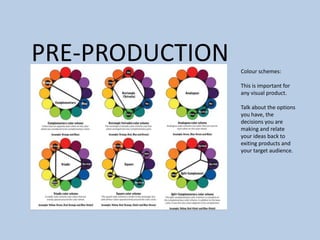
PRE-PRODUCTION Colour schemes:
This is important for
any visual product.
Talk about the options
you have, the
decisions you are
making and relate
your ideas back to
exiting products and
your target audience.
PRE-PRODUCTION
PRE-PRODUCTION
Storyboard
Pre-production
• What are you making? (explain what you have been asked to do) I’m making a
trailer/snippet for a new TV Comedy show. I decided to do this because comedy is
something I enjoy, and thought it would be something that would entertain my
audience.
• It will involve some slapstick and comedy drama because that’s what my audience said
they like seeing when they answered the survey.
• Why? (What is the purpose of making your Film) The purpose of it is to advertise a new
show which should be entertaining for the audience.
• Who is it for? (Audience) Teenagers and adults who like comedy because it will be easy
for them to understand. It won’t be suitable for young children because of some of the
stunts I want to put in, and some of the language that could be involved.
• Where will it appear/on what? (How will audience see it) They can watch it on TV or
YouTube. It will be on The ‘HBOMB TV’ channel once a week for 10-20 minutes.
Reflection:
Pre-production: Bedroom Floorplan
Bed
Shelf
(Lego
and
lamp)
Shelf
(Lego)
Wardrobe
(a lot of
junk)
Door
Chest of
Drawers
(TV and
clock)
Doors to
airing
cupboard
Bedside table
(laptop)
Bedroom
Light
Pre-production: Bedroom floorplan (equipment
positions)
Camera will be
positioned here
when it looks at the
clock. It will need to
be tilted up and
zoomed in.
Camera will be positioned here when
the character bursts into the room. It
will be zoomed out so people can see
what the character does. The bedside
table will need to be moved to the left
so the tripod can fit in the gap.
New position of
bedside table
The camera will be
positioned here when the
character wakes up. It will be
zoomed out for this and
zoomed in when he screams.
Pre-production: first floor college corridor floorplan
Computers
Computers
Tables
Double
doors
Toilet
door
Double
doors to
stairs
Lift
Double
doors
Pre-production: first floor college Corridor floorplan
(equipment positions)
Pre-production: Studio floorplan
Lighting
Lighting
Door
Table and
chair
Backdrop
Green screen
Pre-production: Studio floorplan (equipment
positions)
The lights need to
be set at 60. This is
enough light for
the ‘running out of
apartment’ scene.
The table and
chairs need to
be here so there
not in the shot.
The characters
will fast walk to
the door from
this wall.
The backdrops need to
be here so there not in
the shot.
Pre-production: Bathroom floorplan
Sink
Toilet
Bath
Door
Pre-production: Bathroom floorplan (equipment
positions)
The microphone will be placed on the floor outside the
door. This will be the best place for sound quality.
The camera will be on the tripod which will be over the
microphone handle so it doesn’t mess the sound up.
The character
will be
positioned here
brushing his
teeth.
The reflector will
be placed in the
window space on
the gold setting.
This will make the
room brighter.
Pre-production: Upstairs Hallway
Door to
bedroom
Door to
bedroom
Stairs
Door to
bathroom
Window
Door to
office
Pre-production: Upstairs Hallway (equipment
positions)
The camera and tripod will
be here facing into the
bathroom. The
microphone will be on the
floor.
All the characters will be in
the bathroom.
The camera and tripod will
be positioned here when
the character is being
thrown out the window.
The second character
will be here when he’s
being thrown out the
window.
The character will be
here when he picks the
other character up and
throws him out the
window.
The camera will be here on the over
the shoulder frame. It will look out
the window look at the characters
face as he falls.
Pre-production: Kitchen floorplan
BinBack door
Door to
cupboard
under stairs
Cupboard
under stairs
Door to
hallway Shoe rack Drawers Wash
basket
Dads beer
brew thing
Microwave
Hob
Sink
Pre-production: Kitchen floorplan (equipment
positions)
The character will stand
here washing up.
The second
character will be
stood here. He will
be looking to the
other character and
talking to him.
The camera will be here
on the tripod. It will be
at an angle.
Pre-production: Garden floorplan
Door to
garage
Shed
Slab
Stones
Slab
PathPlants
Christmas
tree
Small plant
house
Door to
shed
Pre-production: Garden floorplan (equipment
positions)
The character will land here when
he’s pushed put the window. This
will be made using stop motion.
The camera will be
on the floor and
will look at the
side of the
characters face as
he’s unconscious.
Pre-production: Character makeup design
I designed a make up design to give me an idea of how the character will look after the
explosion. I struggled finding suitable images on the internet because it mostly came up with
designs I didn't want or didn’t like.
Pre-production: Location list
Location Why?
My Bedroom Using this location as the first
scene.
My Bathroom Using this location to take the
story further
Studio Using this location as the
apartment Lee and Ryan live in.
They will run out with the
‘explosive’ item.
College 1st floor corridor Using this location to film the
final scene. Planting the
‘explosive’ item in the lift.
Pre-production: Storyboard
1. Ryan is working on the
laptop
2. The laptop suddenly
goes off. Ryan looks at it in
shock. He shouts his friend
Lee to come over
3. Lee comes over and
looks at the laptop.
4. Lee tells Ryan he’s
broken it. They suddenly
smell smoke
5. They both look at the
laptop in horror.
6. Lee grabs the laptop and
they both leave the
apartment.
Pre-production: Storyboard
7. Lee and Ryan leave the
apartment with the laptop.
They run to the lift.
8. Lee and Ryan reach the
lift.
9. They wait for the lift.
10. The lift arrives. They
wait for the door to open.
11. They run into the lift
and put the laptop on the
floor. They press the
button inside to make it go
down.
12. They run out of the lift.
Pre-production: Storyboard
13. The lift doors shut
and they are safe… for
now.
14. The lift suddenly
explodes from the
inside. Lee and Ryan
jump backwards
because of the impact.
15. Ben is still sleeping.
He hasn’t heard the
explosion.
16. Lee and Ryan are in
shock because of what
happened.
17. They get up and
decide to run.
18. Ben is still asleep.
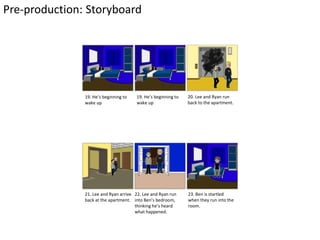
Pre-production: Storyboard
19. He’s beginning to
wake up
19. He’s beginning to
wake up
20. Lee and Ryan run
back to the apartment.
21. Lee and Ryan arrive
back at the apartment.
22. Lee and Ryan run
into Ben’s bedroom,
thinking he’s heard
what happened.
23. Ben is startled
when they run into the
room.
Pre-production: Storyboard
24. Lee and Ryan look
shocked and realise Ben
hasn’t heard what
happened.
25. Ben asks them if
they’re ok.
26. Lee and Ryan look
nervous, then ask if Ben
heard a loud bang.
27. Ben says he didn’t
hear anything.
28. Lee and Ryan
nervously says part of
what they did.
29. Ben’s mood changes
and he gets up to go to
the bathroom.
Pre-production: Storyboard
30. Ben is brushing his teeth.
He asks Lee and Ryan what
happened while brushing his
teeth.
31. Lee and Ryan admit what
they did. Ben spits in Lee’s
face in shock.
32. Ben is shocked and asks
Lee to repeat what he said.
32. Lee and Ryan apologise.
Ben’s emotions change. He
looks happy, but angry. He
says they will pay him back,
but not in the wat they think.
33. Ben starts cleaning the
bathroom.
Resources
Equipment/ Props/ Costume needed Locations needed
Camera Studio, College 2nd floor art area and outside.
Tripod Studio, college 2nd floor art area and outside
Over the shoulder College 2nd floor art area and outside
Boom Microphone Studio, college 2nd floor studio and outside
Laptop (explosive item) Studio and college 2nd floor art area
2 Mobile Phones College 2nd floor art area
Make up College 2nd floor art area
PC & software (premiere pro and Photoshop) Learning Centre, 2F027, 2F099 and 1F028
Mac and software (premiere pro and
Photoshop)
2F084, 3F082
Sound effects
Phone Dialing tone (record myself)
Phone ring out ringtone (record myself)
Phone ringtone (record myself)
Explosion (download from YouTube)
Yell (from falling) (record myself)
Contingency Planning
Potential Issue Solution
Actors might not be available Ask various people to be backups.
Memory stick doesn’t work Save work in various places (e.g. cloud) then there’s
more than one copy
Studio might be used when I need it Make sure I followed the booking procedure, but be
prepared to Re-arrange it for another time (a
lunchtime)
Computer crashes or breaks down Save work in various places so there’s more than one
copy
Talk to tutor
Camera doesn’t work Possibly flat battery so Replace the batteries.
If not talk to college technician
Microphone/audio recorder doesn’t work Possibly flat battery so Replace the batteries
I’m not in college Do work at home or come into college on a day off to
catch up.
Images/footage is corrupted Take another shot or try fixing the original.
Health and Safety
Potential Issue How will the issue be
avoided?
electrical apliances such as lights can give me
an electric shock
Always use items correctly to avoid a shock
or whack it
Static electrical shock I normally get the shocks when it’s really
cold so I’m prepared for them.
Obstacles are in the way (e.g wires) –
someone could trip over
Put them in a safe place and be aware of
whether my installation is making a trip hazard.
Water spills over computer Make sure water bottle is tight and the lid is
shut and it’s out of the way.
Production Schedule Week 1
Day Lesson Task Location
Tuesday 7th May 1 Film the first scene of the
video (the laptop breaking).
Put footage in Premiere pro
Studio
Tuesday 7th May 2 Start editing the first scene
of the video
2F099
Tuesday 7th May 3 Write up development
diary
2F099
Wednesday 8th May 1 Film the final scene of the
video (the fight scene)
Put footage in Premiere pro
Studio
Wednesday 8th May 2 Continue editing the first
scene of the video
At 4:00pm write up
development diary
3F082
Thursday 9th May 1 Edit the final scene of the
video
3F082
Production Schedule Week 1
Day Lesson Task Location
Thursday 9th May 2 Film the second scene of
the video (panic/putting
the laptop in the lift)
Put footage into premiere
pro
At 12:00 write up
development diary
First floor college
construction area
Friday 10th May 1 Start editing the second
scene of the video
1F028
Friday 10th May 2 Continue editing the
second scene of the video
At 12:00 write up
development diary
3F082
Production Schedule week 2
Day Lesson Task Location
Tuesday 14th May 1 Film the third scene of the
video
Put footage into premiere pro
First floor college
construction area
Tuesday 14th May 2 Start editing the editing the
third scene of the video
2F099
Tuesday 14th May 3 Write up development diary 2F099
Wednesday 15th May 1 Continue editing the third
scene of the video
2F084
Wednesday 15th May 2 Continue editing the third
scene of the video
At 4:00pm write up
development diary
3F082
Thursday 16th May 1 Continue editing video 3F082
Thursday 16th May 2 Continue editing video
At 12:00 write up
development diary
3F082
Production Schedule week 2
Day Lesson Task Location
Friday 17th May 1 Do photoshoot for
TV Show poster
Put image into
Photoshop
Studio
Friday 17th May 2 Start editing image
in Photoshop
At 12:00 Write up
development diary
3F082
Production Schedule Week 3
Day Lesson Task Location
Tuesday 21st May 1 Maths Exam (9:15-
11:15)
Tuesday 21st May 2 Maths Exam (9:15-
11:15)
11:20-12:20:
Continue editing
the image for
poster
3F082
Tuesday 21st May 3 Continue editing
the image for
poster
2F099
Tuesday 21st May 4 Write up
development diary
2F099
Production Schedule Week 3
Day Lesson Task Location
Wednesday 22nd May 1 Start making TV Logo on
Canva.com
2F084
Wednesday 22nd May 2 Continue making TV Logo
on Canva.com
At 4:00pm write up
development diary
3F082
Thursday 23rd May 1 Put logo into photoshop
and edit
3F082
Thursday 23rd May 2 Continue editing TV Logo
At 12:00 write up
development diary
3F082
Friday 24th May 1 Continue editing logo 1F028
Friday 24th May 2 Continue editing logo
At 12:00 write up
development diary
3F082
Production Schedule Week 4
Day Lesson Task Location
Tuesday 4th June 1 Put TV logo into Premiere
pro at the start and end of
the video
Start making credits for the
video
2F027
Tuesday 4th June 2 Continue making credits for
the video
2F099
Tuesday 4th June 3 Write up development
diary
2F099
Wednesday 5th June 1 Start putting outtakes
together in Premiere Pro
2F084
Wednesday 5th June 2 Continue putting outtakes
together in Premiere Pro
At 4:00pm write up
development diary
3F082
Thursday 6th June 1 Start putting Practice shots
together in Premiere Pro
(include poster shots)
3F082
Production Schedule Week 4
Day Lesson Task Location
Thursday 6th June 2 Continue putting practice
shots together in Premiere
Pro.
At 12:00 write up
development diary
3F082
Friday 7th June 1 Upload video, outtakes and
practice shots to blog.
Start writing evaluation
1F028
Friday 7th June 2 Continue writing evaluation
At 12:00 write up
development diary
3F082

4. pre production

  • 1.
  • 2.
    Resources Pre-production is importantfor the smooth running of a project. It is for you to go through final development and organisation for your project before you start production. The pre-production tasks you do will depend on your project. You need to undertake appropriate tasks in order to make your project work. A production schedule should be in everyone’s project. The blue slides are here to give advice. This advice can also be found in the main lecture. Delete when you don’t need it. Don’t submit your work with this in.
  • 3.
    PRE-PRODUCTIONPre-production paperwork fora print production could include:  Risk assessment  Flat plans  Style Sheets  Equipment/Resource list  Contingency plan  Copy (the written part of your work)  Thorough production schedule/ Action Plan  Location Recce for photographs  Budget  Model call sheet
  • 4.
    PRE-PRODUCTIONPre-production paperwork formoving image could include:  Risk assessment  Storyboard  Shotlist  Equipment list and bookings  Contingency plan  Script  Thorough production schedule/ Action Plan  Call sheet  Location Recce  Budget
  • 5.
    PRE-PRODUCTION Pre-production paperwork fora video game production could include:  Risk assessment  Sound effect list  Music list  Style sheet or other visual planning  Contingency plan  Scene plan  Thorough production schedule/ Action Plan  Budget
  • 6.
    PRE-PRODUCTION Pre-production paperwork foran audio production could include:  Risk assessment  Sound effect list  Music list  Equipment/Resource list  Script/Questions  Contingency plan  Location plan  Contributor information (interviewees/guests/actors)  Thorough production schedule/ Action Plan  Budget
  • 7.
    PRE-PRODUCTION• Style sheet –Collection of potential choice you could make for your products visuals (colours, image styles and fonts). Provide some indication of which ones you will use, where you will use them and reasons why – This should explore alternatives to everything- don’t just include one option. Look at several potential aspects to include and reference the ones you plan to use and why • Layout Plans – Potential designs you could do for your product using images, fonts and colours from style sheet
  • 8.
    PRE-PRODUCTION Colour schemes: Thisis important for any visual product. Talk about the options you have, the decisions you are making and relate your ideas back to exiting products and your target audience.
  • 9.
  • 10.
  • 11.
    Pre-production • What areyou making? (explain what you have been asked to do) I’m making a trailer/snippet for a new TV Comedy show. I decided to do this because comedy is something I enjoy, and thought it would be something that would entertain my audience. • It will involve some slapstick and comedy drama because that’s what my audience said they like seeing when they answered the survey. • Why? (What is the purpose of making your Film) The purpose of it is to advertise a new show which should be entertaining for the audience. • Who is it for? (Audience) Teenagers and adults who like comedy because it will be easy for them to understand. It won’t be suitable for young children because of some of the stunts I want to put in, and some of the language that could be involved. • Where will it appear/on what? (How will audience see it) They can watch it on TV or YouTube. It will be on The ‘HBOMB TV’ channel once a week for 10-20 minutes. Reflection:
  • 12.
    Pre-production: Bedroom Floorplan Bed Shelf (Lego and lamp) Shelf (Lego) Wardrobe (alot of junk) Door Chest of Drawers (TV and clock) Doors to airing cupboard Bedside table (laptop) Bedroom Light
  • 13.
    Pre-production: Bedroom floorplan(equipment positions) Camera will be positioned here when it looks at the clock. It will need to be tilted up and zoomed in. Camera will be positioned here when the character bursts into the room. It will be zoomed out so people can see what the character does. The bedside table will need to be moved to the left so the tripod can fit in the gap. New position of bedside table The camera will be positioned here when the character wakes up. It will be zoomed out for this and zoomed in when he screams.
  • 14.
    Pre-production: first floorcollege corridor floorplan Computers Computers Tables Double doors Toilet door Double doors to stairs Lift Double doors
  • 15.
    Pre-production: first floorcollege Corridor floorplan (equipment positions)
  • 16.
  • 17.
    Pre-production: Studio floorplan(equipment positions) The lights need to be set at 60. This is enough light for the ‘running out of apartment’ scene. The table and chairs need to be here so there not in the shot. The characters will fast walk to the door from this wall. The backdrops need to be here so there not in the shot.
  • 18.
  • 19.
    Pre-production: Bathroom floorplan(equipment positions) The microphone will be placed on the floor outside the door. This will be the best place for sound quality. The camera will be on the tripod which will be over the microphone handle so it doesn’t mess the sound up. The character will be positioned here brushing his teeth. The reflector will be placed in the window space on the gold setting. This will make the room brighter.
  • 20.
    Pre-production: Upstairs Hallway Doorto bedroom Door to bedroom Stairs Door to bathroom Window Door to office
  • 21.
    Pre-production: Upstairs Hallway(equipment positions) The camera and tripod will be here facing into the bathroom. The microphone will be on the floor. All the characters will be in the bathroom. The camera and tripod will be positioned here when the character is being thrown out the window. The second character will be here when he’s being thrown out the window. The character will be here when he picks the other character up and throws him out the window. The camera will be here on the over the shoulder frame. It will look out the window look at the characters face as he falls.
  • 22.
    Pre-production: Kitchen floorplan BinBackdoor Door to cupboard under stairs Cupboard under stairs Door to hallway Shoe rack Drawers Wash basket Dads beer brew thing Microwave Hob Sink
  • 23.
    Pre-production: Kitchen floorplan(equipment positions) The character will stand here washing up. The second character will be stood here. He will be looking to the other character and talking to him. The camera will be here on the tripod. It will be at an angle.
  • 24.
    Pre-production: Garden floorplan Doorto garage Shed Slab Stones Slab PathPlants Christmas tree Small plant house Door to shed
  • 25.
    Pre-production: Garden floorplan(equipment positions) The character will land here when he’s pushed put the window. This will be made using stop motion. The camera will be on the floor and will look at the side of the characters face as he’s unconscious.
  • 26.
    Pre-production: Character makeupdesign I designed a make up design to give me an idea of how the character will look after the explosion. I struggled finding suitable images on the internet because it mostly came up with designs I didn't want or didn’t like.
  • 27.
    Pre-production: Location list LocationWhy? My Bedroom Using this location as the first scene. My Bathroom Using this location to take the story further Studio Using this location as the apartment Lee and Ryan live in. They will run out with the ‘explosive’ item. College 1st floor corridor Using this location to film the final scene. Planting the ‘explosive’ item in the lift.
  • 28.
    Pre-production: Storyboard 1. Ryanis working on the laptop 2. The laptop suddenly goes off. Ryan looks at it in shock. He shouts his friend Lee to come over 3. Lee comes over and looks at the laptop. 4. Lee tells Ryan he’s broken it. They suddenly smell smoke 5. They both look at the laptop in horror. 6. Lee grabs the laptop and they both leave the apartment.
  • 29.
    Pre-production: Storyboard 7. Leeand Ryan leave the apartment with the laptop. They run to the lift. 8. Lee and Ryan reach the lift. 9. They wait for the lift. 10. The lift arrives. They wait for the door to open. 11. They run into the lift and put the laptop on the floor. They press the button inside to make it go down. 12. They run out of the lift.
  • 30.
    Pre-production: Storyboard 13. Thelift doors shut and they are safe… for now. 14. The lift suddenly explodes from the inside. Lee and Ryan jump backwards because of the impact. 15. Ben is still sleeping. He hasn’t heard the explosion. 16. Lee and Ryan are in shock because of what happened. 17. They get up and decide to run. 18. Ben is still asleep.
  • 31.
    Pre-production: Storyboard 19. He’sbeginning to wake up 19. He’s beginning to wake up 20. Lee and Ryan run back to the apartment. 21. Lee and Ryan arrive back at the apartment. 22. Lee and Ryan run into Ben’s bedroom, thinking he’s heard what happened. 23. Ben is startled when they run into the room.
  • 32.
    Pre-production: Storyboard 24. Leeand Ryan look shocked and realise Ben hasn’t heard what happened. 25. Ben asks them if they’re ok. 26. Lee and Ryan look nervous, then ask if Ben heard a loud bang. 27. Ben says he didn’t hear anything. 28. Lee and Ryan nervously says part of what they did. 29. Ben’s mood changes and he gets up to go to the bathroom.
  • 33.
    Pre-production: Storyboard 30. Benis brushing his teeth. He asks Lee and Ryan what happened while brushing his teeth. 31. Lee and Ryan admit what they did. Ben spits in Lee’s face in shock. 32. Ben is shocked and asks Lee to repeat what he said. 32. Lee and Ryan apologise. Ben’s emotions change. He looks happy, but angry. He says they will pay him back, but not in the wat they think. 33. Ben starts cleaning the bathroom.
  • 34.
    Resources Equipment/ Props/ Costumeneeded Locations needed Camera Studio, College 2nd floor art area and outside. Tripod Studio, college 2nd floor art area and outside Over the shoulder College 2nd floor art area and outside Boom Microphone Studio, college 2nd floor studio and outside Laptop (explosive item) Studio and college 2nd floor art area 2 Mobile Phones College 2nd floor art area Make up College 2nd floor art area PC & software (premiere pro and Photoshop) Learning Centre, 2F027, 2F099 and 1F028 Mac and software (premiere pro and Photoshop) 2F084, 3F082
  • 35.
    Sound effects Phone Dialingtone (record myself) Phone ring out ringtone (record myself) Phone ringtone (record myself) Explosion (download from YouTube) Yell (from falling) (record myself)
  • 36.
    Contingency Planning Potential IssueSolution Actors might not be available Ask various people to be backups. Memory stick doesn’t work Save work in various places (e.g. cloud) then there’s more than one copy Studio might be used when I need it Make sure I followed the booking procedure, but be prepared to Re-arrange it for another time (a lunchtime) Computer crashes or breaks down Save work in various places so there’s more than one copy Talk to tutor Camera doesn’t work Possibly flat battery so Replace the batteries. If not talk to college technician Microphone/audio recorder doesn’t work Possibly flat battery so Replace the batteries I’m not in college Do work at home or come into college on a day off to catch up. Images/footage is corrupted Take another shot or try fixing the original.
  • 37.
    Health and Safety PotentialIssue How will the issue be avoided? electrical apliances such as lights can give me an electric shock Always use items correctly to avoid a shock or whack it Static electrical shock I normally get the shocks when it’s really cold so I’m prepared for them. Obstacles are in the way (e.g wires) – someone could trip over Put them in a safe place and be aware of whether my installation is making a trip hazard. Water spills over computer Make sure water bottle is tight and the lid is shut and it’s out of the way.
  • 38.
    Production Schedule Week1 Day Lesson Task Location Tuesday 7th May 1 Film the first scene of the video (the laptop breaking). Put footage in Premiere pro Studio Tuesday 7th May 2 Start editing the first scene of the video 2F099 Tuesday 7th May 3 Write up development diary 2F099 Wednesday 8th May 1 Film the final scene of the video (the fight scene) Put footage in Premiere pro Studio Wednesday 8th May 2 Continue editing the first scene of the video At 4:00pm write up development diary 3F082 Thursday 9th May 1 Edit the final scene of the video 3F082
  • 39.
    Production Schedule Week1 Day Lesson Task Location Thursday 9th May 2 Film the second scene of the video (panic/putting the laptop in the lift) Put footage into premiere pro At 12:00 write up development diary First floor college construction area Friday 10th May 1 Start editing the second scene of the video 1F028 Friday 10th May 2 Continue editing the second scene of the video At 12:00 write up development diary 3F082
  • 40.
    Production Schedule week2 Day Lesson Task Location Tuesday 14th May 1 Film the third scene of the video Put footage into premiere pro First floor college construction area Tuesday 14th May 2 Start editing the editing the third scene of the video 2F099 Tuesday 14th May 3 Write up development diary 2F099 Wednesday 15th May 1 Continue editing the third scene of the video 2F084 Wednesday 15th May 2 Continue editing the third scene of the video At 4:00pm write up development diary 3F082 Thursday 16th May 1 Continue editing video 3F082 Thursday 16th May 2 Continue editing video At 12:00 write up development diary 3F082
  • 41.
    Production Schedule week2 Day Lesson Task Location Friday 17th May 1 Do photoshoot for TV Show poster Put image into Photoshop Studio Friday 17th May 2 Start editing image in Photoshop At 12:00 Write up development diary 3F082
  • 42.
    Production Schedule Week3 Day Lesson Task Location Tuesday 21st May 1 Maths Exam (9:15- 11:15) Tuesday 21st May 2 Maths Exam (9:15- 11:15) 11:20-12:20: Continue editing the image for poster 3F082 Tuesday 21st May 3 Continue editing the image for poster 2F099 Tuesday 21st May 4 Write up development diary 2F099
  • 43.
    Production Schedule Week3 Day Lesson Task Location Wednesday 22nd May 1 Start making TV Logo on Canva.com 2F084 Wednesday 22nd May 2 Continue making TV Logo on Canva.com At 4:00pm write up development diary 3F082 Thursday 23rd May 1 Put logo into photoshop and edit 3F082 Thursday 23rd May 2 Continue editing TV Logo At 12:00 write up development diary 3F082 Friday 24th May 1 Continue editing logo 1F028 Friday 24th May 2 Continue editing logo At 12:00 write up development diary 3F082
  • 44.
    Production Schedule Week4 Day Lesson Task Location Tuesday 4th June 1 Put TV logo into Premiere pro at the start and end of the video Start making credits for the video 2F027 Tuesday 4th June 2 Continue making credits for the video 2F099 Tuesday 4th June 3 Write up development diary 2F099 Wednesday 5th June 1 Start putting outtakes together in Premiere Pro 2F084 Wednesday 5th June 2 Continue putting outtakes together in Premiere Pro At 4:00pm write up development diary 3F082 Thursday 6th June 1 Start putting Practice shots together in Premiere Pro (include poster shots) 3F082
  • 45.
    Production Schedule Week4 Day Lesson Task Location Thursday 6th June 2 Continue putting practice shots together in Premiere Pro. At 12:00 write up development diary 3F082 Friday 7th June 1 Upload video, outtakes and practice shots to blog. Start writing evaluation 1F028 Friday 7th June 2 Continue writing evaluation At 12:00 write up development diary 3F082

Editor's Notes

  • #13 Use this space to document whatever pre-production work you did for your project. It will vary from person to person and project to project.
  • #14 Use this space to document whatever pre-production work you did for your project. It will vary from person to person and project to project.
  • #28 Use this space to document whatever pre-production work you did for your project. It will vary from person to person and project to project.