DEUS
                                           Deployment and Ease Use of wireless Services


         Wireless Mesh Networking

Main challenges
Wireless network are omnipresent in modern society, providing ubiquitous computing for
everyone. Enterprises and communities wishing to provide these services typically lack
the necessary expertise to deploy such networks. As a consequence, they are confronted
with two main challenges. The first challenge is to deploy a wireless enterprise grade
network. The second challenge is to maintain the network after deployment in order to
cope with changing demands and requirements.


DEUS approach
The IBBT DEUS Project tackles these two key challenges by creating an intelligent
wireless network, centred on three mission objectives:
       • Easy deployment: the easy deployment mechanisms allow the network to
           work “out of the box”,
       • Ease of use: the DEUS algorithms will automatically organize the wireless
           mesh network to adapt to varying conditions and environments,
       • Easy management: the easy management tool suite enables the site
           administrator to inspect the network state and manage the configuration of
           the networking equipment.


DEUS solutions
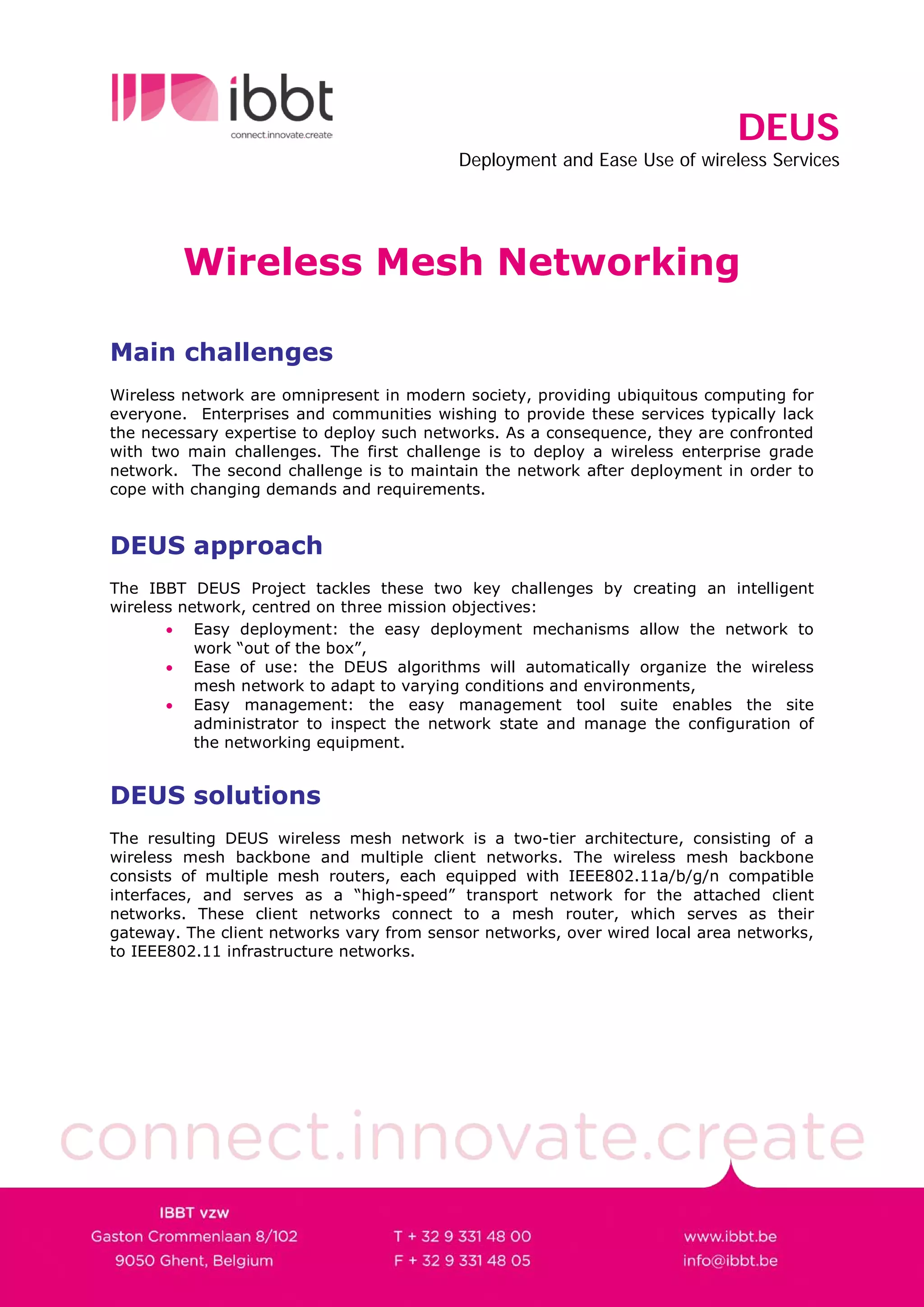
The resulting DEUS wireless mesh network is a two-tier architecture, consisting of a
wireless mesh backbone and multiple client networks. The wireless mesh backbone
consists of multiple mesh routers, each equipped with IEEE802.11a/b/g/n compatible
interfaces, and serves as a “high-speed” transport network for the attached client
networks. These client networks connect to a mesh router, which serves as their
gateway. The client networks vary from sensor networks, over wired local area networks,
to IEEE802.11 infrastructure networks.
DEUS
                                            Deployment and Ease Use of wireless Services


                           Figure 1 - DEUS network architecture


DEUS easy deployment
The DEUS easy deployment mechanism is responsible for the introduction, configuration
and acceptance of new mesh nodes into an existing DEUS network. To perform this
configuration procedure a special DEUS node is required in the network: the coordinator.
The purpose of the coordinator is to provide a centralized point for secure one-time
registration and acceptance.

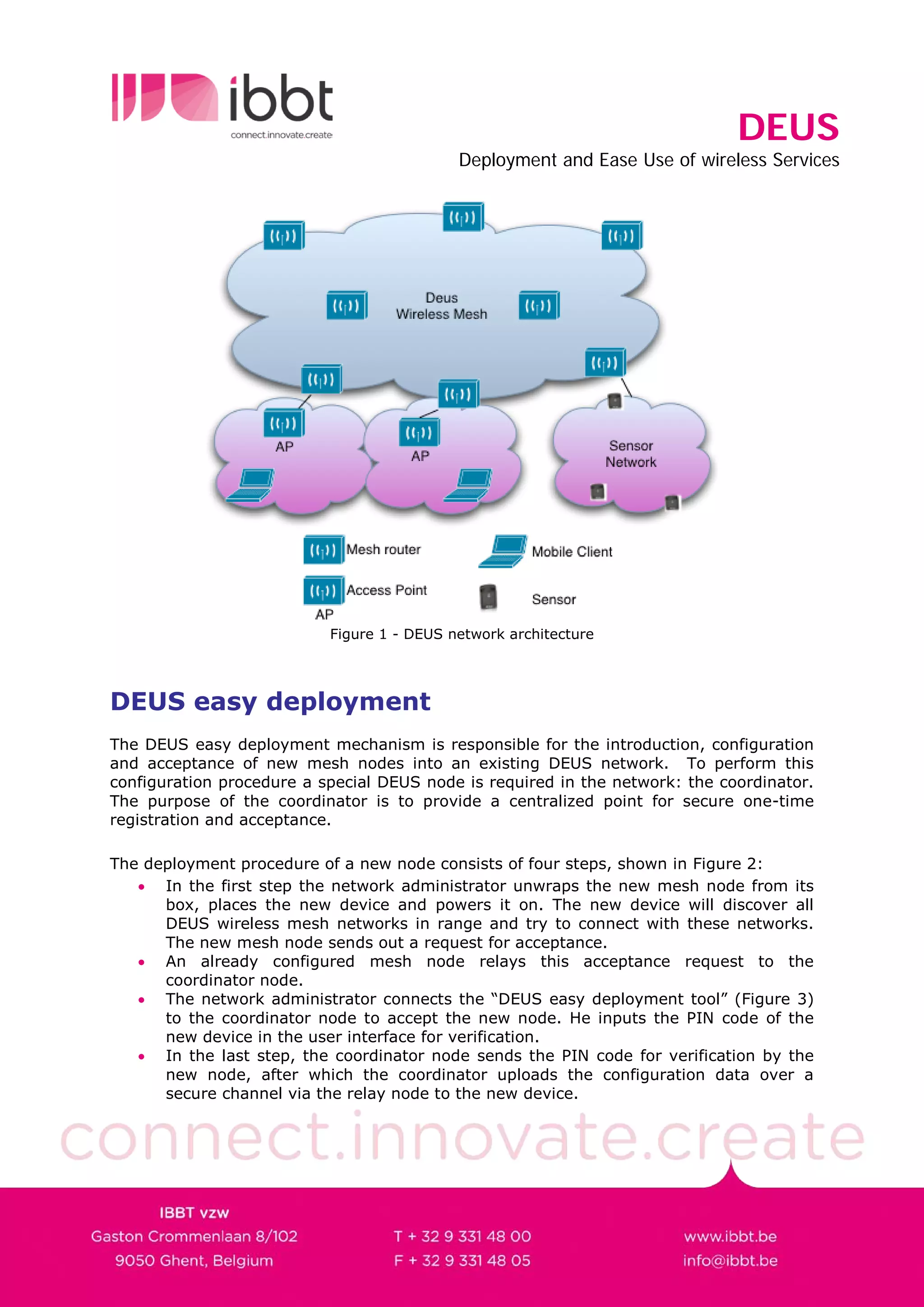
The deployment procedure of a new node consists of four steps, shown in Figure 2:
   • In the first step the network administrator unwraps the new mesh node from its
      box, places the new device and powers it on. The new device will discover all
      DEUS wireless mesh networks in range and try to connect with these networks.
      The new mesh node sends out a request for acceptance.
   • An already configured mesh node relays this acceptance request to the
      coordinator node.
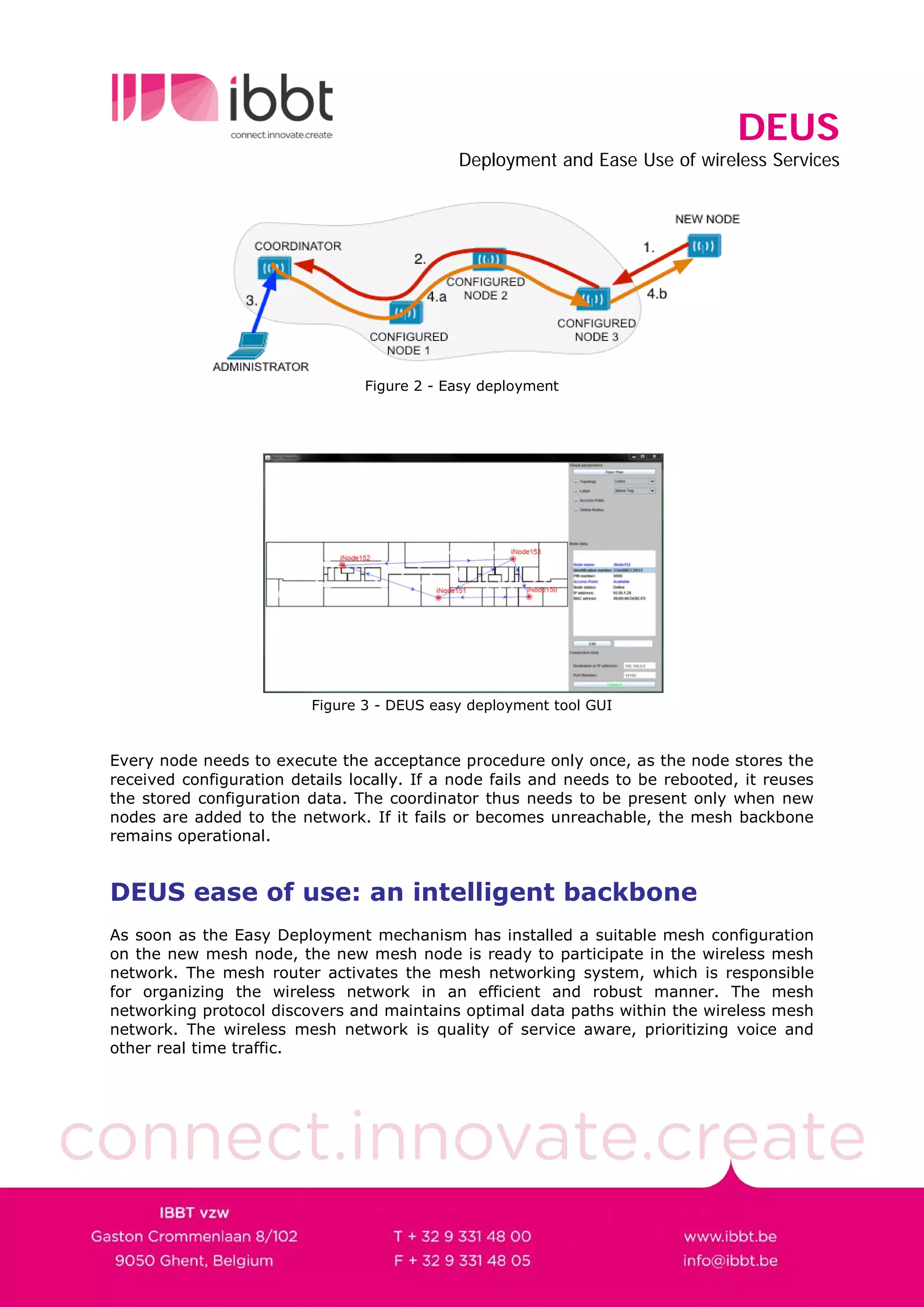
   • The network administrator connects the “DEUS easy deployment tool” (Figure 3)
      to the coordinator node to accept the new node. He inputs the PIN code of the
      new device in the user interface for verification.
   • In the last step, the coordinator node sends the PIN code for verification by the
      new node, after which the coordinator uploads the configuration data over a
      secure channel via the relay node to the new device.
DEUS
                                             Deployment and Ease Use of wireless Services


                                 Figure 2 - Easy deployment


                          Figure 3 - DEUS easy deployment tool GUI


Every node needs to execute the acceptance procedure only once, as the node stores the
received configuration details locally. If a node fails and needs to be rebooted, it reuses
the stored configuration data. The coordinator thus needs to be present only when new
nodes are added to the network. If it fails or becomes unreachable, the mesh backbone
remains operational.


DEUS ease of use: an intelligent backbone
As soon as the Easy Deployment mechanism has installed a suitable mesh configuration
on the new mesh node, the new mesh node is ready to participate in the wireless mesh
network. The mesh router activates the mesh networking system, which is responsible
for organizing the wireless network in an efficient and robust manner. The mesh
networking protocol discovers and maintains optimal data paths within the wireless mesh
network. The wireless mesh network is quality of service aware, prioritizing voice and
other real time traffic.
DEUS
                                             Deployment and Ease Use of wireless Services

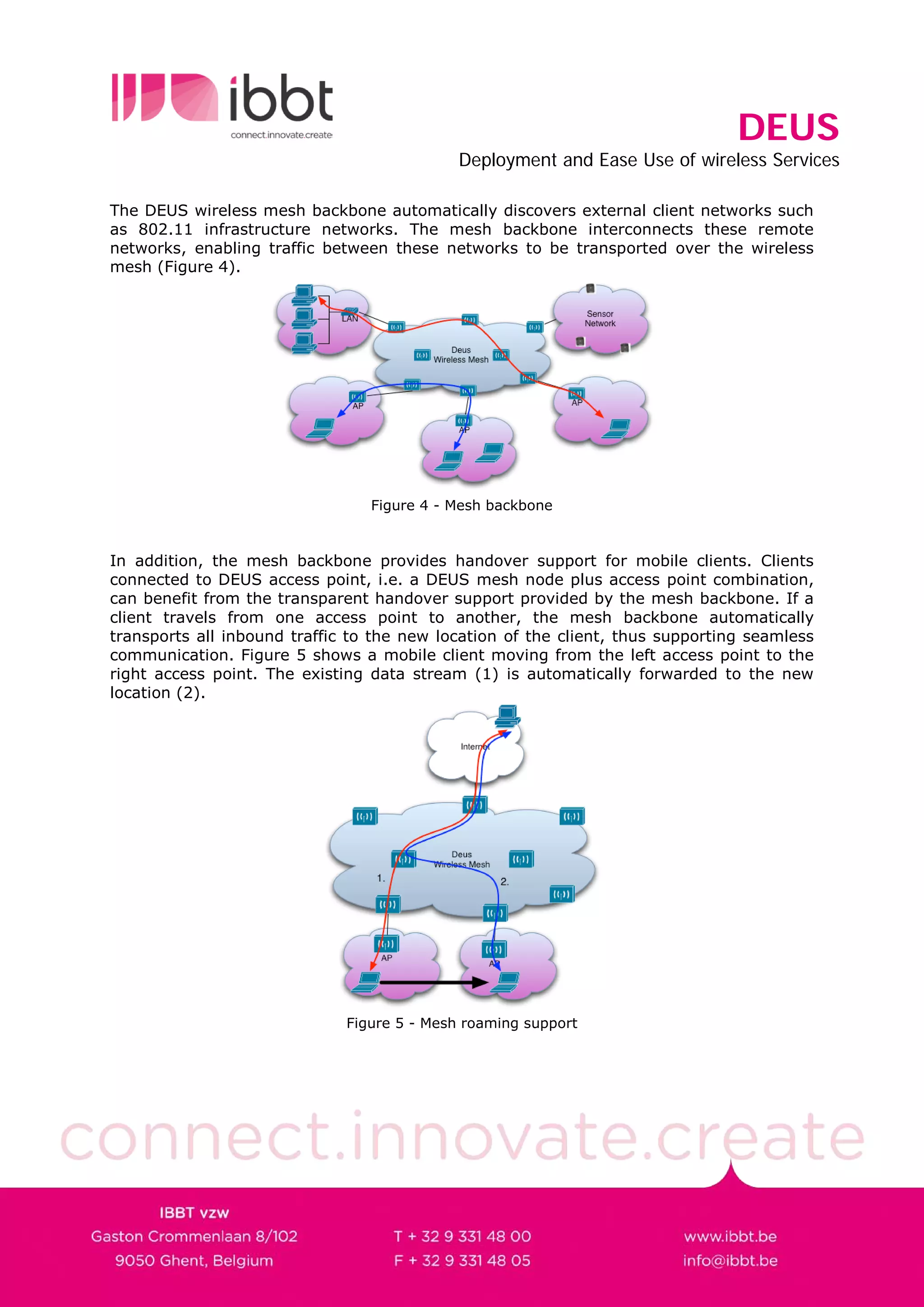
The DEUS wireless mesh backbone automatically discovers external client networks such
as 802.11 infrastructure networks. The mesh backbone interconnects these remote
networks, enabling traffic between these networks to be transported over the wireless
mesh (Figure 4).


                                 Figure 4 - Mesh backbone


In addition, the mesh backbone provides handover support for mobile clients. Clients
connected to DEUS access point, i.e. a DEUS mesh node plus access point combination,
can benefit from the transparent handover support provided by the mesh backbone. If a
client travels from one access point to another, the mesh backbone automatically
transports all inbound traffic to the new location of the client, thus supporting seamless
communication. Figure 5 shows a mobile client moving from the left access point to the
right access point. The existing data stream (1) is automatically forwarded to the new
location (2).


                              Figure 5 - Mesh roaming support
DEUS
                                                Deployment and Ease Use of wireless Services


Easy management tools
The DEUS project provides an easy management suite, which enables the site
administrator to inspect the network state and manage the configuration of the
networking equipment.
The OneAccess Management suite consists of the Total Maintenance Application, the
Element Manager and the Element Viewer. These tools use an efficient custom protocol
to communicate with the devices, consuming very limited bandwidth, yet providing real
time information.
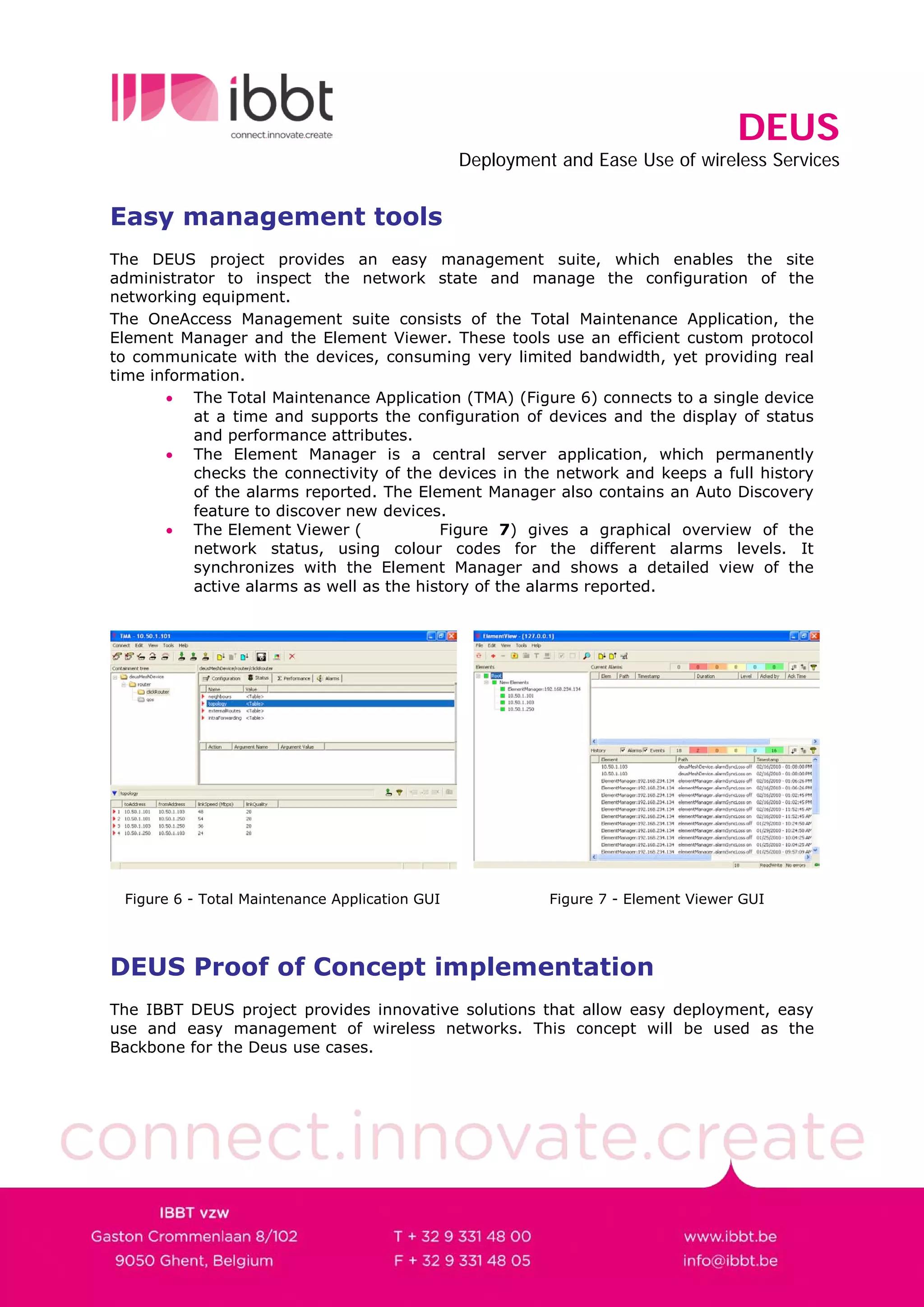
       • The Total Maintenance Application (TMA) (Figure 6) connects to a single device
           at a time and supports the configuration of devices and the display of status
           and performance attributes.
       • The Element Manager is a central server application, which permanently
           checks the connectivity of the devices in the network and keeps a full history
           of the alarms reported. The Element Manager also contains an Auto Discovery
           feature to discover new devices.
       • The Element Viewer (              Figure 7) gives a graphical overview of the
           network status, using colour codes for the different alarms levels. It
           synchronizes with the Element Manager and shows a detailed view of the
           active alarms as well as the history of the alarms reported.


 Figure 6 - Total Maintenance Application GUI             Figure 7 - Element Viewer GUI


DEUS Proof of Concept implementation
The IBBT DEUS project provides innovative solutions that allow easy deployment, easy
use and easy management of wireless networks. This concept will be used as the
Backbone for the Deus use cases.
DEUS
                            Deployment and Ease Use of wireless Services


Project partners


In cooperation with


IBBT research groups

UGent - IBCN            http://www.ibcn.intec.ugent.be
UGent - WiCa            http://www.wica.intec.ugent.be
UA - PATS               http.www.pats.ua.ac.be
KU Leuven – DistriNet   http.www.distrinet.cs.kuleuven.be
KU Leuven – CUO         http://www.soc.kuleuven.be/com/mediac/cuo
UHasselt – EDM          http://www.edm.uhasselt.be/

4 deus leaflet wp4

  • 1.
    DEUS Deployment and Ease Use of wireless Services Wireless Mesh Networking Main challenges Wireless network are omnipresent in modern society, providing ubiquitous computing for everyone. Enterprises and communities wishing to provide these services typically lack the necessary expertise to deploy such networks. As a consequence, they are confronted with two main challenges. The first challenge is to deploy a wireless enterprise grade network. The second challenge is to maintain the network after deployment in order to cope with changing demands and requirements. DEUS approach The IBBT DEUS Project tackles these two key challenges by creating an intelligent wireless network, centred on three mission objectives: • Easy deployment: the easy deployment mechanisms allow the network to work “out of the box”, • Ease of use: the DEUS algorithms will automatically organize the wireless mesh network to adapt to varying conditions and environments, • Easy management: the easy management tool suite enables the site administrator to inspect the network state and manage the configuration of the networking equipment. DEUS solutions The resulting DEUS wireless mesh network is a two-tier architecture, consisting of a wireless mesh backbone and multiple client networks. The wireless mesh backbone consists of multiple mesh routers, each equipped with IEEE802.11a/b/g/n compatible interfaces, and serves as a “high-speed” transport network for the attached client networks. These client networks connect to a mesh router, which serves as their gateway. The client networks vary from sensor networks, over wired local area networks, to IEEE802.11 infrastructure networks.
  • 2.
    DEUS Deployment and Ease Use of wireless Services Figure 1 - DEUS network architecture DEUS easy deployment The DEUS easy deployment mechanism is responsible for the introduction, configuration and acceptance of new mesh nodes into an existing DEUS network. To perform this configuration procedure a special DEUS node is required in the network: the coordinator. The purpose of the coordinator is to provide a centralized point for secure one-time registration and acceptance. The deployment procedure of a new node consists of four steps, shown in Figure 2: • In the first step the network administrator unwraps the new mesh node from its box, places the new device and powers it on. The new device will discover all DEUS wireless mesh networks in range and try to connect with these networks. The new mesh node sends out a request for acceptance. • An already configured mesh node relays this acceptance request to the coordinator node. • The network administrator connects the “DEUS easy deployment tool” (Figure 3) to the coordinator node to accept the new node. He inputs the PIN code of the new device in the user interface for verification. • In the last step, the coordinator node sends the PIN code for verification by the new node, after which the coordinator uploads the configuration data over a secure channel via the relay node to the new device.
  • 3.
    DEUS Deployment and Ease Use of wireless Services Figure 2 - Easy deployment Figure 3 - DEUS easy deployment tool GUI Every node needs to execute the acceptance procedure only once, as the node stores the received configuration details locally. If a node fails and needs to be rebooted, it reuses the stored configuration data. The coordinator thus needs to be present only when new nodes are added to the network. If it fails or becomes unreachable, the mesh backbone remains operational. DEUS ease of use: an intelligent backbone As soon as the Easy Deployment mechanism has installed a suitable mesh configuration on the new mesh node, the new mesh node is ready to participate in the wireless mesh network. The mesh router activates the mesh networking system, which is responsible for organizing the wireless network in an efficient and robust manner. The mesh networking protocol discovers and maintains optimal data paths within the wireless mesh network. The wireless mesh network is quality of service aware, prioritizing voice and other real time traffic.
  • 4.
    DEUS Deployment and Ease Use of wireless Services The DEUS wireless mesh backbone automatically discovers external client networks such as 802.11 infrastructure networks. The mesh backbone interconnects these remote networks, enabling traffic between these networks to be transported over the wireless mesh (Figure 4). Figure 4 - Mesh backbone In addition, the mesh backbone provides handover support for mobile clients. Clients connected to DEUS access point, i.e. a DEUS mesh node plus access point combination, can benefit from the transparent handover support provided by the mesh backbone. If a client travels from one access point to another, the mesh backbone automatically transports all inbound traffic to the new location of the client, thus supporting seamless communication. Figure 5 shows a mobile client moving from the left access point to the right access point. The existing data stream (1) is automatically forwarded to the new location (2). Figure 5 - Mesh roaming support
  • 5.
    DEUS Deployment and Ease Use of wireless Services Easy management tools The DEUS project provides an easy management suite, which enables the site administrator to inspect the network state and manage the configuration of the networking equipment. The OneAccess Management suite consists of the Total Maintenance Application, the Element Manager and the Element Viewer. These tools use an efficient custom protocol to communicate with the devices, consuming very limited bandwidth, yet providing real time information. • The Total Maintenance Application (TMA) (Figure 6) connects to a single device at a time and supports the configuration of devices and the display of status and performance attributes. • The Element Manager is a central server application, which permanently checks the connectivity of the devices in the network and keeps a full history of the alarms reported. The Element Manager also contains an Auto Discovery feature to discover new devices. • The Element Viewer ( Figure 7) gives a graphical overview of the network status, using colour codes for the different alarms levels. It synchronizes with the Element Manager and shows a detailed view of the active alarms as well as the history of the alarms reported. Figure 6 - Total Maintenance Application GUI Figure 7 - Element Viewer GUI DEUS Proof of Concept implementation The IBBT DEUS project provides innovative solutions that allow easy deployment, easy use and easy management of wireless networks. This concept will be used as the Backbone for the Deus use cases.
  • 6.
    DEUS Deployment and Ease Use of wireless Services Project partners In cooperation with IBBT research groups UGent - IBCN http://www.ibcn.intec.ugent.be UGent - WiCa http://www.wica.intec.ugent.be UA - PATS http.www.pats.ua.ac.be KU Leuven – DistriNet http.www.distrinet.cs.kuleuven.be KU Leuven – CUO http://www.soc.kuleuven.be/com/mediac/cuo UHasselt – EDM http://www.edm.uhasselt.be/