
Innovating Communications
•
•
•
10 Advantages of 3CX Phone System
Software based: Easy to install & manage
Inexpensive to buy and expand
Work from anywhere with iOS & Android clients
Leverage existing IT infrastructure & Server hardware
Save on your phone bill with SIP Trunks & Mobile / Remote clients
Integrated video conferencing using WebRTC
Better customer service with advanced call queues
Integrate with CRM & Accounting software
Standards based – use popular IP Phones, SIP Trunks
Click 2 Call from your website
1.
2.
3.
4.
5.
6.
7.
8.
9.
10.
REDUCE YOUR COSTS, INCREASE YOUR
PRODUCTIVITY & MOBILITY WITH 3CX
PHONE SYSTEM FOR WINDOWS
Evolve your communications by allowing employees to hot desk anywhere
in the office.
Enable teleworking by allowing employees to take their extension with
them wherever they go.
Lower your call costs and globalize your business by making use of world-
wide VoIP providers and bridging your offices for free inter-office calls.
Move to 3CX Phone System - an open standard Windows-based IP PBX
that provides superior features and flexibility at a far lower cost.
3CX Phone System completely replaces a hardware PBX without the need for
additional phone wiring. It supports popular SIP phones, VoIP providers, and
traditional PSTN lines. 3CX Phone System’s web-based management
console makes it easy to configure, eliminating the need for expensive main-
tenance.
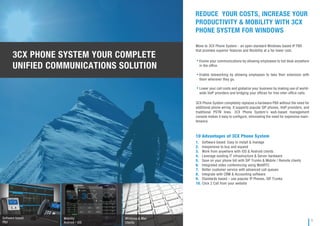
Software based
PBX
Mobility
Android / iOS
Windows & Mac
Clients
3CX PHONE SYSTEM YOUR COMPLETE
UNIFIED COMMUNICATIONS SOLUTION
1
SAVE ON COSTS WITH 3CX
3CX Phone System for Windows is much cheaper than a traditional phone
system. The initial purchase cost and the expansion cost are both much
lower compared to a proprietary PBX, and with 3CX Phone System you also
save on maintenance fees.
Unlike appliances, 3CX can scale to an almost unlimited capacity because it
leverages modern server hardware.
With 3CX, businesses can also use VoIP Providers & Skype to save on
international calls and to terminate international customer service numbers
on the local IP PBX.
Manage the PBX in house and save on consultant’s fees.
Further savings come from connecting branch offices with 3CX Bridges, so
that all inter-office calls are setup as internal calls and are therefore free.
Also, integration of remote workers is easy with the 3CX Tunnel, boosting
mobility and resulting in savings from teleworking possibilities.
3CX Phone System includes enterprise-level features as standard. Business-
es do not need to pay extra for advanced features or add-ons, as 3CX
already: inbuilt fax server, digital receptionist, paging/intercom, integrated
voice mail, central phone book and more.
Configurability of 3CX is outstanding – we can easily
make changes to the PBX ourselves, something that was
unthinkable on a traditional PBX.
Bill Peters, Head of IT, Caterham F1/
3CX Bridges: Setup inter- office calls as
FREE internal calls
Advanced call features at no
additional cost
Remote employees can make phone
calls free of charge
SAY GOODBYE TO EXPENSIVE EXPANSION
MODULES AND COSTLY PHONE BILLS!
2
UNIFIED COMMUNICATIONS
3CX Phone System for Windows delivers Unified Communications technology
by unifying voice mail, fax and email, as well as providing presence
information.
With 3CX Phone System, employees can easily see the presence of other
users and avoid making or transferring calls unnecessarily.
Presence is displayed in any standards-based IP phone, as well as in the
3CXPhone user portal.
Furthermore, 3CX unifies voice mail and faxes with email by delivering them
to the user’s inbox.
3CX provides full video capability - using 3CXPhone or a SIP video phone,
video calls can be made with a click of a button.
3CX includes a fax server that is able to route incoming faxes as PDFs to
email. Users can send faxes via traditional fax machines or by using a 3rd
party T38 capable fax server software.
With 3CX, businesses save time and money as they can forget about fax
machines and extra telephone lines.
3CX was remarkably flexible and easy to install. It was
also extremely simple to manage and being able to run
3CX on Windows Server offers great peace of mind.
Dustin Adam, Director of IT, RE/MAX/
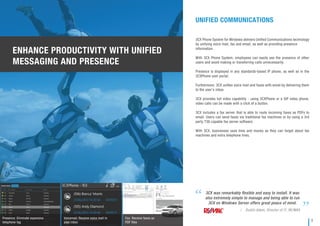
Presence: Eliminate expensive
telephone tag
Voicemail: Receive voice mail in
your inbox
Fax: Receive faxes as
PDF files
ENHANCE PRODUCTIVITY WITH UNIFIED
MESSAGING AND PRESENCE
3
FREEDOM TO THE USER
3CX gives total freedom to the user, by enhancing mobility and allowing staff
to work remotely.
3CX Phone System includes a web-based user portal that gives extension
users complete mobility and independence.
Users can configure extension preferences using a web browser without
help from IT staff.
Call forwarding rules can be created based on time received, caller ID and
type of call. For example, calls outside working hours can be routed to voice
mail or a mobile phone.
This way, crucial calls are never missed, and there is no need to give out
personal mobile numbers when out of the office.
3CX is the only IP PBX to include a free Windows & Mac VoIP phone, and free
VoIP phone apps for iPhone and Android that can be used in or out of the
office.
3CXPhone for Windows, Mac, iPhone and Android and traditional hardware
phones, can be used at the same time using the same credentials.
For example, the hardware phone can be used when at the office, but when
at home or on the road it is very easy to switch to the softphone and remain
connected to the company’s phone system.
3CX Phone System is proving flexible and reliable, and it’s
on target to reduce our ongoing telephony maintenance,
line rental, support, and call costs by 70 percent per
annum, about £70,000.
Stephanie Stephenson,
Director of Customer Services,
Wiltshire College
/
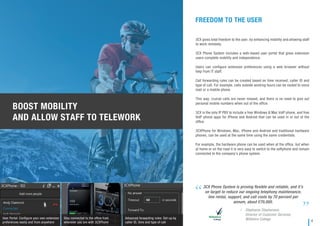
User Portal: Configure your own extension
preferences easily and from anywhere
Stay connected to the office from
wherever you are with 3CXPhone
Advanced forwarding rules: Set-up by
caller ID, time and type of call
BOOST MOBILITY
AND ALLOW STAFF TO TELEWORK
4
FREEDOM TO THE NETWORK MANAGER
With 3CX, network managers break free from the archaic user interfaces of
conventional PBXs and from the traditional PBX vendor. With the intuitive
web-based console, administrators can easily create extensions and make
PBX configuration changes without needing the PBX vendor.
Because 3CX Phone System is just another Windows server application, it is
easy to manage too. It can be monitored just like any other Windows server
application using your existing network monitoring package.
As 3CX Phone System is completely software-based, it provides many
advantages over a traditional PBX or an IP PBX appliance.
It’s easier to manage and control and you do not need to learn how to update
and troubleshoot an obscure home-made Linux version.
A software-based phone system scales a lot better too. Just add more
phones and lines as you go along without being limited by the ports or
processor on the appliance.
You can install 3CX Phone System on your existing server or virtualize it and
eliminate extra hardware, energy and management costs. You can easily
backup your PBX and restore it on another machine in case of hardware
failure - an impossible task when an appliance breaks down.
The implementation of 3CX Phone System in our
company has improved the efficiency and communications
between our branches worldwide and has cut down our call
costs significantly… Utilizing its trunking and advanced
call routing features, we were able to lower our telephony
cost by about a four-figure sum per month.
Volkan Sanverdi, CFO,
Chip One Exchange
/
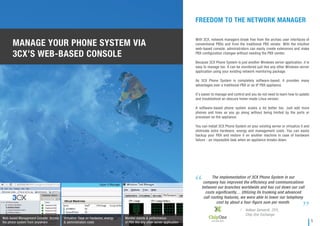
Web-based Management Console: Access
the phone system from anywhere
Virtualize: Save on hardware, energy
& administration costs
Monitor events & performance
of PBX like any other server application
MANAGE YOUR PHONE SYSTEM VIA
3CX’S WEB-BASED CONSOLE
5
BOOST CUSTOMER SATISFACTION
WITH 3CX PHONE SYSTEM PRO
The 3CX Phone System Pro edition provides professional call center features
at an affordable price for any size of business. Boost your customer care
agents’ productivity by reviewing real time queue and agent statistics.
Supervisors can review the number of calls in a queue, how many calls have
been answered or unanswered, average and longest wait-times and more.
Improve your customers’ satisfaction with the Call Back feature. Customers
can hang up after a configurable length of time and maintain their position
in the queue.
Using the Listen feature, supervisors have the ability to listen in to calls. The
Whisper feature allows the supervisor to speak directly to an agent, giving
them vital feedback whilst on the call and without the customer hearing. The
Barge feature allows the supervisor to enter the call and assist the customer
further. With more detailed call center driven reports, you’re always up to
date with how your customer care is developing.
Wrap-up time, assigns a configurable amount of time for your employees to
carry out any admin tasks or to complete other followup tasks. The SLA
alerts feature allows supervisors and managers to be notified when callers
have to wait beyond a configurable amount of time.
3CX Phone System Pro is a license key only upgrade. Simply purchase the
upgrade, and reactivate 3CX Phone System to instantly activate the call
center features.
The fact that I could install 3CX Phone System on the
existing Windows Server was a great advantage. Rather
than buying a “black box“, I could leverage my Windows
skills to administer the phone system and greatly reduce
the administration time of the PBX.
Stefan Pfender,
CEO of The Maierl Hotel
/
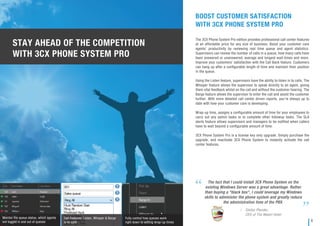
Monitor the queue status, which agents
are logged in and out of queues
Call Features: Listen, Whisper & Barge
in to calls
Fully control how queues work
right down to setting wrap-up times
STAY AHEAD OF THE COMPETITION
WITH 3CX PHONE SYSTEM PRO
6
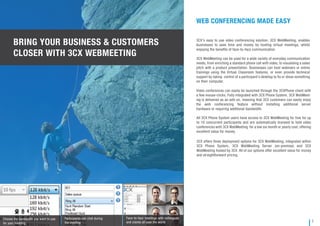
Participants can chat during
the meeting
BRING YOUR BUSINESS & CUSTOMERS
CLOSER WITH 3CX WEBMEETING
WEB CONFERENCING MADE EASY
3CX’s easy to use video conferencing solution, 3CX WebMeeting, enables
businesses to save time and money by hosting virtual meetings, whilst
enjoying the benefits of face-to-face communication.
3CX WebMeeting can be used for a wide variety of everyday communication
needs, from enriching a standard phone call with video, to visualising a sales
pitch with a product presentation. Businesses can host webinars or online
trainings using the Virtual Classroom features, or even provide technical
support by taking control of a participant’s desktop to fix or show something
on their computer.
Video conferences can easily be launched through the 3CXPhone client with
a few mouse-clicks. Fully integrated with 3CX Phone System, 3CX WebMeet-
ing is delivered as an add-on, meaning that 3CX customers can easily enjoy
the web conferencing feature without installing additional server
hardware or requiring additional bandwidth.
All 3CX Phone System users have access to 3CX WebMeeting for free for up
to 10 concurrent participants and are automatically licensed to hold video
conferences with 3CX WebMeeting for a low six month or yearly cost, offering
excellent value for money.
3CX offers three deployment options for 3CX WebMeeting; integrated within
3CX Phone System, 3CX WebMeeting Server (on-premise) and 3CX
WebMeeting hosted by 3CX. All of our options offer excellent value for money
and straightforward pricing.
7
Face-to-face meetings with colleagues
and clients all over the world
Choose the bandwidth you want to use
for your meeting
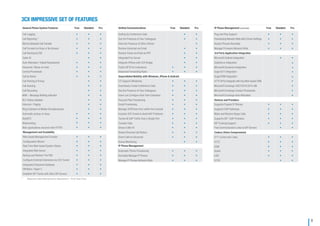
General Phone System Features Free Standard Pro
Call Logging • • •
Call Reporting * • • •
Blind & Attended Call Transfer • • •
Call Forward on Busy or No Answer • • •
Call Routing by DID • • •
Caller ID • •
Auto Attendant / Digital Receptionist • • •
Voicemail / Music on Hold • • •
Central Phonebook • • •
Call by Name • • •
• • •
• • •
• • •
• • •
Call Parking & Pickup • •
Call Queuing • •
Call Recording • •
MWI – Message Waiting Indicator • •
BLF Status Updates • •
Intercom / Paging • •
R
Automatic pickup on busy
WebRTC
Webmeeting
Web applications secured with HTTPS
ing Extension & Mobile Simultaneously • •
Management and Scalability
Web-based Management Console • • •
Configuration Wizard • • •
Real Time Web-based System Status • • •
Integrated Web Server • • •
Backup and Restore The PBX • • •
Configure External Extensions via 3CX Tunnel • • •
Integrated Enterprise Database • • •
VM Ware / Hyper V • • •
Establish SIP Trunks with other SIP Servers • • •
Unified Communications Free Standard Pro
Setting Up Conference Calls • •
See the Presence of Your Colleagues • •
View the Presence of Other Offices •
Receive Voicemail via Email • •
Receive Faxes via Email as PDF • •
Integrated Fax Server • •
Integrate Offices with 3CX Bridge • •
Public SIP ID for Extensions • • •
Advanced Forwarding Rules • • •
Unparalleled Mobility with Windows, iPhone & Android
CTI Support (Windows) • •
Seamlessly Create Conference Calls • • •
See the Presence of Your Colleagues • • •
Users can Configure their Own Extension • • •
Plug and Play Provisioning • • •
Email Provisioning • • •
Manage 3CXPhone from within the Console • • •
Includes 3CX Tunnel to Avoid NAT Problems • • •
Tunnel All VoIP Traffic Over a Single Port • • •
Transfer Calls • • •
Shows Caller ID • • •
Shows Personal Call History • • •
Divert Calls to Voicemail • • •
Queue Monitoring • •
IP Phone Management
Automatic Phone Provisioning • • •
Remotely Manage IP Phones • • •
Manage IP Phones Network Wide • • •
IP Phone Management (continued) Free Standard Pro
Plug and Play Support • • •
Provisioning Network Wide with Correct Settings • • •
Restart Phones Remotely • • •
Manage Firmware Network Wide • • •
3rd Party Application Integration
Microsoft Outlook Integration •
Salesforce integration
Microsoft Dynamics Integration
Sage ACT! integration
SugarCRM Integration
HTTP API to integrate with Any Web-based CRM •
Microsoft Exchange 2007/2010/2013 UM •
Microsoft Exchange Contact Phonebook •
Microsoft Exchange Auto Attendant •
Devices and Providers
Supports Popular IP Phones • • •
Supports VoIP Gateways • • •
Make and Receive Skype Calls • • •
Supports SIP / VoIP Providers • • •
SIP Trunking Support • • •
Free Communication Links to SIP Servers • •
Codecs (Voice Compression)
G711 (a law and u law) • • •
G722 • • •
GSM • • •
Speex • • •
ILBC • • •
G729 • •
3CX IMPRESSIVE SET OF FEATURES
* Requires Valid Maintenance Agreement – First Year Free
8
•
•
•
•
•
•
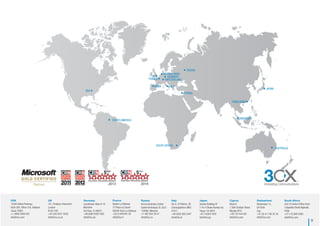
USA
SOUTH AFRICA
HONG KONG
UK GERMANY
SWITZERLAND
CYPRUS
JAPAN
RUSSIA
FRANCE
Innovating Communications
9
2013 2014
SOUTH AMERICA
NETHERLANDS
SPAIN ITALY
SINGAPORE
AUSTRALIA
USA
15305 Dallas Parkway,
Suite 300, Office 316, Addison
Texas 75001
+1 (469) 2069 035
info@3cx.com
UK
101, Finsbury Pavement
London
EC2A 1RS
+44 (20) 3327 2020
info@3cx.co.uk
Germany
Landshuter Allee 8-10
München
73608-D,roofldr3
+49 (0)89 2206 1592
info@3cx.de
Russia
Avrora Business Center
Sadovnicheskaya St. 82/2
wocsoM,880511
+7 495 204 29 37
info@3cx.ru
Cyprus
Block B
1 28th October Street
Nicosia 2414
+357 22 444 032
info@3cx.com
Switzerland
Seestrasse 15,
CH 6301
Zug
+41 (0) 41 740 35 35
info@3cx.com
South Africa
Unit 10 Oxford Office Park
3 Bauhinia Street Highveld,
0169
+27 (12) 686 8380
info@3cx.com
Japan
Semizu Building 4F
1-10-4 Otowa Bunkyo-ky
Tokyo 112-0013
+81 3 6304 1818
info@3cx.jp
Italy
Via G. Di Vittorio, 28
Campogalliano (MO)
41011
7445390)550(93+
info@3cx.it
France
Elysée La Défense
7C Place du Dome
92056 Paris La Défense
+33 (1) 848 851 00
info@3cx.fr

3cx phone system brochure

  • 1.
  • 2.
    • • • 10 Advantages of3CX Phone System Software based: Easy to install & manage Inexpensive to buy and expand Work from anywhere with iOS & Android clients Leverage existing IT infrastructure & Server hardware Save on your phone bill with SIP Trunks & Mobile / Remote clients Integrated video conferencing using WebRTC Better customer service with advanced call queues Integrate with CRM & Accounting software Standards based – use popular IP Phones, SIP Trunks Click 2 Call from your website 1. 2. 3. 4. 5. 6. 7. 8. 9. 10. REDUCE YOUR COSTS, INCREASE YOUR PRODUCTIVITY & MOBILITY WITH 3CX PHONE SYSTEM FOR WINDOWS Evolve your communications by allowing employees to hot desk anywhere in the office. Enable teleworking by allowing employees to take their extension with them wherever they go. Lower your call costs and globalize your business by making use of world- wide VoIP providers and bridging your offices for free inter-office calls. Move to 3CX Phone System - an open standard Windows-based IP PBX that provides superior features and flexibility at a far lower cost. 3CX Phone System completely replaces a hardware PBX without the need for additional phone wiring. It supports popular SIP phones, VoIP providers, and traditional PSTN lines. 3CX Phone System’s web-based management console makes it easy to configure, eliminating the need for expensive main- tenance. Software based PBX Mobility Android / iOS Windows & Mac Clients 3CX PHONE SYSTEM YOUR COMPLETE UNIFIED COMMUNICATIONS SOLUTION 1
  • 3.
    SAVE ON COSTSWITH 3CX 3CX Phone System for Windows is much cheaper than a traditional phone system. The initial purchase cost and the expansion cost are both much lower compared to a proprietary PBX, and with 3CX Phone System you also save on maintenance fees. Unlike appliances, 3CX can scale to an almost unlimited capacity because it leverages modern server hardware. With 3CX, businesses can also use VoIP Providers & Skype to save on international calls and to terminate international customer service numbers on the local IP PBX. Manage the PBX in house and save on consultant’s fees. Further savings come from connecting branch offices with 3CX Bridges, so that all inter-office calls are setup as internal calls and are therefore free. Also, integration of remote workers is easy with the 3CX Tunnel, boosting mobility and resulting in savings from teleworking possibilities. 3CX Phone System includes enterprise-level features as standard. Business- es do not need to pay extra for advanced features or add-ons, as 3CX already: inbuilt fax server, digital receptionist, paging/intercom, integrated voice mail, central phone book and more. Configurability of 3CX is outstanding – we can easily make changes to the PBX ourselves, something that was unthinkable on a traditional PBX. Bill Peters, Head of IT, Caterham F1/ 3CX Bridges: Setup inter- office calls as FREE internal calls Advanced call features at no additional cost Remote employees can make phone calls free of charge SAY GOODBYE TO EXPENSIVE EXPANSION MODULES AND COSTLY PHONE BILLS! 2
  • 4.
    UNIFIED COMMUNICATIONS 3CX PhoneSystem for Windows delivers Unified Communications technology by unifying voice mail, fax and email, as well as providing presence information. With 3CX Phone System, employees can easily see the presence of other users and avoid making or transferring calls unnecessarily. Presence is displayed in any standards-based IP phone, as well as in the 3CXPhone user portal. Furthermore, 3CX unifies voice mail and faxes with email by delivering them to the user’s inbox. 3CX provides full video capability - using 3CXPhone or a SIP video phone, video calls can be made with a click of a button. 3CX includes a fax server that is able to route incoming faxes as PDFs to email. Users can send faxes via traditional fax machines or by using a 3rd party T38 capable fax server software. With 3CX, businesses save time and money as they can forget about fax machines and extra telephone lines. 3CX was remarkably flexible and easy to install. It was also extremely simple to manage and being able to run 3CX on Windows Server offers great peace of mind. Dustin Adam, Director of IT, RE/MAX/ Presence: Eliminate expensive telephone tag Voicemail: Receive voice mail in your inbox Fax: Receive faxes as PDF files ENHANCE PRODUCTIVITY WITH UNIFIED MESSAGING AND PRESENCE 3
  • 5.
    FREEDOM TO THEUSER 3CX gives total freedom to the user, by enhancing mobility and allowing staff to work remotely. 3CX Phone System includes a web-based user portal that gives extension users complete mobility and independence. Users can configure extension preferences using a web browser without help from IT staff. Call forwarding rules can be created based on time received, caller ID and type of call. For example, calls outside working hours can be routed to voice mail or a mobile phone. This way, crucial calls are never missed, and there is no need to give out personal mobile numbers when out of the office. 3CX is the only IP PBX to include a free Windows & Mac VoIP phone, and free VoIP phone apps for iPhone and Android that can be used in or out of the office. 3CXPhone for Windows, Mac, iPhone and Android and traditional hardware phones, can be used at the same time using the same credentials. For example, the hardware phone can be used when at the office, but when at home or on the road it is very easy to switch to the softphone and remain connected to the company’s phone system. 3CX Phone System is proving flexible and reliable, and it’s on target to reduce our ongoing telephony maintenance, line rental, support, and call costs by 70 percent per annum, about £70,000. Stephanie Stephenson, Director of Customer Services, Wiltshire College / User Portal: Configure your own extension preferences easily and from anywhere Stay connected to the office from wherever you are with 3CXPhone Advanced forwarding rules: Set-up by caller ID, time and type of call BOOST MOBILITY AND ALLOW STAFF TO TELEWORK 4
  • 6.
    FREEDOM TO THENETWORK MANAGER With 3CX, network managers break free from the archaic user interfaces of conventional PBXs and from the traditional PBX vendor. With the intuitive web-based console, administrators can easily create extensions and make PBX configuration changes without needing the PBX vendor. Because 3CX Phone System is just another Windows server application, it is easy to manage too. It can be monitored just like any other Windows server application using your existing network monitoring package. As 3CX Phone System is completely software-based, it provides many advantages over a traditional PBX or an IP PBX appliance. It’s easier to manage and control and you do not need to learn how to update and troubleshoot an obscure home-made Linux version. A software-based phone system scales a lot better too. Just add more phones and lines as you go along without being limited by the ports or processor on the appliance. You can install 3CX Phone System on your existing server or virtualize it and eliminate extra hardware, energy and management costs. You can easily backup your PBX and restore it on another machine in case of hardware failure - an impossible task when an appliance breaks down. The implementation of 3CX Phone System in our company has improved the efficiency and communications between our branches worldwide and has cut down our call costs significantly… Utilizing its trunking and advanced call routing features, we were able to lower our telephony cost by about a four-figure sum per month. Volkan Sanverdi, CFO, Chip One Exchange / Web-based Management Console: Access the phone system from anywhere Virtualize: Save on hardware, energy & administration costs Monitor events & performance of PBX like any other server application MANAGE YOUR PHONE SYSTEM VIA 3CX’S WEB-BASED CONSOLE 5
  • 7.
    BOOST CUSTOMER SATISFACTION WITH3CX PHONE SYSTEM PRO The 3CX Phone System Pro edition provides professional call center features at an affordable price for any size of business. Boost your customer care agents’ productivity by reviewing real time queue and agent statistics. Supervisors can review the number of calls in a queue, how many calls have been answered or unanswered, average and longest wait-times and more. Improve your customers’ satisfaction with the Call Back feature. Customers can hang up after a configurable length of time and maintain their position in the queue. Using the Listen feature, supervisors have the ability to listen in to calls. The Whisper feature allows the supervisor to speak directly to an agent, giving them vital feedback whilst on the call and without the customer hearing. The Barge feature allows the supervisor to enter the call and assist the customer further. With more detailed call center driven reports, you’re always up to date with how your customer care is developing. Wrap-up time, assigns a configurable amount of time for your employees to carry out any admin tasks or to complete other followup tasks. The SLA alerts feature allows supervisors and managers to be notified when callers have to wait beyond a configurable amount of time. 3CX Phone System Pro is a license key only upgrade. Simply purchase the upgrade, and reactivate 3CX Phone System to instantly activate the call center features. The fact that I could install 3CX Phone System on the existing Windows Server was a great advantage. Rather than buying a “black box“, I could leverage my Windows skills to administer the phone system and greatly reduce the administration time of the PBX. Stefan Pfender, CEO of The Maierl Hotel / Monitor the queue status, which agents are logged in and out of queues Call Features: Listen, Whisper & Barge in to calls Fully control how queues work right down to setting wrap-up times STAY AHEAD OF THE COMPETITION WITH 3CX PHONE SYSTEM PRO 6
  • 8.
    Participants can chatduring the meeting BRING YOUR BUSINESS & CUSTOMERS CLOSER WITH 3CX WEBMEETING WEB CONFERENCING MADE EASY 3CX’s easy to use video conferencing solution, 3CX WebMeeting, enables businesses to save time and money by hosting virtual meetings, whilst enjoying the benefits of face-to-face communication. 3CX WebMeeting can be used for a wide variety of everyday communication needs, from enriching a standard phone call with video, to visualising a sales pitch with a product presentation. Businesses can host webinars or online trainings using the Virtual Classroom features, or even provide technical support by taking control of a participant’s desktop to fix or show something on their computer. Video conferences can easily be launched through the 3CXPhone client with a few mouse-clicks. Fully integrated with 3CX Phone System, 3CX WebMeet- ing is delivered as an add-on, meaning that 3CX customers can easily enjoy the web conferencing feature without installing additional server hardware or requiring additional bandwidth. All 3CX Phone System users have access to 3CX WebMeeting for free for up to 10 concurrent participants and are automatically licensed to hold video conferences with 3CX WebMeeting for a low six month or yearly cost, offering excellent value for money. 3CX offers three deployment options for 3CX WebMeeting; integrated within 3CX Phone System, 3CX WebMeeting Server (on-premise) and 3CX WebMeeting hosted by 3CX. All of our options offer excellent value for money and straightforward pricing. 7 Face-to-face meetings with colleagues and clients all over the world Choose the bandwidth you want to use for your meeting
  • 9.
    General Phone SystemFeatures Free Standard Pro Call Logging • • • Call Reporting * • • • Blind & Attended Call Transfer • • • Call Forward on Busy or No Answer • • • Call Routing by DID • • • Caller ID • • Auto Attendant / Digital Receptionist • • • Voicemail / Music on Hold • • • Central Phonebook • • • Call by Name • • • • • • • • • • • • • • • Call Parking & Pickup • • Call Queuing • • Call Recording • • MWI – Message Waiting Indicator • • BLF Status Updates • • Intercom / Paging • • R Automatic pickup on busy WebRTC Webmeeting Web applications secured with HTTPS ing Extension & Mobile Simultaneously • • Management and Scalability Web-based Management Console • • • Configuration Wizard • • • Real Time Web-based System Status • • • Integrated Web Server • • • Backup and Restore The PBX • • • Configure External Extensions via 3CX Tunnel • • • Integrated Enterprise Database • • • VM Ware / Hyper V • • • Establish SIP Trunks with other SIP Servers • • • Unified Communications Free Standard Pro Setting Up Conference Calls • • See the Presence of Your Colleagues • • View the Presence of Other Offices • Receive Voicemail via Email • • Receive Faxes via Email as PDF • • Integrated Fax Server • • Integrate Offices with 3CX Bridge • • Public SIP ID for Extensions • • • Advanced Forwarding Rules • • • Unparalleled Mobility with Windows, iPhone & Android CTI Support (Windows) • • Seamlessly Create Conference Calls • • • See the Presence of Your Colleagues • • • Users can Configure their Own Extension • • • Plug and Play Provisioning • • • Email Provisioning • • • Manage 3CXPhone from within the Console • • • Includes 3CX Tunnel to Avoid NAT Problems • • • Tunnel All VoIP Traffic Over a Single Port • • • Transfer Calls • • • Shows Caller ID • • • Shows Personal Call History • • • Divert Calls to Voicemail • • • Queue Monitoring • • IP Phone Management Automatic Phone Provisioning • • • Remotely Manage IP Phones • • • Manage IP Phones Network Wide • • • IP Phone Management (continued) Free Standard Pro Plug and Play Support • • • Provisioning Network Wide with Correct Settings • • • Restart Phones Remotely • • • Manage Firmware Network Wide • • • 3rd Party Application Integration Microsoft Outlook Integration • Salesforce integration Microsoft Dynamics Integration Sage ACT! integration SugarCRM Integration HTTP API to integrate with Any Web-based CRM • Microsoft Exchange 2007/2010/2013 UM • Microsoft Exchange Contact Phonebook • Microsoft Exchange Auto Attendant • Devices and Providers Supports Popular IP Phones • • • Supports VoIP Gateways • • • Make and Receive Skype Calls • • • Supports SIP / VoIP Providers • • • SIP Trunking Support • • • Free Communication Links to SIP Servers • • Codecs (Voice Compression) G711 (a law and u law) • • • G722 • • • GSM • • • Speex • • • ILBC • • • G729 • • 3CX IMPRESSIVE SET OF FEATURES * Requires Valid Maintenance Agreement – First Year Free 8 • • • • • •
  • 10.
    USA SOUTH AFRICA HONG KONG UKGERMANY SWITZERLAND CYPRUS JAPAN RUSSIA FRANCE Innovating Communications 9 2013 2014 SOUTH AMERICA NETHERLANDS SPAIN ITALY SINGAPORE AUSTRALIA USA 15305 Dallas Parkway, Suite 300, Office 316, Addison Texas 75001 +1 (469) 2069 035 info@3cx.com UK 101, Finsbury Pavement London EC2A 1RS +44 (20) 3327 2020 info@3cx.co.uk Germany Landshuter Allee 8-10 München 73608-D,roofldr3 +49 (0)89 2206 1592 info@3cx.de Russia Avrora Business Center Sadovnicheskaya St. 82/2 wocsoM,880511 +7 495 204 29 37 info@3cx.ru Cyprus Block B 1 28th October Street Nicosia 2414 +357 22 444 032 info@3cx.com Switzerland Seestrasse 15, CH 6301 Zug +41 (0) 41 740 35 35 info@3cx.com South Africa Unit 10 Oxford Office Park 3 Bauhinia Street Highveld, 0169 +27 (12) 686 8380 info@3cx.com Japan Semizu Building 4F 1-10-4 Otowa Bunkyo-ky Tokyo 112-0013 +81 3 6304 1818 info@3cx.jp Italy Via G. Di Vittorio, 28 Campogalliano (MO) 41011 7445390)550(93+ info@3cx.it France Elysée La Défense 7C Place du Dome 92056 Paris La Défense +33 (1) 848 851 00 info@3cx.fr