SAP BusinessObjects Analysis, edition for
MS Office
Overview
Product Management Analysis Clients
January 2011


                                      Confidential
Agenda


SAP BusinessObjects Analysis, edition for Microsoft Office
Appendix


© 2011 SAP AG. All rights reserved.                          Confidential   2
SAP BusinessObjects Analysis, edition for MS Office
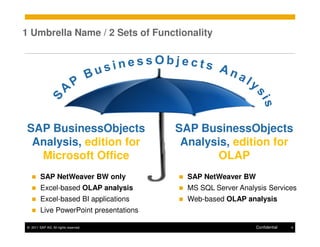
1 Umbrella Name / 2 Sets of Functionality


 SAP BusinessObjects                     SAP BusinessObjects
  Analysis, edition for                   Analysis, edition for
   Microsoft Office                             OLAP
         SAP NetWeaver BW only             SAP NetWeaver BW
         Excel-based OLAP analysis         MS SQL Server Analysis Services
         Excel-based BI applications       Web-based OLAP analysis
         Live PowerPoint presentations

 © 2011 SAP AG. All rights reserved.                          Confidential   4
SAP BusinessObjects Analysis,
Edition for Microsoft Office
Your investments in BEx analyzer are safe
BEx analyzer and the suite of SAP BEx tools stay in maintenance mode
They will still be delivered with the next releases of SAP NetWeaver BW
They follow the same life cycle and release strategy as BW
         E.g., BEx analyzer shipped with BW 7.3 will be supported for the next 7+2 years

You will leverage most of these investments moving forward
BEx queries are consumed directly by SAP BusinessObjects BI 4.0 front-ends
BEx Query Designer remains in place to create and maintain BEx queries

Your future looks bright
New offering: SAP BusinessObjects Analysis, edition for MS Office
Alternative to BEx analyzer with enhanced premium functionality


 © 2011 SAP AG. All rights reserved.                                               Confidential   5
SAP® BusinessObjects™ Analysis,
Edition for Microsoft® Office

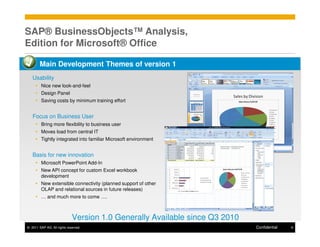
        Main Development Themes of version 1
   Usability
         Nice new look-and-feel
         Design Panel
         Saving costs by minimum training effort


   Focus on Business User
         Bring more flexibility to business user
         Moves load from central IT
         Tightly integrated into familiar Microsoft environment


   Basis for new innovation
         Microsoft PowerPoint Add-In
         New API concept for custom Excel workbook
         development
         New extensible connectivity (planned support of other
         OLAP and relational sources in future releases)
         … and much more to come ….


                             Version 1.0 Generally Available since Q3 2010
© 2011 SAP AG. All rights reserved.                                          Confidential   6
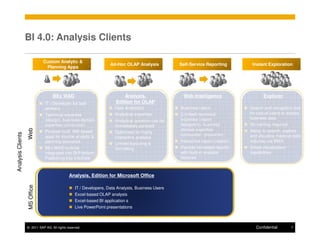
BI 4.0: Analysis Clients

                               Custom Analytic &
                                                                    Ad-Hoc OLAP Analysis           Self-Service Reporting         Instant Exploration
                                Planning Apps


                                   BEx WAD                                 Analysis,                Web Intelligence                    Explorer
                               IT / Developer for task                 Edition for OLAP
                               workers                                Data Analyst(s)
                                                                             Interactive           Business Users                Search and navigation tool
                               Technical expertise                    Analytical expertise         (Limited) technical           for casual users to access
                                                                             Analysis
                               (design), business domain                                           expertise (report             business data
                                                                      Analytical question can be
                               expertise (consumer)                   immediately pursued          designers), business          No training required
                                                                                                   domain expertise
                   Web


                               Purpose-built BW-based                 Optimized for highly                                       Ability to search, explore
Analysis Clients


                               apps for routine analytic &                                         (consumer / prosumer)         and visualize massive data
                                                                      interactive analysis
                               planning scenarios                                                  Interactive report creation   volumes via BWA
                                                                      Limited layouting &
                               BEx WAD runtime                        formatting                   Flexible formatted reports    Smart visualization
                               integrated into BI Platform,                                        with built-in analysis        capabilities
                               Publishing into InfoView                                            features


                                              Analysis, Edition for Microsoft Office
                   MS Office


                                                  IT / Developers, Data Analysts, Business Users
                                                  Excel-based OLAP analysis
                                                  Excel-based BI application s
                                                  Live PowerPoint presentations


                   © 2011 SAP AG. All rights reserved.                                                                              Confidential      7
Use Cases for Analysis, Edition for MS Office


          Power User / IT                   Business Analyst             Business User &
                                                                         Task Worker

Centralized creation of               Ad Hoc data access and data       Consuming pre-defined BI
Analysis content (workbooks           analysis, slicing & dicing, and   content in Microsoft Excel
& PowerPoints)                        so on, in Excel                   and Microsoft PowerPoint
Sophisticated workbook                Ad Hoc embedding of BI data
design (VBA APIs and so on)           into PowerPoint presentations


© 2011 SAP AG. All rights reserved.                                                Confidential   8
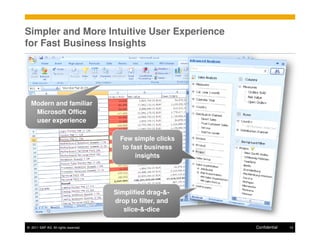
Simpler and More Intuitive User Experience
for Fast Business Insights


  Modern and familiar
   Microsoft Office
   user experience

                                        Few simple clicks
                                         to fast business
                                              insights


                                      Simplified drag-&-
                                      drop to filter, and
                                         slice-&-dice

© 2011 SAP AG. All rights reserved.                         Confidential   10
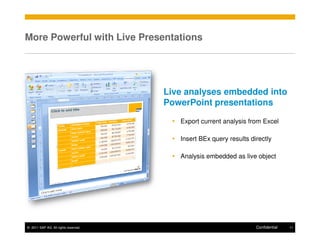
More Powerful with Live Presentations


                                      Live analyses embedded into
                                      PowerPoint presentations

                                         Export current analysis from Excel

                                         Insert BEx query results directly

                                         Analysis embedded as live object


© 2011 SAP AG. All rights reserved.                                 Confidential   11
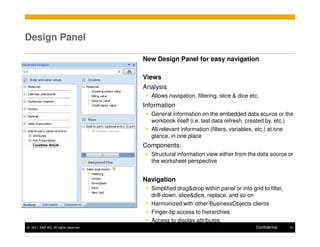
Design Panel

                                      New Design Panel for easy navigation

                                      Views
                                      Analysis
                                        Allows navigation, filtering, slice & dice etc.
                                      Information
                                        General information on the embedded data source or the
                                        workbook itself (i.e. last data refresh, created by, etc.)
                                        All relevant information (filters, variables, etc.) at one
                                        glance, in one place
                                      Components:
                                        Structural information view either from the data source or
                                        the worksheet perspective


                                      Navigation
                                        Simplified drag&drop within panel or into grid to filter,
                                        drill-down, slice&dice, replace, and so on
                                        Harmonized with other BusinessObjects clients
                                        Finger-tip access to hierarchies
                                        Access to display attributes
© 2011 SAP AG. All rights reserved.                                                  Confidential   12
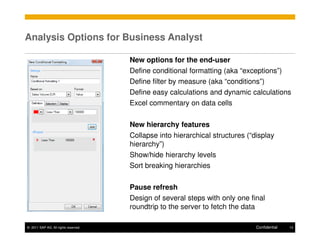
Analysis Options for Business Analyst

                                      New options for the end-user
                                      Define conditional formatting (aka “exceptions”)
                                      Define filter by measure (aka “conditions”)
                                      Define easy calculations and dynamic calculations
                                      Excel commentary on data cells

                                      New hierarchy features
                                      Collapse into hierarchical structures (“display
                                      hierarchy”)
                                      Show/hide hierarchy levels
                                      Sort breaking hierarchies

                                      Pause refresh
                                      Design of several steps with only one final
                                      roundtrip to the server to fetch the data

© 2011 SAP AG. All rights reserved.                                            Confidential   13
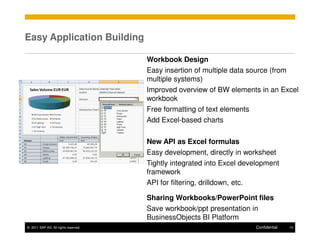
Easy Application Building

                                      Workbook Design
                                      Easy insertion of multiple data source (from
                                      multiple systems)
                                      Improved overview of BW elements in an Excel
                                      workbook
                                      Free formatting of text elements
                                      Add Excel-based charts

                                      New API as Excel formulas
                                      Easy development, directly in worksheet
                                      Tightly integrated into Excel development
                                      framework
                                      API for filtering, drilldown, etc.

                                      Sharing Workbooks/PowerPoint files
                                      Save workbook/ppt presentation in
                                      BusinessObjects BI Platform
© 2011 SAP AG. All rights reserved.                                    Confidential   14
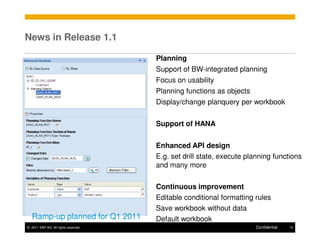
News in Release 1.1

                                      Planning
                                      Support of BW-integrated planning
                                      Focus on usability
                                      Planning functions as objects
                                      Display/change planquery per workbook

                                      Support of HANA


                                      Enhanced API design
                                      E.g. set drill state, execute planning functions
                                      and many more

                                      Continuous improvement
                                      Editable conditional formatting rules
                                      Save workbook without data
   Ramp-up planned for Q1 2011        Default workbook
© 2011 SAP AG. All rights reserved.                                   Confidential   15
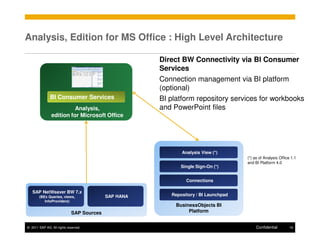
Analysis, Edition for MS Office : High Level Architecture

                                                      Direct BW Connectivity via BI Consumer
                                                      Services
                                                      Connection management via BI platform
                                                      (optional)
               BI Consumer Services                   BI platform repository services for workbooks
                         Analysis,                    and PowerPoint files
               edition for Microsoft Office


                                                             Analysis View (*)
                                                                                     (*) as of Analysis Office 1.1
                                                                                     and BI Platform 4.0
                                                             Single Sign-On (*)


                                                               Connections

   SAP NetWeaver BW 7.x
       (BEx Queries, views,                SAP HANA      Repository / BI Launchpad
          InfoProviders)
                                                           BusinessObjects BI
                             SAP Sources                        Platform


© 2011 SAP AG. All rights reserved.                                                       Confidential        16
SAP BusinessObjects Analysis, Edition for Microsoft
Office 1.0/1.1 – Prerequisites
Client Prerequisites
    MS Office 2003, MS Office 2007 or MS Office 2010 (on MS Windows XP and higher)
    – Powerpoint Add-in only available for MS Office 2007 and MS Office 2010
    SAP GUI installation not mandatory
    – But local SAPLOGON.INI file required if you don‘t use BI Platform for connection management
    Client Sizing: See SAP note 1466118


Server Prerequisites
    SAP NetWeaver BW 7.0 or higher
    – Recommendation: use BW 7.0 EHP1 or even SAP NetWeaver BW 7.3 as there are significant TCO
      and integration improvements between BusinessObjects Enterprise and NetWeaver
    – Queries defined in SAP BEx Query Designer 3.5 (within SAP NetWeaver 7.0!) or 7.0+ ; also: direct
      access to SAP NetWeaver BW InfoProvider and query views
      o No need to migrate queries, no change in BW data models necessary
      o The SAP BEx Query Designer stays as it is and can continues to be the semantic modeling level for
        SAP NetWeaver BW data.
    Optional SAP Business Objects BI Platform 3.1 or higher (can run side-by side with SAP
    NetWeaver BW)
    – See next slide for information about platform capabilities
© 2011 SAP AG. All rights reserved.                                                       Confidential   17
BI Platform Services


BI Platform (fka BO Enterprise) is strategic for all SAP BusinessObjects Clients
    Analysis 1.0 on SAP BusinessObjects Enterprise XI 3.1
    – Central provisioning of BW connections
    – Client-side Single-Sign On
    – Saving and sharing workbooks centrally (common xls / ppt InfoObject)
    Analysis 1.1 on BI platform 4.0
    –   Support system-type connection
    –   Server-side and client-side Single-Sign On
    –   Saving and sharing workbooks centrally (common xls(x) / ppt(x) InfoObject)
    –   Interoperability with other clients: Web Intelligence, Crystal Reports and SAP BusinessObjects
        Analysis, edition for OLAP based on analysis view
    SAP recommends using BI platform for productive use of the Office Add-in, as BI platform
    supports main services such as central repository including security, interoperability and, in
    future, lifecycle management. But you can also use it without BI platform and store and
    distribute workbooks locally or on any share drive – often used in testing environments.


© 2011 SAP AG. All rights reserved.                                                           Confidential   18
Appendix
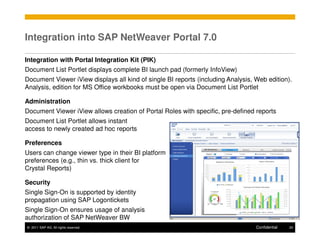
Integration into SAP NetWeaver Portal 7.0

Integration with Portal Integration Kit (PIK)
Document List Portlet displays complete BI launch pad (formerly InfoView)
Document Viewer iView displays all kind of single BI reports (including Analysis, Web edition).
Analysis, edition for MS Office workbooks must be open via Document List Portlet

Administration
Document Viewer iView allows creation of Portal Roles with specific, pre-defined reports
Document List Portlet allows instant
access to newly created ad hoc reports

Preferences
Users can change viewer type in their BI platform
preferences (e.g., thin vs. thick client for
Crystal Reports)

Security
Single Sign-On is supported by identity
propagation using SAP Logontickets
Single Sign-On ensures usage of analysis
authorization of SAP NetWeaver BW
© 2011 SAP AG. All rights reserved.                                               Confidential   20
SAP Business Explorer (BEx)


Maintenance
    BEx 7.0 continues to be delivered with the next SAP NetWeaver BW releases. At this point
    in time, there‘s no planned end of life. The maintenance period is renewed with every major
    BW release.
    BEx 3.5 is part of BW 3.5/SAP NetWeaver 04 and the maintenance cycle is coupled to this
    release (see SAP note 1410878). As BEx 3.5 is also compatible with a BW 7.0 backend
    and had been delivered with BW 7.0, SAP will maintain BEx 3.5 functionality within BW 7.0
    and subsequent releases until the end of BW 7.0 maintenance cycle. Maintenance is NOT
    extended with BW 7.30 or other future releases. Note that full PAM support of BEx 3.5
    cannot be granted by SAP – as Microsoft has removed, e.g., support for some components
    within Windows 7 that had been used by BEx Web Application Designer 3.5.
    Also see: https://www.sdn.sap.com/irj/sdn/bex
Coexistence BEx Analyzer and Analysis, edition for MS Office
    You can install BEx and Analysis on a single PC.
    Only one add-in can be active in an Excel session (in other words, either BEx or Analysis
    can be active)
    Opening a BEx workbook activates the BEx add-in.

© 2011 SAP AG. All rights reserved.                                               Confidential   21
Thank You!


Contact information:

Alexander Peter
Director, Product Management
SAP AG
© 2011 SAP AG. All rights reserved


No part of this publication may be reproduced or transmitted in any form or for any purpose   Business Objects and the Business Objects logo, BusinessObjects, Crystal Reports, Crystal
without the express permission of SAP AG. The information contained herein may be             Decisions, Web Intelligence, Xcelsius, and other Business Objects products and services
changed without prior notice.                                                                 mentioned herein as well as their respective logos are trademarks or registered trademarks
                                                                                              of Business Objects Software Ltd. Business Objects is an SAP company.
Some software products marketed by SAP AG and its distributors contain proprietary
software components of other software vendors.                                                Sybase and Adaptive Server, iAnywhere, Sybase 365, SQL Anywhere, and other Sybase
                                                                                              products and services mentioned herein as well as their respective logos are trademarks or
Microsoft, Windows, Excel, Outlook, and PowerPoint are registered trademarks of Microsoft
                                                                                              registered trademarks of Sybase, Inc. Sybase is an SAP company.
Corporation.
IBM, DB2, DB2 Universal Database, System i, System i5, System p, System p5, System x,         All other product and service names mentioned are the trademarks of their respective
System z, System z10, System z9, z10, z9, iSeries, pSeries, xSeries, zSeries, eServer,        companies. Data contained in this document serves informational purposes only. National
z/VM, z/OS, i5/OS, S/390, OS/390, OS/400, AS/400, S/390 Parallel Enterprise Server,           product specifications may vary.
PowerVM, Power Architecture, POWER6+, POWER6, POWER5+, POWER5, POWER,                         The information in this document is proprietary to SAP. No part of this document may be
OpenPower, PowerPC, BatchPipes, BladeCenter, System Storage, GPFS, HACMP,                     reproduced, copied, or transmitted in any form or for any purpose without the express prior
RETAIN, DB2 Connect, RACF, Redbooks, OS/2, Parallel Sysplex, MVS/ESA, AIX,                    written permission of SAP AG.
Intelligent Miner, WebSphere, Netfinity, Tivoli and Informix are trademarks or registered     This document is a preliminary version and not subject to your license agreement or any
trademarks of IBM Corporation.                                                                other agreement with SAP. This document contains only intended strategies, developments,
Linux is the registered trademark of Linus Torvalds in the U.S. and other countries.          and functionalities of the SAP® product and is not intended to be binding upon SAP to any
                                                                                              particular course of business, product strategy, and/or development. Please note that this
Adobe, the Adobe logo, Acrobat, PostScript, and Reader are either trademarks or
                                                                                              document is subject to change and may be changed by SAP at any time without notice.
registered trademarks of Adobe Systems Incorporated in the United States and/or other
countries.                                                                                    SAP assumes no responsibility for errors or omissions in this document. SAP does not
Oracle is a registered trademark of Oracle Corporation.                                       warrant the accuracy or completeness of the information, text, graphics, links, or other items
                                                                                              contained within this material. This document is provided without a warranty of any kind,
UNIX, X/Open, OSF/1, and Motif are registered trademarks of the Open Group.                   either express or implied, including but not limited to the implied warranties of
Citrix, ICA, Program Neighborhood, MetaFrame, WinFrame, VideoFrame, and MultiWin are          merchantability, fitness for a particular purpose, or non-infringement.
trademarks or registered trademarks of Citrix Systems, Inc.                                   SAP shall have no liability for damages of any kind including without limitation direct,
HTML, XML, XHTML and W3C are trademarks or registered trademarks of W3C®, World               special, indirect, or consequential damages that may result from the use of these materials.
Wide Web Consortium, Massachusetts Institute of Technology.                                   This limitation shall not apply in cases of intent or gross negligence.
Java is a registered trademark of Sun Microsystems, Inc.                                      The statutory liability for personal injury and defective products is not affected. SAP has no
                                                                                              control over the information that you may access through the use of hot links contained in
JavaScript is a registered trademark of Sun Microsystems, Inc., used under license for        these materials and does not endorse your use of third-party Web pages nor provide any
technology invented and implemented by Netscape.                                              warranty whatsoever relating to third-party Web pages.
SAP, R/3, SAP NetWeaver, Duet, PartnerEdge, ByDesign, SAP BusinessObjects Explorer,
StreamWork, and other SAP products and services mentioned herein as well as their
respective logos are trademarks or registered trademarks of SAP AG in Germany and other
countries.


 © 2011 SAP AG. All rights reserved.                                                                                                                             Confidential            23

30fab7f5 f95f-2d10-8ba7-8edb4d69b9f3

  • 1.
    SAP BusinessObjects Analysis,edition for MS Office Overview Product Management Analysis Clients January 2011 Confidential
  • 2.
    Agenda SAP BusinessObjects Analysis,edition for Microsoft Office Appendix © 2011 SAP AG. All rights reserved. Confidential 2
  • 3.
    SAP BusinessObjects Analysis,edition for MS Office
  • 4.
    1 Umbrella Name/ 2 Sets of Functionality SAP BusinessObjects SAP BusinessObjects Analysis, edition for Analysis, edition for Microsoft Office OLAP SAP NetWeaver BW only SAP NetWeaver BW Excel-based OLAP analysis MS SQL Server Analysis Services Excel-based BI applications Web-based OLAP analysis Live PowerPoint presentations © 2011 SAP AG. All rights reserved. Confidential 4
  • 5.
    SAP BusinessObjects Analysis, Editionfor Microsoft Office Your investments in BEx analyzer are safe BEx analyzer and the suite of SAP BEx tools stay in maintenance mode They will still be delivered with the next releases of SAP NetWeaver BW They follow the same life cycle and release strategy as BW E.g., BEx analyzer shipped with BW 7.3 will be supported for the next 7+2 years You will leverage most of these investments moving forward BEx queries are consumed directly by SAP BusinessObjects BI 4.0 front-ends BEx Query Designer remains in place to create and maintain BEx queries Your future looks bright New offering: SAP BusinessObjects Analysis, edition for MS Office Alternative to BEx analyzer with enhanced premium functionality © 2011 SAP AG. All rights reserved. Confidential 5
  • 6.
    SAP® BusinessObjects™ Analysis, Editionfor Microsoft® Office Main Development Themes of version 1 Usability Nice new look-and-feel Design Panel Saving costs by minimum training effort Focus on Business User Bring more flexibility to business user Moves load from central IT Tightly integrated into familiar Microsoft environment Basis for new innovation Microsoft PowerPoint Add-In New API concept for custom Excel workbook development New extensible connectivity (planned support of other OLAP and relational sources in future releases) … and much more to come …. Version 1.0 Generally Available since Q3 2010 © 2011 SAP AG. All rights reserved. Confidential 6
  • 7.
    BI 4.0: AnalysisClients Custom Analytic & Ad-Hoc OLAP Analysis Self-Service Reporting Instant Exploration Planning Apps BEx WAD Analysis, Web Intelligence Explorer IT / Developer for task Edition for OLAP workers Data Analyst(s) Interactive Business Users Search and navigation tool Technical expertise Analytical expertise (Limited) technical for casual users to access Analysis (design), business domain expertise (report business data Analytical question can be expertise (consumer) immediately pursued designers), business No training required domain expertise Web Purpose-built BW-based Optimized for highly Ability to search, explore Analysis Clients apps for routine analytic & (consumer / prosumer) and visualize massive data interactive analysis planning scenarios Interactive report creation volumes via BWA Limited layouting & BEx WAD runtime formatting Flexible formatted reports Smart visualization integrated into BI Platform, with built-in analysis capabilities Publishing into InfoView features Analysis, Edition for Microsoft Office MS Office IT / Developers, Data Analysts, Business Users Excel-based OLAP analysis Excel-based BI application s Live PowerPoint presentations © 2011 SAP AG. All rights reserved. Confidential 7
  • 8.
    Use Cases forAnalysis, Edition for MS Office Power User / IT Business Analyst Business User & Task Worker Centralized creation of Ad Hoc data access and data Consuming pre-defined BI Analysis content (workbooks analysis, slicing & dicing, and content in Microsoft Excel & PowerPoints) so on, in Excel and Microsoft PowerPoint Sophisticated workbook Ad Hoc embedding of BI data design (VBA APIs and so on) into PowerPoint presentations © 2011 SAP AG. All rights reserved. Confidential 8
  • 9.
    Simpler and MoreIntuitive User Experience for Fast Business Insights Modern and familiar Microsoft Office user experience Few simple clicks to fast business insights Simplified drag-&- drop to filter, and slice-&-dice © 2011 SAP AG. All rights reserved. Confidential 10
  • 10.
    More Powerful withLive Presentations Live analyses embedded into PowerPoint presentations Export current analysis from Excel Insert BEx query results directly Analysis embedded as live object © 2011 SAP AG. All rights reserved. Confidential 11
  • 11.
    Design Panel New Design Panel for easy navigation Views Analysis Allows navigation, filtering, slice & dice etc. Information General information on the embedded data source or the workbook itself (i.e. last data refresh, created by, etc.) All relevant information (filters, variables, etc.) at one glance, in one place Components: Structural information view either from the data source or the worksheet perspective Navigation Simplified drag&drop within panel or into grid to filter, drill-down, slice&dice, replace, and so on Harmonized with other BusinessObjects clients Finger-tip access to hierarchies Access to display attributes © 2011 SAP AG. All rights reserved. Confidential 12
  • 12.
    Analysis Options forBusiness Analyst New options for the end-user Define conditional formatting (aka “exceptions”) Define filter by measure (aka “conditions”) Define easy calculations and dynamic calculations Excel commentary on data cells New hierarchy features Collapse into hierarchical structures (“display hierarchy”) Show/hide hierarchy levels Sort breaking hierarchies Pause refresh Design of several steps with only one final roundtrip to the server to fetch the data © 2011 SAP AG. All rights reserved. Confidential 13
  • 13.
    Easy Application Building Workbook Design Easy insertion of multiple data source (from multiple systems) Improved overview of BW elements in an Excel workbook Free formatting of text elements Add Excel-based charts New API as Excel formulas Easy development, directly in worksheet Tightly integrated into Excel development framework API for filtering, drilldown, etc. Sharing Workbooks/PowerPoint files Save workbook/ppt presentation in BusinessObjects BI Platform © 2011 SAP AG. All rights reserved. Confidential 14
  • 14.
    News in Release1.1 Planning Support of BW-integrated planning Focus on usability Planning functions as objects Display/change planquery per workbook Support of HANA Enhanced API design E.g. set drill state, execute planning functions and many more Continuous improvement Editable conditional formatting rules Save workbook without data Ramp-up planned for Q1 2011 Default workbook © 2011 SAP AG. All rights reserved. Confidential 15
  • 15.
    Analysis, Edition forMS Office : High Level Architecture Direct BW Connectivity via BI Consumer Services Connection management via BI platform (optional) BI Consumer Services BI platform repository services for workbooks Analysis, and PowerPoint files edition for Microsoft Office Analysis View (*) (*) as of Analysis Office 1.1 and BI Platform 4.0 Single Sign-On (*) Connections SAP NetWeaver BW 7.x (BEx Queries, views, SAP HANA Repository / BI Launchpad InfoProviders) BusinessObjects BI SAP Sources Platform © 2011 SAP AG. All rights reserved. Confidential 16
  • 16.
    SAP BusinessObjects Analysis,Edition for Microsoft Office 1.0/1.1 – Prerequisites Client Prerequisites MS Office 2003, MS Office 2007 or MS Office 2010 (on MS Windows XP and higher) – Powerpoint Add-in only available for MS Office 2007 and MS Office 2010 SAP GUI installation not mandatory – But local SAPLOGON.INI file required if you don‘t use BI Platform for connection management Client Sizing: See SAP note 1466118 Server Prerequisites SAP NetWeaver BW 7.0 or higher – Recommendation: use BW 7.0 EHP1 or even SAP NetWeaver BW 7.3 as there are significant TCO and integration improvements between BusinessObjects Enterprise and NetWeaver – Queries defined in SAP BEx Query Designer 3.5 (within SAP NetWeaver 7.0!) or 7.0+ ; also: direct access to SAP NetWeaver BW InfoProvider and query views o No need to migrate queries, no change in BW data models necessary o The SAP BEx Query Designer stays as it is and can continues to be the semantic modeling level for SAP NetWeaver BW data. Optional SAP Business Objects BI Platform 3.1 or higher (can run side-by side with SAP NetWeaver BW) – See next slide for information about platform capabilities © 2011 SAP AG. All rights reserved. Confidential 17
  • 17.
    BI Platform Services BIPlatform (fka BO Enterprise) is strategic for all SAP BusinessObjects Clients Analysis 1.0 on SAP BusinessObjects Enterprise XI 3.1 – Central provisioning of BW connections – Client-side Single-Sign On – Saving and sharing workbooks centrally (common xls / ppt InfoObject) Analysis 1.1 on BI platform 4.0 – Support system-type connection – Server-side and client-side Single-Sign On – Saving and sharing workbooks centrally (common xls(x) / ppt(x) InfoObject) – Interoperability with other clients: Web Intelligence, Crystal Reports and SAP BusinessObjects Analysis, edition for OLAP based on analysis view SAP recommends using BI platform for productive use of the Office Add-in, as BI platform supports main services such as central repository including security, interoperability and, in future, lifecycle management. But you can also use it without BI platform and store and distribute workbooks locally or on any share drive – often used in testing environments. © 2011 SAP AG. All rights reserved. Confidential 18
  • 18.
  • 19.
    Integration into SAPNetWeaver Portal 7.0 Integration with Portal Integration Kit (PIK) Document List Portlet displays complete BI launch pad (formerly InfoView) Document Viewer iView displays all kind of single BI reports (including Analysis, Web edition). Analysis, edition for MS Office workbooks must be open via Document List Portlet Administration Document Viewer iView allows creation of Portal Roles with specific, pre-defined reports Document List Portlet allows instant access to newly created ad hoc reports Preferences Users can change viewer type in their BI platform preferences (e.g., thin vs. thick client for Crystal Reports) Security Single Sign-On is supported by identity propagation using SAP Logontickets Single Sign-On ensures usage of analysis authorization of SAP NetWeaver BW © 2011 SAP AG. All rights reserved. Confidential 20
  • 20.
    SAP Business Explorer(BEx) Maintenance BEx 7.0 continues to be delivered with the next SAP NetWeaver BW releases. At this point in time, there‘s no planned end of life. The maintenance period is renewed with every major BW release. BEx 3.5 is part of BW 3.5/SAP NetWeaver 04 and the maintenance cycle is coupled to this release (see SAP note 1410878). As BEx 3.5 is also compatible with a BW 7.0 backend and had been delivered with BW 7.0, SAP will maintain BEx 3.5 functionality within BW 7.0 and subsequent releases until the end of BW 7.0 maintenance cycle. Maintenance is NOT extended with BW 7.30 or other future releases. Note that full PAM support of BEx 3.5 cannot be granted by SAP – as Microsoft has removed, e.g., support for some components within Windows 7 that had been used by BEx Web Application Designer 3.5. Also see: https://www.sdn.sap.com/irj/sdn/bex Coexistence BEx Analyzer and Analysis, edition for MS Office You can install BEx and Analysis on a single PC. Only one add-in can be active in an Excel session (in other words, either BEx or Analysis can be active) Opening a BEx workbook activates the BEx add-in. © 2011 SAP AG. All rights reserved. Confidential 21
  • 21.
    Thank You! Contact information: AlexanderPeter Director, Product Management SAP AG
  • 22.
    © 2011 SAPAG. All rights reserved No part of this publication may be reproduced or transmitted in any form or for any purpose Business Objects and the Business Objects logo, BusinessObjects, Crystal Reports, Crystal without the express permission of SAP AG. The information contained herein may be Decisions, Web Intelligence, Xcelsius, and other Business Objects products and services changed without prior notice. mentioned herein as well as their respective logos are trademarks or registered trademarks of Business Objects Software Ltd. Business Objects is an SAP company. Some software products marketed by SAP AG and its distributors contain proprietary software components of other software vendors. Sybase and Adaptive Server, iAnywhere, Sybase 365, SQL Anywhere, and other Sybase products and services mentioned herein as well as their respective logos are trademarks or Microsoft, Windows, Excel, Outlook, and PowerPoint are registered trademarks of Microsoft registered trademarks of Sybase, Inc. Sybase is an SAP company. Corporation. IBM, DB2, DB2 Universal Database, System i, System i5, System p, System p5, System x, All other product and service names mentioned are the trademarks of their respective System z, System z10, System z9, z10, z9, iSeries, pSeries, xSeries, zSeries, eServer, companies. Data contained in this document serves informational purposes only. National z/VM, z/OS, i5/OS, S/390, OS/390, OS/400, AS/400, S/390 Parallel Enterprise Server, product specifications may vary. PowerVM, Power Architecture, POWER6+, POWER6, POWER5+, POWER5, POWER, The information in this document is proprietary to SAP. No part of this document may be OpenPower, PowerPC, BatchPipes, BladeCenter, System Storage, GPFS, HACMP, reproduced, copied, or transmitted in any form or for any purpose without the express prior RETAIN, DB2 Connect, RACF, Redbooks, OS/2, Parallel Sysplex, MVS/ESA, AIX, written permission of SAP AG. Intelligent Miner, WebSphere, Netfinity, Tivoli and Informix are trademarks or registered This document is a preliminary version and not subject to your license agreement or any trademarks of IBM Corporation. other agreement with SAP. This document contains only intended strategies, developments, Linux is the registered trademark of Linus Torvalds in the U.S. and other countries. and functionalities of the SAP® product and is not intended to be binding upon SAP to any particular course of business, product strategy, and/or development. Please note that this Adobe, the Adobe logo, Acrobat, PostScript, and Reader are either trademarks or document is subject to change and may be changed by SAP at any time without notice. registered trademarks of Adobe Systems Incorporated in the United States and/or other countries. SAP assumes no responsibility for errors or omissions in this document. SAP does not Oracle is a registered trademark of Oracle Corporation. warrant the accuracy or completeness of the information, text, graphics, links, or other items contained within this material. This document is provided without a warranty of any kind, UNIX, X/Open, OSF/1, and Motif are registered trademarks of the Open Group. either express or implied, including but not limited to the implied warranties of Citrix, ICA, Program Neighborhood, MetaFrame, WinFrame, VideoFrame, and MultiWin are merchantability, fitness for a particular purpose, or non-infringement. trademarks or registered trademarks of Citrix Systems, Inc. SAP shall have no liability for damages of any kind including without limitation direct, HTML, XML, XHTML and W3C are trademarks or registered trademarks of W3C®, World special, indirect, or consequential damages that may result from the use of these materials. Wide Web Consortium, Massachusetts Institute of Technology. This limitation shall not apply in cases of intent or gross negligence. Java is a registered trademark of Sun Microsystems, Inc. The statutory liability for personal injury and defective products is not affected. SAP has no control over the information that you may access through the use of hot links contained in JavaScript is a registered trademark of Sun Microsystems, Inc., used under license for these materials and does not endorse your use of third-party Web pages nor provide any technology invented and implemented by Netscape. warranty whatsoever relating to third-party Web pages. SAP, R/3, SAP NetWeaver, Duet, PartnerEdge, ByDesign, SAP BusinessObjects Explorer, StreamWork, and other SAP products and services mentioned herein as well as their respective logos are trademarks or registered trademarks of SAP AG in Germany and other countries. © 2011 SAP AG. All rights reserved. Confidential 23