Implementing Aggregate Awareness in
[   SAP BusinessObjects 3.1
    Michael Ward
    Creative Technology and Training Solutions, LLC
Aggregate Awareness 3.1


                        Presentation Objectives/Agenda
                             The importance of Aggregate Awareness, which takes
                              advantage of database summary tables, speeding up
                              report queries
                             Summary tables and adding them to the universe
                             The @Aggregate Aware Function, how it works, and how
                              query efficiency is improved through its use
                             Redefining objects: How to apply @Aggregate Aware to
                              the Select statement SQL
                             Detecting Incompatibility and setting objects to be
                              compatible with the Summary tables
                             Testing Aggregate Awareness with the report tool


Real Experience. Real Advantage.      © 2011– Creative Technology and Training Solutions, LLC                       1-2
Aggregate Awareness 3.1


                        Aggregate Awareness

                        What Is Aggregate Awareness?
                        Summary Tables
                        Use @Aggregate_Aware Function
                        Detect Incompatibility
                        Aggregate Awareness Testing


Real Experience. Real Advantage.   © 2011– Creative Technology and Training Solutions, LLC                       1-3
Aggregate Awareness 3.1


                        Aggregate Awareness

                        Process That Incorporates Higher
                         Level Aggregation (Summary Tables)
                         into Universe
                        Speeds up Queries That Contain
                         Statistics Reported at Higher Levels
                         (i.e. Year)


Real Experience. Real Advantage.   © 2011– Creative Technology and Training Solutions, LLC                       1-4
Aggregate Awareness 3.1


                        Aggregate Awareness
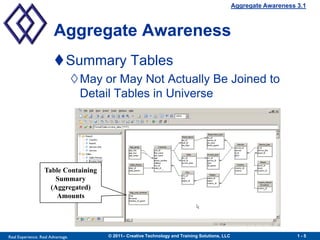
                        Summary Tables
                                   May or May Not Actually Be Joined to
                                    Detail Tables in Universe


                   Table Containing
                      Summary
                     (Aggregated)
                       Amounts


Real Experience. Real Advantage.         © 2011– Creative Technology and Training Solutions, LLC                       1-5
Aggregate Awareness 3.1


                        Summary Tables

                        Store Data at Higher Level Than
                         Detail (Fact) Tables
                        Increase Processing Efficiency
                                   Fewer Rows Retrieved
                                   Few If Any Calculations Required
                                   Few or No Joins


Real Experience. Real Advantage.         © 2011– Creative Technology and Training Solutions, LLC                       1-6
Aggregate Awareness 3.1


                        Apply Aggregate Awareness

                        Insert Summary Tables into Universe
                        Add Joins, Set Cardinality (If Needed)
                        Redefine or Create Objects Using
                         @Aggregate_Aware
                        Define Compatible/Incompatible
                         Objects Using Aggregate Navigation


Real Experience. Real Advantage.   © 2011– Creative Technology and Training Solutions, LLC                       1-7
Aggregate Awareness 3.1


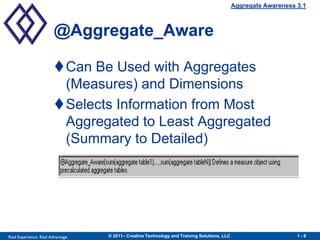
                        @Aggregate_Aware

                        Can Be Used with Aggregates
                         (Measures) and Dimensions
                        Selects Information from Most
                         Aggregated to Least Aggregated
                         (Summary to Detailed)


Real Experience. Real Advantage.   © 2011– Creative Technology and Training Solutions, LLC                       1-8
Aggregate Awareness 3.1


                        Apply Aggregate Awareness

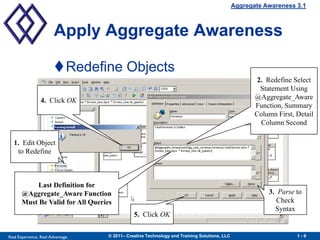
                        Redefine Objects
                                                                                                     2. Redefine Select
                                                                                                      Statement Using
                 4. Click OK                                                                        @Aggregate_Aware
                                                                                                    Function, Summary
                                                                                                    Column First, Detail
                                                                                                      Column Second

  1. Edit Object
   to Redefine


            Last Definition for
       @Aggregate_Aware Function                                                                        3. Parse to
       Must Be Valid for All Queries                                                                       Check
                                                                                                          Syntax
                                              5. Click OK


Real Experience. Real Advantage.   © 2011– Creative Technology and Training Solutions, LLC                        1-9
Aggregate Awareness 3.1


                        Apply Aggregate Awareness

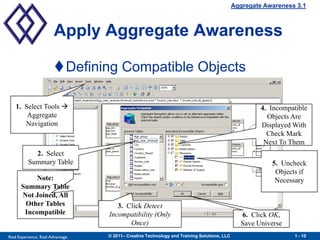
                        Defining Compatible Objects

   1. Select Tools                                                                                   4. Incompatible
       Aggregate                                                                                        Objects Are
      Navigation                                                                                      Displayed With
                                                                                                        Check Mark
                                                                                                       Next To Them
            2. Select
          Summary Table                                                                                  5. Uncheck
                                                                                                          Objects if
           Note:                                                                                          Necessary
      Summary Table
      Not Joined, All
       Other Tables                   3. Click Detect
       Incompatible                Incompatibility (Only                                       6. Click OK,
                                          Once)                                                Save Universe
Real Experience. Real Advantage.   © 2011– Creative Technology and Training Solutions, LLC                      1 - 10
Aggregate Awareness 3.1


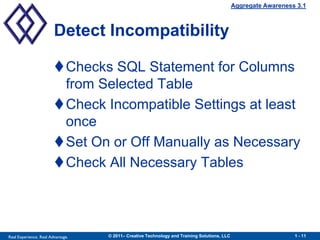
                        Detect Incompatibility

                        Checks SQL Statement for Columns
                         from Selected Table
                        Check Incompatible Settings at least
                         once
                        Set On or Off Manually as Necessary
                        Check All Necessary Tables


Real Experience. Real Advantage.   © 2011– Creative Technology and Training Solutions, LLC                      1 - 11
Aggregate Awareness 3.1


                        Aggregate Awareness

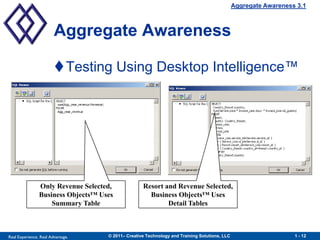
                        Testing Using Desktop Intelligence™


                Only Revenue Selected,             Resort and Revenue Selected,
                Business Objects™ Uses               Business Objects™ Uses
                    Summary Table                          Detail Tables


Real Experience. Real Advantage.    © 2011– Creative Technology and Training Solutions, LLC                      1 - 12
Aggregate Awareness 3.1


                        Aggregate Awareness
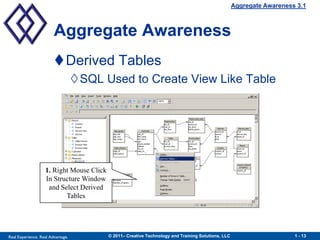
                        Derived Tables
                                   SQL Used to Create View Like Table


                   1. Right Mouse Click
                   In Structure Window
                    and Select Derived
                          Tables


Real Experience. Real Advantage.          © 2011– Creative Technology and Training Solutions, LLC                      1 - 13
Aggregate Awareness 3.1


                        Aggregate Awareness
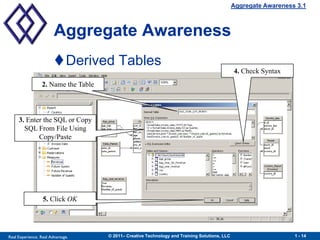
                        Derived Tables
                                                                                                4. Check Syntax
                  2. Name the Table


     3. Enter the SQL or Copy
       SQL From File Using
            Copy/Paste


                  5. Click OK


Real Experience. Real Advantage.      © 2011– Creative Technology and Training Solutions, LLC                      1 - 14
Aggregate Awareness 3.1


                        Aggregate Awareness
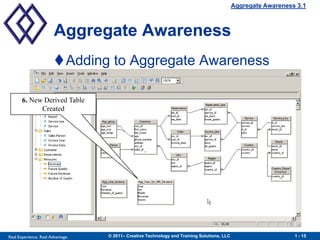
                        Adding to Aggregate Awareness

       6. New Derived Table
             Created


Real Experience. Real Advantage.   © 2011– Creative Technology and Training Solutions, LLC                      1 - 15
Aggregate Awareness 3.1


                        Aggregate Awareness
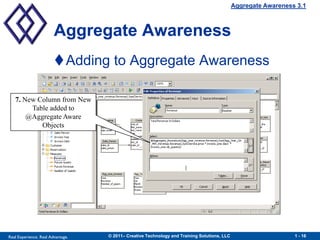
                        Adding to Aggregate Awareness

   7. New Column from New
        Table added to
       @Aggregate Aware
           Objects


Real Experience. Real Advantage.   © 2011– Creative Technology and Training Solutions, LLC                      1 - 16
Aggregate Awareness 3.1


                        Aggregate Awareness
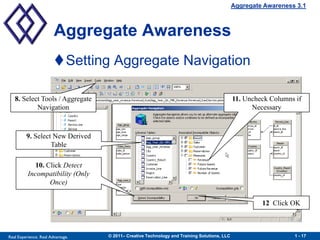
                        Setting Aggregate Navigation

   8. Select Tools / Aggregate                                                               11. Uncheck Columns if
           Navigation                                                                              Necessary


         9. Select New Derived
                  Table

             10. Click Detect
          Incompatibility (Only
                  Once)

                                                                                                      12 Click OK


Real Experience. Real Advantage.   © 2011– Creative Technology and Training Solutions, LLC                      1 - 17
Aggregate Awareness 3.1


                        Aggregate Awareness
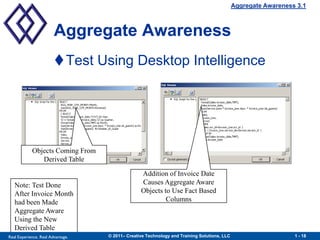
                        Test Using Desktop Intelligence


            Objects Coming From
               Derived Table

                                                 Addition of Invoice Date
   Note: Test Done                               Causes Aggregate Aware
   After Invoice Month                           Objects to Use Fact Based
   had been Made                                          Columns
   Aggregate Aware
   Using the New
   Derived Table
Real Experience. Real Advantage.   © 2011– Creative Technology and Training Solutions, LLC                      1 - 18
Aggregate Awareness 3.1


                        Presentation Objectives/Agenda
                             The importance of Aggregate Awareness, which takes
                              advantage of database summary tables, speeding up
                              report queries
                             Summary tables and adding them to the universe
                             The @Aggregate Aware Function, how it works, and how
                              query efficiency is improved through its use
                             Redefining objects: How to apply @Aggregate Aware to
                              the Select statement SQL
                             Detecting Incompatibility and setting objects to be
                              compatible with the Summary tables
                             Testing Aggregate Awareness with the report tool


Real Experience. Real Advantage.      © 2011– Creative Technology and Training Solutions, LLC                      1 - 19
Aggregate Awareness 3.1


                      Contact Information:
                  Michael Ward
                  Creative Technology and Training Solutions, LLC
                  56132 Parkview
                  Shelby Twp., MI 48316

                  (586) 677-8300      Office
                  (586) 677-8301      Fax
                  (586) 484-5523      Cell

                  www.cttsbi.com

                  Email: MichaelWard@cttsbi.com


Real Experience. Real Advantage.   © 2011– Creative Technology and Training Solutions, LLC                      1 - 20
[
                                Thank you for participating.
                                                       Please remember to complete and return your
                                                                evaluation form following this session.
                                      For ongoing education on this area of focus, visit the Year-Round
                                                              Community page at www.asug.com/yrc
                                                                                                          ]
                                                             [   SESSION CODE:
                                                                 5004


Real Experience. Real Advantage.                                                                          21

5004 implementing aggregate_awareness_in_sap_business_objects

  • 1.
    Implementing Aggregate Awarenessin [ SAP BusinessObjects 3.1 Michael Ward Creative Technology and Training Solutions, LLC
  • 2.
    Aggregate Awareness 3.1 Presentation Objectives/Agenda  The importance of Aggregate Awareness, which takes advantage of database summary tables, speeding up report queries  Summary tables and adding them to the universe  The @Aggregate Aware Function, how it works, and how query efficiency is improved through its use  Redefining objects: How to apply @Aggregate Aware to the Select statement SQL  Detecting Incompatibility and setting objects to be compatible with the Summary tables  Testing Aggregate Awareness with the report tool Real Experience. Real Advantage. © 2011– Creative Technology and Training Solutions, LLC 1-2
  • 3.
    Aggregate Awareness 3.1 Aggregate Awareness What Is Aggregate Awareness? Summary Tables Use @Aggregate_Aware Function Detect Incompatibility Aggregate Awareness Testing Real Experience. Real Advantage. © 2011– Creative Technology and Training Solutions, LLC 1-3
  • 4.
    Aggregate Awareness 3.1 Aggregate Awareness Process That Incorporates Higher Level Aggregation (Summary Tables) into Universe Speeds up Queries That Contain Statistics Reported at Higher Levels (i.e. Year) Real Experience. Real Advantage. © 2011– Creative Technology and Training Solutions, LLC 1-4
  • 5.
    Aggregate Awareness 3.1 Aggregate Awareness Summary Tables May or May Not Actually Be Joined to Detail Tables in Universe Table Containing Summary (Aggregated) Amounts Real Experience. Real Advantage. © 2011– Creative Technology and Training Solutions, LLC 1-5
  • 6.
    Aggregate Awareness 3.1 Summary Tables Store Data at Higher Level Than Detail (Fact) Tables Increase Processing Efficiency Fewer Rows Retrieved Few If Any Calculations Required Few or No Joins Real Experience. Real Advantage. © 2011– Creative Technology and Training Solutions, LLC 1-6
  • 7.
    Aggregate Awareness 3.1 Apply Aggregate Awareness Insert Summary Tables into Universe Add Joins, Set Cardinality (If Needed) Redefine or Create Objects Using @Aggregate_Aware Define Compatible/Incompatible Objects Using Aggregate Navigation Real Experience. Real Advantage. © 2011– Creative Technology and Training Solutions, LLC 1-7
  • 8.
    Aggregate Awareness 3.1 @Aggregate_Aware Can Be Used with Aggregates (Measures) and Dimensions Selects Information from Most Aggregated to Least Aggregated (Summary to Detailed) Real Experience. Real Advantage. © 2011– Creative Technology and Training Solutions, LLC 1-8
  • 9.
    Aggregate Awareness 3.1 Apply Aggregate Awareness Redefine Objects 2. Redefine Select Statement Using 4. Click OK @Aggregate_Aware Function, Summary Column First, Detail Column Second 1. Edit Object to Redefine Last Definition for @Aggregate_Aware Function 3. Parse to Must Be Valid for All Queries Check Syntax 5. Click OK Real Experience. Real Advantage. © 2011– Creative Technology and Training Solutions, LLC 1-9
  • 10.
    Aggregate Awareness 3.1 Apply Aggregate Awareness Defining Compatible Objects 1. Select Tools  4. Incompatible Aggregate Objects Are Navigation Displayed With Check Mark Next To Them 2. Select Summary Table 5. Uncheck Objects if Note: Necessary Summary Table Not Joined, All Other Tables 3. Click Detect Incompatible Incompatibility (Only 6. Click OK, Once) Save Universe Real Experience. Real Advantage. © 2011– Creative Technology and Training Solutions, LLC 1 - 10
  • 11.
    Aggregate Awareness 3.1 Detect Incompatibility Checks SQL Statement for Columns from Selected Table Check Incompatible Settings at least once Set On or Off Manually as Necessary Check All Necessary Tables Real Experience. Real Advantage. © 2011– Creative Technology and Training Solutions, LLC 1 - 11
  • 12.
    Aggregate Awareness 3.1 Aggregate Awareness Testing Using Desktop Intelligence™ Only Revenue Selected, Resort and Revenue Selected, Business Objects™ Uses Business Objects™ Uses Summary Table Detail Tables Real Experience. Real Advantage. © 2011– Creative Technology and Training Solutions, LLC 1 - 12
  • 13.
    Aggregate Awareness 3.1 Aggregate Awareness Derived Tables SQL Used to Create View Like Table 1. Right Mouse Click In Structure Window and Select Derived Tables Real Experience. Real Advantage. © 2011– Creative Technology and Training Solutions, LLC 1 - 13
  • 14.
    Aggregate Awareness 3.1 Aggregate Awareness Derived Tables 4. Check Syntax 2. Name the Table 3. Enter the SQL or Copy SQL From File Using Copy/Paste 5. Click OK Real Experience. Real Advantage. © 2011– Creative Technology and Training Solutions, LLC 1 - 14
  • 15.
    Aggregate Awareness 3.1 Aggregate Awareness Adding to Aggregate Awareness 6. New Derived Table Created Real Experience. Real Advantage. © 2011– Creative Technology and Training Solutions, LLC 1 - 15
  • 16.
    Aggregate Awareness 3.1 Aggregate Awareness Adding to Aggregate Awareness 7. New Column from New Table added to @Aggregate Aware Objects Real Experience. Real Advantage. © 2011– Creative Technology and Training Solutions, LLC 1 - 16
  • 17.
    Aggregate Awareness 3.1 Aggregate Awareness Setting Aggregate Navigation 8. Select Tools / Aggregate 11. Uncheck Columns if Navigation Necessary 9. Select New Derived Table 10. Click Detect Incompatibility (Only Once) 12 Click OK Real Experience. Real Advantage. © 2011– Creative Technology and Training Solutions, LLC 1 - 17
  • 18.
    Aggregate Awareness 3.1 Aggregate Awareness Test Using Desktop Intelligence Objects Coming From Derived Table Addition of Invoice Date Note: Test Done Causes Aggregate Aware After Invoice Month Objects to Use Fact Based had been Made Columns Aggregate Aware Using the New Derived Table Real Experience. Real Advantage. © 2011– Creative Technology and Training Solutions, LLC 1 - 18
  • 19.
    Aggregate Awareness 3.1 Presentation Objectives/Agenda  The importance of Aggregate Awareness, which takes advantage of database summary tables, speeding up report queries  Summary tables and adding them to the universe  The @Aggregate Aware Function, how it works, and how query efficiency is improved through its use  Redefining objects: How to apply @Aggregate Aware to the Select statement SQL  Detecting Incompatibility and setting objects to be compatible with the Summary tables  Testing Aggregate Awareness with the report tool Real Experience. Real Advantage. © 2011– Creative Technology and Training Solutions, LLC 1 - 19
  • 20.
    Aggregate Awareness 3.1 Contact Information: Michael Ward Creative Technology and Training Solutions, LLC 56132 Parkview Shelby Twp., MI 48316 (586) 677-8300 Office (586) 677-8301 Fax (586) 484-5523 Cell www.cttsbi.com Email: MichaelWard@cttsbi.com Real Experience. Real Advantage. © 2011– Creative Technology and Training Solutions, LLC 1 - 20
  • 21.
    [  Thank you for participating. Please remember to complete and return your evaluation form following this session. For ongoing education on this area of focus, visit the Year-Round Community page at www.asug.com/yrc ] [ SESSION CODE: 5004 Real Experience. Real Advantage. 21