SAP HANA SPS 11 - What’s New?
SAP HANA Operations
SAP HANA Product Management November, 2015
(Delta from SPS 10 to SPS 11)
© 2015 SAP AG or an SAP affiliate company. All rights reserved. 2
Agenda
Administration & Monitoring – Melanie Handreck
Backup & Recovery – Andrea Kristen
High Availability – Ralf Czekalla
SAP DB Control Center - José Ramos
Platform Lifecycle Management - Stephanie Lewellen
Application Lifecycle Management – Ron Silberstein
Questions & Answers – all
© 2015 SAP AG or an SAP affiliate company. All rights reserved. 3
Agenda Administration & Monitoring
SAP HANA Cockpit
 Offline system administration and diagnosis
SAP HANA Database
 Monitoring of DDL statements
 Improved connection monitoring
 Improved SQL statement analysis
SAP HANA Cockpit
For Offline Administration
© 2015 SAP AG or an SAP affiliate company. All rights reserved. 5
SAP HANA Cockpit for Offline Administration
Overview
Offline Administration and Diagnosis
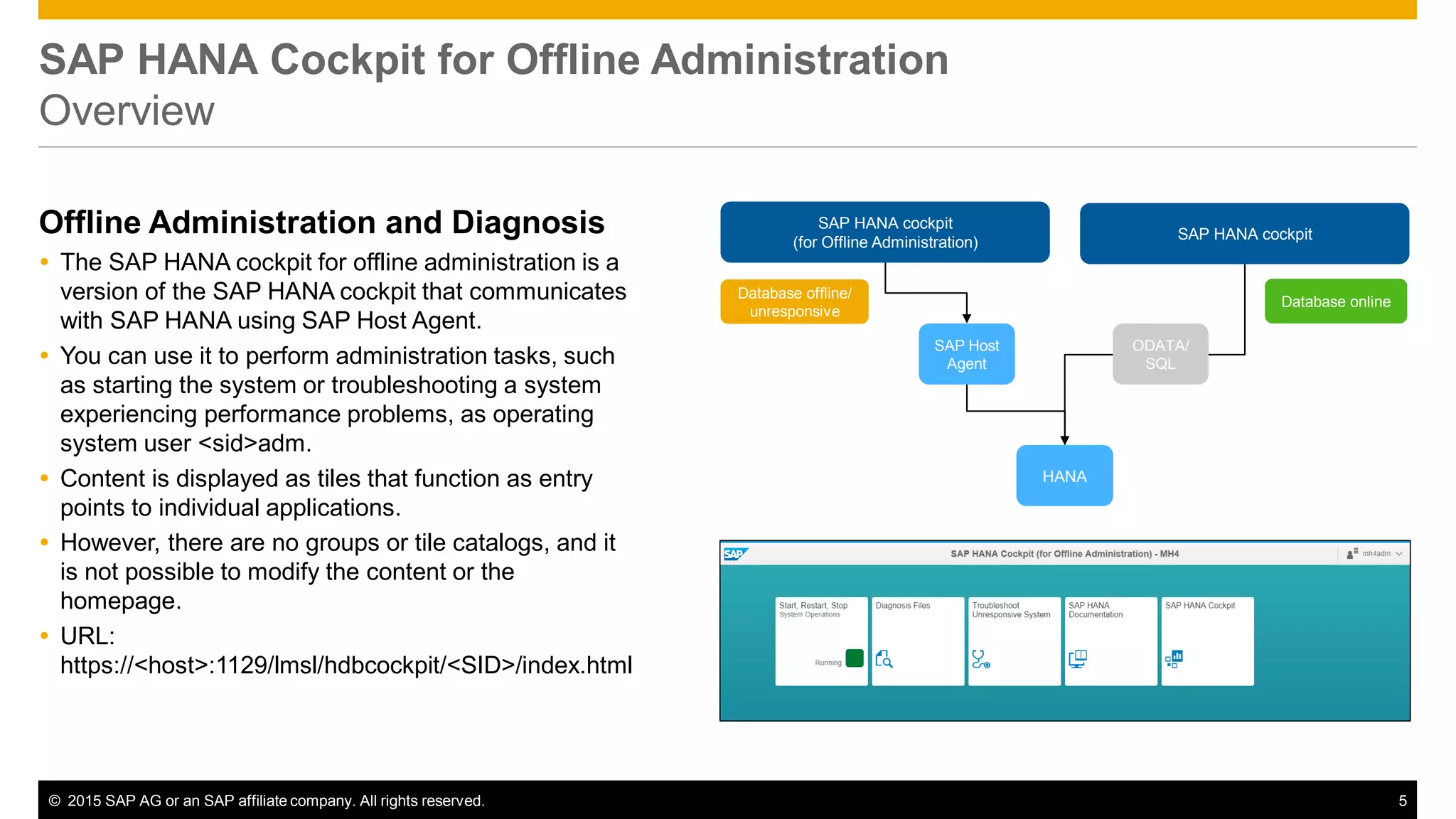
 The SAP HANA cockpit for offline administration is a
version of the SAP HANA cockpit that communicates
with SAP HANA using SAP Host Agent.
 You can use it to perform administration tasks, such
as starting the system or troubleshooting a system
experiencing performance problems, as operating
system user <sid>adm.
 Content is displayed as tiles that function as entry
points to individual applications.
 However, there are no groups or tile catalogs, and it
is not possible to modify the content or the
homepage.
 URL:
https://<host>:1129/lmsl/hdbcockpit/<SID>/index.html
HANA
SAP Host
Agent
SAP HANA cockpit
(for Offline Administration)
Database offline/
unresponsive
SAP HANA cockpit
Database online
ODATA/
SQL
© 2015 SAP AG or an SAP affiliate company. All rights reserved. 6
SAP HANA Cockpit for Offline Administration
Start/Restart/Stop System
Start/Restart/Stop
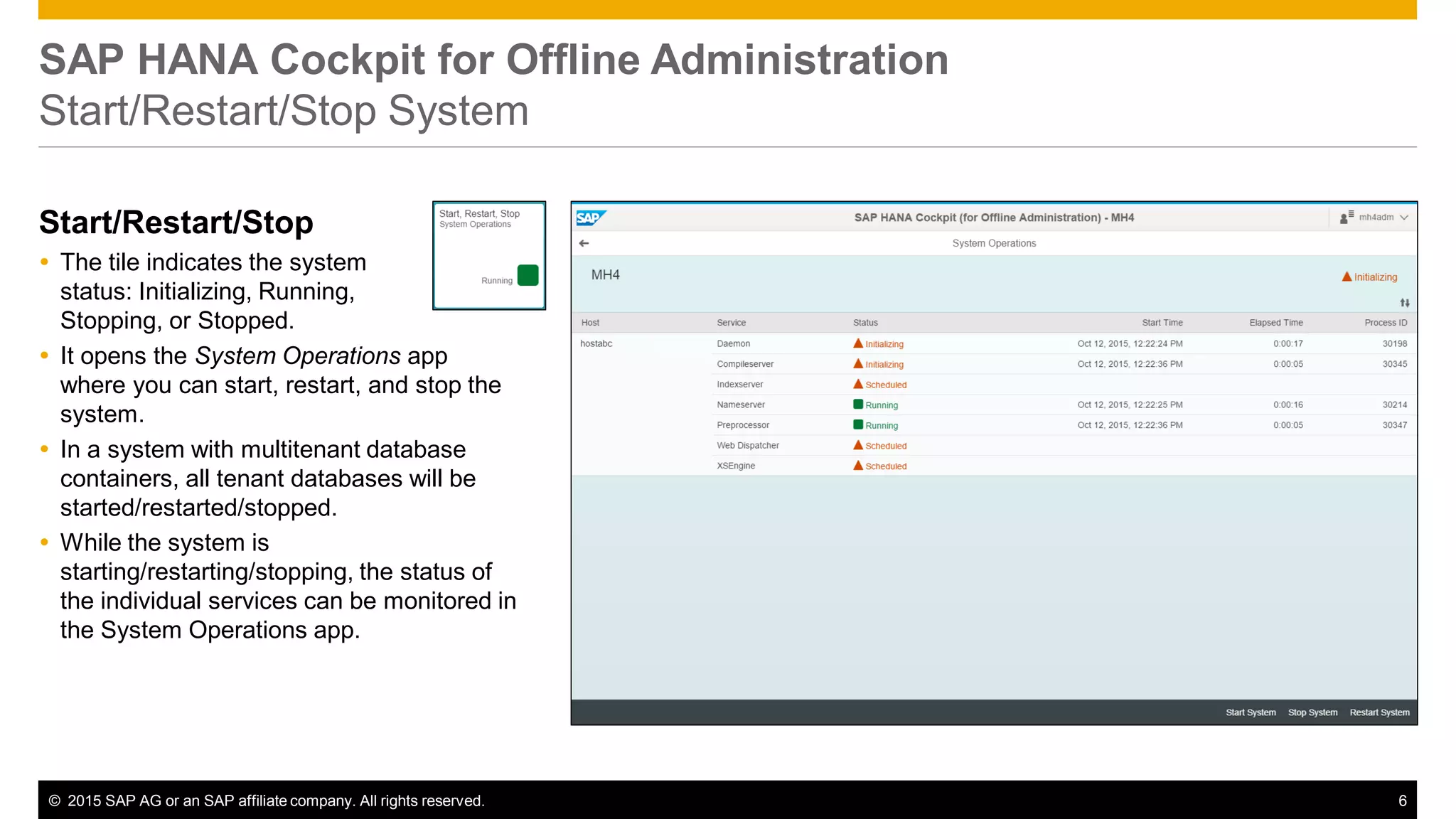
 The tile indicates the system
status: Initializing, Running,
Stopping, or Stopped.
 It opens the System Operations app
where you can start, restart, and stop the
system.
 In a system with multitenant database
containers, all tenant databases will be
started/restarted/stopped.
 While the system is
starting/restarting/stopping, the status of
the individual services can be monitored in
the System Operations app.
© 2015 SAP AG or an SAP affiliate company. All rights reserved. 7
SAP HANA Cockpit for Offline Administration
Diagnosis Files
Log and Trace Files
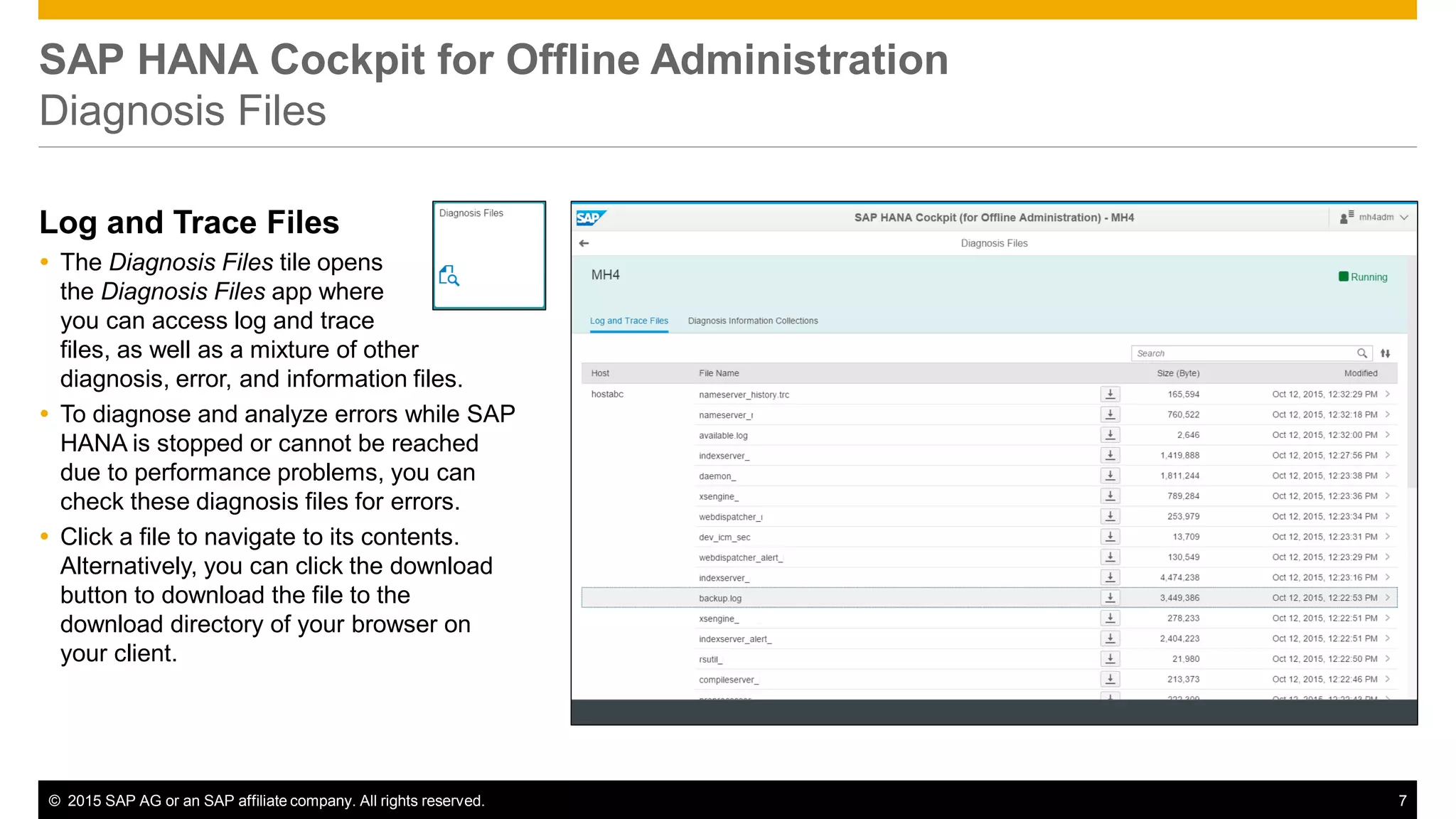
 The Diagnosis Files tile opens
the Diagnosis Files app where
you can access log and trace
files, as well as a mixture of other
diagnosis, error, and information files.
 To diagnose and analyze errors while SAP
HANA is stopped or cannot be reached
due to performance problems, you can
check these diagnosis files for errors.
 Click a file to navigate to its contents.
Alternatively, you can click the download
button to download the file to the
download directory of your browser on
your client.
© 2015 SAP AG or an SAP affiliate company. All rights reserved. 8
SAP HANA Cockpit for Offline Administration
Diagnosis Files
Diagnosis Information
Collection
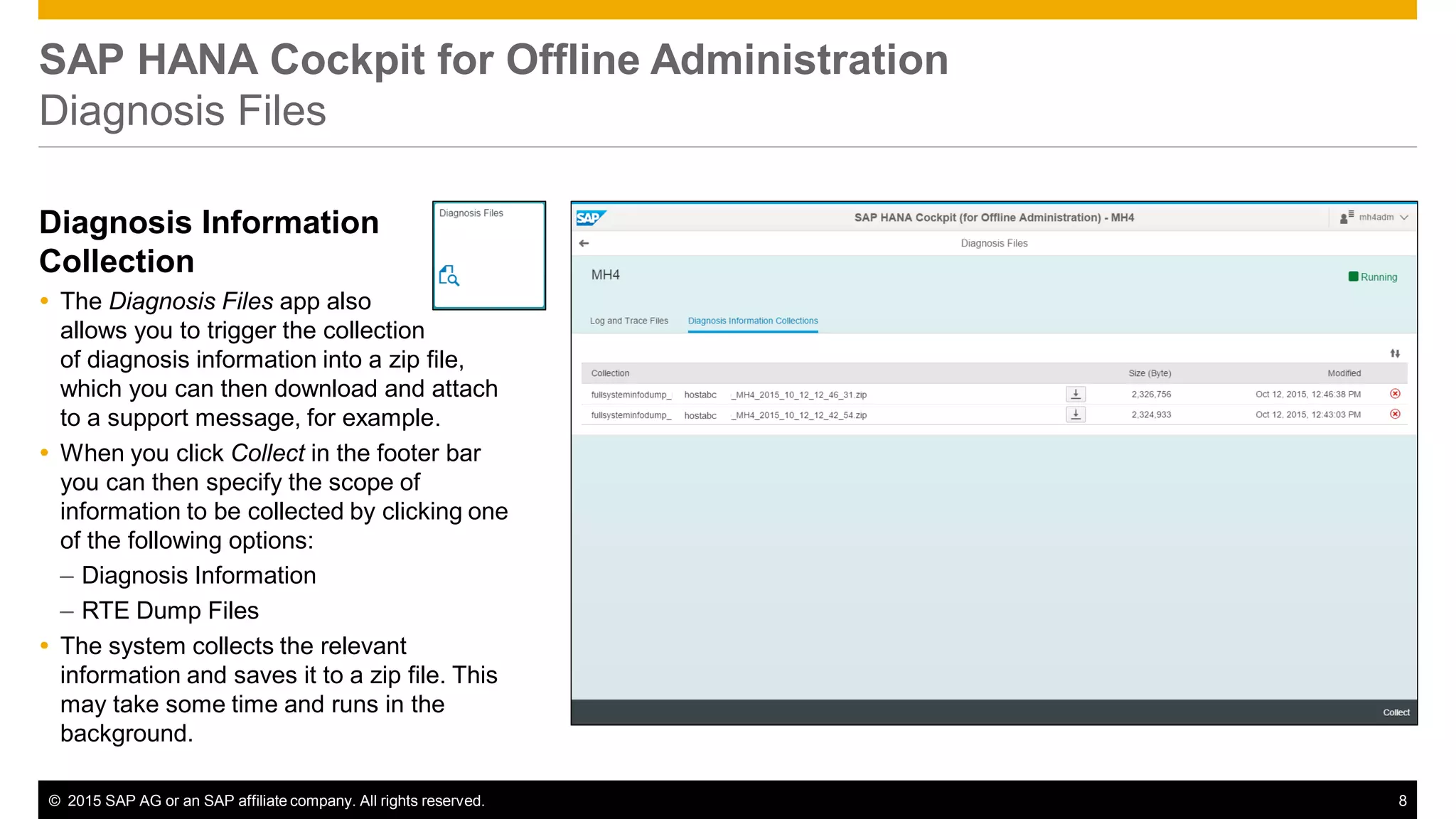
 The Diagnosis Files app also
allows you to trigger the collection
of diagnosis information into a zip file,
which you can then download and attach
to a support message, for example.
 When you click Collect in the footer bar
you can then specify the scope of
information to be collected by clicking one
of the following options:
– Diagnosis Information
– RTE Dump Files
 The system collects the relevant
information and saves it to a zip file. This
may take some time and runs in the
background.
© 2015 SAP AG or an SAP affiliate company. All rights reserved. 9
SAP HANA Cockpit for Offline Administration
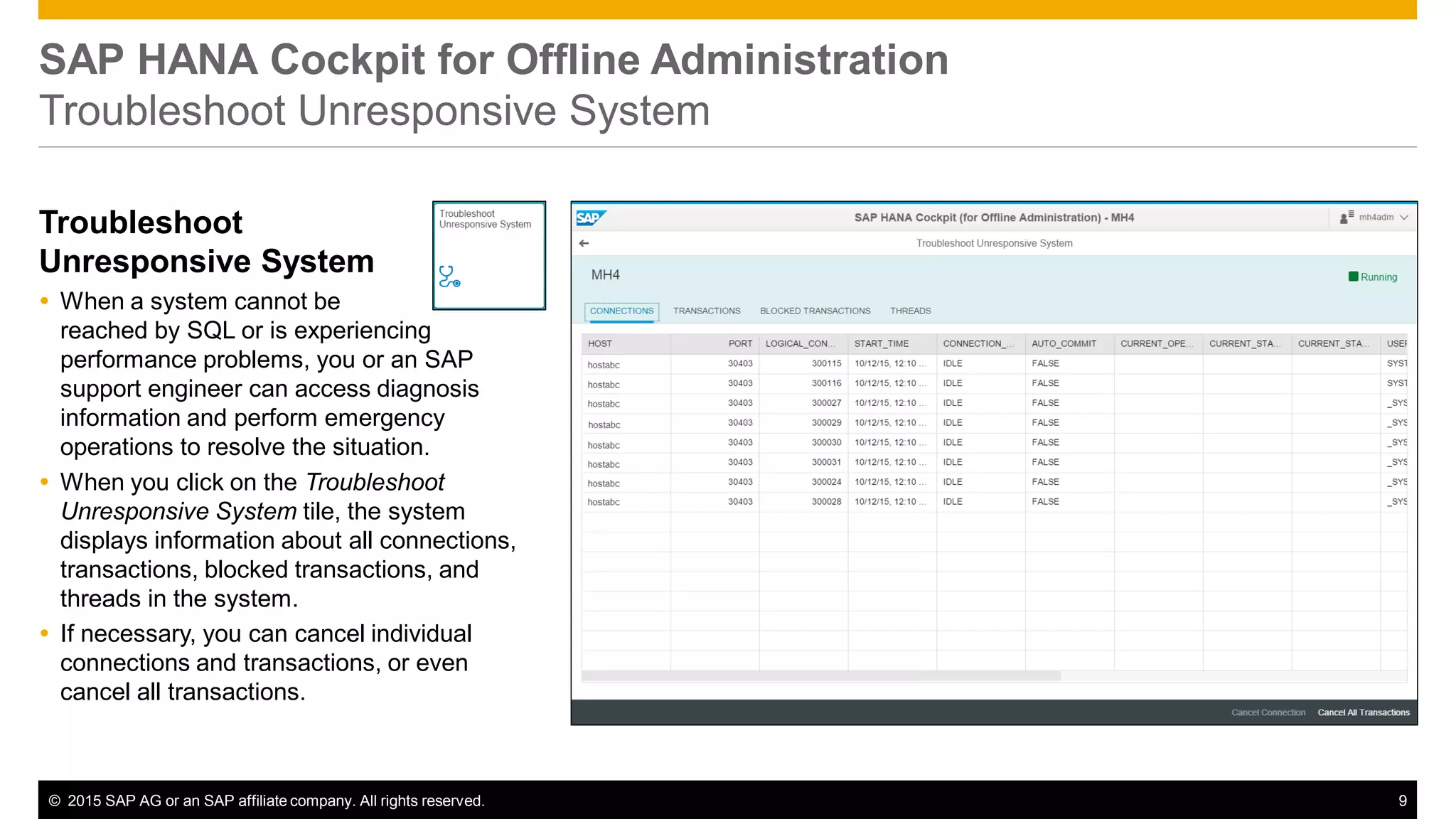
Troubleshoot Unresponsive System
Troubleshoot
Unresponsive System
 When a system cannot be
reached by SQL or is experiencing
performance problems, you or an SAP
support engineer can access diagnosis
information and perform emergency
operations to resolve the situation.
 When you click on the Troubleshoot
Unresponsive System tile, the system
displays information about all connections,
transactions, blocked transactions, and
threads in the system.
 If necessary, you can cancel individual
connections and transactions, or even
cancel all transactions.
SAP HANA Database
© 2015 SAP AG or an SAP affiliate company. All rights reserved. 11
SAP HANA Database
Monitoring Improvements
Monitoring of DDL Statements
 Monitoring view M_EXECUTED_STATEMENTS records all DDL statements (e.g. table split/move) by default (can be disabled
using parameter enable_ddl in global.ini, section executed_statements).
 Statements are traced in memory, and flushed in regular intervals to a file.
 The file size and flush interval are configurable as well as the max. number of trace files (parameters maxfilesize, maxfiles and
trace_flush_internal).
Connection Monitoring
 New column CLOSE_REASON in view M_CONNECTIONS now reveals the reason, why a session has been closed (e.g.
because the connection client has been terminated, or because of an idle timeout).
 New columns COMMIT_MAX_EXECUTION_TIME, COMMIT_TOTAL_EXECUTION_TIME,
COMMIT_AVG_EXECUTION_TIME and COMMIT_COUNT in view M_CONNECTION_STATISTICS record the time needed
to perform a commit.
© 2015 SAP AG or an SAP affiliate company. All rights reserved. 12
SAP HANA Database
Monitoring Improvements
SQL Statement Monitoring
 M_SQL_PLAN_CACHE now contains columns MAX_CALLED_THREAD_COUNT, TOTAL_CALLED_THREAD_COUNT and
AVG_CALLED_THREAD_COUNT to show how many threads have been used to execute a specific query.
 Columns MAX_SERVICE_NETWORK_REQUEST_COUNT, TOTAL_SERVICE_NETWORK_REQUEST_COUNT and
AVG_SERVICE_NETWORK_REQUEST_COUNT record TrexNet request counts in M_SQL_PLAN_CACHE.
 M_EXPENSIVE_STATEMENTS now includes column WORKLOAD_CLASS_NAME to show which workload class had been
assigned to a specific statement execution.
 SQL statement hash is now included in trace files in case of error situations (e.g. out of memory situations) to easily identify
which statement caused the problem.
Statistics Service
 Alert data in the _SYS_STATISTICS.STATISTICS_ALERTS table is now deleted by default after a period of 42 days.
 The number of alerts in the system (that is rows in the table _SYS_STATISTICS.STATISTICS_ALERTS_BASE) now cannot
exceed 1,000,000 by default. If this number is exceeded, the system starts deleting rows in increments of 10 percent until the
number of alerts is below the maximum.
© 2015 SAP AG or an SAP affiliate company. All rights reserved.
Thank you
Contact information
Melanie Handreck
SAP HANA Product Management
AskSAPHANA@sap.com

What's New in SAP HANA SPS 11 Operations

  • 1.
    SAP HANA SPS11 - What’s New? SAP HANA Operations SAP HANA Product Management November, 2015 (Delta from SPS 10 to SPS 11)
  • 2.
    © 2015 SAPAG or an SAP affiliate company. All rights reserved. 2 Agenda Administration & Monitoring – Melanie Handreck Backup & Recovery – Andrea Kristen High Availability – Ralf Czekalla SAP DB Control Center - José Ramos Platform Lifecycle Management - Stephanie Lewellen Application Lifecycle Management – Ron Silberstein Questions & Answers – all
  • 3.
    © 2015 SAPAG or an SAP affiliate company. All rights reserved. 3 Agenda Administration & Monitoring SAP HANA Cockpit  Offline system administration and diagnosis SAP HANA Database  Monitoring of DDL statements  Improved connection monitoring  Improved SQL statement analysis
  • 4.
    SAP HANA Cockpit ForOffline Administration
  • 5.
    © 2015 SAPAG or an SAP affiliate company. All rights reserved. 5 SAP HANA Cockpit for Offline Administration Overview Offline Administration and Diagnosis  The SAP HANA cockpit for offline administration is a version of the SAP HANA cockpit that communicates with SAP HANA using SAP Host Agent.  You can use it to perform administration tasks, such as starting the system or troubleshooting a system experiencing performance problems, as operating system user <sid>adm.  Content is displayed as tiles that function as entry points to individual applications.  However, there are no groups or tile catalogs, and it is not possible to modify the content or the homepage.  URL: https://<host>:1129/lmsl/hdbcockpit/<SID>/index.html HANA SAP Host Agent SAP HANA cockpit (for Offline Administration) Database offline/ unresponsive SAP HANA cockpit Database online ODATA/ SQL
  • 6.
    © 2015 SAPAG or an SAP affiliate company. All rights reserved. 6 SAP HANA Cockpit for Offline Administration Start/Restart/Stop System Start/Restart/Stop  The tile indicates the system status: Initializing, Running, Stopping, or Stopped.  It opens the System Operations app where you can start, restart, and stop the system.  In a system with multitenant database containers, all tenant databases will be started/restarted/stopped.  While the system is starting/restarting/stopping, the status of the individual services can be monitored in the System Operations app.
  • 7.
    © 2015 SAPAG or an SAP affiliate company. All rights reserved. 7 SAP HANA Cockpit for Offline Administration Diagnosis Files Log and Trace Files  The Diagnosis Files tile opens the Diagnosis Files app where you can access log and trace files, as well as a mixture of other diagnosis, error, and information files.  To diagnose and analyze errors while SAP HANA is stopped or cannot be reached due to performance problems, you can check these diagnosis files for errors.  Click a file to navigate to its contents. Alternatively, you can click the download button to download the file to the download directory of your browser on your client.
  • 8.
    © 2015 SAPAG or an SAP affiliate company. All rights reserved. 8 SAP HANA Cockpit for Offline Administration Diagnosis Files Diagnosis Information Collection  The Diagnosis Files app also allows you to trigger the collection of diagnosis information into a zip file, which you can then download and attach to a support message, for example.  When you click Collect in the footer bar you can then specify the scope of information to be collected by clicking one of the following options: – Diagnosis Information – RTE Dump Files  The system collects the relevant information and saves it to a zip file. This may take some time and runs in the background.
  • 9.
    © 2015 SAPAG or an SAP affiliate company. All rights reserved. 9 SAP HANA Cockpit for Offline Administration Troubleshoot Unresponsive System Troubleshoot Unresponsive System  When a system cannot be reached by SQL or is experiencing performance problems, you or an SAP support engineer can access diagnosis information and perform emergency operations to resolve the situation.  When you click on the Troubleshoot Unresponsive System tile, the system displays information about all connections, transactions, blocked transactions, and threads in the system.  If necessary, you can cancel individual connections and transactions, or even cancel all transactions.
  • 10.
  • 11.
    © 2015 SAPAG or an SAP affiliate company. All rights reserved. 11 SAP HANA Database Monitoring Improvements Monitoring of DDL Statements  Monitoring view M_EXECUTED_STATEMENTS records all DDL statements (e.g. table split/move) by default (can be disabled using parameter enable_ddl in global.ini, section executed_statements).  Statements are traced in memory, and flushed in regular intervals to a file.  The file size and flush interval are configurable as well as the max. number of trace files (parameters maxfilesize, maxfiles and trace_flush_internal). Connection Monitoring  New column CLOSE_REASON in view M_CONNECTIONS now reveals the reason, why a session has been closed (e.g. because the connection client has been terminated, or because of an idle timeout).  New columns COMMIT_MAX_EXECUTION_TIME, COMMIT_TOTAL_EXECUTION_TIME, COMMIT_AVG_EXECUTION_TIME and COMMIT_COUNT in view M_CONNECTION_STATISTICS record the time needed to perform a commit.
  • 12.
    © 2015 SAPAG or an SAP affiliate company. All rights reserved. 12 SAP HANA Database Monitoring Improvements SQL Statement Monitoring  M_SQL_PLAN_CACHE now contains columns MAX_CALLED_THREAD_COUNT, TOTAL_CALLED_THREAD_COUNT and AVG_CALLED_THREAD_COUNT to show how many threads have been used to execute a specific query.  Columns MAX_SERVICE_NETWORK_REQUEST_COUNT, TOTAL_SERVICE_NETWORK_REQUEST_COUNT and AVG_SERVICE_NETWORK_REQUEST_COUNT record TrexNet request counts in M_SQL_PLAN_CACHE.  M_EXPENSIVE_STATEMENTS now includes column WORKLOAD_CLASS_NAME to show which workload class had been assigned to a specific statement execution.  SQL statement hash is now included in trace files in case of error situations (e.g. out of memory situations) to easily identify which statement caused the problem. Statistics Service  Alert data in the _SYS_STATISTICS.STATISTICS_ALERTS table is now deleted by default after a period of 42 days.  The number of alerts in the system (that is rows in the table _SYS_STATISTICS.STATISTICS_ALERTS_BASE) now cannot exceed 1,000,000 by default. If this number is exceeded, the system starts deleting rows in increments of 10 percent until the number of alerts is below the maximum.
  • 13.
    © 2015 SAPAG or an SAP affiliate company. All rights reserved. Thank you Contact information Melanie Handreck SAP HANA Product Management AskSAPHANA@sap.com