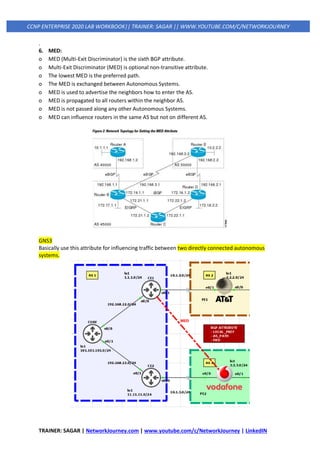
TRAINER: SAGAR | NetworkJourney.com | www.youtube.com/c/NetworkJourney | LinkedIN
CCNP ENTERPRISE 2020 LAB WORKBOOK|| TRAINER: SAGAR || WWW.YOUTUBE.COM/C/NETWORKJOURNEY
TOPICS COVERED:
IP ROUTING ESSENTIALS
- ROUTING PROTOCOL OVERVIEW
- PATH SELECTION
- STATIC ROUTING
- EIGRP
- ADVANCE EIGRP
- OSPF
- ADVANCE OSPF
- BGP
- ADVANCE BGP
- REDISTRIBUTION
- POLICY BASED ROUTING (PBR)
- BIDIRECTIONAL FORWARDING DETECTION (BFD)
TRAINER: SAGAR | NetworkJourney.com | www.youtube.com/c/NetworkJourney | LinkedIN
CCNP ENTERPRISE 2020 LAB WORKBOOK|| TRAINER: SAGAR || WWW.YOUTUBE.COM/C/NETWORKJOURNEY
ROUTING PROTOCOL OVERVIEW
A router’s primary function is to move an IP packet from one network to a different network. A
router learns about non-attached networks through configuration of static routes or through
dynamic IP routing protocols.
Dynamic IP routing protocols distribute network topology information between routers and provide
updates without intervention when a topology change in the network occurs.
Design requirements or hardware limitations may restrict IP routing to static routes, which do not
accommodate topology changes very well and can burden network engineers, depending on the size
of the network. With dynamic routing protocols, routers try to select the best loop-free path on
which to forward a packet to its destination IP address.
The common dynamic routing protocols found on most routing platforms today are as follows:
• Routing Information Protocol Version 2 (RIPv2)
• Enhanced Interior Gateway Routing (EIGRP)
• Open Shortest Path First (OSPF)
• Intermediate System-to-Intermediate System (IS-IS)
• Border Gateway Protocol (BGP)
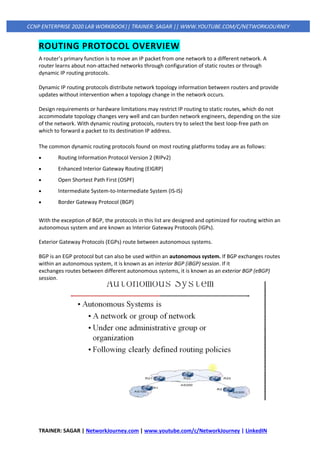
With the exception of BGP, the protocols in this list are designed and optimized for routing within an
autonomous system and are known as Interior Gateway Protocols (IGPs).
Exterior Gateway Protocols (EGPs) route between autonomous systems.
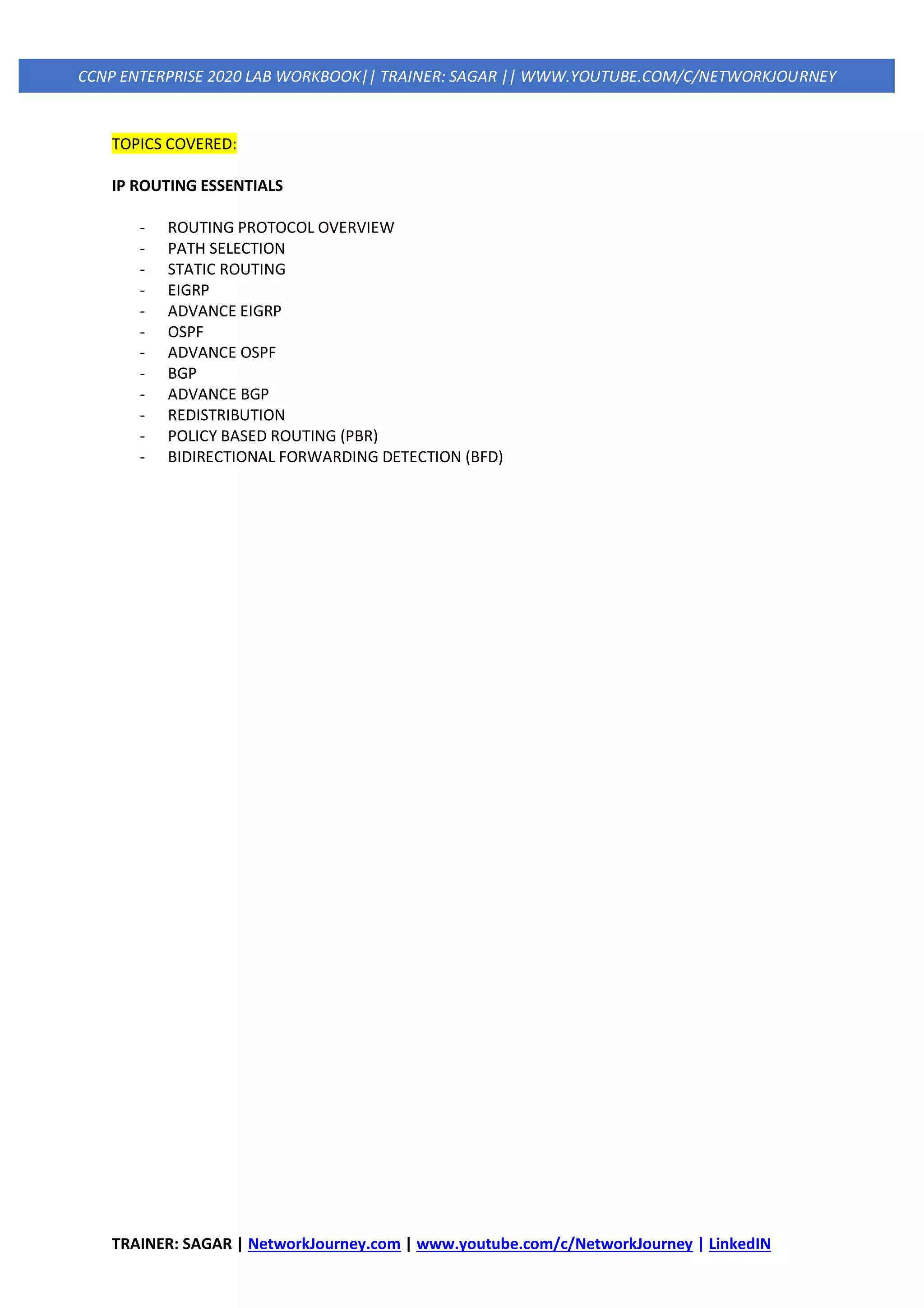
BGP is an EGP protocol but can also be used within an autonomous system. If BGP exchanges routes
within an autonomous system, it is known as an interior BGP (iBGP) session. If it
exchanges routes between different autonomous systems, it is known as an exterior BGP (eBGP)
session.
TRAINER: SAGAR | NetworkJourney.com | www.youtube.com/c/NetworkJourney | LinkedIN
CCNP ENTERPRISE 2020 LAB WORKBOOK|| TRAINER: SAGAR || WWW.YOUTUBE.COM/C/NETWORKJOURNEY
Distance Vector Algorithms
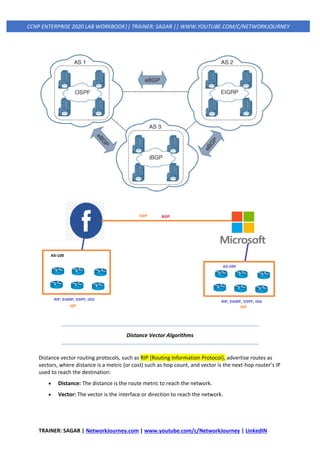
Distance vector routing protocols, such as RIP {Routing Information Protocol}, advertise routes as
vectors, where distance is a metric (or cost) such as hop count, and vector is the next-hop router’s IP
used to reach the destination:
• Distance: The distance is the route metric to reach the network.
• Vector: The vector is the interface or direction to reach the network.
TRAINER: SAGAR | NetworkJourney.com | www.youtube.com/c/NetworkJourney | LinkedIN
CCNP ENTERPRISE 2020 LAB WORKBOOK|| TRAINER: SAGAR || WWW.YOUTUBE.COM/C/NETWORKJOURNEY
When a router receives routing information from a neighbor, it stores it in a local routing database
as it is received, and the distance vector algorithm (such as the Bellman-Ford and Ford-Fulkerson
algorithms) is used to determine which paths are the best loop-free paths to each reachable
destination. When the best paths are determined, they are installed into the routing table and are
advertised to each neighbor router.
Routers running distance vector protocols advertise the routing information to their neighbors from
their own perspective, modified from the original route received.
Therefore, a distance vector protocol does not have a complete map of the whole network; instead,
its database reflects that a neighbor router knows how to reach the destination network and how
far the neighbor router is from the destination network.
The advantage of distance vector protocols is that they require less CPU and memory and can run on
low-end routers.
A distance vector protocol selects paths purely based on distance. It does not account for link speeds
or other factors.
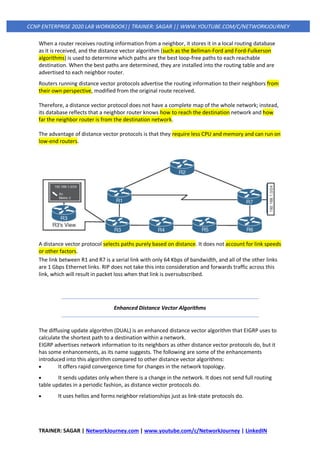
The link between R1 and R7 is a serial link with only 64 Kbps of bandwidth, and all of the other links
are 1 Gbps Ethernet links. RIP does not take this into consideration and forwards traffic across this
link, which will result in packet loss when that link is oversubscribed.
Enhanced Distance Vector Algorithms
The diffusing update algorithm (DUAL) is an enhanced distance vector algorithm that EIGRP uses to
calculate the shortest path to a destination within a network.
EIGRP advertises network information to its neighbors as other distance vector protocols do, but it
has some enhancements, as its name suggests. The following are some of the enhancements
introduced into this algorithm compared to other distance vector algorithms:
• It offers rapid convergence time for changes in the network topology.
• It sends updates only when there is a change in the network. It does not send full routing
table updates in a periodic fashion, as distance vector protocols do.
• It uses hellos and forms neighbor relationships just as link-state protocols do.
TRAINER: SAGAR | NetworkJourney.com | www.youtube.com/c/NetworkJourney | LinkedIN
CCNP ENTERPRISE 2020 LAB WORKBOOK|| TRAINER: SAGAR || WWW.YOUTUBE.COM/C/NETWORKJOURNEY
• It uses bandwidth, delay, reliability, load, and maximum transmission unit (MTU) size instead
of hop count for path calculations.
• It has the option to load balance traffic across equal- or unequal-cost paths.
EIGRP is sometimes referred to as a hybrid routing protocol because it has characteristics of both
distance vector and link-state protocols.
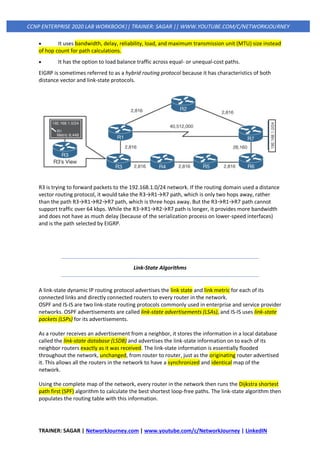
R3 is trying to forward packets to the 192.168.1.0/24 network. If the routing domain used a distance
vector routing protocol, it would take the R3→R1→R7 path, which is only two hops away, rather
than the path R3→R1→R2→R7 path, which is three hops away. But the R3→R1→R7 path cannot
support traffic over 64 kbps. While the R3→R1→R2→R7 path is longer, it provides more bandwidth
and does not have as much delay (because of the serialization process on lower-speed interfaces)
and is the path selected by EIGRP.
Link-State Algorithms
A link-state dynamic IP routing protocol advertises the link state and link metric for each of its
connected links and directly connected routers to every router in the network.
OSPF and IS-IS are two link-state routing protocols commonly used in enterprise and service provider
networks. OSPF advertisements are called link-state advertisements (LSAs), and IS-IS uses link-state
packets (LSPs) for its advertisements.
As a router receives an advertisement from a neighbor, it stores the information in a local database
called the link-state database (LSDB) and advertises the link-state information on to each of its
neighbor routers exactly as it was received. The link-state information is essentially flooded
throughout the network, unchanged, from router to router, just as the originating router advertised
it. This allows all the routers in the network to have a synchronized and identical map of the
network.
Using the complete map of the network, every router in the network then runs the Dijkstra shortest
path first (SPF) algorithm to calculate the best shortest loop-free paths. The link-state algorithm then
populates the routing table with this information.
TRAINER: SAGAR | NetworkJourney.com | www.youtube.com/c/NetworkJourney | LinkedIN
CCNP ENTERPRISE 2020 LAB WORKBOOK|| TRAINER: SAGAR || WWW.YOUTUBE.COM/C/NETWORKJOURNEY
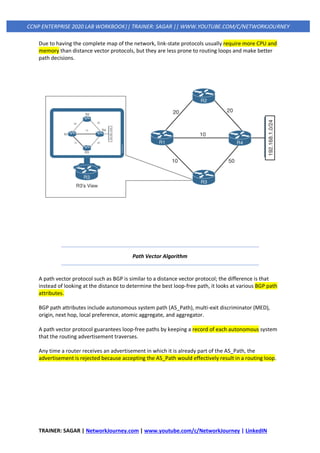
Due to having the complete map of the network, link-state protocols usually require more CPU and
memory than distance vector protocols, but they are less prone to routing loops and make better
path decisions.
Path Vector Algorithm
A path vector protocol such as BGP is similar to a distance vector protocol; the difference is that
instead of looking at the distance to determine the best loop-free path, it looks at various BGP path
attributes.
BGP path attributes include autonomous system path (AS_Path), multi-exit discriminator (MED),
origin, next hop, local preference, atomic aggregate, and aggregator.
A path vector protocol guarantees loop-free paths by keeping a record of each autonomous system
that the routing advertisement traverses.
Any time a router receives an advertisement in which it is already part of the AS_Path, the
advertisement is rejected because accepting the AS_Path would effectively result in a routing loop.
TRAINER: SAGAR | NetworkJourney.com | www.youtube.com/c/NetworkJourney | LinkedIN
CCNP ENTERPRISE 2020 LAB WORKBOOK|| TRAINER: SAGAR || WWW.YOUTUBE.COM/C/NETWORKJOURNEY
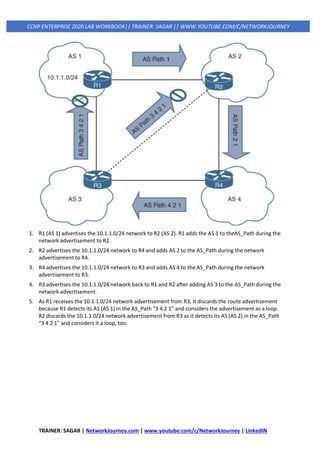
1. R1 (AS 1) advertises the 10.1.1.0/24 network to R2 (AS 2). R1 adds the AS 1 to theAS_Path during the
network advertisement to R2.
2. R2 advertises the 10.1.1.0/24 network to R4 and adds AS 2 to the AS_Path during the network
advertisement to R4.
3. R4 advertises the 10.1.1.0/24 network to R3 and adds AS 4 to the AS_Path during the network
advertisement to R3.
4. R3 advertises the 10.1.1.0/24 network back to R1 and R2 after adding AS 3 to the AS_Path during the
network advertisement.
5. As R1 receives the 10.1.1.0/24 network advertisement from R3, it discards the route advertisement
because R1 detects its AS (AS 1) in the AS_Path “3 4 2 1” and considers the advertisement as a loop.
R2 discards the 10.1.1.0/24 network advertisement from R3 as it detects its AS (AS 2) in the AS_Path
“3 4 2 1” and considers it a loop, too.
TRAINER: SAGAR | NetworkJourney.com | www.youtube.com/c/NetworkJourney | LinkedIN
CCNP ENTERPRISE 2020 LAB WORKBOOK|| TRAINER: SAGAR || WWW.YOUTUBE.COM/C/NETWORKJOURNEY
PATH SELECTION
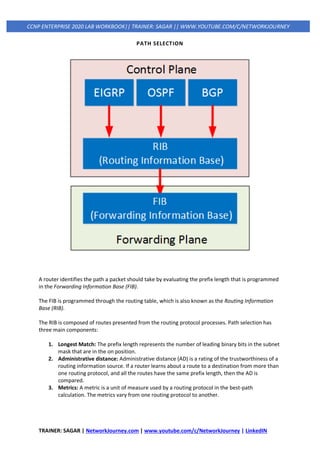
A router identifies the path a packet should take by evaluating the prefix length that is programmed
in the Forwarding Information Base (FIB).
The FIB is programmed through the routing table, which is also known as the Routing Information
Base (RIB).
The RIB is composed of routes presented from the routing protocol processes. Path selection has
three main components:
1. Longest Match: The prefix length represents the number of leading binary bits in the subnet
mask that are in the on position.
2. Administrative distance: Administrative distance (AD) is a rating of the trustworthiness of a
routing information source. If a router learns about a route to a destination from more than
one routing protocol, and all the routes have the same prefix length, then the AD is
compared.
3. Metrics: A metric is a unit of measure used by a routing protocol in the best-path
calculation. The metrics vary from one routing protocol to another.
TRAINER: SAGAR | NetworkJourney.com | www.youtube.com/c/NetworkJourney | LinkedIN
CCNP ENTERPRISE 2020 LAB WORKBOOK|| TRAINER: SAGAR || WWW.YOUTUBE.COM/C/NETWORKJOURNEY
1. Longest match
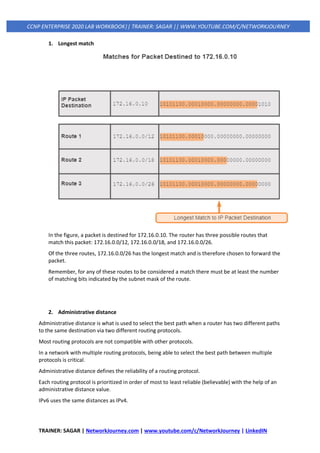
In the figure, a packet is destined for 172.16.0.10. The router has three possible routes that
match this packet: 172.16.0.0/12, 172.16.0.0/18, and 172.16.0.0/26.
Of the three routes, 172.16.0.0/26 has the longest match and is therefore chosen to forward the
packet.
Remember, for any of these routes to be considered a match there must be at least the number
of matching bits indicated by the subnet mask of the route.
2. Administrative distance
Administrative distance is what is used to select the best path when a router has two different paths
to the same destination via two different routing protocols.
Most routing protocols are not compatible with other protocols.
In a network with multiple routing protocols, being able to select the best path between multiple
protocols is critical.
Administrative distance defines the reliability of a routing protocol.
Each routing protocol is prioritized in order of most to least reliable (believable) with the help of an
administrative distance value.
IPv6 uses the same distances as IPv4.
TRAINER: SAGAR | NetworkJourney.com | www.youtube.com/c/NetworkJourney | LinkedIN
CCNP ENTERPRISE 2020 LAB WORKBOOK|| TRAINER: SAGAR || WWW.YOUTUBE.COM/C/NETWORKJOURNEY
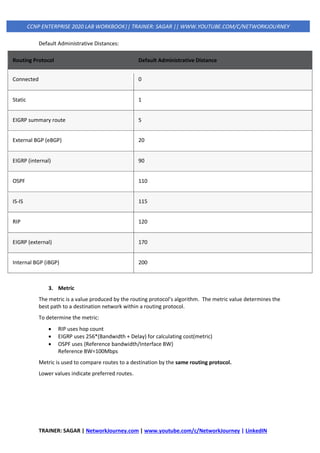
Default Administrative Distances:
Routing Protocol Default Administrative Distance
Connected 0
Static 1
EIGRP summary route 5
External BGP (eBGP) 20
EIGRP (internal) 90
OSPF 110
IS-IS 115
RIP 120
EIGRP (external) 170
Internal BGP (iBGP) 200
3. Metric
The metric is a value produced by the routing protocol's algorithm. The metric value determines the
best path to a destination network within a routing protocol.
To determine the metric:
• RIP uses hop count
• EIGRP uses 256*(Bandwidth + Delay) for calculating cost(metric)
• OSPF uses {Reference bandwidth/Interface BW}
Reference BW=100Mbps
Metric is used to compare routes to a destination by the same routing protocol.
Lower values indicate preferred routes.
TRAINER: SAGAR | NetworkJourney.com | www.youtube.com/c/NetworkJourney | LinkedIN
CCNP ENTERPRISE 2020 LAB WORKBOOK|| TRAINER: SAGAR || WWW.YOUTUBE.COM/C/NETWORKJOURNEY
Equal-Cost Multipathing
If a routing protocol identifies multiple paths as a best path and supports multiple path entries, the
router installs the maximum number of paths allowed per destination. This is known as equal-cost
multipathing (ECMP) and provides load sharing across all links. RIP, EIGRP, OSPF, and IS-IS all support
ECMP. ECMP provides a mechanism to increase bandwidth across multiple paths by splitting traffic
equally across the links.
R1# show ip route
! Output omitted for brevity
O 10.3.3.0/24 [110/30] via 10.12.1.2, 00:49:12, GigabitEthernet0/2
[110/30] via 10.14.1.4, 00:49:51, GigabitEthernet0/4
Unequal-Cost Load Balancing
By default, routing protocols install only routes with the lowest path metric. However, EIGRP can be
configured (not enabled by default) to install multiple routes with different path metrics. This allows
for unequal-cost load balancing across multiple paths. Traffic is transmitted out the router’s
interfaces based on that path’s metrics in ratio to other the interface’s metrics.
OSPF
TRAINER: SAGAR | NetworkJourney.com | www.youtube.com/c/NetworkJourney | LinkedIN
CCNP ENTERPRISE 2020 LAB WORKBOOK|| TRAINER: SAGAR || WWW.YOUTUBE.COM/C/NETWORKJOURNEY
R1# show ip route eigrp
! Output omitted for brevity
Gateway of last resort is not set
10.0.0.0/8 is variably subnetted, 7 subnets, 2 masks
D 10.3.3.0/24 [90/3328] via 10.14.1.4, 00:00:02, GigabitEthernet0/4
[90/5632] via 10.12.1.2, 00:00:02, GigabitEthernet0/2
TRAINER: SAGAR | NetworkJourney.com | www.youtube.com/c/NetworkJourney | LinkedIN
CCNP ENTERPRISE 2020 LAB WORKBOOK|| TRAINER: SAGAR || WWW.YOUTUBE.COM/C/NETWORKJOURNEY
STATIC ROUTING
Static routes provide precise control over routing but may create an administrative burden as the
number of routers and network segments grow.
Using static routing requires zero network bandwidth because implementing manual route entries
does not require communication with other routers.
Unfortunately, because the routers are not communicating, there is no network intelligence. If a link
goes down, other routers will not be aware that the network path is no longer valid. Static routes are
useful when
• Dynamic routing protocols cannot be used on a router because of limited router CPU or
memory
• Routes learned from dynamic routing protocols need to be superseded
Static Route Types
Static routes can be classified as one of the following:
1. Directly attached static routes
2. Recursive static route
3. Fully specified static route
1. Directly Attached Static Routes
Point-to-point interfaces do not have to worry about maintaining an adjacency table and do not use
Address Resolution Protocol (ARP), so static routes can directly reference the outbound interface of
a router.
A static route that uses only the outbound next-hop interface is known as a directly attached static
route, and it requires that the outbound interface be in an up state for the route to be installed into
the RIB.
R1# configure term
Enter configuration commands, one per line. End with CNTL/Z.
R1(config)# ip route 10.22.22.0 255.255.255.0 Serial 1/0
R2# configure term
Enter configuration commands, one per line. End with CNTL/Z.
R2(config)# ip route 10.11.11.0 255.255.255.0 Serial 1/0
R1# show ip route
TRAINER: SAGAR | NetworkJourney.com | www.youtube.com/c/NetworkJourney | LinkedIN
CCNP ENTERPRISE 2020 LAB WORKBOOK|| TRAINER: SAGAR || WWW.YOUTUBE.COM/C/NETWORKJOURNEY
! Output omitted for brevity
Gateway of last resort is not set
10.0.0.0/8 is variably subnetted, 5 subnets, 2 masks
C 10.11.11.0/24 is directly connected, GigabitEthernet0/1
C 10.12.2.0/24 is directly connected, Serial1/0
S 10.22.22.0/24 is directly connected, Serial1/0
R2# show ip route
! Output omitted for brevity
Gateway of last resort is not set
10.0.0.0/8 is variably subnetted, 5 subnets, 2 masks
S 10.11.11.0/24 is directly connected, Serial1/0
C 10.12.2.0/24 is directly connected, Serial1/0
C 10.22.22.0/24 is directly connected, GigabitEthernet0/1
R1 indicates that the 10.22.22.0/24 network is reachable via the S1/0 interface, and R2 indicates that
the 10.11.11.0/24 network is reachable via the S1/0 interface.
2. Recursive Static Routes
The forwarding engine on Cisco devices needs to know which interface an outbound packet should
use.
A recursive static route specifies the IP address of the next-hop address.
The recursive lookup occurs when the router queries the RIB to locate the route toward the next-
hop IP address (connected, static, or dynamic) and then cross-references the adjacency table.
Recursive static routes are configured with the command ip route network subnet-mask next-hop-ip.
Recursive static routes require the route’s next-hop address to exist in the routing table to install the
static route into the RIB.
R1# configure term
Enter configuration commands, one per line. End with CNTL/Z.
R1(config)# ip route 10.22.22.0 255.255.255.0 10.12.1.2
R2# configure term
Enter configuration commands, one per line. End with CNTL/Z.
R2(config)# ip route 10.11.11.0 255.255.255.0 10.12.1.
R1# show ip route
! Output omitted for brevity
TRAINER: SAGAR | NetworkJourney.com | www.youtube.com/c/NetworkJourney | LinkedIN
CCNP ENTERPRISE 2020 LAB WORKBOOK|| TRAINER: SAGAR || WWW.YOUTUBE.COM/C/NETWORKJOURNEY
10.0.0.0/8 is variably subnetted, 5 subnets, 2 masks
C 10.11.11.0/24 is directly connected, GigabitEthernet0/1
C 10.12.1.0/24 is directly connected, GigabitEthernet0/0
S 10.22.22.0/24 [1/0] via 10.12.1.2
Advantage:
Static route recursion can simplify topologies if a link fails because it may allow the static route to
stay installed while it changes to a different outbound interface in the same direction as the
destination.
Disadvantage:
However, problems arise if the recursive lookup resolves to a different interface pointed in the
opposite direction.
3. Fully Specified Static Routes
To correct this issue, the static route configuration should use the outbound interface and the next-
hop IP address. A static route with both an interface and a next-hop IP address is known as a fully
specified static route.
If the interface listed is not in an up state, the router removes the static route from the RIB.
Specifying the next-hop address along with the physical interface removes the recursive lookup and
does not involve the ARP processing problems that occur when using only the outbound interface.
Fully specified static routes are configured with the command ip route network subnet-mask
interface-id next-hop-ip.
R1# configure term
Enter configuration commands, one per line. End with CNTL/Z.
R1(config)# ip route 10.22.22.0 255.255.255.0 GigabitEthernet0/0 10.12.1.2
R2# configure term
Enter configuration commands, one per line. End with CNTL/Z.
R2(config)# ip route 10.11.11.0 255.255.255.0 GigabitEthernet0/0 10.12.1.
R1# show ip route
! Output omitted for brevity
10.0.0.0/8 is variably subnetted, 5 subnets, 2 masks
C 10.11.11.0/24 is directly connected, GigabitEthernet0/1
C 10.12.1.0/24 is directly connected, GigabitEthernet0/0
S 10.22.22.0/24 [1/0] via 10.12.1.2, GigabitEthernet0/0
TRAINER: SAGAR | NetworkJourney.com | www.youtube.com/c/NetworkJourney | LinkedIN
CCNP ENTERPRISE 2020 LAB WORKBOOK|| TRAINER: SAGAR || WWW.YOUTUBE.COM/C/NETWORKJOURNEY
Floating Static Routing
The default AD on a static route is 1, but a static route can be configured with an AD value of 1 to
255 for a specific route.
The AD is set on a static route by appending the AD as part of the command structure.
Using a floating static route is a common technique for providing backup connectivity for prefixes
learned via dynamic routing protocols.
A floating static route is configured with an AD higher than that of the primary route. Because the
AD is higher than that of the primary route, it is installed in the RIB only when the primary route is
withdrawn.
R1# configure terminal
Enter configuration commands, one per line. End with CNTL/Z.
R1(config)# ip route 10.22.22.0 255.255.255.0 10.12.1.2 10
R1(config)# ip route 10.22.22.0 255.255.255.0 Serial 1/0 210
R1# show ip route
! Output omitted for brevity
Gateway of last resort is not set
10.0.0.0/8 is variably subnetted, 5 subnets, 2 masks
C 10.11.11.0/24 is directly connected, GigabitEthernet0/1
C 10.12.1.0/24 is directly connected, GigabitEthernet0/0
C 10.12.2.0/24 is directly connected, Serial1/0
S 10.22.22.0/24 [10/0] via 10.12.1.2
TRAINER: SAGAR | NetworkJourney.com | www.youtube.com/c/NetworkJourney | LinkedIN
CCNP ENTERPRISE 2020 LAB WORKBOOK|| TRAINER: SAGAR || WWW.YOUTUBE.COM/C/NETWORKJOURNEY
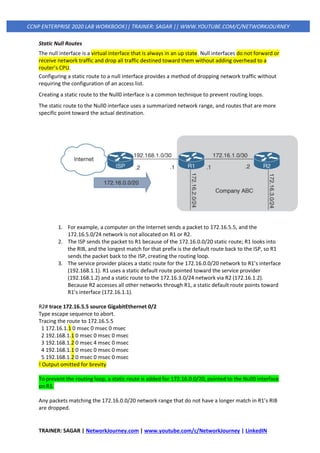
Static Null Routes
The null interface is a virtual interface that is always in an up state. Null interfaces do not forward or
receive network traffic and drop all traffic destined toward them without adding overhead to a
router’s CPU.
Configuring a static route to a null interface provides a method of dropping network traffic without
requiring the configuration of an access list.
Creating a static route to the Null0 interface is a common technique to prevent routing loops.
The static route to the Null0 interface uses a summarized network range, and routes that are more
specific point toward the actual destination.
1. For example, a computer on the Internet sends a packet to 172.16.5.5, and the
172.16.5.0/24 network is not allocated on R1 or R2.
2. The ISP sends the packet to R1 because of the 172.16.0.0/20 static route; R1 looks into
the RIB, and the longest match for that prefix is the default route back to the ISP, so R1
sends the packet back to the ISP, creating the routing loop.
3. The service provider places a static route for the 172.16.0.0/20 network to R1’s interface
(192.168.1.1). R1 uses a static default route pointed toward the service provider
(192.168.1.2) and a static route to the 172.16.3.0/24 network via R2 (172.16.1.2).
Because R2 accesses all other networks through R1, a static default route points toward
R1’s interface (172.16.1.1).
R2# trace 172.16.5.5 source GigabitEthernet 0/2
Type escape sequence to abort.
Tracing the route to 172.16.5.5
1 172.16.1.1 0 msec 0 msec 0 msec
2 192.168.1.1 0 msec 0 msec 0 msec
3 192.168.1.2 0 msec 4 msec 0 msec
4 192.168.1.1 0 msec 0 msec 0 msec
5 192.168.1.2 0 msec 0 msec 0 msec
! Output omitted for brevity
To prevent the routing loop, a static route is added for 172.16.0.0/20, pointed to the Null0 interface
on R1.
Any packets matching the 172.16.0.0/20 network range that do not have a longer match in R1’s RIB
are dropped.
TRAINER: SAGAR | NetworkJourney.com | www.youtube.com/c/NetworkJourney | LinkedIN
CCNP ENTERPRISE 2020 LAB WORKBOOK|| TRAINER: SAGAR || WWW.YOUTUBE.COM/C/NETWORKJOURNEY
R1
ip route 0.0.0.0 0.0.0.0 Gi0/0 192.168.1.2
ip route 172.16.3.0 255.255.255.0 Gi0/2 172.16.1.2
ip route 172.16.0.0 255.255.240.0 Null0
R2# trace 172.16.5.5 source GigabitEthernet 0/2
Type escape sequence to abort.
Tracing the route to 172.16.5.5
1 172.16.1.1 * * *
2 172.16.1.1 * * *
! Output omitted for brevity
QUIZ
1. Which of the following routing protocols is classified as an EGP?
1. RIP
2. EIGRP
3. OSPF
4. IS-IS
5. BGP
2. Which of the following routing protocols are classified as IGPs? (Choose all that apply.)
1. RIP
2. EIGRP
3. OSPF
4. IS-IS
5. BGP
3. A path vector routing protocol finds the best loop-free path by using ______.
1. hop count
2. bandwidth
3. delay
4. interface cost
5. path attributes
4. A distance vector routing protocol finds the best loop-free path by using ______.
1. hop count
2. bandwidth
3. delay
4. interface cost
5. path attributes
5. A link-state routing protocol finds the best loop free path by using ______.
1. hop count
2. bandwidth
3. delay
TRAINER: SAGAR | NetworkJourney.com | www.youtube.com/c/NetworkJourney | LinkedIN
CCNP ENTERPRISE 2020 LAB WORKBOOK|| TRAINER: SAGAR || WWW.YOUTUBE.COM/C/NETWORKJOURNEY
4. interface cost
5. path attributes
6. A router uses _________ as the first criterion for forwarding packets.
1. path metric
2. administrative distance
3. longest match
4. hop count
7. A router uses _________ as the second criterion for forwarding packets.
1. path metric
2. administrative distance
3. longest match
4. hop count
8. The ability to install multiple paths from the same routing protocol with the same path metric into
the RIB is known as ______.
1. per-packet load balancing
2. round-robin load balancing
3. equal-cost multipathing
4. parallel link forwarding
9. Which static route should be used to avoid unintentional forwarding paths with an Ethernet link
failure?
1. A directly attached static route
2. A recursive static route
3. A fully specified static route
4. A static null route
10. Virtual routing and forwarding (VRF) is useful with _____ addresses.
1. MAC
2. IPv4
3. IPv6
4. IPv4 and IPv6
Answers to the “Do I Know This Already?” quiz:
1 E
2 A, B, C, D
3 E
4 A
5 E
6 C
7 B
8 C
9 C
10 D
TRAINER: SAGAR | NetworkJourney.com | www.youtube.com/c/NetworkJourney | LinkedIN
CCNP ENTERPRISE 2020 LAB WORKBOOK|| TRAINER: SAGAR || WWW.YOUTUBE.COM/C/NETWORKJOURNEY
EIGRP (ENHANCED INTERIOR GATEWAY ROUTING
PROTOCOL)
EIGRP Theory of Operation
• EIGRP stands for Enhanced Interior Gateway Routing Protocol.
• EIGRP is a Cisco Proprietary routing protocol however open in 2013.
• It is hybrid routing protocol sometime called Advanced Distance Vector.
• It has characteristics of both distance vector and link state protocols.
• It uses DUAL (Diffusing Update Algorithm) algorithm to select best path.
• EIGRP supports Both Internet Protocol V4 and IPV6 routed protocols.
• EIGRP protocol supports VLSM, CIDR also supports trigger updates.
• It sends partial or full update only when something is change in network.
• The Default Internal Administrative Distance of EIGRP protocol is 90.
• The Default External Administrative Distance of EIGRP protocol is 170.
• The EIGRP default hope count support is 100 but it can be tune to 255.
• EIGRP protocol support Equal cost Load and Unequal Cost load balancing.
• EIGRP take load balancing by default up-to 4 paths can configure up to 32.
• Hello time of EIGRP protocol is 5 seconds and the dead time is 15 seconds.
• EIGRP updates are sent to 224.0.0.10 on Multicast Internet Protocol address.
• EIGRP Support MD5 Authentication & by default, Auto Summarization is enable.
Some of the many advantages of EIGRP are:
• very low usage of network resources during normal operation; only hello packets are
transmitted on a stable network
• when a change occurs, only routing table changes are propagated, not the entire routing
table; this reduces the load the routing protocol itself places on the network
• rapid convergence times for changes in the network topology (in some situations
convergence can be almost instantaneous)
EIGRP is an enhanced distance vector protocol, relying on the Diffused Update Algorithm (DUAL) to
calculate the shortest path to a destination within a network.
Major Revisions of the Protocol
There are two major revisions of EIGRP, versions 0 and 1. Cisco IOS versions earlier than 10.3(11),
11.0(8), and 11.1(3) run the earlier version of EIGRP; some explanations in this paper may not apply
to that earlier version. We highly recommend using the later version of EIGRP, as it includes many
performance and stability enhancements.
TRAINER: SAGAR | NetworkJourney.com | www.youtube.com/c/NetworkJourney | LinkedIN
CCNP ENTERPRISE 2020 LAB WORKBOOK|| TRAINER: SAGAR || WWW.YOUTUBE.COM/C/NETWORKJOURNEY
Basic Theory
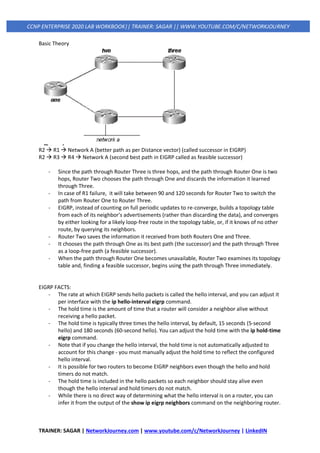
R2 → R1 → Network A (better path as per Distance vector) (called successor in EIGRP)
R2 → R3 → R4 → Network A (second best path in EIGRP called as feasible successor)
- Since the path through Router Three is three hops, and the path through Router One is two
hops, Router Two chooses the path through One and discards the information it learned
through Three.
- In case of R1 failure, it will take between 90 and 120 seconds for Router Two to switch the
path from Router One to Router Three.
- EIGRP, instead of counting on full periodic updates to re-converge, builds a topology table
from each of its neighbor's advertisements (rather than discarding the data), and converges
by either looking for a likely loop-free route in the topology table, or, if it knows of no other
route, by querying its neighbors.
- Router Two saves the information it received from both Routers One and Three.
- It chooses the path through One as its best path (the successor) and the path through Three
as a loop-free path (a feasible successor).
- When the path through Router One becomes unavailable, Router Two examines its topology
table and, finding a feasible successor, begins using the path through Three immediately.
EIGRP FACTS:
- The rate at which EIGRP sends hello packets is called the hello interval, and you can adjust it
per interface with the ip hello-interval eigrp command.
- The hold time is the amount of time that a router will consider a neighbor alive without
receiving a hello packet.
- The hold time is typically three times the hello interval, by default, 15 seconds (5-second
hello) and 180 seconds (60-second hello). You can adjust the hold time with the ip hold-time
eigrp command.
- Note that if you change the hello interval, the hold time is not automatically adjusted to
account for this change - you must manually adjust the hold time to reflect the configured
hello interval.
- It is possible for two routers to become EIGRP neighbors even though the hello and hold
timers do not match.
- The hold time is included in the hello packets so each neighbor should stay alive even
though the hello interval and hold timers do not match.
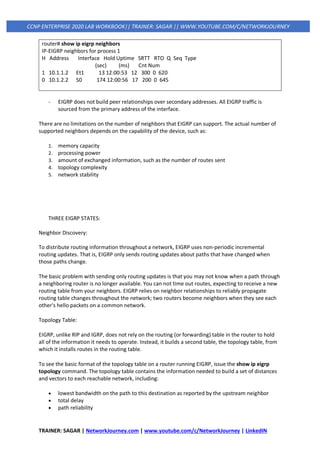
- While there is no direct way of determining what the hello interval is on a router, you can
infer it from the output of the show ip eigrp neighbors command on the neighboring router.
TRAINER: SAGAR | NetworkJourney.com | www.youtube.com/c/NetworkJourney | LinkedIN
CCNP ENTERPRISE 2020 LAB WORKBOOK|| TRAINER: SAGAR || WWW.YOUTUBE.COM/C/NETWORKJOURNEY
router# show ip eigrp neighbors
IP-EIGRP neighbors for process 1
H Address Interface Hold Uptime SRTT RTO Q Seq Type
(sec) (ms) Cnt Num
1 10.1.1.2 Et1 13 12:00:53 12 300 0 620
0 10.1.2.2 S0 174 12:00:56 17 200 0 645
- EIGRP does not build peer relationships over secondary addresses. All EIGRP traffic is
sourced from the primary address of the interface.
There are no limitations on the number of neighbors that EIGRP can support. The actual number of
supported neighbors depends on the capability of the device, such as:
1. memory capacity
2. processing power
3. amount of exchanged information, such as the number of routes sent
4. topology complexity
5. network stability
THREE EIGRP STATES:
Neighbor Discovery:
To distribute routing information throughout a network, EIGRP uses non-periodic incremental
routing updates. That is, EIGRP only sends routing updates about paths that have changed when
those paths change.
The basic problem with sending only routing updates is that you may not know when a path through
a neighboring router is no longer available. You can not time out routes, expecting to receive a new
routing table from your neighbors. EIGRP relies on neighbor relationships to reliably propagate
routing table changes throughout the network; two routers become neighbors when they see each
other's hello packets on a common network.
Topology Table:
EIGRP, unlike RIP and IGRP, does not rely on the routing (or forwarding) table in the router to hold
all of the information it needs to operate. Instead, it builds a second table, the topology table, from
which it installs routes in the routing table.
To see the basic format of the topology table on a router running EIGRP, issue the show ip eigrp
topology command. The topology table contains the information needed to build a set of distances
and vectors to each reachable network, including:
• lowest bandwidth on the path to this destination as reported by the upstream neighbor
• total delay
• path reliability
TRAINER: SAGAR | NetworkJourney.com | www.youtube.com/c/NetworkJourney | LinkedIN
CCNP ENTERPRISE 2020 LAB WORKBOOK|| TRAINER: SAGAR || WWW.YOUTUBE.COM/C/NETWORKJOURNEY
• path loading
• minimum path maximum transmission unit (MTU)
• feasible distance
• reported distance
• route source (external routes are marked)
EIGRP Metrics:
EIGRP uses the minimum bandwidth on the path to a destination network and the total delay to
compute routing metrics.
Although you can configure other metrics, we do not recommend it, as it can cause routing loops in
your network.
The bandwidth and delay metrics are determined from values configured on the interfaces of
routers in the path to the destination network.
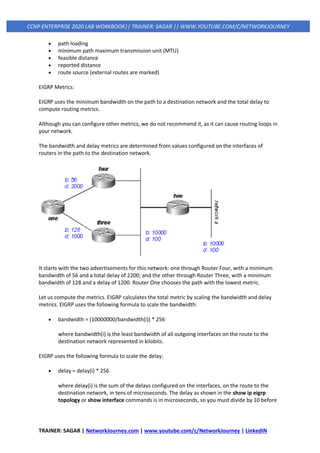
It starts with the two advertisements for this network: one through Router Four, with a minimum
bandwidth of 56 and a total delay of 2200; and the other through Router Three, with a minimum
bandwidth of 128 and a delay of 1200. Router One chooses the path with the lowest metric.
Let us compute the metrics. EIGRP calculates the total metric by scaling the bandwidth and delay
metrics. EIGRP uses the following formula to scale the bandwidth:
• bandwidth = (10000000/bandwidth(i)) * 256
where bandwidth(i) is the least bandwidth of all outgoing interfaces on the route to the
destination network represented in kilobits.
EIGRP uses the following formula to scale the delay:
• delay = delay(i) * 256
where delay(i) is the sum of the delays configured on the interfaces, on the route to the
destination network, in tens of microseconds. The delay as shown in the show ip eigrp
topology or show interface commands is in microseconds, so you must divide by 10 before
TRAINER: SAGAR | NetworkJourney.com | www.youtube.com/c/NetworkJourney | LinkedIN
CCNP ENTERPRISE 2020 LAB WORKBOOK|| TRAINER: SAGAR || WWW.YOUTUBE.COM/C/NETWORKJOURNEY
you use it in this formula. Throughout this paper, we use delay as it is configured and shown
on the interface.
EIGRP uses these scaled values to determine the total metric to the network:
• metric = ([K1 * bandwidth + (K2 * bandwidth) / (256 - load) + K3 * delay] * [K5 / (reliability +
K4)]) * 256
Note: These K values should be used after careful planning. Mismatched K values prevent a neighbor
relationship from being built, which can cause your network to fail to converge.
Note: If K5 = 0, the formula reduces to Metric = ([k1 * bandwidth + (k2 * bandwidth)/(256 - load) +
k3 * delay]) * 256.
The default values for K are:
• K1 = 1
• K2 = 0
• K3 = 1
• K4 = 0
• K5 = 0
For default behavior, you can simplify the formula as follows:
metric = bandwidth + delay
In this example, the total cost through Router Four is:
minimum bandwidth = 56k
total delay = 100 + 100 + 2000 = 2200
[(10000000/56) + 2200] x 256 = (178571 + 2200) x 256 = 180771 x 256 = 46277376
And the total cost through Router Three is:
minimum bandwidth = 128k
total delay = 100 + 100 + 1000 = 1200
[(10000000/128) + 1200] x 256 = (78125 + 1200) x 256 = 79325 x 256 = 20307200
So, to reach Network A, Router One chooses the route through Router Three.
EIGRP Tables:
EIGRP maintains three tables. 1) Neighbor Table, 2) Topology Table and 3) Routing Table.
Neighbor Table:
Neighbor table includes all neighbors that is directly connected to router using EIGRP. In simple
words, next hop router and the interfaces.
TRAINER: SAGAR | NetworkJourney.com | www.youtube.com/c/NetworkJourney | LinkedIN
CCNP ENTERPRISE 2020 LAB WORKBOOK|| TRAINER: SAGAR || WWW.YOUTUBE.COM/C/NETWORKJOURNEY
Topology Table:
EIGRP uses this table to store all routes, which it learned from neighbors. It contains a list of all
destinations and routes advertised by neighboring routers. The EIGRP Topology table contains
everything that EIGRP has learned.
Routing Table:
EIGRP stores single best (Successor) route for each destination in this table. Router uses this table to
forward the packet. There is a separate routing table for each routed protocol.
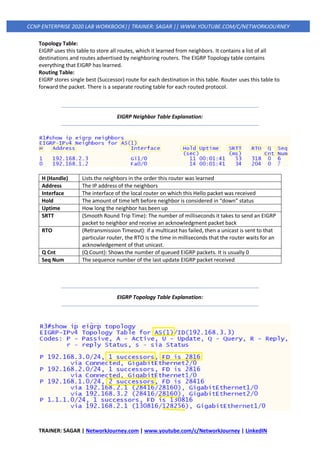
EIGRP Neighbor Table Explanation:
H (Handle) Lists the neighbors in the order this router was learned
Address The IP address of the neighbors
Interface The interface of the local router on which this Hello packet was received
Hold The amount of time left before neighbor is considered in “down” status
Uptime How long the neighbor has been up
SRTT (Smooth Round Trip Time): The number of milliseconds it takes to send an EIGRP
packet to neighbor and receive an acknowledgment packet back
RTO (Retransmission Timeout): if a multicast has failed, then a unicast is sent to that
particular router, the RTO is the time in milliseconds that the router waits for an
acknowledgement of that unicast.
Q Cnt (Q Count): Shows the number of queued EIGRP packets. It is usually 0
Seq Num The sequence number of the last update EIGRP packet received
EIGRP Topology Table Explanation:
TRAINER: SAGAR | NetworkJourney.com | www.youtube.com/c/NetworkJourney | LinkedIN
CCNP ENTERPRISE 2020 LAB WORKBOOK|| TRAINER: SAGAR || WWW.YOUTUBE.COM/C/NETWORKJOURNEY
AS Autonomous System number 1
Codes Passive is good and Active is bad
Sia Status (Stuck in
Active)
EIGRP has not received a reply to a query packet from one of the neighbors
within the allowed time about 3 minutes.
1 Successors The best path In this case only one way to get to the destination
FD is 2816 Feasible Distance: Total distance to get to the destination
28416/28160 First, one is Feasible Distance. The second Value is Advertised Distance
EIGRP Routing Table Explanation:
D Shows this is an EIGRP learnt route
192.168.3.0/24 Destination learn network and 24 is subnet mask.
90 90, is the Administrative Distance of EIGRP.
3072 This is the metric, Total distance to get to the destination
192.168.2.3 The neighbor that advertised the route.
00:49:16 Time since the route was learnt.
GigabitE1/0 The outbound interface going towards the destination.
EIGRP Metric:
EIGRP uses metric to select the best route from all available routes for destination. Metric has five
components.1.Bandwidth, 2.Load, 3.Delay, 4.Reliability and 5.MTU. From these only bandwidth and
delay are by default enabled.
K Value Component Description
K1 Bandwidth Lowest bandwidth of route
K2 Load Worst load on route based on packet rate
K3 Delay Cumulative interface delay of route
K4 Reliability Worst reliability of route based on keep alive
K5 MTU Smallest MTU in path [Not used in route calculation]
TRAINER: SAGAR | NetworkJourney.com | www.youtube.com/c/NetworkJourney | LinkedIN
CCNP ENTERPRISE 2020 LAB WORKBOOK|| TRAINER: SAGAR || WWW.YOUTUBE.COM/C/NETWORKJOURNEY
Path Metric Calculation:
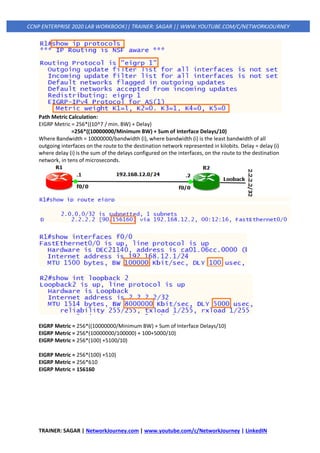
EIGRP Metric = 256*((10^7 / min. BW) + Delay)
=256*((10000000/Minimum BW) + Sum of Interface Delays/10)
Where Bandwidth = 10000000/bandwidth (i), where bandwidth (i) is the least bandwidth of all
outgoing interfaces on the route to the destination network represented in kilobits. Delay = delay (i)
where delay (i) is the sum of the delays configured on the interfaces, on the route to the destination
network, in tens of microseconds.
EIGRP Metric = 256*((10000000/Minimum BW) + Sum of Interface Delays/10)
EIGRP Metric = 256*(10000000/100000) + 100+5000/10)
EIGRP Metric = 256*(100) +5100/10)
EIGRP Metric = 256*(100) +510)
EIGRP Metric = 256*610
EIGRP Metric = 156160
TRAINER: SAGAR | NetworkJourney.com | www.youtube.com/c/NetworkJourney | LinkedIN
CCNP ENTERPRISE 2020 LAB WORKBOOK|| TRAINER: SAGAR || WWW.YOUTUBE.COM/C/NETWORKJOURNEY
Path Selection Optimization:
Change EIGRP metrics by manipulating the bandwidth and/or delay values. Changing the bandwidth
value is not recommended because that value is used for many other reasons and features in the
router. Also, configure the K-Values to influence the EIGRP metric calculation.
Commands Description
R6#show ip route eigrp
D 7.7.7.7 [90/156160] via 192.168.76.7, F0/1
[90/156160] via 192.168.67.7, F0/0
First verify both routes in routing table
Equal path load balancing
R6(config)#interface FastEthernet 0/0
R6(config-if)# bandwidth 10000
Enter interface mode
Decrease the bandwidth to 10000
R6#show ip route eigrp Verify again only one path now
R6(config)#interface FastEthernet 0/0
R6(config-if)#no bandwidth 10000
Enter interface mode
Make the default bandwidth again
R6#show ip route eigrp Check again both path back
R6(config)#interface FastEthernet 0/0
R6(config-if)#delay 200
Enter interface mode
Increase the delay this time
R6#show ip route eigrp Verify again only one path now
R6(config)#interface FastEthernet 0/0
R6(config-if)#no delay 200
Enter interface mode
Make the default delay again
R6#show ip route eigrp
D 7.7.7.7 [90/156160] via 192.168.76.7, F0/1
[90/156160] via 192.168.67.7, F0/0
First verify both routes in routing table
Equal path load balancing
R6(config)#router eigrp 1
R6(config-router)#metric weights 0 1 1 1 1 1
Enter EIGRP mode
Change k Values
R7(config)#router eigrp 1
R7(config-router)#metric weights 0 1 1 1 1 1
Enter EIGRP mode
Change K values
R6#show ip route eigrp
D 7.7.7.7 [90/610]
Verify the eigrp routes different FD
R6(config)#interface FastEthernet 0/0
R6(config-if)# bandwidth 10000
R6(config-if)#delay 200
Enter interface mode
Decrease the bandwidth to 10000
Increase the delay Change metric
EIGRP Packet Types:
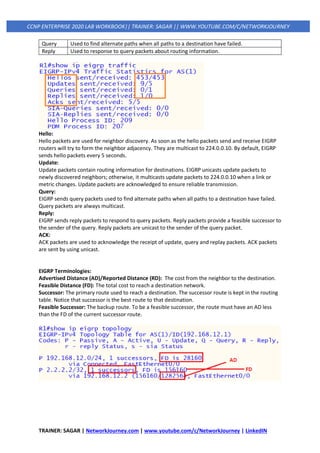
EIGRP uses five packet types in communication with its neighbors. The packet types are below.
Packet Description
Hello Used to identify neighbors. They are sent as periodic multicasts.
Update Used to advertise routes, only sent as multicasts when something is changed.
Ack Acknowledges receipt of an update.
TRAINER: SAGAR | NetworkJourney.com | www.youtube.com/c/NetworkJourney | LinkedIN
CCNP ENTERPRISE 2020 LAB WORKBOOK|| TRAINER: SAGAR || WWW.YOUTUBE.COM/C/NETWORKJOURNEY
Query Used to find alternate paths when all paths to a destination have failed.
Reply Used to response to query packets about routing information.
Hello:
Hello packets are used for neighbor discovery. As soon as the hello packets send and receive EIGRP
routers will try to form the neighbor adjacency. They are multicast to 224.0.0.10. By default, EIGRP
sends hello packets every 5 seconds.
Update:
Update packets contain routing information for destinations. EIGRP unicasts update packets to
newly discovered neighbors; otherwise, it multicasts update packets to 224.0.0.10 when a link or
metric changes. Update packets are acknowledged to ensure reliable transmission.
Query:
EIGRP sends query packets used to find alternate paths when all paths to a destination have failed.
Query packets are always multicast.
Reply:
EIGRP sends reply packets to respond to query packets. Reply packets provide a feasible successor to
the sender of the query. Reply packets are unicast to the sender of the query packet.
ACK:
ACK packets are used to acknowledge the receipt of update, query and replay packets. ACK packets
are sent by using unicast.
EIGRP Terminologies:
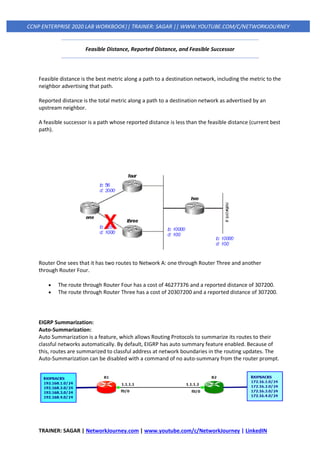
Advertised Distance (AD)/Reported Distance (RD): The cost from the neighbor to the destination.
Feasible Distance (FD): The total cost to reach a destination network.
Successor: The primary route used to reach a destination. The successor route is kept in the routing
table. Notice that successor is the best route to that destination.
Feasible Successor: The backup route. To be a feasible successor, the route must have an AD less
than the FD of the current successor route.
TRAINER: SAGAR | NetworkJourney.com | www.youtube.com/c/NetworkJourney | LinkedIN
CCNP ENTERPRISE 2020 LAB WORKBOOK|| TRAINER: SAGAR || WWW.YOUTUBE.COM/C/NETWORKJOURNEY
Feasible Distance, Reported Distance, and Feasible Successor
Feasible distance is the best metric along a path to a destination network, including the metric to the
neighbor advertising that path.
Reported distance is the total metric along a path to a destination network as advertised by an
upstream neighbor.
A feasible successor is a path whose reported distance is less than the feasible distance (current best
path).
Router One sees that it has two routes to Network A: one through Router Three and another
through Router Four.
• The route through Router Four has a cost of 46277376 and a reported distance of 307200.
• The route through Router Three has a cost of 20307200 and a reported distance of 307200.
EIGRP Summarization:
Auto-Summarization:
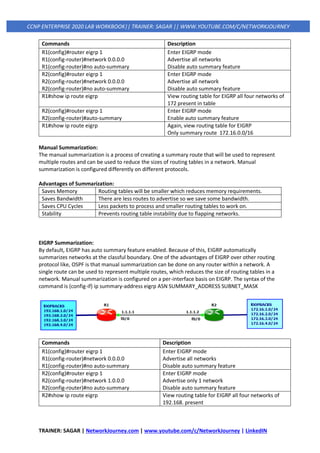
Auto Summarization is a feature, which allows Routing Protocols to summarize its routes to their
classful networks automatically. By default, EIGRP has auto summary feature enabled. Because of
this, routes are summarized to classful address at network boundaries in the routing updates. The
Auto-Summarization can be disabled with a command of no auto-summary from the router prompt.
TRAINER: SAGAR | NetworkJourney.com | www.youtube.com/c/NetworkJourney | LinkedIN
CCNP ENTERPRISE 2020 LAB WORKBOOK|| TRAINER: SAGAR || WWW.YOUTUBE.COM/C/NETWORKJOURNEY
Commands Description
R1(config)#router eigrp 1
R1(config-router)#network 0.0.0.0
R1(config-router)#no auto-summary
Enter EIGRP mode
Advertise all networks
Disable auto summary feature
R2(config)#router eigrp 1
R2(config-router)#network 0.0.0.0
R2(config-router)#no auto-summary
Enter EIGRP mode
Advertise all network
Disable auto summary feature
R1#show ip route eigrp View routing table for EIGRP all four networks of
172 present in table
R2(config)#router eigrp 1
R2(config-router)#auto-summary
Enter EIGRP mode
Enable auto summary feature
R1#show ip route eigrp Again, view routing table for EIGRP
Only summary route 172.16.0.0/16
Manual Summarization:
The manual summarization is a process of creating a summary route that will be used to represent
multiple routes and can be used to reduce the sizes of routing tables in a network. Manual
summarization is configured differently on different protocols.
Advantages of Summarization:
Saves Memory Routing tables will be smaller which reduces memory requirements.
Saves Bandwidth There are less routes to advertise so we save some bandwidth.
Saves CPU Cycles Less packets to process and smaller routing tables to work on.
Stability Prevents routing table instability due to flapping networks.
EIGRP Summarization:
By default, EIGRP has auto summary feature enabled. Because of this, EIGRP automatically
summarizes networks at the classful boundary. One of the advantages of EIGRP over other routing
protocol like, OSPF is that manual summarization can be done on any router within a network. A
single route can be used to represent multiple routes, which reduces the size of routing tables in a
network. Manual summarization is configured on a per-interface basis on EIGRP. The syntax of the
command is (config-if) ip summary-address eigrp ASN SUMMARY_ADDRESS SUBNET_MASK
Commands Description
R1(config)#router eigrp 1
R1(config-router)#network 0.0.0.0
R1(config-router)#no auto-summary
Enter EIGRP mode
Advertise all networks
Disable auto summary feature
R2(config)#router eigrp 1
R2(config-router)#network 1.0.0.0
R2(config-router)#no auto-summary
Enter EIGRP mode
Advertise only 1 network
Disable auto summary feature
R2#show ip route eigrp View routing table for EIGRP all four networks of
192.168. present
TRAINER: SAGAR | NetworkJourney.com | www.youtube.com/c/NetworkJourney | LinkedIN
CCNP ENTERPRISE 2020 LAB WORKBOOK|| TRAINER: SAGAR || WWW.YOUTUBE.COM/C/NETWORKJOURNEY
R1(config)#interface f0/0
R1(config-if)#ip summary-address eigrp 1
192.168.0.0 255.255.248.0
Enter interface mode facing R2
Enter summary route to send
R2#show ip route eigrp Check again routing table only summary route
192.168.0.0/21 only
R1#show ip route eigrp Checking summary route in R1
192.168.0.0/21 is a summary, Null0
R1(config)#interface f0/0
R1(config-if)#no ip summary-address eigrp 1
192.168.0.0 255.255.248.0 255
R1(config-if)#ip summary-address eigrp 1
192.168.0.0 255.255.248.0 255
Enter interface mode of R1
Remove the summary route configure before
Set summary route again with AD 255 to remove
Null0 in R1 table
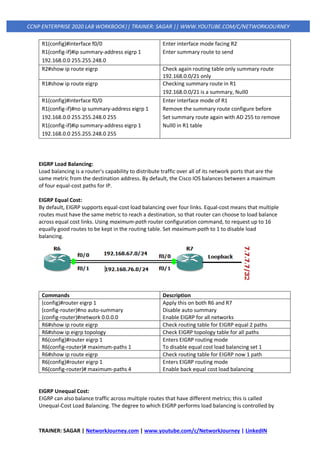
EIGRP Load Balancing:
Load balancing is a router's capability to distribute traffic over all of its network ports that are the
same metric from the destination address. By default, the Cisco IOS balances between a maximum
of four equal-cost paths for IP.
EIGRP Equal Cost:
By default, EIGRP supports equal-cost load balancing over four links. Equal-cost means that multiple
routes must have the same metric to reach a destination, so that router can choose to load balance
across equal cost links. Using maximum-path router configuration command, to request up to 16
equally good routes to be kept in the routing table. Set maximum-path to 1 to disable load
balancing.
Commands Description
(config)#router eigrp 1
(config-router)#no auto-summary
(config-router)#network 0.0.0.0
Apply this on both R6 and R7
Disable auto summary
Enable EIGRP for all networks
R6#show ip route eigrp Check routing table for EIGRP equal 2 paths
R6#show ip eigrp topology Check EIGRP topology table for all paths
R6(config)#router eigrp 1
R6(config‐router)# maximum-paths 1
Enters EIGRP routing mode
To disable equal cost load balancing set 1
R6#show ip route eigrp Check routing table for EIGRP now 1 path
R6(config)#router eigrp 1
R6(config‐router)# maximum-paths 4
Enters EIGRP routing mode
Enable back equal cost load balancing
EIGRP Unequal Cost:
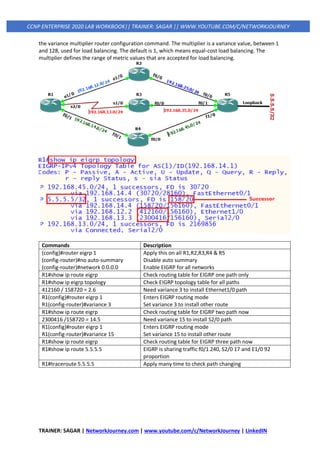
EIGRP can also balance traffic across multiple routes that have different metrics; this is called
Unequal-Cost Load Balancing. The degree to which EIGRP performs load balancing is controlled by
TRAINER: SAGAR | NetworkJourney.com | www.youtube.com/c/NetworkJourney | LinkedIN
CCNP ENTERPRISE 2020 LAB WORKBOOK|| TRAINER: SAGAR || WWW.YOUTUBE.COM/C/NETWORKJOURNEY
the variance multiplier router configuration command. The multiplier is a variance value, between 1
and 128, used for load balancing. The default is 1, which means equal-cost load balancing. The
multiplier defines the range of metric values that are accepted for load balancing.
Commands Description
(config)#router eigrp 1
(config-router)#no auto-summary
(config-router)#network 0.0.0.0
Apply this on all R1,R2,R3,R4 & R5
Disable auto summary
Enable EIGRP for all networks
R1#show ip route eigrp Check routing table for EIGRP one path only
R1#show ip eigrp topology Check EIGRP topology table for all paths
412160 / 158720 = 2.6 Need variance 3 to install Ethernet1/0 path
R1(config)#router eigrp 1
R1(config‐router)#variance 3
Enters EIGRP routing mode
Set variance 3 to install other route
R1#show ip route eigrp Check routing table for EIGRP two path now
2300416 /158720 = 14.5 Need variance 15 to install S2/0 path
R1(config)#router eigrp 1
R1(config‐router)#variance 15
Enters EIGRP routing mode
Set variance 15 to install other route
R1#show ip route eigrp Check routing table for EIGRP three path now
R1#show ip route 5.5.5.5 EIGRP is sharing traffic f0/1 240, S2/0 17 and E1/0 92
proportion
R1#traceroute 5.5.5.5 Apply many time to check path changing
TRAINER: SAGAR | NetworkJourney.com | www.youtube.com/c/NetworkJourney | LinkedIN
CCNP ENTERPRISE 2020 LAB WORKBOOK|| TRAINER: SAGAR || WWW.YOUTUBE.COM/C/NETWORKJOURNEY
EIGRP Basic Configuration:
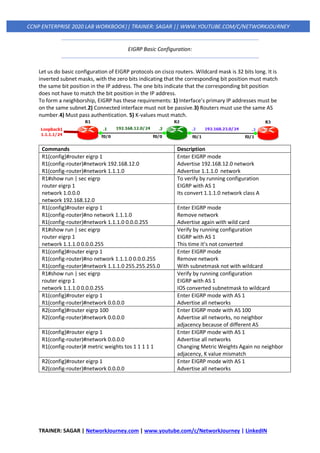
Let us do basic configuration of EIGRP protocols on cisco routers. Wildcard mask is 32 bits long. It is
inverted subnet masks, with the zero bits indicating that the corresponding bit position must match
the same bit position in the IP address. The one bits indicate that the corresponding bit position
does not have to match the bit position in the IP address.
To form a neighborship, EIGRP has these requirements: 1) Interface’s primary IP addresses must be
on the same subnet.2) Connected interface must not be passive.3) Routers must use the same AS
number.4) Must pass authentication. 5) K-values must match.
Commands Description
R1(config)#router eigrp 1
R1(config-router)#network 192.168.12.0
R1(config-router)#network 1.1.1.0
Enter EIGRP mode
Advertise 192.168.12.0 network
Advertise 1.1.1.0 network
R1#show run | sec eigrp
router eigrp 1
network 1.0.0.0
network 192.168.12.0
To verify by running configuration
EIGRP with AS 1
Its convert 1.1.1.0 network class A
R1(config)#router eigrp 1
R1(config-router)#no network 1.1.1.0
R1(config-router)#network 1.1.1.0 0.0.0.255
Enter EIGRP mode
Remove network
Advertise again with wild card
R1#show run | sec eigrp
router eigrp 1
network 1.1.1.0 0.0.0.255
Verify by running configuration
EIGRP with AS 1
This time it’s not converted
R1(config)#router eigrp 1
R1(config-router)#no network 1.1.1.0 0.0.0.255
R1(config-router)#network 1.1.1.0 255.255.255.0
Enter EIGRP mode
Remove network
With subnetmask not with wildcard
R1#show run | sec eigrp
router eigrp 1
network 1.1.1.0 0.0.0.255
Verify by running configuration
EIGRP with AS 1
IOS converted subnetmask to wildcard
R1(config)#router eigrp 1
R1(config-router)#network 0.0.0.0
Enter EIGRP mode with AS 1
Advertise all networks
R2(config)#router eigrp 100
R2(config-router)#network 0.0.0.0
Enter EIGRP mode with AS 100
Advertise all networks, no neighbor
adjacency because of different AS
R1(config)#router eigrp 1
R1(config-router)#network 0.0.0.0
R1(config-router)# metric weights tos 1 1 1 1 1
Enter EIGRP mode with AS 1
Advertise all networks
Changing Metric Weights Again no neighbor
adjacency, K value mismatch
R2(config)#router eigrp 1
R2(config-router)#network 0.0.0.0
Enter EIGRP mode with AS 1
Advertise all networks
TRAINER: SAGAR | NetworkJourney.com | www.youtube.com/c/NetworkJourney | LinkedIN
CCNP ENTERPRISE 2020 LAB WORKBOOK|| TRAINER: SAGAR || WWW.YOUTUBE.COM/C/NETWORKJOURNEY
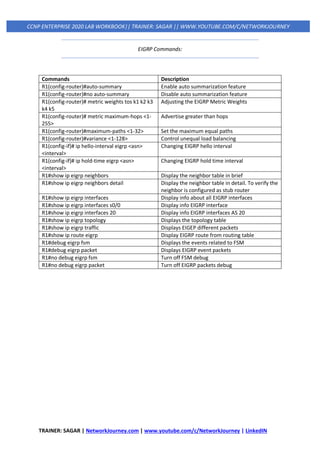
EIGRP Commands:
Commands Description
R1(config-router)#auto-summary Enable auto summarization feature
R1(config-router)#no auto-summary Disable auto summarization feature
R1(config-router)# metric weights tos k1 k2 k3
k4 k5
Adjusting the EIGRP Metric Weights
R1(config-router)# metric maximum-hops <1-
255>
Advertise greater than hops
R1(config-router)#maximum-paths <1-32> Set the maximum equal paths
R1(config-router)#variance <1-128> Control unequal load balancing
R1(config-if)# ip hello-interval eigrp <asn>
<interval>
Changing EIGRP hello interval
R1(config-if)# ip hold-time eigrp <asn>
<interval>
Changing EIGRP hold time interval
R1#show ip eigrp neighbors Display the neighbor table in brief
R1#show ip eigrp neighbors detail Display the neighbor table in detail. To verify the
neighbor is configured as stub router
R1#show ip eigrp interfaces Display info about all EIGRP interfaces
R1#show ip eigrp interfaces s0/0 Display info EIGRP interface
R1#show ip eigrp interfaces 20 Display info EIGRP interfaces AS 20
R1#show ip eigrp topology Displays the topology table
R1#show ip eigrp traffic Displays EIGEP different packets
R1#show ip route eigrp Display EIGRP route from routing table
R1#debug eigrp fsm Displays the events related to FSM
R1#debug eigrp packet Displays EIGRP event packets
R1#no debug eigrp fsm Turn off FSM debug
R1#no debug eigrp packet Turn off EIGRP packets debug
TRAINER: SAGAR | NetworkJourney.com | www.youtube.com/c/NetworkJourney | LinkedIN
CCNP ENTERPRISE 2020 LAB WORKBOOK|| TRAINER: SAGAR || WWW.YOUTUBE.COM/C/NETWORKJOURNEY
OSPF (OPEN SHORTEST PATH FIRST)
▪ No hop-count limitation
▪ Rapid convergence
▪ Classless (allows the use of VLSM)
▪ Password authentication
▪ Advanced path selection capabilities
▪ Tagging of external routes
▪ Better use of bandwidth via multicasts and periodic routing updates
▪ Allows networks to be divided into smaller logical areas for efficiency
▪ Uses multicast addresses for efficient and reliable routing update process
▪ Uses equal-cost load balancing over multiple paths for efficient bandwidth usage
▪ Supports MD5 authentication for secure route exchange
▪ No split horizon issues
▪ OSPF protocols is the Link-State dynamic routing protocol.
▪ OSPF protocols uses the Shortest Path First (SPF) algorithm.
▪ OSPF protocols uses IP protocol type 89 (not TCP or UDP).
▪ OSPF External and Internal Administrative Distance is 110.
▪ OSPF is a classless Routing protocol and OSPF metric is Cost.
▪ OSPF use multicast address 224.0.0.5 to send the hello packet.
▪ OSPF use multicast address 224.0.0.6 for all designated routers.
▪ OSPF default Hello time is 10 seconds and dead time is 40 seconds.
▪ OSPF protocols supports both the VLSM and route summarization.
▪ OSPF use wildcard mask, which is the reciprocal of subnet mask.
▪ OSPF protocols supports both MD5 and clear text authentication.
▪ OSPF protocols supports the summarization at ABRs router only.
▪ OSPF are requires more memory and CPU processing to run.
▪ OSPF work on area, Area 0 is the backbone of OSPF technology.
▪ OSPF have Neighbor table, Topology table and Routing table.
▪ OSPF packets are only sends to the neighbor of own Area.
▪ OSPF protocols supports both IPv4 and IPv6 routed protocols.
▪ OSPF load balancing with equal cost routes for same destination.
▪ OSPF protocols supports trigger updates for fast convergence.
▪ OSPF sends update with a sequence number of 0x80000001.
▪ The sequence number ends with 0x7FFFFFFF and start again.
▪ The sequence number will increment by one in every updates.
▪ OSPF protocol is more complex to setup and hard to troubleshoot.
TRAINER: SAGAR | NetworkJourney.com | www.youtube.com/c/NetworkJourney | LinkedIN
CCNP ENTERPRISE 2020 LAB WORKBOOK|| TRAINER: SAGAR || WWW.YOUTUBE.COM/C/NETWORKJOURNEY
OSPF PACKET TYPES
Type Packet Name Functional Overview
1 Hello
These packets are for discovering and maintaining neighbors. Packets are
sent out periodically on all OSPF interfaces to discover new neighbors
while ensuring that other adjacent neighbors are still online.
2
Database
description (DBD)
or (DDP)
These packets are for summarizing database contents. Packets are
exchanged when an OSPF adjacency is first being formed. These packets
are used to describe the contents of the LSDB.
3
Link-state request
(LSR)
These packets are for database downloads. When a router thinks that part
of its LSDB is stale, it may request a portion of a neighbor’s database by
using this packet type.
4
Link-state update
(LSU)
These packets are for database updates. This is an explicit LSA for a
specific network link and normally is sent in direct response to an LSR.
5 Link-state ack
These packets are for flooding acknowledgments. These packets are sent
in response to the flooding of LSAs, thus making flooding a reliable
transport feature.
OSPF HELLO PACKET COMPONENTS
OSPF hello packets are responsible for discovering and maintaining neighbors.
In most instances, a router sends hello packets to the AllSPFRouters address (224.0.0.5).
Data Field Description
Router ID (RID) A unique 32-bit ID within an OSPF domain.
Authentication options
A field that allows secure communication between OSPF routers to
prevent malicious activity. Options are none, clear text, or Message
Digest 5 (MD5) authentication.
Area ID
The OSPF area that the OSPF interface belongs to. It is a 32-bit number
that can be written in dotted-decimal format (0.0.1.0) or decimal (256).
Interface address mask
The network mask for the primary IP address for the interface out
which the hello is sent.
Interface priority The router interface priority for DR elections.
Hello interval
The time span, in seconds, that a router sends out hello packets on the
interface.
Dead interval
The time span, in seconds, that a router waits to hear a hello from a
neighbor router before it declares that router down.
Designated router and
backup designated router
The IP address of the DR and backup DR (BDR) for the network link.
Active neighbor
A list of OSPF neighbors seen on the network segment. A router must
have received a hello from the neighbor within the dead interval.
TRAINER: SAGAR | NetworkJourney.com | www.youtube.com/c/NetworkJourney | LinkedIN
CCNP ENTERPRISE 2020 LAB WORKBOOK|| TRAINER: SAGAR || WWW.YOUTUBE.COM/C/NETWORKJOURNEY
ROUTER ID
The OSPF router ID (RID) is a 32-bit number that uniquely identifies an OSPF router.
In some OSPF output commands, neighbor ID refers to the RID; the terms are synonymous.
The RID must be unique for each OSPF process in an OSPF domain and must be unique between
OSPF processes on a router.
3-Ways to Configure Router-ID:
1. Manually Set. Example CLI command: router-id router-id
2. Highest ‘up’ Loopback interface IP address
3. Highest ‘up’ Physical Interface IP address
The command clear ip ospf process restarts the OSPF process on a router so that OSPF can use the
new RID.
OSPF SEVEN STATES NEIGHBORSHIP
An OSPF neighbor is a router that shares a common OSPF-enabled network link.
OSPF routers discover other neighbors via the OSPF hello packets.
An adjacent OSPF neighbor is an OSPF neighbor that shares a synchronized OSPF database between
the two neighbors.
Each OSPF process maintains a table for adjacent OSPF neighbors and the state of each router.
OSPF Neighbor States
State Description
1) Down
This is the initial state of a neighbor relationship. It indicates that the router has not
received any OSPF hello packets.
2) Init
This state indicates that a hello packet has been received from another router, but
bidirectional communication has not been established.
3) 2-Way
Bidirectional communication has been established. If a DR or BDR is needed, the
election occurs during this state.
4) ExStart
This is the first state in forming an adjacency. Routers identify which router will be
the master or slave for the LSDB synchronization.
5) Exchange During this state, routers are exchanging link states by using DBD packets.
6) Loading
LSR packets are sent to the neighbor, asking for the more recent LSAs that have
been discovered (but not received) in the Exchange state.
7) Full Neighboring routers are fully adjacent.
TRAINER: SAGAR | NetworkJourney.com | www.youtube.com/c/NetworkJourney | LinkedIN
CCNP ENTERPRISE 2020 LAB WORKBOOK|| TRAINER: SAGAR || WWW.YOUTUBE.COM/C/NETWORKJOURNEY
DESIGNATED ROUTER AND BACKUP DESIGNATED ROUTER
Multi-access networks such as Ethernet (LANs) and Frame Relay allow more than two routers to
exist on a network segment.
Such a setup could cause scalability problems with OSPF as the number of routers on a segment
increases.
Additional routers flood more LSAs on the segment, and OSPF traffic becomes excessive as OSPF
neighbor adjacencies increase.
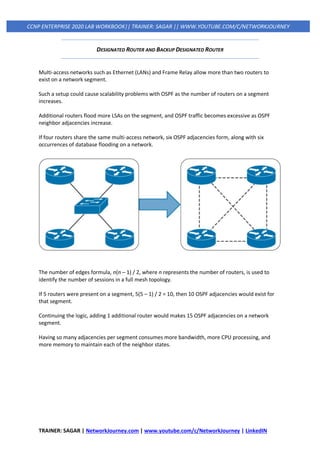
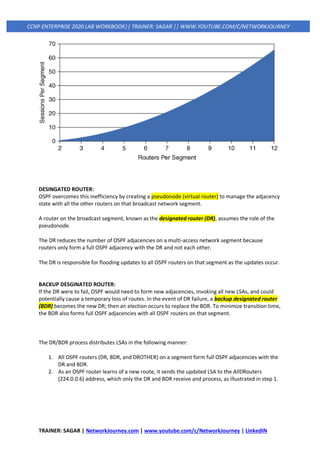
If four routers share the same multi-access network, six OSPF adjacencies form, along with six
occurrences of database flooding on a network.
The number of edges formula, n(n – 1) / 2, where n represents the number of routers, is used to
identify the number of sessions in a full mesh topology.
If 5 routers were present on a segment, 5(5 – 1) / 2 = 10, then 10 OSPF adjacencies would exist for
that segment.
Continuing the logic, adding 1 additional router would makes 15 OSPF adjacencies on a network
segment.
Having so many adjacencies per segment consumes more bandwidth, more CPU processing, and
more memory to maintain each of the neighbor states.
TRAINER: SAGAR | NetworkJourney.com | www.youtube.com/c/NetworkJourney | LinkedIN
CCNP ENTERPRISE 2020 LAB WORKBOOK|| TRAINER: SAGAR || WWW.YOUTUBE.COM/C/NETWORKJOURNEY
DESINGATED ROUTER:
OSPF overcomes this inefficiency by creating a pseudonode (virtual router) to manage the adjacency
state with all the other routers on that broadcast network segment.
A router on the broadcast segment, known as the designated router (DR), assumes the role of the
pseudonode.
The DR reduces the number of OSPF adjacencies on a multi-access network segment because
routers only form a full OSPF adjacency with the DR and not each other.
The DR is responsible for flooding updates to all OSPF routers on that segment as the updates occur.
BACKUP DESGINATED ROUTER:
If the DR were to fail, OSPF would need to form new adjacencies, invoking all new LSAs, and could
potentially cause a temporary loss of routes. In the event of DR failure, a backup designated router
(BDR) becomes the new DR; then an election occurs to replace the BDR. To minimize transition time,
the BDR also forms full OSPF adjacencies with all OSPF routers on that segment.
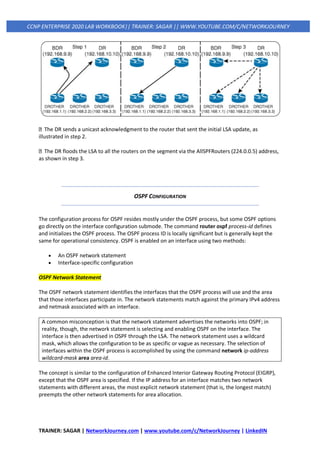
The DR/BDR process distributes LSAs in the following manner:
1. All OSPF routers (DR, BDR, and DROTHER) on a segment form full OSPF adjacencies with the
DR and BDR.
2. As an OSPF router learns of a new route, it sends the updated LSA to the AllDRouters
(224.0.0.6) address, which only the DR and BDR receive and process, as illustrated in step 1.
TRAINER: SAGAR | NetworkJourney.com | www.youtube.com/c/NetworkJourney | LinkedIN
CCNP ENTERPRISE 2020 LAB WORKBOOK|| TRAINER: SAGAR || WWW.YOUTUBE.COM/C/NETWORKJOURNEY
The DR sends a unicast acknowledgment to the router that sent the initial LSA update, as
illustrated in step 2.
The DR floods the LSA to all the routers on the segment via the AllSPFRouters (224.0.0.5) address,
as shown in step 3.
OSPF CONFIGURATION
The configuration process for OSPF resides mostly under the OSPF process, but some OSPF options
go directly on the interface configuration submode. The command router ospf process-id defines
and initializes the OSPF process. The OSPF process ID is locally significant but is generally kept the
same for operational consistency. OSPF is enabled on an interface using two methods:
• An OSPF network statement
• Interface-specific configuration
OSPF Network Statement
The OSPF network statement identifies the interfaces that the OSPF process will use and the area
that those interfaces participate in. The network statements match against the primary IPv4 address
and netmask associated with an interface.
A common misconception is that the network statement advertises the networks into OSPF; in
reality, though, the network statement is selecting and enabling OSPF on the interface. The
interface is then advertised in OSPF through the LSA. The network statement uses a wildcard
mask, which allows the configuration to be as specific or vague as necessary. The selection of
interfaces within the OSPF process is accomplished by using the command network ip-address
wildcard-mask area area-id.
The concept is similar to the configuration of Enhanced Interior Gateway Routing Protocol (EIGRP),
except that the OSPF area is specified. If the IP address for an interface matches two network
statements with different areas, the most explicit network statement (that is, the longest match)
preempts the other network statements for area allocation.
TRAINER: SAGAR | NetworkJourney.com | www.youtube.com/c/NetworkJourney | LinkedIN
CCNP ENTERPRISE 2020 LAB WORKBOOK|| TRAINER: SAGAR || WWW.YOUTUBE.COM/C/NETWORKJOURNEY
The connected network for the OSPF-enabled interface is added to the OSPF LSDB under the
corresponding OSPF area in which the interface participates. Secondary connected networks are
added to the LSDB only if the secondary IP address matches a network statement associated with
the same area.
router ospf 1
network 10.0.0.10 0.0.0.0 area 0
network 10.0.10.10 0.0.0.0 area 0
network 192.0.0.10 0.0.0.0 area 0
network 192.10.0.10 0.0.0.0 area 0
Interface-Specific Configuration
The second method for enabling OSPF on an interface for IOS is to configure it specifically on an
interface with the command ip ospf process-id area area-id [secondaries none]. This method also
adds secondary connected networks to the LSDB unless the secondaries none option is used.
This method provides explicit control for enabling OSPF; however, the configuration is not
centralized and increases in complexity as the number of interfaces on the routers increases. If a
hybrid configuration exists on a router, interface-specific settings take precedence over the network
statement with the assignment of the areas.
interface GigabitEthernet 0/0
ip address 10.0.0.1 255.255.255.0
ip ospf 1 area
PASSIVE INTERFACES
Enabling an interface with OSPF is the quickest way to advertise a network segment to other OSPF
routers.
However, it might be easy for someone to plug in an unauthorized OSPF router on an OSPF-enabled
network segment and introduce false routes, thus causing havoc in the network.
Making the network interface passive still adds the network segment into the LSDB but prohibits the
interface from forming OSPF adjacencies.
A passive interface does not send out OSPF hellos and does not process any received OSPF packets.
The command passive interface-id under the OSPF process makes the interface passive, and the
command passive interface default makes all interfaces passive. To allow for an interface to process
OSPF packets, the command no passive interface-id is used.
TRAINER: SAGAR | NetworkJourney.com | www.youtube.com/c/NetworkJourney | LinkedIN
CCNP ENTERPRISE 2020 LAB WORKBOOK|| TRAINER: SAGAR || WWW.YOUTUBE.COM/C/NETWORKJOURNEY
REQUIREMENTS FOR NEIGHBOR ADJACENCY
The following list of requirements must be met for an OSPF neighborship to be formed:
• RIDs must be unique between the two devices. They should be unique for the entire OSPF
routing domain to prevent errors.
• The interfaces must share a common subnet. OSPF uses the interface’s primary IP address
when sending out OSPF hellos. The network mask (netmask) in the hello packet is used to
extract the network ID of the hello packet.
• The MTUs (maximum transmission units) on the interfaces must match. The OSPF protocol
does not support fragmentation, so the MTUs on the interfaces should match.
• The area ID must match for the segment.
• The DR enablement must match for the segment.
• OSPF hello and dead timers must match for the segment.
• Authentication type and credentials (if any) must match for the segment.
• Area type flags must match for the segment (for example, Stub, NSSA). (These are not
discussed in this book.)
Example: Configuring OSPF
! OSPF is enabled with a single command, and the passive interface is
! set individually
R1# configure terminal
Enter configuration commands, one per line. End with CNTL/Z.
R1(config)# interface Loopback0
R1(config-if)# ip address 192.168.1.1 255.255.255.255
R1(config-if)# interface GigabitEthernet0/1
R1(config-if)# ip address 10.123.4.1 255.255.255.0
R1(config-if)# interface GigabitEthernet0/2
R1(config-if)# ip address 10.1.1.1 255.255.255.0
R1(config-if)#
R1(config-if)# router ospf 1
R1(config-router)# router-id 192.168.1.1
R1(config-router)# passive-interface GigabitEthernet0/2
R1(config-router)# network 0.0.0.0 255.255.255.255 area 0
A. Confirmation of Interfaces
It is a good practice to verify that the correct interfaces are running OSPF after making changes to
the OSPF configuration. The command show ip ospf interface [brief | interface-id] displays the
OSPF-enabled interfaces.
R1# show ip ospf interface
! Output omitted for brevity
Loopback0 is up, line protocol is up
Internet Address 192.168.1.1/32, Area 0, Attached via Network Statement
Process ID 1, Router ID 192.168.1.1, Network Type LOOPBACK, Cost: 1
TRAINER: SAGAR | NetworkJourney.com | www.youtube.com/c/NetworkJourney | LinkedIN
CCNP ENTERPRISE 2020 LAB WORKBOOK|| TRAINER: SAGAR || WWW.YOUTUBE.COM/C/NETWORKJOURNEY
Topology-MTID Cost Disabled Shutdown Topology Name
0 1 no no Base
Loopback interface is treated as a stub Host
GigabitEthernet0/1 is up, line protocol is up
Internet Address 10.123.4.1/24, Area 0, Attached via Network Statement
Process ID 1, Router ID 192.168.1.1, Network Type BROADCAST, Cost: 1
Topology-MTID Cost Disabled Shutdown Topology Name
0 1 no no Bas
Transmit Delay is 1 sec, State DROTHER, Priority 1
Designated Router (ID) 192.168.4.4, Interface address 10.123.4.4
Backup Designated router (ID) 192.168.3.3, Interface address 10.123.4.3
Timer intervals configured, Hello 10, Dead 40, Wait 40, Retransmit 5
..
Neighbor Count is 3, Adjacent neighbor count is 2
Adjacent with neighbor 192.168.3.3 (Backup Designated Router)
Adjacent with neighbor 192.168.4.4 (Designated Router)
Suppress hello for 0 neighbor(s)
R1# show ip ospf interface brief
Interface PID Area IP Address/Mask Cost State Nbrs F/C
Lo0 1 0 192.168.1.1/32 1 LOOP 0/0
Gi0/2 1 0 10.1.1.1/24 1 DR 0/0
Gi0/1 1 0 10.123.4.1/24 1 DROTH 2/3
OSPF Interface Columns
Field Description
Interface Interfaces with OSPF enabled
PID The OSPF process ID associated with this interface
Area The area that this interface is associated with
IP
Address/Mask
The IP address and subnet mask for the interface
Cost The cost metric assigned to an interface that is used to calculate a path metric
State The current interface state, which could be DR, BDR, DROTHER, LOOP, or Down
Nbrs F The number of neighbor OSPF routers for a segment that are fully adjacent
Nbrs C
The number of neighbor OSPF routers for a segment that have been detected and
are in a 2-Way state
The DROTHER is a router on the DR-enabled segment that is not the DR or the BDR; it is simply the
other router. DROTHERs do not establish full adjacency with other DROTHERs.
B. Verification of OSPF Neighbor Adjacencies
The command show ip ospf neighbor [detail] provides the OSPF neighbor table.
R1# show ip ospf neighbor
TRAINER: SAGAR | NetworkJourney.com | www.youtube.com/c/NetworkJourney | LinkedIN
CCNP ENTERPRISE 2020 LAB WORKBOOK|| TRAINER: SAGAR || WWW.YOUTUBE.COM/C/NETWORKJOURNEY
Neighbor ID Pri State Dead Time Address Interface
192.168.2.2 1 2WAY/DROTHER 00:00:37 10.123.4.2 GigabitEthernet0/1
192.168.3.3 1 FULL/BDR 00:00:35 10.123.4.3 GigabitEthernet0/1
192.168.4.4 1 FULL/DR 00:00:33 10.123.4.4 GigabitEthernet0/1
OSPF Neighbor State Fields
Field Description
Neighbor
ID
The router ID (RID) of the neighboring router.
PRI The priority for the neighbor’s interface, which is used for DR/BDR elections.
State
The second field is the DR, BDR, or DROTHER role if the interface requires a DR. For non-
DR network links, the second field shows just a hyphen (-).
Dead Time The time left until the router is declared unreachable.
Address The primary IP address for the OSPF neighbor.
Interface The local interface to which the OSPF neighbor is attached.
C. Verification of OSPF Routes
The next step is to verify the OSPF routes installed in the IP routing table. OSPF routes that install
into the Routing Information Base (RIB) are shown with the command show ip route ospf.
R1# show ip route ospf
! Output omitted for brevity
Codes: L - local, C - connected, S - static, R - RIP, M - mobile, B - BGP
D - EIGRP, EX - EIGRP external, O - OSPF, IA - OSPF inter area
N1 - OSPF NSSA external type 1, N2 - OSPF NSSA external type 2
E1 - OSPF external type 1, E2 - OSPF external type 2
Gateway of last resort is not set
10.0.0.0/8 is variably subnetted, 7 subnets, 2 masks
O 10.2.2.0/24 [110/2] via 10.123.4.2, 00:35:03, GigabitEthernet0/1
O 10.3.3.0/24 [110/2] via 10.123.4.3, 00:35:03, GigabitEthernet0/1
O 10.4.4.0/24 [110/2] via 10.123.4.4, 00:35:03, GigabitEthernet0/1
192.168.2.0/32 is subnetted, 1 subnets
O 192.168.2.2 [110/2] via 10.123.4.2, 00:35:03, GigabitEthernet0/1
192.168.3.0/32 is subnetted, 1 subnets
O 192.168.3.3 [110/2] via 10.123.4.3, 00:35:03, GigabitEthernet0/1
192.168.4.0/32 is subnetted, 1 subnets
O 192.168.4.4 [110/2] via 10.123.4.4, 00:35:03, GigabitEthernet0/1
TRAINER: SAGAR | NetworkJourney.com | www.youtube.com/c/NetworkJourney | LinkedIN
CCNP ENTERPRISE 2020 LAB WORKBOOK|| TRAINER: SAGAR || WWW.YOUTUBE.COM/C/NETWORKJOURNEY
DAY#3 OSPF
ADVANCE OSPF
OSPF Networks Types
1. Broadcast
- This type of Network is by default enabled on every Ethernet interfaces
- Elects DR/BDR
- Uses Multicast 224.0.0.5
- Allows more than 2 routers on a link
- Timers: Hello = 10sec, Dead = 40sec
2. Point-to-Point
- Default for Serial and Tunnel interfaces
- Do not Elects DR/BDR
- Uses Multicast 224.0.0.5
- Only 2 routers allowed on a link
- Timers: Hello = 10sec, Dead = 40sec
3. Point-to-Multipoint Broadcast
- Do not Elects DR/BDR
- Multicast 224.0.0.5
- Allows more than 2 routers on a link
- Timers: Hello = 30sec, Dead = 120sec
- Automatic neighbor discovery so no need to configure OSPF neighbors yourself.
- No DR/BDR election since OSPF sees the network as a collection of point-to-point
links.
- Only a single IP subnet is used in the topology below.
- Make sure your frame-relay network is configured with the broadcast keyword.
TRAINER: SAGAR | NetworkJourney.com | www.youtube.com/c/NetworkJourney | LinkedIN
CCNP ENTERPRISE 2020 LAB WORKBOOK|| TRAINER: SAGAR || WWW.YOUTUBE.COM/C/NETWORKJOURNEY
4. Point-to-Multipoint Non-Broadcast
- Do not Elects DR/BDR
- Uses Unicast (neighbor statements)
- Allows more than 2 routers on a link
- Timers: Hello = 30sec, Dead = 120sec
- No Automatic neighbor discovery so you need to configure OSPF neighbors yourself!
- No DR/BDR election since OSPF sees the network as a collection of point-to-point
links.
- Only a single IP subnet is used in the topology above.
5. Non-Broadcast
- DR/BDR
- Timers: Hello = 30sec, Dead = 120sec
- Non-broadcast network type assume you are running a multi-access network.
- Couple of key things to remember here:
• Multi-access means we have to select a DR and BDR.
• Non-broadcast means that OSPF expects us to configure neighbors ourselves
6. Loopback
- Default enabled for loopback interfaces
- When used in OSPF, /32 is considered always
- To override this limitation, set network type to “point-to-point”
TRAINER: SAGAR | NetworkJourney.com | www.youtube.com/c/NetworkJourney | LinkedIN
CCNP ENTERPRISE 2020 LAB WORKBOOK|| TRAINER: SAGAR || WWW.YOUTUBE.COM/C/NETWORKJOURNEY
Types of OSPF LSAs
Router LSA (Type 1)
Originated from each router
Flooded within same area
Tells the area about all links participating in the OSPF process within that area
Network LSA (Type 2)
Originated by the DR
If there is no DR, the Type 2 LSA wouldn’t be seen
Network Summary LSA (Type 3)
Originated by ABR router
Carry the destination network prefixes from one area into another
ASBR Summary (Type 4)
Originated by an ASBR router
Tells all the other areas about the ASBR
Tell all the other areas “to get to this Router-ID(ASBR) go through Me(ABR)”
TRAINER: SAGAR | NetworkJourney.com | www.youtube.com/c/NetworkJourney | LinkedIN
CCNP ENTERPRISE 2020 LAB WORKBOOK|| TRAINER: SAGAR || WWW.YOUTUBE.COM/C/NETWORKJOURNEY
External LSA (Type 5)
Originated by an ASBR
Flooded throughout OSPF domain, except Stubby areas
Consist of Network prefix/subnet-mask of external network (ex. RIP, EIGRP..)
NSSA External LSA (Type 7)
Originated by an ASBR
Exist only in Not-So-Stubby-Area (NSSA)
Are Not flooded outside the area they were originated
Example: Allows LSA Types: 1, 2, 3, 7 ( No External Type-5’s )
TRAINER: SAGAR | NetworkJourney.com | www.youtube.com/c/NetworkJourney | LinkedIN
CCNP ENTERPRISE 2020 LAB WORKBOOK|| TRAINER: SAGAR || WWW.YOUTUBE.COM/C/NETWORKJOURNEY
OSPF AREAS TYPES
❖ Backbone area (area 0)
❖ Standard area (area 1 to area 255.255.255.255)
❖ Stub area (LSA TYPE 5) -
- A stub area is an area in which you do not allow advertisements of external routes,
reducing the size of the database.
- Allows LSA Types: 1, 2, 3 & Summary default route (No External Type-5’s)
- A default summary LSA, with a prefix of 0.0.0.0/0 is originated into the stub area by an
ABR, so that devices in the area can forward all traffic for which a specific route is not
known, via ABR.
- A stub area disables advertisements of external routes.
- Stub Configuration:
router ospf 1
area 100 stub
❖ Totally stubby area:
- Allows LSA Types: 1, 2, 7 & Summary Default Route
- {No Type 5 and Type 3 LSA’s, NO ASBR}
- Configurations:
router ospf 1
area 100 stub no-summary
❖ Not-so-stubby area (NSSA) : The motivation behind NSSA is to allow OSPF Stub areas to
carry External routes (routes learned using other routing protocols like RIP, EIGRP, BGP, etc).
Stub areas are defined as areas that are not capable of importing routes external to OSPF.
Allows LSA Types: 1, 2, 3, 7 (No External Type-5’s, ASBR
allowed)
- NSSA Configuration:
router ospf 1
area 100 nssa
TRAINER: SAGAR | NetworkJourney.com | www.youtube.com/c/NetworkJourney | LinkedIN
CCNP ENTERPRISE 2020 LAB WORKBOOK|| TRAINER: SAGAR || WWW.YOUTUBE.COM/C/NETWORKJOURNEY
NSSA {N-bit and E-bit}
- Together, the N-bit (NSSA supported bit) and E-bit (External Routing Capability of the area)
reflect an interface's external LSA flooding capability
- When the peers exchange Hello messages, they check for the N-bit (should be set to 1) and
E-bit (should be set to 0), along with Area ID. A mismatch in the Options field could result in
failed adjacency.
- The NSSA ABR (the routers connecting NSSA to backbone area 0) translates Type 7 LSA into
Type 5 LSA, and flooded into the OSPF topology.
NSSA Type 7/5 {P-bit}
- Bit P—This bit is used in order to tell the NSSA ABR whether to translate type 7 into type 5.
- No Type 7/5 translation means bit P = 0.
- Type 7/5 translation means bit P = 1.
- If bit P = 0, then the NSSA ABR must not translate this LSA into Type 5. This happens when
NSSA ASBR is also an NSSA ABR.
- If bit P = 1, then the NSSA ABR must translate this type 7 LSA into a type 5 LSA. If there are
multiple NSSA ABRs, the one with highest router ID.
TRAINER: SAGAR | NetworkJourney.com | www.youtube.com/c/NetworkJourney | LinkedIN
CCNP ENTERPRISE 2020 LAB WORKBOOK|| TRAINER: SAGAR || WWW.YOUTUBE.COM/C/NETWORKJOURNEY
Area Restriction
Normal None
Stub No Type 5 AS-external LSA allowed
Totally Stub No Type 3, 4 or 5 LSAs allowed except the default summary route
NSSA
No Type 5 AS-external LSAs allowed, but Type 7 LSAs that convert to Type 5 at the NSSA ABR
can traverse
NSSA Totally
Stub
No Type 3, 4 or 5 LSAs except the default summary route, but Type 7 LSAs that convert to Type
5 at the NSSA ABR are allowed
TRAINER: SAGAR | NetworkJourney.com | www.youtube.com/c/NetworkJourney | LinkedIN
CCNP ENTERPRISE 2020 LAB WORKBOOK|| TRAINER: SAGAR || WWW.YOUTUBE.COM/C/NETWORKJOURNEY
DAY#4 OSPF
OSPF PATH SELECTION:
1. Intra-area
2. Interarea
3. External routes (which involves additional logic not covered in CCNP)
1. Intra-area
Routes advertised via a type 1 LSA for an area are always preferred over type 3 LSAs.
If multiple intra-area routes exist, the path with the lowest total path metric is installed in the OSPF
Routing Information Base (RIB), which is then presented to the router’s global RIB.
If there is a tie in metric, both routes install into the OSPF RIB.
In below diagram,
Best Route: R1–R3–R4
Not preferred: R1–R2–R4 (inter-area)
MUMBAIR1#sh ip rout 3.3.3.3
Routing entry for 3.3.3.3/32
Known via "ospf 100", distance 110, metric 11, type intra area
Last update from 192.168.23.12 on Ethernet0/0, 00:16:34 ago
Routing Descriptor Blocks:
* 192.168.23.12, from 3.3.3.3, 00:16:34 ago, via Ethernet0/0
Route metric is 11, traffic share count is 1
TRAINER: SAGAR | NetworkJourney.com | www.youtube.com/c/NetworkJourney | LinkedIN
CCNP ENTERPRISE 2020 LAB WORKBOOK|| TRAINER: SAGAR || WWW.YOUTUBE.COM/C/NETWORKJOURNEY
2. Inter-area
The next priority for selecting a path to a network is selection of the path with the lowest total path
metric to the destination.
If there is a tie in metric, both routes install into the OSPF RIB.
All interarea paths for a route must go through Area 0 to be considered.
In below diagram:
R1 uses the path R1–R3–R5–R6 because its total path metric is 35
R1–R2–R4–R6 path NOT preferred, with a metric of 40
MUMBAIR1#sh ip rout 6.6.6.6
Routing entry for 6.6.6.6/32
Known via "ospf 100", distance 110, metric 21, type inter area
Last update from 192.168.23.14 on Ethernet0/0, 00:15:23 ago
Routing Descriptor Blocks:
* 192.168.23.14, from 4.4.4.4, 00:15:23 ago, via Ethernet0/0
Route metric is 21, traffic share count is 1
Equal-Cost Multipathing
If OSPF identifies multiple paths in the path selection algorithms, those routes are installed into the
routing table as equal-cost multipathing (ECMP) routes.
The default maximum number of ECMP paths is four paths.
The default ECMP setting can be overwritten with the command maximum-paths maximum-paths
under the OSPF process to modify the default setting.
TRAINER: SAGAR | NetworkJourney.com | www.youtube.com/c/NetworkJourney | LinkedIN
CCNP ENTERPRISE 2020 LAB WORKBOOK|| TRAINER: SAGAR || WWW.YOUTUBE.COM/C/NETWORKJOURNEY
METRIC: (COST)
Default cost of essential interfaces:
TRAINER: SAGAR | NetworkJourney.com | www.youtube.com/c/NetworkJourney | LinkedIN
CCNP ENTERPRISE 2020 LAB WORKBOOK|| TRAINER: SAGAR || WWW.YOUTUBE.COM/C/NETWORKJOURNEY
Solution: AUTO-COST REFERENCE-BANDWIDTH
>router(config)#
router ospf 1
auto-cost reference-bandwidth 1000 (equals to 1000 Mbps)
New Reference BW = 10^8 X 10^2 = 10^10
OSPF METRIC (cost) = (New Reference BW / Interface BW)
Example:
ROUTER4(config)#int e0/1
ROUTER4(config-if)#ip ospf cost 1
AUTO-COST REFERENCE BANDWITH (Reference 10^10)
TRAINER: SAGAR | NetworkJourney.com | www.youtube.com/c/NetworkJourney | LinkedIN
CCNP ENTERPRISE 2020 LAB WORKBOOK|| TRAINER: SAGAR || WWW.YOUTUBE.COM/C/NETWORKJOURNEY
Summarization of Routes:
Route scalability is a large factor for the IGP routing protocols used by service providers because
there can be thousands of routers running in a network.
Before Summarization:
MUMBAIR6(config-if)#do sh ip rout | i 192.
O IA 192.168.23.0/24 [110/20] via 10.100.100.1, 00:00:17, Ethernet0/0
192.168.24.0/32 is subnetted, 1 subnets
O IA 192.168.24.1 [110/21] via 10.100.100.1, 00:00:17, Ethernet0/0
192.168.25.0/32 is subnetted, 1 subnets
O IA 192.168.25.1 [110/21] via 10.100.100.1, 00:00:17, Ethernet0/0
192.168.26.0/32 is subnetted, 1 subnets
O IA 192.168.26.1 [110/21] via 10.100.100.1, 00:00:17, Ethernet0/0
CONFIG:
MUMBAIR2(config)#
interface Loopback24
ip address 192.168.24.1 255.255.255.0
end
interface Loopback25
ip address 192.168.25.1 255.255.255.0
end
interface Loopback26
ip address 192.168.26.1 255.255.255.0
end
MUMBAIR2(config)#
router ospf 100
network 192.168.24.0 0.0.0.255 area 0
network 192.168.25.0 0.0.0.255 area 0
network 192.168.26.0 0.0.0.255 area 0
Summarization is enabled always on ABR only
MUMBAIR4(config)#
router ospf 1
area 0 range 192.168.0.0 255.255.0.0 cost 11
After Summarization:
MUMBAIR6(config-if)#do sh ip rout | begin 192.
O IA 192.168.0.0/16 [110/21] via 10.100.100.1, 00:01:14, Ethernet0/0
TRAINER: SAGAR | NetworkJourney.com | www.youtube.com/c/NetworkJourney | LinkedIN
CCNP ENTERPRISE 2020 LAB WORKBOOK|| TRAINER: SAGAR || WWW.YOUTUBE.COM/C/NETWORKJOURNEY
DAY#5 OSPF
ROUTE FILTERING:
Route filtering is a method for selectively identifying routes that are advertised or received from
neighbor routers.
Route filtering may be used to manipulate traffic flows, reduce memory utilization, or improve
security.
Filtering with Summarization
One of the easiest methodologies for filtering routes is to use the not-advertise keyword during
prefix summarization.
Using this keyword prevents creation of any type 3 LSAs for any networks in that range, thus making
the subordinate routes visible only within the area where the route originates.
MUMBAIR4# configure terminal
MUMBAIR4(config-router)# area 0 range 192.168.0.0 255.255.0.0 not-advertise
RESULTS:
MUMBAIR6#show ip route | i 192.
No 192.x.x.x routes found
Area Filtering
Although filtering via summarization is very easy, it is limited in its ability.
if the 172.16.1.0/24 network needs to be present in Area 0 but removed in Area 34, it is not possible
to filter the route using summarization.
R2
ip prefix-list PREFIX-FILTER seq 5 deny 172.16.1.0/24
ip prefix-list PREFIX-FILTER seq 10 permit 0.0.0.0/0 le 32
!
router ospf 1
TRAINER: SAGAR | NetworkJourney.com | www.youtube.com/c/NetworkJourney | LinkedIN
CCNP ENTERPRISE 2020 LAB WORKBOOK|| TRAINER: SAGAR || WWW.YOUTUBE.COM/C/NETWORKJOURNEY
router-id 192.168.2.2
network 10.12.1.0 0.0.0.255 area 12
network 10.23.1.0 0.0.0.255 area 0
area 0 filter-list prefix PREFIX-FILTER in
RESULT:
R3# show ip route ospf | begin Gateway
Gateway of last resort is not set
10.0.0.0/8 is variably subnetted, 5 subnets, 2 masks
O IA 10.12.1.0/24 [110/2] via 10.23.1.2, 00:17:39, GigabitEthernet0/1
172.16.0.0/24 is subnetted, 2 subnets
O IA 172.16.2.0 [110/3] via 10.23.1.2, 00:16:30, GigabitEthernet0/1
O IA 172.16.3.0 [110/3] via 10.23.1.2, 00:16:30, GigabitEthernet0/1
MUMBAIR4(config)#
ip prefix-list PREFIX-FILTER seq 5 deny 192.168.24.1/32
ip prefix-list PREFIX-FILTER seq 10 permit 192.168.0.0/16
router ospf 1
area 40 filter-list prefix PREFIX-FILTER in
MUMBAIR6# sh ip rout | i 192.168.24.
MUMBAIR6# -> NO ROUTES FOUND FOR 192.168.24.
Local OSPF Filtering
In some scenarios, routes need to be removed only on specific routers in an area.
OSPF is a link-state protocol that requires all routers in the same area to maintain an identical copy
of the LSDB for that area.
A route can exist in the OSPF LSDB, but it could be prevented from being installed in the local RIB.
This is accomplished by using a Distribute List.
MUMBAIR4(config)#
MUMBAIR4(config)#ip access-list standard ACL-OSPF
MUMBAIR4(config-std-nacl)#10 deny 192.168.24.0 0.0.0.255
MUMBAIR4(config-std-nacl)#20 permit any
router ospf 1
distribute-list ACL-OSPF in
MUMBAIR6# sh ip rout | i 192.168.24
192.168.24.0/32 is subnetted, 1 subnets
O IA 192.168.24.1 [110/21] via 10.100.100.1, 00:09:02, Ethernet0/0
MUMBAIR6#
Route will be present but no reachability
MUMBAIR6#ping 192.168.24.1
Type escape sequence to abort.
Sending 5, 100-byte ICMP Echos to 192.168.24.1, timeout is 2 seconds:
UUUUU
TRAINER: SAGAR | NetworkJourney.com | www.youtube.com/c/NetworkJourney | LinkedIN
CCNP ENTERPRISE 2020 LAB WORKBOOK|| TRAINER: SAGAR || WWW.YOUTUBE.COM/C/NETWORKJOURNEY
DEFAULT ROUTE ORIGINATE:
A common situation is where you have some internet-facing routers running BGP with some ISP,
probably receiving full routes, and you want to send a default route to the internal routers, so they
will use the "nearest" router (in terms of metric) to send traffic destined outside the AS.
To generate a default external route into an Open Shortest Path First (OSPF) routing domain. The
topology is something like this:
R1(config)#router ospf 1
R1(config-router)#default-information originate ?
If you use the default-information originate you can advertise a default route in OSPF. OSPF won’t
advertise a default route if you don’t already have it in your routing table.
If you add the always keyword it will advertise the default route even if you don’t have it in the
routing table. Once you have advertised the default route it will look like this on other routers:
TRAINER: SAGAR | NetworkJourney.com | www.youtube.com/c/NetworkJourney | LinkedIN
CCNP ENTERPRISE 2020 LAB WORKBOOK|| TRAINER: SAGAR || WWW.YOUTUBE.COM/C/NETWORKJOURNEY
MUMBAIR6#show ip ospf database | begin Type-5
Type-5 AS External Link States
Link ID ADV Router Age Seq# Checksum Tag
0.0.0.0 172.16.3.1 59 0x80000001 0x008D64 1
MUMBAIR6#show ip route ospf
O*E2 0.0.0.0/0 [110/1] via 192.168.12.1, 00:00:24, FastEthernet0/0
EXAMPLE:
MUMBAIR6
hostname MUMBAIR6
!
interface FastEthernet0/1
ip address 192.168.12.1 255.255.255.0
!
router ospf 1
network 192.168.12.0
default-information originate always
!
end
VIRTUAL LINKS:
All areas in an Open Shortest Path First (OSPF) autonomous system must be physically
connected to the backbone area (Area 0). In some cases, where this is not possible, you can
use a virtual link to connect to the backbone through a non-backbone area.
You can also use virtual links to connect two parts of a partitioned backbone through a non-
backbone area.
The area through which you configure the virtual link, known as a transit area, must have
full routing information.
The transit area cannot be a stub area.
router ospf 1
area 1 virtual-link 3.3.3.3
router ospf 1
area 1 virtual-link 1.1.1.1
show ip ospf virtual-links
Router3.3.3.3#show ip ospf neighbor
TRAINER: SAGAR | NetworkJourney.com | www.youtube.com/c/NetworkJourney | LinkedIN
CCNP ENTERPRISE 2020 LAB WORKBOOK|| TRAINER: SAGAR || WWW.YOUTUBE.COM/C/NETWORKJOURNEY
Neighbor ID Pri State Dead Time Address
Interface
2.2.2.2 1 FULL/ - 00:00:38 6.0.0.2
ATM2/0.20
Router3.3.3.3#show ip ospf virtual-links
Virtual Link OSPF_VL3 to router 1.1.1.1 is up
Run as demand circuit
DoNotAge LSA allowed.
Transit area 1, via interface ATM2/0.20, Cost of using 65
Transmit Delay is 1 sec, State POINT_TO_POINT,
Timer intervals configured, Hello 10, Dead 40, Wait 40, Retransmit 5
Hello due in 00:00:01
Adjacency State FULL (Hello suppressed)
Index 1/2, retransmission queue length 0, number of retransmission
0
First 0x0(0)/0x0(0) Next 0x0(0)/0x0(0)
Last retransmission scan length is 0, maximum is 0
Last retransmission scan time is 0 msec, maximum is 0 msec
Notice that adjacencies over virtual links are not displayed in the show ip ospf neighbor
command output. The only way to see them is to look at the router LSA and observe debug
commands as the adjacency comes up, or issue the show ip ospf virtual-links command.
======OSPF TOPIC ENDS HERE========
OSPF QUIZ#
1. OSPF uses the protocol number ___________ for its inter-router communication.
87
88
89
90
2. OSPF uses ___________ packet types for inter-router communication.
three
four
five
TRAINER: SAGAR | NetworkJourney.com | www.youtube.com/c/NetworkJourney | LinkedIN
CCNP ENTERPRISE 2020 LAB WORKBOOK|| TRAINER: SAGAR || WWW.YOUTUBE.COM/C/NETWORKJOURNEY
six
seven
3. What destination addresses does OSPF use, when feasible? (Choose two.)
IP address 224.0.0.5
IP address 224.0.0.10
IP address 224.0.0.8
MAC address 01:00:5E:00:00:05
MAC address 01:00:5E:00:00:0A
4. True or false: OSPF is only enabled on a router interface by using the command network ip-
address wildcard-mask area area-id under the OSPF router process.
True
False
5. True or false: The OSPF process ID must match for routers to establish a neighbor adjacency.
True
False
6. True or false: A default route advertised with the command default information-originate in OSPF
will always appear as an OSPF inter-area route.
True
False
7. True or false: The router with the highest IP address is the designated router when using a serial
point-to-point link.
True
False
8. OSPF automatically assigns a link cost to an interface based on a reference bandwidth of
___________.
100 Mbps
1 Gbps
10 Gbps
TRAINER: SAGAR | NetworkJourney.com | www.youtube.com/c/NetworkJourney | LinkedIN
CCNP ENTERPRISE 2020 LAB WORKBOOK|| TRAINER: SAGAR || WWW.YOUTUBE.COM/C/NETWORKJOURNEY
40 Gbps
9. What command is configured to prevent a router from becoming the designated router for a
network segment?
The interface command ip ospf priority 0
The interface command ip ospf priority 255
The command dr-disable interface-id under the OSPF process
The command passive interface interface-id under the OSPF process
The command dr-priority interface-id 255 under the OSPF process
10. What is the advertised network for the loopback interface with IP address 10.123.4.1/30?
10.123.4.1/24
10.123.4.0/30
10.123.4.1/32
10.123.4.0/24
Answers to the “Do I Know This Already?” quiz:
1 C
2 C
3 A, D
4 B
5 B
6 B
7 B
8 A
9 A
10 C
TRAINER: SAGAR | NetworkJourney.com | www.youtube.com/c/NetworkJourney | LinkedIN
CCNP ENTERPRISE 2020 LAB WORKBOOK|| TRAINER: SAGAR || WWW.YOUTUBE.COM/C/NETWORKJOURNEY
BGP (BORDER GATEWAY PROTOCOL)
RFC (REQUEST FOR COMMENT) 1654 defines Border Gateway Protocol (BGP) as an EGP standardized
path vector routing protocol that provides scalability, flexibility, and network stability.
When BGP was created, the primary design consideration was for IPv4 inter-organization
connectivity on public networks like the Internet and on private dedicated networks.
BGP is the only protocol used to exchange networks on the Internet, which has more than 780,000
IPv4 routes and continues to grow.
Due to the large size of the BGP tables, BGP does not advertise incremental updates or refresh
network advertisements as OSPF and IS-IS do.
BGP Key Points
• BGP stand for Border Gateway Protocol.
• BGP is also a Dynamic Routing Protocol.
• BGP is Exterior Gateway Protocol (EGP).
• BGP is the only EGP use now a days.
• BGP is called Protocol of the Internet.
• BGP is called an application layer protocol.
• BGP is also called Policy-based routing protocol.
• BGP is an AS-by-AS dynamic routing protocol.
• BGP is a Path-Vector Routing protocol.
• Path-Vector means list of AS on path to destination.
• BGP Protocols uses TCP Port Number 179.
• BGP is open standard routing protocol.
• BGP is mainly used for Scalability and Reliability.
• BGP is mainly used for control but not for speed.
• BGP prevents loop using the AS Numbers.
• BGP is classless supports FLSM, VLSM, and CIDR.
• BGP support auto and manual summarization.
• BGP Updates are incremental and triggered.
• BGP Updates are sent as unicast to manually defined neighbors.
• BGP Administrative Distance is 20 for External Updates
• BGP Administrative Distance is 200 for Internal Updates.
• BGP does not use load balancing, uses only one path per network.
• BGP Protocols has two flavors eBGP and iBGP.
• If peers are in the same AS called internal BGP (iBGP).
• If peers are in a different AS called external BGP (eBGP).
• Neighbor relationships for eBGP and iBGP are slightly different.
TRAINER: SAGAR | NetworkJourney.com | www.youtube.com/c/NetworkJourney | LinkedIN
CCNP ENTERPRISE 2020 LAB WORKBOOK|| TRAINER: SAGAR || WWW.YOUTUBE.COM/C/NETWORKJOURNEY
• IBPG the neighbors no need to be connected directly.
• EBGP the neighbors need to be connected directly.
• BGP guarantees loop-free routing information.
• BGP has no auto discovery mechanism peers to be set manually.
• BGP Protocol is used to exchange Internet routes.
• BGP is a Layer 4 protocol that sits on top of TCP.
BGP itself is an application (layer 7).
BGP’s purpose is for routing (layer 3); exchanging layer 3 information. It’s a routing protocol.
BGP uses TCP port 179 (layer 4: transport), but the application is what does the processing of the
logic (routing policy).
Autonomous System Numbers
An organization requiring connectivity to the Internet must obtain an autonomous system number
(ASN).
ASNs were originally 2 bytes (16-bit range), which made 65,535 ASNs possible.
Due to exhaustion, RFC 4893 expanded the ASN field to accommodate 4 bytes (32-bit range).
This allows for 4,294,967,295 unique ASNs, providing quite an increase from the original 65,535
ASNs.
An autonomous system (AS) is a group of IP networks operated by one or more network
operator(s) that has a single and clearly defined external routing policy.
Exterior routing protocols are used to exchange routing information between Autonomous
Systems.
TRAINER: SAGAR | NetworkJourney.com | www.youtube.com/c/NetworkJourney | LinkedIN
CCNP ENTERPRISE 2020 LAB WORKBOOK|| TRAINER: SAGAR || WWW.YOUTUBE.COM/C/NETWORKJOURNEY
Who Allots ASN To Organization?
AS numbers are assigned in blocks by Internet Assigned Numbers Authority (IANA) to regional
Internet registries (RIRs).
The appropriate RIR then assigns ASNs to entities within its designated area from the block assigned
by IANA.
Entities wishing to receive an ASN must complete the application process of their RIR, LIR or
upstream service provider and be approved before being assigned an ASN.
Current IANA ASN assignments to RIRs can be found on the IANA website.
There are other sources for more specific data: https://www.iana.org/numbers
Assignment of ASN in blocks: https://www.iana.org/assignments/as-numbers/as-numbers.xhtml
What is ASN?
A public AS has a globally unique number, an AS Number, associated with it. This number is used
both in the exchange of exterior routing information (between neighboring Autonomous Systems)
and as an identifier of the AS itself.
There are two types of AS Numbers:
• Public AS Numbers
• Private AS Numbers
ASN TABLE:
TRAINER: SAGAR | NetworkJourney.com | www.youtube.com/c/NetworkJourney | LinkedIN
CCNP ENTERPRISE 2020 LAB WORKBOOK|| TRAINER: SAGAR || WWW.YOUTUBE.COM/C/NETWORKJOURNEY
ASN FAQs
When should an AS be created?
An AS needs to be created if a network connects to more than one AS with different routing policies.
When is a Public AS Number required?
A Public AS Number is required only when an AS is exchanging routing information with other
Autonomous Systems on the public Internet. That is, all routes originating from an AS is visible on
the Internet.
Is my organization eligible for a Public AS Number?
Your organization is eligible for an AS Number assignment if:
• it is currently multihomed, or
• it has the need to interconnect with another AS
When can I use a Private AS Number?
A Private AS Number should be used if an AS is only required to communicate via Border Gateway
Protocol with a single provider. As the routing policy between the AS and the provider will not be
visible in the Internet, a Private AS Number can be used for this purpose.
IANA has reserved, for Private Use, a contiguous block of 1023 Autonomous System numbers from
the “16-bit Autonomous System Numbers” registry, namely 64512 – 65534 inclusive.
IANA has also reserved, for Private Use, a contiguous block of 94,967,295 Autonomous System
numbers from the “32-bit Autonomous System Numbers” registry, namely 4200000000 –
4294967294 inclusive.
I plan to change my upstream providers. Can I take my AS Number with me?
This depends on how you received that AS Number. If you got it directly from APNIC, then it is
portable and you can take it with you to whichever providers you choose.
However, if you got your AS Number from a Local Internet Registry (LIR), you can only use it while
you continue to receive connectivity from the LIR. That is, if you decide to no longer use the LIR as
one of your upstream providers, then you have to return the AS Number.
It is imperative to use only the ASN assigned by IANA, the ASN assigned by your service provider,
or a private ASN. Using another organization’s ASN without permission could result in traffic loss
and cause havoc on the Internet.
TRAINER: SAGAR | NetworkJourney.com | www.youtube.com/c/NetworkJourney | LinkedIN
CCNP ENTERPRISE 2020 LAB WORKBOOK|| TRAINER: SAGAR || WWW.YOUTUBE.COM/C/NETWORKJOURNEY
4 bytes (32-bit range)
4-byte ASNs provide 232
or 4,294,967,296 autonomous system numbers ranging from 0 to
4294967295.
The first thing to notice about these numbers is that they include all of the older 2-byte ASNs, 0
through 65535
That greatly helps with interoperability between autonomous systems using 2-byte ASNs and those
using 4-byte ASNs.
A 4-byte ASN between 0 and 65535 is called a mappable ASN, because it can be represented in just 2
bytes; the first 16 bits are in every case all zeroes.
3-Ways of Representing 4-byte ASN (32bit):
1. asplain is a simple decimal representation of the ASN, from 0 to 4294967295.
2. asdot+ breaks the number up into low-order and high-order 16-bit values, separated by a
dot. All of the older 2-byte ASNs can be represented in the low-order value, with the high-
order value set to 0. So for example, 65535 is 0.65535. One more than that, 65536, is
outside the value that can be represented in the low-order range alone, and is therefore
represented as 1.0. 65537 would be 1.1, 65680 is 1.144, and so on.
3. asdot is a mixture of asplain and asdot+. Any ASN in the 2-byte range of 0 – 65535 is written
in asplain (so 65535 is written “65535”) and any ASN above that range is written in asdot+
(so 65536 is written “1.0”).
ASPLAIN to ASDOT+ Converter: https://submit.apnic.net/cgi-bin/convert-asn.pl
ASN Allocation Policies
All five of the RIRs (Regional Internet Registries) (AfriNIC, APNIC, ARIN, LACNIC, and RIPE NCC) have
the same assignment policies for 4-byte ASNs:
· 4-byte ASNs have been available since 1 January 2007. The default assignment, if you request an
ASN, is to give you a 2-byte ASN and only assign a 4-byte ASN if you specifically request it.
· Beginning on 1 January 2009 that policy reverses: A 4-byte ASN will be the default. You can still
get a 2-byte ASN, but only if you specifically request it.
· A year later, on 1 January 2010, all ASN assignments will be 4-byte. The ASN you receive might
be of the form 0.XX (where the high-order 16 bits are all 0 and the low-order 16 bits are not), but the
RIRs will make no distinction between those numbers and any other 4-byte ASN. And although it
won't effect your network in any way, the 16-bit ASN you've had maybe for years will, in the eyes of
the RIRs, be a mapable 32-bit ASN. For instance, Level3 Communications' AS3356 becomes in the
eyes of the RIRs, at the beginning of 2010, 0.3356.
TRAINER: SAGAR | NetworkJourney.com | www.youtube.com/c/NetworkJourney | LinkedIN
CCNP ENTERPRISE 2020 LAB WORKBOOK|| TRAINER: SAGAR || WWW.YOUTUBE.COM/C/NETWORKJOURNEY
BGP Peering States:
o IDLE: router is looking for neighbor
➢ The BGP process is administratively down.
➢ The BGP process is awaiting the next retry attempt.
➢ BGP is just configure on new neighbor.
➢ Already established BGP peering is reset.
• Connect: remote peer trying to initiate TCP connection with local peer process
➢ The BGP process is waiting for the TCP connect to be established.
➢ BGP is waiting for the TCP three-way handshake to complete.
➢ If successful, it will continue to the OpenSent State.
➢ If fails, it will continue to the Active State.
➢ If BGP reset is, send it will move back to the Idle State.
• Active: local BGP process is trying to establish TCP session with its remote peer
➢ The TCP connection failed, and the Connect-Retry timer is running.
➢ BGP will try another TCP three-way handshake to establish a connection.
➢ BGP is listening for an incoming TCP connection.
➢ If it is successful, it will move to the OpenSent State.
➢ If BGP reset is, send it will move back to the Idle State.
• OpenSent: TCP session is up, Open message has been sent to establish peering
➢ The TCP connection exists, and the router has sent a BGP Open Message.
➢ The matching Open Message has not been received from peer.
➢ BGP will be waiting for an Open message from the remote BGP neighbor.
• OpenConfirm: Router has sent keepalives to peer and wait to receive a keepalive message in
return
➢ Both routers have sent & received an Open Message.
➢ BGP waits for a Keepalive message from the remote BGP neighbor.
➢ If Keepalive message is received, it move to the Established State.
➢ BGP will keep sending Keepalive messages.
• Established: Router have a BGP peering session
➢ All neighbor parameters match.
➢ The peers can now exchange Updates.
➢ The BGP neighbor adjacency is complete.
➢ BGP routers send update packets to exchange routing information.
➢ BGP reset hold timer every time receive a Keepalive message.
➢ BGP reset hold timer every time receive update message.
➢ If receive a notification message it jump back to the Idle state.
TRAINER: SAGAR | NetworkJourney.com | www.youtube.com/c/NetworkJourney | LinkedIN
CCNP ENTERPRISE 2020 LAB WORKBOOK|| TRAINER: SAGAR || WWW.YOUTUBE.COM/C/NETWORKJOURNEY
BGP MESSAGE TYPE
4 BGP Message types = Open, Update, Keepalive, Notifications
• Open: After a neighbor is configured, BGP sends an open message to try to establish peering
with that neighbor. Includes information such as autonomous system number, router ID, and
hold time.
• Update: Message used to transfer routing information between peers. Includes new routes,
withdrawn routes, and path attributes.
• Keepalive: BGP peers exchange keepalive messages every 60 seconds by default. These keep the
peering session active.
• Notification: When a problem occurs that causes a router to end the BGP peering session, a
notification message is sent to the BGP neighbor and the connection is closed.
TRAINER: SAGAR | NetworkJourney.com | www.youtube.com/c/NetworkJourney | LinkedIN
CCNP ENTERPRISE 2020 LAB WORKBOOK|| TRAINER: SAGAR || WWW.YOUTUBE.COM/C/NETWORKJOURNEY
LAB#1:
CONFIGURATIONS:
R26(config)#
hostname ATT26
int e0/2
ip add 209.165.201.1 255.255.255.252
no shut
int loopback 1
ip add 209.209.209.1 255.255.255.0
no shut
router bgp 65000
neighbor 209.165.201.2 remote-as 65001
network 209.209.209.0 mask 255.255.255.0
R27(config)#
hostname VODAFONER27
int e0/2
ip add 209.165.201.2 255.255.255.252
no shut
int e0/1
ip add 10.172.13.1 255.255.255.0
no shut
int loopback 1
ip add 29.29.29.1 255.255.255.0
no shut
router bgp 65001
neighbor 209.165.201.1 remote-as 65000
network 29.29.29.0 mask 255.255.255.0
TRAINER: SAGAR | NetworkJourney.com | www.youtube.com/c/NetworkJourney | LinkedIN
CCNP ENTERPRISE 2020 LAB WORKBOOK|| TRAINER: SAGAR || WWW.YOUTUBE.COM/C/NETWORKJOURNEY
BGP NEIGHBOR TABLE:
ATT26#sh ip bgp summary
BGP router identifier 209.165.201.1, local AS number 65000
BGP table version is 1, main routing table version 1
Neighbor V AS MsgRcvd MsgSent TblVer InQ OutQ Up/Down State/PfxRcd
209.165.201.2 4 65001 8 8 3 0 0 00:04:14 1
BGP router identifier The IP address representing this router
Local AS number The local router’s Autonomous System Number
BGP table version Local BGP table increases when the BGP table changes
Main routing table version Last version of BGP database in the main routing table
Neighbor The IP address, used in the neighbor statement
V (Version) The version of BGP this router is running
AS (Autonomous System) The listed neighbor’s Autonomous System Number
MsgRcvd (Message Received) The number of BGP messages received from neighbor
MsgSent (Message Sent) The number of BGP messages sent to this neighbor
TblVer (Table Version) Last version of the BGP table that was sent to neighbor
InQ (In Queue) In Queue input messages in Queue
OutQ (Out Queue) Out Queue Output messages in Queue
Up/Down Time since BGP session was established
State The current state of the BGP session: active, idle etc
PfxRcd (Prefix Received) Number of BGP network entries received from this neighbor
BGP FORWARDING TABLE:
ATT26#show ip bgp
BGP table version is 3, local router ID is 209.209.209.1
Status codes: s suppressed, d damped, h history, * valid, > best, i - internal,
r RIB-failure, S Stale, m multipath, b backup-path, f RT-Filter,
x best-external, a additional-path, c RIB-compressed,
Origin codes: i - IGP, e - EGP, ? - incomplete
RPKI validation codes: V valid, I invalid, N Not found
Network Next Hop Metric LocPrf Weight Path
*> 29.29.29.0/24 209.165.201.2 0 0 65001 i
*> 209.209.209.0 0.0.0.0 0 32768 i
BGP table version Local BGP table increases when the BGP table changes
Local router ID The IP address representing this router
Network Learn network with subnet masks
* This is a valid route and that BGP is able to use it
> This entry has been selected as the best path
Next Hop 0.0.0.0 means that this network originated on this router
R1 learn about this network from 192.168.12.2
TRAINER: SAGAR | NetworkJourney.com | www.youtube.com/c/NetworkJourney | LinkedIN
CCNP ENTERPRISE 2020 LAB WORKBOOK|| TRAINER: SAGAR || WWW.YOUTUBE.COM/C/NETWORKJOURNEY
Metric BGP attributes that are used to select the best path
LocPrf BGP attributes that are used to select the best path
Weight BGP attributes that are used to select the best path
Path A sequence of Autonomous Systems in the path from Left to Right
Path i Network was advertised using the network command
Path 2 AS path 2
Path ? Redistributed Networks
Weight = 32768 for LOCAL
Weight = 0 other routes
ROUTING TABLE:
ATT26#show ip route
<!—output omitted--!>
Gateway of last resort is not set
29.0.0.0/24 is subnetted, 1 subnets
B 29.29.29.0 [20/0] via 209.165.201.2, 00:15:17
209.165.201.0/24 is variably subnetted, 2 subnets, 2 masks
<!—output omitted--!>
B This route was learned through BGP
29.29.29.0/24 Destination learn network and 24 is subnet mask
20 20 is the Administrative Distance of eBGP protocol
209.165.201.2 Next Hop IP Address where to send the traffic
00:15:17 Time since the route was learnt
DEBUG:
debug ip bgp all
debug ip bgp ipv4 unicast updates
VODAFONER27#
*Jun 2 15:25:04.814: BGP: 209.165.201.1 connection timed out 180187ms (last update) 180000ms
(hold time)
*Jun 2 15:25:04.814: BGP: 209.165.201.1 went from Established to Closing
*Jun 2 15:25:04.814: %BGP-3-NOTIFICATION: sent to neighbor 209.165.201.1 4/0 (hold time
expired) 0 bytes
*Jun 2 15:25:04.814: BGP: ses global 209.165.201.1 (0xF1B0F408:1) Send NOTIFICATION 4/0 (hold
time expired) 0 bytes
*Jun 2 15:25:04.814: BGP: 209.165.201.1 local error close after sending NOTIFICATION
*Jun 2 15:25:04.814: %BGP-5-NBR_RESET: Neighbor 209.165.201.1 reset (BGP Notification sent)
*Jun 2 15:25:04.814: BGP: nbr_topo global 209.165.201.1 IPv4 Unicast:base (0xF1B0F408:1) NSF
delete stale NSF not active
*Jun 2 15:25:04.815: BGP: 209.165.201.1 closing
*Jun 2 15:25:04.815: BGP: ses global 209.165.201.1 (0xF1B0F408:1) Session close and reset
neighbor 209.165.201.1 topostate
TRAINER: SAGAR | NetworkJourney.com | www.youtube.com/c/NetworkJourney | LinkedIN
CCNP ENTERPRISE 2020 LAB WORKBOOK|| TRAINER: SAGAR || WWW.YOUTUBE.COM/C/NETWORKJOURNEY
*Jun 2 15:25:04.815: BGP: nbr_topo global 209.165.201.1 IPv4 Unicast:base (0xF1B0F408:1)
Resetting ALL counters.
*Jun 2 15:25:04.815: BGP: 209.165.201.1 went from Closing to Idle
*Jun 2 15:25:04.815: %BGP-5-ADJCHANGE: neighbor 209.165.201.1 Down BGP Notification sent
*Jun 2 15:25:04.815: %BGP_SESSION-5-ADJCHANGE: neighbor 209.165.201.1 IPv4 Unicast topology
base removed from session BGP Notification sent
BGP STATE DOWN:
Neighbor V AS MsgRcvd MsgSent TblVer InQ OutQ Up/Down State/PfxRcd
209.165.201.1 4 65000 0 0 1 0 0 00:03:13 Active
VODAFONER27#
BGP ACTIVE AND PASSIVE
• By default, neighbor with lowest BGP RID will establish connection.
• Active having a higher random port > 1023.
• Passive having TCP Port 179.
• Active is called Client and Passive is called Server.
• This behaviour can be modified.
BGP LOGS:
*Jun 2 15:29:25.144: BGP: 209.165.201.2 passive open to 209.165.201.1
*Jun 2 15:29:25.144: BGP: Fetched peer 209.165.201.2 from tcb
*Jun 2 15:29:25.144: BGP: 209.165.201.2 passive went from Idle to Connect
TRAINER: SAGAR | NetworkJourney.com | www.youtube.com/c/NetworkJourney | LinkedIN
CCNP ENTERPRISE 2020 LAB WORKBOOK|| TRAINER: SAGAR || WWW.YOUTUBE.COM/C/NETWORKJOURNEY
ACTIVE PORT > 1024 and PASSIVE PORT = 179
ATT26(config-if)#do sh ip bgp neig | i hos
Local host: 209.165.201.1, Local port: 63158
Foreign host: 209.165.201.2, Foreign port: 179
VODAFONER27#sh ip bgp nei | i host
Local host: 209.165.201.2, Local port: 179
Foreign host: 209.165.201.1, Foreign port: 63158
CONFIGURATIONS
R1(config)#router bgp 1
R1(config-router)#neighbor 192.168.12.2 transport connection-mode passive
R2(config)#router bgp 2
R2(config-router)#neighbor 192.168.12.1 transport connection-mode active
BGP Timers:
• Basic BGP times are Keepalive and Hold-down timer intervals.
• By default, Keepalive timer is 60 seconds.
• By default, hold-down timer is 3 x Keepalive or 180 seconds.
• Failing to receive 3 keepalives in a row will make the hold-down timer reach 180 seconds.
• Neighbor is considered down and routes from this neighbor are flushed.
• To verify current timers, issue the “show ip bgp neighbor” command.
• BGP timers can be changed, both the defaults and on a per-neighbor basis.
• In the OPEN message, BGP routers exchange the hold time they want to use.
• Values of 1 or 2 are illegal, minimum working value for the hold time is 3 seconds.
VODAFONER27#sh ip bgp nei
BGP neighbor is 209.165.201.1, remote AS 65000, external link
BGP version 4, remote router ID 209.209.209.1
BGP state = Established, up for 00:09:25
Last read 00:00:23, last write 00:00:28, hold time is 180, keepalive interval is 60 seconds
TRAINER: SAGAR | NetworkJourney.com | www.youtube.com/c/NetworkJourney | LinkedIN
CCNP ENTERPRISE 2020 LAB WORKBOOK|| TRAINER: SAGAR || WWW.YOUTUBE.COM/C/NETWORKJOURNEY
CONFIGURATIONS:
R2(config)#router bgp 2
R2(config-router)#timers bgp 50 150
R2(config-router)#neighbor 192.168.23.3 timers 20 60
R2#clear ip bgp *
After changing the time for neighbor R3 new hold time is 60 and Keepalive is 20 seconds now.
After changing default, timers for all other new hold time is 150 & Keepalive is 50 seconds now.
BGP Next-Hop-Self:
• RFC 4271 (Request for Comment)
• Well-known Mandatory attribute
• The NEXT_HOP is a well-known mandatory attribute that defines the IP address of the router
that SHOULD be used as the next hop to the destinations listed in the UPDATE message.
• IBGP do not change the next hop IP address.
• BGP Next-Hop-Self solve reachability problems.
The BGP nexthop attribute is the next hop IP address that is going to be used to reach a certain
destination.
iBGP does not modify the next hop, leaving it at its original value. Therefore when the router
performs a route recursion / lookup it can fail if there is no IGP route to the next-hop address which
is advertised with the BGP prefix.
TRAINER: SAGAR | NetworkJourney.com | www.youtube.com/c/NetworkJourney | LinkedIN
CCNP ENTERPRISE 2020 LAB WORKBOOK|| TRAINER: SAGAR || WWW.YOUTUBE.COM/C/NETWORKJOURNEY
CONFIGURATIONS:
VODAFONER27(config-router)#neighbor 10.172.13.2 next-hop-self
VODAFONER28#sh ip bgp 209.209.209.0
BGP routing table entry for 209.209.209.0/24, version 9
Paths: (1 available, best #1, table default)
Not advertised to any peer
Refresh Epoch 1
65000
10.172.13.1 from 10.172.13.1 (29.29.29.1)
Origin IGP, metric 0, localpref 100, valid, internal, best
rx pathid: 0, tx pathid: 0x0
VODAFONER28#traceroute 209.209.209.1
Type escape sequence to abort.
Tracing the route to 209.209.209.1
VRF info: (vrf in name/id, vrf out name/id)
1 10.172.13.1 0 msec 1 msec 0 msec
2
VODAFONER28#sh ip bgp 209.209.209.0
BGP routing table entry for 209.209.209.0/24, version 10
Paths: (1 available, no best path)
Not advertised to any peer
Refresh Epoch 1
65000
209.165.201.1 (inaccessible) from 10.172.13.1 (29.29.29.1)
Origin IGP, metric 0, localpref 100, valid, internal
rx pathid: 0, tx pathid: 0
VODAFONER28#
TRAINER: SAGAR | NetworkJourney.com | www.youtube.com/c/NetworkJourney | LinkedIN
CCNP ENTERPRISE 2020 LAB WORKBOOK|| TRAINER: SAGAR || WWW.YOUTUBE.COM/C/NETWORKJOURNEY
BGP Flavors:
There are two flavors of BGP Internal BGP and External BGP.
IBGP (Interior Border Gateway Protocol):
o If the peers are in the same AS called Internal BGP (iBGP).
o Internal BGP (IBGP) is between same Autonomous System Number.
o Routes learned from IBGP peer will not be advertised to other IBGP peers (to avoid loop)
o By default, Internal BGP (IBGP) peers are set with TTL value = 255
o Internal BGP (IBGP) routes have Administrative Distance of 200.
o Next hop remains unchanged when route is advertised to IBGP peer.
o Internal BGP (IBGP) peers do not need to be directly connected.
EBGP (Exterior Border Gateway Protocol):
o If peers are in a different AS called external BGP (eBGP).
o EBGP is peering between two different Autonomous System (AS).
o Routes learned from eBGP peer will be advertised to other peers.
o EBGP peers are set with TTL = 1, means neighbors directly connected.
o External BGP (EBGP) routes have Administrative Distance of 20.
o Next hop changed when it is advertised to EBGP peer by default.
o External BGP (EBGP) the neighbors need to be connected directly.
TRAINER: SAGAR | NetworkJourney.com | www.youtube.com/c/NetworkJourney | LinkedIN
CCNP ENTERPRISE 2020 LAB WORKBOOK|| TRAINER: SAGAR || WWW.YOUTUBE.COM/C/NETWORKJOURNEY
BGP Multihop & Update-Source:
BGP MULTIHOP
• EBGP routers use a TTL value of one for their BGP packets.
• BGP neighbor away more than one hop TTL decrement to 0 & discarded.
• The solution is to use to Multihop command.
• Use the ebgp-multihop command to increase the TTL value.
• Multihop command does not apply to Internal BGP.
• If source EBGP from the loopback interfaces, then require Multihop.
• If source EBGP from the loopback interfaces also require update-source loopback.
• Using a loopback interface as update source, BGP session will not go down.
• Update source can be configured per neighbor or per peer-group.
• Static route is required to ensure that the loopback is reachable from both ends (optional),
however, we have used eBGP in our scenario.
• Multihop enables the peers to pass through the other routers to form peer relationships.
GNS LAB
ATT26(config-router)#do sh run | sec bgp
router bgp 65000
bgp log-neighbor-changes
network 209.209.209.0
neighbor 29.29.29.1 remote-as 65001
neighbor 29.29.29.1 ebgp-multihop 255
neighbor 29.29.29.1 update-source Loopback1
neighbor 209.165.201.2 remote-as 65001
VODAFONER27(config-router)#do sh run | sec bgp
router bgp 65001
bgp log-neighbor-changes
network 29.29.29.0 mask 255.255.255.0
neighbor 10.172.13.2 remote-as 65001
neighbor 209.165.201.1 remote-as 65000
neighbor 209.209.209.1 remote-as 65000
neighbor 209.209.209.1 ebgp-multihop 255
1st
HOP
2nd
HOP
TRAINER: SAGAR | NetworkJourney.com | www.youtube.com/c/NetworkJourney | LinkedIN
CCNP ENTERPRISE 2020 LAB WORKBOOK|| TRAINER: SAGAR || WWW.YOUTUBE.COM/C/NETWORKJOURNEY
neighbor 209.209.209.1 update-source Loopback1
BGP UPDATE-SOURCE
For BGP, a neighbor relationship to be established, source IP address of BGP packets sent by
a router must be the same as neighbor ip-address set on the neighboring router. By default,
packet’s source IP address is outgoing interface.
neighbor {ip-addr | group-name} update-source interf
PRACTICE TASK: (HOMEWORK)
TRAINER: SAGAR | NetworkJourney.com | www.youtube.com/c/NetworkJourney | LinkedIN
CCNP ENTERPRISE 2020 LAB WORKBOOK|| TRAINER: SAGAR || WWW.YOUTUBE.COM/C/NETWORKJOURNEY
BGP Peer Group:
• BGP router may have many neighbors that require the same BGP policies.
• BGP peer groups are used to simplify configuration and to improve performance.
• Peer group can be used when router has a group of neighbors with the same policies.
• Update is generated once per group rather than for each neighbor.
• BGP peer group requires less CPU resources rather send separately.
• Peer groups saves a lot of time and typing.
• Peer groups make updating more efficient and improve performance
Routers Basic Configurations
R1(config)#interface f1/0
R1(config-if)#ip add 192.168.12.1 255.255.255.0
R1(config-if)#no shutdown
R2(config)#interface f0/0
R2(config-if)#ip add 192.168.12.2
255.255.255.0
R2(config-if)#no shutdown
R2(config)#interface loopback 2
R2(config-if)#ip add 2.2.2.2 255.255.255.0
R2(config-if)#no shutdown
R1(config)#interface f0/0
R1(config-if)#ip add 192.168.13.1 255.255.255.0
R1(config-if)#no shutdown
R3(config)#interface f0/0
R3(config-if)#ip add 192.168.13.3
255.255.255.0
R3(config-if)#no shutdown
R3(config)#interface loopback 3
R3(config-if)#ip add 3.3.3.3 255.255.255.0
R3(config-if)#no shutdown
R1(config)#int f0/1
R1(config-if)#ip add 192.168.14.1 255.255.255.0
R1(config-if)#no shutdown
R4(config)#interface f0/0
R4(config-if)#ip add 192.168.14.4
255.255.255.0
R4(config-if)#no shutdown
R4(config)#interface loopback 4
TRAINER: SAGAR | NetworkJourney.com | www.youtube.com/c/NetworkJourney | LinkedIN
CCNP ENTERPRISE 2020 LAB WORKBOOK|| TRAINER: SAGAR || WWW.YOUTUBE.COM/C/NETWORKJOURNEY
R4(config-if)#ip add 4.4.4.4 255.255.255.0
R4(config-if)#no shutdown
R1(config)#interface loopback 1
R1(config-if)#ip add 1.1.1.1 255.255.255.0
R1(config-if)#no shutdown
R1 Configuration without Peer Group
R1(config)#router bgp 1
R1(config-router)#neighbor 2.2.2.2 remote-as 2
R1(config-router)#neighbor 3.3.3.3 remote-as 3
R1(config-router)#neighbor 4.4.4.4 remote-as 4
R1(config-router)#neighbor 2.2.2.2 update-source loopback 1
R1(config-router)#neighbor 3.3.3.3 update-source loopback 1
R1(config-router)#neighbor 4.4.4.4 update-source loopback 1
R1(config-router)#neighbor 2.2.2.2 ebgp-multihop 2
R1(config-router)#neighbor 3.3.3.3 ebgp-multihop 2
R1(config-router)#neighbor 4.4.4.4 ebgp-multihop 2
R1 Configuration With Peer Group
R1(config)#router bgp 1
R1(config-router)#neighbor 2.2.2.2 remote-as 2
R1(config-router)#neighbor 3.3.3.3 remote-as 3
R1(config-router)#neighbor 4.4.4.4 remote-as 4
R1(config-router)#neighbor pg1 peer-group
R1(config-router)#neighbor 2.2.2.2 peer-group pg1
R1(config-router)#neighbor 3.3.3.3 peer-group pg1
R1(config-router)#neighbor 4.4.4.4 peer-group pg1
R1(config-router)#neighbor pg1 update-source loopback 1
R1(config-router)#neighbor pg1 ebgp-multihop 2
TRAINER: SAGAR | NetworkJourney.com | www.youtube.com/c/NetworkJourney | LinkedIN
CCNP ENTERPRISE 2020 LAB WORKBOOK|| TRAINER: SAGAR || WWW.YOUTUBE.COM/C/NETWORKJOURNEY
BGP Best Path Selection:
• BGP sends update packet to a peer with path attributes associated with prefix.
• BGP selects the best path based on a list of attributes.
• BGP attributes are similar to metrics in OSPF and EIGRP.
• BGP use path attributes to pick the best route to a destination.
• BGP store multiple paths to a destination in BGP table.
• BGP only install one best route in the routing table.
• BGP path algorithm decides best path to install in the IP routing table.
• BGP path algorithm decides best path to use for traffic forwarding.
• BGP goes through the following steps to select the best path route.
Priority Attribute Preference
1 Weight Highest
2 Local Preference Highest
3 Originate Local
4 AS Path Shortest
5 Origin Code Lowest
6 MED Lowest
7 EBGP Path Over IBGP Path Prefer eBGP
8 Shortest IGP Path to BGP Next Hop Lowest IGP Metric
9 Oldest Path Received First
10 Router ID Lowest
11 Neighbor IP Address Lowest Neighbor IP
TRAINER: SAGAR | NetworkJourney.com | www.youtube.com/c/NetworkJourney | LinkedIN
CCNP ENTERPRISE 2020 LAB WORKBOOK|| TRAINER: SAGAR || WWW.YOUTUBE.COM/C/NETWORKJOURNEY
BGP Attributes:
BGP uses path attributes (PAs) associated with each network path. The PAs provide BGP with
granularity and control of routing policies within BGP. The BGP prefix PAs are classified as follows:
• Well-known mandatory
• Well-known discretionary (pron: duh·skri·shuh·nuh·ree)
• Optional transitive
• Optional non-transitive
➢ Well-known mandatory attributes must be included with every prefix advertisement;
➢ Well-known discretionary attributes may or may not be included with a prefix advertisement.
➢ Optional attributes do not have to be recognized by all BGP implementations. Optional
attributes can be set so that they are transitive and stay with the route advertisement from AS
to AS.
➢ Other PAs are non-transitive and cannot be shared from AS to AS.
Well-Known Mandatory:
• As the name suggests it is mandatory and must.
• These attribute must appear in every Update message.
• Must be recognized & supported by all BGP speakers.
• If these attributes are missing a Notification, error is generated.
• If these attributes are missing the session will be closed.
• Well-Known mandatory attributes are AS Path, Next Hop Address, & Origin.
TRAINER: SAGAR | NetworkJourney.com | www.youtube.com/c/NetworkJourney | LinkedIN
CCNP ENTERPRISE 2020 LAB WORKBOOK|| TRAINER: SAGAR || WWW.YOUTUBE.COM/C/NETWORKJOURNEY
Well-Known Discretionary: (pron: duh·skri·shuh·nuh·ree)
• Must be recognized & supported by all BGP speakers.
• May or may not appear in every BGP Update message.
• Does not have to be included in every BGP update message.
• Well-Known Discretionary attributes are Local Preference & Atomic Aggregate.
Optional Transitive:
• May or may not be supported by all BGP speakers.
• Will be passed on if not recognized by the receiver.
• The attribute should be accepted and passed along to other peers.
• Optional Transitive attributes are Aggregator and Community.
• Transitive, these attributes are across AS boundaries.
Optional Non-Transitive:
• May or may not be supported by all BGP speakers.
• Not required to pass on, may be safely ignored.
• The attribute should be ignored and not passed on to other peers.
• Optional Non-Transitive attributes are MED, Originator ID and Cluster List.
• Non-transitive, these attributes are restricted to the same AS.
Type Code Attribute Name Category
1 Origin Well-Known Mandatory
2 AS Path Well-Known Mandatory
3 Next Hop Well-Known Mandatory
4 Multi Exit Disc (MED) Optional Non-Transitive
5 Local Pref Well-Known Discretionary
6 Atomic Aggregate Well-Known Discretionary
7 Aggregator Optional Transitive
8 Community Optional Transitive
9 Originator ID Optional Non-Transitive
10 Cluster List Optional Non-Transitive
TRAINER: SAGAR | NetworkJourney.com | www.youtube.com/c/NetworkJourney | LinkedIN
CCNP ENTERPRISE 2020 LAB WORKBOOK|| TRAINER: SAGAR || WWW.YOUTUBE.COM/C/NETWORKJOURNEY
In BGP, the Network Layer Reachability Information (NLRI) is a routing update that consists of the
network prefix, prefix length, and any BGP PAs for the specific route. (Update packet)
SUMMARY OF BGP ATTRIBUTES
• BGP path selection is done through the best path algorithm.
• Best path uses various attributes assigned to each route.
• BGP attributes are similar to metrics in OSPF and EIGRP.
• BGP selects the best path based on a list of attributes.
• BGP use attributes to decide the best route.
• BGP has 0 to 14 attributes for Cisco.
• BGP has 1 to 14 attributes for other venders.
• BGP does not use metrics but use set of attributes.
• BGP has four main types of attributes.
• Well-Known Mandatory.
• Well-Known Discretionary.
• Optional Transitive.
• Optional Non-Transitive.
BGP influencing INBOUND traffic
1. AS_path
2. MED Multi-exit discriminator
BGP influencing OUTBOUND traffic
1. Weight
2. Local_pref
TRAINER: SAGAR | NetworkJourney.com | www.youtube.com/c/NetworkJourney | LinkedIN
CCNP ENTERPRISE 2020 LAB WORKBOOK|| TRAINER: SAGAR || WWW.YOUTUBE.COM/C/NETWORKJOURNEY
1. BGP Weight Attribute (highest wins)
BGP weight attribute is a Cisco proprietary path attribute that is local to the router and is used to
influence local path selection on a certain router.
BGP weight is the first tie breaker for best path selection on a Cisco router, the attribute is not
propagated to other routers in the BGP updates and only found on Cisco routers.
The path with the highest weight is selected as the best toward a destination.
The weight can be a number from 0 to 65,535. Paths that the router originates have a weight of
32,768 by default, and other paths have a weight of 0. As we mentioned earlier the path with the
highest weight value wins.
Summary:
• Weight is Cisco-Proprietary value.
• Weight is only local on the router.
• Weight is not exchanged between BGP routers.
• Weight is never advertised to other routers.
• The path with the highest weight is preferred.
• Weight for a route originated on the local router is 32768.
• Weight is zero for all other routes.
BGP weight can be set using one of three ways on a Cisco router.
1. Assigned per neighbor using the neighbor {ip-address | peer-group} weight weight. This
command will influence all routes received from a certain neighbor by assigning the configured
value to all these routes.
2. Using AS-Path access lists. ip as-path access-list access-list-number {permit | deny} as-regular-
expression neighbor ip-address filter-list access-list-number weight weight. This method will
apply the weight value to As-paths defined in the access list.
3. Using route-maps for more complex definitions.
BGP weight is the easiest way to manipulate the BGP path selection on a single Cisco router for
outbound traffic. The attribute is local and will not be propagated to other routers in the network
within the BGP update messages.
Weight values can be assigned to routes using the neighbor command, IP AS-PATH or route maps for
complex policies.
TRAINER: SAGAR | NetworkJourney.com | www.youtube.com/c/NetworkJourney | LinkedIN
CCNP ENTERPRISE 2020 LAB WORKBOOK|| TRAINER: SAGAR || WWW.YOUTUBE.COM/C/NETWORKJOURNEY
GNS3 LAB
R1 Configuration R2 Configuration
interface f0/0
ip add 192.168.12.1 255.255.255.0
no shutdown
interface f0/1
ip add 192.168.13.1 255.255.255.0
no shutdown
interface f0/0
ip add 192.168.23.2 255.255.255.0
no shutdown
interface f0/1
ip add 192.168.12.2 255.255.255.0
no shutdown
interface loopback3
ip add 23.23.23.2 255.255.255.0
R3 Configuration
interface f0/0
ip add 192.168.23.3 255.255.255.0
no shutdown
interface f0/1
ip add 192.168.13.3 255.255.255.0
no shutdown
interface loopback3
ip add 23.23.23.3 255.255.255.0
R1 BGP configuration R2 BGP configuration
router bgp 1
neighbor 192.168.12.2 remote-as 2
neighbor 192.168.13.3 remote-as 2
router bgp 2
neighbor 192.168.12.1 remote-as 1
neighbor 192.168.23.3 remote-as 2
network 23.23.23.0 mask 255.255.255.0
R3 BGP Configuration
router bgp 2
neighbor 192.168.13.1 remote-as 1
neighbor 192.168.23.2 remote-as 2
network 23.23.23.0 mask 255.255.255.0
First, let us check BGP weight attribute value for internal and external routes. It is 0 for external
routes and 32768 default for internal routes.
TRAINER: SAGAR | NetworkJourney.com | www.youtube.com/c/NetworkJourney | LinkedIN
CCNP ENTERPRISE 2020 LAB WORKBOOK|| TRAINER: SAGAR || WWW.YOUTUBE.COM/C/NETWORKJOURNEY
Router R1 decided to use 192.168.12.2 as the next hop. All the BGP attributes are the same so it
came down to the router ID to select a winner.
Note: Router ID. Prefer the path with the lowest BGP neighbor router ID.
Modify the attribute “weight”
R1 Weight Configuration
router bgp 1
neighbor 192.168.13.3 weight 500
To apply the path attribute changes to BGP prefix, always clear the process
clear ip bgp *
show ip bgp
After changing the weight, R1 Now selected 192.168.13.3 as the next hop address.
TRAINER: SAGAR | NetworkJourney.com | www.youtube.com/c/NetworkJourney | LinkedIN
CCNP ENTERPRISE 2020 LAB WORKBOOK|| TRAINER: SAGAR || WWW.YOUTUBE.COM/C/NETWORKJOURNEY
2. LOCAL PREFERENCE (highest wins)
This is another way of choosing outbound path with BGP. Why would we need yet another way?
Well, for starters, weight is Cisco proprietary attribute, which means there is no weight on, say
Juniper. And weight has only local significance. This means we may have to apply it on several or all
routers.
Local preference comes right after weight in BGP path selection, so it is still strong mechanism of
preferring a path. It is not limited to a local router, but spans the entire autonomous system. This
means that we can set a local pref on one router for some prefixes, and it is sent to all internal
neighbours along with prefix updates. It is removed on eBGP sessions, so it stays within a local AS.
Local pref can range from 0-4294967295 with a default of 100. The higher the better.
The local preference has to be set inbound on routes being received to influence the outbound
routing behaviour.
Summary:
• Local Preference is the second BGP attribute.
• Use local preference to choose the outbound external BGP path.
• Local Preference is sent to all Internal BGP routers in AS.
• Local Preference is not exchanged between external BGP routers.
• Local preference is a Well-Known Discretionary BGP attribute.
• Local Preference Default value is 100.
• The path with the highest Local Preference is preferred.
TRAINER: SAGAR | NetworkJourney.com | www.youtube.com/c/NetworkJourney | LinkedIN
CCNP ENTERPRISE 2020 LAB WORKBOOK|| TRAINER: SAGAR || WWW.YOUTUBE.COM/C/NETWORKJOURNEY
GNS3:
CE1(config)#
router bgp 1
bgp default local-preference 150
OR
CE1(config)#
neighbor 10.1.2.2 route-map in
route-map LOCAL-PREF-150
set local-preference 150
Clear ip bgp *
Or
Clear ip bgp 10.1.2.2 soft (preferable) [keeps the tcp session, only refreshes route changes]
SHOW COMMANDS:
1st
Method to Verify:
CORE#sh ip bgp 8.8.8.8 bestpath
BGP routing table entry for 8.8.8.0/24, version 51
Paths: (2 available, best #2, table default)
Not advertised to any peer
Refresh Epoch 1
2 4 5
192.168.12.2 from 192.168.12.2 (192.168.14.1)
Origin IGP, metric 0, localpref 250, valid, internal, best
rx pathid: 0, tx pathid: 0x0
2nd
Method to Verify:
CORE#sh ip bgp
<!output omitted--!>
Network Next Hop Metric LocPrf Weight Path
* i 8.8.8.0/24 192.168.13.2 0 150 0 3 4 5 i
*>i 192.168.12.2 0 250 0 2 4 5 i
3rd
Method to Verify:
CORE#traceroute 8.8.8.8
Type escape sequence to abort.
Tracing the route to 8.8.8.8
VRF info: (vrf in name/id, vrf out name/id)
TRAINER: SAGAR | NetworkJourney.com | www.youtube.com/c/NetworkJourney | LinkedIN
CCNP ENTERPRISE 2020 LAB WORKBOOK|| TRAINER: SAGAR || WWW.YOUTUBE.COM/C/NETWORKJOURNEY
1 192.168.12.2 0 msec 1 msec 0 msec
2 10.1.2.2 1 msec 1 msec 1 msec
3 10.2.4.2 [AS 2] 1 msec 1 msec 1 msec
4 192.168.102.2 [AS 4] 1 msec 0 msec 0 msec
5 10.4.5.2 [AS 4] 2 msec 1 msec 1 msec
If you see the local preference attribute has been applied to all routes coming in from PE1, if
we just wanted to do it for 8.8.8.8 then we could match this network in a prefix-list and add
that to the route-map.
ip prefix-list 8.8.8.8 seq 5 permit 8.8.8.8/32
route-map LOCAL-PREF-150 permit 10
match ip address prefix-list 8.8.8.8
set local-preference 150
4. AS Path:
o AS Path is the fourth BGP attribute.
o AS path is a mandatory attribute, describe path taken on the way to destination.
o BGP prefers the shortest AS path to get to a destination.
o BGP AS Path is a Well-Known mandatory attribute.
o Ordered list of ASNs through which the update has passed.
o The main purpose of the AS Path is to avoid loops.
o AS-Path prepending is to make received prefix "Less Attractive".
o Add own AS number multiple times so the as path becomes longer.
o AS-Path prepending is a way to manipulate the AS-Path attribute of a BGP route.
o AS-Path prepending used to influence inbound direction traffic.
o AS path 1 2 3 is preferred over AS path 1 2 3 4 5.
GNS3
CE1(config)#
router bgp 1
neighbor 10.1.2.2 route-map PREPEND out
!
route-map PREPEND permit 10
set as-path prepend 40000 40000
Show commands:
GOOGLE-SERVER#show ip bgp
*> 0.0.0.0 0 32768 i
*> 101.101.101.0/24 10.4.5.1 0 4 3 1 i
*> 192.168.12.0 10.4.5.1 0 4 2 1 40000 40000 i
*> 192.168.13.0 10.4.5.1 0 4 3 1 i
*> 192.168.14.0 10.4.5.1 0 4 3 1 i
*> 192.168.102.0 10.4.5.1 0 0 4 i
*> 192.168.103.0 10.4.5.1 0 0 4 i
Network Next Hop Metric LocPrf Weight Path
*> 192.168.104.0 10.4.5.1 0 4 i
TRAINER: SAGAR | NetworkJourney.com | www.youtube.com/c/NetworkJourney | LinkedIN
CCNP ENTERPRISE 2020 LAB WORKBOOK|| TRAINER: SAGAR || WWW.YOUTUBE.COM/C/NETWORKJOURNEY
.
6. MED:
o MED (Multi-Exit Discriminator) is the sixth BGP attribute.
o Multi-Exit Discriminator (MED) is optional non-transitive attribute.
o The lowest MED is the preferred path.
o The MED is exchanged between Autonomous Systems.
o MED is used to advertise the neighbors how to enter the AS.
o MED is propagated to all routers within the neighbor AS.
o MED is not passed along any other Autonomous Systems.
o MED can influence routers in the same AS but not on different AS.
GNS3
Basically use this attribute for influencing traffic between two directly connected autonomous
systems.
TRAINER: SAGAR | NetworkJourney.com | www.youtube.com/c/NetworkJourney | LinkedIN
CCNP ENTERPRISE 2020 LAB WORKBOOK|| TRAINER: SAGAR || WWW.YOUTUBE.COM/C/NETWORKJOURNEY
AS1
CE1(config)# router bgp 1
CE1 (config-router-af)# neighbor 10.1.3.2 route-map MED out
Device(config-router-af)# exit
CE1 (config)# route-map MED permit 10
CE1 (config-route-map)# set metric 50
Device(config-route-map)# exit
3. Originate:
o Originate is the third BGP attribute.
o Prefer the path that the local router originated.
o In the BGP table, Local router originated see next hop 0.0.0.0.
o Routes with weight set to “32768” is considered as local routes.
o BGP router will prefer routes that it installed into BGP itself to another router installed.
5. Origin Code:
o BGP prefer the lowest Origin Code.
o There are three origin codes: IGP, EGP & Incomplete.
o IGP is lower than EGP and EGP is lower than Incomplete.
o IGP (shows up as i) use the network command for BGP.
o EGP (shows up as e) is an old routing protocol no more.
o Incomplete (shows up as ?) means redistributed something into BGP.
o Origin is a Well-known mandatory attribute.
7. EBGP Path Over iBGP Path:
o Prefer eBGP (External BGP) over iBGP (Internal BGP) paths.
o Routes learned via eBGP is more preferred than routes learned via iBGP.
o If both routes are learned via eBGP then chooses the lowest IGP value to the next hop.
8. Shortest IGP Path to BGP Next Hop:
o Prefer the path within the AS with the lowest IGP metric to the BGP next hop.
9. Oldest Path:
o Prefer the path that received first, in other words, the oldest path.
o The oldest route in the routing table is preferred over the new ones.
10. Router ID:
o Prefer the path with the lowest BGP neighbor router ID.
o Lowest router ID will be selected as the best path.
o The router ID is based on the highest IP address.
o If there is loopback interface, then the IP address of loopback will be used.
TRAINER: SAGAR | NetworkJourney.com | www.youtube.com/c/NetworkJourney | LinkedIN
CCNP ENTERPRISE 2020 LAB WORKBOOK|| TRAINER: SAGAR || WWW.YOUTUBE.COM/C/NETWORKJOURNEY
o The router ID can also be manually configured.
11. Neighbor IP Address:
o Prefer the path with the lowest neighbor IP address.
o If two eBGP routers and two links in between then the router ID will be the same.
o In this case, the neighbor IP address is the tiebreaker.
OTHER BGP ATTRIBUTES
Atomic Aggregate
The Atomic Aggregate attribute informs BGP peers that the local router is using a less specific
(aggregated) route to a destination.
If a BGP speaker selects a less specific route, when a more specific route is available, it must attach
the Atomic Aggregate attribute when propagating the route. The Atomic Aggregate attribute lets the
BGP peers know that the BGP speaker used an aggregated route.
When you use the Atomic Aggregate attribute, the BGP speaker has the option to send the
Aggregator attribute. The Aggregator attribute includes the AS number and the IP address of the
router that originated the aggregated route. In Cisco routers, the IP address is the RID of the router
that performs the route aggregation. Atomic Aggregate is a well-known attribute and Aggregator is
an optional, transitive attribute.
BGP Communities
A BGP community is bit of “extra information” that you can add to one of more prefixes which is
advertised to BGP neighbors.
This extra information can be used for things like traffic engineering or dynamic routing policies.
BGP communities provide additional capability for tagging routes and for modifying BGP routing
policy on upstream and downstream routers. BGP communities can be appended, removed, or
modified selectively on each attribute as the route travels from router to router.
BGP communities are an optional transitive BGP attribute that can traverse from autonomous
system to autonomous system. A BGP community is a 32-bit number that can be included with a
route. A BGP community can be displayed as a full 32-bit number (0-4,294,967,295) or as two 16-bit
numbers (0-65535):(0-65535) commonly referred to as new-format.
TRAINER: SAGAR | NetworkJourney.com | www.youtube.com/c/NetworkJourney | LinkedIN
CCNP ENTERPRISE 2020 LAB WORKBOOK|| TRAINER: SAGAR || WWW.YOUTUBE.COM/C/NETWORKJOURNEY
BGP QUIZ
1. Which of the following autonomous systems are private? (Choose two.)
1. 64,512–65,535
2. 65,000–65,535
3. 4,200,000,000–4,294,967,294
4. 4,265,000–4,265,535,016
2. Which BGP attribute must be recognized by all BGP implementations and advertised to
other autonomous systems?
1. Well-known mandatory
2. Well-known discretionary
3. Optional transitive
4. Optional non-transitive
3. True or false: BGP supports dynamic neighbor discovery by both routers.
1. True
2. False
4. True or false: A BGP session is always one hop away from a neighbor.
1. True
2. False
5. True or false: The IPv4 address family must be initialized to establish a BGP session with
a peer using IPv4 addressing.
1. True
2. False
6. Which command is used to view the BGP neighbors and their hello intervals?
1. show bgp neighbors
2. show bgp afi safi neighbors
3. show bgp afi safi summary
4. show afi bgp interface brief
7. How many tables does BGP use for storing prefixes?
1. One
2. Two
TRAINER: SAGAR | NetworkJourney.com | www.youtube.com/c/NetworkJourney | LinkedIN
CCNP ENTERPRISE 2020 LAB WORKBOOK|| TRAINER: SAGAR || WWW.YOUTUBE.COM/C/NETWORKJOURNEY
3. Three
4. Four
8. True or false: BGP advertises all its paths for every prefix so that every neighbor can build
its own topology table.
1. True
2. False
9. Which BGP command advertises a summary route to prevent link-flap processing by
downstream BGP routers?
1. aggregate-address network subnet-mask as-set
2. aggregate-address network subnet-mask summary-only
3. summary-address network subnet-mask
4. summary-address network mask subnet-mask
10. True or false: The IPv6 address family must be initialized to establish a BGP session with
a peer using IPv6 addressing.
1. True
2. False
Answers to the “Do I Know This Already?” quiz:
1 A, C
2 A
3 B
4 B
5 B
6 B
7 C
8 B
9 B
10 A
TRAINER: SAGAR | NetworkJourney.com | www.youtube.com/c/NetworkJourney | LinkedIN
CCNP ENTERPRISE 2020 LAB WORKBOOK|| TRAINER: SAGAR || WWW.YOUTUBE.COM/C/NETWORKJOURNEY
REDISTRIBUTION
Redistribution always encompasses two routing protocols: a source and destination.
The source protocol provides the network prefixes that are to be redistributed, and the destination
protocol receives the injected network prefixes.
The redistribution configuration exists under the destination protocol and identifies the source
protocol.
Using a route map allows for the filtering or modification of route attributes during the injection into
the destination protocol.
KEY POINTS:
A route must exist in the RIB in order for it to be redistributed into the destination protocol.
In addition to the route being in the RIB, the source protocol that redistributes into the destination
protocol must be the source for the route in the RIB.
REMEMBER!!!
Redistribution is not transitive.
In other words, when a router redistributes protocol 1 into protocol 2, and protocol 2 redistributes
into protocol 3, the routes from protocol 1 does not redistribute into protocol 3.
router eigrp
redistribute ospf
router ospf
redistribute eigrp
redistribute bgp
router bgp
TRAINER: SAGAR | NetworkJourney.com | www.youtube.com/c/NetworkJourney | LinkedIN
CCNP ENTERPRISE 2020 LAB WORKBOOK|| TRAINER: SAGAR || WWW.YOUTUBE.COM/C/NETWORKJOURNEY
redistribute ospf
For routes to be exchanged between all three routing protocols, mutual redistribution must be
configured between all three protocols
router eigrp
redistribute ospf
redistribute bgp
router ospf
redistribute eigrp
redistribute bgp
router bgp
redistribute ospf
redistribute eigrp
Seed Metrics
Every routing protocol uses a different methodology for calculating the best path for a route, EIGRP
can use bandwidth, delay, load, and reliability for calculating its best path, whereas OSPF primarily
uses the path metric for calculating the shortest path first (SPF) tree (SPT).
OSPF cannot calculate the SPT using EIGRP path attributes, and EIGRP cannot run diffusing update
algorithm (DUAL) using only the total path metric.
The destination protocol must be provided with relevant metrics to the destination protocols so that
the destination protocol can calculate the best path for the redistributed routes.
TRAINER: SAGAR | NetworkJourney.com | www.youtube.com/c/NetworkJourney | LinkedIN
CCNP ENTERPRISE 2020 LAB WORKBOOK|| TRAINER: SAGAR || WWW.YOUTUBE.COM/C/NETWORKJOURNEY
Every protocol provides a seed metric at the time of redistribution that allows the destination
protocol to calculate a best path.
Protocol Default Seed Metric
EIGRP Infinity. Routes set with infinity are not installed into the EIGRP topology table.
OSPF All routes are Type 2 external. Routes sourced from BGP use a seed metric of 1, and all other protocols
uses a seed metric of 20.
BGP Origin is set to incomplete, the multi-exit discriminator (MED) is set to the IGP metric, and the weight is
set to 32,768.
BGP ORIGIN SHOWING “?”
TRAINER: SAGAR | NetworkJourney.com | www.youtube.com/c/NetworkJourney | LinkedIN
CCNP ENTERPRISE 2020 LAB WORKBOOK|| TRAINER: SAGAR || WWW.YOUTUBE.COM/C/NETWORKJOURNEY
PROTOCOL-SPECIFIC CONFIGURATION
redistribute {connected | static | eigrp as-number | ospf process-id [match
{internal | external [1|2]}] | bgp as-number} [destination-protocol-
options] [route-map route-map-name].
Redistribution commonly uses route maps to manipulate or filter routes on the redistributing
router.
SELECTIVE REDISTRIBUTION:
BGP is designed to handle a large routing table, whereas IGPs are not. Redistributing BGP into an IGP
on a router with a larger BGP table (for example, the Internet table with 800,000+ routes) should use
selective route redistribution. Otherwise, the IGP can become unstable in the routing domain, which
can lead to packet loss.
PROTCOL BASIS REDISTRIBUTIONS:
1. EIGRP
redistribute source-protocol [metric bandwidth delay reliability
load mtu] [route-map route-map-name]
EXAMPLE1: (USING DEFAULT-METRIC)
router eigrp 100
default-metric 1000000 1 255 1 1500
network 10.23.1.0 0.0.0.255
redistribute ospf 1
EXAMPLE2: (USING LEGACY METHOD)
router eigrp 100
network 10.23.1.0 0.0.0.255
redistribute ospf 11000000 1 255 1 1500
EXAMPLE3: (USING ROUTE-MAP)
router eigrp 100
network 10.23.1.0 0.0.0.255
redistribute ospf 1 route-map OSPF-2-EIGRP
!
route-map OSPF-2-EIGRP permit 10
set metric 1000000 1 255 1 1500
TRAINER: SAGAR | NetworkJourney.com | www.youtube.com/c/NetworkJourney | LinkedIN
CCNP ENTERPRISE 2020 LAB WORKBOOK|| TRAINER: SAGAR || WWW.YOUTUBE.COM/C/NETWORKJOURNEY
2. OSPF
redistribute source-protocol [subnets] [metric metric] [metric-type {1 | 2}]
[tag 0-4294967295] [route-map route-map-name]
3. BGP
Redistributing routes into BGP does not require a seed metric because BGP is a path vector protocol.
Redistributed routes have the following BGP attributes set:
• The origin is set to incomplete.
• The next-hop address is set to the IP address of the source protocol.
• The weight is set to 32,768.
• The MED is set to the path metric of the source protocol.
TRAINER: SAGAR | NetworkJourney.com | www.youtube.com/c/NetworkJourney | LinkedIN
CCNP ENTERPRISE 2020 LAB WORKBOOK|| TRAINER: SAGAR || WWW.YOUTUBE.COM/C/NETWORKJOURNEY
GNS3: (PRACTICE ASSIGNMENT)
TASK#1: CONFIGURE OSPF BETWEEN MUMBAIR4 AND MUMBAIR6
TASK#2: CONFIGURE EIGRP BETWEEN MUMBAIR6 AND TOKYOR7
TASK#3: CONFIGURE “REDISTRIBUTION”
TRAINER: SAGAR | NetworkJourney.com | www.youtube.com/c/NetworkJourney | LinkedIN
CCNP ENTERPRISE 2020 LAB WORKBOOK|| TRAINER: SAGAR || WWW.YOUTUBE.COM/C/NETWORKJOURNEY
MUMBAIR4(CONFIG)# #INTERFACE WAY
INTERFACE E0/1
IP OSPF 1 AREA 40
MUMBAIR6(CONFIG)# #INTERFACE WAY
INTERFACE E0/0
IP OSPF 1 AREA 40
INTERFACE E0/1
IP OSPF 1 AREA 40
INTERFACE LOOPBACK 1
IP OSPF 1 AREA 40
ROUTER OSPF 1
REDISTRIBUTE EIGRP 100 METRIC 10 SUBNETS
ROUTER EIGRP 100
NETWORK 113.0.0.0
REDISTRIBUTE OSPF 1 METRIC 10000 1000 255 255 1500
TOKYOR7
INTERFACE E1/0
IP ADDRESS 113.23.23.2 255.255.255.0
NO SHUT
ROUTER EIGRP 100
NETWORK 113.0.0.0
TRAINER: SAGAR | NetworkJourney.com | www.youtube.com/c/NetworkJourney | LinkedIN
CCNP ENTERPRISE 2020 LAB WORKBOOK|| TRAINER: SAGAR || WWW.YOUTUBE.COM/C/NETWORKJOURNEY
R2 and R3 have used the command bgp redistribute-internal, which allows for any iBGP learned
prefixes to be redistributed into OSPF or EIGRP.
R2#
router bgp 65100
bgp redistribute-internal
network 10.23.1.0 mask 255.255.255.0
redistribute ospf 1
neighbor 10.23.1.3 remote-as 65100
TRAINER: SAGAR | NetworkJourney.com | www.youtube.com/c/NetworkJourney | LinkedIN
CCNP ENTERPRISE 2020 LAB WORKBOOK|| TRAINER: SAGAR || WWW.YOUTUBE.COM/C/NETWORKJOURNEY
ISSUES OF REDISTRIBUTIONS:
• Suboptimal routing
• Routing loops
PROBLEM: [Suboptimal routing]
When redistributing routes from one routing source into another routing source, the original
routing source’s information is lost when the seed metric is injected at the redistribution point.
Therefore, overall network visibility is lost or hidden from the destination routing source.
This is not an issue when there is only one point of redistribution between two sources. However, if
there are multiple points of redistribution between two sources.
SOLUTION:
You can solve this issue by providing different seed metrics on the boundary routers
PROBLEM: [Routing Loops]
Routing loops caused due to administrative distance (AD)
OSPF E2
SOLUTION:
To redistribute a route from one routing source to another (EIGRP into OSPF, for example), that
route must be in the routing table as an entry for the routing source that you are redistributing the
route from.
QUIZ: PART 1
1. R1 learns the 10.11.11.0/24 prefix from EIGRP. EIGRP is redistributed into OSPF on R1, and OSPF is
redistributed into BGP on R1. R1 advertises all the BGP network prefixes to R3. Does R3 receive the
10.11.11.0/24 prefix?
TRAINER: SAGAR | NetworkJourney.com | www.youtube.com/c/NetworkJourney | LinkedIN
CCNP ENTERPRISE 2020 LAB WORKBOOK|| TRAINER: SAGAR || WWW.YOUTUBE.COM/C/NETWORKJOURNEY
1. Yes
2. No
2. What is the administrative distance for external EIGRP routes?
1. 90
2. 110
3. 170
4. 200
3. What is the default seed metric for OSPF?
1. 20
2. 100
3. 32,768
4. infinity
4. R1 learns the 10.11.11.0/24 prefix from EIGRP. EIGRP is redistributed into OSPF on R1. R1 has an
OSPF adjacency with R2. R2 redistributes OSPF into BGP. R2 advertises all BGP network prefixes to
R3. Does R3 receive the 10.11.11.0/24 prefix?
1. Yes
2. No
5. What is the administrative distance for external OSPF routes?
1. 150
2. 110
3. 180
4. 200
6. What is the default seed metric for EIGRP?
1. 20
2. 100
3. 32,768
4. infinity
7. Which additional command is needed to redistribute external OSPF routes into EIGRP?
1. ospf-external-prefixes redistributable
2. eigrp receive external source networks
3. ospf redistribute-internal
4. None
8. Which additional command is needed to redistribute external OSPF routes in to BGP?
1. ospf-external-prefixes redistributable
2. match external
3. bgp redistribute-internal
4. none
ANSWERS:
1. b. Route redistribution is not transitive on a single router.
2. c. The AD for external EIGRP routes is 170.
3. a. The default seed metric for OSPF is 20.
4. a. Sequential redistribution is allowed.
TRAINER: SAGAR | NetworkJourney.com | www.youtube.com/c/NetworkJourney | LinkedIN
CCNP ENTERPRISE 2020 LAB WORKBOOK|| TRAINER: SAGAR || WWW.YOUTUBE.COM/C/NETWORKJOURNEY
5. b. The AD for external OSPF routes is 110, which is the same as the AD for internal OSPF routes.
6. d. The default seed metric for EIGRP is infinity.
7. d. External OSPF routes redistribute into EIGRP with the basic redistribution command.
8. c. External OSPF routes are not redistributed into BGP with the basic redistribution command; the
command match external must also be used.
QUIZ PART2:
1. Which of the following are methods that can be used to solve routing issues caused by multipoint
redistribution? (Choose all that apply.)
1. Modify the seed metrics of the redistributed routes.
2. Modify the administrative distances of redistributed routes.
3. Tag routes as they are redistributed and then deny them from being redistributed back into
the originating routing source.
4. Modify the metric used to reach the boundary routers.
2. Which of the following methods can be used to solve suboptimal routing issues caused by
redistribution?
1. Modify the seed metrics of the redistributed routes.
2. Modify the administrative distances of redistributed routes.
3. Redistribute only classless networks.
4. Modify the metrics of the routes before redistribution.
3. Which of the following is true?
1. The EIGRP command distance 165 10.1.1.1 0.0.0.0 changes the AD to 165 for all EIGRP
routes learned from neighbor 10.1.1.1.
2. The EIGRP command distance 165 10.1.1.1 0.0.0.0 changes the AD to 165 for the EIGRP
learned route 10.1.1.0/24.
3. The EIGRP command distance 165 10.1.1.1 0.0.0.0 changes the AD to 165 for internal EIGRP
routes learned from neighbor 10.1.1.1.
4. The EIGRP command distance 165 10.1.1.1 0.0.0.0 changes the AD to 165 for external EIGRP
routes learned from neighbor 10.1.1.1.
4. What must be true for a route from one routing source to be redistributed into a different routing
source?
1. The routing sources must have similar metrics.
2. The routing sources must have similar administrative distances.
TRAINER: SAGAR | NetworkJourney.com | www.youtube.com/c/NetworkJourney | LinkedIN
CCNP ENTERPRISE 2020 LAB WORKBOOK|| TRAINER: SAGAR || WWW.YOUTUBE.COM/C/NETWORKJOURNEY
3. The route must be in the routing table on the router performing redistribution.
4. The route must be a directly connected route on the router performing redistribution.
5. Which of the following routing protocols have a default seed metric of unreachable? (Choose
two.)
1. RIP
2. EIGRP
3. OSPF
4. BGP
6. Which of the following routing protocols has a default seed metric of 20?
1. RIPng
2. EIGRP for IPv6
3. OSPFv3
4. BGP
7. When redistributing, you have four options for the seed metric: accepting the default value,
specifying it with the default-metric command, using the metric option with
the redistribute command, and using a route map. If all four of these are configured with different
values, which will be preferred?
1. Default values
2. default-metric command
3. Metric option with the redistribute command
4. Route map attached to the redistribute command
9. Which option is mandatory when redistributing OSPF routes into EIGRP?
1. metric
2. metric type
3. subnets
4. match
10. Which option is mandatory when redistributing classless networks into OSPF?
1. metric
2. metric type
3. subnets
4. match
TRAINER: SAGAR | NetworkJourney.com | www.youtube.com/c/NetworkJourney | LinkedIN
CCNP ENTERPRISE 2020 LAB WORKBOOK|| TRAINER: SAGAR || WWW.YOUTUBE.COM/C/NETWORKJOURNEY
11. Which of the following is not included when redistributing from one IPv6 routing protocol into
another IPv6 routing protocol?
1. A prefix
2. A seed metric
3. A directly connected route participating in the routing process
4. An administrative distance
12. During redistribution that uses route maps, what occurs to a route that matches a deny entry in
the route map?
1. It is redistributed with default values.
2. It is redistributed with the values in the set clause.
3. It is redistributed only if there is a routing table entry for it.
4. It is not redistributed.
ANSWERS:
1. a, b, and c
2. a
3. c
4. c
5. a and b
6. c
7. d
9. a
10. c
11. c
12. d
TRAINER: SAGAR | NetworkJourney.com | www.youtube.com/c/NetworkJourney | LinkedIN
CCNP ENTERPRISE 2020 LAB WORKBOOK|| TRAINER: SAGAR || WWW.YOUTUBE.COM/C/NETWORKJOURNEY
POLICY BASED ROUTING (PBR)
Policy-based routing can be used to change the next hop IP address for traffic matching certain
criteria.
This can be useful to overrule your routing table for certain traffic types. I will show you how to
configure policy-based routing.
GNS3 LAB:
1# Configure Interface on Routers mentioned below:
TOKYOR7(config)#
interface Ethernet0/1
ip address 192.168.10.1 255.255.255.0
no shutdown
interface Ethernet0/2
ip address 192.168.40.1 255.255.255.0
no shutdown
interface Ethernet0/3
ip address 192.168.20.1 255.255.255.0
no shutdown
TOKYOR10(config)#
interface Ethernet0/1
TRAINER: SAGAR | NetworkJourney.com | www.youtube.com/c/NetworkJourney | LinkedIN
CCNP ENTERPRISE 2020 LAB WORKBOOK|| TRAINER: SAGAR || WWW.YOUTUBE.COM/C/NETWORKJOURNEY
ip address 192.168.10.2 255.255.255.0
no shutdown
interface Ethernet0/3
ip address 192.168.30.2 255.255.255.0
no shutdown
TOKYOR29(config)#
interface Ethernet0/0
ip address 192.168.50.2 255.255.255.0
no shutdown
interface Ethernet0/2
ip address 192.168.40.2 255.255.255.0
no shutdown
TOKYOR12(config)#
interface Ethernet0/2
ip address 192.168.60.2 255.255.255.0
no shutdown
interface Ethernet0/3
ip address 192.168.20.2 255.255.255.0
no shutdown
TOKYOR30(config)#
interface Loopback1
ip address 4.4.4.4 255.255.255.0
no shutdown
interface Ethernet0/0
ip address 192.168.50.1 255.255.255.0
no shutdown
interface Ethernet0/2
ip address 192.168.60.1 255.255.255.0
no shutdown
interface Ethernet0/3
ip address 192.168.30.1 255.255.255.0
no shutdown
2# Configure OSPF process on below mentioned Routers:
TOKYOR7(config)#
TOKYOR10(config)#
TOKYOR29(config)#
TOKYOR12(config)#
TOKYOR30(config)#
conf t
router ospf 1
network 0.0.0.0 0.0.0.0 area 0
end
TRAINER: SAGAR | NetworkJourney.com | www.youtube.com/c/NetworkJourney | LinkedIN
CCNP ENTERPRISE 2020 LAB WORKBOOK|| TRAINER: SAGAR || WWW.YOUTUBE.COM/C/NETWORKJOURNEY
PRE-CHECKS HERE
OSPF Neighbors are established
TOKYOR7#show ip ospf neighbor
Neighbor ID Pri State Dead Time Address Interface
192.168.60.2 1 FULL/DR 00:00:39 192.168.20.2 Ethernet0/3
192.168.50.2 1 FULL/DR 00:00:39 192.168.40.2 Ethernet0/2
192.168.30.2 1 FULL/DR 00:00:39 192.168.10.2 Ethernet0/1
TOKYOR7#
OSPF support equal load-sharing, hence, all 3 routes are placed in RIB:
TOKYOR7#show ip route 4.4.4.4
Routing entry for 4.4.4.4/32
Known via "ospf 1", distance 110, metric 21, type intra area
Last update from 192.168.10.2 on Ethernet0/1, 00:00:01 ago
Routing Descriptor Blocks:
192.168.40.2, from 4.4.4.4, 00:00:01 ago, via Ethernet0/2
Route metric is 21, traffic share count is 1
* 192.168.20.2, from 4.4.4.4, 00:00:01 ago, via Ethernet0/3
Route metric is 21, traffic share count is 1
192.168.10.2, from 4.4.4.4, 00:00:01 ago, via Ethernet0/1
Route metric is 21, traffic share count is 1
ICMP is successful to 4.4.4.4
TOKYOR7#ping 4.4.4.4 rep 10
Type escape sequence to abort.
Sending 10, 100-byte ICMP Echos to 4.4.4.4, timeout is 2 seconds:
!!!!!!!!!!
Success rate is 100 percent (10/10), round-trip min/avg/max = 1/1/1 ms
TOKYOR7#
Traceroute (udp packets) to 4.4.4.4 is successful (Note: traceroute in router generates udp packet)
TOKYOR7#traceroute 4.4.4.4 probe 1
Type escape sequence to abort.
Tracing the route to 4.4.4.4
VRF info: (vrf in name/id, vrf out name/id)
1 192.168.10.2 0 msec
2 192.168.60.1 1 msec
Telnet is successful to 4.4.4.4 (Note: telnet generates tcp traffic)
TOKYOR7#telnet 4.4.4.4
Trying 4.4.4.4 ... Open
User Access Verification
Username:
TRAINER: SAGAR | NetworkJourney.com | www.youtube.com/c/NetworkJourney | LinkedIN
CCNP ENTERPRISE 2020 LAB WORKBOOK|| TRAINER: SAGAR || WWW.YOUTUBE.COM/C/NETWORKJOURNEY
Now let’s say that I want to use the link in between TOKYOR7 and TOKYOR12 to reach 4.4.4.4. I
could influence the metric for OSPF, but this applies to all traffic. What if I wanted to use this link for
certain traffic only?
TOKYOR7(config)#
int e0/3
ip ospf cost 1000
end
All traffic is impact due to manipulating the OSPF COST on TOKYOR7_E0/3. The route is removed
from RIB as well:
TOKYOR7#show ip route 4.4.4.4
Routing entry for 4.4.4.4/32
Known via "ospf 1", distance 110, metric 21, type intra area
Last update from 192.168.40.2 on Ethernet0/2, 00:06:41 ago
Routing Descriptor Blocks:
* 192.168.40.2, from 4.4.4.4, 00:06:41 ago, via Ethernet0/2
Route metric is 21, traffic share count is 1
192.168.10.2, from 4.4.4.4, 00:06:41 ago, via Ethernet0/1
Route metric is 21, traffic share count is 1
We could use the link in between TOKYOR7 / TOKYOR10 & TOKYOR29 for the majority of our traffic
and use the link between TOKYOR7/ TOKYOR12 only for certain traffic. This can be very useful. For
example, imagine that the link between TOKYOR7/ TOKYOR12 is a dedicated link that offers QoS for
VoIP traffic.
This is something we can achieve with PBR (Policy Based Routing) Let me show you how!
Right now, all traffic is sent towards TOKYOR29/ TOKYOR10:
TOKYOR7#show ip route | include 4.4.4.4
O 4.4.4.4 [110/21] via 192.168.40.2, 00:09:01, Ethernet0/2
TOKYOR7#show ip route 4.4.4.4
Routing Descriptor Blocks:
* 192.168.40.2, from 4.4.4.4, 00:06:41 ago, via Ethernet0/2
Route metric is 21, traffic share count is 1
192.168.10.2, from 4.4.4.4, 00:06:41 ago, via Ethernet0/1
Now let’s say that we want all ICMP traffic from TOKYOR7 destined for 4.4.4.4 to cross the link
between TOKYOR7/TOKYOR12. Here’s how to do this:
First, I create an access-list that matches my traffic. Now we have to create a route-map:
TOKYOR7(config)#
ip access-list extended ONLY_ICMP_TOKYOR12
permit icmp host 192.168.10.1 host 4.4.4.4
TRAINER: SAGAR | NetworkJourney.com | www.youtube.com/c/NetworkJourney | LinkedIN
CCNP ENTERPRISE 2020 LAB WORKBOOK|| TRAINER: SAGAR || WWW.YOUTUBE.COM/C/NETWORKJOURNEY
permit icmp host 192.168.40.1 host 4.4.4.4
permit icmp host 192.168.20.1 host 4.4.4.4
Whenever the traffic matches the access-list, we will change the next hop to 192.168.20.2
(TOKYOR12) using route-map.
TOKYOR7(config)#
route-map PBR_TOKYOR12 permit 5
match ip address ONLY_ICMP_TOKYOR12
set ip next-hop 192.168.20.2
Last but not least, let’s activate it:
TOKYOR7(config)#
ip local policy route-map PBR_TOKYOR12
Let’s see if it works, to see it in action I will enable a debug on R1:
TOKYOR7#debug ip policy
Policy routing debugging is on
Now let’s send a ping from TOKYOR7:
TOKYOR7#ping 4.4.4.4 repeat 1
Type escape sequence to abort.
Sending 1, 100-byte ICMP Echos to 4.4.4.4, timeout is 2 seconds:
!
Success rate is 100 percent (1/1), round-trip min/avg/max = 13/13/13 ms
The ping is working, let’s see what TOKYOR7 thinks of it:
*Aug 19 16:21:58.327: IP: s=192.168.40.1 (local), d=4.4.4.4, len 100, policy match
*Aug 19 16:21:58.327: IP: route map PBR_TOKYOR12, item 5, permit
*Aug 19 16:21:58.327: IP: s=192.168.40.1 (local), d=4.4.4.4 (Ethernet0/3), len 100, policy routed
*Aug 19 16:21:58.327: IP: local to Ethernet0/3 192.168.20.2
Above you can see that it has been policy routed towards 192.168.20.2. We can also verify this by
looking at the route-map:
TOKYOR7#show route-map PBR_TOKYOR12
route-map PBR_TOKYOR12, permit, sequence 5
Match clauses:
ip address (access-lists): ONLY_ICMP_TOKYOR12
Set clauses:
ip next-hop 192.168.20.2
Nexthop tracking current: 0.0.0.0
192.168.20.2, fib_nh:0,oce:0,status:0
TRAINER: SAGAR | NetworkJourney.com | www.youtube.com/c/NetworkJourney | LinkedIN
CCNP ENTERPRISE 2020 LAB WORKBOOK|| TRAINER: SAGAR || WWW.YOUTUBE.COM/C/NETWORKJOURNEY
Policy routing matches: 10 packets, 1000 bytes
TOKYOR7#
Let’s try some traffic that doesn’t match our access-list. Telnet for example:
TOKYOR7#tracer 4.4.4.4 prob 1
Type escape sequence to abort.
Tracing the route to 4.4.4.4
VRF info: (vrf in name/id, vrf out name/id)
1 192.168.10.2 1 msec
2 192.168.50.1 1 msec
OR
TOKYOR7#telnet 4.4.4.4
Trying 4.4.4.4 ... Open
TOKYOR7 is able to connect but it’s not policy routed:
*Aug 19 15:41:02.828: IP: s=192.168.40.1 (local), d=4.4.4.4, len 28, policy rejected -- normal
forwarding
*Aug 19 15:41:02.829: IP: s=192.168.40.1 (local), d=4.4.4.4, len 28, policy rejected -- normal
forwarding
As you can see above, this traceroute (udp) / telnet traffic (TCP) is routed using the normal path.
There is one more thing I’d like to show you. With policy-based routing, there is a difference
between traffic that is originated from the router and going through the router.
The example above is for traffic originated from the router (TOKYOR7). What if we want to policy
route traffic that is routed viaTOKYOR7?
TOKYOR7#
interface Ethernet0/0
ip address 192.168.1.100 255.255.255.0
end
TRAINER: SAGAR | NetworkJourney.com | www.youtube.com/c/NetworkJourney | LinkedIN
CCNP ENTERPRISE 2020 LAB WORKBOOK|| TRAINER: SAGAR || WWW.YOUTUBE.COM/C/NETWORKJOURNEY
Let’s create another route-map & access-list:
TOKYOR7(config)#
ip access-list extended ONLY_ICMP_TOKYOR12_HOST
permit icmp host 192.168.1.1 host 4.4.4.4
Now we have to create a route-map:
TOKYOR7(config)#
route-map PBR_TOKYOR12_HOST permit 5
match ip address ONLY_ICMP_TOKYOR12
set ip next-hop 192.168.20.2
Whenever the traffic matches the access-list, we will change the next hop to 192.168.20.2
(TOKYOR12).
Last but not least, let’s activate it:
TOKYOR7#
interface Ethernet 0/0
ip policy route-map PBR_TOKYOR12_HOST
Let’s see if it works, to see it in action I will enable a debug on R1:
TOKYOR7#
debug ip policy
Policy routing debugging is on
Now let’s send a ping from TOKYOPC1:
TOKYOPC1/ # ping 4.4.4.4
Type escape sequence to abort.
Sending 1, 100-byte ICMP Echos to 4.4.4.4, timeout is 2 seconds:
!
TRAINER: SAGAR | NetworkJourney.com | www.youtube.com/c/NetworkJourney | LinkedIN
CCNP ENTERPRISE 2020 LAB WORKBOOK|| TRAINER: SAGAR || WWW.YOUTUBE.COM/C/NETWORKJOURNEY
Success rate is 100 percent (1/1), round-trip min/avg/max = 13/13/13 ms
The ping is working, let’s see what TOKYOR7 thinks of it:
TOKYOR7#
*Aug 19 15:59:59.801: IP: s=192.168.1.10 (Ethernet0/0), d=4.4.4.4, len 84, FIB policy match
*Aug 19 15:59:59.801: IP: s=192.168.1.10 (Ethernet0/0), d=4.4.4.4, len 84, PBR Counted
*Aug 19 15:59:59.801: IP: s=192.168.1.10 (Ethernet0/0), d=4.4.4.4, g=192.168.20.2, len 84, FIB
policy routed
Above you can see that it has been policy routed towards 192.168.20.2. We can also verify this by
looking at the route-map:
TOKYOR7#show route-map PBR_TOKYOR12_HOST
route-map PBR_TOKYOR12_HOST, permit, sequence 5
Match clauses:
ip address (access-lists): ONLY_ICMP_TOKYOR12
Set clauses:
ip next-hop 192.168.20.2
Nexthop tracking current: 0.0.0.0
192.168.20.2, fib_nh:0,oce:0,status:0
Policy routing matches: 8 packets, 784 bytes
Great, our traffic from TOKYOR7 is policy routed.
Summary:
Policy-based routing allows us to overrule the global routing table for traffic that matches our
access-list. This can be a great way to redirect traffic for certain applications. To activate PBR, there
is a difference for traffic that is going through the router or that is originated by the router:
• Use the ip policy command under the interface for traffic that is going through the router.
• Use the ip policy local command globally for traffic that is originated by the router.
TRAINER: SAGAR | NetworkJourney.com | www.youtube.com/c/NetworkJourney | LinkedIN
CCNP ENTERPRISE 2020 LAB WORKBOOK|| TRAINER: SAGAR || WWW.YOUTUBE.COM/C/NETWORKJOURNEY
BIDIRECTIONAL FORWARDING DETECTION (BFD)
BFD (Bidirectional Forwarding Detection) is a super-fast protocol that is able to detect link failures
within milliseconds or even microseconds. All (routing) protocols have some sort of mechanism to
detect link failures. OSPF uses hello packets and a dead interval, EIGRP uses hello packets and a
hold-down timer etc.
Networks that use real-time traffic like VoIP require fast convergence times. Routing protocols like
OSPF or EIGRP are able to quickly select another path once they lose a neighbor but it takes a while
for them to realize that something is wrong.
We can tune timers for fast convergence, for example OSPF can be configured to use a dead interval
of only one second. The problem however is that all of these protocols were never really designed
for sub-second failover. Hello packets and such are processed by the control plane so there is quite
some overhead. BFD was designed to be fast; its packets can be processed by some interface
modules or line cards so there isn’t much overhead.
BFD runs independent from any other (routing) protocols. Once it’s up and running, you can
configure protocols like OSPF, EIGRP, BGP, HSRP, MPLS LDP etc. to use BFD for link failure detection
instead of their own mechanisms. When the link fails, BFD will inform the protocol. Here’s how you
can visualize this:
R1 and R2 are configured to use BFD and will send control packets to each other. OSPF remains the
same, it’s sending its OSPF packets. Once the link fails, this will happen:
When BFD doesn’t receive its control packets anymore it realizes we have a link failure and it will
report this to OSPF. OSPF will then tear down the neighbor adjacency.
TRAINER: SAGAR | NetworkJourney.com | www.youtube.com/c/NetworkJourney | LinkedIN
CCNP ENTERPRISE 2020 LAB WORKBOOK|| TRAINER: SAGAR || WWW.YOUTUBE.COM/C/NETWORKJOURNEY
There are two operating modes to BFD, asynchronous mode and demand mode. The asynchronous
mode is similar to the hello and holddown timers, BFD will keep sending hello packets (called BFD
control packets) and when you don’t receive some of them, the session is teared down.
The demand mode is different, once BFD has found a neighbor it won’t continuously send control
packets but only uses a polling mechanism. Another method has to be used to check reachability, for
example it could check the receive and transmit statistics of the interface. Right now, Cisco (or any
other vendor I know of) doesn’t support BFD demand mode.
Both modes also support something called echo mode. When a device sends BFD echo packets then
the receiver will return them without processing them. When the sender doesn’t get the echo
packets back, it knows something is wrong and will tear down the session.
GNS3:
1# Configure Interface on Routers mentioned below:
TOKYOR7(config)#
interface Ethernet0/2
ip address 192.168.40.1 255.255.255.0
no shutdown
TOKYOR29(config)#
interface Ethernet0/0
ip address 192.168.50.2 255.255.255.0
no shutdown
interface Ethernet0/2
ip address 192.168.40.2 255.255.255.0
no shutdown
TOKYOR30(config)#
interface Ethernet0/0
ip address 192.168.50.1 255.255.255.0
no shutdown
2# Configure OSPF process on below mentioned Routers:
TOKYOR7(config)#
TOKYOR29(config)#
TOKYOR30(config)#
conf t
TRAINER: SAGAR | NetworkJourney.com | www.youtube.com/c/NetworkJourney | LinkedIN
CCNP ENTERPRISE 2020 LAB WORKBOOK|| TRAINER: SAGAR || WWW.YOUTUBE.COM/C/NETWORKJOURNEY
router ospf 1
network 0.0.0.0 0.0.0.0 area 0
end
Configure the BFD timers.
TOKYOR7(config)#
interface Eth0/2
bfd interval 50 min_rx 50 multiplier 3
router ospf 1
bfd all-interfaces
TOKYOR29(config)#
interface Eth0/2
bfd interval 50 min_rx 50 multiplier 3
router ospf 1
bfd all-interfaces
TOKYOR30(config)#
interface Eth0/2
bfd interval 50 min_rx 50 multiplier 3
router ospf 1
bfd all-interfaces
• The BFD interval is to specify how often we will send BFD packets, this is similar to the hello
packet that protocols like OSPF, EIGRP, HSRP, etc. use.
• The second value to configure is the minimum receive interval. This is how often we expect to
receive a BFD packet from our neighbor.
• The last value to configure is for the holddown. This is similar to the dead interval in OSPF or the
holddown time that other protocols use.
PRE-CHECKS:
TOKYOR29#show bfd neighbors
IPv4 Sessions
NeighAddr LD/RD RH/RS State Int
192.168.40.1 1/1 Up Up Et0/2
TOKYOR29#show bfd neighbors details
IPv4 Sessions
NeighAddr LD/RD RH/RS State Int
192.168.40.1 1/1 Up Up Et0/2
Session state is UP and using echo function with 50 ms interval.
Session Host: Software
OurAddr: 192.168.40.2
TRAINER: SAGAR | NetworkJourney.com | www.youtube.com/c/NetworkJourney | LinkedIN
CCNP ENTERPRISE 2020 LAB WORKBOOK|| TRAINER: SAGAR || WWW.YOUTUBE.COM/C/NETWORKJOURNEY
Handle: 1
Local Diag: 0, Demand mode: 0, Poll bit: 0
MinTxInt: 1000000, MinRxInt: 1000000, Multiplier: 3
Received MinRxInt: 1000000, Received Multiplier: 3
Holddown (hits): 0(0), Hello (hits): 1000(24)
Rx Count: 26, Rx Interval (ms) min/max/avg: 1/1002/839 last: 715 ms ago
Tx Count: 26, Tx Interval (ms) min/max/avg: 1/992/836 last: 796 ms ago
Elapsed time watermarks: 0 0 (last: 0)
Registered protocols: OSPF
Uptime: 00:00:21
Last packet: Version: 1 - Diagnostic: 0
State bit: Up - Demand bit: 0
Poll bit: 0 - Final bit: 0
C bit: 0
Multiplier: 3 - Length: 24
My Discr.: 1 - Your Discr.: 1
Min tx interval: 1000000 - Min rx interval: 1000000
Min Echo interval: 50000
Now, let us “shutdown” down the interface to see the BFD convergence speed and its working:
TOKYOR7
interface Eth 0/2
shutdown
Almost immediately you will see these messages on TOKYOR12:
TOKYOR12(config-router)#
*Aug 19 16:46:55.436: %OSPF-5-ADJCHG: Process 1, Nbr 192.168.50.2 on Ethernet0/2 from FULL
to DOWN, Neighbor Down: BFD node down
Within a second, BFD reports to OSPF that there is a link failure and the neighbor adjacency has
been dropped. Now that’s pretty quick!
TRAINER: SAGAR | NetworkJourney.com | www.youtube.com/c/NetworkJourney | LinkedIN
CCNP ENTERPRISE 2020 LAB WORKBOOK|| TRAINER: SAGAR || WWW.YOUTUBE.COM/C/NETWORKJOURNEY

3 ip routing pbr bfd -v2

  • 1.
    TRAINER: SAGAR |NetworkJourney.com | www.youtube.com/c/NetworkJourney | LinkedIN CCNP ENTERPRISE 2020 LAB WORKBOOK|| TRAINER: SAGAR || WWW.YOUTUBE.COM/C/NETWORKJOURNEY TOPICS COVERED: IP ROUTING ESSENTIALS - ROUTING PROTOCOL OVERVIEW - PATH SELECTION - STATIC ROUTING - EIGRP - ADVANCE EIGRP - OSPF - ADVANCE OSPF - BGP - ADVANCE BGP - REDISTRIBUTION - POLICY BASED ROUTING (PBR) - BIDIRECTIONAL FORWARDING DETECTION (BFD)
  • 2.
    TRAINER: SAGAR |NetworkJourney.com | www.youtube.com/c/NetworkJourney | LinkedIN CCNP ENTERPRISE 2020 LAB WORKBOOK|| TRAINER: SAGAR || WWW.YOUTUBE.COM/C/NETWORKJOURNEY ROUTING PROTOCOL OVERVIEW A router’s primary function is to move an IP packet from one network to a different network. A router learns about non-attached networks through configuration of static routes or through dynamic IP routing protocols. Dynamic IP routing protocols distribute network topology information between routers and provide updates without intervention when a topology change in the network occurs. Design requirements or hardware limitations may restrict IP routing to static routes, which do not accommodate topology changes very well and can burden network engineers, depending on the size of the network. With dynamic routing protocols, routers try to select the best loop-free path on which to forward a packet to its destination IP address. The common dynamic routing protocols found on most routing platforms today are as follows: • Routing Information Protocol Version 2 (RIPv2) • Enhanced Interior Gateway Routing (EIGRP) • Open Shortest Path First (OSPF) • Intermediate System-to-Intermediate System (IS-IS) • Border Gateway Protocol (BGP) With the exception of BGP, the protocols in this list are designed and optimized for routing within an autonomous system and are known as Interior Gateway Protocols (IGPs). Exterior Gateway Protocols (EGPs) route between autonomous systems. BGP is an EGP protocol but can also be used within an autonomous system. If BGP exchanges routes within an autonomous system, it is known as an interior BGP (iBGP) session. If it exchanges routes between different autonomous systems, it is known as an exterior BGP (eBGP) session.
  • 3.
    TRAINER: SAGAR |NetworkJourney.com | www.youtube.com/c/NetworkJourney | LinkedIN CCNP ENTERPRISE 2020 LAB WORKBOOK|| TRAINER: SAGAR || WWW.YOUTUBE.COM/C/NETWORKJOURNEY Distance Vector Algorithms Distance vector routing protocols, such as RIP {Routing Information Protocol}, advertise routes as vectors, where distance is a metric (or cost) such as hop count, and vector is the next-hop router’s IP used to reach the destination: • Distance: The distance is the route metric to reach the network. • Vector: The vector is the interface or direction to reach the network.
  • 4.
    TRAINER: SAGAR |NetworkJourney.com | www.youtube.com/c/NetworkJourney | LinkedIN CCNP ENTERPRISE 2020 LAB WORKBOOK|| TRAINER: SAGAR || WWW.YOUTUBE.COM/C/NETWORKJOURNEY When a router receives routing information from a neighbor, it stores it in a local routing database as it is received, and the distance vector algorithm (such as the Bellman-Ford and Ford-Fulkerson algorithms) is used to determine which paths are the best loop-free paths to each reachable destination. When the best paths are determined, they are installed into the routing table and are advertised to each neighbor router. Routers running distance vector protocols advertise the routing information to their neighbors from their own perspective, modified from the original route received. Therefore, a distance vector protocol does not have a complete map of the whole network; instead, its database reflects that a neighbor router knows how to reach the destination network and how far the neighbor router is from the destination network. The advantage of distance vector protocols is that they require less CPU and memory and can run on low-end routers. A distance vector protocol selects paths purely based on distance. It does not account for link speeds or other factors. The link between R1 and R7 is a serial link with only 64 Kbps of bandwidth, and all of the other links are 1 Gbps Ethernet links. RIP does not take this into consideration and forwards traffic across this link, which will result in packet loss when that link is oversubscribed. Enhanced Distance Vector Algorithms The diffusing update algorithm (DUAL) is an enhanced distance vector algorithm that EIGRP uses to calculate the shortest path to a destination within a network. EIGRP advertises network information to its neighbors as other distance vector protocols do, but it has some enhancements, as its name suggests. The following are some of the enhancements introduced into this algorithm compared to other distance vector algorithms: • It offers rapid convergence time for changes in the network topology. • It sends updates only when there is a change in the network. It does not send full routing table updates in a periodic fashion, as distance vector protocols do. • It uses hellos and forms neighbor relationships just as link-state protocols do.
  • 5.
    TRAINER: SAGAR |NetworkJourney.com | www.youtube.com/c/NetworkJourney | LinkedIN CCNP ENTERPRISE 2020 LAB WORKBOOK|| TRAINER: SAGAR || WWW.YOUTUBE.COM/C/NETWORKJOURNEY • It uses bandwidth, delay, reliability, load, and maximum transmission unit (MTU) size instead of hop count for path calculations. • It has the option to load balance traffic across equal- or unequal-cost paths. EIGRP is sometimes referred to as a hybrid routing protocol because it has characteristics of both distance vector and link-state protocols. R3 is trying to forward packets to the 192.168.1.0/24 network. If the routing domain used a distance vector routing protocol, it would take the R3→R1→R7 path, which is only two hops away, rather than the path R3→R1→R2→R7 path, which is three hops away. But the R3→R1→R7 path cannot support traffic over 64 kbps. While the R3→R1→R2→R7 path is longer, it provides more bandwidth and does not have as much delay (because of the serialization process on lower-speed interfaces) and is the path selected by EIGRP. Link-State Algorithms A link-state dynamic IP routing protocol advertises the link state and link metric for each of its connected links and directly connected routers to every router in the network. OSPF and IS-IS are two link-state routing protocols commonly used in enterprise and service provider networks. OSPF advertisements are called link-state advertisements (LSAs), and IS-IS uses link-state packets (LSPs) for its advertisements. As a router receives an advertisement from a neighbor, it stores the information in a local database called the link-state database (LSDB) and advertises the link-state information on to each of its neighbor routers exactly as it was received. The link-state information is essentially flooded throughout the network, unchanged, from router to router, just as the originating router advertised it. This allows all the routers in the network to have a synchronized and identical map of the network. Using the complete map of the network, every router in the network then runs the Dijkstra shortest path first (SPF) algorithm to calculate the best shortest loop-free paths. The link-state algorithm then populates the routing table with this information.
  • 6.
    TRAINER: SAGAR |NetworkJourney.com | www.youtube.com/c/NetworkJourney | LinkedIN CCNP ENTERPRISE 2020 LAB WORKBOOK|| TRAINER: SAGAR || WWW.YOUTUBE.COM/C/NETWORKJOURNEY Due to having the complete map of the network, link-state protocols usually require more CPU and memory than distance vector protocols, but they are less prone to routing loops and make better path decisions. Path Vector Algorithm A path vector protocol such as BGP is similar to a distance vector protocol; the difference is that instead of looking at the distance to determine the best loop-free path, it looks at various BGP path attributes. BGP path attributes include autonomous system path (AS_Path), multi-exit discriminator (MED), origin, next hop, local preference, atomic aggregate, and aggregator. A path vector protocol guarantees loop-free paths by keeping a record of each autonomous system that the routing advertisement traverses. Any time a router receives an advertisement in which it is already part of the AS_Path, the advertisement is rejected because accepting the AS_Path would effectively result in a routing loop.
  • 7.
    TRAINER: SAGAR |NetworkJourney.com | www.youtube.com/c/NetworkJourney | LinkedIN CCNP ENTERPRISE 2020 LAB WORKBOOK|| TRAINER: SAGAR || WWW.YOUTUBE.COM/C/NETWORKJOURNEY 1. R1 (AS 1) advertises the 10.1.1.0/24 network to R2 (AS 2). R1 adds the AS 1 to theAS_Path during the network advertisement to R2. 2. R2 advertises the 10.1.1.0/24 network to R4 and adds AS 2 to the AS_Path during the network advertisement to R4. 3. R4 advertises the 10.1.1.0/24 network to R3 and adds AS 4 to the AS_Path during the network advertisement to R3. 4. R3 advertises the 10.1.1.0/24 network back to R1 and R2 after adding AS 3 to the AS_Path during the network advertisement. 5. As R1 receives the 10.1.1.0/24 network advertisement from R3, it discards the route advertisement because R1 detects its AS (AS 1) in the AS_Path “3 4 2 1” and considers the advertisement as a loop. R2 discards the 10.1.1.0/24 network advertisement from R3 as it detects its AS (AS 2) in the AS_Path “3 4 2 1” and considers it a loop, too.
  • 8.
    TRAINER: SAGAR |NetworkJourney.com | www.youtube.com/c/NetworkJourney | LinkedIN CCNP ENTERPRISE 2020 LAB WORKBOOK|| TRAINER: SAGAR || WWW.YOUTUBE.COM/C/NETWORKJOURNEY PATH SELECTION A router identifies the path a packet should take by evaluating the prefix length that is programmed in the Forwarding Information Base (FIB). The FIB is programmed through the routing table, which is also known as the Routing Information Base (RIB). The RIB is composed of routes presented from the routing protocol processes. Path selection has three main components: 1. Longest Match: The prefix length represents the number of leading binary bits in the subnet mask that are in the on position. 2. Administrative distance: Administrative distance (AD) is a rating of the trustworthiness of a routing information source. If a router learns about a route to a destination from more than one routing protocol, and all the routes have the same prefix length, then the AD is compared. 3. Metrics: A metric is a unit of measure used by a routing protocol in the best-path calculation. The metrics vary from one routing protocol to another.
  • 9.
    TRAINER: SAGAR |NetworkJourney.com | www.youtube.com/c/NetworkJourney | LinkedIN CCNP ENTERPRISE 2020 LAB WORKBOOK|| TRAINER: SAGAR || WWW.YOUTUBE.COM/C/NETWORKJOURNEY 1. Longest match In the figure, a packet is destined for 172.16.0.10. The router has three possible routes that match this packet: 172.16.0.0/12, 172.16.0.0/18, and 172.16.0.0/26. Of the three routes, 172.16.0.0/26 has the longest match and is therefore chosen to forward the packet. Remember, for any of these routes to be considered a match there must be at least the number of matching bits indicated by the subnet mask of the route. 2. Administrative distance Administrative distance is what is used to select the best path when a router has two different paths to the same destination via two different routing protocols. Most routing protocols are not compatible with other protocols. In a network with multiple routing protocols, being able to select the best path between multiple protocols is critical. Administrative distance defines the reliability of a routing protocol. Each routing protocol is prioritized in order of most to least reliable (believable) with the help of an administrative distance value. IPv6 uses the same distances as IPv4.
  • 10.
    TRAINER: SAGAR |NetworkJourney.com | www.youtube.com/c/NetworkJourney | LinkedIN CCNP ENTERPRISE 2020 LAB WORKBOOK|| TRAINER: SAGAR || WWW.YOUTUBE.COM/C/NETWORKJOURNEY Default Administrative Distances: Routing Protocol Default Administrative Distance Connected 0 Static 1 EIGRP summary route 5 External BGP (eBGP) 20 EIGRP (internal) 90 OSPF 110 IS-IS 115 RIP 120 EIGRP (external) 170 Internal BGP (iBGP) 200 3. Metric The metric is a value produced by the routing protocol's algorithm. The metric value determines the best path to a destination network within a routing protocol. To determine the metric: • RIP uses hop count • EIGRP uses 256*(Bandwidth + Delay) for calculating cost(metric) • OSPF uses {Reference bandwidth/Interface BW} Reference BW=100Mbps Metric is used to compare routes to a destination by the same routing protocol. Lower values indicate preferred routes.
  • 11.
    TRAINER: SAGAR |NetworkJourney.com | www.youtube.com/c/NetworkJourney | LinkedIN CCNP ENTERPRISE 2020 LAB WORKBOOK|| TRAINER: SAGAR || WWW.YOUTUBE.COM/C/NETWORKJOURNEY Equal-Cost Multipathing If a routing protocol identifies multiple paths as a best path and supports multiple path entries, the router installs the maximum number of paths allowed per destination. This is known as equal-cost multipathing (ECMP) and provides load sharing across all links. RIP, EIGRP, OSPF, and IS-IS all support ECMP. ECMP provides a mechanism to increase bandwidth across multiple paths by splitting traffic equally across the links. R1# show ip route ! Output omitted for brevity O 10.3.3.0/24 [110/30] via 10.12.1.2, 00:49:12, GigabitEthernet0/2 [110/30] via 10.14.1.4, 00:49:51, GigabitEthernet0/4 Unequal-Cost Load Balancing By default, routing protocols install only routes with the lowest path metric. However, EIGRP can be configured (not enabled by default) to install multiple routes with different path metrics. This allows for unequal-cost load balancing across multiple paths. Traffic is transmitted out the router’s interfaces based on that path’s metrics in ratio to other the interface’s metrics. OSPF
  • 12.
    TRAINER: SAGAR |NetworkJourney.com | www.youtube.com/c/NetworkJourney | LinkedIN CCNP ENTERPRISE 2020 LAB WORKBOOK|| TRAINER: SAGAR || WWW.YOUTUBE.COM/C/NETWORKJOURNEY R1# show ip route eigrp ! Output omitted for brevity Gateway of last resort is not set 10.0.0.0/8 is variably subnetted, 7 subnets, 2 masks D 10.3.3.0/24 [90/3328] via 10.14.1.4, 00:00:02, GigabitEthernet0/4 [90/5632] via 10.12.1.2, 00:00:02, GigabitEthernet0/2
  • 13.
    TRAINER: SAGAR |NetworkJourney.com | www.youtube.com/c/NetworkJourney | LinkedIN CCNP ENTERPRISE 2020 LAB WORKBOOK|| TRAINER: SAGAR || WWW.YOUTUBE.COM/C/NETWORKJOURNEY STATIC ROUTING Static routes provide precise control over routing but may create an administrative burden as the number of routers and network segments grow. Using static routing requires zero network bandwidth because implementing manual route entries does not require communication with other routers. Unfortunately, because the routers are not communicating, there is no network intelligence. If a link goes down, other routers will not be aware that the network path is no longer valid. Static routes are useful when • Dynamic routing protocols cannot be used on a router because of limited router CPU or memory • Routes learned from dynamic routing protocols need to be superseded Static Route Types Static routes can be classified as one of the following: 1. Directly attached static routes 2. Recursive static route 3. Fully specified static route 1. Directly Attached Static Routes Point-to-point interfaces do not have to worry about maintaining an adjacency table and do not use Address Resolution Protocol (ARP), so static routes can directly reference the outbound interface of a router. A static route that uses only the outbound next-hop interface is known as a directly attached static route, and it requires that the outbound interface be in an up state for the route to be installed into the RIB. R1# configure term Enter configuration commands, one per line. End with CNTL/Z. R1(config)# ip route 10.22.22.0 255.255.255.0 Serial 1/0 R2# configure term Enter configuration commands, one per line. End with CNTL/Z. R2(config)# ip route 10.11.11.0 255.255.255.0 Serial 1/0 R1# show ip route
  • 14.
    TRAINER: SAGAR |NetworkJourney.com | www.youtube.com/c/NetworkJourney | LinkedIN CCNP ENTERPRISE 2020 LAB WORKBOOK|| TRAINER: SAGAR || WWW.YOUTUBE.COM/C/NETWORKJOURNEY ! Output omitted for brevity Gateway of last resort is not set 10.0.0.0/8 is variably subnetted, 5 subnets, 2 masks C 10.11.11.0/24 is directly connected, GigabitEthernet0/1 C 10.12.2.0/24 is directly connected, Serial1/0 S 10.22.22.0/24 is directly connected, Serial1/0 R2# show ip route ! Output omitted for brevity Gateway of last resort is not set 10.0.0.0/8 is variably subnetted, 5 subnets, 2 masks S 10.11.11.0/24 is directly connected, Serial1/0 C 10.12.2.0/24 is directly connected, Serial1/0 C 10.22.22.0/24 is directly connected, GigabitEthernet0/1 R1 indicates that the 10.22.22.0/24 network is reachable via the S1/0 interface, and R2 indicates that the 10.11.11.0/24 network is reachable via the S1/0 interface. 2. Recursive Static Routes The forwarding engine on Cisco devices needs to know which interface an outbound packet should use. A recursive static route specifies the IP address of the next-hop address. The recursive lookup occurs when the router queries the RIB to locate the route toward the next- hop IP address (connected, static, or dynamic) and then cross-references the adjacency table. Recursive static routes are configured with the command ip route network subnet-mask next-hop-ip. Recursive static routes require the route’s next-hop address to exist in the routing table to install the static route into the RIB. R1# configure term Enter configuration commands, one per line. End with CNTL/Z. R1(config)# ip route 10.22.22.0 255.255.255.0 10.12.1.2 R2# configure term Enter configuration commands, one per line. End with CNTL/Z. R2(config)# ip route 10.11.11.0 255.255.255.0 10.12.1. R1# show ip route ! Output omitted for brevity
  • 15.
    TRAINER: SAGAR |NetworkJourney.com | www.youtube.com/c/NetworkJourney | LinkedIN CCNP ENTERPRISE 2020 LAB WORKBOOK|| TRAINER: SAGAR || WWW.YOUTUBE.COM/C/NETWORKJOURNEY 10.0.0.0/8 is variably subnetted, 5 subnets, 2 masks C 10.11.11.0/24 is directly connected, GigabitEthernet0/1 C 10.12.1.0/24 is directly connected, GigabitEthernet0/0 S 10.22.22.0/24 [1/0] via 10.12.1.2 Advantage: Static route recursion can simplify topologies if a link fails because it may allow the static route to stay installed while it changes to a different outbound interface in the same direction as the destination. Disadvantage: However, problems arise if the recursive lookup resolves to a different interface pointed in the opposite direction. 3. Fully Specified Static Routes To correct this issue, the static route configuration should use the outbound interface and the next- hop IP address. A static route with both an interface and a next-hop IP address is known as a fully specified static route. If the interface listed is not in an up state, the router removes the static route from the RIB. Specifying the next-hop address along with the physical interface removes the recursive lookup and does not involve the ARP processing problems that occur when using only the outbound interface. Fully specified static routes are configured with the command ip route network subnet-mask interface-id next-hop-ip. R1# configure term Enter configuration commands, one per line. End with CNTL/Z. R1(config)# ip route 10.22.22.0 255.255.255.0 GigabitEthernet0/0 10.12.1.2 R2# configure term Enter configuration commands, one per line. End with CNTL/Z. R2(config)# ip route 10.11.11.0 255.255.255.0 GigabitEthernet0/0 10.12.1. R1# show ip route ! Output omitted for brevity 10.0.0.0/8 is variably subnetted, 5 subnets, 2 masks C 10.11.11.0/24 is directly connected, GigabitEthernet0/1 C 10.12.1.0/24 is directly connected, GigabitEthernet0/0 S 10.22.22.0/24 [1/0] via 10.12.1.2, GigabitEthernet0/0
  • 16.
    TRAINER: SAGAR |NetworkJourney.com | www.youtube.com/c/NetworkJourney | LinkedIN CCNP ENTERPRISE 2020 LAB WORKBOOK|| TRAINER: SAGAR || WWW.YOUTUBE.COM/C/NETWORKJOURNEY Floating Static Routing The default AD on a static route is 1, but a static route can be configured with an AD value of 1 to 255 for a specific route. The AD is set on a static route by appending the AD as part of the command structure. Using a floating static route is a common technique for providing backup connectivity for prefixes learned via dynamic routing protocols. A floating static route is configured with an AD higher than that of the primary route. Because the AD is higher than that of the primary route, it is installed in the RIB only when the primary route is withdrawn. R1# configure terminal Enter configuration commands, one per line. End with CNTL/Z. R1(config)# ip route 10.22.22.0 255.255.255.0 10.12.1.2 10 R1(config)# ip route 10.22.22.0 255.255.255.0 Serial 1/0 210 R1# show ip route ! Output omitted for brevity Gateway of last resort is not set 10.0.0.0/8 is variably subnetted, 5 subnets, 2 masks C 10.11.11.0/24 is directly connected, GigabitEthernet0/1 C 10.12.1.0/24 is directly connected, GigabitEthernet0/0 C 10.12.2.0/24 is directly connected, Serial1/0 S 10.22.22.0/24 [10/0] via 10.12.1.2
  • 17.
    TRAINER: SAGAR |NetworkJourney.com | www.youtube.com/c/NetworkJourney | LinkedIN CCNP ENTERPRISE 2020 LAB WORKBOOK|| TRAINER: SAGAR || WWW.YOUTUBE.COM/C/NETWORKJOURNEY Static Null Routes The null interface is a virtual interface that is always in an up state. Null interfaces do not forward or receive network traffic and drop all traffic destined toward them without adding overhead to a router’s CPU. Configuring a static route to a null interface provides a method of dropping network traffic without requiring the configuration of an access list. Creating a static route to the Null0 interface is a common technique to prevent routing loops. The static route to the Null0 interface uses a summarized network range, and routes that are more specific point toward the actual destination. 1. For example, a computer on the Internet sends a packet to 172.16.5.5, and the 172.16.5.0/24 network is not allocated on R1 or R2. 2. The ISP sends the packet to R1 because of the 172.16.0.0/20 static route; R1 looks into the RIB, and the longest match for that prefix is the default route back to the ISP, so R1 sends the packet back to the ISP, creating the routing loop. 3. The service provider places a static route for the 172.16.0.0/20 network to R1’s interface (192.168.1.1). R1 uses a static default route pointed toward the service provider (192.168.1.2) and a static route to the 172.16.3.0/24 network via R2 (172.16.1.2). Because R2 accesses all other networks through R1, a static default route points toward R1’s interface (172.16.1.1). R2# trace 172.16.5.5 source GigabitEthernet 0/2 Type escape sequence to abort. Tracing the route to 172.16.5.5 1 172.16.1.1 0 msec 0 msec 0 msec 2 192.168.1.1 0 msec 0 msec 0 msec 3 192.168.1.2 0 msec 4 msec 0 msec 4 192.168.1.1 0 msec 0 msec 0 msec 5 192.168.1.2 0 msec 0 msec 0 msec ! Output omitted for brevity To prevent the routing loop, a static route is added for 172.16.0.0/20, pointed to the Null0 interface on R1. Any packets matching the 172.16.0.0/20 network range that do not have a longer match in R1’s RIB are dropped.
  • 18.
    TRAINER: SAGAR |NetworkJourney.com | www.youtube.com/c/NetworkJourney | LinkedIN CCNP ENTERPRISE 2020 LAB WORKBOOK|| TRAINER: SAGAR || WWW.YOUTUBE.COM/C/NETWORKJOURNEY R1 ip route 0.0.0.0 0.0.0.0 Gi0/0 192.168.1.2 ip route 172.16.3.0 255.255.255.0 Gi0/2 172.16.1.2 ip route 172.16.0.0 255.255.240.0 Null0 R2# trace 172.16.5.5 source GigabitEthernet 0/2 Type escape sequence to abort. Tracing the route to 172.16.5.5 1 172.16.1.1 * * * 2 172.16.1.1 * * * ! Output omitted for brevity QUIZ 1. Which of the following routing protocols is classified as an EGP? 1. RIP 2. EIGRP 3. OSPF 4. IS-IS 5. BGP 2. Which of the following routing protocols are classified as IGPs? (Choose all that apply.) 1. RIP 2. EIGRP 3. OSPF 4. IS-IS 5. BGP 3. A path vector routing protocol finds the best loop-free path by using ______. 1. hop count 2. bandwidth 3. delay 4. interface cost 5. path attributes 4. A distance vector routing protocol finds the best loop-free path by using ______. 1. hop count 2. bandwidth 3. delay 4. interface cost 5. path attributes 5. A link-state routing protocol finds the best loop free path by using ______. 1. hop count 2. bandwidth 3. delay
  • 19.
    TRAINER: SAGAR |NetworkJourney.com | www.youtube.com/c/NetworkJourney | LinkedIN CCNP ENTERPRISE 2020 LAB WORKBOOK|| TRAINER: SAGAR || WWW.YOUTUBE.COM/C/NETWORKJOURNEY 4. interface cost 5. path attributes 6. A router uses _________ as the first criterion for forwarding packets. 1. path metric 2. administrative distance 3. longest match 4. hop count 7. A router uses _________ as the second criterion for forwarding packets. 1. path metric 2. administrative distance 3. longest match 4. hop count 8. The ability to install multiple paths from the same routing protocol with the same path metric into the RIB is known as ______. 1. per-packet load balancing 2. round-robin load balancing 3. equal-cost multipathing 4. parallel link forwarding 9. Which static route should be used to avoid unintentional forwarding paths with an Ethernet link failure? 1. A directly attached static route 2. A recursive static route 3. A fully specified static route 4. A static null route 10. Virtual routing and forwarding (VRF) is useful with _____ addresses. 1. MAC 2. IPv4 3. IPv6 4. IPv4 and IPv6 Answers to the “Do I Know This Already?” quiz: 1 E 2 A, B, C, D 3 E 4 A 5 E 6 C 7 B 8 C 9 C 10 D
  • 20.
    TRAINER: SAGAR |NetworkJourney.com | www.youtube.com/c/NetworkJourney | LinkedIN CCNP ENTERPRISE 2020 LAB WORKBOOK|| TRAINER: SAGAR || WWW.YOUTUBE.COM/C/NETWORKJOURNEY EIGRP (ENHANCED INTERIOR GATEWAY ROUTING PROTOCOL) EIGRP Theory of Operation • EIGRP stands for Enhanced Interior Gateway Routing Protocol. • EIGRP is a Cisco Proprietary routing protocol however open in 2013. • It is hybrid routing protocol sometime called Advanced Distance Vector. • It has characteristics of both distance vector and link state protocols. • It uses DUAL (Diffusing Update Algorithm) algorithm to select best path. • EIGRP supports Both Internet Protocol V4 and IPV6 routed protocols. • EIGRP protocol supports VLSM, CIDR also supports trigger updates. • It sends partial or full update only when something is change in network. • The Default Internal Administrative Distance of EIGRP protocol is 90. • The Default External Administrative Distance of EIGRP protocol is 170. • The EIGRP default hope count support is 100 but it can be tune to 255. • EIGRP protocol support Equal cost Load and Unequal Cost load balancing. • EIGRP take load balancing by default up-to 4 paths can configure up to 32. • Hello time of EIGRP protocol is 5 seconds and the dead time is 15 seconds. • EIGRP updates are sent to 224.0.0.10 on Multicast Internet Protocol address. • EIGRP Support MD5 Authentication & by default, Auto Summarization is enable. Some of the many advantages of EIGRP are: • very low usage of network resources during normal operation; only hello packets are transmitted on a stable network • when a change occurs, only routing table changes are propagated, not the entire routing table; this reduces the load the routing protocol itself places on the network • rapid convergence times for changes in the network topology (in some situations convergence can be almost instantaneous) EIGRP is an enhanced distance vector protocol, relying on the Diffused Update Algorithm (DUAL) to calculate the shortest path to a destination within a network. Major Revisions of the Protocol There are two major revisions of EIGRP, versions 0 and 1. Cisco IOS versions earlier than 10.3(11), 11.0(8), and 11.1(3) run the earlier version of EIGRP; some explanations in this paper may not apply to that earlier version. We highly recommend using the later version of EIGRP, as it includes many performance and stability enhancements.
  • 21.
    TRAINER: SAGAR |NetworkJourney.com | www.youtube.com/c/NetworkJourney | LinkedIN CCNP ENTERPRISE 2020 LAB WORKBOOK|| TRAINER: SAGAR || WWW.YOUTUBE.COM/C/NETWORKJOURNEY Basic Theory R2 → R1 → Network A (better path as per Distance vector) (called successor in EIGRP) R2 → R3 → R4 → Network A (second best path in EIGRP called as feasible successor) - Since the path through Router Three is three hops, and the path through Router One is two hops, Router Two chooses the path through One and discards the information it learned through Three. - In case of R1 failure, it will take between 90 and 120 seconds for Router Two to switch the path from Router One to Router Three. - EIGRP, instead of counting on full periodic updates to re-converge, builds a topology table from each of its neighbor's advertisements (rather than discarding the data), and converges by either looking for a likely loop-free route in the topology table, or, if it knows of no other route, by querying its neighbors. - Router Two saves the information it received from both Routers One and Three. - It chooses the path through One as its best path (the successor) and the path through Three as a loop-free path (a feasible successor). - When the path through Router One becomes unavailable, Router Two examines its topology table and, finding a feasible successor, begins using the path through Three immediately. EIGRP FACTS: - The rate at which EIGRP sends hello packets is called the hello interval, and you can adjust it per interface with the ip hello-interval eigrp command. - The hold time is the amount of time that a router will consider a neighbor alive without receiving a hello packet. - The hold time is typically three times the hello interval, by default, 15 seconds (5-second hello) and 180 seconds (60-second hello). You can adjust the hold time with the ip hold-time eigrp command. - Note that if you change the hello interval, the hold time is not automatically adjusted to account for this change - you must manually adjust the hold time to reflect the configured hello interval. - It is possible for two routers to become EIGRP neighbors even though the hello and hold timers do not match. - The hold time is included in the hello packets so each neighbor should stay alive even though the hello interval and hold timers do not match. - While there is no direct way of determining what the hello interval is on a router, you can infer it from the output of the show ip eigrp neighbors command on the neighboring router.
  • 22.
    TRAINER: SAGAR |NetworkJourney.com | www.youtube.com/c/NetworkJourney | LinkedIN CCNP ENTERPRISE 2020 LAB WORKBOOK|| TRAINER: SAGAR || WWW.YOUTUBE.COM/C/NETWORKJOURNEY router# show ip eigrp neighbors IP-EIGRP neighbors for process 1 H Address Interface Hold Uptime SRTT RTO Q Seq Type (sec) (ms) Cnt Num 1 10.1.1.2 Et1 13 12:00:53 12 300 0 620 0 10.1.2.2 S0 174 12:00:56 17 200 0 645 - EIGRP does not build peer relationships over secondary addresses. All EIGRP traffic is sourced from the primary address of the interface. There are no limitations on the number of neighbors that EIGRP can support. The actual number of supported neighbors depends on the capability of the device, such as: 1. memory capacity 2. processing power 3. amount of exchanged information, such as the number of routes sent 4. topology complexity 5. network stability THREE EIGRP STATES: Neighbor Discovery: To distribute routing information throughout a network, EIGRP uses non-periodic incremental routing updates. That is, EIGRP only sends routing updates about paths that have changed when those paths change. The basic problem with sending only routing updates is that you may not know when a path through a neighboring router is no longer available. You can not time out routes, expecting to receive a new routing table from your neighbors. EIGRP relies on neighbor relationships to reliably propagate routing table changes throughout the network; two routers become neighbors when they see each other's hello packets on a common network. Topology Table: EIGRP, unlike RIP and IGRP, does not rely on the routing (or forwarding) table in the router to hold all of the information it needs to operate. Instead, it builds a second table, the topology table, from which it installs routes in the routing table. To see the basic format of the topology table on a router running EIGRP, issue the show ip eigrp topology command. The topology table contains the information needed to build a set of distances and vectors to each reachable network, including: • lowest bandwidth on the path to this destination as reported by the upstream neighbor • total delay • path reliability
  • 23.
    TRAINER: SAGAR |NetworkJourney.com | www.youtube.com/c/NetworkJourney | LinkedIN CCNP ENTERPRISE 2020 LAB WORKBOOK|| TRAINER: SAGAR || WWW.YOUTUBE.COM/C/NETWORKJOURNEY • path loading • minimum path maximum transmission unit (MTU) • feasible distance • reported distance • route source (external routes are marked) EIGRP Metrics: EIGRP uses the minimum bandwidth on the path to a destination network and the total delay to compute routing metrics. Although you can configure other metrics, we do not recommend it, as it can cause routing loops in your network. The bandwidth and delay metrics are determined from values configured on the interfaces of routers in the path to the destination network. It starts with the two advertisements for this network: one through Router Four, with a minimum bandwidth of 56 and a total delay of 2200; and the other through Router Three, with a minimum bandwidth of 128 and a delay of 1200. Router One chooses the path with the lowest metric. Let us compute the metrics. EIGRP calculates the total metric by scaling the bandwidth and delay metrics. EIGRP uses the following formula to scale the bandwidth: • bandwidth = (10000000/bandwidth(i)) * 256 where bandwidth(i) is the least bandwidth of all outgoing interfaces on the route to the destination network represented in kilobits. EIGRP uses the following formula to scale the delay: • delay = delay(i) * 256 where delay(i) is the sum of the delays configured on the interfaces, on the route to the destination network, in tens of microseconds. The delay as shown in the show ip eigrp topology or show interface commands is in microseconds, so you must divide by 10 before
  • 24.
    TRAINER: SAGAR |NetworkJourney.com | www.youtube.com/c/NetworkJourney | LinkedIN CCNP ENTERPRISE 2020 LAB WORKBOOK|| TRAINER: SAGAR || WWW.YOUTUBE.COM/C/NETWORKJOURNEY you use it in this formula. Throughout this paper, we use delay as it is configured and shown on the interface. EIGRP uses these scaled values to determine the total metric to the network: • metric = ([K1 * bandwidth + (K2 * bandwidth) / (256 - load) + K3 * delay] * [K5 / (reliability + K4)]) * 256 Note: These K values should be used after careful planning. Mismatched K values prevent a neighbor relationship from being built, which can cause your network to fail to converge. Note: If K5 = 0, the formula reduces to Metric = ([k1 * bandwidth + (k2 * bandwidth)/(256 - load) + k3 * delay]) * 256. The default values for K are: • K1 = 1 • K2 = 0 • K3 = 1 • K4 = 0 • K5 = 0 For default behavior, you can simplify the formula as follows: metric = bandwidth + delay In this example, the total cost through Router Four is: minimum bandwidth = 56k total delay = 100 + 100 + 2000 = 2200 [(10000000/56) + 2200] x 256 = (178571 + 2200) x 256 = 180771 x 256 = 46277376 And the total cost through Router Three is: minimum bandwidth = 128k total delay = 100 + 100 + 1000 = 1200 [(10000000/128) + 1200] x 256 = (78125 + 1200) x 256 = 79325 x 256 = 20307200 So, to reach Network A, Router One chooses the route through Router Three. EIGRP Tables: EIGRP maintains three tables. 1) Neighbor Table, 2) Topology Table and 3) Routing Table. Neighbor Table: Neighbor table includes all neighbors that is directly connected to router using EIGRP. In simple words, next hop router and the interfaces.
  • 25.
    TRAINER: SAGAR |NetworkJourney.com | www.youtube.com/c/NetworkJourney | LinkedIN CCNP ENTERPRISE 2020 LAB WORKBOOK|| TRAINER: SAGAR || WWW.YOUTUBE.COM/C/NETWORKJOURNEY Topology Table: EIGRP uses this table to store all routes, which it learned from neighbors. It contains a list of all destinations and routes advertised by neighboring routers. The EIGRP Topology table contains everything that EIGRP has learned. Routing Table: EIGRP stores single best (Successor) route for each destination in this table. Router uses this table to forward the packet. There is a separate routing table for each routed protocol. EIGRP Neighbor Table Explanation: H (Handle) Lists the neighbors in the order this router was learned Address The IP address of the neighbors Interface The interface of the local router on which this Hello packet was received Hold The amount of time left before neighbor is considered in “down” status Uptime How long the neighbor has been up SRTT (Smooth Round Trip Time): The number of milliseconds it takes to send an EIGRP packet to neighbor and receive an acknowledgment packet back RTO (Retransmission Timeout): if a multicast has failed, then a unicast is sent to that particular router, the RTO is the time in milliseconds that the router waits for an acknowledgement of that unicast. Q Cnt (Q Count): Shows the number of queued EIGRP packets. It is usually 0 Seq Num The sequence number of the last update EIGRP packet received EIGRP Topology Table Explanation:
  • 26.
    TRAINER: SAGAR |NetworkJourney.com | www.youtube.com/c/NetworkJourney | LinkedIN CCNP ENTERPRISE 2020 LAB WORKBOOK|| TRAINER: SAGAR || WWW.YOUTUBE.COM/C/NETWORKJOURNEY AS Autonomous System number 1 Codes Passive is good and Active is bad Sia Status (Stuck in Active) EIGRP has not received a reply to a query packet from one of the neighbors within the allowed time about 3 minutes. 1 Successors The best path In this case only one way to get to the destination FD is 2816 Feasible Distance: Total distance to get to the destination 28416/28160 First, one is Feasible Distance. The second Value is Advertised Distance EIGRP Routing Table Explanation: D Shows this is an EIGRP learnt route 192.168.3.0/24 Destination learn network and 24 is subnet mask. 90 90, is the Administrative Distance of EIGRP. 3072 This is the metric, Total distance to get to the destination 192.168.2.3 The neighbor that advertised the route. 00:49:16 Time since the route was learnt. GigabitE1/0 The outbound interface going towards the destination. EIGRP Metric: EIGRP uses metric to select the best route from all available routes for destination. Metric has five components.1.Bandwidth, 2.Load, 3.Delay, 4.Reliability and 5.MTU. From these only bandwidth and delay are by default enabled. K Value Component Description K1 Bandwidth Lowest bandwidth of route K2 Load Worst load on route based on packet rate K3 Delay Cumulative interface delay of route K4 Reliability Worst reliability of route based on keep alive K5 MTU Smallest MTU in path [Not used in route calculation]
  • 27.
    TRAINER: SAGAR |NetworkJourney.com | www.youtube.com/c/NetworkJourney | LinkedIN CCNP ENTERPRISE 2020 LAB WORKBOOK|| TRAINER: SAGAR || WWW.YOUTUBE.COM/C/NETWORKJOURNEY Path Metric Calculation: EIGRP Metric = 256*((10^7 / min. BW) + Delay) =256*((10000000/Minimum BW) + Sum of Interface Delays/10) Where Bandwidth = 10000000/bandwidth (i), where bandwidth (i) is the least bandwidth of all outgoing interfaces on the route to the destination network represented in kilobits. Delay = delay (i) where delay (i) is the sum of the delays configured on the interfaces, on the route to the destination network, in tens of microseconds. EIGRP Metric = 256*((10000000/Minimum BW) + Sum of Interface Delays/10) EIGRP Metric = 256*(10000000/100000) + 100+5000/10) EIGRP Metric = 256*(100) +5100/10) EIGRP Metric = 256*(100) +510) EIGRP Metric = 256*610 EIGRP Metric = 156160
  • 28.
    TRAINER: SAGAR |NetworkJourney.com | www.youtube.com/c/NetworkJourney | LinkedIN CCNP ENTERPRISE 2020 LAB WORKBOOK|| TRAINER: SAGAR || WWW.YOUTUBE.COM/C/NETWORKJOURNEY Path Selection Optimization: Change EIGRP metrics by manipulating the bandwidth and/or delay values. Changing the bandwidth value is not recommended because that value is used for many other reasons and features in the router. Also, configure the K-Values to influence the EIGRP metric calculation. Commands Description R6#show ip route eigrp D 7.7.7.7 [90/156160] via 192.168.76.7, F0/1 [90/156160] via 192.168.67.7, F0/0 First verify both routes in routing table Equal path load balancing R6(config)#interface FastEthernet 0/0 R6(config-if)# bandwidth 10000 Enter interface mode Decrease the bandwidth to 10000 R6#show ip route eigrp Verify again only one path now R6(config)#interface FastEthernet 0/0 R6(config-if)#no bandwidth 10000 Enter interface mode Make the default bandwidth again R6#show ip route eigrp Check again both path back R6(config)#interface FastEthernet 0/0 R6(config-if)#delay 200 Enter interface mode Increase the delay this time R6#show ip route eigrp Verify again only one path now R6(config)#interface FastEthernet 0/0 R6(config-if)#no delay 200 Enter interface mode Make the default delay again R6#show ip route eigrp D 7.7.7.7 [90/156160] via 192.168.76.7, F0/1 [90/156160] via 192.168.67.7, F0/0 First verify both routes in routing table Equal path load balancing R6(config)#router eigrp 1 R6(config-router)#metric weights 0 1 1 1 1 1 Enter EIGRP mode Change k Values R7(config)#router eigrp 1 R7(config-router)#metric weights 0 1 1 1 1 1 Enter EIGRP mode Change K values R6#show ip route eigrp D 7.7.7.7 [90/610] Verify the eigrp routes different FD R6(config)#interface FastEthernet 0/0 R6(config-if)# bandwidth 10000 R6(config-if)#delay 200 Enter interface mode Decrease the bandwidth to 10000 Increase the delay Change metric EIGRP Packet Types: EIGRP uses five packet types in communication with its neighbors. The packet types are below. Packet Description Hello Used to identify neighbors. They are sent as periodic multicasts. Update Used to advertise routes, only sent as multicasts when something is changed. Ack Acknowledges receipt of an update.
  • 29.
    TRAINER: SAGAR |NetworkJourney.com | www.youtube.com/c/NetworkJourney | LinkedIN CCNP ENTERPRISE 2020 LAB WORKBOOK|| TRAINER: SAGAR || WWW.YOUTUBE.COM/C/NETWORKJOURNEY Query Used to find alternate paths when all paths to a destination have failed. Reply Used to response to query packets about routing information. Hello: Hello packets are used for neighbor discovery. As soon as the hello packets send and receive EIGRP routers will try to form the neighbor adjacency. They are multicast to 224.0.0.10. By default, EIGRP sends hello packets every 5 seconds. Update: Update packets contain routing information for destinations. EIGRP unicasts update packets to newly discovered neighbors; otherwise, it multicasts update packets to 224.0.0.10 when a link or metric changes. Update packets are acknowledged to ensure reliable transmission. Query: EIGRP sends query packets used to find alternate paths when all paths to a destination have failed. Query packets are always multicast. Reply: EIGRP sends reply packets to respond to query packets. Reply packets provide a feasible successor to the sender of the query. Reply packets are unicast to the sender of the query packet. ACK: ACK packets are used to acknowledge the receipt of update, query and replay packets. ACK packets are sent by using unicast. EIGRP Terminologies: Advertised Distance (AD)/Reported Distance (RD): The cost from the neighbor to the destination. Feasible Distance (FD): The total cost to reach a destination network. Successor: The primary route used to reach a destination. The successor route is kept in the routing table. Notice that successor is the best route to that destination. Feasible Successor: The backup route. To be a feasible successor, the route must have an AD less than the FD of the current successor route.
  • 30.
    TRAINER: SAGAR |NetworkJourney.com | www.youtube.com/c/NetworkJourney | LinkedIN CCNP ENTERPRISE 2020 LAB WORKBOOK|| TRAINER: SAGAR || WWW.YOUTUBE.COM/C/NETWORKJOURNEY Feasible Distance, Reported Distance, and Feasible Successor Feasible distance is the best metric along a path to a destination network, including the metric to the neighbor advertising that path. Reported distance is the total metric along a path to a destination network as advertised by an upstream neighbor. A feasible successor is a path whose reported distance is less than the feasible distance (current best path). Router One sees that it has two routes to Network A: one through Router Three and another through Router Four. • The route through Router Four has a cost of 46277376 and a reported distance of 307200. • The route through Router Three has a cost of 20307200 and a reported distance of 307200. EIGRP Summarization: Auto-Summarization: Auto Summarization is a feature, which allows Routing Protocols to summarize its routes to their classful networks automatically. By default, EIGRP has auto summary feature enabled. Because of this, routes are summarized to classful address at network boundaries in the routing updates. The Auto-Summarization can be disabled with a command of no auto-summary from the router prompt.
  • 31.
    TRAINER: SAGAR |NetworkJourney.com | www.youtube.com/c/NetworkJourney | LinkedIN CCNP ENTERPRISE 2020 LAB WORKBOOK|| TRAINER: SAGAR || WWW.YOUTUBE.COM/C/NETWORKJOURNEY Commands Description R1(config)#router eigrp 1 R1(config-router)#network 0.0.0.0 R1(config-router)#no auto-summary Enter EIGRP mode Advertise all networks Disable auto summary feature R2(config)#router eigrp 1 R2(config-router)#network 0.0.0.0 R2(config-router)#no auto-summary Enter EIGRP mode Advertise all network Disable auto summary feature R1#show ip route eigrp View routing table for EIGRP all four networks of 172 present in table R2(config)#router eigrp 1 R2(config-router)#auto-summary Enter EIGRP mode Enable auto summary feature R1#show ip route eigrp Again, view routing table for EIGRP Only summary route 172.16.0.0/16 Manual Summarization: The manual summarization is a process of creating a summary route that will be used to represent multiple routes and can be used to reduce the sizes of routing tables in a network. Manual summarization is configured differently on different protocols. Advantages of Summarization: Saves Memory Routing tables will be smaller which reduces memory requirements. Saves Bandwidth There are less routes to advertise so we save some bandwidth. Saves CPU Cycles Less packets to process and smaller routing tables to work on. Stability Prevents routing table instability due to flapping networks. EIGRP Summarization: By default, EIGRP has auto summary feature enabled. Because of this, EIGRP automatically summarizes networks at the classful boundary. One of the advantages of EIGRP over other routing protocol like, OSPF is that manual summarization can be done on any router within a network. A single route can be used to represent multiple routes, which reduces the size of routing tables in a network. Manual summarization is configured on a per-interface basis on EIGRP. The syntax of the command is (config-if) ip summary-address eigrp ASN SUMMARY_ADDRESS SUBNET_MASK Commands Description R1(config)#router eigrp 1 R1(config-router)#network 0.0.0.0 R1(config-router)#no auto-summary Enter EIGRP mode Advertise all networks Disable auto summary feature R2(config)#router eigrp 1 R2(config-router)#network 1.0.0.0 R2(config-router)#no auto-summary Enter EIGRP mode Advertise only 1 network Disable auto summary feature R2#show ip route eigrp View routing table for EIGRP all four networks of 192.168. present
  • 32.
    TRAINER: SAGAR |NetworkJourney.com | www.youtube.com/c/NetworkJourney | LinkedIN CCNP ENTERPRISE 2020 LAB WORKBOOK|| TRAINER: SAGAR || WWW.YOUTUBE.COM/C/NETWORKJOURNEY R1(config)#interface f0/0 R1(config-if)#ip summary-address eigrp 1 192.168.0.0 255.255.248.0 Enter interface mode facing R2 Enter summary route to send R2#show ip route eigrp Check again routing table only summary route 192.168.0.0/21 only R1#show ip route eigrp Checking summary route in R1 192.168.0.0/21 is a summary, Null0 R1(config)#interface f0/0 R1(config-if)#no ip summary-address eigrp 1 192.168.0.0 255.255.248.0 255 R1(config-if)#ip summary-address eigrp 1 192.168.0.0 255.255.248.0 255 Enter interface mode of R1 Remove the summary route configure before Set summary route again with AD 255 to remove Null0 in R1 table EIGRP Load Balancing: Load balancing is a router's capability to distribute traffic over all of its network ports that are the same metric from the destination address. By default, the Cisco IOS balances between a maximum of four equal-cost paths for IP. EIGRP Equal Cost: By default, EIGRP supports equal-cost load balancing over four links. Equal-cost means that multiple routes must have the same metric to reach a destination, so that router can choose to load balance across equal cost links. Using maximum-path router configuration command, to request up to 16 equally good routes to be kept in the routing table. Set maximum-path to 1 to disable load balancing. Commands Description (config)#router eigrp 1 (config-router)#no auto-summary (config-router)#network 0.0.0.0 Apply this on both R6 and R7 Disable auto summary Enable EIGRP for all networks R6#show ip route eigrp Check routing table for EIGRP equal 2 paths R6#show ip eigrp topology Check EIGRP topology table for all paths R6(config)#router eigrp 1 R6(config‐router)# maximum-paths 1 Enters EIGRP routing mode To disable equal cost load balancing set 1 R6#show ip route eigrp Check routing table for EIGRP now 1 path R6(config)#router eigrp 1 R6(config‐router)# maximum-paths 4 Enters EIGRP routing mode Enable back equal cost load balancing EIGRP Unequal Cost: EIGRP can also balance traffic across multiple routes that have different metrics; this is called Unequal-Cost Load Balancing. The degree to which EIGRP performs load balancing is controlled by
  • 33.
    TRAINER: SAGAR |NetworkJourney.com | www.youtube.com/c/NetworkJourney | LinkedIN CCNP ENTERPRISE 2020 LAB WORKBOOK|| TRAINER: SAGAR || WWW.YOUTUBE.COM/C/NETWORKJOURNEY the variance multiplier router configuration command. The multiplier is a variance value, between 1 and 128, used for load balancing. The default is 1, which means equal-cost load balancing. The multiplier defines the range of metric values that are accepted for load balancing. Commands Description (config)#router eigrp 1 (config-router)#no auto-summary (config-router)#network 0.0.0.0 Apply this on all R1,R2,R3,R4 & R5 Disable auto summary Enable EIGRP for all networks R1#show ip route eigrp Check routing table for EIGRP one path only R1#show ip eigrp topology Check EIGRP topology table for all paths 412160 / 158720 = 2.6 Need variance 3 to install Ethernet1/0 path R1(config)#router eigrp 1 R1(config‐router)#variance 3 Enters EIGRP routing mode Set variance 3 to install other route R1#show ip route eigrp Check routing table for EIGRP two path now 2300416 /158720 = 14.5 Need variance 15 to install S2/0 path R1(config)#router eigrp 1 R1(config‐router)#variance 15 Enters EIGRP routing mode Set variance 15 to install other route R1#show ip route eigrp Check routing table for EIGRP three path now R1#show ip route 5.5.5.5 EIGRP is sharing traffic f0/1 240, S2/0 17 and E1/0 92 proportion R1#traceroute 5.5.5.5 Apply many time to check path changing
  • 34.
    TRAINER: SAGAR |NetworkJourney.com | www.youtube.com/c/NetworkJourney | LinkedIN CCNP ENTERPRISE 2020 LAB WORKBOOK|| TRAINER: SAGAR || WWW.YOUTUBE.COM/C/NETWORKJOURNEY EIGRP Basic Configuration: Let us do basic configuration of EIGRP protocols on cisco routers. Wildcard mask is 32 bits long. It is inverted subnet masks, with the zero bits indicating that the corresponding bit position must match the same bit position in the IP address. The one bits indicate that the corresponding bit position does not have to match the bit position in the IP address. To form a neighborship, EIGRP has these requirements: 1) Interface’s primary IP addresses must be on the same subnet.2) Connected interface must not be passive.3) Routers must use the same AS number.4) Must pass authentication. 5) K-values must match. Commands Description R1(config)#router eigrp 1 R1(config-router)#network 192.168.12.0 R1(config-router)#network 1.1.1.0 Enter EIGRP mode Advertise 192.168.12.0 network Advertise 1.1.1.0 network R1#show run | sec eigrp router eigrp 1 network 1.0.0.0 network 192.168.12.0 To verify by running configuration EIGRP with AS 1 Its convert 1.1.1.0 network class A R1(config)#router eigrp 1 R1(config-router)#no network 1.1.1.0 R1(config-router)#network 1.1.1.0 0.0.0.255 Enter EIGRP mode Remove network Advertise again with wild card R1#show run | sec eigrp router eigrp 1 network 1.1.1.0 0.0.0.255 Verify by running configuration EIGRP with AS 1 This time it’s not converted R1(config)#router eigrp 1 R1(config-router)#no network 1.1.1.0 0.0.0.255 R1(config-router)#network 1.1.1.0 255.255.255.0 Enter EIGRP mode Remove network With subnetmask not with wildcard R1#show run | sec eigrp router eigrp 1 network 1.1.1.0 0.0.0.255 Verify by running configuration EIGRP with AS 1 IOS converted subnetmask to wildcard R1(config)#router eigrp 1 R1(config-router)#network 0.0.0.0 Enter EIGRP mode with AS 1 Advertise all networks R2(config)#router eigrp 100 R2(config-router)#network 0.0.0.0 Enter EIGRP mode with AS 100 Advertise all networks, no neighbor adjacency because of different AS R1(config)#router eigrp 1 R1(config-router)#network 0.0.0.0 R1(config-router)# metric weights tos 1 1 1 1 1 Enter EIGRP mode with AS 1 Advertise all networks Changing Metric Weights Again no neighbor adjacency, K value mismatch R2(config)#router eigrp 1 R2(config-router)#network 0.0.0.0 Enter EIGRP mode with AS 1 Advertise all networks
  • 35.
    TRAINER: SAGAR |NetworkJourney.com | www.youtube.com/c/NetworkJourney | LinkedIN CCNP ENTERPRISE 2020 LAB WORKBOOK|| TRAINER: SAGAR || WWW.YOUTUBE.COM/C/NETWORKJOURNEY EIGRP Commands: Commands Description R1(config-router)#auto-summary Enable auto summarization feature R1(config-router)#no auto-summary Disable auto summarization feature R1(config-router)# metric weights tos k1 k2 k3 k4 k5 Adjusting the EIGRP Metric Weights R1(config-router)# metric maximum-hops <1- 255> Advertise greater than hops R1(config-router)#maximum-paths <1-32> Set the maximum equal paths R1(config-router)#variance <1-128> Control unequal load balancing R1(config-if)# ip hello-interval eigrp <asn> <interval> Changing EIGRP hello interval R1(config-if)# ip hold-time eigrp <asn> <interval> Changing EIGRP hold time interval R1#show ip eigrp neighbors Display the neighbor table in brief R1#show ip eigrp neighbors detail Display the neighbor table in detail. To verify the neighbor is configured as stub router R1#show ip eigrp interfaces Display info about all EIGRP interfaces R1#show ip eigrp interfaces s0/0 Display info EIGRP interface R1#show ip eigrp interfaces 20 Display info EIGRP interfaces AS 20 R1#show ip eigrp topology Displays the topology table R1#show ip eigrp traffic Displays EIGEP different packets R1#show ip route eigrp Display EIGRP route from routing table R1#debug eigrp fsm Displays the events related to FSM R1#debug eigrp packet Displays EIGRP event packets R1#no debug eigrp fsm Turn off FSM debug R1#no debug eigrp packet Turn off EIGRP packets debug
  • 36.
    TRAINER: SAGAR |NetworkJourney.com | www.youtube.com/c/NetworkJourney | LinkedIN CCNP ENTERPRISE 2020 LAB WORKBOOK|| TRAINER: SAGAR || WWW.YOUTUBE.COM/C/NETWORKJOURNEY OSPF (OPEN SHORTEST PATH FIRST) ▪ No hop-count limitation ▪ Rapid convergence ▪ Classless (allows the use of VLSM) ▪ Password authentication ▪ Advanced path selection capabilities ▪ Tagging of external routes ▪ Better use of bandwidth via multicasts and periodic routing updates ▪ Allows networks to be divided into smaller logical areas for efficiency ▪ Uses multicast addresses for efficient and reliable routing update process ▪ Uses equal-cost load balancing over multiple paths for efficient bandwidth usage ▪ Supports MD5 authentication for secure route exchange ▪ No split horizon issues ▪ OSPF protocols is the Link-State dynamic routing protocol. ▪ OSPF protocols uses the Shortest Path First (SPF) algorithm. ▪ OSPF protocols uses IP protocol type 89 (not TCP or UDP). ▪ OSPF External and Internal Administrative Distance is 110. ▪ OSPF is a classless Routing protocol and OSPF metric is Cost. ▪ OSPF use multicast address 224.0.0.5 to send the hello packet. ▪ OSPF use multicast address 224.0.0.6 for all designated routers. ▪ OSPF default Hello time is 10 seconds and dead time is 40 seconds. ▪ OSPF protocols supports both the VLSM and route summarization. ▪ OSPF use wildcard mask, which is the reciprocal of subnet mask. ▪ OSPF protocols supports both MD5 and clear text authentication. ▪ OSPF protocols supports the summarization at ABRs router only. ▪ OSPF are requires more memory and CPU processing to run. ▪ OSPF work on area, Area 0 is the backbone of OSPF technology. ▪ OSPF have Neighbor table, Topology table and Routing table. ▪ OSPF packets are only sends to the neighbor of own Area. ▪ OSPF protocols supports both IPv4 and IPv6 routed protocols. ▪ OSPF load balancing with equal cost routes for same destination. ▪ OSPF protocols supports trigger updates for fast convergence. ▪ OSPF sends update with a sequence number of 0x80000001. ▪ The sequence number ends with 0x7FFFFFFF and start again. ▪ The sequence number will increment by one in every updates. ▪ OSPF protocol is more complex to setup and hard to troubleshoot.
  • 37.
    TRAINER: SAGAR |NetworkJourney.com | www.youtube.com/c/NetworkJourney | LinkedIN CCNP ENTERPRISE 2020 LAB WORKBOOK|| TRAINER: SAGAR || WWW.YOUTUBE.COM/C/NETWORKJOURNEY OSPF PACKET TYPES Type Packet Name Functional Overview 1 Hello These packets are for discovering and maintaining neighbors. Packets are sent out periodically on all OSPF interfaces to discover new neighbors while ensuring that other adjacent neighbors are still online. 2 Database description (DBD) or (DDP) These packets are for summarizing database contents. Packets are exchanged when an OSPF adjacency is first being formed. These packets are used to describe the contents of the LSDB. 3 Link-state request (LSR) These packets are for database downloads. When a router thinks that part of its LSDB is stale, it may request a portion of a neighbor’s database by using this packet type. 4 Link-state update (LSU) These packets are for database updates. This is an explicit LSA for a specific network link and normally is sent in direct response to an LSR. 5 Link-state ack These packets are for flooding acknowledgments. These packets are sent in response to the flooding of LSAs, thus making flooding a reliable transport feature. OSPF HELLO PACKET COMPONENTS OSPF hello packets are responsible for discovering and maintaining neighbors. In most instances, a router sends hello packets to the AllSPFRouters address (224.0.0.5). Data Field Description Router ID (RID) A unique 32-bit ID within an OSPF domain. Authentication options A field that allows secure communication between OSPF routers to prevent malicious activity. Options are none, clear text, or Message Digest 5 (MD5) authentication. Area ID The OSPF area that the OSPF interface belongs to. It is a 32-bit number that can be written in dotted-decimal format (0.0.1.0) or decimal (256). Interface address mask The network mask for the primary IP address for the interface out which the hello is sent. Interface priority The router interface priority for DR elections. Hello interval The time span, in seconds, that a router sends out hello packets on the interface. Dead interval The time span, in seconds, that a router waits to hear a hello from a neighbor router before it declares that router down. Designated router and backup designated router The IP address of the DR and backup DR (BDR) for the network link. Active neighbor A list of OSPF neighbors seen on the network segment. A router must have received a hello from the neighbor within the dead interval.
  • 38.
    TRAINER: SAGAR |NetworkJourney.com | www.youtube.com/c/NetworkJourney | LinkedIN CCNP ENTERPRISE 2020 LAB WORKBOOK|| TRAINER: SAGAR || WWW.YOUTUBE.COM/C/NETWORKJOURNEY ROUTER ID The OSPF router ID (RID) is a 32-bit number that uniquely identifies an OSPF router. In some OSPF output commands, neighbor ID refers to the RID; the terms are synonymous. The RID must be unique for each OSPF process in an OSPF domain and must be unique between OSPF processes on a router. 3-Ways to Configure Router-ID: 1. Manually Set. Example CLI command: router-id router-id 2. Highest ‘up’ Loopback interface IP address 3. Highest ‘up’ Physical Interface IP address The command clear ip ospf process restarts the OSPF process on a router so that OSPF can use the new RID. OSPF SEVEN STATES NEIGHBORSHIP An OSPF neighbor is a router that shares a common OSPF-enabled network link. OSPF routers discover other neighbors via the OSPF hello packets. An adjacent OSPF neighbor is an OSPF neighbor that shares a synchronized OSPF database between the two neighbors. Each OSPF process maintains a table for adjacent OSPF neighbors and the state of each router. OSPF Neighbor States State Description 1) Down This is the initial state of a neighbor relationship. It indicates that the router has not received any OSPF hello packets. 2) Init This state indicates that a hello packet has been received from another router, but bidirectional communication has not been established. 3) 2-Way Bidirectional communication has been established. If a DR or BDR is needed, the election occurs during this state. 4) ExStart This is the first state in forming an adjacency. Routers identify which router will be the master or slave for the LSDB synchronization. 5) Exchange During this state, routers are exchanging link states by using DBD packets. 6) Loading LSR packets are sent to the neighbor, asking for the more recent LSAs that have been discovered (but not received) in the Exchange state. 7) Full Neighboring routers are fully adjacent.
  • 39.
    TRAINER: SAGAR |NetworkJourney.com | www.youtube.com/c/NetworkJourney | LinkedIN CCNP ENTERPRISE 2020 LAB WORKBOOK|| TRAINER: SAGAR || WWW.YOUTUBE.COM/C/NETWORKJOURNEY DESIGNATED ROUTER AND BACKUP DESIGNATED ROUTER Multi-access networks such as Ethernet (LANs) and Frame Relay allow more than two routers to exist on a network segment. Such a setup could cause scalability problems with OSPF as the number of routers on a segment increases. Additional routers flood more LSAs on the segment, and OSPF traffic becomes excessive as OSPF neighbor adjacencies increase. If four routers share the same multi-access network, six OSPF adjacencies form, along with six occurrences of database flooding on a network. The number of edges formula, n(n – 1) / 2, where n represents the number of routers, is used to identify the number of sessions in a full mesh topology. If 5 routers were present on a segment, 5(5 – 1) / 2 = 10, then 10 OSPF adjacencies would exist for that segment. Continuing the logic, adding 1 additional router would makes 15 OSPF adjacencies on a network segment. Having so many adjacencies per segment consumes more bandwidth, more CPU processing, and more memory to maintain each of the neighbor states.
  • 40.
    TRAINER: SAGAR |NetworkJourney.com | www.youtube.com/c/NetworkJourney | LinkedIN CCNP ENTERPRISE 2020 LAB WORKBOOK|| TRAINER: SAGAR || WWW.YOUTUBE.COM/C/NETWORKJOURNEY DESINGATED ROUTER: OSPF overcomes this inefficiency by creating a pseudonode (virtual router) to manage the adjacency state with all the other routers on that broadcast network segment. A router on the broadcast segment, known as the designated router (DR), assumes the role of the pseudonode. The DR reduces the number of OSPF adjacencies on a multi-access network segment because routers only form a full OSPF adjacency with the DR and not each other. The DR is responsible for flooding updates to all OSPF routers on that segment as the updates occur. BACKUP DESGINATED ROUTER: If the DR were to fail, OSPF would need to form new adjacencies, invoking all new LSAs, and could potentially cause a temporary loss of routes. In the event of DR failure, a backup designated router (BDR) becomes the new DR; then an election occurs to replace the BDR. To minimize transition time, the BDR also forms full OSPF adjacencies with all OSPF routers on that segment. The DR/BDR process distributes LSAs in the following manner: 1. All OSPF routers (DR, BDR, and DROTHER) on a segment form full OSPF adjacencies with the DR and BDR. 2. As an OSPF router learns of a new route, it sends the updated LSA to the AllDRouters (224.0.0.6) address, which only the DR and BDR receive and process, as illustrated in step 1.
  • 41.
    TRAINER: SAGAR |NetworkJourney.com | www.youtube.com/c/NetworkJourney | LinkedIN CCNP ENTERPRISE 2020 LAB WORKBOOK|| TRAINER: SAGAR || WWW.YOUTUBE.COM/C/NETWORKJOURNEY The DR sends a unicast acknowledgment to the router that sent the initial LSA update, as illustrated in step 2. The DR floods the LSA to all the routers on the segment via the AllSPFRouters (224.0.0.5) address, as shown in step 3. OSPF CONFIGURATION The configuration process for OSPF resides mostly under the OSPF process, but some OSPF options go directly on the interface configuration submode. The command router ospf process-id defines and initializes the OSPF process. The OSPF process ID is locally significant but is generally kept the same for operational consistency. OSPF is enabled on an interface using two methods: • An OSPF network statement • Interface-specific configuration OSPF Network Statement The OSPF network statement identifies the interfaces that the OSPF process will use and the area that those interfaces participate in. The network statements match against the primary IPv4 address and netmask associated with an interface. A common misconception is that the network statement advertises the networks into OSPF; in reality, though, the network statement is selecting and enabling OSPF on the interface. The interface is then advertised in OSPF through the LSA. The network statement uses a wildcard mask, which allows the configuration to be as specific or vague as necessary. The selection of interfaces within the OSPF process is accomplished by using the command network ip-address wildcard-mask area area-id. The concept is similar to the configuration of Enhanced Interior Gateway Routing Protocol (EIGRP), except that the OSPF area is specified. If the IP address for an interface matches two network statements with different areas, the most explicit network statement (that is, the longest match) preempts the other network statements for area allocation.
  • 42.
    TRAINER: SAGAR |NetworkJourney.com | www.youtube.com/c/NetworkJourney | LinkedIN CCNP ENTERPRISE 2020 LAB WORKBOOK|| TRAINER: SAGAR || WWW.YOUTUBE.COM/C/NETWORKJOURNEY The connected network for the OSPF-enabled interface is added to the OSPF LSDB under the corresponding OSPF area in which the interface participates. Secondary connected networks are added to the LSDB only if the secondary IP address matches a network statement associated with the same area. router ospf 1 network 10.0.0.10 0.0.0.0 area 0 network 10.0.10.10 0.0.0.0 area 0 network 192.0.0.10 0.0.0.0 area 0 network 192.10.0.10 0.0.0.0 area 0 Interface-Specific Configuration The second method for enabling OSPF on an interface for IOS is to configure it specifically on an interface with the command ip ospf process-id area area-id [secondaries none]. This method also adds secondary connected networks to the LSDB unless the secondaries none option is used. This method provides explicit control for enabling OSPF; however, the configuration is not centralized and increases in complexity as the number of interfaces on the routers increases. If a hybrid configuration exists on a router, interface-specific settings take precedence over the network statement with the assignment of the areas. interface GigabitEthernet 0/0 ip address 10.0.0.1 255.255.255.0 ip ospf 1 area PASSIVE INTERFACES Enabling an interface with OSPF is the quickest way to advertise a network segment to other OSPF routers. However, it might be easy for someone to plug in an unauthorized OSPF router on an OSPF-enabled network segment and introduce false routes, thus causing havoc in the network. Making the network interface passive still adds the network segment into the LSDB but prohibits the interface from forming OSPF adjacencies. A passive interface does not send out OSPF hellos and does not process any received OSPF packets. The command passive interface-id under the OSPF process makes the interface passive, and the command passive interface default makes all interfaces passive. To allow for an interface to process OSPF packets, the command no passive interface-id is used.
  • 43.
    TRAINER: SAGAR |NetworkJourney.com | www.youtube.com/c/NetworkJourney | LinkedIN CCNP ENTERPRISE 2020 LAB WORKBOOK|| TRAINER: SAGAR || WWW.YOUTUBE.COM/C/NETWORKJOURNEY REQUIREMENTS FOR NEIGHBOR ADJACENCY The following list of requirements must be met for an OSPF neighborship to be formed: • RIDs must be unique between the two devices. They should be unique for the entire OSPF routing domain to prevent errors. • The interfaces must share a common subnet. OSPF uses the interface’s primary IP address when sending out OSPF hellos. The network mask (netmask) in the hello packet is used to extract the network ID of the hello packet. • The MTUs (maximum transmission units) on the interfaces must match. The OSPF protocol does not support fragmentation, so the MTUs on the interfaces should match. • The area ID must match for the segment. • The DR enablement must match for the segment. • OSPF hello and dead timers must match for the segment. • Authentication type and credentials (if any) must match for the segment. • Area type flags must match for the segment (for example, Stub, NSSA). (These are not discussed in this book.) Example: Configuring OSPF ! OSPF is enabled with a single command, and the passive interface is ! set individually R1# configure terminal Enter configuration commands, one per line. End with CNTL/Z. R1(config)# interface Loopback0 R1(config-if)# ip address 192.168.1.1 255.255.255.255 R1(config-if)# interface GigabitEthernet0/1 R1(config-if)# ip address 10.123.4.1 255.255.255.0 R1(config-if)# interface GigabitEthernet0/2 R1(config-if)# ip address 10.1.1.1 255.255.255.0 R1(config-if)# R1(config-if)# router ospf 1 R1(config-router)# router-id 192.168.1.1 R1(config-router)# passive-interface GigabitEthernet0/2 R1(config-router)# network 0.0.0.0 255.255.255.255 area 0 A. Confirmation of Interfaces It is a good practice to verify that the correct interfaces are running OSPF after making changes to the OSPF configuration. The command show ip ospf interface [brief | interface-id] displays the OSPF-enabled interfaces. R1# show ip ospf interface ! Output omitted for brevity Loopback0 is up, line protocol is up Internet Address 192.168.1.1/32, Area 0, Attached via Network Statement Process ID 1, Router ID 192.168.1.1, Network Type LOOPBACK, Cost: 1
  • 44.
    TRAINER: SAGAR |NetworkJourney.com | www.youtube.com/c/NetworkJourney | LinkedIN CCNP ENTERPRISE 2020 LAB WORKBOOK|| TRAINER: SAGAR || WWW.YOUTUBE.COM/C/NETWORKJOURNEY Topology-MTID Cost Disabled Shutdown Topology Name 0 1 no no Base Loopback interface is treated as a stub Host GigabitEthernet0/1 is up, line protocol is up Internet Address 10.123.4.1/24, Area 0, Attached via Network Statement Process ID 1, Router ID 192.168.1.1, Network Type BROADCAST, Cost: 1 Topology-MTID Cost Disabled Shutdown Topology Name 0 1 no no Bas Transmit Delay is 1 sec, State DROTHER, Priority 1 Designated Router (ID) 192.168.4.4, Interface address 10.123.4.4 Backup Designated router (ID) 192.168.3.3, Interface address 10.123.4.3 Timer intervals configured, Hello 10, Dead 40, Wait 40, Retransmit 5 .. Neighbor Count is 3, Adjacent neighbor count is 2 Adjacent with neighbor 192.168.3.3 (Backup Designated Router) Adjacent with neighbor 192.168.4.4 (Designated Router) Suppress hello for 0 neighbor(s) R1# show ip ospf interface brief Interface PID Area IP Address/Mask Cost State Nbrs F/C Lo0 1 0 192.168.1.1/32 1 LOOP 0/0 Gi0/2 1 0 10.1.1.1/24 1 DR 0/0 Gi0/1 1 0 10.123.4.1/24 1 DROTH 2/3 OSPF Interface Columns Field Description Interface Interfaces with OSPF enabled PID The OSPF process ID associated with this interface Area The area that this interface is associated with IP Address/Mask The IP address and subnet mask for the interface Cost The cost metric assigned to an interface that is used to calculate a path metric State The current interface state, which could be DR, BDR, DROTHER, LOOP, or Down Nbrs F The number of neighbor OSPF routers for a segment that are fully adjacent Nbrs C The number of neighbor OSPF routers for a segment that have been detected and are in a 2-Way state The DROTHER is a router on the DR-enabled segment that is not the DR or the BDR; it is simply the other router. DROTHERs do not establish full adjacency with other DROTHERs. B. Verification of OSPF Neighbor Adjacencies The command show ip ospf neighbor [detail] provides the OSPF neighbor table. R1# show ip ospf neighbor
  • 45.
    TRAINER: SAGAR |NetworkJourney.com | www.youtube.com/c/NetworkJourney | LinkedIN CCNP ENTERPRISE 2020 LAB WORKBOOK|| TRAINER: SAGAR || WWW.YOUTUBE.COM/C/NETWORKJOURNEY Neighbor ID Pri State Dead Time Address Interface 192.168.2.2 1 2WAY/DROTHER 00:00:37 10.123.4.2 GigabitEthernet0/1 192.168.3.3 1 FULL/BDR 00:00:35 10.123.4.3 GigabitEthernet0/1 192.168.4.4 1 FULL/DR 00:00:33 10.123.4.4 GigabitEthernet0/1 OSPF Neighbor State Fields Field Description Neighbor ID The router ID (RID) of the neighboring router. PRI The priority for the neighbor’s interface, which is used for DR/BDR elections. State The second field is the DR, BDR, or DROTHER role if the interface requires a DR. For non- DR network links, the second field shows just a hyphen (-). Dead Time The time left until the router is declared unreachable. Address The primary IP address for the OSPF neighbor. Interface The local interface to which the OSPF neighbor is attached. C. Verification of OSPF Routes The next step is to verify the OSPF routes installed in the IP routing table. OSPF routes that install into the Routing Information Base (RIB) are shown with the command show ip route ospf. R1# show ip route ospf ! Output omitted for brevity Codes: L - local, C - connected, S - static, R - RIP, M - mobile, B - BGP D - EIGRP, EX - EIGRP external, O - OSPF, IA - OSPF inter area N1 - OSPF NSSA external type 1, N2 - OSPF NSSA external type 2 E1 - OSPF external type 1, E2 - OSPF external type 2 Gateway of last resort is not set 10.0.0.0/8 is variably subnetted, 7 subnets, 2 masks O 10.2.2.0/24 [110/2] via 10.123.4.2, 00:35:03, GigabitEthernet0/1 O 10.3.3.0/24 [110/2] via 10.123.4.3, 00:35:03, GigabitEthernet0/1 O 10.4.4.0/24 [110/2] via 10.123.4.4, 00:35:03, GigabitEthernet0/1 192.168.2.0/32 is subnetted, 1 subnets O 192.168.2.2 [110/2] via 10.123.4.2, 00:35:03, GigabitEthernet0/1 192.168.3.0/32 is subnetted, 1 subnets O 192.168.3.3 [110/2] via 10.123.4.3, 00:35:03, GigabitEthernet0/1 192.168.4.0/32 is subnetted, 1 subnets O 192.168.4.4 [110/2] via 10.123.4.4, 00:35:03, GigabitEthernet0/1
  • 46.
    TRAINER: SAGAR |NetworkJourney.com | www.youtube.com/c/NetworkJourney | LinkedIN CCNP ENTERPRISE 2020 LAB WORKBOOK|| TRAINER: SAGAR || WWW.YOUTUBE.COM/C/NETWORKJOURNEY DAY#3 OSPF ADVANCE OSPF OSPF Networks Types 1. Broadcast - This type of Network is by default enabled on every Ethernet interfaces - Elects DR/BDR - Uses Multicast 224.0.0.5 - Allows more than 2 routers on a link - Timers: Hello = 10sec, Dead = 40sec 2. Point-to-Point - Default for Serial and Tunnel interfaces - Do not Elects DR/BDR - Uses Multicast 224.0.0.5 - Only 2 routers allowed on a link - Timers: Hello = 10sec, Dead = 40sec 3. Point-to-Multipoint Broadcast - Do not Elects DR/BDR - Multicast 224.0.0.5 - Allows more than 2 routers on a link - Timers: Hello = 30sec, Dead = 120sec - Automatic neighbor discovery so no need to configure OSPF neighbors yourself. - No DR/BDR election since OSPF sees the network as a collection of point-to-point links. - Only a single IP subnet is used in the topology below. - Make sure your frame-relay network is configured with the broadcast keyword.
  • 47.
    TRAINER: SAGAR |NetworkJourney.com | www.youtube.com/c/NetworkJourney | LinkedIN CCNP ENTERPRISE 2020 LAB WORKBOOK|| TRAINER: SAGAR || WWW.YOUTUBE.COM/C/NETWORKJOURNEY 4. Point-to-Multipoint Non-Broadcast - Do not Elects DR/BDR - Uses Unicast (neighbor statements) - Allows more than 2 routers on a link - Timers: Hello = 30sec, Dead = 120sec - No Automatic neighbor discovery so you need to configure OSPF neighbors yourself! - No DR/BDR election since OSPF sees the network as a collection of point-to-point links. - Only a single IP subnet is used in the topology above. 5. Non-Broadcast - DR/BDR - Timers: Hello = 30sec, Dead = 120sec - Non-broadcast network type assume you are running a multi-access network. - Couple of key things to remember here: • Multi-access means we have to select a DR and BDR. • Non-broadcast means that OSPF expects us to configure neighbors ourselves 6. Loopback - Default enabled for loopback interfaces - When used in OSPF, /32 is considered always - To override this limitation, set network type to “point-to-point”
  • 48.
    TRAINER: SAGAR |NetworkJourney.com | www.youtube.com/c/NetworkJourney | LinkedIN CCNP ENTERPRISE 2020 LAB WORKBOOK|| TRAINER: SAGAR || WWW.YOUTUBE.COM/C/NETWORKJOURNEY Types of OSPF LSAs Router LSA (Type 1) Originated from each router Flooded within same area Tells the area about all links participating in the OSPF process within that area Network LSA (Type 2) Originated by the DR If there is no DR, the Type 2 LSA wouldn’t be seen Network Summary LSA (Type 3) Originated by ABR router Carry the destination network prefixes from one area into another ASBR Summary (Type 4) Originated by an ASBR router Tells all the other areas about the ASBR Tell all the other areas “to get to this Router-ID(ASBR) go through Me(ABR)”
  • 49.
    TRAINER: SAGAR |NetworkJourney.com | www.youtube.com/c/NetworkJourney | LinkedIN CCNP ENTERPRISE 2020 LAB WORKBOOK|| TRAINER: SAGAR || WWW.YOUTUBE.COM/C/NETWORKJOURNEY External LSA (Type 5) Originated by an ASBR Flooded throughout OSPF domain, except Stubby areas Consist of Network prefix/subnet-mask of external network (ex. RIP, EIGRP..) NSSA External LSA (Type 7) Originated by an ASBR Exist only in Not-So-Stubby-Area (NSSA) Are Not flooded outside the area they were originated Example: Allows LSA Types: 1, 2, 3, 7 ( No External Type-5’s )
  • 50.
    TRAINER: SAGAR |NetworkJourney.com | www.youtube.com/c/NetworkJourney | LinkedIN CCNP ENTERPRISE 2020 LAB WORKBOOK|| TRAINER: SAGAR || WWW.YOUTUBE.COM/C/NETWORKJOURNEY OSPF AREAS TYPES ❖ Backbone area (area 0) ❖ Standard area (area 1 to area 255.255.255.255) ❖ Stub area (LSA TYPE 5) - - A stub area is an area in which you do not allow advertisements of external routes, reducing the size of the database. - Allows LSA Types: 1, 2, 3 & Summary default route (No External Type-5’s) - A default summary LSA, with a prefix of 0.0.0.0/0 is originated into the stub area by an ABR, so that devices in the area can forward all traffic for which a specific route is not known, via ABR. - A stub area disables advertisements of external routes. - Stub Configuration: router ospf 1 area 100 stub ❖ Totally stubby area: - Allows LSA Types: 1, 2, 7 & Summary Default Route - {No Type 5 and Type 3 LSA’s, NO ASBR} - Configurations: router ospf 1 area 100 stub no-summary ❖ Not-so-stubby area (NSSA) : The motivation behind NSSA is to allow OSPF Stub areas to carry External routes (routes learned using other routing protocols like RIP, EIGRP, BGP, etc). Stub areas are defined as areas that are not capable of importing routes external to OSPF. Allows LSA Types: 1, 2, 3, 7 (No External Type-5’s, ASBR allowed) - NSSA Configuration: router ospf 1 area 100 nssa
  • 51.
    TRAINER: SAGAR |NetworkJourney.com | www.youtube.com/c/NetworkJourney | LinkedIN CCNP ENTERPRISE 2020 LAB WORKBOOK|| TRAINER: SAGAR || WWW.YOUTUBE.COM/C/NETWORKJOURNEY NSSA {N-bit and E-bit} - Together, the N-bit (NSSA supported bit) and E-bit (External Routing Capability of the area) reflect an interface's external LSA flooding capability - When the peers exchange Hello messages, they check for the N-bit (should be set to 1) and E-bit (should be set to 0), along with Area ID. A mismatch in the Options field could result in failed adjacency. - The NSSA ABR (the routers connecting NSSA to backbone area 0) translates Type 7 LSA into Type 5 LSA, and flooded into the OSPF topology. NSSA Type 7/5 {P-bit} - Bit P—This bit is used in order to tell the NSSA ABR whether to translate type 7 into type 5. - No Type 7/5 translation means bit P = 0. - Type 7/5 translation means bit P = 1. - If bit P = 0, then the NSSA ABR must not translate this LSA into Type 5. This happens when NSSA ASBR is also an NSSA ABR. - If bit P = 1, then the NSSA ABR must translate this type 7 LSA into a type 5 LSA. If there are multiple NSSA ABRs, the one with highest router ID.
  • 52.
    TRAINER: SAGAR |NetworkJourney.com | www.youtube.com/c/NetworkJourney | LinkedIN CCNP ENTERPRISE 2020 LAB WORKBOOK|| TRAINER: SAGAR || WWW.YOUTUBE.COM/C/NETWORKJOURNEY Area Restriction Normal None Stub No Type 5 AS-external LSA allowed Totally Stub No Type 3, 4 or 5 LSAs allowed except the default summary route NSSA No Type 5 AS-external LSAs allowed, but Type 7 LSAs that convert to Type 5 at the NSSA ABR can traverse NSSA Totally Stub No Type 3, 4 or 5 LSAs except the default summary route, but Type 7 LSAs that convert to Type 5 at the NSSA ABR are allowed
  • 53.
    TRAINER: SAGAR |NetworkJourney.com | www.youtube.com/c/NetworkJourney | LinkedIN CCNP ENTERPRISE 2020 LAB WORKBOOK|| TRAINER: SAGAR || WWW.YOUTUBE.COM/C/NETWORKJOURNEY DAY#4 OSPF OSPF PATH SELECTION: 1. Intra-area 2. Interarea 3. External routes (which involves additional logic not covered in CCNP) 1. Intra-area Routes advertised via a type 1 LSA for an area are always preferred over type 3 LSAs. If multiple intra-area routes exist, the path with the lowest total path metric is installed in the OSPF Routing Information Base (RIB), which is then presented to the router’s global RIB. If there is a tie in metric, both routes install into the OSPF RIB. In below diagram, Best Route: R1–R3–R4 Not preferred: R1–R2–R4 (inter-area) MUMBAIR1#sh ip rout 3.3.3.3 Routing entry for 3.3.3.3/32 Known via "ospf 100", distance 110, metric 11, type intra area Last update from 192.168.23.12 on Ethernet0/0, 00:16:34 ago Routing Descriptor Blocks: * 192.168.23.12, from 3.3.3.3, 00:16:34 ago, via Ethernet0/0 Route metric is 11, traffic share count is 1
  • 54.
    TRAINER: SAGAR |NetworkJourney.com | www.youtube.com/c/NetworkJourney | LinkedIN CCNP ENTERPRISE 2020 LAB WORKBOOK|| TRAINER: SAGAR || WWW.YOUTUBE.COM/C/NETWORKJOURNEY 2. Inter-area The next priority for selecting a path to a network is selection of the path with the lowest total path metric to the destination. If there is a tie in metric, both routes install into the OSPF RIB. All interarea paths for a route must go through Area 0 to be considered. In below diagram: R1 uses the path R1–R3–R5–R6 because its total path metric is 35 R1–R2–R4–R6 path NOT preferred, with a metric of 40 MUMBAIR1#sh ip rout 6.6.6.6 Routing entry for 6.6.6.6/32 Known via "ospf 100", distance 110, metric 21, type inter area Last update from 192.168.23.14 on Ethernet0/0, 00:15:23 ago Routing Descriptor Blocks: * 192.168.23.14, from 4.4.4.4, 00:15:23 ago, via Ethernet0/0 Route metric is 21, traffic share count is 1 Equal-Cost Multipathing If OSPF identifies multiple paths in the path selection algorithms, those routes are installed into the routing table as equal-cost multipathing (ECMP) routes. The default maximum number of ECMP paths is four paths. The default ECMP setting can be overwritten with the command maximum-paths maximum-paths under the OSPF process to modify the default setting.
  • 55.
    TRAINER: SAGAR |NetworkJourney.com | www.youtube.com/c/NetworkJourney | LinkedIN CCNP ENTERPRISE 2020 LAB WORKBOOK|| TRAINER: SAGAR || WWW.YOUTUBE.COM/C/NETWORKJOURNEY METRIC: (COST) Default cost of essential interfaces:
  • 56.
    TRAINER: SAGAR |NetworkJourney.com | www.youtube.com/c/NetworkJourney | LinkedIN CCNP ENTERPRISE 2020 LAB WORKBOOK|| TRAINER: SAGAR || WWW.YOUTUBE.COM/C/NETWORKJOURNEY Solution: AUTO-COST REFERENCE-BANDWIDTH >router(config)# router ospf 1 auto-cost reference-bandwidth 1000 (equals to 1000 Mbps) New Reference BW = 10^8 X 10^2 = 10^10 OSPF METRIC (cost) = (New Reference BW / Interface BW) Example: ROUTER4(config)#int e0/1 ROUTER4(config-if)#ip ospf cost 1 AUTO-COST REFERENCE BANDWITH (Reference 10^10)
  • 57.
    TRAINER: SAGAR |NetworkJourney.com | www.youtube.com/c/NetworkJourney | LinkedIN CCNP ENTERPRISE 2020 LAB WORKBOOK|| TRAINER: SAGAR || WWW.YOUTUBE.COM/C/NETWORKJOURNEY Summarization of Routes: Route scalability is a large factor for the IGP routing protocols used by service providers because there can be thousands of routers running in a network. Before Summarization: MUMBAIR6(config-if)#do sh ip rout | i 192. O IA 192.168.23.0/24 [110/20] via 10.100.100.1, 00:00:17, Ethernet0/0 192.168.24.0/32 is subnetted, 1 subnets O IA 192.168.24.1 [110/21] via 10.100.100.1, 00:00:17, Ethernet0/0 192.168.25.0/32 is subnetted, 1 subnets O IA 192.168.25.1 [110/21] via 10.100.100.1, 00:00:17, Ethernet0/0 192.168.26.0/32 is subnetted, 1 subnets O IA 192.168.26.1 [110/21] via 10.100.100.1, 00:00:17, Ethernet0/0 CONFIG: MUMBAIR2(config)# interface Loopback24 ip address 192.168.24.1 255.255.255.0 end interface Loopback25 ip address 192.168.25.1 255.255.255.0 end interface Loopback26 ip address 192.168.26.1 255.255.255.0 end MUMBAIR2(config)# router ospf 100 network 192.168.24.0 0.0.0.255 area 0 network 192.168.25.0 0.0.0.255 area 0 network 192.168.26.0 0.0.0.255 area 0 Summarization is enabled always on ABR only MUMBAIR4(config)# router ospf 1 area 0 range 192.168.0.0 255.255.0.0 cost 11 After Summarization: MUMBAIR6(config-if)#do sh ip rout | begin 192. O IA 192.168.0.0/16 [110/21] via 10.100.100.1, 00:01:14, Ethernet0/0
  • 58.
    TRAINER: SAGAR |NetworkJourney.com | www.youtube.com/c/NetworkJourney | LinkedIN CCNP ENTERPRISE 2020 LAB WORKBOOK|| TRAINER: SAGAR || WWW.YOUTUBE.COM/C/NETWORKJOURNEY DAY#5 OSPF ROUTE FILTERING: Route filtering is a method for selectively identifying routes that are advertised or received from neighbor routers. Route filtering may be used to manipulate traffic flows, reduce memory utilization, or improve security. Filtering with Summarization One of the easiest methodologies for filtering routes is to use the not-advertise keyword during prefix summarization. Using this keyword prevents creation of any type 3 LSAs for any networks in that range, thus making the subordinate routes visible only within the area where the route originates. MUMBAIR4# configure terminal MUMBAIR4(config-router)# area 0 range 192.168.0.0 255.255.0.0 not-advertise RESULTS: MUMBAIR6#show ip route | i 192. No 192.x.x.x routes found Area Filtering Although filtering via summarization is very easy, it is limited in its ability. if the 172.16.1.0/24 network needs to be present in Area 0 but removed in Area 34, it is not possible to filter the route using summarization. R2 ip prefix-list PREFIX-FILTER seq 5 deny 172.16.1.0/24 ip prefix-list PREFIX-FILTER seq 10 permit 0.0.0.0/0 le 32 ! router ospf 1
  • 59.
    TRAINER: SAGAR |NetworkJourney.com | www.youtube.com/c/NetworkJourney | LinkedIN CCNP ENTERPRISE 2020 LAB WORKBOOK|| TRAINER: SAGAR || WWW.YOUTUBE.COM/C/NETWORKJOURNEY router-id 192.168.2.2 network 10.12.1.0 0.0.0.255 area 12 network 10.23.1.0 0.0.0.255 area 0 area 0 filter-list prefix PREFIX-FILTER in RESULT: R3# show ip route ospf | begin Gateway Gateway of last resort is not set 10.0.0.0/8 is variably subnetted, 5 subnets, 2 masks O IA 10.12.1.0/24 [110/2] via 10.23.1.2, 00:17:39, GigabitEthernet0/1 172.16.0.0/24 is subnetted, 2 subnets O IA 172.16.2.0 [110/3] via 10.23.1.2, 00:16:30, GigabitEthernet0/1 O IA 172.16.3.0 [110/3] via 10.23.1.2, 00:16:30, GigabitEthernet0/1 MUMBAIR4(config)# ip prefix-list PREFIX-FILTER seq 5 deny 192.168.24.1/32 ip prefix-list PREFIX-FILTER seq 10 permit 192.168.0.0/16 router ospf 1 area 40 filter-list prefix PREFIX-FILTER in MUMBAIR6# sh ip rout | i 192.168.24. MUMBAIR6# -> NO ROUTES FOUND FOR 192.168.24. Local OSPF Filtering In some scenarios, routes need to be removed only on specific routers in an area. OSPF is a link-state protocol that requires all routers in the same area to maintain an identical copy of the LSDB for that area. A route can exist in the OSPF LSDB, but it could be prevented from being installed in the local RIB. This is accomplished by using a Distribute List. MUMBAIR4(config)# MUMBAIR4(config)#ip access-list standard ACL-OSPF MUMBAIR4(config-std-nacl)#10 deny 192.168.24.0 0.0.0.255 MUMBAIR4(config-std-nacl)#20 permit any router ospf 1 distribute-list ACL-OSPF in MUMBAIR6# sh ip rout | i 192.168.24 192.168.24.0/32 is subnetted, 1 subnets O IA 192.168.24.1 [110/21] via 10.100.100.1, 00:09:02, Ethernet0/0 MUMBAIR6# Route will be present but no reachability MUMBAIR6#ping 192.168.24.1 Type escape sequence to abort. Sending 5, 100-byte ICMP Echos to 192.168.24.1, timeout is 2 seconds: UUUUU
  • 60.
    TRAINER: SAGAR |NetworkJourney.com | www.youtube.com/c/NetworkJourney | LinkedIN CCNP ENTERPRISE 2020 LAB WORKBOOK|| TRAINER: SAGAR || WWW.YOUTUBE.COM/C/NETWORKJOURNEY DEFAULT ROUTE ORIGINATE: A common situation is where you have some internet-facing routers running BGP with some ISP, probably receiving full routes, and you want to send a default route to the internal routers, so they will use the "nearest" router (in terms of metric) to send traffic destined outside the AS. To generate a default external route into an Open Shortest Path First (OSPF) routing domain. The topology is something like this: R1(config)#router ospf 1 R1(config-router)#default-information originate ? If you use the default-information originate you can advertise a default route in OSPF. OSPF won’t advertise a default route if you don’t already have it in your routing table. If you add the always keyword it will advertise the default route even if you don’t have it in the routing table. Once you have advertised the default route it will look like this on other routers:
  • 61.
    TRAINER: SAGAR |NetworkJourney.com | www.youtube.com/c/NetworkJourney | LinkedIN CCNP ENTERPRISE 2020 LAB WORKBOOK|| TRAINER: SAGAR || WWW.YOUTUBE.COM/C/NETWORKJOURNEY MUMBAIR6#show ip ospf database | begin Type-5 Type-5 AS External Link States Link ID ADV Router Age Seq# Checksum Tag 0.0.0.0 172.16.3.1 59 0x80000001 0x008D64 1 MUMBAIR6#show ip route ospf O*E2 0.0.0.0/0 [110/1] via 192.168.12.1, 00:00:24, FastEthernet0/0 EXAMPLE: MUMBAIR6 hostname MUMBAIR6 ! interface FastEthernet0/1 ip address 192.168.12.1 255.255.255.0 ! router ospf 1 network 192.168.12.0 default-information originate always ! end VIRTUAL LINKS: All areas in an Open Shortest Path First (OSPF) autonomous system must be physically connected to the backbone area (Area 0). In some cases, where this is not possible, you can use a virtual link to connect to the backbone through a non-backbone area. You can also use virtual links to connect two parts of a partitioned backbone through a non- backbone area. The area through which you configure the virtual link, known as a transit area, must have full routing information. The transit area cannot be a stub area. router ospf 1 area 1 virtual-link 3.3.3.3 router ospf 1 area 1 virtual-link 1.1.1.1 show ip ospf virtual-links Router3.3.3.3#show ip ospf neighbor
  • 62.
    TRAINER: SAGAR |NetworkJourney.com | www.youtube.com/c/NetworkJourney | LinkedIN CCNP ENTERPRISE 2020 LAB WORKBOOK|| TRAINER: SAGAR || WWW.YOUTUBE.COM/C/NETWORKJOURNEY Neighbor ID Pri State Dead Time Address Interface 2.2.2.2 1 FULL/ - 00:00:38 6.0.0.2 ATM2/0.20 Router3.3.3.3#show ip ospf virtual-links Virtual Link OSPF_VL3 to router 1.1.1.1 is up Run as demand circuit DoNotAge LSA allowed. Transit area 1, via interface ATM2/0.20, Cost of using 65 Transmit Delay is 1 sec, State POINT_TO_POINT, Timer intervals configured, Hello 10, Dead 40, Wait 40, Retransmit 5 Hello due in 00:00:01 Adjacency State FULL (Hello suppressed) Index 1/2, retransmission queue length 0, number of retransmission 0 First 0x0(0)/0x0(0) Next 0x0(0)/0x0(0) Last retransmission scan length is 0, maximum is 0 Last retransmission scan time is 0 msec, maximum is 0 msec Notice that adjacencies over virtual links are not displayed in the show ip ospf neighbor command output. The only way to see them is to look at the router LSA and observe debug commands as the adjacency comes up, or issue the show ip ospf virtual-links command. ======OSPF TOPIC ENDS HERE======== OSPF QUIZ# 1. OSPF uses the protocol number ___________ for its inter-router communication. 87 88 89 90 2. OSPF uses ___________ packet types for inter-router communication. three four five
  • 63.
    TRAINER: SAGAR |NetworkJourney.com | www.youtube.com/c/NetworkJourney | LinkedIN CCNP ENTERPRISE 2020 LAB WORKBOOK|| TRAINER: SAGAR || WWW.YOUTUBE.COM/C/NETWORKJOURNEY six seven 3. What destination addresses does OSPF use, when feasible? (Choose two.) IP address 224.0.0.5 IP address 224.0.0.10 IP address 224.0.0.8 MAC address 01:00:5E:00:00:05 MAC address 01:00:5E:00:00:0A 4. True or false: OSPF is only enabled on a router interface by using the command network ip- address wildcard-mask area area-id under the OSPF router process. True False 5. True or false: The OSPF process ID must match for routers to establish a neighbor adjacency. True False 6. True or false: A default route advertised with the command default information-originate in OSPF will always appear as an OSPF inter-area route. True False 7. True or false: The router with the highest IP address is the designated router when using a serial point-to-point link. True False 8. OSPF automatically assigns a link cost to an interface based on a reference bandwidth of ___________. 100 Mbps 1 Gbps 10 Gbps
  • 64.
    TRAINER: SAGAR |NetworkJourney.com | www.youtube.com/c/NetworkJourney | LinkedIN CCNP ENTERPRISE 2020 LAB WORKBOOK|| TRAINER: SAGAR || WWW.YOUTUBE.COM/C/NETWORKJOURNEY 40 Gbps 9. What command is configured to prevent a router from becoming the designated router for a network segment? The interface command ip ospf priority 0 The interface command ip ospf priority 255 The command dr-disable interface-id under the OSPF process The command passive interface interface-id under the OSPF process The command dr-priority interface-id 255 under the OSPF process 10. What is the advertised network for the loopback interface with IP address 10.123.4.1/30? 10.123.4.1/24 10.123.4.0/30 10.123.4.1/32 10.123.4.0/24 Answers to the “Do I Know This Already?” quiz: 1 C 2 C 3 A, D 4 B 5 B 6 B 7 B 8 A 9 A 10 C
  • 65.
    TRAINER: SAGAR |NetworkJourney.com | www.youtube.com/c/NetworkJourney | LinkedIN CCNP ENTERPRISE 2020 LAB WORKBOOK|| TRAINER: SAGAR || WWW.YOUTUBE.COM/C/NETWORKJOURNEY BGP (BORDER GATEWAY PROTOCOL) RFC (REQUEST FOR COMMENT) 1654 defines Border Gateway Protocol (BGP) as an EGP standardized path vector routing protocol that provides scalability, flexibility, and network stability. When BGP was created, the primary design consideration was for IPv4 inter-organization connectivity on public networks like the Internet and on private dedicated networks. BGP is the only protocol used to exchange networks on the Internet, which has more than 780,000 IPv4 routes and continues to grow. Due to the large size of the BGP tables, BGP does not advertise incremental updates or refresh network advertisements as OSPF and IS-IS do. BGP Key Points • BGP stand for Border Gateway Protocol. • BGP is also a Dynamic Routing Protocol. • BGP is Exterior Gateway Protocol (EGP). • BGP is the only EGP use now a days. • BGP is called Protocol of the Internet. • BGP is called an application layer protocol. • BGP is also called Policy-based routing protocol. • BGP is an AS-by-AS dynamic routing protocol. • BGP is a Path-Vector Routing protocol. • Path-Vector means list of AS on path to destination. • BGP Protocols uses TCP Port Number 179. • BGP is open standard routing protocol. • BGP is mainly used for Scalability and Reliability. • BGP is mainly used for control but not for speed. • BGP prevents loop using the AS Numbers. • BGP is classless supports FLSM, VLSM, and CIDR. • BGP support auto and manual summarization. • BGP Updates are incremental and triggered. • BGP Updates are sent as unicast to manually defined neighbors. • BGP Administrative Distance is 20 for External Updates • BGP Administrative Distance is 200 for Internal Updates. • BGP does not use load balancing, uses only one path per network. • BGP Protocols has two flavors eBGP and iBGP. • If peers are in the same AS called internal BGP (iBGP). • If peers are in a different AS called external BGP (eBGP). • Neighbor relationships for eBGP and iBGP are slightly different.
  • 66.
    TRAINER: SAGAR |NetworkJourney.com | www.youtube.com/c/NetworkJourney | LinkedIN CCNP ENTERPRISE 2020 LAB WORKBOOK|| TRAINER: SAGAR || WWW.YOUTUBE.COM/C/NETWORKJOURNEY • IBPG the neighbors no need to be connected directly. • EBGP the neighbors need to be connected directly. • BGP guarantees loop-free routing information. • BGP has no auto discovery mechanism peers to be set manually. • BGP Protocol is used to exchange Internet routes. • BGP is a Layer 4 protocol that sits on top of TCP. BGP itself is an application (layer 7). BGP’s purpose is for routing (layer 3); exchanging layer 3 information. It’s a routing protocol. BGP uses TCP port 179 (layer 4: transport), but the application is what does the processing of the logic (routing policy). Autonomous System Numbers An organization requiring connectivity to the Internet must obtain an autonomous system number (ASN). ASNs were originally 2 bytes (16-bit range), which made 65,535 ASNs possible. Due to exhaustion, RFC 4893 expanded the ASN field to accommodate 4 bytes (32-bit range). This allows for 4,294,967,295 unique ASNs, providing quite an increase from the original 65,535 ASNs. An autonomous system (AS) is a group of IP networks operated by one or more network operator(s) that has a single and clearly defined external routing policy. Exterior routing protocols are used to exchange routing information between Autonomous Systems.
  • 67.
    TRAINER: SAGAR |NetworkJourney.com | www.youtube.com/c/NetworkJourney | LinkedIN CCNP ENTERPRISE 2020 LAB WORKBOOK|| TRAINER: SAGAR || WWW.YOUTUBE.COM/C/NETWORKJOURNEY Who Allots ASN To Organization? AS numbers are assigned in blocks by Internet Assigned Numbers Authority (IANA) to regional Internet registries (RIRs). The appropriate RIR then assigns ASNs to entities within its designated area from the block assigned by IANA. Entities wishing to receive an ASN must complete the application process of their RIR, LIR or upstream service provider and be approved before being assigned an ASN. Current IANA ASN assignments to RIRs can be found on the IANA website. There are other sources for more specific data: https://www.iana.org/numbers Assignment of ASN in blocks: https://www.iana.org/assignments/as-numbers/as-numbers.xhtml What is ASN? A public AS has a globally unique number, an AS Number, associated with it. This number is used both in the exchange of exterior routing information (between neighboring Autonomous Systems) and as an identifier of the AS itself. There are two types of AS Numbers: • Public AS Numbers • Private AS Numbers ASN TABLE:
  • 68.
    TRAINER: SAGAR |NetworkJourney.com | www.youtube.com/c/NetworkJourney | LinkedIN CCNP ENTERPRISE 2020 LAB WORKBOOK|| TRAINER: SAGAR || WWW.YOUTUBE.COM/C/NETWORKJOURNEY ASN FAQs When should an AS be created? An AS needs to be created if a network connects to more than one AS with different routing policies. When is a Public AS Number required? A Public AS Number is required only when an AS is exchanging routing information with other Autonomous Systems on the public Internet. That is, all routes originating from an AS is visible on the Internet. Is my organization eligible for a Public AS Number? Your organization is eligible for an AS Number assignment if: • it is currently multihomed, or • it has the need to interconnect with another AS When can I use a Private AS Number? A Private AS Number should be used if an AS is only required to communicate via Border Gateway Protocol with a single provider. As the routing policy between the AS and the provider will not be visible in the Internet, a Private AS Number can be used for this purpose. IANA has reserved, for Private Use, a contiguous block of 1023 Autonomous System numbers from the “16-bit Autonomous System Numbers” registry, namely 64512 – 65534 inclusive. IANA has also reserved, for Private Use, a contiguous block of 94,967,295 Autonomous System numbers from the “32-bit Autonomous System Numbers” registry, namely 4200000000 – 4294967294 inclusive. I plan to change my upstream providers. Can I take my AS Number with me? This depends on how you received that AS Number. If you got it directly from APNIC, then it is portable and you can take it with you to whichever providers you choose. However, if you got your AS Number from a Local Internet Registry (LIR), you can only use it while you continue to receive connectivity from the LIR. That is, if you decide to no longer use the LIR as one of your upstream providers, then you have to return the AS Number. It is imperative to use only the ASN assigned by IANA, the ASN assigned by your service provider, or a private ASN. Using another organization’s ASN without permission could result in traffic loss and cause havoc on the Internet.
  • 69.
    TRAINER: SAGAR |NetworkJourney.com | www.youtube.com/c/NetworkJourney | LinkedIN CCNP ENTERPRISE 2020 LAB WORKBOOK|| TRAINER: SAGAR || WWW.YOUTUBE.COM/C/NETWORKJOURNEY 4 bytes (32-bit range) 4-byte ASNs provide 232 or 4,294,967,296 autonomous system numbers ranging from 0 to 4294967295. The first thing to notice about these numbers is that they include all of the older 2-byte ASNs, 0 through 65535 That greatly helps with interoperability between autonomous systems using 2-byte ASNs and those using 4-byte ASNs. A 4-byte ASN between 0 and 65535 is called a mappable ASN, because it can be represented in just 2 bytes; the first 16 bits are in every case all zeroes. 3-Ways of Representing 4-byte ASN (32bit): 1. asplain is a simple decimal representation of the ASN, from 0 to 4294967295. 2. asdot+ breaks the number up into low-order and high-order 16-bit values, separated by a dot. All of the older 2-byte ASNs can be represented in the low-order value, with the high- order value set to 0. So for example, 65535 is 0.65535. One more than that, 65536, is outside the value that can be represented in the low-order range alone, and is therefore represented as 1.0. 65537 would be 1.1, 65680 is 1.144, and so on. 3. asdot is a mixture of asplain and asdot+. Any ASN in the 2-byte range of 0 – 65535 is written in asplain (so 65535 is written “65535”) and any ASN above that range is written in asdot+ (so 65536 is written “1.0”). ASPLAIN to ASDOT+ Converter: https://submit.apnic.net/cgi-bin/convert-asn.pl ASN Allocation Policies All five of the RIRs (Regional Internet Registries) (AfriNIC, APNIC, ARIN, LACNIC, and RIPE NCC) have the same assignment policies for 4-byte ASNs: · 4-byte ASNs have been available since 1 January 2007. The default assignment, if you request an ASN, is to give you a 2-byte ASN and only assign a 4-byte ASN if you specifically request it. · Beginning on 1 January 2009 that policy reverses: A 4-byte ASN will be the default. You can still get a 2-byte ASN, but only if you specifically request it. · A year later, on 1 January 2010, all ASN assignments will be 4-byte. The ASN you receive might be of the form 0.XX (where the high-order 16 bits are all 0 and the low-order 16 bits are not), but the RIRs will make no distinction between those numbers and any other 4-byte ASN. And although it won't effect your network in any way, the 16-bit ASN you've had maybe for years will, in the eyes of the RIRs, be a mapable 32-bit ASN. For instance, Level3 Communications' AS3356 becomes in the eyes of the RIRs, at the beginning of 2010, 0.3356.
  • 70.
    TRAINER: SAGAR |NetworkJourney.com | www.youtube.com/c/NetworkJourney | LinkedIN CCNP ENTERPRISE 2020 LAB WORKBOOK|| TRAINER: SAGAR || WWW.YOUTUBE.COM/C/NETWORKJOURNEY BGP Peering States: o IDLE: router is looking for neighbor ➢ The BGP process is administratively down. ➢ The BGP process is awaiting the next retry attempt. ➢ BGP is just configure on new neighbor. ➢ Already established BGP peering is reset. • Connect: remote peer trying to initiate TCP connection with local peer process ➢ The BGP process is waiting for the TCP connect to be established. ➢ BGP is waiting for the TCP three-way handshake to complete. ➢ If successful, it will continue to the OpenSent State. ➢ If fails, it will continue to the Active State. ➢ If BGP reset is, send it will move back to the Idle State. • Active: local BGP process is trying to establish TCP session with its remote peer ➢ The TCP connection failed, and the Connect-Retry timer is running. ➢ BGP will try another TCP three-way handshake to establish a connection. ➢ BGP is listening for an incoming TCP connection. ➢ If it is successful, it will move to the OpenSent State. ➢ If BGP reset is, send it will move back to the Idle State. • OpenSent: TCP session is up, Open message has been sent to establish peering ➢ The TCP connection exists, and the router has sent a BGP Open Message. ➢ The matching Open Message has not been received from peer. ➢ BGP will be waiting for an Open message from the remote BGP neighbor. • OpenConfirm: Router has sent keepalives to peer and wait to receive a keepalive message in return ➢ Both routers have sent & received an Open Message. ➢ BGP waits for a Keepalive message from the remote BGP neighbor. ➢ If Keepalive message is received, it move to the Established State. ➢ BGP will keep sending Keepalive messages. • Established: Router have a BGP peering session ➢ All neighbor parameters match. ➢ The peers can now exchange Updates. ➢ The BGP neighbor adjacency is complete. ➢ BGP routers send update packets to exchange routing information. ➢ BGP reset hold timer every time receive a Keepalive message. ➢ BGP reset hold timer every time receive update message. ➢ If receive a notification message it jump back to the Idle state.
  • 71.
    TRAINER: SAGAR |NetworkJourney.com | www.youtube.com/c/NetworkJourney | LinkedIN CCNP ENTERPRISE 2020 LAB WORKBOOK|| TRAINER: SAGAR || WWW.YOUTUBE.COM/C/NETWORKJOURNEY BGP MESSAGE TYPE 4 BGP Message types = Open, Update, Keepalive, Notifications • Open: After a neighbor is configured, BGP sends an open message to try to establish peering with that neighbor. Includes information such as autonomous system number, router ID, and hold time. • Update: Message used to transfer routing information between peers. Includes new routes, withdrawn routes, and path attributes. • Keepalive: BGP peers exchange keepalive messages every 60 seconds by default. These keep the peering session active. • Notification: When a problem occurs that causes a router to end the BGP peering session, a notification message is sent to the BGP neighbor and the connection is closed.
  • 72.
    TRAINER: SAGAR |NetworkJourney.com | www.youtube.com/c/NetworkJourney | LinkedIN CCNP ENTERPRISE 2020 LAB WORKBOOK|| TRAINER: SAGAR || WWW.YOUTUBE.COM/C/NETWORKJOURNEY LAB#1: CONFIGURATIONS: R26(config)# hostname ATT26 int e0/2 ip add 209.165.201.1 255.255.255.252 no shut int loopback 1 ip add 209.209.209.1 255.255.255.0 no shut router bgp 65000 neighbor 209.165.201.2 remote-as 65001 network 209.209.209.0 mask 255.255.255.0 R27(config)# hostname VODAFONER27 int e0/2 ip add 209.165.201.2 255.255.255.252 no shut int e0/1 ip add 10.172.13.1 255.255.255.0 no shut int loopback 1 ip add 29.29.29.1 255.255.255.0 no shut router bgp 65001 neighbor 209.165.201.1 remote-as 65000 network 29.29.29.0 mask 255.255.255.0
  • 73.
    TRAINER: SAGAR |NetworkJourney.com | www.youtube.com/c/NetworkJourney | LinkedIN CCNP ENTERPRISE 2020 LAB WORKBOOK|| TRAINER: SAGAR || WWW.YOUTUBE.COM/C/NETWORKJOURNEY BGP NEIGHBOR TABLE: ATT26#sh ip bgp summary BGP router identifier 209.165.201.1, local AS number 65000 BGP table version is 1, main routing table version 1 Neighbor V AS MsgRcvd MsgSent TblVer InQ OutQ Up/Down State/PfxRcd 209.165.201.2 4 65001 8 8 3 0 0 00:04:14 1 BGP router identifier The IP address representing this router Local AS number The local router’s Autonomous System Number BGP table version Local BGP table increases when the BGP table changes Main routing table version Last version of BGP database in the main routing table Neighbor The IP address, used in the neighbor statement V (Version) The version of BGP this router is running AS (Autonomous System) The listed neighbor’s Autonomous System Number MsgRcvd (Message Received) The number of BGP messages received from neighbor MsgSent (Message Sent) The number of BGP messages sent to this neighbor TblVer (Table Version) Last version of the BGP table that was sent to neighbor InQ (In Queue) In Queue input messages in Queue OutQ (Out Queue) Out Queue Output messages in Queue Up/Down Time since BGP session was established State The current state of the BGP session: active, idle etc PfxRcd (Prefix Received) Number of BGP network entries received from this neighbor BGP FORWARDING TABLE: ATT26#show ip bgp BGP table version is 3, local router ID is 209.209.209.1 Status codes: s suppressed, d damped, h history, * valid, > best, i - internal, r RIB-failure, S Stale, m multipath, b backup-path, f RT-Filter, x best-external, a additional-path, c RIB-compressed, Origin codes: i - IGP, e - EGP, ? - incomplete RPKI validation codes: V valid, I invalid, N Not found Network Next Hop Metric LocPrf Weight Path *> 29.29.29.0/24 209.165.201.2 0 0 65001 i *> 209.209.209.0 0.0.0.0 0 32768 i BGP table version Local BGP table increases when the BGP table changes Local router ID The IP address representing this router Network Learn network with subnet masks * This is a valid route and that BGP is able to use it > This entry has been selected as the best path Next Hop 0.0.0.0 means that this network originated on this router R1 learn about this network from 192.168.12.2
  • 74.
    TRAINER: SAGAR |NetworkJourney.com | www.youtube.com/c/NetworkJourney | LinkedIN CCNP ENTERPRISE 2020 LAB WORKBOOK|| TRAINER: SAGAR || WWW.YOUTUBE.COM/C/NETWORKJOURNEY Metric BGP attributes that are used to select the best path LocPrf BGP attributes that are used to select the best path Weight BGP attributes that are used to select the best path Path A sequence of Autonomous Systems in the path from Left to Right Path i Network was advertised using the network command Path 2 AS path 2 Path ? Redistributed Networks Weight = 32768 for LOCAL Weight = 0 other routes ROUTING TABLE: ATT26#show ip route <!—output omitted--!> Gateway of last resort is not set 29.0.0.0/24 is subnetted, 1 subnets B 29.29.29.0 [20/0] via 209.165.201.2, 00:15:17 209.165.201.0/24 is variably subnetted, 2 subnets, 2 masks <!—output omitted--!> B This route was learned through BGP 29.29.29.0/24 Destination learn network and 24 is subnet mask 20 20 is the Administrative Distance of eBGP protocol 209.165.201.2 Next Hop IP Address where to send the traffic 00:15:17 Time since the route was learnt DEBUG: debug ip bgp all debug ip bgp ipv4 unicast updates VODAFONER27# *Jun 2 15:25:04.814: BGP: 209.165.201.1 connection timed out 180187ms (last update) 180000ms (hold time) *Jun 2 15:25:04.814: BGP: 209.165.201.1 went from Established to Closing *Jun 2 15:25:04.814: %BGP-3-NOTIFICATION: sent to neighbor 209.165.201.1 4/0 (hold time expired) 0 bytes *Jun 2 15:25:04.814: BGP: ses global 209.165.201.1 (0xF1B0F408:1) Send NOTIFICATION 4/0 (hold time expired) 0 bytes *Jun 2 15:25:04.814: BGP: 209.165.201.1 local error close after sending NOTIFICATION *Jun 2 15:25:04.814: %BGP-5-NBR_RESET: Neighbor 209.165.201.1 reset (BGP Notification sent) *Jun 2 15:25:04.814: BGP: nbr_topo global 209.165.201.1 IPv4 Unicast:base (0xF1B0F408:1) NSF delete stale NSF not active *Jun 2 15:25:04.815: BGP: 209.165.201.1 closing *Jun 2 15:25:04.815: BGP: ses global 209.165.201.1 (0xF1B0F408:1) Session close and reset neighbor 209.165.201.1 topostate
  • 75.
    TRAINER: SAGAR |NetworkJourney.com | www.youtube.com/c/NetworkJourney | LinkedIN CCNP ENTERPRISE 2020 LAB WORKBOOK|| TRAINER: SAGAR || WWW.YOUTUBE.COM/C/NETWORKJOURNEY *Jun 2 15:25:04.815: BGP: nbr_topo global 209.165.201.1 IPv4 Unicast:base (0xF1B0F408:1) Resetting ALL counters. *Jun 2 15:25:04.815: BGP: 209.165.201.1 went from Closing to Idle *Jun 2 15:25:04.815: %BGP-5-ADJCHANGE: neighbor 209.165.201.1 Down BGP Notification sent *Jun 2 15:25:04.815: %BGP_SESSION-5-ADJCHANGE: neighbor 209.165.201.1 IPv4 Unicast topology base removed from session BGP Notification sent BGP STATE DOWN: Neighbor V AS MsgRcvd MsgSent TblVer InQ OutQ Up/Down State/PfxRcd 209.165.201.1 4 65000 0 0 1 0 0 00:03:13 Active VODAFONER27# BGP ACTIVE AND PASSIVE • By default, neighbor with lowest BGP RID will establish connection. • Active having a higher random port > 1023. • Passive having TCP Port 179. • Active is called Client and Passive is called Server. • This behaviour can be modified. BGP LOGS: *Jun 2 15:29:25.144: BGP: 209.165.201.2 passive open to 209.165.201.1 *Jun 2 15:29:25.144: BGP: Fetched peer 209.165.201.2 from tcb *Jun 2 15:29:25.144: BGP: 209.165.201.2 passive went from Idle to Connect
  • 76.
    TRAINER: SAGAR |NetworkJourney.com | www.youtube.com/c/NetworkJourney | LinkedIN CCNP ENTERPRISE 2020 LAB WORKBOOK|| TRAINER: SAGAR || WWW.YOUTUBE.COM/C/NETWORKJOURNEY ACTIVE PORT > 1024 and PASSIVE PORT = 179 ATT26(config-if)#do sh ip bgp neig | i hos Local host: 209.165.201.1, Local port: 63158 Foreign host: 209.165.201.2, Foreign port: 179 VODAFONER27#sh ip bgp nei | i host Local host: 209.165.201.2, Local port: 179 Foreign host: 209.165.201.1, Foreign port: 63158 CONFIGURATIONS R1(config)#router bgp 1 R1(config-router)#neighbor 192.168.12.2 transport connection-mode passive R2(config)#router bgp 2 R2(config-router)#neighbor 192.168.12.1 transport connection-mode active BGP Timers: • Basic BGP times are Keepalive and Hold-down timer intervals. • By default, Keepalive timer is 60 seconds. • By default, hold-down timer is 3 x Keepalive or 180 seconds. • Failing to receive 3 keepalives in a row will make the hold-down timer reach 180 seconds. • Neighbor is considered down and routes from this neighbor are flushed. • To verify current timers, issue the “show ip bgp neighbor” command. • BGP timers can be changed, both the defaults and on a per-neighbor basis. • In the OPEN message, BGP routers exchange the hold time they want to use. • Values of 1 or 2 are illegal, minimum working value for the hold time is 3 seconds. VODAFONER27#sh ip bgp nei BGP neighbor is 209.165.201.1, remote AS 65000, external link BGP version 4, remote router ID 209.209.209.1 BGP state = Established, up for 00:09:25 Last read 00:00:23, last write 00:00:28, hold time is 180, keepalive interval is 60 seconds
  • 77.
    TRAINER: SAGAR |NetworkJourney.com | www.youtube.com/c/NetworkJourney | LinkedIN CCNP ENTERPRISE 2020 LAB WORKBOOK|| TRAINER: SAGAR || WWW.YOUTUBE.COM/C/NETWORKJOURNEY CONFIGURATIONS: R2(config)#router bgp 2 R2(config-router)#timers bgp 50 150 R2(config-router)#neighbor 192.168.23.3 timers 20 60 R2#clear ip bgp * After changing the time for neighbor R3 new hold time is 60 and Keepalive is 20 seconds now. After changing default, timers for all other new hold time is 150 & Keepalive is 50 seconds now. BGP Next-Hop-Self: • RFC 4271 (Request for Comment) • Well-known Mandatory attribute • The NEXT_HOP is a well-known mandatory attribute that defines the IP address of the router that SHOULD be used as the next hop to the destinations listed in the UPDATE message. • IBGP do not change the next hop IP address. • BGP Next-Hop-Self solve reachability problems. The BGP nexthop attribute is the next hop IP address that is going to be used to reach a certain destination. iBGP does not modify the next hop, leaving it at its original value. Therefore when the router performs a route recursion / lookup it can fail if there is no IGP route to the next-hop address which is advertised with the BGP prefix.
  • 78.
    TRAINER: SAGAR |NetworkJourney.com | www.youtube.com/c/NetworkJourney | LinkedIN CCNP ENTERPRISE 2020 LAB WORKBOOK|| TRAINER: SAGAR || WWW.YOUTUBE.COM/C/NETWORKJOURNEY CONFIGURATIONS: VODAFONER27(config-router)#neighbor 10.172.13.2 next-hop-self VODAFONER28#sh ip bgp 209.209.209.0 BGP routing table entry for 209.209.209.0/24, version 9 Paths: (1 available, best #1, table default) Not advertised to any peer Refresh Epoch 1 65000 10.172.13.1 from 10.172.13.1 (29.29.29.1) Origin IGP, metric 0, localpref 100, valid, internal, best rx pathid: 0, tx pathid: 0x0 VODAFONER28#traceroute 209.209.209.1 Type escape sequence to abort. Tracing the route to 209.209.209.1 VRF info: (vrf in name/id, vrf out name/id) 1 10.172.13.1 0 msec 1 msec 0 msec 2 VODAFONER28#sh ip bgp 209.209.209.0 BGP routing table entry for 209.209.209.0/24, version 10 Paths: (1 available, no best path) Not advertised to any peer Refresh Epoch 1 65000 209.165.201.1 (inaccessible) from 10.172.13.1 (29.29.29.1) Origin IGP, metric 0, localpref 100, valid, internal rx pathid: 0, tx pathid: 0 VODAFONER28#
  • 79.
    TRAINER: SAGAR |NetworkJourney.com | www.youtube.com/c/NetworkJourney | LinkedIN CCNP ENTERPRISE 2020 LAB WORKBOOK|| TRAINER: SAGAR || WWW.YOUTUBE.COM/C/NETWORKJOURNEY BGP Flavors: There are two flavors of BGP Internal BGP and External BGP. IBGP (Interior Border Gateway Protocol): o If the peers are in the same AS called Internal BGP (iBGP). o Internal BGP (IBGP) is between same Autonomous System Number. o Routes learned from IBGP peer will not be advertised to other IBGP peers (to avoid loop) o By default, Internal BGP (IBGP) peers are set with TTL value = 255 o Internal BGP (IBGP) routes have Administrative Distance of 200. o Next hop remains unchanged when route is advertised to IBGP peer. o Internal BGP (IBGP) peers do not need to be directly connected. EBGP (Exterior Border Gateway Protocol): o If peers are in a different AS called external BGP (eBGP). o EBGP is peering between two different Autonomous System (AS). o Routes learned from eBGP peer will be advertised to other peers. o EBGP peers are set with TTL = 1, means neighbors directly connected. o External BGP (EBGP) routes have Administrative Distance of 20. o Next hop changed when it is advertised to EBGP peer by default. o External BGP (EBGP) the neighbors need to be connected directly.
  • 80.
    TRAINER: SAGAR |NetworkJourney.com | www.youtube.com/c/NetworkJourney | LinkedIN CCNP ENTERPRISE 2020 LAB WORKBOOK|| TRAINER: SAGAR || WWW.YOUTUBE.COM/C/NETWORKJOURNEY BGP Multihop & Update-Source: BGP MULTIHOP • EBGP routers use a TTL value of one for their BGP packets. • BGP neighbor away more than one hop TTL decrement to 0 & discarded. • The solution is to use to Multihop command. • Use the ebgp-multihop command to increase the TTL value. • Multihop command does not apply to Internal BGP. • If source EBGP from the loopback interfaces, then require Multihop. • If source EBGP from the loopback interfaces also require update-source loopback. • Using a loopback interface as update source, BGP session will not go down. • Update source can be configured per neighbor or per peer-group. • Static route is required to ensure that the loopback is reachable from both ends (optional), however, we have used eBGP in our scenario. • Multihop enables the peers to pass through the other routers to form peer relationships. GNS LAB ATT26(config-router)#do sh run | sec bgp router bgp 65000 bgp log-neighbor-changes network 209.209.209.0 neighbor 29.29.29.1 remote-as 65001 neighbor 29.29.29.1 ebgp-multihop 255 neighbor 29.29.29.1 update-source Loopback1 neighbor 209.165.201.2 remote-as 65001 VODAFONER27(config-router)#do sh run | sec bgp router bgp 65001 bgp log-neighbor-changes network 29.29.29.0 mask 255.255.255.0 neighbor 10.172.13.2 remote-as 65001 neighbor 209.165.201.1 remote-as 65000 neighbor 209.209.209.1 remote-as 65000 neighbor 209.209.209.1 ebgp-multihop 255 1st HOP 2nd HOP
  • 81.
    TRAINER: SAGAR |NetworkJourney.com | www.youtube.com/c/NetworkJourney | LinkedIN CCNP ENTERPRISE 2020 LAB WORKBOOK|| TRAINER: SAGAR || WWW.YOUTUBE.COM/C/NETWORKJOURNEY neighbor 209.209.209.1 update-source Loopback1 BGP UPDATE-SOURCE For BGP, a neighbor relationship to be established, source IP address of BGP packets sent by a router must be the same as neighbor ip-address set on the neighboring router. By default, packet’s source IP address is outgoing interface. neighbor {ip-addr | group-name} update-source interf PRACTICE TASK: (HOMEWORK)
  • 82.
    TRAINER: SAGAR |NetworkJourney.com | www.youtube.com/c/NetworkJourney | LinkedIN CCNP ENTERPRISE 2020 LAB WORKBOOK|| TRAINER: SAGAR || WWW.YOUTUBE.COM/C/NETWORKJOURNEY BGP Peer Group: • BGP router may have many neighbors that require the same BGP policies. • BGP peer groups are used to simplify configuration and to improve performance. • Peer group can be used when router has a group of neighbors with the same policies. • Update is generated once per group rather than for each neighbor. • BGP peer group requires less CPU resources rather send separately. • Peer groups saves a lot of time and typing. • Peer groups make updating more efficient and improve performance Routers Basic Configurations R1(config)#interface f1/0 R1(config-if)#ip add 192.168.12.1 255.255.255.0 R1(config-if)#no shutdown R2(config)#interface f0/0 R2(config-if)#ip add 192.168.12.2 255.255.255.0 R2(config-if)#no shutdown R2(config)#interface loopback 2 R2(config-if)#ip add 2.2.2.2 255.255.255.0 R2(config-if)#no shutdown R1(config)#interface f0/0 R1(config-if)#ip add 192.168.13.1 255.255.255.0 R1(config-if)#no shutdown R3(config)#interface f0/0 R3(config-if)#ip add 192.168.13.3 255.255.255.0 R3(config-if)#no shutdown R3(config)#interface loopback 3 R3(config-if)#ip add 3.3.3.3 255.255.255.0 R3(config-if)#no shutdown R1(config)#int f0/1 R1(config-if)#ip add 192.168.14.1 255.255.255.0 R1(config-if)#no shutdown R4(config)#interface f0/0 R4(config-if)#ip add 192.168.14.4 255.255.255.0 R4(config-if)#no shutdown R4(config)#interface loopback 4
  • 83.
    TRAINER: SAGAR |NetworkJourney.com | www.youtube.com/c/NetworkJourney | LinkedIN CCNP ENTERPRISE 2020 LAB WORKBOOK|| TRAINER: SAGAR || WWW.YOUTUBE.COM/C/NETWORKJOURNEY R4(config-if)#ip add 4.4.4.4 255.255.255.0 R4(config-if)#no shutdown R1(config)#interface loopback 1 R1(config-if)#ip add 1.1.1.1 255.255.255.0 R1(config-if)#no shutdown R1 Configuration without Peer Group R1(config)#router bgp 1 R1(config-router)#neighbor 2.2.2.2 remote-as 2 R1(config-router)#neighbor 3.3.3.3 remote-as 3 R1(config-router)#neighbor 4.4.4.4 remote-as 4 R1(config-router)#neighbor 2.2.2.2 update-source loopback 1 R1(config-router)#neighbor 3.3.3.3 update-source loopback 1 R1(config-router)#neighbor 4.4.4.4 update-source loopback 1 R1(config-router)#neighbor 2.2.2.2 ebgp-multihop 2 R1(config-router)#neighbor 3.3.3.3 ebgp-multihop 2 R1(config-router)#neighbor 4.4.4.4 ebgp-multihop 2 R1 Configuration With Peer Group R1(config)#router bgp 1 R1(config-router)#neighbor 2.2.2.2 remote-as 2 R1(config-router)#neighbor 3.3.3.3 remote-as 3 R1(config-router)#neighbor 4.4.4.4 remote-as 4 R1(config-router)#neighbor pg1 peer-group R1(config-router)#neighbor 2.2.2.2 peer-group pg1 R1(config-router)#neighbor 3.3.3.3 peer-group pg1 R1(config-router)#neighbor 4.4.4.4 peer-group pg1 R1(config-router)#neighbor pg1 update-source loopback 1 R1(config-router)#neighbor pg1 ebgp-multihop 2
  • 84.
    TRAINER: SAGAR |NetworkJourney.com | www.youtube.com/c/NetworkJourney | LinkedIN CCNP ENTERPRISE 2020 LAB WORKBOOK|| TRAINER: SAGAR || WWW.YOUTUBE.COM/C/NETWORKJOURNEY BGP Best Path Selection: • BGP sends update packet to a peer with path attributes associated with prefix. • BGP selects the best path based on a list of attributes. • BGP attributes are similar to metrics in OSPF and EIGRP. • BGP use path attributes to pick the best route to a destination. • BGP store multiple paths to a destination in BGP table. • BGP only install one best route in the routing table. • BGP path algorithm decides best path to install in the IP routing table. • BGP path algorithm decides best path to use for traffic forwarding. • BGP goes through the following steps to select the best path route. Priority Attribute Preference 1 Weight Highest 2 Local Preference Highest 3 Originate Local 4 AS Path Shortest 5 Origin Code Lowest 6 MED Lowest 7 EBGP Path Over IBGP Path Prefer eBGP 8 Shortest IGP Path to BGP Next Hop Lowest IGP Metric 9 Oldest Path Received First 10 Router ID Lowest 11 Neighbor IP Address Lowest Neighbor IP
  • 85.
    TRAINER: SAGAR |NetworkJourney.com | www.youtube.com/c/NetworkJourney | LinkedIN CCNP ENTERPRISE 2020 LAB WORKBOOK|| TRAINER: SAGAR || WWW.YOUTUBE.COM/C/NETWORKJOURNEY BGP Attributes: BGP uses path attributes (PAs) associated with each network path. The PAs provide BGP with granularity and control of routing policies within BGP. The BGP prefix PAs are classified as follows: • Well-known mandatory • Well-known discretionary (pron: duh·skri·shuh·nuh·ree) • Optional transitive • Optional non-transitive ➢ Well-known mandatory attributes must be included with every prefix advertisement; ➢ Well-known discretionary attributes may or may not be included with a prefix advertisement. ➢ Optional attributes do not have to be recognized by all BGP implementations. Optional attributes can be set so that they are transitive and stay with the route advertisement from AS to AS. ➢ Other PAs are non-transitive and cannot be shared from AS to AS. Well-Known Mandatory: • As the name suggests it is mandatory and must. • These attribute must appear in every Update message. • Must be recognized & supported by all BGP speakers. • If these attributes are missing a Notification, error is generated. • If these attributes are missing the session will be closed. • Well-Known mandatory attributes are AS Path, Next Hop Address, & Origin.
  • 86.
    TRAINER: SAGAR |NetworkJourney.com | www.youtube.com/c/NetworkJourney | LinkedIN CCNP ENTERPRISE 2020 LAB WORKBOOK|| TRAINER: SAGAR || WWW.YOUTUBE.COM/C/NETWORKJOURNEY Well-Known Discretionary: (pron: duh·skri·shuh·nuh·ree) • Must be recognized & supported by all BGP speakers. • May or may not appear in every BGP Update message. • Does not have to be included in every BGP update message. • Well-Known Discretionary attributes are Local Preference & Atomic Aggregate. Optional Transitive: • May or may not be supported by all BGP speakers. • Will be passed on if not recognized by the receiver. • The attribute should be accepted and passed along to other peers. • Optional Transitive attributes are Aggregator and Community. • Transitive, these attributes are across AS boundaries. Optional Non-Transitive: • May or may not be supported by all BGP speakers. • Not required to pass on, may be safely ignored. • The attribute should be ignored and not passed on to other peers. • Optional Non-Transitive attributes are MED, Originator ID and Cluster List. • Non-transitive, these attributes are restricted to the same AS. Type Code Attribute Name Category 1 Origin Well-Known Mandatory 2 AS Path Well-Known Mandatory 3 Next Hop Well-Known Mandatory 4 Multi Exit Disc (MED) Optional Non-Transitive 5 Local Pref Well-Known Discretionary 6 Atomic Aggregate Well-Known Discretionary 7 Aggregator Optional Transitive 8 Community Optional Transitive 9 Originator ID Optional Non-Transitive 10 Cluster List Optional Non-Transitive
  • 87.
    TRAINER: SAGAR |NetworkJourney.com | www.youtube.com/c/NetworkJourney | LinkedIN CCNP ENTERPRISE 2020 LAB WORKBOOK|| TRAINER: SAGAR || WWW.YOUTUBE.COM/C/NETWORKJOURNEY In BGP, the Network Layer Reachability Information (NLRI) is a routing update that consists of the network prefix, prefix length, and any BGP PAs for the specific route. (Update packet) SUMMARY OF BGP ATTRIBUTES • BGP path selection is done through the best path algorithm. • Best path uses various attributes assigned to each route. • BGP attributes are similar to metrics in OSPF and EIGRP. • BGP selects the best path based on a list of attributes. • BGP use attributes to decide the best route. • BGP has 0 to 14 attributes for Cisco. • BGP has 1 to 14 attributes for other venders. • BGP does not use metrics but use set of attributes. • BGP has four main types of attributes. • Well-Known Mandatory. • Well-Known Discretionary. • Optional Transitive. • Optional Non-Transitive. BGP influencing INBOUND traffic 1. AS_path 2. MED Multi-exit discriminator BGP influencing OUTBOUND traffic 1. Weight 2. Local_pref
  • 88.
    TRAINER: SAGAR |NetworkJourney.com | www.youtube.com/c/NetworkJourney | LinkedIN CCNP ENTERPRISE 2020 LAB WORKBOOK|| TRAINER: SAGAR || WWW.YOUTUBE.COM/C/NETWORKJOURNEY 1. BGP Weight Attribute (highest wins) BGP weight attribute is a Cisco proprietary path attribute that is local to the router and is used to influence local path selection on a certain router. BGP weight is the first tie breaker for best path selection on a Cisco router, the attribute is not propagated to other routers in the BGP updates and only found on Cisco routers. The path with the highest weight is selected as the best toward a destination. The weight can be a number from 0 to 65,535. Paths that the router originates have a weight of 32,768 by default, and other paths have a weight of 0. As we mentioned earlier the path with the highest weight value wins. Summary: • Weight is Cisco-Proprietary value. • Weight is only local on the router. • Weight is not exchanged between BGP routers. • Weight is never advertised to other routers. • The path with the highest weight is preferred. • Weight for a route originated on the local router is 32768. • Weight is zero for all other routes. BGP weight can be set using one of three ways on a Cisco router. 1. Assigned per neighbor using the neighbor {ip-address | peer-group} weight weight. This command will influence all routes received from a certain neighbor by assigning the configured value to all these routes. 2. Using AS-Path access lists. ip as-path access-list access-list-number {permit | deny} as-regular- expression neighbor ip-address filter-list access-list-number weight weight. This method will apply the weight value to As-paths defined in the access list. 3. Using route-maps for more complex definitions. BGP weight is the easiest way to manipulate the BGP path selection on a single Cisco router for outbound traffic. The attribute is local and will not be propagated to other routers in the network within the BGP update messages. Weight values can be assigned to routes using the neighbor command, IP AS-PATH or route maps for complex policies.
  • 89.
    TRAINER: SAGAR |NetworkJourney.com | www.youtube.com/c/NetworkJourney | LinkedIN CCNP ENTERPRISE 2020 LAB WORKBOOK|| TRAINER: SAGAR || WWW.YOUTUBE.COM/C/NETWORKJOURNEY GNS3 LAB R1 Configuration R2 Configuration interface f0/0 ip add 192.168.12.1 255.255.255.0 no shutdown interface f0/1 ip add 192.168.13.1 255.255.255.0 no shutdown interface f0/0 ip add 192.168.23.2 255.255.255.0 no shutdown interface f0/1 ip add 192.168.12.2 255.255.255.0 no shutdown interface loopback3 ip add 23.23.23.2 255.255.255.0 R3 Configuration interface f0/0 ip add 192.168.23.3 255.255.255.0 no shutdown interface f0/1 ip add 192.168.13.3 255.255.255.0 no shutdown interface loopback3 ip add 23.23.23.3 255.255.255.0 R1 BGP configuration R2 BGP configuration router bgp 1 neighbor 192.168.12.2 remote-as 2 neighbor 192.168.13.3 remote-as 2 router bgp 2 neighbor 192.168.12.1 remote-as 1 neighbor 192.168.23.3 remote-as 2 network 23.23.23.0 mask 255.255.255.0 R3 BGP Configuration router bgp 2 neighbor 192.168.13.1 remote-as 1 neighbor 192.168.23.2 remote-as 2 network 23.23.23.0 mask 255.255.255.0 First, let us check BGP weight attribute value for internal and external routes. It is 0 for external routes and 32768 default for internal routes.
  • 90.
    TRAINER: SAGAR |NetworkJourney.com | www.youtube.com/c/NetworkJourney | LinkedIN CCNP ENTERPRISE 2020 LAB WORKBOOK|| TRAINER: SAGAR || WWW.YOUTUBE.COM/C/NETWORKJOURNEY Router R1 decided to use 192.168.12.2 as the next hop. All the BGP attributes are the same so it came down to the router ID to select a winner. Note: Router ID. Prefer the path with the lowest BGP neighbor router ID. Modify the attribute “weight” R1 Weight Configuration router bgp 1 neighbor 192.168.13.3 weight 500 To apply the path attribute changes to BGP prefix, always clear the process clear ip bgp * show ip bgp After changing the weight, R1 Now selected 192.168.13.3 as the next hop address.
  • 91.
    TRAINER: SAGAR |NetworkJourney.com | www.youtube.com/c/NetworkJourney | LinkedIN CCNP ENTERPRISE 2020 LAB WORKBOOK|| TRAINER: SAGAR || WWW.YOUTUBE.COM/C/NETWORKJOURNEY 2. LOCAL PREFERENCE (highest wins) This is another way of choosing outbound path with BGP. Why would we need yet another way? Well, for starters, weight is Cisco proprietary attribute, which means there is no weight on, say Juniper. And weight has only local significance. This means we may have to apply it on several or all routers. Local preference comes right after weight in BGP path selection, so it is still strong mechanism of preferring a path. It is not limited to a local router, but spans the entire autonomous system. This means that we can set a local pref on one router for some prefixes, and it is sent to all internal neighbours along with prefix updates. It is removed on eBGP sessions, so it stays within a local AS. Local pref can range from 0-4294967295 with a default of 100. The higher the better. The local preference has to be set inbound on routes being received to influence the outbound routing behaviour. Summary: • Local Preference is the second BGP attribute. • Use local preference to choose the outbound external BGP path. • Local Preference is sent to all Internal BGP routers in AS. • Local Preference is not exchanged between external BGP routers. • Local preference is a Well-Known Discretionary BGP attribute. • Local Preference Default value is 100. • The path with the highest Local Preference is preferred.
  • 92.
    TRAINER: SAGAR |NetworkJourney.com | www.youtube.com/c/NetworkJourney | LinkedIN CCNP ENTERPRISE 2020 LAB WORKBOOK|| TRAINER: SAGAR || WWW.YOUTUBE.COM/C/NETWORKJOURNEY GNS3: CE1(config)# router bgp 1 bgp default local-preference 150 OR CE1(config)# neighbor 10.1.2.2 route-map in route-map LOCAL-PREF-150 set local-preference 150 Clear ip bgp * Or Clear ip bgp 10.1.2.2 soft (preferable) [keeps the tcp session, only refreshes route changes] SHOW COMMANDS: 1st Method to Verify: CORE#sh ip bgp 8.8.8.8 bestpath BGP routing table entry for 8.8.8.0/24, version 51 Paths: (2 available, best #2, table default) Not advertised to any peer Refresh Epoch 1 2 4 5 192.168.12.2 from 192.168.12.2 (192.168.14.1) Origin IGP, metric 0, localpref 250, valid, internal, best rx pathid: 0, tx pathid: 0x0 2nd Method to Verify: CORE#sh ip bgp <!output omitted--!> Network Next Hop Metric LocPrf Weight Path * i 8.8.8.0/24 192.168.13.2 0 150 0 3 4 5 i *>i 192.168.12.2 0 250 0 2 4 5 i 3rd Method to Verify: CORE#traceroute 8.8.8.8 Type escape sequence to abort. Tracing the route to 8.8.8.8 VRF info: (vrf in name/id, vrf out name/id)
  • 93.
    TRAINER: SAGAR |NetworkJourney.com | www.youtube.com/c/NetworkJourney | LinkedIN CCNP ENTERPRISE 2020 LAB WORKBOOK|| TRAINER: SAGAR || WWW.YOUTUBE.COM/C/NETWORKJOURNEY 1 192.168.12.2 0 msec 1 msec 0 msec 2 10.1.2.2 1 msec 1 msec 1 msec 3 10.2.4.2 [AS 2] 1 msec 1 msec 1 msec 4 192.168.102.2 [AS 4] 1 msec 0 msec 0 msec 5 10.4.5.2 [AS 4] 2 msec 1 msec 1 msec If you see the local preference attribute has been applied to all routes coming in from PE1, if we just wanted to do it for 8.8.8.8 then we could match this network in a prefix-list and add that to the route-map. ip prefix-list 8.8.8.8 seq 5 permit 8.8.8.8/32 route-map LOCAL-PREF-150 permit 10 match ip address prefix-list 8.8.8.8 set local-preference 150 4. AS Path: o AS Path is the fourth BGP attribute. o AS path is a mandatory attribute, describe path taken on the way to destination. o BGP prefers the shortest AS path to get to a destination. o BGP AS Path is a Well-Known mandatory attribute. o Ordered list of ASNs through which the update has passed. o The main purpose of the AS Path is to avoid loops. o AS-Path prepending is to make received prefix "Less Attractive". o Add own AS number multiple times so the as path becomes longer. o AS-Path prepending is a way to manipulate the AS-Path attribute of a BGP route. o AS-Path prepending used to influence inbound direction traffic. o AS path 1 2 3 is preferred over AS path 1 2 3 4 5. GNS3 CE1(config)# router bgp 1 neighbor 10.1.2.2 route-map PREPEND out ! route-map PREPEND permit 10 set as-path prepend 40000 40000 Show commands: GOOGLE-SERVER#show ip bgp *> 0.0.0.0 0 32768 i *> 101.101.101.0/24 10.4.5.1 0 4 3 1 i *> 192.168.12.0 10.4.5.1 0 4 2 1 40000 40000 i *> 192.168.13.0 10.4.5.1 0 4 3 1 i *> 192.168.14.0 10.4.5.1 0 4 3 1 i *> 192.168.102.0 10.4.5.1 0 0 4 i *> 192.168.103.0 10.4.5.1 0 0 4 i Network Next Hop Metric LocPrf Weight Path *> 192.168.104.0 10.4.5.1 0 4 i
  • 94.
    TRAINER: SAGAR |NetworkJourney.com | www.youtube.com/c/NetworkJourney | LinkedIN CCNP ENTERPRISE 2020 LAB WORKBOOK|| TRAINER: SAGAR || WWW.YOUTUBE.COM/C/NETWORKJOURNEY . 6. MED: o MED (Multi-Exit Discriminator) is the sixth BGP attribute. o Multi-Exit Discriminator (MED) is optional non-transitive attribute. o The lowest MED is the preferred path. o The MED is exchanged between Autonomous Systems. o MED is used to advertise the neighbors how to enter the AS. o MED is propagated to all routers within the neighbor AS. o MED is not passed along any other Autonomous Systems. o MED can influence routers in the same AS but not on different AS. GNS3 Basically use this attribute for influencing traffic between two directly connected autonomous systems.
  • 95.
    TRAINER: SAGAR |NetworkJourney.com | www.youtube.com/c/NetworkJourney | LinkedIN CCNP ENTERPRISE 2020 LAB WORKBOOK|| TRAINER: SAGAR || WWW.YOUTUBE.COM/C/NETWORKJOURNEY AS1 CE1(config)# router bgp 1 CE1 (config-router-af)# neighbor 10.1.3.2 route-map MED out Device(config-router-af)# exit CE1 (config)# route-map MED permit 10 CE1 (config-route-map)# set metric 50 Device(config-route-map)# exit 3. Originate: o Originate is the third BGP attribute. o Prefer the path that the local router originated. o In the BGP table, Local router originated see next hop 0.0.0.0. o Routes with weight set to “32768” is considered as local routes. o BGP router will prefer routes that it installed into BGP itself to another router installed. 5. Origin Code: o BGP prefer the lowest Origin Code. o There are three origin codes: IGP, EGP & Incomplete. o IGP is lower than EGP and EGP is lower than Incomplete. o IGP (shows up as i) use the network command for BGP. o EGP (shows up as e) is an old routing protocol no more. o Incomplete (shows up as ?) means redistributed something into BGP. o Origin is a Well-known mandatory attribute. 7. EBGP Path Over iBGP Path: o Prefer eBGP (External BGP) over iBGP (Internal BGP) paths. o Routes learned via eBGP is more preferred than routes learned via iBGP. o If both routes are learned via eBGP then chooses the lowest IGP value to the next hop. 8. Shortest IGP Path to BGP Next Hop: o Prefer the path within the AS with the lowest IGP metric to the BGP next hop. 9. Oldest Path: o Prefer the path that received first, in other words, the oldest path. o The oldest route in the routing table is preferred over the new ones. 10. Router ID: o Prefer the path with the lowest BGP neighbor router ID. o Lowest router ID will be selected as the best path. o The router ID is based on the highest IP address. o If there is loopback interface, then the IP address of loopback will be used.
  • 96.
    TRAINER: SAGAR |NetworkJourney.com | www.youtube.com/c/NetworkJourney | LinkedIN CCNP ENTERPRISE 2020 LAB WORKBOOK|| TRAINER: SAGAR || WWW.YOUTUBE.COM/C/NETWORKJOURNEY o The router ID can also be manually configured. 11. Neighbor IP Address: o Prefer the path with the lowest neighbor IP address. o If two eBGP routers and two links in between then the router ID will be the same. o In this case, the neighbor IP address is the tiebreaker. OTHER BGP ATTRIBUTES Atomic Aggregate The Atomic Aggregate attribute informs BGP peers that the local router is using a less specific (aggregated) route to a destination. If a BGP speaker selects a less specific route, when a more specific route is available, it must attach the Atomic Aggregate attribute when propagating the route. The Atomic Aggregate attribute lets the BGP peers know that the BGP speaker used an aggregated route. When you use the Atomic Aggregate attribute, the BGP speaker has the option to send the Aggregator attribute. The Aggregator attribute includes the AS number and the IP address of the router that originated the aggregated route. In Cisco routers, the IP address is the RID of the router that performs the route aggregation. Atomic Aggregate is a well-known attribute and Aggregator is an optional, transitive attribute. BGP Communities A BGP community is bit of “extra information” that you can add to one of more prefixes which is advertised to BGP neighbors. This extra information can be used for things like traffic engineering or dynamic routing policies. BGP communities provide additional capability for tagging routes and for modifying BGP routing policy on upstream and downstream routers. BGP communities can be appended, removed, or modified selectively on each attribute as the route travels from router to router. BGP communities are an optional transitive BGP attribute that can traverse from autonomous system to autonomous system. A BGP community is a 32-bit number that can be included with a route. A BGP community can be displayed as a full 32-bit number (0-4,294,967,295) or as two 16-bit numbers (0-65535):(0-65535) commonly referred to as new-format.
  • 97.
    TRAINER: SAGAR |NetworkJourney.com | www.youtube.com/c/NetworkJourney | LinkedIN CCNP ENTERPRISE 2020 LAB WORKBOOK|| TRAINER: SAGAR || WWW.YOUTUBE.COM/C/NETWORKJOURNEY BGP QUIZ 1. Which of the following autonomous systems are private? (Choose two.) 1. 64,512–65,535 2. 65,000–65,535 3. 4,200,000,000–4,294,967,294 4. 4,265,000–4,265,535,016 2. Which BGP attribute must be recognized by all BGP implementations and advertised to other autonomous systems? 1. Well-known mandatory 2. Well-known discretionary 3. Optional transitive 4. Optional non-transitive 3. True or false: BGP supports dynamic neighbor discovery by both routers. 1. True 2. False 4. True or false: A BGP session is always one hop away from a neighbor. 1. True 2. False 5. True or false: The IPv4 address family must be initialized to establish a BGP session with a peer using IPv4 addressing. 1. True 2. False 6. Which command is used to view the BGP neighbors and their hello intervals? 1. show bgp neighbors 2. show bgp afi safi neighbors 3. show bgp afi safi summary 4. show afi bgp interface brief 7. How many tables does BGP use for storing prefixes? 1. One 2. Two
  • 98.
    TRAINER: SAGAR |NetworkJourney.com | www.youtube.com/c/NetworkJourney | LinkedIN CCNP ENTERPRISE 2020 LAB WORKBOOK|| TRAINER: SAGAR || WWW.YOUTUBE.COM/C/NETWORKJOURNEY 3. Three 4. Four 8. True or false: BGP advertises all its paths for every prefix so that every neighbor can build its own topology table. 1. True 2. False 9. Which BGP command advertises a summary route to prevent link-flap processing by downstream BGP routers? 1. aggregate-address network subnet-mask as-set 2. aggregate-address network subnet-mask summary-only 3. summary-address network subnet-mask 4. summary-address network mask subnet-mask 10. True or false: The IPv6 address family must be initialized to establish a BGP session with a peer using IPv6 addressing. 1. True 2. False Answers to the “Do I Know This Already?” quiz: 1 A, C 2 A 3 B 4 B 5 B 6 B 7 C 8 B 9 B 10 A
  • 99.
    TRAINER: SAGAR |NetworkJourney.com | www.youtube.com/c/NetworkJourney | LinkedIN CCNP ENTERPRISE 2020 LAB WORKBOOK|| TRAINER: SAGAR || WWW.YOUTUBE.COM/C/NETWORKJOURNEY REDISTRIBUTION Redistribution always encompasses two routing protocols: a source and destination. The source protocol provides the network prefixes that are to be redistributed, and the destination protocol receives the injected network prefixes. The redistribution configuration exists under the destination protocol and identifies the source protocol. Using a route map allows for the filtering or modification of route attributes during the injection into the destination protocol. KEY POINTS: A route must exist in the RIB in order for it to be redistributed into the destination protocol. In addition to the route being in the RIB, the source protocol that redistributes into the destination protocol must be the source for the route in the RIB. REMEMBER!!! Redistribution is not transitive. In other words, when a router redistributes protocol 1 into protocol 2, and protocol 2 redistributes into protocol 3, the routes from protocol 1 does not redistribute into protocol 3. router eigrp redistribute ospf router ospf redistribute eigrp redistribute bgp router bgp
  • 100.
    TRAINER: SAGAR |NetworkJourney.com | www.youtube.com/c/NetworkJourney | LinkedIN CCNP ENTERPRISE 2020 LAB WORKBOOK|| TRAINER: SAGAR || WWW.YOUTUBE.COM/C/NETWORKJOURNEY redistribute ospf For routes to be exchanged between all three routing protocols, mutual redistribution must be configured between all three protocols router eigrp redistribute ospf redistribute bgp router ospf redistribute eigrp redistribute bgp router bgp redistribute ospf redistribute eigrp Seed Metrics Every routing protocol uses a different methodology for calculating the best path for a route, EIGRP can use bandwidth, delay, load, and reliability for calculating its best path, whereas OSPF primarily uses the path metric for calculating the shortest path first (SPF) tree (SPT). OSPF cannot calculate the SPT using EIGRP path attributes, and EIGRP cannot run diffusing update algorithm (DUAL) using only the total path metric. The destination protocol must be provided with relevant metrics to the destination protocols so that the destination protocol can calculate the best path for the redistributed routes.
  • 101.
    TRAINER: SAGAR |NetworkJourney.com | www.youtube.com/c/NetworkJourney | LinkedIN CCNP ENTERPRISE 2020 LAB WORKBOOK|| TRAINER: SAGAR || WWW.YOUTUBE.COM/C/NETWORKJOURNEY Every protocol provides a seed metric at the time of redistribution that allows the destination protocol to calculate a best path. Protocol Default Seed Metric EIGRP Infinity. Routes set with infinity are not installed into the EIGRP topology table. OSPF All routes are Type 2 external. Routes sourced from BGP use a seed metric of 1, and all other protocols uses a seed metric of 20. BGP Origin is set to incomplete, the multi-exit discriminator (MED) is set to the IGP metric, and the weight is set to 32,768. BGP ORIGIN SHOWING “?”
  • 102.
    TRAINER: SAGAR |NetworkJourney.com | www.youtube.com/c/NetworkJourney | LinkedIN CCNP ENTERPRISE 2020 LAB WORKBOOK|| TRAINER: SAGAR || WWW.YOUTUBE.COM/C/NETWORKJOURNEY PROTOCOL-SPECIFIC CONFIGURATION redistribute {connected | static | eigrp as-number | ospf process-id [match {internal | external [1|2]}] | bgp as-number} [destination-protocol- options] [route-map route-map-name]. Redistribution commonly uses route maps to manipulate or filter routes on the redistributing router. SELECTIVE REDISTRIBUTION: BGP is designed to handle a large routing table, whereas IGPs are not. Redistributing BGP into an IGP on a router with a larger BGP table (for example, the Internet table with 800,000+ routes) should use selective route redistribution. Otherwise, the IGP can become unstable in the routing domain, which can lead to packet loss. PROTCOL BASIS REDISTRIBUTIONS: 1. EIGRP redistribute source-protocol [metric bandwidth delay reliability load mtu] [route-map route-map-name] EXAMPLE1: (USING DEFAULT-METRIC) router eigrp 100 default-metric 1000000 1 255 1 1500 network 10.23.1.0 0.0.0.255 redistribute ospf 1 EXAMPLE2: (USING LEGACY METHOD) router eigrp 100 network 10.23.1.0 0.0.0.255 redistribute ospf 11000000 1 255 1 1500 EXAMPLE3: (USING ROUTE-MAP) router eigrp 100 network 10.23.1.0 0.0.0.255 redistribute ospf 1 route-map OSPF-2-EIGRP ! route-map OSPF-2-EIGRP permit 10 set metric 1000000 1 255 1 1500
  • 103.
    TRAINER: SAGAR |NetworkJourney.com | www.youtube.com/c/NetworkJourney | LinkedIN CCNP ENTERPRISE 2020 LAB WORKBOOK|| TRAINER: SAGAR || WWW.YOUTUBE.COM/C/NETWORKJOURNEY 2. OSPF redistribute source-protocol [subnets] [metric metric] [metric-type {1 | 2}] [tag 0-4294967295] [route-map route-map-name] 3. BGP Redistributing routes into BGP does not require a seed metric because BGP is a path vector protocol. Redistributed routes have the following BGP attributes set: • The origin is set to incomplete. • The next-hop address is set to the IP address of the source protocol. • The weight is set to 32,768. • The MED is set to the path metric of the source protocol.
  • 104.
    TRAINER: SAGAR |NetworkJourney.com | www.youtube.com/c/NetworkJourney | LinkedIN CCNP ENTERPRISE 2020 LAB WORKBOOK|| TRAINER: SAGAR || WWW.YOUTUBE.COM/C/NETWORKJOURNEY GNS3: (PRACTICE ASSIGNMENT) TASK#1: CONFIGURE OSPF BETWEEN MUMBAIR4 AND MUMBAIR6 TASK#2: CONFIGURE EIGRP BETWEEN MUMBAIR6 AND TOKYOR7 TASK#3: CONFIGURE “REDISTRIBUTION”
  • 105.
    TRAINER: SAGAR |NetworkJourney.com | www.youtube.com/c/NetworkJourney | LinkedIN CCNP ENTERPRISE 2020 LAB WORKBOOK|| TRAINER: SAGAR || WWW.YOUTUBE.COM/C/NETWORKJOURNEY MUMBAIR4(CONFIG)# #INTERFACE WAY INTERFACE E0/1 IP OSPF 1 AREA 40 MUMBAIR6(CONFIG)# #INTERFACE WAY INTERFACE E0/0 IP OSPF 1 AREA 40 INTERFACE E0/1 IP OSPF 1 AREA 40 INTERFACE LOOPBACK 1 IP OSPF 1 AREA 40 ROUTER OSPF 1 REDISTRIBUTE EIGRP 100 METRIC 10 SUBNETS ROUTER EIGRP 100 NETWORK 113.0.0.0 REDISTRIBUTE OSPF 1 METRIC 10000 1000 255 255 1500 TOKYOR7 INTERFACE E1/0 IP ADDRESS 113.23.23.2 255.255.255.0 NO SHUT ROUTER EIGRP 100 NETWORK 113.0.0.0
  • 106.
    TRAINER: SAGAR |NetworkJourney.com | www.youtube.com/c/NetworkJourney | LinkedIN CCNP ENTERPRISE 2020 LAB WORKBOOK|| TRAINER: SAGAR || WWW.YOUTUBE.COM/C/NETWORKJOURNEY R2 and R3 have used the command bgp redistribute-internal, which allows for any iBGP learned prefixes to be redistributed into OSPF or EIGRP. R2# router bgp 65100 bgp redistribute-internal network 10.23.1.0 mask 255.255.255.0 redistribute ospf 1 neighbor 10.23.1.3 remote-as 65100
  • 107.
    TRAINER: SAGAR |NetworkJourney.com | www.youtube.com/c/NetworkJourney | LinkedIN CCNP ENTERPRISE 2020 LAB WORKBOOK|| TRAINER: SAGAR || WWW.YOUTUBE.COM/C/NETWORKJOURNEY ISSUES OF REDISTRIBUTIONS: • Suboptimal routing • Routing loops PROBLEM: [Suboptimal routing] When redistributing routes from one routing source into another routing source, the original routing source’s information is lost when the seed metric is injected at the redistribution point. Therefore, overall network visibility is lost or hidden from the destination routing source. This is not an issue when there is only one point of redistribution between two sources. However, if there are multiple points of redistribution between two sources. SOLUTION: You can solve this issue by providing different seed metrics on the boundary routers PROBLEM: [Routing Loops] Routing loops caused due to administrative distance (AD) OSPF E2 SOLUTION: To redistribute a route from one routing source to another (EIGRP into OSPF, for example), that route must be in the routing table as an entry for the routing source that you are redistributing the route from. QUIZ: PART 1 1. R1 learns the 10.11.11.0/24 prefix from EIGRP. EIGRP is redistributed into OSPF on R1, and OSPF is redistributed into BGP on R1. R1 advertises all the BGP network prefixes to R3. Does R3 receive the 10.11.11.0/24 prefix?
  • 108.
    TRAINER: SAGAR |NetworkJourney.com | www.youtube.com/c/NetworkJourney | LinkedIN CCNP ENTERPRISE 2020 LAB WORKBOOK|| TRAINER: SAGAR || WWW.YOUTUBE.COM/C/NETWORKJOURNEY 1. Yes 2. No 2. What is the administrative distance for external EIGRP routes? 1. 90 2. 110 3. 170 4. 200 3. What is the default seed metric for OSPF? 1. 20 2. 100 3. 32,768 4. infinity 4. R1 learns the 10.11.11.0/24 prefix from EIGRP. EIGRP is redistributed into OSPF on R1. R1 has an OSPF adjacency with R2. R2 redistributes OSPF into BGP. R2 advertises all BGP network prefixes to R3. Does R3 receive the 10.11.11.0/24 prefix? 1. Yes 2. No 5. What is the administrative distance for external OSPF routes? 1. 150 2. 110 3. 180 4. 200 6. What is the default seed metric for EIGRP? 1. 20 2. 100 3. 32,768 4. infinity 7. Which additional command is needed to redistribute external OSPF routes into EIGRP? 1. ospf-external-prefixes redistributable 2. eigrp receive external source networks 3. ospf redistribute-internal 4. None 8. Which additional command is needed to redistribute external OSPF routes in to BGP? 1. ospf-external-prefixes redistributable 2. match external 3. bgp redistribute-internal 4. none ANSWERS: 1. b. Route redistribution is not transitive on a single router. 2. c. The AD for external EIGRP routes is 170. 3. a. The default seed metric for OSPF is 20. 4. a. Sequential redistribution is allowed.
  • 109.
    TRAINER: SAGAR |NetworkJourney.com | www.youtube.com/c/NetworkJourney | LinkedIN CCNP ENTERPRISE 2020 LAB WORKBOOK|| TRAINER: SAGAR || WWW.YOUTUBE.COM/C/NETWORKJOURNEY 5. b. The AD for external OSPF routes is 110, which is the same as the AD for internal OSPF routes. 6. d. The default seed metric for EIGRP is infinity. 7. d. External OSPF routes redistribute into EIGRP with the basic redistribution command. 8. c. External OSPF routes are not redistributed into BGP with the basic redistribution command; the command match external must also be used. QUIZ PART2: 1. Which of the following are methods that can be used to solve routing issues caused by multipoint redistribution? (Choose all that apply.) 1. Modify the seed metrics of the redistributed routes. 2. Modify the administrative distances of redistributed routes. 3. Tag routes as they are redistributed and then deny them from being redistributed back into the originating routing source. 4. Modify the metric used to reach the boundary routers. 2. Which of the following methods can be used to solve suboptimal routing issues caused by redistribution? 1. Modify the seed metrics of the redistributed routes. 2. Modify the administrative distances of redistributed routes. 3. Redistribute only classless networks. 4. Modify the metrics of the routes before redistribution. 3. Which of the following is true? 1. The EIGRP command distance 165 10.1.1.1 0.0.0.0 changes the AD to 165 for all EIGRP routes learned from neighbor 10.1.1.1. 2. The EIGRP command distance 165 10.1.1.1 0.0.0.0 changes the AD to 165 for the EIGRP learned route 10.1.1.0/24. 3. The EIGRP command distance 165 10.1.1.1 0.0.0.0 changes the AD to 165 for internal EIGRP routes learned from neighbor 10.1.1.1. 4. The EIGRP command distance 165 10.1.1.1 0.0.0.0 changes the AD to 165 for external EIGRP routes learned from neighbor 10.1.1.1. 4. What must be true for a route from one routing source to be redistributed into a different routing source? 1. The routing sources must have similar metrics. 2. The routing sources must have similar administrative distances.
  • 110.
    TRAINER: SAGAR |NetworkJourney.com | www.youtube.com/c/NetworkJourney | LinkedIN CCNP ENTERPRISE 2020 LAB WORKBOOK|| TRAINER: SAGAR || WWW.YOUTUBE.COM/C/NETWORKJOURNEY 3. The route must be in the routing table on the router performing redistribution. 4. The route must be a directly connected route on the router performing redistribution. 5. Which of the following routing protocols have a default seed metric of unreachable? (Choose two.) 1. RIP 2. EIGRP 3. OSPF 4. BGP 6. Which of the following routing protocols has a default seed metric of 20? 1. RIPng 2. EIGRP for IPv6 3. OSPFv3 4. BGP 7. When redistributing, you have four options for the seed metric: accepting the default value, specifying it with the default-metric command, using the metric option with the redistribute command, and using a route map. If all four of these are configured with different values, which will be preferred? 1. Default values 2. default-metric command 3. Metric option with the redistribute command 4. Route map attached to the redistribute command 9. Which option is mandatory when redistributing OSPF routes into EIGRP? 1. metric 2. metric type 3. subnets 4. match 10. Which option is mandatory when redistributing classless networks into OSPF? 1. metric 2. metric type 3. subnets 4. match
  • 111.
    TRAINER: SAGAR |NetworkJourney.com | www.youtube.com/c/NetworkJourney | LinkedIN CCNP ENTERPRISE 2020 LAB WORKBOOK|| TRAINER: SAGAR || WWW.YOUTUBE.COM/C/NETWORKJOURNEY 11. Which of the following is not included when redistributing from one IPv6 routing protocol into another IPv6 routing protocol? 1. A prefix 2. A seed metric 3. A directly connected route participating in the routing process 4. An administrative distance 12. During redistribution that uses route maps, what occurs to a route that matches a deny entry in the route map? 1. It is redistributed with default values. 2. It is redistributed with the values in the set clause. 3. It is redistributed only if there is a routing table entry for it. 4. It is not redistributed. ANSWERS: 1. a, b, and c 2. a 3. c 4. c 5. a and b 6. c 7. d 9. a 10. c 11. c 12. d
  • 112.
    TRAINER: SAGAR |NetworkJourney.com | www.youtube.com/c/NetworkJourney | LinkedIN CCNP ENTERPRISE 2020 LAB WORKBOOK|| TRAINER: SAGAR || WWW.YOUTUBE.COM/C/NETWORKJOURNEY POLICY BASED ROUTING (PBR) Policy-based routing can be used to change the next hop IP address for traffic matching certain criteria. This can be useful to overrule your routing table for certain traffic types. I will show you how to configure policy-based routing. GNS3 LAB: 1# Configure Interface on Routers mentioned below: TOKYOR7(config)# interface Ethernet0/1 ip address 192.168.10.1 255.255.255.0 no shutdown interface Ethernet0/2 ip address 192.168.40.1 255.255.255.0 no shutdown interface Ethernet0/3 ip address 192.168.20.1 255.255.255.0 no shutdown TOKYOR10(config)# interface Ethernet0/1
  • 113.
    TRAINER: SAGAR |NetworkJourney.com | www.youtube.com/c/NetworkJourney | LinkedIN CCNP ENTERPRISE 2020 LAB WORKBOOK|| TRAINER: SAGAR || WWW.YOUTUBE.COM/C/NETWORKJOURNEY ip address 192.168.10.2 255.255.255.0 no shutdown interface Ethernet0/3 ip address 192.168.30.2 255.255.255.0 no shutdown TOKYOR29(config)# interface Ethernet0/0 ip address 192.168.50.2 255.255.255.0 no shutdown interface Ethernet0/2 ip address 192.168.40.2 255.255.255.0 no shutdown TOKYOR12(config)# interface Ethernet0/2 ip address 192.168.60.2 255.255.255.0 no shutdown interface Ethernet0/3 ip address 192.168.20.2 255.255.255.0 no shutdown TOKYOR30(config)# interface Loopback1 ip address 4.4.4.4 255.255.255.0 no shutdown interface Ethernet0/0 ip address 192.168.50.1 255.255.255.0 no shutdown interface Ethernet0/2 ip address 192.168.60.1 255.255.255.0 no shutdown interface Ethernet0/3 ip address 192.168.30.1 255.255.255.0 no shutdown 2# Configure OSPF process on below mentioned Routers: TOKYOR7(config)# TOKYOR10(config)# TOKYOR29(config)# TOKYOR12(config)# TOKYOR30(config)# conf t router ospf 1 network 0.0.0.0 0.0.0.0 area 0 end
  • 114.
    TRAINER: SAGAR |NetworkJourney.com | www.youtube.com/c/NetworkJourney | LinkedIN CCNP ENTERPRISE 2020 LAB WORKBOOK|| TRAINER: SAGAR || WWW.YOUTUBE.COM/C/NETWORKJOURNEY PRE-CHECKS HERE OSPF Neighbors are established TOKYOR7#show ip ospf neighbor Neighbor ID Pri State Dead Time Address Interface 192.168.60.2 1 FULL/DR 00:00:39 192.168.20.2 Ethernet0/3 192.168.50.2 1 FULL/DR 00:00:39 192.168.40.2 Ethernet0/2 192.168.30.2 1 FULL/DR 00:00:39 192.168.10.2 Ethernet0/1 TOKYOR7# OSPF support equal load-sharing, hence, all 3 routes are placed in RIB: TOKYOR7#show ip route 4.4.4.4 Routing entry for 4.4.4.4/32 Known via "ospf 1", distance 110, metric 21, type intra area Last update from 192.168.10.2 on Ethernet0/1, 00:00:01 ago Routing Descriptor Blocks: 192.168.40.2, from 4.4.4.4, 00:00:01 ago, via Ethernet0/2 Route metric is 21, traffic share count is 1 * 192.168.20.2, from 4.4.4.4, 00:00:01 ago, via Ethernet0/3 Route metric is 21, traffic share count is 1 192.168.10.2, from 4.4.4.4, 00:00:01 ago, via Ethernet0/1 Route metric is 21, traffic share count is 1 ICMP is successful to 4.4.4.4 TOKYOR7#ping 4.4.4.4 rep 10 Type escape sequence to abort. Sending 10, 100-byte ICMP Echos to 4.4.4.4, timeout is 2 seconds: !!!!!!!!!! Success rate is 100 percent (10/10), round-trip min/avg/max = 1/1/1 ms TOKYOR7# Traceroute (udp packets) to 4.4.4.4 is successful (Note: traceroute in router generates udp packet) TOKYOR7#traceroute 4.4.4.4 probe 1 Type escape sequence to abort. Tracing the route to 4.4.4.4 VRF info: (vrf in name/id, vrf out name/id) 1 192.168.10.2 0 msec 2 192.168.60.1 1 msec Telnet is successful to 4.4.4.4 (Note: telnet generates tcp traffic) TOKYOR7#telnet 4.4.4.4 Trying 4.4.4.4 ... Open User Access Verification Username:
  • 115.
    TRAINER: SAGAR |NetworkJourney.com | www.youtube.com/c/NetworkJourney | LinkedIN CCNP ENTERPRISE 2020 LAB WORKBOOK|| TRAINER: SAGAR || WWW.YOUTUBE.COM/C/NETWORKJOURNEY Now let’s say that I want to use the link in between TOKYOR7 and TOKYOR12 to reach 4.4.4.4. I could influence the metric for OSPF, but this applies to all traffic. What if I wanted to use this link for certain traffic only? TOKYOR7(config)# int e0/3 ip ospf cost 1000 end All traffic is impact due to manipulating the OSPF COST on TOKYOR7_E0/3. The route is removed from RIB as well: TOKYOR7#show ip route 4.4.4.4 Routing entry for 4.4.4.4/32 Known via "ospf 1", distance 110, metric 21, type intra area Last update from 192.168.40.2 on Ethernet0/2, 00:06:41 ago Routing Descriptor Blocks: * 192.168.40.2, from 4.4.4.4, 00:06:41 ago, via Ethernet0/2 Route metric is 21, traffic share count is 1 192.168.10.2, from 4.4.4.4, 00:06:41 ago, via Ethernet0/1 Route metric is 21, traffic share count is 1 We could use the link in between TOKYOR7 / TOKYOR10 & TOKYOR29 for the majority of our traffic and use the link between TOKYOR7/ TOKYOR12 only for certain traffic. This can be very useful. For example, imagine that the link between TOKYOR7/ TOKYOR12 is a dedicated link that offers QoS for VoIP traffic. This is something we can achieve with PBR (Policy Based Routing) Let me show you how! Right now, all traffic is sent towards TOKYOR29/ TOKYOR10: TOKYOR7#show ip route | include 4.4.4.4 O 4.4.4.4 [110/21] via 192.168.40.2, 00:09:01, Ethernet0/2 TOKYOR7#show ip route 4.4.4.4 Routing Descriptor Blocks: * 192.168.40.2, from 4.4.4.4, 00:06:41 ago, via Ethernet0/2 Route metric is 21, traffic share count is 1 192.168.10.2, from 4.4.4.4, 00:06:41 ago, via Ethernet0/1 Now let’s say that we want all ICMP traffic from TOKYOR7 destined for 4.4.4.4 to cross the link between TOKYOR7/TOKYOR12. Here’s how to do this: First, I create an access-list that matches my traffic. Now we have to create a route-map: TOKYOR7(config)# ip access-list extended ONLY_ICMP_TOKYOR12 permit icmp host 192.168.10.1 host 4.4.4.4
  • 116.
    TRAINER: SAGAR |NetworkJourney.com | www.youtube.com/c/NetworkJourney | LinkedIN CCNP ENTERPRISE 2020 LAB WORKBOOK|| TRAINER: SAGAR || WWW.YOUTUBE.COM/C/NETWORKJOURNEY permit icmp host 192.168.40.1 host 4.4.4.4 permit icmp host 192.168.20.1 host 4.4.4.4 Whenever the traffic matches the access-list, we will change the next hop to 192.168.20.2 (TOKYOR12) using route-map. TOKYOR7(config)# route-map PBR_TOKYOR12 permit 5 match ip address ONLY_ICMP_TOKYOR12 set ip next-hop 192.168.20.2 Last but not least, let’s activate it: TOKYOR7(config)# ip local policy route-map PBR_TOKYOR12 Let’s see if it works, to see it in action I will enable a debug on R1: TOKYOR7#debug ip policy Policy routing debugging is on Now let’s send a ping from TOKYOR7: TOKYOR7#ping 4.4.4.4 repeat 1 Type escape sequence to abort. Sending 1, 100-byte ICMP Echos to 4.4.4.4, timeout is 2 seconds: ! Success rate is 100 percent (1/1), round-trip min/avg/max = 13/13/13 ms The ping is working, let’s see what TOKYOR7 thinks of it: *Aug 19 16:21:58.327: IP: s=192.168.40.1 (local), d=4.4.4.4, len 100, policy match *Aug 19 16:21:58.327: IP: route map PBR_TOKYOR12, item 5, permit *Aug 19 16:21:58.327: IP: s=192.168.40.1 (local), d=4.4.4.4 (Ethernet0/3), len 100, policy routed *Aug 19 16:21:58.327: IP: local to Ethernet0/3 192.168.20.2 Above you can see that it has been policy routed towards 192.168.20.2. We can also verify this by looking at the route-map: TOKYOR7#show route-map PBR_TOKYOR12 route-map PBR_TOKYOR12, permit, sequence 5 Match clauses: ip address (access-lists): ONLY_ICMP_TOKYOR12 Set clauses: ip next-hop 192.168.20.2 Nexthop tracking current: 0.0.0.0 192.168.20.2, fib_nh:0,oce:0,status:0
  • 117.
    TRAINER: SAGAR |NetworkJourney.com | www.youtube.com/c/NetworkJourney | LinkedIN CCNP ENTERPRISE 2020 LAB WORKBOOK|| TRAINER: SAGAR || WWW.YOUTUBE.COM/C/NETWORKJOURNEY Policy routing matches: 10 packets, 1000 bytes TOKYOR7# Let’s try some traffic that doesn’t match our access-list. Telnet for example: TOKYOR7#tracer 4.4.4.4 prob 1 Type escape sequence to abort. Tracing the route to 4.4.4.4 VRF info: (vrf in name/id, vrf out name/id) 1 192.168.10.2 1 msec 2 192.168.50.1 1 msec OR TOKYOR7#telnet 4.4.4.4 Trying 4.4.4.4 ... Open TOKYOR7 is able to connect but it’s not policy routed: *Aug 19 15:41:02.828: IP: s=192.168.40.1 (local), d=4.4.4.4, len 28, policy rejected -- normal forwarding *Aug 19 15:41:02.829: IP: s=192.168.40.1 (local), d=4.4.4.4, len 28, policy rejected -- normal forwarding As you can see above, this traceroute (udp) / telnet traffic (TCP) is routed using the normal path. There is one more thing I’d like to show you. With policy-based routing, there is a difference between traffic that is originated from the router and going through the router. The example above is for traffic originated from the router (TOKYOR7). What if we want to policy route traffic that is routed viaTOKYOR7? TOKYOR7# interface Ethernet0/0 ip address 192.168.1.100 255.255.255.0 end
  • 118.
    TRAINER: SAGAR |NetworkJourney.com | www.youtube.com/c/NetworkJourney | LinkedIN CCNP ENTERPRISE 2020 LAB WORKBOOK|| TRAINER: SAGAR || WWW.YOUTUBE.COM/C/NETWORKJOURNEY Let’s create another route-map & access-list: TOKYOR7(config)# ip access-list extended ONLY_ICMP_TOKYOR12_HOST permit icmp host 192.168.1.1 host 4.4.4.4 Now we have to create a route-map: TOKYOR7(config)# route-map PBR_TOKYOR12_HOST permit 5 match ip address ONLY_ICMP_TOKYOR12 set ip next-hop 192.168.20.2 Whenever the traffic matches the access-list, we will change the next hop to 192.168.20.2 (TOKYOR12). Last but not least, let’s activate it: TOKYOR7# interface Ethernet 0/0 ip policy route-map PBR_TOKYOR12_HOST Let’s see if it works, to see it in action I will enable a debug on R1: TOKYOR7# debug ip policy Policy routing debugging is on Now let’s send a ping from TOKYOPC1: TOKYOPC1/ # ping 4.4.4.4 Type escape sequence to abort. Sending 1, 100-byte ICMP Echos to 4.4.4.4, timeout is 2 seconds: !
  • 119.
    TRAINER: SAGAR |NetworkJourney.com | www.youtube.com/c/NetworkJourney | LinkedIN CCNP ENTERPRISE 2020 LAB WORKBOOK|| TRAINER: SAGAR || WWW.YOUTUBE.COM/C/NETWORKJOURNEY Success rate is 100 percent (1/1), round-trip min/avg/max = 13/13/13 ms The ping is working, let’s see what TOKYOR7 thinks of it: TOKYOR7# *Aug 19 15:59:59.801: IP: s=192.168.1.10 (Ethernet0/0), d=4.4.4.4, len 84, FIB policy match *Aug 19 15:59:59.801: IP: s=192.168.1.10 (Ethernet0/0), d=4.4.4.4, len 84, PBR Counted *Aug 19 15:59:59.801: IP: s=192.168.1.10 (Ethernet0/0), d=4.4.4.4, g=192.168.20.2, len 84, FIB policy routed Above you can see that it has been policy routed towards 192.168.20.2. We can also verify this by looking at the route-map: TOKYOR7#show route-map PBR_TOKYOR12_HOST route-map PBR_TOKYOR12_HOST, permit, sequence 5 Match clauses: ip address (access-lists): ONLY_ICMP_TOKYOR12 Set clauses: ip next-hop 192.168.20.2 Nexthop tracking current: 0.0.0.0 192.168.20.2, fib_nh:0,oce:0,status:0 Policy routing matches: 8 packets, 784 bytes Great, our traffic from TOKYOR7 is policy routed. Summary: Policy-based routing allows us to overrule the global routing table for traffic that matches our access-list. This can be a great way to redirect traffic for certain applications. To activate PBR, there is a difference for traffic that is going through the router or that is originated by the router: • Use the ip policy command under the interface for traffic that is going through the router. • Use the ip policy local command globally for traffic that is originated by the router.
  • 120.
    TRAINER: SAGAR |NetworkJourney.com | www.youtube.com/c/NetworkJourney | LinkedIN CCNP ENTERPRISE 2020 LAB WORKBOOK|| TRAINER: SAGAR || WWW.YOUTUBE.COM/C/NETWORKJOURNEY BIDIRECTIONAL FORWARDING DETECTION (BFD) BFD (Bidirectional Forwarding Detection) is a super-fast protocol that is able to detect link failures within milliseconds or even microseconds. All (routing) protocols have some sort of mechanism to detect link failures. OSPF uses hello packets and a dead interval, EIGRP uses hello packets and a hold-down timer etc. Networks that use real-time traffic like VoIP require fast convergence times. Routing protocols like OSPF or EIGRP are able to quickly select another path once they lose a neighbor but it takes a while for them to realize that something is wrong. We can tune timers for fast convergence, for example OSPF can be configured to use a dead interval of only one second. The problem however is that all of these protocols were never really designed for sub-second failover. Hello packets and such are processed by the control plane so there is quite some overhead. BFD was designed to be fast; its packets can be processed by some interface modules or line cards so there isn’t much overhead. BFD runs independent from any other (routing) protocols. Once it’s up and running, you can configure protocols like OSPF, EIGRP, BGP, HSRP, MPLS LDP etc. to use BFD for link failure detection instead of their own mechanisms. When the link fails, BFD will inform the protocol. Here’s how you can visualize this: R1 and R2 are configured to use BFD and will send control packets to each other. OSPF remains the same, it’s sending its OSPF packets. Once the link fails, this will happen: When BFD doesn’t receive its control packets anymore it realizes we have a link failure and it will report this to OSPF. OSPF will then tear down the neighbor adjacency.
  • 121.
    TRAINER: SAGAR |NetworkJourney.com | www.youtube.com/c/NetworkJourney | LinkedIN CCNP ENTERPRISE 2020 LAB WORKBOOK|| TRAINER: SAGAR || WWW.YOUTUBE.COM/C/NETWORKJOURNEY There are two operating modes to BFD, asynchronous mode and demand mode. The asynchronous mode is similar to the hello and holddown timers, BFD will keep sending hello packets (called BFD control packets) and when you don’t receive some of them, the session is teared down. The demand mode is different, once BFD has found a neighbor it won’t continuously send control packets but only uses a polling mechanism. Another method has to be used to check reachability, for example it could check the receive and transmit statistics of the interface. Right now, Cisco (or any other vendor I know of) doesn’t support BFD demand mode. Both modes also support something called echo mode. When a device sends BFD echo packets then the receiver will return them without processing them. When the sender doesn’t get the echo packets back, it knows something is wrong and will tear down the session. GNS3: 1# Configure Interface on Routers mentioned below: TOKYOR7(config)# interface Ethernet0/2 ip address 192.168.40.1 255.255.255.0 no shutdown TOKYOR29(config)# interface Ethernet0/0 ip address 192.168.50.2 255.255.255.0 no shutdown interface Ethernet0/2 ip address 192.168.40.2 255.255.255.0 no shutdown TOKYOR30(config)# interface Ethernet0/0 ip address 192.168.50.1 255.255.255.0 no shutdown 2# Configure OSPF process on below mentioned Routers: TOKYOR7(config)# TOKYOR29(config)# TOKYOR30(config)# conf t
  • 122.
    TRAINER: SAGAR |NetworkJourney.com | www.youtube.com/c/NetworkJourney | LinkedIN CCNP ENTERPRISE 2020 LAB WORKBOOK|| TRAINER: SAGAR || WWW.YOUTUBE.COM/C/NETWORKJOURNEY router ospf 1 network 0.0.0.0 0.0.0.0 area 0 end Configure the BFD timers. TOKYOR7(config)# interface Eth0/2 bfd interval 50 min_rx 50 multiplier 3 router ospf 1 bfd all-interfaces TOKYOR29(config)# interface Eth0/2 bfd interval 50 min_rx 50 multiplier 3 router ospf 1 bfd all-interfaces TOKYOR30(config)# interface Eth0/2 bfd interval 50 min_rx 50 multiplier 3 router ospf 1 bfd all-interfaces • The BFD interval is to specify how often we will send BFD packets, this is similar to the hello packet that protocols like OSPF, EIGRP, HSRP, etc. use. • The second value to configure is the minimum receive interval. This is how often we expect to receive a BFD packet from our neighbor. • The last value to configure is for the holddown. This is similar to the dead interval in OSPF or the holddown time that other protocols use. PRE-CHECKS: TOKYOR29#show bfd neighbors IPv4 Sessions NeighAddr LD/RD RH/RS State Int 192.168.40.1 1/1 Up Up Et0/2 TOKYOR29#show bfd neighbors details IPv4 Sessions NeighAddr LD/RD RH/RS State Int 192.168.40.1 1/1 Up Up Et0/2 Session state is UP and using echo function with 50 ms interval. Session Host: Software OurAddr: 192.168.40.2
  • 123.
    TRAINER: SAGAR |NetworkJourney.com | www.youtube.com/c/NetworkJourney | LinkedIN CCNP ENTERPRISE 2020 LAB WORKBOOK|| TRAINER: SAGAR || WWW.YOUTUBE.COM/C/NETWORKJOURNEY Handle: 1 Local Diag: 0, Demand mode: 0, Poll bit: 0 MinTxInt: 1000000, MinRxInt: 1000000, Multiplier: 3 Received MinRxInt: 1000000, Received Multiplier: 3 Holddown (hits): 0(0), Hello (hits): 1000(24) Rx Count: 26, Rx Interval (ms) min/max/avg: 1/1002/839 last: 715 ms ago Tx Count: 26, Tx Interval (ms) min/max/avg: 1/992/836 last: 796 ms ago Elapsed time watermarks: 0 0 (last: 0) Registered protocols: OSPF Uptime: 00:00:21 Last packet: Version: 1 - Diagnostic: 0 State bit: Up - Demand bit: 0 Poll bit: 0 - Final bit: 0 C bit: 0 Multiplier: 3 - Length: 24 My Discr.: 1 - Your Discr.: 1 Min tx interval: 1000000 - Min rx interval: 1000000 Min Echo interval: 50000 Now, let us “shutdown” down the interface to see the BFD convergence speed and its working: TOKYOR7 interface Eth 0/2 shutdown Almost immediately you will see these messages on TOKYOR12: TOKYOR12(config-router)# *Aug 19 16:46:55.436: %OSPF-5-ADJCHG: Process 1, Nbr 192.168.50.2 on Ethernet0/2 from FULL to DOWN, Neighbor Down: BFD node down Within a second, BFD reports to OSPF that there is a link failure and the neighbor adjacency has been dropped. Now that’s pretty quick!
  • 124.
    TRAINER: SAGAR |NetworkJourney.com | www.youtube.com/c/NetworkJourney | LinkedIN CCNP ENTERPRISE 2020 LAB WORKBOOK|| TRAINER: SAGAR || WWW.YOUTUBE.COM/C/NETWORKJOURNEY