EFFECTIVE ONLINE RESEARCH
By the end of this lesson, you are expected to:
1. Facilitate the practice in judging the credibility, value, and usefulness of researched
materials.
2. Use the Internet as a tool for credible research and information gathering to best achieve
specific objectives.
Use the Internet as a tool for credible research and information gathering to best achieve
specific class objectives or address situational challenges.
(CS_ICT11/12-ICTPT-Ia-b-3)
Direction: Write all your answers in your activity
notebook.
1.Using the Internet, try to search for your complete
name.
2.Write down how many sites have featured your
personal name and what is written about you.
WHAT’S IN
Activity 3.1: What’s In My Name?
ANSWER THE FOLLOWING:
•What other information are written about
you?
•Are the search results coming from
reliable sources? Why?
•Should these bits of information need to
be posted or shown in public?
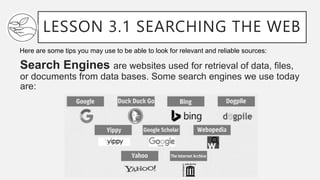
LESSON 3.1 SEARCHING THE WEB
Search Engines are websites used for retrieval of data, files,
or documents from data bases. Some search engines we use today
are:
Here are some tips you may use to be able to look for relevant and reliable sources:
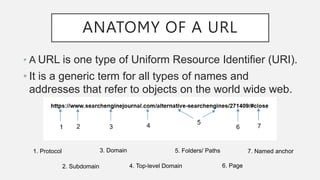
ANATOMY OF A URL
• A URL is one type of Uniform Resource Identifier (URI).
• It is a generic term for all types of names and
addresses that refer to objects on the world wide web.
1. Protocol
2. Subdomain
3. Domain
4. Top-level Domain
5. Folders/ Paths
6. Page
7. Named anchor
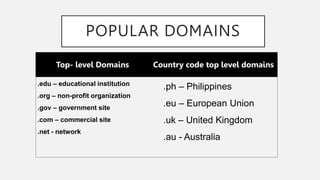
POPULAR DOMAINS
Top- level Domains Country code top level domains
.edu – educational institution
.org – non-profit organization
.gov – government site
.com – commercial site
.net - network
.ph – Philippines
.eu – European Union
.uk – United Kingdom
.au - Australia
SEARCH SKILLS AND TOOLS
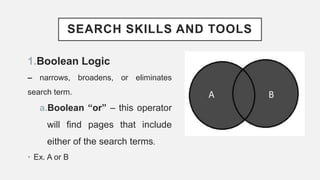
1.Boolean Logic
– narrows, broadens, or eliminates
search term.
a.Boolean “or” – this operator
will find pages that include
either of the search terms.
• Ex. A or B
SEARCH SKILLS AND TOOLS
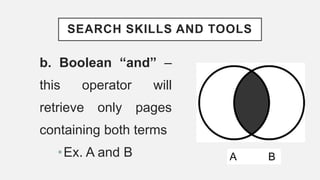
b. Boolean “and” –
this operator will
retrieve only pages
containing both terms
•Ex. A and B A B
SEARCH SKILLS AND TOOLS
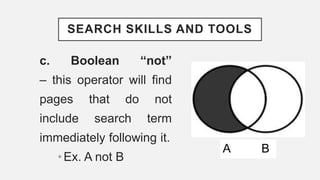
c. Boolean “not”
– this operator will find
pages that do not
include search term
immediately following it.
•Ex. A not B
A B
SEARCH SKILLS AND TOOLS
2. Phase Searching – is used to search for famous
quotes, proper names, recommendations, etc. It
encloses the phrase in quotation marks.
• Ex. “Jane Doe” “To be or not to be”
SEARCH SKILLS AND TOOLS
3. Plus (+) – indicates that the
word after the sign is a required
word must be found in search.
Example: +fire
SEARCH SKILLS AND TOOLS
4. Minus (–) sign – indicates to
exclude a word from your search that
is not required on the result.
Example: Jaguar speed –car
SEARCH SKILLS AND TOOLS
5. Ampersand (@) is used to
find social tags.
Example: @SteveJobs
SEARCH SKILLS AND TOOLS
6. Hashtag (#) is used to find
popular hashtags.
Example: #LawOfClassroom
SEARCH SKILLS AND TOOLS
7. Finding Documents – using the filetype refines
the search for documents on the web.
o filetype:pdf
o filetype:doc
o filetype:xls
•Ex. ICT in the Philippines pdf
SEARCH SKILLS AND TOOLS
8. Searching Site – the sites find
webpage from a website.
•Ex.: National Geographic information
in Australia
•Search: Australia site:
NationalGeographic.com
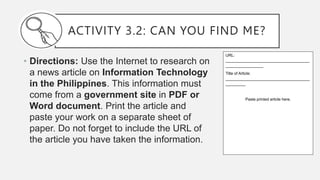
ACTIVITY 3.2: CAN YOU FIND ME?
• Directions: Use the Internet to research on
a news article on Information Technology
in the Philippines. This information must
come from a government site in PDF or
Word document. Print the article and
paste your work on a separate sheet of
paper. Do not forget to include the URL of
the article you have taken the information.
URL:
______________________________________
_________________
Title of Article:
______________________________________
_________
Paste printed article here.

3. EFFECTIVE ONLINE RESEARCH.pptx

  • 1.
    EFFECTIVE ONLINE RESEARCH Bythe end of this lesson, you are expected to: 1. Facilitate the practice in judging the credibility, value, and usefulness of researched materials. 2. Use the Internet as a tool for credible research and information gathering to best achieve specific objectives. Use the Internet as a tool for credible research and information gathering to best achieve specific class objectives or address situational challenges. (CS_ICT11/12-ICTPT-Ia-b-3)
  • 2.
    Direction: Write allyour answers in your activity notebook. 1.Using the Internet, try to search for your complete name. 2.Write down how many sites have featured your personal name and what is written about you. WHAT’S IN Activity 3.1: What’s In My Name?
  • 3.
    ANSWER THE FOLLOWING: •Whatother information are written about you? •Are the search results coming from reliable sources? Why? •Should these bits of information need to be posted or shown in public?
  • 4.
    LESSON 3.1 SEARCHINGTHE WEB Search Engines are websites used for retrieval of data, files, or documents from data bases. Some search engines we use today are: Here are some tips you may use to be able to look for relevant and reliable sources:
  • 5.
    ANATOMY OF AURL • A URL is one type of Uniform Resource Identifier (URI). • It is a generic term for all types of names and addresses that refer to objects on the world wide web. 1. Protocol 2. Subdomain 3. Domain 4. Top-level Domain 5. Folders/ Paths 6. Page 7. Named anchor
  • 6.
    POPULAR DOMAINS Top- levelDomains Country code top level domains .edu – educational institution .org – non-profit organization .gov – government site .com – commercial site .net - network .ph – Philippines .eu – European Union .uk – United Kingdom .au - Australia
  • 7.
    SEARCH SKILLS ANDTOOLS 1.Boolean Logic – narrows, broadens, or eliminates search term. a.Boolean “or” – this operator will find pages that include either of the search terms. • Ex. A or B
  • 8.
    SEARCH SKILLS ANDTOOLS b. Boolean “and” – this operator will retrieve only pages containing both terms •Ex. A and B A B
  • 9.
    SEARCH SKILLS ANDTOOLS c. Boolean “not” – this operator will find pages that do not include search term immediately following it. •Ex. A not B A B
  • 10.
    SEARCH SKILLS ANDTOOLS 2. Phase Searching – is used to search for famous quotes, proper names, recommendations, etc. It encloses the phrase in quotation marks. • Ex. “Jane Doe” “To be or not to be”
  • 11.
    SEARCH SKILLS ANDTOOLS 3. Plus (+) – indicates that the word after the sign is a required word must be found in search. Example: +fire
  • 12.
    SEARCH SKILLS ANDTOOLS 4. Minus (–) sign – indicates to exclude a word from your search that is not required on the result. Example: Jaguar speed –car
  • 13.
    SEARCH SKILLS ANDTOOLS 5. Ampersand (@) is used to find social tags. Example: @SteveJobs
  • 14.
    SEARCH SKILLS ANDTOOLS 6. Hashtag (#) is used to find popular hashtags. Example: #LawOfClassroom
  • 15.
    SEARCH SKILLS ANDTOOLS 7. Finding Documents – using the filetype refines the search for documents on the web. o filetype:pdf o filetype:doc o filetype:xls •Ex. ICT in the Philippines pdf
  • 16.
    SEARCH SKILLS ANDTOOLS 8. Searching Site – the sites find webpage from a website. •Ex.: National Geographic information in Australia •Search: Australia site: NationalGeographic.com
  • 17.
    ACTIVITY 3.2: CANYOU FIND ME? • Directions: Use the Internet to research on a news article on Information Technology in the Philippines. This information must come from a government site in PDF or Word document. Print the article and paste your work on a separate sheet of paper. Do not forget to include the URL of the article you have taken the information. URL: ______________________________________ _________________ Title of Article: ______________________________________ _________ Paste printed article here.

Editor's Notes

  • #5 There are billions of information on the web and it is a challenge for us to truly find which information is reliable and relevant. Here are some tips you may use to be able to look for relevant and reliable sources:
  • #6 Knowing the URL endings will give you clues to who is sponsoring the website and help evaluate the sources.