Input & Output Devices
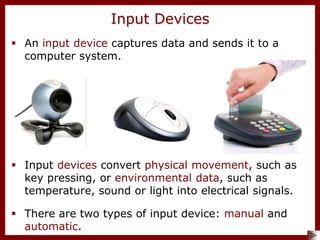
 An input device captures data and sends it to a
computer system.
 Input devices convert physical movement, such as
key pressing, or environmental data, such as
temperature, sound or light into electrical signals.
Input Devices
 There are two types of input device: manual and
automatic.
Manual Input Devices
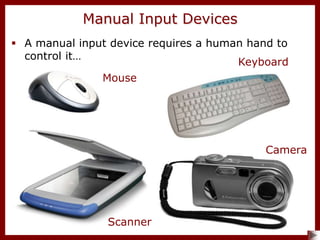
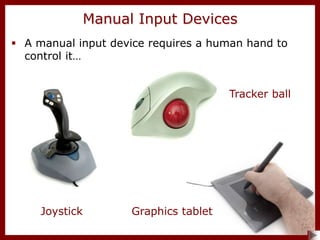
 A manual input device requires a human hand to
control it…
Mouse
Keyboard
Scanner
Camera
Manual Input Devices
Tracker ball
Joystick Graphics tablet
 A manual input device requires a human hand to
control it…
Manual Input Devices
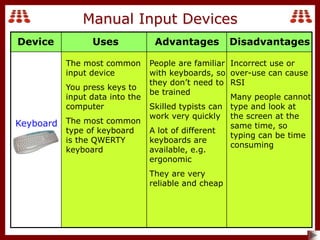
Keyboard
The most common
input device
You press keys to
input data into the
computer
The most common
type of keyboard
is the QWERTY
keyboard
People are familiar
with keyboards, so
they don’t need to
be trained
Skilled typists can
work very quickly
A lot of different
keyboards are
available, e.g.
ergonomic
They are very
reliable and cheap
Incorrect use or
over-use can cause
RSI
Many people cannot
type and look at
the screen at the
same time, so
typing can be time
consuming
Uses Advantages Disadvantages
Device
Manual Input Devices
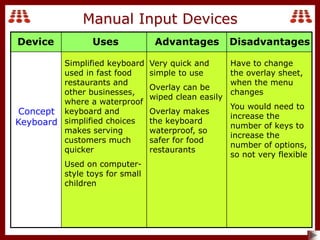
Concept
Keyboard
Simplified keyboard
used in fast food
restaurants and
other businesses,
where a waterproof
keyboard and
simplified choices
makes serving
customers much
quicker
Used on computer-
style toys for small
children
Very quick and
simple to use
Overlay can be
wiped clean easily
Overlay makes
the keyboard
waterproof, so
safer for food
restaurants
Have to change
the overlay sheet,
when the menu
changes
You would need to
increase the
number of keys to
increase the
number of options,
so not very flexible
Uses Advantages Disadvantages
Device
Manual Input Devices
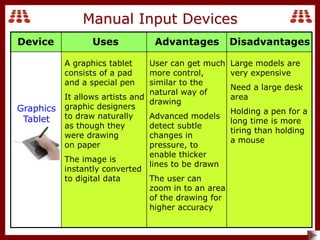
Graphics
Tablet
A graphics tablet
consists of a pad
and a special pen
It allows artists and
graphic designers
to draw naturally
as though they
were drawing
on paper
The image is
instantly converted
to digital data
User can get much
more control,
similar to the
natural way of
drawing
Advanced models
detect subtle
changes in
pressure, to
enable thicker
lines to be drawn
The user can
zoom in to an area
of the drawing for
higher accuracy
Large models are
very expensive
Need a large desk
area
Holding a pen for a
long time is more
tiring than holding
a mouse
Uses Advantages Disadvantages
Device
Manual Input Devices
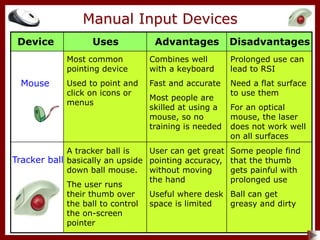
Mouse
Most common
pointing device
Used to point and
click on icons or
menus
Combines well
with a keyboard
Fast and accurate
Most people are
skilled at using a
mouse, so no
training is needed
Prolonged use can
lead to RSI
Need a flat surface
to use them
For an optical
mouse, the laser
does not work well
on all surfaces
Tracker ball
A tracker ball is
basically an upside
down ball mouse.
The user runs
their thumb over
the ball to control
the on-screen
pointer
User can get great
pointing accuracy,
without moving
the hand
Useful where desk
space is limited
Some people find
that the thumb
gets painful with
prolonged use
Ball can get
greasy and dirty
Uses Advantages Disadvantages
Device
Manual Input Devices
Uses Advantages Disadvantages
Device
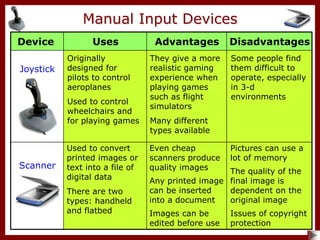
Scanner
Used to convert
printed images or
text into a file of
digital data
There are two
types: handheld
and flatbed
Even cheap
scanners produce
quality images
Any printed image
can be inserted
into a document
Images can be
edited before use
Pictures can use a
lot of memory
The quality of the
final image is
dependent on the
original image
Issues of copyright
protection
Joystick
Originally
designed for
pilots to control
aeroplanes
Used to control
wheelchairs and
for playing games
They give a more
realistic gaming
experience when
playing games
such as flight
simulators
Many different
types available
Some people find
them difficult to
operate, especially
in 3-d
environments
Manual Input Devices
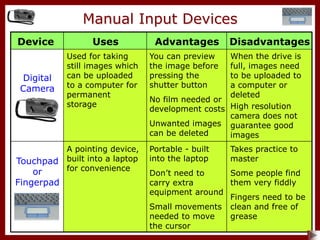
Digital
Camera
Used for taking
still images which
can be uploaded
to a computer for
permanent
storage
You can preview
the image before
pressing the
shutter button
No film needed or
development costs
Unwanted images
can be deleted
When the drive is
full, images need
to be uploaded to
a computer or
deleted
High resolution
camera does not
guarantee good
images
Touchpad
or
Fingerpad
A pointing device,
built into a laptop
for convenience
Portable - built
into the laptop
Don’t need to
carry extra
equipment around
Small movements
needed to move
the cursor
Takes practice to
master
Some people find
them very fiddly
Fingers need to be
clean and free of
grease
Uses Advantages Disadvantages
Device
Automatic Input Devices
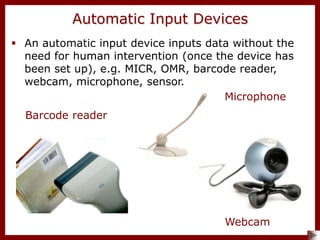
 An automatic input device inputs data without the
need for human intervention (once the device has
been set up), e.g. MICR, OMR, barcode reader,
webcam, microphone, sensor.
Microphone
Webcam
Barcode reader
Automatic Input Devices
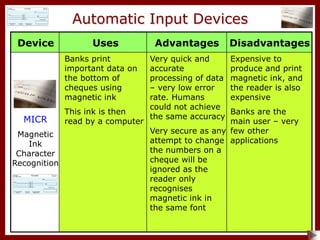
MICR
Magnetic
Ink
Character
Recognition
Banks print
important data on
the bottom of
cheques using
magnetic ink
This ink is then
read by a computer
Very quick and
accurate
processing of data
– very low error
rate. Humans
could not achieve
the same accuracy
Very secure as any
attempt to change
the numbers on a
cheque will be
ignored as the
reader only
recognises
magnetic ink in
the same font
Expensive to
produce and print
magnetic ink, and
the reader is also
expensive
Banks are the
main user – very
few other
applications
Uses Advantages Disadvantages
Device
Automatic Input Devices
OMR
Optical
Mark
Recognition
Used when you
mark the numbers
with a pencil on
a lottery ticket
Also used to mark
multiple choice
exam papers, and
paper-based school
registers
Very fast method
of reading data,
which reduces
queuing time for
lottery tickets
More accurate
than human
data entry
Sometimes
incomplete marks
are not read
correctly
Only pre-prepared
forms can be
scanned into the
computer
Uses Advantages Disadvantages
Device
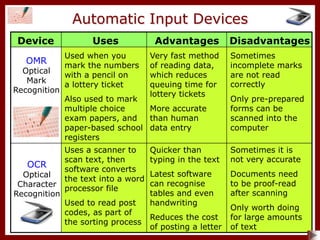
OCR
Optical
Character
Recognition
Uses a scanner to
scan text, then
software converts
the text into a word
processor file
Used to read post
codes, as part of
the sorting process
Quicker than
typing in the text
Latest software
can recognise
tables and even
handwriting
Reduces the cost
of posting a letter
Sometimes it is
not very accurate
Documents need
to be proof-read
after scanning
Only worth doing
for large amounts
of text
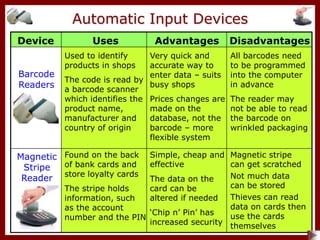
Automatic Input Devices
Barcode
Readers
Used to identify
products in shops
The code is read by
a barcode scanner
which identifies the
product name,
manufacturer and
country of origin
Very quick and
accurate way to
enter data – suits
busy shops
Prices changes are
made on the
database, not the
barcode – more
flexible system
All barcodes need
to be programmed
into the computer
in advance
The reader may
not be able to read
the barcode on
wrinkled packaging
Uses Advantages Disadvantages
Device
Magnetic
Stripe
Reader
Found on the back
of bank cards and
store loyalty cards
The stripe holds
information, such
as the account
number and the PIN
Simple, cheap and
effective
The data on the
card can be
altered if needed
‘Chip n’ Pin’ has
increased security
Magnetic stripe
can get scratched
Not much data
can be stored
Thieves can read
data on cards then
use the cards
themselves
Uses Advantages Disadvantages
Device
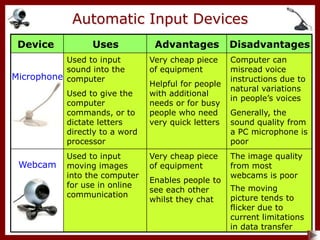
Microphone
Used to input
sound into the
computer
Used to give the
computer
commands, or to
dictate letters
directly to a word
processor
Very cheap piece
of equipment
Helpful for people
with additional
needs or for busy
people who need
very quick letters
Computer can
misread voice
instructions due to
natural variations
in people’s voices
Generally, the
sound quality from
a PC microphone is
poor
Automatic Input Devices
Webcam
Used to input
moving images
into the computer
for use in online
communication
Very cheap piece
of equipment
Enables people to
see each other
whilst they chat
The image quality
from most
webcams is poor
The moving
picture tends to
flicker due to
current limitations
in data transfer
Output Devices
Output Devices
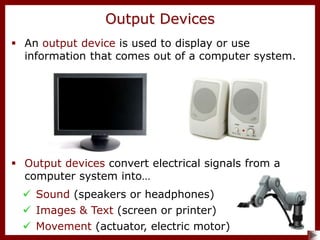
 An output device is used to display or use
information that comes out of a computer system.
 Output devices convert electrical signals from a
computer system into…
 Sound (speakers or headphones)
 Images & Text (screen or printer)
 Movement (actuator, electric motor)
Output Devices
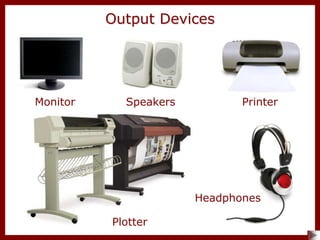
Monitor Speakers
Plotter
Headphones
Printer
Output Devices
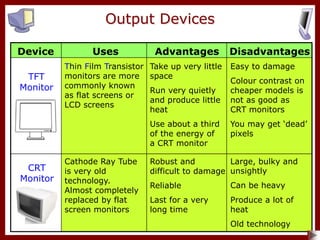
TFT
Monitor
Thin Film Transistor
monitors are more
commonly known
as flat screens or
LCD screens
Take up very little
space
Run very quietly
and produce little
heat
Use about a third
of the energy of
a CRT monitor
Easy to damage
Colour contrast on
cheaper models is
not as good as
CRT monitors
You may get ‘dead’
pixels
Uses Advantages Disadvantages
Device
CRT
Monitor
Cathode Ray Tube
is very old
technology.
Almost completely
replaced by flat
screen monitors
Robust and
difficult to damage
Reliable
Last for a very
long time
Large, bulky and
unsightly
Can be heavy
Produce a lot of
heat
Old technology
Output Devices
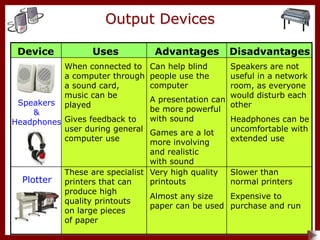
Speakers
&
Headphones
When connected to
a computer through
a sound card,
music can be
played
Gives feedback to
user during general
computer use
Can help blind
people use the
computer
A presentation can
be more powerful
with sound
Games are a lot
more involving
and realistic
with sound
Speakers are not
useful in a network
room, as everyone
would disturb each
other
Headphones can be
uncomfortable with
extended use
Uses Advantages Disadvantages
Device
Plotter
These are specialist
printers that can
produce high
quality printouts
on large pieces
of paper
Very high quality
printouts
Almost any size
paper can be used
Slower than
normal printers
Expensive to
purchase and run
Printers
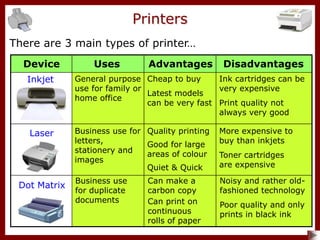
There are 3 main types of printer…
Dot Matrix
Laser
Inkjet
Uses Advantages Disadvantages
Device
General purpose
use for family or
home office
Cheap to buy
Latest models
can be very fast
Ink cartridges can be
very expensive
Print quality not
always very good
Business use for
letters,
stationery and
images
Quality printing
Good for large
areas of colour
Quiet & Quick
More expensive to
buy than inkjets
Toner cartridges
are expensive
Business use
for duplicate
documents
Can make a
carbon copy
Can print on
continuous
rolls of paper
Noisy and rather old-
fashioned technology
Poor quality and only
prints in black ink
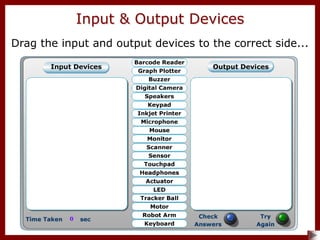
Drag the input and output devices to the correct side...
Input & Output Devices
Keyword Activity
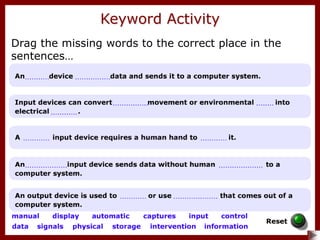
Drag the missing words to the correct place in the
sentences…
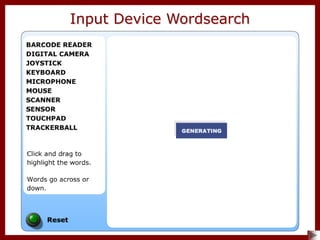
Input Device Wordsearch
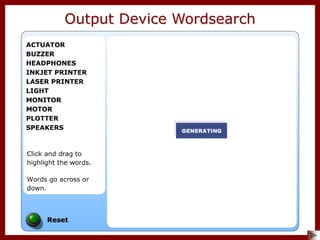
Output Device Wordsearch
Input Device Crossword
Output Device Crossword
Quiz
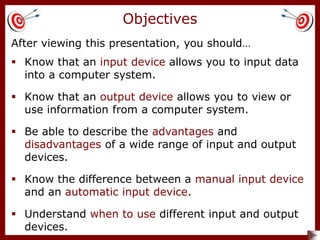
After viewing this presentation, you should…
 Know that an input device allows you to input data
into a computer system.
 Understand when to use different input and output
devices.
 Know that an output device allows you to view or
use information from a computer system.
 Be able to describe the advantages and
disadvantages of a wide range of input and output
devices.
Objectives
 Know the difference between a manual input device
and an automatic input device.
End of Show
All images are for viewing purposes only.
Copyright 2008 © Smart Presentations Ltd.
and its licensors. All rights reserved.

2-input-output-devices.ppt

  • 1.
  • 2.
     An inputdevice captures data and sends it to a computer system.  Input devices convert physical movement, such as key pressing, or environmental data, such as temperature, sound or light into electrical signals. Input Devices  There are two types of input device: manual and automatic.
  • 3.
    Manual Input Devices A manual input device requires a human hand to control it… Mouse Keyboard Scanner Camera
  • 4.
    Manual Input Devices Trackerball Joystick Graphics tablet  A manual input device requires a human hand to control it…
  • 5.
    Manual Input Devices Keyboard Themost common input device You press keys to input data into the computer The most common type of keyboard is the QWERTY keyboard People are familiar with keyboards, so they don’t need to be trained Skilled typists can work very quickly A lot of different keyboards are available, e.g. ergonomic They are very reliable and cheap Incorrect use or over-use can cause RSI Many people cannot type and look at the screen at the same time, so typing can be time consuming Uses Advantages Disadvantages Device
  • 6.
    Manual Input Devices Concept Keyboard Simplifiedkeyboard used in fast food restaurants and other businesses, where a waterproof keyboard and simplified choices makes serving customers much quicker Used on computer- style toys for small children Very quick and simple to use Overlay can be wiped clean easily Overlay makes the keyboard waterproof, so safer for food restaurants Have to change the overlay sheet, when the menu changes You would need to increase the number of keys to increase the number of options, so not very flexible Uses Advantages Disadvantages Device
  • 7.
    Manual Input Devices Graphics Tablet Agraphics tablet consists of a pad and a special pen It allows artists and graphic designers to draw naturally as though they were drawing on paper The image is instantly converted to digital data User can get much more control, similar to the natural way of drawing Advanced models detect subtle changes in pressure, to enable thicker lines to be drawn The user can zoom in to an area of the drawing for higher accuracy Large models are very expensive Need a large desk area Holding a pen for a long time is more tiring than holding a mouse Uses Advantages Disadvantages Device
  • 8.
    Manual Input Devices Mouse Mostcommon pointing device Used to point and click on icons or menus Combines well with a keyboard Fast and accurate Most people are skilled at using a mouse, so no training is needed Prolonged use can lead to RSI Need a flat surface to use them For an optical mouse, the laser does not work well on all surfaces Tracker ball A tracker ball is basically an upside down ball mouse. The user runs their thumb over the ball to control the on-screen pointer User can get great pointing accuracy, without moving the hand Useful where desk space is limited Some people find that the thumb gets painful with prolonged use Ball can get greasy and dirty Uses Advantages Disadvantages Device
  • 9.
    Manual Input Devices UsesAdvantages Disadvantages Device Scanner Used to convert printed images or text into a file of digital data There are two types: handheld and flatbed Even cheap scanners produce quality images Any printed image can be inserted into a document Images can be edited before use Pictures can use a lot of memory The quality of the final image is dependent on the original image Issues of copyright protection Joystick Originally designed for pilots to control aeroplanes Used to control wheelchairs and for playing games They give a more realistic gaming experience when playing games such as flight simulators Many different types available Some people find them difficult to operate, especially in 3-d environments
  • 10.
    Manual Input Devices Digital Camera Usedfor taking still images which can be uploaded to a computer for permanent storage You can preview the image before pressing the shutter button No film needed or development costs Unwanted images can be deleted When the drive is full, images need to be uploaded to a computer or deleted High resolution camera does not guarantee good images Touchpad or Fingerpad A pointing device, built into a laptop for convenience Portable - built into the laptop Don’t need to carry extra equipment around Small movements needed to move the cursor Takes practice to master Some people find them very fiddly Fingers need to be clean and free of grease Uses Advantages Disadvantages Device
  • 11.
    Automatic Input Devices An automatic input device inputs data without the need for human intervention (once the device has been set up), e.g. MICR, OMR, barcode reader, webcam, microphone, sensor. Microphone Webcam Barcode reader
  • 12.
    Automatic Input Devices MICR Magnetic Ink Character Recognition Banksprint important data on the bottom of cheques using magnetic ink This ink is then read by a computer Very quick and accurate processing of data – very low error rate. Humans could not achieve the same accuracy Very secure as any attempt to change the numbers on a cheque will be ignored as the reader only recognises magnetic ink in the same font Expensive to produce and print magnetic ink, and the reader is also expensive Banks are the main user – very few other applications Uses Advantages Disadvantages Device
  • 13.
    Automatic Input Devices OMR Optical Mark Recognition Usedwhen you mark the numbers with a pencil on a lottery ticket Also used to mark multiple choice exam papers, and paper-based school registers Very fast method of reading data, which reduces queuing time for lottery tickets More accurate than human data entry Sometimes incomplete marks are not read correctly Only pre-prepared forms can be scanned into the computer Uses Advantages Disadvantages Device OCR Optical Character Recognition Uses a scanner to scan text, then software converts the text into a word processor file Used to read post codes, as part of the sorting process Quicker than typing in the text Latest software can recognise tables and even handwriting Reduces the cost of posting a letter Sometimes it is not very accurate Documents need to be proof-read after scanning Only worth doing for large amounts of text
  • 14.
    Automatic Input Devices Barcode Readers Usedto identify products in shops The code is read by a barcode scanner which identifies the product name, manufacturer and country of origin Very quick and accurate way to enter data – suits busy shops Prices changes are made on the database, not the barcode – more flexible system All barcodes need to be programmed into the computer in advance The reader may not be able to read the barcode on wrinkled packaging Uses Advantages Disadvantages Device Magnetic Stripe Reader Found on the back of bank cards and store loyalty cards The stripe holds information, such as the account number and the PIN Simple, cheap and effective The data on the card can be altered if needed ‘Chip n’ Pin’ has increased security Magnetic stripe can get scratched Not much data can be stored Thieves can read data on cards then use the cards themselves
  • 15.
    Uses Advantages Disadvantages Device Microphone Usedto input sound into the computer Used to give the computer commands, or to dictate letters directly to a word processor Very cheap piece of equipment Helpful for people with additional needs or for busy people who need very quick letters Computer can misread voice instructions due to natural variations in people’s voices Generally, the sound quality from a PC microphone is poor Automatic Input Devices Webcam Used to input moving images into the computer for use in online communication Very cheap piece of equipment Enables people to see each other whilst they chat The image quality from most webcams is poor The moving picture tends to flicker due to current limitations in data transfer
  • 16.
  • 17.
    Output Devices  Anoutput device is used to display or use information that comes out of a computer system.  Output devices convert electrical signals from a computer system into…  Sound (speakers or headphones)  Images & Text (screen or printer)  Movement (actuator, electric motor)
  • 18.
  • 19.
    Output Devices TFT Monitor Thin FilmTransistor monitors are more commonly known as flat screens or LCD screens Take up very little space Run very quietly and produce little heat Use about a third of the energy of a CRT monitor Easy to damage Colour contrast on cheaper models is not as good as CRT monitors You may get ‘dead’ pixels Uses Advantages Disadvantages Device CRT Monitor Cathode Ray Tube is very old technology. Almost completely replaced by flat screen monitors Robust and difficult to damage Reliable Last for a very long time Large, bulky and unsightly Can be heavy Produce a lot of heat Old technology
  • 20.
    Output Devices Speakers & Headphones When connectedto a computer through a sound card, music can be played Gives feedback to user during general computer use Can help blind people use the computer A presentation can be more powerful with sound Games are a lot more involving and realistic with sound Speakers are not useful in a network room, as everyone would disturb each other Headphones can be uncomfortable with extended use Uses Advantages Disadvantages Device Plotter These are specialist printers that can produce high quality printouts on large pieces of paper Very high quality printouts Almost any size paper can be used Slower than normal printers Expensive to purchase and run
  • 21.
    Printers There are 3main types of printer… Dot Matrix Laser Inkjet Uses Advantages Disadvantages Device General purpose use for family or home office Cheap to buy Latest models can be very fast Ink cartridges can be very expensive Print quality not always very good Business use for letters, stationery and images Quality printing Good for large areas of colour Quiet & Quick More expensive to buy than inkjets Toner cartridges are expensive Business use for duplicate documents Can make a carbon copy Can print on continuous rolls of paper Noisy and rather old- fashioned technology Poor quality and only prints in black ink
  • 22.
    Drag the inputand output devices to the correct side... Input & Output Devices
  • 23.
    Keyword Activity Drag themissing words to the correct place in the sentences…
  • 24.
  • 25.
  • 26.
  • 27.
  • 28.
  • 29.
    After viewing thispresentation, you should…  Know that an input device allows you to input data into a computer system.  Understand when to use different input and output devices.  Know that an output device allows you to view or use information from a computer system.  Be able to describe the advantages and disadvantages of a wide range of input and output devices. Objectives  Know the difference between a manual input device and an automatic input device.
  • 30.
    End of Show Allimages are for viewing purposes only. Copyright 2008 © Smart Presentations Ltd. and its licensors. All rights reserved.