Graph Databases
• Graphdatabases are an odd fish in the NoSQL
pond.
• Most NoSQL databases were inspired by the
need to run on clusters, which led to
aggregate-oriented data models of large
records with simple connections.
• Graph databases are motivated by a different
frustration with relational databases and thus
have an opposite model—small records with
complex interconnections, something like
3.
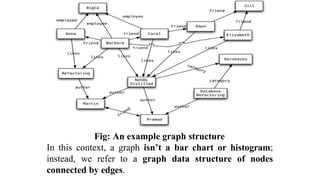
Fig: An examplegraph structure
In this context, a graph isn’t a bar chart or histogram;
instead, we refer to a graph data structure of nodes
connected by edges.
4.
• In Fig:we have a web of information whose nodes are
very small (nothing more than a name) but there is
a rich structure of interconnections between them.
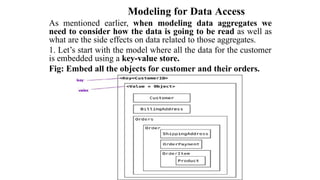
With this structure, we can ask questions such as
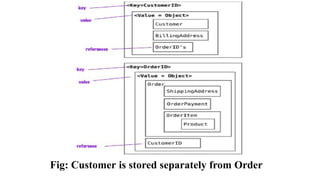
“find the books in the Databases category that
are written by someone whom a friend of mine
likes.”
• Graph databases are ideal for capturing any data
consisting of complex relationships such as
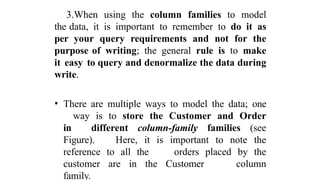
social networks, product preferences, or
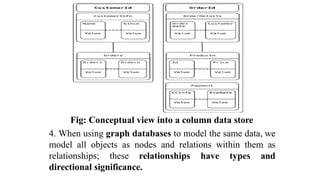
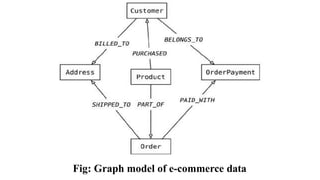
eligibility rules.
• The fundamental data model of a graph database is
very simple: nodes connected by edges (also
called arcs).
5.
Difference between Graph& Relational databases
• Although relational databases can implement
relationships using foreign keys, the joins required
to navigate around can get quite expensive—
which means performance is often poor for
highly connected data models.
• Graph databases make traversal along the
relationships very cheap. A large part of this
is because graph databases shift most of the work
of navigating relationships from query time to
insert time. This naturally pays off for
situations where querying performance is more
important than insert speed.
6.
• The emphasison relationships makes graph
databases very different from aggregate-
oriented databases.
• Graph databases are more likely to run on a
single server rather than distributed across
clusters.
• ACID transactions need to cover multiple
nodes and edges to maintain consistency.
• The only thing graph database have in common
with aggregate-oriented databases is their
rejection of the relational model.
7.
Schemaless Databases
• Acommon theme across all the forms of NoSQL
databases is that they are schemaless.
• When you want to store data in a relational
database, you first have to define a schema
—a defined structure for the database which says
what tables exist, which columns exist, and
what data types each column can hold.
• Before you store some data, you have to have the
schema defined for it in relational database.
8.
With NoSQL databases,way of storing data
• A key-value store allows you to store any data you
like under a key.
• A document database effectively does the same
thing, since it makes no restrictions on
the structure of the documents you store.
• Column-family databases allow you to store any
data under any column you like.
• Graph databases allow you to freely add new edges
and freely add properties to nodes and edges as
you wish.
9.
With a schema:
•You have to figure out in advance what you need to
store, but that can be hard to do.
Without a schema:
• You can easily store whatever you need.
• This allows you to easily change your data storage as
you learn more about your project.
• You can easily add new things as you discover them.
• If you find you don’t need some things anymore, you
can just stop storing them, without worrying
about losing old data as you would if you delete
columns in a relational schema.
10.
• A schemaputs all rows of a table into a
straightjacket, which becomes awkward if you
have different kinds of data in different rows.
You either end up with lots of columns that are
usually null (a sparse table), or you end up
with meaningless columns like custom
column 4.
• A schemaless store also makes it easier to deal
with nonuniform data: data where each record
has a different set of fields. It allows each
record to contain just what it needs—no more,
no less.
11.
Problems in Schemaless:
•If you are storing some data and displaying it in
a report as a simple list of fieldName: value
lines then a schema is only going to get in the
way.
• But usually we do with our data more than this,
and we do it with programs that need to know
that the billing address is called
billingAddress and not addressForBilling
and that the quantify field is going to be an
integer 5 and not five.
12.
Fact is thatwhenever we write a program that accesses data,
that program almost always relies on some form of implicit
schema. Unless it just says something like
//pseudo code
foreach (Record r in records)
{
foreach (Field f in r.fields)
{ print (f.name, f.value)
}
}
Here it will assume that certain field names are present and
carry data with a certain meaning, and assume something
about the type of data stored within that field.
13.
• Programs arenot humans; they cannot read “qty” and conclude
that, that must be the same as “quantity”. So, however schemaless
our database is, there is usually an implicit schema present.
Having the implicit schema in the application code results in some
problems.
• In order to understand what data is present you have to dig into
the application code.
• The database remains ignorant of the schema—it can’t use the
schema to help it decide how to store and retrieve data efficiently. It
can’t apply its own validations upon that data to ensure that
different applications don’t manipulate data in an inconsistent way.
These are the reasons why relational databases have a fixed schema.
• Schemaless database shifts the schema into the application code
that accesses it. This becomes problematic if multiple
applications, developed by different people, access the same
database.
14.
These problems canbe reduced with a couple of
approaches:
• Encapsulate all database interaction within a single
application and integrate it with other applications
using web services.
• Another approach is to clearly define different areas of an
aggregate for access by different applications.
These could be different sections in a document
database or different column families in column-family
database.
Relational schemas can also be changed at any time with
standard SQL commands. If necessary, you can create new
columns in an ad-hoc way to store nonuniform data. We have
only rarely seen this done.
Most of the time, however, nonuniformity in your data is a
good reason to favor a schemaless database.
15.
Materialized Views
• Whenwe talked about aggregate-oriented data models,
we stressed their advantages. If you want to
access orders, it’s useful to have all the data
for an order contained in a single aggregate that
can be stored and accessed as a unit.
• But aggregate-orientation has a corresponding
disadvantage: What happens if a product
manager wants to know how much a particular
item has sold over the last couple of weeks?
• Now the aggregate-orientation works against you,
forcing you to potentially read every order in
the database to answer the question. You can
reduce this burden by building an index on the
product, but you’re still working against the
aggregate structure.
16.
• Relational databasessupport accessing data in
different ways. Furthermore, they provide
a convenient mechanism that allows you to look
at data differently from the way it’s stored—
views.
View:
• A view is like a relational table (it is a relation) but
it’s defined by computation over the base
tables. When you access a view, the database
computes the data in the view—a handy form of
encapsulation.
• Views provide a mechanism to hide from the client
whether data is derived data or base data.
17.
Materialized Views:
• Tocope with this, materialized views were
invented, which are views that are computed
in advance and cached on disk. Materialized
views are effective for data that is read
heavily but can stand being somewhat stale.
• Although NoSQL databases don’t have views,
they may have precomputed and cached
queries, and they reuse the term
“materialized view” to describe them.
Often, NoSQL databases create materialized
views using a map-reduce
computation.
18.
There are twostrategies to building a materialized view
• The first is the eager approach where you update
the materialized view at the same time you
update the base data for it. In this case,
adding an order would also update the purchase
history aggregates for each product.
• This approach is good when you have more frequent
reads of the materialized view than you have
writes and you want the materialized views to
be as fresh as possible. The application
database approach is valuable here as it makes
it easier to ensure that any updates to base data
also update materialized views.
• If you don’t want to pay that overhead on each
update, you can run batch jobs to update
the materialized views at regular intervals as
per requirements.
19.
• You canbuild materialized views outside of the
database by reading the data, computing the
view, and saving it back to the database.
• More often databases will support building
materialized views themselves.
• In this case, you provide the computation that needs
to be done, and the database executes
the computation when needed according to
some parameters that you configure. This is
particularly handy for eager updates of views with
incremental map-reduce.
20.
Modeling for DataAccess
As mentioned earlier, when modeling data aggregates we
need to consider how the data is going to be read as well as
what are the side effects on data related to those aggregates.
1. Let’s start with the model where all the data for the customer
is embedded using a key-value store.
Fig: Embed all the objects for customer and their orders.
21.
• In thisscenario, the application can read the
customer’s information and all the related data
by using the key.
• If the requirements are to read the orders or the
products sold in each order, the whole object has
to be read and then parsed on the client side
to build the results.
• When references are needed, we could switch to
document stores and then query inside
the documents, or even change the data for the
key-value store to split the value object into
Customer and Order objects and then
maintain these objects’ references to each
other.
22.
With the references(see Figure), we can now find the orders independently from the
Customer, and with the orderId reference in the Customer we can find all Orders for the
Customer.
# Customer object
{ "customerId": 1,
"customer": {
"name": "Martin",
"billingAddress": [{"city": "Chicago"}],
"payment": [{"type": "debit","ccinfo": "1000-1000-1000-1000"}],
"orders":[{"orderId":99}]
}
}
# Order object
{ "customerId": 1,
"orderId": 99,
"order":{
"orderDate":"Nov-20-2011",
"orderItems":[{"productId":27, "price": 32.45}],
"orderPayment":[{"ccinfo":"1000-1000-1000-1000",
"txnId":"abelif879rft"}], "shippingAddress":
{"city":"Chicago"} } }
2. In documentstores, since we can query inside documents, removing references
to Orders from the Customer object is possible. This change allows us to not
update the Customer object when new orders are placed by the Customer.
# Customer object
{ "customerId": 1,
"name": "Martin",
"billingAddress": [{"city": "Chicago"}],
"payment": [
{"type": "debit",
"ccinfo": "1000-1000-1000-1000"}
]
}
#Order object
{ "orderId": 99,
"customerId": 1,
"orderDate":"Nov-20-2011",
"orderItems":[{"productId":27, "price": 32.45}],
"orderPayment":[{"ccinfo":"1000-1000-1000-1000",
"txnId":"abelif879rft"}], "shippingAddress":
{"city":"Chicago"}
}
25.
• Since documentdata stores allow you to query by
attributes inside the document, searches such
as “find all orders that include the
Refactoring Databases product” are possible, but the
decision to create an aggregate of items and orders
they belong to is not based on the database’s
query capability but on the read optimization
desired by the application.
26.
3.When using thecolumn families to model
the data, it is important to remember to do it as
per your query requirements and not for the
purpose of writing; the general rule is to make
it easy to query and denormalize the data during
write.
• There are multiple ways to model the data; one
way is to store the Customer and Order
in different column-family families (see
Figure). Here, it is important to note the
reference to all the orders placed by the
customer are in the Customer column
family.
27.
Fig: Conceptual viewinto a column data store
4. When using graph databases to model the same data, we
model all objects as nodes and relations within them as
relationships; these relationships have types and
directional significance.
28.
• Each nodehas independent relationships with other
nodes. These relationships have names
like PURCHASED, PAID_WITH, or
BELONGS_TO (see
Figure); these relationship names let you traverse
the graph.
• Let’s say you want to find all the Customers who
PURCHASED a product with the
name Refactoring Database. All we need to
do is query for the product node
Refactoring Databases and look for all the
Customers with the incoming PURCHASED
relationship.
Key Points
• Aggregate-orienteddatabases make inter-aggregate
relationships more difficult to handle than
intra- aggregate relationships.
• Graph databases organize data into node and edge
graphs; they work best for data that has
complex relationship structures.
• Schemaless databases allow you to freely add fields
to records, but there is usually an implicit
schema expected by users of the data.
• Aggregate-oriented databases often compute
materialized views to provide data
organized differently from their primary
aggregates. This is often done with map-reduce
computations.

![With the references (see Figure), we can now find the orders independently from the
Customer, and with the orderId reference in the Customer we can find all Orders for the
Customer.
# Customer object
{ "customerId": 1,
"customer": {
"name": "Martin",
"billingAddress": [{"city": "Chicago"}],
"payment": [{"type": "debit","ccinfo": "1000-1000-1000-1000"}],
"orders":[{"orderId":99}]
}
}
# Order object
{ "customerId": 1,
"orderId": 99,
"order":{
"orderDate":"Nov-20-2011",
"orderItems":[{"productId":27, "price": 32.45}],
"orderPayment":[{"ccinfo":"1000-1000-1000-1000",
"txnId":"abelif879rft"}], "shippingAddress":
{"city":"Chicago"} } }](https://image.slidesharecdn.com/graphdatabases-251212111854-b52c4ebb/85/GRAPH-DATABASES-pptxDWDWDWDWDWDADASFDSAF-22-320.jpg)
![2. In document stores, since we can query inside documents, removing references
to Orders from the Customer object is possible. This change allows us to not
update the Customer object when new orders are placed by the Customer.
# Customer object
{ "customerId": 1,
"name": "Martin",
"billingAddress": [{"city": "Chicago"}],
"payment": [
{"type": "debit",
"ccinfo": "1000-1000-1000-1000"}
]
}
#Order object
{ "orderId": 99,
"customerId": 1,
"orderDate":"Nov-20-2011",
"orderItems":[{"productId":27, "price": 32.45}],
"orderPayment":[{"ccinfo":"1000-1000-1000-1000",
"txnId":"abelif879rft"}], "shippingAddress":
{"city":"Chicago"}
}](https://image.slidesharecdn.com/graphdatabases-251212111854-b52c4ebb/85/GRAPH-DATABASES-pptxDWDWDWDWDWDADASFDSAF-24-320.jpg)


![[DSC Europe 25] Gordana Milutinovic Dumbelovic - From Insight to Oversight: A...](https://cdn.slidesharecdn.com/ss_thumbnails/t7dkjsfxqwwzceropjv4-gordana-milutinovicdumbelovic-from-insight-to-oversight-ai-driven-power-bi-moni-260119121559-9e0bf11b-thumbnail.jpg?width=640&height=640&fit=bounds)
![[DSC Europe 25] Harshvardhan Jain - From Pre-Trained to Purpose-Built: Fine-T...](https://cdn.slidesharecdn.com/ss_thumbnails/zru4zmiseku5tgvu2dgw-harshvardhan-jain-from-pre-trained-to-purpose-built-fine-tuning-llms-for-high-i-260119101520-8335585f-thumbnail.jpg?width=640&height=640&fit=bounds)

![[DSC Europe 25] Mikhail Rozhkov - AI Product Canvas: From Business Goals to T...](https://cdn.slidesharecdn.com/ss_thumbnails/d53doddtpgfqivmzqel6-mikhail-rozhkov-ai-product-canvas-v1-260121115910-9dd517a7-thumbnail.jpg?width=640&height=640&fit=bounds)


![[DSC Europe 25] Egor Krasheninnikov - The Control Stack: Building Guardrails ...](https://cdn.slidesharecdn.com/ss_thumbnails/3lzcz7hxqmo51mtalv4u-the-control-stack-260119101520-ea90841a-thumbnail.jpg?width=640&height=640&fit=bounds)
![[DSC Europe 25] Dubravko Culibrk - Deep Learning for Mammography.pptx](https://cdn.slidesharecdn.com/ss_thumbnails/yiscimuktacgqoiu4dkp-deep-learning-for-mammography-260119121559-aad59182-thumbnail.jpg?width=640&height=640&fit=bounds)

![[DSC Europe 25] Borko Kozomora - Optimizing business workflows with advances ...](https://cdn.slidesharecdn.com/ss_thumbnails/hbgekyb0txw0xpo4yfml-borko-kozomora-leading-ai-transformation-260122103838-cc29ee38-thumbnail.jpg?width=640&height=640&fit=bounds)
![[DSC Europe 25] Josip Saban - Career building for data professionals.pptx](https://cdn.slidesharecdn.com/ss_thumbnails/zroflcttkm1vmli0txea-josip-saban-career-building-for-data-professionals-260123083019-587cdb8c-thumbnail.jpg?width=640&height=640&fit=bounds)
![[DSC Europe 25] Milovan Jovicic - Beyond AI's Reach: The Enduring Value of Ev...](https://cdn.slidesharecdn.com/ss_thumbnails/pyeij0hurgwq5jugmtnv-2-milovan-jovicic-beyond-ais-reach-the-enduring-value-of-evergreen-design-v2-260120105856-d6ee57e5-thumbnail.jpg?width=640&height=640&fit=bounds)
![[DSC Europe 25] Tamas Srancsik - How To Teach Your AI Football? An Argument f...](https://cdn.slidesharecdn.com/ss_thumbnails/bcjh1m9xtbosv20ucftb-tamas-srancsik-how-to-teach-your-ai-football-260121115910-08b53e9e-thumbnail.jpg?width=640&height=640&fit=bounds)


![[DSC Europe 25] Bojan Djuricic - Predictive Design Process.pdf](https://cdn.slidesharecdn.com/ss_thumbnails/5awdrbedqdek3gqu2ezy-4-the-predictive-design-bojan-djuricic-260120105856-6c399e9b-thumbnail.jpg?width=640&height=640&fit=bounds)
